Miele Washer Pw 6101 Users Manual Operating Pdf
PW 6131 to the manual 29396e34-7819-47cf-a445-32de6da320b3
2015-01-24
: Miele Miele-Washer-Pw-6101-Users-Manual-222701 miele-washer-pw-6101-users-manual-222701 miele pdf
Open the PDF directly: View PDF  .
.
Page Count: 44
- Contents
- IMPORTANT SAFETY INSTRUCTIONS 4
- Guide to the washer 7
- Use 10
- 1. Turn on the washer 10
- 2. Sort and load the laundry 10
- Maximum dry laundry weights 11
- 3. Add detergent 11
- 4. Select a program 14
- 5. Select wash options (if needed) 14
- 6. Select Delay Start (if needed) 15
- 7. Adjust the program (if needed) 15
- 8. Start the program 16
- 9. End of program 16
- Canceling a program 17
- Canceling a locked program 17
- Skipping program cycles 18
- Program sequence 18
- K Information 19
- Program end with water in the drum 19
- Program stop 19
- Program Guide Standard Programs 20
- Washing using the program card 22
- Extra features 23
- Optional modules 24
- Cleaning and Care 27
- Frequently asked questions 30
- After sales service 34
- Guide to the data plate symbols 35
- Installation instructions 37
- Help to protect the environment 38
- Installation Instructions 39
- Quick Guide 43

Operating Instructions
Washer
PW 6101
PW 6131
PW 6161
PW 6201
To prevent accidents
and machine damage
read these instructions
before installing or use.
UV
M.-Nr. 06 578 520

IMPORTANT SAFETY INSTRUCTIONS . . . . . . . . . . . . . . . . . . . . . . . . . . . . . . . . . . . . . . . . . . . 4
Guide to the washer . . . . . . . . . . . . . . . . . . . . . . . . . . . . . . . . . . . . . . . . . . . . . . . . . . . . . . . . . . 7
Operating panel . . . . . . . . . . . . . . . . . . . . . . . . . . . . . . . . . . . . . . . . . . . . . . . . . . . . . . . . . . . . . . 8
Use. . . . . . . . . . . . . . . . . . . . . . . . . . . . . . . . . . . . . . . . . . . . . . . . . . . . . . . . . . . . . . . . . . . . . . . 10
1. Turn on the washer. . . . . . . . . . . . . . . . . . . . . . . . . . . . . . . . . . . . . . . . . . . . . . . . . . . . . . . . . 10
2. Sort and load the laundry. . . . . . . . . . . . . . . . . . . . . . . . . . . . . . . . . . . . . . . . . . . . . . . . . . . . 10
Maximum dry laundry weights . . . . . . . . . . . . . . . . . . . . . . . . . . . . . . . . . . . . . . . . . . . . . . . . . . 11
3. Add detergent . . . . . . . . . . . . . . . . . . . . . . . . . . . . . . . . . . . . . . . . . . . . . . . . . . . . . . . . . . . . 11
4. Select a program . . . . . . . . . . . . . . . . . . . . . . . . . . . . . . . . . . . . . . . . . . . . . . . . . . . . . . . . . . 14
5. Select wash options (if needed). . . . . . . . . . . . . . . . . . . . . . . . . . . . . . . . . . . . . . . . . . . . . . . 14
6. Select Delay Start (if needed) . . . . . . . . . . . . . . . . . . . . . . . . . . . . . . . . . . . . . . . . . . . . . . . .15
7. Adjust the program (if needed) . . . . . . . . . . . . . . . . . . . . . . . . . . . . . . . . . . . . . . . . . . . . . . . 15
8. Start the program . . . . . . . . . . . . . . . . . . . . . . . . . . . . . . . . . . . . . . . . . . . . . . . . . . . . . . . . . . 16
9. End of program . . . . . . . . . . . . . . . . . . . . . . . . . . . . . . . . . . . . . . . . . . . . . . . . . . . . . . . . . . . 16
Canceling a program . . . . . . . . . . . . . . . . . . . . . . . . . . . . . . . . . . . . . . . . . . . . . . . . . . . . . . . . . 17
Canceling a locked program . . . . . . . . . . . . . . . . . . . . . . . . . . . . . . . . . . . . . . . . . . . . . . . . . . . 17
Skipping program cycles . . . . . . . . . . . . . . . . . . . . . . . . . . . . . . . . . . . . . . . . . . . . . . . . . . . . . . 18
Program sequence. . . . . . . . . . . . . . . . . . . . . . . . . . . . . . . . . . . . . . . . . . . . . . . . . . . . . . . . . . . 18
KInformation. . . . . . . . . . . . . . . . . . . . . . . . . . . . . . . . . . . . . . . . . . . . . . . . . . . . . . . . . . . . . . . . 19
Program end with water in the drum . . . . . . . . . . . . . . . . . . . . . . . . . . . . . . . . . . . . . . . . . . . . . 19
Program stop . . . . . . . . . . . . . . . . . . . . . . . . . . . . . . . . . . . . . . . . . . . . . . . . . . . . . . . . . . . . . . . 19
Program Guide Standard Programs . . . . . . . . . . . . . . . . . . . . . . . . . . . . . . . . . . . . . . . . . . . . 20
Washing using the program card . . . . . . . . . . . . . . . . . . . . . . . . . . . . . . . . . . . . . . . . . . . . . . 22
Card only operation . . . . . . . . . . . . . . . . . . . . . . . . . . . . . . . . . . . . . . . . . . . . . . . . . . . . . . . . . . 22
Extra features . . . . . . . . . . . . . . . . . . . . . . . . . . . . . . . . . . . . . . . . . . . . . . . . . . . . . . . . . . . . . . 23
Language selection . . . . . . . . . . . . . . . . . . . . . . . . . . . . . . . . . . . . . . . . . . . . . . . . . . . . . . . . . . 23
Optional modules . . . . . . . . . . . . . . . . . . . . . . . . . . . . . . . . . . . . . . . . . . . . . . . . . . . . . . . . . . . 24
Liquid dispensing system . . . . . . . . . . . . . . . . . . . . . . . . . . . . . . . . . . . . . . . . . . . . . . . . . . . . .24
Peak load cutoff . . . . . . . . . . . . . . . . . . . . . . . . . . . . . . . . . . . . . . . . . . . . . . . . . . . . . . . . . . . . . 26
PC Connection . . . . . . . . . . . . . . . . . . . . . . . . . . . . . . . . . . . . . . . . . . . . . . . . . . . . . . . . . . . . . . 26
Load size . . . . . . . . . . . . . . . . . . . . . . . . . . . . . . . . . . . . . . . . . . . . . . . . . . . . . . . . . . . . . . . . . . 26
Cleaning and Care . . . . . . . . . . . . . . . . . . . . . . . . . . . . . . . . . . . . . . . . . . . . . . . . . . . . . . . . . . 27
After each use . . . . . . . . . . . . . . . . . . . . . . . . . . . . . . . . . . . . . . . . . . . . . . . . . . . . . . . . . . . . . . 27
Cleaning the exterior . . . . . . . . . . . . . . . . . . . . . . . . . . . . . . . . . . . . . . . . . . . . . . . . . . . . . . . . . 27
Frequently asked questions . . . . . . . . . . . . . . . . . . . . . . . . . . . . . . . . . . . . . . . . . . . . . . . . . . 30
Power failure - Emergency door release . . . . . . . . . . . . . . . . . . . . . . . . . . . . . . . . . . . . . . . . . . 31
Fault messages . . . . . . . . . . . . . . . . . . . . . . . . . . . . . . . . . . . . . . . . . . . . . . . . . . . . . . . . . . . . . 32
Contents
2

After sales service . . . . . . . . . . . . . . . . . . . . . . . . . . . . . . . . . . . . . . . . . . . . . . . . . . . . . . . . . . 34
Guide to the data plate symbols . . . . . . . . . . . . . . . . . . . . . . . . . . . . . . . . . . . . . . . . . . . . . . . 35
Installation instructions. . . . . . . . . . . . . . . . . . . . . . . . . . . . . . . . . . . . . . . . . . . . . . . . . . . . . . 37
Help to protect the environment . . . . . . . . . . . . . . . . . . . . . . . . . . . . . . . . . . . . . . . . . . . . . . . 38
Installation Instructions. . . . . . . . . . . . . . . . . . . . . . . . . . . . . . . . . . . . . . . . . . . . . . . . . . . . . . 39
Installation site . . . . . . . . . . . . . . . . . . . . . . . . . . . . . . . . . . . . . . . . . . . . . . . . . . . . . . . . . . . . . . 39
Removing the shipping struts . . . . . . . . . . . . . . . . . . . . . . . . . . . . . . . . . . . . . . . . . . . . . . . . . . 40
Plumbing . . . . . . . . . . . . . . . . . . . . . . . . . . . . . . . . . . . . . . . . . . . . . . . . . . . . . . . . . . . . . . . . . . 41
Connecting the water intake / water drain hoses. . . . . . . . . . . . . . . . . . . . . . . . . . . . . . . . . . . . 41
Electrical connection . . . . . . . . . . . . . . . . . . . . . . . . . . . . . . . . . . . . . . . . . . . . . . . . . . . . . . . . . 42
Quick Guide . . . . . . . . . . . . . . . . . . . . . . . . . . . . . . . . . . . . . . . . . . . . . . . . . . . . . . . . . . . . . . . 43
Contents
3

,WARNING
Read all instructions before installation or
use to prevent injury and machine
damage.
This washer-extractor is only intended for
laundry which has not come in contact
with flammable substances.
Dry cleaning solvents must not be used
in this machine. Such solvents could
cause a fire or explosion.
This appliance conforms to all uniform
safety codes and regulations. The
manufacturer cannot be held responsible
for damage or injury caused by improper
use of this appliance.
All personnel working with this machine
must be fully trained in its use and safety.
SAVE THESE INSTRUCTIONS AND
REVIEW THEM PERIODICALLY
Correct usage of the washer
Do not wash articles that have been
previously cleaned, washed, soaked or
spotted with gasoline, dry-cleaning solvents,
organic oils or other flammable substances.
These articles give off vapors that could
ignite or explode. Do not add these items to
the wash load.
CAUTION: Fire hazard!
Do not store or use gasoline, gasoline-
based substances or any easily flammable
materials near the machine. Do not use the
top of the washer as a storage area.
Do not store any chemicals (liquid
detergents, wash aids) on the top of the
washer. The chemicals could damage the
surface. Spilled chemicals must be
immediately washed off with a wet sponge.
Under certain conditions, hydrogen gas
may be produced in a hot water system
that has not been used for 2 weeks or more.
HYDROGEN GAS IS EXPLOSIVE. If the hot
water system has not been used for such a
period, turn on all hot water faucets and let
the water flow from each for several minutes
before using the washing machine. This will
release any built-up hydrogen gas. Do not
smoke or use an open flame during this
time, the gas is flammable.
IMPORTANT SAFETY INSTRUCTIONS
4

Electrical Safety
GROUNDING INSTRUCTIONS
This appliance must be grounded. In the
event of malfunction or breakdown,
grounding will reduce the risk of electric
shock by providing a path of least resistance
for electric current.
Repairs to electrical or steam appliances
should only be carried out by a Miele
authorized technician in accordance with
local and national safety regulations.
Unauthorized repairs could cause injury or
machine damage. The manufacturer cannot
be held responsible for unauthorized work.
Do not repair of replace any part of the
appliance or attempt any servicing
unless specifically recommended in these
operating instructions. Contact Miele’s
Technical Service Department for
assistance.
Do not damage, remove, or bypass any
of the safety features and controls of the
washer.
Do not operate a machine with an
electrical fault until repaired.
Only use the washer if all panels are
properly in place.
The washer is only completely isolated
from the electrical supply when the
circuit breaker has been tripped or the
power main shut off.
Do not use force to open the washer
drum door. The door handle is equipped
with an extra safety mechanism to guarantee
that the door remains locked.
Faulty components must only be
replaced with genuine Miele spare parts
to guarantee the safe operation of this
machine.
IMPORTANT SAFETY INSTRUCTIONS
5
Use
Do not let children play in, on or near the
washer. Do not let them play with the
controls or operate the unit. Close
supervision of children is necessary when
the appliance is used near children.
The drum door glass will be hot when
washing at very high temperatures. Do
not touch the glass.
Do not reach into the appliance if the
drum is moving.
Do not drink washer water! Harmful
residues could be present.
Chlorine or agents containing chlorine
are corrosive and may cause permanent
damage to components of the machine.
Always follow the instructions of the
chemical manufacturer when using
cleaning agents and special application
chemicals. Only use such chemicals for the
purpose and in the situation specified by the
manufacturer. This will prevent the danger of
adverse chemical reactions and material
damage.
If in doubt, check with the manufacturer to
be sure that the product is suitable for use in
this machine.
Dyes, dye removers and descaling
agents may only be used in this machine
if the manufacturer states they are suitable
for use in a washing machine. Always
observe the manufacturer’s instructions
carefully.
Fabric softeners may be used with this
machine. Follow the manufacturers
instructions.
Do not use high pressure cleaners to
hose down the washer.
Check the hoses regularly for leaks to
prevent water damage.
Do not tamper with
the controls.
Additional information
Disinfecting and cleaning agents often
contain chlorides (salts) which can
cause steel surfaces to rust. To protect the
machine from rust damage, only use
chloride free disinfecting and cleaning
agents for washing/disinfecting and for
cleaning the machine. If you are not sure
about an agent contact Miele’s Professional
Division. If you accidentally spill an agent
containing chloride on the machine it should
be rinsed off with water and dried with a soft
cloth.
The manufacturer of the washer does not
take responsibility for the effect of the
chemical on the laundry or the machine
when a chemical cleaning agent is
recommended on technical application
grounds.
Keep the area around the machine clean
and free of debris.
Before the appliance is removed for
service or discarded, remove the door.
The interior of the machine should be
cleaned periodically by a qualified
service agent.
Using accessories
Only use genuine Miele accessories. If
other parts are used, guarantee,
performance and product liability claims
may become void.
Ensure that any one operating this
machine is familiar with these safety
instructions.
SAVE THESE
INSTRUCTIONS
IMPORTANT SAFETY INSTRUCTIONS
6
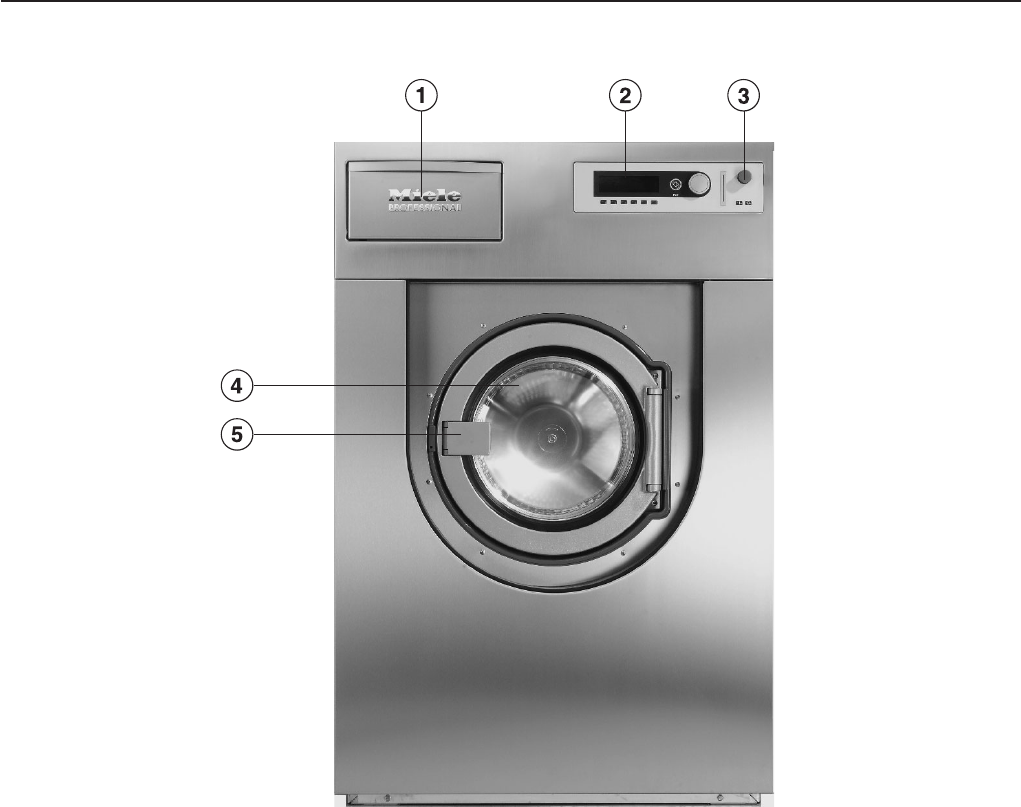
aDetergent compartments
Pull the handle to open the flap.
bControl panel
cEmergency Stop button
Pressing the red button turns the machine
off.
dDrum door
eDoor handle
Pull the door handle to open the drum door.
Do not use force.
The door handle is equipped with an extra
safety mechanism to guarantee that the door
remains locked.
Guide to the washer
7
Operating panel
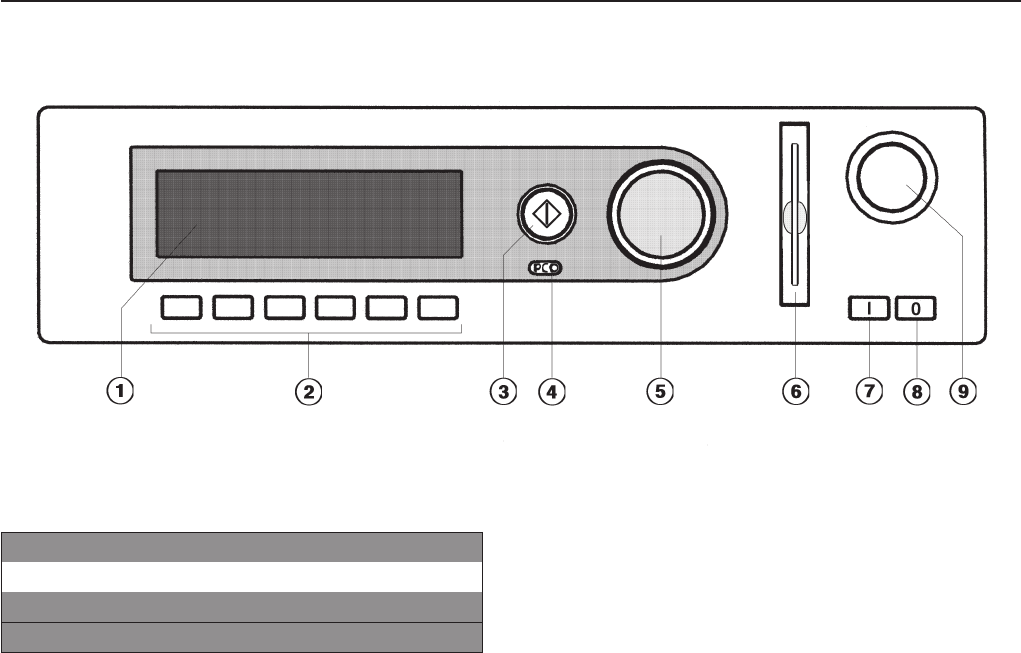
aDisplay*
1 Hot Wash 194 °F
2 Cottons 140 °F
3 Cottons Intensive 140 °F
iFC A
The display will go into standby mode
10 min. after a program is started. The
display will fade. The circle illumination of
the h"Start" button lights up. By touching
any operating button or the jog shuttle the
display will switch back on (exception:
power failure or emergency stop button
used).
bControl keys
The control keys have different functions
depending on the machine status. The
functions are shown in the display above
each button.
If programed to "Button allocation direct", the
first 6 programs from the program list can be
selected directly with the control keys 1 to 6.
chStart button
The circle illumination flashes if a selected
program can be started. To start a program
press the "Start" button. Once a program has
started the Start button can be pressed to
show the original display.
* Contents in the display will vary with
program offering.
dOptical interface PC
The optical interface on the machine’s
control panel provides the connection point
for data transfer between the machine’s
controls and a PC.
eJog shuttle
Turn the jog shuttle to display selections
and input fields.
Press the jog shuttle to confirm display
selections or changes.
fCard reader
For card operation. Washing programs can
be uploaded and downloaded for the
machine on the program card. The
programs on the card can be used to
operate the washer.
gI On button
Turns the machine on.
h0 Off button
Turns the machine off.
iEmergency Stop button
Only use in case of an emergency.
Press the red button to turn the machine off.
After clearing the danger, turn the button
clockwise to unlock it.
Press h"Start" again to continue the
interrupted program.
Guide to the washer
8
Control keys
^Press once to activate the function, press
again to deactivate the function.
iManual operation
(Used by Miele Service Technicians)
See the Programming manual.
FC Functions
Press this key to temporarily select another
language and/or access the operator level.
ABack to the previous display
+iBlock plus
The respective program block, e.g. prewash,
will be added to the program.
mStarch Stop
Press this button to stop the program and
allow starch to be added to the laundry.
kSpin Stop
Press this button if a final spin is not required
after the final rinse.
mDelay start
Press this key to select a start time in the
display.
KInformation
To show program information
fStop/Finish
Press to stop a selected program or to end
an already stopped program.
qDrain
üSkip
Cycles of a program in progress can be
skipped or repeated.
e/-Following or previous line
SSave
See the Programming manual.
$Program locked
If a program is locked it cannot be stopped
or ended with the Off-button after 1 minute.
)Program unlocked
ßDispensing
äDispensing not available
\Operating data
-> l <- Reset to 0 (zero)
To reset the load sensor to "00.0" when the
drum is empty and the display shows a load
size.
DData transfer
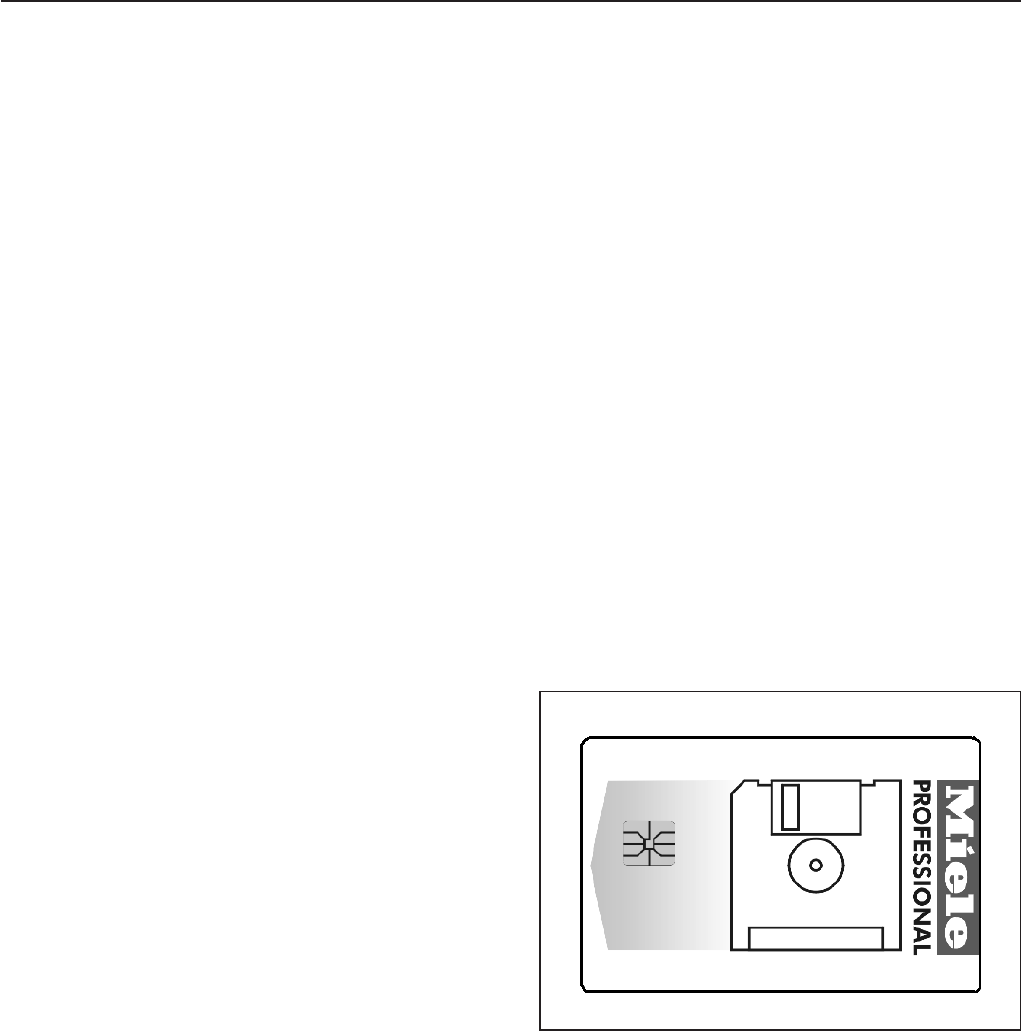
Operator Card
No programs are saved on this card. To
transfer the data from the control to the card
and vice versa see the Programming
manual.
30 programs containing 6 blocks each can
be saved on the card.
The rear side of the card can be labeled.
Guide to the washer
9
1. Turn on the washer
^Open the on-site water valves (and the
supply valves for steam, if relevant).
^Turn on the electrical supply at the mains
(on site).
^Press l"On" to turn the washer on.
The welcome screen shows.
PROFESSIONAL
PW 6xx1
Welcome
Then the program list is shown. The program
started last is highlighted.
1 Hot Wash 194 °F
2 Cottons 140 °F
3 Cottons Intensive 140 °F
iäFC A
2. Sort and load the laundry
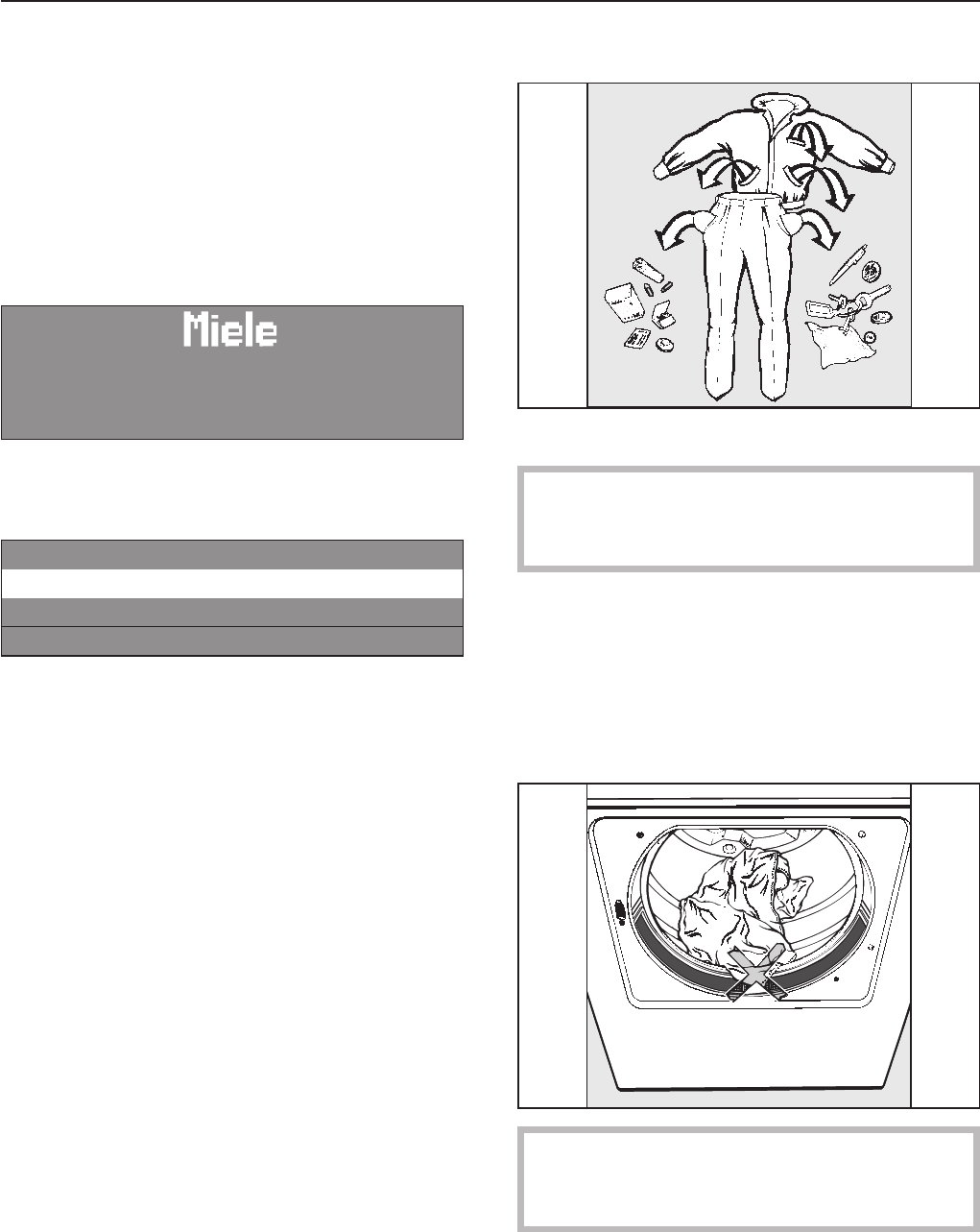
^Empty all pockets.
Foreign objects left in pockets (e.g. nails,
coins, paper clips, etc.) can cause
damage to clothes and the machine.
^Sort the laundry.
^Only wash fabrics according to their wash
care label.
^Open the drum door by pulling the handle.
^Load the laundry loosely into the drum.
To prevent fabric damage, check that
laundry will not be caught in the closed
door.
^Close the drum door with the handle.
Do not swing the door shut.
Use
10
Maximum dry laundry weights
PW 6101
23 lbs / 10 kg laundry
14 lbs / 6 kg wet cleaning
PW 6131
30 lbs / 13 kg laundry
18 lbs / 8 kg wet cleaning
PW 6161
36 lbs / 16 kg laundry
22 lbs / 10 kg wet cleaning
PW 6201
45 lbs / 20 kg laundry
27 lbs / 12 kg wet cleaning
3. Add detergent
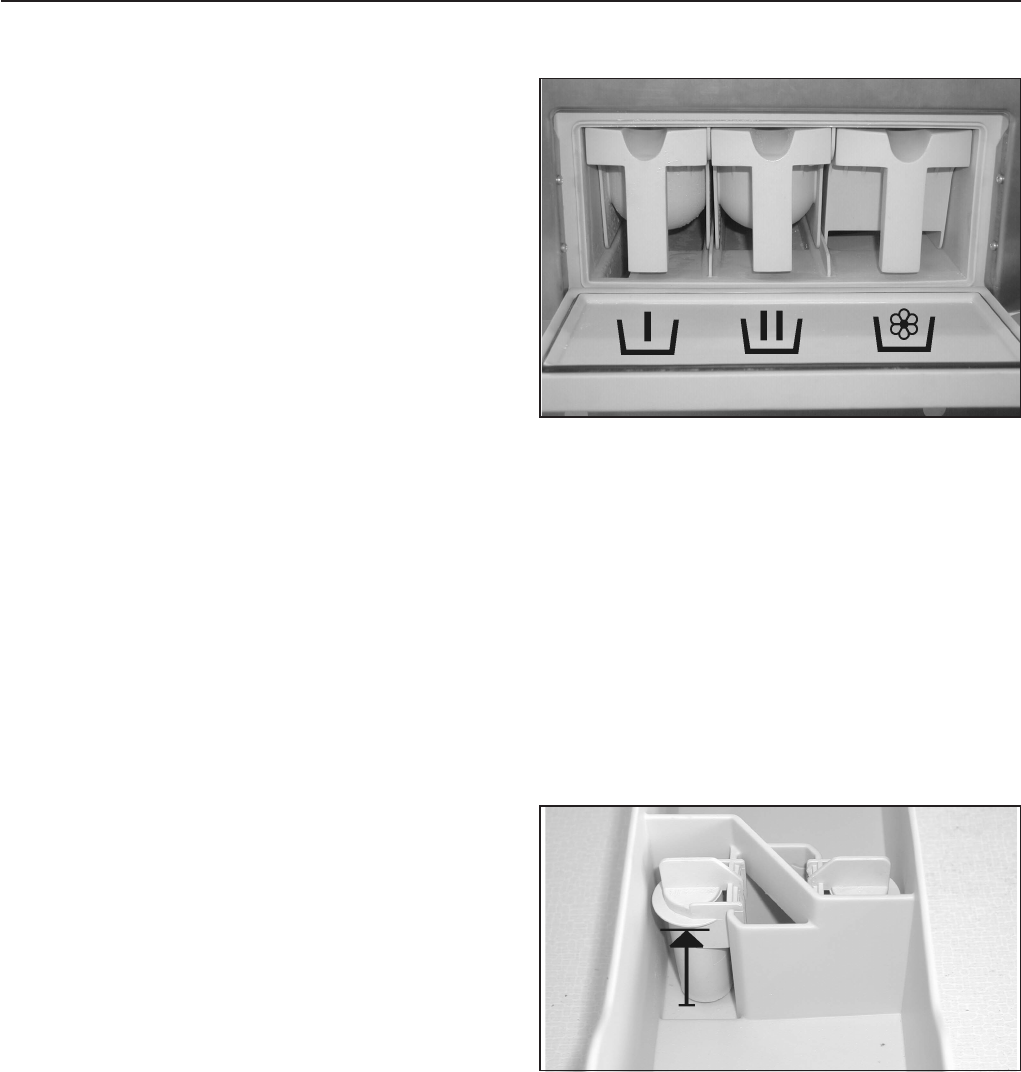
^Open the detergent compartment flap,
pull out the respective containers and add
detergent.
j= Detergent for the main wash
i= Detergent for a Pre-Wash
(1/4of the total recommended amount
of detergent)
§=Front compartment
Fabric softener or liquid starch
Rear compartment
Liquid additives e.g. bleach
^Do not exceed the maximum fill level, the
excess will flow directly into the drum.
^Close the detergent compartment.
Use
11
Detergent
Only use the correct amount of high
efficiency low sudsing detergent. Too
much detergent will cause oversudsing.
Dosage
Follow the instructions on the detergent
packaging to ensure the correct usage and
dosage amount for your water hardness.
Adjust the amount of detergent if the load is
smaller and more or less soiled than normal.
Water hardness
Water
hardness
levels
Water
quality Hardness
level in
mmol/l
German
hardness
°d
I soft 0 - 1.3 0 - 7
II moderate 1.3 - 2.5 7 - 14
III hard 2.5 - 3.8 14 - 21
IV very hard over 3.8 over 21
If you do not know the water hardness in
your area contact your local water authority.
Fabric softener
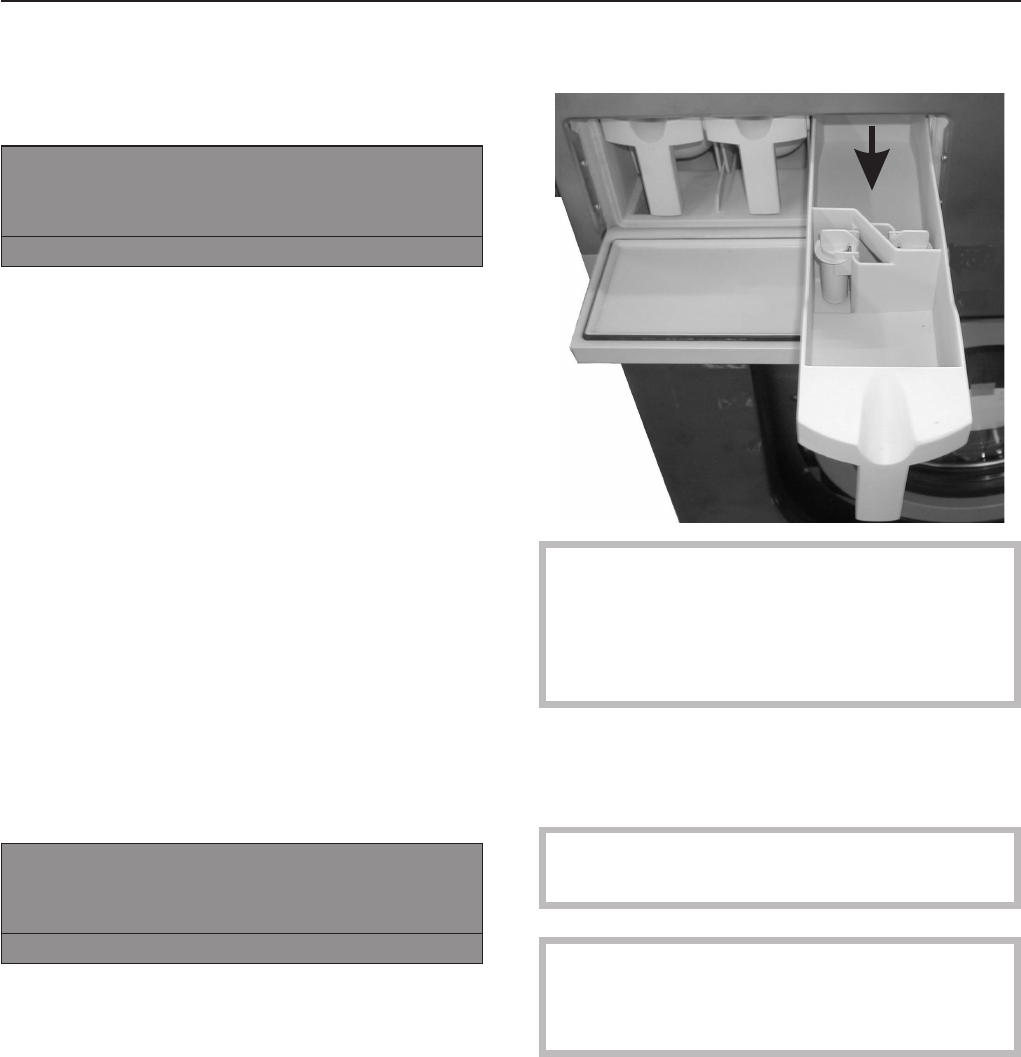
^Pour liquid fabric softener into the
compartment according to the
manufacturer’s instructions. Do not
exceed the maximum fill level, the
excess will prematurely activate the siphon
and be wasted.
^Close the compartment lid and push in the
dispenser drawer.
The fabric softener will automatically be
dispensed during the final rinse cycle.
A small amount of water will remain in the
compartment at the end of the program.
Never mix fabric softener and starch in
the fabric softener compartment §. This
will clog the dispenser.
Use
12
Starch
In the detergent container
1 Hot Wash mProgram stop - starch stop
Door can be opened.
iüf
"Program stop - Starch Stop" flashes in the
display when it is time to add starch to the
laundry.
^Add starch, prepared according to the
manufacturer’s instructions, into
compartment p. The wash time is
automatically extended by 4 minutes.
^Press h"Start" to continue the program.
In the drum
^Once the program stops in "Starch Stop",
open the drum door and add starch to the
laundry load prepared according to the
manufacturer’s instructions.
^Close the drum door.
The display shows:
1 Hot Wash mProgram stop - Starch Stop
Door can be opened.
iüf
^Press the h"Start" button to continue the
program.
Bleach
Only bleach items with the xsymbol on
the fabric care label.
Liquid bleach can only be used in a
program designed for bleach.
Liquid bleach must only be filled in a
programmed detergent compartment. It will
be automatically added to the second rinse.
A third rinse is necessary when using
bleach (see the Programming manual).
,The use of chlorine or chloric aids
lead to corrosion and may damage the
machine.
Fabric dye
Fabric dye and color aids must be suitable
for use in a washer. Always follow the
instructions of the manufacturer.
Use
13

4. Select a program
^Select a program by turning the jog shuttle
(e.g. Program 1 Hot Wash).
The following will appear in the display:
16 Extra Drain
1 Hot Wash 194 °F
2 Cottons 140 °F
iäFC A
^See the Programming manual for more
information.
^Confirm the selected program by pressing
the inner button of the jog shuttle.
The display shows:
1 Hot Wash 22.0 /22.0 lb
194 °F Main wash
Rinse 1200 rpm
+im k mA
5. Select wash options (if needed)
^Press one of the wash option buttons.
To deselect the option, press it again.
+iBlock Plus
A pre-wash can be selected for heavily
soiled laundry in certain programs. If a
pre-wash is an option the "+i" field is
highlighted. If a pre-wash is not available,
the "+i" will not be shown.
mStarch Stop
Starch can be selected with all standard
programs (excluding Extra Spin and Extra
Drain). The mfield is highlighted in the
display.
kSpin Stop
Spin Stop can be selected with all standard
programs (excluding Extra Spin). The k
field is highlighted in the display.
1 Hot Wash kProgram stop - w/o spin
Door can be opened.
iüf
"Without spin" flashes in the display when the
spin cycle is reached.
^Press the f"End" button.
^The program ends without spinning.
^To continue the program with spinning,
press the h"Start" button.
Use
14
6. Select Delay Start (if needed)
Use the m"Delay start" button to program
the washer to start automatically at a later
time.
Setting the delay start
^Press m"Delay Start".
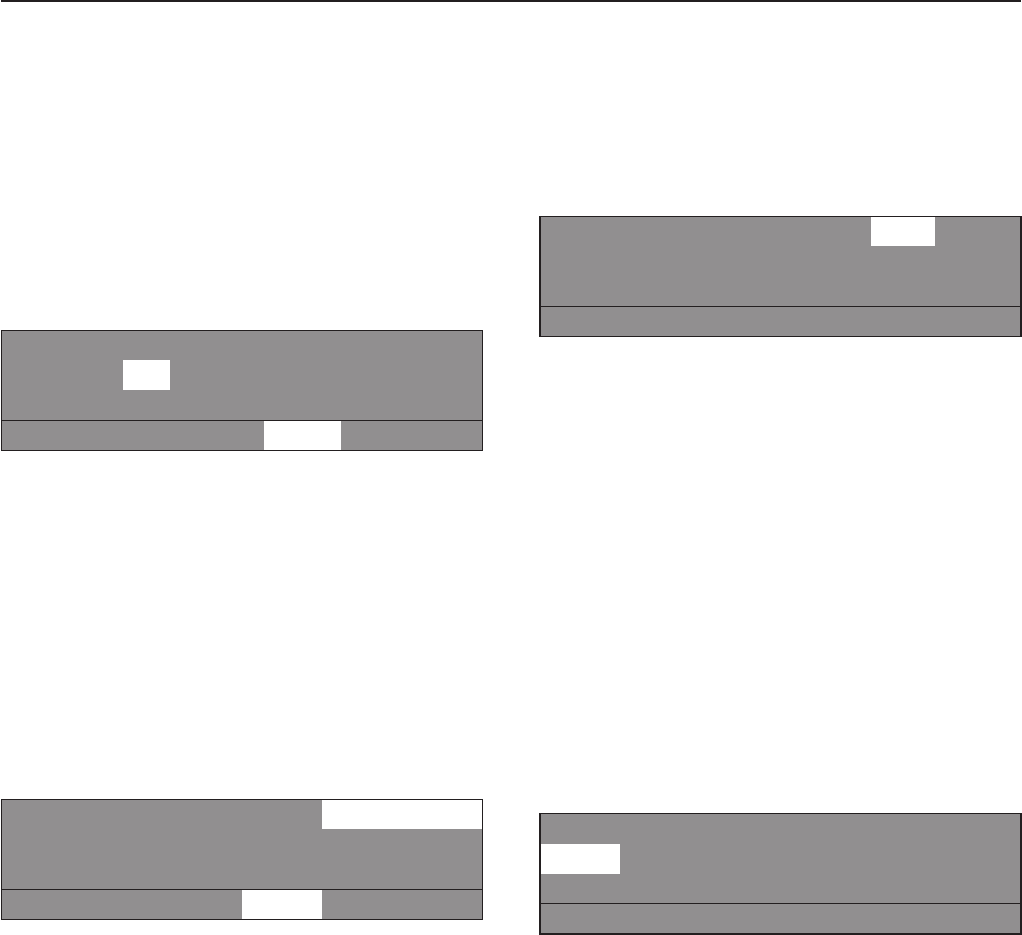
The following will appear in the display:
1 Hot Wash 22.0 / 22.0 lb
Start time: 16 : 10 Start date: 2.4.2003
After selection press the Start button.
mA
The display shows the current time of day
and date. The entry field is marked for
hours.
^Press, then turn the jog shuttle to select
the hour. Press it to confirm the selection.
^Repeat with the minutes, day, month and
year.
^Press the h"Start" button to start the
program at the selected start time.
1 Hot Wash 22.0 / 22.0 lb
194 °F Main wash
16:15 -2.4.2003 Start: 6:00 -3.4.2003
+im k mA
The display shows the current time of day,
date and the start time.
^If the door is opened before the delay start
time has elapsed, press the h"Start"
button again.
Canceling the Delay Start
^Press m"Delay Start" again or the
A"Back" button to cancel the delay start
function.
7. Adjust the program (if needed)
Laundry weight
The laundry weight can be manually
selected.
1 Hot Wash 22.0 / 22.0 lb
104 °F Pre-wash
194 °F Main wash e
+im k mA
^Turn the jog shuttle to "Laundry weight"
and press to confirm the selection.
The weight shown on the right side indicates
the max. weight.
^Turn the jog shuttle to the desired laundry
weight and press to confirm the selection.
Temperature
In 1°F steps from cold to the maximum
program temperature.
^Turn the jog shuttle to "Temperature"
(104 °F for Pre-wash) and press to confirm
the selection.
1 Hot Wash 22.0 / 22.0 lb
104 °F Pre-wash
194 °F Main wash e
+im k mA
^Turn the jog shuttle to the desired
temperature and press it to confirm the
selection.
Use
15
Spin speed
The spin speed can be adjusted from 0 -
300 then in 25 rpm increments. Depending
on the model of machine and the Program
selected the max. spin speed ranges from
600 - 1200 rpms.
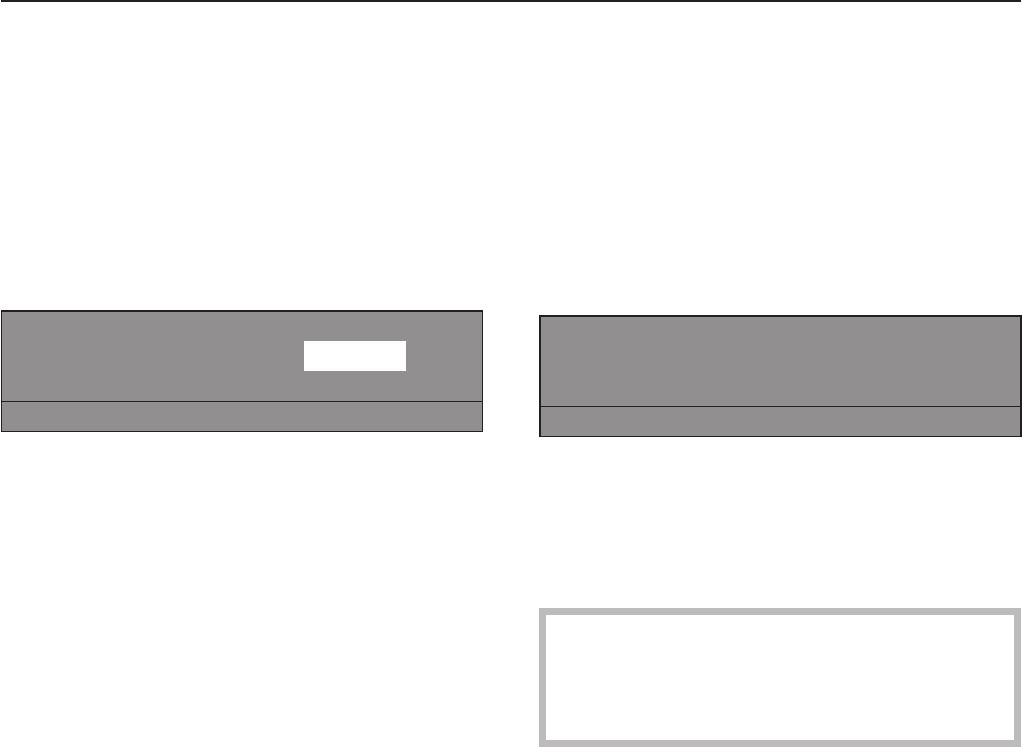
^Turn the jog shuttle to "Spin speed"
and press to confirm the selection.
1 Hot Wash 22.0 / 22.0 lb
Rinse 1200 rpm -
+im k mA
^Turn the jog shuttle to the desired spin
speed and press to confirm the selection.
8. Start the program
^Press the h"Start" button to start the
program.
9. End of program
At the end of the program, once the drum is
stationary and no water is in the machine the
display shows (for example):
1 Hot Wash
Program end
Door can be opened.
mFC A
At the same time a tone will sound for a
short time to signal the program end.
^Pull the door handle to open the drum
door.
Important:
If the door cannot be opened, press
against the door handle then pull again.
Do not use force!
^Remove the laundry.
^Leave the drum door open to air dry the
interior.
^Turn the machine off with the 0"Off" button.
^Turn the mains off (on-site).
^Close the gas or steam valve (on-site).
Use
16

Canceling a program
To cancel a program, press the f"End"
button twice.
If the program was canceled with water in
the machine or during spinning, the display
shows:
1 Hot Wash
Program stop with water in the machine!
iüf
or
1 Hot Wash
Program stop - drum not stationary!
iüf
Press the q"Water drain" button or select
the program Extra Spin, and press the h
"Start" button.
Canceling a locked program
Locked programs cannot be stopped or
canceled.
1 Hot Wash
194 °F Main wash
Locked! End at 12:35
)A
The display shows that the program is
locked if the f"End" button is pressed.
To unlock the program press the )"Unlock"
button.
Enter the password, by turning the jog
shuttle to the desired character in the alpha
numeric list and then pressing the shuttle to
confirm each selection.
After entering the password the display
shows:
Unlock program?
SA
Press the S"Save" button to confirm. The
normal display shows and the program can
be canceled.
1 Hot Wash
194 °F Main wash 140 °F
Rinse 1 End at 12:35
mKf
Use
17
Skipping program cycles
Cycles of a program in progress can be
skipped or repeated.
^Press the f"End" button to stop the
program.
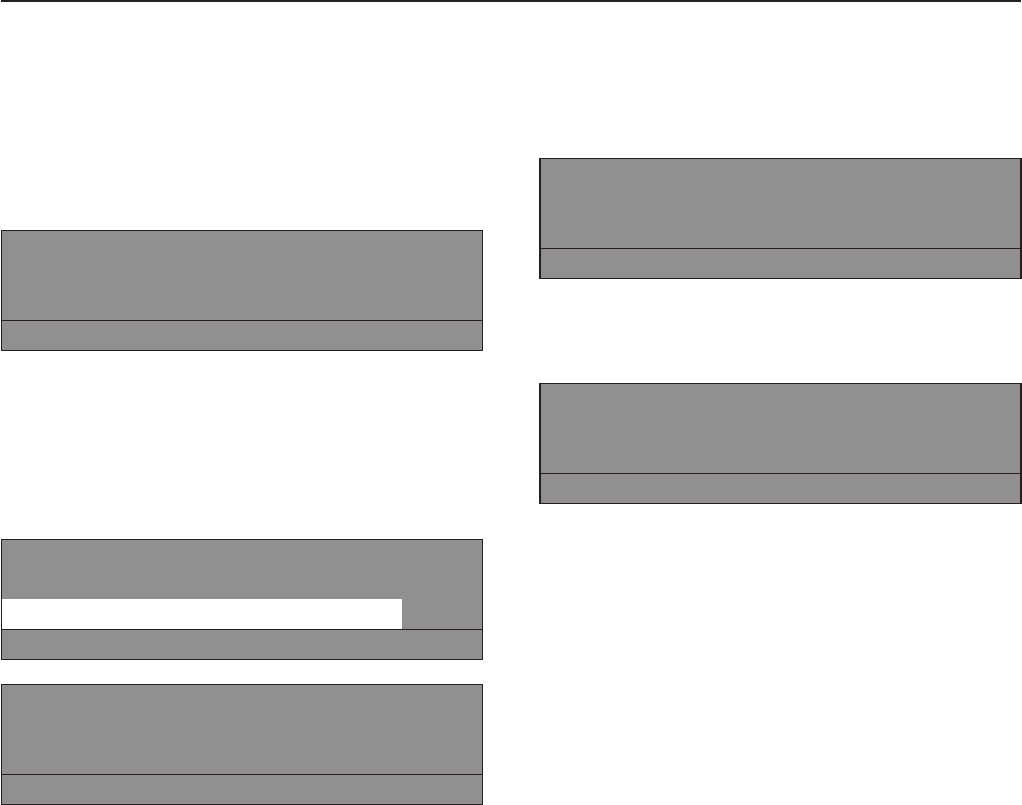
1 Hot Wash
Program stop
iüf
^Press the ü"Skip" button. The display
shows the current area, block or step.
See also "Program structure" in the
Programming manual .
Skip -> 1 Hot Wash
Program stop
Area 2: Main wash e
SA
Area: 2 Main wash
Block 1: Main wash
Step: Wash time 2 -
SA
^Turn the jog shuttle to "Area" and press it to
confirm the selection.
Area: Select either 1 Prewash, 2 Main
wash or 3 Rinse and confirm by pressing
the jog shuttle.
^Turn the jog shuttle to "Block" and press it
to confirm the selection.
Block: Select either Prewash 1-10, Main
wash 1-10 or Rinse 1-10 and confirm by
pressing the jog shuttle.
^Turn the jog shuttle to "Block" and press it
to confirm the selection. Select the desired
program step and confirm.
^To start the new program step press S
"Save" and h"Start".
To go back without skipping a program
cycle
^Press the A"Back" to go back to the
program stop.
Program sequence
The program sequence is shown in the
display after the start of the program.
1 Hot Wash
104 °F Pre-wash 68 °F
Main wash End at 12:35
+im k mKf
The second display line, here Pre-wash, the
wash water temperature is shown.
1 Hot Wash
194 °F Main wash 140 °F
Rinse 1 Cold End at 12:35
+im k mKf
If the program block Pre-wash has ended,
the 2nd line in the display shows the
program block Main wash with the current
wash water temperature. The 3rd line shows
the following program block, here Rinse 1.
The program end display, above 12:35,
shows the time of day when the program will
be finished.
Use
18

KInformation
1 Hot Wash
194 °F Main wash 140 °F
Rinse 1 Cold End at 12:35
+im k mKf
Press the K"Information" button during the
program to show information in the display.
1 Hot Wash
Delay start: 10.7.2003
Start time: 9:47 e
A
For more information press e.
Time after start: 0 h 23 min
Time left: 0 h 11min
Time after start: 0 h 23 min e
Time left: 0 h 11min
Repetition: no
Area: Rinse 3 e
Block 2: Rinse 2
Block step Wash time 1
Actual water level: 22 mm e
Programmed value: 60 mm
Actual temperature: 95°F
Programmed temperature: 140 °F e
1 Hot Wash
Revolution: 40 rpm
Rhythm: 12 / 3 -
A
^Press the A"Back" button to return to the
program sequence.
Program end with water in the drum
If the program is interrupted during a cycle,
the display shows either:
1 Hot Wash
Program end - Water in drum
mFC A
or
1 Hot Wash
Program end - Drum not stationary
mFC A
,The drum door is locked.
Do not use force!
^Press the q"Water drain" button or select
the Drain Extra and press h"Start".
^At the end of the program open the door.
Program stop
^To stop the program, press f"End".
The program stops.
1 Hot Wash
Program stop
iüf
^Press f"End" again to continue the
program.
Use
19

Programs may vary depending on machine type.
Program /
Display Fabric Program cycle Wash
options
1 Hot Wash
194 °F Bed linens and terry cloth
laundry made of cotton,
linen or mixed fabrics
Pre-wash 104°F selectable
Main wash 194°F
2 x Rinse
last rinse warm*
Final spin
+i
m
k
2Cottons
140 °F Lightly soiled bed linens
and terry cloth laundry
made of cotton, linen or
mixed fabrics
Pre-wash 86°F selectable
Main wash 140°F
2 x Rinse
last rinse warm*
Final spin
+i
m
k
3Cottons
intensive
140 °F
Bed linens and terry cloth
laundry made of cotton,
linen or mixed fabrics
Pre-wash 86°F selectable
Main wash 140°F
2 x Rinse
last rinse warm*
Final spin
+i
m
k
4Cottons
86 °F Lightly soiled bed linens
and terry cloth laundry
made of cotton, linen or
mixed fabrics
Pre-wash 86°F selectable
Main wash 86°F
2 x Rinse
Final spin
+i
m
k
5Cottons
intensive
86 °F
Bed linens and terry cloth
laundry made of cotton,
linen or mixed fabrics
Pre-wash 86°F selectable
Main wash 86°F
2 x Rinse
Final spin
+i
m
k
6Wrinkle Free
140 °F Lightly soiled synthetics
and mixed fabrics Pre-wash 86°F selectable
Main wash 140°F
2 x Rinse
Final spin 1 Min.
+i
m
k
7Wrinkle Free
intensive
140 °F
Synthetics and mixed
fabrics Pre-wash 86°F selectable
Main wash 140°F
2 x Rinse
Final spin 1 Min.
+i
m
k
8Wrinkle Free
86 °F Lightly soiled synthetics
and mixed fabrics Pre-wash 86°F selectable
Main wash 86°F
2 x Rinse
Final spin 1 Min.
+i
m
k
9Wrinkle Free
intensive
86 °F
Synthetics and mixed
fabrics Pre-wash 86°F selectable
Main wash 86°F
2 x Rinse
Final spin 1 Min.
+i
m
k
Program Guide Standard Programs
20

10 Delicates Synthetics, silk, rayon Pre-wash selectable
Main wash 86°F
Wash rhythm "delicate"
2 x Rinse
Final spin 1 Min.
+i
m
k
11 Woolens
86 °F Machine washable woolens,
sturdy woolens and mixed
woolens
Main wash limited to 104°F
Wash rhythm "gentle"
2 x Rinse
Final spin 1 Min.
m
k
12 Handwash
Woolens
86 °F
Woolens and mixed woolens Main wash limited to 86°F
Wash rhythm "gentle"
2 x Rinse
Final spin 1 Min.
m
k
13 Extra
Starch
14 Extra
Rinse /
Spin
Laundry which needs to be
rinsed and spun Rinse
Final spin m
k
15 Extra Spin Laundry which needs to be
spun Final spin
16 Extra
Drain Water drain
* Warm rinse
The standard programs 1Hot Wash 194°F, 2Cottons 140°F and 3Cottons Intensive 140°F are
programmed to rinse with hot water. If a hot water connection is available, it is favorable to use
this.
- The residual moisture of the laundry is lower after spinning.
- The laundry is already warmed.
If the laundry is immediately dried in a dryer or ironed with the rotary iron, time and energy is
saved.
To deselect the warm rinse, see the Programming manual.
Program Guide Standard Programs
21
Program cards are programmed to a
machine type. Empty cards can be used
with any machine.
^Press l"On" to turn the washer on.
The Welcome screen shows.
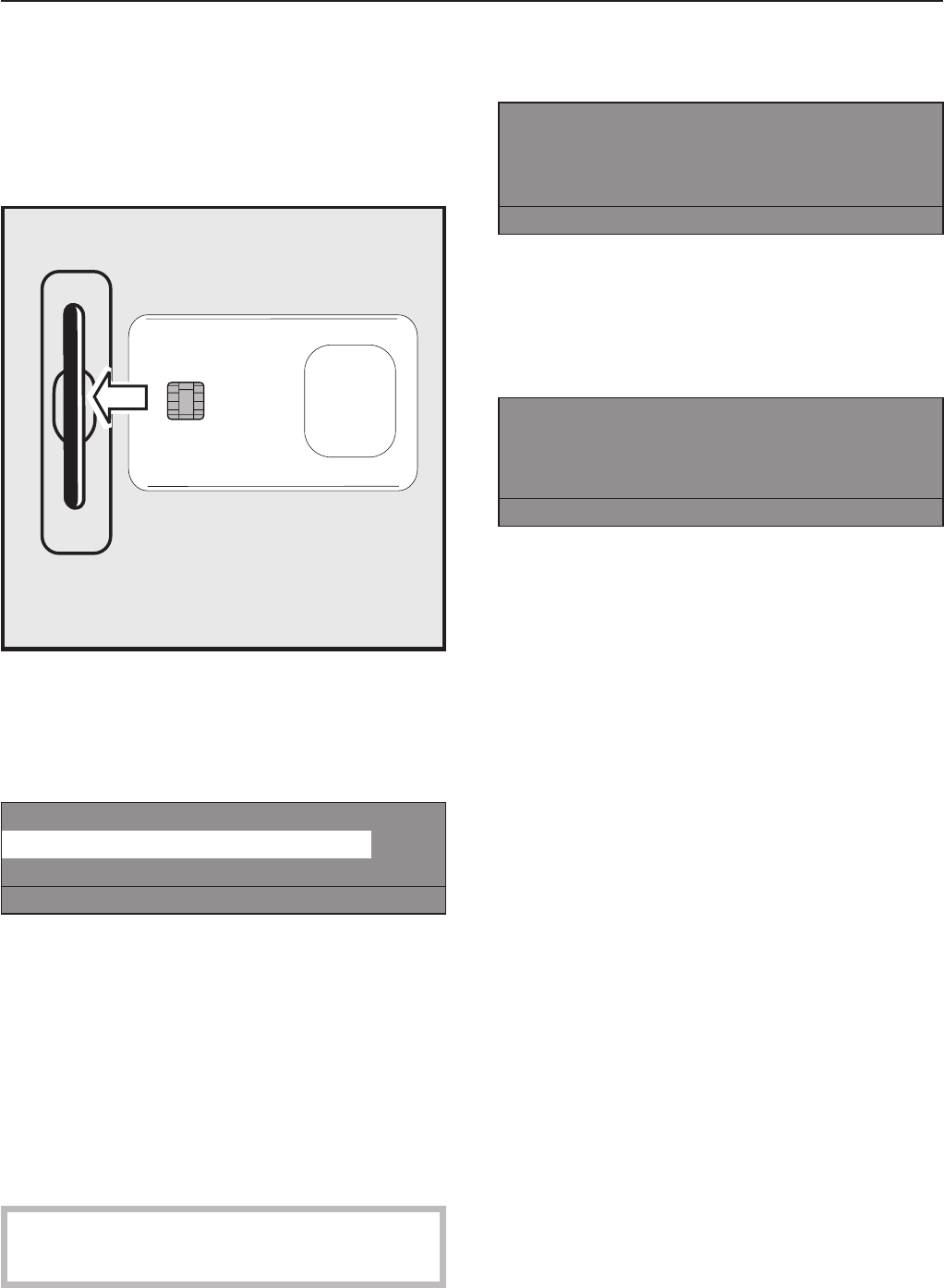
^Insert the card, arrow first, into the card
reader.
The display shows the list of programs on
the card, example:
Card operation
17 Fire department clothing 113 °F
18 Wrinkle-free 140 °F
ißFC A
^Turn the jog shuttle to select a program.
Press the jog shuttle to confirm the
selection.
^Press the h"Start" button to begin the
program.
^Remove the card from the card reader.
Once the program is finished it will be
deleted from the machines memory.
,Do not insert any items other than the
card into the card reader.
If the card was inserted the wrong way, the
display shows:
§Card error
Reinsert card correctly in card reader.
Continue: Press Start.
iüf
^Reinsert the card properly into the card
reader.
If the card is not suitable for this type of
machine, the display shows:
Card operation
Programs on the card are only
suitable for machine type
A
^Insert a card suitable for this machine
type.
Card only operation
A card with one particular program is
enclosed for laundry with special treatment
needs.
The function "Load" can be activated in the
operator level. The machine will only accept
cards in this function.
Those cards contain only one program. The
programs saved in the machine control are
not accessible.
Washing using the program card
22

Language selection
The language can be selected with the F
flag symbol. The language is set back to its
original setting 5 minutes after the program
ends or when the door is opened.
1 Hot Wash 194 °F
2 Cottons 140 °F
3 Cottons Intensive 140°F
iFC A
Press the function button FC. The display
shows:
Settings Back A
Main menu Language
Operator level
FC A
^Turn then press the jog shuttle to select
"Language".
Settings Back A
Language Deutsch
English
FC A
^Turn the jog shuttle to select the desired
language and press to confirm the
selection.
Extra features
23
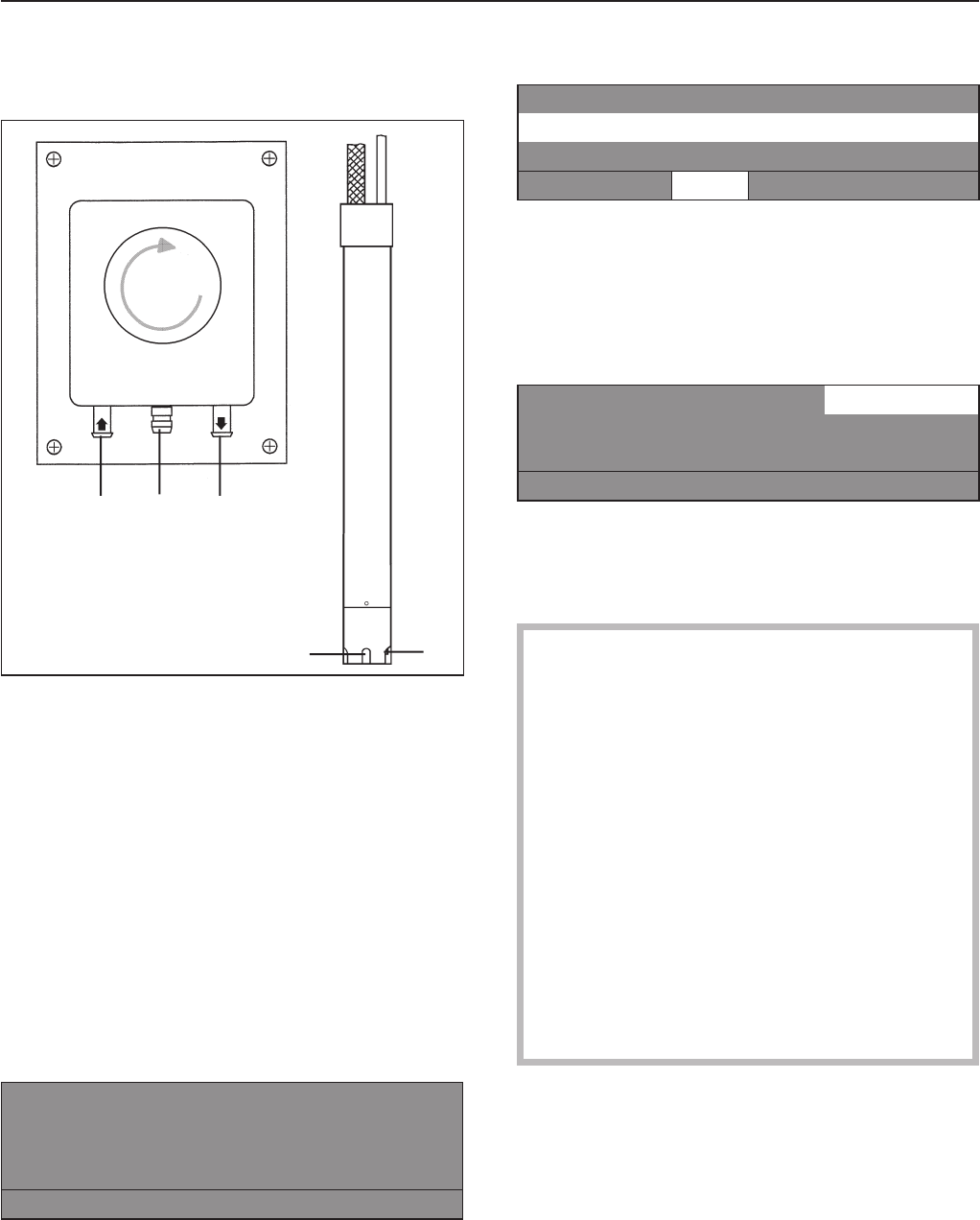
Liquid dispensing system
(Dispensing systems vary)
Priming the dispensing pumps
aHose connection socket (in)
bLeakage outlet
cHose connection socket (out)
dSuction inlet opening
eLevel indicator
When the dispenser container is empty the
pump and the machine will shut off.
The display will indicate that the detergent
dispenser is empty.
öDispensing system fault
Fill dispensing container 1
Press Start.
if
^Refill the dispensing containers.
^Press h"Start" to continue the program.
Deselect the dispensing
1 Hot Wash 194 °F
2 Cottons 140 °F
3 Cottons Intensive 140 °F
iäFC A
The liquid dispensing can be manually
deselected before a program start.
The dispensing pump is turned off.
The display shows:
1 Hot Wash 22.0/22.0 lb t
194 °F Main wash
Rinse 1000 rpm
+im k mA
Dispensing amount
,Always follow the instructions of the
chemical manufacturer when using
cleaning agents and special application
chemicals.
Only use such chemicals for the purpose
and in the situation specified by the
manufacturer to prevent the danger of
adverse chemical reactions and material
damage.
If in doubt, check with the manufacturer
that the product is suitable for use in this
machine.
Liquid detergent should stand at room
temperature before being used to ensure
proper dispensing.
Optional modules
24
e
abc
d
Priming the dispensing pumps
Use the calibration to get liquid detergent to
the pumphead. Once calibration is complete
run an empty program to get detergent to
the machine before actually washing a load
of laundry in the machine.
Dispensing calibration
The dispensing calibration is used to
calculate the flow rate of each single
dispensing pump.
Direct access to the dispensing calibration
when the machine is turned off:
^Press and hold the 2nd control key.
^Turn the machine on at the mains.
Dispensing calibration ~Main menu
Dispensing pump 1
Dispensing pump 2 e
A
Selections: Dispensing pump 1 to 13
After selecting a dispensing pump the
display shows:
Dispensing calibration ~Dispensing pump 1
V: 100ml t: 0s P: 200.0 ml/min
0/1 SA
The dispensing amount can be adjusted in
1 ml increments from 0 to 999 ml.
^Press the control key 0/1, the dispensing
hose fills. Press the 0/1 button again to
stop.
^Hold the hose, of the dispensing pump to
be determined, in a measuring cup.
,Avoid skin and eye contact, wear
protective clothing.
^Press Ato get back to the main menu.
Dispensing calibration Main menu
Dispensing pump 1
Dispensing pump 2 eA
^Select the dispensing pump.
Dispensing calibration Dispensing pump 1
V: 100ml t: 0s no
0/1 SA
^The dispensing can be manually stopped
by pressing the 0/1 button or it will stop
automatically after 60 seconds.
^Measure the pumped amount in the
measuring cup.
Dispensing calibration Dispensing pump 1
V: 100ml t: 30s P: 200.0 ml/min
0/1 SA
^Enter the measured amount in the "V:" field.
The flow rate P is calculated by the control.
^Press S"Save" to allocate the measured
values to the dispensing pump.
^Reconnect the hose.
Maintenance of the dispensing system
^Rinse the dispensing system with hot
water every 2 weeks, or before shutting
down the dispenser pumps for any length
of time, to prevent the system from
clogging.
^Rinse out the suction pipes with water.
^Place the suction pipes in a container with
warm water, 104 - 122°F (40 - 50°C).
^Select each pump by using the dispensing
calibration.
^Turn on each pump until the dispensing
system is rinsed.
^Check the connection points, hoses and
washers for leaks.
Optional modules
25
Peak load cut off
When activating the peak load cut off the
heat is turned off and the program is
stopped. The display shows:
1 Hot Wash
Program stop by peak load function
The program continues.
iüf
When the peak load function ends the
program will continue automatically.
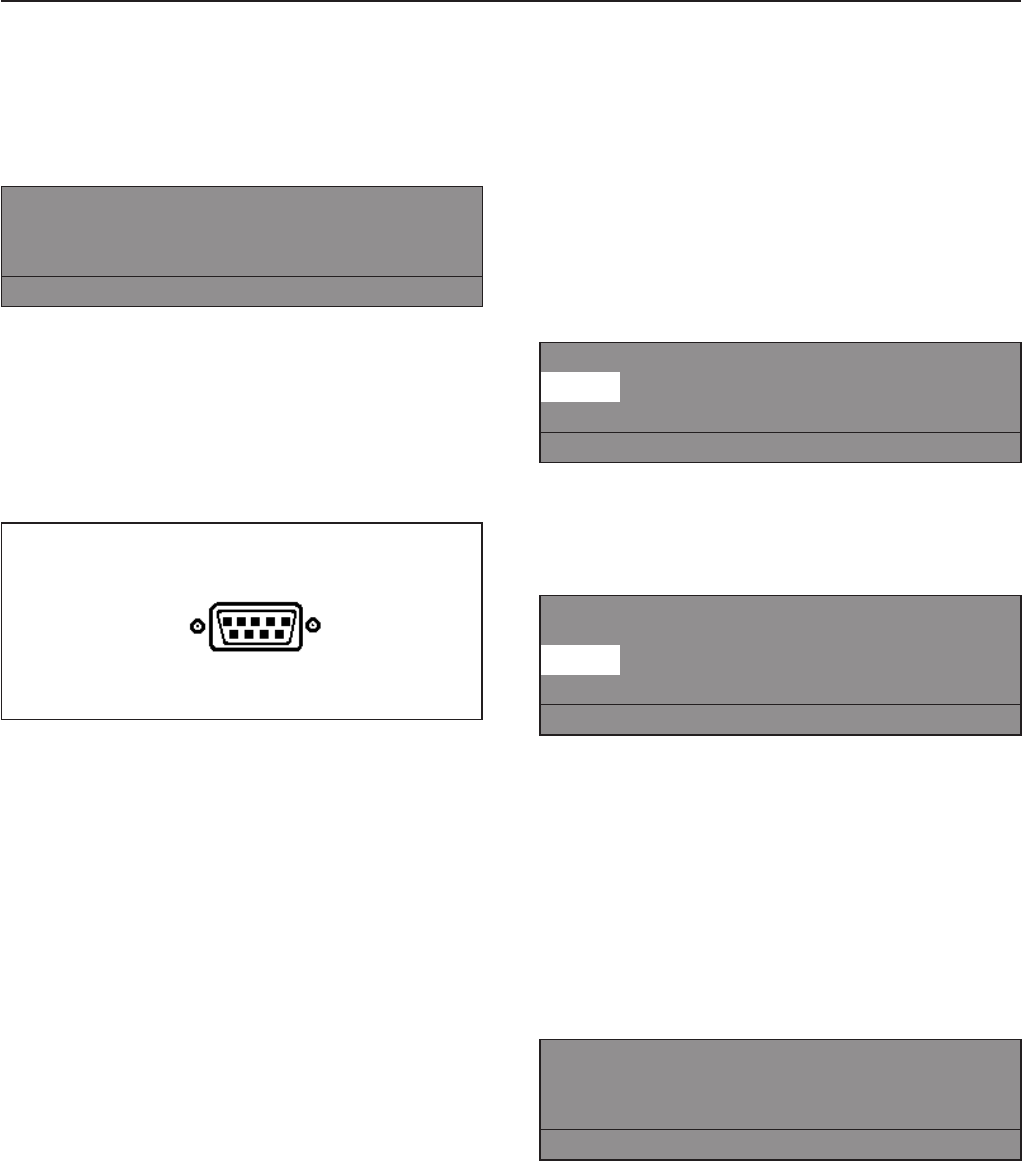
PC Connection
A serial interface is located at the rear of the
washer to connect the machine to a PC
(Personal Computer).
PC-Operation: Program changes can be
made via a PC, or a new program can be
downloaded.
Printer-Operation:
It is possible to print out whole programs or
parts of programs.
This requires a special Editor Program which
is available from the Miele Professional
Department.
Load size
If the machine is equipped with a load
module, the load weight will be displayed, in
0.5 lb increments, while loading the laundry.
The maximum laundry weight is displayed
next to the selected program.
^Reset with the -> I <- "zero setting" if the
weight display does not show "00.0" when
the drum is empty.
1 Hot Wash 00.0 / 16 lb
140 °F Main wash
Rinse e
+im k m-> I <- A
If there was still laundry in the drum when
the weight display was reset, the display
shows:
1 Hot Wash - - .-
/16 lb
140 °F Main wash
Rinse e
+im k m-> I <- A
^Reset again with the -> I <- button.
If the machine is overloaded (wet laundry)
the machine calculates after the programs
start with the nominal value. This value is
saved in the operating data module.
At the end of a program, with the drum
stationary, the residual moisture of the
laundry is displayed.
1 Hot Wash
Program end Residual moisture 60 %
Door can be opened..
mFC A
See "Use - Adjust the program" for more
information.
Optional modules
26
After each use
Never use high pressure cleaners to hose
down the machine.
The machine should be cleaned immediately
after use.
^After use do not shut the drum door, allow
the interior to air dry.
Cleaning the exterior
,Never use abrasive cleaners, scouring
pads, steel wool or caustic cleaners on
the machine. They will damage the
surface.
All surfaces can be cleaned with a solution
of warm water and liquid dish soap applied
with a soft sponge.
Door gasket
^Clean any residues on the door gasket
with a damp cloth.
Stainless steel
Stainless steel surfaces can be cleaned
using a non-abrasive stainless steel cleaner.
To help prevent resoiling, a conditioner for
stainless steel can also be used.
^Apply sparingly with even pressure.
Cleaning the drip channel and siphon
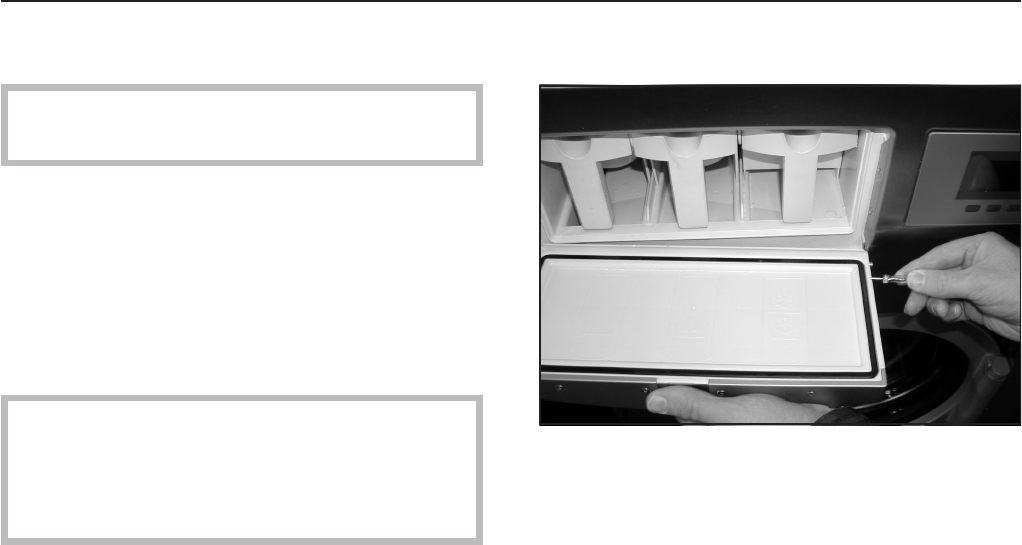
^Insert a small screwdriver into the hole on
the right side of the detergent flap.
^Push it in horizontally until the hinge
disengages.
^Take the detergent flap off.
^Clean the drip channel and the siphon.
The siphon can be cleaned with a bottle
brush.
Detergent containers and siphon tube
^Regularly clean detergent residues from
the detergent dispensers, drawers and
siphons with warm water.
^Pull the siphon tube out, clean it with warm
water and reinsert it.
Cleaning and Care
27
Vent grille
^Regularly check and clean the wash water
vent grille at the rear of the machine.
Rust
The drum and the wash water drum are
made of stainless steel. Water with a high
iron content or items like paper clips or iron
buttons which are in the laundry, can lead to
rust in the drums.
^To help prevent rust, a conditioner for
stainless steel can be used.
^Check the door gasket for iron residue and
clean with stainless steel conditioner.
^Clean regularly.
Leave the drum door open after use for
the interior to air dry.
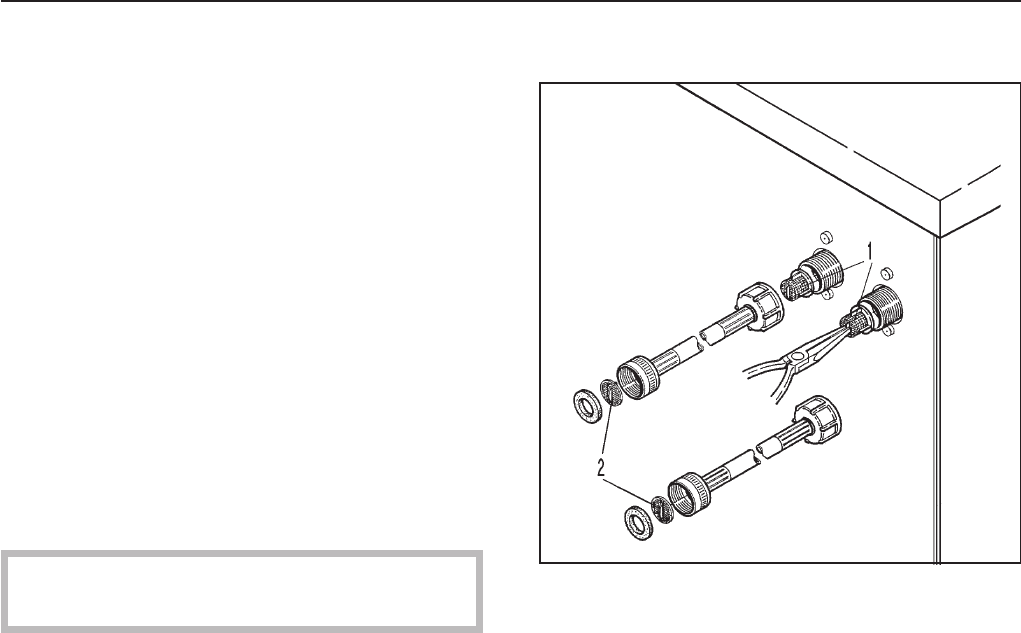
Water inlet filters
^Regularly check and clean the filters in the
water intake valves, 1, and the water intake
hoses, 2.
Maintenance during downtime
^When the machine is not used for an
extended time (4 weeks or more), the
drum needs to be rotated manually a
couple of times to prevent bearing
damage. Repeat every month.
Cleaning and Care
28
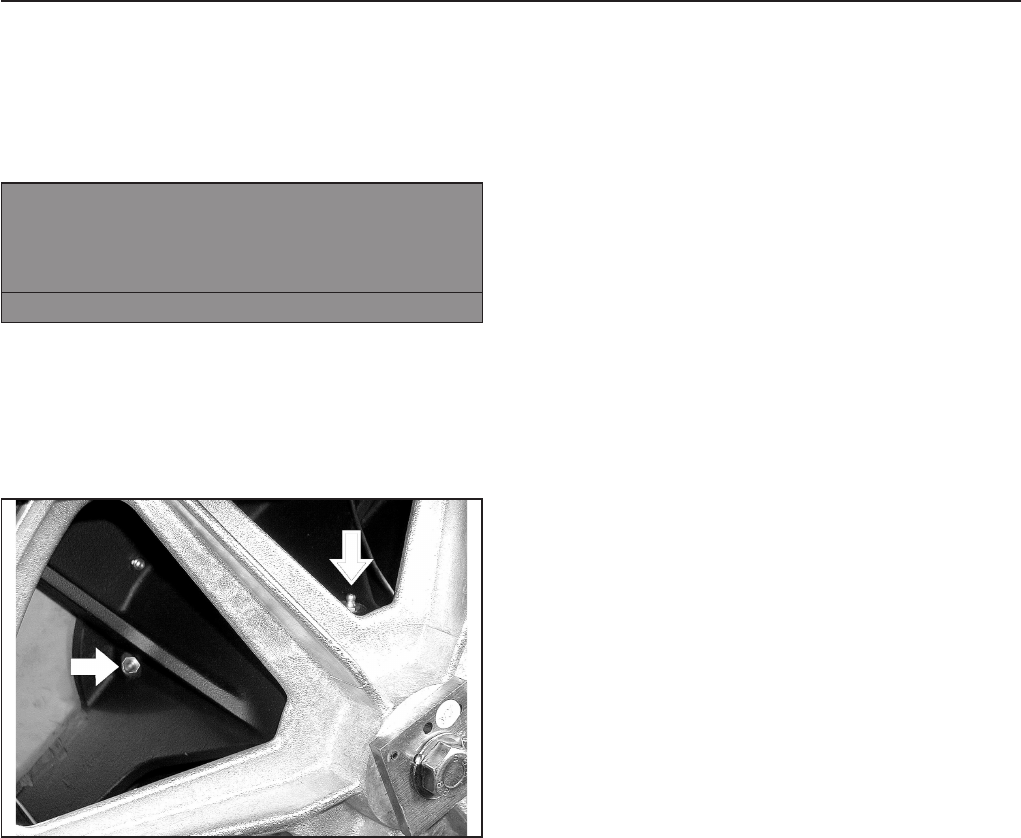
Drum bearing lubrication
(PW 6161 and 6201 only)
If the machine needs to be serviced the
following message shows:
§DRUM BEARING LUBRICATION!
Call the Miele Service
Department.
A
^Press A"back" to delete the message.
The message will show each time the
machine is turned on, until a Service
Technician has serviced the machine.
^After about 1000 operating hours, lubricate
the drum journal bearings with the
lubricating nipple using Arcanol L 100
grease.
Maintenance during downtime
When the machine is not in use for an
extended time (4 weeks or more), the drum
bearings must be lubricated (before the
downtime).
^Lubricate the drum bearings according to
the warning message and turn the drum
by hand a few times.
^Repeat every month to prevent bearing
damage.
Cleaning and Care
29
Reasons for oversudsing
Detergent type
^Only use detergent formulated for use in
commercial washers. Detergents for
domestic machines are not suitable.
Too much detergent
^Follow the detergent manufacturer’s
instructions and adjust the amount to the
local water hardness.
Oversudsing detergent
^Use a low sudsing detergent or contact
Miele’s detergent application specialists.
Very soft water
^In areas with soft water, use less
detergent.
Soiling level of laundry
^For lightly soiled laundry use less
detergent.
Residue, e.g. undissolved detergent on
laundry
^Run a prewash without detergent and
without selecting a temperature.
^Laundry which has been pre-treated in
detergent before washing must be
thoroughly rinsed before running a wash
program.
Small loads
^Reduce the amount of detergent
dispensed accordingly.
Drum speed too high during a wash
(Profitronic-controls)
^Reduce the drum speed and wash rhythm.
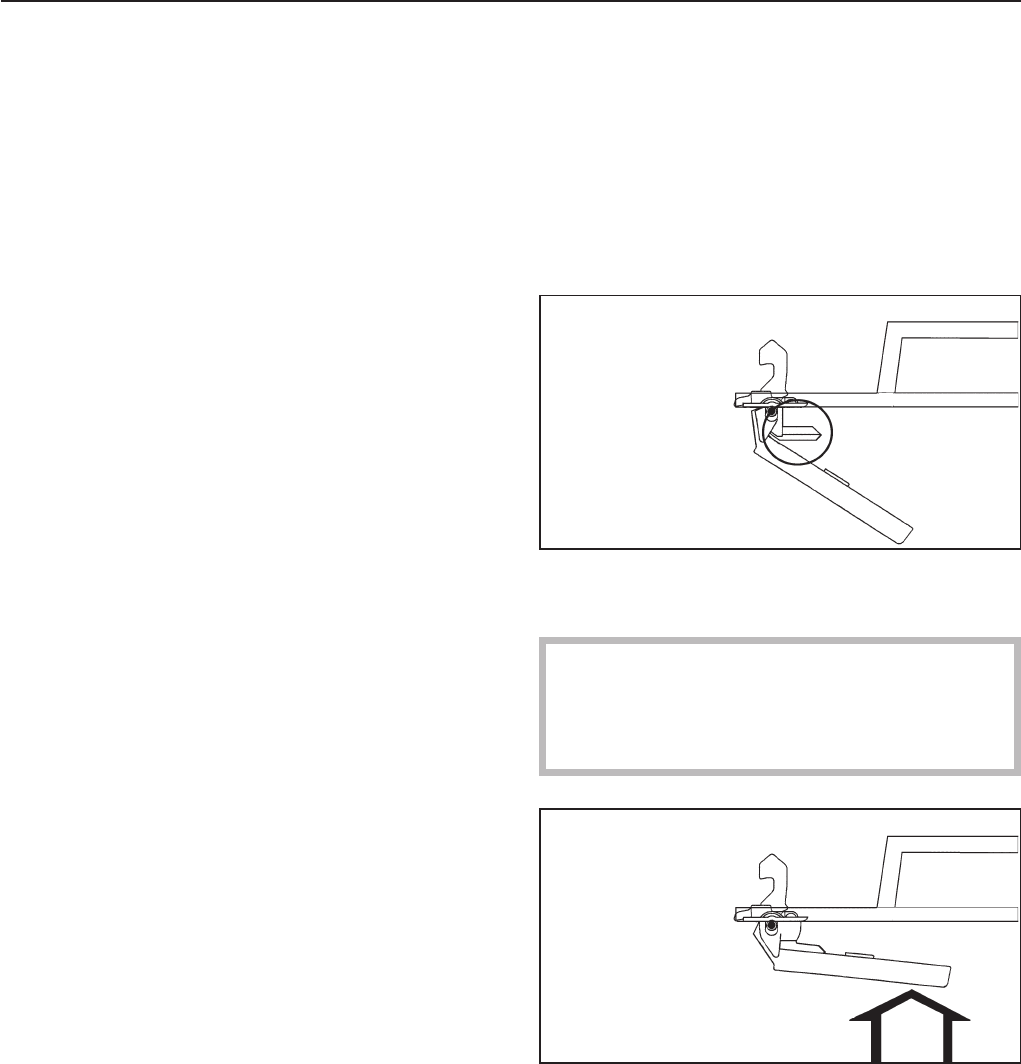
The drum door cannot be opened
^Press against the door handle, turn the
machine on then off and pull on the door
handle once more.
The safety mechanism of the door
handle is disengaged
The door handle has lost its function. The
door cannot be opened or closed.
The safety mechanism is designed to
protect the handle from damage, i.e. if too
much force is being used in an attempt to
open the door.
^Firmly press against the door handle until
you hear the safety mechanism click.
The door can now be opened or closed
provided there is no water in the machine.
Frequently asked questions
30
Power failure - Emergency door
release
During a short power failure
The program remains in the last position.
When power is restored the following
message appears in the display:
yPower failure
Program stop
Press Start.
f
^Press h"Start" to continue the program.
Extended power failure
^Turn the machine off.
^Turn the electrical supply off at the mains.
^Close the steam valve (on-site).
The machine must be drained and the drum
door opened manually to unload the
machine.
Draining the wash water
^Place a container under the manual drain
at the rear of the machine.
^Open the drain by loosening the venting
screw. Do not take it completely out.
^A small amount of water from the machine
will drain.
^Tighten the venting screw again and test
for leaks by opening the water supply.
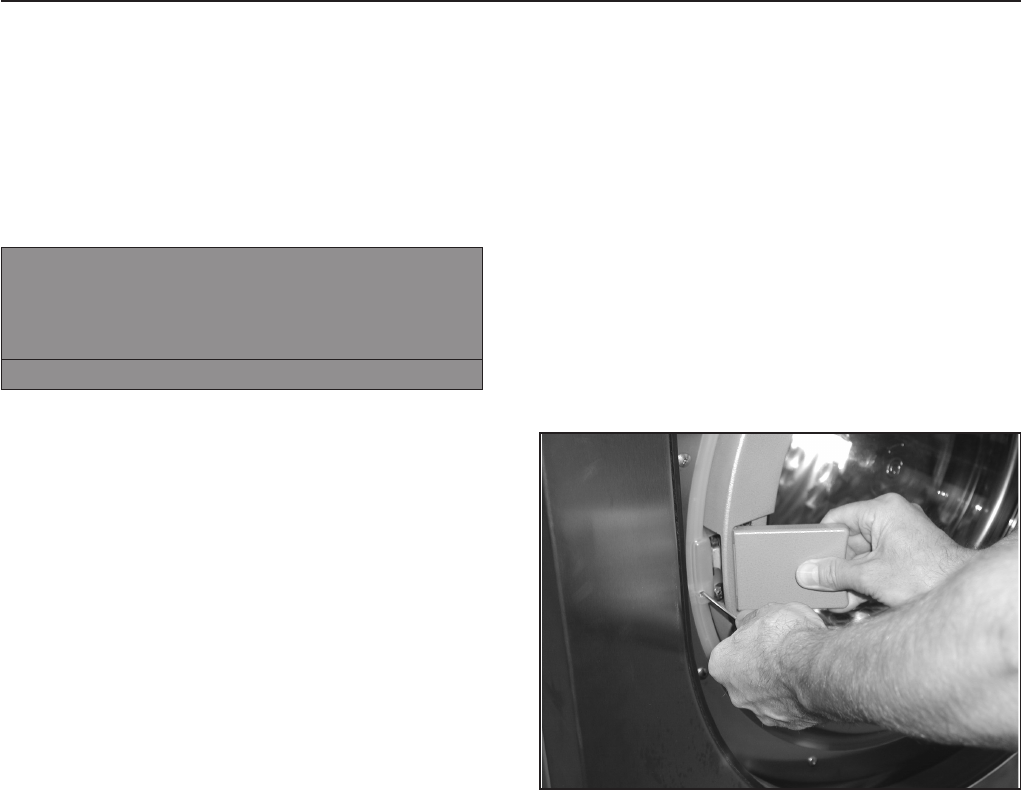
Open the door manually
^Insert and hold a small screwdriver in the
opening next to the door lock.
^Press against the door handle, then pull it
towards you to open the door.
Do not use force!
^Remove the laundry.
Frequently asked questions
31
Display Service interval
^Call Technical Service for maintenance if
the display shows the following message
after turning the machine on.
§Service interval 1
Call the Miele Service Department.
A
The display goes out after 5 seconds.
Fault messages
,Repairs to electrical or steam
appliances should only be carried out by
a Miele authorized technician in
accordance with local and national safety
regulations. Unauthorized repairs could
cause injury or machine damage. The
manufacturer cannot be held responsible
for unauthorized work.
Faults that occur before or after the start of a
program flash in the display.
If the display remains off, the dryer has no
power.
^Check the plug, main switch and fuses
on-site.
yPower failure
Program stop
Press Start.
f
^Press h"Start".
This fault message can also indicate that the
overload cut-out of the drive motors has over
heated.
^Allow the motor to cool.
Frequently asked questions
32

MWater intake fault
Call the Miele Service Department.
if restart is without success.
if
^Check the water supply and press h
"Start".
§Heating system fault
Program Stop
Press Start.
if
^Press h"Start" to continue the program
without heating.
If the program has a "Thermostop" the
program will time out.
^Call Miele Technical Service.
^Some programs may be canceled if this
messages shows.
Call Technical Service.
mMotor system error
Program stop. Press Start.
Motor temperature too high.
if
^Allow the motor to cool.
§Imbalance fault
Call the Miele Service Department
if restart is without success.
iA
Large imbalance, the imbalance switch has
activated.
^Turn the machine off and on again
^Press h"Start".
qDrain error
Call the Miele Service Department
if restart is without success.
if
^Check and clean the drain system and
press h"Start".
A defective drain valve should only be
replaced by an authorized service
technician.
öDispensing system fault
Fill dispensing container 1
Press Start.
if
^Change/fill the dispensing container.
§Card error
Reinsert card correctly in card reader.
Continue: Press Start.
if
^Insert the card properly into the card
reader.
Frequently asked questions
33
In the event of a fault which you cannot
correct yourself, please contact:
Miele Technical Service
800-991-9380
Techserv@mieleusa.com
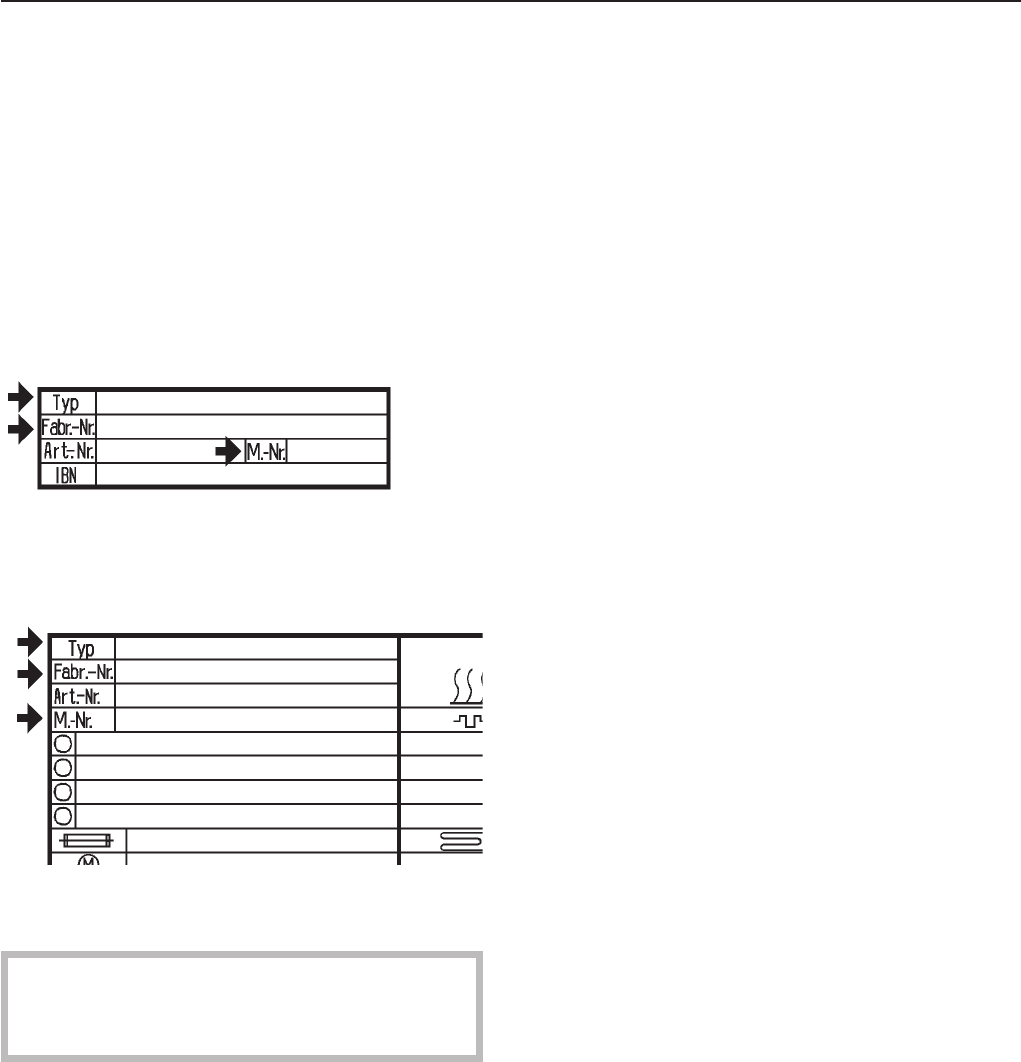
When contacting Technical Service please
quote the model (M.-Nr.) and serial number
(Fabr.-Nr.) of the machine. These can be
found on the silver data plate:
Above the drum opening,
or on the back panel of the machine.
When calling Miele Technical Service report
the error in the display.
Only use original Miele spare parts when
performing maintenance or repairs on this
machine.
After sales service
34
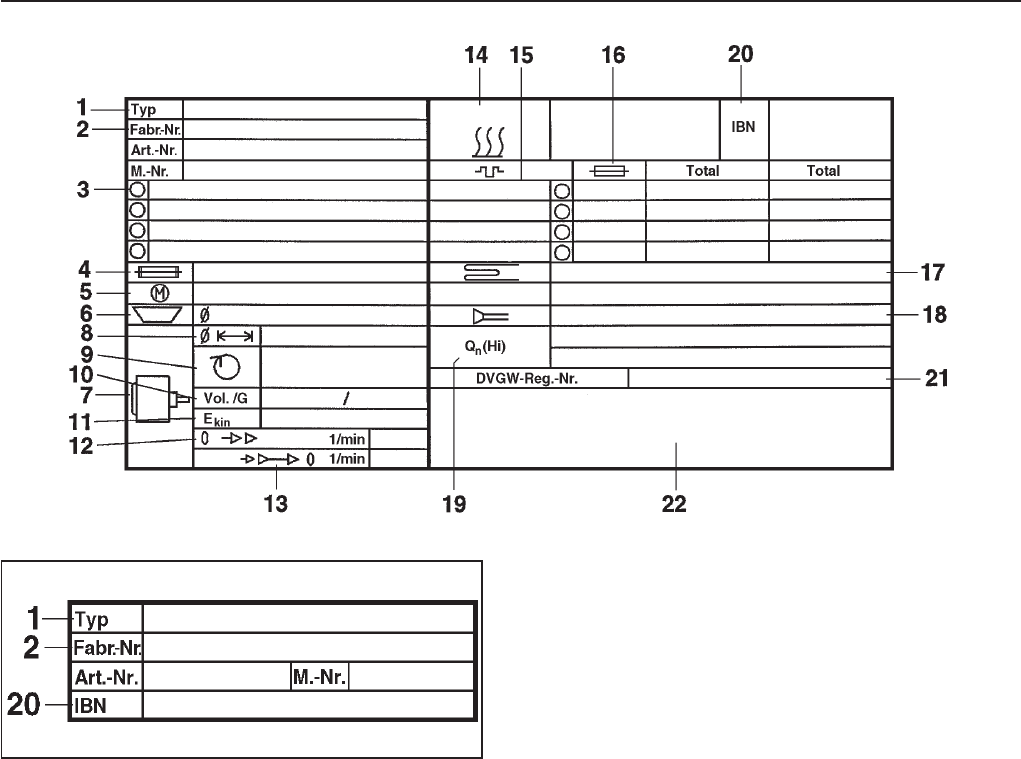
1 Machine type
2 Serial number/Year of production *
3 Voltage/Frequency
4 Fuse rating
5 Drive motor
6 Plate diameter/Plate quantity *
7 Drum data
8 Drum diameter/Drum depth
9 Spin speed
10 Drum volume/Laundry dry weight
11 Kinetic Energy
12 Ex. time to top speed
13 Breaking time
14 Heating
* Not valid for this machine.
15 Electric heating
16 Fusing (on site)
17 Steam heating indirect
18 Steam heating direct
19 Gas heating
20 Commissioning date
21 Water-Registration
DVGW-test cert (Water)
22 Field for CE test symbol
Noise level
Wash cycle Spin cycle
PW 6101 60 dB 73 dB
PW 6131 61 dB 72 dB
PW 6161 62 dB 77 dB
PW 6201 62 dB 77 dB
Guide to the data plate symbols
35
36

Installation Instructions

Disposal of the packing materials
The packing materials protect the appliance
during shipping. They have been designed
to be biodegradable and recyclable.
To prevent suffocation, ensure that any
plastic wrappings, bags, etc. are disposed
of safely and kept out of the reach of
children.
Disposal of an old appliance
Old appliances may contain materials that
can be recycled. Please contact your local
recycling center about the possibility of
recycling these materials.
Ensure that the appliance presents no
danger to children while being stored for
disposal. Before discarding an old
appliance, unplug it from the outlet, cut off
its power cord and remove any doors to
prevent hazards.
Help to protect the environment
38

The washer must only be installed by a
Miele authorized service technician.
Before installation or service disconnect
the power supply to the work area.
The minimum dimensions and distance
required from the wall, as shown in the
installation diagram, must be observed to
allow service to be performed and the
data plate to be viewed.
Installation site
A concrete or reinforced floor is the most
suitable surface for the washer. These types
of floors are less prone to vibration during
the spin cycle.
The washer must be leveled for proper
operation. The machine does not need to be
installed on a base, however, any
unevenness in the floor must be
compensated for.
Do not install or store this machine in a room
where temperatures below freezing may
occur or where the machine may be
exposed to the weather.
Do not install the washer on carpeting.
Carpeting will block the washers air vents.
Installation Instructions
39
Removing the shipping struts
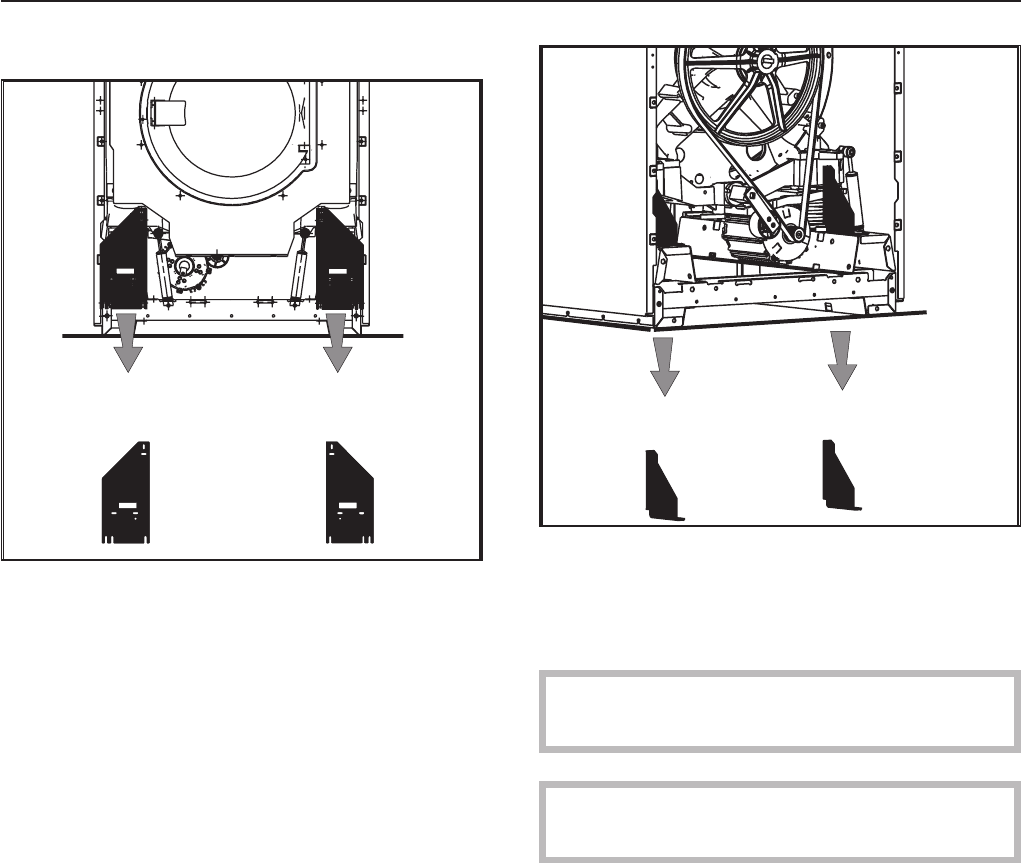
Four red-marked shipping struts, two at the
front and two at the rear, are each fixed with
3 hex screws.
^Remove the shipping struts at the installation
location before using the washer.
^Take off the front and back panel of the
machine by removing the screws at the
bottom edge of the front service panel and
the screws in the rear panel and remove.
Save the shipping struts for future use. They
must be refitted if the machine is moved.
Do not move the machine without all of
the outer panels in place.
Installation Instructions
40
Plumbing
The machine should be connected to two
water supply valves, which conform with
local and national regulations. Installation
must be carried out by an authorized
service technician.
To ensure the machine is correctly
connected please follow the installation plan
and the separate installation instructions
supplied with the machine.
Connecting the water intake / water
drain hoses
See the enclosed installation plan.
A water pressure flow rate of at least 14.5 psi,
maximum 145 psi is required.
The inlet pressure hoses supplied with the
machine must be used for connection to the
water supply.
The hoses should only be replaced with
genuine Miele spare parts which fulfill the
pressure requirements.
The hot water intake must not exceed a
temperature of 158°F (70°C).
Cold water connection only
See the enclosed installation diagram.
,Must comply with all local codes.
Installation Instructions
41

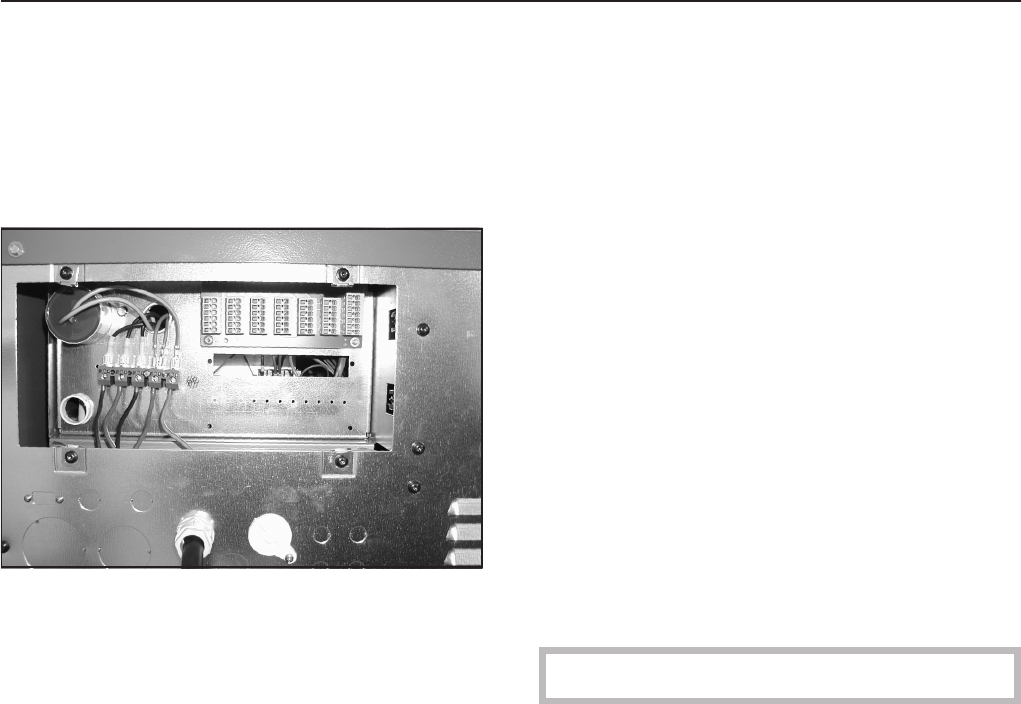
Electrical connection
All electrical work must be performed by a
qualified service technician in accordance
with applicable codes and standards.
The connecting terminal is located behind a
cover.
The machine must only be connected to the
voltage and frequency shown on the data
plate.
The machine is equipped with a multi-tap
transformer.
Steam heated washers are factory set to
3 phase, 208 V, 60 Hz
They can be converted to
3 phase, 240 V, 60 Hz by a Miele Service
Technician.
Electrically heated washers are factory set
to 3 phase, 230 V, 50/60 Hz
They can be converted to
3 phase, 208 V, 60 Hz by a Miele Service
Technician.
To activate the heating the water level in the
drum must be 2" (50 mm) high.
A motor overload protection is located in the
motor winding.
See the enclosed wiring and installation
diagrams.
Steam connection
The steam connection must only be
connected by a certified installer. For more
information see the enclosed installation
plan and the installation manual.
Connecting the dispensing pumps
The connecting terminal for 4 time controlled
dispensing pumps is located behind the
cover next to the electrical connection.
The dispensing pumps can be operated
without the multifunction module.
Installation Instructions
42

1. Sort the laundry
Only use this machine for items that are machine washable, see item fabric care label.
^Empty all pockets.
2. Turn the machine on and load the laundry
^Press the I"On" button to turn the machine on.
^Open the drum door and load the laundry.
^Close the drum door.
3. Add detergent
^Add detergent:
Main wash in detergent container j,
Prewash in detergent container i,
Fabric softener/ starch in front detergent container p,
Additional liquid aids in rear detergent container p(if programmed).
4. Select a program by turning the jog shuttle
Programs may vary depending on the offerings of your machine.
Standard programs
1Hot Wash 194°F 9Wrinkle Free Intensive 86°F
2Cottons 140°F 10 Delicates
3Cottons Intensive 140°F 11 Woolens 86°F
4Cottons 86°F 12 Handwash Woolens 86°F
5Cottons Intensive 86°F 13 Extra Starch
6Wrinkle Free 140°F 14 Extra Rinse + Spin
7Wrinkle Free Intensive 140°F 15 Extra Spin
8Wrinkle Free 86°F 16 Extra Drain
5. Press h"Start".
The selected program begins.
6. At the end of a program
The program end is displayed.
^Open the door by pulling the handle.
Remove the laundry.
^Leave the drum door open.
^Turn the machine off with the 0"Off" button.
Quick Guide
43
1 Hot Wash
Program end
Door can be opened.
mFC A
All rights reserved / 2106 06 578 520 / 03
