Miller Edge MEL916 Monitored Edge Link User Manual WPE Instuctions

Miller Edge, Inc. Monitored Edge Link WPE Instuctions

Users Manual

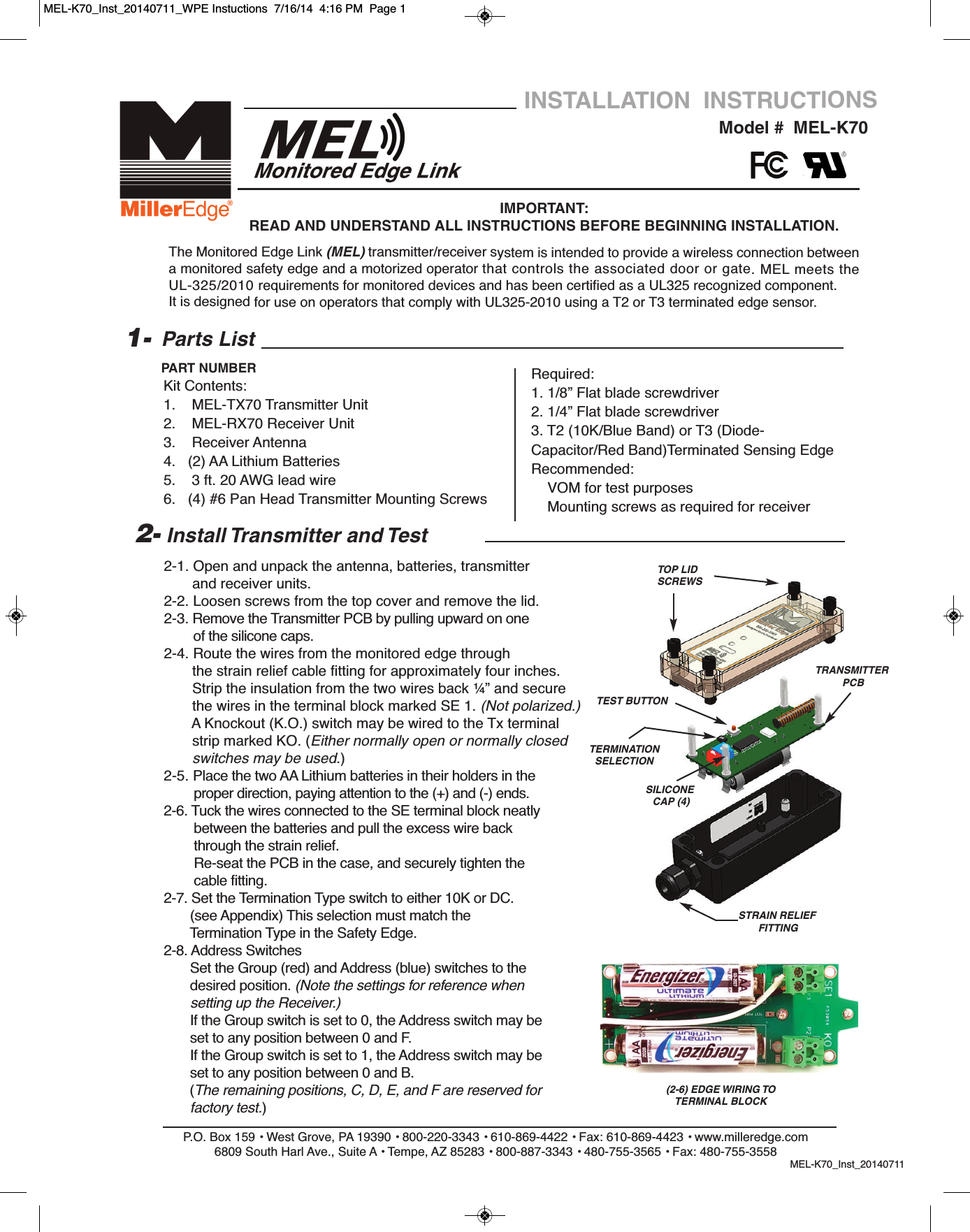
2-1. Open and unpack the antenna, batteries, transmitter and receiver units.2-2. Loosen screws from the top cover and remove the lid. 2-3. Remove the Transmitter PCB by pulling upward on one of the silicone caps.2-4. Route the wires from the monitored edge through                 the strain relief cable fitting for approximately four inches.Strip the insulation from the two wires back ¼” and secure the wires in the terminal block marked SE 1. (Not polarized.)A Knockout (K.O.) switch may be wired to the Tx terminal strip marked KO. (Either normally open or normally closed switches may be used.)2-5. Place the two AA Lithium batteries in their holders in theproper direction, paying attention to the (+) and (-) ends.2-6. Tuck the wires connected to the SE terminal block neatly between the batteries and pull the excess wire back through the strain relief.Re-seat the PCB in the case, and securely tighten the  cable fitting.2-7. Set the Termination Type switch to either 10K or DC. (see Appendix) This selection must match the Termination Type in the Safety Edge.          2-8. Address SwitchesSet the Group (red) and Address (blue) switches to thedesired position. (Note the settings for reference when setting up the Receiver.)If the Group switch is set to 0, the Address switch may be set to any position between 0 and F.If the Group switch is set to 1, the Address switch may be set to any position between 0 and B. (The remaining positions, C, D, E, and F are reserved for factory test.)P.O. Box 159 • West Grove, PA 19390 • 800-220-3343 • 610-869-4422 • Fax: 610-869-4423 • www.milleredge.com6809 South Harl Ave., Suite A • Tempe, AZ 85283 • 800-887-3343 • 480-755-3565 • Fax: 480-755-3558MEL-K70_Inst_20140711Model #  MEL-K70INSTALLATION  INSTRUCTIONSIMPORTANT: READ AND UNDERSTAND ALL INSTRUCTIONS BEFORE BEGINNING INSTALLATION.Parts ListKit Contents:1.    MEL-TX70 Transmitter Unit2.    MEL-RX70 Receiver Unit3.    Receiver Antenna 4.   (2) AA Lithium Batteries  5.    3 ft. 20 AWG lead wire6.   (4) #6 Pan Head Transmitter Mounting Screws1-PART NUMBER2- Install Transmitter and TestThe Monitored Edge Link (MEL) transmitter/receiver system is intended to provide a wireless connection betweena monitored safety edge and a motorized operator that controls the associated door or gate. MEL meets theUL-325/2010 requirements for monitored devices and has been certified as a UL325 recognized component.It is designed for use on operators that comply with UL325-2010 using a T2 or T3 terminated edge sensor.Required:1. 1/8” Flat blade screwdriver2. 1/4” Flat blade screwdriver3. T2 (10K/Blue Band) or T3 (Diode-Capacitor/Red Band)Terminated Sensing EdgeRecommended:VOM for test purposesMounting screws as required for receiverTOP LIDSCREWS TRANSMITTERPCBTEST BUTTONTERMINATIONSELECTIONSILICONECAP (4)STRAIN RELIEFFITTING(2-6) EDGE WIRING TO TERMINAL BLOCKMEL-K70_Inst_20140711_WPE Instuctions  7/16/14  4:16 PM  Page 1
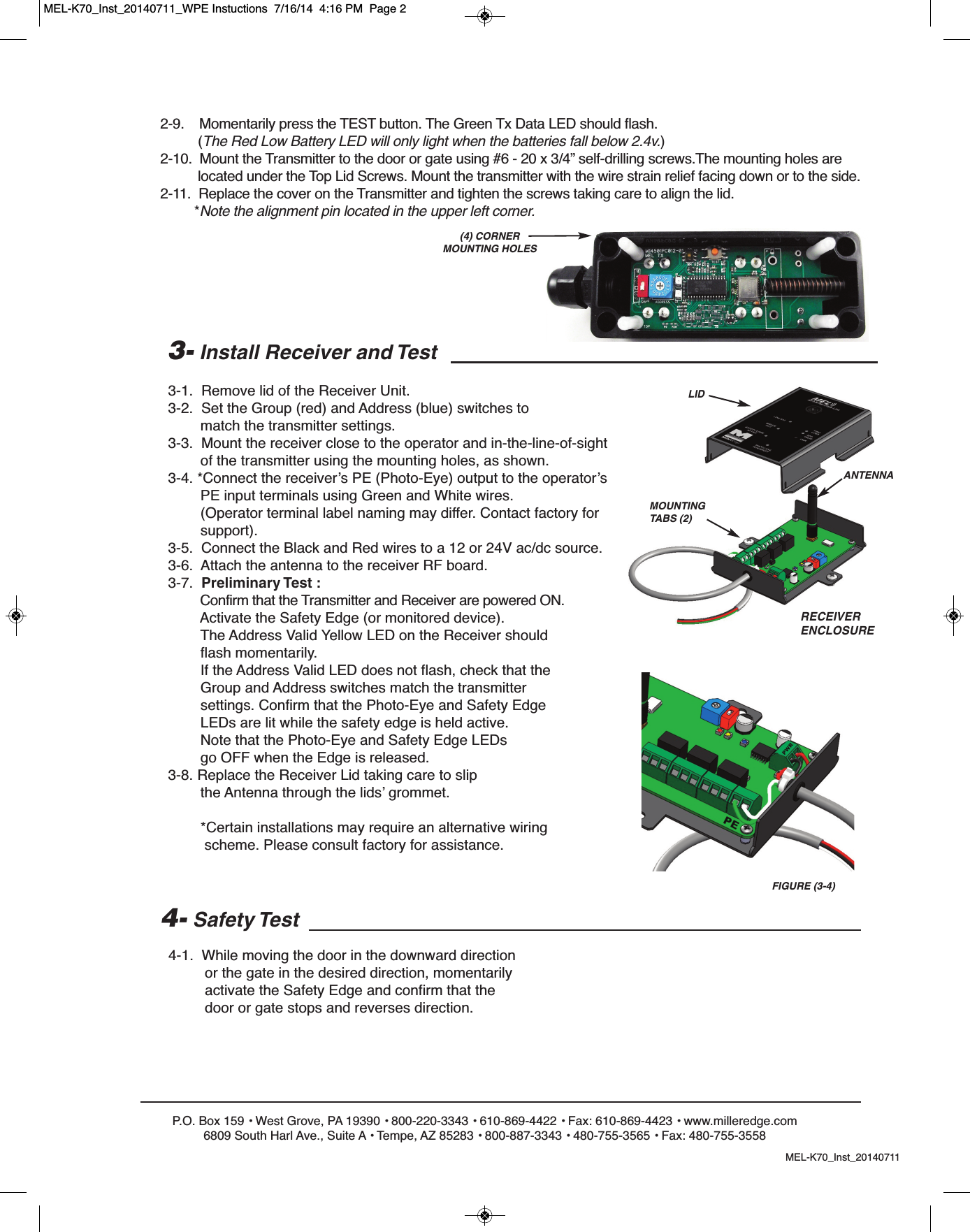
P.O. Box 159 • West Grove, PA 19390 • 800-220-3343 • 610-869-4422 • Fax: 610-869-4423 • www.milleredge.com6809 South Harl Ave., Suite A • Tempe, AZ 85283 • 800-887-3343 • 480-755-3565 • Fax: 480-755-35582-9.    Momentarily press the TEST button. The Green Tx Data LED should flash. (The Red Low Battery LED will only light when the batteries fall below 2.4v.)2-10.  Mount the Transmitter to the door or gate using #6 - 20 x 3/4” self-drilling screws.The mounting holes are located under the Top Lid Screws. Mount the transmitter with the wire strain relief facing down or to the side.2-11.  Replace the cover on the Transmitter and tighten the screws taking care to align the lid.*Note the alignment pin located in the upper left corner.3- Install Receiver and Test 3-1.  Remove lid of the Receiver Unit.3-2.  Set the Group (red) and Address (blue) switches to match the transmitter settings.3-3.  Mount the receiver close to the operator and in-the-line-of-sightof the transmitter using the mounting holes, as shown.3-4. *Connect the receiver’s PE (Photo-Eye) output to the operator’s PE input terminals using Green and White wires. (Operator terminal label naming may differ. Contact factory for support). 3-5.  Connect the Black and Red wires to a 12 or 24V ac/dc source. 3-6.  Attach the antenna to the receiver RF board.3-7.  Preliminary Test :Confirm that the Transmitter and Receiver are powered ON.Activate the Safety Edge (or monitored device). The Address Valid Yellow LED on the Receiver shouldflash momentarily.If the Address Valid LED does not flash, check that theGroup and Address switches match the transmitter settings. Confirm that the Photo-Eye and Safety Edge LEDs are lit while the safety edge is held active. Note that the Photo-Eye and Safety Edge LEDsgo OFF when the Edge is released.3-8. Replace the Receiver Lid taking care to slipthe Antenna through the lids’ grommet.*Certain installations may require an alternative wiringscheme. Please consult factory for assistance. 4- Safety Test4-1.  While moving the door in the downward directionor the gate in the desired direction, momentarily activate the Safety Edge and confirm that thedoor or gate stops and reverses direction.(4) CORNER MOUNTING HOLESLIDANTENNAMOUNTINGTABS (2)RECEIVERENCLOSUREFIGURE (3-4)MEL-K70_Inst_20140711MEL-K70_Inst_20140711_WPE Instuctions  7/16/14  4:16 PM  Page 2
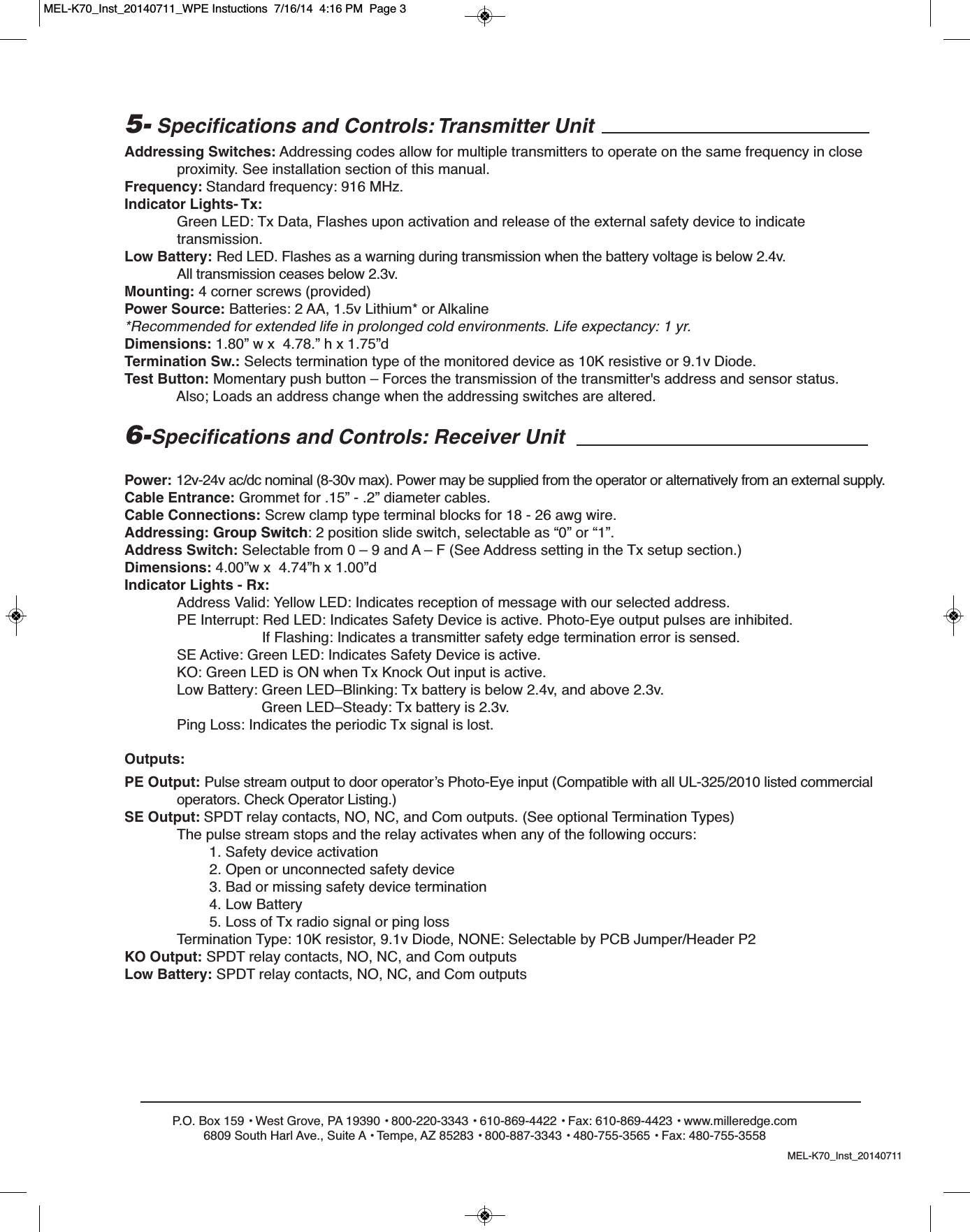
P.O. Box 159 • West Grove, PA 19390 • 800-220-3343 • 610-869-4422 • Fax: 610-869-4423 • www.milleredge.com6809 South Harl Ave., Suite A • Tempe, AZ 85283 • 800-887-3343 • 480-755-3565 • Fax: 480-755-35585- Specifications and Controls: Transmitter UnitAddressing Switches: Addressing codes allow for multiple transmitters to operate on the same frequency in close proximity. See installation section of this manual.Frequency: Standard frequency: 916 MHz. Indicator Lights- Tx:Green LED: Tx Data, Flashes upon activation and release of the external safety device to indicate transmission.Low Battery: Red LED. Flashes as a warning during transmission when the battery voltage is below 2.4v. All transmission ceases below 2.3v.Mounting: 4 corner screws (provided)Power Source: Batteries: 2 AA, 1.5v Lithium* or Alkaline*Recommended for extended life in prolonged cold environments. Life expectancy: 1 yr.Dimensions: 1.80” w x  4.78.” h x 1.75”dTermination Sw.: Selects termination type of the monitored device as 10K resistive or 9.1v Diode.Test Button: Momentary push button – Forces the transmission of the transmitter's address and sensor status.Also; Loads an address change when the addressing switches are altered.6-Specifications and Controls: Receiver UnitPower: 12v-24v ac/dc nominal (8-30v max). Power may be supplied from the operator or alternatively from an external supply.Cable Entrance: Grommet for .15” - .2” diameter cables.Cable Connections: Screw clamp type terminal blocks for 18 - 26 awg wire.Addressing: Group Switch: 2 position slide switch, selectable as “0” or “1”.Address Switch: Selectable from 0 – 9 and A – F (See Address setting in the Tx setup section.)Dimensions: 4.00”w x  4.74”h x 1.00”dIndicator Lights - Rx:Address Valid: Yellow LED: Indicates reception of message with our selected address. PE Interrupt: Red LED: Indicates Safety Device is active. Photo-Eye output pulses are inhibited.If Flashing: Indicates a transmitter safety edge termination error is sensed.SE Active: Green LED: Indicates Safety Device is active.KO: Green LED is ON when Tx Knock Out input is active. Low Battery: Green LED–Blinking: Tx battery is below 2.4v, and above 2.3v.Green LED–Steady: Tx battery is 2.3v.Ping Loss: Indicates the periodic Tx signal is lost.Outputs:PE Output: Pulse stream output to door operator’s Photo-Eye input (Compatible with all UL-325/2010 listed commercialoperators. Check Operator Listing.)SE Output: SPDT relay contacts, NO, NC, and Com outputs. (See optional Termination Types)The pulse stream stops and the relay activates when any of the following occurs:1. Safety device activation2. Open or unconnected safety device3. Bad or missing safety device termination4. Low Battery5. Loss of Tx radio signal or ping lossTermination Type: 10K resistor, 9.1v Diode, NONE: Selectable by PCB Jumper/Header P2KO Output: SPDT relay contacts, NO, NC, and Com outputsLow Battery: SPDT relay contacts, NO, NC, and Com outputsMEL-K70_Inst_20140711MEL-K70_Inst_20140711_WPE Instuctions  7/16/14  4:16 PM  Page 3
P.O. Box 159 • West Grove, PA 19390 • 800-220-3343 • 610-869-4422 • Fax: 610-869-4423 • www.milleredge.com6809 South Harl Ave., Suite A • Tempe, AZ 85283 • 800-887-3343 • 480-755-3565 • Fax: 480-755-3558Transmitter:MODEL: MEL-TX70FCC ID: OYE-MEL916THIS DEVICE COMPLIES WITH PART 15 OF THE FCC RULES. OPERATIONS IS SUBJECT TO THE FOLLOWINGTWO CONDITIONS.1) THIS DEVICE MAY NOT CAUSE HARMFUL INTERFERENCEAND2) THIS DEVICE MUST ACCEPT ANY INTERFERENCE RECEIVED INCLUDING INTERFERENCE THAT MAYCAUSE UNDESIRED OPERATION.8- FCC ComplianceReceiver:MODEL: MEL-RX70This equipment has been tested and found to comply with the limits for a Class B digital device, pursuant to Part15 of the FCC Rules.These limits are designed to provide reasonable protection against harmful interference in a residential installation. This equipmentgenerates, uses and can radiate radio frequency energy and, if not installed and used in accordance with the instructions, may causeharmful interference to radio communications. However, there is no guarantee that interference will not occur in a particular installa-tion. If this equipment does cause harmful interference to radio or television reception, which may be determined by turning theequipment off and on, the user is encouraged to try to correct the interference by one or more of the following measures:1- Re-orient or relocate the receiver antenna2- Increase the separation between the equipment and the receiver3- Connect the equipment into an outlet on a circuit different from that to which the receiver is connected.4- Consult the dealer or an experienced radio/TVtechnician for help.Changes or Modifications Not Expressly Approved By The Party Responsible For Compliance Could Void The User’sAuthority To Operate The Equipment.7- Appendix:Miller Edge Terminated Sensing Edge Color Coding:T2 10K Resistor (Blue band)T3 Diode/Capacitor (Red band)* Colored ID tape is located on the Sensing Edge cable.Alarm Power Switch: Provides for connection of optional audible or visual alarm when transmitter battery is low.Optional: Dry contacts, or +5vdc @ 20 ma. (max) available on the NO & NC relay contacts.The Low Bat relay is active when the “LOW BAT” LED isflashing or on steady.With alarm power switched “ON”, you will have 5VDCavailable on the “LOW BAT” terminal between NC & NO.With alarm power turned “OFF”, you will have dry relay contacts available on the “LOW BAT” terminals.MEL-K70_Inst_20140711MEL-K70_Inst_20140711_WPE Instuctions  7/16/14  4:16 PM  Page 4

Navigation menu