Miltel Communications IWCTX15-17 Field Station User Manual Revised

Miltel Communications Ltd Field Station Users Manual Revised

Users Manual Revised

 IrriWise ™   Wireless Crop Monitoring System IrriWise Transmitter  IrriWise Transceiver (Receiver/Repeater)     User Manual            Miltel Communications Ltd.              September 2004
  1-2 CHAPTER 1  INTRODUCTION  1.1 GENERAL This chapter provides a functional description of the IrriWiseTM – Wireless Crop Monitoring System. This system has been designed to provide the grower with real-time data collected from the field, thereby providing better control over irrigation scheduling and farm resources. 1.1.1 What Is The System Intended For? The IrriWiseTM system is a management tool intended to provide the grower with better control over crop irrigation and farm resources by means of data collection and its interpretation. Data is collected from the field using state of the art radio technology and transferred to your PC, where it is presented in user-friendly software, enabling easy data interpretation, improving real-time decisions and analysis of history.  Data is sampled from the sensors and transmitted to base station as follows: • Soil moisture sensors are measured every 15 minutes and transmitted every 30 minutes. • Weather station sensors are measured every 5 minutes and an average reading is transmitted every 15 minutes. • Water meter readings are sent at the beginning and end of irrigations and every 10 minutes during irrigation.
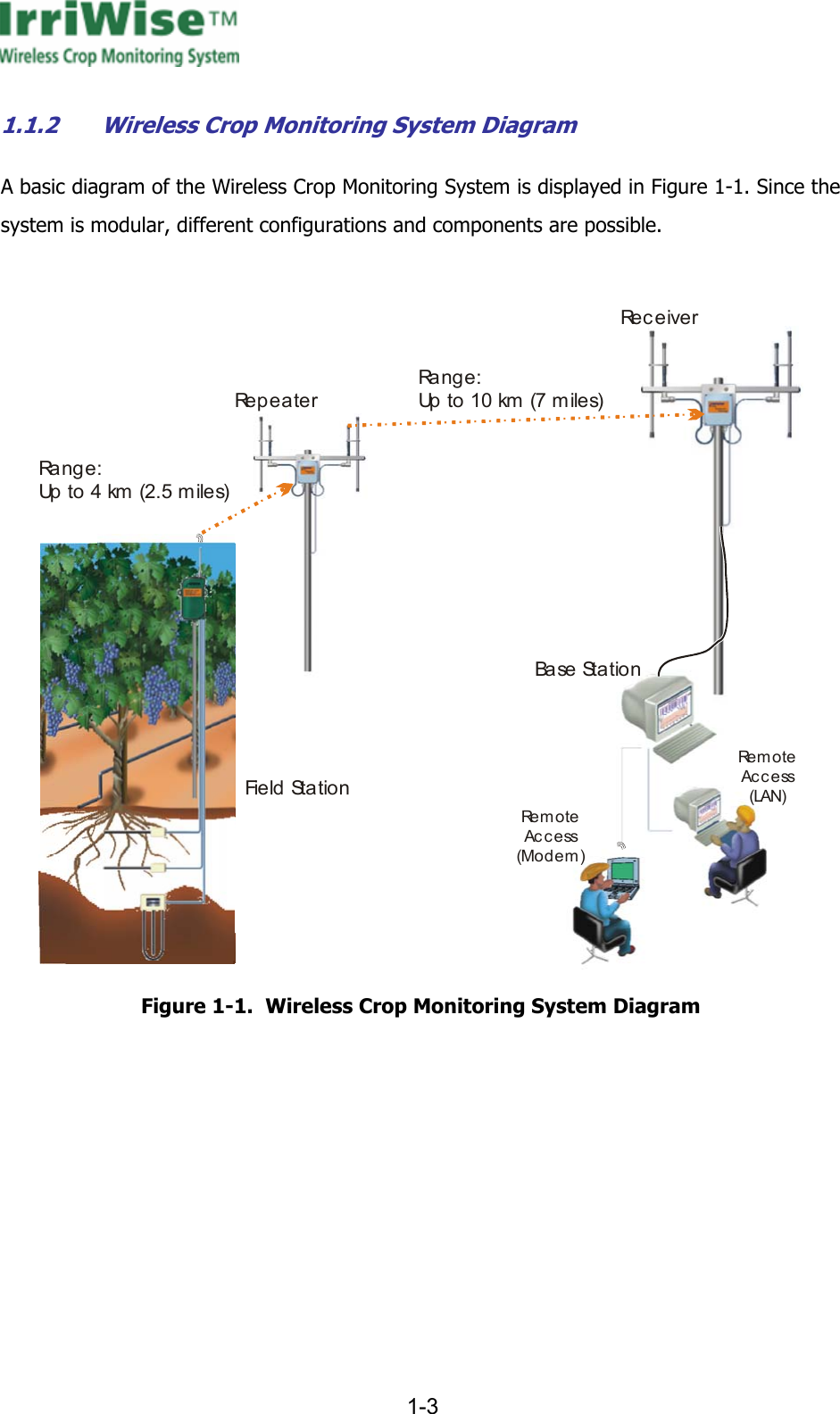
     1-3  1.1.2 Wireless Crop Monitoring System Diagram A basic diagram of the Wireless Crop Monitoring System is displayed in Figure  1-1. Since the system is modular, different configurations and components are possible.  Ra n g e :Up to 4 km (2.5 miles)Ra n g e :Up to 10 km (7 miles)Ba se  St a t i o nFie ld  St a t io nRe m o t eAc c e ss(Modem)Re m o t eAccess(LAN)Re p e a t e rReceiver Figure  1-1.  Wireless Crop Monitoring System Diagram
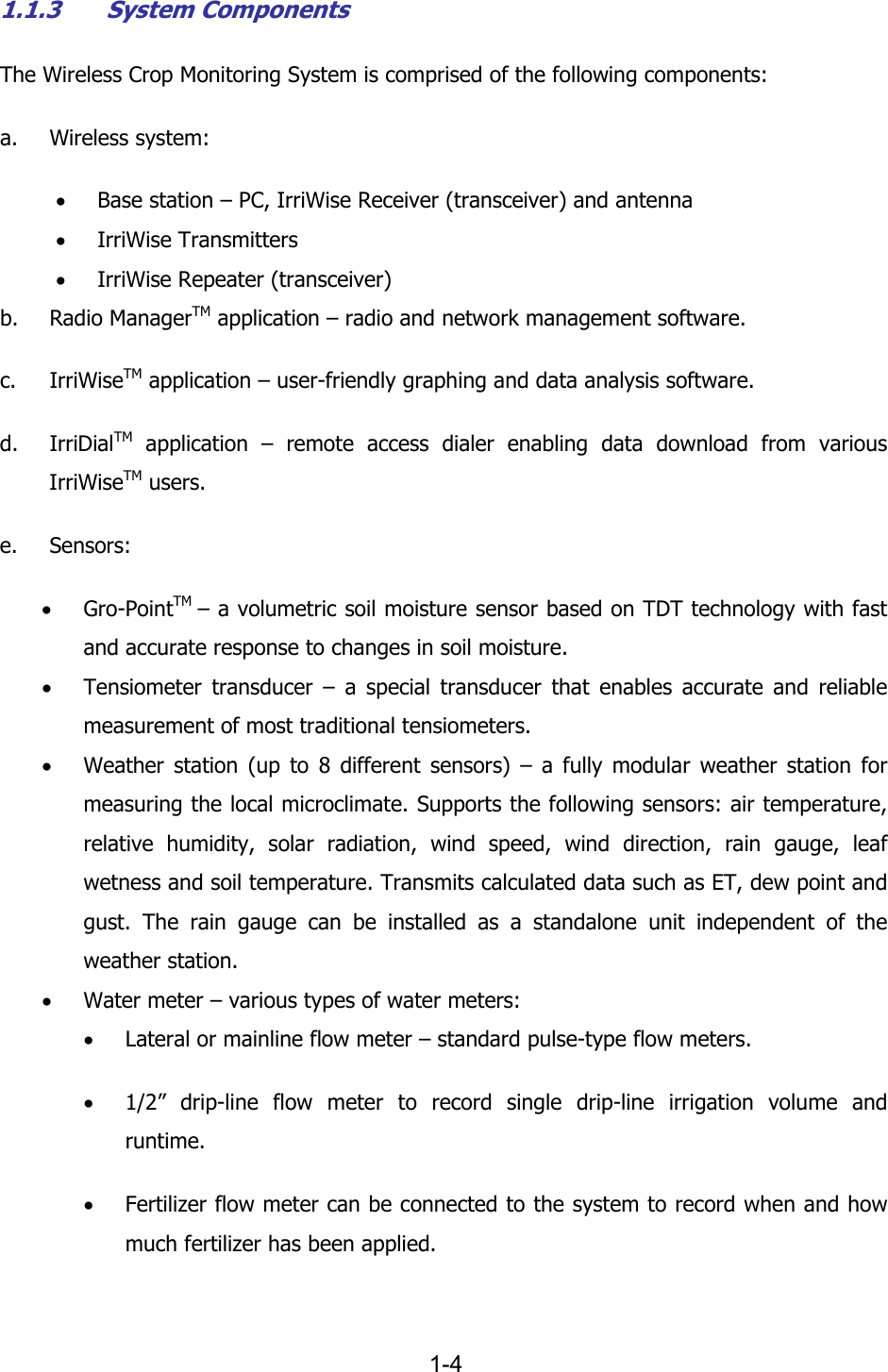
  1-4 1.1.3 System Components The Wireless Crop Monitoring System is comprised of the following components: a. Wireless system: • Base station – PC, IrriWise Receiver (transceiver) and antenna • IrriWise Transmitters • IrriWise Repeater (transceiver) b. Radio ManagerTM application – radio and network management software. c. IrriWiseTM application – user-friendly graphing and data analysis software. d. IrriDialTM application – remote access dialer enabling data download from various IrriWiseTM users. e. Sensors: • Gro-PointTM  – a volumetric soil moisture sensor based on TDT technology with fast and accurate response to changes in soil moisture. • Tensiometer transducer – a special transducer that enables accurate and reliable measurement of most traditional tensiometers. • Weather station (up to 8 different sensors) – a fully modular weather station for measuring the local microclimate. Supports the following sensors: air temperature, relative humidity, solar radiation, wind speed, wind direction, rain gauge, leaf wetness and soil temperature. Transmits calculated data such as ET, dew point and gust. The rain gauge can be installed as a standalone unit independent of the weather station. • Water meter – various types of water meters: • Lateral or mainline flow meter – standard pulse-type flow meters. • 1/2” drip-line flow meter to record single drip-line irrigation volume and runtime. • Fertilizer flow meter can be connected to the system to record when and how much fertilizer has been applied.
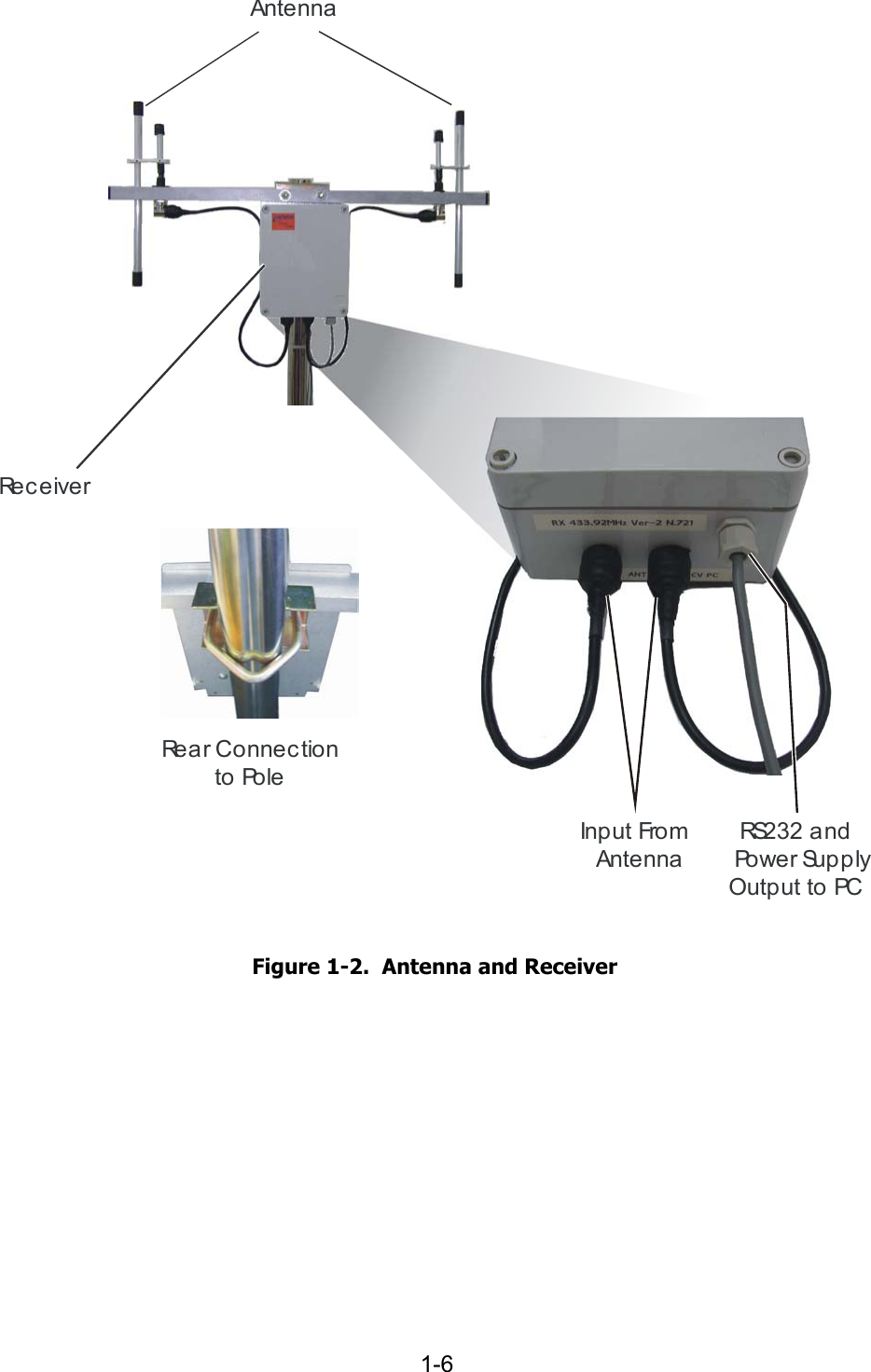
     1-5  • Tipping bucket flow sensor to record irrigation volume and runtime based on individual dripper. 1.1.3.1 Wireless System The wireless system provides the remote access interface. The transmission range of the wireless system is up to 4 km (2.5 miles), depending on the following factors: a. Interference (noise) on the selected frequency. The “cleaner” the frequency, the longer the range. b. Crop clearance – radio waves do not penetrate foliage very well, especially when wet from rain or dew. c. Topographical conditions – the extent of line of sight (LOS) pureness and positioning height affect the transmission range accordingly.   Base Station Receiver and Antenna  The base station includes the antenna and receiver as a joint unit and is responsible for the reception of data sent by the transmitters and for its transfer to the PC via RS232 (see Figure  1-2).
  1-6 AntennaRe c e i v e rRS2 3 2  a n d  Po w e r Su p p lyOutput to PC    Input FromAntenna  Rear Connectionto Pole  Figure  1-2.  Antenna and Receiver
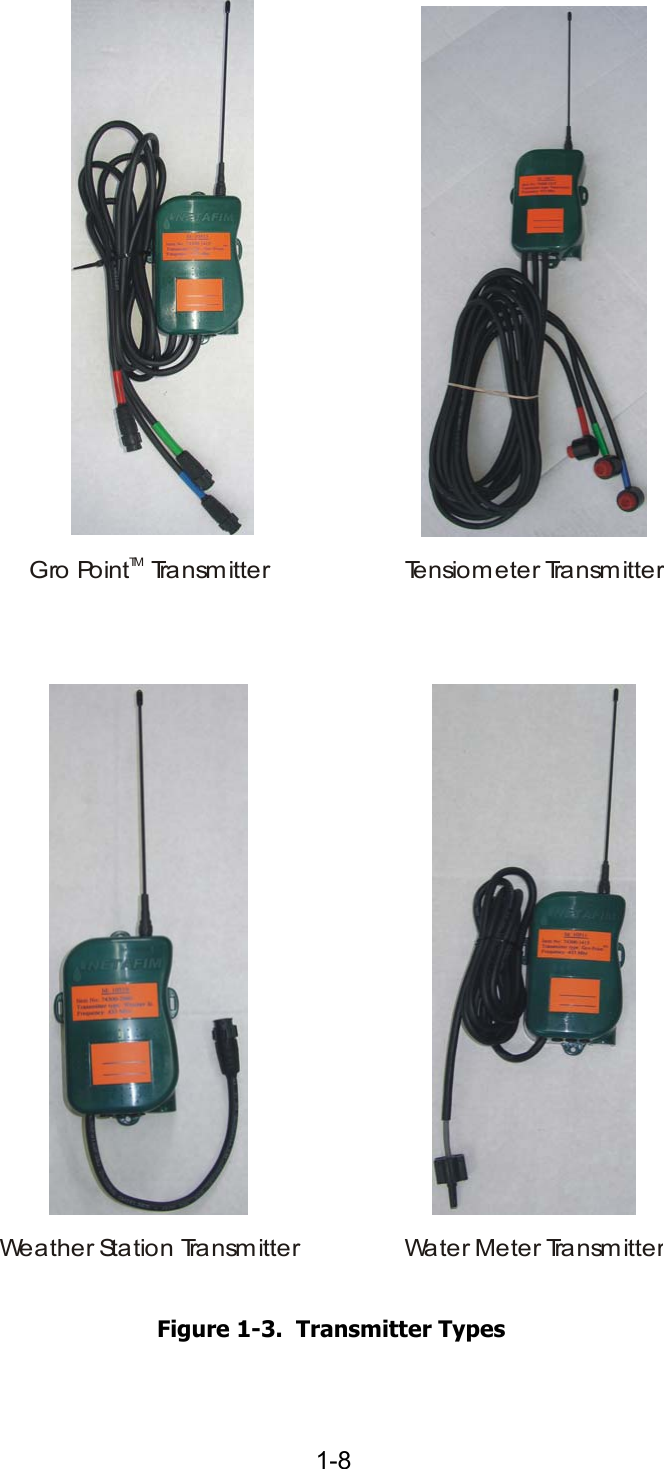
     1-7  PC A PC computer is required for the collection of the received data. This PC contains the Radio ManagerTM and IrriWiseTM software. Remote users can access the data stored on this PC by means of modem and/or LAN and IrriDialTM application. The technical specification of PC requirements is as follows: a. PC operating system – Windows 2000 or Windows XP. b. CPU – minimum Pentium III 900 MHz. c. RAM – minimum 128 MB. d. Available disk space – minimum 5 GB. e. Unused serial port (cannot be shared with Palm Pilot or other applications). f. Ability to remain switched ON 100% of the time. g. Quality surge suppressor power strip. h. Quality UPS plugged to surge suppressor. Transmitter The transmitter (Figure  1-3) enables to send data by means of RF transmission. This device is equipped with a battery designed to provide an operation term of at least 6 years (except for weather station transmitter battery, which lasts for 3 years) and is highly reliable. The transmitter enables the transmission to a range of up to 4 km (2.5 miles).  There are four types of transmitters, as displayed in Figure  1-3.
  1-8 Weather Station TransmitterGro Point  Tra nsm itte rTMWater Meter TransmitterTensiometer Tra nsm itter  Figure  1-3.  Transmitter Types
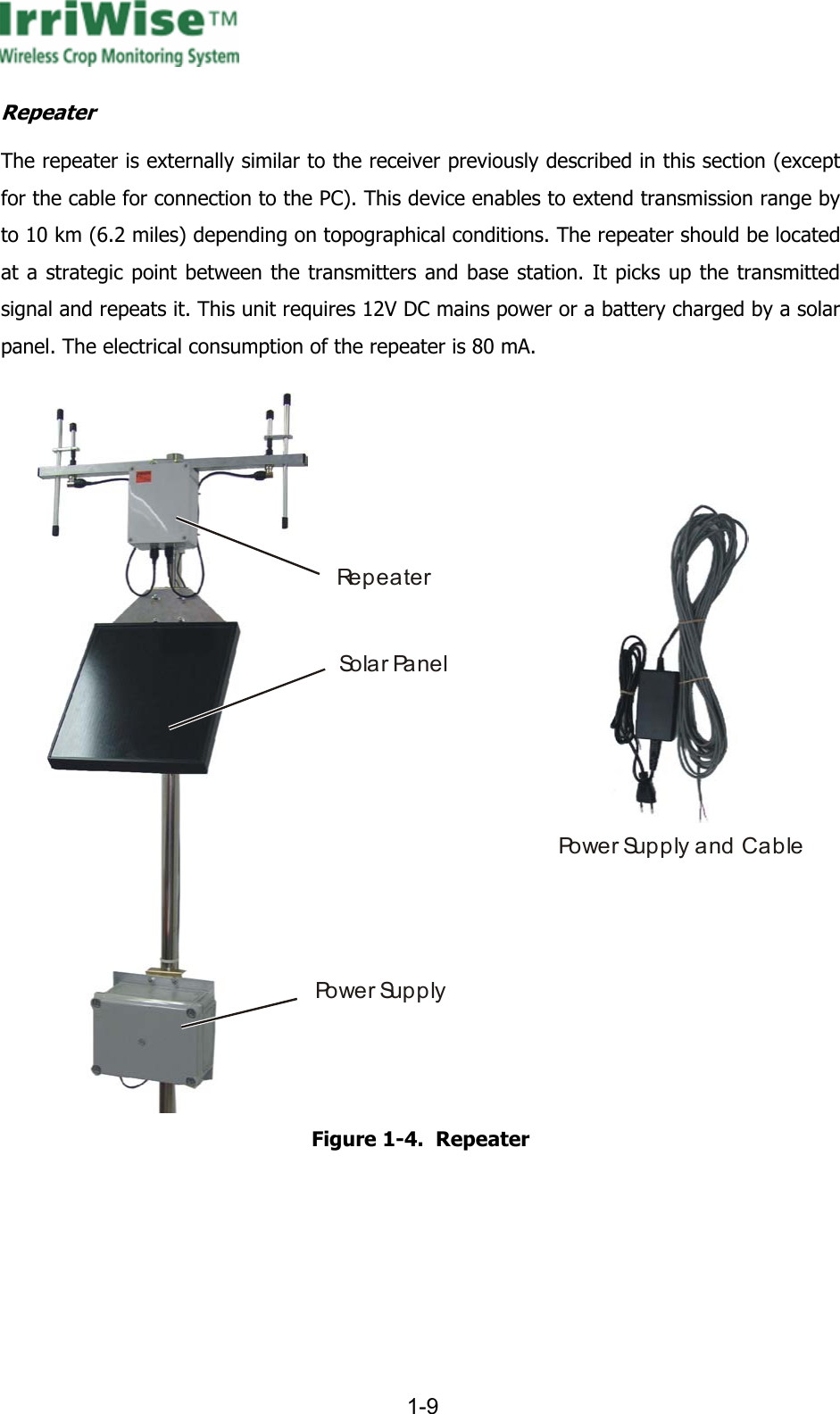
     1-9  Repeater The repeater is externally similar to the receiver previously described in this section (except for the cable for connection to the PC). This device enables to extend transmission range by to 10 km (6.2 miles) depending on topographical conditions. The repeater should be located at a strategic point between the transmitters and base station. It picks up the transmitted signal and repeats it. This unit requires 12V DC mains power or a battery charged by a solar panel. The electrical consumption of the repeater is 80 mA. RepeaterSo l a r Pa n e lPo w e r  Su p p l yPower Supply and Cable Figure  1-4.  Repeater
  2-10 CHAPTER 2  SYSTEM INSTALLATION  2.1 GENERAL This chapter provides the guidelines and instructions for system installation in different applications. 2.2 INSTALLATION AND GETTING STARTED (QUICK GUIDE) This section provides summarized instructions for advanced users only. It is recommended that other users refer to the detailed instructions in Paragraph. Before starting the installation procedure, inspect all system components and verify that they all appear in order. Before starting the installation procedure, set your computer to administrator properties. 2.2.1 Base Station Type Installation To install a base station type, perform the steps as follows: a. Install the Radio ManagerTM application b. Plug the receiver into the power supply and connect the base station to the unused communication port on your PC. c. In  Radio Manager window select Settings>Comm Port... and select the required communication port from the list. d. Perform a receiver operation check and verify proper operation on the receiver. e. While the Radio ManagerTM is open and waits for incoming calls (orange icon), open the incoming connections (Start>Connect To…>Show All Connections>Incoming Connections) and select the modem designated for Radio ManagerTM communication. f. Install the IrriWiseTM application.
     2-11  g. Reboot (restart) your computer. h. Define the transmitters in the Radio ManagerTM System Configuration Table. i. Click the IrriWiseTM shortcut on the desktop or alternatively select Start>Programs>IrriWise.  j. Register IrriWiseTM. k. Perform a transmission test for each transmitter - verify proper operation. Verify that the counter number progresses according to the station type (the number depends on the number of sensors in the transmitting station), and that the correct time and date appear at the bottom left corner of the window. l. In the IrriWiseTM application select File>Open the Select a Chart screen will open. A list of all transmitters as specified in the Radio ManagerTM system configuration table should appear. Verify that all transmitters appear and are named as specified. If not, check the system configuration table in the Radio ManagerTM and perform a transmission test again. The application is now installed and ready for operation. Proceed to field installation.
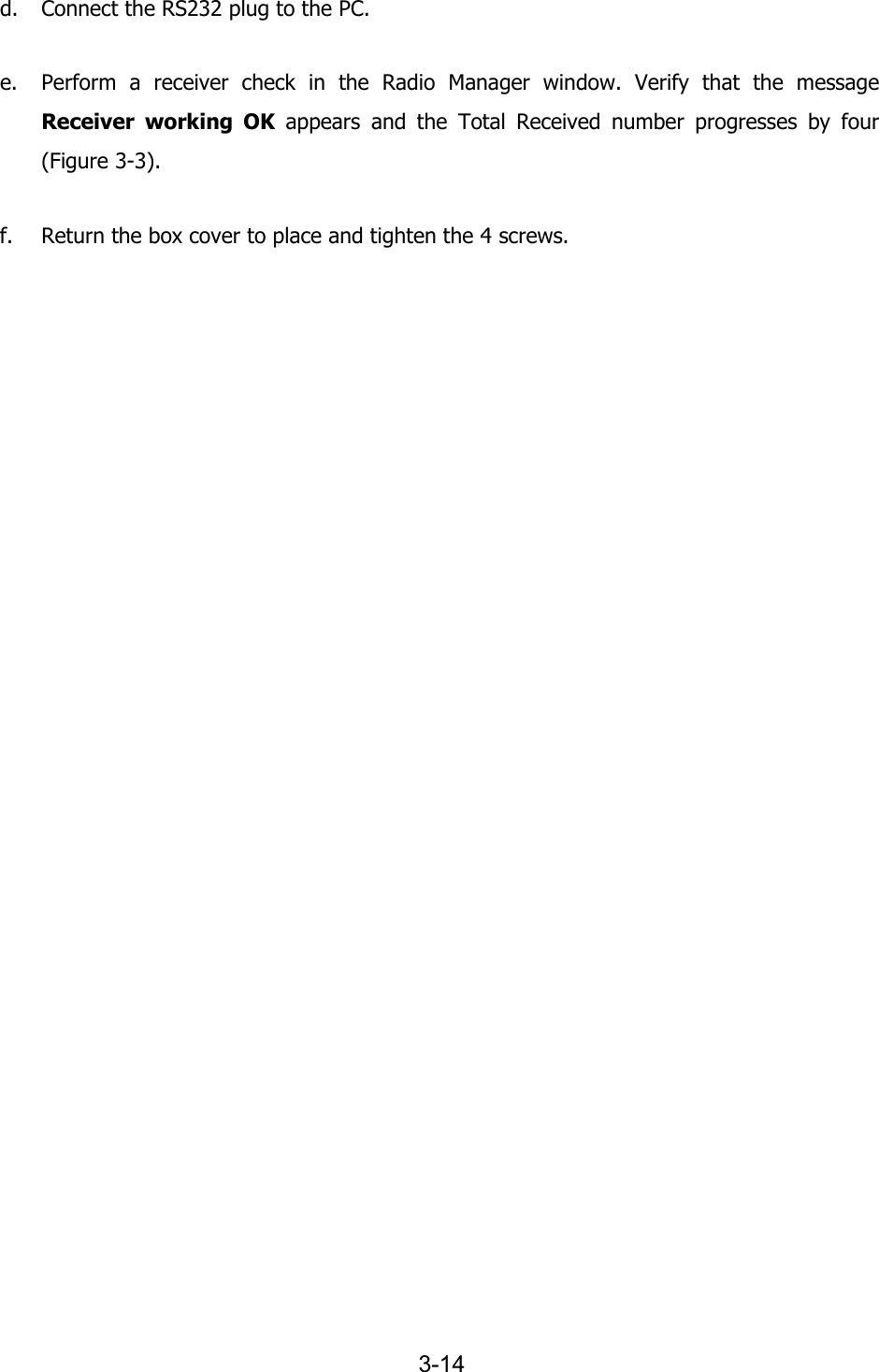
  3-12 CHAPTER 3  WIRELESS SYSTEM SPECIFICATIONS & INSTALLATION  3.1 GENERAL This chapter provides the guidelines and instructions for the wireless system installation. 3.2 BASE STATION – ANTENNA AND RECEIVER 3.2.1 Installation The antenna should be positioned in a manner that provides best Line of Sight (LOS) between itself and the field units. LOS may be partially interrupted by topographical features (such as vegetation), but this might reduce transmission distances. It is recommended that the base station unit will be plugged into an Uninterrupted Power Supply (UPS) and a quality surge suppressor strip. The ground resistance for the unit should be less then 1.0 Ω of resistance to a known good ground. To achieve maximum reliability, the base station PC should also be connected to the UPS, although its monitor may be plugged directly to the power strip. See Figure  3-1 for recommended installation.
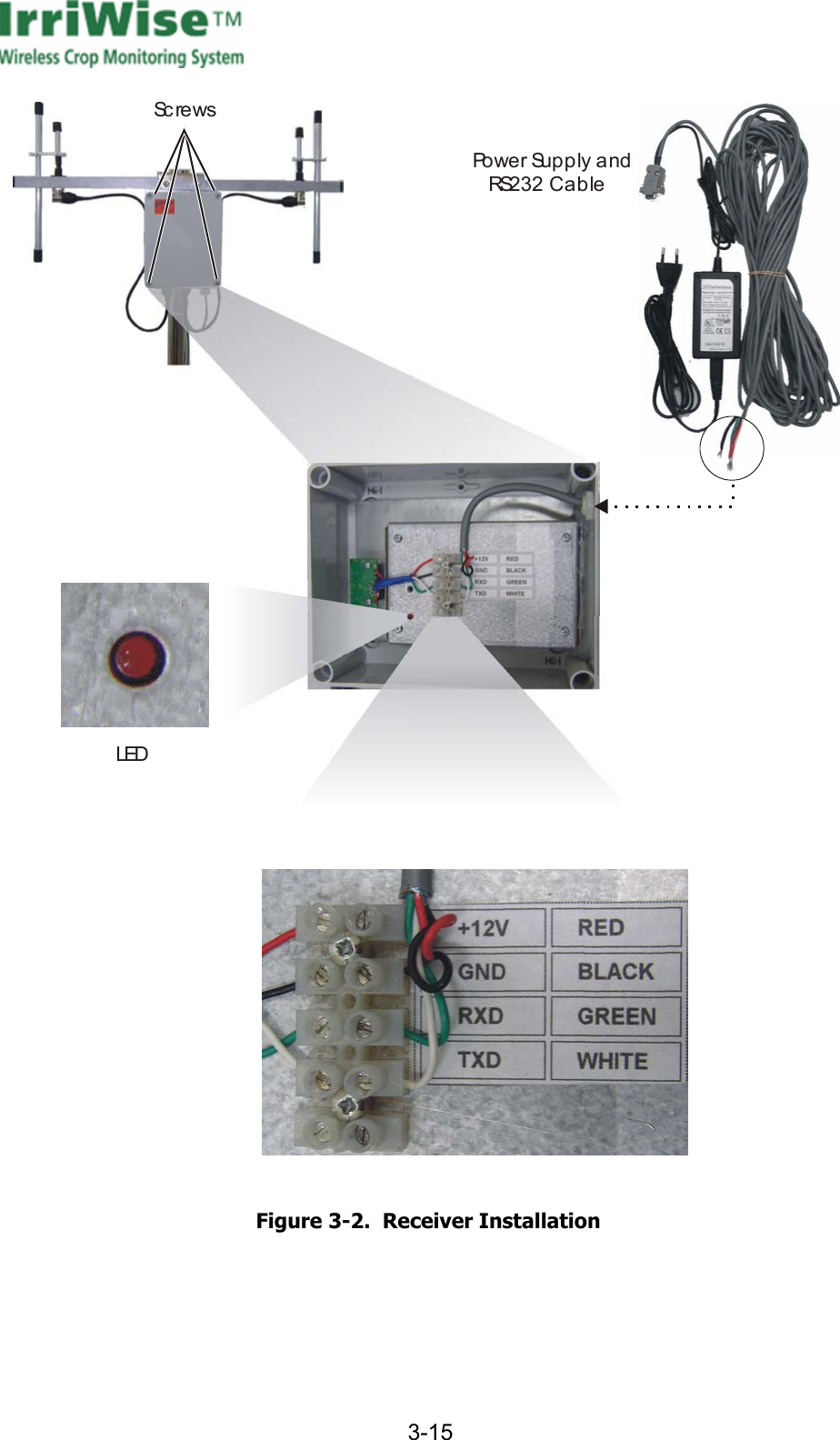
     3-13  Ba se  St a t i o nField Station1.5 - 2 m(5 - 6.5 ft)Up to 4 km (2.5 miles)LO SR 23230 m (98 ft)S Figure  3-1.  Wireless System Installation  3.2.2 Specifications: The specifications of the antenna and receiver are as follows: • Cable length:  30 meters • Power supply:  10~240 VAC 3.2.3 Installation Procedure To install the antenna and receiver, perform the steps as follows (see Figure  3-2): a. Using a flat screwdriver, remove 4 screws and remove the receiver cover. b. Insert the communication cable into the box and connect the red, black, green and white wires as specified. c. Plug the power cable into a 110~240 VAC mains outlet. Verify that the LED is blinking at a rate of 2 blinks per second.
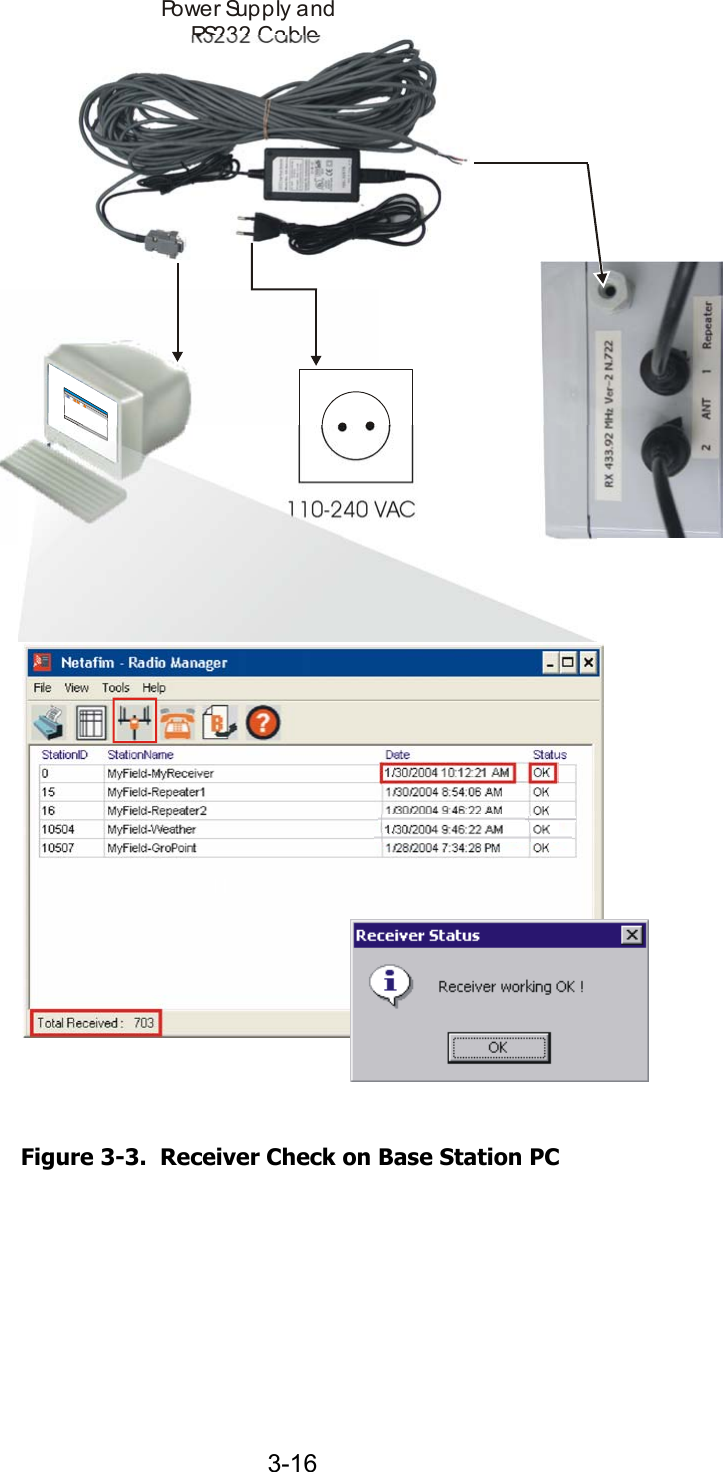
  3-14 d. Connect the RS232 plug to the PC. e. Perform a receiver check in the Radio Manager window. Verify that the message Receiver working OK appears and the Total Received number progresses by four (Figure  3-3). f. Return the box cover to place and tighten the 4 screws.
     3-15  ScrewsLEDPo w e r  Su p p l y  a n dR 232 Cable S  Figure  3-2.  Receiver Installation
  3-16 Po w e r  Supply and R 232 CableS110-240 VAC  Figure  3-3.  Receiver Check on Base Station PC
     3-17  3.3 REPEATER 3.3.1 General The Repeater is designated to either extend transmission range up to 10 km (6 miles) or to enable transmission when LOS cannot be established between the antenna and the transmitters. The repeater should be positioned in a strategic point, providing best LOS between it, the base station and the transmitters. A suitable place could be for example an elevated terrain (such as a hill) or on a high pole. Each repeater has a four-digit ID number, which enables its identification in the system by the Radio ManagerTM. 3.3.2 Specifications There are two types of repeaters, distinct by their power supply: mains or solar. 3.3.2.1 Solar-Powered Repeater The specifications of the solar panel will be calculated according to the specific light conditions in the area where it is placed.  • Energy consumption: 80 mA 12 V. • Minimum requirement for solar panel: 10 W and a battery 7.5 Amp/hour (depending on radiation factors). For repeater operation at low radiation times, higher capacity solar panel and battery are required. Consult your local dealer about the most suitable solar panel and battery for your region and operation requirements. 3.3.2.2 Mains-Powered Repeater •  Power supply: 110~240 VAC.
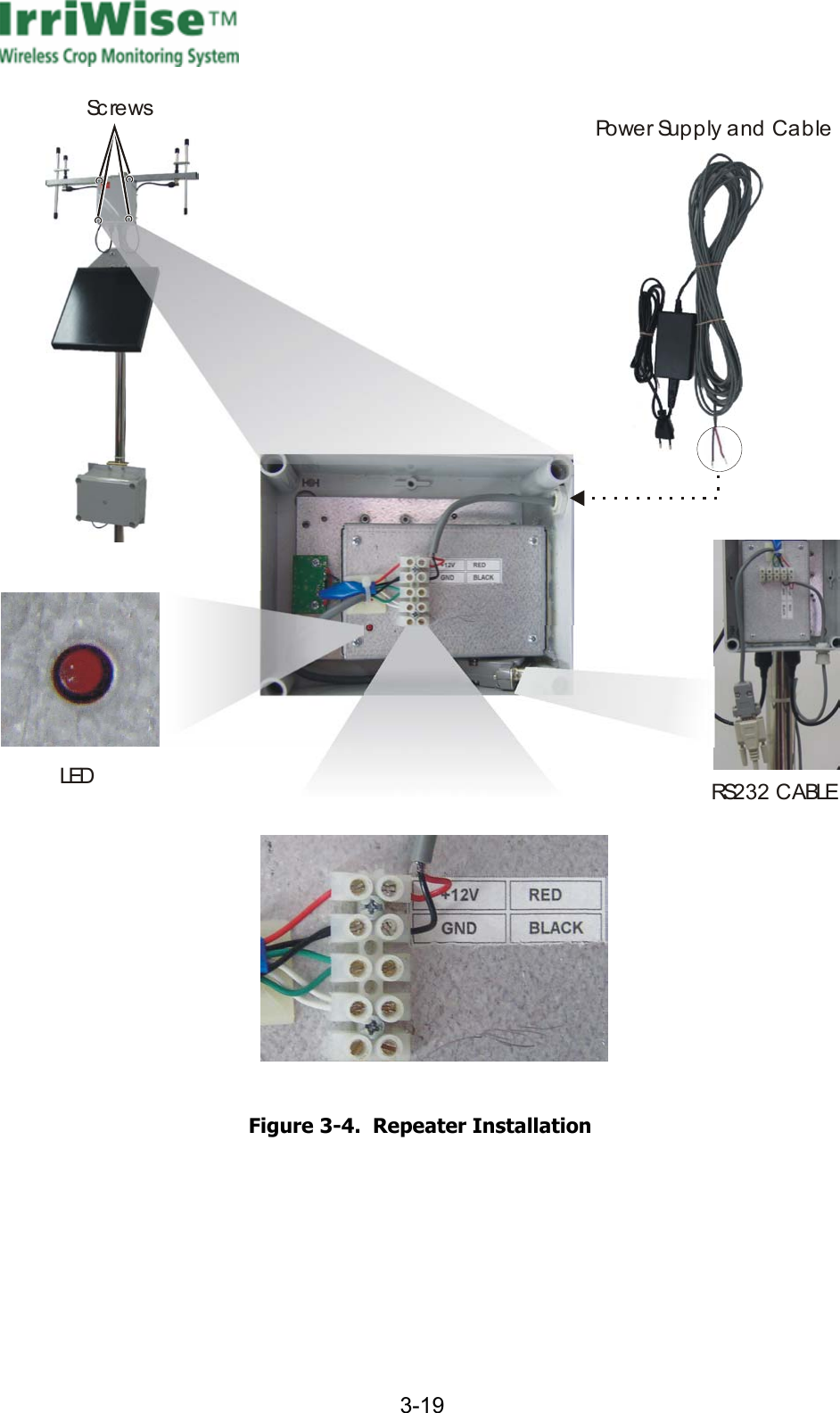
  3-18 3.3.3 Installation To install a repeater, perform the steps as follows (Figure  3-4): a. Using a Phillips screwdriver, remove 4 screws and remove the receiver cover. b. Insert the power cable into the box and connect the red and black wires as specified. c. Plug the power cable into a 110~240 VAC mains outlet. Verify that the LED is blinking at a rate of 2 blinks per second. d. Connect the RS232 plug to the PC. e. Proceed to repeater configuration.
     3-19  ScrewsLEDPower Supply and CableRS232 CABLE  Figure  3-4.  Repeater Installation
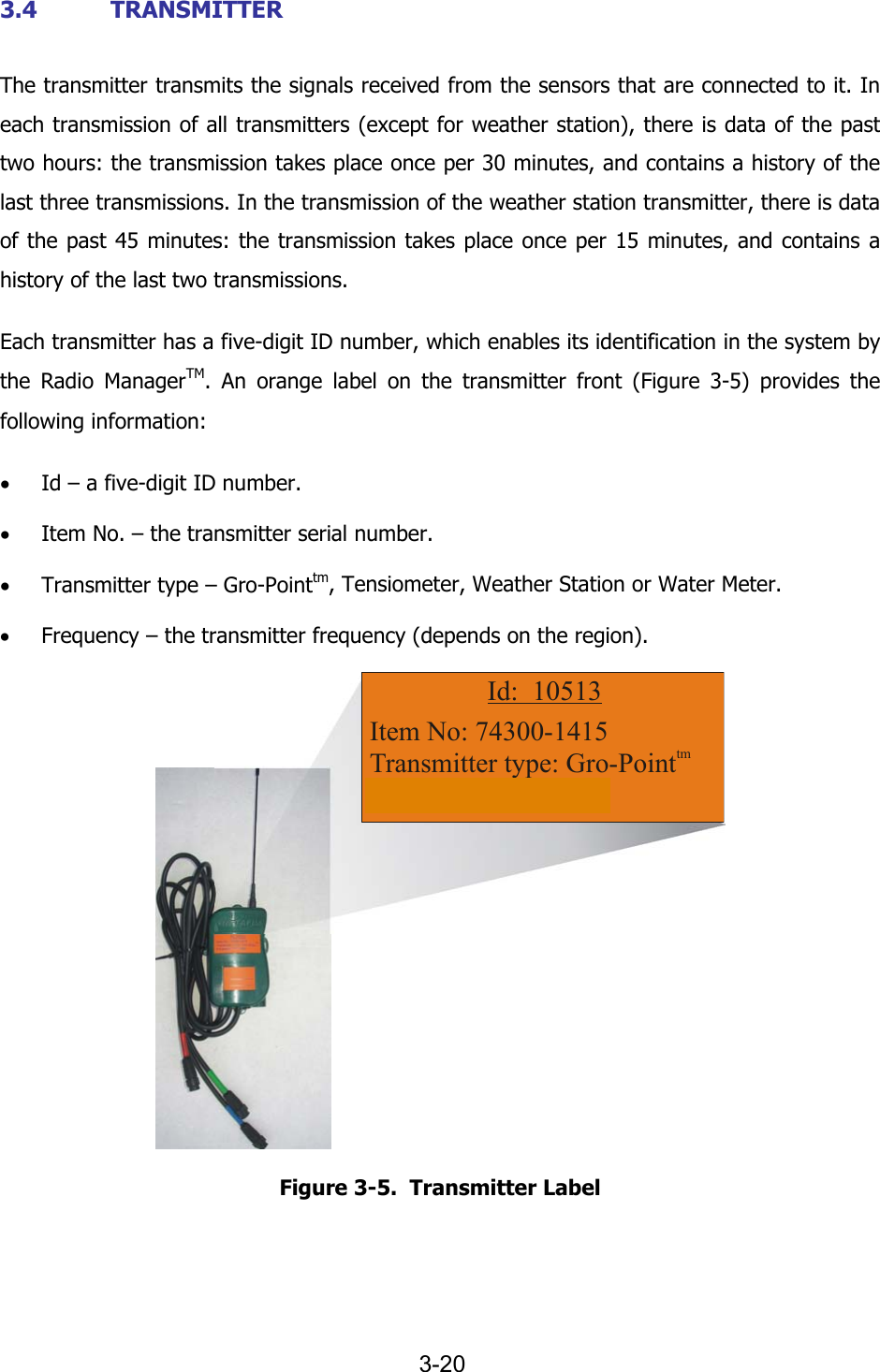
  3-20 3.4 TRANSMITTER The transmitter transmits the signals received from the sensors that are connected to it. In each transmission of all transmitters (except for weather station), there is data of the past two hours: the transmission takes place once per 30 minutes, and contains a history of the last three transmissions. In the transmission of the weather station transmitter, there is data of the past 45 minutes: the transmission takes place once per 15 minutes, and contains a history of the last two transmissions. Each transmitter has a five-digit ID number, which enables its identification in the system by the Radio ManagerTM. An orange label on the transmitter front (Figure  3-5) provides the following information: • Id – a five-digit ID number. • Item No. – the transmitter serial number. • Transmitter type – Gro-Pointtm, Tensiometer, Weather Station or Water Meter. • Frequency – the transmitter frequency (depends on the region). Item No: 74300-1415Transmitter type: Gro-PointFrequency: 433 MhztmId:  10513 Figure  3-5.  Transmitter Label
     3-21    3.4.1 Transmitter Installation This paragraph provides installation instructions for all transmitter types. To install a transmitter, perform the steps as follows: a. Choose a site for installation (see Chapter 5). b. Put the transmitter on the ground and perform a transmission test using the magnet (according to the procedure specified in Chapter 2). During nighttime or rainy weather there may occur transmission interference. c. Insert a pole into the conical slot at the back of the transmitter. Pole diameter may be 8 – 13 mm (5/16 – 1/2 inches). Alternatively, insert a plastic strap or a T-wrap into the loops on the sides of the transmitter or alternatively use screws or nails, and attach to a pole. d. Screw the transmitter antenna (either directly on the transmitter or use a 6 m/20 ft extender cable). e. Roll the remaining cable and attach it to the pole. f. Install the antenna above foliage height, at least 1 m (3 ft) above the spot where the transmission test was performed. The transmitter must be firmly attached to a pole and positioned at a height of 1 meter or higher, depending on crop height (above foliage height).
  3-22    FCC Declaration of Conformity   The IrriWise products including: •  IrriWise Receiver (Transceiver) • IrriWise Repeater (Transceiver)  The above products comply with Part 15 of the FCC Rules. Operation is subject to the following two conditions: (1) this device may not cause harmful interference, and (2) this device must accept any interference received, including interference that may cause undesired operation.    Imported to the USA by: Netafim USA  5470 E. Home Ave. Fresno, CA 93727       Tel: 800-777-6541 FAX:  800-695-4753
     3-23        Licensing Notice  The FCC rules require the equipment user to obtain a site license before operation of this equipment. Licensing of the equipment is the user’s responsibility. The user is required to contact an authorized FCC coordinator for the purpose of obtaining the proper license for the specific location/site where the equipment is to be installed. We strongly recommend that the user should obtain the proper frequency license before ordering of the equipment.

Navigation menu