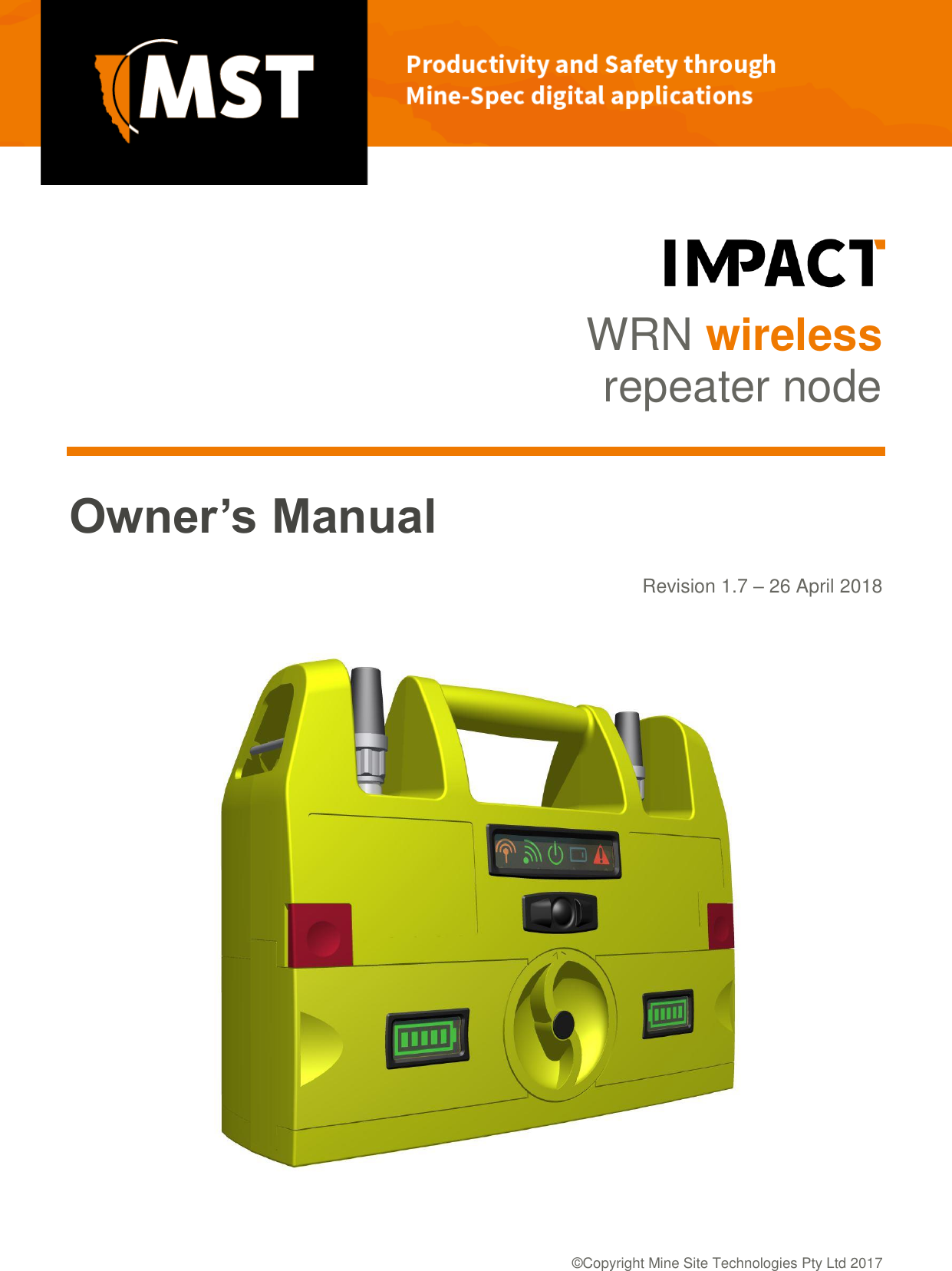
Mine Site Technologies WRN Wireless Repeater Node User Manual MST UserManual

Mine Site Technologies Pty Ltd Wireless Repeater Node MST UserManual

User Manual

 ©Copyright Mine Site Technologies Pty Ltd 2017   WRN wireless repeater node  Owner’s Manual   Revision 1.7 – 26 April 2018
 WRN wireless repeater node MST Owner’s Manual Revision 1.7 – 26 April 2018    © Mine Site Technologies Pty Ltd 2017 Commercial in Confidence 2
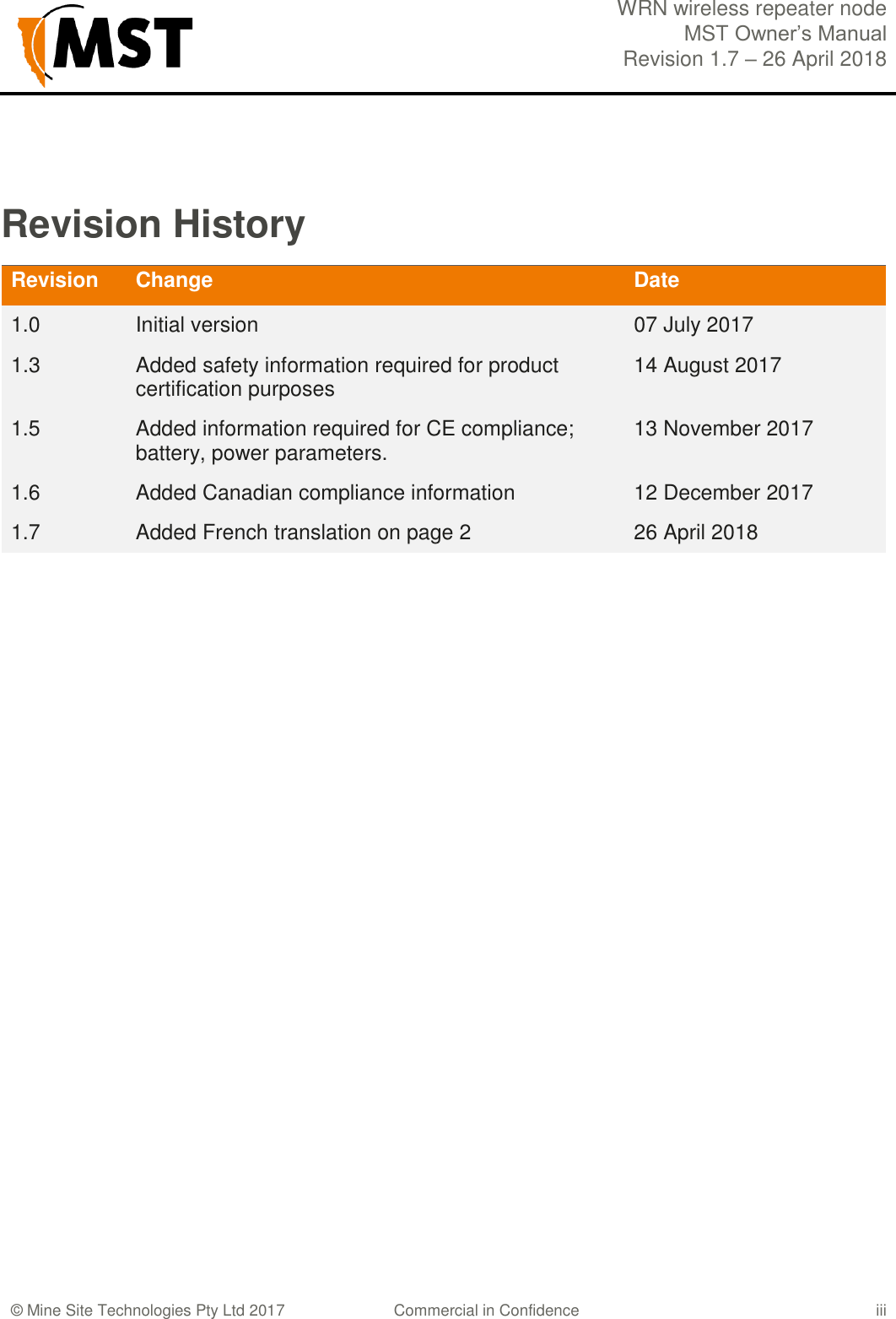
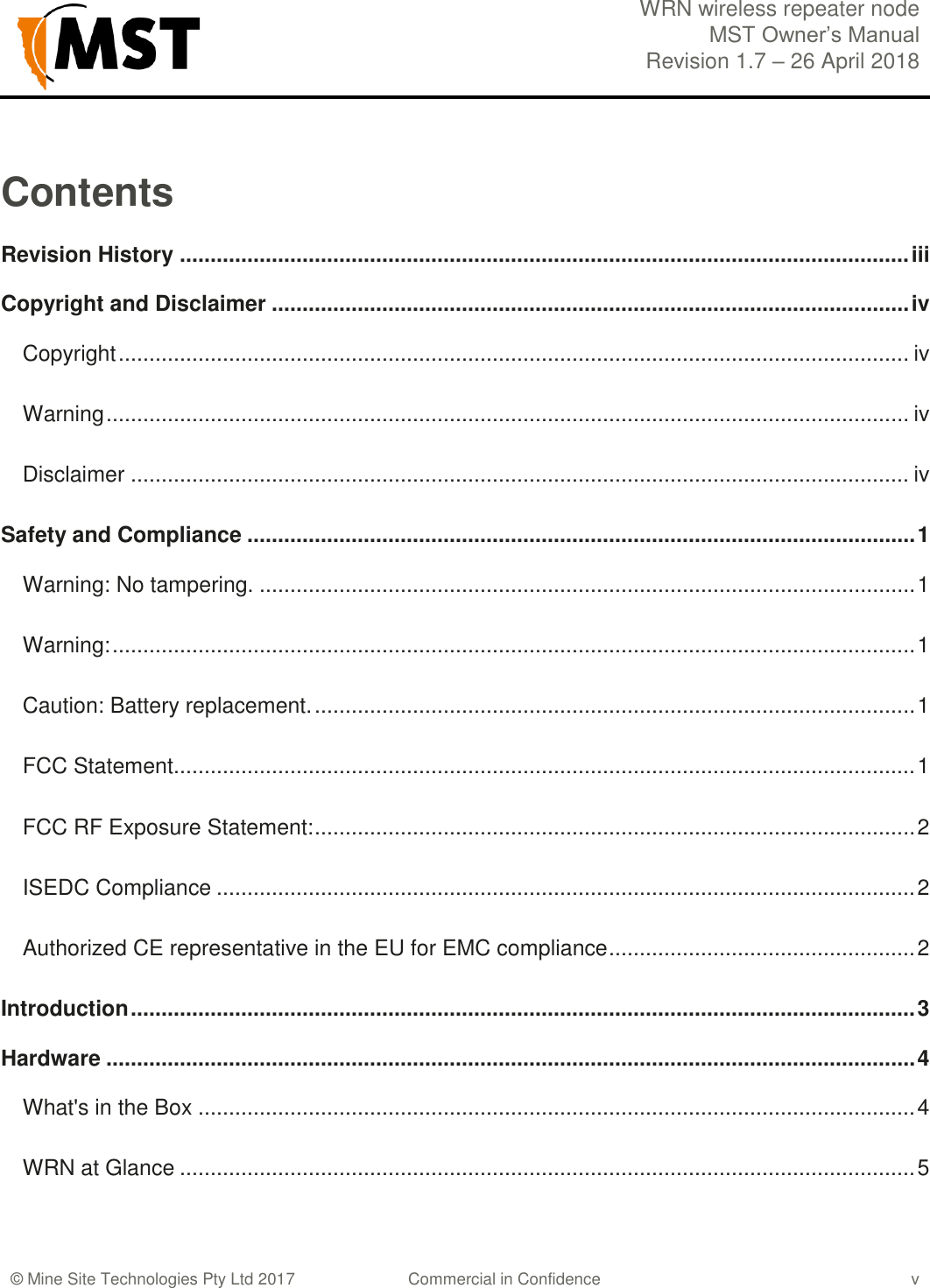
 WRN wireless repeater node MST Owner’s Manual Revision 1.7 – 26 April 2018    © Mine Site Technologies Pty Ltd 2017 Commercial in Confidence iii Revision History Revision Change Date 1.0 Initial version 07 July 2017 1.3 Added safety information required for product certification purposes 14 August 2017 1.5 Added information required for CE compliance; battery, power parameters. 13 November 2017 1.6 Added Canadian compliance information 12 December 2017 1.7 Added French translation on page 2 26 April 2018
 WRN wireless repeater node MST Owner’s Manual Revision 1.7 – 26 April 2018    © Mine Site Technologies Pty Ltd 2017 Commercial in Confidence iv Copyright and Disclaimer Copyright  Published in Sydney by:  Mine Site Technologies Pty Ltd ABN:  93 002 961 953  ACN:  002 961 953 Global Head Office:   Level 5, 113 Wicks Road, North Ryde, NSW 2141 Australia Telephone:      +61 (0)2 9491 6500 This publication is Copyright. Other than for the purposes of and subject to the conditions prescribed under the Copyright Act 1968 (as amended), no part of it may in any form or by any means be reproduced, stored in a retrieval system or transmitted without prior written permission of the copyright owner. Enquiries should be addressed to Mine Site Technologies Pty Ltd. Warning  Unauthorised reproduction of, alteration of contents, or distribution to third parties, in whole or in part is an infringement of copyright. Mine Site Technologies Pty Ltd will actively pursue any breach of its copyright. Disclaimer Information contained in this document has been developed by Mine Site Technologies Pty Ltd (MST). Every care has been taken by the staff of MST to ensure the content of this manual is relevant and up to date at the time of publication. Content is subject to change without notice. Technical updates as associated with this manual will be supplied to the customer at MST’s earliest convenience. This manual is published and distributed on the basis that the publisher is not responsible for the results of any actions taken by users of the information contained in this manual. MST does not accept responsibility for errors or damages resulting from misrepresentation, misinterpretation or deviation from instructions by any person regarding the information contained in this manual. The information is supplied on the condition that the recipient will make their own determination as to the suitability of the information for their purposes prior to use.
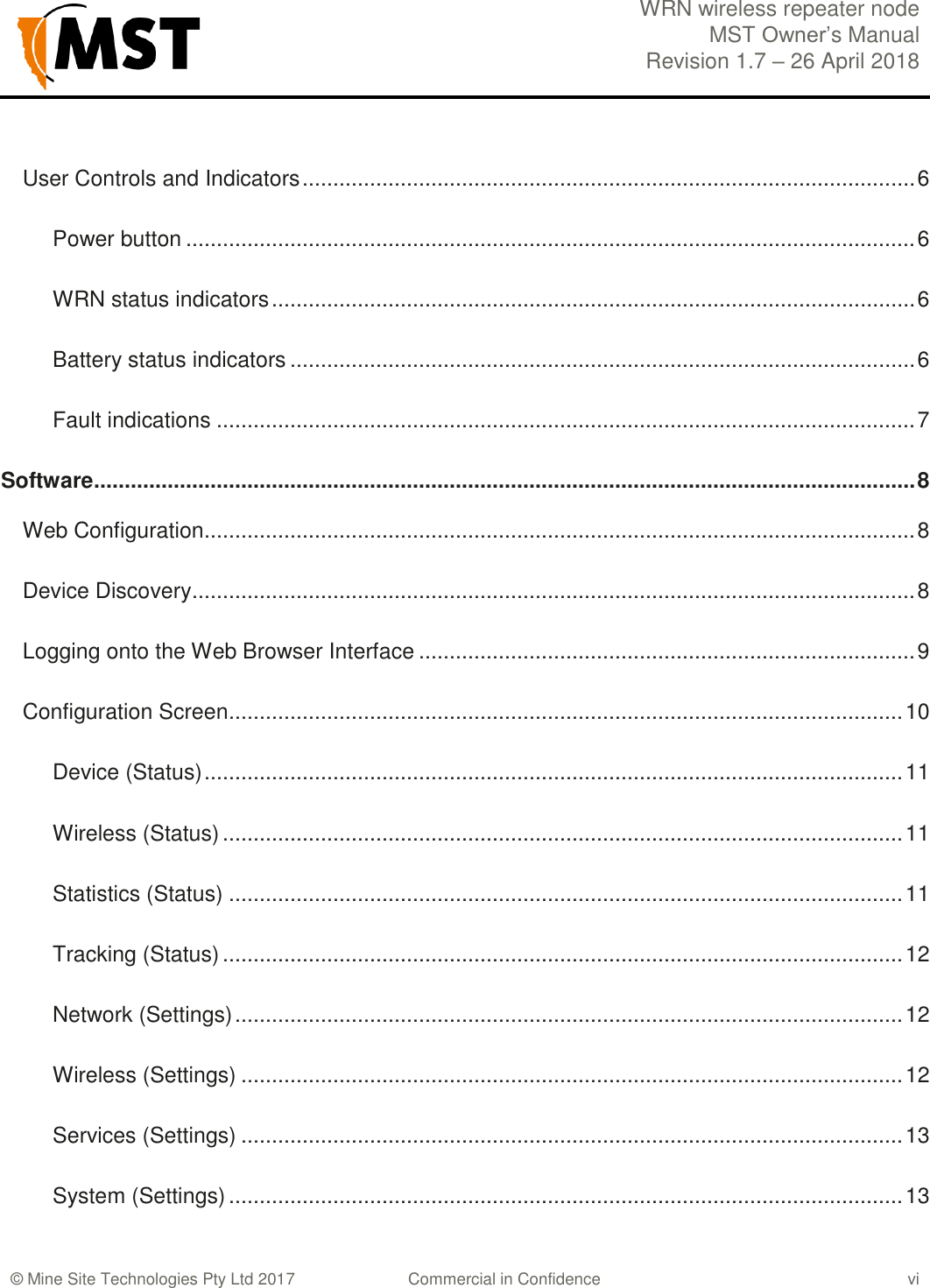
 WRN wireless repeater node MST Owner’s Manual Revision 1.7 – 26 April 2018    © Mine Site Technologies Pty Ltd 2017 Commercial in Confidence v Contents Revision History ....................................................................................................................... iii Copyright and Disclaimer ........................................................................................................ iv Copyright ................................................................................................................................. iv Warning ................................................................................................................................... iv Disclaimer ............................................................................................................................... iv Safety and Compliance ............................................................................................................. 1 Warning: No tampering. ........................................................................................................... 1 Warning: ................................................................................................................................... 1 Caution: Battery replacement. .................................................................................................. 1 FCC Statement......................................................................................................................... 1 FCC RF Exposure Statement: .................................................................................................. 2 ISEDC Compliance .................................................................................................................. 2 Authorized CE representative in the EU for EMC compliance .................................................. 2 Introduction ................................................................................................................................ 3 Hardware .................................................................................................................................... 4 What's in the Box ..................................................................................................................... 4 WRN at Glance ........................................................................................................................ 5
 WRN wireless repeater node MST Owner’s Manual Revision 1.7 – 26 April 2018    © Mine Site Technologies Pty Ltd 2017 Commercial in Confidence vi User Controls and Indicators .................................................................................................... 6 Power button ....................................................................................................................... 6 WRN status indicators ......................................................................................................... 6 Battery status indicators ...................................................................................................... 6 Fault indications .................................................................................................................. 7 Software ...................................................................................................................................... 8 Web Configuration .................................................................................................................... 8 Device Discovery ...................................................................................................................... 8 Logging onto the Web Browser Interface ................................................................................. 9 Configuration Screen .............................................................................................................. 10 Device (Status) .................................................................................................................. 11 Wireless (Status) ............................................................................................................... 11 Statistics (Status) .............................................................................................................. 11 Tracking (Status) ............................................................................................................... 12 Network (Settings) ............................................................................................................. 12 Wireless (Settings) ............................................................................................................ 12 Services (Settings) ............................................................................................................ 13 System (Settings) .............................................................................................................. 13
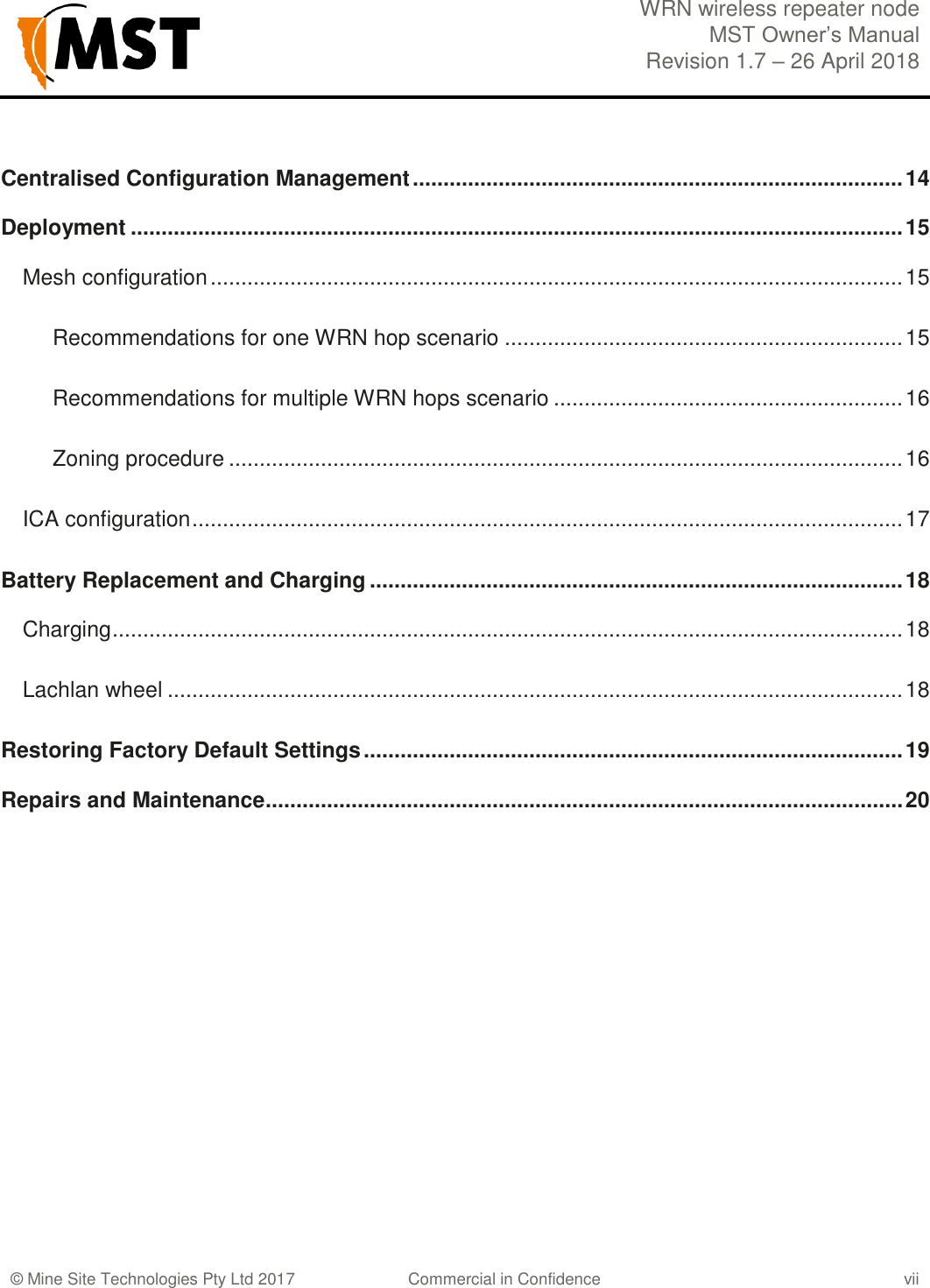
 WRN wireless repeater node MST Owner’s Manual Revision 1.7 – 26 April 2018    © Mine Site Technologies Pty Ltd 2017 Commercial in Confidence vii Centralised Configuration Management ................................................................................ 14 Deployment .............................................................................................................................. 15 Mesh configuration ................................................................................................................. 15 Recommendations for one WRN hop scenario ................................................................. 15 Recommendations for multiple WRN hops scenario ......................................................... 16 Zoning procedure .............................................................................................................. 16 ICA configuration .................................................................................................................... 17 Battery Replacement and Charging ....................................................................................... 18 Charging ................................................................................................................................. 18 Lachlan wheel ........................................................................................................................ 18 Restoring Factory Default Settings ........................................................................................ 19 Repairs and Maintenance ........................................................................................................ 20
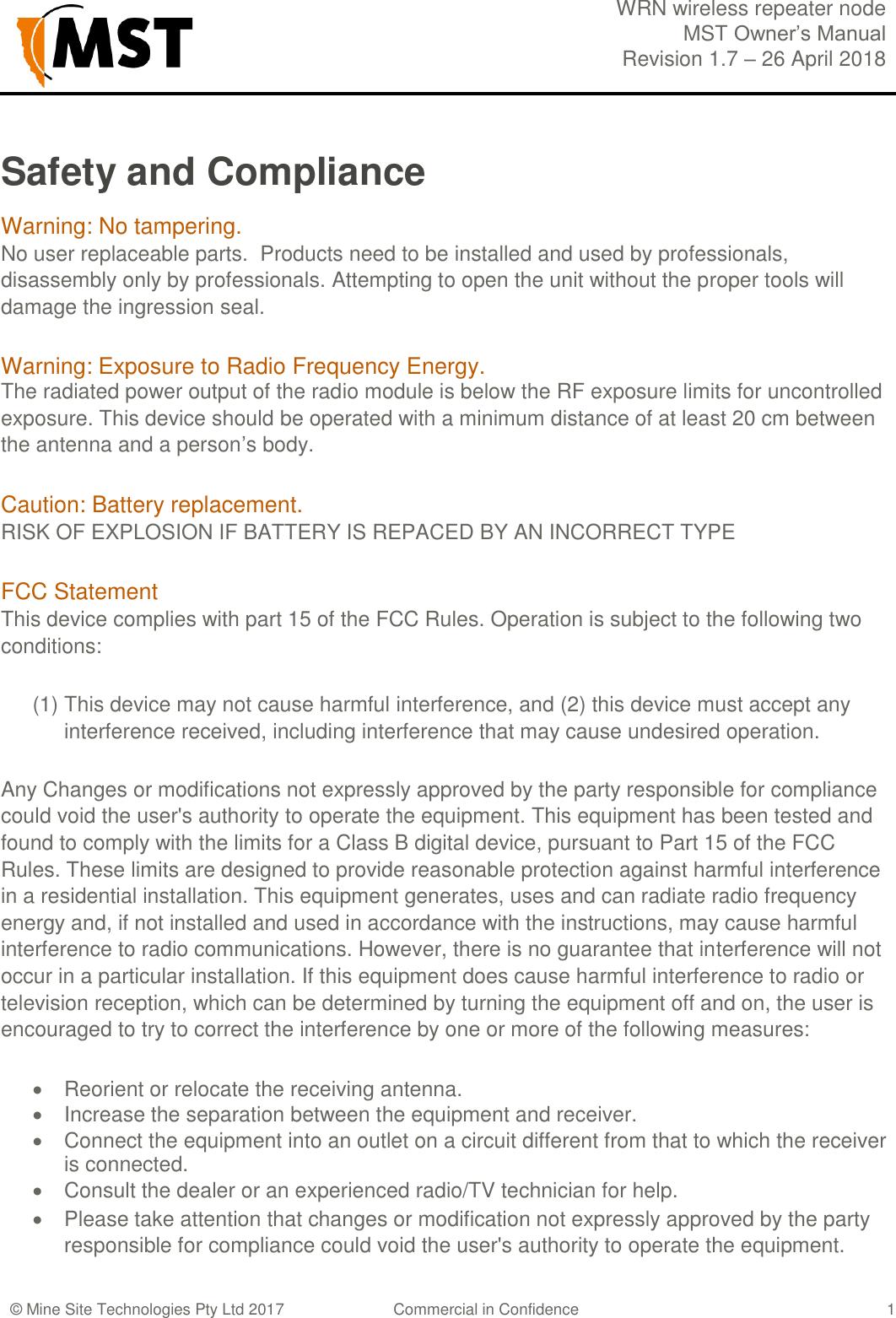
 WRN wireless repeater node MST Owner’s Manual Revision 1.7 – 26 April 2018  © Mine Site Technologies Pty Ltd 2017 Commercial in Confidence   1 Safety and Compliance Warning: No tampering.  No user replaceable parts.  Products need to be installed and used by professionals, disassembly only by professionals. Attempting to open the unit without the proper tools will damage the ingression seal. Warning: Exposure to Radio Frequency Energy. The radiated power output of the radio module is below the RF exposure limits for uncontrolled exposure. This device should be operated with a minimum distance of at least 20 cm between the antenna and a person’s body. Caution: Battery replacement. RISK OF EXPLOSION IF BATTERY IS REPACED BY AN INCORRECT TYPE FCC Statement This device complies with part 15 of the FCC Rules. Operation is subject to the following two conditions:  (1) This device may not cause harmful interference, and (2) this device must accept any interference received, including interference that may cause undesired operation. Any Changes or modifications not expressly approved by the party responsible for compliance could void the user's authority to operate the equipment. This equipment has been tested and found to comply with the limits for a Class B digital device, pursuant to Part 15 of the FCC Rules. These limits are designed to provide reasonable protection against harmful interference in a residential installation. This equipment generates, uses and can radiate radio frequency energy and, if not installed and used in accordance with the instructions, may cause harmful interference to radio communications. However, there is no guarantee that interference will not occur in a particular installation. If this equipment does cause harmful interference to radio or television reception, which can be determined by turning the equipment off and on, the user is encouraged to try to correct the interference by one or more of the following measures:   Reorient or relocate the receiving antenna.   Increase the separation between the equipment and receiver.   Connect the equipment into an outlet on a circuit different from that to which the receiver is connected.   Consult the dealer or an experienced radio/TV technician for help.   Please take attention that changes or modification not expressly approved by the party responsible for compliance could void the user's authority to operate the equipment.
 WRN wireless repeater node MST Owner’s Manual Revision 1.7 – 26 April 2018  © Mine Site Technologies Pty Ltd 2017 Commercial in Confidence   2 FCC RF Exposure Statement: This equipment should be installed and operated with minimum distance 20cm between the radiator & your body.  ISEDC Compliance  This device complies with Innovation, Science, and Economic Development 7 Canada licence-exempt RSS standard(s). Operation is subject to the following two conditions: (1) This device may not cause interference, and (2) This device must accept any interference, including interference that may cause undesired operation of the device.  Le présent appareil est conforme aux CNR d' Innovation, Science et Développement economique Canada applicables aux appareils radio exempts de licence. L'exploitation est autorisée aux deux conditions suivantes: (1) l'appareil ne doit pas produire de brouillage, et (2) l'utilisateur de l'appareil doit accepter tout brouillage radioélectrique subi, même si le brouillage est susceptible d'en compromettre le fonctionnement.  The antenna(s) used for this transmitter must be installed to provide a separation distance of at least 20cm from all persons and must not be collocated or operating in conjunction with any other antenna or transmitter, End-Users must be provided with transmitter operation conditions for satisfying RF exposure compliance. Cet émetteur ne doit pas tre Co-placé ou ne fonctionnant en même temps qu'aucune autre antenne ou émetteur. Cet équipement devrait être installé et actionné avec une distance minimum de 20 centimètres entre le radiateur et votre corps. Authorized CE representative in the EU for EMC compliance HASO S.C.  ul. Towarowa 20, 43-100 Tychy, Poland
 WRN wireless repeater node MST Owner’s Manual Revision 1.7 – 26 April 2018  © Mine Site Technologies Pty Ltd 2017 Commercial in Confidence   3 Introduction MST Wireless Repeater Node (WRN) is a battery-powered solution for network connectivity in underground locations, where no power or fixed network infrastructure is available. Without requiring any setup or configuration, the units form a mesh with up to 10 nodes that extends the open standards 802.11b/g/n Wi-Fi coverage into the working areas. This allows real-time data collection from trucks, loaders, and drill rigs that are often working in areas without any communications for extended periods. It also enables 2-way voice communications using the MST MinePhone handsets for Coal and Hard Rock.  WRN has the following features:   1 x 802.11b/g/n wireless radio  Modulation: CCK, OFDM, BPSK, DQPSK  TX Power: 16 dB  1 x N-Type Male antenna connector  1 x 2dBi Omni-directional antenna  Two 96 Amp/h hot swappable Li-Ion batteries  Battery type: W-WRN-600    Power input parameters: 7.4V, 150mA  Typical operational time with fully charged batteries is more than 120 hours (the actual time will vary depending on the environment and the amount of transmitted data).  AeroScout®  and MST Tag reading capability, allowing real time tracking of assets and personnel  Low power consumption  Simple Network Management Protocol (SNMP) support for remote monitoring  Trivial File Transfer Protocol (TFTP) based central configuration management  Support of 802.11s meshing  Weight : 3.45kg (with 2 battery packs)  Dimensions : 233x310x92 mm  Operating Temperature : 0 to +50 ℃
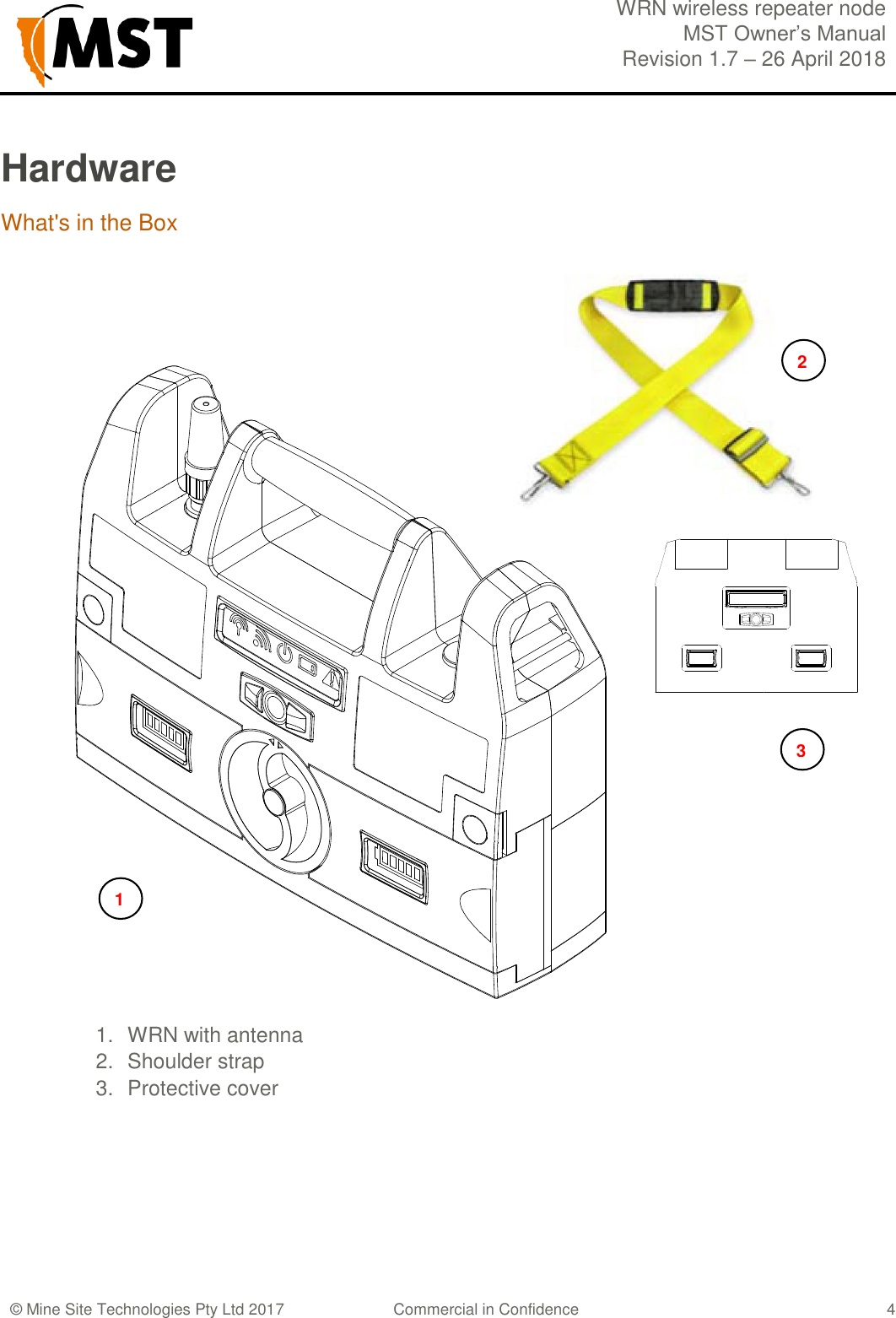
 WRN wireless repeater node MST Owner’s Manual Revision 1.7 – 26 April 2018  © Mine Site Technologies Pty Ltd 2017 Commercial in Confidence   4 Hardware What's in the Box               1.  WRN with antenna 2.  Shoulder strap 3.  Protective cover    1 2 3
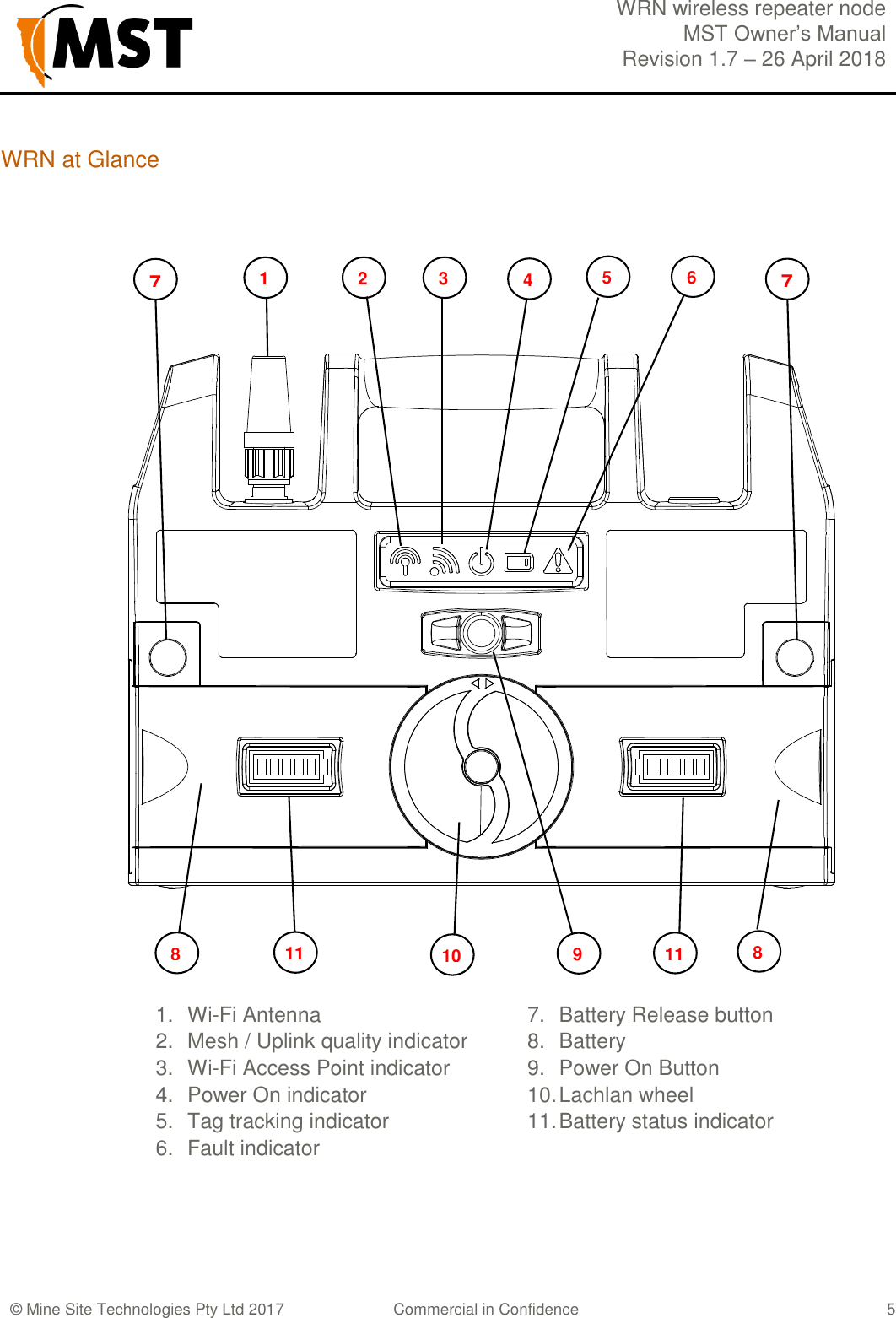
 WRN wireless repeater node MST Owner’s Manual Revision 1.7 – 26 April 2018  © Mine Site Technologies Pty Ltd 2017 Commercial in Confidence   5 WRN at Glance         1. Wi-Fi Antenna 2.  Mesh / Uplink quality indicator 3. Wi-Fi Access Point indicator 4.  Power On indicator 5.  Tag tracking indicator 6.  Fault indicator 7.  Battery Release button 8.  Battery 9.  Power On Button 10. Lachlan wheel 11. Battery status indicator      11 10 9 1 2 3 4 5 6 7 7 8 8 11
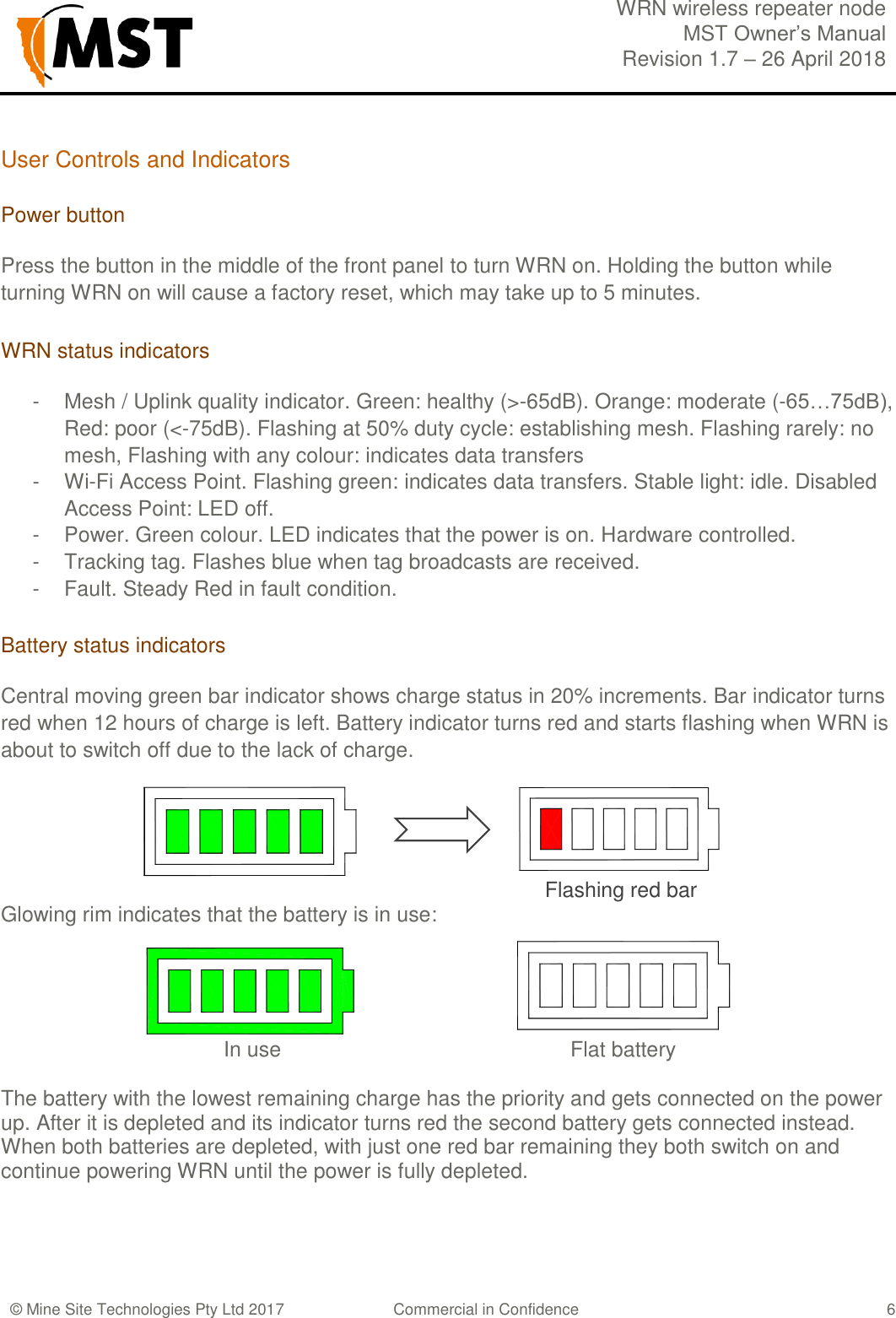
 WRN wireless repeater node MST Owner’s Manual Revision 1.7 – 26 April 2018  © Mine Site Technologies Pty Ltd 2017 Commercial in Confidence   6 User Controls and Indicators  Power button  Press the button in the middle of the front panel to turn WRN on. Holding the button while turning WRN on will cause a factory reset, which may take up to 5 minutes. WRN status indicators   -  Mesh / Uplink quality indicator. Green: healthy (>-65dB). Orange: moderate (-65…75dB), Red: poor (<-75dB). Flashing at 50% duty cycle: establishing mesh. Flashing rarely: no mesh, Flashing with any colour: indicates data transfers -  Wi-Fi Access Point. Flashing green: indicates data transfers. Stable light: idle. Disabled Access Point: LED off. -  Power. Green colour. LED indicates that the power is on. Hardware controlled. -  Tracking tag. Flashes blue when tag broadcasts are received. -  Fault. Steady Red in fault condition.  Battery status indicators   Central moving green bar indicator shows charge status in 20% increments. Bar indicator turns red when 12 hours of charge is left. Battery indicator turns red and starts flashing when WRN is about to switch off due to the lack of charge.                                                              Flashing red bar Glowing rim indicates that the battery is in use:                                        In use           Flat battery   The battery with the lowest remaining charge has the priority and gets connected on the power up. After it is depleted and its indicator turns red the second battery gets connected instead. When both batteries are depleted, with just one red bar remaining they both switch on and continue powering WRN until the power is fully depleted.
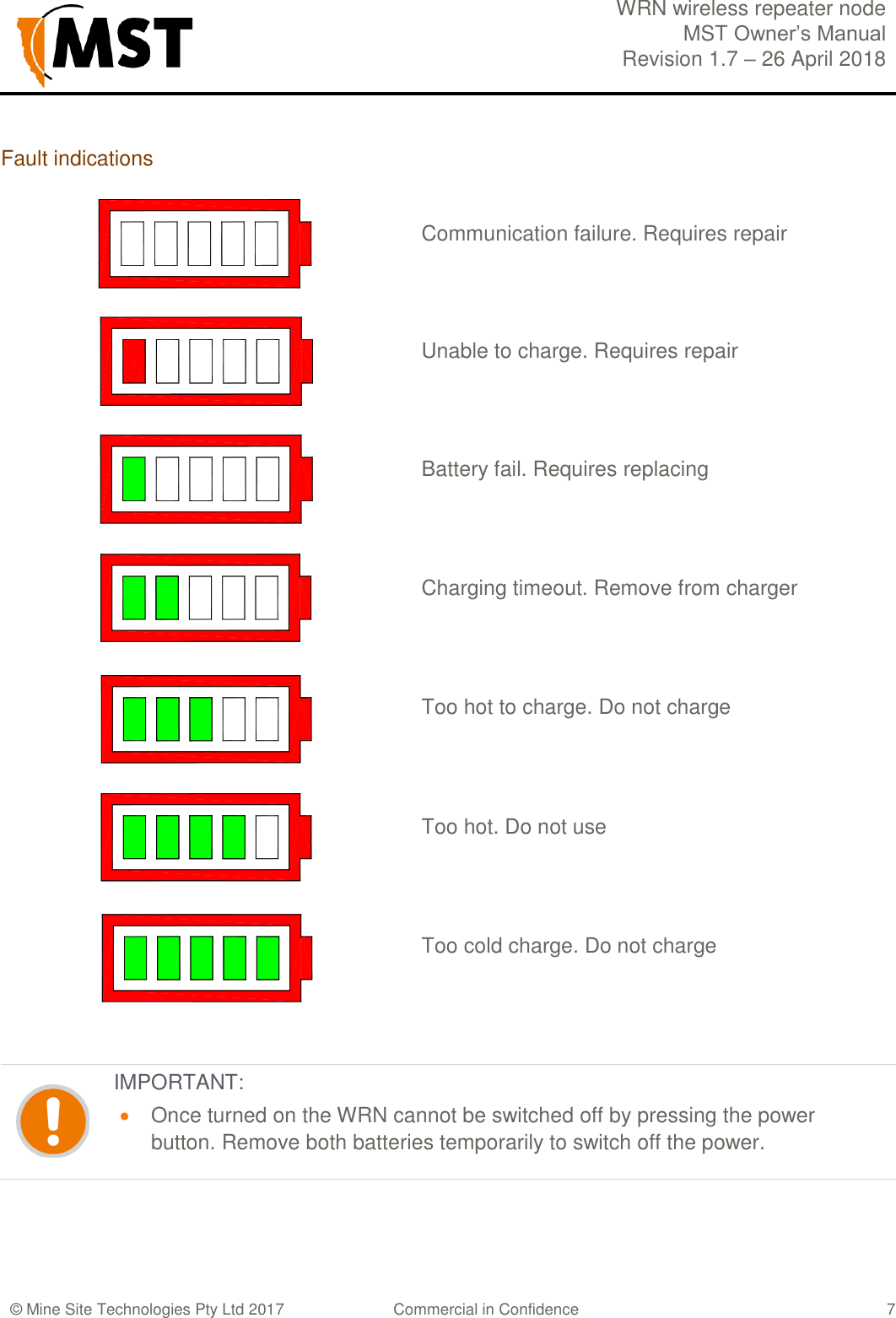
 WRN wireless repeater node MST Owner’s Manual Revision 1.7 – 26 April 2018  © Mine Site Technologies Pty Ltd 2017 Commercial in Confidence   7 Fault indications     Communication failure. Requires repair    Unable to charge. Requires repair    Battery fail. Requires replacing    Charging timeout. Remove from charger    Too hot to charge. Do not charge    Too hot. Do not use   Too cold charge. Do not charge   IMPORTANT:  Once turned on the WRN cannot be switched off by pressing the power button. Remove both batteries temporarily to switch off the power.
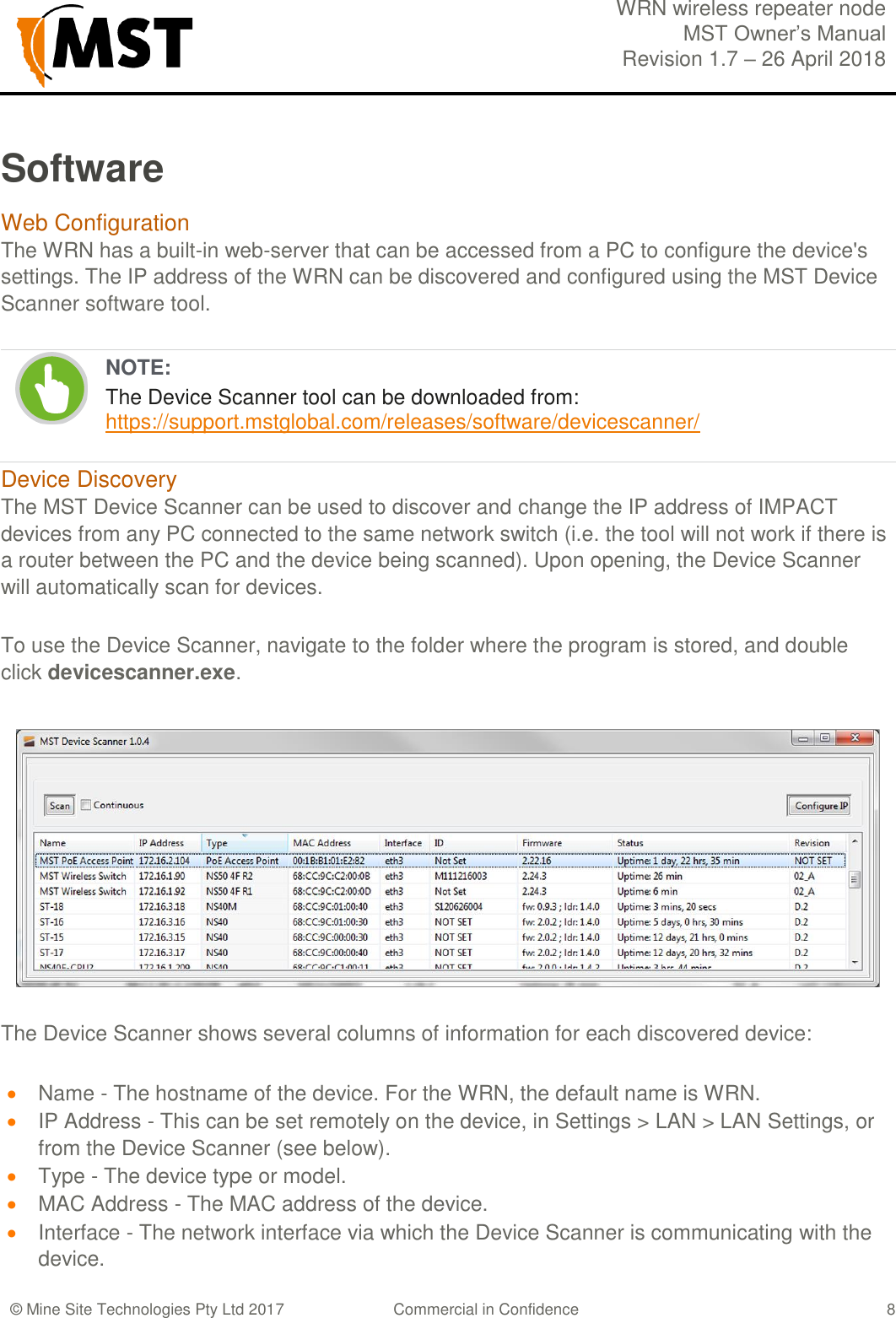
 WRN wireless repeater node MST Owner’s Manual Revision 1.7 – 26 April 2018  © Mine Site Technologies Pty Ltd 2017 Commercial in Confidence   8 Software Web Configuration The WRN has a built-in web-server that can be accessed from a PC to configure the device's settings. The IP address of the WRN can be discovered and configured using the MST Device Scanner software tool.  NOTE: The Device Scanner tool can be downloaded from:  https://support.mstglobal.com/releases/software/devicescanner/  Device Discovery The MST Device Scanner can be used to discover and change the IP address of IMPACT devices from any PC connected to the same network switch (i.e. the tool will not work if there is a router between the PC and the device being scanned). Upon opening, the Device Scanner will automatically scan for devices. To use the Device Scanner, navigate to the folder where the program is stored, and double click devicescanner.exe.  The Device Scanner shows several columns of information for each discovered device:  Name - The hostname of the device. For the WRN, the default name is WRN.  IP Address - This can be set remotely on the device, in Settings > LAN > LAN Settings, or from the Device Scanner (see below).  Type - The device type or model.  MAC Address - The MAC address of the device.  Interface - The network interface via which the Device Scanner is communicating with the device.
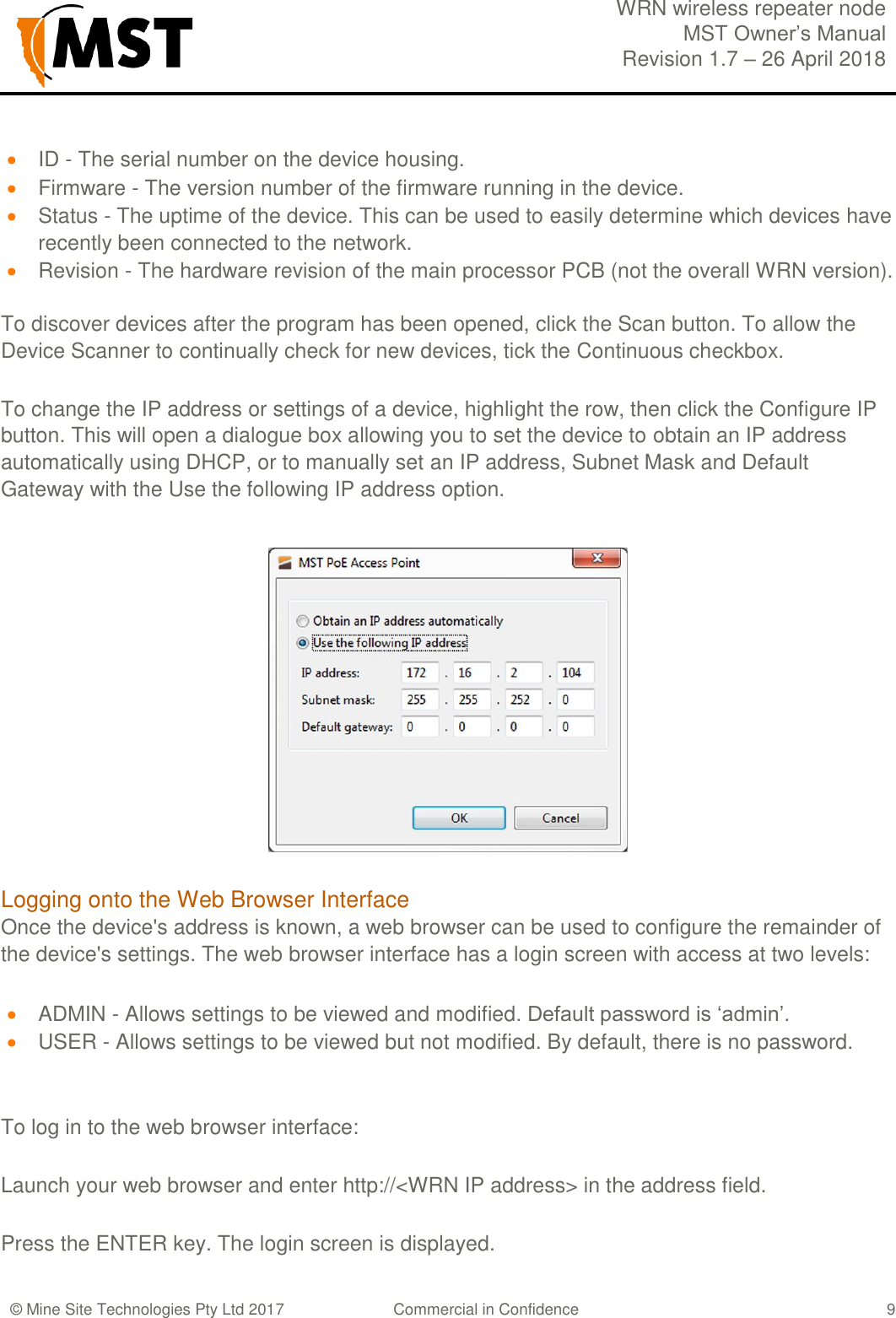
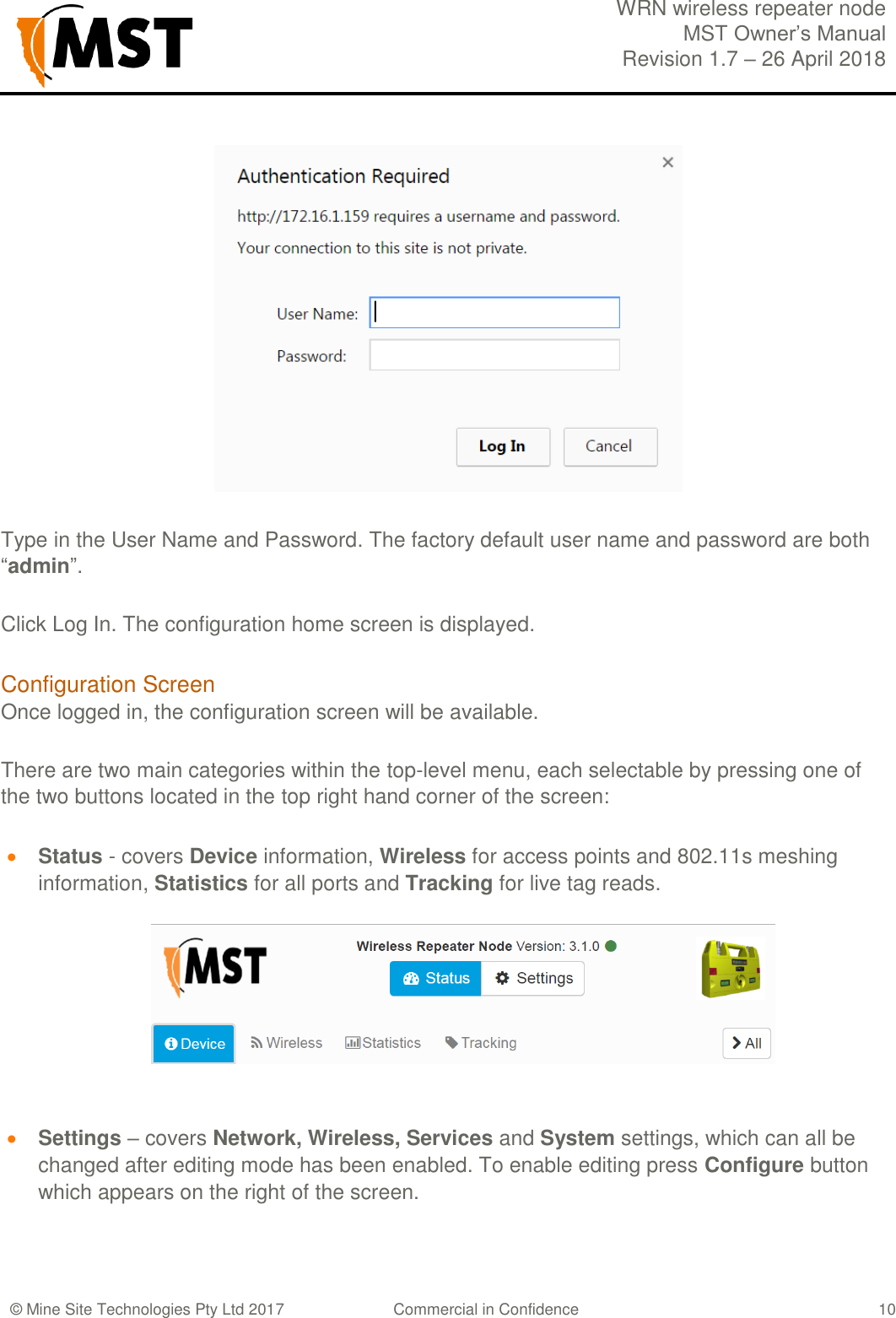
 WRN wireless repeater node MST Owner’s Manual Revision 1.7 – 26 April 2018  © Mine Site Technologies Pty Ltd 2017 Commercial in Confidence   9  ID - The serial number on the device housing.  Firmware - The version number of the firmware running in the device.  Status - The uptime of the device. This can be used to easily determine which devices have recently been connected to the network.  Revision - The hardware revision of the main processor PCB (not the overall WRN version).  To discover devices after the program has been opened, click the Scan button. To allow the Device Scanner to continually check for new devices, tick the Continuous checkbox. To change the IP address or settings of a device, highlight the row, then click the Configure IP button. This will open a dialogue box allowing you to set the device to obtain an IP address automatically using DHCP, or to manually set an IP address, Subnet Mask and Default Gateway with the Use the following IP address option.  Logging onto the Web Browser Interface Once the device's address is known, a web browser can be used to configure the remainder of the device's settings. The web browser interface has a login screen with access at two levels:  ADMIN - Allows settings to be viewed and modified. Default password is ‘admin’.  USER - Allows settings to be viewed but not modified. By default, there is no password.  To log in to the web browser interface: Launch your web browser and enter http://<WRN IP address> in the address field. Press the ENTER key. The login screen is displayed.
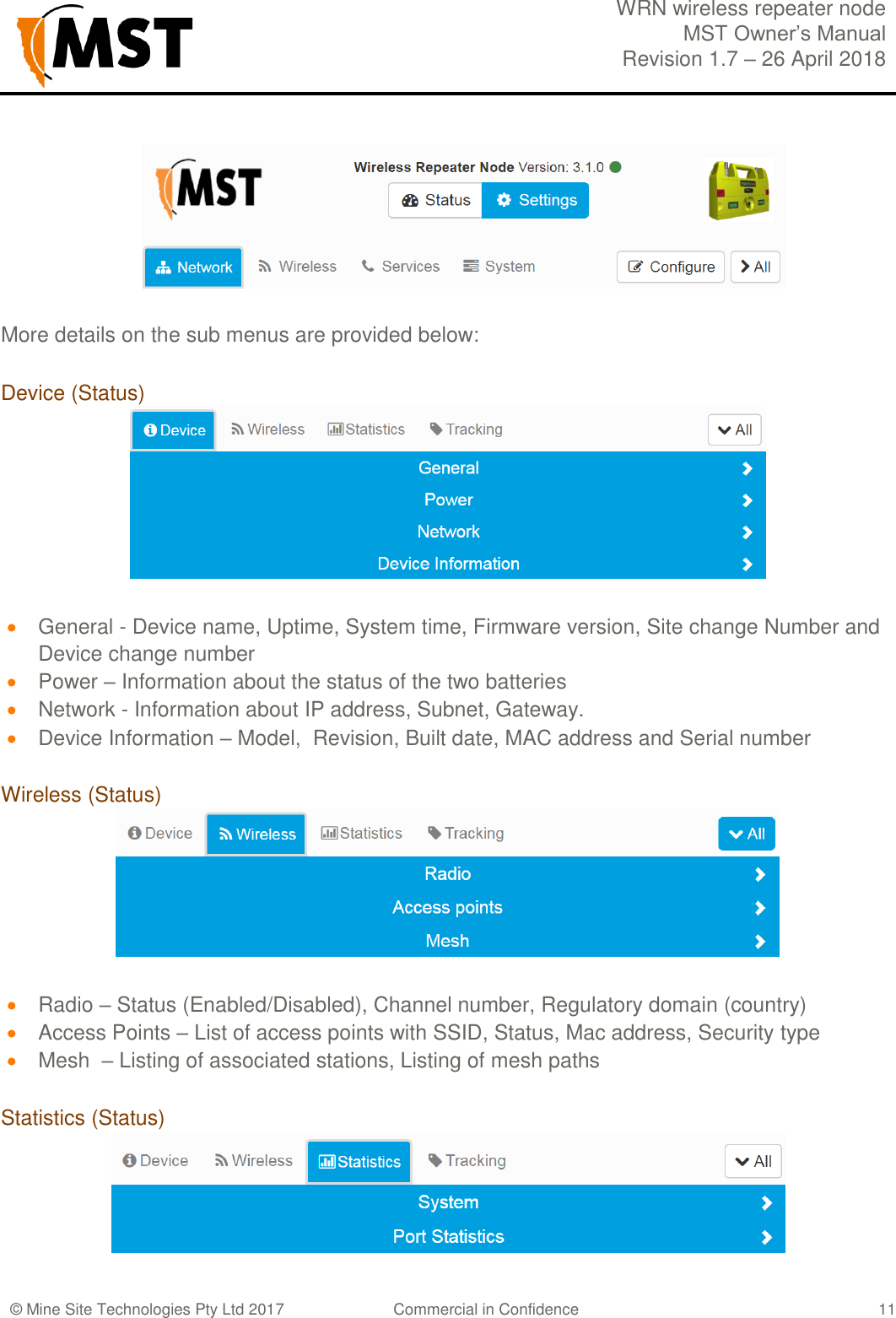
 WRN wireless repeater node MST Owner’s Manual Revision 1.7 – 26 April 2018  © Mine Site Technologies Pty Ltd 2017 Commercial in Confidence   10  Type in the User Name and Password. The factory default user name and password are both “admin”. Click Log In. The configuration home screen is displayed. Configuration Screen Once logged in, the configuration screen will be available. There are two main categories within the top-level menu, each selectable by pressing one of the two buttons located in the top right hand corner of the screen:  Status - covers Device information, Wireless for access points and 802.11s meshing information, Statistics for all ports and Tracking for live tag reads.      Settings – covers Network, Wireless, Services and System settings, which can all be changed after editing mode has been enabled. To enable editing press Configure button which appears on the right of the screen.
 WRN wireless repeater node MST Owner’s Manual Revision 1.7 – 26 April 2018  © Mine Site Technologies Pty Ltd 2017 Commercial in Confidence   11  More details on the sub menus are provided below: Device (Status)   General - Device name, Uptime, System time, Firmware version, Site change Number and Device change number  Power – Information about the status of the two batteries  Network - Information about IP address, Subnet, Gateway.  Device Information – Model,  Revision, Built date, MAC address and Serial number  Wireless (Status)   Radio – Status (Enabled/Disabled), Channel number, Regulatory domain (country)  Access Points – List of access points with SSID, Status, Mac address, Security type  Mesh  – Listing of associated stations, Listing of mesh paths  Statistics (Status)
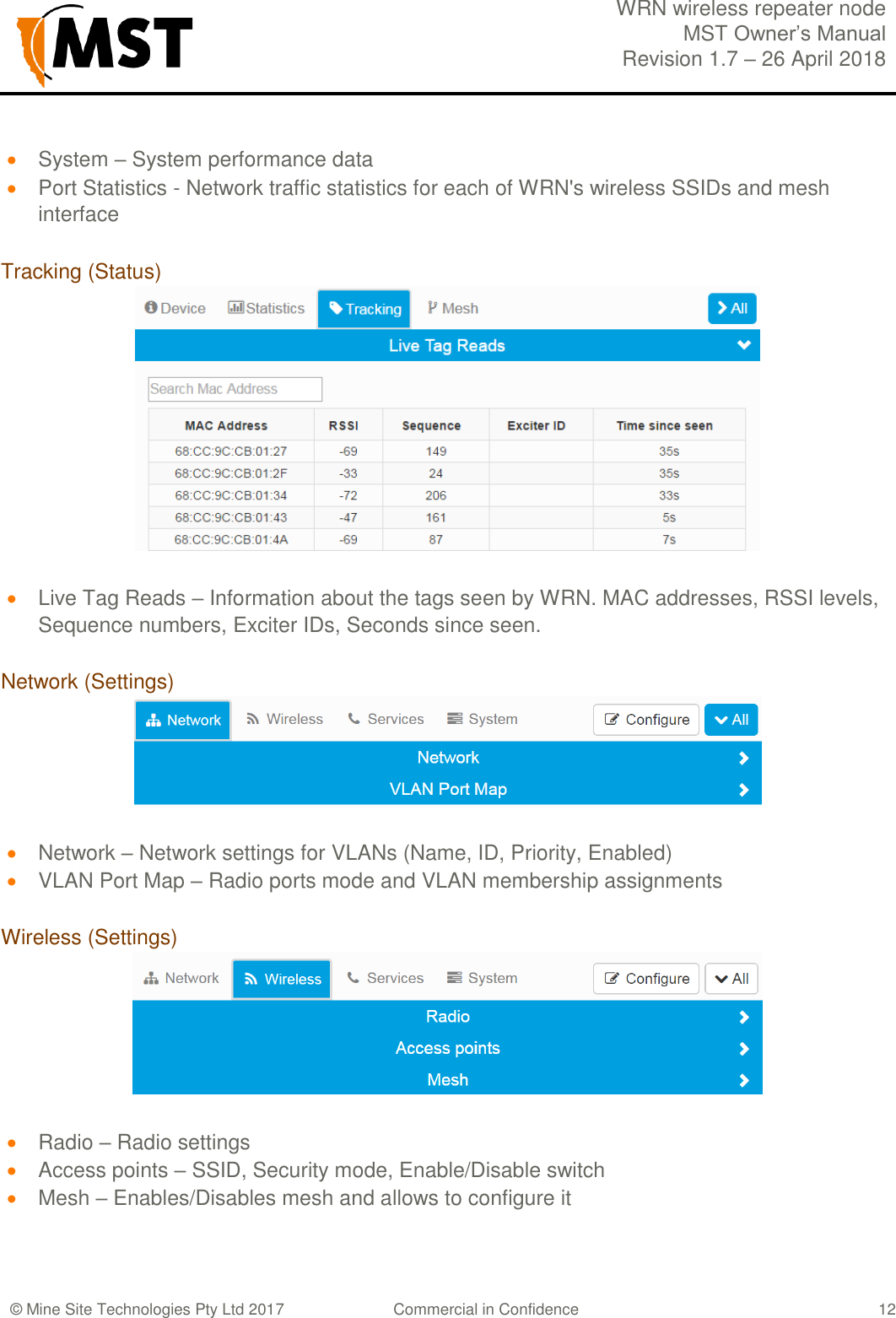
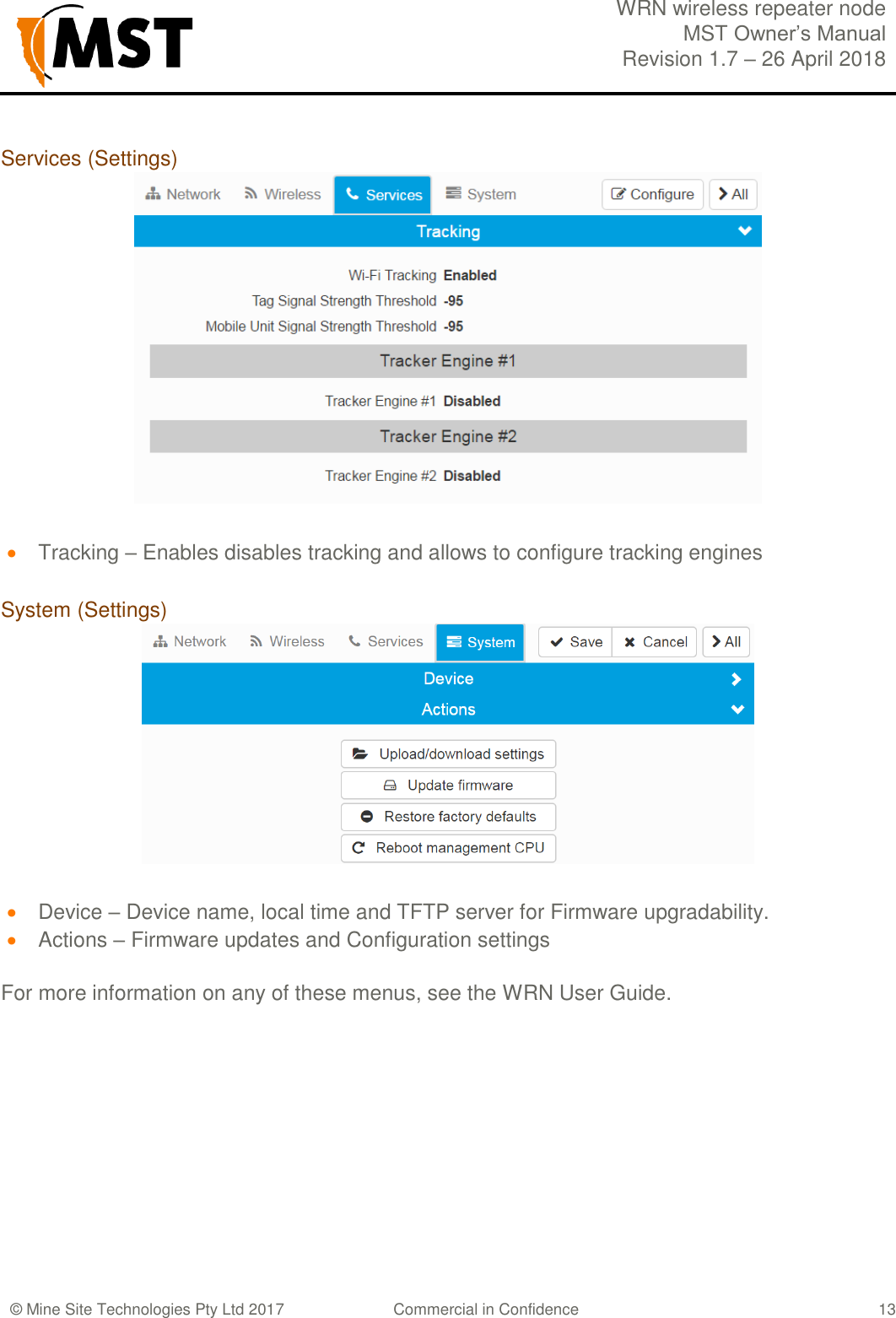
 WRN wireless repeater node MST Owner’s Manual Revision 1.7 – 26 April 2018  © Mine Site Technologies Pty Ltd 2017 Commercial in Confidence   12  System – System performance data  Port Statistics - Network traffic statistics for each of WRN's wireless SSIDs and mesh interface  Tracking (Status)   Live Tag Reads – Information about the tags seen by WRN. MAC addresses, RSSI levels, Sequence numbers, Exciter IDs, Seconds since seen.  Network (Settings)   Network – Network settings for VLANs (Name, ID, Priority, Enabled)  VLAN Port Map – Radio ports mode and VLAN membership assignments  Wireless (Settings)   Radio – Radio settings  Access points – SSID, Security mode, Enable/Disable switch  Mesh – Enables/Disables mesh and allows to configure it
 WRN wireless repeater node MST Owner’s Manual Revision 1.7 – 26 April 2018  © Mine Site Technologies Pty Ltd 2017 Commercial in Confidence   13 Services (Settings)   Tracking – Enables disables tracking and allows to configure tracking engines  System (Settings)   Device – Device name, local time and TFTP server for Firmware upgradability.   Actions – Firmware updates and Configuration settings  For more information on any of these menus, see the WRN User Guide.
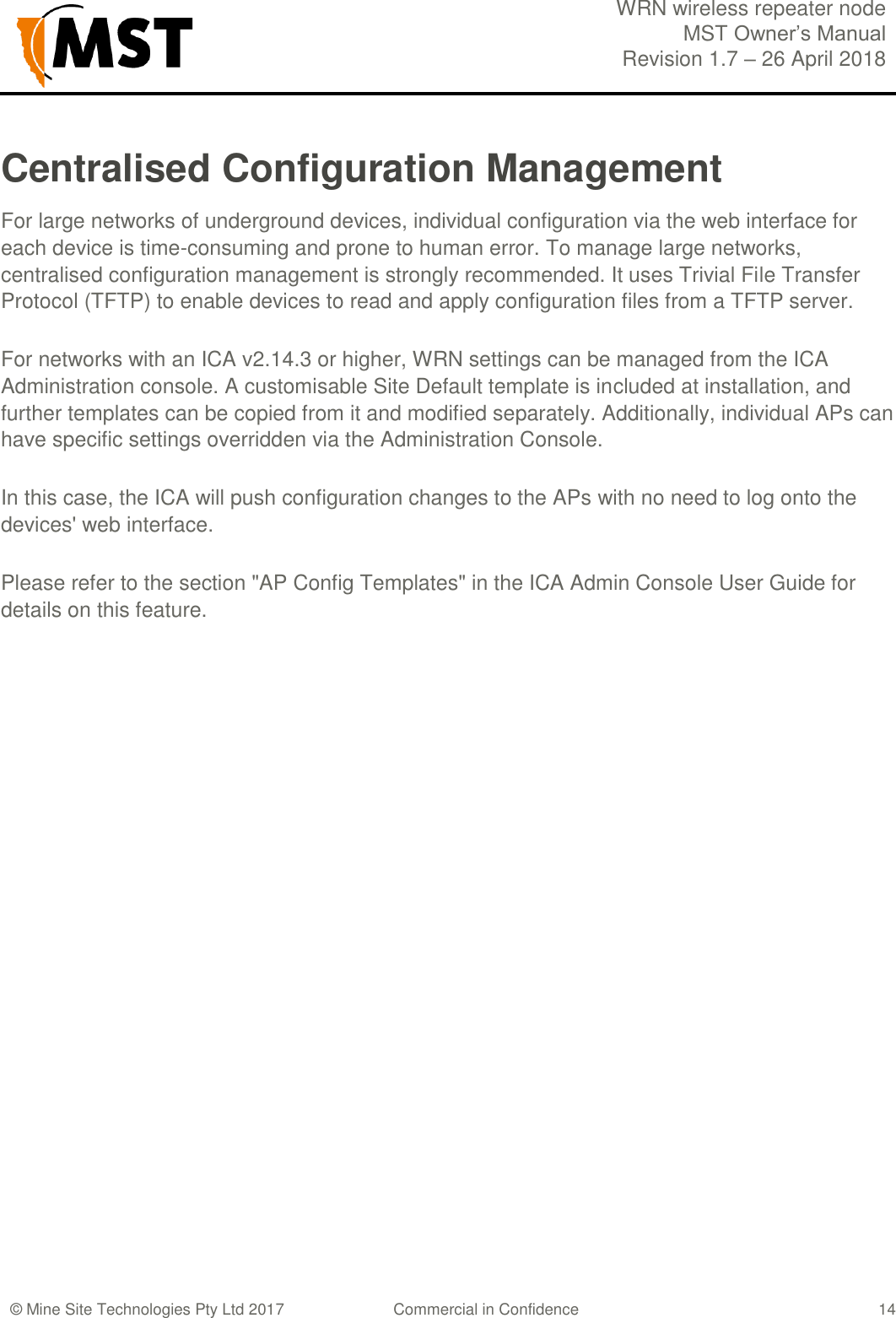
 WRN wireless repeater node MST Owner’s Manual Revision 1.7 – 26 April 2018  © Mine Site Technologies Pty Ltd 2017 Commercial in Confidence   14 Centralised Configuration Management For large networks of underground devices, individual configuration via the web interface for each device is time-consuming and prone to human error. To manage large networks, centralised configuration management is strongly recommended. It uses Trivial File Transfer Protocol (TFTP) to enable devices to read and apply configuration files from a TFTP server.  For networks with an ICA v2.14.3 or higher, WRN settings can be managed from the ICA Administration console. A customisable Site Default template is included at installation, and further templates can be copied from it and modified separately. Additionally, individual APs can have specific settings overridden via the Administration Console. In this case, the ICA will push configuration changes to the APs with no need to log onto the devices' web interface. Please refer to the section "AP Config Templates" in the ICA Admin Console User Guide for details on this feature.
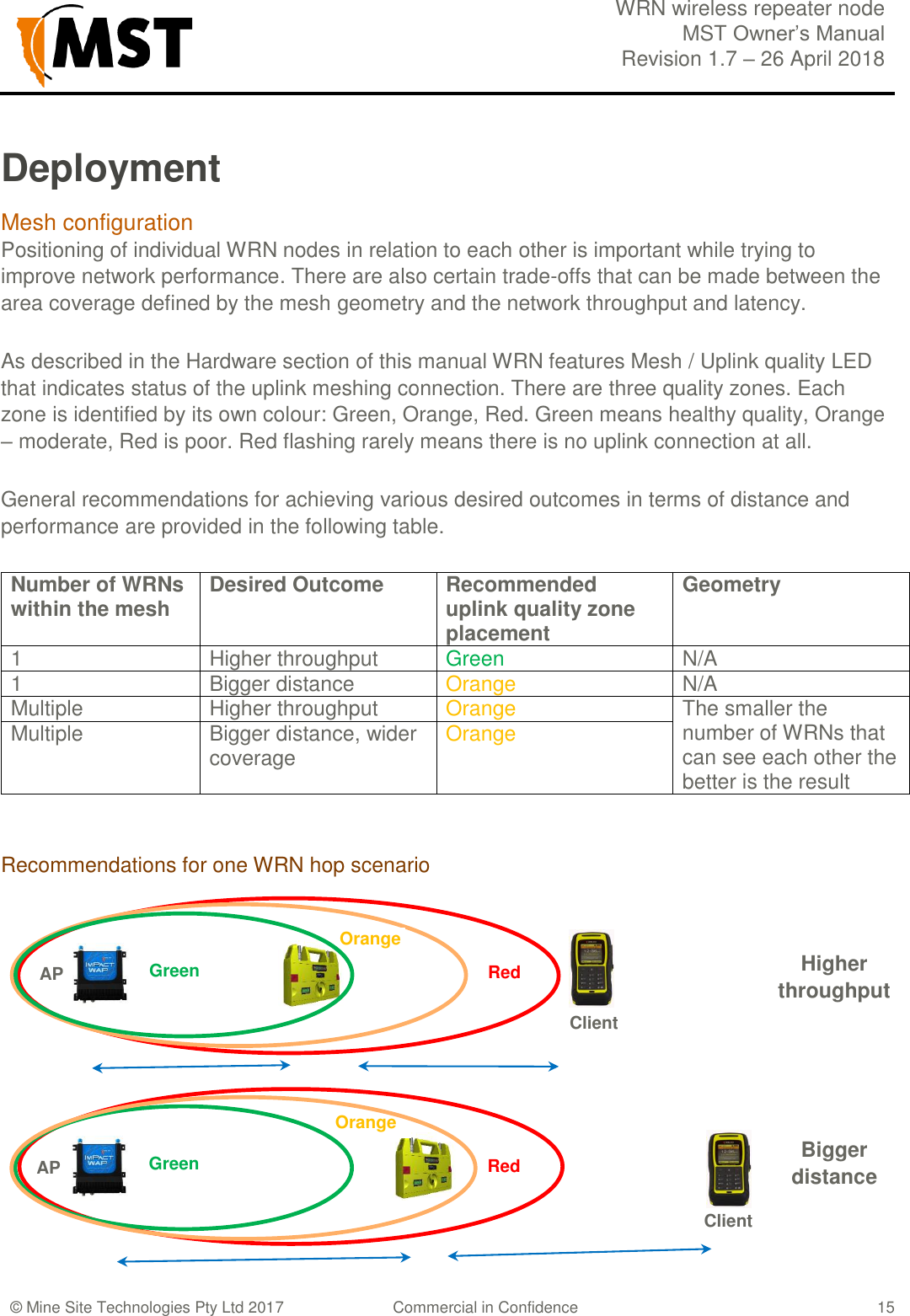
 WRN wireless repeater node MST Owner’s Manual Revision 1.7 – 26 April 2018  © Mine Site Technologies Pty Ltd 2017 Commercial in Confidence   15 Green Orange Red Bigger distance Green Orange Red Higher throughput AP Client Deployment Mesh configuration Positioning of individual WRN nodes in relation to each other is important while trying to improve network performance. There are also certain trade-offs that can be made between the area coverage defined by the mesh geometry and the network throughput and latency.  As described in the Hardware section of this manual WRN features Mesh / Uplink quality LED that indicates status of the uplink meshing connection. There are three quality zones. Each zone is identified by its own colour: Green, Orange, Red. Green means healthy quality, Orange – moderate, Red is poor. Red flashing rarely means there is no uplink connection at all. General recommendations for achieving various desired outcomes in terms of distance and performance are provided in the following table. Number of WRNs within the mesh Desired Outcome Recommended uplink quality zone placement Geometry 1  Higher throughput Green N/A 1 Bigger distance Orange N/A Multiple Higher throughput Orange  The smaller the number of WRNs that can see each other the better is the result Multiple Bigger distance, wider coverage Orange  Recommendations for one WRN hop scenario          AP Client
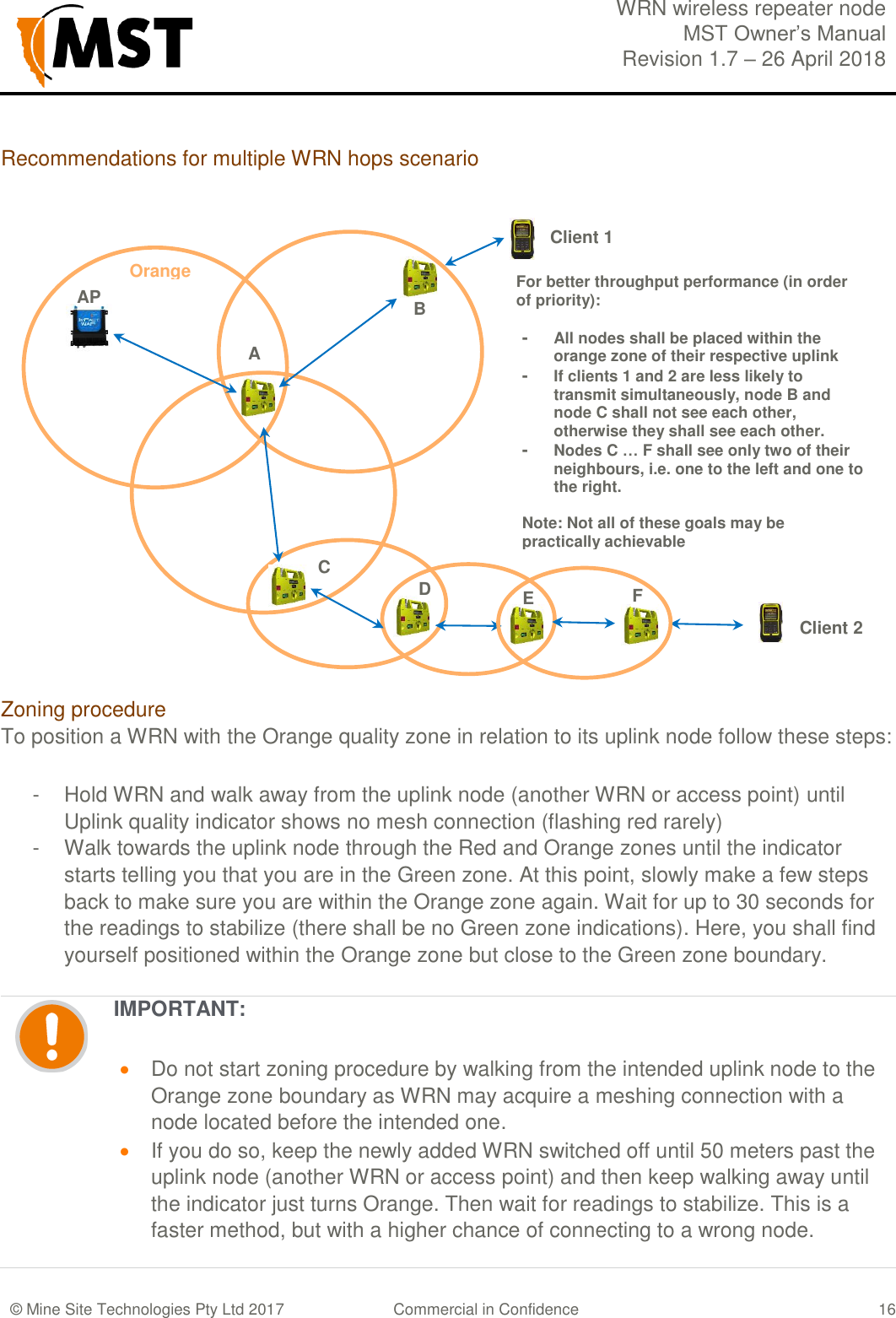
 WRN wireless repeater node MST Owner’s Manual Revision 1.7 – 26 April 2018  © Mine Site Technologies Pty Ltd 2017 Commercial in Confidence   16 D E For better throughput performance (in order of priority):  -All nodes shall be placed within the orange zone of their respective uplink -If clients 1 and 2 are less likely to transmit simultaneously, node B and node C shall not see each other, otherwise they shall see each other. -Nodes C … F shall see only two of their neighbours, i.e. one to the left and one to the right.   Note: Not all of these goals may be practically achievable Orange A C B AP Client 1 Client 2 F Recommendations for multiple WRN hops scenario          Zoning procedure To position a WRN with the Orange quality zone in relation to its uplink node follow these steps:  -  Hold WRN and walk away from the uplink node (another WRN or access point) until Uplink quality indicator shows no mesh connection (flashing red rarely) -  Walk towards the uplink node through the Red and Orange zones until the indicator starts telling you that you are in the Green zone. At this point, slowly make a few steps back to make sure you are within the Orange zone again. Wait for up to 30 seconds for the readings to stabilize (there shall be no Green zone indications). Here, you shall find yourself positioned within the Orange zone but close to the Green zone boundary.   IMPORTANT:  Do not start zoning procedure by walking from the intended uplink node to the Orange zone boundary as WRN may acquire a meshing connection with a node located before the intended one.  If you do so, keep the newly added WRN switched off until 50 meters past the uplink node (another WRN or access point) and then keep walking away until the indicator just turns Orange. Then wait for readings to stabilize. This is a faster method, but with a higher chance of connecting to a wrong node.
 WRN wireless repeater node MST Owner’s Manual Revision 1.7 – 26 April 2018  © Mine Site Technologies Pty Ltd 2017 Commercial in Confidence   17   ICA configuration Support for WRN was introduced in ICA version 2.14.3, the following features require an ICA upgraded to this version or later. The WRN appears as a type of Access Point in the ICA.  The same procedures for managing and configuring APs apply.  These procedures are detailed in the Admin Console User Guide, and Network Console User Guide documentation shipped with the ICA. If the local ICA is configured to Scan Network for APs, it will discover a WRN within several minutes of the device connecting to the network and automatically add it to the database.  Alternatively, WRNs may be manually added to the ICA using the Admin Console editor. After it has been added to the ICA database, a WRN must be positioned on the map before it can contribute to reading tags into the Position Engine.  Use the Network Console tool to place a WRN at the appropriate position on the map, and enable tracking.  WRNs may be connected to tracking paths as per a normal AP.   Note: The default antenna shipped with a WRN is a 2dBi omnidirectional; ensure that the antenna on the device is correctly configured for accurate tracking. Because of its unique battery configuration the WRN has its own System Rule in the ICA for events and alarms: WRN Battery Level Monitoring.  Administrators can configure this rule to modify the severity of alerts, and notification set to be advised when the devices need batteries replaced.
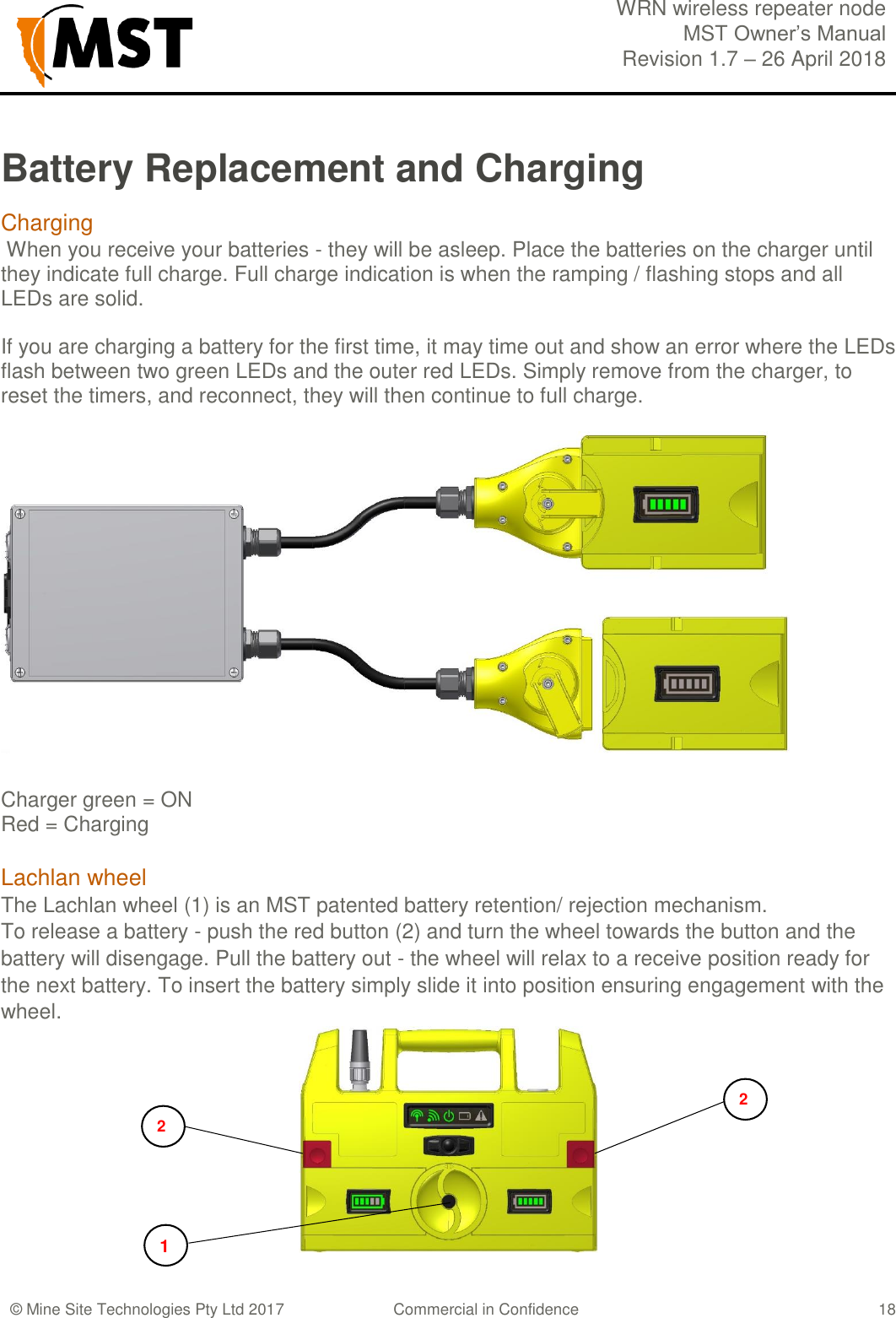
 WRN wireless repeater node MST Owner’s Manual Revision 1.7 – 26 April 2018  © Mine Site Technologies Pty Ltd 2017 Commercial in Confidence   18 Battery Replacement and Charging Charging  When you receive your batteries - they will be asleep. Place the batteries on the charger until they indicate full charge. Full charge indication is when the ramping / flashing stops and all LEDs are solid.  If you are charging a battery for the first time, it may time out and show an error where the LEDs flash between two green LEDs and the outer red LEDs. Simply remove from the charger, to reset the timers, and reconnect, they will then continue to full charge.   Charger green = ON Red = Charging  Lachlan wheel The Lachlan wheel (1) is an MST patented battery retention/ rejection mechanism. To release a battery - push the red button (2) and turn the wheel towards the button and the battery will disengage. Pull the battery out - the wheel will relax to a receive position ready for the next battery. To insert the battery simply slide it into position ensuring engagement with the wheel.  2 1 2
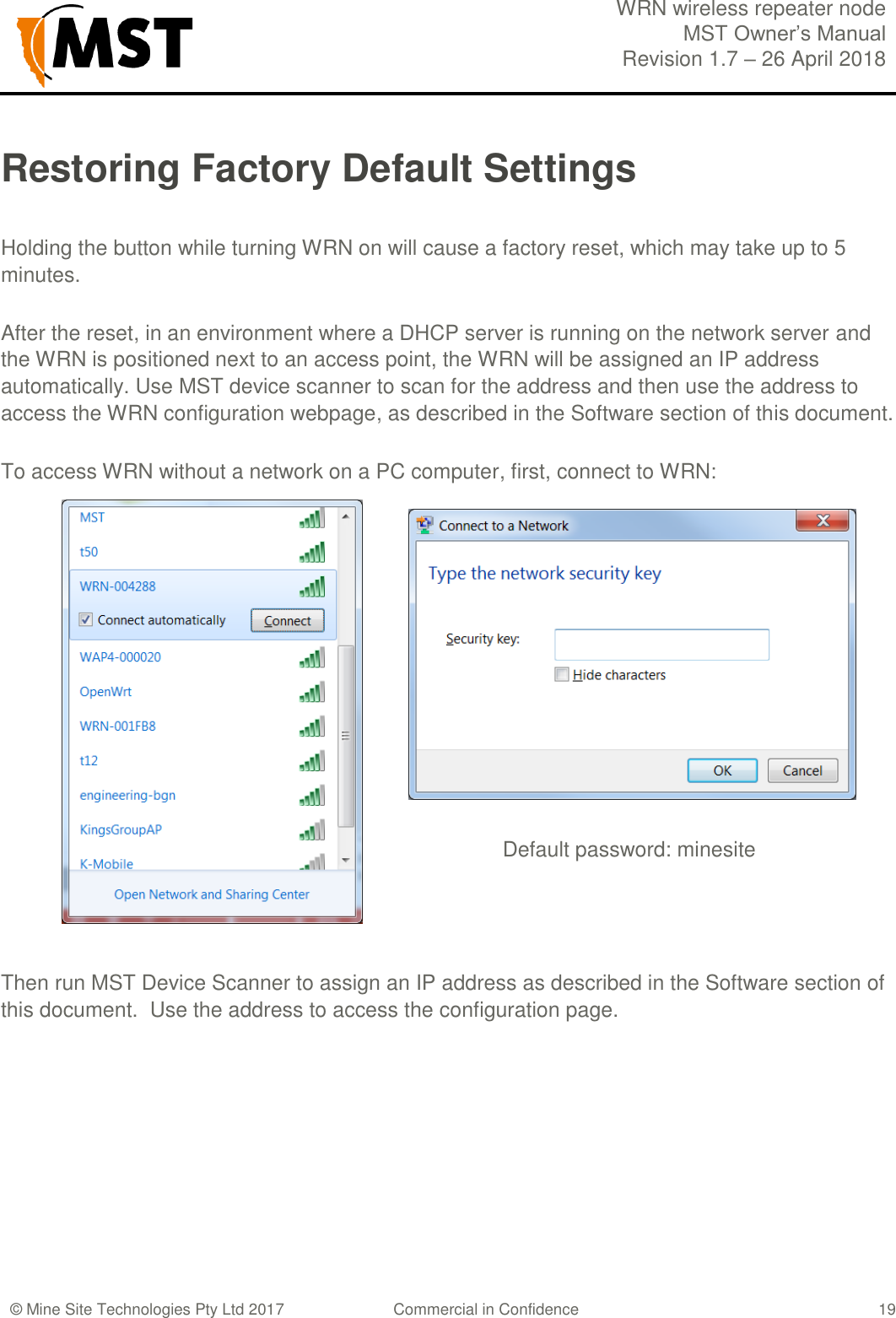
 WRN wireless repeater node MST Owner’s Manual Revision 1.7 – 26 April 2018  © Mine Site Technologies Pty Ltd 2017 Commercial in Confidence   19 Restoring Factory Default Settings  Holding the button while turning WRN on will cause a factory reset, which may take up to 5 minutes.  After the reset, in an environment where a DHCP server is running on the network server and the WRN is positioned next to an access point, the WRN will be assigned an IP address automatically. Use MST device scanner to scan for the address and then use the address to access the WRN configuration webpage, as described in the Software section of this document.     To access WRN without a network on a PC computer, first, connect to WRN:                        Default password: minesite     Then run MST Device Scanner to assign an IP address as described in the Software section of this document.  Use the address to access the configuration page.
 WRN wireless repeater node MST Owner’s Manual Revision 1.7 – 26 April 2018  © Mine Site Technologies Pty Ltd 2017 Commercial in Confidence   20 Repairs and Maintenance It is recommended that all WRNs, antennas, cables and connectors are inspected at regular intervals to ensure safe and reliable operation. A maintenance checklist is provided below. Inspection Action Structural  Inspect the outer case for any structural damage.  Check there is no excessive damage or markings to the case  Antennas  Check the antennas for any damage.  Check the antennas' connections to the coaxial cable for any damage to the insulation or connection.  Check the antennas' directional alignment.  Check that the device configuration (for one or two antennas) corresponds to the physical antennas attached to the device.  Do not use uncertified antennas in an environment which requires intrinsic safety approvals LEDs  Follow the guidelines of the User Controls and indicators section of this document to obtain information about the operational status Testing RF transmit path for WRN  Stand 50M away from the IMPACT WRN.  Using a Mine Phone handset, verify the signal strength is within specification. (Refer to site-specific commissioning data). Testing RF receive path for WRN  Stand 50M away from the IMPACT WRN with two AeroScout tags.  Open the web browser interface and select the Status > Tracking web page.  Verify that the two tags have been detected, and verify that the received signal strength is within specification (Refer to site-specific commissioning data).    NOTE: A tracker server must be configured for the tags to be displayed on the web interface    NOTE: Please contact MST for all maintenance and repair enquiries.
Mine Site Technologies Pty Ltd   Mine Site Technologies Pty Ltd (MST) is a tier one provider of communications networks and operational optimisation solutions, which assist the mining, resources and industrial sectors to optimally manage core business operations. Established in Australia over 25 years ago and with a global reach across six continents, the company specialises in the design, manufacture, deployment and support of critical technologies for communications, automation-enablement, production optimization, vehicle and personnel tracking, and safety in hazardous environments both underground and on the surface.  A pioneering force within the mining industry, MST has over 600 deployments at mine sites worldwide. Customers across the globe trust MST solutions to help optimise output, minimise cost and reduce risk, resulting in a compelling ROI on technology investments.  MST subsidiary Nixon Communications provides specialist surface radio and networking services throughout Australia.

Navigation menu