Mitsubishi Electronics Digital Air Conditioner Pca A24Ga Users Manual OC368B 1.qxp
PCA-A24GA to the manual 1432c6af-31e7-400f-ae20-a97a96e0b17c
2015-02-09
: Mitsubishi-Electronics Mitsubishi-Electronics-Mitsubishi-Digital-Electronics-Air-Conditioner-Pca-A24Ga-Users-Manual-556420 mitsubishi-electronics-mitsubishi-digital-electronics-air-conditioner-pca-a24ga-users-manual-556420 mitsubishi-electronics pdf
Open the PDF directly: View PDF  .
.
Page Count: 36
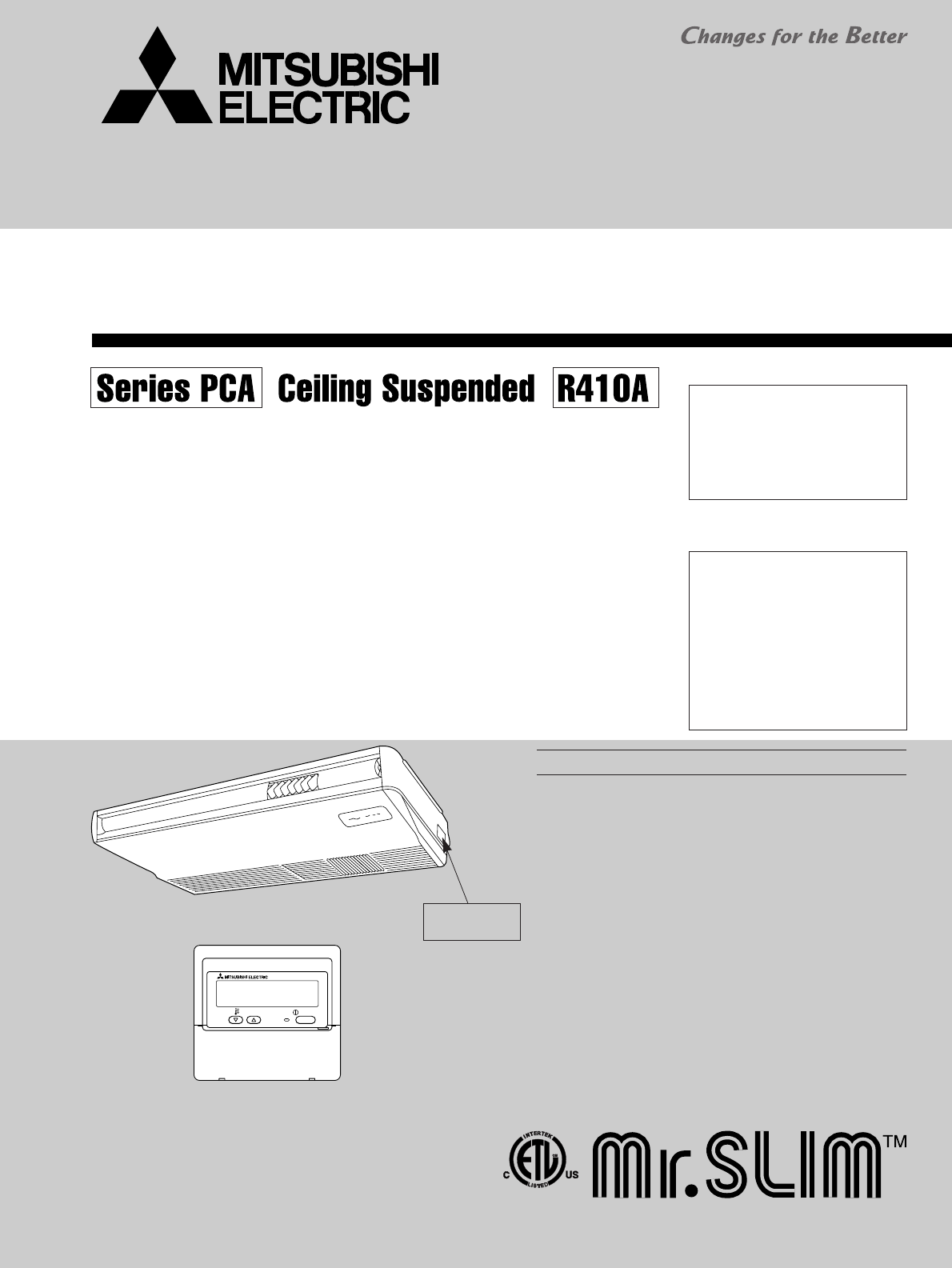
SERVICE MANUAL
SPLIT-TYPE, HEAT PUMP AIR CONDITIONERS
SPLIT-TYPE, AIR CONDITIONERS
No. OC368
REVISED EDITION-B
INDOOR UNIT
REMOTE CONTROLLER
CONTENTS
1. TECHNICAL CHANGES··································2
2. REFERENCE MANUAL ······································2
3. SAFETY PRECAUTION···································3
4. PART NAMES AND FUNCTIONS ···················5
5. SPECIFICATIONS············································8
6. NOISE CRITERION CURVES··························9
7. OUTLINES AND DIMENSIONS ·····················10
8.
WIRING DIAGRAM
············································12
9.
REFRIGERANT SYSTEM DIAGRAM
··················13
10. TROUBLESHOOTING ···································14
11. DISASSEMBLY PROCEDURE·······················26
12. PARTS LIST ···················································31
13. RoHS PARTS LIST ········································34
ON/OFF
TEMP.
Indoor unit
[Model names] [Service Ref.]
PCA-A24GA PCA-A24GA
PCA-A24GA1
PCA-A30GA PCA-A30GA
PCA-A30GA1
PCA-A36GA PCA-A36GA
PCA-A36GA1
PCA-A42GA PCA-A42GA
PCA-A42GA1
Model name
indication
June 2007
NOTE:
• This manual describes only
service data of the indoor
units.
• RoHS compliant products have
<G> mark on the spec name
plate.
• For servicing RoHS compli-
ant products, refer to the RoHS
PARTS LIST.
Revision:
• WIRING DIAGRAM has been
changed in REVISED EDI-
TION-B.
• Some descriptions have been
modified.
• Please void OC368 REVISED
EDITION-A.
3 3 2 2 3
OC368B--1.qxp 07.6.20 1:01 PM Page 1
2
1TECHNICAL CHANGES
2REFERENCE MANUAL
Service Ref.
PUZ-A18/24/30/36/42NHA
PUZ-A18/24/30/36/42NHA-BS
PUY-A12/18/24/30/36/42NHA(1)
PUY-A12/18/24/30/36/42NHA(1)-BS
Service Manual No.
OC367
2-1. OUTDOOR UNIT SERVICE MANUAL
Series (Outdoor unit)
PUZ-A·NHA PUZ-A·NHA-BS
PUY-A·NHA PUY-A·NHA-BS
Manual No.
OCS04
2-2. TECHNICAL DATA BOOK
PCA-A24GA ➔PCA-A24GA1
PCA-A30GA ➔PCA-A30GA1
PCA-A36GA ➔PCA-A36GA1
PCA-A42GA ➔PCA-A42GA1
• Indoor controller board has been changed.
OC368B--1.qxp 07.6.20 1:01 PM Page 2
3
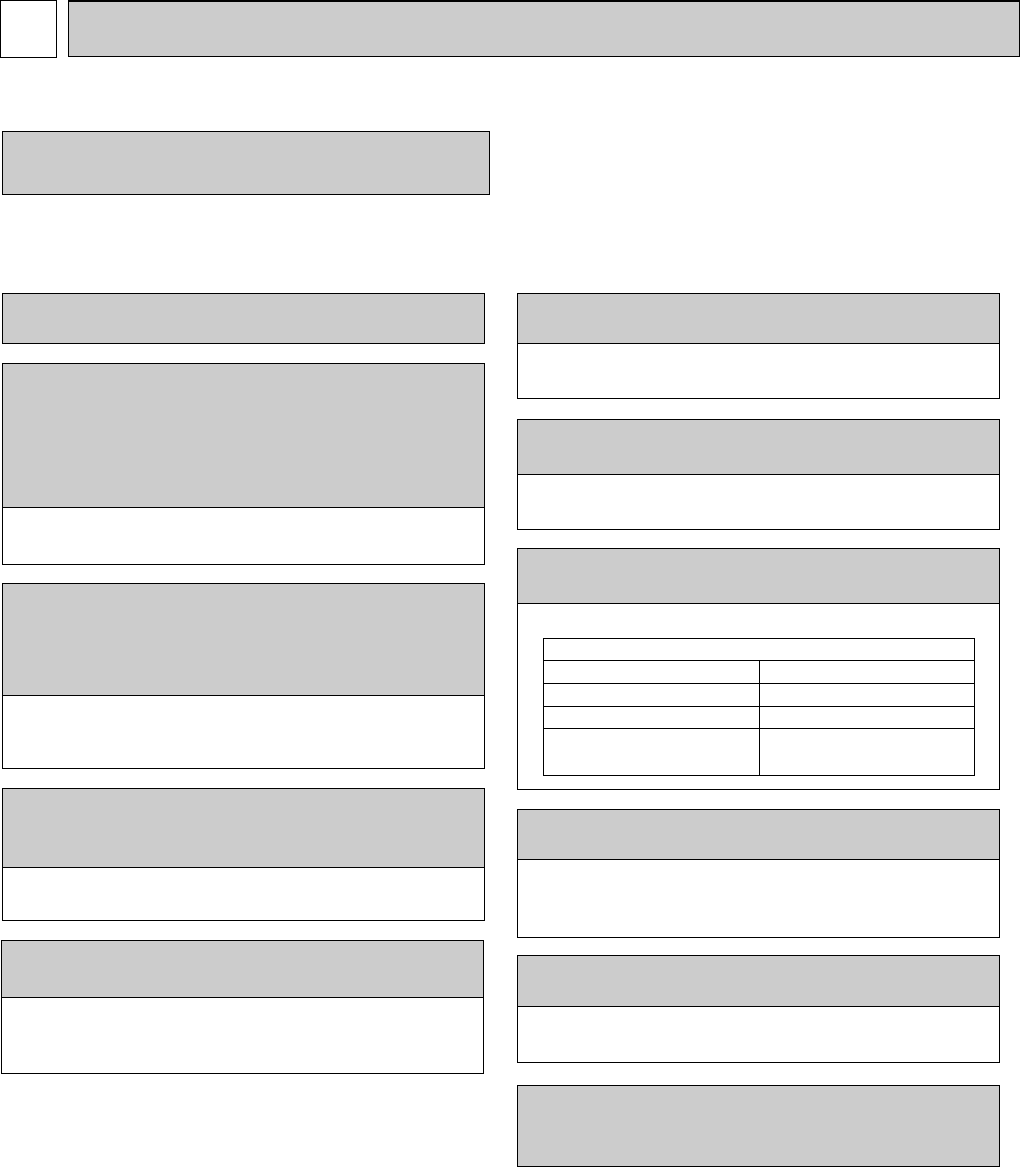
Cautions for units utilising refrigerant R410A
3-2. CAUTIONS RELATED TO NEW REFRIGERANT
Use new refrigerant pipes.
Make sure that the inside and outside of refrige-
rant piping is clean and it has no contamination
such as sulfur hazardous for use, oxides, dirt,
shaving particles, etc.
In addition, use pipes with specified thickness.
Store the piping to be used during installation
indoors and keep both ends of the piping sealed
until just before brazing. (Leave elbow joints, etc.
in their packaging.)
Use ester oil, ether oil or alkylbenzene oil (small
amount) as the refrigerant oil applied to flares
and flange connections.
Charge refrigerant from liquid phase of gas
cylinder.
If the refrigerant is charged from gas phase, composition
change may occur in refrigerant and the efficiency will be
lowered.
Do not use refrigerant other than R410A.
If other refrigerant (R22 etc.) is used, chlorine in refrige-
rant can cause deterioration of refrigerant oil etc.
Use a vacuum pump with a reverse flow check
valve.
Vacuum pump oil may flow back into refrigerant cycle and
that can cause deterioration of refrigerant oil etc.
Use the following tools specifically designed for
use with R410A refrigerant.
The following tools are necessary to use R410A refrigerant.
Keep the tools with care.
If dirt, dust or moisture enters into refrigerant cycle, that can
cause deterioration of the refrigerant oil or malfunction of
the compressor.
Do not use a charging cylinder.
If a charging cylinder is used, the composition of refrigera-
nt will change and the efficiency will be lowered.
Flare tool
Electronic refrigerant
charging scale
Vacuum pump adaptor
Size adjustment gauge
Gauge manifold
Torque wrench
Gas leak detector
Charge hose
Tools for R410A
Contamination inside refrigerant piping can cause deterio-
ration of refrigerant oil etc.
If dirt, dust or moisture enters into refrigerant cycle, that can
cause deterioration of refrigerant oil or malfunction of com-
pressor.
If large amount of mineral oil enters, that can cause deterio-
ration of refrigerant oil etc.
Ventilate the room if refrigerant leaks during
operation. If refrigerant comes into contact with
a flame, poisonous gases will be released.
[1] Cautions for service
(1) Perform service after collecting the refrigerant left in a unit completely.
(2) Do not release refrigerant in the air.
(3) After completing service, charge the cycle with specified amount of refrigerant.
(4) When performing service, install a filter drier simultaneously.
Be sure to use a filter drier for new refrigerant.
SAFETY PRECAUTION
3
3-1. ALWAYS OBSERVE FOR SAFETY
Before obtaining access to terminals, all supply
circuits must be disconnected.
OC368B--1.qxp 07.6.20 1:01 PM Page 3
4
Gravimeter
Unit
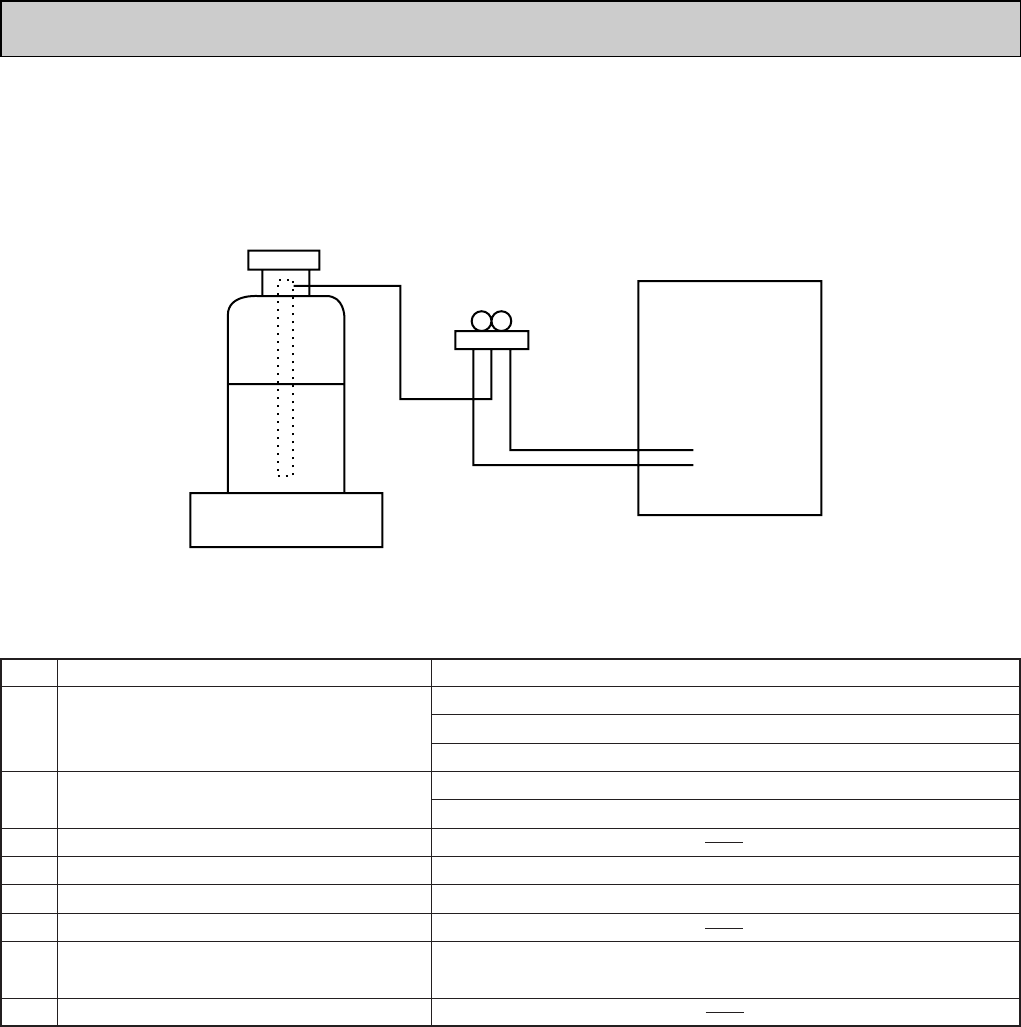
[3] Service tools
Use the below service tools as exclusive tools for R410A refrigerant.
No. Specifications
1Gauge manifold ·Only for R410A
·Use the existing fitting specifications. (UNF1/2)
·Use high-tension side pressure of 5.3MPa·G or over.
2Charge hose ·Only for R410A
·Use pressure performance of 5.09MPa·G or over.
3Electronic scale
4Gas leak detector ·Use the detector for R134a, R407C or R410A.
5Adaptor for reverse flow check ·Attach on vacuum pump.
6Refrigerant charge base
7Refrigerant cylinder ·Only for R410A Top of cylinder (Pink)
Cylinder with syphon
8Refrigerant recovery equipment
[2] Additional refrigerant charge
When charging directly from cylinder
· Check that cylinder for R410A on the market is syphon type.
· Charging should be performed with the cylinder of syphon stood vertically. (Refrigerant is charged from liquid phase.)
OC368B--1.qxp 07.6.20 1:01 PM Page 4
5
PART NAMES AND FUNCTIONS
4
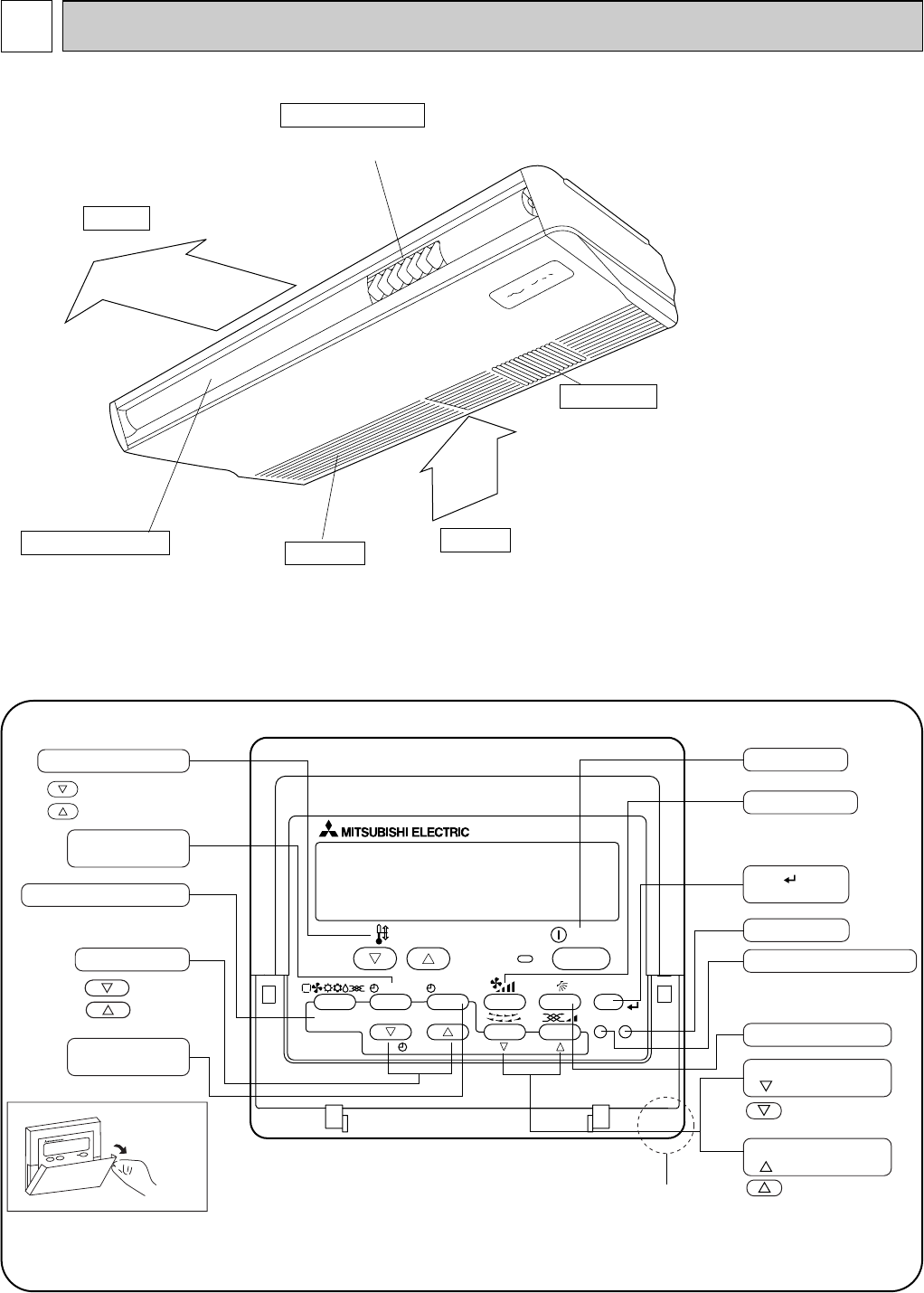
● Indoor Unit
Air outlet
Intake grille Air intake
Left/right guide vanes
Change the direction of airflow
from the horizontal blower.
Long-life filter
Removes dust and foreign matter from air coming in
through the grille (Recommended cleaning interval :
Approx. every 2,500 operating hours)
Up/down guide vanes
Change the direction of airflow from the
vertical blower.
PAR-21MAA
ON/OFF
FILTER
CHECK
OPERATION
CLEAR
TEST
TEMP.
MENU
BACK DAY
MONITOR/SET
CLOCK
ON/OFF
Temperature setting buttons
Down
Up
Timer Menu button
(Monitor/Set button)
Mode button (Return button)
Set Time buttons
Back
Ahead
Timer On/Off button
(Set Day button)
Opening the
lid
ON/OFF button
Fan Speed button
Filter button
(<Enter> button)
Test Run button
Check button (Clear button)
Airflow Up/Down button
Louver button
( Operation button)
To return operation
number
Ventilation button
( Operation button)
To go to next operation
number
Built-in temperature sensor
● Wired remote controller
Once the controllers are set, the same operation mode can be repeated by simply pressing the ON/OFF button.
OC368B--1.qxp 07.6.20 1:01 PM Page 5
6
● Wired remote controller
●
●
˚F˚C
˚F˚C
ERROR CODE
AFTER
TIMER
TIME SUN MON TUE WED THU FRI SAT
ON
OFF
Hr
AFTER
FILTER
FUNCTION
ONLY1Hr.
WEEKLY
SIMPLE
AUTO OFF
Note:
“PLEASE WAIT” message
This message is displayed for approximately 3 minutes when power is supplied to the indoor unit or when the unit is recovering from a power failure.
“NOT AVAILABLE” message
This message is displayed if an invalid button is pressed (to operate a function that the indoor unit does not have).
If a single remote controller is used to operate multiple indoor units simultaneously that are different types, this message will not be displayed as
far as any of the indoor units is equipped with the function.
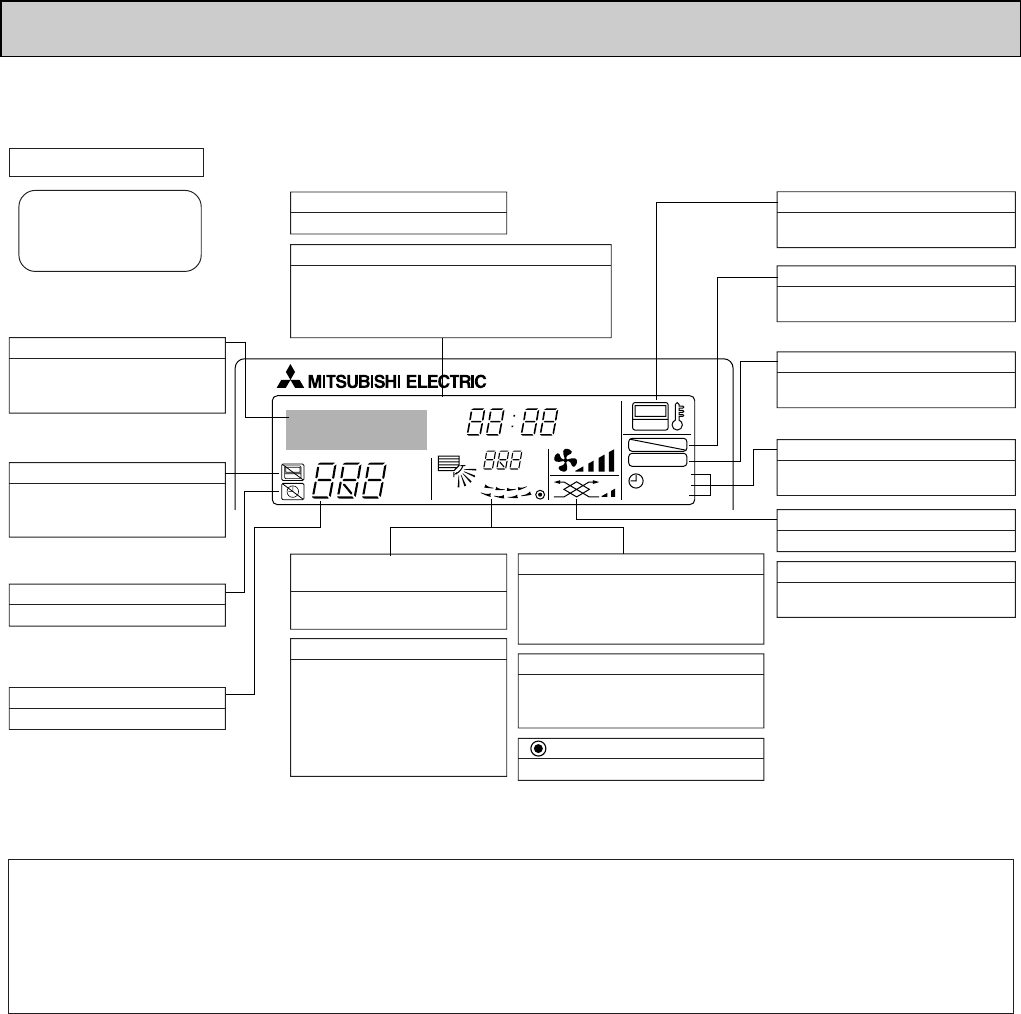
Display Section
For purposes of this explanation,
all parts of the display are shown
as lit. During actual operation, only
the relevant items will be lit.
Identifies the current operation
Shows the operating mode, etc.
*Multilanguage display is available.
“Centrally Controlled” indicator
Indicates that operation from the
remote controller has been prohib-
ited by a master controller.
“Timer is Off” indicator
Indicates that the timer is off.
Temperature Setting
Shows the target temperature.
Day-of-Week
Shows the current day of the week.
Time/Timer Display
Shows the current time, unless the simple or Auto Off
timer is set.
If the simple or Auto Off timer is set, the time to be
switched off is shown.
“Sensor” indication
Displayed when the remote controller
sensor is used.
“Locked” indicator
Indicates that remote controller but-
tons have been locked.
“Clean The Filter” indicator
To be displayed on when it is time to
clean the filter.
Timer indicators
The indicator comes on if the corre-
sponding timer is set.
Up/Down Air Direction indica-
tor
Shows the direction of the
outcoming airflow.
“One Hour Only” indicator
Room Temperature display
Shows the room temperature. The room
temperature display range is 46–102
°
F.
The display blinks if the temperature
is less than 46
°
F
or 102
°
F
or more.
Louver display
Indicates the action of the swing louver.
Does not appear if the louver is not
running.
(Power On indicator)
Indicates that the power is on.
Fan Speed indicator
Shows the selected fan speed.
Ventilation indicator
Appears when the unit is running in
Ventilation mode.
Displayed if the airflow is set to
Low or downward during COOL
or DRY mode. (Operation varies
according to model.)
The indicator goes off in one hour,
at which time the airflow direction
also changes.
OC368B--1.qxp 07.6.20 1:01 PM Page 6
7
ON/OFF TEMP
FAN
VANE
TEST RUN
AUTO STOP
AUTO START
h
min
LOUVER
MODE
CHECK
RESETSET CLOCK
MODEL
SELECT
NOT AVAILABLE
SWING
CHECK
FAN
TEST
RUN
˚F
˚C
AMPMSTOP
START
AMPM
COOL
DRY
AUTO
FAN
HEAT
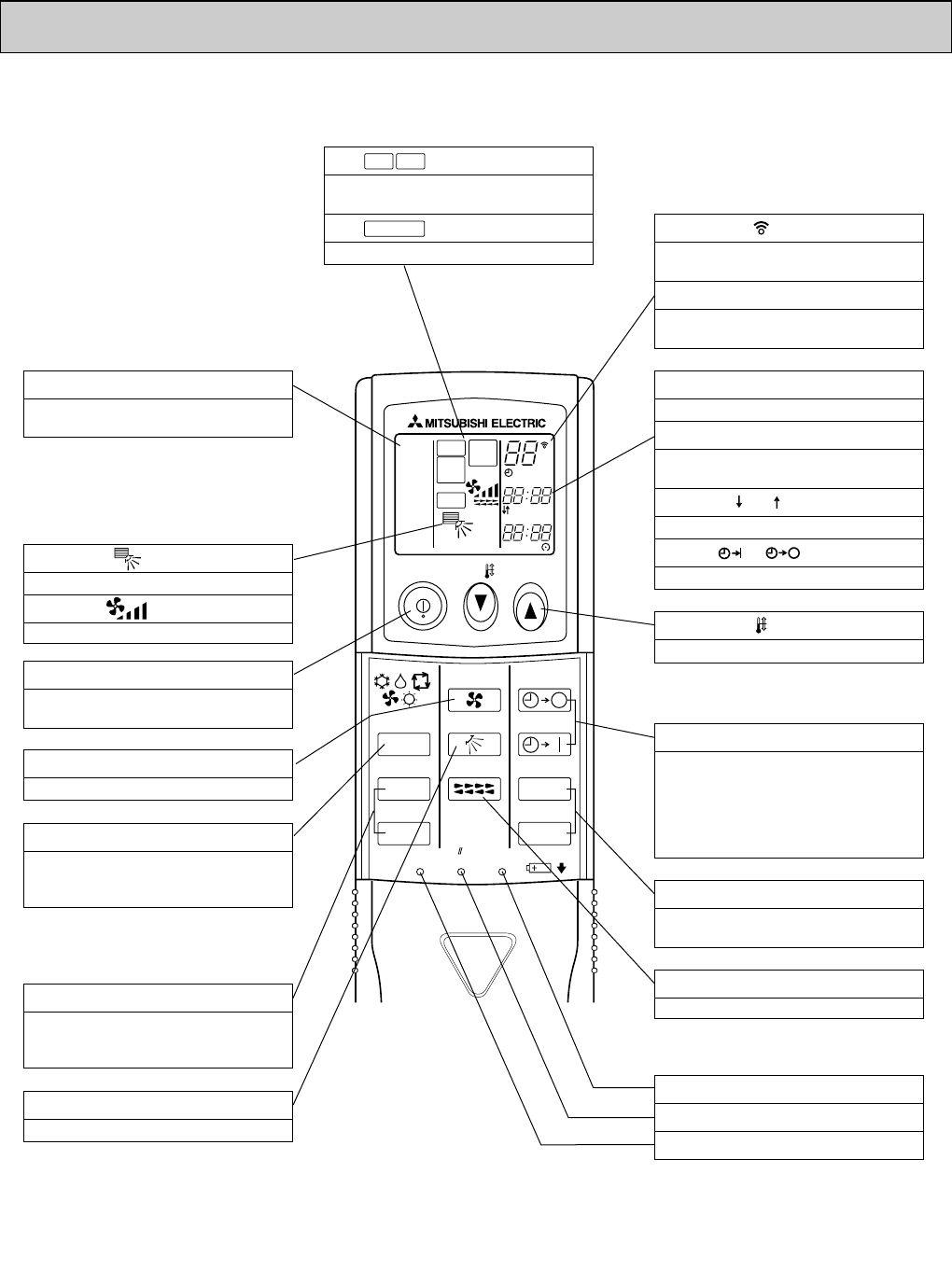
VANE CONTROL button
Changes the air flow direction.
CLOCK button
RESET button
SET button
ON/OFF button
The unit is turned ON and OFF alternately
each time the button is pressed.
LOUVER button
Changes left / right airflow direction.
(Not available for this model.)
MODE SELECT button
Switches the operation mode between
COOLING/DRY/FAN/HEATING and AUTO
mode.
wIn case the outdoor unit is cooling only
type, the heating and auto mode are not
available.
CHECK-TEST RUN button
Performs an inspection check or test opera-
tion.
Do not use it for normal operation.
FAN SPEED SELECT button
Changes the fan speed.
TIMER display
Displays when in timer operation or when
setting timer.
button
Sets any desired room temperature.
CLOCK display
Displays the current time.
“ ” “ ” display
Displays the order of timer operation.
“ ” “ ” display
Displays whether timer is on or off.
Buttons used to set the “hour and minute” of
the current time and timer settings.
"h" and "min" buttons
Temperature setting display
indicates the desired temperature setting
which is set.
display
Displays selected fan speed.
display
The vertical direction of air flow is indicated.
display
Blinks when model is selected.
display
Lights up while the signal is transmitted to
the indoor unit when the button is pressed.
display
Indicate that the unit is being checked or
test-run.
OPERATION MODE display
OPERATION MODE display
Indicates which operation mode is in effect.
TIMER CONTROL buttons
AUTO STOP (OFF timer): when this switch
is set, the air conditioner will be au-
tomatically stopped at the preset time.
AUTO START (ON timer): when this switch
is set, the air conditioner will be automatical-
ly started at the preset time.
MODEL SELECT
CHECK
TEST RUN
● Wireless remote controller
OC368B--1.qxp 07.6.20 1:01 PM Page 7
8
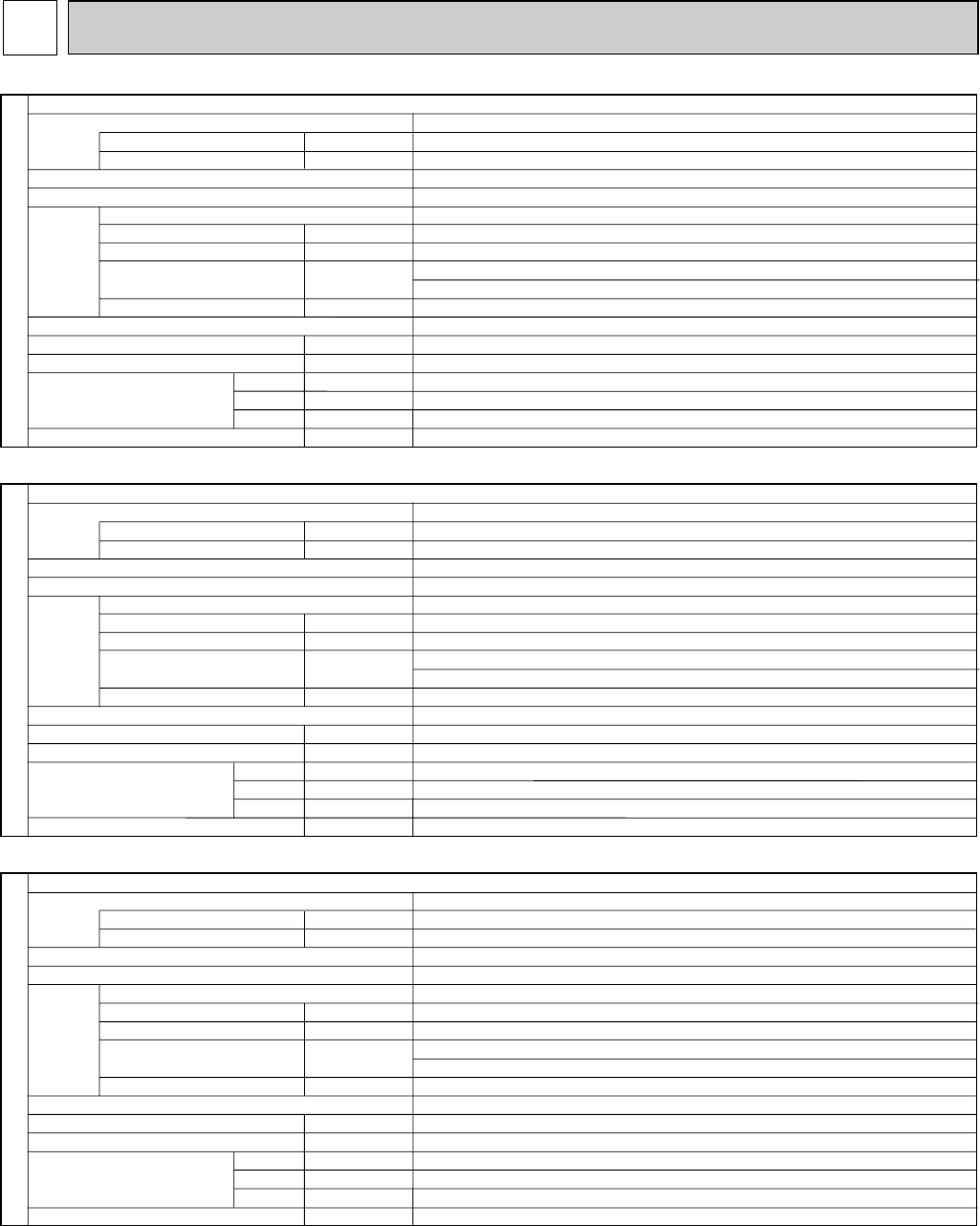
SPECIFICATIONS
5
A
A
kW
F.L.A
m3/min(CFM)
Pa(mmAq)
dB
mm(in.)
mm(in.)
mm(in.)
mm(in.)
kg(lbs)
Service Ref.
Power supply(phase, cycle, voltage)
Max. Fuse Size
Min.Circuit Ampacity
External finish
Heat exchanger
Fan Fan(drive) o No.
Fan motor output
Fan motor
Airflow(Low-Medium2-Medium1-High)
External static pressure
Operation control & Thermostat
Noise level(Low-Medium2-Medium1-High)
Field drain pipe O.D.
Dimensions
Weight
W
D
H
INDOOR UNIT
PCA-A24GA, PCA-A24GA1
Single phase, 60Hz, 208/230V
15
1
Munsell 0.70Y 8.59/0.97
Plate fin coil
Sirocco fan (direct) o 3
0.070
0.53
Dry: 14-15-16-18(495-530-565-635)
Wet: 13-14-15-16(445-480-510-570)
0(direct blow)
Remote controller & built-in
37-39-41-43
26(1-1/32)
1,310(51-9/16)
680(26-25/32)
210(8-9/32)
34(75)
Single phase, 60Hz, 208/230V
15
1
Munsell 0.70Y 8.59/0.97
Plate fin coil
Sirocco fan (direct) o 3
0.090
0.69
Dry: 20-21-23-25(705-740-810-885)
Wet:18-19-21-22(635-670-730-790)
0(direct blow)
Remote controller & built-in
40-41-43-45
26(1-1/32)
1,310(51-9/16)
680(26-25/32)
270(10-5/8)
37(82)
A
A
kW
F.L.A
K/min(CFM)
Pa(mmAq)
dB
mm(in.)
mm(in.)
mm(in.)
mm(in.)
kg(lbs)
Service Ref.
Power supply(phase, cycle, voltage)
Max. Fuse Size
Min.Circuit Ampacity
External finish
Heat exchanger
Fan Fan(drive) o No.
Fan motor output
Fan motor
Airflow(Low-Medium2-Medium1-High)
External static pressure
Operation control & Thermostat
Noise level(Low-Medium2-Medium1-High)
Field drain pipe O.D.
Dimensions
Weight
W
D
H
INDOOR UNIT
PCA-A36GA, PCA-A36GA1
Single phase, 60Hz, 208/230V
15
1
Munsell 0.70Y 8.59/0.97
Plate fin coil
Sirocco fan (direct) o 3
0.070
0.53
Dry: 14-15-16-18(495-530-565-635)
Wet:13-14-15-16(445-480-510-570)
0(direct blow)
Remote controller & built-in
37-39-41-43
26(1-1/32)
1,310(51-9/16)
680(26-25/32)
210(8-9/32)
34(75)
A
A
kW
F.L.A
K/min(CFM)
Pa(mmAq)
dB
mm(in.)
mm(in.)
mm(in.)
mm(in.)
kg(lbs)
Service Ref.
Power supply(phase, cycle, voltage)
Max. Fuse Size
Min.Circuit Ampacity
External finish
Heat exchanger
Fan Fan(drive) o No.
Fan motor output
Fan motor
Airflow(Low-Medium2-Medium1-High)
External static pressure
Operation control & Thermostat
Noise level(Low-Medium2-Medium1-High)
Field drain pipe O.D.
Dimensions
Weight
W
D
H
PCA-A30GA, PCA-A30GA1
INDOOR UNIT
OC368B--1.qxp 07.6.20 1:01 PM Page 8
9
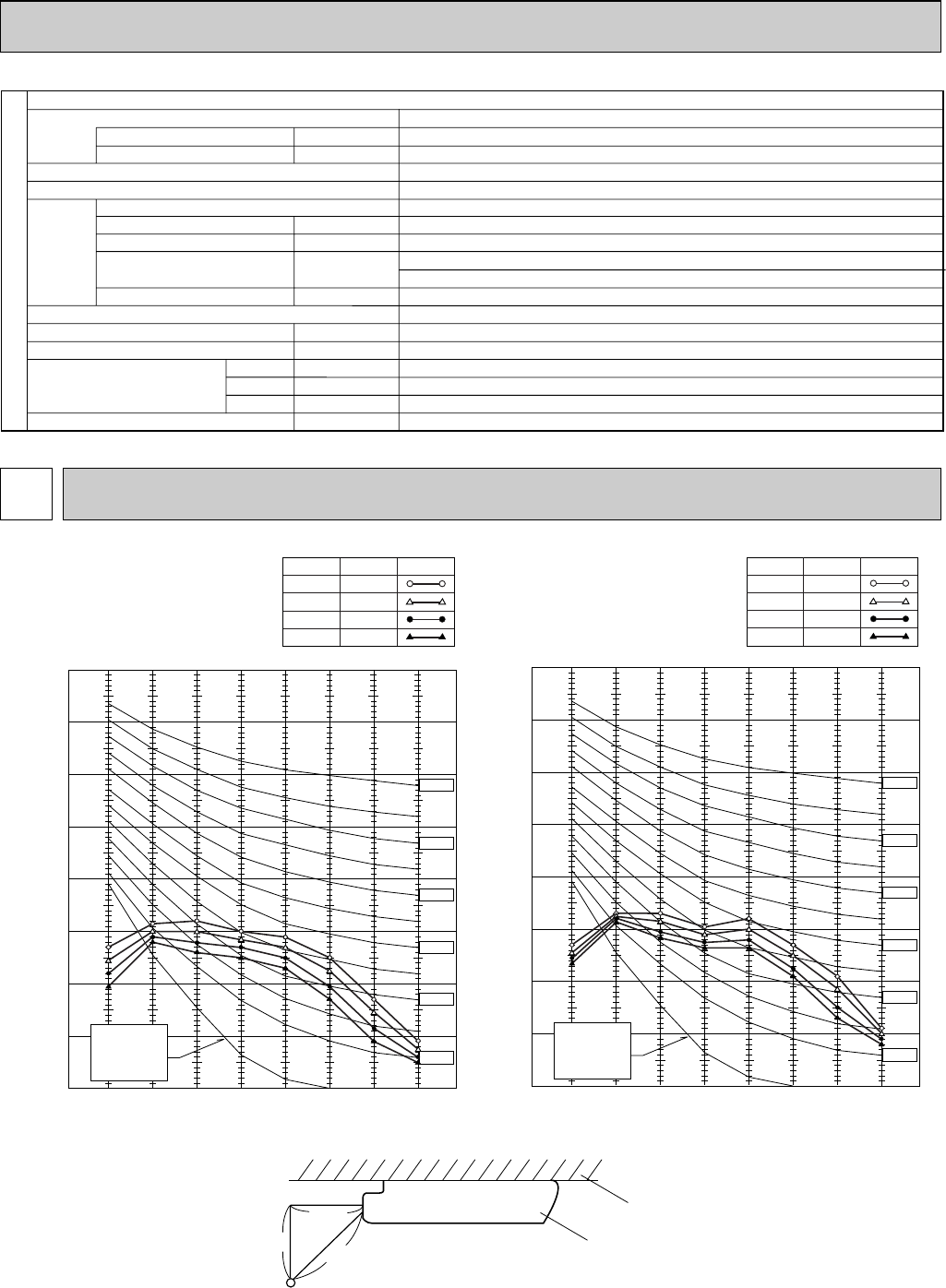
NOISE CRITERION CURVES6
90
80
70
60
50
40
30
20
10 63 125 250 500 1000 2000 4000 8000
APPROXIMATE
THRESHOLD OF
HEARING FOR
CONTINUOUS
NOISE
NC-60
NC-50
NC-40
NC-30
NC-20
NC-70
BAND CENTER FREQUENCIES, Hz
OCTAVE BAND SOUND PRESSURE LEVEL, dB (0 dB = 0.0002 µbar)
PCA-A24GA
PCA-A30GA
PCA-A24GA1
PCA-A30GA1
NOTCH
High
Medium1
Medium2
Low
SPL(dB)
43
41
39
37
LINE
90
80
70
60
50
40
30
20
10 63 125 250 500 1000 2000 4000 8000
APPROXIMATE
THRESHOLD OF
HEARING FOR
CONTINUOUS
NOISE
NC-60
NC-50
NC-40
NC-30
NC-20
NC-70
BAND CENTER FREQUENCIES, Hz
OCTAVE BAND SOUND PRESSURE LEVEL, dB (0 dB = 0.0002 µbar)
PCA-A36GA
PCA-A42GA
PCA-A36GA1
PCA-A42GA1
NOTCH
High
Medium1
Medium2
Low
SPL(dB)
45
43
41
40
LINE
Single phase, 60Hz, 208/230V
15
1
Munsell 0.70Y 8.59/0.97
Plate fin coil
Sirocco fan (direct) o 3
0.090
0.69
Dry: 20-21-23-25(705-740-810-885)
Wet:18-19-21-22(635-670-730-790)
0(direct blow)
Remote controller & built-in
40-41-43-45
26(1-1/32)
1,310(51-9/16)
680(26-25/32)
270(10-5/8)
37(82)
A
A
kW
F.L.A
K/min(CFM)
Pa(mmAq)
dB
mm(in.)
mm(in.)
mm(in.)
mm(in.)
kg(lbs)
Service Ref.
Power supply(phase, cycle, voltage)
Max. Fuse Size
Min.Circuit Ampacity
External finish
Heat exchanger
Fan Fan(drive) o No.
Fan motor output
Fan motor
Airflow(Low-Medium2-Medium1-High)
External static pressure
Operation control & Thermostat
Noise level(Low-Medium2-Medium1-High)
Field drain pipe O.D.
Dimensions
Weight
W
D
H
PCA-A42GA, PCA-A42GA1
INDOOR UNIT
3.3ft
3.3ft unit
about 4.62ft
MICROPHONE
ceiling
OC368B--1.qxp 07.6.20 1:01 PM Page 9
10
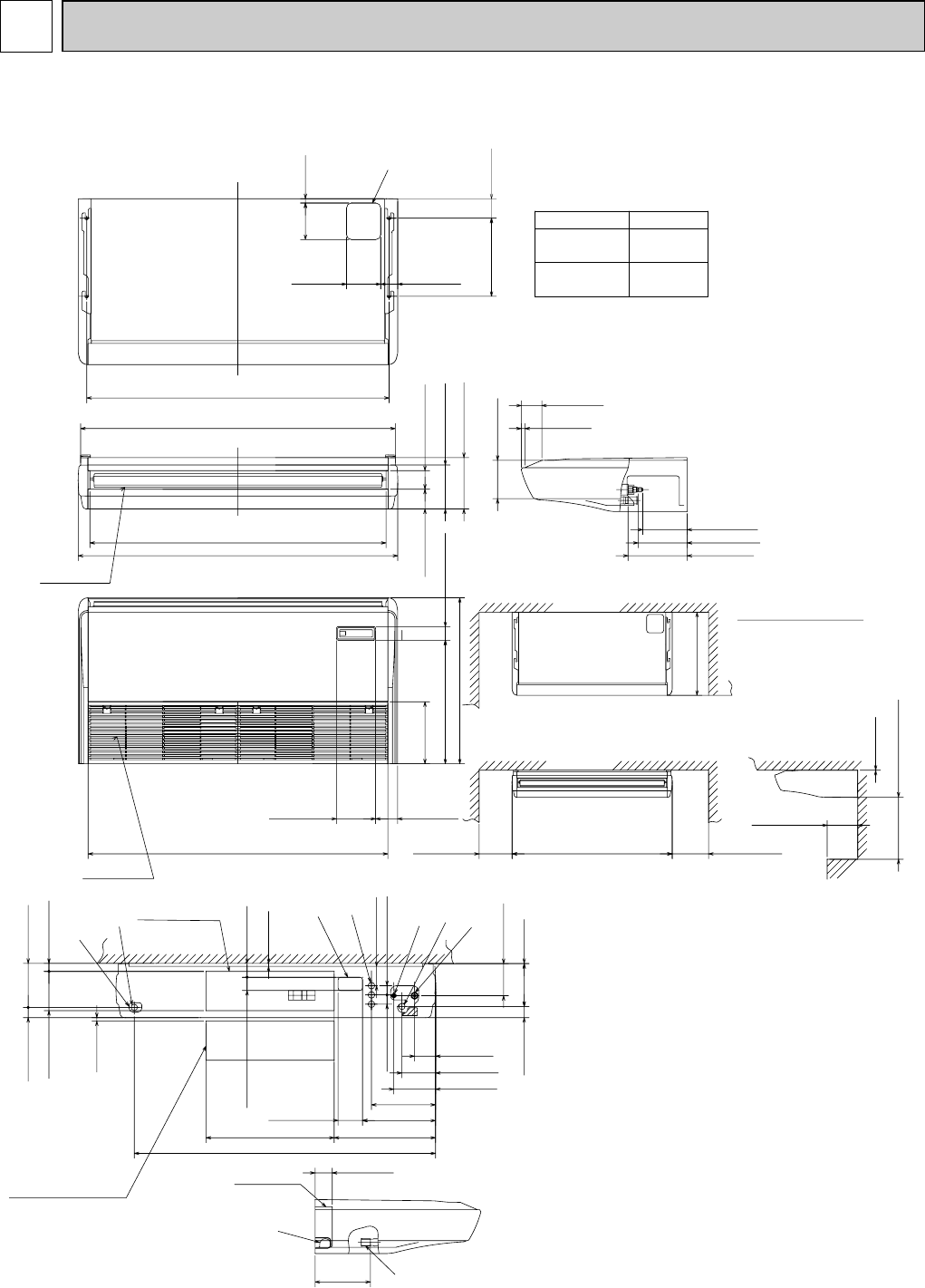
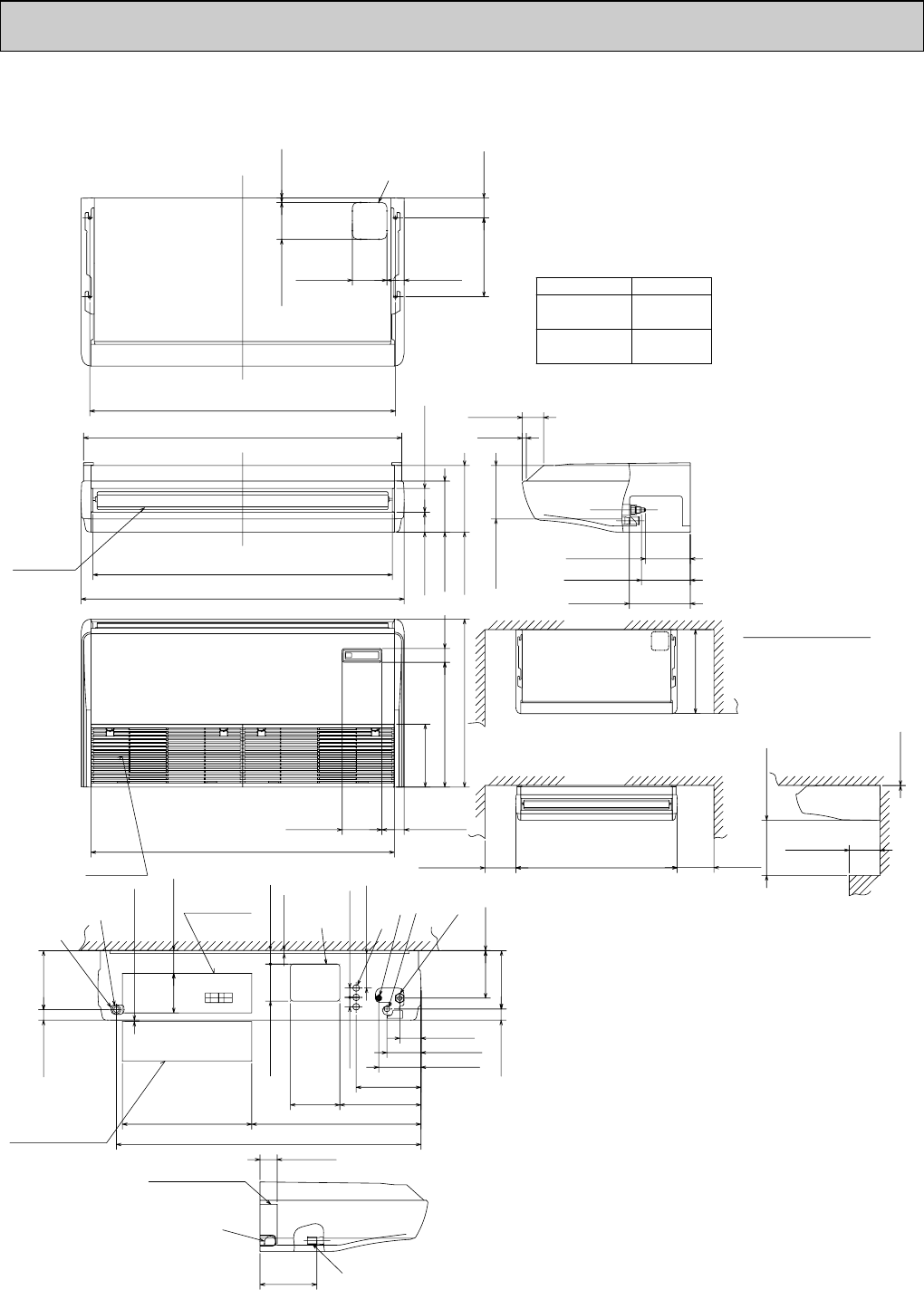
7OUTLINES AND DIMENSIONS
PCA-A24GA PCA-A24GA1
PCA-A30GA PCA-A30GA1
9
11-13/16(300)
3-15/16(100)
2-1/8(54) 2-1/4(57)
7/16(11)
9 Knockout hole for fresh air intake
(6~7)
1/4~9/32
1-21/32(42) 7-1/16(179)
1-1/4(32)6-11/32(161)
20-21/32(525)
1-1/2(38)
3-1/8(79)
10-3/8(263) 6-3/4(171)
5-7/16(138)
3-3/8(86)
6-7/8
(175)
1-13/16(46)
5-5/32(131)
1/16(1)
1-1/2(38)
16-3/8(416)
48-5/8(1235)
8514
Ceiling
Electrical box
[FRONT VIEW]
2
3
When electrical box
is pulled down
2
7
9-1/32(229)
2-3/4(70)
Electrical box
5 Refrigerant-pipe connection(liquid pipe side/flared connection)
6 Knockout hole for upper pipe arrangement
7 Knockout hole for left drain pipe arrangement
8 Knockout hole for wiring arrangement
1 Drainage pipe connection(1-1/32(26mm)I.D.)
2 Drainage pipe connection(for the left arrangement)
3 Knockout hole for left drain-piping arrangement
4 Refrigerant-pipe connection(gas pipe side/flared connection)
4
Gas pipe
5
Liquid pipe
MODEL 24/30
3/8F
5/8F
2-3/4(70)
23/32(18)
5-1/2(140)
(150)
5-29/32
12-5/8(320) 3-1/8(80)
48-13/16(1240)
50-13/16(1290)
47-13/16(1214)
51-9/16(1310)
7-3/32(180)
8-9/32(210)
2-3/16(81) 3-25/32(96)
26-25/32(680) 2-7/32(56)19-29/32(506)
10(254)
3-17/32(90)6-3/8(161)
48-3/8(1228) 11-13/16(300)51-9/16(1310)10-5/8(270)
or more
26-25/32(680)
Less than
3-7/16(87)
5/8(16)
6-3/16(157)
or more
Ceiling
Rear wall
Allowing clearances
NOTES:
Use M10 or W3/8 screw for anchor bolt.
(Suspension bolt pitch)
Air outlet
Air intake
gas
liquid
(Drainage)
7-3/16(182)
7/15/16(201)
9-1/2(241)
9-13/16(250)
19-11/16(500)
(Gap to ceiling)
or more
1/16(1)
Less than
6
Unit : inch(mm)
OC368B--1.qxp 07.6.20 1:01 PM Page 10
11
PCA-A36GA PCA-A36GA1
PCA-A42GA PCA-A42GA1
Unit : inch(mm)
4
Gas pipe
MODEL
3/8F
5/8F
5
Liquid pipe
36/42
7/16(11)
9
2-3/16(55)5-7/8(150)
13(330)
7-7/8(200)
9 Knockout hole for fresh air intake
(6~7)
7-2/32(289)
1-21/32(42)
Electrical box
(160)
1/4~9/32
3-21/32(93)
6-5/16
1-1/2(38) 1-1/2(38)
5-1/2(140)
(196) 1/16(1)
9-9/32(236)
7-9/16
1-25/32(45)
10-3/8(263)
6-3/4(171)
5-7/16(138)
3-3/8(86)
27-1/16(687)20-21/32(525)
48-5/8(1235)
2-3/4(70)
9-1/32(229)
(56)
10(254)
19-29/32(506)
2-7/32
26-25/32(680)
3-17/32(90)6-3/8(160)
48-3/8(1228)
3-3/16(81) 3-25/32(96)
8-5/32(207)
10-5/8(270)
47-13/16(1214)
51-9/16(1310)
50-13/16(1290)
48-13/16(1240)
23/32(18)5-29/32(150)
2-3/4(70)5-1/2(140)
12-5/8(320) 3-1/8(80)
5/8(16)
3-7/16(87)
8-17/32(217)
7-3/16(182)
7-13/16(198)
9-5/8(245)
Less than
26-25/32(680)
10-5/8(270) (300)
11-13/16
51-9/16(1310)
19-11/16(500)
9-13/16(250)
1 Drainage pipe connection(1-1/32(26mm)I.D.)
2 Drainage pipe connection(for the left arrangement)
3 Knockout hole for left drain-piping arrangement
4 Refrigerant-pipe connection(gas pipe side/flared connection)
5 Refrigerant-pipe connection(liquid pipe side/flared connection)
6 Knockout hole for upper pipe arrangement
7 Knockout hole for left drain pipe arrangement
8 Knockout hole for wiring arrangement
Air intake
Air outlet
2
7
Electrical box
When electrical box
is pulled down
8
514
2
3
Less than
or more
or more
Ceiling
[FRONT VIEW]
(Suspension bolt pitch)
(Drainage)
gas
liquid
(Gap to ceiling)
Allowing clearances
Rear wall
Ceiling
1/16(1)
NOTES:
Use M10 or W3/8 screw for anchor bolt.
6
OC368B--1.qxp 07.6.20 1:01 PM Page 11
12
PCA-A24GA PCA-A30GA PCA-A36GA PCA-A42GA
PCA-A24GA1PCA-A30GA1PCA-A36GA1PCA-A42GA1
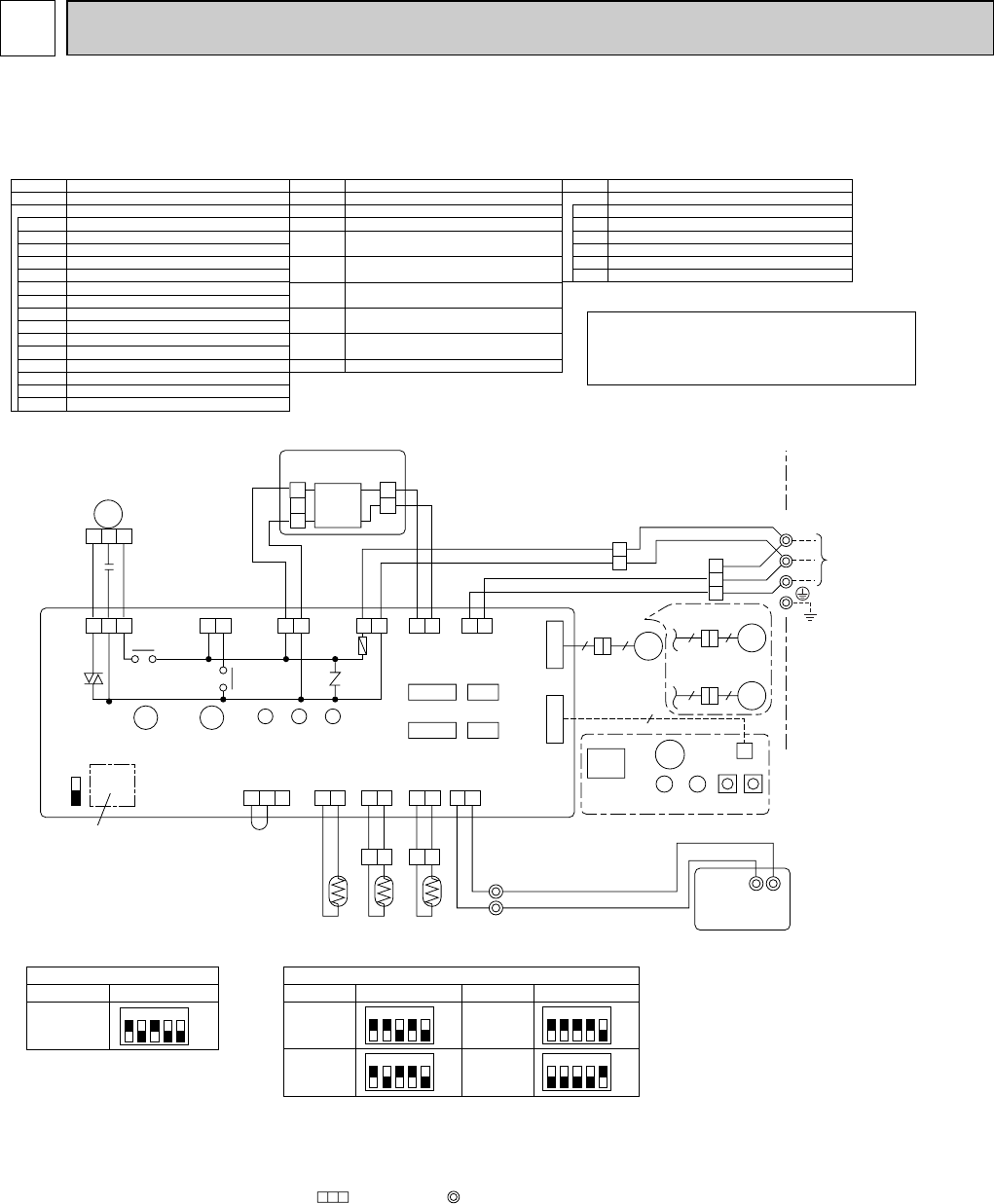
[Emergency operation procedure]
When the wired remote control or the indoor unit microcomputer has failed, but all other
components work properly, if you set the switch (SWE) on the indoor control board ON, the indoor
unit will begin Emergency Operation.
When Emergency Operation is activated, indoor fan runs at high speed.
SWE
ON
OFF
SW2 SW1
Refer to tables 1 and 2
for service PCB.
D.SENSOR
CN31
(
WHT
)
123
INTAKE
CN20
(
RED
)
1 2
TH1
LIQUID
CN21
(
WHT
)
1 2
TH2
1 2
PIPE
CN29
(
BLK
)
1 2
TH5
1 2
BLK
BLK
BLK
BLK
BLU
BLU
REMOCON
CN22
(
BLU
)
1 2
2
1
TB5
TRANSMISSION WIRES DC12V
R.B
TB6
12
CN41 CN2L
CN51 CN32
WIRELESS
CN90
(
WHT
)
VANE
CN6V
(
GRN
)
24/30 TYPE
36/42 TYPE
MV
66
9
MV
66
MV
55
W.B
BZ CNB
RECEIVER
RU LED1 LED2 SW2SW1
1 3
BRN
ORN
A-CONTROL
CN3C(BLU)
1 2
BLK
WHT
POWER
CN2D(WHT)
LED3 LED2 LED1
X4 X1
1 31 31 3
ZNR
FUSE
WHT
RED
YLW
ORN
POWER
CNDK
(RED)
POWER
CND
(ORN)
D.U.M
CNP
(BLU)
X1
FAN
(
WHT
)1 3 5
1 2 3
BLK
WHT
RED
C
MF
BCR
X4
I.B
1
21
2
3
P.B
CNDK
(RED)
DC13.1V
CN2S
(WHT)
TO OUTDOOR UNIT
TB4
S1
S2
S3
YLW
ORN
YLW
ORN
BRN
SW1 SW2
Table 1 Table 2
Service board Service board
MODELS
PCA-A,GA
1 2 3 4 5
ON
OFF
1 2 3 4 5
ON
OFF
MODELS
PCA-A24GA
1 2 3 4 5
ON
OFF
PCA-A30GA
Service board
1 2 3 4 5
ON
OFF
MODELS
PCA-A36GA
1 2 3 4 5
ON
OFF
PCA-A42GA
Please set the voltage using the remote
controller.
For the setting method, please refer to
the indoor unit Installation Manual.
P.B INDOOR POWER BOARD
SYMBOL NAME
[LEGEND]
I.B INDOOR CONTROLLER BOARD
FUSE FUSE (6.3A/250V)
ZNR VARISTOR
CN2L CONNECTOR<LOSSNAY>
CN32 CONNECTOR<REMOTE SWITCH>
CN41 CONNECTOR<HA TERMINAL-A>
CN51 CONNECTOR<CENTRALLY CONTROL>
SW1 SWITCH <MODEL SELECTION>wSee Table 1.
SW2 SWITCH <CAPACITY CODE>wSee Table 2.
SWE
SWITCH<EMERGENCY OPERATION>
X4 RELAY<FAN MOTOR>
X1 RELAY<DRAIN PUMP>
BCR
POWER SUPPLY<R.B>
LED1 POWER SUPPLY<I.B>
LED2 TRANSMISSION<INDOOR-OUTDOOR>LED3
FAN CONTROL ELEMENT
C CAPACITOR<FAN MOTOR>
FAN MOTOR
VANE MOTOR
MF
MV
SYMBOL NAME
TB4 TERMINAL BLOCK<INDOOR/OUTDOOR
CONNECTING LINE>
TERMINAL BLOCK<REMOTE CONTROLLER
TRANSMISSION LINE >
ROOM TEMP.THERMISTOR
<32
°
F/15k
Ω
, 77
°
F/5.2k
Ω
DETECT>
PIPE TEMP.THERMISTOR/LIQUID
<32
°
F/15k
Ω
, 77
°
F/5.2k
Ω
DETECT>
COND./EVA.TEMP.THERMISTOR
<32
°
F/15k
Ω
, 77
°
F/5.2k
Ω
DETECT>
TB5,TB6
TH5
TH1
TH2
W.B
WIRELESS REMOTE CONTROLLER BOARD(OPTION)
RECEIVING UNIT
BUZZER
LED<RUN INDICATOR >
LED<HOT ADJUST>
SWITCH<HEATING ON/OFF>
SWITCH<COOLING ON/OFF>
WIRED REMOTE CONTROLLER BOARD
R.B
RU
BZ
LED1
LED2
SW1
SW2
NAMESYMBOL
NOTES:
1. Since the outdoor side electric wiring may change, be sure to check the outdoor unit
electric wiring for servicing.
2. Indoor and outdoor connecting wires have polarities, make sure to match terminal numbers (S1, S2, S3)
for correct wirings.
3. Symbols used in wiring diagram above are, : Connector, : Terminal (block).
4. This diagram shows the wiring of Indoor and Outdoor connecting wires (specification of 230V),
adopting superimposed system of power and signal.
w1.Use copper supply wires.
w1
8WIRING DIAGRAM
OC368B--1.qxp 07.6.20 1:01 PM Page 12
13
PCA-A24GA PCA-A30GA PCA-A36GA PCA-A42GA
PCA-A24GA1PCA-A30GA1PCA-A36GA1PCA-A42GA1
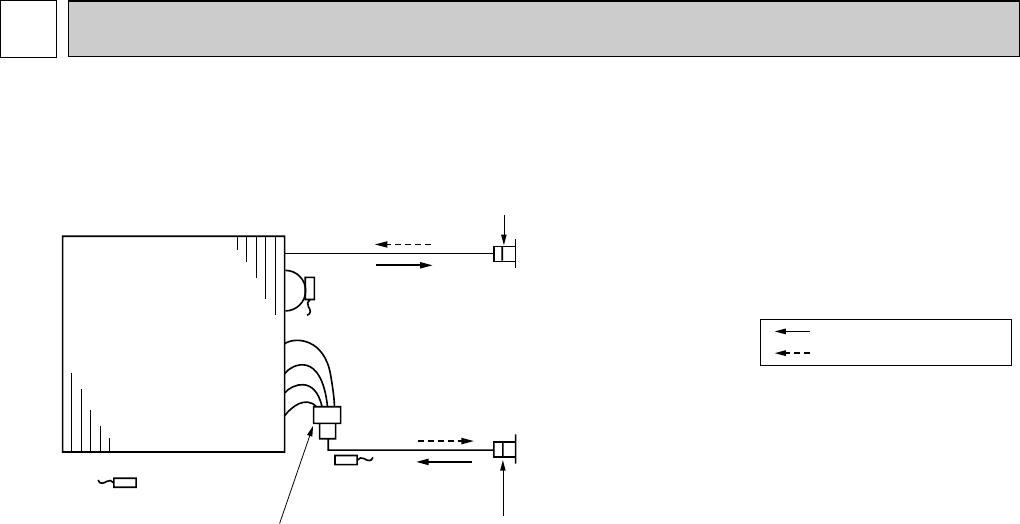
Pipe temperature
thermistor/liquid
(TH2)
Distributor
with strainer
#50
Condenser/evaporator
temperature thermistor
(TH5)
Room temperature
thermistor (TH1)
Refrigerant flow in cooling
Refrigerant flow in heating
Strainer
#50
Strainer
#50
Heat exchanger
Refrigerant GAS pipe connection
(Flare)
Refrigerant LIQUID pipe connection
(Flare)
9REFRIGERANT SYSTEM DIAGRAM
OC368B--1.qxp 07.6.20 1:01 PM Page 13
14
10 TROUBLESHOOTING
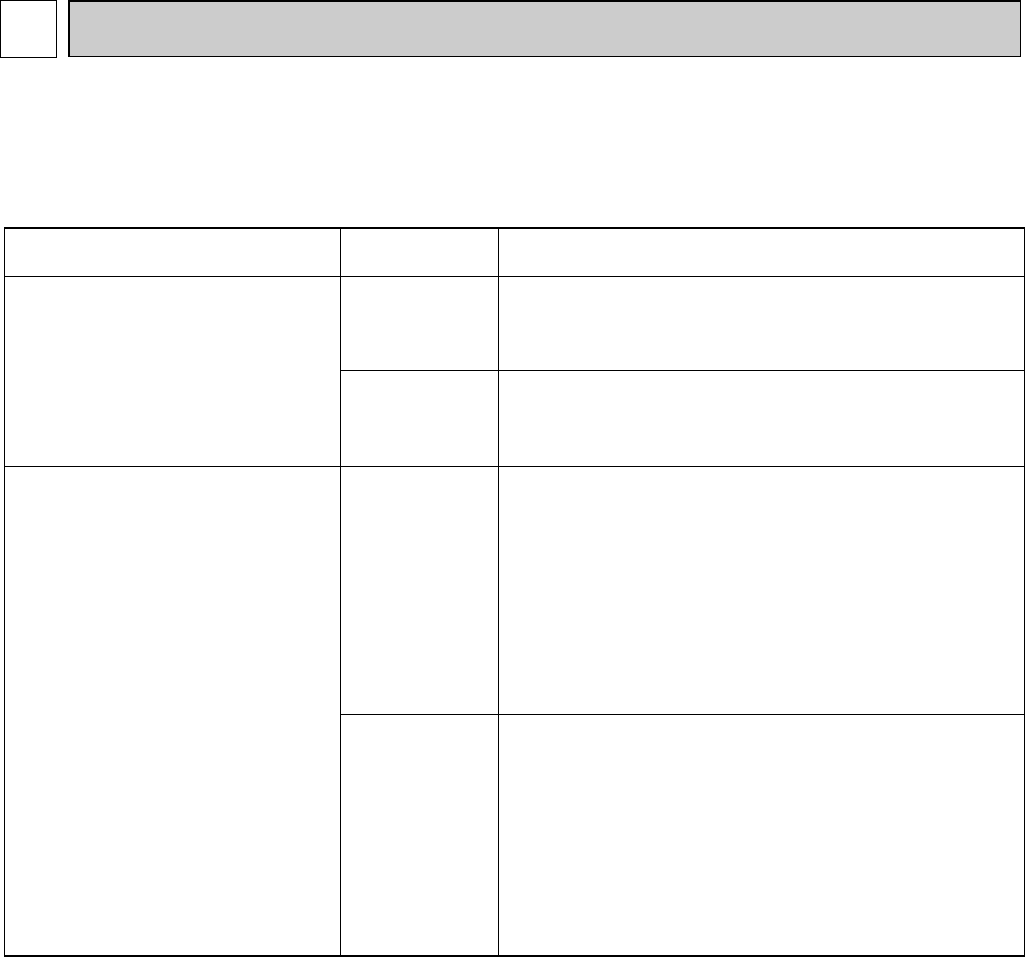
<Error code display by self-diagnosis and actions to be taken for service (summary)>
Present and past error codes are logged and displayed on the wired remote controller or controller board of outdoor unit.
Actions to be taken for service and the inferior phenomenon reoccurrence at field are summarized in the table below. Check
the contents below before investigating details.
10-1. TROUBLESHOOTING
Unit conditions at service Error code Actions to be taken for service (summary)
The inferior phenomenon is
reoccurring.
Displayed
Not displayed
Judge what is wrong and take a corrective action
according to “SELF-DIAGNOSIS ACTION TABLE” (10-2).
Identify the cause of the inferior phenomenon and take
a corrective action according to “TROUBLESHOOTING
BY INFERIOR PHENOMENA ” (10-3).
The inferior phenomenon is
not reoccurring.
Logged
Not logged
1Consider the temporary defects such as the work of
protection devices in the refrigerant circuit including
compressor, poor connection of wiring, noise and etc.
Re-check the symptom, and check the installation
environment, refrigerant amount, weather when the
inferior phenomenon occurred, and wiring related.
2Reset error code logs and restart the unit after finishing
service.
3There is no abnormality in electrical components,
controller boards, and remote controller.
1Recheck the abnormal symptom.
2Identify the cause of the inferior phenomenon and take
a corrective action according to “TROUBLESHOOTING
BY INFERIOR PHENOMENA ” (10-3).
3Continue to operate unit for the time being if the cause
is not ascertained.
4There is no abnormality in electrical components,
controller boards, remote controller etc.
OC368B--1.qxp 07.6.20 1:01 PM Page 14
15
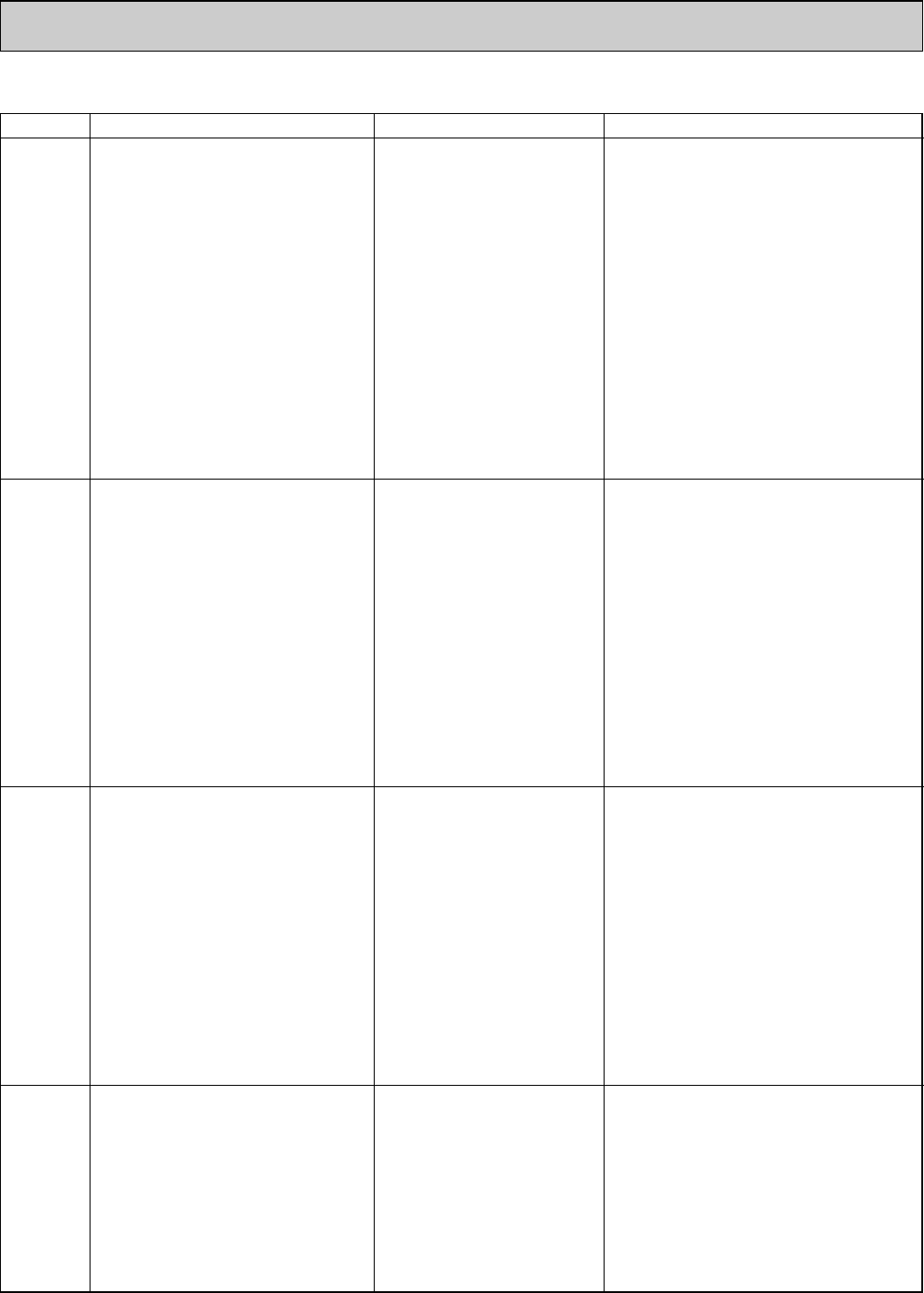
Error Code Abnormal
point and detection method
Cause Countermeasure
P1
Room temperature thermistor (TH1)
1The unit is in 3-minute resume preven-
tion mode if short/open of thermistor is
detected. Abnormal if the unit does not
reset normally after 3 minutes. (The
unit returns to normal operation, if it
has been reset normally.)
2Constantly detected during cooling,
drying, and heating operation.
Short: 90:(194˚F) or more
Open: -40:(-40˚F) or less
1Defective thermistor
characteristics
2Contact failure of connector
(CN20) on the indoor controller
board (Insert failure)
3Breaking of wire or contact
failure of thermistor wiring
4Defective indoor controller
board
1–3Check resistance value of thermistor.
0: (32˚F)• • • • • • • • • • • 15.0k"
10:(50˚F)• • • • • • • • • • • • • 9.6k"
20:(68˚F)• • • • • • • • • • • • • 6.3k"
30:(86˚F)• • • • • • • • • • • • • 4.3k"
40:(104˚F)• • • • • • • • • • • •3.0k"
If you put force on (draw or bend) the lead wire
with measuring resistance value of thermistor
breaking of wire or contact failure can be detected.
2Check contact failure of connector (CN20) on
the indoor controller board. Refer to 10-6.
Turn the power on again and check restart
after inserting connector again.
4Check room temperature display on remote
controller.
Replace indoor controller board if there is abnor-
mal difference with actual room temperature.
Turn the power off, and on again to operate
after check.
P2
Pipe temperature thermistor/Liquid
(TH2)
1The unit is in 3-minute resume
prevention mode if short/open of
thermistor is detected. Abnormal if the
unit does not reset normally after 3 min-
utes. (The unit returns to normal opera-
tion, if it has been reset normally.)
2Constantly detected during cooling,
drying, and heating (except defrosting)
operation.
Short: 90:(194˚F) or more
Open: -40:(-40˚F) or less
1Defective thermistor
characteristics
2Contact failure of connector
(CN21) on the indoor controller
board (Insert failure)
3Breaking of wire or contact
failure of thermistor wiring
4Defective refrigerant circuit is
causing thermistor temperature
of 90:(194˚F) or more or
-40:(-40˚F) or less.
5Defective indoor controller board
1–3Check resistance value of thermistor.
For characteristics, refer to (P1) above.
2Check contact failure of connector (CN21) on
the indoor controller board. Refer to 10-6.
Turn the power on and check restart after
inserting connector again.
4Check pipe <liquid> temperature with remote
controller in test run mode. If pipe <liquid>
temperature is extremely low (in cooling
mode) or high (in heating mode), refrigerant
circuit may have defect.
5Check pipe <liquid> temperature with remote
controller in test run mode. If there is extreme
difference with actual pipe <liquid> temperature,
replace indoor controller board.
Turn the power off, and on again to operate
after check.
P4
Drain sensor (DS)
1Suspensive abnormality, if short/open of
thermistor is detected for 30 seconds
continuously.
Turn off compressor and indoor fan.
2
Short/open is detected for 30 seconds con-
tinuously during suspensive abnormality.
(The unit returns to normal operation, if
it has been reset normally.)
3Detect the following condition.
• During cooling and drying operation
• In case that pipe <liquid> temperature
- room temperature <-10deg
(Except defrosting)
• When pipe <liquid> temperature or
room temperature is short/open tem-
perature.
• During drain pump operation
1Defective thermistor
characteristics
2Contact failure of connector
(CN31) on the indoor controller
board (Insert failure)
3Breaking of wire or contact
failure of drain sensor wiring
4Defective indoor controller board
1–3Check resistance value of thermistor.
0: (32˚F)• • • • • • • • • • • • 6.0k"
10:(50˚F)• • • • • • • • • • • • 3.9k"
20:(68˚F)• • • • • • • • • • • • 2.6k"
30:(86˚F)• • • • • • • • • • • • 1.8k"
40:(104˚F)• • • • • • • • • • 1.3k"
2Check contact failure of connector (CN31) on
the indoor controller board. Refer to 10-6.
Turn the power on again and check restart
after inserting connector again.
4Replace indoor controller board if drain
pump operates with the line of drain sensor
connector CN31-1and 2is short-circuited,
and abnormality reappears.
Turn the power off, and on again to operate
after check.
P5
Malfunction of drain pump (DP)
1Suspensive abnormality, if thermistor
of drain sensor heats itself and
temperature rises slightly. Turn off
compressor and indoor fan.
2Drain pump is abnormal if the condition
above is detected during suspensive
abnormality.
3Constantly detected during drain pump
operation.
1Malfunction of drain pump
2Defective drain
Clogged drain pump
Clogged drain pipe
3Attached drop of water at the
drain sensor
• Drops of drain trickles from
lead wire.
• Clogged filter is causing
wave of drain.
4Defective indoor controller board
1Check if drain pump works.
2Check drain function.
3Check the setting of lead wire of drain sensor
and check clogs of the filter.
4Replace indoor controller board if drain
pump operates with the line of drain sensor
connector CN31-1and 2is short-circuited
and abnormality reappears.
Refer to 10-6.
Turn the power off, and on again to operate
after check.
10-2. SELF-DIAGNOSIS ACTION TABLE Note: Refer to the manual of outdoor unit for the details of display
such as F, U, and other E.
OC368B--1.qxp 07.6.20 1:01 PM Page 15
16
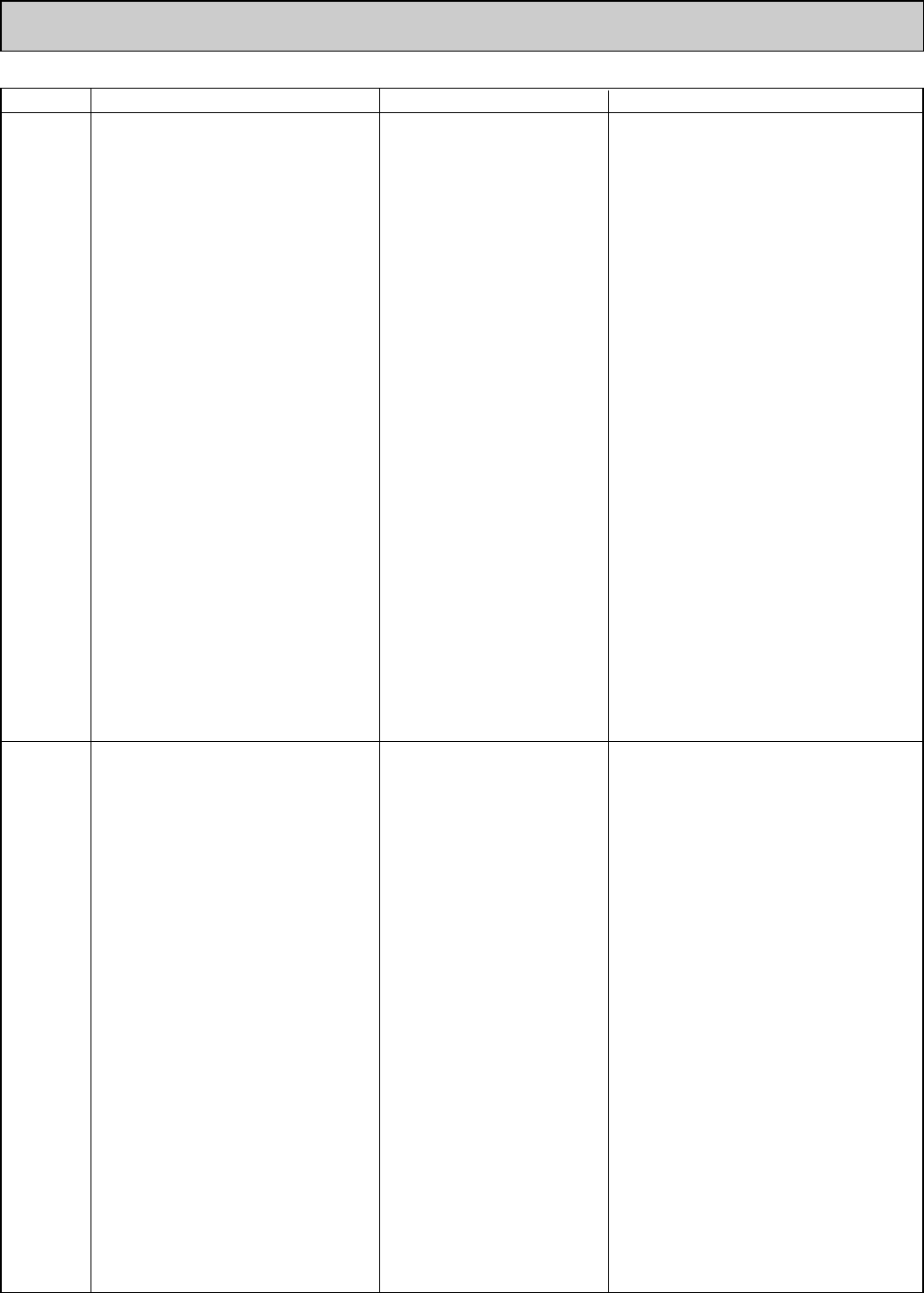
Error Code Abnormal
point and detection method
Cause Countermeasure
P6
Freezing/overheating protection is
working
1Freezing protection (Cooling mode)
The unit is in 6-minute resume prevention
mode if pipe <liquid or condenser/evap-
orator> temperature stays under
-15:(5˚F) for 3 minutes, 3 minutes after
the compressor started. Abnormal if it
stays under -15:(5˚F) for 3 minutes
again within 16 minutes after 6-minute
resume prevention mode.
2Overheating protection (Heating mode)
The units is in 6-minute resume
prevention mode if pipe <condenser /
evaporator> temperature is detected as
over 70:(158˚F) after the compressor
started. Abnormal if the temperature of
over 70:(158˚F) is detected again with-
in 10 minutes after 6-minute resume
prevention mode.
P8
1Slight temperature difference
between indoor room
temperature and pipe <liquid
or condenser / evaporator>
temperature thermistor
• Shortage of refrigerant
• Disconnected holder of pipe
<liquid or condenser /
evaporator> thermistor
• Defective refrigerant circuit
2Converse connection of
extension pipe (on plural units
connection)
3Converse wiring of indoor/
outdoor unit connecting wire
(on plural units connection)
4Defective detection of indoor
room temperature and pipe
<condenser / evaporator>
temperature thermistor
5Stop valve is not opened
completely.
(Cooling or drying mode)
1Clogged filter (reduced airflow)
2Short cycle of air path
3Low-load (low temperature)
operation out of the tolerance
range
4Defective indoor fan motor
• Fan motor is defective.
• Indoor controller board is
defective.
5Defective outdoor fan control
6Overcharge of refrigerant
7Defective refrigerant circuit
(clogs)
(Heating mode)
1Clogged filter (reduced airflow)
2Short cycle of air path
3Overload (high temperature)
operation beyond the tolerance
range
4Defective indoor fan motor
• Fan motor is defective.
• Indoor controller board is
defective.
5Defective outdoor fan control
6Overcharge of refrigerant
7Defective refrigerant circuit
(clogs)
8Bypass circuit of outdoor unit
is defective.
(Cooling or drying mode)
1Check clogs of the filter.
2Remove shields.
4Measure the resistance of fan motor's winding.
Measure the output voltage of fan's connector
(FAN) on the indoor controller board.
WThe indoor controller board should be
normal when voltage of AC 208/230V is
detected while fan motor is connected.
Refer to 10-6.
5Check outdoor fan motor.
67 Check operating condition of refrigerant
circuit.
(Heating mode)
1Check clogs of the filter.
2Remove shields.
4
Measure the resistance of fan motor's winding.
Measure the output voltage of fan's connector
(FAN) on the indoor controller board.
WThe indoor controller board should be
normal when voltage of AC 208/230V is
detected while fan motor is connected.
Refer to 10-6.
5Check outdoor fan motor.
6~8Check operating condition of refrigerant
circuit.
Pipe temperature
<Cooling mode>
Detected as abnormal when the pipe tem-
perature is not in the cooling range 3 min-
utes after compressor start and 6 minutes
after the liquid or condenser/evaporator pipe
is out of cooling range.
Note 1) It takes at least 9 minutes to
detect.
Note 2) Abnormality P8 is not detected in
drying mode.
Cooling range
:-3 deg C[-5.4deg F]]
(TH-TH1)
TH: Lower temperature between liquid pipe
temperature (TH2) and
condenser/evaporator temperature
(TH5)
TH1: Intake temperature
<Heating mode>
When 10 seconds have passed after the
compressor starts operation and the hot
adjustment mode has finished, the unit is
detected as abnormal when
condenser/evaporator pipe temperature is
not in heating range within 20 minutes.
Note 3) It takes at least 27 minutes to
detect abnormality.
Note 4) It excludes the period of defrosting
(Detection restarts when defrosting
mode is over)
Heating range
:3 deg C[5.4deg F][
(TH5-TH1)
1~4 Check pipe <liquid or condenser /
evaporator> temperature with room
temperature display on remote controller
and outdoor controller circuit board.
Pipe <liquid or condenser / evaporator>
temperature display is indicated by setting
SW2 of outdoor controller circuit board as
follows.
23Check converse connection of extension
pipe or converse wiring of indoor/outdoor
unit connecting wire.
Conduct temperature check with outdoor
controller circuit board after connecting
‘A-Control Service Tool(PAC-SK52ST)’.
()
OC368B--1.qxp 07.6.20 1:01 PM Page 16
17
Error Code Abnormal point and detection method Cause Countermeasure
P9
Pipe temperature thermistor /
Condenser-Evaporator (TH5)
1The unit is in 3-minute resume protec-
tion mode if short/open of thermistor is
detected. Abnormal if the unit does not
get back to normal within 3 minutes.
(The unit returns to normal operation, if
it has been reset normally.)
2Constantly detected during cooling, dry-
ing, and heating operation (except
defrosting)
Short: 90:(194˚F) or more
Open: -40:(-40˚F) or less
1Defective thermistor
characteristics
2Contact failure of connector
(CN29) on the indoor controller
board (Insert failure)
3Breaking of wire or contact
failure of thermistor wiring
4Temperature of thermistor is
90:(194˚F) or more or -40:
(-40˚F) or less caused by
defective refrigerant circuit.
5Defective indoor controller
board
1–3Check resistance value of thermistor.
For characteristics, refer to (P1) above.
2Check contact failure of connector (CN29)
on the indoor controller board. Refer to 10-6.
Turn the power on and check restart after
inserting connector again.
4Operate in test run mode and check pipe
<condenser / evaporator> temperature with
outdoor controller circuit board. If pipe
<condenser / evaporator> temperature is
extremely low (in cooling mode) or high (in
heating mode), refrigerant circuit may have
defect.
5Operate in test run mode and check pipe
<condenser / evaporator> temperature with
outdoor control circuit board. If there is
exclusive difference with actual pipe
<condenser / evaporator> temperature
replace indoor controller board.
There is no abnormality if none of above
comes within the unit.
Turn the power off and on again to operate.
E0
or
E4
Remote controller transmission
error(E0)/signal receiving error(E4)
1Abnormal if main or sub remote con-
troller cannot receive any transmission
normally from indoor unit of refrigerant
address “0” for 3 minutes.
(Error code : E0)
2Abnormal if sub-remote controller could
not receive for any signal for 2 minutes.
(Error code: E0)
1Abnormal if indoor controller board can
not receive any data from remote con-
troller board or normally from other
indoor controller board for 3 minutes.
(Error code: E4)
2Indoor controller board cannot receive
any signal from remote controller for 2
minutes. (Error code: E4)
1Check disconnection or looseness of indoor
unit or transmission wire of remote controller.
2Set one of the remote controllers “main”
if there is no problem with the action above.
3Check wiring of remote controller.
• Total wiring length: max. 500m
(Do not use cable o3 or more)
• The number of connecting indoor units:
max. 16 units
• The number of connecting remote con-
troller: max. 2 units
When the above-mentioned problem 1~3 are not seen.
4Diagnose remote controllers.
a) When “RC OK” is displayed,
remote controllers have no problem.
Turn the power off, and on again to
check. If abnormality generates again,
replace indoor controller board.
b) When “RC NG” is displayed,
replace remote controller.
c) When “RC E3” is displayed,
d) When “ERC 00-06” is displayed,
[ c),d)→Noise may be causing abnormality. ]
∗If the unit is not normal after replacing
indoor controller board in group control,
the indoor controller board of address
“0” may be abnormal.
E3
or
E5
Remote controller transmission
error(E3)/signal receiving error(E5)
1Abnormal if remote controller could not
find blank of transmission path for 6 sec-
onds and could not transmit.
(Error code: E3)
2Remote controller receives transmitted
data at the same time, compares the
data, and when detecting it, judges
different data to be abnormal 30
continuous times. (Error code: E3)
1Abnormal if indoor controller board could
not find blank of transmission path.
(Error code: E5)
2Indoor controller board receives trans-
mitted data at the same time, compares
the data,and when detecting it, judges
different data to be abnormal 30
continuous times. (Error code: E5)
1Set a remote controller to main, and the
other to sub.
2Remote controller is connected with only 1
indoor unit.
3The address changes to a separate setting.
4~6 Diagnose remote controller.
a) When “RC OK” is displayed, remote con-
trollers have no problem.
Turn the power off, and on again to check.
When becoming abnormal again, replace
indoor controller board.
b)When “RC NG” is displayed, replace
remote controller.
c)When “RC E3” or “ERC 00-66” is displayed,
noise may be causing abnormality.
1Contact failure at transmission
wire of remote controller
2All remote controllers are set
as “sub” remote controller. In
this case, E0 is displayed on
remote controller, and E4 is
displayed at LED (LED1, LED2)
on the outdoor controller circuit
board.
3Miswiring of remote controller
4Defective transmitting receiving
circuit of remote controller
5Defective transmitting receiving
circuit of indoor controller board
of refrigerant address “0”
6Noise has entered into the
transmission wire of remote
controller.
12 remote controller are set as
“main.” (In case of 2 remote
controllers)
2Remote controller is connected
with 2 indoor units or more.
3Repetition of refrigerant
address
4Defective transmitting receiving
circuit of remote controller
5Defective transmitting receiving
circuit of indoor controller board
6Noise has entered into trans-
mission wire of remote controller.
In case of checking pipe temperature
with outdoor controller circuit board,
be sure to connect A-control service
tool (PAC-SK52ST).
()
OC368B--1.qxp 07.6.20 1:01 PM Page 17
18
E6
1Contact failure, short circuit or,
miswiring (converse wiring) of
indoor/outdoor unit connecting
wire
2Defective transmitting receiving
circuit of indoor controller board
3Defective transmitting receiving
circuit of indoor controller board
4Noise has entered into indoor/
outdoor unit connecting wire.
∗Check LED display on the outdoor control cir-
cuit board. (Connect A-control service tool,
PAC-SK52ST.)
Refer to EA-EC item if LED displays EA-EC.
1Check disconnection or looseness of indoor/
outdoor unit connecting wire of indoor unit or
outdoor unit.
Check all the units in case of twin indoor
unit system.
2-4Turn the power off, and on again to
check. If abnormality generates again,
replace indoor controller board or outdoor
controller circuit board.
∗Other indoor controller board may have
defect in case of twin indoor unit system.
E7
Indoor/outdoor unit communication
error (Transmitting error)
Abnormal if “1” receiving is detected 30
times continuously though indoor controller
board has transmitted “0”.
1Defective transmitting receiving
circuit of indoor controller board
2Noise has entered into power
supply.
3Noise has entered into outdoor
control wire.
1-3Turn the power off, and on again to
check. If abnormality generates again,
replace indoor controller board.
Indoor/outdoor unit communication
error (Signal receiving error)
1Abnormal if indoor controller board
cannot receive any signal normally for 6
minutes after turning the power on.
2Abnormal if indoor controller board
cannot receive any signal normally for 3
minutes.
3Consider the unit as abnormal under the
following condition: When 2 or more
indoor units are connected to 1
outdoor unit, indoor controller board
cannot receive a signal for 3 minutes
from outdoor controller circuit board, a
signal which allows outdoor controller
circuit board to transmit signals.
Error Code Abnormal point and detection method Cause Countermeasure
Fb
Indoor controller board
Abnormal if data cannot be normally read
from the nonvolatile memory of the indoor
controller board.
1Defective indoor controller
board
1Replace indoor controller board.
E1
or
E2
Remote controller control board
1Abnormal if data cannot be normally
read from the nonvolatile memory of the
remote controller control board.
(Error code: E1)
2Abnormal if the clock function of remote
controller cannot be normally operated.
(Error code: E2)
1Defective remote controller 1Replace remote controller.
PA
(2502)
(2500)
Forced compressor stop
(due to water leakage abnormality)
1
When the intake temperature subtracted
with liquid pipe temperature is less than
-10:(14˚F), drain sensor detects
whether it is soaked in the water or not
at the interval of 90 seconds.
(Drain
pump will start operating when the drain sen-
sor detects to be soaked in the water.)
2The unit has a water leakage abnormality
when the following conditions, a and b,
are satisfied while the above-mentioned
detection is performed.
a) The drain sensor detects to be
soaked in the water 10 times in a row.
b) The intake temperature subtracted
with liquid pipe temperature is detect-
ed to be less than -10:(14˚F) for a
total of 30 minutes. (When the drain
sensor detects to be NOT soaked in
the water, the detection record of a
and b will be cleared.)
3The drain sensor detection is performed
in operations other than cooling. (When
the unit stops operating, during heating
or fan operation, when the unit stops
because of some abnormality)
*Once the water leakage abnormality is
detected, abnormality state will not be
released until the main power is reset.
1Drain pump trouble
2Drain defective
· Drain pump clogging
· Drain pipe clogging
3Open circuit of drain sensor
side heater
4Contact failure of drain sensor
connector
5Dew condensation on drain
sensor
· Drain water trickles along
lead wire.
· Drain water waving due to filter
clogging
6Extension piping connection
difference at twin system
7Miswiring of indoor/ outdoor
connecting at twin system
8Room temperature thermistor /
liquid pipe temperature thermis-
tor detection is defective.
1Check the drain pump.
2Please confirm whether water can be
drained.
3Confirm the resistance of the drain sensor.
4Check the connector contact failure.
5Check the drain sensor leadwire mounted.
Check the filter clogging.
6Check the piping connection.
7Check the indoor/ outdoor connecting wires.
8Check the room temperature display of
remote controller.
Check the indoor liquid pipe temperature
display of outdoor controller board.
OC368B--1.qxp 07.6.20 1:01 PM Page 18
19
(For the separate indoor/outdoor unit power sup-
ply system)
1Power supply of 208/230V AC is not supplied to
indoor unit.
2The connectors of the optional replacement kit are
not used.
3Defective indoor controller board
4Defective indoor power board
10-3. TROUBLESHOOTING BY INFERIOR PHENOMENA
Note: Refer to the manual of outdoor unit for the detail of remote controller.
Phenomena Cause Countermeasure
(1)LED2 on indoor controller board
is off. • When LED1 on indoor controller board is also off.
1Power supply of rated voltage is not supplied to out-
door unit.
2Defective outdoor controller circuit board
3Power supply of 208/230V is not supplied to indoor
unit.
4Defective indoor power board
5Defective indoor controller board
1Check the voltage of outdoor power
supply terminal block (L1,L2).
• When AC 208/230V is not detected,
check the power wiring to outdoor unit
and the breaker.
• When AC 208/230V is detected,
check 2(below).
2Check the voltage between outdoor
terminal block S1 and S2.
• When AC 208/230V is not detected.
—Check the fuse on outdoor controller
circuit board.
—Check the wiring connection.
• When AC 208/230V is detected,
check 3(below).
3Check the voltage between indoor terminal
block S1 and S2.
• When AC 208/230V is not detected,
check indoor/outdoor unit connecting
wire for mis-wiring.
• When AC 208/230V is detected,
check 4(below).
4Check voltage output from CN2S on indoor
power board (DC13.1V). Refer to 10-6-1.
• When no voltage is output, check the
wiring connection.
• When output voltage is between
DC12.5V and DC13.7V, check 5
(below).
5Check the wiring connection between
indoor controller board and indoor power
board. Check the fuse on indoor controller
board. If no problems are found, indoor
controller board is defective.
1Check the voltage of indoor power supply
terminal block (L1,L2).
• When AC208/230V is not detected,
check the power supply wiring.
• When AC208/230V is detected, check
2(below).
2Check that there is no problem in the
method of connecting the connectors.
• When there are problems in the method
of connecting the connectors, connect
the connector correctly referring to instal-
lation manual of an optional kit.
• When there is no problem in the
method of connecting the connectors,
check 3(below).
3Check voltage output from CNDK on
indoor controller board.
• When AC208/230V is not detected.
—Check the fuse on indoor controller board.
—Check the wiring connection between
indoor power supply terminal block and
CND on indoor controller board.
• When AC208/230V is detected, check
4(below).
4Check voltage output from CN2S on
indoor power board.
• When no voltage output, check the
wiring connection between CNDK on
indoor controller board and CNSK on
indoor power board.
If no problem are found, indoor power
board is defective.
• When DC12.5~13.7V is detected,
check the wiring connection between
CN2S on indoor power board and
CN2D on indoor power board.
If no problem are found, indoor con-
troller board is defective.
OC368B--1.qxp 07.6.20 1:01 PM Page 19
20
Note: Refer to the manual of the outdoor unit for the detail of remote controller.
(3)Upward/downward vane
performance failure
1The vane is not downward during defrosting and
heat preparation and when the thermostat is OFF in
HEAT mode. (Working of COOL protection function)
2Vane motor does not rotate.
• Defective vane motor
• Breaking of wire or connection failure of connector
• Up/down vane setting is “No vanes”.
3Upward/downward vane does not work.
• The vane is set to fixed position.
1Normal operation (The vane is set to hor-
izontal regardless of remote control.)
2Check 2(left).
• Check the vane motor. (Refer to “How
to check the parts”.)
• Check for breaking of wire or connec-
tion failure of connector.
• Check “Up/down vane setting”. (Unit
function selection by remote controller).
3Normal operation (Each connector on
vane motor side is disconnected.)
Phenomena Cause Countermeasure
(2)LED2 on indoor controller board
is blinking. • When LED1 on indoor controller board is also blinking.
Connection failure of indoor/outdoor unit connecting
wire
• When LED1 is lit.
1Miswiring of remote controller wires
Under indoor unit system, 2 indoor
units are wired
together.
2Refrigerant address for outdoor unit is wrong or not
set.
Under grouping control system, there are some units
whose refrigerant address is 0.
3Shortcut of remote controller wires
4Defective remote controller
Check indoor/outdoor unit connecting wire
for connection failure.
1Check the connection of remote con-
troller wires in case of twin indoor unit
system. When 2 or more indoor units are
wired in one refrigerant system, connect
remote controller wires to one of those
units.
2Check the setting of refrigerant address
in case of grouping control system.
If there are some units whose refrigerant
addresses are 0 in one group, set one of
the units to 0 using SW1 (3-6) on outdoor
controller circuit board
.
34 Remove remote controller wires and
check LED2 on indoor controller board.
• When LED2 is blinking, check the
shortcut of remote controller wires.
• When LED2 is lit, connect remote
controller wires again and:
if LED2 is blinking, remote controller
is defective; if LED2 is lit, connection
failure of remote controller terminal
block etc. has returned to normal.
(4)Receiver for wireless remote
controller
1Weak batteries of wireless remote controller
2Contact failure of connector (CNB) on wireless
remote controller board(Insert failure)
3Contact failure of connector (CN90) on indoor con-
troller board(Insert failure)
4Contact failure of connector between wireless
remote controller board and indoor controller board
1Replace batteries of the wireless remote
controller.
2~4
Check contact failure of each connector.
If no problems are found in connector,
replace indoor controller board.
When the same trouble occurs even if
indoor controller board is replaced,
replace wireless remote controller
board.
• When LED1 on indoor controller board is lit.
1Mis-setting of refrigerant address for outdoor unit
(There is no unit corresponding to refrigerant
address “0”.)
1Reconfirm the setting of refrigerant
address for outdoor unit.
Set the refrigerant address to “0”.
(For grouping control system under
which 2 or more outdoor units are
connected, set one of the units to “0”.)
Set refrigerant address using SW1 (3-6)
on outdoor controller circuit board.
(1)LED2 on indoor controller board
is off.
OC368B--1.qxp 07.6.20 1:01 PM Page 20

21
10-4. WHEN WIRED REMOTE CONTROLLER OR INDOOR UNIT
MICROCOMPUTER TROUBLES
1. If there is not any other problem when trouble occurs, emergency operation starts as the indoor controller board switch
(SWE) is set to ON.
During the emergency operation the indoor unit operates with Indoor fan at high speed.
2. For emergency operation of cooling or heating
In emergency operation for COOL or HEAT, setting of the switch (SWE) in the indoor controller board and outdoor unit
emergency operation are necessary.
3. Before you activate emergency operation, check the following points:
(1) Emergency operation cannot be activated when:
· the outdoor unit malfunctions.
· the indoor fan malfunctions.
(2) Emergency operation becomes continuous only by switching the power source on / off. ON / OFF on the remote control
or temperature control etc. does not function.
(3) Avoid operating for a long time when the outdoor unit begins defrosting while emergency operation of the heating is acti-
vated, because it will start to blow cold air.
(4) Emergency cooling should be limited to 10 hours maximum. (The indoor unit heat exchanger may freeze.)
(5) After emergency operation has been deactivated, set the switches etc. to their original positions.
(6) Movement of the vanes does not work in emergency operation, therefore you have to slowly set them manually to the
appropriate position.
OC368B--1.qxp 07.6.20 1:01 PM Page 21
22
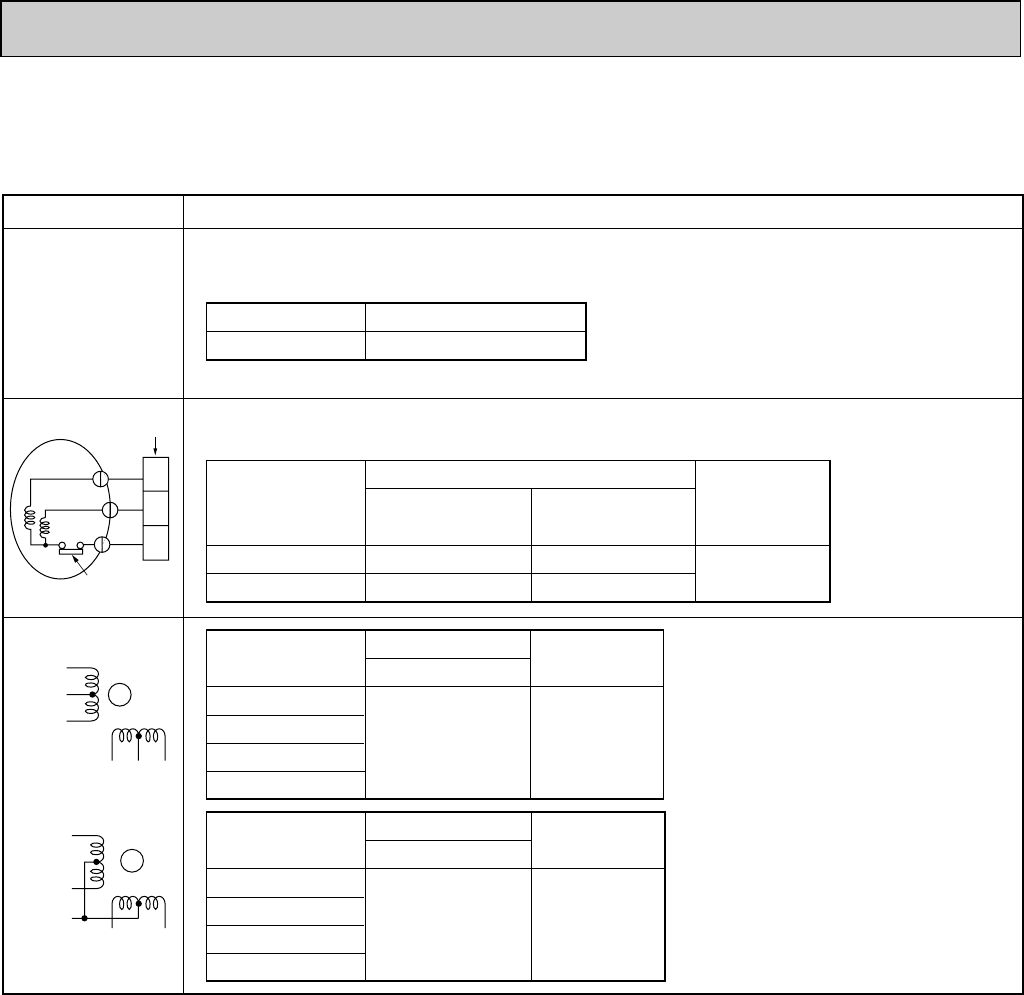
10-5. HOW TO CHECK THE PARTS
PCA-A24GA PCA-A30GA PCA-A36GA PCA-A42GA
PCA-A24GA1PCA-A30GA1PCA-A36GA1PCA-A42GA1
1
1
2
2
3
3
Red
White
Black
Relay connector
Protector
4
5
2
361
Orange
Red
Pink
Yellow Brown Blue
M
4
2
5
31
Pink
Orange
Red
Yellow Blue
M
OFF: 130i5:
ON :80i20:
Parts name Check points
Disconnect the connector then measure the resistance using a tester.
(At the ambient temperature 10:(50˚F)~30:(86˚F))
(Refer to the next pege for a detail.)
Room temperature
thermistor (TH1)
Pipe temperature
thermistor (TH2)
Condenser/evaporator
temperature thermistor
(TH5)
Normal
4.3k"~9.6k"
Abnormal
Open or short
Measure the resistance between the terminals using a tester.
(Winding temperature 20:(68˚F))
Fan motor (MF)
Abnormal
Open or short
Motor terminal
or
Relay connector
60.8"
55.1"
41.1"
54.3"
Normal
Open or short
Abnormal
Connector PCA-A24·30GA(1)
140~160"
Normal
Open or short
Abnormal
Connector PCA-A36·42GA(1)
Normal
Vane motor (MV)
140~160"
Red–Yellow
Red–Blue
Red–Blue
Red–Pink
Brown–Yellow
Brown–Blue
Red–Orange
Red–Pink
Red–Black
White–Black
PCA-A24GA(1)
PCA-A30GA(1)
PCA-A36GA(1)
PCA-A42GA(1)
OC368B--1.qxp 07.6.20 1:01 PM Page 22
23
0
10
20
30
40
50
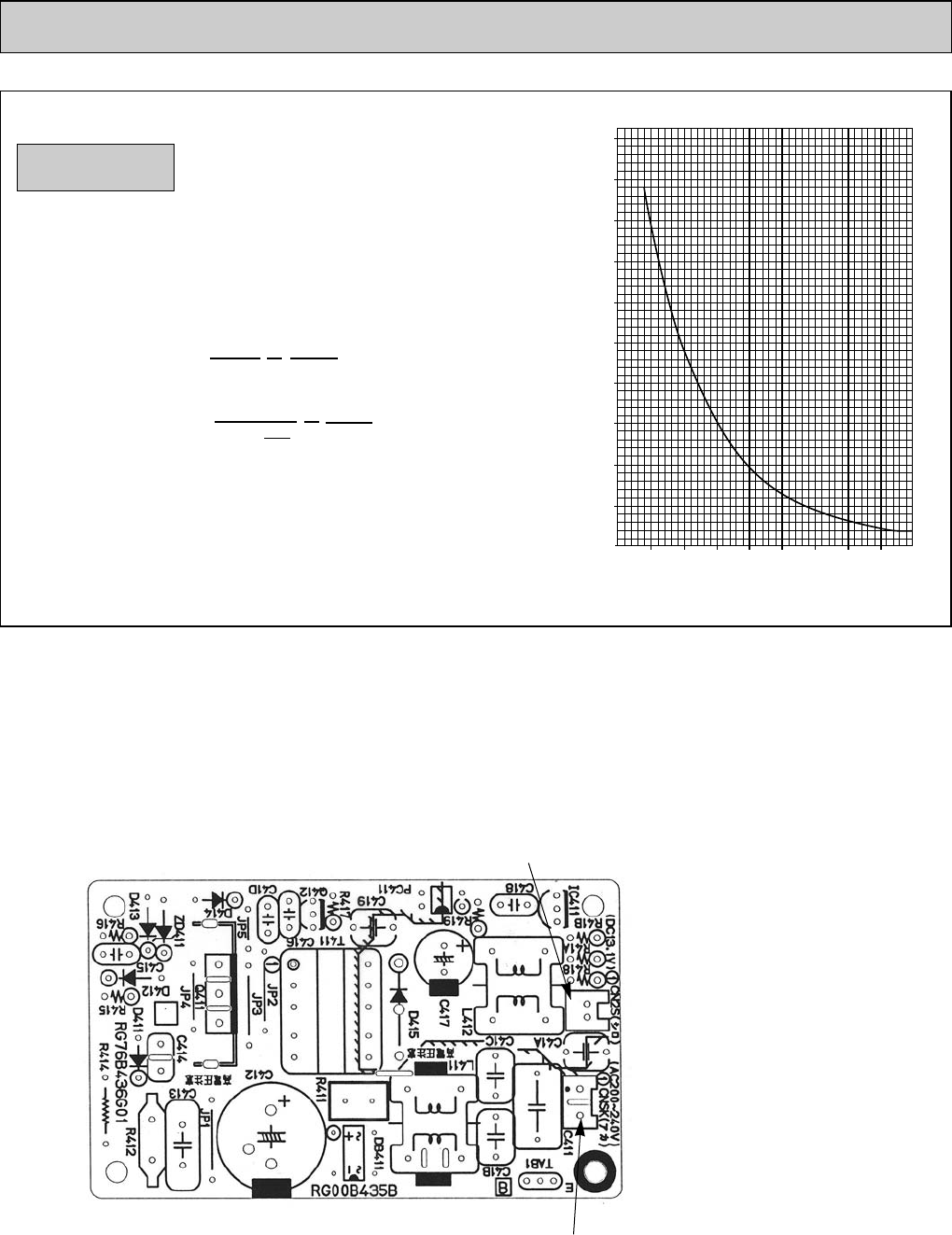
-20 -10 0 10 20 30 40 50
< Thermistor for lower temperature >
Temperature
Resistance (k")
:
-4 -14 32 50 68 86
104
122
˚F
10-6.TEST POINT DIAGRAM
10-6-1. Power board
PCA-A24GA PCA-A30GA PCA-A36GA PCA-A42GA
PCA-A24GA1PCA-A30GA1PCA-A36GA1PCA-A42GA1
CNSK
Connect to the indoor controller board
(CNDK)
Between 1 to 3208/230V AC
CN2S
Connect to the indoor controller board (CN2D)
Between 1 to 3 12.6-13.7V DC (Pin1(+))
<Thermistor Characteristic graph>
Room temperature thermistor(TH1)
Pipe temperature thermistor(TH2)
Condenser/evaporator temperature
thermistor(TH5)
Thermistor R0=15kΩ±3%
Fixed number of B=3480 ± 2%
t(:):Rt=15exp { 3480( ) }
T(˚F):Rt=15exp { 3480( ) }
0: (32˚F) 15kΩ
10: (50˚F) 9.6kΩ
20: (68˚F) 6.3kΩ
25: (77˚F) 5.4kΩ
30: (86˚F) 4.3kΩ
40:(104˚F) 3.0kΩ
1
273+t
1
273
1
273+
1
273
T-32
1.8
Thermistor for
lower temperature
OC368B--1.qxp 07.6.20 1:01 PM Page 23
24
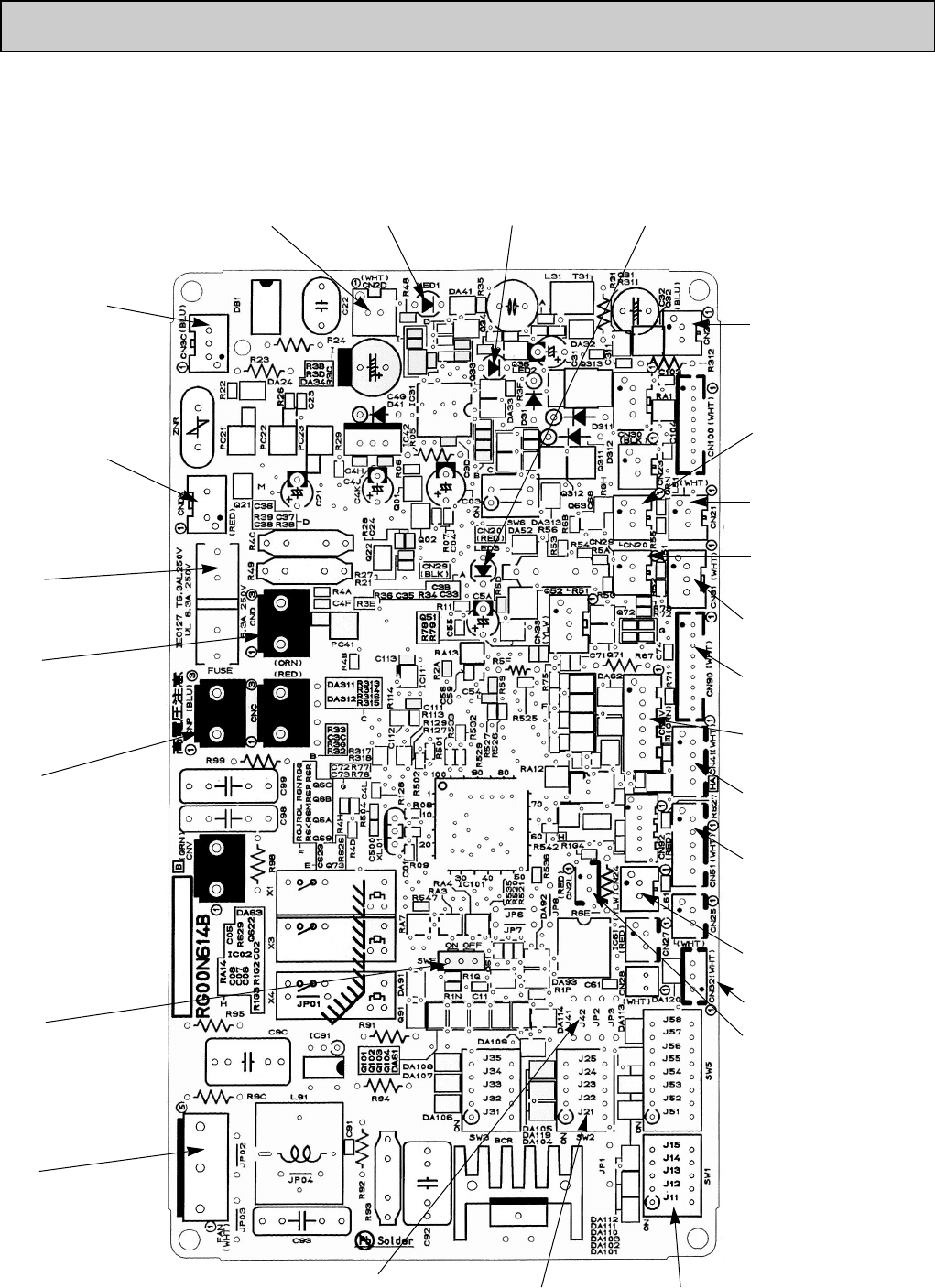
10-6-2. Indoor controller board
PCA-A24GA PCA-A30GA PCA-A36GA PCA-A42GA
PCA-A24GA1PCA-A30GA1PCA-A36GA1PCA-A42GA1
CN2D
Connect to the indoor
power board (CN2S)
(12.5~13.7V DC)
CNDK
Connect to the indoor
power board (CNSK)
(208/230V AC)
FUSE
(6.3 A 250 V)
CN22
Connect to the terminal
block(TB5)
(Remote controller connecting
wire)
(10.4~14.6V DC)
CN21
Pipe temperature
thermistor/Liquid (TH2)
CN20
Room temperature
thermistor (TH1)
CN41
Connector (HA terminal-A)
CN6V
Vane motor output
(MV)
CN90
Connect to the wireless
remote controller board
(CNB)
CN31
Drain sensor (DS)
CN51
Centrally control
CN29
Condenser/evaporator
temperature thermistor (TH5)
CN24
Heater output
(12V DC)
SW1
Model setting
SW2
Capacity setting
SWE
Emergency operation
LED1
Power supply (I.B) LED2
Power supply (R.B) LED3
Transmission (Indoor/outdoor)
CN3C
Transmission
(Indoor/outdoor)
(0~24V DC)
FAN
Fan motor output
Jumper wire J41, J42
Pair number setting with
wireless remote controller
CND
Power supply input
(208/230V AC)
CNP
Drain-pump output
(DP)
(208/230V AC)
CN2L
Connector
(LOSSNAY)
CN32
Remote switch
OC368B--1.qxp 07.6.20 1:01 PM Page 24
25
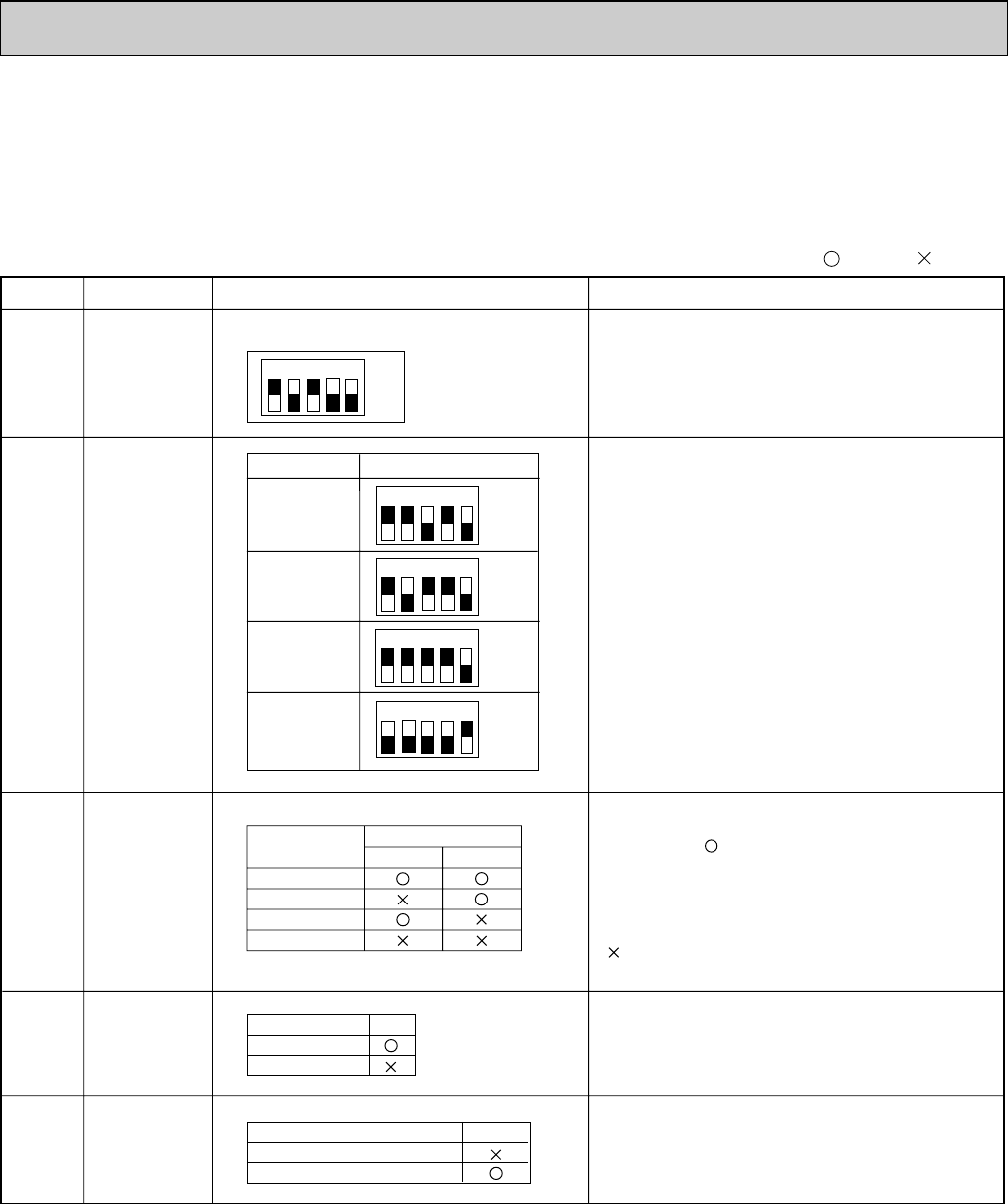
SW1
Setting by the dip switch and jumper wire
Functions
Jumper wire
Model
settings
Capacity
settings
Pair number
setting with
wireless
remote
controller
For service board
Remarks
SW2
J41
J42
Unit type
setting
JP1
Indoor
controller
board type
setting
JP3
0
1
2
3 ~ 9
Wireless remote
controller setting
Control PCB setting
J41 J42
<Initial setting>
Wireless remote controller: 0
Control PCB: (for both J41 and J42)
Four pair number settings are supported.
The pair number settings of the wireless remote
controller and indoor control PCB (J41/J42) are
given in the table on the left.
(' ' in the table indicates the jumper wire is disco-
nnected.)
There is no jumper (JP1) because these models
have the cond./eva. temperature thermistor (TH5).
(Marks in the table below) Jumper wire ( : Short : Open)
Without TH5
With TH5
Model JP1
For product
Service parts
Indoor controller board type JP3
Service board
MODELS
PCA-A24GA
PCA-A24GA1
1 2 3 4 5
1 2 3 4 5
1 2 3 4 5
PCA-A30GA
PCA-A30GA1
PCA-A36GA
PCA-A36GA1
PCA-A42GA
PCA-A42GA1
ON
OFF
ON
OFF
1 2 3 4 5
ON
OFF
ON
OFF
1 2 3 4 5
ON
OFF
10-7. FUNCTIONS OF DIP SWITCH AND JUMPER WIRE
Each function is controlled by the dip switch and the jumper wire on control P.C. board.
SW1 and SW2 are equipped only for service parts.
Model setting and capacity setting are memorized in the nonvolatile memory of the control P.C. board of
the unit.
OC368B--1.qxp 07.6.20 1:01 PM Page 25
26
DISASSEMBLY PROCEDURE
11
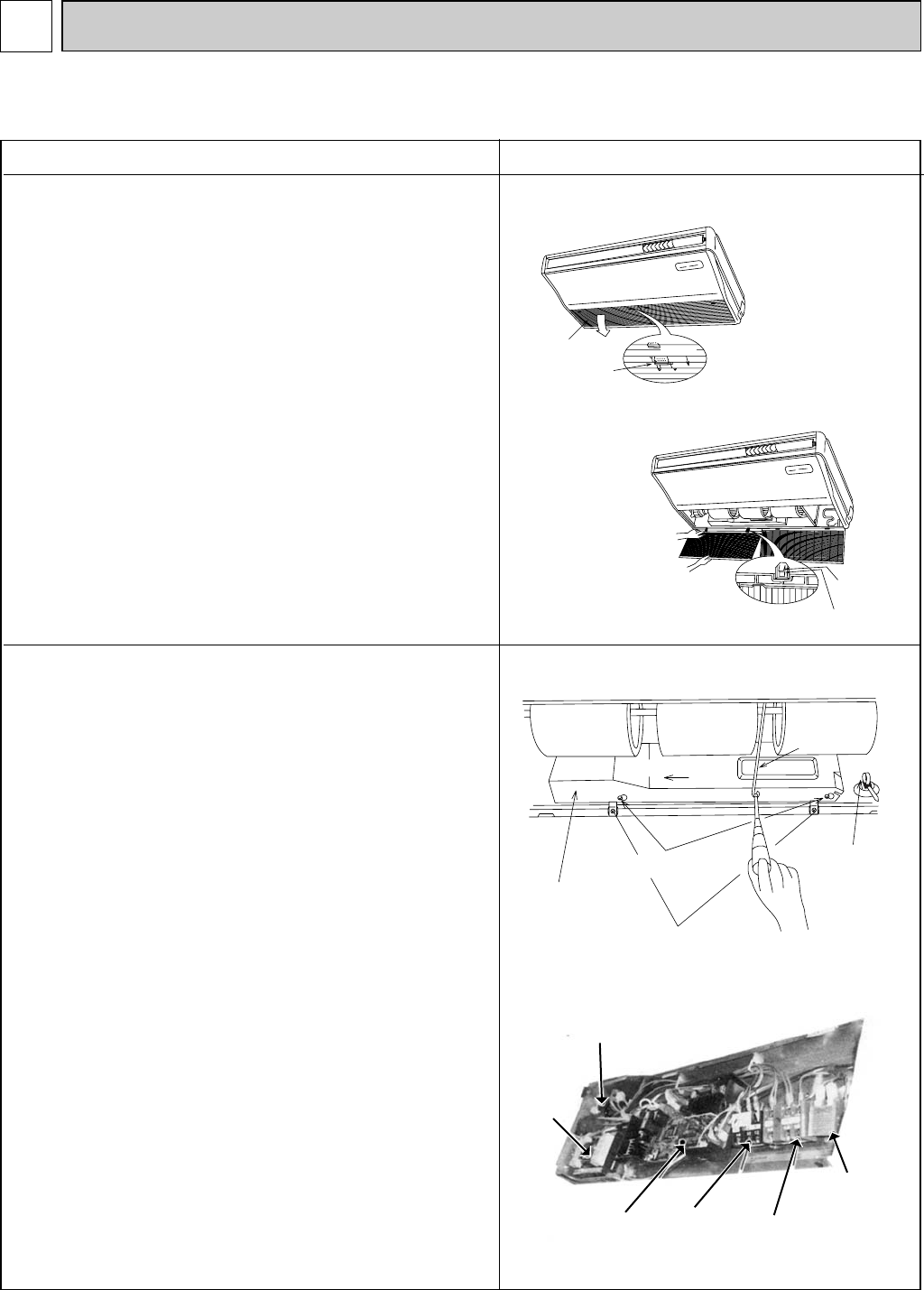
1. Removing the air intake grille
(1) Slide the intake grille holding 2 knobs backward to open
the intake grille.
(2) When the intake grille left open, push the stoppers on the
rear 2 hinges to pull out the intake grille.
OPERATING PROCEDURE PHOTOS & ILLUSTRATIONS
2. Removing the electrical box
(1) Remove the air intake grille. (See the figure 1)
(2) Remove the screw from the beam and remove the beam.
(3) Remove the screws from the electrical cover, and
remove the electrical cover.
(4) Disconnect CN6V, CN21 and CN29.
(5) Remove the screws from the electrical box and pull out
the electrical box.
<Electrical parts in the electrical box>
Terminal block (for indoor / outdoor connecting line)<TB4>
Terminal block (for power supply)<TB2>
Terminal block (for remote controller)<TB5>
Fan motor capacitor<C>
Indoor control board<I.B>
Power board<P.B>
(There might not be TB2 depending on the model.)
Figure 1
Figure 2
Photo 1
slide
Intake grille
Intake grille
Holding knobs
Hinges
Pull out the intake grille
Electrical cover
Screw(electrical cover)
Screw(electrical box)
Slide to the left
Beam
Clamp
PCA-A24GA PCA-A30GA PCA-A36GA PCA-A42GA
PCA-A24GA1PCA-A30GA1PCA-A36GA1PCA-A42GA1
Fan motor
capacitor
Power board
Indoor control
board Terminal block
(power supply) Terminal block
(Indoor / outdoor
connecting wire)
Terminal block
(remote control)
OC368B--1.qxp 07.6.20 1:01 PM Page 26
screw
side panel
sliding the panel
to the front
27
Figure 3
5. Removing the side panel
(1) Remove the air intake grille.
(2) Remove the screw from the side panel, and remove the
side panel by sliding the panel to the front.
OPERATING PROCEDURE PHOTOS & ILLUSTRATIONS
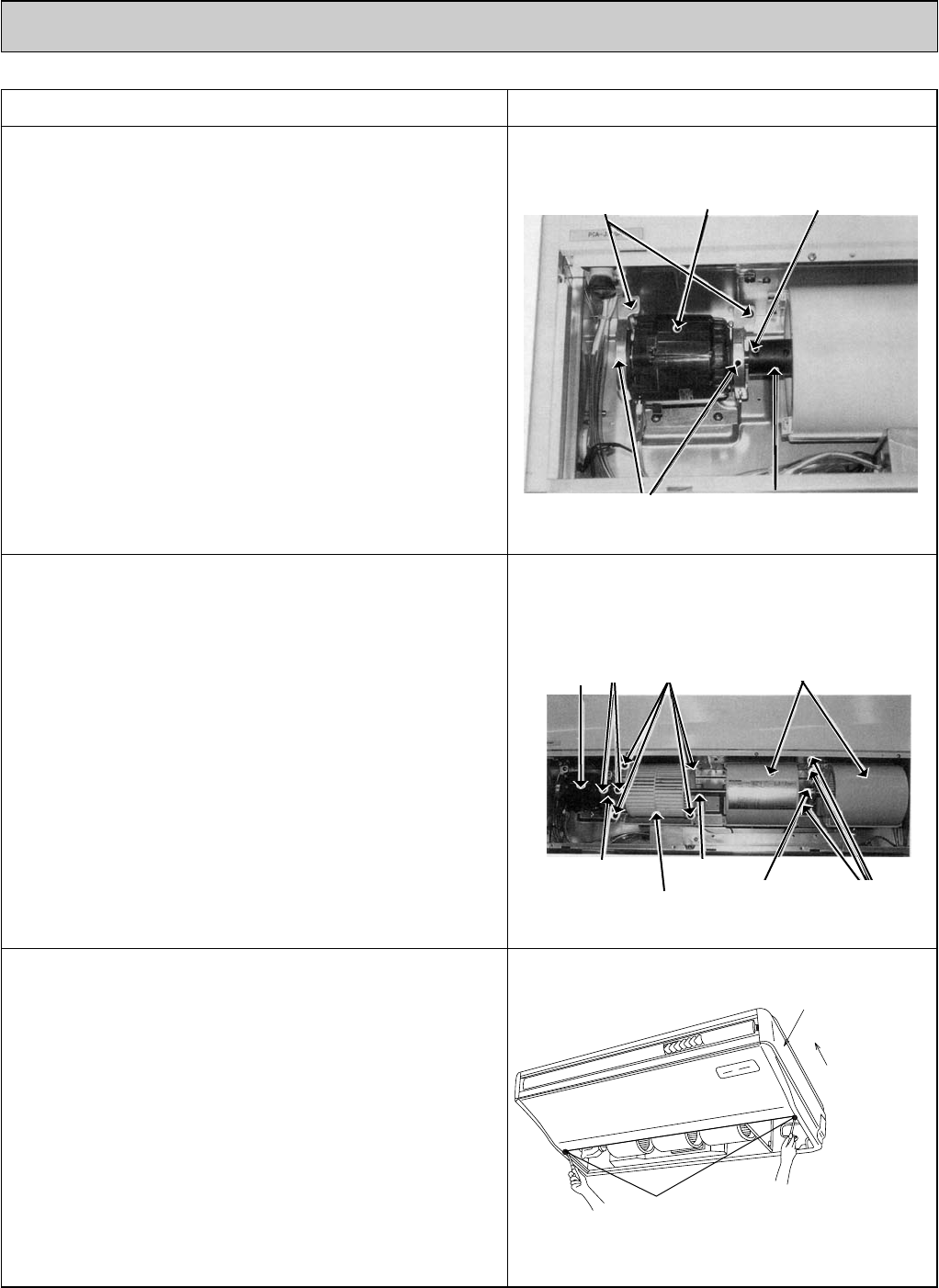
3. Removing the fan motor <MF>
(1) Remove the intake grille.
(2) Disconnect the fan motor connector.
(3) Remove the screw for removing the motor support at both
left and right side.
(4) Loosen the set screws at the fan motor side of the con-
necting joint.
(5) Slide the fan motor <MF> to the left side and pull it out.
4. Removing the sirocco fan
(1) Remove the air intake grille.
(2) Remove 1 beam.
(3) Remove the lower casing while pressing the stoppers at
upper side of the casing.
(4) Loosen the set screws at the connecting joint.
(5) Remove the sirocco fan and shaft together by sliding the
shaft to the left.
(Note)
Make sure that the upper side casing is snapped to the fan
plate securely with catch.
Photo 2
Photo 3
Motor set screws
Motor support connecting joint
Sirocco fan
Shaft
Motor Set screw Catch
Connecting joint
Bearing Screws
Screws
Casing
OC368B--1.qxp 07.6.20 1:01 PM Page 27
28
OPERATING PROCEDURE PHOTOS
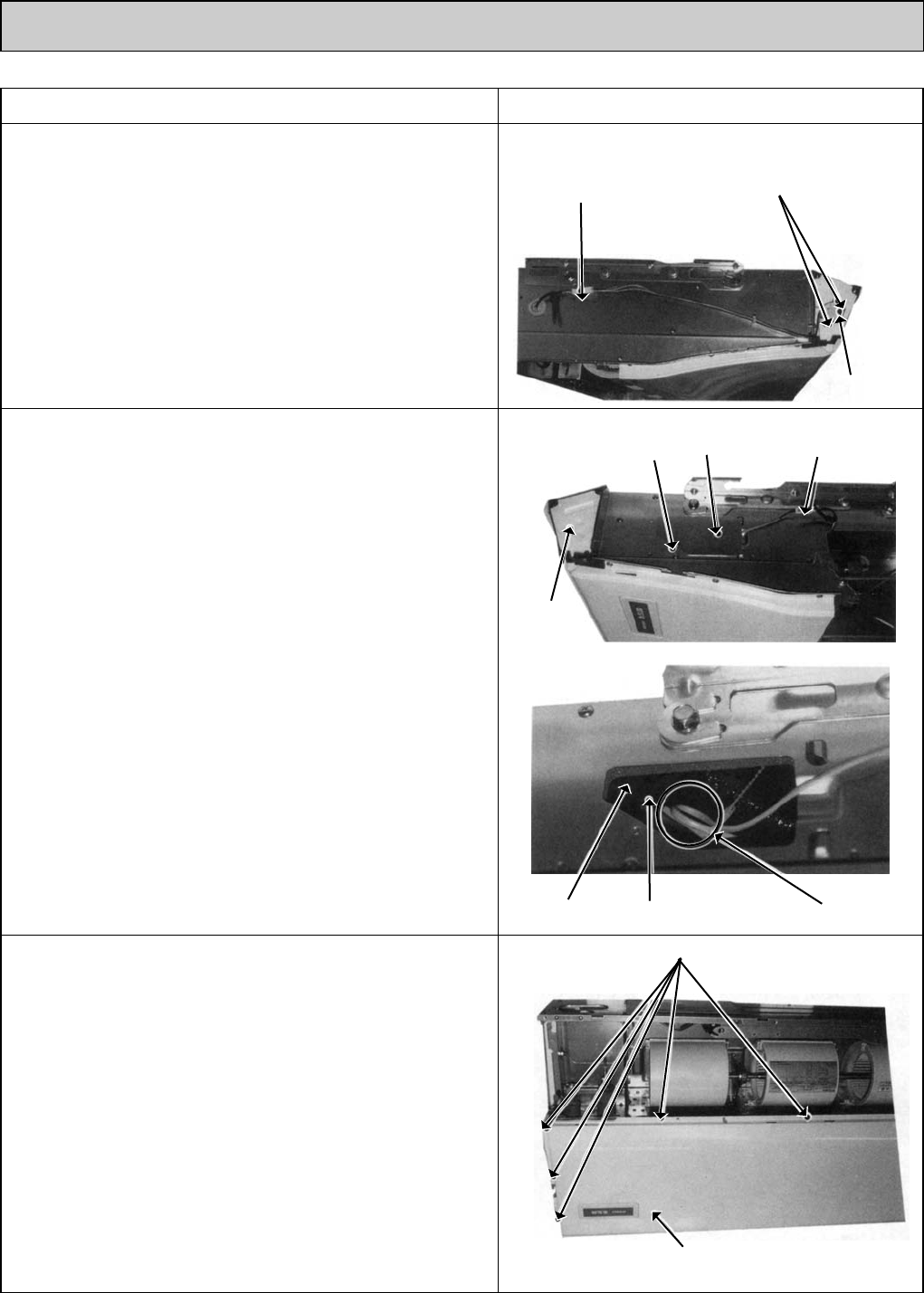
6. Removing the vane motor <MV>
(1) Remove the air intake grille. (See the figure 1)
(2) Remove the left side panel. (See the figure 3)
(3) Remove the relay connector of vane motor.
(4) Remove the electrical box.
(5) Remove the screws of vane motor, then remove vane
motor <MV>.
(Note)
Connect the lead wires and connectors properly and place
them in the proper position so that the wires are not pinched
by other parts.
8. Removing the Under panel
(1) Remove the air intake grille. (See the figure 1)
(2) Remove the beam.
(3) Remove the side panel (right and left). (See the figure 3)
(4) Remove the 9 screws of the under panel, then remove
the under panel.
wWeight of the under panel : Approx. 2kg.
7. Removing the Indoor coil thermistor <TH2/TH5>
(1) Remove the air intake grille. (See the figure 1)
(2) Remove the right side panel. (See the figure 3)
(3) Remove the relay connector of the pipe thermistor
<TH2/TH5>.
(4) Remove the screw, and remove the check panel.
(5) Extract the indoor coil thermistor <TH2/TH5> from the
holder.
<Caution for the installation>
There is a possibility for the short circuit when connector gets
wet by water through the thermistor lead wire.
Therefore, lead wire of the indoor coil thermistor <TH2/TH5>
should be tied as shown in the photo 6.
Photo 4
Photo 7
Screw
Screws
Relay connector of
the vane motor
Vane motor
Under panel
Photo 5
Photo 6
Screw
Hold Indoor coil thermistor Clamp
Check
panel
Relay connector of
the pipe thermistor
Left side
panel
OC368B--1.qxp 07.6.20 1:01 PM Page 28
29
OPERATING PROCEDURE PHOTOS
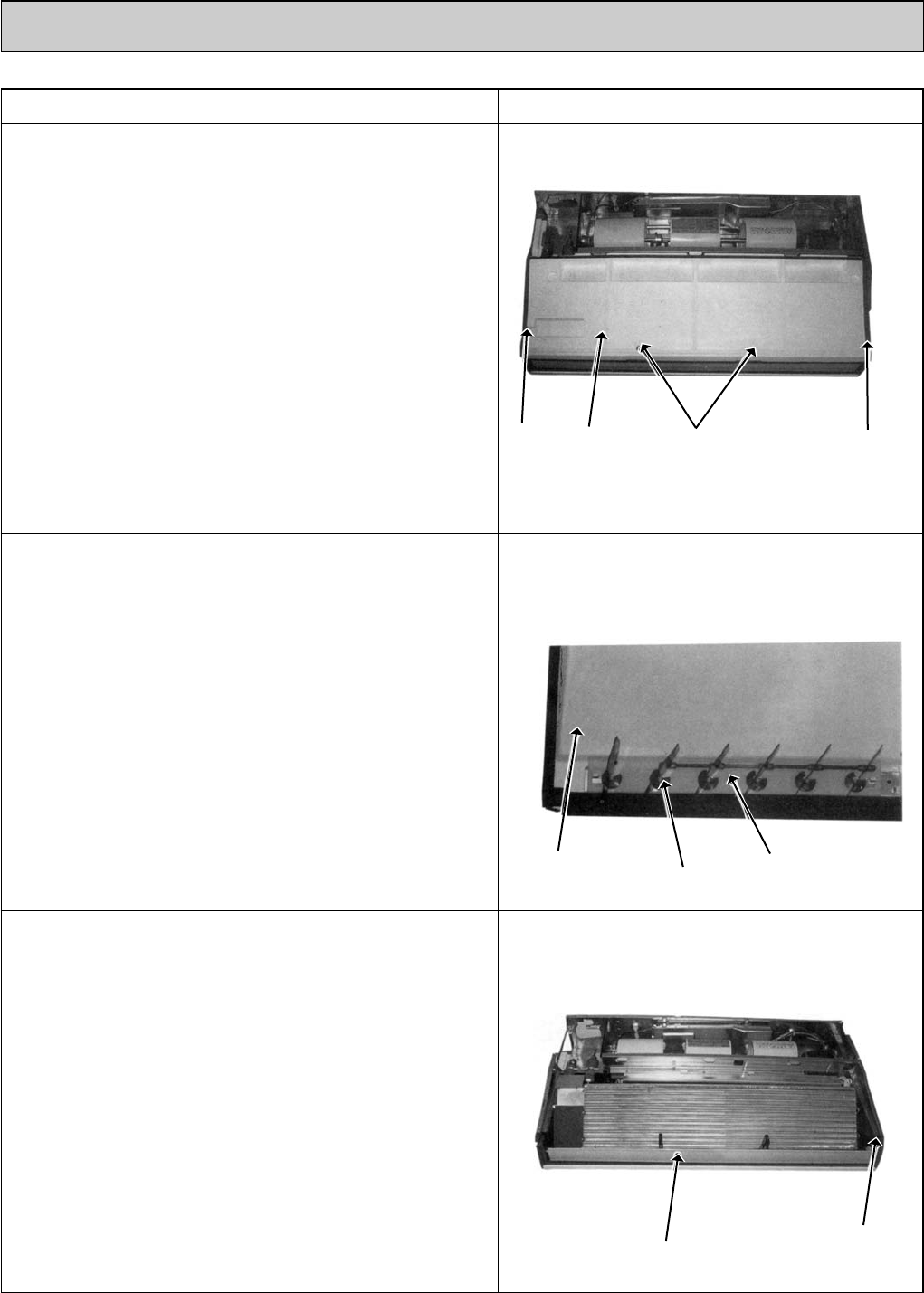
9. Removing the drain pan
(1) Remove the air intake grille. (See the figure 1)
(2) Remove the beam.
(3)
Remove the side panels of right and left. (See the figure 3)
(4) Remove the under panel. Remove the screws of the right
and left side drain pan.
(5) Remove the 2 insulations in centre of the drain pan, and
after removing the 2 screws, remove the drain pan.
(Note)
Please be aware that there might be drain left in the drain
pan when you remove the drain pump (option).
10. Removing the guide vane
(1) Remove the intake grille. (See the figure 1)
(2) Remove the beam.
(3)
Remove the side panels (right and left). (See the figure 3)
(4) Remove the under panel. (See the photo 7)
(5) Remove the drain pan. (See the photo 8)
(6) Remove the screw from the guide vane, then remove the
guide vane.
11. Removing the Auto vane
(1) Remove the intake grille. (See the figure 1)
(2) Remove the left side panel. (See the figure 3)
(3) Remove the left side box.
(4) Remove the under panel.
(5) Remove the screw from the auto vane.
(6) Slide the auto vane to the right side and pull the auto
vane out.
Photo 8
Screw
Screw
Screw
Guide vane
Auto vane
Drain pan
Screw Drain pan Screw
(Insulation)
Photo 9
Photo 10
OC368B--1.qxp 07.6.20 1:01 PM Page 29
30
OPERATING PROCEDURE PHOTOS
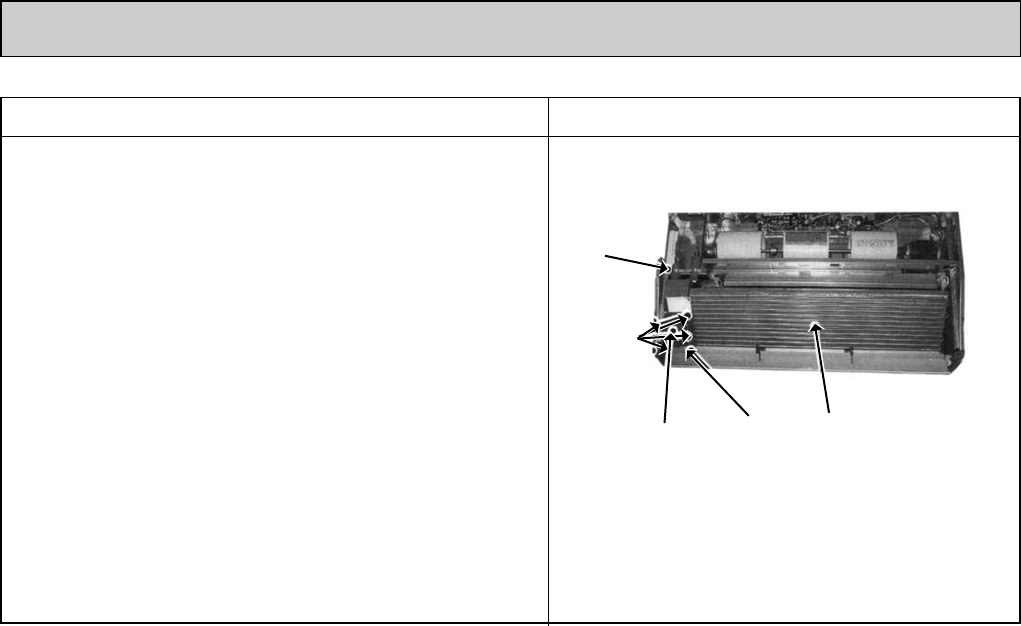
12. Removing the heat exchanger
(1) Remove the air intake grille. (See the figure 1)
(2) Remove the beam.
(3) Remove the side panel (right and left). (See the figure 3)
(4) Disconnect the relay connector of the pipe thermistor.
(5) Remove the under panel. (See the photo 7)
(6) Remove the drain pan. (See the photo 8)
(7) Unscrew the screw of the pipe cover, and remove the
pipe cover.
(8) Unscrew the screw of the pipe support, and remove the
pipe support.
(9) Unscrew the screw of the heat exchanger, and remove
the heat exchanger.
Remove the heat exchanger with care. Since this is quite
heavy, removing work should be done with more than 2
people.
wWeight of heat exchanger : Approx. 5.3kg
Photo 11
Pipe
support
Pipe cover Heat
exchanger
Screws
Screws
OC368B--1.qxp 07.6.20 1:01 PM Page 30
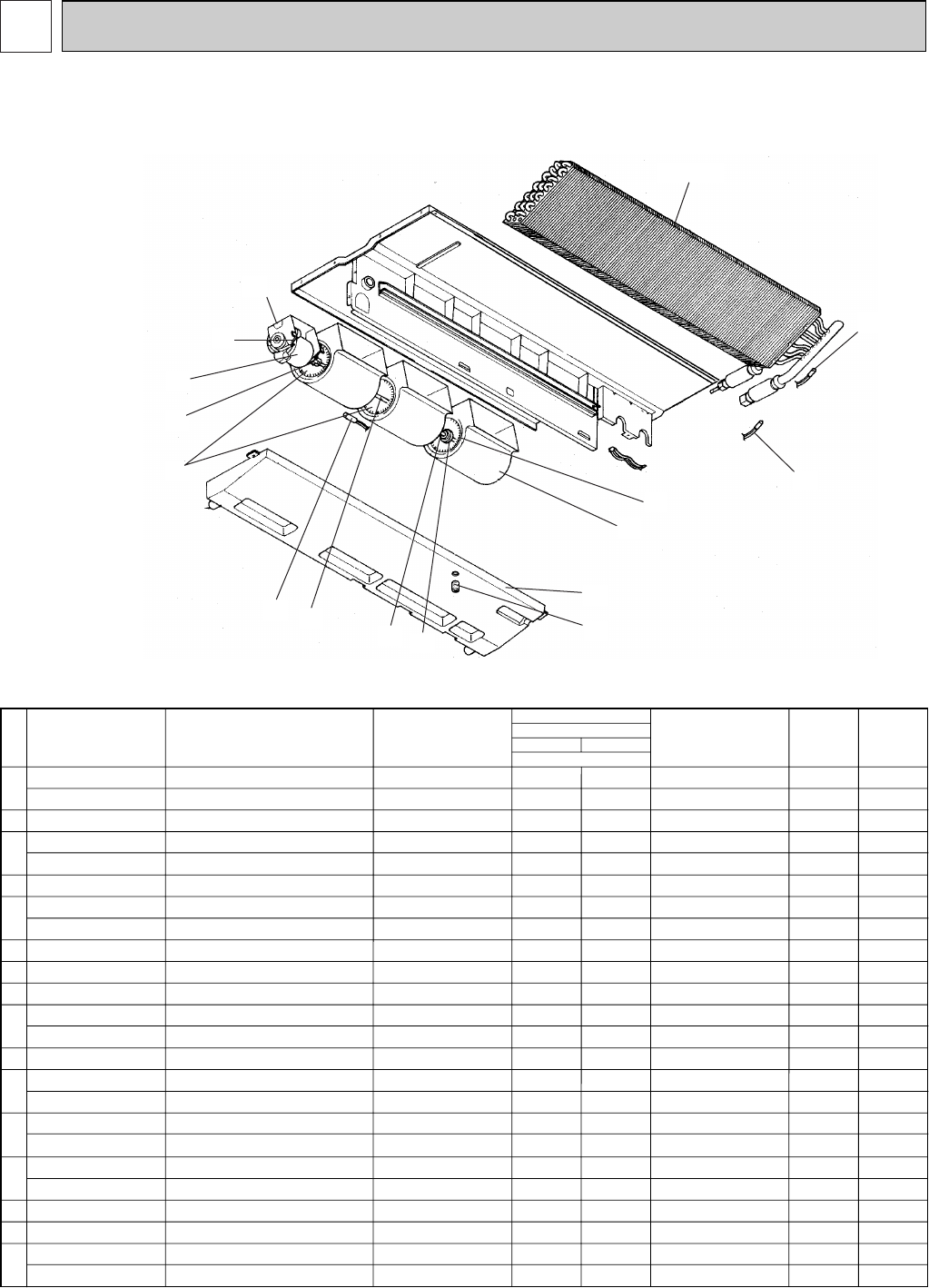
31
PARTS LIST (non-RoHS compliant)
12
No.
Parts No. Parts Name Specifications Wiring
Diagram
Symbol
Recom-
mended
Q'ty
1
2
3
4
5
6
7
8
9
10
11
12
13
14
15
16
1
1
1
1
2
1
1
1
1
1
1
3
1
1
1
1
MF
MF
TH1
TH2
TH5
D09C4P70MS
D10C4P90MS
Remarks
(Drawing No.)
R01 29J 130
R01 35J 130
R01 43E 126
T7W 30J 762
T7W E14 762
R01 700 116
R01 E17 114
R01 E19 114
R01 E26 202
R01 29J 100
R01 E00 103
R01 29J 145
R01 35J 145
R01 17J 524
T7W E20 529
T7W E15 529
R01 17J 110
R01 35J 110
R01 E15 114
R01 E20 114
R01 E27 202
R01 17J 202
T7W H23 480
T7W H24 480
MOTOR LEG
MOTOR LEG
PIECE(MOTOR)
FAN MOTOR
FAN MOTOR
SHAFT JOINT
SIROCCO FAN
SIROCCO FAN
ROOM TEMPERATURE THERMISTOR
SHAFT
SLEEVE BEARING
BEARING SUPPORT
BEARING SUPPORT
DRAIN PLUG
DRAIN PAN ASSY
DRAIN PAN ASSY
CASING
CASING
SIROCCO FAN
SIROCCO FAN
LIQUID PIPE TEMPERATURE THERMISTOR
COND/EVA TEMPERATURE THERMISTOR
HEAT EXCHANGER
HEAT EXCHANGER
1
1
1
1
2
1
1
1
1
1
1
3
1
1
1
1
24/30
PCA-A
GA 36/42
Q'ty/set
16
10
7
5
15
14
13
6
12
2
11
9
1
3
4
8
FAN AND FUNCTIONAL PARTS
PCA-A24GA PCA-A30GA
PCA-A36GA PCA-A42GA
OC368B--2.qxp 07.6.20 0:59 PM Page 31
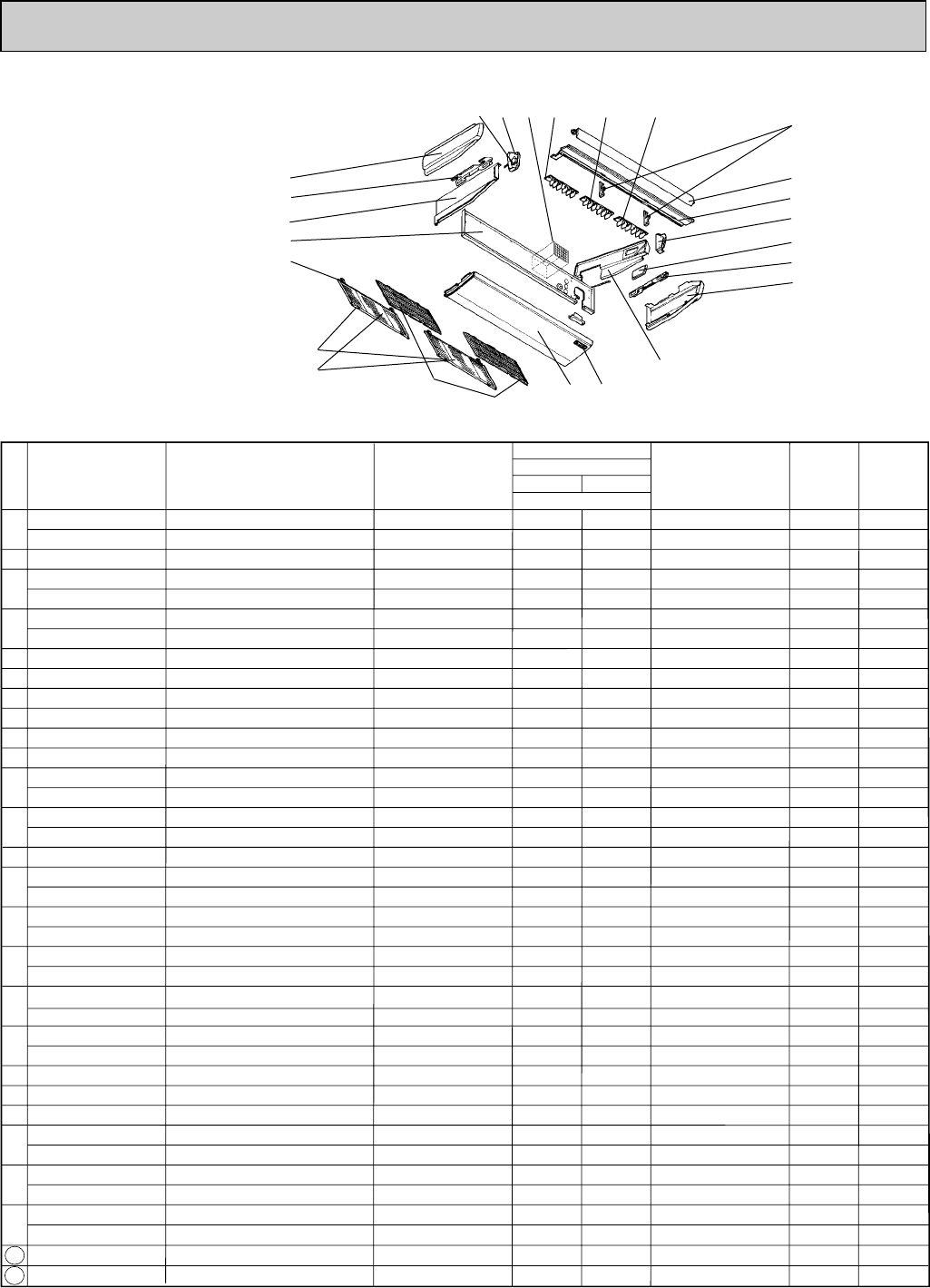
32
STRUCTURAL PART
PCA-A24GA
PCA-A30GA
PCA-A36GA
PCA-A42GA
No. Parts No. Parts Name Specifications 24/30
Wiring
Diagram
Symbol
Recom-
mended
Q'ty
PCA-A
GA
1
1
1
1
4
4
2
2
1
1
1
1
1
1
1
1
1
2
1
1
1
1
1
1
1
1
36/42
1
1
1
1
4
4
2
2
1
1
1
1
1
1
1
1
1
2
1
1
1
1
1
1
1
1
MV
MV
Remarks
(Drawing No.)
1
2
3
4
5
6
7
8
9
10
11
12
13
14
15
16
17
18
19
20
21
22
23
24
25
26
R01 17J 662
R01 35J 662
R01 17J 809
T7W E01 666
T7W E00 666
T7W E05 676
T7W E00 676
R01 17J 061
R01 17J 054
R01 17J 691
R01 A14 500
R01 29J 669
T7W E01 070
T7W E01 665
T7W E00 665
R01 17J 661
R01 35J 661
R01 17J 808
T7W E05 668
T7W E01 668
R01 17J 067
R01 35J 067
T7W E05 651
T7W E00 651
R01 29J 002
R01 E03 002
R01 E00 033
R01 E01 033
R01 37J 085
R01 37J 087
R01 37J 086
T7W E01 501
T7W 051 501
R01 17J 068
R01 E00 068
R01 29J 223
R01 35J 223
R01 17J 523
T7W E00 072
LEFT SIDE PANEL
LEFT SIDE PANEL
LEFT LEG
S.PLATE-L
S.PLATE-L
REAR PANEL
REAR PANEL
GRILLE HINGE
GRILLE CATCH
GRILLE ASSY
L.L FILTER
UNDER PANEL
W.BOARD CASE
S.PLATE-R
S.PLATE-R
RIGHT SIDE PANEL
RIGHT SIDE PANEL
RIGHT LEG
SERVICE PANEL
SERVICE PANEL
RIGHT SIDE BOX
RIGHT SIDE BOX
FRONT PANEL
FRONT PANEL
AUTO VANE
AUTO VANE
VANE SUPPORT
VANE SUPPORT
G.V ASSY-6R
G.V ASSY-6C
G.V ASSY-6L
AIR FILTER
AIR FILTER
LEFT SIDE BOX
LEFT SIDE BOX
VANE MOTOR
VANE MOTOR
JOINT SOCKET
DRAIN HOSE COVER
Q'ty/set
Part numbers that are circled are not shown in the figure.
3
2
1
4
5
6
78910
11
12
13
14
15
16
17
18
1920212324 22
OC368B--2.qxp 07.6.20 0:59 PM Page 32
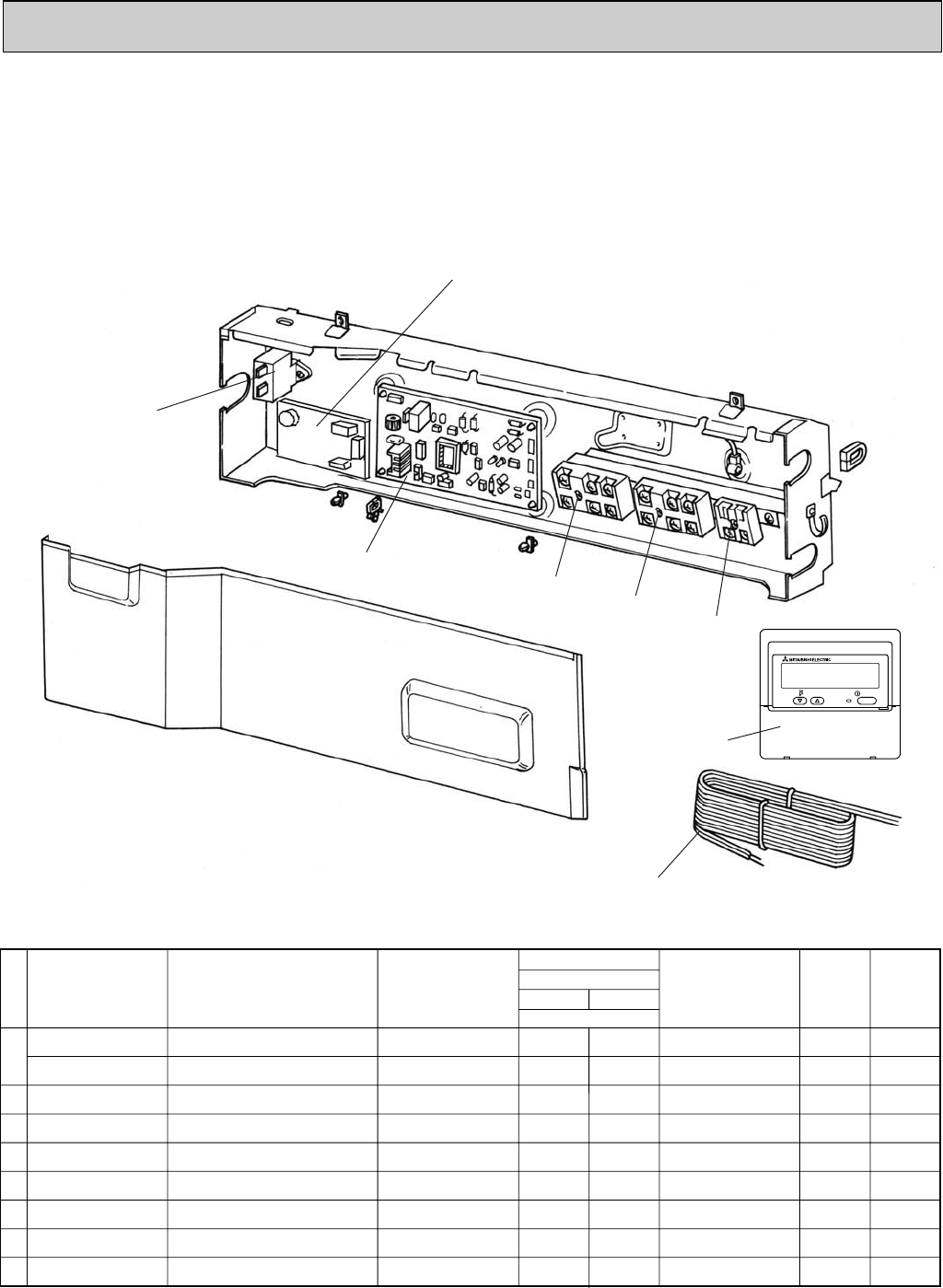
33
T7W E18 255
T7W E19 255
T7W E56 310
T7W E41 716
R01 E18 246
R01 E21 246
T7W E35 313
T7W A01 305
T7W E14 713
CAPACITOR
CAPACITOR
INDOOR CONTROLLER BOARD
TERMINAL BLOCK
TERMINAL BLOCK
TERMINAL BLOCK
POWER BOARD
REMOTE CONTROLLER CORD
REMOTE CONTROLLER
4= 440V
5= 440V
3P(L1,L2,GR)
3P(S1,S2,S3)
2P(1,2)
PAR-21MAA
1
1
1
1
1
1
1
1
1
1
1
1
1
1
1
1
C
C
I.B
TB2
TB4
TB5
P.B
R.B
Parts No. Parts Name Specifications 36/42
Wiring
Diagram
Symbol
Recom-
mended
Q'ty
PCA-A
GA
24/30 Remarks
(Drawing No.)
Q'ty/ set
1
2
3
4
5
6
7
8
No.
6
5
1
ELECTRICAL PARTS
PCA-A24GA
PCA-A30GA
PCA-A36GA
PCA-A42GA
2
34
ON/OFF
TEMP.
7
8
OC368B--2.qxp 07.6.20 0:59 PM Page 33
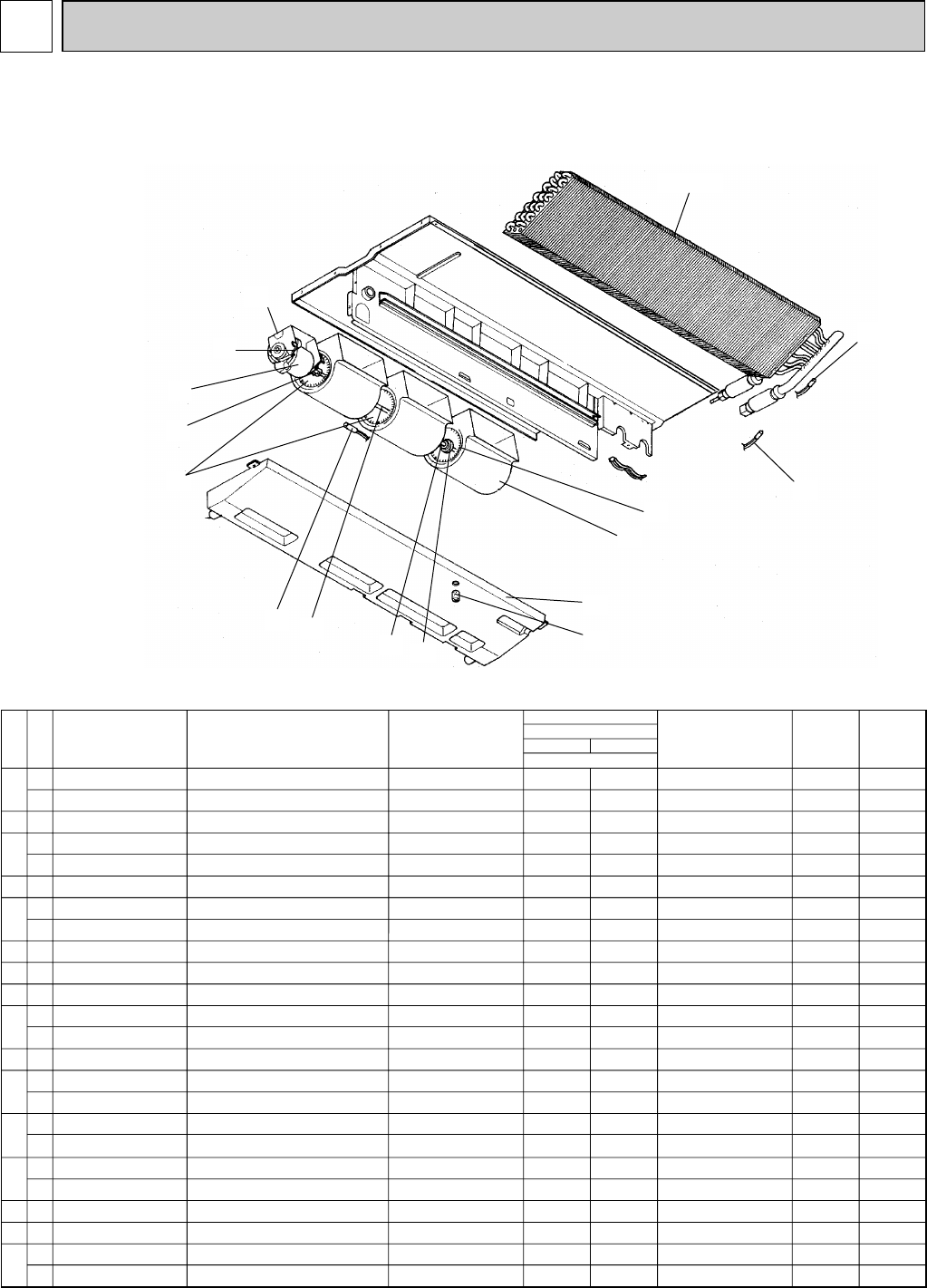
34
13 RoHS PARTS LIST
No.
Parts No. Parts Name Specifications Wiring
Diagram
Symbol
Recom-
mended
Q'ty
1
2
3
4
5
6
7
8
9
10
11
12
13
14
15
16
RoHS
G
G
G
G
G
G
G
G
G
G
G
G
G
G
G
G
G
G
G
G
G
G
G
G
1
1
1
1
2
1
1
1
1
1
1
3
1
1
1
1
MF
MF
TH1
TH2
TH5
D09C4P70MS
D10C4P90MS
Remarks
(Drawing No.)
R01 30J 130
R01 32J 130
R01 45E 126
T7W 40J 762
T7W E31 762
R01 800 116
R01 E17 114
R01 E19 114
R01 H08 202
R01 30J 100
R01 E02 103
R01 30J 145
R01 36J 145
R01 18J 524
T7W E30 529
T7W E31 529
R01 18J 110
R01 19J 110
R01 E15 114
R01 E20 114
R01 H10 202
R01 H09 202
T7W H23 480
T7W H24 480
MOTOR LEG
MOTOR LEG
PIECE(MOTOR)
FAN MOTOR
FAN MOTOR
SHAFT JOINT
SIROCCO FAN
SIROCCO FAN
ROOM TEMPERATURE THERMISTOR
SHAFT
SLEEVE BEARING
BEARING SUPPORT
BEARING SUPPORT
DRAIN PLUG
DRAIN PAN ASSY
DRAIN PAN ASSY
CASING
CASING
SIROCCO FAN
SIROCCO FAN
LIQUID PIPE TEMPERATURE THERMISTOR
COND/EVA TEMPERATURE THERMISTOR
HEAT EXCHANGER
HEAT EXCHANGER
GA1
1
1
1
1
2
1
1
1
1
1
1
3
1
1
1
1
24/30
PCA-A
36/42
Q'ty/set
16
10
7
5
15
14
13
6
12
2
11
9
1
3
4
8
FAN AND FUNCTIONAL PARTS
PCA-A24GA1PCA-A30GA1
PCA-A36GA1PCA-A42GA1
OC368B--2.qxp 07.6.20 0:59 PM Page 34
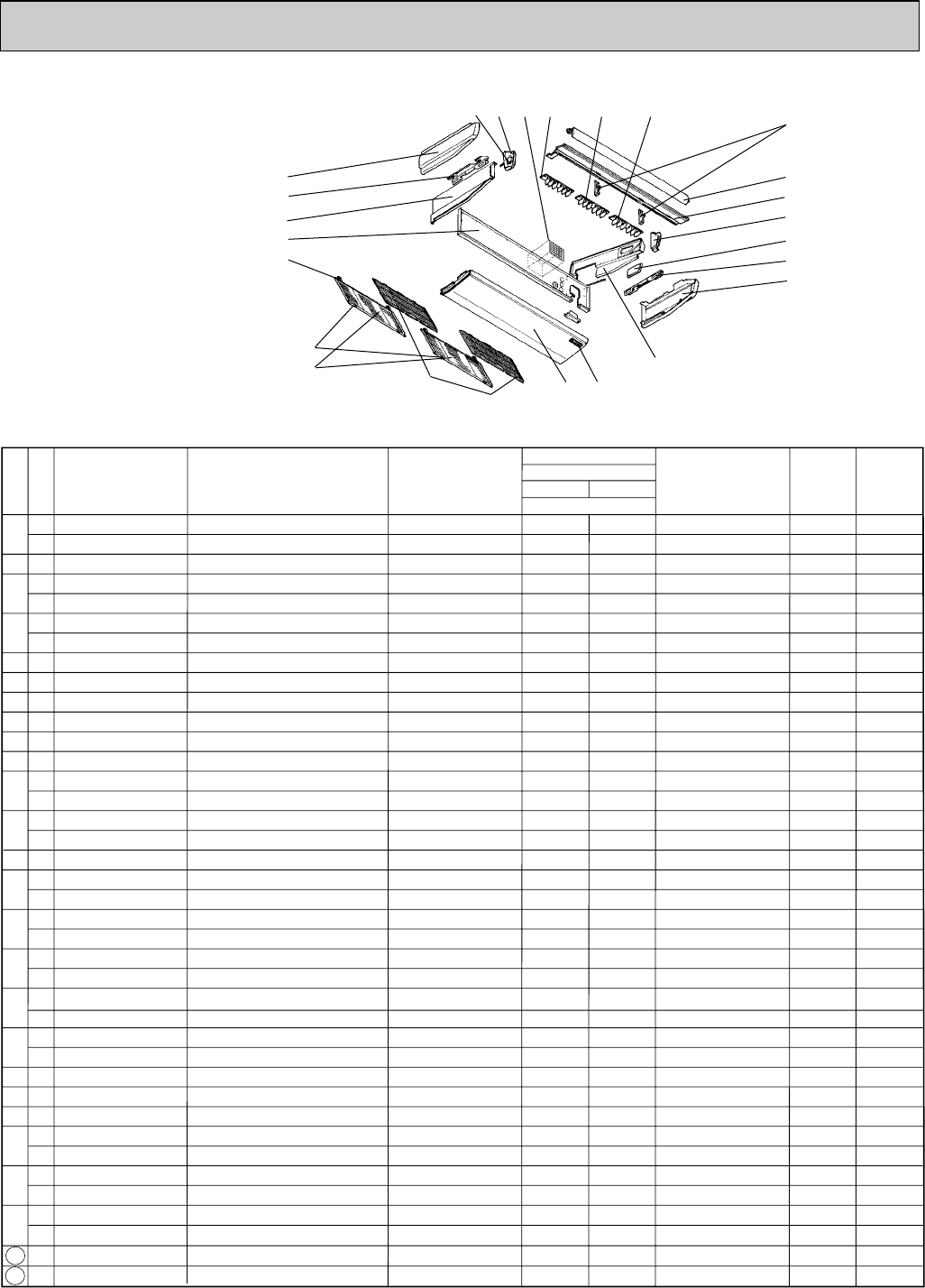
35
STRUCTURAL PART
PCA-A24GA1
PCA-A30GA1
PCA-A36GA1
PCA-A42GA1
No.
Parts No. Parts Name Specifications 24/30
Wiring
Diagram
Symbol
Recom-
mended
Q'ty
PCA-A
GA1
1
1
1
1
4
4
2
2
1
1
1
1
1
1
1
1
1
2
1
1
1
1
1
1
1
1
36/42
1
1
1
1
4
4
2
2
1
1
1
1
1
1
1
1
1
2
1
1
1
1
1
1
1
1
Remarks
(Drawing No.)
1
2
3
4
5
6
7
8
9
10
11
12
13
14
15
16
17
18
19
20
21
22
23
24
25
26
RoHS
G
G
G
G
G
G
G
G
G
G
G
G
G
G
G
G
G
G
G
G
G
G
G
G
G
G
G
G
G
G
G
G
G
G
G
G
G
G
G
R01 18J 662
R01 36J 662
R01 18J 809
T7W E02 666
T7W E03 666
T7W E07 676
T7W E08 676
R01 18J 061
R01 19J 054
R01 19J 691
R01 A29 500
R01 30J 669
T7W E02 070
T7W E03 665
T7W E04 665
R01 18J 661
R01 36J 661
R01 18J 808
T7W E10 668
T7W E11 668
R01 18J 067
R01 36J 067
T7W E08 651
T7W E09 651
R01 30J 002
R01 E14 002
R01 E02 033
R01 E03 033
R01 38J 085
R01 38J 087
R01 38J 086
T7W E03 501
T7W E04 501
R01 18J 068
R01 E01 068
R01 E10 223
R01 E12 223
R01 18J 523
T7W E01 072
LEFT SIDE PANEL
LEFT SIDE PANEL
LEFT LEG
S.PLATE-L
S.PLATE-L
REAR PANEL
REAR PANEL
GRILLE HINGE
GRILLE CATCH
GRILLE ASSY
L.L FILTER
UNDER PANEL
W.BOARD CASE
S.PLATE-R
S.PLATE-R
RIGHT SIDE PANEL
RIGHT SIDE PANEL
RIGHT LEG
SERVICE PANEL
SERVICE PANEL
RIGHT SIDE BOX
RIGHT SIDE BOX
FRONT PANEL
FRONT PANEL
AUTO VANE
AUTO VANE
VANE SUPPORT
VANE SUPPORT
G.V ASSY-6R
G.V ASSY-6C
G.V ASSY-6L
AIR FILTER
AIR FILTER
LEFT SIDE BOX
LEFT SIDE BOX
VANE MOTOR
VANE MOTOR
JOINT SOCKET
DRAIN HOSE COVER
Q'ty/set
MV
MV
Part numbers that are circled are not shown in the figure.
3
2
1
4
5
6
78910
11
12
13
14
15
16
17
18
1920212324 22
OC368B--2.qxp 07.6.20 0:59 PM Page 35
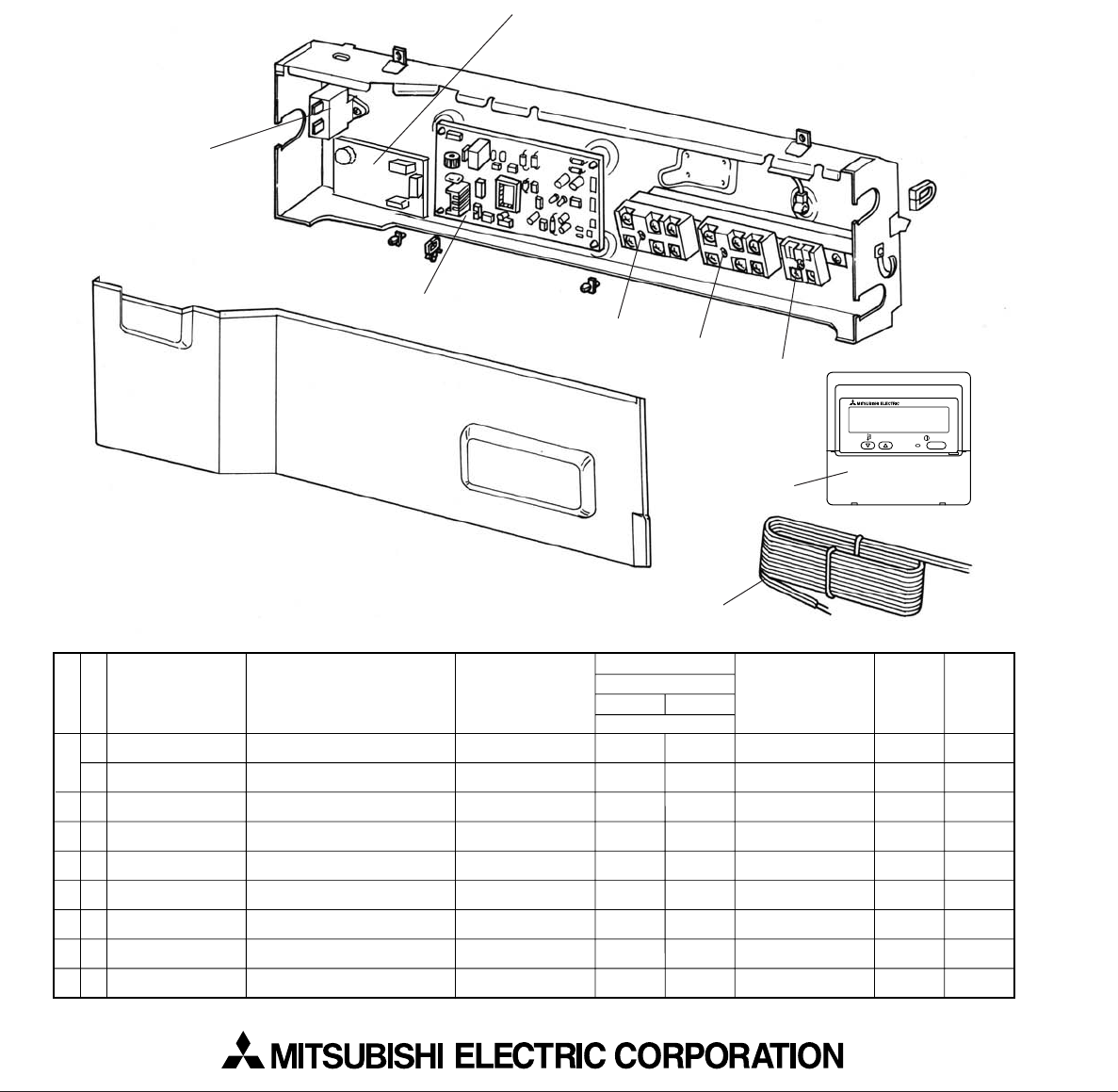
HEAD OFFICE : TOKYO BLDG., 2-7-3, MARUNOUCHI, CHIYODA-KU, TOKYO 100-8310, JAPAN
CCopyright 2006 MITSUBISHI ELECTRIC ENGINEERING CO., LTD.
Distributed in Jun. 2007 No.OC368 REVISED EDITION-B PDF 9
Distributed in Aug. 2006 No.OC368 REVISED EDITION-A PDF 9
Distributed in Feb. 2006 No.OC368 PDF 10
Made in Japan
New publication, effective Jun. 2007
Specifications subject to change without notice.
T7W E18 255
T7W E19 255
T7W E56 310
T7W E41 716
R01 E18 246
R01 E21 246
T7W E35 313
T7W A01 305
T7W E14 713
CAPACITOR
CAPACITOR
INDOOR CONTROLLER BOARD
TERMINAL BLOCK
TERMINAL BLOCK
TERMINAL BLOCK
POWER BOARD
REMOTE CONTROLLER CORD
REMOTE CONTROLLER
4= 440V
5= 440V
3P(L1,L2,GR)
3P(S1,S2,S3)
2P(1,2)
PAR-21MAA
1
1
1
1
1
1
1
1
1
1
1
1
1
1
1
1
C
C
I.B
TB2
TB4
TB5
P.B
R.B
Parts No. Parts Name Specifications 36/42
Wiring
Diagram
Symbol
Recom-
mended
Q'ty
PCA-A
GA1
24/30 Remarks
(Drawing No.)
Q'ty/ set
1
2
3
4
5
6
7
8
No.
G
G
G
G
G
G
G
G
G
RoHS
6
5
1
ELECTRICAL PARTS
PCA-A24GA1
PCA-A30GA1
PCA-A36GA1
PCA-A42GA1
2
34
ON/OFF
TEMP.
7
8
OC368B--2.qxp 07.6.20 0:59 PM Page 36
