Mizco MZJAM10TD FM-Transmitter User Manual

Mizco International Inc. FM-Transmitter

User Manual

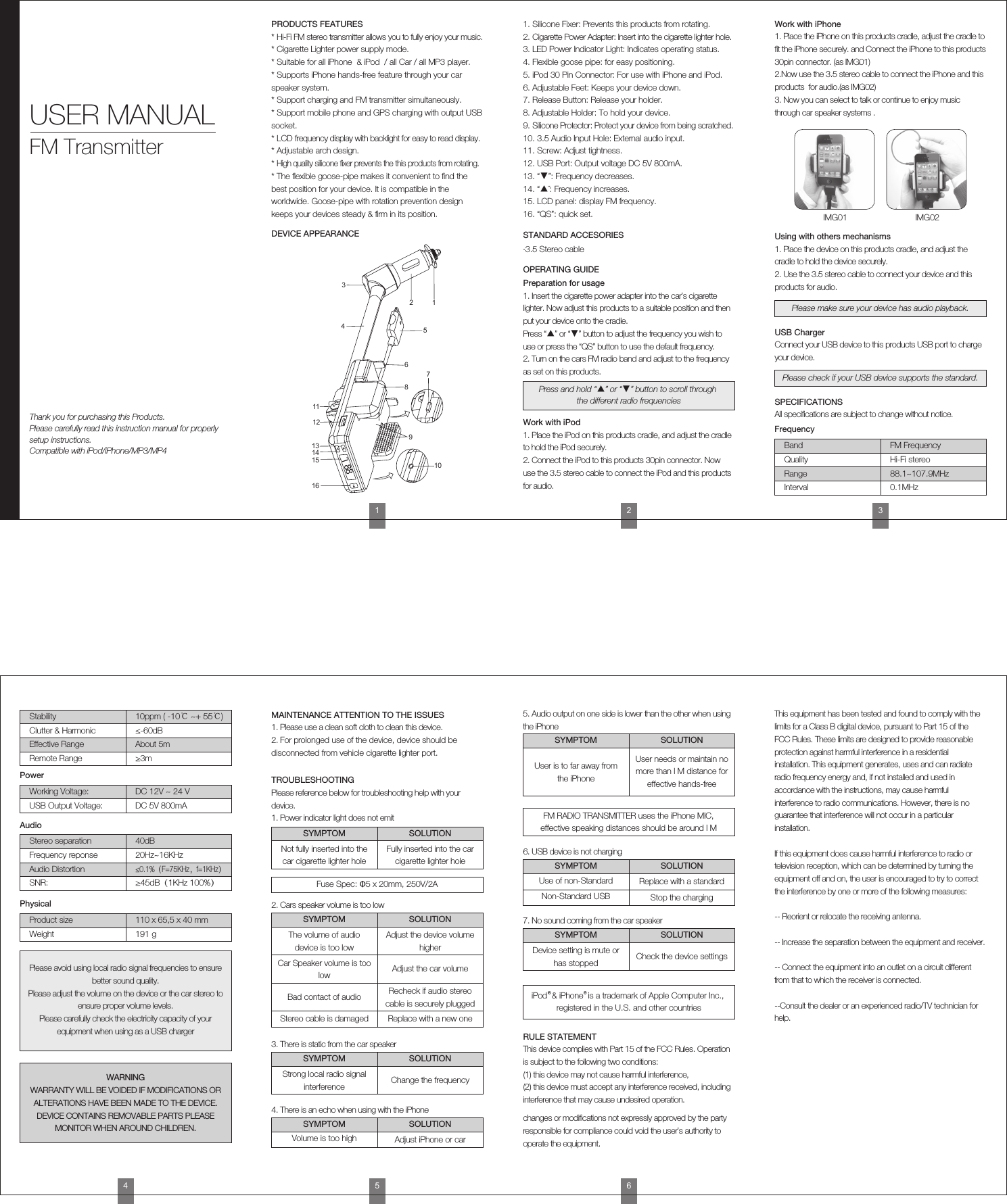
IMG01 IMG021. Place the iPhone on this products cradle, adjust the cradle to fit the iPhone securely. and Connect the iPhone to this products 30pin connector. (as IMG01)2.Now use the 3.5 stereo cable to connect the iPhone and this products  for audio.(as IMG02)3. Now you can select to talk or continue to enjoy music through car speaker systems .Work with iPhone1. Place the device on this products cradle, and adjust the cradle to hold the device securely.2. Use the 3.5 stereo cable to connect your device and this products for audio.Using with others mechanismsThis device complies with Part 15 of the FCC Rules. Operation is subject to the following two conditions:(1) this device may not cause harmful interference, (2) this device must accept any interference received, including interference that may cause undesired operation.changes or modifications not expressly approved by the party responsible for compliance could void the user’s authority to operate the equipment.This equipment has been tested and found to comply with the limits for a Class B digital device, pursuant to Part 15 of the FCC Rules. These limits are designed to provide reasonable protection against harmful interference in a residential installation. This equipment generates, uses and can radiate radio frequency energy and, if not installed and used in accordance with the instructions, may cause harmful interference to radio communications. However, there is no guarantee that interference will not occur in a particular installation.If this equipment does cause harmful interference to radio or television reception, which can be determined by turning the equipment off and on, the user is encouraged to try to correct the interference by one or more of the following measures:-- Reorient or relocate the receiving antenna.-- Increase the separation between the equipment and receiver.-- Connect the equipment into an outlet on a circuit different from that to which the receiver is connected.--Consult the dealer or an experienced radio/TV technician for help.RULE STATEMENT1. Please use a clean soft cloth to clean this device.2. For prolonged use of the device, device should be disconnected from vehicle cigarette lighter port.MAINTENANCE ATTENTION TO THE ISSUESPlease reference below for troubleshooting help with your device.1. Power indicator light does not emitTROUBLESHOOTINGConnect your USB device to this products USB port to charge your device.USB ChargerAll specifications are subject to change without notice.SPECIFICATIONSPlease make sure your device has audio playback.Please check if your USB device supports the standard.FrequencyBand FM FrequencyQuality Hi-Fi stereoRange 88.1~107.9MHzInterval 0.1MHzPowerWorking Voltage: DC 12V ~ 24 VUSB Output Voltage: DC 5V 800mAStability 10ppm ( -10℃ ~+ 55℃)Clutter & Harmonic ≤-60dBEffective Range About 5mRemote Range ≥3mAudioStereo separation 40dBFrequency reponse 20Hz~16KHzPhysicalProduct size 110 x 65,5 x 40 mmWeight 191 gAudio Distortion≤0.1%(F=75KHz,f=1KHz)SNR: ≥45dB(1KHz 100%)SYMPTOM SOLUTIONFuse Spec: Φ5 x 20mm, 250V/2A2. Cars speaker volume is too lowSYMPTOM SOLUTIONPlease avoid using local radio signal frequencies to ensure better sound quality.Please adjust the volume on the device or the car stereo to ensure proper volume levels. Please carefully check the electricity capacity of your equipment when using as a USB chargerWARNINGWARRANTY WILL BE VOIDED IF MODIFICATIONS OR ALTERATIONS HAVE BEEN MADE TO THE DEVICE.DEVICE CONTAINS REMOVABLE PARTS PLEASE MONITOR WHEN AROUND CHILDREN.Not fully inserted into the car cigarette lighter holeThe volume of audio device is too lowAdjust the device volume higherCar Speaker volume is too low Adjust the car volumeBad contact of audio Recheck if audio stereo cable is securely pluggedStereo cable is damaged Replace with a new one3. There is static from the car speakerSYMPTOM SOLUTIONStrong local radio signal interference Change the frequency7. No sound coming from the car speakerSYMPTOM SOLUTIONDevice setting is mute or has stopped Check the device settings4. There is an echo when using with the iPhoneSYMPTOM SOLUTIONVolume is too high Adjust iPhone or car6. USB device is not chargingSYMPTOM SOLUTIONUse of non-Standard Replace with a standardNon-Standard USB Stop the charging5. Audio output on one side is lower than the other when using the iPhoneSYMPTOM SOLUTIONUser is to far away from the iPhoneFM RADIO TRANSMITTER uses the iPhone MIC, effective speaking distances should be around l MUser needs or maintain no more than l M distance for effective hands-freeFully inserted into the car cigarette lighter hole456iPod  & iPhone  is a trademark of Apple Computer Inc., registered in the U.S. and other countriesPRODUCTS FEATURES* Hi-Fi FM stereo transmitter allows you to fully enjoy your music.* Cigarette Lighter power supply mode.* Suitable for all iPhone  & iPod  / all Car / all MP3 player.* Supports iPhone hands-free feature through your car speaker system.* Support charging and FM transmitter simultaneously.* Support mobile phone and GPS charging with output USB socket.* LCD frequency display with backlight for easy to read display.* Adjustable arch design.* High quality silicone fixer prevents the this products from rotating.* The flexible goose-pipe makes it convenient to find the best position for your device. It is compatible in the worldwide. Goose-pipe with rotation prevention design keeps your devices steady & firm in its position.1. Silicone Fixer: Prevents this products from rotating.2. Cigarette Power Adapter: Insert into the cigarette lighter hole.3. LED Power Indicator Light: Indicates operating status.4. Flexible goose pipe: for easy positioning.5. iPod 30 Pin Connector: For use with iPhone and iPod.6. Adjustable Feet: Keeps your device down.7. Release Button: Release your holder.8. Adjustable Holder: To hold your device.9. Silicone Protector: Protect your device from being scratched.10. 3.5 Audio Input Hole: External audio input.11. Screw: Adjust tightness.12. USB Port: Output voltage DC 5V 800mA.13. “▼”: Frequency decreases.14. “▲¨: Frequency increases.15. LCD panel: display FM frequency.16. “QS”: quick set.1. Insert the cigarette power adapter into the car’s cigarette lighter. Now adjust this products to a suitable position and then put your device onto the cradle.Press “▲” or “▼” button to adjust the frequency you wish to use or press the “QS” button to use the default frequency.2. Turn on the cars FM radio band and adjust to the frequency as set on this products.Thank you for purchasing this Products.Please carefully read this instruction manual for properly setup instructions.Compatible with iPod/iPhone/MP3/MP4USER MANUALFM Transmitter12345678910111213141516DEVICE APPEARANCE STANDARD ACCESORIES·3.5 Stereo cableOPERATING GUIDEPreparation for usage1. Place the iPod on this products cradle, and adjust the cradle to hold the iPod securely.2. Connect the iPod to this products 30pin connector. Now use the 3.5 stereo cable to connect the iPod and this products for audio.Work with iPodPress and hold “▲” or “▼” button to scroll through the different radio frequencies123

Navigation menu