Mobile Communications BBU672 Consumer Wide-band Booster User Manual 2 BBUZ660

Mobile Communications Inc. Consumer Wide-band Booster 2 BBUZ660

Contents

User Manual 2 (BBUZ660)

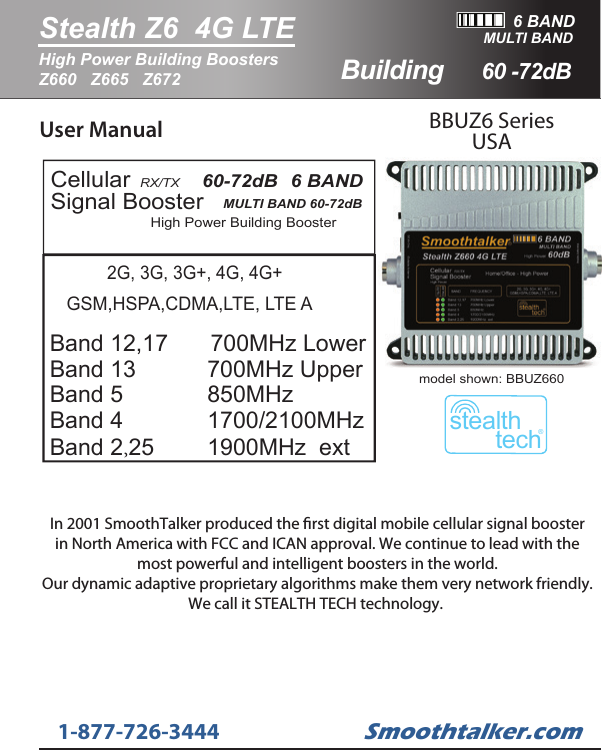
User Manual BBUZ6 SeriesUSAHigh Power Building BoosterCellularSignal Booster RX/TX   MULTI BAND 60-72dB   60-72dB   6 BAND   GSM,HSPA,CDMA,LTE, LTE ABand 12,17   Band 13           Band 5             Band 4     Band 2,25   700MHz Upper850MHz 1700/2100MHz 2G, 3G, 3G+, 4G, 4G+1900MHz  ext700MHz Lower6 BANDStealth Z6  4G LTE60 -72dBHigh Power Building Boosters Z660   Z665   Z672MULTI BANDstealthtech®model shown: BBUZ660Smoothtalker.com1-877-726-3444BuildingIn 2001 SmoothTalker produced the rst digital mobile cellular signal boosterin North America with FCC and ICAN approval. We continue to lead with themost powerful and intelligent boosters in the world.Our dynamic adaptive proprietary algorithms make them very network friendly.We call it STEALTH TECH technology.
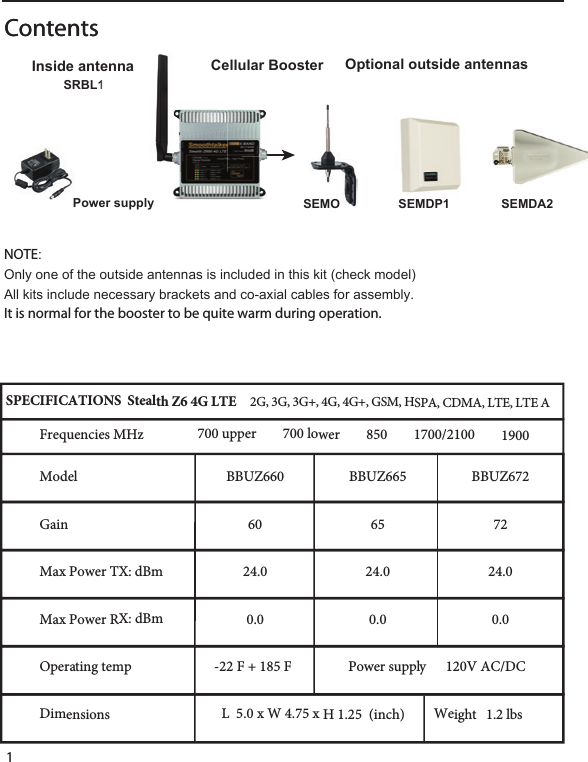
 1ContentsContents   SRBL1Power supplySRBL1Cellular Booster Inside antennaSEMDA2SEMO SEMDP1Optional outside antennasNOTE:Only one of the outside antennas is included in this kit (check model)All kits include necessary brackets and co-axial cables for assembly.It is normal for the booster to be quite warm during operation.Power supply      120V AC/DCGain656024.024.00.00.0Operating temp -22 F + 185 F  Dimensions Weight   1.2 lbsL  5.0 x W 4.75 x H 1.25  (inch)Model7224.00.0BBUZ672BBUZ665BBUZ660SPECIFICATIONS  Stealth Z6 4G LTE     2G, 3G, 3G+, 4G, 4G+, GSM, HSPA, CDMA, LTE, LTE A Frequencies MHz700 upper        700 lower        850        1700/2100        1900Max Power TX: dBmMax Power RX: dBm
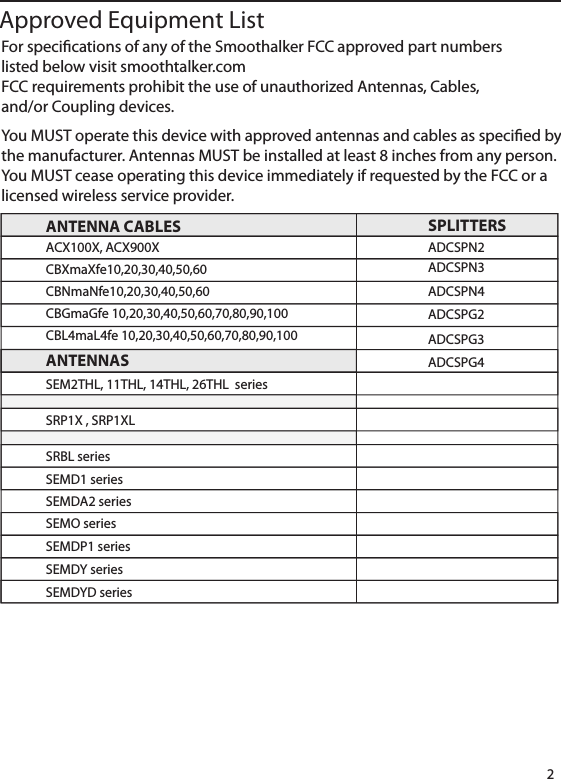
ANTENNA CABLESACX100X, ACX900XCBXmaXfe10,20,30,40,50,60CBNmaNfe10,20,30,40,50,60CBGmaGfe 10,20,30,40,50,60,70,80,90,100CBL4maL4fe 10,20,30,40,50,60,70,80,90,100SPLITTERSADCSPN2ADCSPN3ADCSPN4ADCSPG2ADCSPG3ADCSPG4ANTENNASSEM2THL, 11THL, 14THL, 26THL  seriesSRP1X , SRP1XLSRBL series SEMD1 seriesSEMDA2 seriesSEMO seriesSEMDP1 seriesSEMDY series SEMDYD series 2For specications of any of the Smoothalker FCC approved part numberslisted below visit smoothtalker.comFCC requirements prohibit the use of unauthorized Antennas, Cables,and/or Coupling devices.    You MUST operate this device with approved antennas and cables as specied bythe manufacturer. Antennas MUST be installed at least 8 inches from any person.You MUST cease operating this device immediately if requested by the FCC or alicensed wireless service provider. Approved Equipment List
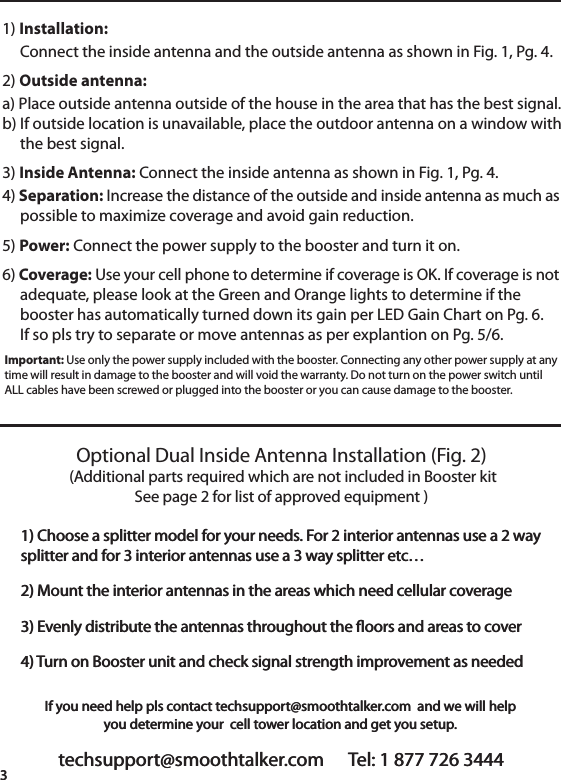
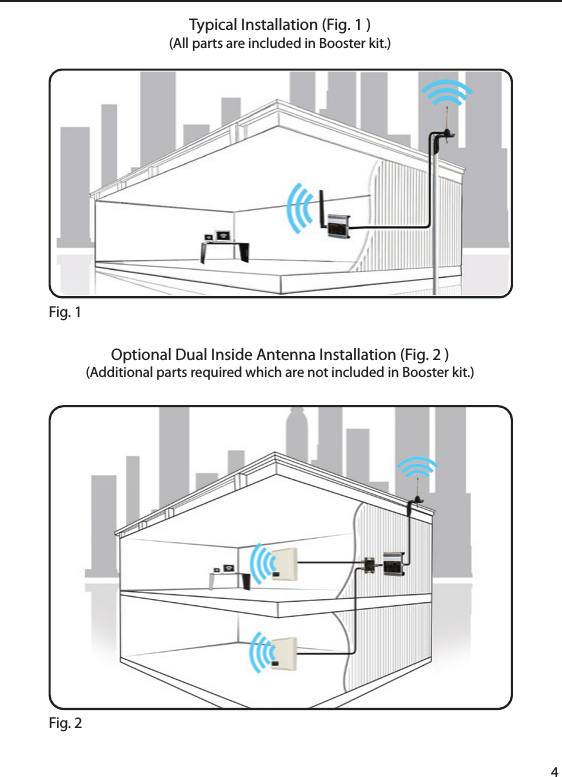
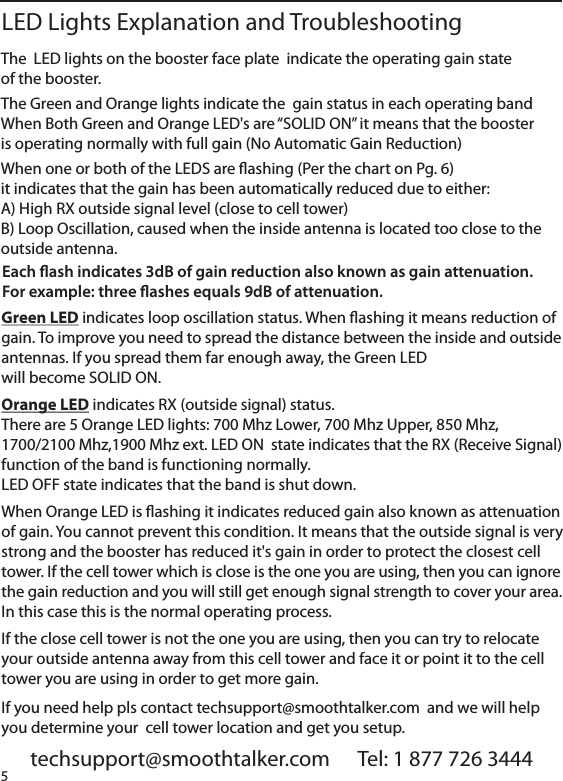
techsupport@smoothtalker.com      Tel: 1 877 726 34443If you need help pls contact techsupport@smoothtalker.com  and we will helpyou determine your  cell tower location and get you setup.1) Installation:     Connect the inside antenna and the outside antenna as shown in Fig. 1, Pg. 4. 2) Outside antenna: a) Place outside antenna outside of the house in the area that has the best signal.b) If outside location is unavailable, place the outdoor antenna on a window with     the best signal.3) Inside Antenna: Connect the inside antenna as shown in Fig. 1, Pg. 4. 4) Separation: Increase the distance of the outside and inside antenna as much as     possible to maximize coverage and avoid gain reduction. 5) Power: Connect the power supply to the booster and turn it on.6) Coverage: Use your cell phone to determine if coverage is OK. If coverage is not     adequate, please look at the Green and Orange lights to determine if the     booster has automatically turned down its gain per LED Gain Chart on Pg. 6.     If so pls try to separate or move antennas as per explantion on Pg. 5/6.Important: Use only the power supply included with the booster. Connecting any other power supply at anytime will result in damage to the booster and will void the warranty. Do not turn on the power switch untilALL cables have been screwed or plugged into the booster or you can cause damage to the booster.Optional Dual Inside Antenna Installation (Fig. 2) (Additional parts required which are not included in Booster kitSee page 2 for list of approved equipment )1) Choose a splitter model for your needs. For 2 interior antennas use a 2 waysplitter and for 3 interior antennas use a 3 way splitter etc… 2) Mount the interior antennas in the areas which need cellular coverage 3) Evenly distribute the antennas throughout the oors and areas to cover4) Turn on Booster unit and check signal strength improvement as neededtechsupport@smoothtalker.com      Tel: 1 877 726 34443If you need help pls contact techsupport@smoothtalker.com  and we will helpyou determine your  cell tower location and get you setup.1) Choose a splitter model for your needs. For 2 interior antennas use a 2 waysplitter and for 3 interior antennas use a 3 way splitter etc… 2) Mount the interior antennas in the areas which need cellular coverage 3) Evenly distribute the antennas throughout the oors and areas to cover4) Turn on Booster unit and check signal strength improvement as needed
4Typical Installation (Fig. 1 )(All parts are included in Booster kit.)Optional Dual Inside Antenna Installation (Fig. 2 )(Additional parts required which are not included in Booster kit.) Fig. 1Fig. 2
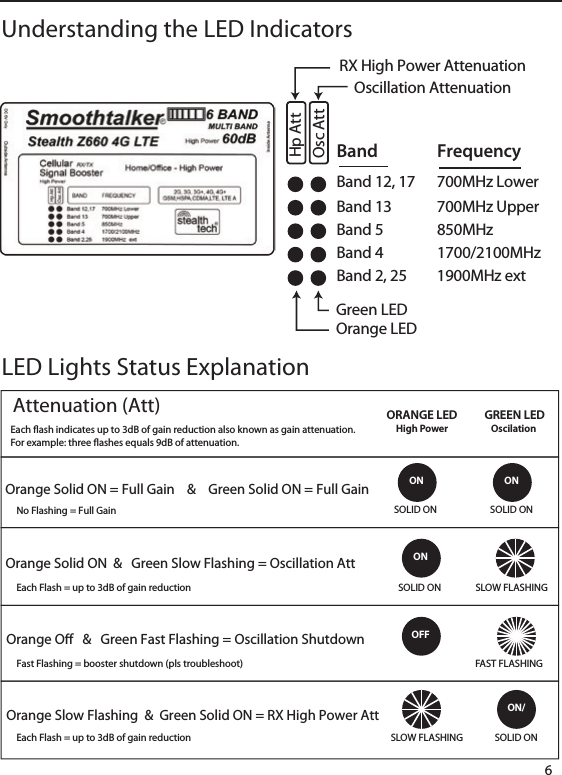
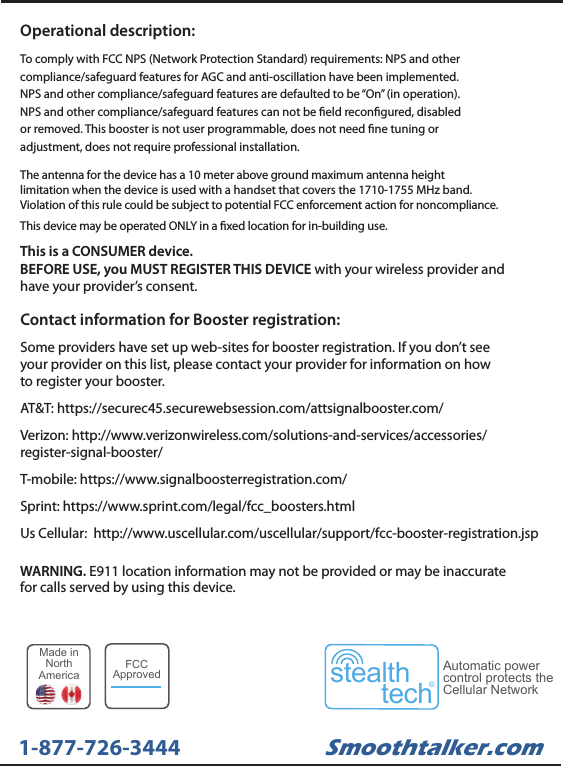
The  LED lights on the booster face plate  indicate the operating gain stateof the booster.The Green and Orange lights indicate the  gain status in each operating bandWhen Both Green and Orange LED's are “SOLID ON” it means that the boosteris operating normally with full gain (No Automatic Gain Reduction)When one or both of the LEDS are ashing (Per the chart on Pg. 6)it indicates that the gain has been automatically reduced due to either:A) High RX outside signal level (close to cell tower)B) Loop Oscillation, caused when the inside antenna is located too close to theoutside antenna.         techsupport@smoothtalker.com      Tel: 1 877 726 3444LED Lights Explanation and TroubleshootingEach ash indicates 3dB of gain reduction also known as gain attenuation.For example: three ashes equals 9dB of attenuation. Green LED indicates loop oscillation status. When ashing it means reduction ofgain. To improve you need to spread the distance between the inside and outsideantennas. If you spread them far enough away, the Green LEDwill become SOLID ON.Orange LED indicates RX (outside signal) status.There are 5 Orange LED lights: 700 Mhz Lower, 700 Mhz Upper, 850 Mhz,1700/2100 Mhz,1900 Mhz ext. LED ON  state indicates that the RX (Receive Signal)function of the band is functioning normally.LED OFF state indicates that the band is shut down.When Orange LED is ashing it indicates reduced gain also known as attenuationof gain. You cannot prevent this condition. It means that the outside signal is verystrong and the booster has reduced it's gain in order to protect the closest celltower. If the cell tower which is close is the one you are using, then you can ignorethe gain reduction and you will still get enough signal strength to cover your area.In this case this is the normal operating process.If the close cell tower is not the one you are using, then you can try to relocateyour outside antenna away from this cell tower and face it or point it to the celltower you are using in order to get more gain.If you need help pls contact techsupport@smoothtalker.com  and we will helpyou determine your  cell tower location and get you setup.5
Band 12, 17  700MHz LowerBand     FrequencyBand 13  700MHz UpperBand  5     850MHzBand  4     1700/2100MHzBand 2, 25  1900MHz extRX High Power AttenuationOscillation AttenuationOrange LEDGreen LEDHp AttOsc AttUnderstanding the LED Indicators6LED Lights Status ExplanationON ONONSLOW FLASHINGSOLID ONSOLID ON SOLID ON SOLID ON SLOW FLASHINGFAST FLASHINGOFFON/ORANGE LEDHigh PowerGREEN LEDOscilation Attenuation (Att) Orange Solid ON = Full Gain    &    Green Solid ON = Full GainOrange Solid ON  &   Green Slow Flashing = Oscillation AttOrange O   &   Green Fast Flashing = Oscillation ShutdownOrange Slow Flashing  &  Green Solid ON = RX High Power AttEach ash indicates up to 3dB of gain reduction also known as gain attenuation.For example: three ashes equals 9dB of attenuation. No Flashing = Full Gain Each Flash = up to 3dB of gain reductionEach Flash = up to 3dB of gain reductionFast Flashing = booster shutdown (pls troubleshoot)
Contact information for Booster registration:Some providers have set up web-sites for booster registration. If you don’t seeyour provider on this list, please contact your provider for information on howto register your booster.AT&T: https://securec45.securewebsession.com/attsignalbooster.com/Verizon: http://www.verizonwireless.com/solutions-and-services/accessories/register-signal-booster/T-mobile: https://www.signalboosterregistration.com/Sprint: https://www.sprint.com/legal/fcc_boosters.htmlUs Cellular:  http://www.uscellular.com/uscellular/support/fcc-booster-registration.jspThis is a CONSUMER device. BEFORE USE, you MUST REGISTER THIS DEVICE with your wireless provider andhave your provider’s consent.WARNING. E911 location information may not be provided or may be inaccuratefor calls served by using this device.The antenna for the device has a 10 meter above ground maximum antenna heightlimitation when the device is used with a handset that covers the 1710-1755 MHz band.Violation of this rule could be subject to potential FCC enforcement action for noncompliance.This device may be operated ONLY in a xed location for in-building use.Operational description:To comply with FCC NPS (Network Protection Standard) requirements: NPS and othercompliance/safeguard features for AGC and anti-oscillation have been implemented.NPS and other compliance/safeguard features are defaulted to be “On” (in operation).NPS and other compliance/safeguard features can not be eld recongured, disabledor removed. This booster is not user programmable, does not need ne tuning oradjustment, does not require professional installation.Smoothtalker.com1-877-726-3444Made inNorthAmericastealthtech®Automatic powercontrol protects theCellular NetworkFCCApproved

Navigation menu