Mobile Communications BRB81975 Consumer Wideband Bi-Directional Booster User Manual Rev A

Mobile Communications Inc. Consumer Wideband Bi-Directional Booster Rev A

User Manual Rev A

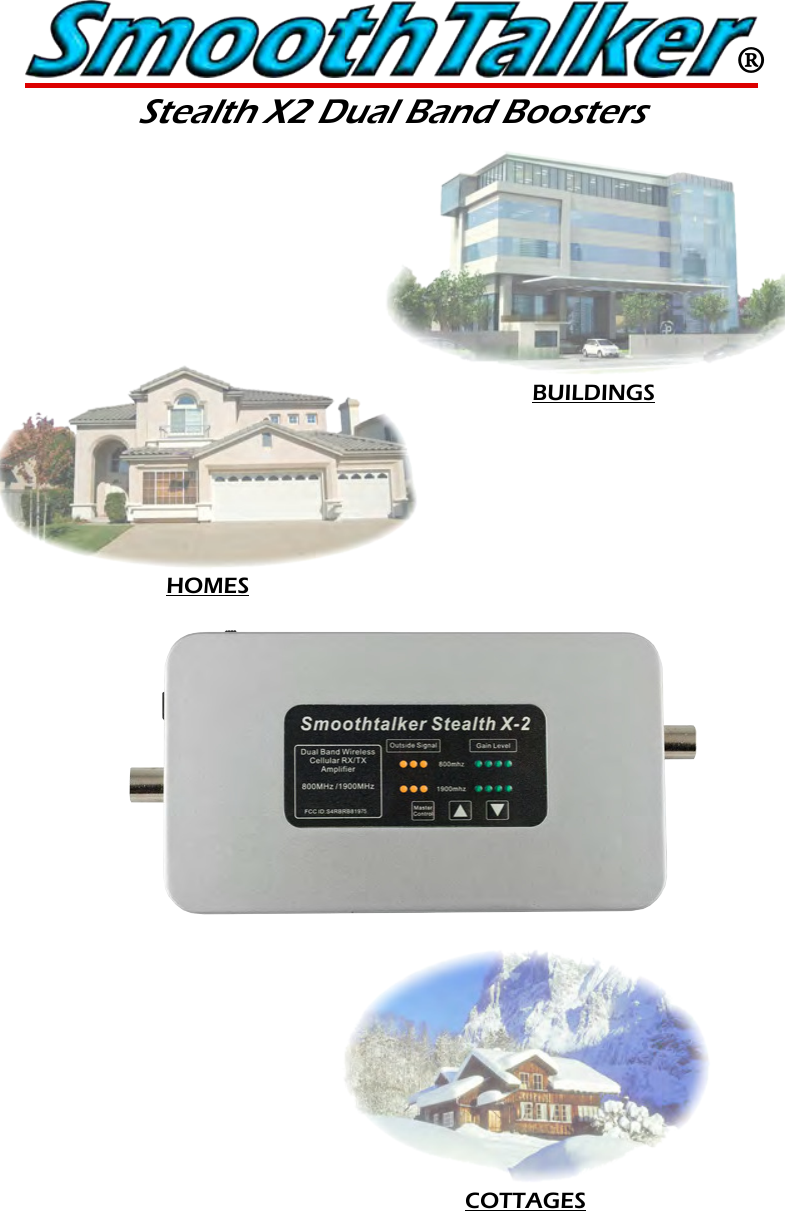
®Stealth X2 Dual Band BoostersCOTTAGESBUILDINGSHOMES
®Stealth X2 Dual Band BoostersFeatures ......................................................................3Specifications .............................................................3Package contents ...................................................4 Optional Parts ............................................................4Antenna and Booster Installation .....................5Installation Illustrations .........................................6Control panel ...........................................................7LED lights - Outside signal level/RX power .....7Gain level ..................................................................8Manual gain control ..............................................8LED lights - Gain level ...............................................9Tech support  .............................................................9 Frequently asked questions .............................10Troubleshooting guide ......................................10 Inside Antennas .....................................................11 Outside Antennas ................................................11 Extention Cables ....................................................12 Splitters/Power Dividers ......................................12 Specifications .........................................................13 Glossary of terms .................................................14FCC information ....................................................14Warranty ..................................................................14Table of ContentsPg. 2
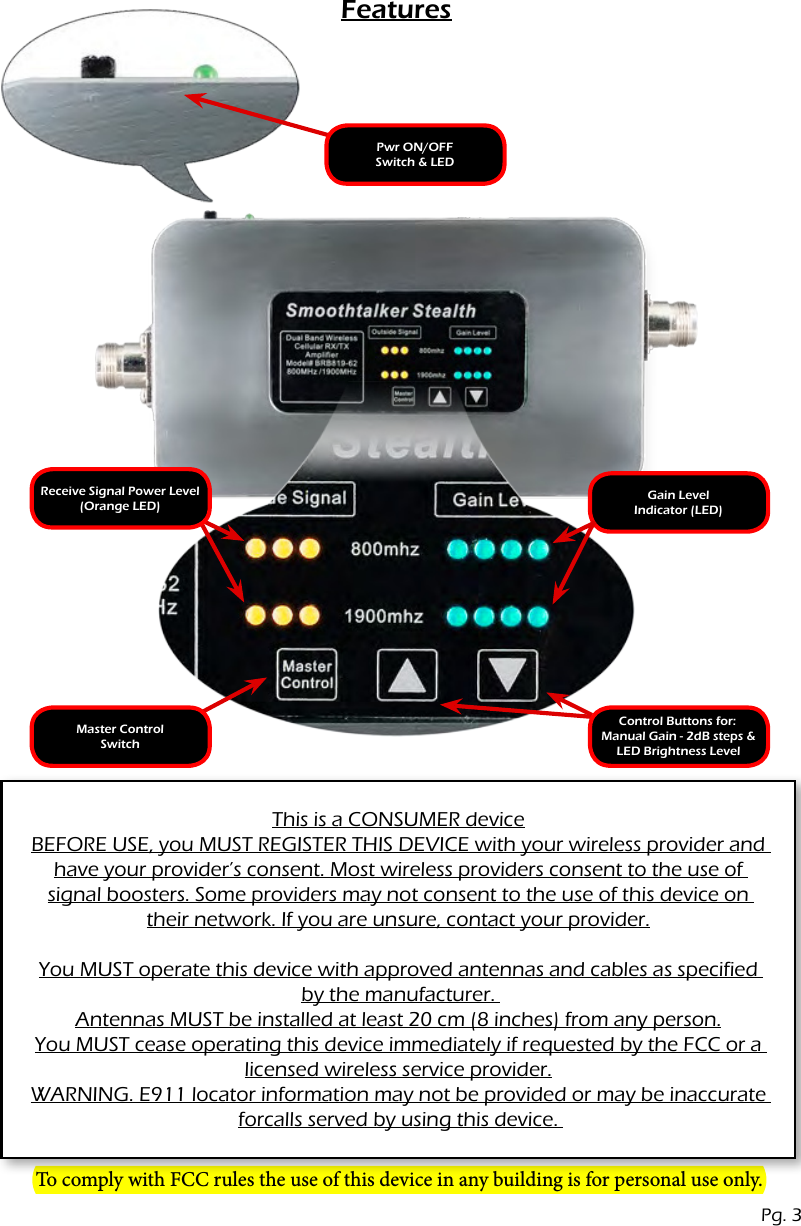
FeaturesGain Level Indicator (LED)Pwr ON/OFF Switch & LEDReceive Signal Power Level(Orange LED)Control Buttons for: Manual Gain - 2dB steps & LED Brightness LevelMaster Control SwitchPg. 3This is a CONSUMER deviceBEFORE USE, you MUST REGISTER THIS DEVICE with your wireless provider and have your provider’s consent. Most wireless providers consent to the use of signal boosters. Some providers may not consent to the use of this device on their network. If you are unsure, contact your provider.You MUST operate this device with approved antennas and cables as specified by the manufacturer. Antennas MUST be installed at least 20 cm (8 inches) from any person.You MUST cease operating this device immediately if requested by the FCC or a licensed wireless service provider.WARNING. E911 locator information may not be provided or may be inaccurate forcalls served by using this device. To comply with FCC rules the use of this device in any building is for personal use only.
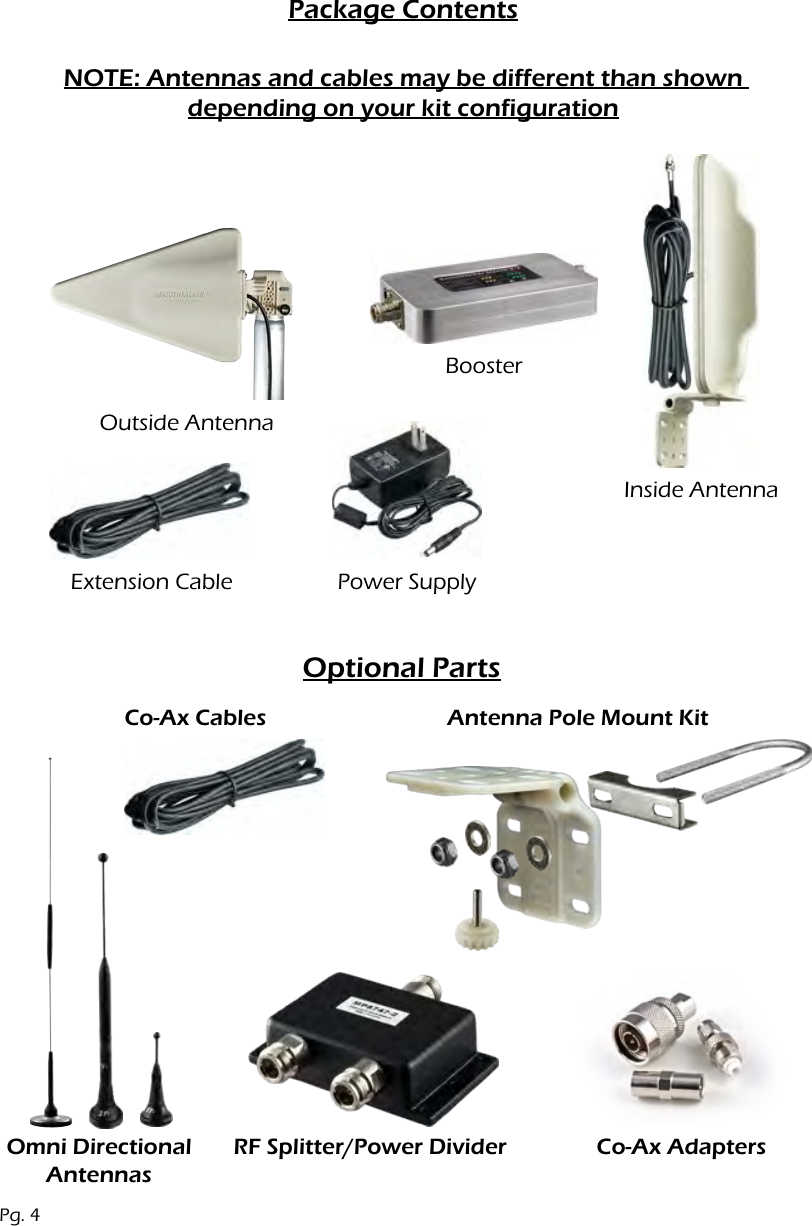
Package ContentsNOTE: Antennas and cables may be different than shown  depending on your kit configurationPg. 4Outside AntennaInside AntennaBoosterExtension Cable Power SupplyOptional PartsOmni DirectionalAntennasCo-Ax Cables Antenna Pole Mount KitRF Splitter/Power Divider Co-Ax Adapters
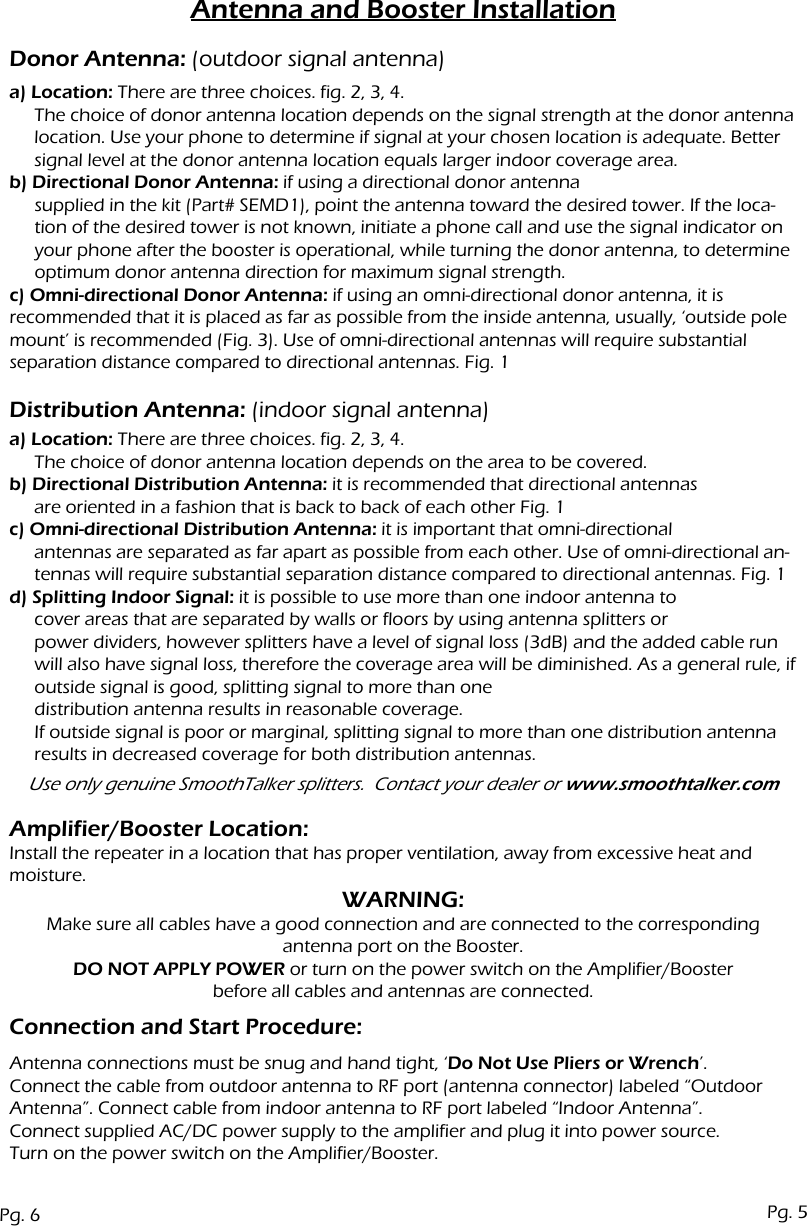
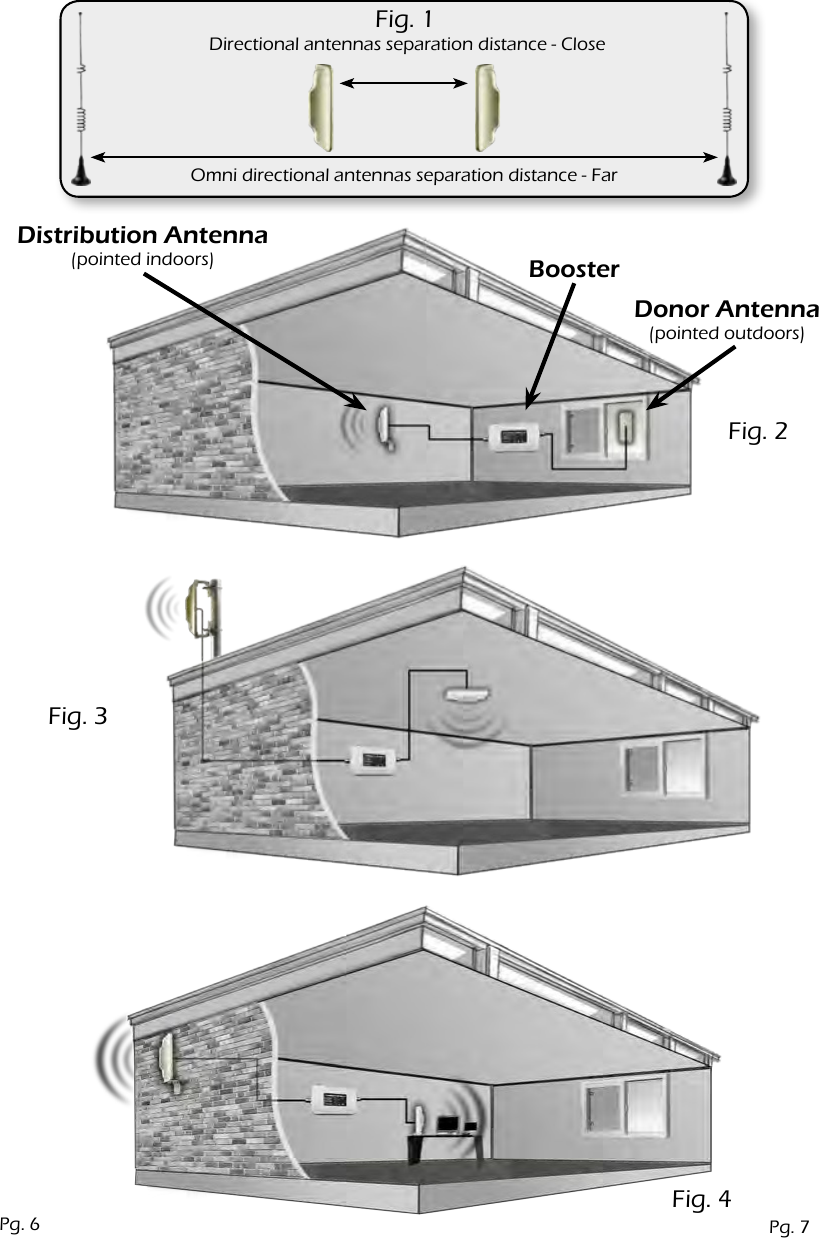
Antenna and Booster Installationa) Location: There are three choices. fig. 2, 3, 4.The choice of donor antenna location depends on the signal strength at the donor antenna location. Use your phone to determine if signal at your chosen location is adequate. Better signal level at the donor antenna location equals larger indoor coverage area.b) Directional Donor Antenna: if using a directional donor antennasupplied in the kit (Part# SEMD1), point the antenna toward the desired tower. If the loca-tion of the desired tower is not known, initiate a phone call and use the signal indicator on your phone after the booster is operational, while turning the donor antenna, to determine optimum donor antenna direction for maximum signal strength.c) Omni-directional Donor Antenna: if using an omni-directional donor antenna, it is recommended that it is placed as far as possible from the inside antenna, usually, ‘outside pole mount’ is recommended (Fig. 3). Use of omni-directional antennas will require substantial separation distance compared to directional antennas. Fig. 1Donor Antenna: (outdoor signal antenna)Distribution Antenna: (indoor signal antenna)Connection and Start Procedure:Amplifier/Booster Location:Install the repeater in a location that has proper ventilation, away from excessive heat and moisture.a) Location: There are three choices. fig. 2, 3, 4.The choice of donor antenna location depends on the area to be covered.b) Directional Distribution Antenna: it is recommended that directional antennasare oriented in a fashion that is back to back of each other Fig. 1c) Omni-directional Distribution Antenna: it is important that omni-directional antennas are separated as far apart as possible from each other. Use of omni-directional an-tennas will require substantial separation distance compared to directional antennas. Fig. 1d) Splitting Indoor Signal: it is possible to use more than one indoor antenna tocover areas that are separated by walls or floors by using antenna splitters or power dividers, however splitters have a level of signal loss (3dB) and the added cable run will also have signal loss, therefore the coverage area will be diminished. As a general rule, if outside signal is good, splitting signal to more than one distribution antenna results in reasonable coverage.If outside signal is poor or marginal, splitting signal to more than one distribution antenna results in decreased coverage for both distribution antennas.Use only genuine SmoothTalker splitters.  Contact your dealer or www.smoothtalker.comWARNING:Make sure all cables have a good connection and are connected to the correspondingantenna port on the Booster.DO NOT APPLY POWER or turn on the power switch on the Amplifier/Boosterbefore all cables and antennas are connected.Antenna connections must be snug and hand tight, ‘Do Not Use Pliers or Wrench’.Connect the cable from outdoor antenna to RF port (antenna connector) labeled “Outdoor Antenna”. Connect cable from indoor antenna to RF port labeled “Indoor Antenna”.Connect supplied AC/DC power supply to the amplifier and plug it into power source.Turn on the power switch on the Amplifier/Booster.Pg. 6 Pg. 5
Omni directional antennas separation distance - FarDirectional antennas separation distance - CloseFig. 1Fig. 2Fig. 3Fig. 4Distribution Antenna(pointed indoors)Donor Antenna(pointed outdoors)BoosterPg. 7Pg. 6
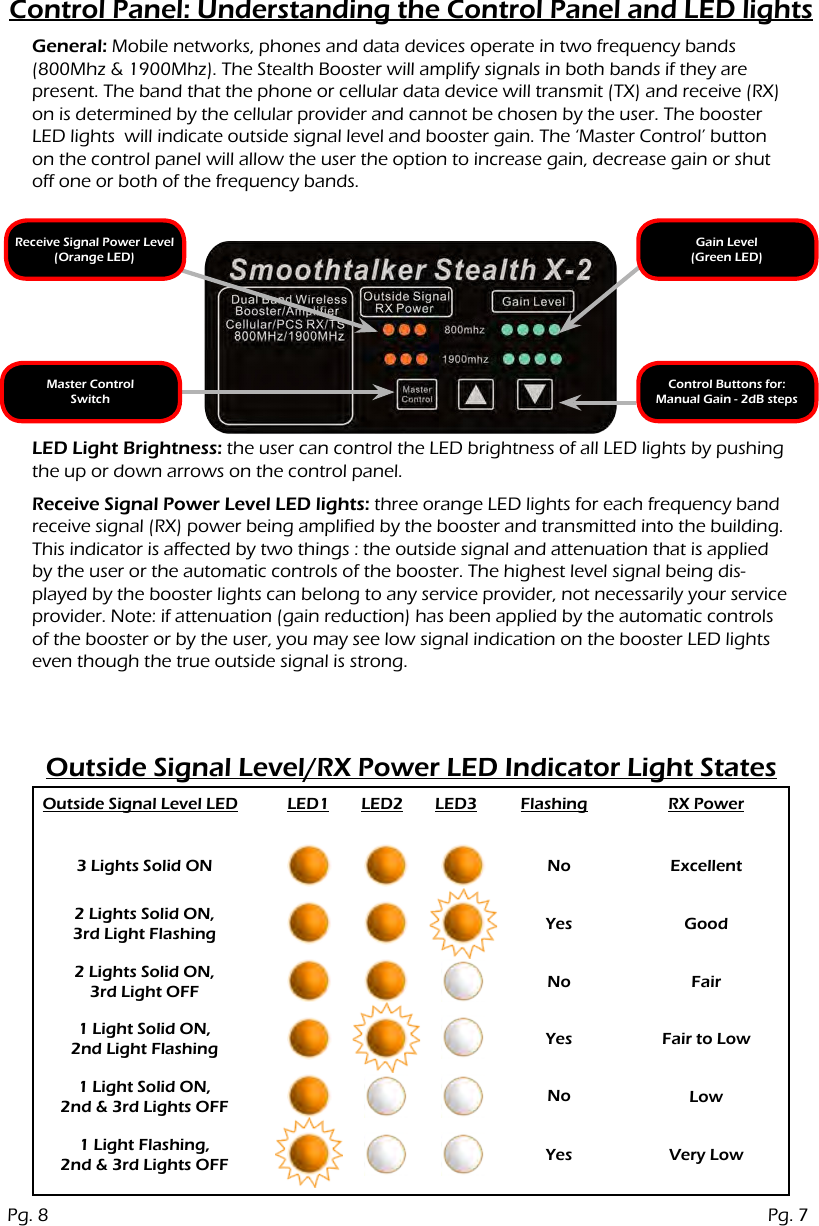
Control Panel: Understanding the Control Panel and LED lightsOutside Signal Level/RX Power LED Indicator Light StatesGeneral: Mobile networks, phones and data devices operate in two frequency bands (800Mhz & 1900Mhz). The Stealth Booster will amplify signals in both bands if they are present. The band that the phone or cellular data device will transmit (TX) and receive (RX) on is determined by the cellular provider and cannot be chosen by the user. The booster LED lights  will indicate outside signal level and booster gain. The ‘Master Control’ button on the control panel will allow the user the option to increase gain, decrease gain or shut off one or both of the frequency bands.Receive Signal Power Level(Orange LED)Master ControlSwitchGain Level(Green LED)Control Buttons for: Manual Gain - 2dB stepsReceive Signal Power Level LED lights: three orange LED lights for each frequency band receive signal (RX) power being amplified by the booster and transmitted into the building. This indicator is affected by two things : the outside signal and attenuation that is applied by the user or the automatic controls of the booster. The highest level signal being dis-played by the booster lights can belong to any service provider, not necessarily your service provider. Note: if attenuation (gain reduction) has been applied by the automatic controls of the booster or by the user, you may see low signal indication on the booster LED lights even though the true outside signal is strong.LED Light Brightness: the user can control the LED brightness of all LED lights by pushing the up or down arrows on the control panel.Outside Signal Level LED LED1 LED2 LED3 Flashing RX Power3 Lights Solid ON No ExcellentGoodFairFair to LowLowVery LowYesNoYesNoYes2 Lights Solid ON,3rd Light Flashing2 Lights Solid ON,3rd Light OFF1 Light Solid ON,2nd Light Flashing1 Light Solid ON,2nd & 3rd Lights OFF1 Light Flashing,2nd & 3rd Lights OFFPg. 8 Pg. 7
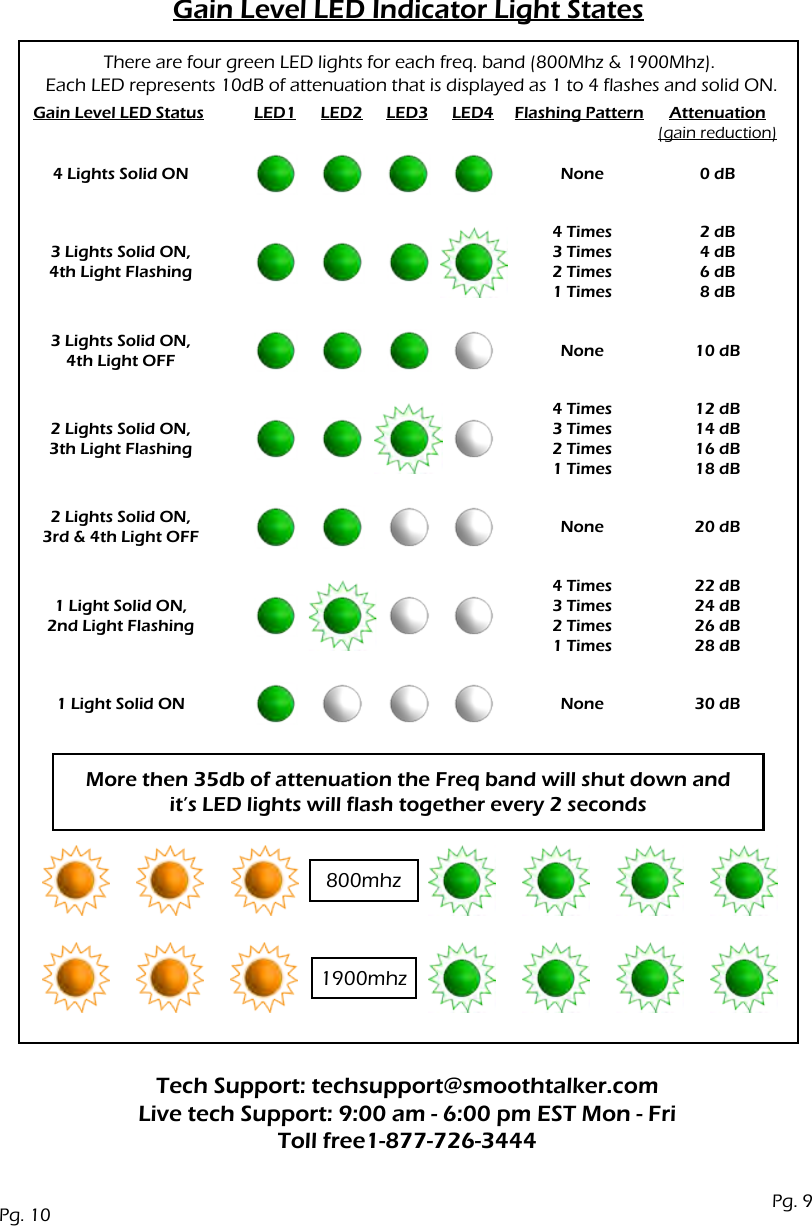
Gain Level: Understanding the Control Panel and LED lightsManual Gain ControlGeneral: Four green LED lights for each frequency band will indicate the level of amplification that is being applied by the Booster to the receive (RX) signal and transmit (TX) signal. Gain is applied to both RX and TX signals. Normally all four green LED will be solid on. If any green LED lights are flashing or off, it is an indication that gain has been reduced. There are four events that will cause the green LED lights to turn off or flash.1) Shutdown:a) Automatic shutdown will occur in one band or both bands if antennas are placed too close to each other and the ‘Automatic Oscillation (feedback) Suppression’ function cannot eliminate the oscillation. TX and RX gain will be turned off completely in the frequency band where oscil-lation cannot be suppressed.b) Manual shutdown can also be achieved in one or both frequency bands by the user.2) Oscillation (feedback) Suppression:The booster will automatically apply attenuation (reduce gain) to suppress oscillation (feed-back). This function is automatic and cannot be manually overridden.3) RX High Power Control:The booster will automatically apply attenuation (reduce gain) if RX power is too high. This function is automatic and cannot be manually overridden.4) Manual Attenuation:Gain can be increased or decreased manually by the user in 1dB steps over a range of 35 dB for each frequency band, however, the user will not be able to reduce attenuation that has been applied by the automatic oscillation suppression function or by the automatic high powercontrol function in order to protect both, the cellular tower and the booster.The master control button has 3 functions which cycle every 3 times pressed as follows:1) 800mhz manual gain control Press once. The 3 orange LED lights for the 800 mhz band will flash together. Use up or down arrows to adjust gain in this frequency band as desired. Each push of the up or down button will adjust 1 dB of gain. Total manual adjustment range is 35 dB. Adding more than 35 dB of attenuation will shut down the frequency band. Quick shutdown of the frequency band can also be achieved by holding the down arrow. When the frequency band shuts off all of the orange and green  LED lights for that frequency band will flash every 2 seconds.2) 1900mhz manual gain control Press second time. The 3 orange LED lights for the 1900 mhz band will flash together. Use up or down arrows to adjust gain in this frequency band if desired. Each push of the up or down button will adjust 1 dB of gain. Total manual adjustment range is 35 dB. Adding more than 35 dB of attenuation will shut down the frequency band. Quick shutdown of the frequency band can also be achieved by holding the down arrow. When the frequency band shuts off all of the orange and green  LED lights for that frequency band will flash every 2 seconds.3) Manual gain LED display Press third time to display the LED status of your inputed manual gain settings then power the booster OFF/ON for manual settings to take effect. Each time you cycle to this 3rd setting you will see your inputed manual gain settings displayed on the LEDs.Note: the booster will remember manual settings through power on and off conditions. If you want to return the booster to ‘Fully Automatic Mode’ you must push and hold the master con-trol button (approximately  3 to 5 seconds) until you see all 800mhz lights flash once from left to right followed by 900mhz lights flash once from left to right.  Power the booster OFF and then ON for ‘fully automatic mode’ to take effect.Important:a) for manual settings to take effect, the booster must be powered OFF and then ON.b) manual settings cannot override the automatic functions of oscillation and high powercontrols. This means that if you are trying to set a gain level higher than the automatic control functions allow, the manual gain settings will be limited by the automatic control functions.Pg. 9Pg. 8
Gain Level LED Indicator Light StatesMore then 35db of attenuation the Freq band will shut down andit’s LED lights will flash together every 2 seconds800mhz1900mhzThere are four green LED lights for each freq. band (800Mhz & 1900Mhz). Each LED represents 10dB of attenuation that is displayed as 1 to 4 flashes and solid ON.Gain Level LED Status Flashing Pattern Attenuation (gain reduction)LED1 LED2 LED3 LED44 Lights Solid ON NoneNoneNoneNone4 Times3 Times2 Times1 Times4 Times3 Times2 Times1 Times4 Times3 Times2 Times1 Times2 dB4 dB6 dB8 dB12 dB14 dB16 dB18 dB22 dB24 dB26 dB28 dB0 dB10 dB20 dB30 dB3 Lights Solid ON,4th Light Flashing3 Lights Solid ON,4th Light OFF2 Lights Solid ON,3rd & 4th Light OFF2 Lights Solid ON,3th Light Flashing1 Light Solid ON,2nd Light Flashing1 Light Solid ONTech Support: techsupport@smoothtalker.comLive tech Support: 9:00 am - 6:00 pm EST Mon - Fri Toll free1-877-726-3444Pg. 10 Pg. 9
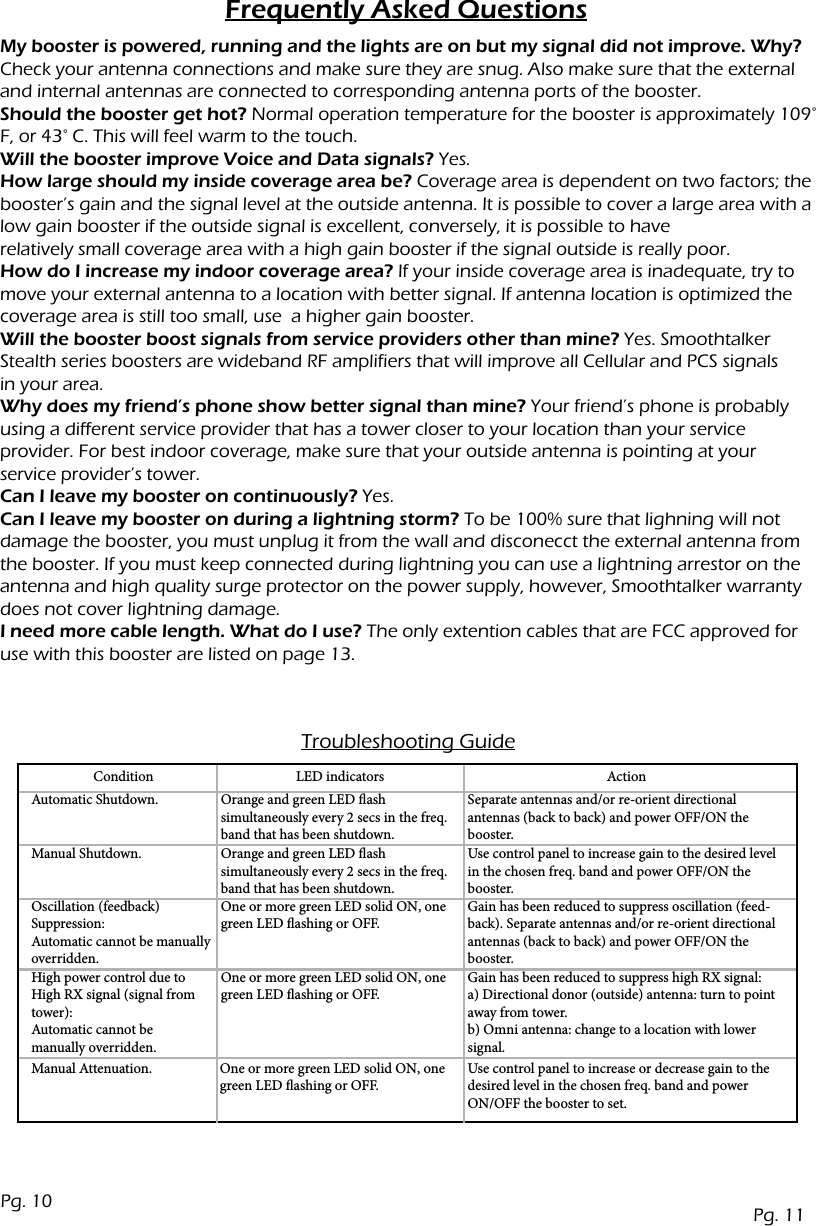
Frequently Asked QuestionsMy booster is powered, running and the lights are on but my signal did not improve. Why?Check your antenna connections and make sure they are snug. Also make sure that the external and internal antennas are connected to corresponding antenna ports of the booster.Should the booster get hot? Normal operation temperature for the booster is approximately 109° F, or 43° C. This will feel warm to the touch.Will the booster improve Voice and Data signals? Yes.How large should my inside coverage area be? Coverage area is dependent on two factors; the booster’s gain and the signal level at the outside antenna. It is possible to cover a large area with a low gain booster if the outside signal is excellent, conversely, it is possible to haverelatively small coverage area with a high gain booster if the signal outside is really poor.How do I increase my indoor coverage area? If your inside coverage area is inadequate, try to move your external antenna to a location with better signal. If antenna location is optimized the coverage area is still too small, use  a higher gain booster.  Will the booster boost signals from service providers other than mine? Yes. Smoothtalker Stealth series boosters are wideband RF amplifiers that will improve all Cellular and PCS signalsin your area.Why does my friend’s phone show better signal than mine? Your friend’s phone is probably using a different service provider that has a tower closer to your location than your serviceprovider. For best indoor coverage, make sure that your outside antenna is pointing at yourservice provider’s tower.Can I leave my booster on continuously? Yes.Can I leave my booster on during a lightning storm? To be 100% sure that lighning will not damage the booster, you must unplug it from the wall and disconecct the external antenna from the booster. If you must keep connected during lightning you can use a lightning arrestor on the antenna and high quality surge protector on the power supply, however, Smoothtalker warranty does not cover lightning damage.I need more cable length. What do I use? The only extention cables that are FCC approved for use with this booster are listed on page 13.Troubleshooting GuideConditionAutomatic Shutdown.Manual Shutdown.Oscillation (feedback) Suppression: Automatic cannot be manually overridden.Manual Attenuation. One or more green LED solid ON, one green LED ashing or OFF.Use control panel to increase or decrease gain to the desired level in the chosen freq. band and power ON/OFF the booster to set.High power control due to High RX signal (signal from tower): Automatic cannot be manually overridden.Orange and green LED ash simultaneously every 2 secs in the freq. band that has been shutdown.Orange and green LED ashsimultaneously every 2 secs in the freq. band that has been shutdown.One or more green LED solid ON, one green LED ashing or OFF.One or more green LED solid ON, one green LED ashing or OFF.Separate antennas and/or re-orient directional antennas (back to back) and power OFF/ON the booster.Use control panel to increase gain to the desired level in the chosen freq. band and power OFF/ON the booster.Gain has been reduced to suppress oscillation (feed-back). Separate antennas and/or re-orient directional antennas (back to back) and power OFF/ON the booster.Gain has been reduced to suppress high RX signal: a) Directional donor (outside) antenna: turn to point away from tower. b) Omni antenna: change to a location with lower signal.LED indicators ActionPg. 11Pg. 10
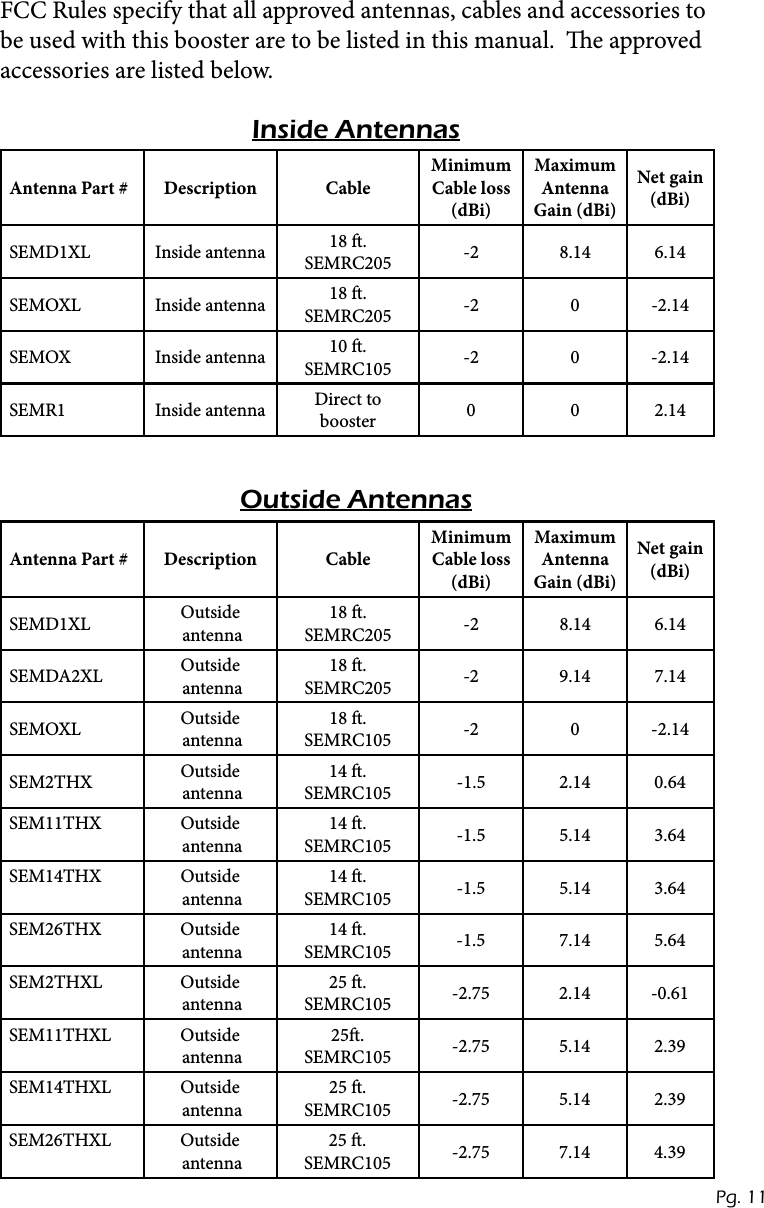
Antenna Part # Description CableMinimum Cable loss (dBi)Maximum Antenna Gain (dBi)Net gain (dBi)SEMD1XL Inside antenna 18 .  SEMRC205 -2 8.14 6.14SEMOXL Inside antenna 18 .  SEMRC205 -2 0 -2.14SEMOX Inside antenna 10 .  SEMRC105 -2 0 -2.14SEMR1 Inside antenna Direct to booster 0 0 2.14Inside Antennas Outside AntennasAntenna Part # Description CableMinimum Cable loss (dBi)Maximum Antenna Gain (dBi)Net gain (dBi)SEMD1XL Outside  antenna18 .  SEMRC205 -2 8.14 6.14SEMDA2XL Outside  antenna18 .  SEMRC205 -2 9.14 7.14SEMOXL Outside  antenna18 .  SEMRC105 -2 0 -2.14SEM2THX Outside  antenna14 .  SEMRC105 -1.5 2.14 0.64SEM11THX Outside  antenna14 .  SEMRC105 -1.5 5.14 3.64SEM14THX Outside  antenna14 .  SEMRC105 -1.5 5.14 3.64SEM26THX Outside  antenna14 .  SEMRC105 -1.5 7.14 5.64SEM2THXL Outside  antenna25 .  SEMRC105 -2.75 2.14 -0.61SEM11THXL Outside  antenna25.  SEMRC105 -2.75 5.14 2.39SEM14THXL Outside  antenna25 .  SEMRC105 -2.75 5.14 2.39SEM26THXL Outside  antenna25 .  SEMRC105 -2.75 7.14 4.39FCC Rules specify that all approved antennas, cables and accessories to be used with this booster are to be listed in this manual.  e approved  accessories are listed below.Pg. 11
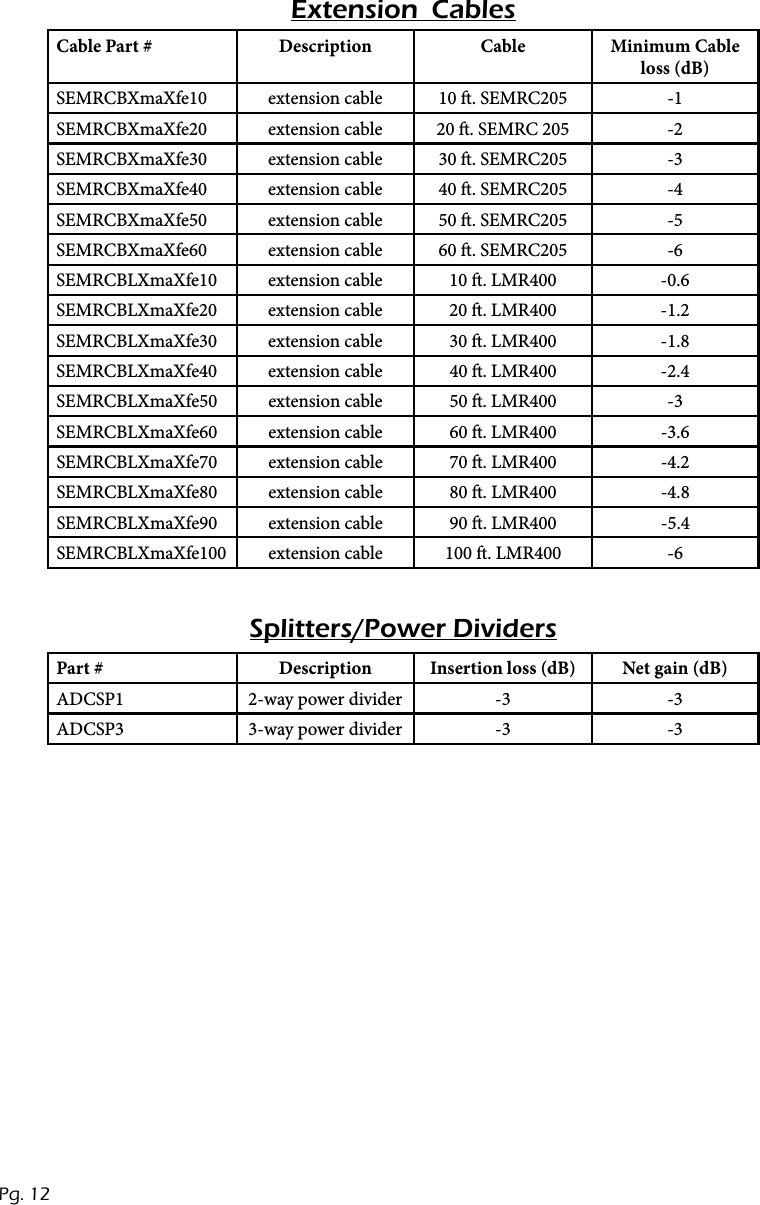
Cable Part # Description Cable Minimum Cable loss (dB)SEMRCBXmaXfe10 extension cable 10 . SEMRC205 -1SEMRCBXmaXfe20 extension cable 20 . SEMRC 205 -2SEMRCBXmaXfe30 extension cable 30 . SEMRC205 -3SEMRCBXmaXfe40 extension cable 40 . SEMRC205 -4SEMRCBXmaXfe50 extension cable 50 . SEMRC205 -5SEMRCBXmaXfe60 extension cable 60 . SEMRC205 -6SEMRCBLXmaXfe10 extension cable 10 . LMR400 -0.6SEMRCBLXmaXfe20 extension cable 20 . LMR400 -1.2SEMRCBLXmaXfe30 extension cable 30 . LMR400 -1.8SEMRCBLXmaXfe40 extension cable 40 . LMR400 -2.4SEMRCBLXmaXfe50 extension cable 50 . LMR400 -3SEMRCBLXmaXfe60 extension cable 60 . LMR400 -3.6SEMRCBLXmaXfe70 extension cable 70 . LMR400 -4.2SEMRCBLXmaXfe80 extension cable 80 . LMR400 -4.8SEMRCBLXmaXfe90 extension cable 90 . LMR400 -5.4SEMRCBLXmaXfe100 extension cable 100 . LMR400 -6Extension  Cables Splitters/Power DividersPart # Description Insertion loss (dB) Net gain (dB)ADCSP1 2-way power divider -3 -3ADCSP3 3-way power divider -3 -3Pg. 12
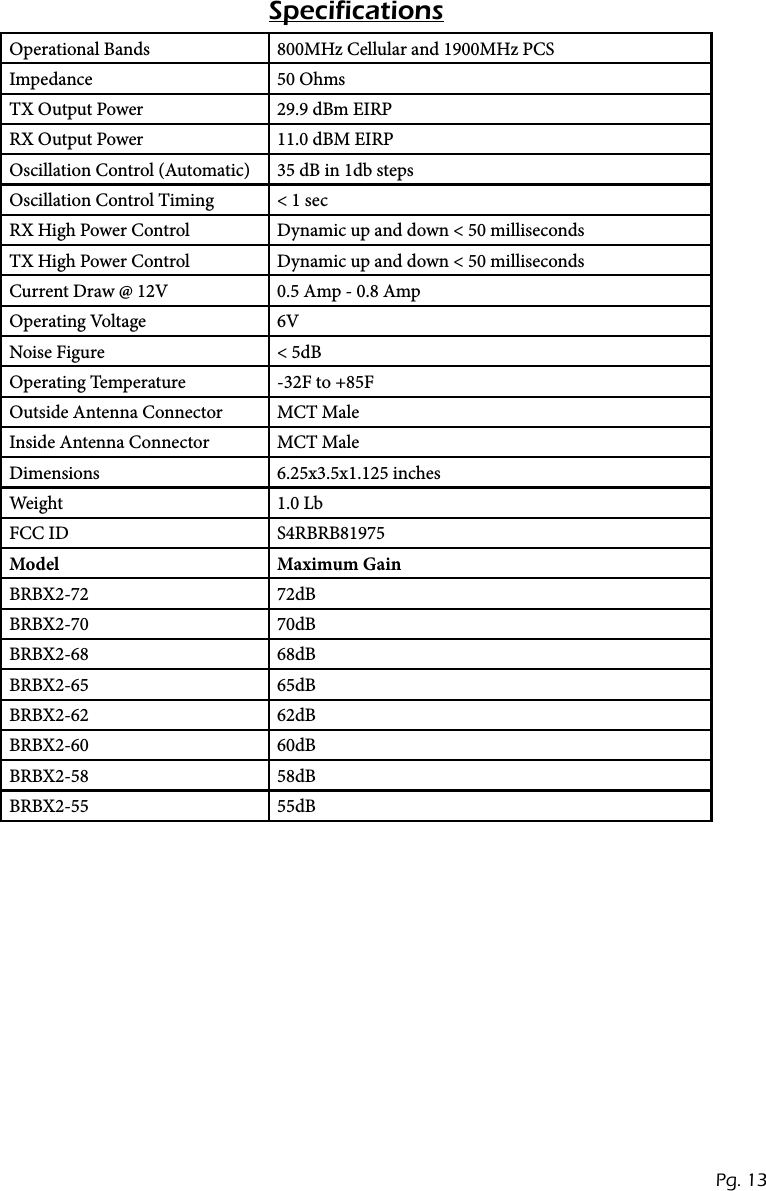
Operational Bands 800MHz Cellular and 1900MHz PCSImpedance 50 OhmsTX Output Power 29.9 dBm EIRPRX Output Power 11.0 dBM EIRPOscillation Control (Automatic) 35 dB in 1db stepsOscillation Control Timing < 1 secRX High Power Control Dynamic up and down < 50 millisecondsTX High Power Control Dynamic up and down < 50 millisecondsCurrent Draw @ 12V 0.5 Amp - 0.8 AmpOperating Voltage 6VNoise Figure < 5dBOperating Temperature -32F to +85FOutside Antenna Connector MCT MaleInside Antenna Connector MCT MaleDimensions 6.25x3.5x1.125 inchesWeight 1.0 LbFCC ID S4RBRB81975Model Maximum GainBRBX2-72 72dBBRBX2-70 70dBBRBX2-68 68dBBRBX2-65 65dBBRBX2-62 62dBBRBX2-60 60dBBRBX2-58 58dBBRBX2-55 55dBSpecificationsPg. 13
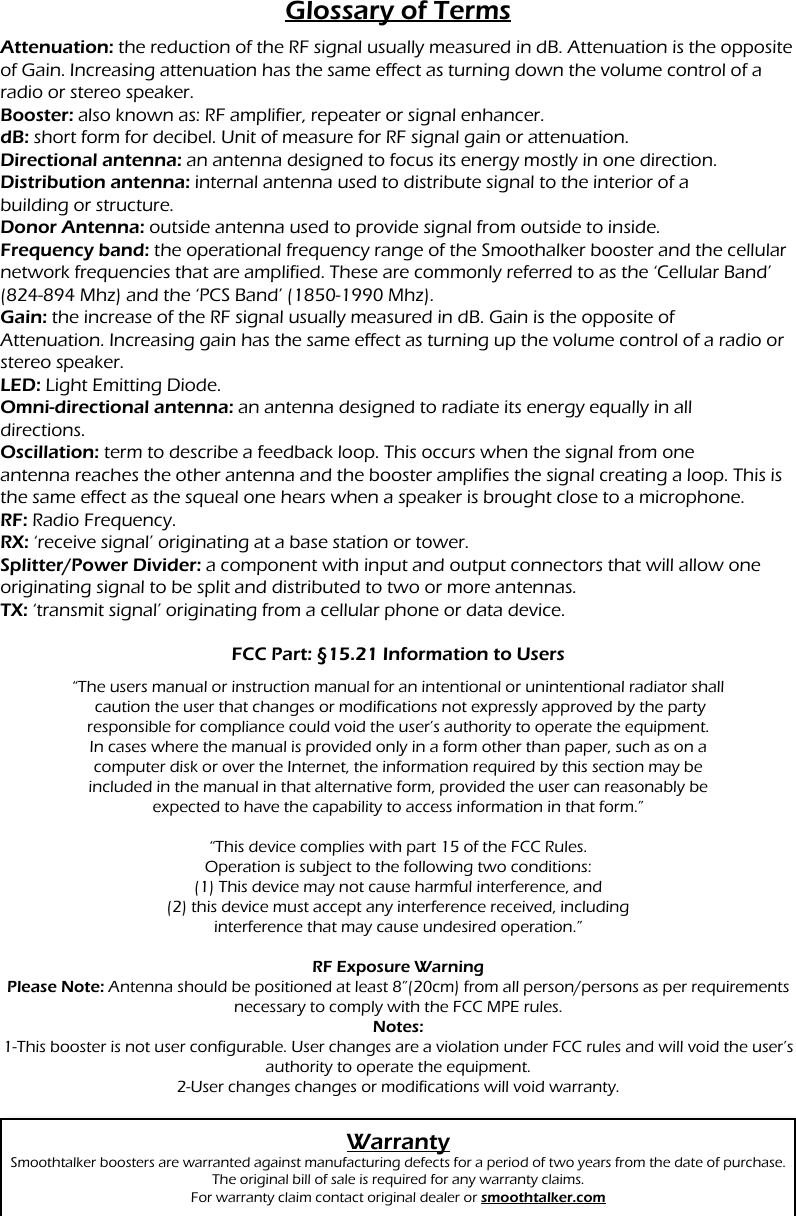
Glossary of TermsAttenuation: the reduction of the RF signal usually measured in dB. Attenuation is the opposite of Gain. Increasing attenuation has the same effect as turning down the volume control of a radio or stereo speaker.Booster: also known as: RF amplifier, repeater or signal enhancer.dB: short form for decibel. Unit of measure for RF signal gain or attenuation.Directional antenna: an antenna designed to focus its energy mostly in one direction.Distribution antenna: internal antenna used to distribute signal to the interior of abuilding or structure.Donor Antenna: outside antenna used to provide signal from outside to inside.Frequency band: the operational frequency range of the Smoothalker booster and the cellular network frequencies that are amplified. These are commonly referred to as the ‘Cellular Band’ (824-894 Mhz) and the ‘PCS Band’ (1850-1990 Mhz).Gain: the increase of the RF signal usually measured in dB. Gain is the opposite ofAttenuation. Increasing gain has the same effect as turning up the volume control of a radio or stereo speaker.LED: Light Emitting Diode.Omni-directional antenna: an antenna designed to radiate its energy equally in alldirections.Oscillation: term to describe a feedback loop. This occurs when the signal from oneantenna reaches the other antenna and the booster amplifies the signal creating a loop. This is the same effect as the squeal one hears when a speaker is brought close to a microphone.RF: Radio Frequency.RX: ‘receive signal’ originating at a base station or tower.Splitter/Power Divider: a component with input and output connectors that will allow one originating signal to be split and distributed to two or more antennas.TX: ‘transmit signal’ originating from a cellular phone or data device.FCC Part: §15.21 Information to UsersWarrantySmoothtalker boosters are warranted against manufacturing defects for a period of two years from the date of purchase. The original bill of sale is required for any warranty claims.For warranty claim contact original dealer or smoothtalker.com“The users manual or instruction manual for an intentional or unintentional radiator shall caution the user that changes or modifications not expressly approved by the partyresponsible for compliance could void the user’s authority to operate the equipment.In cases where the manual is provided only in a form other than paper, such as on acomputer disk or over the Internet, the information required by this section may beincluded in the manual in that alternative form, provided the user can reasonably beexpected to have the capability to access information in that form.” “This device complies with part 15 of the FCC Rules.Operation is subject to the following two conditions:(1) This device may not cause harmful interference, and(2) this device must accept any interference received, includinginterference that may cause undesired operation.”RF Exposure WarningPlease Note: Antenna should be positioned at least 8”(20cm) from all person/persons as per requirements necessary to comply with the FCC MPE rules.  Notes:1-This booster is not user configurable. User changes are a violation under FCC rules and will void the user’s authority to operate the equipment.2-User changes changes or modifications will void warranty.

Navigation menu