Monster Clarityhd Precision Micro Bluetooth Speaker 100 Users Manual
View in PDF format LIT_Instr_ClarityHD_QS_BlackBerry_A6Ln Speakers | monsterproducts.com
View in PDF Format LIT_Instr_ClarityHD_QS_BlackBerry_A6Ln Product Manuals – Monster Products
2015-06-12
: Monster Monster-Clarityhd-Precision-Micro-Bluetooth-Speaker-100-Users-Manual-751368 monster-clarityhd-precision-micro-bluetooth-speaker-100-users-manual-751368 monster pdf
Open the PDF directly: View PDF  .
.
Page Count: 13
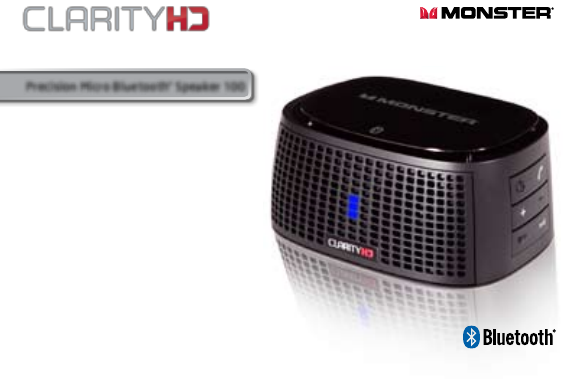
User Guide and
Warranty Information
™
Listen in High Definition
Big, Clear Stereo Sound From a Versatile,
Palm-sized, Bluetooth Wireless Speaker
and Speakerphone
Precision Micro Bluetooth® Speaker 100
1
What’s Included:
• ClarityHDPrecisionMicroBluetoothSpeaker
• TravelPouch
• USBChargingCable
General Specifications
• Bluetoothv2.0includesproles:A2DP,AVRCP,HFP,HSP
• AdvancedAudioDistributionProle(A2DP)forwirelessmusicstreaming
• AudioVideoRemoteControlProle(AVRCP)forwirelessaudio
andvideoplaybackcontrol
• Hands-freeAudio(HFP)andHeadsetProles(HSP)forhands-free
callingcapability
• Rangeupto33FT(10M)
2
3
Features and Benefits
• Bluetooth2.0withMonsteraudioanddigitalsignalprocessingforclean,
best-in-classwirelessstereosound
• Built-inmicwithadvancednoise-cancellationenablesclearwireless
hands-freecallingandconferencing
• Two35mmfullrangedriversdeliversuperbmusicdelity
• MonsterPassiveRadiatorSubwoofer
• ConvenientchargingwithincludedminiUSBchargingcable
• RechargeableLithiumIonbatteryforupto5hoursofplaytime
• ConnectstoiPodoranydevicewitha3.5mmheadphoneportusing
aminijackcable(cablenotincluded)
• Auto-searchandauto-reconnectwithcompatibledevice
ON
Micro Bluetooth® Speaker 100
OFF USB
CHARGING
AUDIO IN
®
ON
Micro Bluetooth® Speaker 100
OFF USB
CHARGING
AUDIO IN
®
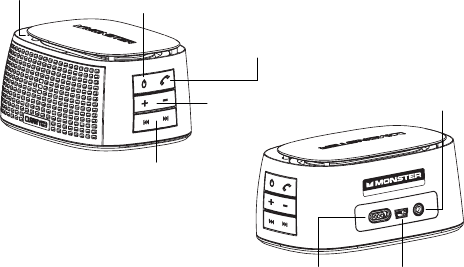
Microphone Power/Pairing
Button
Hands-freeCalling
Answer/EndButton
VolumeControls
Skip/Scan
Forward/Back
Button
ON
Micro Bluetooth® Speaker 100
OFF USB
CHARGING
AUDIO IN
®
ON
Micro Bluetooth® Speaker 100
OFF USB
CHARGING
AUDIO IN
®
MainPower
Switch
MiniUSB
ChargingInput
3.5mmAudio
InPort

4
5
LED Indicator
ThereisanLEDlightinthemiddleofthefrontofClarityHDPrecisionMicro
BluetoothSpeaker.BelowarewhattheLED’svariousdisplaysindicate.
LED Off–PowerOFF
BLUE –PowerON
Flashing BLUE/RED–Pairingmode
RED–LowBatteryLevel
Flashing RED–Batteryalmostdrained
Flashing BLUE –Batteryisrecharging
Set-up and Pairing via Bluetooth For Music Playback
and Hands-free Calling
NOTE:ClarityHDPrecisionMicroBluetoothSpeakercanpairwithmost
Compatibility
Wireless:DeviceswithBluetooth2.0orabove(SeeGeneralSpecications
forproles),suchasBlackberryandBluetoothequippedPCsandmost
Bluetoothequippedsmartphonesorcomputers.
Wired:Deviceswithastandard3.5mmheadphoneoutputportvia3.5mm
minijackcable(notincluded).
WARNING
1.Donotbecomedistractedbythisproductwhiledriving.
2.Donotleavetheproductexposedtoaheatsourceorhightemperatures.
3.Donotremoveorattempttoremovethenon-user-replaceablebattery.
Whendisposingoftheproduct,takeittoawasteelectronicsservice.
4.Pleaserememberthatalooseobjectinamovingvehiclecouldbecome
adeadlyprojectileintheeventofacollision.

6
7
Pairing with Bluetooth Equipped Blackberry
ClarityHDPrecisionMicroBluetoothSpeakercanbeconnectedwirelessly
viaBluetoothtoyourBluetoothequippedBlackberry.Itfeaturesabuilt-inmic
forhands-freecallingandcanbeusedforplaybackofyourmusiclibrary.
1.PutClarityHDPrecisionMicroBluetoothSpeakerintopairingmode.
2.FromtheBlackberryHomescreen,presstheMenukey.
3.Select“ManageConnections.”
4.Select“Bluetooth.”
5.Select“Search.”
6.Select“ClarityHD”
7.Enterpasscode0000.Youarenowconnected.
Forpairingwithnon-Blackberrymobiledevices,pleaseconsultthat
device’sowner’smanual.
Bluetooth2.0devices.Pairingmayvarybydevice.ConsultyourBluetooth
device’sowner’smanualforpairinginstructions.
Putting ClarityHD Precision Micro Bluetooth Speaker
Into Pairing Mode
1.TurnthemainpowerswitchonthebackofClarityHD
PrecisionMicroBluetoothSpeakertothe“ON”position.
2.Pressandholddownthe buttonontherightsideofClarityHD
PrecisionMicroBluetoothSpeakeruntilthelightonthefrontstarts
blinkingredandblue.Thisindicatesthatitisinpairingmode.
NOTE:ClarityHDPrecisionMicroBluetoothSpeakerwillstayinpairing
modefor3minutes.Ifyoudonotcompletethenextstepsbeforethen,
simplyturnClarityHDPrecisionMicroBluetoothSpeakermainpower
switchtoOFFandthenbacktoON,andrepeatstep2.
8
9
NOTE:NotallPCssupportallBluetoothprolesneededforfullfunctionality
withClarityHDPrecisionMicroBluetoothSpeaker.YourPCmayneed
additionalBluetoothdriversorprolesinstalled.Pleaseconsultyourowner’s
manual.IfyourPCdoesnotsupportneededBluetoothproles,youcan
connectwitha3.5mmto3.5mmminijackcableandlistentomusicthrough
ClarityHDPrecisionMicroBluetoothSpeaker.Seesection Connecting
to a device via 3.5 mm “AUDIO IN” input.
1.PutClarityHDPrecisionMicroBluetoothSpeakerMicroBluetooth
Speakerintopairingmode.
2.OnyourPC,click“Start”thenclick“ControlPanel”
3.Under“HardwareandSound”click“Addadevice.”
4.TheAddaDeviceWizardwillpopup.Youshouldseeaniconfor“ClarityHD.”
Clickonitandthenclick“Next.”
Reconnection in Event of Bluetooth Disconnection
IfbyanyreasonyourdeviceandClarityHDPrecisionMicroBluetooth
Speakeraredisconnected,suchasoutofconnectiondistanceorpowering
off,theycanbere-connectedby:
1.Shortpressingthepower/phonebuttononClarityHDPrecision
MicroBluetoothSpeaker.
2.Select“ClarityHD”fromyourdeviceforreconnection.
NOTE: Afterpairing,ClarityHDPrecisionMicroBluetoothSpeakerwillalso
“auto-connect”withcompatibledevicesthatauto-searchandre-connect
withtheirlastconnectingdeviceifdisconnectionshouldoccur.
Pairing with Bluetooth Equipped PC (Windows 7)
YoucanpairClarityHDPrecisionMicroBluetoothSpeakerwithmostBluetooth
equippedPCstolistentomusicorforuseasaspeakerphonewithSkype
andotheronlinevideo/voicechatclients.

10
11
Taking Calls on a Blackberry Connected to ClarityHD
Precision Micro Bluetooth Speaker
Whenyoureceiveanincomingcall,analertwillsoundfromClarityHD
PrecisionMicroBluetoothSpeaker.Ifyouarelisteningtomusicthrough
yourBlackberry,themusicwillautomaticallypause.
To accept a call:Youcanacceptacallasyouusuallydo,usingyour
Blackberrycontrolsorpressthe onthesideofClarityHDPrecision
MicroBluetoothSpeaker.Speaknormally.Yourcallwillcomethrough
thespeakersandyourvoicepickedupthroughthebuilt-inmic.
To end a call:UseyourBlackberrycontrolsorpressthe button.
To reject a call:UseyourBlackberrycontrolsorpressandholdthe button.
To use call waiting:UseyouBlackberrycontrolsorpressandrelease
the buttontwiceinsuccessiontoputtherstcallonholdandanswer
theincomingcall.Repeattoswitchbacktotherstcall.
5.Windows7willguideyouthroughset-up.Ifprompted,thePasscodeis0000.
6.BesureyourPC’saudiooutputandmicinputaresettoClarityHD
thenclick“Continue.”
YourPCisnowreadytouseClarityHDPrecisionMicroBluetoothSpeaker
toplaymusicandforhands-freeonlinechat.
IfyouhaveaBluetoothequippedMac,pleaseconsultyourowner’smanual
forpairinginstructions.
NOTE:Someaudiodelaymayoccurwhenwatchingvideoplayback,causing
audioonvideotobe“outofsync”whenconnectedviaBluetooth.Use
a3.5mmminijackcableforoptimalperformancewithvideoplayback.
SeesectionConnecting to a device via 3.5 mm “AUDIO IN” input.
NOTE:AlwaysbesuretoswitchClarityHDPrecisionMicroBluetooth
Speakertothe“OFF”positionwhennotinusetosavebatterycharge.

12
13
Volume control:Pushthe(+)toincreasevolumeandthe(-)button
todecreasevolume.
NOTE:WhenconnectedtoaBlackberry,ifyoupushthe ,thersttrack
inyourmusiclibrarywillbegintoplay.Thisfunctionisdisabledduring
anincomingcall.
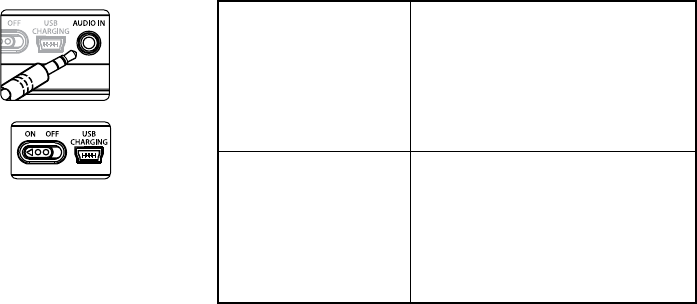
Connecting to a Device Via 3.5 mm “AUDIO IN” Input
YoucanuseClarityHDPrecisionMicroBluetoothSpeakerformusic
playbackwithanydevicethathasa3.5mmheadphoneport.Youwill
needa3.5mmto3.5mmminijackcable(notincluded).
Simplyplugoneendofthecableintoyourdevice,asyouwouldapair
ofheadphones.Plugtheotherendofthecableintothe3.5mmport
marked“AUDIOIN”onthebackofClarityHDPrecisionMicroBluetooth
Speaker.Playmusic.
Controlling Blackberry or Bluetooth PC or music phone’s music
playback using ClarityHD Precision Micro Bluetooth Speaker
InadditiontousingtheplaybackcontrolonyourBlackberryorBluetooth
equippedPCormusicphoneasyounormallywould,youcancontrolmusic
playbackfromClarityHDPrecisionMicroBluetoothSpeakerusingthe
buttonsontheside.
NOTE:YourdevicemustsupportAVRCP(AudioVideoRemoteControlProle)
tocontrolyourdevice’splaybackfromClarityHDPrecisionMicroBluetooth
Speaker.Pleasecheckyourdevice’sowner’smanual.Atthistime,Appledevices
equippedwithBluetooth,likeiPhone,iPadandMacs,donotsupportAVRCP.
Play/Pause:Pushandreleasethe buttontoplay/pause.
Skip to the next or previous track:Pushandreleasethe
ON OFF USB
CHARGING
AUDIO IN
Micro Bluetooth Monitor
buttontoskiptothe
nexttrack.Pushandreleasethe
ON OFF USB
CHARGING
AUDIO IN
Micro Bluetooth Monitor
buttontoskipbacktotheprevioustrack.
14
15
Soundisverylow
or no sound
•PleasecheckClarityHDPrecision
MicroBluetoothSpeakerorBluetooth
deviceVolumeLevel
•Ifusing3.5mmport,besurethe
minijackcableissecurelyinserted
intoClarityHDPrecisionMicroBluetooth
Speakerandyourdevice
Musicisplayingona
devicebutisn’ttransferring
toClarityHDPrecision
MicroBluetoothSpeaker
•MakesureyourBluetoothdevicehasA2DP
(checkyourdevice’sowner’smanual)
•Besurethedeviceispaired
•Ifusing3.5mmport,besuretheminijack
cableissecurelyinsertedintoClarityHD
PrecisionMicroBluetoothSpeaker
andyourdevice
Controlling Volume When Connected Via 3.5 mm “AUDIO IN” Input:
NOTE:Volumecannotbecontrolledwiththevolumecontrol
onClarityHDPrecisionMicroBluetoothSpeakerwhen
connectedviathe3.5mm“AUDIOIN”input.Usethevolume
controlonyourdeviceasyounormallywould.
Recharging Battery
Makesurethepowerswitchissetto“ON.”PlugtheMiniUSB
endoftheincludedUSBcableintotheUSBminiport,marked
“USBCharging”onthebackofClarityHDPrecisionMicro
BluetoothSpeaker.PlugtheotherendintoaUSBporton
yourcomputerorotherdevicesmadeforUSBcharging.TheLEDlightwill
begintoashBLUE.Itwillstopashingatfullcharge.Chargetimeis3hrs
fromanemptybattery.
NOTE:AlwaysbesuretoswitchClarityHDPrecisionMicroBluetoothSpeaker
tothe“OFF”positionwhennotinusetosavebatterycharge.
Trouble Shooting

16
17
Musicisnotresuming
afterhangingupacall
•Pressplaytoresumemusic
Trouble ShootingTrouble Shooting
LEDlightnoton •MakesureClarityHDPrecisionMicro
BluetoothSpeakermainswitchisON
•MakesureClarityHDPrecisionMicro
BluetoothSpeakerischarged
Hands-freecallingisnot
workingwithBlackberry
ormobilephone
•Makesureyourmobiledevice
hasHSP/HFP
•BesureyourBlackberryormobile
phoneispaired
•CheckvolumeonClarityHDPrecision
MicroBluetoothSpeaker
18
19
otherthanaMonsteremployee;(f)exposureoftheProducttoheat,brightlight,sun,liquids,sandorothercontaminants;
or(g)actsoutsidethecontrolofMonster,includingwithoutlimitationactsofGod,re,storms,earthquakeorood.
“Warranty Period”meansthetimeperiodduringwhichMonstermusthavereceivedYourFormalWarrantyClaim.The
differentWarrantyPeriodsrelatedtoProductDefectsaredenedintheSpecicationsTablebelow.TheWarranty
PeriodcommencesonthedatewhenYoupurchasedorreceived(whicheveroccurslater)theProductfroman
AuthorizedDealerasevidencedbytheAuthorizedDealer’sinvoice,salesreceiptorpackingslip.IfYoudonothave
writtenproofofthedateofpurchaseorreceipt,thentheWarrantyPeriodcommencesthree(3)monthsafterthedate
whentheProductleftMonster’soritsfactoryasevidencedbyMonster’srecords.TheWarrantyPeriodendsafterthe
timedenedintheSpecicationsTablehasexpiredorafterYouhavetransferredownershipoftheProduct,whichever
occursearlier.Also,YoumustcallMonsterandobtainaReturnAuthorizationNumber(asdescribedunder“Howto
MakeaClaim”)withintwo(2)monthsafterYoudiscoveraProductDefect(orshouldhavediscoveredit,ifsuchProduct
Defectwasobvious).
“You”meanstherstindividualpersonthatpurchasedtheProductinitsoriginalpackagingfromanAuthorizedDealer.
ThisLimitedWarrantydoesnotapplytopersonsorentitiesthatboughttheProduct(i)inusedorunpackagedform,
(ii)forresale,leaseorothercommercialuse,or(iii)fromsomeoneotherthananAuthorizedDealer.
SCOPE OF THIS LIMITED WARRANTY
PRODUCTS. IfaProductcontainedaProductDefectwhenYouboughtitfromanAuthorizedDealerandMonster
receivesaFormalWarrantyClaimfromYouwithintwo(2)monthsafterYoudiscoversuchProductDefect(orshould
havediscoveredit,ifsuchProductDefectwasobvious)andbeforetheendoftheWarrantyPeriodforProductDefects
applicabletotheaffectedProduct,thenMonsterwillprovideYouwithoneofthefollowingremedies:Monsterwill
(1)repairor,atMonster’ssolediscretion,replacetheProduct,or(2)refundtoYouthepurchasepriceYoupaidtothe
AuthorizedDealerfortheaffectedProductifrepairorreplacementisnotcommerciallypracticableorcannotbetimely
made.NOTE:MONSTERDOESNOTASSUMEANYLIABILITYFORANYINCIDENTAL,CONSEQUENTIALORINDIRECT
DAMAGESUNDERTHISLIMITEDWARRANTY.
LIMITED WARRANTY FOR CONSUMERS
Monster,LLC.,7251WestLakeMeadBlvd.,LasVegas,NV89128,USA,(415)840-2000(“Monster”)extendsYouthis
LimitedWarranty.StatutoryorcommonlawmayprovideYouwithadditionalrightsorremedies,whichshallnotbe
affectedbythisLimitedWarranty.
DEFINITIONS
“Adequate Use”meansuseoftheProduct(i)withinahomeordwelling,(ii)forprivate(asopposedtocommercial)
purposes,(iii)inconformancewithallapplicablelocal,stateorfederallaw,codeorregulations(includingwithout
limitationbuildingand/orelectricalcodes),(iv)inaccordancewithmanufacturerrecommendationsand/orinstructions
inthematerialsanddocumentationthataccompanytheProduct,and(v)ifapplicable,withproperelectricalgrounding.
“Authorized Dealer”meansanydistributor,resellerorretailerthat(i)wasdulyauthorizedtodobusinessinthe
jurisdictionwhereitsoldtheProducttoYou,(ii)waspermittedtosellYoutheProductunderthelawsofthejurisdiction
whereYouboughttheProduct,and(iii)soldYoutheProductnewandinitsoriginalpackaging.
“Formal Warranty Claim”meansaclaimmadeinaccordancewiththesection“FormalWarrantyClaims”herein.
“Product”meansaProduct(i)thatislistedintheSpecicationsTablebelow,(ii)thatYouboughtfromanAuthorizedDealer
newandinitsoriginalpackaging,and(iii)whoseserialnumber,ifany,hasnotbeenremoved,altered,ordefaced.
“Product Defect”meansaninadequacyoftheProductthatexistedatthetimewhenYoureceivedtheProductfroman
AuthorizedDealerandthatcausesafailureoftheProducttoperforminaccordancewithMonster’sdocumentation
accompanyingtheProduct,unlesssuchfailurehasbeencausedcompletelyorpartlyby(a)anyuseotherthan
AdequateUse,(b)transportation,neglect,misuseorabusebyanyoneotherthanMonster’semployees;(c)alteration,
tamperingormodicationoftheproductbyanyoneotherthanaMonsteremployee;(d)accident(otherthana
malfunctionthatwouldotherwisequalifyasaProductDefect);(e)maintenanceorserviceoftheProductbyanyone

20
21
wasobvious);(2)Giveadetailedexplanationofhowthedamageoccurred;(3)ObtainaReturnAuthorizationNumber;
(4)Uponreceiptofaclaimform(whichmaybesenttoYouafterYouledYourFormalWarrantyClaim),llouttheclaim
formentirely;(5)ReturntheProducts,shippingprepaidbyYou(toberefundedifYouareentitledtoaremedyunderthe
ScopeofthisLimitedWarranty),toMonsterforvericationofdamage,alongwithacopyofYouroriginalsalesreceipts
andproofofpurchase(UPClabelorpackingslip)forsuchProducts,thecompletedclaimform,andprintedReturn
AuthorizationNumberontheoutsideofthereturnpackage(theclaimformwillincludeinstructionsforreturn).
TELEPHONE NUMBERS.IfyouboughttheproductintheUnitedStates,LatinAmerica,orAsiaPacic,contactMonster,
LLC(455ValleyDrive,Brisbane,CA94005)at1877800-8989.Ifyouboughttheproductanywhereelse,contactMonster
TechnologyInternationalLtd.,BallymaleyBusinessPark,Ennis,Co.Clare,Ireland.Youcanwriteoruseoneofthe
followingtelephonenumbers:Canada866-348-4171,Ireland353656869354,Belgium0800-79201,CzechRepublic800-
142471,Denmark8088-2128,Finland800-112768,France0800-918201,Germany0800-1819388,Greece00800-353-12008,
Italy800-871-479,Netherlands0800-0228919,Norway800-10906,Russia810-800-20051353,Spain900-982-909,Sweden
020-792650,UnitedKingdom0800-0569520
FURTHER PROCEEDINGS.MonsterwilldeterminewhetheraProductDefectexisted.Monstermay,atitsdiscretion,
directYoutoobtainarepairestimateataservicecenter.Ifarepairestimateisrequired,Youwillbeinstructedonhow
toproperlysubmittheestimateandtheresultinginvoicetoMonsterforpayment.Anyfeesforrepairsmaybenegotiated
byMonster.
TIMING. IfYoubringaFormalWarrantyClaimandfullycomplywithalltermsandconditionsofthisLimitedWarranty,
MonsterwilluseitsbesteffortstoprovideYouwitharemedywithinthirty(30)daysafterreceiptofYourFormal
WarrantyClaim(ifYouresideintheUnitedStates-forty-ve(45)daysifYouresideelsewhere),unlessobstaclesoutside
Monster’scontroldelaytheprocess.
Ver.062706–US ©2010Monster,LLC
GENERAL PROVISIONS
CHOICE OF LAW/JURISDICTION. ThisLimitedWarrantyandanydisputesarisingoutoforinconnectionwiththisLimited
Warranty(“Disputes”)shallbegovernedbythelawsoftheStateofCalifornia,USA,excludingconictsoflawprinciples
andexcludingtheConventionfortheInternationalSaleofGoods.ThecourtslocatedintheStateofCalifornia,USAshall
haveexclusivejurisdictionoveranyDisputes.
OTHER RIGHTS.THISLIMITEDWARRANTYGIVESYOUSPECIFICLEGALRIGHTS,ANDYOUMAYALSOHAVEOTHER
RIGHTS,WHICHVARYFROMSTATETOSTATEANDJURISDICTIONTOJURISDICTION,ANDWHICHSHALLNOTBE
AFFECTEDBYTHISLIMITEDWARRANTY.THISWARRANTYEXTENDSONLYTOYOUANDCANNOTBETRANSFERRED
ORASSIGNED.IfanyprovisionofthisLimitedWarrantyisunlawful,voidorunenforceable,thatprovisionshallbe
deemedseverableandshallnotaffectanyremainingprovisions.IncaseofanyinconsistencybetweentheEnglishand
otherversionsofthisLimitedWarranty,theEnglishversionshallprevail.
REGISTRATION.PleaseregisterYourProductatwww.monstercable.com/register.Failuretoregisterwillnotdiminish
Yourwarrantyrights.
SPECIFICATIONS TABLE
Product Model Warranty Period for Product
MBLCLYMBT100 One(1)year
FORMAL WARRANTY CLAIM
HOW TO MAKE A CLAIM.IntheeventdamagehasoccurredtoProducts,Youmustfollowtheseinstructions:(1)Call
Monsterwithintwo(2)monthsafterYoudiscoveraProductDefect(orshouldhavediscoveredit,ifsuchProductDefect

©2010Monster,LLC
7251WestLakeMeadBlvd.•LasVegas,NV89128
“Monster,” the Monster logo, “Monster Cable,” “ClarityHD,” the RoHS logo, the product and packaging are
trademarks or registered trademarks of Monster Cable Products, Inc. or its subsidiaries in the United States or
other countries. BlackBerry®, RIM®, Research In Motion®, SureType® and related trademarks, names and logos
are the property of Research In Motion Limited and are registered and/or used in the U.S. and countries around
the world. MacBook, iPad, iPhone, iPod and iChat are trademarks of Apple Inc., registered in the U.S. and other
countries. The Bluetooth word mark and logos are owned by the Bluetooth SIG, Inc. and any use of such marks
by Monster, LLC is under license. Other trademarks and trade names are those of their respective owners.
Skype is a trademark of Skype Limited.
rm855425
Listen in High Definition
™
