Montblanc Simplo MB150911 Advanced proximity alarm User Manual Manual for e Tag 5 8 2015
Montblanc Simplo GmbH Advanced proximity alarm Manual for e Tag 5 8 2015
UserManual.pdf

Montblanc e-Tag
User Guide
Content
By purchasing the Montblanc e-Tag you made a good decision.
Please read this user guide with care to make the most out of your e-
Tag.
A. Getting Started
Box content
Understanding your e-Tag
Open the key ring
Charging the battery
Switching the e-Tag on/off
Installing the e-Tag application
Pairing the e-Tag with your phone
Reconnect to a new phone
B. Montblanc e-Tag functionality
Overview
Connecting your e-Tag
Locate your e-Tag
Motion alarm
Turn alarm on/off
Settings
Last seen function
Managing your e-Tag connection
Safety zones and further settings
C. Safety instructions
D. Certification statement
E. End user license agreement
F. Privacy policy
G. Terms of use
H. Technical information
I. Disclaimer
A. Getting Started
The e-Tag can be located with your smartphone, alarm you when
your belongings are moved, send notifications if it gets out of range
and show you the area it was last located. Follow this getting started
chapter or the quick start guide enclosed to the e-Tag before setting
up your e-Tag and connecting it to your phone.
Box content
The e-Tag comes with the following items:
1 x e-Tag
1 x micro-USB cable
1 x Quick start guide
1 x Montblanc service guide
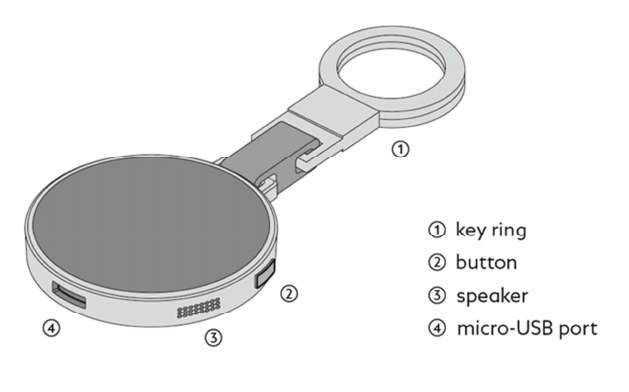
Understanding your e-Tag
The e-Tag consists of a ring to attach it to your item and an electron-
ic part that connects to your phone.
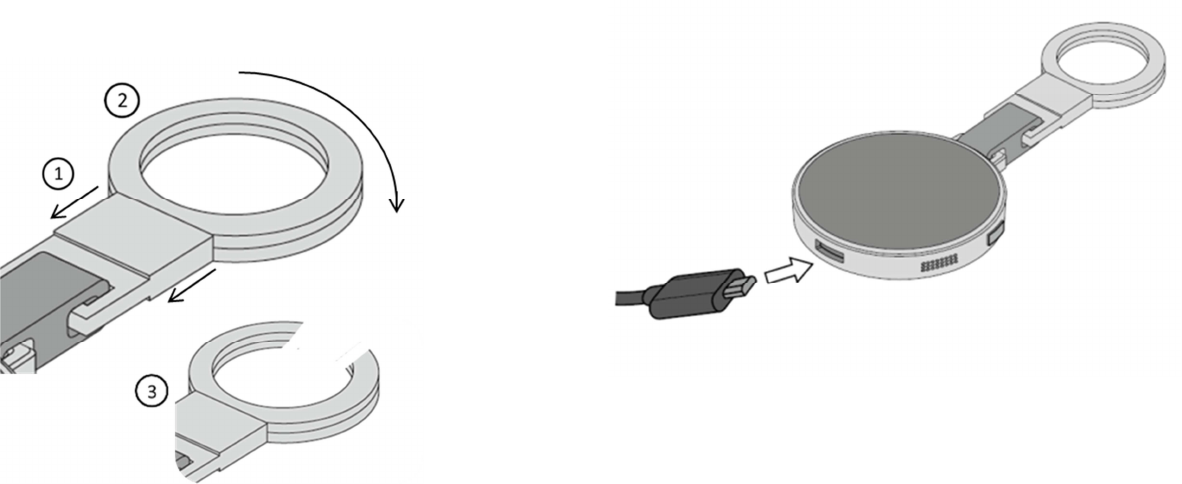
Open the key ring
To open the key ring pull down the flat metal plate (1) and turn the
ring to the left or right (2) until it opens up (3). Now attach the e-Tag
to one of your belongings and close the key ring again by turning it
back.
Charging the battery
Use the enclosed Montblanc micro-USB cable to charge your e-Tag.
Plug the micro-USB cable into the micro-USB port. Plug the other
end of the cable into the USB port of a computer or a suitable USB
charger.
After 4 hours of charging remove the USB cable first from the com-
puting device or USB charger and then disconnect the micro-USB
from the e-Tag. Please do not leave the e-Tag on prolonged
charging, as it may harm the battery performance. The device runs
with a rechargeable lithium-ion battery that provides power for a
maximum of two weeks. The battery life may vary depending on
your personal usage pattern and environmental conditions. You can
check the battery status in the settings of the smartphone application.
Do not leave the e-Tag discharged as thiy may decrease the battery
life time or damage the battery.
Switching the e-Tag on/off
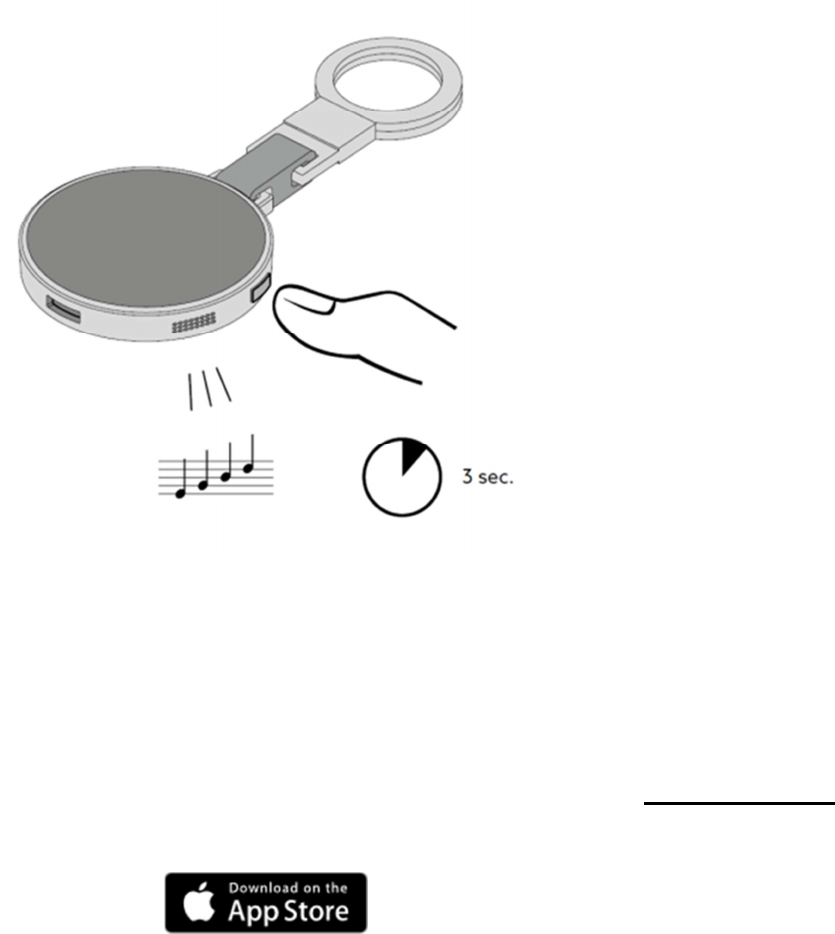
To turn the device on/off press and hold the button on the e-Tag for
three seconds. The e-Tag will make an ascending sound when turned
on and a descending sound when turned off.
Installing the e-Tag application
The Montblanc e-Tag is compatible with Apple iPhone 4S and above
running iOS8. Other mobile devices are not supported by the e-Tag.
For installing the smartphone application make sure that you have an
active Wi-Fi or mobile network connection to access the App store.
By clicking on the app store logo below you will be forwarded to the
app download.
You can also download the app by following these instructions:
1. Access the store by tapping on the “App Store” icon
2. Tap the “Search” icon in the navigation bar
3. Click into the search field and type “Montblanc e –Tag”
4. Select the first search result from the list and tap on the
“Load” button
Pairing the e-Tag with your phone
The e-Tag is paired to the smartphone using Bluetooth® Low Energy.
Through pairing, the e-Tag is able to continuously communicate with
your phone. The pairing process has to be done only once.
Before pairing, please ensure the following:
1. Bluetooth is on
2. e-Tag is on
3. e-Tag is within proximity
4. The app is up to date
5. Your phone has an active internet connection
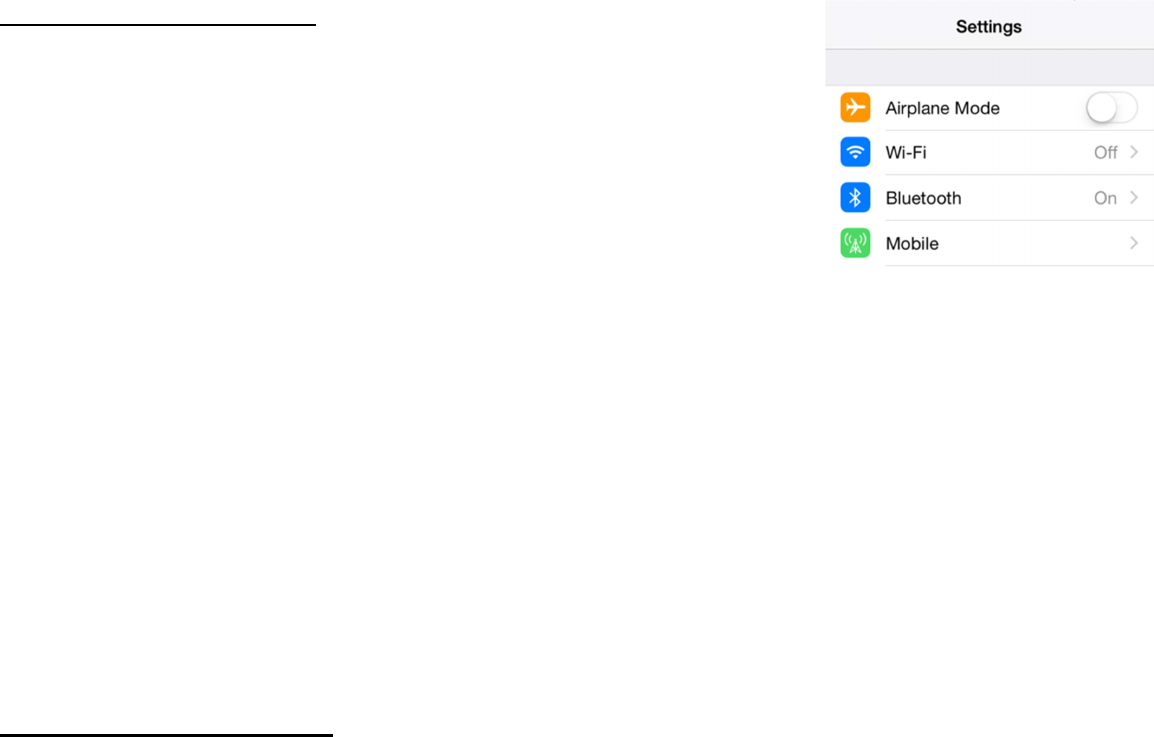
Turn Bluetooth® on
1. Swipe from bottom to top
2. Tap on the Bluetooth icon in the overlay
Connect the e-Tag to your iPhone
Turn the e-Tag on by pressing and holding the button on the device
for three seconds. The e-Tag will make an ascending sound and con-
nect to your smartphone.
Reconnect to a new phone
Once the e-Tag is paired it cannot be used with another phone unless
you unpaired it. To reconnect the e-Tag to another phone follow
these three steps.
1. Remove the e-Tag from your app
2. Unpair the e-Tag from your phone
The e-Tag can be paired to one phone only at the same time. If you
already paired your e-Tag to a phone, you must unpair it before pair-
ing it with another phone.
Unpair the e-Tag from your iPhone
Enter Settings and tap on Bluetooth.
Under “My Devices” tap on the information icon next to
“MONTBLANC E-TAG”. Then tap on “Forget This Device”. Turn
your e-Tag off. Now press and hold the button on the device for
about 10 seconds until you hear three beeps. The e-Tag is now ready
to pair again. The e-Tag is now unpaired and ready to pair again with
another phone.
B. Montblanc e-Tag functionality
The application manages the connection between your Phone and the
e-Tag. To setup the smartphone application follow the “Getting
Started”-chapter at the beginning of the manual.
Overview
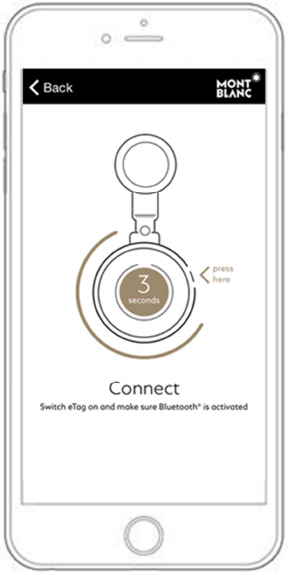
Once you connected the e-Tag to your smartphone and launched the
application, you will be prompted to the connection screen. After the
connection process is completed you will be prompted to the main
screen. Please keep the application running for the best experience.
Connecting your e-Tag
The application will ask you to switch the e-Tag on by pressing its
button for three seconds. The application will guide you through the
pairing and connection process.
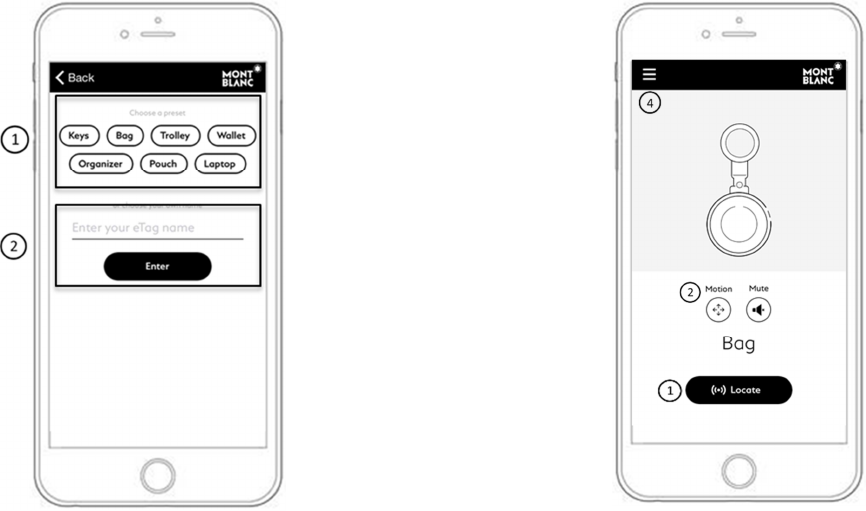
After the connection between your smartphone and e-Tag is set up
you can either choose between a preselected item you want to attach
your e-Tag to (1) or give it a name (2).
Home screen
From the home screen the e-Tag functionalities can be accessed.
1. Locate the e-Tag
2. Activate motion alarm
3. Turn alarm on/off
4. Settings
1. Locate your e-Tag
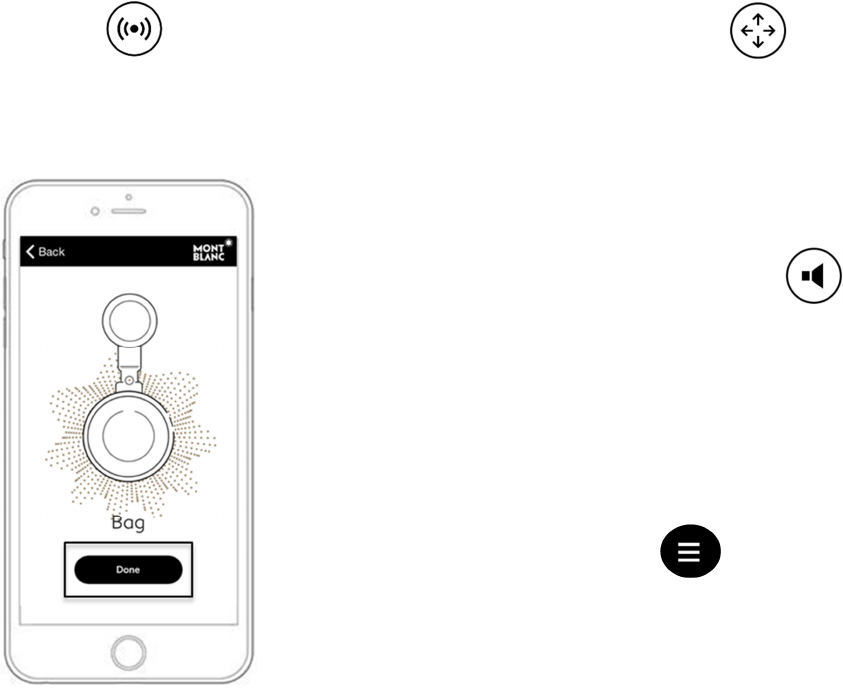
Use the “Locate” function to find your e-Tag within your proximity.
Tap on the locate button on the main screen and the e-Tag will play a
melody to reveal its position.
Once you have found your device you can turn the alarm off by tap-
ping on the “Done” button in the app or by shortly pressing (< 1 sec-
ond) the button of the e-Tag device.
2. Motion alarm
The motion alarm will react to any movement of the e-Tag and send
a notification to your smartphone. To deactivate the alarm please tap
on the “Motion” symbol on the main screen. For a longer battery
lifetime turn the motion alarm off when you don't need it.
3. Turn alarm on/off
You can mute all alarms on the e-Tag. To turn the alarm on/off tap
on the “Mute” symbol on the main screen. If the symbol is black, the
alarm is turned off. It is recommanded to only turn the alarm off in
safe areas. There is no protection to your items if the alarm is turned
off.
4. Settings
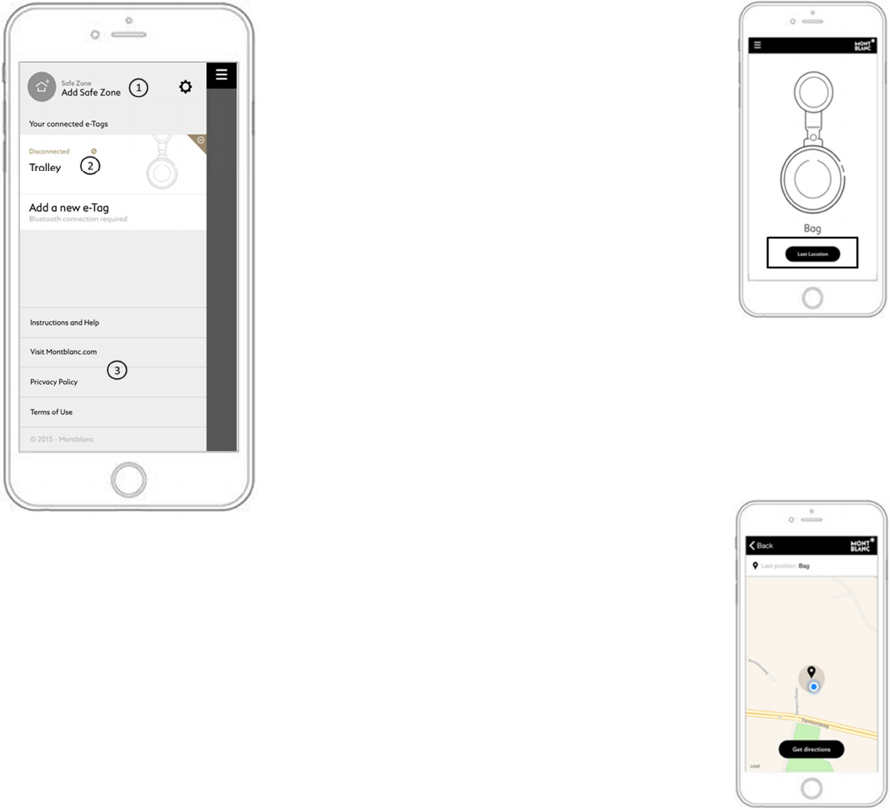
You can access the settings menu from the main screen by swiping
from the left to the right or tapping on the three bars. The settings
enable you to add safe zones (1) and display the status of your e-Tag
(2). You can find additional information and support for your e-Tag
(3).
Last location
When your e-Tag gets out of range (loss of Bluetooth connection)
you can tap on the “last location” button to receive the last location
where the e-Tag was connected to your phone.
The last location of your e-Tag will be shown on the map. Tap on the
“Get directions” button and the route to the last location of the device
will be calculated.
Managing your e-Tag connection
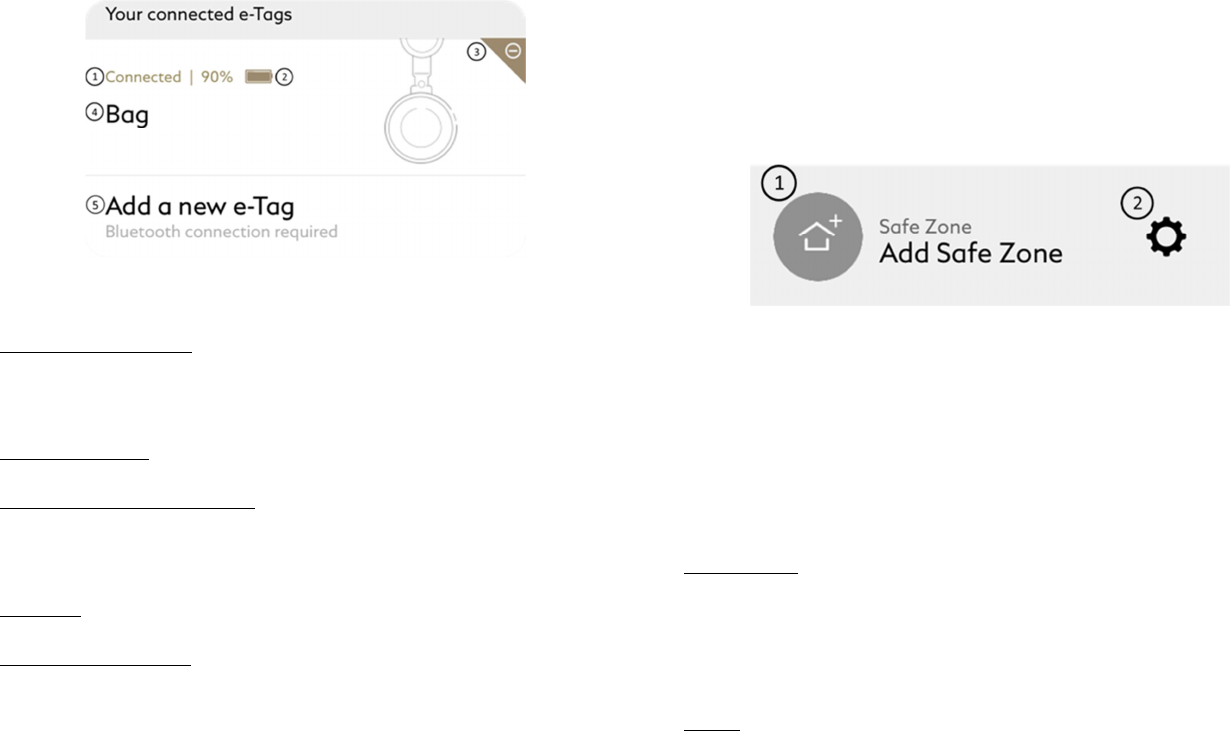
You can manage your e-Tags in the settings menu by tapping on the
three bars. In the “Your connected e-Tags” you will find information
about all connected e-Tags.
1. Connection status: Shows “Connected” when the device is con-
nected to your e-Tag application or “Disconnected” when it is not
connected.
2. Battery status: Shows the battery life of the e-Tag in percent.
3. Change connection status: Tap on the “-“ sign next to the e-Tag to
remove the e-Tag from your app (see chapter on how to unpair the e-
Tag from your phone).
4. Name: Displays the name of your e-Tag.
5. Add a new e-Tag: Add an additional e-Tag to your iPhone. The
number of e-Tags that can be connected to the application is limited
to two.
Safe zones
You can add safe zones to avoid false alarms in secure areas. A safe
zone can be any safe location like your home or your office. To add a
safe zone tap the house symbol in the settings (1) and enter the ad-
dress of your safe zone. Please make sure that GPS is turned on dur-
ing this process.
Settings
To adjust settings please tap on the gear-wheel next to the safe zone
(2). A menu will open up and you can decide whether to turn on or
off the following options:
Notifications
If turned off, the app will stop pushing notifications to the iOS home
screen when an alarm occurs or the e-Tag moves again into your
range.
Sound
If turned off, the phone will not play sounds on alarms.

Vibration
If turned off, the phone will not vibrate on alarms.
Bluetooth
Disconnects all e-tags and disables Bluetooth in the app.
Alert in silent mode
If turned on, the app plays sounds on alarms even when the phone is
muted.
Battery saving mode
If turned on, battery is saved at the expense of a less sensitive alarm
detection.
C. Safety instructions
Please read the following warning and safety information
carefully to prevent incidents. Any configuration or use other
than what is in line with the suggested and intended use is
not covered or guaranteed.
• Keep the device away from any ear, as hearing damage may
occur.
• Montblanc does not guarantee against loss of possessions or
people.
• Using the e-Tag the correct and intended way, might
prevent loss of possessions.
• Do not disassemble, repair, modify, open, drop, puncture,
crush, shred or try otherwise to damage the device. Refrain
from putting high pressure on it or place it near or in a heat
source. The device should be used in temperatures between
32–95°F (0–35°C).
• If the e-Tag begins to swell or expand, emits strong odor, or
becomes hot to the touch, discontinue usage and contact a
Montblanc Boutique or an authorised Montblanc Retailer.
• The e-Tag comes with a rechargeable lithium ion battery
which is flammable. Keep away from open flame. If the bat-
tery inside the e-Tag leaks, discontinue use, and do not allow
the e-Tag to contact your skin or eyes. In event of accidental
contact wash the affected area with large amounts of water
and seek medical assistance immediately.
• Do not leave the e-Tag on prolonged charge when not in use.
Damages resulting from the usage of an improper charger
are not covered by the warranty.
• In case of a leaking battery, refrain from handling or touch-
ing it.
• Avoid any contact, in particular with your eyes or skin. Con-
tact a Montblanc Boutique or an authorised Montblanc Re-
tailer.
• Please refrain from using the device while operating a vehi-
cle as it may distract you.
• Only use the USB cable provided for charging the device
and take care to use a stable power source for charging.
• Keep your e-Tag dry, and do not use it with wet hands.
Moisture in or on the e-Tag may lead to electric shock.
• The device is not a toy. Keep the device and accessories
away from small children.
• Do not service the device yourself. For service and mainte-
nance contact your Montblanc Boutique or an authorised
Montblanc Retailer.
• Do not store your e-Tag in elevated temperatures or in high
humidity.
D. Certification statements
Declaration of conformity
Montblanc declares that this product is in compliance with the essential
requirements of European Directive 1999/5/EC on Radio and Telecommu-
nications Terminal Equipment (R&TTE). A copy of the Declaration of
Conformity for this product may be obtained by clicking on the Compliance
Documentation on www.montblanc.com/e-tag
FCC statement
This device complies with Part 15 of the FCC Rules. Operation is subject to
the following two conditions:
(1) this device may not cause harmful interference, and (2) this device must
accept any interference received, including interference that may cause
undesired operation.
Changes or modifications not expressly approved by the party responsible
for compliance could void the user's authority to operate the equipment.
IC statement
This device complies with Industry Canada licence-exempt RSS standard(s).
Operation is subject to the following two conditions:
(1) this device may not cause interference, and
(2) this device must accept any interference, including interference that
may cause undesired operation of the device.
Le présent appareil est conforme aux CNR d'Industrie Canada applicables
aux appareils radio exempts de licence. L'exploitation est autorisée aux
deux conditionssuivantes:
(1) l'appareil ne doit pas produire de brouillage, et
(2) l'utilisateur de l'appareil doit accepter tout brouillage
radioélectrique subi, même si le brouillage est susceptible d'en compro-
mettre le fonctionnement.
NCC statement
Warning Statement:
“ 本產品符合低功率電波輻射性電機管理辦法 第十二條、第
十四條等條文規定:
1. 經型式認證合格之低功率射頻電機,非經許可,公司、商號
或使用者均不得擅自變更頻率、加大功率或變更原設計之特性
及功能。
2. 低功率射頻電機之使用不得影響飛航安全及干擾合法通信;
經發現有干擾現象時,應立即停用,並改善至無干擾時方得繼
續使用。
前項合法通信,指依電信法規定作業之無線電通信。低功率射
頻電機須忍受合法通信或工業、科學及醫療用電波輻射性電機
設備之干擾。”
E. End user license agreement
About Montblanc and this End User Licence Agreement
Montblanc-Simplo GmbH has its registered offices at Hellgrundweg
100, D-22525 Hamburg. In this Device EULA, we use the term
Montblanc (and "we", "us" and "our") to refer to the head office of
Montblanc at the registered address above and to its affiliates.
This End User Licence Agreement ("Device EULA") is a legal
agreement between you and Montblanc-Simplo GmbH for your use
of the Montblanc e-Tag or other wearable technology (together the
“Device”), including all associated media and online or electronic
documentation. The Terms of Use also contain an end user licence
agreement in respect of your use of the mobile application and forms
part of the user documentation provided to you when you download
the mobile application for the Device. Data is transferred from the
Device to the mobile application and is encrypted over Bluetooth.
Please read the terms of this Device EULA carefully before using
the Device. By using the Device, you signify your assent and
agreement to this Device EULA. If you do not agree to this De-
vice EULA, then you are not authorised to continue use of the
Device.
Changes to this Device EULA
We may make changes to this Device EULA from time to time. If
you do not agree with the Device EULA at any time, you should
cease using the Device. Your continued use of the Device constitutes
you continued agreement to the current Device EULA.
Intellectual property and end user license
You acknowledge that all intellectual property rights in the Device
anywhere in the world belong to us or our licensors, that rights in the
firmware that forms part of the Device are licensed (not sold) to you,
and that you have no rights in, or to, the Device other than the right
to use it in accordance with the terms of this Device EULA.
The design, trademarks, service marks, logos and branding displayed
in the Device and all content and information within it, belongs to
Montblanc and its licensors, and are protected by intellectual proper-
ty legislation such as copyright, designs and trademark legislation
and under international treaty provisions and national laws world-
wide and you must not use it except as strictly permitted by this De-
vice EULA.
In consideration of you agreeing to abide by this Device EULA,
Montblanc grants you a limited, non-transferable, non-exclusive
licence use of the Device and its firmware for your own non-
commercial, educational, private or domestic use only. We reserve
all other rights not expressly granted to you under this Device EULA.
You may not:
(a) rent, lease, sell, sublicense, redistribute, adapt, vary or modify
the Device;
(b) copy, reverse engineer, decompile, attempt (in whole or in part)
to obtain the source code of, modify or create derivative works
of the Device, or any updates except to the extent that you
cannot be prohibited from so doing under applicable law; or
(c) adapt or circumvent or disable any technological protection
measures contained in or used to protect the Device.
You must not transmit any data, send or upload any material that
contains viruses, Trojan horses, worms, time-bombs, keystroke log-
gers, spyware, adware or any other harmful programs or similar
computer code designed to adversely affect the operation of any
computer software.
Disclaimers and limitation of liability
This section applies to the Device only and not other Montblanc
products. Nothing in this section is intended to limit any of your
rights pursuant to the Montblanc International Guarantee provided to
you with the Device.
Montblanc hopes to provide helpful and accurate information on the
Device, but makes no endorsement, representation or warranty of
any kind about any information, services or recommendations made
available through the Device. All information, services or recom-
mendations is provided for informational purposes only. Montblanc
is not responsible for the accuracy, completeness, reliability, effec-
tiveness, or correct use of information displayed or accessed through
the Device. If you rely on any information provided by Montblanc or
available through the Device, then this is at your own risk. In addi-
tion, Montblanc does not warrant or represent that the use of the De-
vice will not infringe rights of third parties.
Access and information transmitted in connection with the Device
will pass over public telecommunications networks. We make no
representation or warranty in connection with, and disclaim any lia-
bility for, the network or service used to access and use the Device.
Montblanc does not warrant that the functional and/or technical as-
pects of the Device will be error-free or that the Device is free of
viruses or other harmful components. If use of the Device results in
the need for servicing or replacing property, material, equipment,
data or other element, Montblanc is not responsible for those costs.
Without limiting the foregoing, everything on the Device is provided
to you "AS IS" AND "AS AVAILABLE" AND, TO THE FULLEST
EXTENT PERMITTED BY APPLICABLE LAW, WITHOUT
WARRANTY OF ANY KIND, EITHER EXPRESSED OR IM-
PLIED, INCLUDING, BUT NOT LIMITED TO, THE IMPLIED
WARRANTIES OF MERCHANTABILITY, SATISFACTORY
QUALITY, FITNESS FOR A PARTICULAR PURPOSE, REA-
SONABLE CARE AND SKILL, OR NON-INFRINGEMENT.
Montblanc and its suppliers or licensors make no warranties about
the (i) software, text, downloads, graphics, and links that form part of
the Device, or about results to be obtained from using the Device;
and (ii) the ability of the Device to integrate with any third party
software (including compatibility issues arising out of upgrades re-
leased for mobile operating systems).
Our maximum aggregate liability under or in connection with this
Device EULA (including your use of the Device) and the Terms of
Use whether in contract, tort (including negligence) or otherwise,
shall in all circumstances be limited to the amount that you paid for
the Device, provided that nothing in this Device EULA shall limit or
exclude our liability for (i) death or personal injury resulting from
our negligence, (ii) fraud or fraudulent misrepresentation, and (iii)
any other liability that cannot be excluded or limited by law.
To the fullest extent permitted by applicable law, Montblanc shall
not be liable for any indirect, incidental, special or consequential
damages of any kind arising out of or in connection with the use of
the Device (including reliance on information made available as part
of your use of the Device) or any liability relating to any loss of use,
interruption of business, lost profits or lost data, regardless of the
form of action, whether in contract, tort (including negligence) or
otherwise, even if Montblanc has been advised of the possibility of
such damages.
Please note that in some jurisdictions consumer protection laws may
not allow certain exclusions or limitation of warranties or liabilities,
and consequently some of the above exclusions and limitations may
not apply.
Termination and suspension
You agree that Montblanc may terminate or suspend your licence to
use the Device at any time, with or without notice to you. We may
terminate your licence if Montblanc reasonably believes that you
have violated or acted inconsistently with the letter or spirit of the
Device EULA, or violated the rights of Montblanc, its affiliated
companies or any third party. You agree that Montblanc may modify
or discontinue providing the Device, with or without notice to you.
Upon termination of your licence you must stop using the Device.
Changes to the Device
You agree that Montblanc may change or update the Device and its
features at any time. Depending on the update, you may not be able
to use the Device until you have downloaded the latest version of it
and accepted any new terms.
General provisions
If any provision, or part of a provision, of this Device EULA is
found to be illegal, invalid or unenforceable, that provision or part-
provision shall be deemed not to form part of this Device EULA, and
the legality, validity or enforceability of the remainder of the provi-
sions of this Device EULA shall not be affected, unless otherwise
required by operation of applicable law.
This Device EULA, the Terms of Use and the Privacy Policy consti-
tute the entire agreement between you and us in relation to the use of
the Device, and replace and extinguish all prior agreements, draft
agreements, arrangements, undertakings, or collateral contracts of
any nature made by the parties, whether oral or written, in relation to
such subject matter.
The waiver by Montblanc of a breach of any provision of these
Terms of Use will not operate to be interpreted as a waiver of any
other or subsequent breach.
Applicable law and jurisdiction
This Device EULA shall be governed by and construed in accord-
ance with the laws of Switzerland, without reference to conflict of
laws provisions. Any dispute, controversy or claim arising out of or
in relation to this Device EULA, including the validity, invalidity,
breach or termination thereof, shall be adjudicated or arbitrated in
accordance with this Device EULA. Where the laws of Switzerland
are different to the mandatory consumer laws in your own country,
we will afford you with similar

F. Privacy policy
About Montblanc and this Privacy Policy
Montblanc-Simplo GmbH has its registered offices at Hellgrundweg
100, D-22525 Hamburg and acts as the data controller in connection
with all personal information that is processed under this Privacy
Policy. In this Privacy Policy, we use the term Montblanc (and "we",
"us" and "our") to refer to the head office of Montblanc at the regis-
tered address above and its affiliates.
Please take a moment to read the following policy which explains
how the Montblanc e-Tag or other wearable technology and the
associated mobile applications (together the “Device”) collects, uses,
discloses and transfers information provided to it through use.
You can find out more about terms governing the use of the Device
in the Terms of Use (www.montblanc.com/e-tag).
Protecting your information
We want you to feel confident about using the Device, and we are
committed to protecting the personal information that the Device
collects. Accordingly, such information will be stored locally on the
Device and can only be accessed on your device.
Contact us
If you have any questions or comments about this Privacy Policy, or
privacy matters generally, please contact us at the address provided
below. You can also use this address if you wish to request access to
the personal data we hold about you.
service@montblanc.com
Montblanc-Simplo GmbH
Hellgrundweg 100
D-22525 Hamburg
Telephone: +49 40 84 001 0
Telefax: +49 40 84 001 300

G. Terms of use
About Montblanc and these Terms of Use
Montblanc-Simplo GmbH has its registered offices at Hellgrundweg
100, D-22525 Hamburg. In these Terms of Use, we use the term
Montblanc (and "we", "us" and "our") to refer to the head office of
Montblanc at the registered address above and its affiliates.
These Terms of Use represent a legal agreement between you and
Montblanc-Simplo GmbH governing your use of the Montblanc e-
Tag or other wearable technology and the associated mobile appli-
cation (together the “Device”), including all associated media and
online or electronic documentation. The Device is operated by or on
behalf of Montblanc-Simplo GmbH.
These Terms of Use also contain an end user licence agreement in
respect of your use of the mobile application for the Device. The
Device EULA governs the use of the device itself and forms part of
the user documentation provided to you with your device.
Please read these Terms of Use carefully before using the Device.
Your use of the Device is governed by and subject to the terms of
these Terms of Use. By downloading the mobile application and
using the device, you signify your assent and agreement to these
Terms of Use. If you do not agree to these Terms of Use, then you
are not authorised to continue use of the Device.
Updates to these Terms of Use
We may make changes from time to time to these Terms of Use so
please check back regularly to keep informed of updates. The latest
version of these Terms of Use will always be available on
www.montblanc.com/e-tag. Any new version of these Terms of Use
shall take effect and will govern the use of the Device and your rela-
tionship with us immediately upon the date of posting. By continu-
ing to use the Device, you agree to be bound by the terms of these
updates and amendments.
About our hosting services
Hosting Services for our website is provided by Richemont Interna-
tional SA at 1752 Villars-sur-Glâne which is located in Switzerland.
We do not host data as part of your use of the Device.
Mobile applications may be hosted by us or by other companies and
you should refer to the relevant conditions of such other company.
Our privacy policy
Our information collection practices are governed by the terms of
our Privacy Policy (www.montblanc.com/e-tag).
Your use of the Device
Full use of the Device requires compatible devices.
You agree to use the Device only for lawful purposes and only in
compliance with (i) all applicable local, national and international
laws and regulations connected with the Device, (ii) these Terms of
Use and the Device EULA, and (iii) any reasonable instructions and
guidelines that we may issue within the Device or otherwise in rela-
tion to the Device from time to time.
Intellectual property and end user licence for the mobile ap-
plication
You acknowledge that all intellectual property rights in the mobile
application anywhere in the world belong to us or our licensors, that
rights in the software that forms part of the mobile application are
licensed (not sold) to you, and that you have no rights in, or to, the
mobile application other than the right to use each of them in ac-
cordance with these Terms of Use.
In consideration of you agreeing to abide by these Terms of Use,
Montblanc grants you a limited, non-transferable, non-exclusive
licence to install and use the mobile application on any supported
mobile device for your own non-commercial, educational, private or
domestic use only. Your download of the mobile application is sub-
ject to the terms of download imposed by the operator of the app
store from which you download the mobile application. We reserve
all other rights not expressly granted to you under these Terms of
Use.
You may not:
• use the mobile application on any device that you do not own
or control;
• rent, lease, sell, sublicense, redistribute, adapt, vary or modi-
fy the mobile application;
• copy, reverse engineer, decompile, attempt (in whole or in
part) to obtain the source code of, modify or create derivative
works of the mobile application, or any updates except to the
extent that you cannot be prohibited from so doing under
applicable law; or
• adapt or circumvent or disable any technological protection
measures contained in or used to protect the mobile applica-
tion.
You must not transmit any data, send or upload any material that
contains viruses, Trojan horses, worms, time-bombs, keystroke log-
gers, spyware, adware or any other harmful programs or similar
computer code designed to adversely affect the operation of any
computer software.
Use of materials on the Device
You may download one computer copy or print one copy of the
material made available to you as part of your use of the Device, or
download the application on to your mobile device, for your own
non-commercial, educational, private or domestic use only, provid-
ed that proprietary notices, in particular intellectual property notic-
es such as copyright©, trademark™, are preserved intact and are
not modified, deleted or changed. Unless otherwise stated, you
should assume that everything that you see or read on the Device
(such as images, photographs, including any person represented in
the photographs, illustrations, icons, texts, video clips, music, writ-
ten and other materials) ("Montblanc Material") are protected by
legislation such as copyright, designs and trademark legislation and
under international treaty provisions and national laws worldwide.
You are not authorised to sell, reproduce, distribute, communicate,
modify, display, publicly perform, report or otherwise prepare de-
rivative or second hand works based on or use any Montblanc Ma-
terial in any way for any public or commercial purposes. Further-
more, Montblanc Material may not be displayed or communicated
on any other platform, in a networked computer environment or on
any other digital platform for any purpose whatsoever. In the event
of breach of any of these Terms of Use, your permission to use the
Montblanc Material will automatically terminate and any copies
made of Montblanc Material must be immediately destroyed. Any
unauthorised use of the Montblanc Material may infringe copyright
laws, trademark laws, the laws of privacy and publicity, and com-
munications regulations and statutes.
Disclaimers and limitation of liability
This section applies to the Device only and not other Montblanc
products. Nothing in this section is intended to limit any of your
rights pursuant to the Montblanc International Guarantee provided
to you with the device.
Montblanc hopes to provide helpful and accurate information on
the Device, but makes no endorsement, representation or warranty
of any kind about any information, services or recommendations
made available through the Device. All information, services or rec-
ommendations is provided for informational purposes only.
Montblanc is not responsible for the accuracy, completeness, relia-
bility, effectiveness, or correct use of information displayed or ac-
cessed through the Device. If you rely on any information provided
by Montblanc or available through the Device, then this is at your
own risk. In addition, Montblanc does not warrant or represent that
the use of the Device and/or Montblanc Material will not infringe
rights of third parties.
Your use of the Device is at your own risk. We are not responsible
for any health problems that may result from training programs or
products you learn about through the Device. If you engage in any
exercise program you receive or learn about through the Device
you agree that you do so at your own risk and are voluntarily par-
ticipating in these activities. No content and information available
or provided by the Device is intended to replace the relationship
between you and your doctor or other medical provider.
Access and information transmitted in connection with the Device
will pass over public telecommunications networks. We make no
representation or warranty in connection with, and disclaim any
liability for, the network or service used to access and use the De-
vice.
Montblanc does not warrant that the functional and/or technical
aspects of the Device will be error-free or that the Device,
Montblanc Material or the servers that make them available are
free of viruses or other harmful components. If use of the Device or
Montblanc Material results in the need for servicing or replacing
property, material, equipment, data or other element, Montblanc is
not responsible for those costs. Without limiting the foregoing, eve-
rything on the Device is provided to you "AS IS" AND "AS AVAILA-
BLE" AND, TO THE FULLEST EXTENT PERMITTED BY APPLICABLE LAW,
WITHOUT WARRANTY OF ANY KIND, EITHER EXPRESSED OR IMPLIED,
INCLUDING, BUT NOT LIMITED TO, THE IMPLIED WARRANTIES OF
MERCHANTABILITY, SATISFACTORY QUALITY, FITNESS FOR A PAR-
TICULAR PURPOSE, REASONABLE CARE AND SKILL, OR NON-
INFRINGEMENT. Montblanc and its suppliers or licensors make no
warranties about the (i) Montblanc Materials, software, text, down-
loads, graphics, and links of the Device, or about results to be ob-
tained from using the Device; and (ii) the ability of the Device to
integrate with any third party software (including compatibility is-
sues arising out of upgrades released for mobile operating systems)..
Our maximum aggregate liability under or in connection with these
Terms of Use (including your use of the mobile application) and the
Device EULA whether in contract, tort (including negligence) or oth-
erwise, shall in all circumstances be limited to the amount that you
paid for the device, provided that nothing in these Terms of Use
shall limit or exclude our liability for (i) death or personal injury re-
sulting from our negligence, (ii) fraud or fraudulent misrepresenta-
tion, and (iii) any other liability that cannot be excluded or limited
by law.
To the fullest extent permitted by applicable law, Montblanc shall
not be liable for any indirect, incidental, special or consequential
damages of any kind arising out of or in connection with the use of
the Device (including reliance on information made available as part
of your use of the Device) or any liability relating to any loss of use,
interruption of business, lost profits or lost data, regardless of the
form of action, whether in contract, tort (including negligence) or
otherwise, even if Montblanc has been advised of the possibility of
such damages.
Please note that in some jurisdictions consumer protection laws
may not allow certain exclusions or limitation of warranties or liabil-
ities, and consequently some of the above exclusions and limita-
tions may not apply.
Trademark notice
In general, all trademarks, logos and service marks that appear on
the Device are registered, unregistered or otherwise protected
Montblanc trademarks or are licensed for use by Montblanc by third
parties. Other trademarks are proprietary marks and are registered
to their respective owners. Nothing contained on the Device should
be construed as granting, by implication or otherwise, any licence or
right to use any trademark without Montblanc’s prior written per-
mission or that of such third party who owns the trademark. Misuse
of any trademark displayed on the Device, or any other content on
the Device, except as provided herein, is strictly prohibited.
Copyright notice
All content (including Montblanc Materials) on the Device are either
Copyright © Montblanc or are licensed for use by Montblanc. All
rights are reserved. Please refer to the section above on Use of Ma-
terials on the Device.
Links & linking
The Device may contain links to other platforms operated by third
parties not affiliated to Montblanc. The inclusion of any link to such
third party sites does not imply endorsement by Montblanc of those
sites. Montblanc has not reviewed all of the content contained in
the linked sites and is not responsible for the content or accuracy of
any off-site pages or any other sites linked to any of the Device. If
you choose to click through any link to off-site pages or third party
sites then this is at your own risk.
Termination and suspension
You agree that Montblanc may terminate or suspend your access to
and use of the Device if Montblanc reasonably believes that you
have violated or acted inconsistently with the letter or spirit of
these Terms of Use, or violated the rights of Montblanc, its affiliated
companies or any third party, with or without notice to you. You
agree that Montblanc may modify or discontinue providing any use
of the Device, with or without notice to you. You agree that
Montblanc will not be liable to you or any third party as a result of
such modification or discontinuation. The provisions entitled "Dis-
claimers and Limitation of liability" and "General provisions" will
survive termination of these Terms of Use.
General provisions
If any provision, or part of a provision, of these Terms of Use is
found to be illegal, invalid or unenforceable, that provision or part-
provision shall be deemed not to form part of these Terms of Use,
and the legality, validity or enforceability of the remainder of the
provisions of these Terms of Use shall not be affected, unless oth-
erwise required by operation of applicable law.
These Terms of Use, the Privacy Policy and the End User Agreement
for the device constitute the entire agreement between you and us
in relation to the use of the Device, and replace and extinguish all
prior agreements, draft agreements, arrangements, undertakings,
or collateral contracts of any nature made by the parties, whether
oral or written, in relation to such subject matter.
The waiver by Montblanc of a breach of any provision of these
Terms of Use will not operate to be interpreted as a waiver of any
other or subsequent breach.
Applicable law and jurisdiction
These Terms of Use shall be governed by and construed in accord-
ance with the laws of Switzerland, without reference to conflict of
laws provisions. Any dispute, controversy or claim arising out of or
in relation to the Terms of Use, including the validity, invalidity,
breach or termination thereof, shall be adjudicated or arbitrated in
accordance with said Terms of Use. Where the laws of Switzerland
are different to the mandatory consumer laws in your own country,
we will afford you with similar protection.
Contact us
If you have any questions or comments about these Terms of Use,
or matters generally, please contact us at the address provided be-

low. You can also use this address if you wish to request a copy of
the personal data we hold about you.
service@montblanc.com
Montblanc-Simplo GmbH
Hellgrundweg 100
D-22525 Hamburg
Telephone: +49 40 84 001 0
Telefax: +49 40 84 001 300
H. Technical information
Battery Lithium-ion battery
Connectivity Bluetooth® Low Energy
Sensor Accelerometer
Operations
•
Locate function
• Proximity alarm
• Last seen
• Motion alarm
Temperature Operating temperature of 32–95°F (0–35°C)
I. Disclaimer
“The Bluetooth® word mark and logos are registered trademarks
owned by Bluetooth SIG, Inc. and any use of such marks by
Montblanc Simplo GmbH is under license.
All trademarks mentioned are the properties of their respective own-
er. iPhone ® is a trademark of Apple Inc., registered in the U.S. and
other countries. App Store ™ is a service mark of Apple Inc.
Bluetooth No.:
Certifications
FCC ID: 2AENP-MB150911
IC: 20163-MB150911