Mous PUMMSA154 Magnetic Wireless Charging Mount User Manual 15 A154 176 MAGWCH UserMan

Mous Products Limited Magnetic Wireless Charging Mount 15 A154 176 MAGWCH UserMan

15_A154-176-MAGWCH UserMan

 Document No: 000-UMD-P041-A154-001_02                                                                                                                                                                www.mous.co                                                                                                           Revision No: 02 Date: November 17, 2017       User Manual      FCC Notice  This device complies with part 15 of the FCC Rules Operation is subject to the following two conditions:(1) This device may not cause harmful interference, and (2) this device must accept any interference received, including interference that may cause undesired operation  Magnetic Wireless Charging MountA154-176-MAGWCH
 Document No: 000-UMD-P041-A154-001_02                                                                                                                                                                www.mous.co                                                                                                           Revision No: 02 Date: November 17, 2017 2   Table of Contents English (UK) Français Deutsch Italiano Español Magyar Polski Română Български Hrvatski Srpski Português Latviešu Lietuvių kalba Eesti Nederlands Svenska Norsk Suomi Dansk Ελληνικά Slovenščina Slovenčina Čeština Türkçe   Русский Українська Қазақ тілі English (USA) Español (Castellano) 简体中文 繁體中文(台灣) Français (Canada) Português (Brasil) 한국어
 Document No: 000-UMD-P041-A154-001_02                                                                                                                                                                www.mous.co                                                                                                           Revision No: 02 Date: November 17, 2017  Read me first Please read this manual before using the device to ensure safe and proper use.  •   Images may differ in appearance from the actual product. Content is subject to change without prior notice.   •   Before  using  the  wireless  charger,  make  sure  it  is compatible with your device.  Instructional icons  Warning: situations that could cause injury to yourself or others  Caution: situations that could cause damage to your device or other equipment  Notice: notes, usage tips, or additional information
 Document No: 000-UMD-P041-A154-001_02                                                                                                                                                                www.mous.co                                                                                                           Revision No: 02 Date: November 17, 2017 4    Package contents Check the product box for the following items:  •   Wireless charge mount •   Quick start guide  •   The items supplied with the device and any available accessories  may  vary  depending  on  the  region  or service provider. •   The supplied  items  are designed  only  for  this  device and may not be compatible with other devices. •   Appearances and specifications are subject to change without prior notice. •   Use  only mobile  phone  approved  accessories.  Using unapproved  accessories  may  cause the  performance problems and malfunctions that are not covered by the warranty. •   Availability  of  all  accessories  is  subject  to  change depending entirely on manufacturing companies.
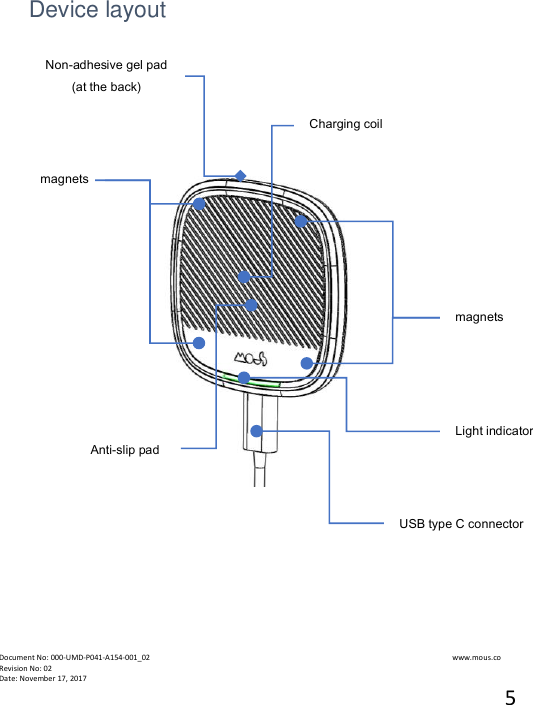
 Document No: 000-UMD-P041-A154-001_02                                                                                                                                                                www.mous.co                                                                                                           Revision No: 02 Date: November 17, 2017 5    Device layout           magnets magnets Light indicator Charging coil Anti-slip pad USB type C connector Non-adhesive gel pad (at the back)
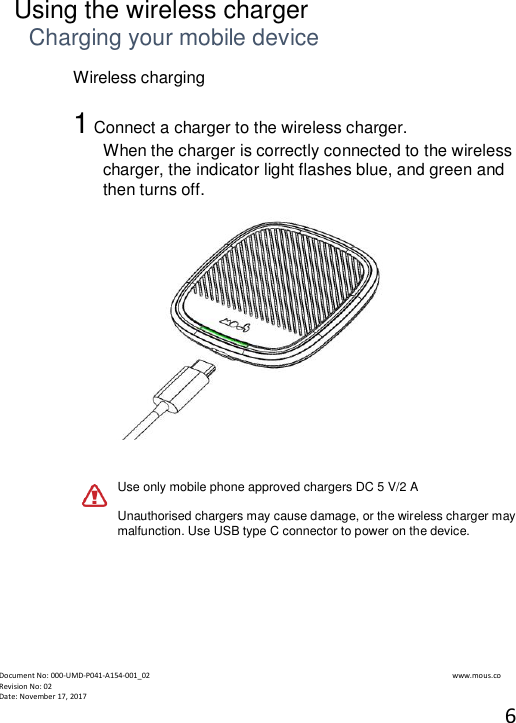
 Document No: 000-UMD-P041-A154-001_02                                                                                                                                                                www.mous.co                                                                                                           Revision No: 02 Date: November 17, 2017 6   Using the wireless charger Charging your mobile device Wireless charging  1 Connect a charger to the wireless charger. When the charger is correctly connected to the wireless charger, the indicator light flashes blue, and green and then turns off.    Use only mobile phone approved chargers DC 5 V/2 A  Unauthorised chargers may cause damage, or the wireless charger may malfunction. Use USB type C connector to power on the device.
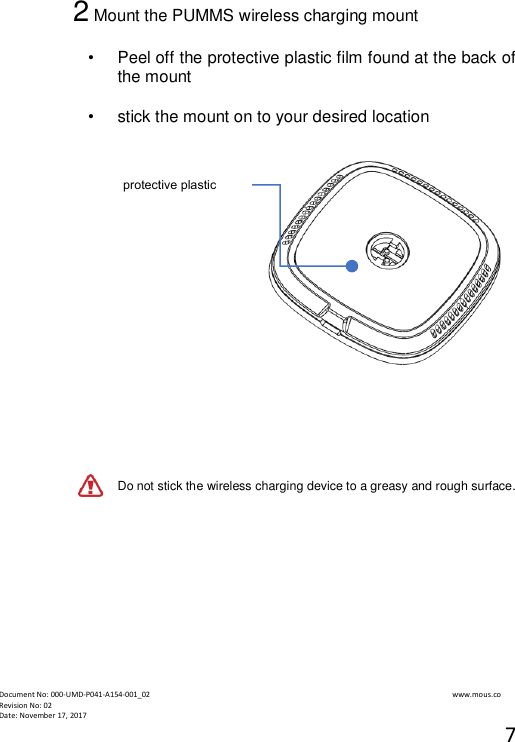
 Document No: 000-UMD-P041-A154-001_02                                                                                                                                                                www.mous.co                                                                                                           Revision No: 02 Date: November 17, 2017 7  2 Mount the PUMMS wireless charging mount   •  Peel off the protective plastic film found at the back of the mount  •   stick the mount on to your desired location        Do not stick the wireless charging device to a greasy and rough surface.            protective plastic film
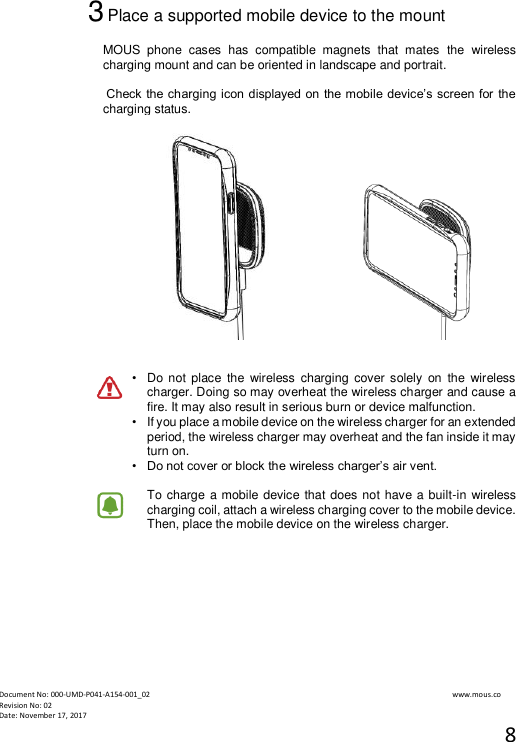
 Document No: 000-UMD-P041-A154-001_02                                                                                                                                                                www.mous.co                                                                                                           Revision No: 02 Date: November 17, 2017 8  3 Place a supported mobile device to the mount  MOUS  phone  cases  has  compatible  magnets  that  mates  the  wireless charging mount and can be oriented in landscape and portrait.   Check the charging icon displayed on the mobile device’s screen for the charging status.         •   Do not  place  the  wireless  charging  cover solely  on  the  wireless charger. Doing so may overheat the wireless charger and cause a fire. It may also result in serious burn or device malfunction. •   If you place a mobile device on the wireless charger for an extended period, the wireless charger may overheat and the fan inside it may turn on. •  Do not cover or block the wireless charger’s air vent.  To charge  a mobile device that does not have a built-in wireless charging coil, attach a wireless charging cover to the mobile device. Then, place the mobile device on the wireless charger.
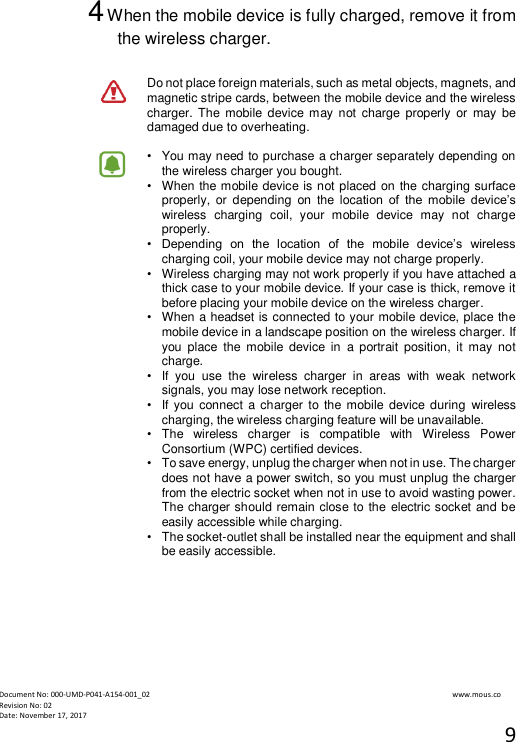
 Document No: 000-UMD-P041-A154-001_02                                                                                                                                                                www.mous.co                                                                                                           Revision No: 02 Date: November 17, 2017 9  4 When the mobile device is fully charged, remove it from the wireless charger.  Do not place foreign materials, such as metal objects, magnets, and magnetic stripe cards, between the mobile device and the wireless charger. The  mobile  device may not  charge  properly  or  may  be damaged due to overheating.  •   You may need to purchase a charger separately depending on the wireless charger you bought. •   When the mobile device is not placed on the charging surface properly,  or  depending  on  the  location  of  the  mobile  device’s wireless  charging  coil,  your  mobile  device  may  not  charge properly. •  Depending  on  the  location  of  the  mobile  device’s  wireless charging coil, your mobile device may not charge properly. •   Wireless charging may not work properly if you have attached a thick case to your mobile device. If your case is thick, remove it before placing your mobile device on the wireless charger. •   When a headset is connected to your mobile device, place the mobile device in a landscape position on the wireless charger. If you  place  the  mobile  device  in  a  portrait  position,  it  may  not charge. •   If  you  use  the  wireless  charger  in  areas  with  weak  network signals, you may lose network reception. •   If you connect a charger to the mobile  device during  wireless charging, the wireless charging feature will be unavailable. •   The  wireless  charger  is  compatible  with  Wireless  Power Consortium (WPC) certified devices. •   To save energy, unplug the charger when not in use. The charger does not have a power switch, so you must unplug the charger from the electric socket when not in use to avoid wasting power. The charger should remain close to the electric socket and be easily accessible while charging. •   The socket-outlet shall be installed near the equipment and shall be easily accessible.
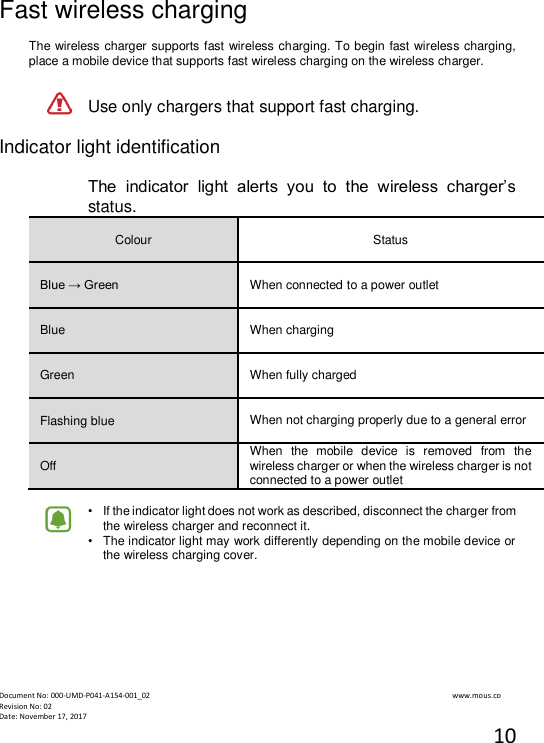
 Document No: 000-UMD-P041-A154-001_02                                                                                                                                                                www.mous.co                                                                                                           Revision No: 02 Date: November 17, 2017 10  Fast wireless charging  The wireless charger supports fast wireless charging. To begin fast wireless charging, place a mobile device that supports fast wireless charging on the wireless charger.  Use only chargers that support fast charging.  Indicator light identification  The  indicator  light  alerts  you  to  the  wireless  charger’s status.  Colour   Status  Blue → Green   When connected to a power outlet  Blue   When charging  Green   When fully charged  Flashing blue   When not charging properly due to a general error   Off  When  the  mobile  device  is  removed  from  the wireless charger or when the wireless charger is not connected to a power outlet  •   If the indicator light does not work as described, disconnect the charger from the wireless charger and reconnect it. •   The indicator light may work differently depending on the mobile device or the wireless charging cover.
 Document No: 000-UMD-P041-A154-001_02                                                                                                                                                                www.mous.co                                                                                                           Revision No: 02 Date: November 17, 2017 11                              Copyright  Copyright © 2017 MOUS Products Limited, UK  This manual is protected under international copyright laws. No part of this manual may be reproduced, distributed, translated, or transmitted in any  form  or  by  any  means,  electronic  or  mechanical,  including  photocopying, recording, or storing in any information storage and retrieval system, without the prior written permission of MOUS Products Limited, UK. Trademarks •   MOUS  Products  Limited,  UK  and  the  MOUS  logo  are  registered  trademarks  of MOUS Products Limited, UK. •   All other trademarks and copyrights are the property of their respective owners. FCC COMPLIANCE STATEMENT: This device complies with part 15 of the FCC Rules.   Operation is subject to the following two conditions:   (1) This device may not cause harmful interference, and   (2) this device must accept any interference received, including interference that may   cause undesired operation. Note: This equipment has been tested and found to comply with the limits for a Class B digital device, pursuant  to  Part 15 of the FCC Rules. These  limits are  designed to provide reasonable protection against harmful interference in a residential installation. This  equipment  generates,  uses  and  can  radiate  radio  frequency  energy  and,  if  not installed and used in accordance with the instructions, may cause harmful interference to radio communications.  However,  there  is  no  guarantee  that  interference  will  not  occur  in  a  particular installation.  If this  equipment  does  cause  harmful interference  to radio  or  television reception, which  can be determined by turning the equipment  off and on,  the user is encouraged  to  try  to  correct  the  interference  by  one  or  more  of  the  following measures: Reorient or relocate the receiving antenna. Increase the separation between the equipment and receiver. Connect the equipment into an outlet on a circuit different from that to which the receiver is connected. Consult the dealer or an experienced radio/TV technician for help.   Warning: Changes  or  modifications  to this  unit not  expressly approved  by  the  part responsible for compliance could void the user’s authority to operate the equipment.

Navigation menu