MyBinding Fellowes Ms460Ci Ps 2008 Manual User
2013-06-04
User Manual: MyBinding Fellowes-Ms460Ci-Ps-2008-Manual
Open the PDF directly: View PDF  .
.
Page Count: 5

fellowes.com
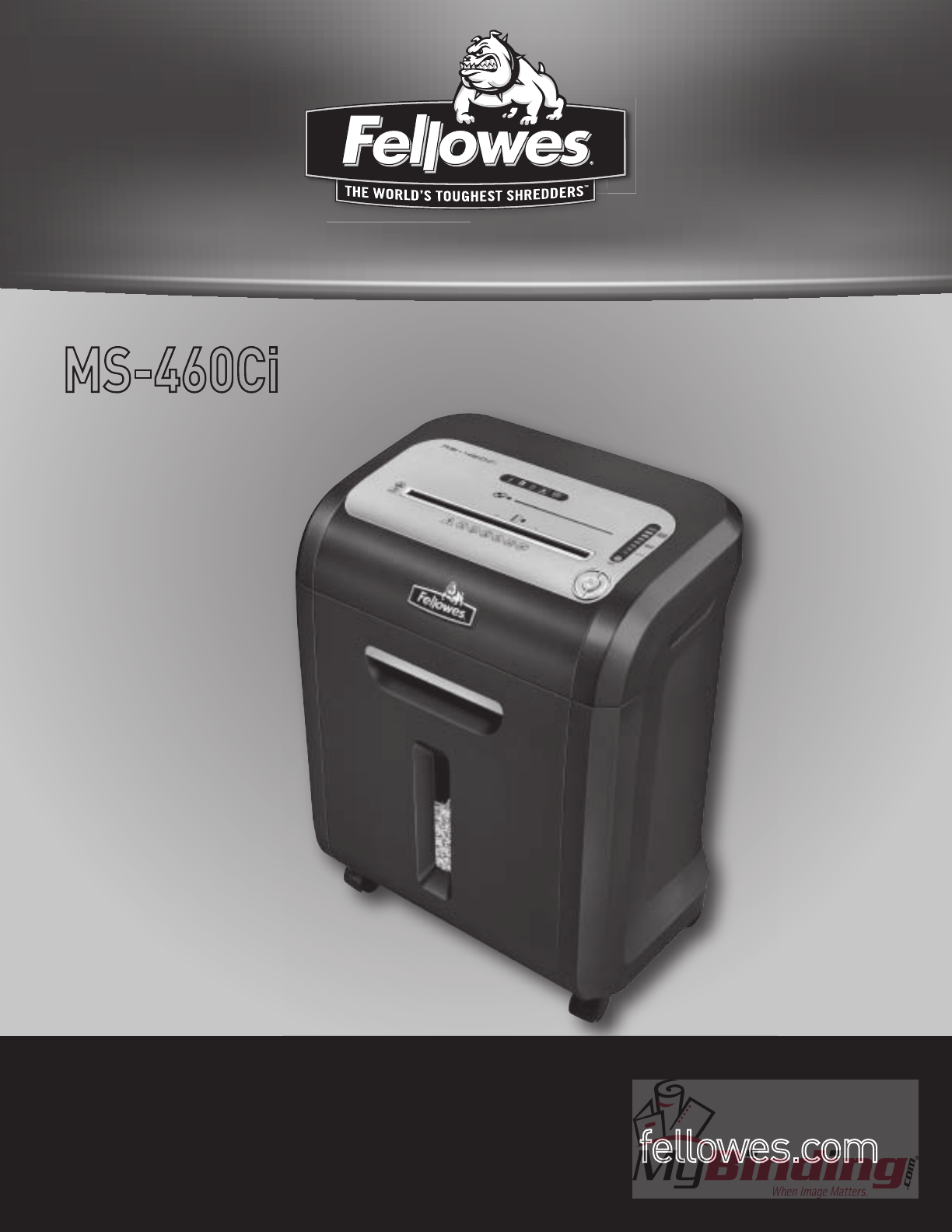
MS 460Ci
MS-460Ci
Please read these instructions before use.
Do not discard: keep for future reference.
Jam Proof System
Eliminates frustrating jams
by preventing overloads
and powering through
misfed paper.
2
IMPORTANT SAFETY INSTRUCTIONS — Read Before Using!
• Keepawayfromchildrenandpets.Keephandsawayfrompaper
entry. Always set to off or unplug when not in use.
• Keepforeignobjects–gloves,jewelry,clothing,hair,etc.–away
fromshredderopenings.Ifobjectenterstopopening,switchto
Reverse()tobackoutobject.
• Neveruseaerosolproducts,petroleumbasedlubricantsorotherflammable
productsonornearshredder.Donotusecannedaironshredder.
• Donotuseifdamagedordefective.Donotdisassembleshredder.Do
notplacenearoroverheatsourceorwater.
• ThisshredderhasaDisconnectPowerSwitch(H)thatmustbeintheON(I)positionto
operateshredder.Incaseofemergency,moveswitchtoOFF(O)position.Thisactionwill
stop shredder immediately.
• Avoidtouchingexposedcuttingbladesundershredderhead.
• UseonlydesignatedentryforshreddingCDs
• KeepfingersawayfromCDholewhenshredding.
• Donotputforeignobjectsinpaperentry.
• Thegroundedsocket-outletshallbeinstalledneartheequipmentandshallbe
easilyaccessible.
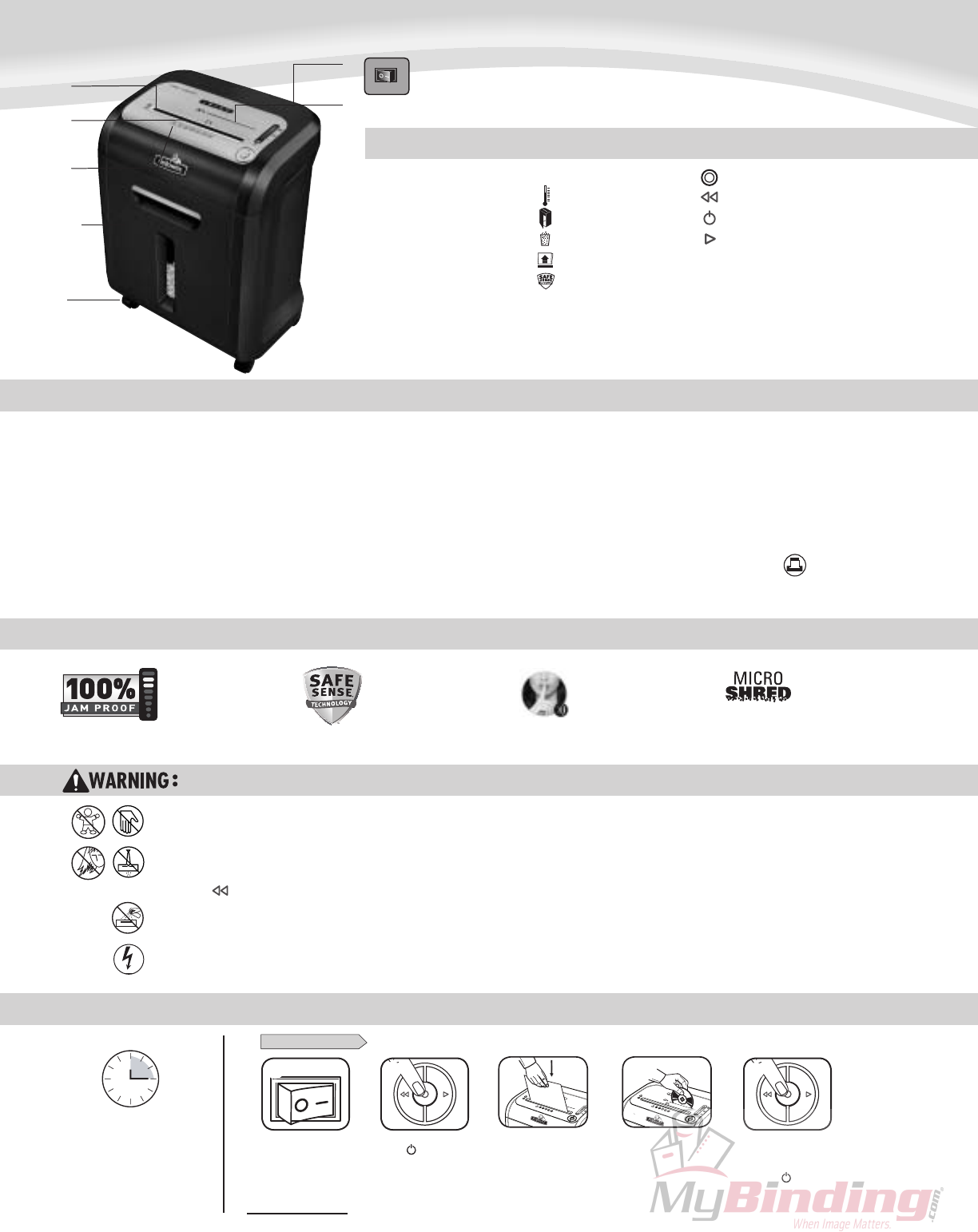
KEY
Patented SafeSense®
Technology
Stopsshredderimmediately
whenhandsaretoocloseto
the paper entry.
CAPABILITIES
ADVANCED PRODUCT FEATURES
MicroShred Technology
MicroShredcutprovides
maximumsecuritybyshredding
paperintoover3000particlesper
8 1/2inchesx11inchessheet.
BASIC SHREDDING OPERATION
ENGLISH
ModelMS-460Ci
Will shred:Paper,creditcards,CD/DVD’s,andstandardstaples
Will not shred:Adhesivelabels,continuousformpaper,transparencies,newspaper,
cardboard,*paperclips,non-standardstaples,31/2”diskettes,laminates,filefolders,X-rays
orplasticotherthannotedabove
Paper/Card shred size:
Micro-Cut ......................................................5/64inchesx25/64inches(2mmx10mm)
CD shred size:
Strip-Cut .......................................................................................... 25/64inches(10mm)
*Paperclipshreddingisnotrecommendedforthisshredder
Maximum:
Sheetsperpass ........................................................................................................... 12*
CDs/Cardsperpass ....................................................................................................... 1*
Paper/cardentrywidth ......................................................................... 9inches(230mm)
CDentrywidth...............................................................................513/64inches(132mm)
*8.5inchesx11inches,20lb.,(75g)paperat120V,60Hz,6.5Amps;heavierpaper,humidity
o r otherthanratedvoltagemayreducecapacity.Recommendeddailyusagerates:
50-100shreddingpassesperday,50creditcards;10CDs 12 sheets per pass.
FellowesSafeSense®shreddersaredesignedtobeoperatedinhomeandofficeenvironmentsranging
between50–80degreesFahrenheit(10–26degreesCelsius)and40–80%relativehumidity.
www.fellowes.com features an extensive on-line support section with a number of self-service options
SilentShred™ Technology
SilentShred™noisequality
shreds without noisy
disruptions.
PAPER/CARD OR CD
A.SafeSense
®
Technology
B.Paper/cardentry
C.Seesafetyinstructions
D.CDentry
E. Pulloutbin
F.Basket-paper(inside)
G.Casters
H.Disconnectpowerswitch
ControlPanelandLEDs
1.Overheat(red)
2. Bin open (red)
3. Bin full (red)
4.Removepaper(red)
5. SafeSense
®
indicator(yellow)
6.Sheetcapacityindicator
7.Autocorrectingbutton(blue)
8. Reverse
9.ON/OFF(blue)
10.Forward
2
Press()ONto
activate(blue)
1
Feedpaper/Card
straight into paper
entry and release
3
Pluginandput
disconnectpower
switchinON(I)position
Continuous operation:
15-minutemaximum
NOTE:Shredderrunsbrieflyafter
eachpasstoclearentry.Continuous
operationbeyond15-minuteswill
trigger25-minutecooldownperiod.
HoldCDatedge,
feedintoCD
entry and release
5
When finished
shredding set
toOFF( )
6
A.
B.
C.
H.
D.
G.
E./F.
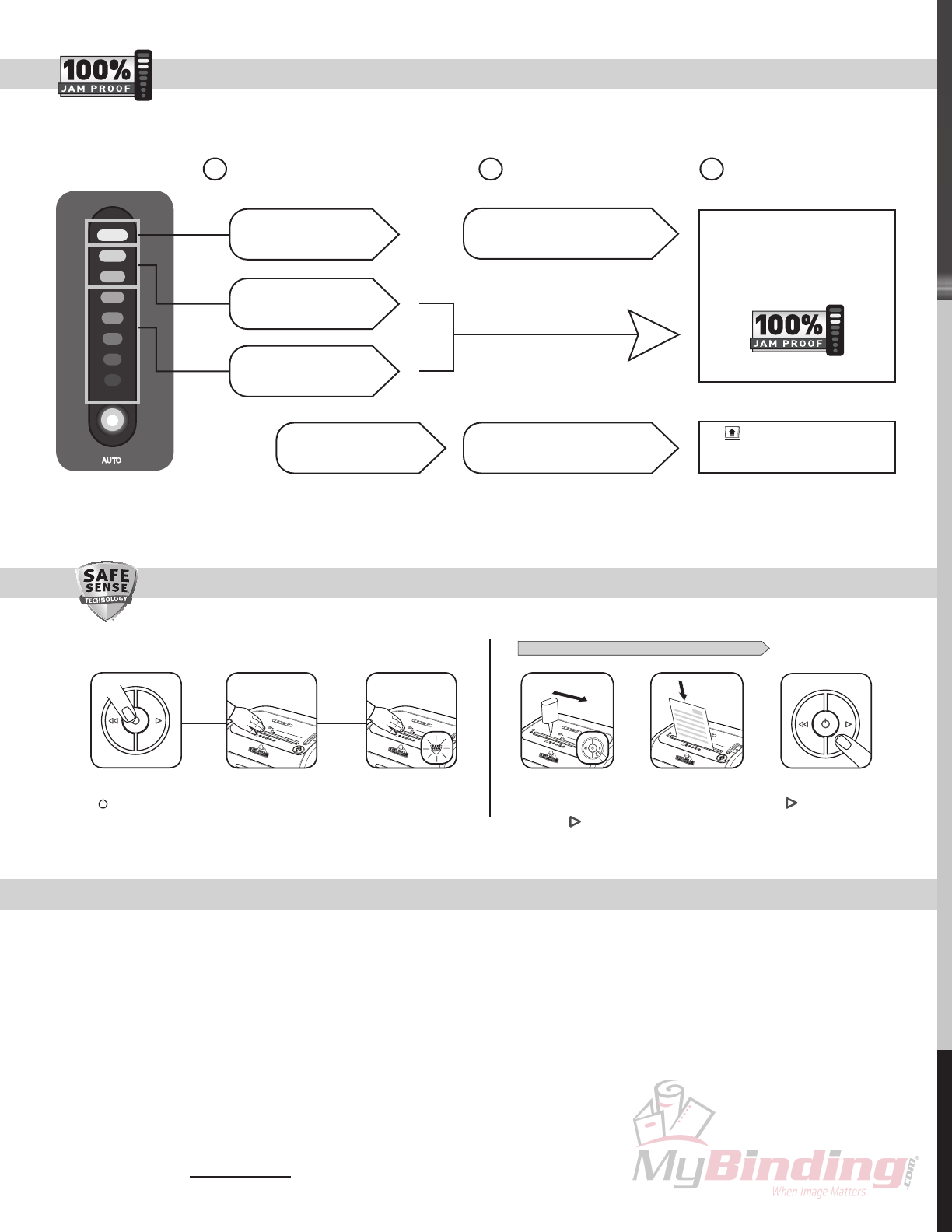
Eliminates frustrating jams by preventing overloads and powering through misfed paper.
JAM PROOF SYSTEM OPERATION*
*100% Jam Proof when used in accordance with user manual
PREVENTIVE MAINTENANCE AND MISCELLANEOUS TROUBLESHOOTING
Go to Support Section at www.fellowes.com or see back page of manual for useful telephone numbers.
3
SAFESENSE® TECHNOLOGY OPERATION OILING SHREDDER
•*Forpeakperformance,werecommendoilingmicroshredshredderseachtimethewastebinisemptied.Onlyuseanon-aerosolvegetableoil(Fellowes35250).
Machinesnotoiledmaylosesheetcapacity,becomenoisy,andultimatelystoprunning.
• Thoughpaperdetectionsensorsaredesignedtobemaintenancefree,thesensorsoccasionallybecomeblockedbypaperdust,causingthemotortoruneven
ifthereisnopaperpresent.(Bothpaperdetectionsensorsarelocatedinthecenterofthepaperentry).
• Onceadayrunshredderinreversefor15secondstoclearcutters.
• Emptywastebasketwhenbinfullindicatorlightsup(bag#36052).
• Shredderwon’trunifthewastebinisnotpushedallthewayin,orbinneedstobeemptied.
• Whenshreddingforaprolongedperiodoftime,themotorcanbecomewarmandrequireacooldownperiod.Whenthisoccurs,theoverheatindicatorwillalertyoutothe
problem,thismodelwillrequire25minutestocooldown.
FOLLOW OILING PROCEDURE BELOW AND REPEAT TWICE
*Applyoilacross
entry and press
forward ( )
Shredonesheet Pressandholdforward
() 2-3seconds
3
1 2
AdvancedJamPrevention-Electronically
measurespaperthicknesstopreventpaperjams:
Continue100%Jam
ProofShredding
1 2 3
UptoRED:TooMany
sheets have been inserted.
UptoGREEN:Moresheets
canbeadded.
UptoYELLOW:Productivity
isoptimized.
If a misfeed
occurs:
If illuminates after paper has been
reversed,pressreverseandremovepaper.
Otherwise,regularshreddingwillresume.
Allindicatorslightupand
shredderpausesfor3-6seconds
Waitforflashingtostopafterautomaticcorrection
iscomplete.Regularshreddingwillresume.
Remove several sheets until
indicatorisbelowred.
3
SafeSense
®
isactiveand
workingproperly
Touchtestareaand
lookfortheSafeSense
®
indicatortoilluminate
TurntheshredderON
( ) toactivateSafeSense
®
2
1
1789 Norwood Avenue, Itasca, Illinois 60143-1095 • USA • 630-893-1600
us ra a anada eu sc and rance apan o ska n ed K ngdom
enelux na spaña a a Koreva ngapore n ed a es
2008 Fellowes, Inc. Part No. 403593 REV B
WARRANTY
Help Line
Australia +1-800-33-11-77
Canada +1-800-665-4339
00-800-1810-1810
Mexico +1-800-234-1185
United States +1-800-955-0959
LIMITEDWARRANTYFellowes,Inc.(“Fellowes”)warrantsthecuttingbladesofthemachinetobefree
fromdefects inmaterialandworkmanshipfor7yearsfromthedateofpurchasebytheoriginal
consumer.Felloweswarrantsallotherpartsofthe machine to be freeofdefectsinmaterialand
workmanshipfor1yearfromthedateofpurchasebytheoriginalconsumer.Ifanypartisfoundto
bedefectiveduringthewarrantyperiod,yoursoleandexclusiveremedywillberepairorreplacement,
atFellowes’optionandexpense,ofthedefectivepart.
Thiswarrantydoesnotapplyincasesofabuse,mishandling,orunauthorizedrepair.ANYIMPLIED
WARRANTY,INCLUDINGTHATOFMERCHANTABILITYORFITNESSFORAPARTICULARPURPOSE,
ISHEREBYLIMITEDINDURATIONTOTHEAPPROPRIATEWARRANTYPERIODSETFORTHABOVE.
InnoeventshallFellowesbeliableforanyconsequentialorincidentaldamagesattributableto
thisproduct.
Thiswarrantygivesyou specificlegalrights.Theduration, terms, andconditionsofthiswarranty
arevalidworldwide,exceptwheredifferentlimitations,restrictions,orconditionsmayberequired
bylocallaw.
Formoredetailsortoobtainserviceunderthiswarranty,pleasecontactusoryourdealer.
