ND Information Technology System PS400 Mobile payment terminal with GSM/GPRS and RFID reader User Manual PS400 Manual 090814

Shanghai SAND Information Technology System Co., Ltd Mobile payment terminal with GSM/GPRS and RFID reader PS400 Manual 090814

Contents

User manual

   SAND Information Technology System Co., Ltd                                                                                                  NO. 22 Baoshi Garden,NO. 487 Tianlin Road, Shanghai China    Tel: 86-21-24016333 Fax: 86-21-33675001   Zip:200233     PS400 EFT-POS   MANUAL          Sand Information Technology System Co., Ltd
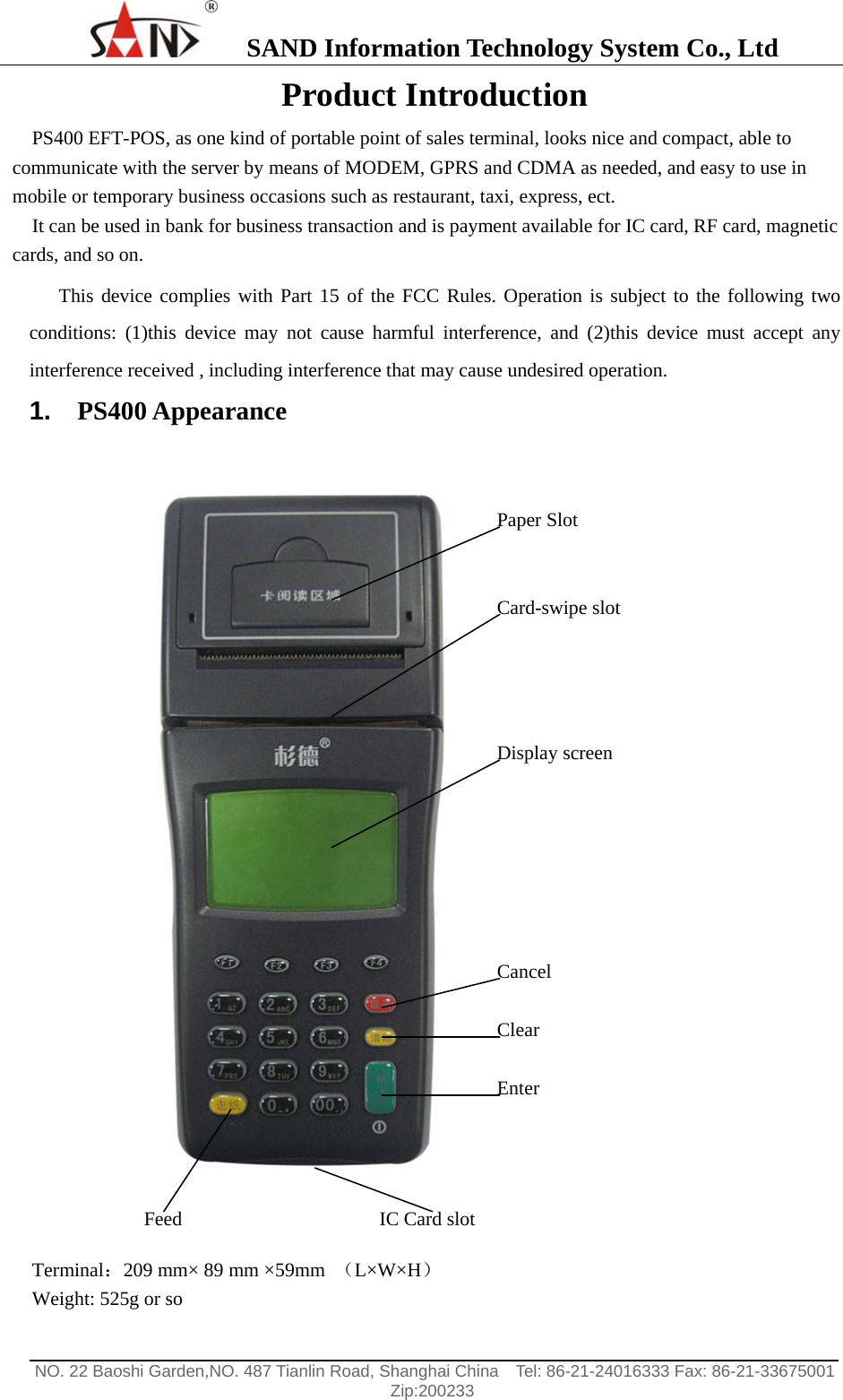
   SAND Information Technology System Co., Ltd                                                                                                  NO. 22 Baoshi Garden,NO. 487 Tianlin Road, Shanghai China    Tel: 86-21-24016333 Fax: 86-21-33675001   Zip:200233  Product Introduction PS400 EFT-POS, as one kind of portable point of sales terminal, looks nice and compact, able to communicate with the server by means of MODEM, GPRS and CDMA as needed, and easy to use in mobile or temporary business occasions such as restaurant, taxi, express, ect. It can be used in bank for business transaction and is payment available for IC card, RF card, magnetic cards, and so on. This device complies with Part 15 of the FCC Rules. Operation is subject to the following two conditions: (1)this device may not cause harmful interference, and (2)this device must accept any interference received , including interference that may cause undesired operation. 1.  PS400 Appearance   Terminal:209 mm× 89 mm ×59mm  (L×W×H) Weight: 525g or so IC Card slot Paper Slot Card-swipe slot Display screen Cancel Clear Enter Feed
   SAND Information Technology System Co., Ltd                                                                                                  NO. 22 Baoshi Garden,NO. 487 Tianlin Road, Shanghai China    Tel: 86-21-24016333 Fax: 86-21-33675001   Zip:200233  2.  Working environment Atmospheric pressure:86~106 kPa Temperature under work:5~40℃ Humidity under work:20~90% Temperature under storage and distribution:-20~+55℃ Humidity under storage and distribution:20~93% This equipment has been tested and found to comply with the limits for a Class B digital device, pursuant to Part 15 of the FCC Rules. These limits are designed to provide reasonable protection against harmful interference in a residential installation. This equipment generates uses and can radiate radio frequency energy and, if not installed and used in accordance with the instructions, may cause harmful interference to radio communications. However, there is no guarantee that interference will not occur in a particular installation. If this equipment does cause harmful interference to radio or television reception, which can be determined by turning the equipment off and on, the user is encouraged to try to correct the interference by one or more of the following measures: • Reorient or relocate the receiving antenna. • Increase the separation between the equipment and receiver. • Consult the dealer or an experienced radio/TV technician for help. 3.  Specification * 32bit RISC ARM CPU   * 8M bit SRAM (expand to 16Mbit), with backup battery * 16Mbit FLASH Memory (expand to 64Mbit) Flash Memory--Procedures can be maintained for over 10 years 64M bit SDRAM   * The calendar clock with backup battery * 19 keys keyboard * ISO1/2, ISO2/3 or ISO 1/2/3 (Optional) * Integrated Circuit (IC) card reader, accord with the standard of GB/T 16649 ISO 7816 EMV2000 (Optional) * High-speed thermal printer, print paper width 57.5mm and speed 50mm/ s * RF card reader accord with the standard of DB31/239.2-2000 and ISO 14443 (Optional) The antenna(s) used for this transmitter must be installed with providing a separation distance of at lease 20cm from all the persons. * GPRS (Optional) * Lithium battery: 2200mAh, charger with duration of charging 4~6 hours Note: Changes or modifications not expressly approved by the manufacturer responsible for compliance could void the user’s authority to operate the equipment.   When the equipment is on charge, the RF card reading is prohibited. The RF card reading and GSM communication should not operate simultaneously.
   SAND Information Technology System Co., Ltd                                                                                                  NO. 22 Baoshi Garden,NO. 487 Tianlin Road, Shanghai China    Tel: 86-21-24016333 Fax: 86-21-33675001   Zip:200233   4.  RS232 interface As shown in the following picture                  RS232
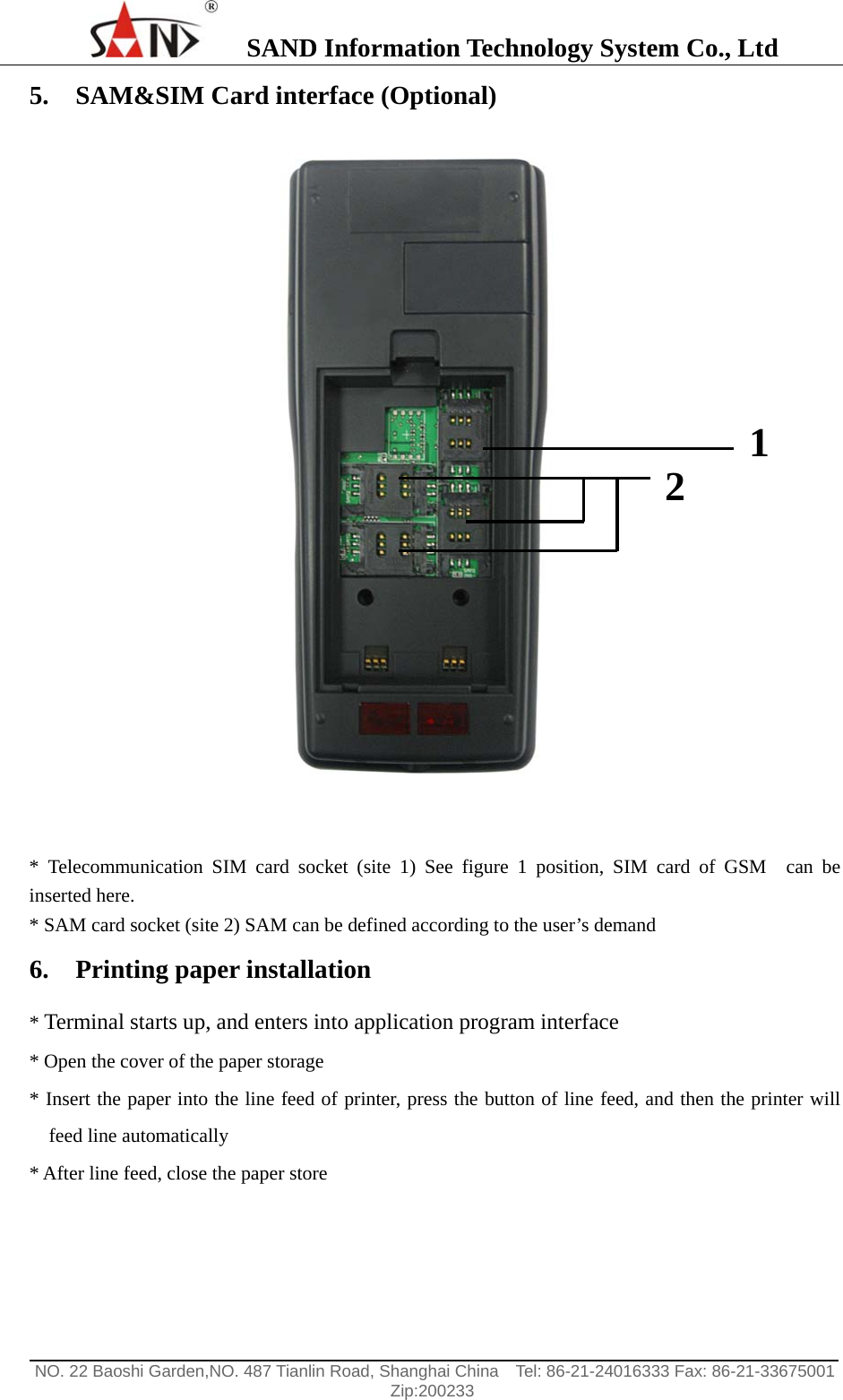
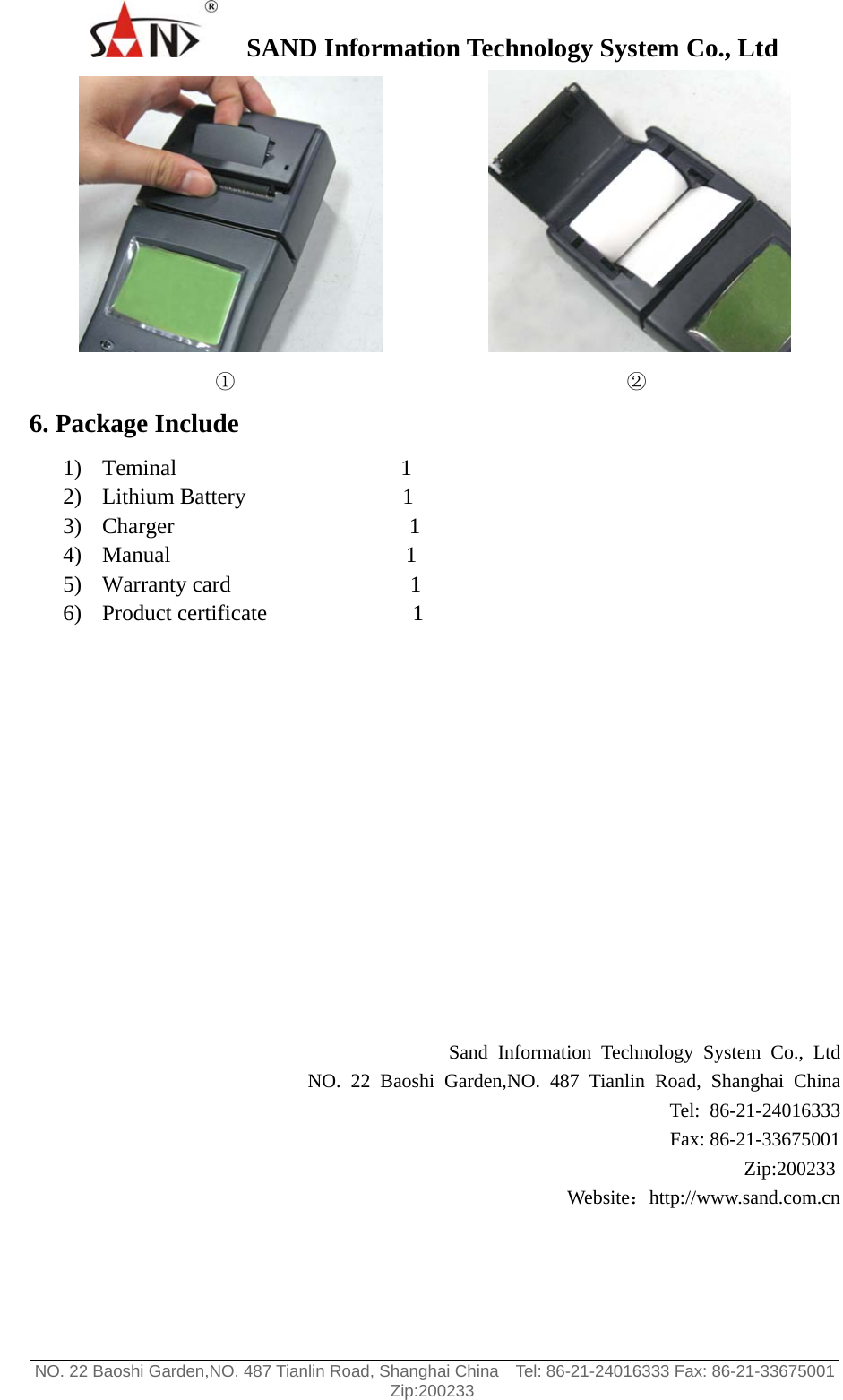
   SAND Information Technology System Co., Ltd                                                                                                  NO. 22 Baoshi Garden,NO. 487 Tianlin Road, Shanghai China    Tel: 86-21-24016333 Fax: 86-21-33675001   Zip:200233  5. SAM&SIM Card interface (Optional)    * Telecommunication SIM card socket (site 1) See figure 1 position, SIM card of GSM  can be inserted here. * SAM card socket (site 2) SAM can be defined according to the user’s demand 6. Printing paper installation   * Terminal starts up, and enters into application program interface * Open the cover of the paper storage * Insert the paper into the line feed of printer, press the button of line feed, and then the printer will feed line automatically * After line feed, close the paper store  2  1
   SAND Information Technology System Co., Ltd                                                                                                  NO. 22 Baoshi Garden,NO. 487 Tianlin Road, Shanghai China    Tel: 86-21-24016333 Fax: 86-21-33675001   Zip:200233                                  ①                                        ② 6. Package Include 1) Teminal                    1 2) Lithium Battery              1 3) Charger                     1 4) Manual                     1 5) Warranty card                1 6) Product certificate             1            Sand Information Technology System Co., Ltd NO. 22 Baoshi Garden,NO. 487 Tianlin Road, Shanghai China Tel: 86-21-24016333 Fax: 86-21-33675001 Zip:200233  Website:http://www.sand.com.cn

Navigation menu