NEOLAB CONVERGENCE NWP-F110 Neo smartpen N2 User Manual

NEOLAB CONVERGENCE Neo smartpen N2

User Manual

User Guide
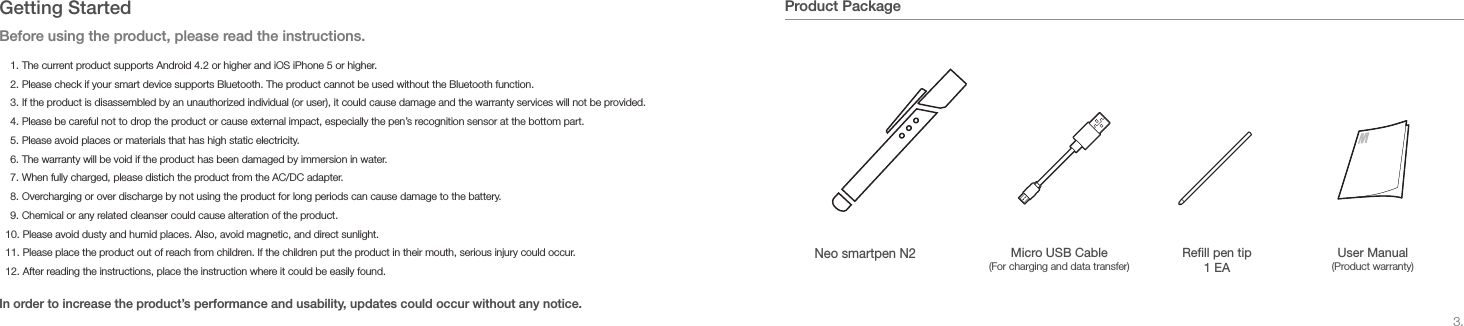
3.Product Package+40°-20°+40°-20°Neo smartpen N2Rell pen tip 1 EAUser Manual (Product warranty)Micro USB Cable (For charging and data transfer)Getting StartedBefore using the product, please read the instructions. In order to increase the product’s performance and usability, updates could occur without any notice.1. The current product supports Android 4.2 or higher and iOS iPhone 5 or higher.2. Please check if your smart device supports Bluetooth. The product cannot be used without the Bluetooth function. 3. If the product is disassembled by an unauthorized individual (or user), it could cause damage and the warranty services will not be provided.4. Please be careful not to drop the product or cause external impact, especially the pen’s recognition sensor at the bottom part.5. Please avoid places or materials that has high static electricity.6. The warranty will be void if the product has been damaged by immersion in water.7. When fully charged, please distich the product from the AC/DC adapter.8. Overcharging or over discharge by not using the product for long periods can cause damage to the battery.9. Chemical or any related cleanser could cause alteration of the product.10. Please avoid dusty and humid places. Also, avoid magnetic, and direct sunlight.11. Please place the product out of reach from children. If the children put the product in their mouth, serious injury could occur.12. After reading the instructions, place the instruction where it could be easily found.
5.N-note (Neo smartpen 2’s exclusive note)Preparing for application1. Application (App) for Neo smartpen N2 can be downloaded from Android ‘Google Play’ store or iOS ‘App Store’. Type and search for “Neo smartpen N2”!2. You can download, install, and update from ‘Google Play’ store or ‘App Store’3. In order to use the App, Neo smartpen N2 needs to be connected via Bluetooth.4. When connected properly, the content from the N-note will appear to the screen.You can download the Neo smartpen N2 application from ‘Google Play Store’ or ‘iOS App Store’Supporting OSSupported device Android 4.2 or higher / iOS iPhone 5 or higherBluetooth 2.0 or higher supporting device Neo smartpen N2 and its App can be used only with N-note and smart diaryFind N-notes in Neo smartpen n2 stores!More N-note designs will be developed and launched.2014 Smart Diary SETN note Basic 01/02/03N note Premium L/M/S N note Snowcat L/M/SCautions in use of N-noteIf you use a new note of the same kind, the written contents of the new note can be overlap the existing one.In this case, you can use the new note after saving the existing note by using the function, [Store existing note]. * In order to learn [Store existing note], please see the pages 13p of the manual.
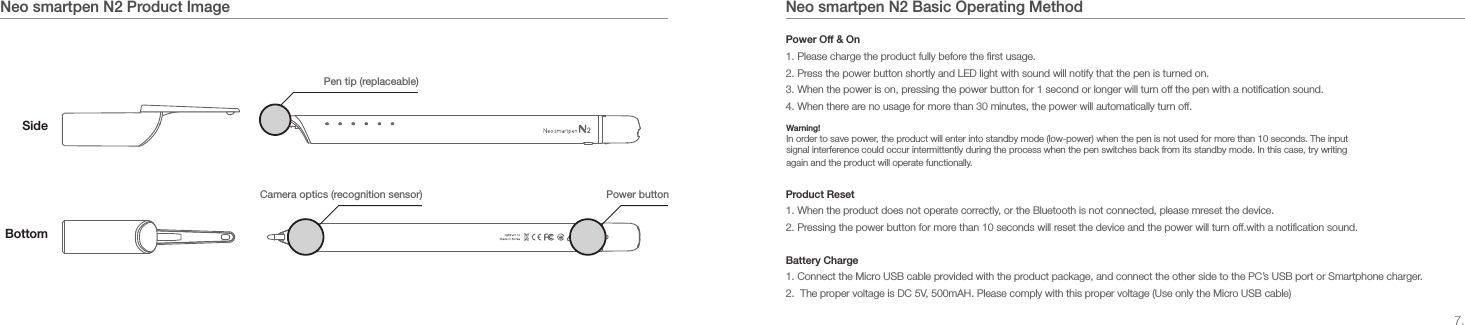
7.Neo smartpen N2 Basic Operating MethodNeo smartpen N2 Product ImageSidePen tip (replaceable)Power button Camera optics (recognition sensor)BottomPower Off & On1. Please charge the product fully before the first usage.2. Press the power button shortly and LED light with sound will notify that the pen is turned on.3. When the power is on, pressing the power button for 1 second or longer will turn off the pen with a notification sound.4. When there are no usage for more than 30 minutes, the power will automatically turn off.Product Reset1. When the product does not operate correctly, or the Bluetooth is not connected, please mreset the device.2. Pressing the power button for more than 10 seconds will reset the device and the power will turn off.with a notification sound.Battery Charge1. Connect the Micro USB cable provided with the product package, and connect the other side to the PC’s USB port or Smartphone charger.2.  The proper voltage is DC 5V, 500mAH. Please comply with this proper voltage (Use only the Micro USB cable)Warning!In order to save power, the product will enter into standby mode (low-power) when the pen is not used for more than 10 seconds. The input signal interference could occur intermittently during the process when the pen switches back from its standby mode. In this case, try writing again and the product will operate functionally.
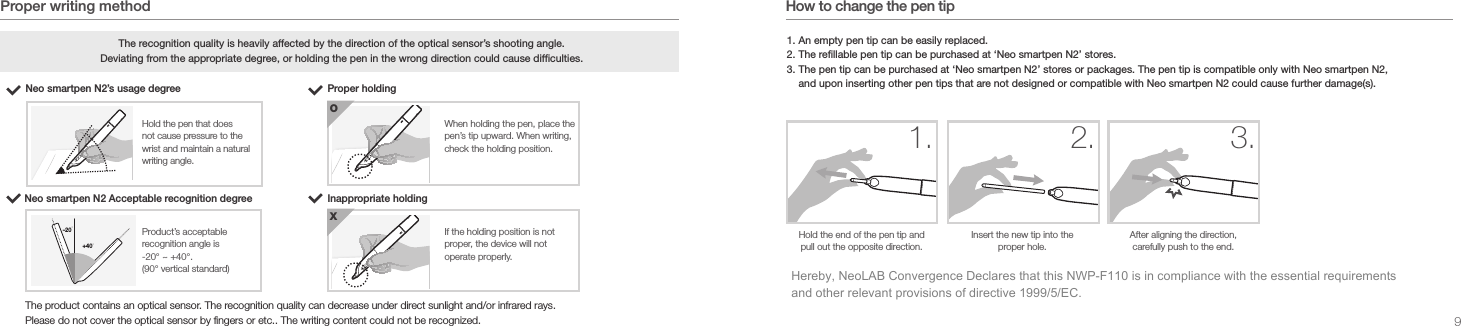
9.Proper writing methodNeo smartpen N2’s usage degree The recognition quality is heavily affected by the direction of the optical sensor’s shooting angle. Deviating from the appropriate degree, or holding the pen in the wrong direction could cause difculties.Proper holdingWhen holding the pen, place the pen’s tip upward. When writing, check the holding position.+40°-20°O+40°-20°Hold the pen that does not cause pressure to the wrist and maintain a natural writing angle.Neo smartpen N2 Acceptable recognition degree+40°-20°Inappropriate holdingIf the holding position is not proper, the device will not operate properly.+40°-20°XProduct’s acceptable recognition angle is -20° ~ +40°. (90° vertical standard)The product contains an optical sensor. The recognition quality can decrease under direct sunlight and/or infrared rays.Please do not cover the optical sensor by fingers or etc.. The writing content could not be recognized. How to change the pen tip1. An empty pen tip can be easily replaced.2. The refillable pen tip can be purchased at ‘Neo smartpen N2’ stores.3. The pen tip can be purchased at ‘Neo smartpen N2’ stores or packages. The pen tip is compatible only with Neo smartpen N2, and upon inserting other pen tips that are not designed or compatible with Neo smartpen N2 could cause further damage(s). Hold the end of the pen tip and pull out the opposite direction.+40°-20°1.Insert the new tip into the proper hole.+40°-20°2.After aligning the direction, carefully push to the end.+40°-20°3.Hereby, NeoLAB Convergence Declares that this NWP-F110 is in compliance with the essential requirements and other relevant provisions of directive 1999/5/EC.
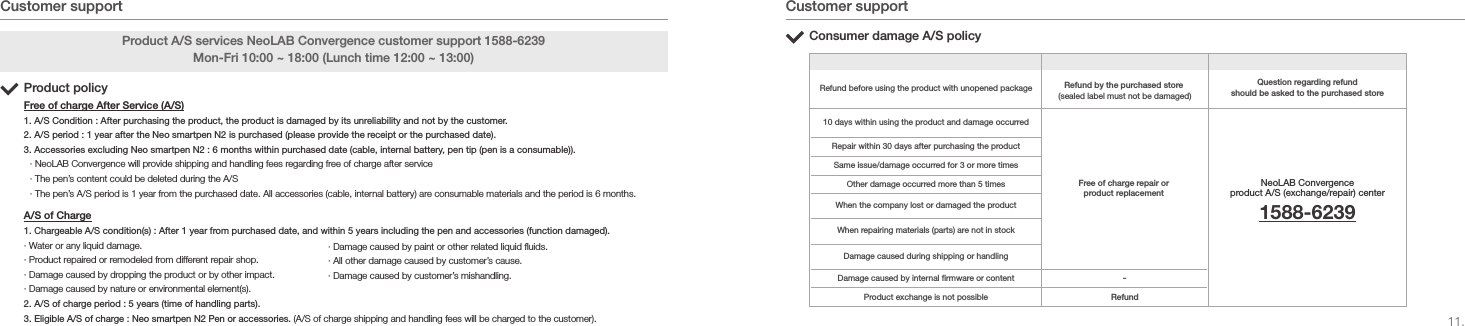
11.소비자 피해 유형 비고A/S 처리Customer support Customer supportProduct A/S services NeoLAB Convergence customer support 1588-6239Mon-Fri 10:00 ~ 18:00 (Lunch time 12:00 ~ 13:00)Product policyFree of charge After Service (A/S)1. A/S Condition : After purchasing the product, the product is damaged by its unreliability and not by the customer.2. A/S period : 1 year after the Neo smartpen N2 is purchased (please provide the receipt or the purchased date).3. Accessories excluding Neo smartpen N2 : 6 months within purchased date (cable, internal battery, pen tip (pen is a consumable)).· NeoLAB Convergence will provide shipping and handling fees regarding free of charge after service· The pen’s content could be deleted during the A/S· The pen’s A/S period is 1 year from the purchased date. All accessories (cable, internal battery) are consumable materials and the period is 6 months.A/S of Charge1. Chargeable A/S condition(s) : After 1 year from purchased date, and within 5 years including the pen and accessories (function damaged).· Water or any liquid damage.· Product repaired or remodeled from different repair shop.· Damage caused by dropping the product or by other impact.· Damage caused by nature or environmental element(s).2. A/S of charge period : 5 years (time of handling parts).3. Eligible A/S of charge : Neo smartpen N2 Pen or accessories. (A/S of charge shipping and handling fees will be charged to the customer).Consumer damage A/S policyRefund before using the product with unopened package10 days within using the product and damage occurredRepair within 30 days after purchasing the productDamage caused by internal rmware or contentProduct exchange is not possibleSame issue/damage occurred for 3 or more timesOther damage occurred more than 5 timesWhen the company lost or damaged the productWhen repairing materials (parts) are not in stockDamage caused during shipping or handlingRefund by the purchased store (sealed label must not be damaged)Free of charge repair or product replacementQuestion regarding refund should be asked to the purchased storeNeoLAB Convergence product A/S (exchange/repair) center1588-6239-Refund· Damage caused by paint or other related liquid uids.· All other damage caused by customer’s cause.· Damage caused by customer’s mishandling.
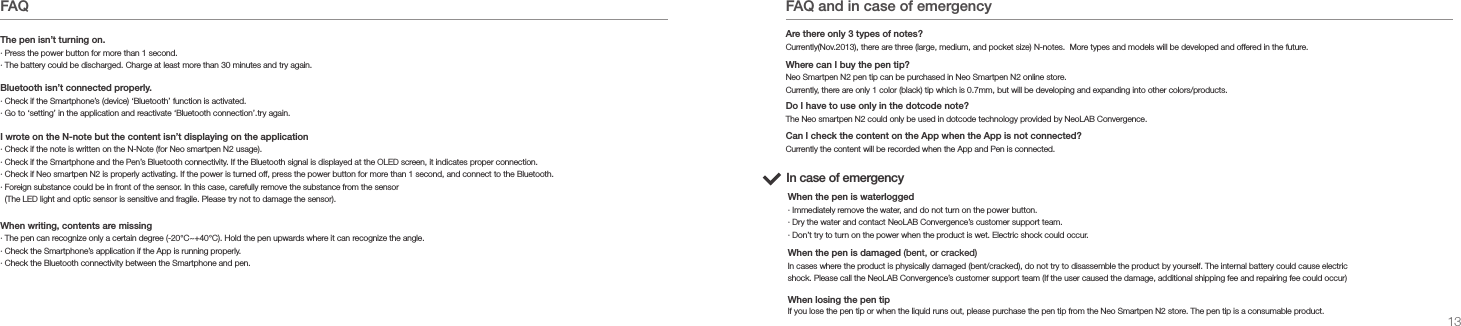
13.FAQ· Press the power button for more than 1 second.· The battery could be discharged. Charge at least more than 30 minutes and try again.The pen isn’t turning on.· Check if the Smartphone’s (device) ‘Bluetooth’ function is activated.· Go to ‘setting’ in the application and reactivate ‘Bluetooth connection’.try again.Bluetooth isn’t connected properly.I wrote on the N-note but the content isn’t displaying on the application· Check if the note is written on the N-Note (for Neo smartpen N2 usage). · Check if the Smartphone and the Pen’s Bluetooth connectivity. If the Bluetooth signal is displayed at the OLED screen, it indicates proper connection.· Check if Neo smartpen N2 is properly activating. If the power is turned off, press the power button for more than 1 second, and connect to the Bluetooth.· Foreign substance could be in front of the sensor. In this case, carefully remove the substance from the sensor   (The LED light and optic sensor is sensitive and fragile. Please try not to damage the sensor).· The pen can recognize only a certain degree (-20°C~+40°C). Hold the pen upwards where it can recognize the angle. · Check the Smartphone’s application if the App is running properly.· Check the Bluetooth connectivity between the Smartphone and pen.When writing, contents are missingFAQ and in case of emergencyIn case of emergency· Immediately remove the water, and do not turn on the power button.· Dry the water and contact NeoLAB Convergence’s customer support team.· Don’t try to turn on the power when the product is wet. Electric shock could occur.When the pen is waterloggedIn cases where the product is physically damaged (bent/cracked), do not try to disassemble the product by yourself. The internal battery could cause electric shock. Please call the NeoLAB Convergence’s customer support team (If the user caused the damage, additional shipping fee and repairing fee could occur)When the pen is damaged (bent, or cracked)If you lose the pen tip or when the liquid runs out, please purchase the pen tip from the Neo Smartpen N2 store. The pen tip is a consumable product.When losing the pen tipCurrently the content will be recorded when the App and Pen is connected.Currently(Nov.2013), there are three (large, medium, and pocket size) N-notes.  More types and models will be developed and offered in the future. Are there only 3 types of notes?Neo Smartpen N2 pen tip can be purchased in Neo Smartpen N2 online store.Currently, there are only 1 color (black) tip which is 0.7mm, but will be developing and expanding into other colors/products.Where can I buy the pen tip?The Neo smartpen N2 could only be used in dotcode technology provided by NeoLAB Convergence.Do I have to use only in the dotcode note?Can I check the content on the App when the App is not connected?
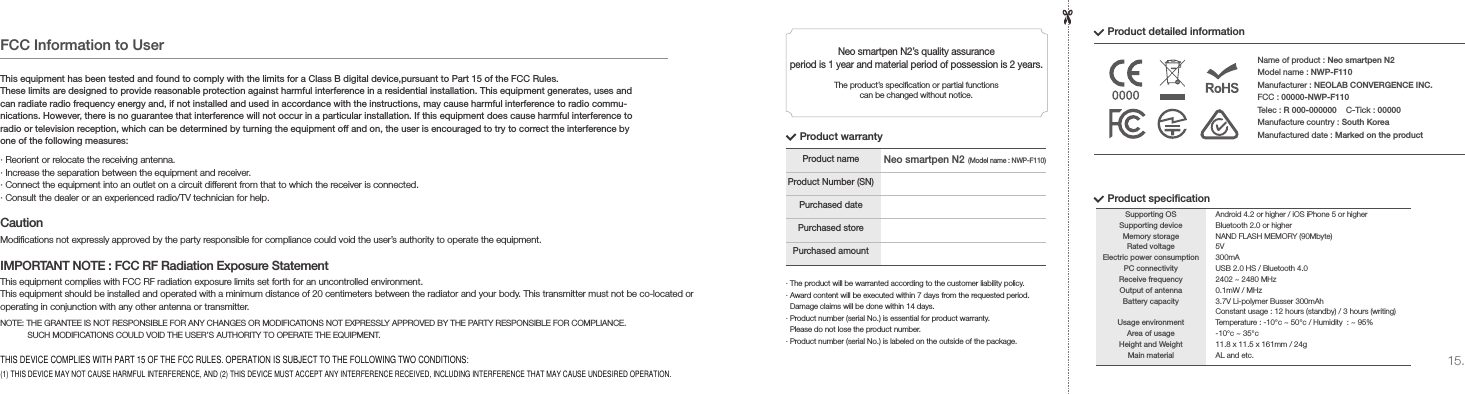
15.· The product will be warranted according to the customer liability policy.· Award content will be executed within 7 days from the requested period.    Damage claims will be done within 14 days.· Product number (serial No.) is essential for product warranty.   Please do not lose the product number.· Product number (serial No.) is labeled on the outside of the package.Product nameProduct Number (SN)Purchased datePurchased storePurchased amountProduct warrantyProduct detailed informationNeo smartpen N2’s quality assurance period is 1 year and material period of possession is 2 years.The product’s specication or partial functions can be changed without notice.Name of product : Neo smartpen N2Model name : NWP-F110Manufacturer : NEOLAB CONVERGENCE INC.FCC : 00000-NWP-F110Telec : R 000-000000    C-Tick : 00000Manufacture country : South KoreaManufactured date : Marked on the productProduct specicationSupporting OSSupporting deviceMemory storageRated voltageElectric power consumptionPC connectivityReceive frequencyOutput of antennaBattery capacityUsage environmentArea of usageHeight and WeightMain materialAndroid 4.2 or higher / iOS iPhone 5 or higherBluetooth 2.0 or higherNAND FLASH MEMORY (90Mbyte)5V300mAUSB 2.0 HS / Bluetooth 4.02402 ~ 2480 MHz0.1mW / MHz3.7V Li-polymer Busser 300mAhConstant usage : 12 hours (standby) / 3 hours (writing)Temperature : -10°c ~ 50°c / Humidity  : ~ 95%-10°c ~ 35°c11.8 x 11.5 x 161mm / 24gAL and etc.Neo smartpen N2(Model name : NWP-F110)FCC Information to UserThis equipment has been tested and found to comply with the limits for a Class B digital device,pursuant to Part 15 of the FCC Rules.These limits are designed to provide reasonable protection against harmful interference in a residential installation. This equipment generates, uses and can radiate radio frequency energy and, if not installed and used in accordance with the instructions, may cause harmful interference to radio commu-nications. However, there is no guarantee that interference will not occur in a particular installation. If this equipment does cause harmful interference to radio or television reception, which can be determined by turning the equipment off and on, the user is encouraged to try to correct the interference by one of the following measures:· Reorient or relocate the receiving antenna.· Increase the separation between the equipment and receiver.· Connect the equipment into an outlet on a circuit different from that to which the receiver is connected.· Consult the dealer or an experienced radio/TV technician for help.Modications not expressly approved by the party responsible for compliance could void the user’s authority to operate the equipment.NOTE: THE GRANTEE IS NOT RESPONSIBLE FOR ANY CHANGES OR MODIFICATIONS NOT EXPRESSLY APPROVED BY THE PARTY RESPONSIBLE FOR COMPLIANCE.            SUCH MODIFICATIONS COULD VOID THE USER’S AUTHORITY TO OPERATE THE EQUIPMENT.This equipment complies with FCC RF radiation exposure limits set forth for an uncontrolled environment.This equipment should be installed and operated with a minimum distance of 20 centimeters between the radiator and your body. This transmitter must not be co-located or operating in conjunction with any other antenna or transmitter.CautionIMPORTANT NOTE : FCC RF Radiation Exposure StatementTHIS DEVICE COMPLIES WITH PART 15 OF THE FCC RULES. OPERATION IS SUBJECT TO THE FOLLOWING TWO CONDITIONS: (1) THIS DEVICE MAY NOT CAUSE HARMFUL INTERFERENCE, AND (2) THIS DEVICE MUST ACCEPT ANY INTERFERENCE RECEIVED, INCLUDING INTERFERENCE THAT MAY CAUSE UNDESIRED OPERATION.

Navigation menu