NIE TECH ZW303 Smart Switch User Manual ZW303manual 180628

NIE Technology Co., Ltd Smart Switch ZW303manual 180628

user_manual

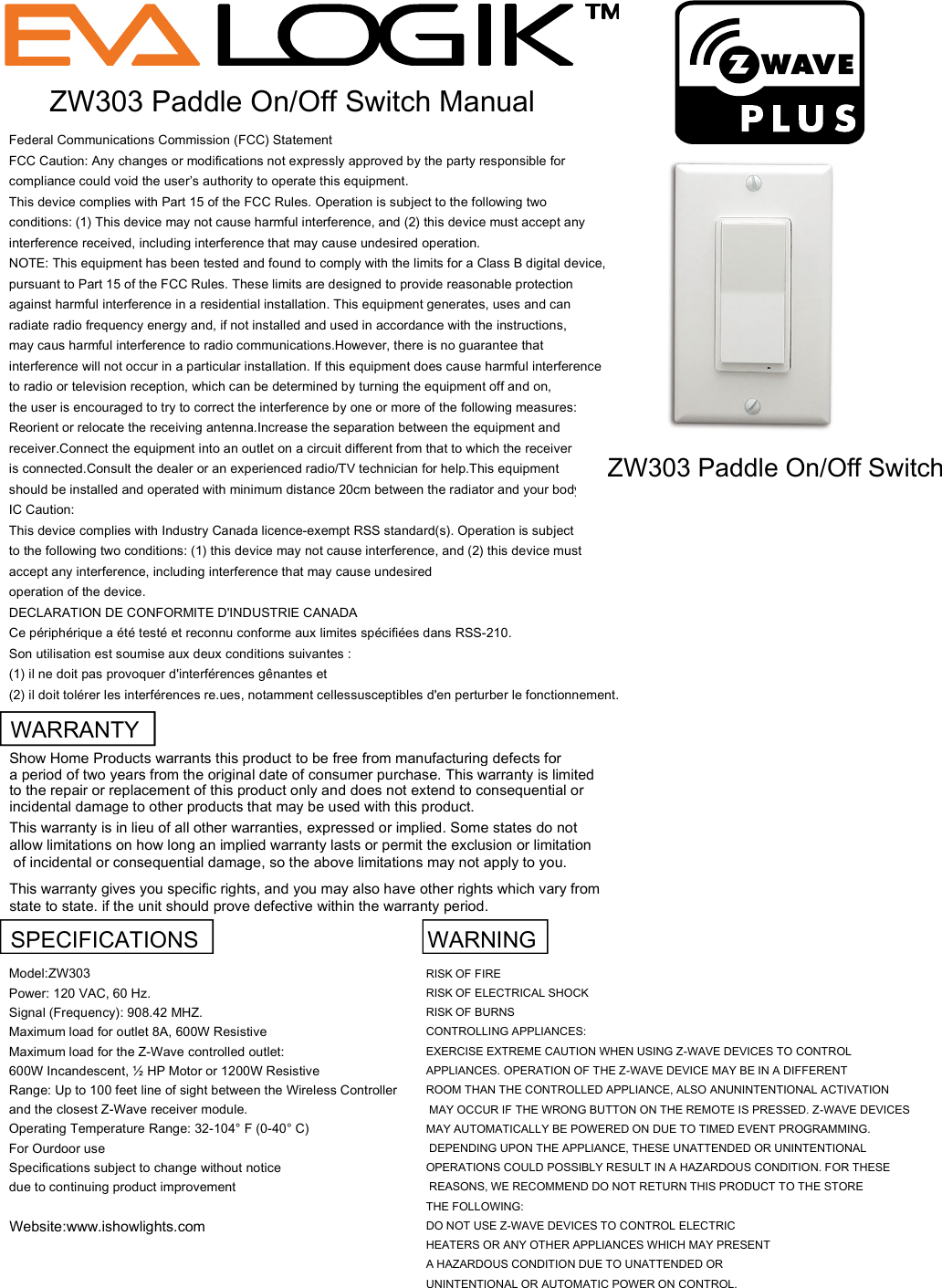
Federal Communications Commission (FCC) StatementFCC Caution: Any changes or modifications not expressly approved by the party responsible forcompliance could void the user’s authority to operate this equipment.This device complies with Part 15 of the FCC Rules. Operation is subject to the following twoconditions: (1) This device may not cause harmful interference, and (2) this device must accept anyinterference received, including interference that may cause undesired operation.NOTE: This equipment has been tested and found to comply with the limits for a Class B digital device,pursuant to Part 15 of the FCC Rules. These limits are designed to provide reasonable protectionagainst harmful interference in a residential installation. This equipment generates, uses and canradiate radio frequency energy and, if not installed and used in accordance with the instructions,may caus harmful interference to radio communications.However, there is no guarantee thatinterference will not occur in a particular installation. If this equipment does cause harmful interferenceto radio or television reception, which can be determined by turning the equipment off and on,the user is encouraged to try to correct the interference by one or more of the following measures:Reorient or relocate the receiving antenna.Increase the separation between the equipment andreceiver.Connect the equipment into an outlet on a circuit different from that to which the receiveris connected.Consult the dealer or an experienced radio/TV technician for help.This equipmentshould be installed and operated with minimum distance 20cm between the radiator and your body.IC Caution:This device complies with Industry Canada licence-exempt RSS standard(s). Operation is subjectto the following two conditions: (1) this device may not cause interference, and (2) this device mustaccept any interference, including interference that may cause undesiredoperation of the device.DECLARATION DE CONFORMITE D'INDUSTRIE CANADACe périphérique a été testé et reconnu conforme aux limites spécifiées dans RSS-210.Son utilisation est soumise aux deux conditions suivantes :(1) il ne doit pas provoquer d'interférences gênantes et(2) il doit tolérer les interférences re.ues, notamment cellessusceptibles d'en perturber le fonctionnement.ZW303 Paddle On/Off Switch ManualZW303 Paddle On/Off SwitchWARRANTYShow Home Products warrants this product to be free from manufacturing defects for a period of two years from the original date of consumer purchase. This warranty is limited to the repair or replacement of this product only and does not extend to consequential orincidental damage to other products that may be used with this product. This warranty is in lieu of all other warranties, expressed or implied. Some states do not allow limitations on how long an implied warranty lasts or permit the exclusion or limitation of incidental or consequential damage, so the above limitations may not apply to you. This warranty gives you specific rights, and you may also have other rights which vary from state to state. if the unit should prove defective within the warranty period.SPECIFICATIONS   WARNINGModel:ZW303RISK OF FIREPower: 120 VAC, 60 Hz.RISK OF ELECTRICAL SHOCKSignal (Frequency): 908.42 MHZ.RISK OF BURNSMaximum load for outlet 8A, 600W ResistiveCONTROLLING APPLIANCES:Maximum load for the Z-Wave controlled outlet:EXERCISE EXTREME CAUTION WHEN USING Z-WAVE DEVICES TO CONTROL 600W Incandescent, ½ HP Motor or 1200W ResistiveAPPLIANCES. OPERATION OF THE Z-WAVE DEVICE MAY BE IN A DIFFERENTRange: Up to 100 feet line of sight between the Wireless ControllerROOM THAN THE CONTROLLED APPLIANCE, ALSO ANUNINTENTIONAL ACTIVATIONand the closest Z-Wave receiver module. MAY OCCUR IF THE WRONG BUTTON ON THE REMOTE IS PRESSED. Z-WAVE DEVICESOperating Temperature Range: 32-104° F (0-40° C)MAY AUTOMATICALLY BE POWERED ON DUE TO TIMED EVENT PROGRAMMING. For Ourdoor use  DEPENDING UPON THE APPLIANCE, THESE UNATTENDED OR UNINTENTIONAL Specifications subject to change without noticeOPERATIONS COULD POSSIBLY RESULT IN A HAZARDOUS CONDITION. FOR THESEdue to continuing product improvement REASONS, WE RECOMMEND DO NOT RETURN THIS PRODUCT TO THE STORE THE FOLLOWING:Website:www.ishowlights.comDO NOT USE Z-WAVE DEVICES TO CONTROL ELECTRIC HEATERS OR ANY OTHER APPLIANCES WHICH MAY PRESENT A HAZARDOUS CONDITION DUE TO UNATTENDED OR UNINTENTIONAL OR AUTOMATIC POWER ON CONTROL.
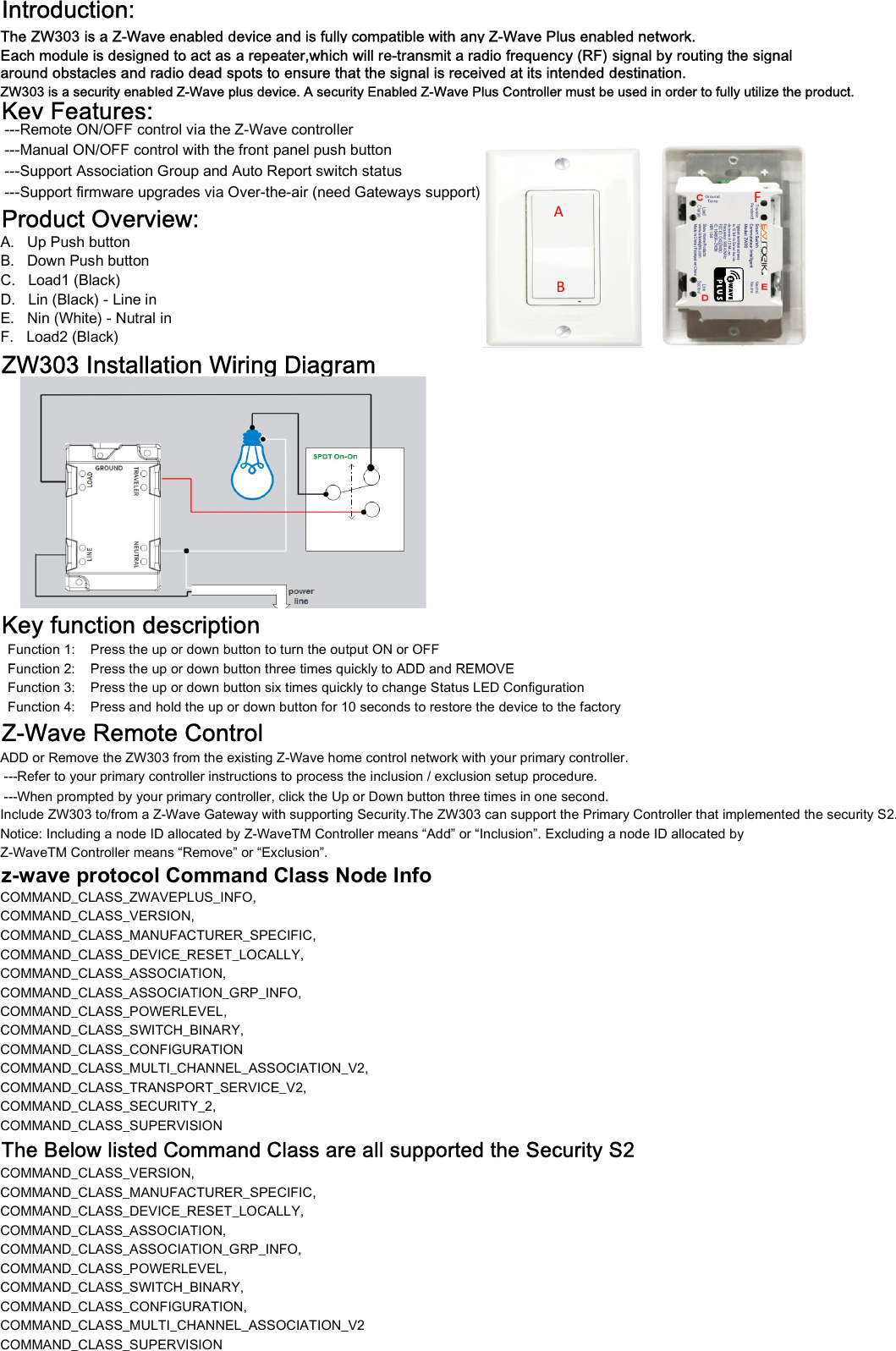
Introduction:The ZW303 is a Z-Wave enabled device and is fully compatible with any Z-Wave Plus enabled network.around obstacles and radio dead spots to ensure that the signal is received at its intended destination.ZW303 is a security enabled Z-Wave plus device. A security Enabled Z-Wave Plus Controller must be used in order to fully utilize the product.Key Features: ---Remote ON/OFF control via the Z-Wave controller ---Manual ON/OFF control with the front panel push button ---Support Association Group and Auto Report switch status ---Support firmware upgrades via Over-the-air (need Gateways support)Product Overview:A.   Up Push buttonB.   Down Push buttonC.   Load1 (Black) D.   Lin (Black) - Line inE.   Nin (White) - Nutral inF.   Load2 (Black)  ZW303 Installation Wiring DiagramKey function description  Function 1:    Press the up or down button to turn the output ON or OFF  Function 2:    Press the up or down button three times quickly to ADD and REMOVEEach module is designed to act as a repeater,which will re-transmit a radio frequency (RF) signal by routing the signalABF  Function 2:    Press the up or down button three times quickly to ADD and REMOVE  Function 3:    Press the up or down button six times quickly to change Status LED Configuration  Function 4:    Press and hold the up or down button for 10 seconds to restore the device to the factoryZ-Wave Remote ControlADD or Remove the ZW303 from the existing Z-Wave home control network with your primary controller. ---Refer to your primary controller instructions to process the inclusion / exclusion setup procedure.Include ZW303 to/from a Z-Wave Gateway with supporting Security.The ZW303 can support the Primary Controller that implemented the security S2.Notice: Including a node ID allocated by Z-WaveTM Controller means “Add” or “Inclusion”. Excluding a node ID allocated by Z-WaveTM Controller means “Remove” or “Exclusion”.z-wave protocol Command Class Node Info COMMAND_CLASS_ZWAVEPLUS_INFO,COMMAND_CLASS_VERSION,COMMAND_CLASS_MANUFACTURER_SPECIFIC,COMMAND_CLASS_DEVICE_RESET_LOCALLY,COMMAND_CLASS_ASSOCIATION,COMMAND_CLASS_ASSOCIATION_GRP_INFO,COMMAND_CLASS_POWERLEVEL,COMMAND_CLASS_SWITCH_BINARY,COMMAND_CLASS_CONFIGURATIONCOMMAND_CLASS_MULTI_CHANNEL_ASSOCIATION_V2,COMMAND_CLASS_TRANSPORT_SERVICE_V2,COMMAND_CLASS_SECURITY_2,COMMAND_CLASS_SUPERVISIONThe Below listed Command Class are all supported the Security S2COMMAND_CLASS_VERSION,COMMAND_CLASS_MANUFACTURER_SPECIFIC,COMMAND_CLASS_DEVICE_RESET_LOCALLY,COMMAND_CLASS_ASSOCIATION,COMMAND_CLASS_ASSOCIATION_GRP_INFO,COMMAND_CLASS_POWERLEVEL,COMMAND_CLASS_SWITCH_BINARY,COMMAND_CLASS_CONFIGURATION,COMMAND_CLASS_MULTI_CHANNEL_ASSOCIATION_V2 ---When prompted by your primary controller, click the Up or Down button three times in one second.COMMAND_CLASS_MULTI_CHANNEL_ASSOCIATION_V2COMMAND_CLASS_SUPERVISION
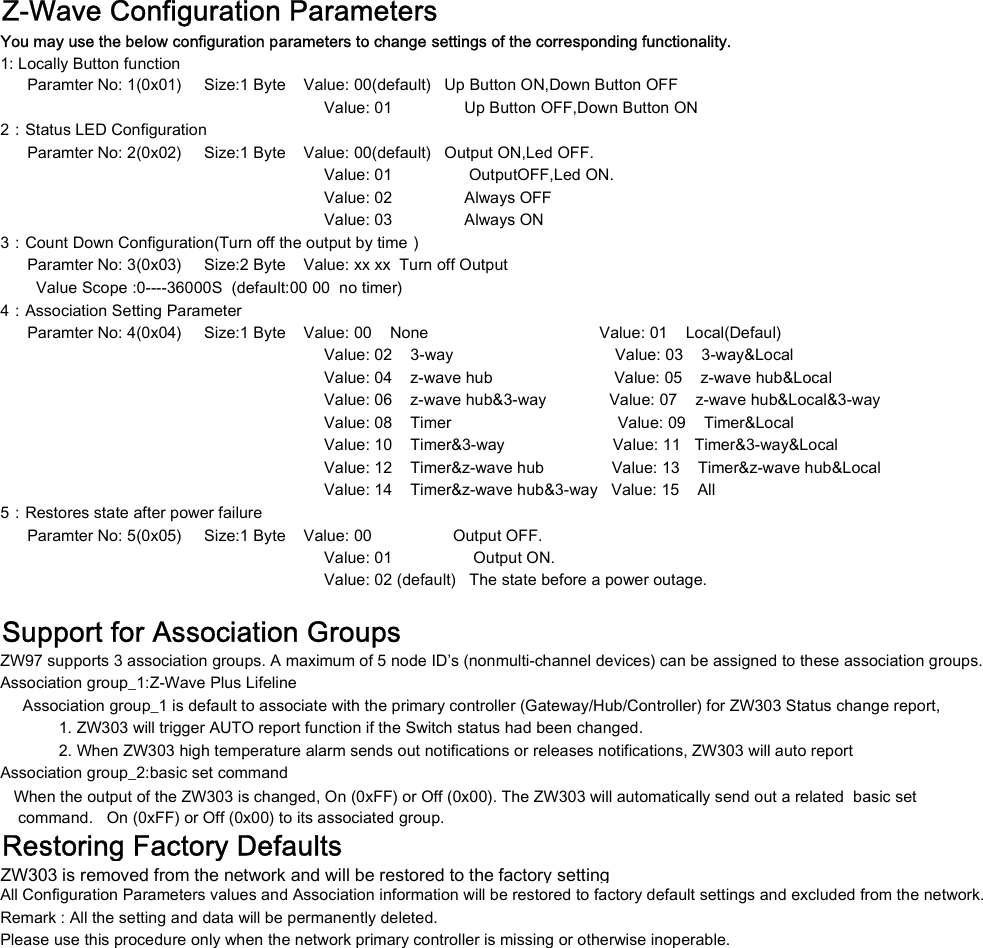
Z-Wave Configuration Parameters1: Locally Button function      Paramter No: 1(0x01)     Size:1 Byte    Value: 00(default)   Up Button ON,Down Button OFF                                                                        Value: 01                Up Button OFF,Down Button ON2:Status LED Configuration      Paramter No: 2(0x02)     Size:1 Byte    Value: 00(default)   Output ON,Led OFF.                                                                        Value: 01                 OutputOFF,Led ON.                                                                        Value: 02                Always OFF                                                                        Value: 03                Always ON3:Count Down Configuration(Turn off the output by time)      Paramter No: 3(0x03)     Size:2 Byte    Value: xx xx  Turn off Output        Value Scope :0----36000S  (default:00 00  no timer)4:Association Setting Parameter      Paramter No: 4(0x04)     Size:1 Byte    Value: 00    None                                      Value: 01    Local(Defaul)                                                                        Value: 02    3-way                                    Value: 03    3-way&Local                                                                        Value: 04    z-wave hub                           Value: 05    z-wave hub&Local                                                                        Value: 06    z-wave hub&3-way              Value: 07    z-wave hub&Local&3-way                                                                        Value: 08    Timer                                     Value: 09    Timer&Local                                                                        Value: 10    Timer&3-way                        Value: 11   Timer&3-way&Local                                                                        Value: 12    Timer&z-wave hub               Value: 13    Timer&z-wave hub&Local                                                                        Value: 14    Timer&z-wave hub&3-way   Value: 15    All5:Restores state after power failure      Paramter No: 5(0x05)     Size:1 Byte    Value: 00                  Output OFF.                                                                        Value: 01                  Output ON.                                                                        Value: 02 (default)   The state before a power outage.Support for Association GroupsZW97 supports 3 association groups. A maximum of 5 node ID’s (nonmulti-channel devices) can be assigned to these association groups.Association group_1:Z-Wave Plus Lifeline     Association group_1 is default to associate with the primary controller (Gateway/Hub/Controller) for ZW303 Status change report,              1. ZW303 will trigger AUTO report function if the Switch status had been changed.             2. When ZW303 high temperature alarm sends out notifications or releases notifications, ZW303 will auto reportYou may use the below configuration parameters to change settings of the corresponding functionality.             2. When ZW303 high temperature alarm sends out notifications or releases notifications, ZW303 will auto reportAssociation group_2:basic set command    command.   On (0xFF) or Off (0x00) to its associated group.Restoring Factory DefaultsZW303 is removed from the network and will be restored to the factory settingAll Configuration Parameters values and Association information will be restored to factory default settings and excluded from the network.Remark : All the setting and data will be permanently deleted.Please use this procedure only when the network primary controller is missing or otherwise inoperable.   When the output of the ZW303 is changed, On (0xFF) or Off (0x00). The ZW303 will automatically send out a related  basic set

Navigation menu