NTN Buzztime NTN2400 2.4GHz Playmaker System User Manual 0751241
NTN Buzztime, Inc. 2.4GHz Playmaker System 0751241
Manual
BT2400A
Federal Communication Commission Interference Statement
This equipment has been tested and found to comply with the limits for a Class B digital
device, pursuant to Part 15 of the FCC Rules. These limits are designed to provide
reasonable protection against harmful interference in a residential installation. This
equipment generates, uses and can radiate radio frequency energy and, if not installed
and used in accordance with the instructions, may cause harmful interference to radio
communications. However, there is no guarantee that interference will not occur in a
particular installation. If this equipment does cause harmful interference to radio or
television reception, which can be determined by turning the equipment off and on, the
user is encouraged to try to correct the interference by one of the following measures:
- Reorient or relocate the receiving antenna.
- Increase the separation between the equipment and receiver.
- Connect the equipment into an outlet on a circuit different from that
to which the receiver is connected.
- Consult the dealer or an experienced radio/TV technician for help.
FCC Caution: Any changes or modifications not expressly approved by the party
responsible for compliance could void the user's authority to operate this equipment.
This device complies with Part 15 of the FCC Rules & Canada-Industry Canada (IC)
Operation is subject to the following two conditions: (1) This device may not cause harmful
interference, and (2) this device must accept any interference received, including
interference that may cause undesired operation.
IMPORTANT NOTE:
Radiation Exposure Statement
(Model: BT2400A FCC ID: M8SNTN2400)
This equipment complies with FCC & IC radiation exposure limits set forth for an
uncontrolled environment.
End users must follow the specific operating instructions for satisfying RF exposure
compliance.
This transmitter must not be co-located or operating in conjunction with any other antenna
or transmitter.
To maintain compliance with FCC RF exposure compliance requirements, please follow
operation instruction as documented in this manual.
(Model: BT2420A FCC ID: M8SNTN2420)
This equipment complies with FCC & IC radiation exposure limits set forth for an
uncontrolled environment. This equipment should be installed and operated with minimum
distance 20cm between the radiator & your body.
This transmitter must not be co-located or operating in conjunction with any other antenna
or transmitter.
Important Information Regarding the Playmakers
1. FCC and Interference Information
(To be inserted later)
2. Important Safety Information
2.1 Use only supplied charging trays and AC power adaptors.
2.2 Do not submerge game pads into liquid.
3. Intended Application
The Playmakers are intended to be used as input devices for playing
interactive games on our Buzztime network.
4. Using the Playmaker
Before using the Playmaker, ensure the PC that the base station is
connected to is powered on. Also, make sure the antenna is attached to
the base.
4.1 Power on/off
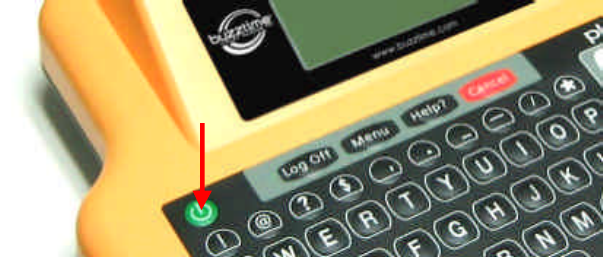
• Press the power button to turn unit on.
• To turn unit off, depress power button for 3 seconds.
4.2 Battery Power indicator
• When the unit is turned on, the battery icon is displayed
momentarily. The battery level is also displayed on the bottom
of the screen.
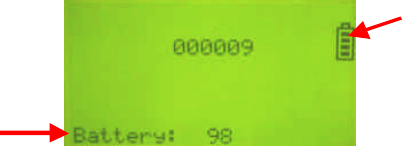
• If battery level is low, return the unit back to the charging tray.
4.3 Error Messages
• Error message “Cannot register” or “Cannot find base” shall
appear on screen if the Playmaker could not detect or
communicate with the base station.
• When an error condition occurs, return the Playmaker unit to
the charging tray and inform the location manager.
4.4 Charging the Playmaker
• When the Playmaker is not in use, place it in the charging tray
with the charging contacts facing down.
• When the Playmaker is properly inserted into the charging tray,
it shall beep once and the LED shall light up.
• When charging is completed or if no charging is necessary, the
LED shall turn off.
4.5 Playmaker Keys
• The keypad is divided into four groups: QWERTY keys, number
keys, cursor keys, and function keys.
• While entering text, use the Backspace key to erase one
character at a time. Use the CAPS key to switch between upper
and lower case. Use the Enter key to skip to the next field.
• The cursor keys are for navigating from field to field. When a
list or menu is displayed, the cursor keys may also be used to
scroll the list. Use the Enter key to select a menu item.
• There are four function keys:
o Log off – To log off from a game
o Menu – To call up the menu
o Help – To call up instructions
o Cancel – To cancel current action
4.6 Diagnostic/Maintenance Features
This feature is for service personnel only.
• Upon starting up the Playmaker, depress the following keys in
sequence: Log off – Enter – Enter.
• Contact NTN Customer Service to obtain a password and enter it
into the password textbox.
• Once logged in, the maintenance menu shall be displayed.
4.7 Servicing
• Servicing shall only be done by trained service personnel.
• For service, please contact NTN Buzztime’s Customer Service.