NantWorks 1001008 Wireless device with BT/WLAN/NFC User Manual
NantWorks Wireless device with BT/WLAN/NFC
User Manual
NANTHEALTH, LLC | 430 W. 5
th
Street Suite 800, Panama City, FL 32401 | Phone: 1.855.WHY.NANT | nanthealth.com
OPERATING INSTRUCTIONS
Version: 01.00.00-1
HBOX
®
This page contains copyrighted materials that are “Confidential” and/or “Proprietary” and, as such, shall not be copied, distributed, or reproduced
in any way without the written consent of NantHealth’s Vice President of Quality and Regulatory Affairs.
HBH-v01.00.00-0-LP-User_Manual-R01 Page 1 of 17
Table of Contents
Table of Contents ........................................................................................................................................................................................................... 1
Table of Figures ............................................................................................................................................................................................................. 3
Notices ........................................................................................................................................................................................................................... 4
Intended Use Statement 4
Trademark Attributions 4
About This Guide ........................................................................................................................................................................................................... 5
Intended Audience 5
Client Support Contact Information 5
Manufacturer Contact 5
Chapter 1: Compliance and Safety Information. ............................................................................................................................................................ 6
Federal Communications Commission (FCC) 6
Personal Electronics Warning 6
Safe Distance Warning 7
Disposal and recycling information 7
HBox must be disposed of properly in accordance to local laws and regulations separately from household and standard waste. For detailed
information on disposal and recycling options contact local waste management authorities for electronics containing lithium-ion batteries. 7
Symbols 7
Chapter 2: Wi-Fi Connectivity ........................................................................................................................................................................................ 8
802.11 a/b/g/n Connectivity 8
Security Standards 8
STA Mode 8
Chapter 3: Ethernet Connectivity ................................................................................................................................................................................... 8
Single Ethernet Port 8
Chapter 4: USB Connectivity ......................................................................................................................................................................................... 8
This page contains copyrighted materials that are “Confidential” and/or “Proprietary” and, as such, shall not be copied, distributed, or reproduced
in any way without the written consent of NantHealth’s Vice President of Quality and Regulatory Affairs.
HBH-v01.00.00-0-LP-User_Manual-R01 Page 2 of 17
Built-In USB Port 8
Chapter 5: HBox Processing Power .............................................................................................................................................................................. 9
Processor Specifications 9
RAM Specifications 9
Storage Space 9
Expandable Storage via SD Card 9
Chapter 6: Preventing Data Corruption .......................................................................................................................................................................... 9
Powering On 9
HBox Battery 9
Safe Shutdown 10
Master Reset Button 10
Chapter 7: HBox Mounting Options ............................................................................................................................................................................. 10
Universal Mount 10
Chapter 8: Indicator Lights ........................................................................................................................................................................................... 14
Power Indicator 14
Connection to Server Indicator 14
Data Transmission Indicator 14
Signal Strength Indicator 14
Ethernet Connection Indicator 15
Chapter 9: Bluetooth .................................................................................................................................................................................................... 15
Bluetooth 4.0 15
Chapter 10: Environmental Requirements ................................................................................................................................................................... 15
Operating Temperature 15
Atmospheric Pressure 15
Storage Temperature 15

This page contains copyrighted materials that are “Confidential” and/or “Proprietary” and, as such, shall not be copied, distributed, or reproduced
in any way without the written consent of NantHealth’s Vice President of Quality and Regulatory Affairs.
HBH-v01.00.00-0-LP-User_Manual-R01 Page 3 of 17
Humidity 16
Chapter 11: Sterilization ............................................................................................................................................................................................... 16
General Cleaning 16
IP Rating 16
Appendix I: Key Features ............................................................................................................................................................................................. 17
Table of Figures
Figure 1. Front View and Side Panel .......................................................................................................................................................................... 11
Figure 2. Rear and Bottom View ................................................................................................................................................................................. 12
Figure 3. Removable Mounting Bracket ...................................................................................................................................................................... 13
Figure 4 - Signal Strength Indicator ............................................................................................................................................................................. 14
This page contains copyrighted materials that are “Confidential” and/or “Proprietary” and, as such, shall not be copied, distributed, or reproduced
in any way without the written consent of NantHealth’s Vice President of Quality and Regulatory Affairs.
HBH-v01.00.00-0-LP-User_Manual-R01 Page 4 of 17
Notices
This document and the information presented in this document are proprietary and confidential information of NantHealth, LLC (“NantHealth”) and
shall not, directly or indirectly, be reproduced, in whole or in part, adapted, modified, disclosed, transmitted, displayed, prepare derivative works
based upon or otherwise disseminate this document or the information contained herein without the prior written consent of NantHealth’s Vice
President of Quality and Regulatory Affairs.
The information contained in this document is solely for use by the designated in-house representatives of current NantHealth licensees who have
agreed in writing to maintain the confidentiality of NantHealth confidential information and not use any of same other than as and to the extent
necessary to use NantHealth software on authorized hardware located at client’s authorized facilities within the scope of the license granted to
them by NantHealth. Any other use by any other person or entity is strictly prohibited. Any violations of these requirements shall be reported to the
NantHealth Regulatory Affairs Department. This document must be returned to NantHealth when the user is no longer licensed by NantHealth to
use NantHealth software, and immediately upon NantHealth’s written request.
NantHealth may make improvements or changes in the product(s) described in this document at any time. NantHealth makes no representations
or warranties regarding this document or the information contained herein and no information provided in this document modify any warranties,
disclaimers, limitations or other terms of any client’s license agreement with NantHealth. ALL IMPLIED WARRANTIES, INCLUDING, WITHOUT
LIMITATION, IMPLIED WARRANTIES OF MERCHANTABILITY, FITNESS FOR A PARTICULAR PURPOSE, TITLE AND NONINFRINGEMENT,
ARE HEREBY DISCLAIMED. NantHealth shall have no liability for any errors or omissions contained in this document or otherwise relating to this
document.
© 2014 NantHealth, LLC. All Rights Reserved.
Intended Use Statement
HBox® is a generic hardware platform designed by NantHealth to host software medical devices. These can be NantHealth developed software
medical devices. By itself, the HBox platform is not a medical device but instead carries the classification of the software medical device it is
hosting.
Trademark Attributions
NantHealth™ and HBox® and all related logos and branding are trademarks of NantHealth, LLC.
All other trademarked product names, brands, images, and other material are the property of their respective owners. Their use in this document
does not imply a relationship between NantHealth, LLC and the trademark holder.
This page contains copyrighted materials that are “Confidential” and/or “Proprietary” and, as such, shall not be copied, distributed, or reproduced
in any way without the written consent of NantHealth’s Vice President of Quality and Regulatory Affairs.
HBH-v01.00.00-0-LP-User_Manual-R01 Page 5 of 17
About This Guide
Intended Audience
The intended audience for this guide is system administrators and other technical personnel responsible for installing, managing or maintaining an
HBox system in an indoor, healthcare environment.
Client Support Contact Information
NantHealth Client Support contact information and hours of operation:
The support line hours are 24/7. The number is 866-202-2124
The e-mail address is support@nanthealth.com
Manufacturer Contact
NantHealth, LLC
430 West 5th Street
Suite 800
Panama City, FL 32401
United States of America
www.nanthealth.com

This page contains copyrighted materials that are “Confidential” and/or “Proprietary” and, as such, shall not be copied, distributed, or reproduced
in any way without the written consent of NantHealth’s Vice President of Quality and Regulatory Affairs.
HBH-v01.00.00-0-LP-User_Manual-R01 Page 6 of 17
Chapter 1: Compliance and Safety Information.
FCC ID:
IFU1001008
Federal Communications Commission (FCC)
This device complies with part 15 of the Federal Communications Commission (FCC) Rules.
Operation is subject to the following two conditions:
1. This device may not cause harmful interference.
2. This device must accept any interference received, including interference that may cause undesired operation.
NOTE: This equipment has been tested and found to comply with the limits for a Class B digital device, pursuant to Part 15 of the FCC Rules.
These limits are designed to provide reasonable protection against harmful interference in a residential installation. This equipment generates,
uses and can radiate radio frequency energy and, if not installed and used in accordance with the instructions, may cause harmful interference to
radio communications. However, there is no guarantee that interference will not occur in a particular installation. If this equipment does cause
interference to radio or television reception, which can be determined by turning the equipment off and on, the user is encouraged to try to correct
the interference by one or more of the following measures:
• Increase the separation between the equipment and the receiver
• Connect the equipment into an outlet on a circuit different from that to which the receiver is connected
• Consult the dealer or an experienced radio/TV technician for help
Changes or modifications not expressly approved by the manufacturer could void the user’s authority to operate the equipment.
This device is restricted to indoor use only when operating in the 5.15 to 5.25 GHz frequency band (U-NII 1).
The end user has no means, either through software or hardware, to change the RF characteristics of the radios within HBox.
Personal Electronics Warning
As a safety measure to prevent potential adverse results to data transmission, users should not plug personal electronics into an HBox USB port.
This page contains copyrighted materials that are “Confidential” and/or “Proprietary” and, as such, shall not be copied, distributed, or reproduced
in any way without the written consent of NantHealth’s Vice President of Quality and Regulatory Affairs.
HBH-v01.00.00-0-LP-User_Manual-R01 Page 7 of 17
Safe Distance Warning
The device is to be installed as to provide a separation of at least 7.9 inches (20cm) from all persons during operation.
Disposal and recycling information
HBox must be disposed of properly in accordance to local laws and regulations separately from household and standard waste. For detailed
information on disposal and recycling options contact local waste management authorities for electronics containing lithium-ion batteries.
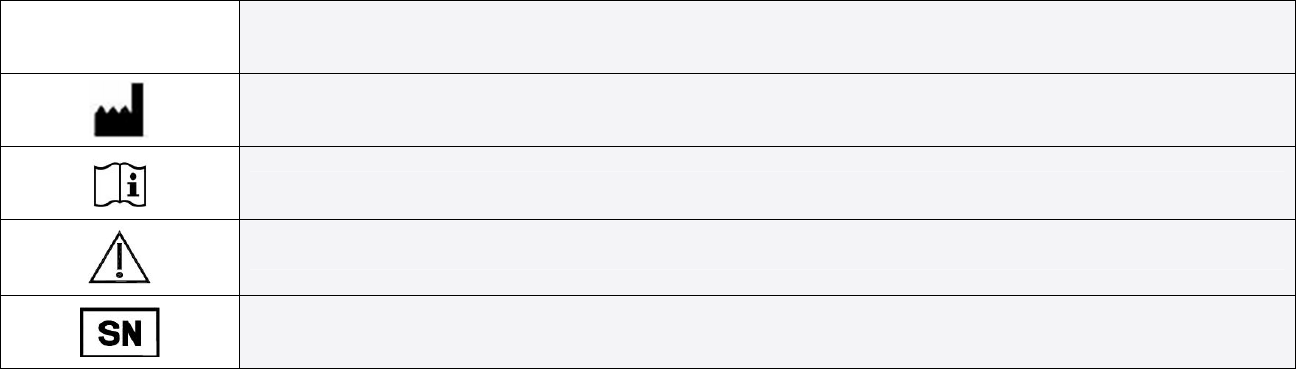
Symbols
Symbol Meaning
Manufacturer
Consult instructions for use
Caution, consult accompanying documents
Serial Number
Table 1. Symbols
This page contains copyrighted materials that are “Confidential” and/or “Proprietary” and, as such, shall not be copied, distributed, or reproduced
in any way without the written consent of NantHealth’s Vice President of Quality and Regulatory Affairs.
HBH-v01.00.00-0-LP-User_Manual-R01 Page 8 of 17
Chapter 2: Wi-Fi Connectivity
802.11 a/b/g/n Connectivity
HBox supports connectivity to Wi-Fi using the following standards:
• 802.11a
• 802.11b
• 802.11g
• 802.11n
Security Standards
When connecting to a Wi-Fi network, HBox uses the following security standards:
• WEP
• WPA
• WPA2
STA Mode
HBox connects to a Wi-Fi access point which supports STA mode.
Chapter 3: Ethernet Connectivity
Single Ethernet Port
HBox has one Ethernet port which supports speeds of 10/100 mbps.
Chapter 4: USB Connectivity
Built-In USB Port
• HBox USB ports are type A female
This page contains copyrighted materials that are “Confidential” and/or “Proprietary” and, as such, shall not be copied, distributed, or reproduced
in any way without the written consent of NantHealth’s Vice President of Quality and Regulatory Affairs.
HBH-v01.00.00-0-LP-User_Manual-R01 Page 9 of 17
• USB version 2.0 compliant
• HBox connects two USB devices without the need of a USB hub
• Each USB port holds ten newtons of tension so that unintentional withdrawal of the USB connection is better prevented
Chapter 5: HBox Processing Power
Processor Specifications
• 32-bit ARM
• One core
• Clock speed of up to 1.0 GHz
RAM Specifications
HBox has RAM of 2 GB.
Storage Space
HBox has a solid state, 8 GB storage space.
Expandable Storage via SD Card
• HBox is capable of expanding its storage space by up to 64 GB using an SD card
• The SD card slot is made inaccessible to the lay user
• HBox stores and retrieves files from the SD card
Chapter 6: Preventing Data Corruption
Powering On
HBox powers on and boots up automatically when it is plugged in. A power button is not required.
HBox Battery
To prevent data corruption during power loss, the internal lithium-ion battery has the capacity to safely shut down the HBox three consecutive
times without time allowance for charging the battery. When not in use the HBox battery has a standby life of one year.

This page contains copyrighted materials that are “Confidential” and/or “Proprietary” and, as such, shall not be copied, distributed, or reproduced
in any way without the written consent of NantHealth’s Vice President of Quality and Regulatory Affairs.
HBH-v01.00.00-0-LP-User_Manual-R01 Page 10 of 17
Note: Do not attempt to remove or replace the HBox internal battery. The lithium-ion battery in HBox should be serviced only by NantHealth, and
must be recycled or disposed of separately from household waste.
Safe Shutdown
• HBox remains operational without interruption when power is discontinued and then returned in less than 10 seconds
• HBox completes a safe shutdown if power is discontinued for more than 10 seconds
• If power is returned while HBox is shutting down, HBox will immediately reboot once the shutdown process completes
Master Reset Button
The master reset button is for the purpose of rebooting the HBox in the event it becomes unresponsive due to a software or a firmware crash. The
button is located underneath the plastic door on the side of HBox. It is accessible only by paperclip or pin.
• HBox will immediately power down when master reset button is pressed
• HBox will begin normal startup when master reset button is released
Chapter 7: HBox Mounting Options
Universal Mount
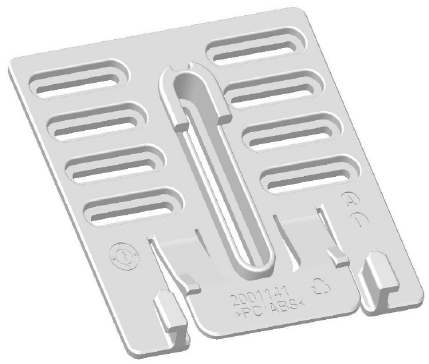
HBox has a wall mount which allows it to be mounted to any flat surface such as a wall, table stand, or medical equipment carts.
• The universal mount is compatible with a hole pattern that consists of two horizontal holes that range from 1 ¼ inches to 2 ¾ inches
apart
• The maximum screw diameter is 3.2mm
Note: Even if not mounted to a wall, HBox should always be used with the back mounting bracket so that unintentional disconnection of the
Ethernet cable will not occur.
This page contains copyrighted materials that are “Confidential” and/or “Proprietary” and, as such, shall not be copied, distributed, or reproduced
in any way without the written consent of NantHealth’s Vice President of Quality and Regulatory Affairs.
HBH-v01.00.00-0-LP-User_Manual-R01 Page 11 of 17
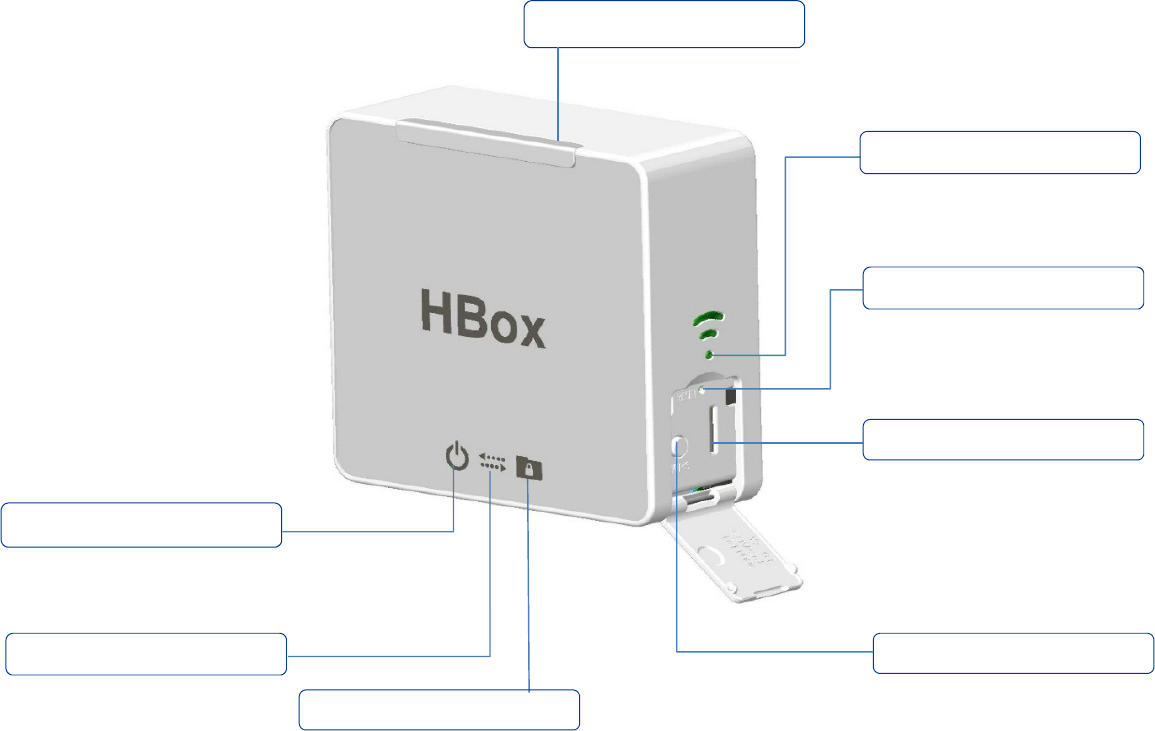
Figure 1. Front View and Side Panel
WPS Button
Internal SD Card Slot
Reset Button
Light Bar
Signal Strength Indicator
Connection to Server
Data Transmission
Power Indicator
This page contains copyrighted materials that are “Confidential” and/or “Proprietary” and, as such, shall not be copied, distributed, or reproduced
in any way without the written consent of NantHealth’s Vice President of Quality and Regulatory Affairs.
HBH-v01.00.00-0-LP-User_Manual-R01 Page 12 of 17
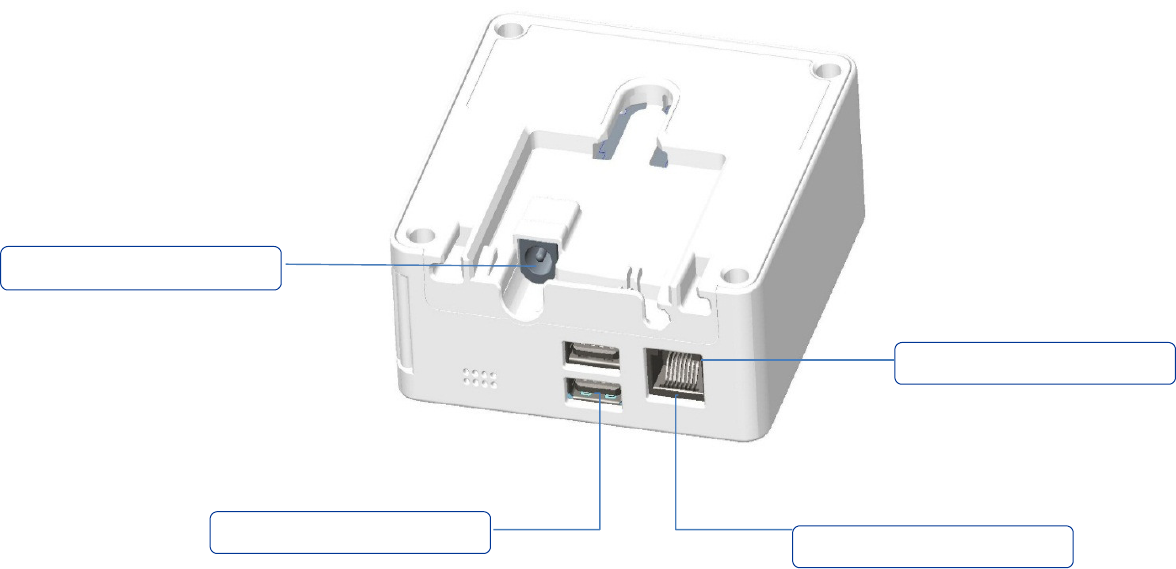
Figure 2. Rear and Bottom View
AC Power Connector
Ethernet Connector
USB Ports
Ethernet Indicator Light
This page contains copyrighted materials that are “Confidential” and/or “Proprietary” and, as such, shall not be copied, distributed, or reproduced
in any way without the written consent of NantHealth’s Vice President of Quality and Regulatory Affairs.
HBH-v01.00.00-0-LP-User_Manual-R01 Page 13 of 17
Figure 3. Removable Mounting Bracket

This page contains copyrighted materials that are “Confidential” and/or “Proprietary” and, as such, shall not be copied, distributed, or reproduced
in any way without the written consent of NantHealth’s Vice President of Quality and Regulatory Affairs.
HBH-v01.00.00-0-LP-User_Manual-R01 Page 14 of 17
Chapter 8: Indicator Lights
Power Indicator
Once powered on, and while in the process of booting, the power indicator light on the forward face panel will blink green. After the boot process
completes, the indicator light displays as solid green, visible from a distance of up to 5 feet.
Connection to Server Indicator
Located on the forward face panel is a light that indicates server connection status. The connection to server indicator can be seen from a viewing
distance of 5 feet.
• When connected to the server, the server indicator displays as green
• When there is no connection to the server, the server indicator displays as blue
Data Transmission Indicator
HBox contains a single light that indicates when data is being transmitted from HBox to the server. The data transmission indicator can be seen
from a viewing distance of 5 feet.
When data is being transmitted from HBox to the server, the data transmission indicator light displays as green.
Signal Strength Indicator
Located on the right side panel there are three green signal strength bars which indicate signal strength. The signal strength indicator bars can be
seen from a viewing distance of 5 feet.
• The first bar indicates the lowest signal strength
• The second bar indicates greater signal strength than the first bar
• The third bar indicates the highest signal strength
Figure 4 - Signal Strength Indicator
This page contains copyrighted materials that are “Confidential” and/or “Proprietary” and, as such, shall not be copied, distributed, or reproduced
in any way without the written consent of NantHealth’s Vice President of Quality and Regulatory Affairs.
HBH-v01.00.00-0-LP-User_Manual-R01 Page 15 of 17
Ethernet Connection Indicator
HBox contains a single light that indicates wired Ethernet connectivity.
• When wired Ethernet connectivity is present, the Ethernet connection indicator blinks green
• When there is no wired Ethernet connectivity, the Ethernet connection indicator displays as solid orange
Chapter 9: Bluetooth
Bluetooth 4.0
The HBox contains a Bluetooth chipset and connects to devices via Bluetooth. The Bluetooth chipset supports:
• Bluetooth 4.0
o Classic
o Bluetooth high speed
o Bluetooth low energy
Chapter 10: Environmental Requirements
Operating Temperature
• Range of +5 deg C to +40 deg C
• Range of +41 deg F to +104 deg F
Atmospheric Pressure
• Range of 700 hPa to 1060 hPa
Storage Temperature
• Range of -25 deg C to +70 deg C
• Range of -13 deg F to + 158 deg F

This page contains copyrighted materials that are “Confidential” and/or “Proprietary” and, as such, shall not be copied, distributed, or reproduced
in any way without the written consent of NantHealth’s Vice President of Quality and Regulatory Affairs.
HBH-v01.00.00-0-LP-User_Manual-R01 Page 16 of 17
Humidity
• Range of 0% to 93%, non-condensing
Chapter 11: Sterilization
General Cleaning
HBox is water resistant and may be wiped down or sterilized with alcohol or liquid cleaners that contain up to 10% bleach without degrading.
Note: Medical disinfectant wipes are recommended.
IP Rating
• HBox has an IP rating of IP52
• Vertically dripping water has no harmful effect when HBox is tilted at an angle of up to 15° from its upright position
Note: Ingress of dust is not entirely preventable.

This page contains copyrighted materials that are “Confidential” and/or “Proprietary” and, as such, shall not be copied, distributed, or reproduced
in any way without the written consent of NantHealth’s Vice President of Quality and Regulatory Affairs.
HBH-v01.00.00-0-LP-User_Manual-R01 Page 17 of 17
Appendix I: Key Features
Ability to run multiple software titles
Setup and configuration is through wired LAN
Support for multiple communication methods to servers
• Ethernet
• Wi-Fi
Support for multiple connection methods to medical devices
• Ethernet
• USB
Support for many USB devices
• 2 USB ports on HBox
• USB ports are version 2.0 compliant
• Supports use of powered USB hub for additional USB ports
Supports SD card expansion up to 64 GB
Mounting options
• Wall mount
Ease of use by automatically powering on when plugged in
Battery support for safe shutdown
Ability to remotely administer and troubleshoot
Simple user interface
Signal strength indicator
• Connection to server indicator
• Data transmission indicator
• Ethernet connector indicator