Narui Electronic D9 Wireless Fabric Speaker User Manual D9 5 26

SHENZHEN NARUI ELECTRONIC CO., LTD. Wireless Fabric Speaker D9 5 26

User Manual

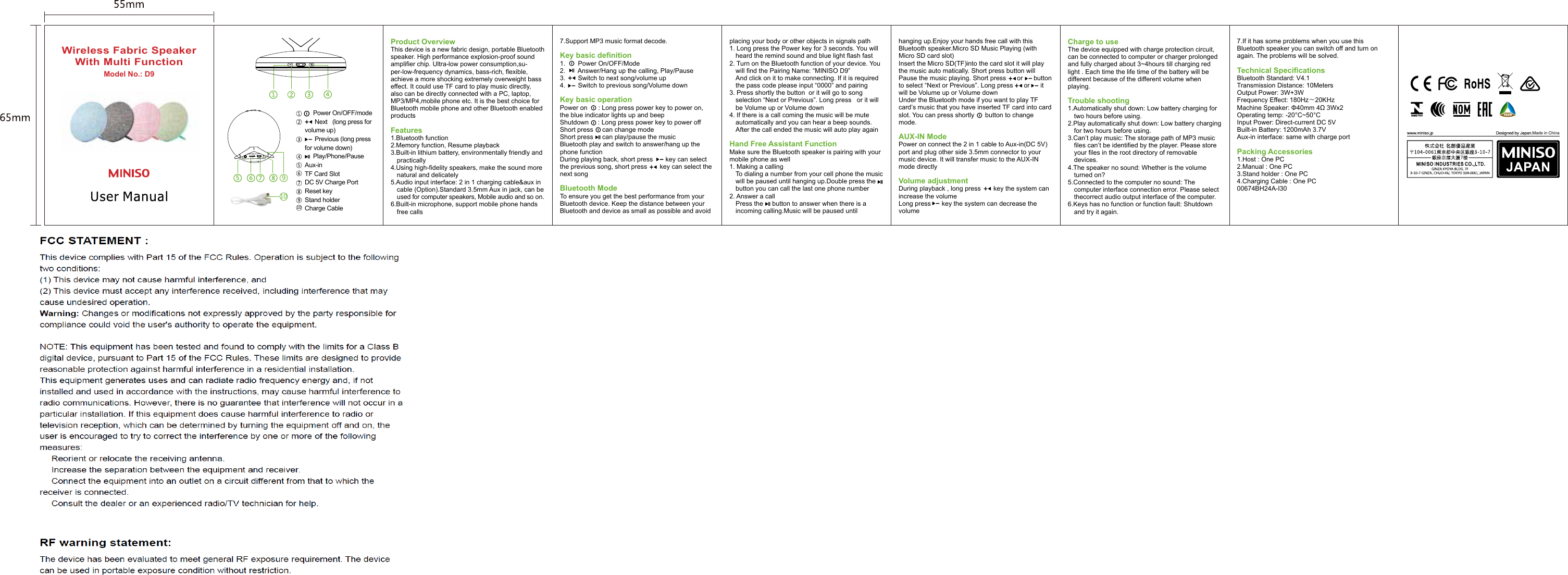
placing your body or other objects in signals path1. Long press the Power key for 3 seconds. You will 01heard the remind sound and blue light flash fast2. Turn on the Bluetooth function of your device. You 01will find the Pairing Name: “MINISO D9”01And click on it to make connecting. If it is required 01the pass code please input “0000” and pairing3. Press shortly the button  or it will go to song 01selection “Next or Previous”. Long press   or it will 01be Volume up or Volume down4. If there is a call coming the music will be mute 01automatically and you can hear a beep sounds. 01After the call ended the music will auto play againHand Free Assistant FunctionMake sure the Bluetooth speaker is pairing with your mobile phone as well1. Making a calling01To dialing a number from your cell phone the music 01will be paused until hanging up.Double press the     01button you can call the last one phone number2. Answer a call01Press the     button to answer when there is a 01incoming calling.Music will be paused until  Model No.: D9Wireless Fabric SpeakerWith Multi FunctionCharge to useThe device equipped with charge protection circuit, can be connected to computer or charger prolonged and fully charged about 3~4hours till charging red light . Each time the life time of the battery will be different because of the different volume when playing.Trouble shooting1.Automatically shut down: Low battery charging for 01two hours before using.2.Play automatically shut down: Low battery charging 01for two hours before using.3.Can’t play music: The storage path of MP3 music 01files can’t be identified by the player. Please store 01your files in the root directory of removable 01devices.4.The speaker no sound: Whether is the volume 01turned on?5.Connected to the computer no sound: The 01computer interface connection error. Please select  01thecorrect audio output interface of the computer.6.Keys has no function or function fault: Shutdown  01and try it again.hanging up.Enjoy your hands free call with this Bluetooth speaker.Micro SD Music Playing (with Micro SD card slot)Insert the Micro SD(TF)into the card slot it will play the music auto matically. Short press button will Pause the music playing. Short press      or      button to select “Next or Previous”. Long press      or      it will be Volume up or Volume downUnder the Bluetooth mode if you want to play TF card’s music that you have inserted TF card into card slot. You can press shortly      button to change mode.AUX-IN Mode Power on connect the 2 in 1 cable to Aux-in(DC 5V) port and plug other side 3.5mm connector to your music device. It will transfer music to the AUX-IN mode directlyVolume adjustmentDuring playback , long press       key the system can increase the volume Long press      key the system can decrease the volume7.Support MP3 music format decode.Key basic definition1.       Power On/OFF/Mode 2.       Answer/Hang up the calling, Play/Pause3.       Switch to next song/volume up4.       Switch to previous song/Volume downKey basic operationPower on      : Long press power key to power on, the blue indicator lights up and beepShutdown     : Long press power key to power offShort press     can change modeShort press     can play/pause the musicBluetooth play and switch to answer/hang up the phone functionDuring playing back, short press       key can select the previous song, short press       key can select the next songBluetooth ModeTo ensure you get the best performance from your Bluetooth device. Keep the distance between your Bluetooth and device as small as possible and avoid Product OverviewThis device is a new fabric design, portable Bluetooth speaker. High performance explosion-proof sound amplifier chip. Ultra-low power consumption,su-per-low-frequency dynamics, bass-rich, flexible, achieve a more shocking extremely overweight bass effect. It could use TF card to play music directly, also can be directly connected with a PC, laptop, MP3/MP4,mobile phone etc. It is the best choice for Bluetooth mobile phone and other Bluetooth enabled productsFeatures1.Bluetooth function2.Memory function, Resume playback3.Built-in lithium battery, environmentally friendly and 01practically4.Using high-fidelity speakers, make the sound more 01natural and delicately5.Audio input interface: 2 in 1 charging cable&aux in 01cable (Option).Standard 3.5mm Aux in jack, can be 01used for computer speakers, Mobile audio and so on.6.Built-in microphone, support mobile phone hands 01free calls7.If it has some problems when you use this Bluetooth speaker you can switch off and turn on again. The problems will be solved. Technical Specifications Bluetooth Standard: V4.1Transmission Distance: 10MetersOutput Power: 3W+3WFrequency Effect: 180Hz~20KHzMachine Speaker: Φ40mm 4Ω 3Wx2 Operating temp: -20°C~50°CInput Power: Direct-current DC 5VBuilt-in Battery: 1200mAh 3.7VAux-in interface: same with charge port Packing Accessories1.Host : One PC2.Manual : One PC3.Stand holder : One PC4.Charging Cable : One PC00674BH24A-I30     Power On/OFF/mode      Next   (long press for volume up)      Previous (long press for volume down)     Play/Phone/PauseAux-in TF Card SlotDC 5V Charge PortReset keyStand holderCharge Cable Made in China10DC 5VTFAUX RESET109

Navigation menu