National Instruments Data Acquisition Device Ni Usb 621X Users Manual User
NI USB-621x to the manual 0240a898-cbbc-4e93-aa21-9ebbf0970401
2015-02-05
: National-Instruments National-Instruments-Data-Acquisition-Device-Ni-Usb-621X-Users-Manual-493691 national-instruments-data-acquisition-device-ni-usb-621x-users-manual-493691 national-instruments pdf
Open the PDF directly: View PDF  .
.
Page Count: 178 [warning: Documents this large are best viewed by clicking the View PDF Link!]
- NI USB-621x User Manual
- Support
- Important Information
- Contents
- About This Manual
- Chapter 1 Getting Started
- Chapter 2 DAQ System Overview
- Chapter 3 Connector Information
- Chapter 4 Analog Input
- Figure 4-1. M Series Analog Input Circuitry
- Analog Input Circuitry
- Analog Input Range
- Analog Input Ground-Reference Settings
- Multichannel Scanning Considerations
- Analog Input Data Acquisition Methods
- Analog Input Digital Triggering
- Field Wiring Considerations
- Analog Input Timing Signals
- Figure 4-4. Analog Input Timing Options
- Figure 4-5. Interval Sampling
- Figure 4-6. Posttriggered Data Acquisition Example
- Figure 4-7. Pretriggered Data Acquisition Example
- AI Sample Clock Signal
- AI Sample Clock Timebase Signal
- AI Convert Clock Signal
- Using an Internal Source
- Using an External Source
- Routing AI Convert Clock Signal to an Output Terminal
- Using a Delay from Sample Clock to Convert Clock
- Figure 4-9. ai/SampleClock and ai/ConvertClock
- Other Timing Requirements
- Figure 4-10. ai/SampleClock Too Fast
- Figure 4-11. ai/ConvertClock Too Fast
- Figure 4-12. ai/SampleClock and ai/ConvertClock Improperly Matched
- Figure 4-13. ai/SampleClock and ai/ConvertClock Properly Matched
- Figure 4-14. Single External Signal Driving ai/SampleClock and ai/ConvertClock Simultaneously
- AI Convert Clock Timebase Signal
- AI Hold Complete Event Signal
- AI Start Trigger Signal
- AI Reference Trigger Signal
- AI Pause Trigger Signal
- Getting Started with AI Applications in Software
- Chapter 5 Connecting AI Signals on the USB-6210/6211 Devices
- Table 5-1. Analog Input Configuration
- Connecting Floating Signal Sources
- What Are Floating Signal Sources?
- When to Use Differential Connections with Floating Signal Sources
- When to Use Referenced Single-Ended (RSE) Connections with Floating Signal Sources
- When to Use Non-Referenced Single-Ended (NRSE) Connections with Floating Signal Sources
- Using Differential Connections for Floating Signal Sources
- Figure 5-1. Differential Connections for Floating Signal Sources without Bias Resistors
- Figure 5-2. Differential Connections for Floating Signal Sources with Single Bias Resistor
- Figure 5-3. Differential Connections for Floating Signal Sources with Balanced Bias Resistors
- Figure 5-4. Differential Connections for AC Coupled Floating Sources with Balanced Bias Resistors
- Using Non-Referenced Single-Ended (NRSE) Connections for Floating Signal Sources
- Using Referenced Single-Ended (RSE) Connections for Floating Signal Sources
- Connecting Ground-Referenced Signal Sources
- What Are Ground-Referenced Signal Sources?
- When to Use Differential Connections with Ground-Referenced Signal Sources
- When to Use Non-Referenced Single-Ended (NRSE) Connections with Ground-Referenced Signal Sources
- When to Use Referenced Single-Ended (RSE) Connections with Ground-Referenced Signal Sources
- Using Differential Connections for Ground-Referenced Signal Sources
- Using Non-Referenced Single-Ended (NRSE) Connections for Ground-Referenced Signal Sources
- Chapter 6 Connecting AI Signals on the USB-6215/6218 Devices
- Chapter 7 Analog Output
- Figure 7-1. M Series Analog Output Circuitry
- Analog Output Circuitry
- AO Range
- Minimizing Glitches on the Output Signal
- Analog Output Data Generation Methods
- Analog Output Digital Triggering
- Connecting Analog Output Signals
- Analog Output Timing Signals
- Getting Started with AO Applications in Software
- Chapter 8 Digital I/O
- Chapter 9 Counters
- Figure 9-1. M Series Counters
- Counter Input Applications
- Counting Edges
- Single Point (On-Demand) Edge Counting
- Figure 9-2. Single Point (On-Demand) Edge Counting
- Figure 9-3. Single Point (On-Demand) Edge Counting with Pause Trigger
- Buffered (Sample Clock) Edge Counting
- Figure 9-4. Buffered (Sample Clock) Edge Counting
- Non-Cumulative Buffered Edge Counting
- Figure 9-5. Non-Cumulative Buffered Edge Counting
- Controlling the Direction of Counting
- Pulse-Width Measurement
- Period Measurement
- Table 9-1. Time N Descriptions
- Semi-Period Measurement
- Frequency Measurement
- Method 1-Measure Low Frequency with One Counter
- Figure 9-11. Method 1
- Method 1b-Measure Low Frequency with One Counter (Averaged)
- Figure 9-12. Method 1b
- Method 2-Measure High Frequency with Two Counters
- Figure 9-13. Method 2
- Method 3-Measure Large Range of Frequencies Using Two Counters
- Figure 9-14. Method 3
- Choosing a Method for Measuring Frequency
- Table 9-2. Frequency Measurement Method 1
- Table 9-3. Frequency Measurement Method Comparison
- Position Measurement
- Two-Signal Edge-Separation Measurement
- Counting Edges
- Counter Output Applications
- Counter Timing Signals
- Default Counter/Timer Pinouts
- Counter Triggering
- Other Counter Features
- Sample Clock
- Table 9-7. Time N Descriptions
- Cascading Counters
- Counter Filters
- Table 9-8. Filters
- Prescaling
- Duplicate Count Prevention
- Example Application That Works Correctly (No Duplicate Counting)
- Figure 9-32. Duplicate Count Prevention Example
- Example Application That Works Incorrectly (Duplicate Counting)
- Figure 9-33. Duplicate Count Example
- Example Application That Prevents Duplicate Count
- Figure 9-34. Duplicate Count Prevention Example
- Enabling Duplicate Count Prevention in NI-DAQmx
- Chapter 10 PFI
- Chapter 11 Isolation and Digital Isolators
- Chapter 12 Digital Routing and Clock Generation
- Chapter 13 Bus Interface
- Chapter 14 Triggering
- Appendix A Device-Specific Information
- Appendix B Troubleshooting
- Appendix C Technical Support and Professional Services
- Glossary
- Index
- Device Pinouts

DAQ M Series
NI USB-621x User Manual
Bus-Powered M Series USB Devices
NI USB-621x User Manual
August 2006
371931A-01
Support
Worldwide Technical Support and Product Information
ni.com
National Instruments Corporate Headquarters
11500 North Mopac Expressway Austin, Texas 78759-3504 USA Tel: 512 683 0100
Worldwide Offices
Australia 1800 300 800, Austria 43 0 662 45 79 90 0, Belgium 32 0 2 757 00 20, Brazil 55 11 3262 3599,
Canada 800 433 3488, China 86 21 6555 7838, Czech Republic 420 224 235 774, Denmark 45 45 76 26 00,
Finland 385 0 9 725 725 11, France 33 0 1 48 14 24 24, Germany 49 0 89 741 31 30, India 91 80 41190000,
Israel 972 0 3 6393737, Italy 39 02 413091, Japan 81 3 5472 2970, Korea 82 02 3451 3400,
Lebanon 961 0 1 33 28 28, Malaysia 1800 887710, Mexico 01 800 010 0793, Netherlands 31 0 348 433 466,
New Zealand 0800 553 322, Norway 47 0 66 90 76 60, Poland 48 22 3390150, Portugal 351 210 311 210,
Russia 7 095 783 68 51, Singapore 1800 226 5886, Slovenia 386 3 425 4200, South Africa 27 0 11 805 8197,
Spain 34 91 640 0085, Sweden 46 0 8 587 895 00, Switzerland 41 56 200 51 51, Taiwan 886 02 2377 2222,
Thailand 662 278 6777, United Kingdom 44 0 1635 523545
For further support information, refer to the Technical Support and Professional Services appendix. To comment
on National Instruments documentation, refer to the National Instruments Web site at ni.com/info and enter
the info code feedback.
© 2006 National Instruments Corporation. All rights reserved.

Important Information
Warranty
The USB-6210, USB-6211, USB-6215, and USB-6218 devices are warranted against defects in materials and workmanship for a period of
three years from the date of shipment, as evidenced by receipts or other documentation. National Instruments will, at its option, repair or replace
equipment that proves to be defective during the warranty period. This warranty includes parts and labor.
The media on which you receive National Instruments software are warranted not to fail to execute programming instructions, due to defects in
materials and workmanship, for a period of 90 days from date of shipment, as evidenced by receipts or other documentation. National Instruments
will, at its option, repair or replace software media that do not execute programming instructions if National Instruments receives notice of such defects
during the warranty period. National Instruments does not warrant that the operation of the software shall be uninterrupted or error free.
A Return Material Authorization (RMA) number must be obtained from the factory and clearly marked on the outside of the package before any
equipment will be accepted for warranty work. National Instruments will pay the shipping costs of returning to the owner parts which are covered by
warranty.
National Instruments believes that the information in this document is accurate. The document has been carefully reviewed for technical accuracy. In
the event that technical or typographical errors exist, National Instruments reserves the right to make changes to subsequent editions of this document
without prior notice to holders of this edition. The reader should consult National Instruments if errors are suspected. In no event shall National
Instruments be liable for any damages arising out of or related to this document or the information contained in it.
EXCEPT AS SPECIFIED HEREIN, NATIONAL INSTRUMENTS MAKES NO WARRANTIES, EXPRESS OR IMPLIED, AND SPECIFICALLY DISCLAIMS ANY WARRANTY OF
MERCHANTABILITY OR FITNESS FOR A PARTICULAR PURPOSE. CUSTOMER’S RIGHT TO RECOVER DAMAGES CAUSED BY FAULT OR NEGLIGENCE ON THE PART OF NATIONAL
INSTRUMENTS SHALL BE LIMITED TO THE AMOUNT THERETOFORE PAID BY THE CUSTOMER. NATIONAL INSTRUMENTS WILL NOT BE LIABLE FOR DAMAGES RESULTING
FROM LOSS OF DATA, PROFITS, USE OF PRODUCTS, OR INCIDENTAL OR CONSEQUENTIAL DAMAGES, EVEN IF ADVISED OF THE POSSIBILITY THEREOF. This limitation of
the liability of National Instruments will apply regardless of the form of action, whether in contract or tort, including negligence. Any action against
National Instruments must be brought within one year after the cause of action accrues. National Instruments shall not be liable for any delay in
performance due to causes beyond its reasonable control. The warranty provided herein does not cover damages, defects, malfunctions, or service
failures caused by owner’s failure to follow the National Instruments installation, operation, or maintenance instructions; owner’s modification of the
product; owner’s abuse, misuse, or negligent acts; and power failure or surges, fire, flood, accident, actions of third parties, or other events outside
reasonable control.
Copyright
Under the copyright laws, this publication may not be reproduced or transmitted in any form, electronic or mechanical, including photocopying,
recording, storing in an information retrieval system, or translating, in whole or in part, without the prior written consent of National
Instruments Corporation.
National Instruments respects the intellectual property of others, and we ask our users to do the same. NI software is protected by copyright and other
intellectual property laws. Where NI software may be used to reproduce software or other materials belonging to others, you may use NI software only
to reproduce materials that you may reproduce in accordance with the terms of any applicable license or other legal restriction.
Trademarks
National Instruments, NI, ni.com, and LabVIEW are trademarks of National Instruments Corporation. Refer to the Terms of Use section
on ni.com/legal for more information about National Instruments trademarks.
FireWire® is the registered trademark of Apple Computer, Inc. Other product and company names mentioned herein are trademarks or trade names
of their respective companies.
Members of the National Instruments Alliance Partner Program are business entities independent from National Instruments and have no agency,
partnership, or joint-venture relationship with National Instruments.
Patents
For patents covering National Instruments products, refer to the appropriate location: Help»Patents in your software, the patents.txt file
on your CD, or ni.com/patents.
WARNING REGARDING USE OF NATIONAL INSTRUMENTS PRODUCTS
(1) NATIONAL INSTRUMENTS PRODUCTS ARE NOT DESIGNED WITH COMPONENTS AND TESTING FOR A LEVEL OF
RELIABILITY SUITABLE FOR USE IN OR IN CONNECTION WITH SURGICAL IMPLANTS OR AS CRITICAL COMPONENTS IN
ANY LIFE SUPPORT SYSTEMS WHOSE FAILURE TO PERFORM CAN REASONABLY BE EXPECTED TO CAUSE SIGNIFICANT
INJURY TO A HUMAN.
(2) IN ANY APPLICATION, INCLUDING THE ABOVE, RELIABILITY OF OPERATION OF THE SOFTWARE PRODUCTS CAN BE
IMPAIRED BY ADVERSE FACTORS, INCLUDING BUT NOT LIMITED TO FLUCTUATIONS IN ELECTRICAL POWER SUPPLY,
COMPUTER HARDWARE MALFUNCTIONS, COMPUTER OPERATING SYSTEM SOFTWARE FITNESS, FITNESS OF COMPILERS
AND DEVELOPMENT SOFTWARE USED TO DEVELOP AN APPLICATION, INSTALLATION ERRORS, SOFTWARE AND HARDWARE
COMPATIBILITY PROBLEMS, MALFUNCTIONS OR FAILURES OF ELECTRONIC MONITORING OR CONTROL DEVICES,
TRANSIENT FAILURES OF ELECTRONIC SYSTEMS (HARDWARE AND/OR SOFTWARE), UNANTICIPATED USES OR MISUSES, OR
ERRORS ON THE PART OF THE USER OR APPLICATIONS DESIGNER (ADVERSE FACTORS SUCH AS THESE ARE HEREAFTER
COLLECTIVELY TERMED “SYSTEM FAILURES”). ANY APPLICATION WHERE A SYSTEM FAILURE WOULD CREATE A RISK OF
HARM TO PROPERTY OR PERSONS (INCLUDING THE RISK OF BODILY INJURY AND DEATH) SHOULD NOT BE RELIANT SOLELY
UPON ONE FORM OF ELECTRONIC SYSTEM DUE TO THE RISK OF SYSTEM FAILURE. TO AVOID DAMAGE, INJURY, OR DEATH,
THE USER OR APPLICATION DESIGNER MUST TAKE REASONABLY PRUDENT STEPS TO PROTECT AGAINST SYSTEM FAILURES,
INCLUDING BUT NOT LIMITED TO BACK-UP OR SHUT DOWN MECHANISMS. BECAUSE EACH END-USER SYSTEM IS
CUSTOMIZED AND DIFFERS FROM NATIONAL INSTRUMENTS' TESTING PLATFORMS AND BECAUSE A USER OR APPLICATION
DESIGNER MAY USE NATIONAL INSTRUMENTS PRODUCTS IN COMBINATION WITH OTHER PRODUCTS IN A MANNER NOT
EVALUATED OR CONTEMPLATED BY NATIONAL INSTRUMENTS, THE USER OR APPLICATION DESIGNER IS ULTIMATELY
RESPONSIBLE FOR VERIFYING AND VALIDATING THE SUITABILITY OF NATIONAL INSTRUMENTS PRODUCTS WHENEVER
NATIONAL INSTRUMENTS PRODUCTS ARE INCORPORATED IN A SYSTEM OR APPLICATION, INCLUDING, WITHOUT
LIMITATION, THE APPROPRIATE DESIGN, PROCESS AND SAFETY LEVEL OF SUCH SYSTEM OR APPLICATION.

© National Instruments Corporation v NI USB-621x User Manual
Contents
About This Manual
Conventions ...................................................................................................................xiii
Related Documentation..................................................................................................xiv
NI-DAQmx for Windows................................................................................xiv
LabVIEW ........................................................................................................xiv
LabWindows™/CVI™....................................................................................xv
Measurement Studio........................................................................................xv
ANSI C without NI Application Software ......................................................xv
.NET Languages without NI Application Software ........................................xvi
Device Documentation and Specifications......................................................xvi
Training Courses .............................................................................................xvi
Technical Support on the Web ........................................................................xvi
Chapter 1
Getting Started
Installing NI-DAQmx ....................................................................................................1-2
Installing Other Software...............................................................................................1-2
Installing the Hardware..................................................................................................1-3
Device Pinouts ...............................................................................................................1-3
Device Specifications ....................................................................................................1-3
Device Accessories ........................................................................................................1-3
Chapter 2
DAQ System Overview
DAQ Hardware ..............................................................................................................2-1
DAQ-STC2......................................................................................................2-2
Calibration Circuitry........................................................................................2-2
Signal Conditioning .......................................................................................................2-3
Sensors and Transducers .................................................................................2-3
Programming Devices in Software ................................................................................2-4
Chapter 3
Connector Information
I/O Connector Signal Descriptions ................................................................................3-1
+5 V Power ....................................................................................................................3-2
+5 V Power as an Output ................................................................................3-2
+5 V Power as an Input ...................................................................................3-3
Contents
NI USB-621x User Manual vi ni.com
Chapter 4
Analog Input
Analog Input Circuitry .................................................................................................. 4-1
Analog Input Range....................................................................................................... 4-2
Analog Input Ground-Reference Settings ..................................................................... 4-3
Configuring AI Ground-Reference Settings in Software................................ 4-5
Multichannel Scanning Considerations......................................................................... 4-6
Use Low Impedance Sources.......................................................................... 4-6
Carefully Choose the Channel Scanning Order .............................................. 4-7
Avoid Switching from a Large to a Small Input Range ................... 4-7
Insert Grounded Channel between Signal Channels ........................ 4-7
Minimize Voltage Step between Adjacent Channels ....................... 4-8
Avoid Scanning Faster Than Necessary ......................................................... 4-8
Example 1 ......................................................................................... 4-8
Example 2 ......................................................................................... 4-9
Analog Input Data Acquisition Methods....................................................................... 4-9
Software-Timed Acquisitions ......................................................................... 4-9
Hardware-Timed Acquisitions........................................................................ 4-9
Buffered ............................................................................................ 4-10
Non-Buffered.................................................................................... 4-10
Analog Input Digital Triggering.................................................................................... 4-10
Field Wiring Considerations.......................................................................................... 4-11
Analog Input Timing Signals ........................................................................................ 4-11
AI Sample Clock Signal.................................................................................. 4-14
Using an Internal Source .................................................................. 4-15
Using an External Source ................................................................. 4-15
Routing AI Sample Clock Signal to an Output Terminal................. 4-15
Other Timing Requirements ............................................................. 4-15
AI Sample Clock Timebase Signal ................................................................. 4-16
AI Convert Clock Signal................................................................................. 4-16
Using an Internal Source .................................................................. 4-17
Using an External Source ................................................................. 4-17
Routing AI Convert Clock Signal to an Output Terminal................ 4-17
Using a Delay from Sample Clock to Convert Clock ...................... 4-17
Other Timing Requirements ............................................................. 4-18
AI Convert Clock Timebase Signal ................................................................ 4-20
AI Hold Complete Event Signal ..................................................................... 4-21
AI Start Trigger Signal.................................................................................... 4-21
Using a Digital Source...................................................................... 4-21
Routing AI Start Trigger to an Output Terminal .............................. 4-21
AI Reference Trigger Signal ........................................................................... 4-22
Using a Digital Source...................................................................... 4-23
Routing AI Reference Trigger Signal to an Output Terminal .......... 4-23
Contents
© National Instruments Corporation vii NI USB-621x User Manual
AI Pause Trigger Signal ..................................................................................4-23
Using a Digital Source ......................................................................4-23
Getting Started with AI Applications in Software.........................................................4-24
Chapter 5
Connecting AI Signals on the USB-6210/6211 Devices
Connecting Floating Signal Sources..............................................................................5-3
What Are Floating Signal Sources? ................................................................5-3
When to Use Differential Connections with Floating Signal Sources ............5-3
When to Use Referenced Single-Ended (RSE) Connections with
Floating Signal Sources................................................................................5-3
When to Use Non-Referenced Single-Ended (NRSE) Connections
with Floating Signal Sources........................................................................5-4
Using Differential Connections for Floating Signal Sources ..........................5-5
Using Non-Referenced Single-Ended (NRSE) Connections for
Floating Signal Sources................................................................................5-8
Using Referenced Single-Ended (RSE) Connections for Floating
Signal Sources ..............................................................................................5-9
Connecting Ground-Referenced Signal Sources ...........................................................5-9
What Are Ground-Referenced Signal Sources? ..............................................5-9
When to Use Differential Connections with Ground-Referenced
Signal Sources ..............................................................................................5-10
When to Use Non-Referenced Single-Ended (NRSE) Connections with
Ground-Referenced Signal Sources..............................................................5-10
When to Use Referenced Single-Ended (RSE) Connections with
Ground-Referenced Signal Sources..............................................................5-11
Using Differential Connections for Ground-Referenced Signal Sources........5-12
Using Non-Referenced Single-Ended (NRSE) Connections for
Ground-Referenced Signal Sources..............................................................5-13
Chapter 6
Connecting AI Signals on the USB-6215/6218 Devices
Differential Measurements ............................................................................................6-1
Differential Pairs............................................................................................................6-1
Referenced Single-Ended (RSE) Measurements ...........................................................6-3
Non-Referenced Single-Ended (NRSE) Measurements ................................................6-4
Contents
NI USB-621x User Manual viii ni.com
Chapter 7
Analog Output
Analog Output Circuitry................................................................................................ 7-1
AO Range ...................................................................................................................... 7-2
Minimizing Glitches on the Output Signal.................................................................... 7-2
Analog Output Data Generation Methods ..................................................................... 7-2
Software-Timed Generations .......................................................................... 7-2
Hardware-Timed Generations......................................................................... 7-2
Analog Output Digital Triggering................................................................................. 7-4
Connecting Analog Output Signals ............................................................................... 7-4
Analog Output Timing Signals...................................................................................... 7-5
AO Start Trigger Signal .................................................................................. 7-5
Using a Digital Source...................................................................... 7-5
Routing AO Start Trigger Signal to an Output Terminal ................. 7-6
AO Pause Trigger Signal ................................................................................ 7-6
Using a Digital Source...................................................................... 7-6
AO Sample Clock Signal ................................................................................ 7-7
Using an Internal Source .................................................................. 7-7
Using an External Source ................................................................. 7-7
Routing AO Sample Clock Signal to an Output Terminal ............... 7-7
Other Timing Requirements ............................................................. 7-7
AO Sample Clock Timebase Signal................................................................ 7-8
Getting Started with AO Applications in Software....................................................... 7-9
Chapter 8
Digital I/O
Static DIO......................................................................................................................8-2
I/O Protection ................................................................................................................ 8-2
Increasing Current Drive ............................................................................................... 8-2
Connecting Digital I/O Signals ..................................................................................... 8-3
Getting Started with DIO Applications in Software...................................................... 8-4
Chapter 9
Counters
Counter Input Applications ........................................................................................... 9-2
Counting Edges ............................................................................................... 9-2
Single Point (On-Demand) Edge Counting ...................................... 9-2
Buffered (Sample Clock) Edge Counting......................................... 9-3
Non-Cumulative Buffered Edge Counting ....................................... 9-4
Controlling the Direction of Counting.............................................. 9-4
Contents
© National Instruments Corporation ix NI USB-621x User Manual
Pulse-Width Measurement ..............................................................................9-5
Single Pulse-Width Measurement.....................................................9-5
Buffered Pulse-Width Measurement.................................................9-5
Period Measurement........................................................................................9-6
Single Period Measurement ..............................................................9-7
Buffered Period Measurement ..........................................................9-7
Semi-Period Measurement ..............................................................................9-9
Single Semi-Period Measurement.....................................................9-9
Buffered Semi-Period Measurement.................................................9-9
Frequency Measurement .................................................................................9-10
Method 1—Measure Low Frequency with One Counter..................9-10
Method 1b—Measure Low Frequency with One Counter
(Averaged)......................................................................................9-11
Method 2—Measure High Frequency with Two Counters...............9-11
Method 3—Measure Large Range of Frequencies Using
Two Counters .................................................................................9-12
Choosing a Method for Measuring Frequency .................................9-13
Position Measurement .....................................................................................9-15
Measurements Using Quadrature Encoders......................................9-15
Measurements Using Two Pulse Encoders.......................................9-17
Two-Signal Edge-Separation Measurement....................................................9-18
Single Two-Signal Edge-Separation Measurement ..........................9-18
Buffered Two-Signal Edge-Separation Measurement ......................9-19
Counter Output Applications .........................................................................................9-20
Simple Pulse Generation .................................................................................9-20
Single Pulse Generation ....................................................................9-20
Single Pulse Generation with Start Trigger ......................................9-20
Retriggerable Single Pulse Generation .............................................9-21
Pulse Train Generation ....................................................................................9-22
Continuous Pulse Train Generation ..................................................9-22
Frequency Generation .....................................................................................9-23
Using the Frequency Generator ........................................................9-23
Frequency Division .........................................................................................9-24
Pulse Generation for ETS................................................................................9-24
Counter Timing Signals .................................................................................................9-25
Counter n Source Signal..................................................................................9-26
Routing a Signal to Counter n Source...............................................9-26
Routing Counter n Source to an Output Terminal ............................9-26
Counter n Gate Signal .....................................................................................9-27
Routing a Signal to Counter n Gate ..................................................9-27
Routing Counter n Gate to an Output Terminal................................9-27
Counter n Aux Signal ......................................................................................9-27
Routing a Signal to Counter n Aux...................................................9-27
Contents
NI USB-621x User Manual x ni.com
Counter n A, Counter n B, and Counter n Z Signals ...................................... 9-28
Routing Signals to A, B, and Z Counter Inputs................................ 9-28
Counter n Up_Down Signal............................................................................ 9-28
Counter n HW Arm Signal.............................................................................. 9-28
Routing Signals to Counter n HW Arm Input .................................. 9-28
Counter n Internal Output and Counter n TC Signals..................................... 9-29
Routing Counter n Internal Output to an Output Terminal .............. 9-29
Frequency Output Signal ................................................................................ 9-29
Routing Frequency Output to a Terminal......................................... 9-29
Default Counter/Timer Pinouts ..................................................................................... 9-29
Counter Triggering ........................................................................................................ 9-31
Arm Start Trigger............................................................................................ 9-31
Start Trigger .................................................................................................... 9-31
Pause Trigger .................................................................................................. 9-31
Other Counter Features.................................................................................................. 9-32
Sample Clock .................................................................................................. 9-32
Cascading Counters......................................................................................... 9-33
Counter Filters................................................................................................. 9-33
Prescaling ........................................................................................................ 9-34
Duplicate Count Prevention ............................................................................ 9-35
Example Application That Works Correctly
(No Duplicate Counting) ............................................................... 9-36
Example Application That Works Incorrectly
(Duplicate Counting) ..................................................................... 9-37
Example Application That Prevents Duplicate Count...................... 9-37
Enabling Duplicate Count Prevention in NI-DAQmx...................... 9-38
Chapter 10
PFI
Using PFI Terminals as Timing Input Signals .............................................................. 10-2
Exporting Timing Output Signals Using PFI Terminals............................................... 10-3
Using PFI Terminals as Static Digital I/Os ................................................................... 10-3
Connecting PFI Input Signals........................................................................................ 10-3
PFI Filters ...................................................................................................................... 10-4
I/O Protection ................................................................................................................ 10-6
Programmable Power-Up States.................................................................................... 10-6
Contents
© National Instruments Corporation xi NI USB-621x User Manual
Chapter 11
Isolation and Digital Isolators
Digital Isolation .............................................................................................................11-2
Benefits of an Isolated DAQ Device .............................................................................11-2
Reducing Common-Mode Noise ...................................................................................11-2
Creating an AC Return Path............................................................................11-3
Isolated Systems................................................................................11-3
Non-Isolated Systems .......................................................................11-3
Chapter 12
Digital Routing and Clock Generation
80 MHz Timebase..........................................................................................................12-1
20 MHz Timebase..........................................................................................................12-1
100 kHz Timebase .........................................................................................................12-2
Chapter 13
Bus Interface
USB Signal Streams.......................................................................................................13-1
Data Transfer Methods ..................................................................................................13-1
USB Signal Stream..........................................................................................13-1
Programmed I/O ..............................................................................................13-2
Changing Data Transfer Methods ...................................................................13-2
Chapter 14
Triggering
Triggering with a Digital Source ...................................................................................14-1
Appendix A
Device-Specific Information
USB-6210 ......................................................................................................................A-1
USB-6211/6215 .............................................................................................................A-4
USB 6218.......................................................................................................................A-7
Contents
NI USB-621x User Manual xii ni.com
Appendix B
Troubleshooting
Appendix C
Technical Support and Professional Services
Glossary
Index
Device Pinouts
Figure A-1. USB-6210 Pinout .................................................................................. A-2
Figure A-2. USB-6211/6215 Pinout......................................................................... A-5
Figure A-3. USB 6218 Pinout .................................................................................. A-8
© National Instruments Corporation xiii NI USB-621x User Manual
About This Manual
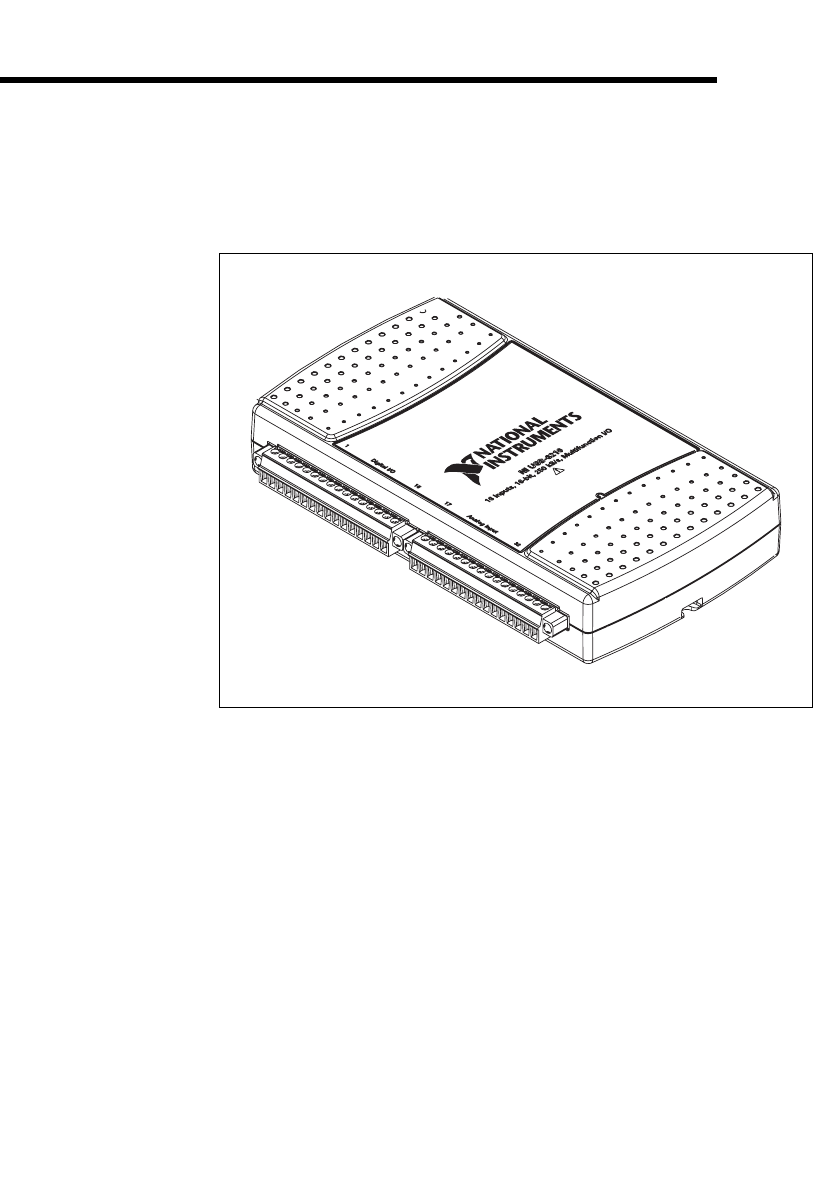
The NI 621x User Manual contains information about using the National
Instruments USB-621x data acquisition (DAQ) devices with
NI-DAQmx 8.3 and later. NI 621x devices feature up to 32 analog input
(AI) channels, up to two analog output (AO) channels, up to eight lines of
digital input (DI), up to eight lines of digital output (DO), and two counters.
Conventions
The following conventions are used in this manual:
<> Angle brackets that contain numbers separated by an ellipsis represent
a range of values associated with a bit or signal name—for example,
AO <3..0>.
»The » symbol leads you through nested menu items and dialog box options
to a final action. The sequence File»Page Setup»Options directs you to
pull down the File menu, select the Page Setup item, and select Options
from the last dialog box.
This icon denotes a note, which alerts you to important information.
This icon denotes a caution, which advises you of precautions to take to
avoid injury, data loss, or a system crash. When this symbol is marked on a
product, refer to the Read Me First: Safety and Radio-Frequency
Interference document which can be found at ni.com/manuals, for
information about precautions to take.
bold Bold text denotes items that you must select or click in the software, such
as menu items and dialog box options. Bold text also denotes parameter
names.
italic Italic text denotes variables, emphasis, a cross-reference, or an introduction
to a key concept. Italic text also denotes text that is a placeholder for a word
or value that you must supply.
monospace Text in this font denotes text or characters that you should enter from the
keyboard, sections of code, programming examples, and syntax examples.
This font is also used for the proper names of disk drives, paths, directories,
programs, subprograms, subroutines, device names, functions, operations,
variables, filenames, and extensions.

About This Manual
NI USB-621x User Manual xiv ni.com
Related Documentation
Each application software package and driver includes information about
writing applications for taking measurements and controlling measurement
devices. The following references to documents assume you have
NI-DAQ 8.3 or later, and where applicable, version 7.0 or later of the NI
application software.
NI-DAQmx for Windows
The NI-DAQmx for USB Devices Getting Started Guide describes
how to install your NI-DAQmx for Windows software, your
NI-DAQmx-supported DAQ device, and how to confirm that your device is
operating properly. Select Start»All Programs»National Instruments»
NI-DAQ»NI-DAQmx for USB Devices Getting Started.
The NI-DAQ Readme lists which devices are supported by this version of
NI-DAQ. Select Start»All Programs»National Instruments»NI-DAQ»
NI-DAQ Readme.
The NI-DAQmx Help contains general information about measurement
concepts, key NI-DAQmx concepts, and common applications that are
applicable to all programming environments. Select Start»All Programs»
National Instruments»NI-DAQ»NI-DAQmx Help.
LabVIEW
If you are a new user, use the Getting Started with LabVIEW manual to
familiarize yourself with the LabVIEW graphical programming
environment and the basic LabVIEW features you use to build data
acquisition and instrument control applications. Open the Getting Started
with LabVIEW manual by selecting Start»All Programs»National
Instruments»LabVIEW»LabVIEW Manuals or by navigating to the
labview\manuals directory and opening
LV_Getting_Started.pdf.
Use the LabVIEW Help, available by selecting Help»Search the
LabVIEW Help in LabVIEW, to access information about LabVIEW
programming concepts, step-by-step instructions for using LabVIEW, and
reference information about LabVIEW VIs, functions, palettes, menus, and

About This Manual
© National Instruments Corporation xv NI USB-621x User Manual
tools. Refer to the following locations on the Contents tab of the LabVIEW
Help for information about NI-DAQmx:
•Getting Started»Getting Started with DAQ—Includes overview
information and a tutorial to learn how to take an NI-DAQmx
measurement in LabVIEW using the DAQ Assistant.
•VI and Function Reference»Measurement I/O VIs and
Functions—Describes the LabVIEW NI-DAQmx VIs and properties.
•Taking Measurements—Contains the conceptual and how-to
information you need to acquire and analyze measurement data in
LabVIEW, including common measurements, measurement
fundamentals, NI-DAQmx key concepts, and device considerations.
LabWindows™/CVI™
The Data Acquisition book of the LabWindows/CVI Help contains
measurement concepts for NI-DAQmx. This book also contains Taking an
NI-DAQmx Measurement in LabWindows/CVI, which includes
step-by-step instructions about creating a measurement task using the DAQ
Assistant. In LabWindows/CVI, select Help»Contents, then select Using
LabWindows/CVI»Data Acquisition.
The NI-DAQmx Library book of the LabWindows/CVI Help contains API
overviews and function reference for NI-DAQmx. Select Library
Reference»NI-DAQmx Library in the LabWindows/CVI Help.
Measurement Studio
The NI Measurement Studio Help contains function reference,
measurement concepts, and a walkthrough for using the Measurement
Studio NI-DAQmx .NET and Visual C++ class libraries. This help
collection is integrated into the Microsoft Visual Studio .NET
documentation. In Visual Studio .NET, select Help»Contents.
Note You must have Visual Studio .NET installed to view the NI Measurement Studio
Help.
ANSI C without NI Application Software
The NI-DAQmx Help contains API overviews and general information
about measurement concepts. Select Start»All Programs»National
Instruments»NI-DAQmx Help.

About This Manual
NI USB-621x User Manual xvi ni.com
.NET Languages without NI Application Software
The NI Measurement Studio Help contains function reference and
measurement concepts for using the Measurement Studio NI-DAQmx
.NET and Visual C++ class libraries. This help collection is integrated into
the Visual Studio .NET documentation. In Visual Studio .NET, select
Help»Contents.
Note You must have Visual Studio .NET installed to view the NI Measurement Studio
Help.
Device Documentation and Specifications
The NI 621x Specifications contains all specifications for the USB-6210,
USB-6211, USB-6215, and USB-6218 M Series devices.
NI-DAQ 7.0 and later includes the Device Document Browser, which
contains online documentation for supported DAQ, SCXI, and switch
devices, such as help files describing device pinouts, features, and
operation, and PDF files of the printed device documents. You can find,
view, and/or print the documents for each device using the Device
Document Browser at any time by inserting the CD. After installing the
Device Document Browser, device documents are accessible from Start»
All Programs»National Instruments»NI-DAQ»Browse Device
Documentation.
Training Courses
If you need more help getting started developing an application with NI
products, NI offers training courses. To enroll in a course or obtain a
detailed course outline, refer to ni.com/training.
Technical Support on the Web
For additional support, refer to ni.com/support or zone.ni.com.
Note You can download these documents at ni.com/manuals.
DAQ specifications and some DAQ manuals are available as PDFs. You
must have Adobe Acrobat Reader with Search and Accessibility 5.0.5 or
later installed to view the PDFs. Refer to the Adobe Systems Incorporated
Web site at www.adobe.com to download Acrobat Reader. Refer to the
National Instruments Product Manuals Library at ni.com/manuals for
updated documentation resources.
Chapter 1 Getting Started
NI USB-621x User Manual 1-2 ni.com
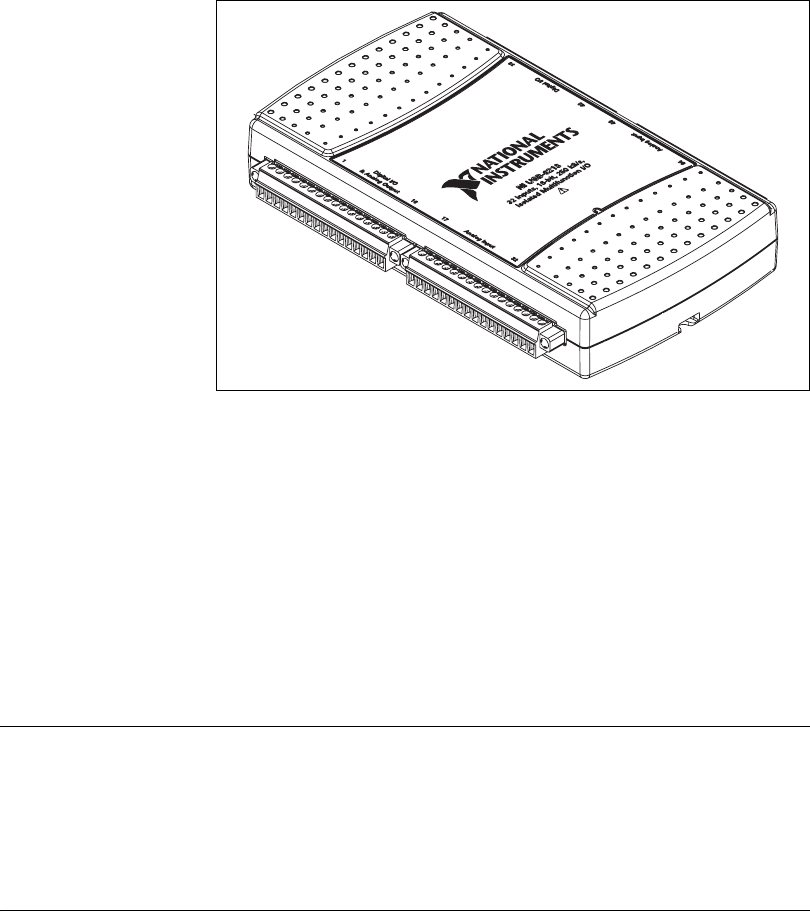
Figure 1-2. USB-6215/6218
NI 621x devices feature up to 32 analog input (AI) channels, up to two
analog output (AO) channels, 8 lines of digital input (DI), 8 lines of digital
output (DO), and two counters. If you have not already installed your
device, refer to the NI-DAQmx for USB Devices Getting Started Guide. For
specifications, refer to the NI 621x Specifications document on
ni.com/manuals.
Before installing your DAQ device, you must install the software you plan
to use with the device.
Installing NI-DAQmx
The NI-DAQmx for USB Devices Getting Started Guide, which you can
download at ni.com/manuals, offers NI-DAQmx users step-by-step
instructions for installing software and hardware, configuring channels and
tasks, and getting started developing an application.
Installing Other Software
If you are using other software, refer to the installation instructions that
accompany your software.

Chapter 1 Getting Started
© National Instruments Corporation 1-3 NI USB-621x User Manual
Installing the Hardware
The NI-DAQmx for USB Devices Getting Started Guide contains
non-software-specific information about how to install USB devices.
Device Pinouts
Refer to Appendix A, Device-Specific Information, for NI 621x device
pinouts.
Device Specifications
Refer to the NI 621x Specifications, available on the NI-DAQ Device
Document Browser or ni.com/manuals, for more detailed information
about NI 621x devices.
Device Accessories
NI offers a variety of accessories to use with your DAQ device. Refer to
Appendix A, Device-Specific Information, or ni.com for more
information.
© National Instruments Corporation 2-1 NI USB-621x User Manual
2
DAQ System Overview
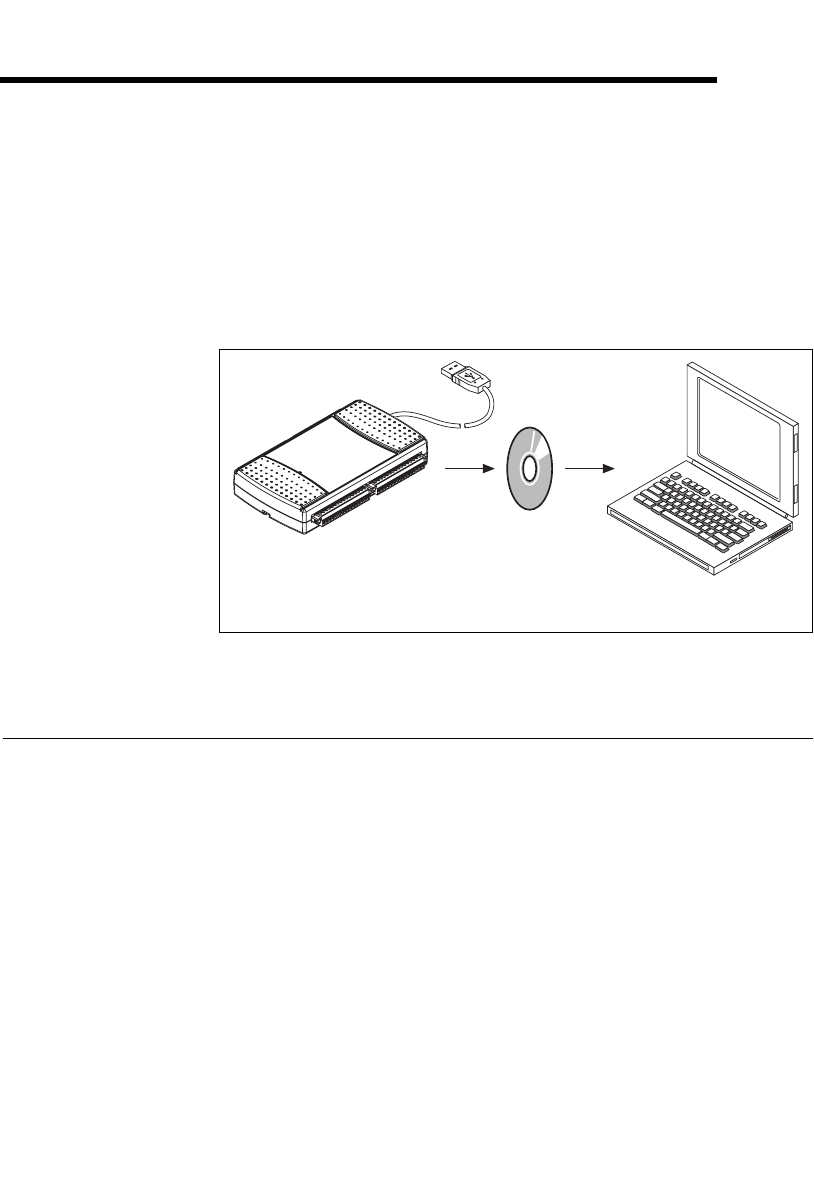
Figure 2-1 shows a typical DAQ system, which includes sensors,
transducers, signal conditioning devices, cables that connect the various
devices to the accessories, the M Series device, programming software, and
PC. The following sections cover the components of a typical DAQ system.
Figure 2-1. Components of a Typical DAQ System
DAQ Hardware
DAQ hardware digitizes signals, performs D/A conversions to generate
analog output signals, and measures and controls digital I/O signals.
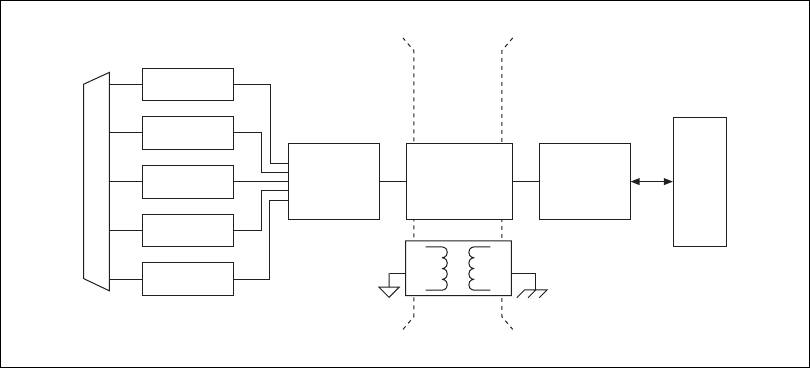
Figure 2-2 features components common to all USB M Series devices.
Personal Computer
or Laptop
DAQ
Hardware
DAQ
Software
Chapter 2 DAQ System Overview
NI USB-621x User Manual 2-2 ni.com
Figure 2-2. USB-621x Block Diagram
DAQ-STC2
The DAQ-STC2 implements a high-performance digital engine for
M Series data acquisition hardware. Some key features of this engine
include the following:
• Flexible AI and AO sample and convert timing
• Many triggering modes
• Independent AI, AO, and CTR FIFOs
• Generation and routing of internal and external timing signals
• Two flexible 32-bit counter/timer modules with hardware gating
• Static DI and static DO signals
• USB Hi-Speed 2.0 interface
• Up to four USB Signal Streams for acquisition and generation
functions
Calibration Circuitry
The M Series analog inputs and outputs have calibration circuitry to correct
gain and offset errors. You can calibrate the device to minimize AI and AO
errors caused by time and temperature drift at run time. No external
circuitry is necessary; an internal reference ensures high accuracy and
stability over time and temperature changes.
Analog Output
Digital I/O
Analog Input
Counters
PFI
Digital
Routing
and Clock
Generation
Bus
Interface Bus
I/O Connector
Digital
Isolators
Isolation
Barrier
(USB-6215
and USB-6218
devices only)

Chapter 2 DAQ System Overview
© National Instruments Corporation 2-3 NI USB-621x User Manual
Factory-calibration constants are permanently stored in an onboard
EEPROM and cannot be modified. When you self-calibrate the device,
software stores new constants in a user-modifiable section of the EEPROM.
To return a device to its initial factory calibration settings, software can
copy the factory-calibration constants to the user-modifiable section of the
EEPROM. Refer to the NI-DAQmx Help or the LabVIEW 8.x Help for more
information about using calibration constants.
Signal Conditioning
Many sensors and transducers require signal conditioning before a
measurement system can effectively and accurately acquire the signal. The
front-end signal conditioning system can include functions such as signal
amplification, attenuation, filtering, electrical isolation, simultaneous
sampling, and multiplexing. In addition, many transducers require
excitation currents or voltages, bridge completion, linearization, or high
amplification for proper and accurate operation. Therefore, most
computer-based measurement systems include some form of signal
conditioning in addition to plug-in data acquisition DAQ devices.
Sensors and Transducers
Sensors can generate electrical signals to measure physical phenomena,
such as temperature, force, sound, or light. Some commonly used sensors
are strain gauges, thermocouples, thermistors, angular encoders, linear
encoders, and resistance temperature detectors (RTDs).
To measure signals from these various transducers, you must convert them
into a form that a DAQ device can accept. For example, the output voltage
of most thermocouples is very small and susceptible to noise. Therefore,
you may need to amplify or filter the thermocouple output before digitizing
it. The manipulation of signals to prepare them for digitizing is called
signal conditioning.
For more information about sensors, refer to the following documents.
• For general information about sensors, visit ni.com/sensors.
• If you are using LabVIEW, refer to the LabVIEW Help by selecting
Help»Search the LabVIEW Help in LabVIEW and then navigate to
the Taking Measurements book on the Contents tab.
• If you are using other application software, refer to Common Sensors
in the NI-DAQmx Help or the LabVIEW 8.x Help.

Chapter 2 DAQ System Overview
NI USB-621x User Manual 2-4 ni.com
Programming Devices in Software
National Instruments measurement devices are packaged with NI-DAQ
driver software, an extensive library of functions and VIs you can call from
your application software, such as LabVIEW or LabWindows/CVI, to
program all the features of your NI measurement devices. Driver software
has an application programming interface (API), which is a library of VIs,
functions, classes, attributes, and properties for creating applications for
your device.
NI-DAQ 7.3 and later includes two NI-DAQ drivers—Traditional NI-DAQ
(Legacy) and NI-DAQmx. M Series devices use the NI-DAQmx driver.
Each driver has its own API, hardware configuration, and software
configuration. Refer to the NI-DAQmx for USB Devices Getting Started
Guide for more information about the two drivers.
NI-DAQmx includes a collection of programming examples to help you get
started developing an application. You can modify example code and save
it in an application. You can use examples to develop a new application or
add example code to an existing application.
To locate LabVIEW and LabWindows/CVI examples, open the National
Instruments Example Finder.
• In LabVIEW, select Help»Find Examples.
• In LabWindows/CVI, select Help»NI Example Finder.
Measurement Studio, Visual Basic, and ANSI C examples are located in the
following directories:
• NI-DAQmx examples for Measurement Studio-supported languages
are in the following directories:
–MeasurementStudio\VCNET\Examples\NIDaq
–MeasurementStudio\DotNET\Examples\NIDaq
• NI-DAQmx examples for ANSI C are in the
NI-DAQ\Examples\DAQmx ANSI C Dev directory
For additional examples, refer to zone.ni.com.

© National Instruments Corporation 3-1 NI USB-621x User Manual
3
Connector Information
The I/O Connector Signal Descriptions and +5 V Power sections contain
information about NI 621x connectors. Refer to Appendix A,
Device-Specific Information, for device I/O connector pinouts.
I/O Connector Signal Descriptions
Table 3-1 describes the signals found on the I/O connectors. Not all signals
are available on all devices.
Table 3-1. I/O Connector Signals
Signal Name Reference Direction Description
AI GND — — Analog Input Ground—These terminals are the
reference point for single-ended AI measurements in
RSE mode and the bias current return point for DIFF
measurements. All three ground references—AI GND,
AO GND, and D GND—are connected on the device.
AI <0..31> Va r i e s Input Analog Input Channels 0 to 31—For single-ended
measurements, each signal is an analog input voltage
channel. In RSE mode, AI GND is the reference for these
signals. In NRSE mode, the reference for each
AI <0..31> signal is AI SENSE.
For differential measurements, AI 0 and AI 8 are the
positive and negative inputs of differential analog input
channel 0. Similarly, the following signal pairs also form
differential input channels:
<AI 1, AI 9>, <AI 2, AI 10>, <AI 3, AI 11>,
<AI4,AI12>, <AI5,AI13>, <AI6,AI14>,
<AI 7, AI 15>, <AI 16, AI 24>, <AI 17, AI 25>,
<AI 18, AI 26>, <AI 19, AI 27>, <AI 20, AI 28>,
<AI 21, AI 29>, <AI 22, AI 30>, <AI 23, AI 31>
AI SENSE —Input Analog Input Sense—In NRSE mode, the reference for
each AI <0..31> signal is AI SENSE.
AO <0..1> AO GND Output Analog Output Channels 0 to 1—These terminals
supply the voltage output of AO channels 0 to 1.

Chapter 3 Connector Information
NI USB-621x User Manual 3-2 ni.com
+5 V Power
The +5 V terminals on the I/O connector can be use as either an output or
an input. Both terminals are internally connected on the USB-621x.
+5 V Power as an Output
Because the USB-621x devices are bus powered, there is a 50 mA limit on
the total current that can be drawn from the +5 V terminals and the digital
outputs PFI <4..7> and PFI <12..15>/P1.<0..7>. The USB-621x monitors
the total current and will drop the voltage on all of the digital outputs and
the +5 V terminals if the 50 mA limit is exceeded.
AO GND — — Analog Output Ground—AO GND is the reference for
AO <0..1>. All three ground references—AI GND,
AO GND, and D GND—are connected on the device.
D GND — — Digital Ground—D GND supplies the reference for
PFI <0..15>/P0/P1 and +5 V. All three ground
references—AI GND, AO GND, and D GND—are
connected on the device.
+5 V D GND Input or
Output
+5 V Power—These terminals provide a +5 V power
source or can be used to externally power the PFI outputs.
PFI <0..3>,
PFI <8..11>/P0.<0..7>
D GND Input Programmable Function Interface or Static Digital
Input Channels 0 to 7—Each PFI terminal can be used
to supply an external source for AI, AO, or counter/timer
inputs.
You also can use these terminals as static digital input
lines.
PFI <4..7>,
PFI <12..15>/P1.<0..7>
D GND Output Programmable Function Interface or Static Digital
Output Channels 0 to 7—You can route many different
internal AI, AO, or counter/timer outputs to each PFI
terminal.
You also can use these terminals as static digital output
lines.
NC — — No connect—Do not connect signals to these terminals.
Table 3-1. I/O Connector Signals (Continued)
Signal Name Reference Direction Description
Chapter 3 Connector Information
© National Instruments Corporation 3-3 NI USB-621x User Manual
+5 V Power as an Input
If you have high current loads for the digital outputs to drive, you can
exceed the 50 mA internal limit by connecting an external +5 V power
source to the +5 V terminals. These terminals are protected against
undervoltage and overvoltage, and they have a 350 mA self-resetting fuse
to protect them from short circuit conditions. If your USB-621x device has
more than one +5 V terminal, you can connect the external power supply to
one terminal and use the other as a power source.
© National Instruments Corporation 4-1 NI USB-621x User Manual
4
Analog Input
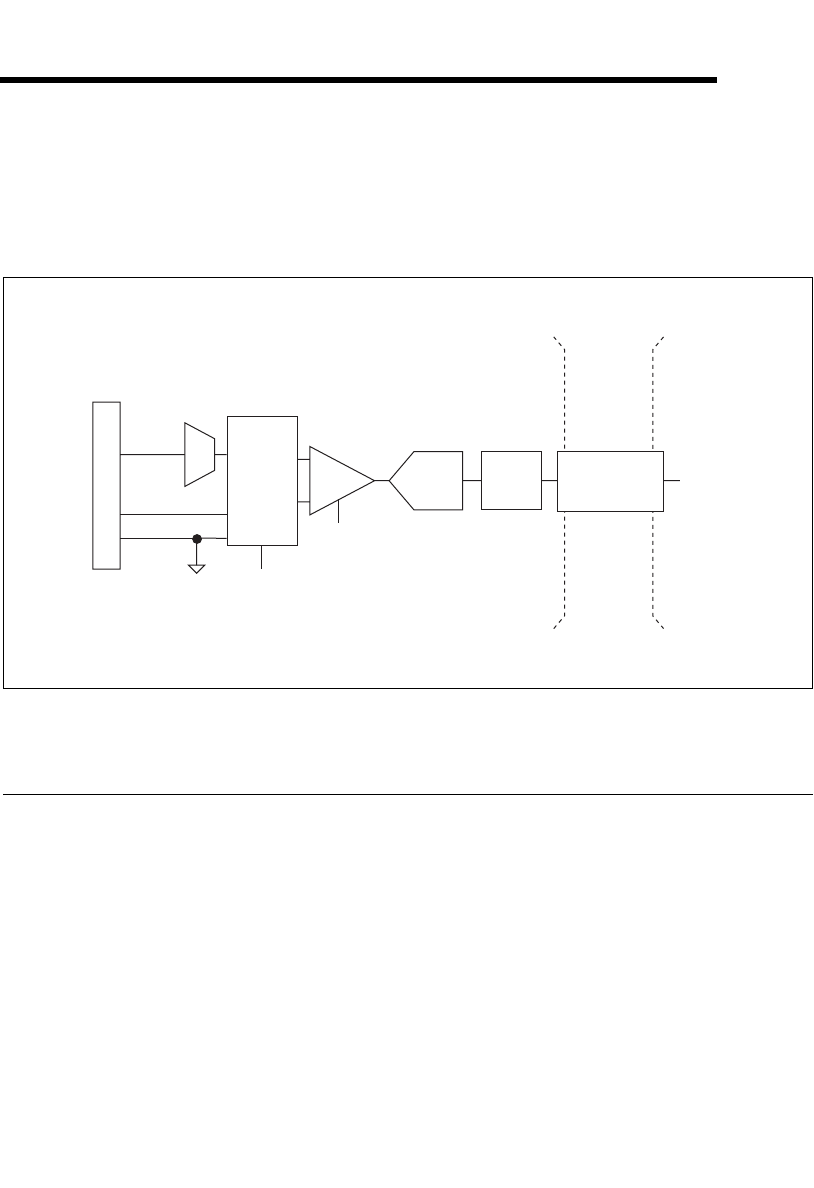
Figure 4-1 shows the analog input circuitry of NI 621x devices.
Figure 4-1. M Series Analog Input Circuitry
Analog Input Circuitry
I/O Connector
You can connect analog input signals to the M Series device through the I/O
connector. The proper way to connect analog input signals depends on the
analog input ground-reference settings, described in the Analog Input
Ground-Reference Settings section. Also refer to Appendix A,
Device-Specific Information, for device I/O connector pinouts.
MUX
Each M Series device has one analog-to-digital converter (ADC). The
multiplexers (MUX) route one AI channel at a time to the ADC through the
NI-PGIA.
DIFF, RSE,
or NRSE
I/O Connector
AI <0..
n
>MUX
AI SENSE
AI GND
NI-PGIA
AI Terminal
Configuration
Selection
Input Range
Selection
ADC AI FIFO AI Data
Digital
Isolators
Isolation
Barrier
(USB-6215
and USB-6218
devices only)

Chapter 4 Analog Input
NI USB-621x User Manual 4-2 ni.com
Ground-Reference Settings
The analog input ground-reference settings circuitry selects between
differential, referenced single-ended, and non-referenced single-ended
input modes. Each AI channel can use a different mode.
Instrumentation Amplifier (NI-PGIA)
The NI programmable gain instrumentation amplifier (NI-PGIA) is a
measurement and instrument class amplifier that minimizes settling times
for all input ranges. The NI-PGIA can amplify or attenuate an AI signal to
ensure that you use the maximum resolution of the ADC.
M Series devices use the NI-PGIA to deliver high accuracy even when
sampling multiple channels with small input ranges at fast rates. M Series
devices can sample channels in any order at the maximum conversion rate,
and you can individually program each channel in a sample with a different
input range.
A/D Converter
The analog-to-digital converter (ADC) digitizes the AI signal by converting
the analog voltage into a digital number.
AI FIFO
M Series devices can perform both single and multiple A/D conversions of
a fixed or infinite number of samples. A large first-in-first-out (FIFO)
buffer holds data during AI acquisitions to ensure that no data is lost.
M Series devices can handle multiple A/D conversion operations with
DMA, interrupts, or programmed I/O.
Analog Input Range
The input range affects the resolution of the M Series device for an AI
channel. For example, a 16-bit ADC converts analog inputs into one of
65,536 (= 216) codes—that is, one of 65,536 possible digital values. So, for
an input range of –10 V to 10 V, the voltage of each code of a 16-bit ADC
is:
M Series devices use a calibration method that requires some codes
(typically about 5% of the codes) to lie outside of the specified range. This
(10 V – (–10 V))
216 = 305 μV
Chapter 4 Analog Input
© National Instruments Corporation 4-3 NI USB-621x User Manual
calibration method improves absolute accuracy, but it increases the nominal
resolution of input ranges by about 5% over what the formula shown above
would indicate.
Choose an input range that matches the expected input range of your signal.
A large input range can accommodate a large signal variation, but reduces
the voltage resolution. Choosing a smaller input range improves the voltage
resolution, but may result in the input signal going out of range.
For more information about setting ranges, refer to the NI-DAQmx Help or
the LabVIEW 8.x Help.
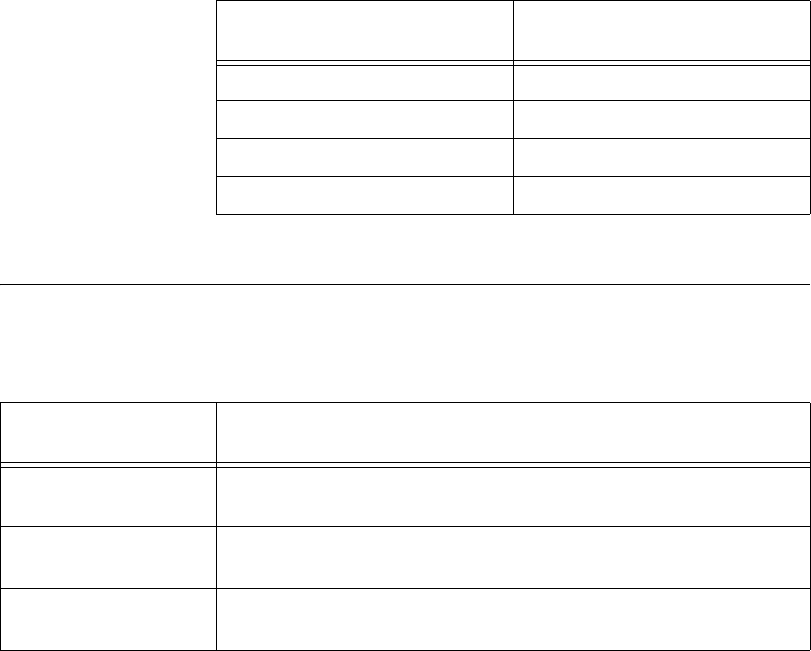
Table 4-1 shows the input ranges and resolutions supported by NI 621x
devices.
Analog Input Ground-Reference Settings
NI 621x devices support the analog input ground-reference settings shown
in Table 4-2.
Table 4-1. Input Ranges for NI 621x
Input Range
Nominal Resolution Assuming
5% Over Range
–10 V to 10 V 320 μV
–5 V to 5 V 160 μV
–1 V to 1 V 32 μV
–200 mV to 200 mV 6.4 μV
Table 4-2. Analog Input Ground-Reference Settings
AI Ground-Reference
Settings Description
DIFF In differential (DIFF) mode, NI 621x devices measure the difference in
voltage between two AI signals.
RSE In referenced single-ended (RSE) mode, NI 621x devices measure the
voltage of an AI signal relative to AI GND.
NRSE In non-referenced single-ended (NRSE) mode, NI 621x devices measure
the voltage of an AI signal relative to the AI SENSE input.
Chapter 4 Analog Input
NI USB-621x User Manual 4-4 ni.com
The AI ground-reference setting determines how you should connect your
AI signals to the NI 621x device. Refer to Chapter 5, Connecting AI Signals
on the USB-6210/6211 Devices, section for more information.
Ground-reference settings are programmed on a per-channel basis. For
example, you might configure the device to scan 12 channels—four
differentially-configured channels and eight single-ended channels.
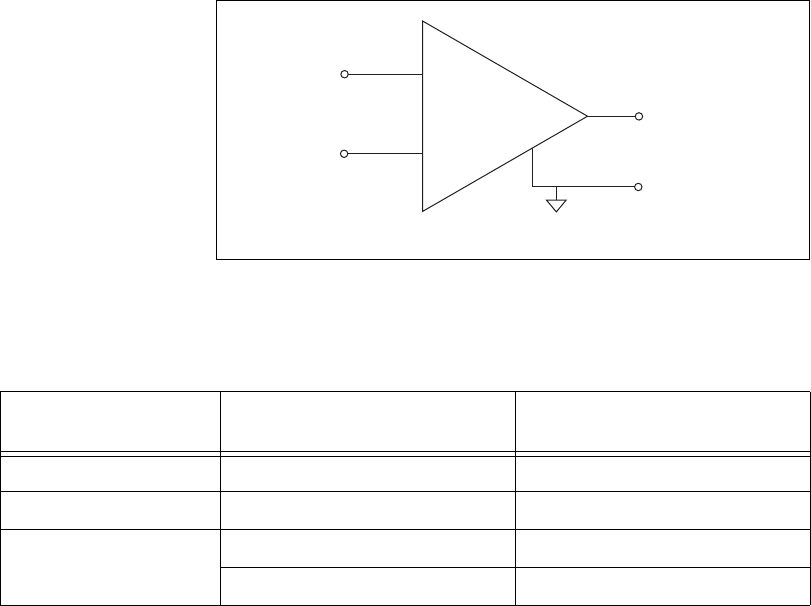
NI 621x devices implement the different analog input ground-reference
settings by routing different signals to the NI-PGIA. The NI-PGIA is a
differential amplifier. That is, the NI-PGIA amplifies (or attenuates) the
difference in voltage between its two inputs. The NI-PGIA drives the ADC
with this amplified voltage. The amount of amplification (the gain), is
determined by the analog input range, as shown in Figure 4-2.
Figure 4-2. NI-PGIA
Table 4-3 shows how signals are routed to the NI-PGIA.
For differential measurements, AI 0 and AI 8 are the positive and negative
inputs of differential analog input channel 0. For a complete list of signal
Table 4-3. Signals Routed to the NI-PGIA
AI Ground-Reference
Settings
Signals Routed to the Positive
Input of the NI-PGIA (Vin+)
Signals Routed to the Negative
Input of the NI-PGIA (Vin–)
RSE AI <0..31> AI GND
NRSE AI <0..31> AI SENSE
DIFF AI <0..7> AI <8..15>
AI <16..23> AI <24..31>
V
in+
V
m
= [V
in+
– V
in–
] × Gain
V
m
V
in–
PGIA +
–
Measured
Voltage
Instrumentation
Amplifier
Chapter 4 Analog Input
© National Instruments Corporation 4-5 NI USB-621x User Manual
pairs that form differential input channels, refer to the I/O Connector Signal
Descriptions section of Chapter 3, Connector Information.
Caution The maximum input voltages rating of AI signals with respect to AI GND (and
for differential signals with respect to each other) are listed in the specifications document
for your device. Exceeding the maximum input voltage of AI signals distorts the
measurement results. Exceeding the maximum input voltage rating also can damage the
device and the computer. NI is not liable for any damage resulting from such signal
connections.
AI ground-reference setting is sometimes referred to as AI terminal
configuration.
Configuring AI Ground-Reference Settings in Software
You can program channels on an M Series device to acquire with different
ground references.
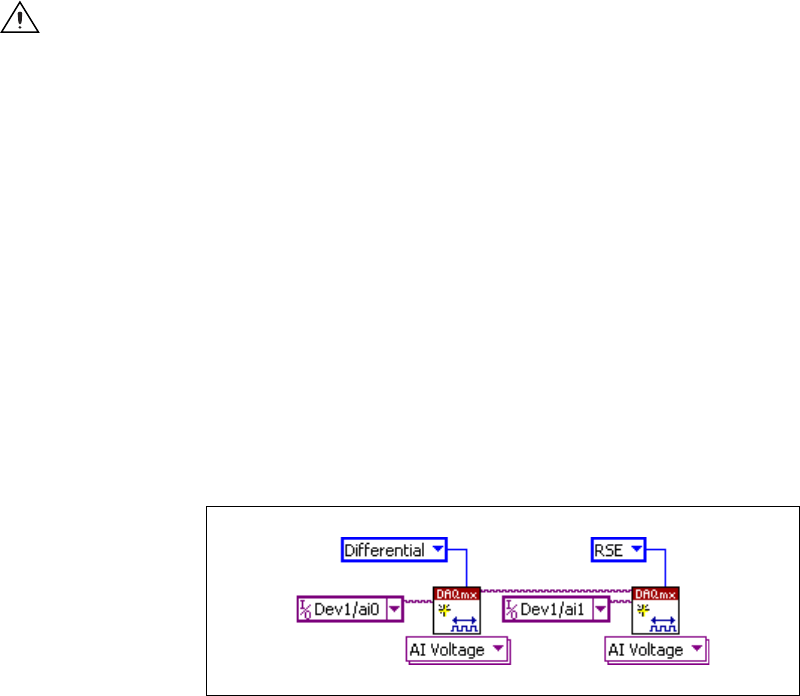
To enable multimode scanning in LabVIEW, use NI-DAQmx Create
Virtual Channel.vi of the NI-DAQmx API. You must use a new VI for
each channel or group of channels configured in a different input mode. In
Figure 4-3, channel 0 is configured in differential mode, and channel 1 is
configured in RSE mode.
Figure 4-3. Enabling Multimode Scanning in LabVIEW
To configure the input mode of your voltage measurement using the DAQ
Assistant, use the Terminal Configuration drop-down list. Refer to the
DAQ Assistant Help for more information about the DAQ Assistant.
To configure the input mode of your voltage measurement using the
NI-DAQmx C API, set the terminalConfig property. Refer to the
NI-DAQmx C Reference Help for more information.

Chapter 4 Analog Input
NI USB-621x User Manual 4-6 ni.com
Multichannel Scanning Considerations
M Series devices can scan multiple channels at high rates and digitize the
signals accurately. However, you should consider several issues when
designing your measurement system to ensure the high accuracy of your
measurements.
In multichannel scanning applications, accuracy is affected by settling
time. When your NI 621x device switches from one AI channel to another
AI channel, the device configures the NI-PGIA with the input range of the
new channel. The NI-PGIA then amplifies the input signal with the gain for
the new input range. Settling time refers to the time it takes the NI-PGIA to
amplify the input signal to the desired accuracy before it is sampled by the
ADC. The specifications document for your DAQ device lists its settling
time.
NI 621x devices are designed to have fast settling times. However, several
factors can increase the settling time which decreases the accuracy of your
measurements. To ensure fast settling times, you should do the following
(in order of importance):
• Use low impedance sources
• Use short high-quality cabling
• Carefully choose the channel scanning order
• Avoid scanning faster than necessary
The following sections contain more information about these factors.
Use Low Impedance Sources
To ensure fast settling times, your signal sources should have an impedance
of <1 kΩ. Large source impedances increase the settling time of the
NI-PGIA, and so decrease the accuracy at fast scanning rates.
Settling times increase when scanning high-impedance signals due to a
phenomenon called charge injection. Multiplexers contain switches,
usually made of switched capacitors. When one of the channels, for
example channel 0, is selected in a multiplexer, those capacitors
accumulate charge. When the next channel, for example channel 1, is
selected, the accumulated charge leaks backward through channel 1. If the
output impedance of the source connected to channel 1 is high enough, the
resulting reading of channel 1 can be partially affected by the voltage on
channel 0. This effect is referred to as ghosting.
Chapter 4 Analog Input
© National Instruments Corporation 4-7 NI USB-621x User Manual
If your source impedance is high, you can decrease the scan rate to allow
the NI-PGIA more time to settle. Another option is to use a voltage follower
circuit external to your DAQ device to decrease the impedance seen by the
DAQ device. Refer to the KnowledgeBase document, How Do I Create a
Buffer to Decrease the Source Impedance of My Analog Input Signal?,
by going to ni.com/info and entering the info code rdbbis.
Carefully Choose the Channel Scanning Order
Avoid Switching from a Large to a Small Input Range
Switching from a channel with a large input range to a channel with a small
input range can greatly increase the settling time.
Suppose a 4 V signal is connected to channel 0 and a 1 mV signal is
connected to channel 1. The input range for channel 0 is –10 V to 10 V and
the input range of channel 1 is –200 mV to 200 mV.
When the multiplexer switches from channel 0 to channel 1, the input to the
NI-PGIA switches from 4 V to 1 mV. The approximately 4 V step from 4 V
to 1 mV is 1,000% of the new full-scale range. For a 16-bit device to settle
within 0.0015% (15 ppm or 1 LSB) of the ±200 mV full-scale range on
channel 1, the input circuitry must settle to within 0.000031% (0.31 ppm or
1/50 LSB) of the ±10 V range. Some devices can take many microseconds
for the circuitry to settle this much.
To avoid this effect, you should arrange your channel scanning order so that
transitions from large to small input ranges are infrequent.
In general, you do not need this extra settling time when the NI-PGIA is
switching from a small input range to a larger input range.
Insert Grounded Channel between Signal Channels
Another technique to improve settling time is to connect an input channel
to ground. Then insert this channel in the scan list between two of your
signal channels. The input range of the grounded channel should match the
input range of the signal after the grounded channel in the scan list.
Consider again the example above where a 4 V signal is connected to
channel 0 and a 1 mV signal is connected to channel 1. Suppose the input
range for channel 0 is –10 V to 10 V and the input range of channel 1 is
–200mV to 200mV.
Chapter 4 Analog Input
NI USB-621x User Manual 4-8 ni.com
You can connect channel 2 to AI GND (or you can use the internal ground
signal; refer to Internal Channels in the NI-DAQmx Help). Set the input
range of channel 2 to –200 mV to 200 mV to match channel 1. Then scan
channels in the order: 0, 2, 1.
Inserting a grounded channel between signal channels improves settling
time because the NI-PGIA adjusts to the new input range setting faster
when the input is grounded.
Minimize Voltage Step between Adjacent Channels
When scanning between channels that have the same input range, the
settling time increases with the voltage step between the channels. If you
know the expected input range of your signals, you can group signals with
similar expected ranges together in your scan list.
For example, suppose all channels in a system use a –5 to 5 V input range.
The signals on channels 0, 2, and 4 vary between 4.3 V and 5 V. The signals
on channels 1, 3, and 5 vary between –4 V and 0 V. Scanning channels in
the order 0, 2, 4, 1, 3, 5 produces more accurate results than scanning
channels in the order 0, 1, 2, 3, 4, 5.
Avoid Scanning Faster Than Necessary
Designing your system to scan at slower speeds gives the NI-PGIA more
time to settle to a more accurate level. Here are two examples to consider.
Example 1
Averaging many AI samples can increase the accuracy of the reading by
decreasing noise effects. In general, the more points you average, the more
accurate the final result. However, you may choose to decrease the number
of points you average and slow down the scanning rate.
Suppose you want to sample 10 channels over a period of 20 ms and
average the results. You could acquire 250 points from each channel at a
scan rate of 125 kS/s. Another method would be to acquire 500 points from
each channel at a scan rate of 250 kS/s. Both methods take the same amount
of time. Doubling the number of samples averaged (from 250 to 500)
decreases the effect of noise by a factor of 1.4 (the square root of 2).
However, doubling the number of samples (in this example) decreases the
time the NI-PGIA has to settle from 8 µs to 4 µs. In some cases, the slower
scan rate system returns more accurate results.

Chapter 4 Analog Input
© National Instruments Corporation 4-9 NI USB-621x User Manual
Example 2
If the time relationship between channels is not critical, you can sample
from the same channel multiple times and scan less frequently. For
example, suppose an application requires averaging 100 points from
channel 0 and averaging 100 points from channel 1. You could alternate
reading between channels—that is, read one point from channel 0, then
one point from channel 1, and so on. You also could read all 100 points
from channel 0 then read 100 points from channel 1. The second method
switches between channels much less often and is affected much less by
settling time.
Analog Input Data Acquisition Methods
When performing analog input measurements, you either can perform
software-timed or hardware-timed acquisitions. Hardware-timed
acquisitions can be buffered or non-buffered.
Software-Timed Acquisitions
With a software-timed acquisition, software controls the rate of the
acquisition. Software sends a separate command to the hardware to initiate
each ADC conversion. In NI-DAQmx, software-timed acquisitions are
referred to as having on-demand timing. Software-timed acquisitions are
also referred to as immediate or static acquisitions and are typically used
for reading a single sample of data.
Hardware-Timed Acquisitions
With hardware-timed acquisitions, a digital hardware signal
(ai/SampleClock) controls the rate of the acquisition. This signal can be
generated internally on your device or provided externally.
Hardware-timed acquisitions have several advantages over software-timed
acquisitions.
• The time between samples can be much shorter.
• The timing between samples is deterministic.
• Hardware-timed acquisitions can use hardware triggering.
Hardware-timed operations can be buffered or non-buffered.

Chapter 4 Analog Input
NI USB-621x User Manual 4-10 ni.com
Buffered
In a buffered acquisition, data is moved from the DAQ device’s onboard
FIFO memory to a PC buffer using USB signal streams or programmed I/O
before it is transferred to application memory. Buffered acquisitions
typically allow for much faster transfer rates than non-buffered acquisitions
because data is moved in large blocks, rather than one point at a time.
One property of buffered I/O operations is the sample mode. The sample
mode can be either finite or continuous.
Finite sample mode acquisition refers to the acquisition of a specific,
predetermined number of data samples. Once the specified number of
samples has been written out, the generation stops. If you use a reference
trigger, you must use finite sample mode.
Continuous acquisition refers to the acquisition of an unspecified number
of samples. Instead of acquiring a set number of data samples and stopping,
a continuous acquisition continues until you stop the operation. Continuous
acquisition is also referred to as double-buffered or circular-buffered
acquisition.
If data cannot be transferred across the bus fast enough, the FIFO becomes
full. New acquisitions will overwrite data in the FIFO before it can be
transferred to host memory. The device generates an error in this case. With
continuous operations, if the user program does not read data out of the PC
buffer fast enough to keep up with the data transfer, the buffer could reach
an overflow condition, causing an error to be generated.
Non-Buffered
Hardware-timed, non-buffered mode is not supported for USB M series
devices.
Analog Input Digital Triggering
Analog input supports three different triggering actions:
• Start trigger
• Reference trigger
• Pause trigger
Refer to the AI Start Trigger Signal, AI Reference Trigger Signal, and AI
Pause Trigger Signal sections for information about these triggers.

Chapter 4 Analog Input
© National Instruments Corporation 4-11 NI USB-621x User Manual
A digital trigger can initiate these actions. All NI 621x devices support
digital triggering. NI 621x devices do not support analog triggering.
Field Wiring Considerations
Environmental noise can seriously affect the measurement accuracy of the
device if you do not take proper care when running signal wires between
signal sources and the device. The following recommendations apply
mainly to AI signal routing to the device, although they also apply to signal
routing in general.
Minimize noise pickup and maximize measurement accuracy by taking the
following precautions.
• Use DIFF AI connections to reject common-mode noise.
• Use individually shielded, twisted-pair wires to connect AI signals to
the device. With this type of wire, the signals attached to the positive
and negative input channels are twisted together and then covered with
a shield. You then connect this shield only at one point to the signal
source ground. This kind of connection is required for signals traveling
through areas with large magnetic fields or high electromagnetic
interference.
Refer to the NI Developer Zone document, Field Wiring and Noise
Considerations for Analog Signals, for more information. To access this
document, go to ni.com/info and enter the info code rdfwn3.
Analog Input Timing Signals
In order to provide all of the timing functionality described throughout this
section, M Series devices have a flexible timing engine. Figure 4-4
summarizes all of the timing options provided by the analog input timing
engine.
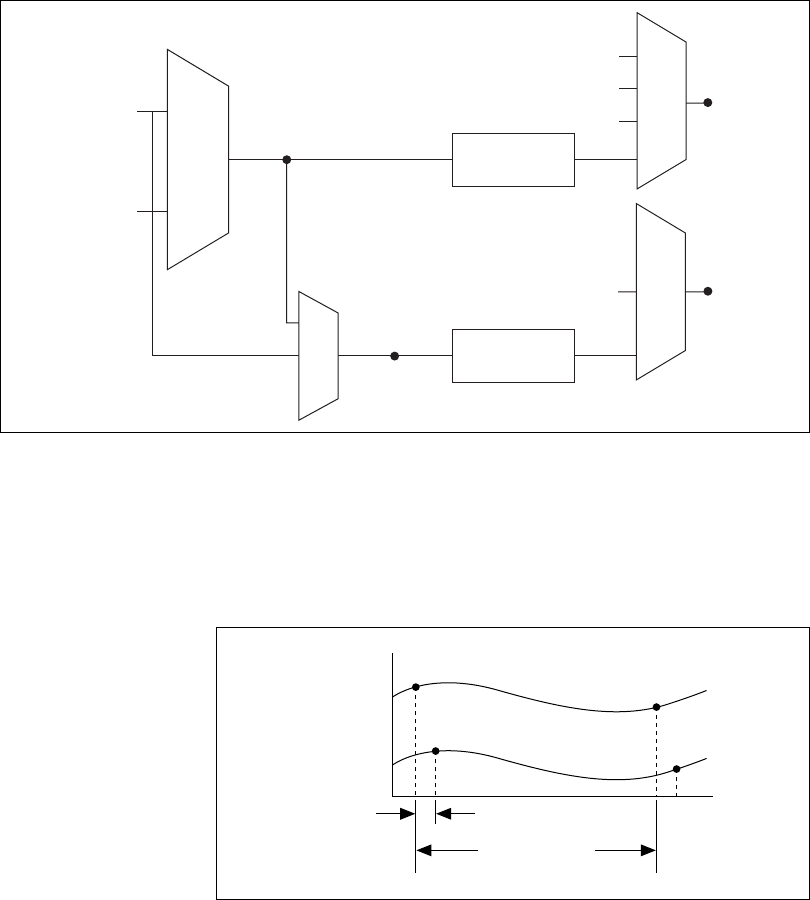
Chapter 4 Analog Input
NI USB-621x User Manual 4-12 ni.com
Figure 4-4. Analog Input Timing Options
M Series devices use ai/SampleClock and ai/ConvertClock to perform
interval sampling. As Figure 4-5 shows, ai/SampleClock controls the
sample period, which is determined by the following equation:
1/Sample Period = Sample Rate
Figure 4-5. Interval Sampling
ai/ConvertClock controls the Convert Period, which is determined by the
following equation:
1/Convert Period = Convert Rate
20 MHz Timebase
100 kHz Timebase
Programmable
Clock
Divider
Programmable
Clock
Divider
ai/SampleClock
Timebase
ai/ConvertClock
Timebase
Analog Comparison Event
Ctr
n
Internal Output
SW Pulse
Ctr
n
Internal Output
ai/ConvertClock
ai/SampleClock
Channel 0
Channel 1
Convert Period
Sample Period
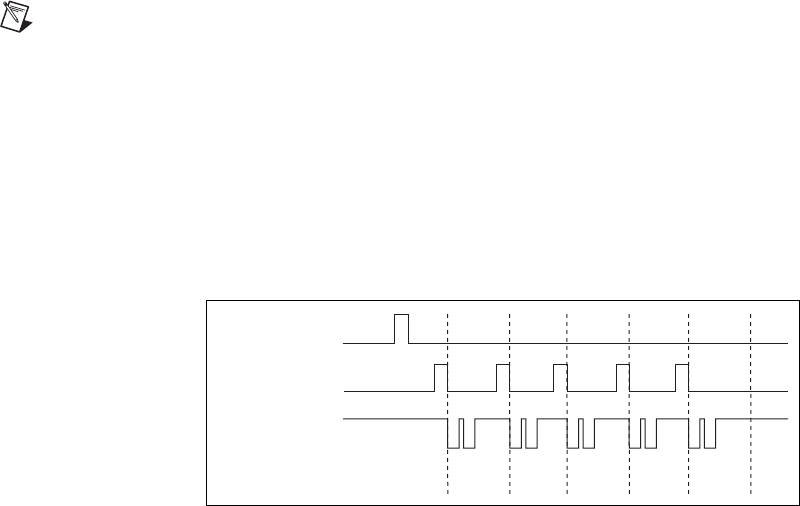
Chapter 4 Analog Input
© National Instruments Corporation 4-13 NI USB-621x User Manual
NI-DAQmx chooses the default convert rate to allow for the maximum
settling time between conversions. Typically, this rate is the sampling rate
for the task multiplied by the number of channels in the task.
Note The sampling rate is the fastest you can acquire data on the device and still achieve
accurate results. For example, if an M Series device has a sampling rate of 250 kS/s, this
sampling rate is aggregate—one channel at 250 kS/s or two channels at 125 kS/s per
channel illustrates the relationship.
Posttriggered data acquisition allows you to view only data that is acquired
after a trigger event is received. A typical posttriggered DAQ sequence is
shown in Figure 4-6. The sample counter is loaded with the specified
number of posttrigger samples, in this example, five. The value decrements
with each pulse on ai/SampleClock, until the value reaches zero and all
desired samples have been acquired.
Figure 4-6. Posttriggered Data Acquisition Example
Pretriggered data acquisition allows you to view data that is acquired before
the trigger of interest, in addition to data acquired after the trigger.
Figure 4-7 shows a typical pretriggered DAQ sequence. ai/StartTrigger can
be either a hardware or software signal. If ai/StartTrigger is set up to be a
software start trigger, an output pulse appears on the ai/StartTrigger line
when the acquisition begins. When the ai/StartTrigger pulse occurs, the
sample counter is loaded with the number of pretriggered samples, in this
example, four. The value decrements with each pulse on ai/SampleClock,
until the value reaches zero. The sample counter is then loaded with the
number of posttriggered samples, in this example, three.
13042
ai/StartTrigger
ai/SampleClock
ai/ConvertClock
Sample Counter
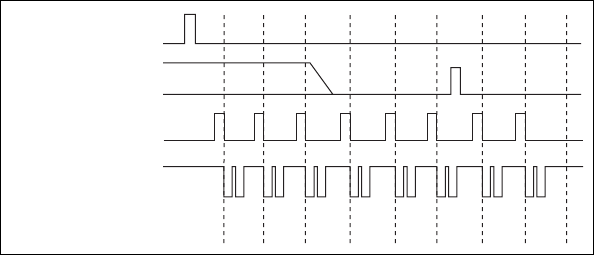
Chapter 4 Analog Input
NI USB-621x User Manual 4-14 ni.com
Figure 4-7. Pretriggered Data Acquisition Example
If an ai/ReferenceTrigger pulse occurs before the specified number of
pretrigger samples are acquired, the trigger pulse is ignored. Otherwise,
when the ai/ReferenceTrigger pulse occurs, the sample counter value
decrements until the specified number of posttrigger samples have been
acquired.
USB M Series devices feature the following analog input timing signals.
• AI Sample Clock Signal
• AI Sample Clock Timebase Signal
• AI Convert Clock Signal
• AI Convert Clock Timebase Signal
• AI Hold Complete Event Signal
• AI Start Trigger Signal
• AI Reference Trigger Signal
• AI Pause Trigger Signal
AI Sample Clock Signal
Use the AI Sample Clock (ai/SampleClock) signal to initiate a set of
measurements. Your M Series device samples the AI signals of every
channel in the task once for every ai/SampleClock. A measurement
acquisition consists of one or more samples.
You can specify an internal or external source for ai/SampleClock. You also
can specify whether the measurement sample begins on the rising edge or
falling edge of ai/SampleClock.
n/a
0 1 2
3 1 0 2 2 2
ai/StartTrigger
ai/ReferenceTrigger
ai/SampleClock
ai/ConvertClock
Scan Counter
Chapter 4 Analog Input
© National Instruments Corporation 4-15 NI USB-621x User Manual
Using an Internal Source
One of the following internal signals can drive ai/SampleClock.
• Counter n Internal Output
• AI Sample Clock Timebase (divided down)
•A software pulse
A programmable internal counter divides down the sample clock timebase.
Using an External Source
Use the external signals PFI <0..3> or PFI <8..11> as the source of
ai/SampleClock.
Routing AI Sample Clock Signal to an Output
Terminal
You can route ai/SampleClock out to any PFI <4..7> or PFI <12..15>
terminal. This pulse is always active high.
You can specify the output to have one of two behaviors. With the pulse
behavior, your DAQ device briefly pulses the PFI terminal once for every
occurrence of ai/SampleClock.
With level behavior, your DAQ device drives the PFI terminal high during
the entire sample.
Other Timing Requirements
Your DAQ device only acquires data during an acquisition. The device
ignores ai/SampleClock when a measurement acquisition is not in progress.
During a measurement acquisition, you can cause your DAQ device to
ignore ai/SampleClock using the ai/PauseTrigger signal.
A counter on your device internally generates ai/SampleClock unless you
select some external source. ai/StartTrigger starts this counter and either
software or hardware can stop it once a finite acquisition completes. When
using an internally generated ai/SampleClock, you also can specify a
configurable delay from ai/StartTrigger to the first ai/SampleClock pulse.
By default, this delay is set to two ticks of the ai/SampleClockTimebase
signal. When using an externally generated ai/SampleClock, you must
ensure the clock signal is consistent with respect to the timing requirements
of ai/ConvertClock. Failure to do so may result in ai/SampleClock pulses
that are masked off and acquisitions with erratic sampling intervals. Refer
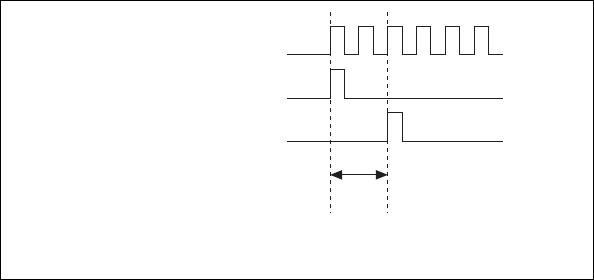
Chapter 4 Analog Input
NI USB-621x User Manual 4-16 ni.com
to AI Convert Clock Signal for more information about the timing
requirements between ai/ConvertClock and ai/SampleClock.
Figure 4-8 shows the relationship of ai/SampleClock to ai/StartTrigger.
Figure 4-8. ai/SampleClock and ai/StartTrigger
AI Sample Clock Timebase Signal
You can route any of the following signals to be the AI Sample Clock
Timebase (ai/SampleClockTimebase) signal:
• 20 MHz Timebase
• 100 kHz Timebase
• PFI <0..3>, PFI <8..11>
ai/SampleClockTimebase is not available as an output on the I/O connector.
ai/SampleClockTimebase is divided down to provide one of the possible
sources for ai/SampleClock. You can configure the polarity selection for
ai/SampleClockTimebase as either rising or falling edge.
AI Convert Clock Signal
Use the AI Convert Clock (ai/ConvertClock) signal to initiate a single A/D
conversion on a single channel. A sample (controlled by the AI Sample
Clock) consists of one or more conversions.
You can specify either an internal or external signal as the source of
ai/ConvertClock. You also can specify whether the measurement sample
begins on the rising edge or falling edge of ai/ConvertClock.
By default, NI-DAQmx chooses the fastest conversion rate possible based
on the speed of the A/D converter and adds 10 µs of padding between each
ai/SampleClockTimebase
ai/StartTrigger
ai/SampleClock
Delay
From
Start
Trigger

Chapter 4 Analog Input
© National Instruments Corporation 4-17 NI USB-621x User Manual
channel to allow for adequate settling time. This scheme enables the
channels to approximate simultaneous sampling and still allow for
adequate settling time. If the AI Sample Clock rate is too fast to allow for
this 10 µs of padding, NI-DAQmx chooses the conversion rate so that the
AI Convert Clock pulses are evenly spaced throughout the sample.
To explicitly specify the conversion rate, use AI Convert Clock Rate
DAQmx Timing property node or function.
Caution Setting the conversion rate higher than the maximum rate specified for your
device will result in errors.
Using an Internal Source
One of the following internal signals can drive ai/ConvertClock:
• AI Convert Clock Timebase (divided down)
• Counter n Internal Output
A programmable internal counter divides down the AI Convert Clock
Timebase to generate ai/ConvertClock. The counter is started by
ai/SampleClock and continues to count down to zero, produces an
ai/ConvertClock, reloads itself, and repeats the process until the sample is
finished. It then reloads itself in preparation for the next ai/SampleClock
pulse.
Using an External Source
Use the external signals PFI <0..3> or PFI <8..11> as the source of
ai/ConvertClock:
Routing AI Convert Clock Signal to an Output
Terminal
You can route ai/ConvertClock (as an active low signal) out to any
PFI <4..7> or PFI <12..15> terminal.
Using a Delay from Sample Clock to Convert Clock
When using an internally generated ai/ConvertClock, you also can specify
a configurable delay from ai/SampleClock to the first ai/ConvertClock
pulse within the sample. By default, this delay is three ticks of
ai/ConvertClockTimebase.
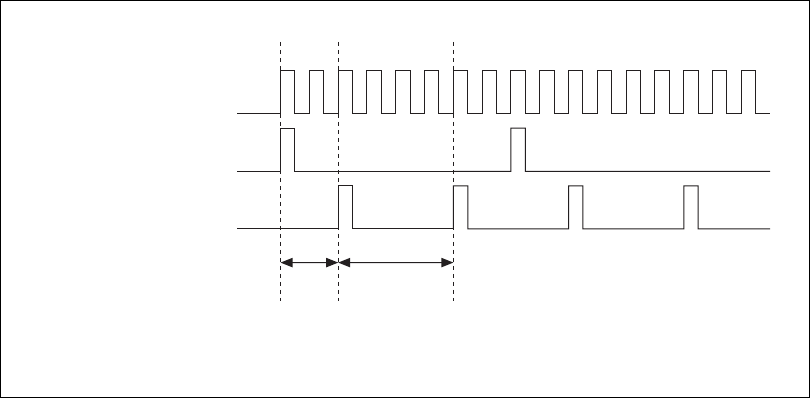
Chapter 4 Analog Input
NI USB-621x User Manual 4-18 ni.com
Figure 4-9 shows the relationship of ai/SampleClock to ai/ConvertClock.
Figure 4-9. ai/SampleClock and ai/ConvertClock
Other Timing Requirements
The sample and conversion level timing of M Series devices work such that
clock signals are gated off unless the proper timing requirements are met.
For example, the device ignores both ai/SampleClock and ai/ConvertClock
until it receives a valid ai/StartTrigger signal. Once the device recognizes
an ai/SampleClock pulse, it ignores subsequent ai/SampleClock pulses
until it receives the correct number of ai/ConvertClock pulses.
Similarly, the device ignores all ai/ConvertClock pulses until it recognizes
an ai/SampleClock pulse. Once the device receives the correct number of
ai/ConvertClock pulses, it ignores subsequent ai/ConvertClock pulses until
it receives another ai/SampleClock. Figures 4-10, 4-11, 4-12, and 4-13
show timing sequences for a four-channel acquisition (using AI channels 0,
1, 2, and 3) and demonstrate proper and improper sequencing of
ai/SampleClock and ai/ConvertClock.
ai/ConvertClockTimebase
ai/SampleClock
ai/ConvertClock
Delay
From
Sample
Clock
Convert
Period
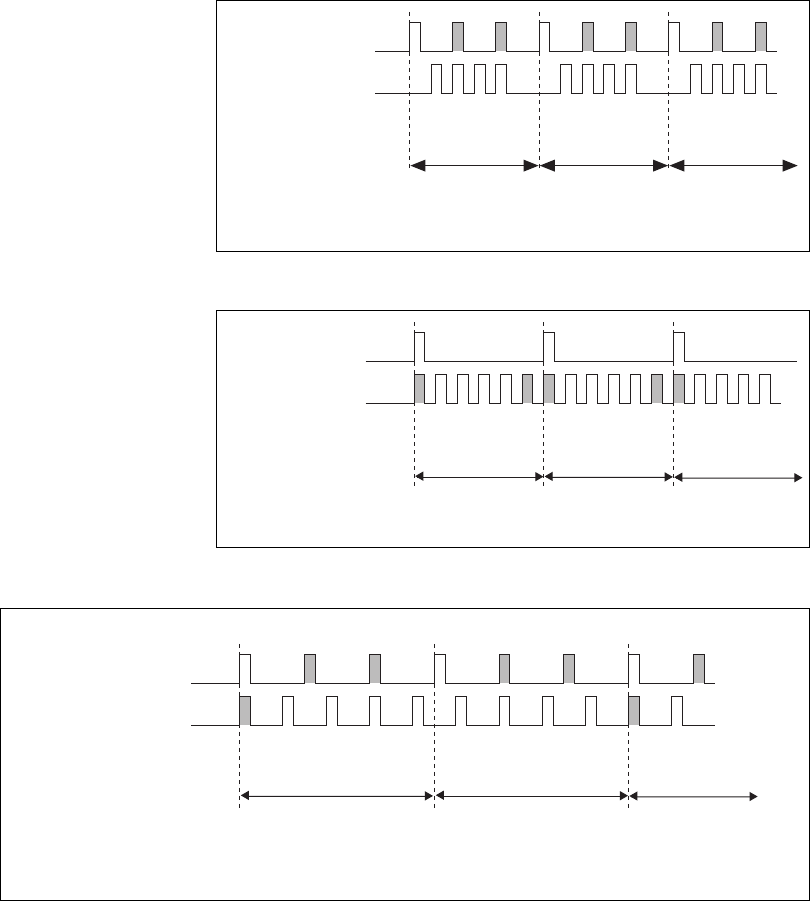
Chapter 4 Analog Input
© National Instruments Corporation 4-19 NI USB-621x User Manual
Figure 4-10. ai/SampleClock Too Fast
Figure 4-11. ai/ConvertClock Too Fast
Figure 4-12. ai/SampleClock and ai/ConvertClock Improperly Matched
• Sample Clock Too Fast for Convert Clock
ai/SampleClock
ai/ConvertClock
Sample #1 Sample #2 Sample #3
Channel Measured 1 2 3 0 1 2 3 0 1 2 3 0
• Sample Clock Pulses are Gated Off
• Convert Clock Too Fast for Sample Clock
• Convert Clock Pulses are Gated Off
ai/SampleClock
ai/ConvertClock
Sample #1 Sample #2 Sample #3
123012301230
Channel Measured
• Improperly Matched Sample Clock and Convert Clock
• Leads to Aperiodic Sampling
ai/SampleClock
ai/ConvertClock
Sample #1 Sample #2 Sample #3
12300
Channel Measured 1230
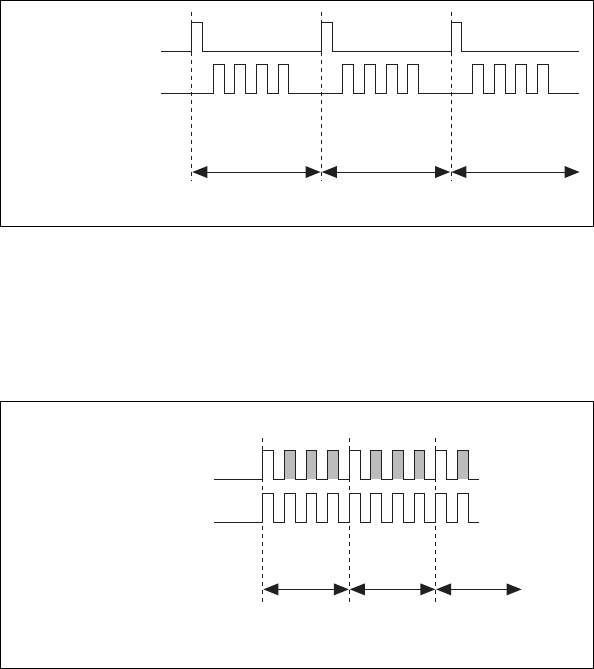
Chapter 4 Analog Input
NI USB-621x User Manual 4-20 ni.com
Figure 4-13. ai/SampleClock and ai/ConvertClock Properly Matched
It is also possible to use a single external signal to drive both
ai/SampleClock and ai/ConvertClock at the same time. In this mode, each
tick of the external clock will cause a conversion on the ADC. Figure 4-14
shows this timing relationship.
Figure 4-14. Single External Signal Driving ai/SampleClock and ai/ConvertClock
Simultaneously
AI Convert Clock Timebase Signal
The AI Convert Clock Timebase (ai/ConvertClockTimebase) signal is
divided down to provide on of the possible sources for ai/ConvertClock.
Use one of the following signals as the source of
ai/ConvertClockTimebase:
• ai/SampleClockTimebase
• 20 MHz Timebase
ai/ConvertClockTimebase is not available as an output on the I/O
connector.
• Properly Matched Sample Clock and Convert Clock
ai/SampleClock
ai/ConvertClock
Sample #1 Sample #2 Sample #3
Channel Measured 1 2 3 0 1 2 3 0 1 2 3 0
• One External Signal Driving Both Clocks
ai/SampleClock
ai/ConvertClock
Sample #1 Sample #2 Sample #3
123012301…0
Channel Measured
Chapter 4 Analog Input
© National Instruments Corporation 4-21 NI USB-621x User Manual
AI Hold Complete Event Signal
The AI Hold Complete Event (ai/HoldCompleteEvent) signal generates a
pulse after each A/D conversion begins. You can route
ai/HoldCompleteEvent out to any PFI <4..8> or PFI <12..15> terminal.
The polarity of ai/HoldCompleteEvent is software-selectable, but is
typically configured so that a low-to-high leading edge can clock external
AI multiplexers indicating when the input signal has been sampled and can
be removed.
AI Start Trigger Signal
Use the AI Start Trigger (ai/StartTrigger) signal to begin a measurement
acquisition. A measurement acquisition consists of one or more samples. If
you do not use triggers, begin a measurement with a software command.
Once the acquisition begins, configure the acquisition to stop:
• When a certain number of points are sampled (in finite mode)
• After a hardware reference trigger (in finite mode)
• With a software command (in continuous mode)
An acquisition that uses a start trigger (but not a reference trigger) is
sometimes referred to as a posttriggered acquisition.
Using a Digital Source
To use ai/StartTrigger with a digital source, specify a source and an edge.
The source can be any of the following signals:
• PFI <0..3>, PFI <8..11>
• Counter n Internal Output
The source also can be one of several other internal signals on your DAQ
device. Refer to Device Routing in MAX in the NI-DAQmx Help or the
LabVIEW 8.x Help for more information.
You also can specify whether the measurement acquisition begins on the
rising edge or falling edge of ai/StartTrigger.
Routing AI Start Trigger to an Output Terminal
You can route ai/StartTrigger out to any PFI <4..8> or PFII <12..15>
terminal.
The output is an active high pulse.
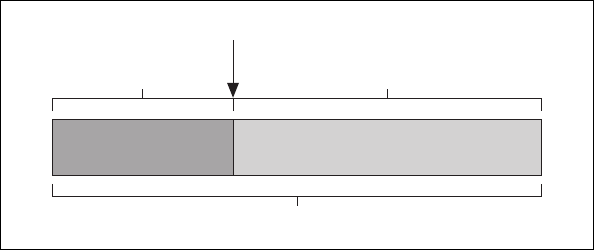
Chapter 4 Analog Input
NI USB-621x User Manual 4-22 ni.com
The device also uses ai/StartTrigger to initiate pretriggered DAQ
operations. In most pretriggered applications, a software trigger generates
ai/StartTrigger. Refer to the AI Reference Trigger Signal section for a
complete description of the use of ai/StartTrigger and ai/ReferenceTrigger
in a pretriggered DAQ operation.
AI Reference Trigger Signal
Use a reference trigger (ai/ReferenceTrigger) signal to stop a measurement
acquisition. To use a reference trigger, specify a buffer of finite size and a
number of pretrigger samples (samples that occur before the reference
trigger). The number of posttrigger samples (samples that occur after the
reference trigger) desired is the buffer size minus the number of pretrigger
samples.
Once the acquisition begins, the DAQ device writes samples to the buffer.
After the DAQ device captures the specified number of pretrigger samples,
the DAQ device begins to look for the reference trigger condition. If the
reference trigger condition occurs before the DAQ device captures the
specified number of pretrigger samples, the DAQ device ignores the
condition.
If the buffer becomes full, the DAQ device continuously discards the oldest
samples in the buffer to make space for the next sample. This data can be
accessed (with some limitations) before the DAQ device discards it. Refer
to the KnowledgeBase document, Can a Pretriggered Acquisition be
Continuous?, for more information. To access this KnowledgeBase, go to
ni.com/info and enter the info code rdcanq.
When the reference trigger occurs, the DAQ device continues to write
samples to the buffer until the buffer contains the number of posttrigger
samples desired. Figure 4-15 shows the final buffer.
Figure 4-15. Reference Trigger Final Buffer
Reference Trigger
Pretrigger Samples
Complete Buffer
Posttrigger Samples
Chapter 4 Analog Input
© National Instruments Corporation 4-23 NI USB-621x User Manual
Using a Digital Source
To use ai/ReferenceTrigger with a digital source, specify a source and an
edge. The source can be the PFI <0..3> or PFI <8..11> signals.
The source also can be one of several internal signals on your DAQ
device. Refer to Device Routing in MAX in the NI-DAQmx Help or the
LabVIEW 8.x Help for more information.
You also can specify whether the measurement acquisition stops on the
rising edge or falling edge of ai/ReferenceTrigger.
Routing AI Reference Trigger Signal to an Output
Terminal
You can route ai/ReferenceTrigger out to any PFI <4..7> or PFI <12..15>
terminal.
AI Pause Trigger Signal
You can use the AI Pause Trigger (ai/PauseTrigger) signal to pause and
resume a measurement acquisition. The internal sample clock pauses while
the external trigger signal is active and resumes when the signal is inactive.
You can program the active level of the pause trigger to be high or low.
Using a Digital Source
To use ai/SampleClock, specify a source and a polarity. The source can be
the PFI <0..3> or PFI <8..11> signals.
The source also can be one of several other internal signals on your DAQ
device. Refer to Device Routing in MAX in the NI-DAQmx Help or the
LabVIEW 8.x Help for more information.

Chapter 4 Analog Input
NI USB-621x User Manual 4-24 ni.com
Getting Started with AI Applications in Software
You can use the M Series device in the following analog input applications.
• Single-point analog input
• Finite analog input
• Continuous analog input
You can perform these applications through DMA, interrupt, or
programmed I/O data transfer mechanisms. Some of the applications also
use start, reference, and pause triggers.
Note For more information about programming analog input applications and triggers in
software, refer to the NI-DAQmx Help or the LabVIEW 8.x Help.

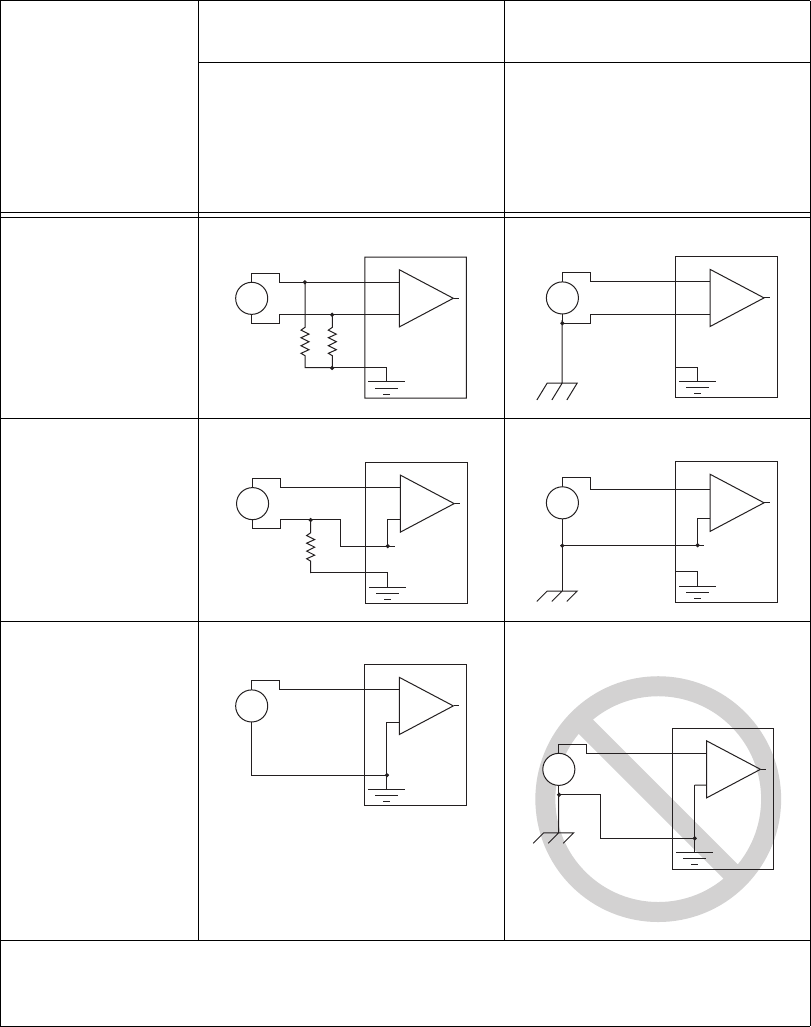
Chapter 5 Connecting AI Signals on the USB-6210/6211 Devices
NI USB-621x User Manual 5-2 ni.com
Table 5-1. Analog Input Configuration
AI
Ground-Reference
Setting*
Floating Signal Sources (Not
Connected to Building Ground)
Ground-Referenced Signal
Sources**
Examples:
• Ungrounded thermocouples
• Signal conditioning with
isolated outputs
• Battery devices
Example:
• Plug-in instruments with
non-isolated outputs
Differential
Single-Ended—
Non-Referenced
(NRSE)
Single-Ended—
Referenced (RSE)
* Refer to the Analog Input Ground-Reference Settings section of Chapter 4, Analog Input, for descriptions of the RSE,
NRSE, and DIFF modes and software considerations.
** Refer to the Connecting Ground-Referenced Signal Sources section for more information.
+
–
+
–
AI+
AI–
AI GND
Signal Source DAQ Device
+
–
+
–
AI+
AI–
AI GND
Signal Source DAQ Device
Vcm
+
–
+
–
AI
AI SENSE
AI GND
Signal Source DAQ Device
+
–
+
–
AI
AI SENSE
AI GND
Signal Source DAQ Device
Vcm
+
–
+
–
AI
AI GND
Signal Source DAQ Device
Ground-loop potential (V
A
– V
B
) are added
to measured signal.
NOT RECOMMENDED
for the
USB-6210/6211
+
–
+
–
AI
AI GND
V
B
V
A
Signal Source DAQ Device

Chapter 5 Connecting AI Signals on the USB-6210/6211 Devices
© National Instruments Corporation 5-3 NI USB-621x User Manual
Connecting Floating Signal Sources
What Are Floating Signal Sources?
A floating signal source is not connected to the building ground system, but
has an isolated ground-reference point. Some examples of floating signal
sources are outputs of transformers, thermocouples, battery-powered
devices, optical isolators, and isolation amplifiers. An instrument or device
that has an isolated output is a floating signal source.
When to Use Differential Connections with Floating Signal Sources
Use DIFF input connections for any channel that meets any of the following
conditions:
• The input signal is low level (less than 1 V).
• The leads connecting the signal to the device are greater than
3m(10ft).
• The input signal requires a separate ground-reference point or return
signal.
• The signal leads travel through noisy environments.
• Two analog input channels, AI+ and AI–, are available for the signal.
DIFF signal connections reduce noise pickup and increase common-mode
noise rejection. DIFF signal connections also allow input signals to float
within the common-mode limits of the NI-PGIA.
Refer to the Using Differential Connections for Floating Signal Sources
section for more information about differential connections.
When to Use Referenced Single-Ended (RSE) Connections with Floating
Signal Sources
Only use RSE input connections if the input signal meets the following
conditions.
• The input signal can share a common reference point, AI GND, with
other signals that use RSE.
• The input signal is high-level (greater than 1 V).
• The leads connecting the signal to the device are less than 3 m (10 ft).
DIFF input connections are recommended for greater signal integrity for
any input signal that does not meet the preceding conditions.
Chapter 5 Connecting AI Signals on the USB-6210/6211 Devices
NI USB-621x User Manual 5-4 ni.com
In the single-ended modes, more electrostatic and magnetic noise couples
into the signal connections than in DIFF configurations. The coupling is the
result of differences in the signal path. Magnetic coupling is proportional
to the area between the two signal conductors. Electrical coupling is a
function of how much the electric field differs between the two conductors.
With this type of connection, the NI-PGIA rejects both the common-mode
noise in the signal and the ground potential difference between the signal
source and the device ground.
Refer to the Using Referenced Single-Ended (RSE) Connections for
Floating Signal Sources section for more information about RSE
connections.
When to Use Non-Referenced Single-Ended (NRSE) Connections with
Floating Signal Sources
Only use NRSE input connections if the input signal meets the following
conditions.
• The input signal is high-level (greater than 1 V).
• The leads connecting the signal to the device are less than 3 m (10 ft).
DIFF input connections are recommended for greater signal integrity for
any input signal that does not meet the preceding conditions.
In the single-ended modes, more electrostatic and magnetic noise couples
into the signal connections than in DIFF configurations. The coupling is the
result of differences in the signal path. Magnetic coupling is proportional
to the area between the two signal conductors. Electrical coupling is a
function of how much the electric field differs between the two conductors.
With this type of connection, the NI-PGIA rejects both the common-mode
noise in the signal and the ground potential difference between the signal
source and the device ground.
Refer to the Using Non-Referenced Single-Ended (NRSE) Connections for
Floating Signal Sources section for more information about NRSE
connections.

Chapter 5 Connecting AI Signals on the USB-6210/6211 Devices
© National Instruments Corporation 5-5 NI USB-621x User Manual
Using Differential Connections for Floating Signal Sources
It is important to connect the negative lead of a floating source to AI GND
(either directly or through a bias resistor). Otherwise, the source may float
out of the maximum working voltage range of the NI-PGIA and the DAQ
device returns erroneous data.
The easiest way to reference the source to AI GND is to connect the
positive side of the signal to AI+ and connect the negative side of the signal
to AI GND as well as to AI– without using resistors. This connection works
well for DC-coupled sources with low source impedance (less than 100 Ω).
Figure 5-1. Differential Connections for Floating Signal Sources without Bias Resistors
However, for larger source impedances, this connection leaves the DIFF
signal path significantly off balance. Noise that couples electrostatically
onto the positive line does not couple onto the negative line because it is
connected to ground. This noise appears as a DIFF-mode signal instead of
a common-mode signal, and thus appears in your data. In this case, instead
of directly connecting the negative line to AI GND, connect the negative
line to AI GND through a resistor that is about 100 times the equivalent
source impedance. The resistor puts the signal path nearly in balance, so
that about the same amount of noise couples onto both connections,
yielding better rejection of electrostatically coupled noise. This
configuration does not load down the source (other than the very high input
impedance of the NI-PGIA).
–
+
Inpedance
<100 Ω
AI GND
AI+
AI–
AI SENSE
Vs
Floating
Signal
Source
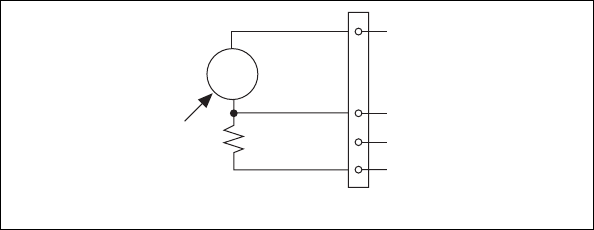
Chapter 5 Connecting AI Signals on the USB-6210/6211 Devices
NI USB-621x User Manual 5-6 ni.com
Figure 5-2. Differential Connections for Floating Signal Sources with Single Bias
Resistor
You can fully balance the signal path by connecting another resistor of the
same value between the positive input and AI GND on the USB-621x
device, as shown in Figure 5-3. This fully balanced configuration offers
slightly better noise rejection, but has the disadvantage of loading the
source down with the series combination (sum) of the two resistors. If, for
example, the source impedance is 2 kΩ and each of the two resistors is
100 kΩ, the resistors load down the source with 200 kΩ and produce a –1%
gain error.
–
+
R is about
100 times
source
impedance
of sensor
AI GND
R
V
s
Floating
Signal
Source
AI+
AI–
AI SENSE
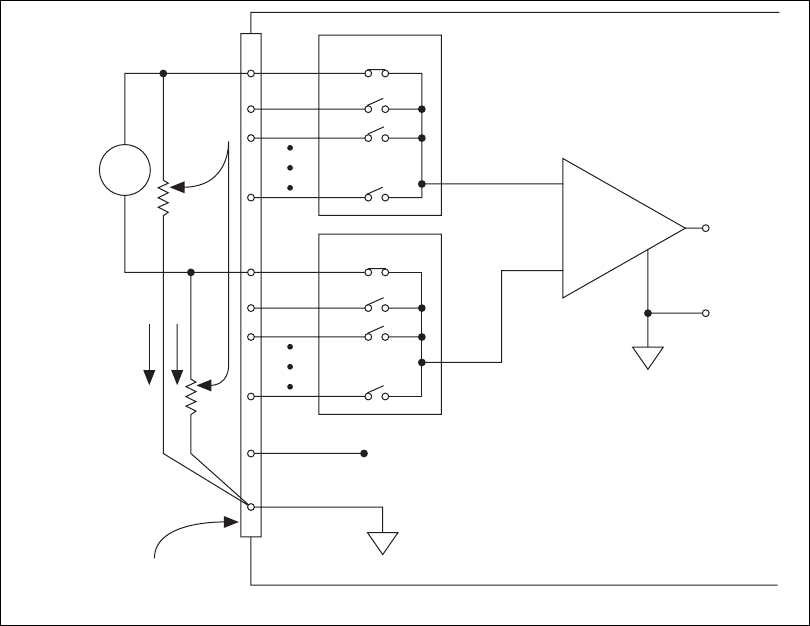
Chapter 5 Connecting AI Signals on the USB-6210/6211 Devices
© National Instruments Corporation 5-7 NI USB-621x User Manual
Figure 5-3. Differential Connections for Floating Signal Sources with Balanced Bias
Resistors
Both inputs of the NI-PGIA require a DC path to ground in order for the
NI-PGIA to work. If the source is AC coupled (capacitively coupled), the
NI-PGIA needs a resistor between the positive input and AI GND. If the
source has low-impedance, choose a resistor that is large enough not to
significantly load the source but small enough not to produce significant
input offset voltage as a result of input bias current (typically 100 kΩ to
1MΩ). In this case, connect the negative input directly to AI GND. If the
source has high output impedance, balance the signal path as previously
described using the same value resistor on both the positive and negative
M Series Device Configured in DIFF Mode
PGIA
–
+
–
+
–
+
Floating
Signal
Source
Bias
Current
Return
Paths
AI GND
AI SENSE
Input Multiplexers
Measured
Voltage
Instrumentation
Amplifier
AI+
AI–
I/O Connector
Bias
Resistors
(see text)
Vs
Vm
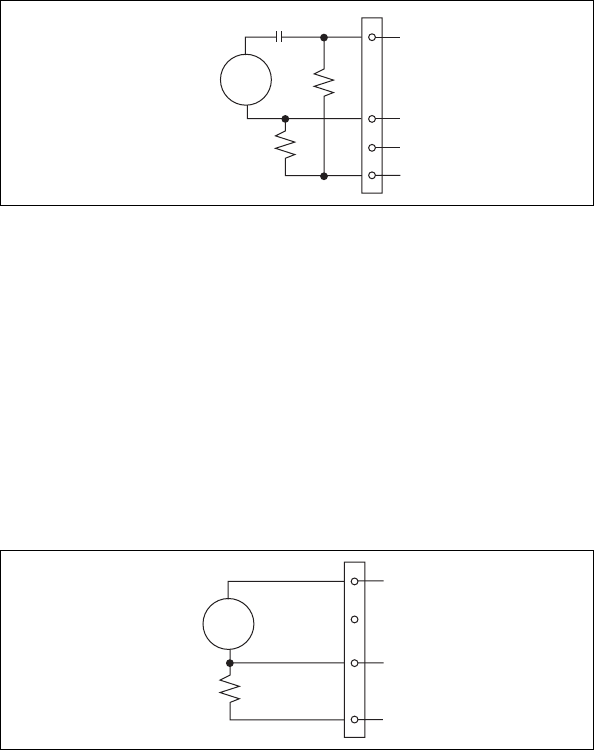
Chapter 5 Connecting AI Signals on the USB-6210/6211 Devices
NI USB-621x User Manual 5-8 ni.com
inputs; be aware that there is some gain error from loading down the source,
as shown in Figure 5-4.
Figure 5-4. Differential Connections for AC Coupled Floating Sources
with Balanced Bias Resistors
Using Non-Referenced Single-Ended (NRSE) Connections for Floating
Signal Sources
It is important to connect the negative lead of a floating signals source to
AI GND (either directly or through a resistor). Otherwise the source may
float out of the valid input range of the NI-PGIA and the DAQ device
returns erroneous data.
Figure 5-5 shows a floating source connected to the DAQ device in NRSE
mode.
Figure 5-5. NRSE Connections for Floating Signal Sources
All of the bias resistor configurations discussed in the Using Differential
Connections for Floating Signal Sources section apply to the NRSE bias
resistors as well. Replace AI– with AI SENSE in Figures 5-1, 5-2, 5-3,
and 5-4 for configurations with zero to two bias resistors. The noise
rejection of NRSE mode is better than RSE mode because the AI SENSE
connection is made remotely near the source. However, the noise rejection
of NRSE mode is worse than DIFF mode because the AI SENSE
–
+
AI GND
V
s
AC Coupled
Floating
Signal
Source
AI+
AI–
AI SENSE
AC Coupling
–
+
AI GND
R
AI SENSE
AI
Vs
Floating
Signal
Source

Chapter 5 Connecting AI Signals on the USB-6210/6211 Devices
© National Instruments Corporation 5-9 NI USB-621x User Manual
connection is shared with all channels rather than being cabled in a twisted
pair with the AI+ signal.
Using the DAQ Assistant, you can configure the channels for RSE or NRSE
input modes. Refer to the Configuring AI Ground-Reference Settings in
Software section of Chapter 4, Analog Input, for more information about
the DAQ Assistant.
Using Referenced Single-Ended (RSE) Connections for Floating Signal
Sources
Figure 5-6 shows how to connect a floating signal source to the NI 621x
device configured for RSE mode.
Figure 5-6. RSE Connections for Floating Signal Sources
Using the DAQ Assistant, you can configure the channels for RSE or NRSE
input modes. Refer to the Configuring AI Ground-Reference Settings in
Software section of Chapter 4, Analog Input, for more information about
the DAQ Assistant.
Connecting Ground-Referenced Signal Sources
What Are Ground-Referenced Signal Sources?
A ground-referenced signal source is a signal source connected to the
building system ground. It is already connected to a common ground point
with respect to the device, assuming that the computer is plugged into the
same power system as the source. Non-isolated outputs of instruments and
devices that plug into the building power system fall into this category.
Selected Channel in RSE Configuration
PGIA
Input Multiplexers
–
+
–
Floating
Signal
Source
V
s
I/O Connector
AI GND
AI SENSE
AI <0..
n
>
+
Programmable Gain
Instrumentation
Amplifier
Measured
Voltage
V
m
–
+
Chapter 5 Connecting AI Signals on the USB-6210/6211 Devices
NI USB-621x User Manual 5-10 ni.com
The difference in ground potential between two instruments connected to
the same building power system is typically between 1 and 100 mV, but the
difference can be much higher if power distribution circuits are improperly
connected. If a grounded signal source is incorrectly measured, this
difference can appear as measurement error. Follow the connection
instructions for grounded signal sources to eliminate this ground potential
difference from the measured signal.
When to Use Differential Connections with Ground-Referenced Signal
Sources
Use DIFF input connections for any channel that meets any of the following
conditions:
• The input signal is low level (less than 1 V).
• The leads connecting the signal to the device are greater than
3m(10ft).
• The input signal requires a separate ground-reference point or return
signal.
• The signal leads travel through noisy environments.
• Two analog input channels, AI+ and AI–, are available.
DIFF signal connections reduce noise pickup and increase common-mode
noise rejection. DIFF signal connections also allow input signals to float
within the common-mode limits of the NI-PGIA.
Refer to the Using Differential Connections for Ground-Referenced Signal
Sources section for more information about differential connections.
When to Use Non-Referenced Single-Ended (NRSE) Connections with
Ground-Referenced Signal Sources
Only use non-referenced single-ended input connections if the input signal
meets the following conditions.
• The input signal is high-level (greater than 1 V).
• The leads connecting the signal to the device are less than 3 m (10 ft).
• The input signal can share a common reference point with other
signals.
DIFF input connections are recommended for greater signal integrity for
any input signal that does not meet the preceding conditions.
Chapter 5 Connecting AI Signals on the USB-6210/6211 Devices
© National Instruments Corporation 5-11 NI USB-621x User Manual
In the single-ended modes, more electrostatic and magnetic noise couples
into the signal connections than in DIFF configurations. The coupling is the
result of differences in the signal path. Magnetic coupling is proportional
to the area between the two signal conductors. Electrical coupling is a
function of how much the electric field differs between the two conductors.
With this type of connection, the NI-PGIA rejects both the common-mode
noise in the signal and the ground potential difference between the signal
source and the device ground.
Refer to the Using Non-Referenced Single-Ended (NRSE) Connections for
Ground-Referenced Signal Sources section for more information about
NRSE connections.
When to Use Referenced Single-Ended (RSE) Connections with
Ground-Referenced Signal Sources
Do not use RSE connections with ground-referenced signal sources. Use
NRSE or DIFF connections instead.
As shown in the bottom-rightmost cell of Table 5-1, there can be a potential
difference between AI GND and the ground of the sensor. In RSE mode,
this ground loop causes measurement errors.
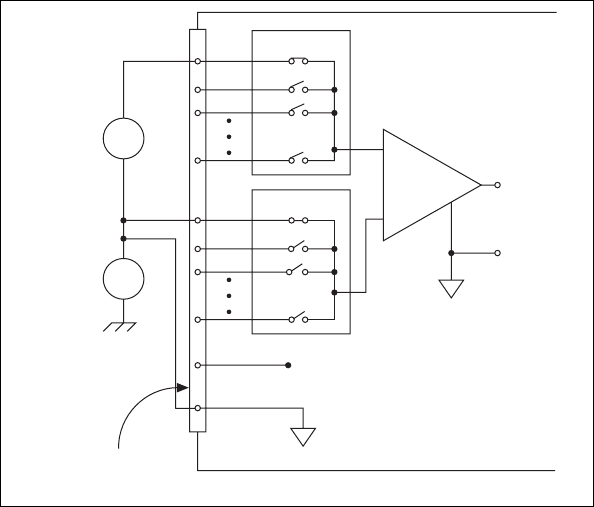
Chapter 5 Connecting AI Signals on the USB-6210/6211 Devices
NI USB-621x User Manual 5-12 ni.com
Using Differential Connections for Ground-Referenced Signal Sources
Figure 5-7 shows how to connect a ground-referenced signal source to the
USB-6210/6211 device configured in DIFF mode.
Figure 5-7. Differential Connections for Ground-Referenced Signal Sources
With this type of connection, the NI-PGIA rejects both the common-mode
noise in the signal and the ground potential difference between the signal
source and the device ground, shown as Vcm in the figure.
AI+ and AI– must both remain within ±11 V of AI GND.
M Series Device Configured in DIFF Mode
PGIA
–
+
–
+
–
+
–
+
Vcm
Vs
Ground-
Referenced
Signal
Source
Common-
Mode
Noise and
Ground
Potential
AI GND
AI SENSE
Input Multiplexers
Vm Measured
Voltage
Instrumentation
Amplifier
AI+
AI–
I/O Connector
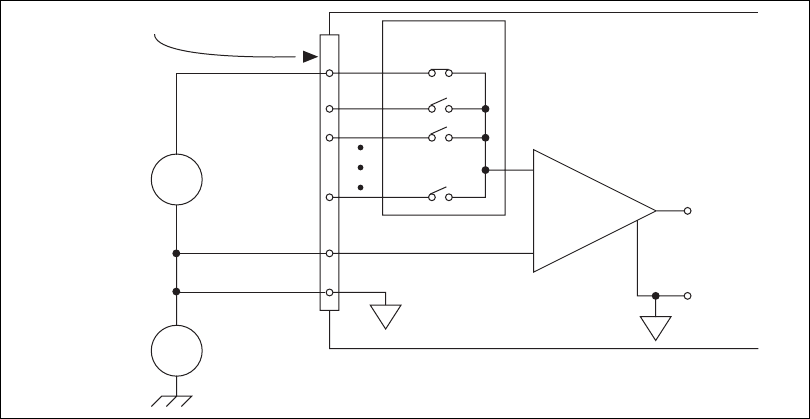
Chapter 5 Connecting AI Signals on the USB-6210/6211 Devices
© National Instruments Corporation 5-13 NI USB-621x User Manual
Using Non-Referenced Single-Ended (NRSE) Connections for
Ground-Referenced Signal Sources
Figure 5-8 shows how to connect ground-reference signal sources to the
USB-6210/6211 device in NRSE mode.
Figure 5-8. Single-Ended Connections for Ground-Referenced Signal Sources
(NRSE Configuration)
AI+ and AI– must both remain within ±11 V of AI GND.
To measure a single-ended, ground-referenced signal source, you must use
the NRSE ground-reference setting. Connect the signal to one of
AI <0..31> and connect the signal local ground reference to AI SENSE.
AI SENSE is internally connected to the negative input of the NI-PGIA.
Therefore, the ground point of the signal connects to the negative input of
the NI-PGIA.
Any potential difference between the device ground and the signal ground
appears as a common-mode signal at both the positive and negative inputs
of the NI-PGIA, and this difference is rejected by the amplifier. If the input
circuitry of a device were referenced to ground, as it is in the RSE
ground-reference setting, this difference in ground potentials would appear
as an error in the measured voltage.
Using the DAQ Assistant, you can configure the channels for RSE or NRSE
input modes. Refer to the Configuring AI Ground-Reference Settings in
Software section of Chapter 4, Analog Input, for more information about
the DAQ Assistant.
M Series Device Configured in NRSE Mode
Common-
Mode
Noise
and Ground
Potential
Ground-
Referenced
Signal
Source PGIA
Input Multiplexers
–
+
–
+
Vs
Vcm
I/O Connector
AI GND
AI SENSE
AI <0..15>
or AI <16..
n
>
–
+
Instrumentation
Amplifier
Measured
Voltage
Vm
–
+
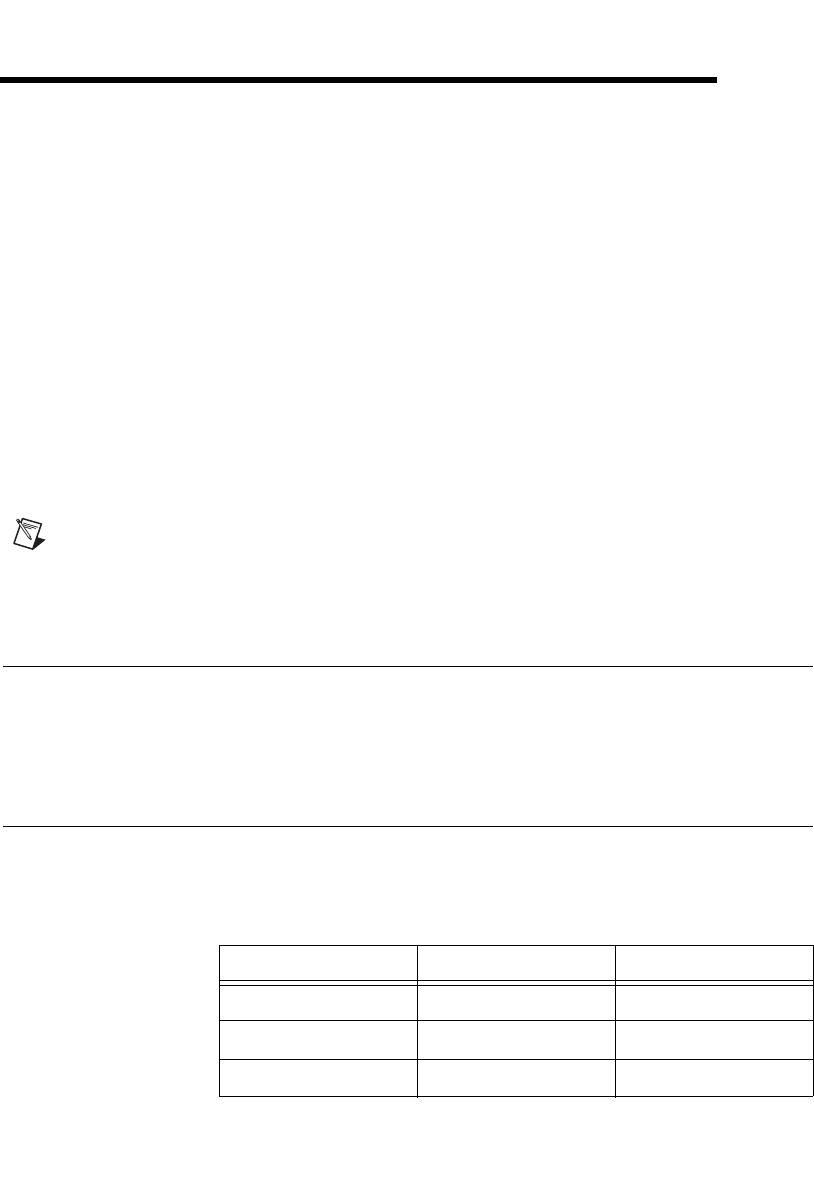
© National Instruments Corporation 6-1 NI USB-621x User Manual
6
Connecting AI Signals on the
USB-6215/6218 Devices
You can connect the USB-6215/6218 directly to a variety of devices and
other signal sources. Make sure the devices you connect to the
USB-6215/6218 are compatible with the input specifications of the
module.
When connecting various sources to the USB-6215/6218, you can use
differential, single-ended, or a combination of single-ended and differential
connections. Refer to Figures 6-1, 6-2, and 6-3 for diagrams of each
connection type.
Note You must always connect AI GND to a local ground signal in your system using a
low impedance connection. If you leave AI GND unconnected, you cannot ensure that
AI <0..31> are within 10 V of AI GND, and your measurement may be unreliable.
Differential Measurements
To attain more accurate measurements and less noise, use a differential
measurement configuration. A differential measurement configuration
requires two inputs for each measurement.
Differential Pairs
Table 6-1 the signal pairs that are valid for differential connection
configurations with the USB-6215/6218.
Table 6-1. I/O Connector Signals
Channel Signal + Signal –
0AI 0 AI 8
1AI 1 AI 9
2AI 2 AI 10
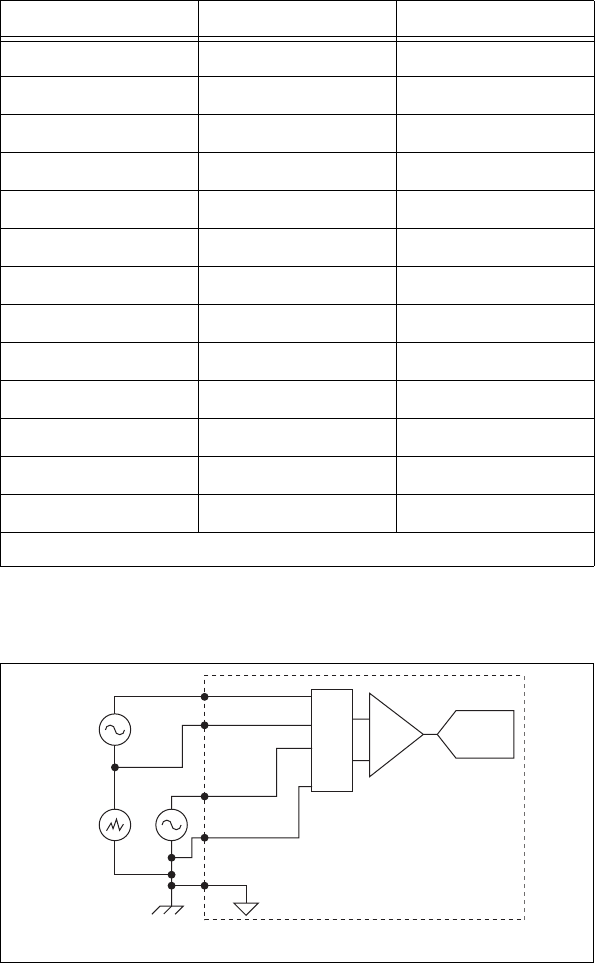
Chapter 6 Connecting AI Signals on the USB-6215/6218 Devices
NI USB-621x User Manual 6-2 ni.com
Refer to Figure 6-1 for an illustration of a differential connection
configuration.
Figure 6-1. Connecting a Device to a USB-6215/6218 Using Differential Connections
3A I3 AI 11
4A I4 AI 12
5A I5 AI 13
6A I6 AI 14
7A I7 AI 15
16* AI 16 AI 24
17* AI 17 AI 25
18* AI 18 AI 26
19* AI 19 AI 27
20* AI 20 AI 28
21* AI 21 AI 29
22* AI 22 AI 30
23* AI 23 AI 31
* USB-6218 devices only.
Table 6-1. I/O Connector Signals (Continued)
Channel Signal + Signal –
AI0+
AI0– (AI8)
1
MUX
AI1+
AI1– (AI9)
1
AI GND
V
cm
V
1
V
2
ADC
PGIA
1
This signal name indicates the differential pair. Refer to
Table1 for a list of differential signal pairs.
USB-6215/6218
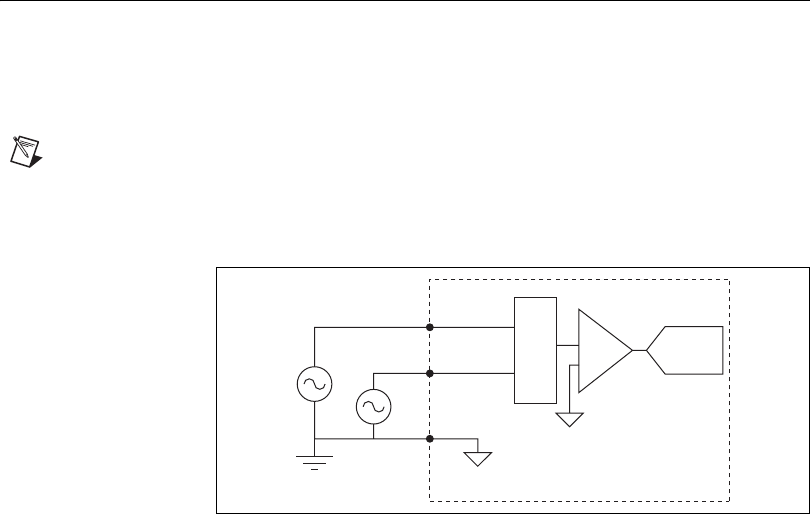
Chapter 6 Connecting AI Signals on the USB-6215/6218 Devices
© National Instruments Corporation 6-3 NI USB-621x User Manual
The differential connection configuration allows the common-mode noise
voltage, Vcm, to be rejected during the measurement of V1.
You must connect the negative lead of your sensors and AI GND to a local
ground signal on your system.
Referenced Single-Ended (RSE) Measurements
Using the RSE measurement configuration allows the USB-6215/6218 to
take measurements on all AI channels when all channels share a common
ground. Refer to Figure 6-2 for an illustration of an RSE connection
configuration.
Note If you leave the AI GND pin unconnected, the signals will float outside the working
input range of the USB-6215/6218, which may result in unreliable measurements because
there is no way to ensure that the input signal is within 10 V of AI GND.
Figure 6-2. Connecting a Device to a USB-6215/6218 Using RSE Connections
In an RSE connection configuration, each input channel is measured with
respect to AI GND.
AI1
AI2
AI GND
USB-6215/6218
MUX ADC
PGIA
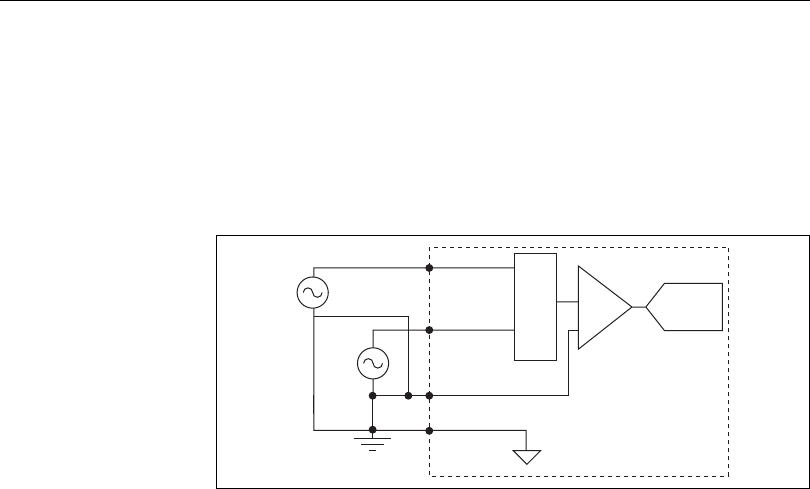
Chapter 6 Connecting AI Signals on the USB-6215/6218 Devices
NI USB-621x User Manual 6-4 ni.com
Non-Referenced Single-Ended (NRSE) Measurements
To reach a compromise between RSE and differential measurements, you
can use an NRSE measurement configuration. This configuration allows
for a remote sense for the negative (–) input of the programmable gain
instrumentation amplifier (PGIA) that is shared among all channels
configured for NRSE mode. The behavior of this configuration is similar to
the behavior of RSE connections but it provides improved noise rejection.
Refer to Figure 6-3 for an illustration of an NRSE connection
configuration.
Figure 6-3. Connecting a Device to a USB-6215/6218 Using NRSE Connections
In the NRSE connection configuration, each input channel is measured
with respect to AI SENSE.
AI1
AI0
AI GND
MUX ADC
PGIA
AISENSE
USB-6215/6218
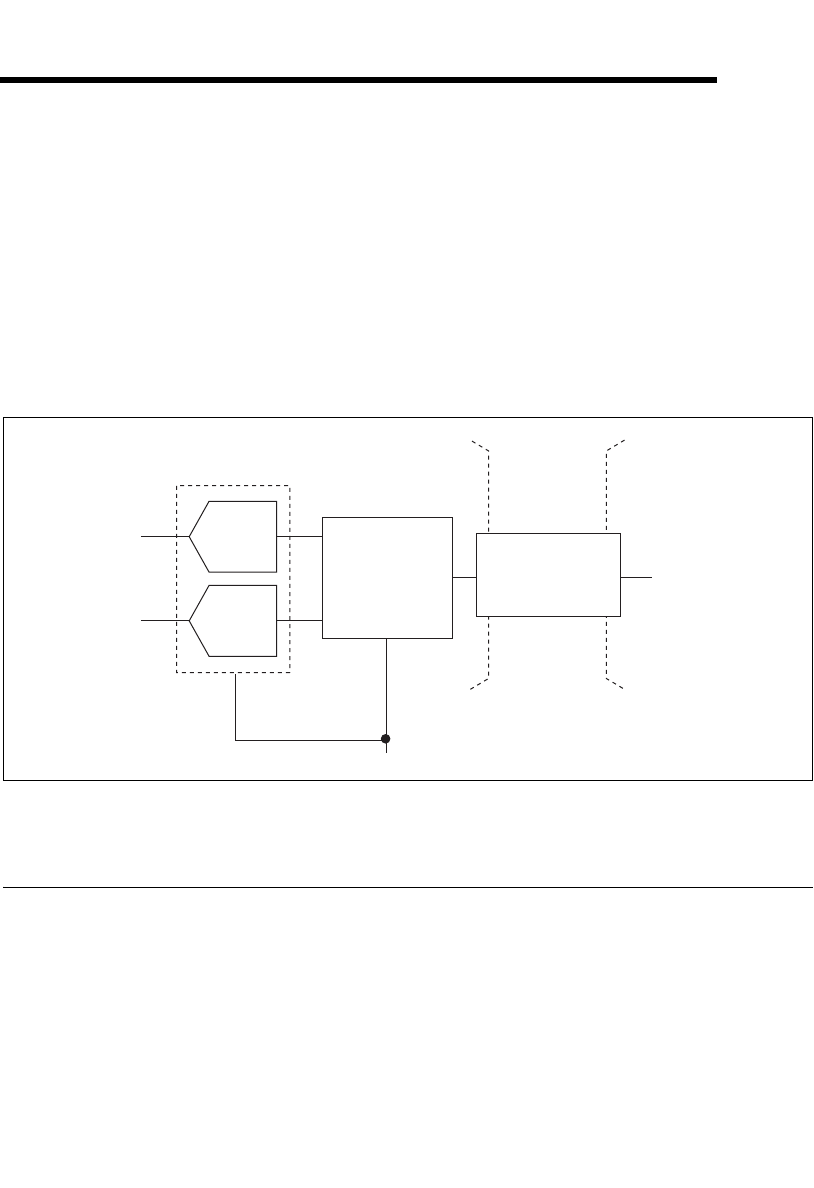
© National Instruments Corporation 7-1 NI USB-621x User Manual
7
Analog Output
Many M Series devices have analog output functionality. NI 621x devices
that support analog output have two AO channels controlled by a single
clock and capable of waveform generation. Refer to Appendix A,
Device-Specific Information, for information about the capabilities of your
device.
Figure 7-1 shows the analog output circuitry of M Series devices.
Figure 7-1. M Series Analog Output Circuitry
Analog Output Circuitry
DACs
Digital-to-analog converters (DACs) convert digital codes to analog
voltages.
AO FIFO
The AO FIFO enables analog output waveform generation. It is a
first-in-first-out (FIFO) memory buffer between the computer and the
AO Sample Clock
AO Data
AO FIFO
AO 0
AO 1
DAC0
DAC1
Isolation
Barrier
(USB-6215
and USB-6218
devices only)
Digital
Isolators
Chapter 7 Analog Output
NI USB-621x User Manual 7-2 ni.com
DACs. It allows you to download the points of a waveform to your M Series
device without host computer interaction.
AO Sample Clock
The AO Sample Clock signal reads a sample from the DAC FIFO and
generates the AO voltage.
AO Range
The AO Range is ±10 V for NI 621x devices.
Minimizing Glitches on the Output Signal
When you use a DAC to generate a waveform, you may observe glitches on
the output signal. These glitches are normal; when a DAC switches from
one voltage to another, it produces glitches due to released charges. The
largest glitches occur when the most significant bit of the DAC code
changes. You can build a lowpass deglitching filter to remove some of these
glitches, depending on the frequency and nature of the output signal. Visit
ni.com/support for more information about minimizing glitches.
Analog Output Data Generation Methods
When performing an analog output operation, you either can perform
software-timed or hardware-timed generations.
Software-Timed Generations
With a software-timed generation, software controls the rate at which data
is generated. Software sends a separate command to the hardware to initiate
each DAC conversion. In NI-DAQmx, software-timed generations are
referred to as on-demand timing. Software-timed generations are also
referred to as immediate or static operations. They are typically used for
writing a single value out, such as a constant DC voltage.
Hardware-Timed Generations
With a hardware-timed generation, a digital hardware signal controls the
rate of the generation. This signal can be generated internally on your
device or provided externally.
Chapter 7 Analog Output
© National Instruments Corporation 7-3 NI USB-621x User Manual
Hardware-timed generations have several advantages over software-timed
acquisitions:
• The time between samples can be much shorter.
• The timing between samples can be deterministic.
• Hardware-timed acquisitions can use hardware triggering.
Hardware-timed operations can be buffered or non-buffered.
During hardware-timed AO generation, data is moved from a PC buffer to
the onboard FIFO on the DAQ device using USB Signal Streams before it
is written to the DACs one sample at a time. Buffered acquisitions allow for
fast transfer rates because data is moved in large blocks rather than one
point at a time.
One property of buffered I/O operations is the sample mode. The sample
mode can be either finite or continuous.
Finite sample mode generation refers to the generation of a specific,
predetermined number of data samples. Once the specified number of
samples has been written out, the generation stops.
Continuous generation refers to the generation of an unspecified number of
samples. Instead of generating a set number of data samples and stopping,
a continuous generation continues until you stop the operation. There are
several different methods of continuous generation that control what data is
written. These methods are regeneration, FIFO regeneration and
non-regeneration modes.
Regeneration is the repetition of the data that is already in the buffer.
Standard regeneration is when data from the PC buffer is continually
downloaded to the FIFO to be written out. New data can be written to the
PC buffer at any time without disrupting the output.
With FIFO regeneration, the entire buffer is downloaded to the FIFO and
regenerated from there. Once the data is downloaded, new data cannot be
written to the FIFO. To use FIFO regeneration, the entire buffer must fit
within the FIFO size. The advantage of using FIFO regeneration is that it
does not require communication with the main host memory once the
operation is started, thereby preventing any problems that may occur due to
excessive bus traffic.
With non-regeneration, old data will not be repeated. New data must be
continually written to the buffer. If the program does not write new data to
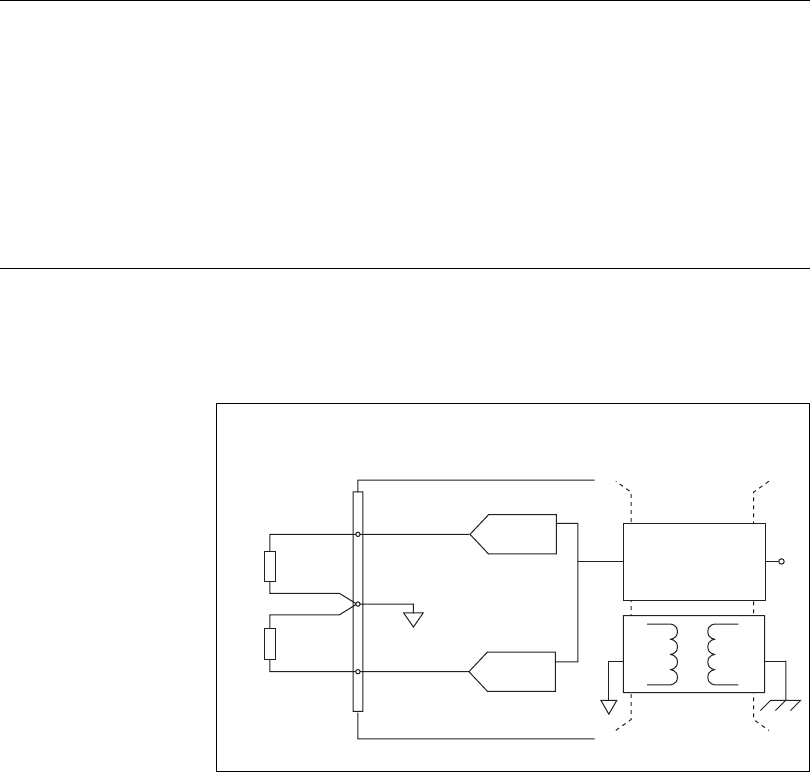
Chapter 7 Analog Output
NI USB-621x User Manual 7-4 ni.com
the buffer at a fast enough rate to keep up with the generation, the buffer
will underflow and cause an error.
Analog Output Digital Triggering
Analog output supports two different triggering actions:
• Start trigger
• Pause trigger
A digital trigger can initiate these actions on the USB-621x devices. Refer
to the AO Start Trigger Signal and AO Pause Trigger Signal sections for
more information about these triggering actions.
Connecting Analog Output Signals
AO <0..1> are the voltage output signals for AO channels 0 and 1.
AO GND is the ground reference for AO <0..1>.
Figure 7-2 shows how to make AO connections to the device.
Figure 7-2. Analog Output Connections
Load
Load
V OUT
V OUT
+
–
+
–
AO GND
AO 1
Analog Output Channels
M Series Device
AO 0
Channel 1
Channel 0
Digital
Isolators
Isolation
Barrier
(USB-6215
and USB-6218
devices only)
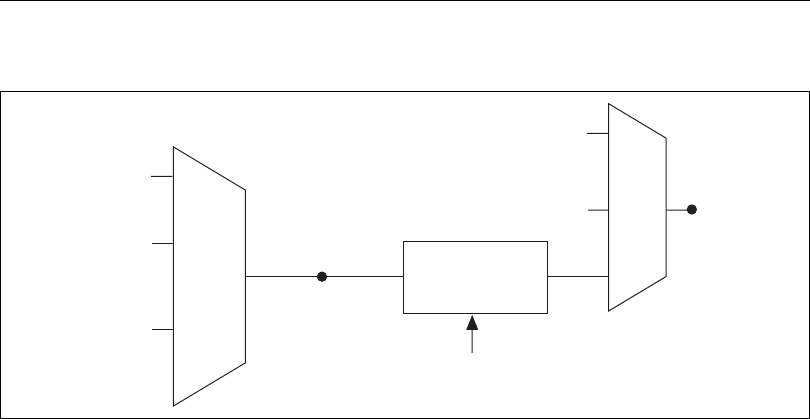
Chapter 7 Analog Output
© National Instruments Corporation 7-5 NI USB-621x User Manual
Analog Output Timing Signals
Figure 7-3 summarizes all of the timing options provided by the analog
output timing engine.
Figure 7-3. Analog Output Timing Options
USB M Series devices feature the following AO (waveform generation)
timing signals.
• AO Start Trigger Signal
• AO Pause Trigger Signal
• AO Sample Clock Signal
• AO Sample Clock Timebase Signal
AO Start Trigger Signal
Use the AO Start Trigger (ao/StartTrigger) signal to initiate a waveform
generation. If you do not use triggers, you can begin a generation with a
software command.
Using a Digital Source
To use ao/StartTrigger, specify a source and an edge. The source can be one
of the following signals:
•A software pulse
• PFI <0..3>, PFI <8..11>
• ai/StartTrigger
20 MHz Timebase
100 kHz Timebase
Programmable
Clock
Divider
ao/SampleClock
Timebase
Ctr
n
Internal Output
ao/SampleClock
PFI
PFI
SampleClock
Timebase Divisor
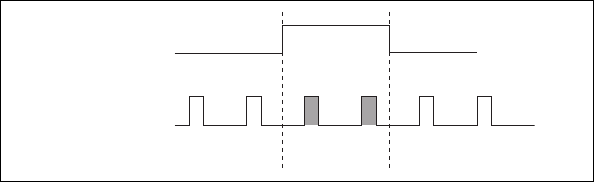
Chapter 7 Analog Output
NI USB-621x User Manual 7-6 ni.com
The source also can be one of several internal signals on your DAQ device.
Refer to Device Routing in MAX in the NI-DAQmx Help or the
LabVIEW 8.x Help for more information.
You also can specify whether the waveform generation begins on the rising
edge or falling edge of ao/StartTrigger.
Routing AO Start Trigger Signal to an Output
Terminal
You can route ao/StartTrigger out to any PFI <4..7> or PFI <12..15>
terminal.
The output is an active high pulse.
AO Pause Trigger Signal
Use the AO Pause Trigger signal (ao/PauseTrigger) to mask off samples in
a DAQ sequence. That is, when ao/PauseTrigger is active, no samples
occur.
ao/PauseTrigger does not stop a sample that is in progress. The pause does
not take effect until the beginning of the next sample.
If you are using any signal other than the onboard clock as the source of
your sample clock, the generation resumes as soon as the pause trigger is
deasserted and another edge of the sample clock is received, as shown in
Figure 7-4.
Figure 7-4. ao/PauseTrigger with Other Signal Source
Using a Digital Source
To use ao/PauseTrigger, specify a source and a polarity. The source can be
the PFI <0..3> or PFI <8..11> signals.
Pause Trigger
Sample Clock
Chapter 7 Analog Output
© National Instruments Corporation 7-7 NI USB-621x User Manual
The source also can be one of several other internal signals on your DAQ
device. Refer to Device Routing in MAX in the NI-DAQmx Help or the
LabVIEW 8.x Help for more information.
You also can specify whether the samples are paused when ao/PauseTrigger
is at a logic high or low level.
AO Sample Clock Signal
Use the AO Sample Clock (ao/SampleClock) signal to initiate AO samples.
Each sample updates the outputs of all of the DACs. You can specify an
internal or external source for ao/SampleClock. You also can specify
whether the DAC update begins on the rising edge or falling edge of
ao/SampleClock.
Using an Internal Source
One of the following internal signals can drive ao/SampleClock.
• AO Sample Clock Timebase (divided down)
• Counter n Internal Output
A programmable internal counter divides down the AO Sample Clock
Timebase signal.
Using an External Source
Use the external signals PFI <0..3> or PFI <8..11> as the source of
ao/SampleClock.
Routing AO Sample Clock Signal to an Output
Terminal
You can route ao/SampleClock (as an active low signal) out to any
PFI <4..7> or PFI <12..15> terminal.
Other Timing Requirements
A counter on your device internally generates ao/SampleClock unless you
select some external source. ao/StartTrigger starts the counter and either the
software or hardware can stop it once a finite generation completes. When
using an internally generated ao/SampleClock, you also can specify a
configurable delay from ao/StartTrigger to the first ao/SampleClock pulse.
By default, this delay is two ticks of ao/SampleClockTimebase.
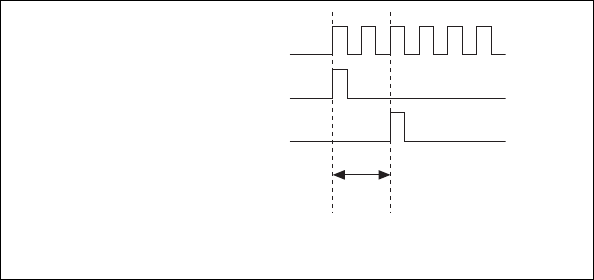
Chapter 7 Analog Output
NI USB-621x User Manual 7-8 ni.com
Figure 7-5 shows the relationship of ao/SampleClock to ao/StartTrigger.
Figure 7-5. ao/SampleClock and ao/StartTrigger
AO Sample Clock Timebase Signal
The AO Sample Clock Timebase (ao/SampleClockTimebase) signal is
divided down to provide a source for ao/SampleClock.
You can route any of the following signals to be the AO Sample Clock
Timebase (ao/SampleClockTimebase) signal:
•20MHzTimebase
• 100 kHz Timebase
• PFI <0..3>, PFI <8..11>
ao/SampleClockTimebase is not available as an output on the I/O
connector.
You might use ao/SampleClockTimebase if you want to use an external
sample clock signal, but need to divide the signal down. If you want to use
an external sample clock signal, but do not need to divide the signal, then
you should use ao/SampleClock rather than ao/SampleClockTimebase.
ao/SampleClockTimebase
ao/StartTrigger
ao/SampleClock
Delay
From
Start
Trigger

Chapter 7 Analog Output
© National Instruments Corporation 7-9 NI USB-621x User Manual
Getting Started with AO Applications in Software
You can use an NI 621x device in the following analog output applications.
• Single-point (on-demand) generation
• Finite generation
• Continuous generation
• Waveform generation
You can perform these generations through programmed I/O or USB Signal
Stream data transfer mechanisms. Some of the applications also use start
triggers and pause triggers.
Note For more information about programming analog output applications and triggers in
software, refer to the NI-DAQmx Help or the LabVIEW 8.x Help.
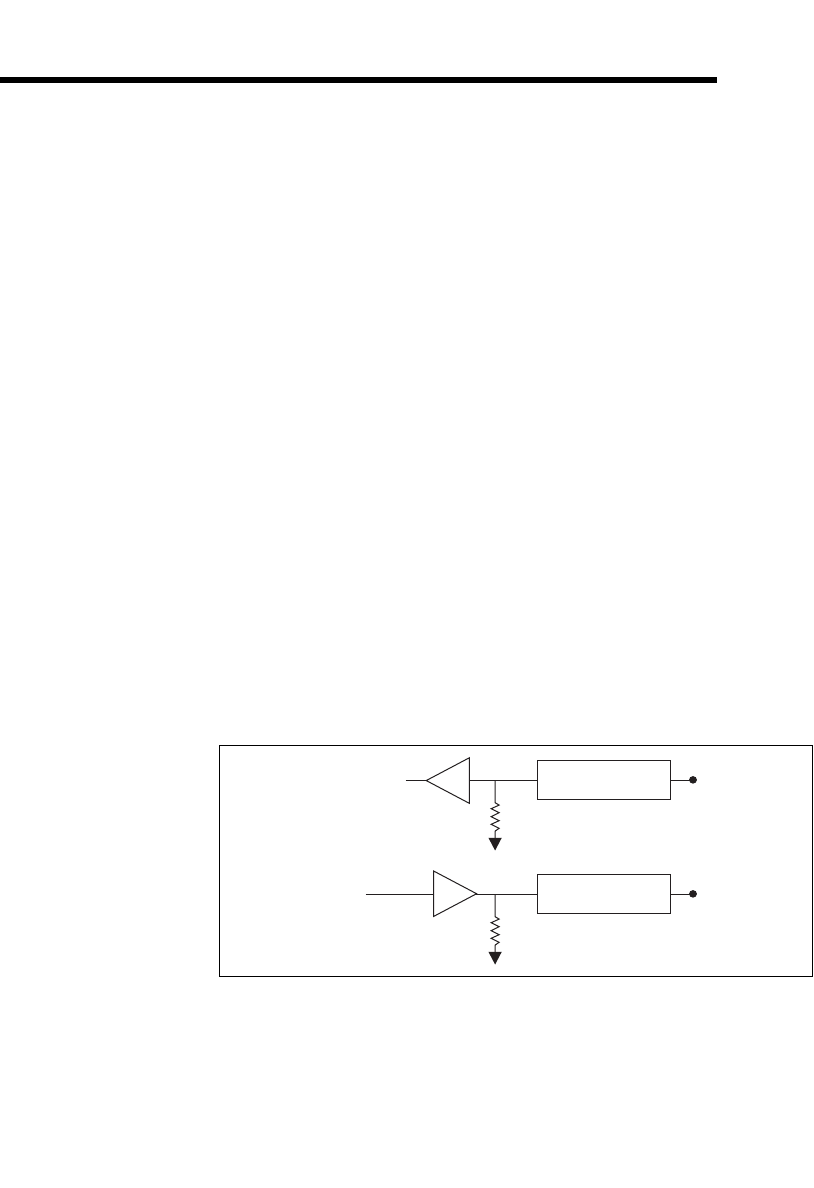
© National Instruments Corporation 8-1 NI USB-621x User Manual
8
Digital I/O
NI 621x devices have eight static digital input lines, P0.<0..7>. These lines
also can be used as PFI inputs.
NI 621x devices have eight static digital output lines, P1.<0..8>.These lines
also can be used as PFI output. By default the digital output lines are
disabled (high impedance with a 47 kΩ pull down resistor) on power up.
Software can enable or disable the entire port (software cannot enable
individual lines). Once the port is enabled, you can individually configure
each line to the following:
• Set a line to a static 0
• Set a line to a static 1
• Export a timing output signal to a line as a PFI pin
The voltage input and output levels and the current drive level of the DI and
DO lines are listed in the NI 621x Specifications. Refer to Chapter 10, PFI,
for more information on PFI inputs and outputs.
Figure 8-1 shows the circuitry of one DI line and one DO line. The
following sections provide information about the various parts of the DIO
circuit.
Figure 8-1. M Series Digital I/O Circuitry
The DI terminals are named P0.<0..7> on the NI 621x device I/O connector.
The DO terminals are named P1.<0..7> on the NI 621x device I/O
connector.
Static DI I/O Protection
47kΩ Pull-Down
P0.
x
I/O Protection
47 kΩ Pull-Down
P1.
x
Static DO

Chapter 8 Digital I/O
NI USB-621x User Manual 8-2 ni.com
The voltage input and output levels and the current drive levels of the DIO
lines are listed in the specifications of your device.
Static DIO
You can use static DI and DO lines to monitor or control digital signals.
All samples of static DI lines and updates of DO lines are software-timed.
I/O Protection
Each DI, DO, and PFI signal is protected against overvoltage,
undervoltage, and overcurrent conditions as well as ESD events. However,
you should avoid these fault conditions by following these guidelines.
•Do not connect a DO or PFI output lines to any external signal source,
ground signal, or power supply.
• Understand the current requirements of the load connected to DO or
PFI output signals. Do not exceed the specified current output limits of
the DAQ device. NI has several signal conditioning solutions for
digital applications requiring high current drive.
•Do not drive a DI or PFI input line with voltages outside of its normal
operating range. The PFI or DI lines have a smaller operating range
than the AI signals.
Increasing Current Drive
The total internal current limit for digital outputs and power down from the
+5 V terminals is 50 mA. You can increase this internal current limit by
supplying an external +5 V supply. Refer to the +5 V Power as an Input
section of Chapter 3, Connector Information.
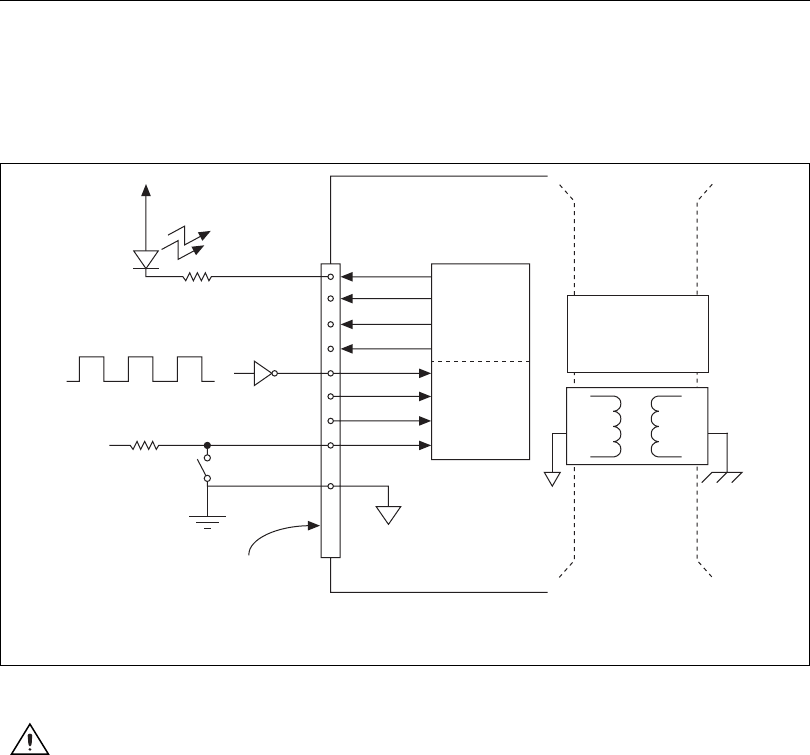
Chapter 8 Digital I/O
© National Instruments Corporation 8-3 NI USB-621x User Manual
Connecting Digital I/O Signals
The DI and DO signals, P0.<0..7> and P1.<0..7> are referenced to D GND.
Digital input applications include receiving TTL signals and sensing
external device states, such as the state of the switch shown in the figure.
Digital output applications include sending TTL signals and driving
external devices, such as the LED shown in Figure 8-2.
Figure 8-2. Digital I/O Connections
Caution Exceeding the maximum input voltage ratings, which are listed in the
specifications document for each M Series device, can damage the DAQ device and the
computer. NI is not liable for any damage resulting from such signal connections.
+5
V
LED
TTL Signal
+5 V
Switch
I/O Connector
D GND
M Series Device
P0.<0..3>
P1.<0..3> Digital
Isolators
Isolation
Barrier
(USB-6215
and USB-6218
devices only)
1
1When using a USB-6215/6218, you must connect D GND
and/or AI GND to the local ground on your system.

Chapter 8 Digital I/O
NI USB-621x User Manual 8-4 ni.com
Getting Started with DIO Applications in Software
You can use the M Series device in the following digital I/O applications:
• Static digital input
• Static digital output
• Digital waveform generation
• Digital waveform acquisition
• DI change detection
Note For more information about programming digital I/O applications and triggers in
software, refer to the NI-DAQmx Help or the LabVIEW 8.x Help.
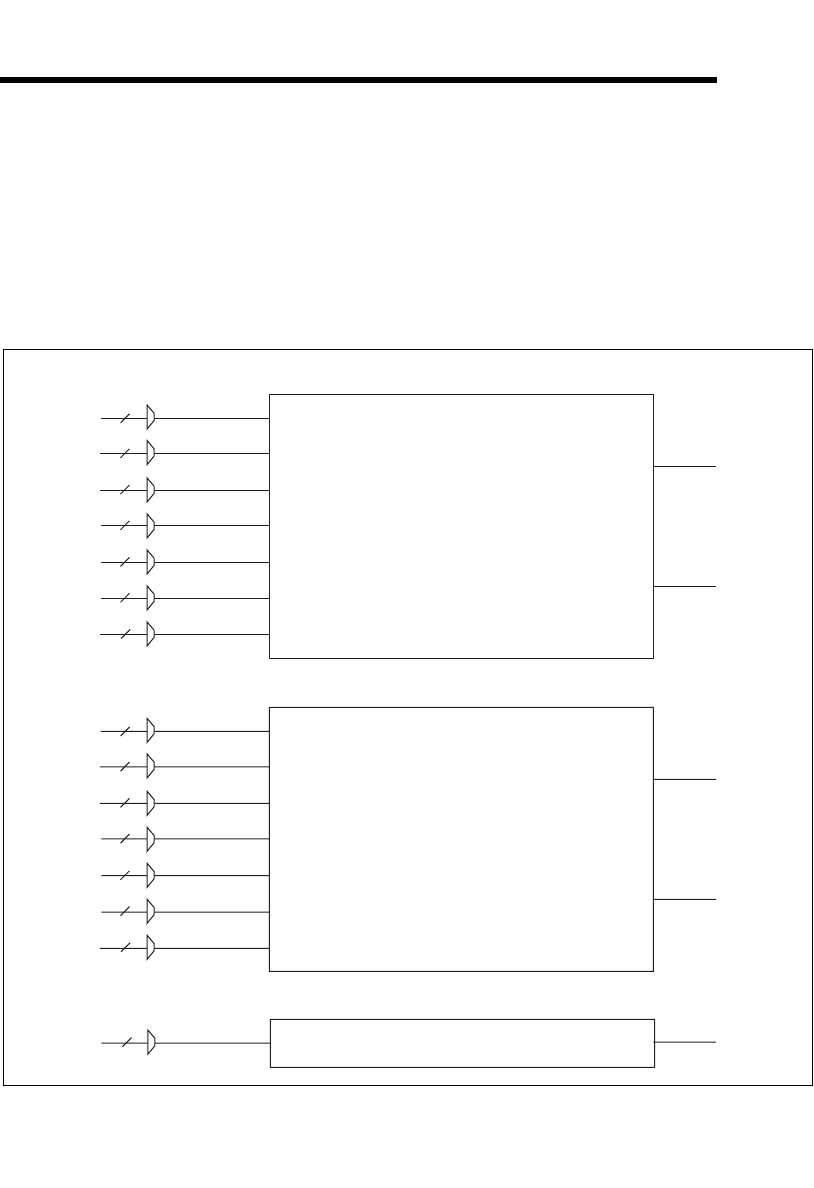
© National Instruments Corporation 9-1 NI USB-621x User Manual
9
Counters
M Series devices have two general-purpose 32-bit counter/timers and one
frequency generator, as shown in Figure 9-1. The general-purpose
counter/timers can be used for many measurement and pulse generation
applications.
Figure 9-1. M Series Counters
Counter 0
Counter 0 Source (Counter 0 Timebase)
Counter 0 Aux
Counter 0 HW Arm
Counter 0 A
Counter 0 B (Counter 0 Up_Down)
Counter 0 Z
Counter 0 Gate Counter 0 Internal Output
Counter 0 TC
Input Selection Muxes
Frequency Generator
Frequency Output Timebase Freq Out
Input Selection Muxes
Counter 1
Counter 1 Source (Counter 1 Timebase)
Counter 1 Aux
Counter 1 HW Arm
Counter 1 A
Counter 1 B (Counter 1 Up_Down)
Counter 1 Z
Counter 1 Gate Counter 0 Internal Output
Counter 0 TC
Input Selection Muxes
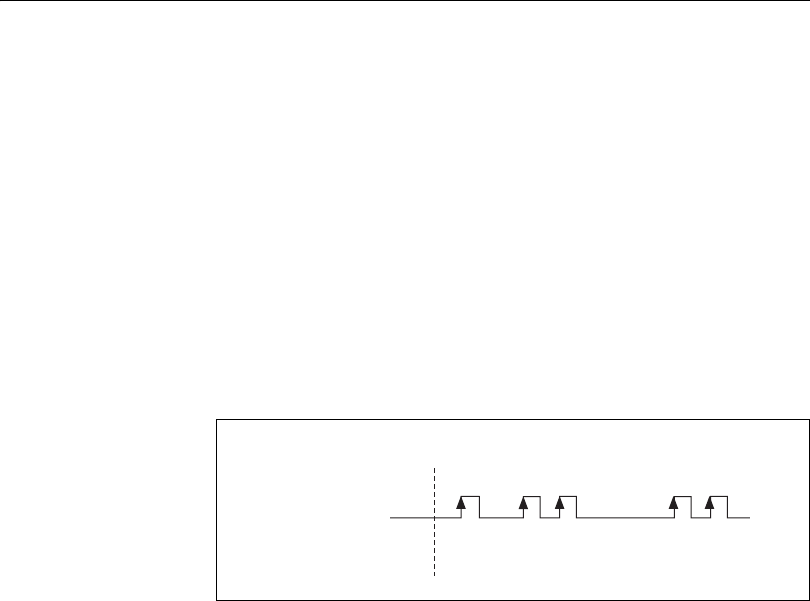
Chapter 9 Counters
NI USB-621x User Manual 9-2 ni.com
The counters have seven input signals, although in most applications only
a few inputs are used.
For information about connecting counter signals, refer to the Default
Counter/Timer Pinouts section.
Counter Input Applications
Counting Edges
In edge counting applications, the counter counts edges on its Source after
the counter is armed. You can configure the counter to count rising or
falling edges on its Source input. You also can control the direction of
counting (up or down).
The counter values can be read on demand or with a sample clock.
Single Point (On-Demand) Edge Counting
With single point (on-demand) edge counting, the counter counts the
number of edges on the Source input after the counter is armed. On-demand
refers to the fact that software can read the counter contents at any time
without disturbing the counting process. Figure 9-2 shows an example of
single point edge counting.
Figure 9-2. Single Point (On-Demand) Edge Counting
You also can use a pause trigger to pause (or gate) the counter. When the
pause trigger is active, the counter ignores edges on its Source input. When
the pause trigger is inactive, the counter counts edges normally.
You can route the pause trigger to the Gate input of the counter. You can
configure the counter to pause counting when the pause trigger is high or
when it is low. Figure 9-3 shows an example of on-demand edge counting
with a pause trigger.
Counter Armed
SOURCE
Counter Value 105432
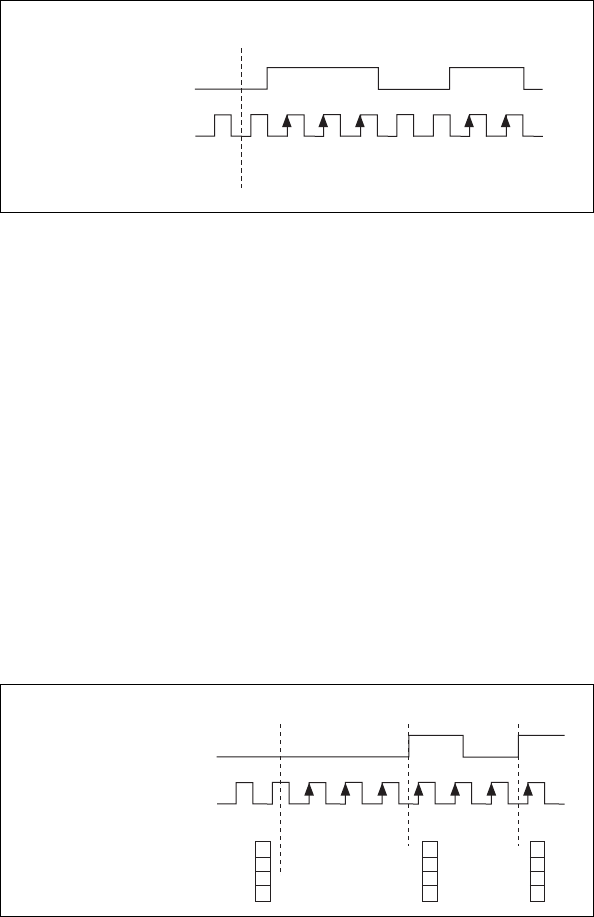
Chapter 9 Counters
© National Instruments Corporation 9-3 NI USB-621x User Manual
Figure 9-3. Single Point (On-Demand) Edge Counting with Pause Trigger
Buffered (Sample Clock) Edge Counting
With buffered edge counting (edge counting using a sample clock), the
counter counts the number of edges on the Source input after the counter is
armed. The value of the counter is sampled on each active edge of a sample
clock. A USB Signal Stream transfers the sampled values to host memory.
The count values returned are the cumulative counts since the counter
armed event. That is, the sample clock does not reset the counter.
You can route the counter sample clock to the Gate input of the counter. You
can configure the counter to sample on the rising or falling edge of the
sample clock.
Figure 9-4 shows an example of buffered edge counting. Notice that
counting begins when the counter is armed, which occurs before the first
active edge on Gate.
Figure 9-4. Buffered (Sample Clock) Edge Counting
Counter Armed
SOURCE
Pause Trigger
(Pause When Low)
Counter Value 100 5432
3
6
3
Counter Armed
SOURCE
Sample Clock
(Sample on Rising Edge)
Counter Value
Buffer
10763452
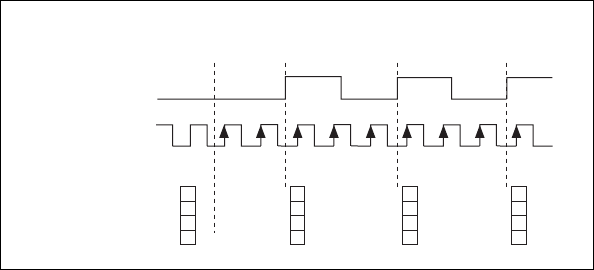
Chapter 9 Counters
NI USB-621x User Manual 9-4 ni.com
Non-Cumulative Buffered Edge Counting
Non-cumulative edge counting is similar to buffered (sample clock) edge
counting. However, the counter resets after each active edge of the Sample
Clock. You can route the Sample Clock to the Gate input of the counter.
Figure 9-5 shows an example of non-cumulative buffered edge counting.
Figure 9-5. Non-Cumulative Buffered Edge Counting
Notice that the first count interval begins when the counter is armed, which
occurs before the first active edge on Gate.
Note that if you are using an external signal as the Source, at least one
Source pulse should occur between each active edge of the Gate signal.
This condition ensures that correct values are returned by the counter. If this
condition is not met, consider using duplicate count prevention, described
in the Duplicate Count Prevention section.
Controlling the Direction of Counting
In edge counting applications, the counter can count up or down. You can
configure the counter to do the following:
• Always count up
• Always count down
• Count up when the Counter n B input is high; count down when it is
low
For information about connecting counter signals, refer to the Default
Counter/Timer Pinouts section.
22
3
2
3
3
Counter
Armed
SOURCE
Counter Value 1101331222
Buffer
Sample Clock
(Sample on
Rising Edge)
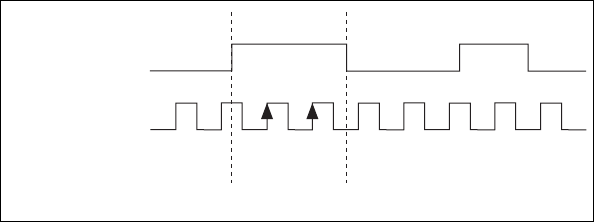
Chapter 9 Counters
© National Instruments Corporation 9-5 NI USB-621x User Manual
Pulse-Width Measurement
In pulse-width measurements, the counter measures the width of a pulse on
its Gate input signal. You can configure the counter to measure the width of
high pulses or low pulses on the Gate signal.
You can route an internal or external periodic clock signal (with a known
period) to the Source input of the counter. The counter counts the number
of rising (or falling) edges on the Source signal while the pulse on the Gate
signal is active.
You can calculate the pulse width by multiplying the period of the Source
signal by the number of edges returned by the counter.
A pulse-width measurement will be accurate even if the counter is armed
while a pulse train is in progress. If a counter is armed while the pulse is in
the active state, it will wait for the next transition to the active state to begin
the measurement.
Single Pulse-Width Measurement
With single pulse-width measurement, the counter counts the number of
edges on the Source input while the Gate input remains active. When the
Gate input goes inactive, the counter stores the count in a hardware save
register and ignores other edges on the Gate and Source inputs. Software
then reads the stored count.
Figure 9-6 shows an example of a single pulse-width measurement.
Figure 9-6. Single Pulse-Width Measurement
Buffered Pulse-Width Measurement
Buffered pulse-width measurement is similar to single pulse-width
measurement, but buffered pulse-width measurement takes measurements
over multiple pulses.
SOURCE
GATE
Counter Value
HW Save Register
10
2
2
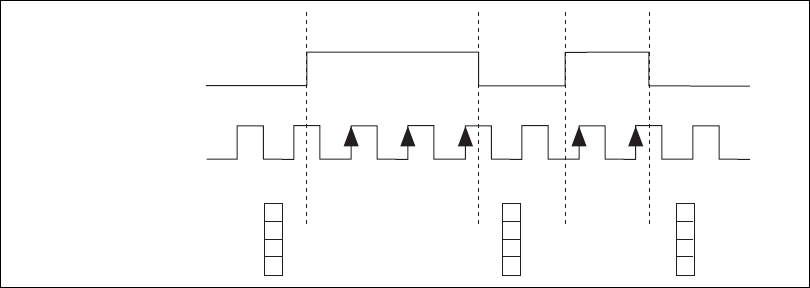
Chapter 9 Counters
NI USB-621x User Manual 9-6 ni.com
The counter counts the number of edges on the Source input while the Gate
input remains active. On each trailing edge of the Gate signal, the counter
stores the count in a hardware save register. A USB Signal Stream transfers
the stored values to host memory.
Figure 9-7 shows an example of a buffered pulse-width measurement.
Figure 9-7. Buffered Pulse-Width Measurement
Note that if you are using an external signal as the Source, at least one
Source pulse should occur between each active edge of the Gate signal.
This condition ensures that correct values are returned by the counter. If this
condition is not met, consider using duplicate count prevention, described
in the Duplicate Count Prevention section.
For information about connecting counter signals, refer to the Default
Counter/Timer Pinouts section.
Period Measurement
In period measurements, the counter measures a period on its Gate input
signal after the counter is armed. You can configure the counter to measure
the period between two rising edges or two falling edges of the Gate input
signal.
You can route an internal or external periodic clock signal (with a known
period) to the Source input of the counter. The counter counts the number
of rising (or falling) edges occurring on the Source input between the
two active edges of the Gate signal.
You can calculate the period of the Gate input by multiplying the period of
the Source signal by the number of edges returned by the counter.
SOURCE
GATE
COUNTER VALUE
BUFFER
1 0 3
3 2
2 1 2
3 3
2
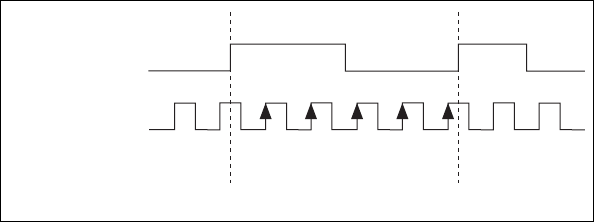
Chapter 9 Counters
© National Instruments Corporation 9-7 NI USB-621x User Manual
Single Period Measurement
With single period measurement, the counter counts the number of rising
(or falling) edges on the Source input occurring between two active edges
of the Gate input. On the second active edge of the Gate input, the counter
stores the count in a hardware save register and ignores other edges on the
Gate and Source inputs. Software then reads the stored count.
Figure 9-8 shows an example of a single period measurement.
Figure 9-8. Single Period Measurement
Buffered Period Measurement
Buffered period measurement is similar to single period measurement, but
buffered period measurement measures multiple periods.
The counter counts the number of rising (or falling) edges on the Source
input between each pair of active edges on the Gate input. At the end of
each period on the Gate signal, the counter stores the count in a hardware
save register. A USB Signal Stream transfers the stored values to host
memory.
The counter begins on the first active edge of the Gate after it is armed. The
arm usually occurs in the middle of a period of the Gate input. The counter
does not store a measurement for this incomplete period.
Figure 9-9 shows an example of a buffered period measurement. In this
example, a period is defined by two consecutive rising edges.
SOURCE
GATE
Counter Value
HW Save Register
103
5
45
2
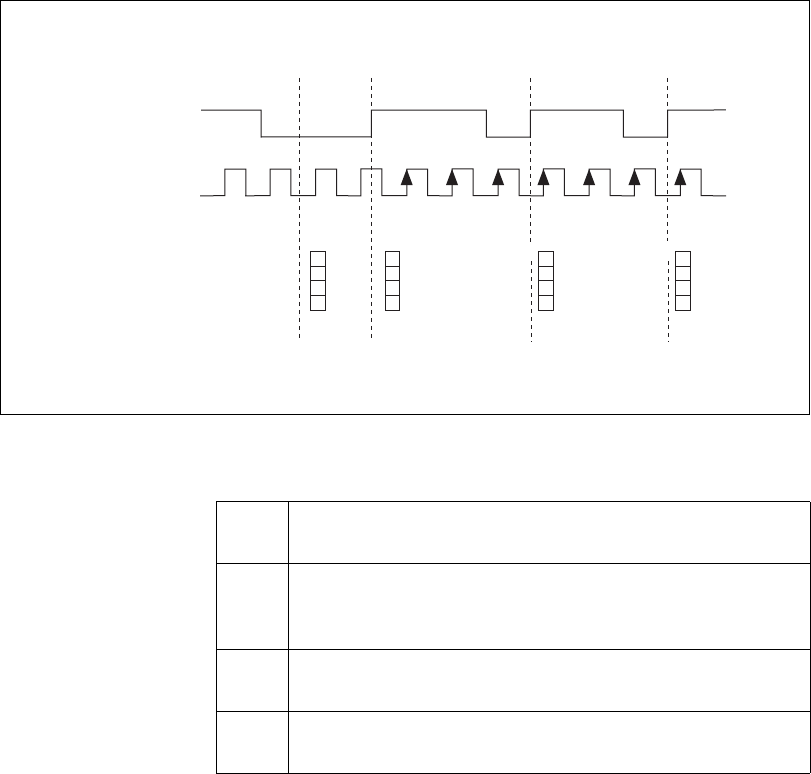
Chapter 9 Counters
NI USB-621x User Manual 9-8 ni.com
Figure 9-9. Buffered Period Measurement
Note that if you are using an external signal as the Source, at least one
Source pulse should occur between each active edge of the Gate signal.
This condition ensures that correct values are returned by the counter. If this
condition is not met, the counter returns a zero. Refer to the Duplicate
Count Prevention section for more information.
For information about connecting counter signals, refer to the Default
Counter/Timer Pinouts section.
Table 9-1. Time N Descriptions
t0At t0, the counter is armed. No measurements are taken until
the counter is armed.
t1The rising edge of Gate indicates the beginning of the first
period to measure. The counter begins counting rising edges of
Source.
t2The rising edge of Gate indicates the end of the first period. The
USB M Series device stores the counter value in the buffer.
t3The rising edge of Gate indicates the end of the second period.
The USB M Series device stores the counter value in the buffer.
SOURCE
GATE
Counter Value
Buffer
13
3
311
22
3
3
3
C
ounter Armed
Time N
3
t
0
t
1
t
2
t
3
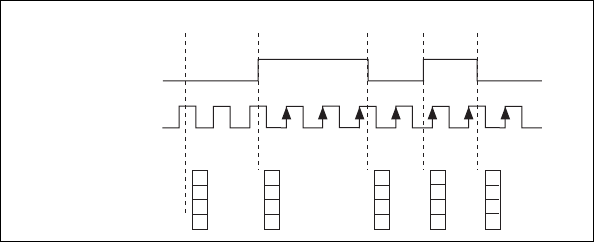
Chapter 9 Counters
© National Instruments Corporation 9-9 NI USB-621x User Manual
Semi-Period Measurement
In semi-period measurements, the counter measures a semi-period on its
Gate input signal after the counter is armed. A semi-period is the time
between any two consecutive edges on the Gate input.
You can route an internal or external periodic clock signal (with a known
period) to the Source input of the counter. The counter counts the number
of rising (or falling) edges occurring on the Source input between two
edges of the Gate signal.
You can calculate the semi-period of the Gate input by multiplying the
period of the Source signal by the number of edges returned by the counter.
Single Semi-Period Measurement
Single semi-period measurement is equivalent to single pulse-width
measurement.
Buffered Semi-Period Measurement
In buffered semi-period measurement, on each edge of the Gate signal, the
counter stores the count in a hardware save register. A USB Signal Stream
transfers the stored values to host memory.
The counter begins counting on the first active edge of the Gate after it is
armed. The arm usually occurs between edges on the Gate input. The
counter does not store a value for this incomplete semi-period.
Figure 9-10 shows an example of a buffered semi-period measurement.
Figure 9-10. Buffered Semi-Period Measurement
Note that if you are using an external signal as the Source, at least one
Source pulse should occur between each active edge of the Gate signal.
3
1
2
3
1
3
SOURCE
GATE
Counter Value
Buffer
1 3
2
2
1 1
1 3
1 2
0
Counter Armed
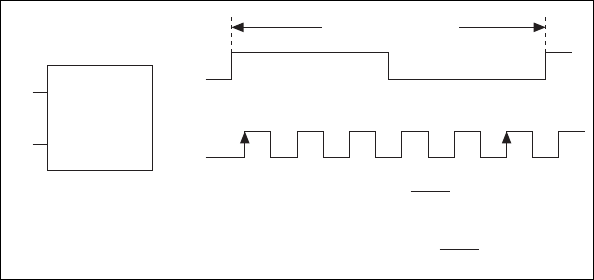
Chapter 9 Counters
NI USB-621x User Manual 9-10 ni.com
This condition ensures that correct values are returned by the counter. If this
condition is not met, the counter returns a zero. Refer to the Duplicate
Count Prevention section for more information.
For information about connecting counter signals, refer to the Default
Counter/Timer Pinouts section.
Frequency Measurement
You can use the counters to measure frequency in several different ways.
You can choose one of the following methods depending on your
application.
Method 1—Measure Low Frequency with One
Counter
In this method, you measure one period of your signal using a known
timebase. This method is good for low frequency signals.
You can route the signal to measure (F1) to the Gate of a counter. You can
route a known timebase (Ft) to the Source of the counter. The known
timebase can be 80MHzTimebase. For signals that might be slower than
0.02 Hz, use a slower known timebase.
You can configure the counter to measure one period of the gate signal. The
frequency of F1 is the inverse of the period. Figure 9-11 illustrates this
method.
Figure 9-11. Method 1
F1
Ft
F1
Ft
Gate
Source
1 2 3 …
N
Single Period
Measurement
…
Period of F1 =
N
Ft
Frequency of F1 =
N
Ft
Interval Measured
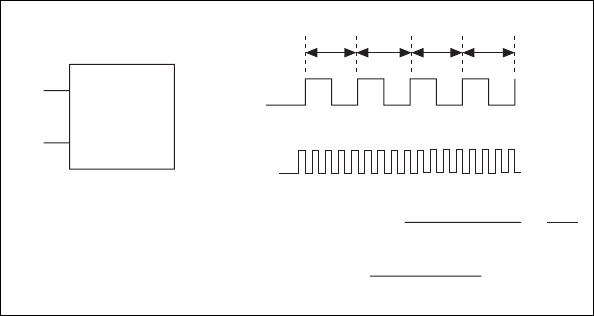
Chapter 9 Counters
© National Instruments Corporation 9-11 NI USB-621x User Manual
Method 1b—Measure Low Frequency with One
Counter (Averaged)
In this method, you measure several periods of your signal using a known
timebase. This method is good for low to medium frequency signals.
You can route the signal to measure (F1) to the Gate of a counter. You can
route a known timebase (Ft) to the Source of the counter. The known
timebase can be 80MHzTimebase. For signals that might be slower than
0.02 Hz, use a slower known timebase.
You can configure the counter to make K + 1 buffered period
measurements. Recall that the first period measurement in the buffer should
be discarded.
Average the remaining K period measurements to determine the average
period of F1. The frequency of F1 is the inverse of the average period.
Figure 9-12 illustrates this method.
Figure 9-12. Method 1b
Method 2—Measure High Frequency with Two
Counters
In this method, you measure one pulse of a known width using your signal
and derive the frequency of your signal from the result. This method is good
for high frequency signals.
In this method, you route a pulse of known duration (T) to the Gate of a
counter. You can generate the pulse using a second counter. You also can
F1
Ft
F1
Intervals Measured
Gate
Source
Buffered Period
Measurement
Average Period of F1 =
N
1 +
N
2 + …
N
K
K
Frequency of F1 =
N
1 +
N
2 + …
N
K
K × Ft
Ft
T1T2…T
K
1
Ft
×
1 2 ...
N
11... ...
N
2 … 1... ...
N
K
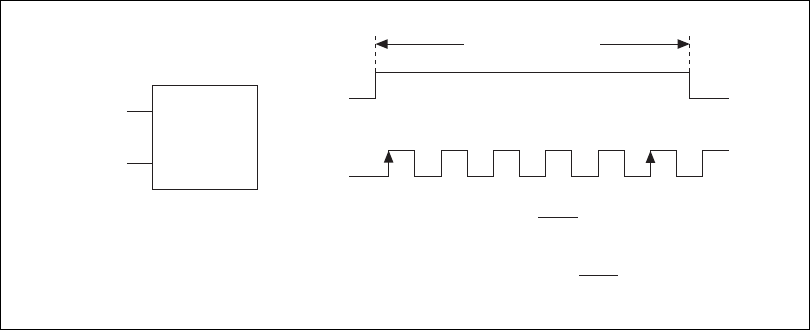
Chapter 9 Counters
NI USB-621x User Manual 9-12 ni.com
generate the pulse externally and connect it to a PFI terminal. You only
need to use one counter if you generate the pulse externally.
Route the signal to measure (F1) to the Source of the counter. Configure the
counter for a single pulse-width measurement. Suppose you measure the
width of pulse T to be N periods of F1. Then the frequency of F1 is N/T.
Figure 9-13 illustrates this method. Another option would be to measure
the width of a known period instead of a known pulse.
Figure 9-13. Method 2
Method 3—Measure Large Range of Frequencies
Using Two Counters
By using two counters, you can accurately measure a signal that might be
high or low frequency. This technique is called reciprocal frequency
measurement. In this method, you generate a long pulse using the signal to
measure. You then measure the long pulse with a known timebase. The
M Series device can measure this long pulse more accurately than the faster
input signal.
You can route the signal to measure to the Source input of Counter 0, as
shown in Figure 9-14. Assume this signal to measure has frequency F1.
Configure Counter 0 to generate a single pulse that is the width of N periods
of the source input signal.
Pulse
F1
Pulse
F1
Gate
Source
12…
N
Pulse-Width
Measurement T =
N
F1
Frequency of F1 = T
Width of
Pulse
N
Width of Pulse (T)
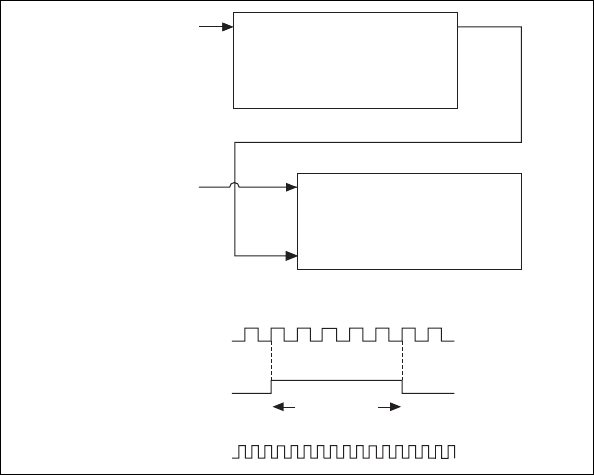
Chapter 9 Counters
© National Instruments Corporation 9-13 NI USB-621x User Manual
Figure 9-14. Method 3
Then route the Counter 0 Internal Output signal to the Gate input of
Counter 1. You can route a signal of known frequency (F2) to the Counter
1 Source input. F2 can be 80MHzTimebase. For signals that might be
slower than 0.02 Hz, use a slower known timebase. Configure Counter 1 to
perform a single pulse-width measurement. Suppose the result is that the
pulse width is J periods of the F2 clock.
From Counter 0, the length of the pulse is N/F1. From Counter 1, the length
of the same pulse is J/F2. Therefore, the frequency of F1 is given by
F1=F2*(N/J).
Choosing a Method for Measuring Frequency
The best method to measure frequency depends on several factors including
the expected frequency of the signal to measures, the desired accuracy, how
many counters are available, and how long the measurement can take.
• Method 1 uses only one counter. It is a good method for many
applications. However, the accuracy of the measurement decreases as
the frequency increases.
Consider a frequency measurement on a 50 kHz signal using an
80 MHz Timebase. This frequency corresponds to 1600 cycles of the
SOURCE OUT
COUNTER 0
SOURCE
GATE
OUT
COUNTER 1
Signal to
Measure (F1)
Signal of Known
Frequency (F2)
CTR_0_SOURCE
(Signal to Measure)
CTR_0_OUT
(CTR_1_GATE)
CTR_1_SOURCE
Interval
to Measure
0 1 2 3 …
N

Chapter 9 Counters
NI USB-621x User Manual 9-14 ni.com
80 MHz Timebase. Your measurement may return 1600 ± 1 cycles
depending on the phase of the signal with respect to the timebase. As
your frequency becomes larger, this error of ±1 cycle becomes more
significant; Table 9-2 illustrates this point.
• Method 1b (measuring K periods of F1) improves the accuracy of the
measurement. A disadvantage of Method 1b is that you have to take
K + 1 measurements. These measurements take more time and
consume some of the available USB bandwidth.
• Method 2 is accurate for high frequency signals. However, the
accuracy decreases as the frequency of the signal to measure
decreases. At very low frequencies, Method 2 may be too inaccurate
for your application. Another disadvantage of Method 2 is that it
requires two counters (if you cannot provide an external signal of
known width). An advantage of Method 2 is that the measurement
completes in a known amount of time.
• Method 3 measures high and low frequency signals accurately.
However, it requires two counters.
Table 9-2. Frequency Measurement Method 1
Task Equation Example 1 Example 2
Actual Frequency to Measure F1 50 kHz 5MHz
Timebase Frequency Ft 80 MHz 80 MHz
Actual Number of Timebase
Periods
Ft/F1 1600 16
Worst Case Measured Number of
Timebase Periods
(Ft/F1) – 1 1599 15
Measured Frequency Ft F1/(Ft – F1) 50.125 kHz 5.33 MHz
Error [Ft F1/(Ft – F1)] – F1 125 kHz 333 kHz
Error % [Ft/(Ft – F1)] – 1 0.06% 6.67%

Chapter 9 Counters
© National Instruments Corporation 9-15 NI USB-621x User Manual
Table 9-3 summarizes some of the differences in methods of measuring
frequency.
For information about connecting counter signals, refer to the Default
Counter/Timer Pinouts section.
Position Measurement
You can use the counters to perform position measurements with
quadrature encoders or two-pulse encoders. You can measure angular
position with X1, X2, and X4 angular encoders. Linear position can be
measured with two-pulse encoders. You can choose to do either a single
point (on-demand) position measurement or a buffered (sample clock)
position measurement. You must arm a counter to begin position
measurements.
Measurements Using Quadrature Encoders
The counters can perform measurements of quadrature encoders that use
X1, X2, or X4 encoding. A quadrature encoder can have up to three
channels—channels A, B, and Z.
X1 Encoding
When channel A leads channel B in a quadrature cycle, the counter
increments. When channel B leads channel A in a quadrature cycle, the
counter decrements. The amount of increments and decrements per cycle
depends on the type of encoding—X1, X2, or X4.
Table 9-3. Frequency Measurement Method Comparison
Method
Number of
Counters Used
Number of
Measurements
Returned
Measures High
Frequency
Signals
Accurately
Measures Low
Frequency
Signals
Accurately
111Poor Good
1b 1 Many Fair Good
21 or 2 1Good Poor
321Good Good
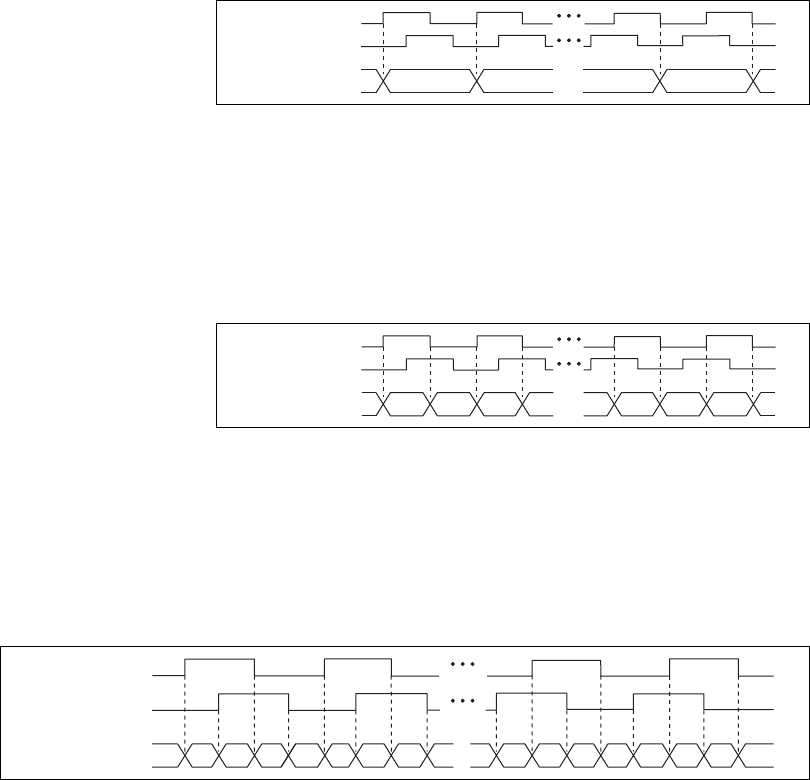
Chapter 9 Counters
NI USB-621x User Manual 9-16 ni.com
Figure 9-15 shows a quadrature cycle and the resulting increments and
decrements for X1 encoding. When channel A leads channel B, the
increment occurs on the rising edge of channel A. When channel B leads
channel A, the decrement occurs on the falling edge of channel A.
Figure 9-15. X1 Encoding
X2 Encoding
The same behavior holds for X2 encoding except the counter increments or
decrements on each edge of channel A, depending on which channel leads
the other. Each cycle results in two increments or decrements, as shown in
Figure 9-16.
Figure 9-16. X2 Encoding
X4 Encoding
Similarly, the counter increments or decrements on each edge of
channels A and B for X4 encoding. Whether the counter increments or
decrements depends on which channel leads the other. Each cycle results in
four increments or decrements, as shown in Figure 9-17.
Figure 9-17. X4 Encoding
Ch A
Ch B
Counter Value 7765
56
Ch A
Ch B
Counter Value 56 8 9
75
6
8
97
Ch A
Ch B
Counter Value 5 6 8 9 10 1011 1112 1213 137 56879
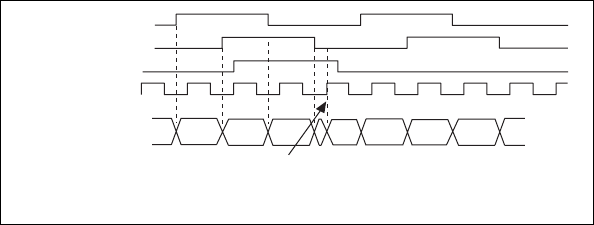
Chapter 9 Counters
© National Instruments Corporation 9-17 NI USB-621x User Manual
Channel Z Behavior
Some quadrature encoders have a third channel, channel Z, which is also
referred to as the index channel. A high level on channel Z causes the
counter to be reloaded with a specified value in a specified phase of the
quadrature cycle. You can program this reload to occur in any one of the
four phases in a quadrature cycle.
Channel Z behavior—when it goes high and how long it stays
high—differs with quadrature encoder designs. You must refer to the
documentation for your quadrature encoder to obtain timing of channel Z
with respect to channels A and B. You must then ensure that channel Z is
high during at least a portion of the phase you specify for reload. For
instance, in Figure 9-18, channel Z is never high when channel A is high
and channel B is low. Thus, the reload must occur in some other phase.
In Figure 9-18, the reload phase is when both channel A and channel B are
low. The reload occurs when this phase is true and channel Z is high.
Incrementing and decrementing takes priority over reloading. Thus, when
the channel B goes low to enter the reload phase, the increment occurs first.
The reload occurs within one maximum timebase period after the reload
phase becomes true. After the reload occurs, the counter continues to count
as before. The figure illustrates channel Z reload with X4 decoding.
Figure 9-18. Channel Z Reload with X4 Decoding
Measurements Using Two Pulse Encoders
The counter supports two pulse encoders that have two channels—channels
A and B.
Ch A
Ch B
Counter Value 56
A = 0
B = 0
Z = 1
Ch Z
Max Timebase
890 21743
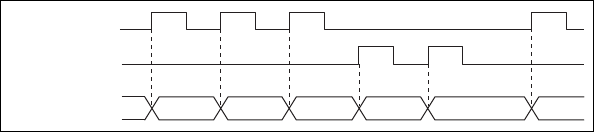
Chapter 9 Counters
NI USB-621x User Manual 9-18 ni.com
The counter increments on each rising edge of channel A. The counter
decrements on each rising edge of channel B, as shown in Figure 9-19.
Figure 9-19. Measurements Using Two Pulse Encoders
For information about connecting counter signals, refer to the Default
Counter/Timer Pinouts section.
Two-Signal Edge-Separation Measurement
Two-signal edge-separation measurement is similar to pulse-width
measurement, except that there are two measurement signals—Aux and
Gate. An active edge on the Aux input starts the counting and an active edge
on the Gate input stops the counting. You must arm a counter to begin a
two edge separation measurement.
After the counter has been armed and an active edge occurs on the Aux
input, the counter counts the number of rising (or falling) edges on the
Source. The counter ignores additional edges on the Aux input.
The counter stops counting upon receiving an active edge on the Gate input.
The counter stores the count in a hardware save register.
You can configure the rising or falling edge of the Aux input to be the active
edge. You can configure the rising or falling edge of the Gate input to be
the active edge.
Use this type of measurement to count events or measure the time that
occurs between edges on two signals. This type of measurement is
sometimes referred to as start/stop trigger measurement, second gate
measurement, or A-to-B measurement.
Single Two-Signal Edge-Separation Measurement
With single two-signal edge-separation measurement, the counter counts
the number of rising (or falling) edges on the Source input occurring
between an active edge of the Gate signal and an active edge of the Aux
signal. The counter then stores the count in a hardware save register and
ignores other edges on its inputs. Software then reads the stored count.
Ch A
Ch B
Counter Value 2 3 54344
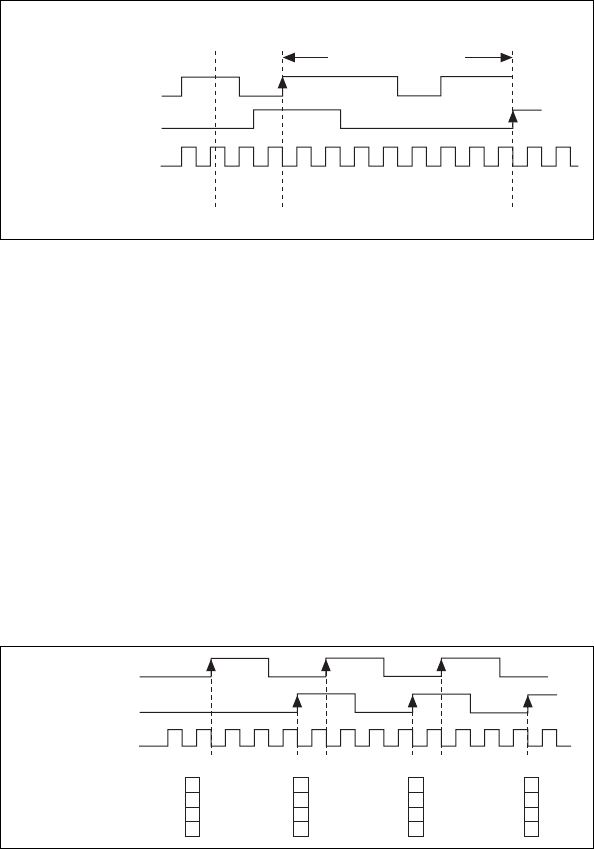
Chapter 9 Counters
© National Instruments Corporation 9-19 NI USB-621x User Manual
Figure 9-20 shows an example of a single two-signal edge-separation
measurement.
Figure 9-20. Single Two-Signal Edge-Separation Measurement
Buffered Two-Signal Edge-Separation Measurement
Buffered and single two-signal edge-separation measurements are similar,
but buffered measurement measures multiple intervals.
The counter counts the number of rising (or falling) edges on the Source
input occurring between an active edge of the Gate signal and an active
edge of the Aux signal. The counter then stores the count in a hardware save
register. On the next active edge of the Gate signal, the counter begins
another measurement. A USB Signal Stream transfers the stored values to
host memory.
Figure 9-21 shows an example of a buffered two-signal edge-separation
measurement.
Figure 9-21. Buffered Two-Signal Edge-Separation Measurement
For information about connecting counter signals, refer to the Default
Counter/Timer Pinouts section.
AUX
Counter
Armed
8
0000123456788 8
Measured Interval
GATE
SOURCE
Counter Value
HW Save Register
SOURCE
Counter Value
Buffer
AUX
GATE
123 123 123
33
3
3
3
3
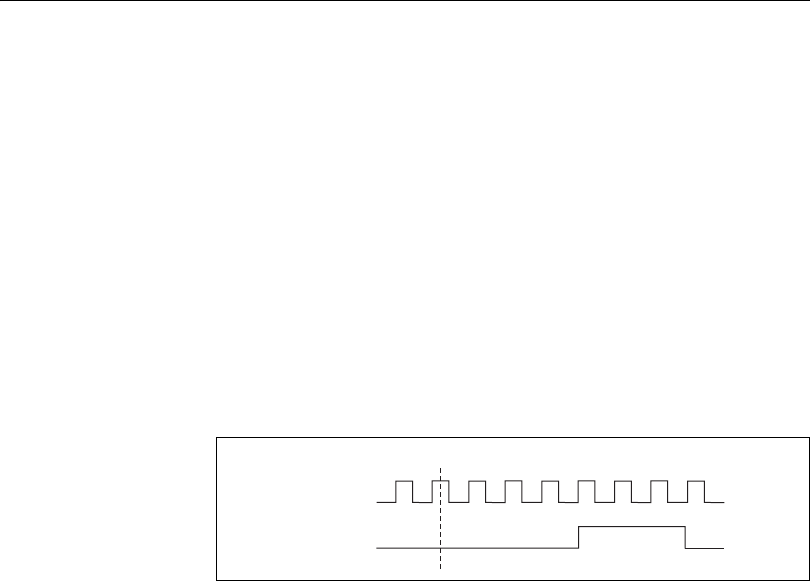
Chapter 9 Counters
NI USB-621x User Manual 9-20 ni.com
Counter Output Applications
Simple Pulse Generation
Single Pulse Generation
The counter can output a single pulse. The pulse appears on the Counter n
Internal Output signal of the counter.
You can specify a delay from when the counter is armed to the beginning
of the pulse. The delay is measured in terms of a number of active edges of
the Source input.
You can specify a pulse width. The pulse width is also measured in terms
of a number of active edges of the Source input. You also can specify the
active edge of the Source input (rising or falling).
Figure 9-22 shows a generation of a pulse with a pulse delay of four and a
pulse width of three (using the rising edge of Source).
Figure 9-22. Single Pulse Generation
Single Pulse Generation with Start Trigger
The counter can output a single pulse in response to one pulse on a
hardware Start Trigger signal. The pulse appears on the Counter n Internal
Output signal of the counter.
You can route the Start Trigger signal to the Gate input of the counter. You
can specify a delay from the Start Trigger to the beginning of the pulse. You
also can specify the pulse width. The delay and pulse width are measured
in terms of a number of active edges of the Source input.
After the Start Trigger signal pulses once, the counter ignores the Gate
input.
SOURCE
OUT
Counter Armed
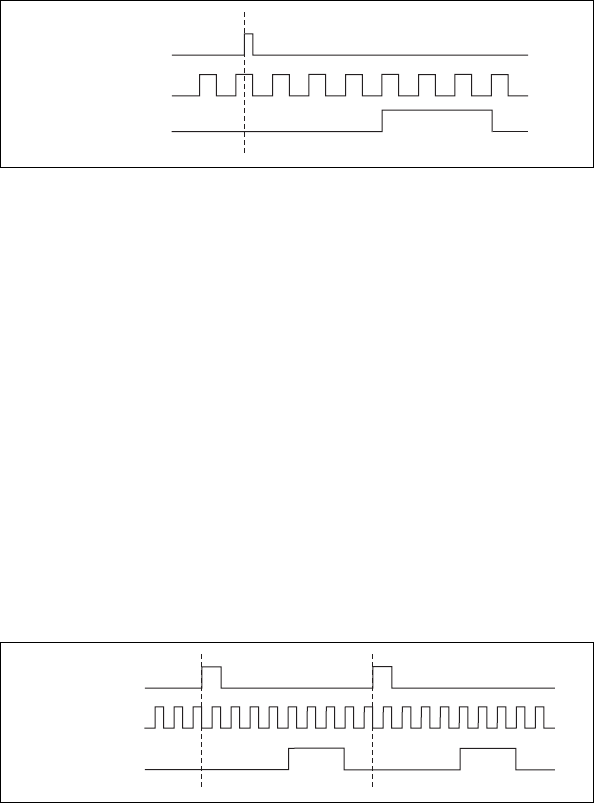
Chapter 9 Counters
© National Instruments Corporation 9-21 NI USB-621x User Manual
Figure 9-23 shows a generation of a pulse with a pulse delay of four and a
pulse width of three (using the rising edge of Source).
Figure 9-23. Single Pulse Generation with Start Trigger
Retriggerable Single Pulse Generation
The counter can output a single pulse in response to each pulse on a
hardware Start Trigger signal. The pulses appear on the Counter n Internal
Output signal of the counter.
You can route the Start Trigger signal to the Gate input of the counter. You
can specify a delay from the Start Trigger to the beginning of each pulse.
You also can specify the pulse width. The delay and pulse width are
measured in terms of a number of active edges of the Source input.
The counter ignores the Gate input while a pulse generation is in progress.
After the pulse generation is finished, the counter waits for another Start
Trigger signal to begin another pulse generation.
Figure 9-24 shows a generation of two pulses with a pulse delay of five and
a pulse width of three (using the rising edge of Source).
Figure 9-24. Retriggerable Single Pulse Generation
For information about connecting counter signals, refer to the Default
Counter/Timer Pinouts section.
SOURCE
GATE
(Start Trigger)
OUT
SOURCE
GATE
(Start Trigger)
OUT
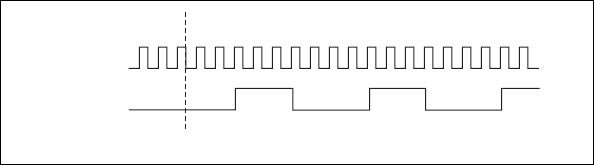
Chapter 9 Counters
NI USB-621x User Manual 9-22 ni.com
Pulse Train Generation
Continuous Pulse Train Generation
This function generates a train of pulses with programmable frequency and
duty cycle. The pulses appear on the Counter n Internal Output signal of the
counter.
You can specify a delay from when the counter is armed to the beginning
of the pulse train. The delay is measured in terms of a number of active
edges of the Source input.
You specify the high and low pulse widths of the output signal. The pulse
widths are also measured in terms of a number of active edges of the Source
input. You also can specify the active edge of the Source input (rising or
falling).
The counter can begin the pulse train generation as soon as the counter is
armed, or in response to a hardware Start Trigger. You can route the Start
Trigger to the Gate input of the counter.
You also can use the Gate input of the counter as a Pause Trigger (if it is not
used as a Start Trigger). The counter pauses pulse generation when the
Pause Trigger is active.
Figure 9-25 shows a continuous pulse train generation (using the rising
edge of Source).
Figure 9-25. Continuous Pulse Train Generation
Continuous pulse train generation is sometimes called frequency division.
If the high and low pulse widths of the output signal are M and N periods,
then the frequency of the Counter n Internal Output signal is equal to the
frequency of the Source input divided by M+N.
For information about connecting counter signals, refer to the Default
Counter/Timer Pinouts section.
SOURCE
OUT
Counter Armed
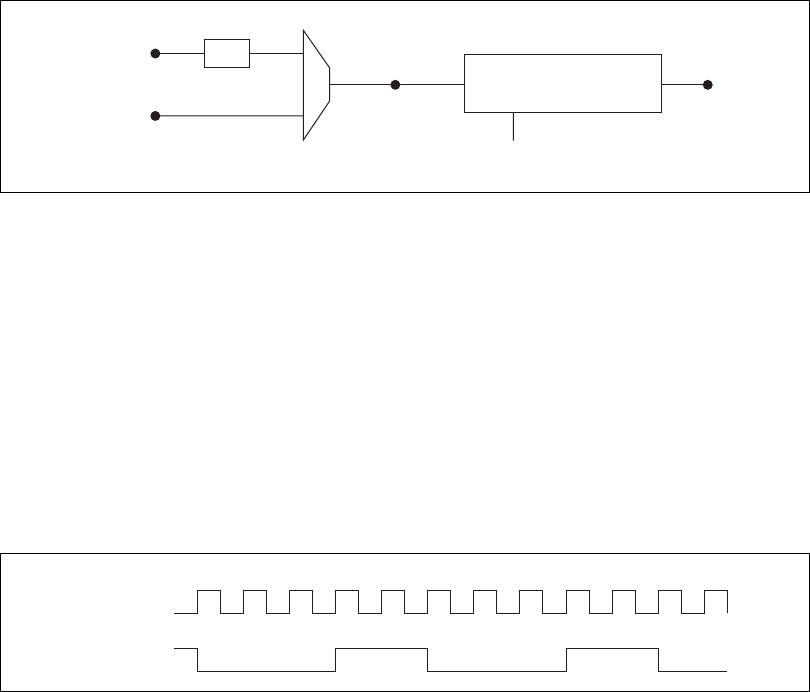
Chapter 9 Counters
© National Instruments Corporation 9-23 NI USB-621x User Manual
Frequency Generation
You can generate a frequency by using a counter in pulse train generation
mode or by using the frequency generator circuit.
Using the Frequency Generator
The frequency generator can output a square wave at many different
frequencies. The frequency generator is independent of the two
general-purpose 32-bit counter/timer modules on M Series devices.
Figure 9-26 shows a block diagram of the frequency generator.
Figure 9-26. Frequency Generator Block Diagram
The frequency generator generates the Frequency Output signal. The
Frequency Output signal is the Frequency Output Timebase divided by a
number you select from 1 to 16. The Frequency Output Timebase can be
either the 20 MHz Timebase divided by 2 or the 100 kHz Timebase.
The duty cycle of Frequency Output is 50% if the divider is either 1 or an
even number. For an odd divider, suppose the divider is set to D. In this
case, Frequency Output is low for (D + 1)/2 cycles and high for (D – 1)/2
cycles of the Frequency Output Timebase.
Figure 9-27 shows the output waveform of the frequency generator when
the divider is set to 5.
Figure 9-27. Frequency Generator Output Waveform
100 kHz Timebase
20 MHz Timebase
Frequency
Output
Timebase
FREQ OUT
Divisor
(1–16)
Frequency Generator
÷
2
Frequency
Output
Timebase
FREQ OUT
(Divisor = 5)

Chapter 9 Counters
NI USB-621x User Manual 9-24 ni.com
Frequency Output can be routed out to any PFI <4..7> or PFI <12..15>
terminal. All PFI terminals are set to high-impedance at startup. The FREQ
OUT signal also can be routed to DO Sample Clock and DI Sample Clock.
In software, program the frequency generator as you would program one of
the counters for pulse train generation.
For information about connecting counter signals, refer to the Default
Counter/Timer Pinouts section.
Frequency Division
The counters can generate a signal with a frequency that is a fraction of an
input signal. This function is equivalent to continuous pulse train
generation.
For information about connecting counter signals, refer to the Default
Counter/Timer Pinouts section.
Pulse Generation for ETS
In this application, the counter produces a pulse on the output a specified
delay after an active edge on Gate. After each active edge on Gate, the
counter cumulatively increments the delay between the Gate and the pulse
on the output by a specified amount. Thus, the delay between the Gate and
the pulse produced successively increases.
Note ETS = Equivalent Time Sampling.
The increase in the delay value can be between 0 and 255. For instance, if
you specify the increment to be 10, the delay between the active Gate edge
and the pulse on the output will increase by 10 every time a new pulse is
generated.
Suppose you program your counter to generate pulses with a delay of
100 and pulse width of 200 each time it receives a trigger. Furthermore,
suppose you specify the delay increment to be 10. On the first trigger, your
pulse delay will be 100, on the second it will be 110, on the third it will be
120; the process will repeat in this manner until the counter is disarmed.
The counter ignores any Gate edge that is received while the pulse triggered
by the previous Gate edge is in progress.
The waveform thus produced at the counter’s output can be used to provide
timing for undersampling applications where a digitizing system can
sample repetitive waveforms that are higher in frequency than the Nyquist
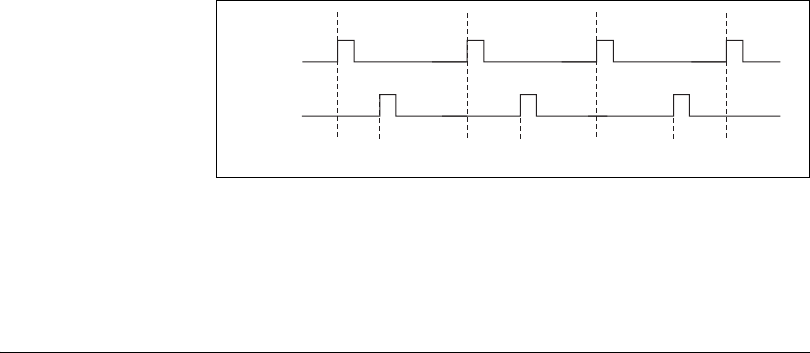
Chapter 9 Counters
© National Instruments Corporation 9-25 NI USB-621x User Manual
frequency of the system. Figure 9-28 shows an example of pulse generation
for ETS; the delay from the trigger to the pulse increases after each
subsequent Gate active edge.
Figure 9-28. Pulse Generation for ETS
For information about connecting counter signals, refer to the Default
Counter/Timer Pinouts section.
Counter Timing Signals
USB M Series devices feature the following counter timing signals.
• Counter n Source
• Counter n Gate
• Counter n Aux
• Counter n A
• Counter n B
• Counter n Z
• Counter n Up_Down
• Counter n HW Arm
• Counter n Internal Output
• Counter n TC
•Frequency Output
In this section, n refers to either Counter 0 or 1. For example, Counter n
Source refers to two signals—Counter 0 Source (the source input to
Counter 0) and Counter 1 Source (the source input to Counter 1).
OUT
D1 D2 = D1 + ΔD D3 = D1 + 2ΔD
GATE
Chapter 9 Counters
NI USB-621x User Manual 9-26 ni.com
Counter n Source Signal
The selected edge of the Counter n Source signal increments and
decrements the counter value depending on the application the counter is
performing. Table 9-4 lists how this terminal is used in various
applications.
Routing a Signal to Counter n Source
Each counter has independent input selectors for the Counter n Source
signal. Any of the following signals can be routed to the Counter n Source
input.
•80MHz Timebase
•20MHz Timebase
• 100 kHz Timebase
• PFI <0..3>, PFI <8..11>
In addition, Counter 1 TC or Counter 1 Gate can be routed to
Counter 0 Source. Counter 0 TC or Counter 0 Gate can be routed to
Counter 1 Source.
Some of these options may not be available in some driver software.
Routing Counter n Source to an Output Terminal
You can route Counter n Source out to any PFI <4..7> or PFII <12..15>
terminal.
Table 9-4. Counter Applications and Counter n Source
Application Purpose of Source Terminal
Pulse Generation Counter Timebase
One Counter Time Measurements Counter Timebase
Two Counter Time Measurements Input Terminal
Non-Buffered Edge Counting Input Terminal
Buffered Edge Counting Input Terminal
Two-Edge Separation Counter Timebase
Chapter 9 Counters
© National Instruments Corporation 9-27 NI USB-621x User Manual
Counter n Gate Signal
The Counter n Gate signal can perform many different operations
depending on the application including starting and stopping the counter,
and saving the counter contents.
Routing a Signal to Counter n Gate
Each counter has independent input selectors for the Counter n Gate signal.
Any of the following signals can be routed to the Counter n Gate input.
• PFI <0..3>, PFI <8..11>
• ai/ReferenceTrigger
• ai/StartTrigger
• ai/SampleClock
• ai/ConvertClock
• ao/SampleClock
In addition, Counter 1 Internal Output or Counter 1 Source can be routed to
Counter 0 Gate. Counter 0 Internal Output or Counter 0 Source can be
routed to Counter 1 Gate.
Some of these options may not be available in some driver software.
Routing Counter n Gate to an Output Terminal
You can route Counter n Gate out to any PFI <4..7> or PFI <12..15>
terminal.
Counter n Aux Signal
The Counter n Aux signal indicates the first edge in a two-signal
edge-separation measurement.
Routing a Signal to Counter n Aux
Each counter has independent input selectors for the Counter n Aux signal.
Any of the following signals can be routed to the Counter n Aux input.
• PFI <0..3>, PFI <8..11>
• ai/ReferenceTrigger
• ai/StartTrigger
In addition, Counter 1 Internal Output, Counter 1 Gate, Counter 1 Source,
or Counter 0 Gate can be routed to Counter 0 Aux. Counter 0 Internal
Chapter 9 Counters
NI USB-621x User Manual 9-28 ni.com
Output, Counter 0 Gate, Counter 0 Source, or Counter 1 Gate can be routed
to Counter 1 Aux.
Some of these options may not be available in some driver software.
Counter n A, Counter n B, and Counter n Z Signals
Counter n B can control the direction of counting in edge counting
applications. Use the A, B, and Z inputs to each counter when measuring
quadrature encoders or measuring two pulse encoders.
Routing Signals to A, B, and Z Counter Inputs
Each counter has independent input selectors for each of the A, B, and Z
inputs. The PFI <0..3> or PFI <8..11> signals can be routed to each input.
Counter n Up_Down Signal
Counter n Up_Down is another name for the Counter n B signal.
Counter n HW Arm Signal
The Counter n HW Arm signal enables a counter to begin an input or output
function.
To begin any counter input or output function, you must first enable, or arm,
the counter. In some applications, such as buffered semi-period
measurement, the counter begins counting when it is armed. In other
applications, such as single pulse-width measurement, the counter begins
waiting for the Gate signal when it is armed. Counter output operations can
use the arm signal in addition to a start trigger.
Software can arm counters or configure counters to be armed on the
assertion of the Counter n HW Arm signal.
Routing Signals to Counter n HW Arm Input
Any of the following signals can be routed to the Counter n HW Arm input.
• PFI <0..3>, PFI <8..11>
• ai/ReferenceTrigger
• ai/StartTrigger
Counter 1 Internal Output can be routed to Counter 0 HW Arm.
Counter 0 Internal Output can be routed to Counter 1 HW Arm.
Chapter 9 Counters
© National Instruments Corporation 9-29 NI USB-621x User Manual
Some of these options may not be available in some driver software.
Counter n Internal Output and Counter n TC Signals
Counter n TC is an internal signal that asserts when the counter value is 0.
The Counter n Internal Output signal changes in response to Counter n TC.
The two software-selectable output options are pulse on TC and toggle
output polarity on TC. The output polarity is software-selectable for both
options.
Routing Counter n Internal Output to an Output
Terminal
You can route Counter n Internal Output to any PFI <4..7> or PFI <12..15>
terminal.
Frequency Output Signal
The Frequency Output (FREQ OUT) signal is the output of the frequency
output generator.
Routing Frequency Output to a Terminal
You can route Frequency Output to any PFI <4..7> or PFI <12..15>
terminal.
Default Counter/Timer Pinouts
By default, NI-DAQmx routes the counter/timer inputs and outputs to the
PFI pins, shown in Tables 9-5 and 9-6.
Table 9-5. Default NI-DAQmx Counter/Timer Pins for USB-6210/6211/6215 Devices
Counter/Timer Signal Default Terminal Number (Name)
CTR 0 SRC 1 (PFI 0)
CTR 0 GATE 2 (PFI 1)
CTR 0 AUX 1 (PFI 0)
CTR 0 OUT 6 (PFI 4)
CTR 0 A 1 (PFI 0)
CTR 0 Z 3 (PFI 2)
Chapter 9 Counters
NI USB-621x User Manual 9-30 ni.com
CTR 0 B 2 (PFI 1)
CTR 1 SRC 4 (PFI 3)
CTR 1 GATE 3 (PFI 2)
CTR 1 AUX 4 (PFI 3)
CTR 1 OUT 7 (PFI 5)
CTR 1 A 4 (PFI 3)
CTR 1 Z 2 (PFI 1)
CTR 1 B 3 (PFI 2)
FREQ OUT 8 (PFI 6)
Table 9-6. Default NI-DAQmx Counter/Timer Pins for USB-6218 Devices
Counter/Timer Signal Default Terminal Number (Name)
CTR 0 SRC 1 (PFI 0)
CTR 0 GATE 2 (PFI 1)
CTR 0 AUX 34 (PFI 9)
CTR 0 OUT 6 (PFI 4)
CTR 0 A 1 (PFI 0)
CTR 0 Z 2 (PFI 1)
CTR 0 B 34 (PFI 9)
CTR 1 SRC 4 (PFI 3)
CTR 1 GATE 3 (PFI 2)
CTR 1 AUX 35 (PFI 10)
CTR 1 OUT 7 (PFI 5)
CTR 1 A 4 (PFI 3)
CTR 1 Z 3 (PFI 2)
CTR 1 B 35 (PFI 10)
FREQ OUT 8 (PFI 6)
Table 9-5. Default NI-DAQmx Counter/Timer Pins for USB-6210/6211/6215 Devices (Continued)
Counter/Timer Signal Default Terminal Number (Name)

Chapter 9 Counters
© National Instruments Corporation 9-31 NI USB-621x User Manual
You can use these defaults or select other sources and destinations for the
counter/timer signals in NI-DAQmx. Refer to Connecting Counter Signals
in the NI-DAQmx Help or the LabVIEW 8.x Help for more information
about how to connect your signals for common counter measurements and
generations. M Series default PFI lines for counter functions are listed in
Physical Channels in the NI-DAQmx Help or the LabVIEW 8.x Help.
Counter Triggering
Counters support three different triggering actions—arm start, start, and
pause.
Arm Start Trigger
Any counter operation can use the arm start trigger.
For counter output operations, you can use it in addition to the start and
pause triggers. For counter input operations, you can use the arm start
trigger to have start trigger-like behavior. The arm start trigger can be used
for synchronizing multiple counter input and output tasks.
When using an arm start trigger, the arm start trigger source is routed to the
Counter n HW Arm signal.
Start Trigger
For counter output operations, a start trigger can be configured to begin a
finite or continuous pulse generation. Once a continuous generation has
triggered, the pulses continue to generate until you stop the operation in
software. For finite generations, the specified number of pulses is generated
and the generation stops unless you use the retriggerable attribute. When
you use this attribute, subsequent start triggers cause the generation to
restart.
When using a start trigger, the start trigger source is routed to the Counter
n Gate signal input of the counter.
Counter input operations can use the arm start trigger to have start
trigger-like behavior.
Pause Trigger
You can use pause triggers in edge counting and continuous pulse
generation applications. For edge counting acquisitions, the counter stops
counting edges while the external trigger signal is low and resumes when
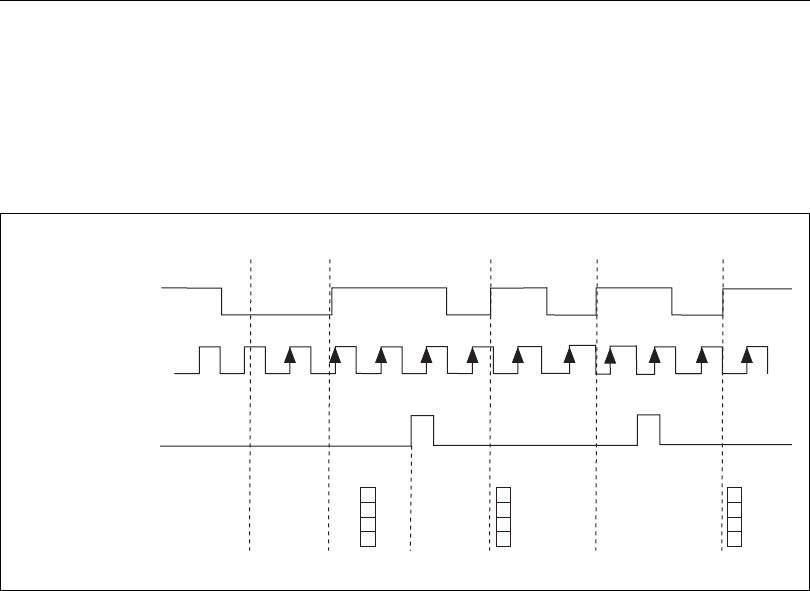
Chapter 9 Counters
NI USB-621x User Manual 9-32 ni.com
the signal goes high or vice versa. For continuous pulse generations, the
counter stops generating pulses while the external trigger signal is low and
resumes when the signal goes high or vice versa.
When using a pause trigger, the pause trigger source is routed to the
Counter n Gate signal input of the counter.
Other Counter Features
Sample Clock
When taking counter measurements, you can enable a sample clock. When
you use a sample clock, measurements are saved after an active edge of the
sample clock. Figure 9-29 shows an example of using a sample clock with
a buffered period measurement. In this example, a period is defined by two
consecutive rising edges of the Gate.
Figure 9-29. Sample Clock Example
SOURCE
GATE
BUFFER
4
Counter Armed
SAMPLE CLOCK
44
3
TIME N
COUNTER VALUE
t0t1t2t3t4t5
12341 212 31
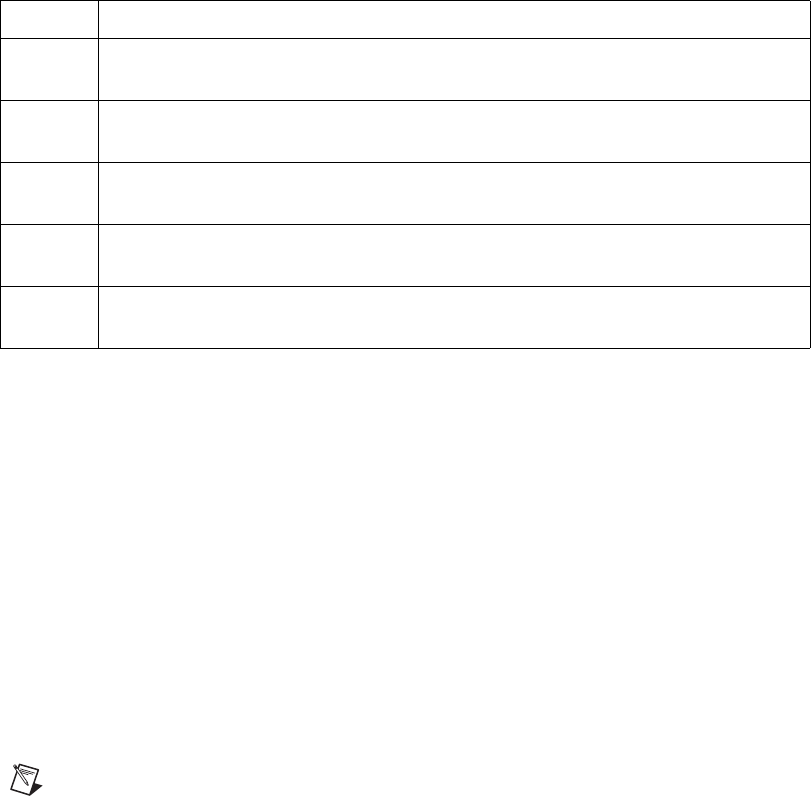
Chapter 9 Counters
© National Instruments Corporation 9-33 NI USB-621x User Manual
Cascading Counters
You can internally route the Counter n Internal Output and Counter n TC
signals of each counter to Gate inputs of the other counter. By cascading
two counters together, you can effectively create a 64-bit counter. By
cascading counters, you also can enable other applications. For example, to
improve the accuracy of frequency measurements, use reciprocal frequency
measurement, as described in the Method 3—Measure Large Range of
Frequencies Using Two Counters section.
Counter Filters
You can enable a programmable debouncing filter on each PFI signal.
When the filters are enabled, your device samples the input on each rising
edge of a filter clock. M Series devices use an onboard oscillator to
generate the filter clock with a 40 MHz frequency.
Note NI-DAQmx only supports filters on counter inputs.
The following is an example of low to high transitions of the input signal.
High to low transitions work similarly.
Assume that an input terminal has been low for a long time. The input
terminal then changes from low to high, but glitches several times. When
the filter clock has sampled the signal high on N consecutive edges, the low
to high transition is propagated to the rest of the circuit. The value of N
depends on the filter setting; refer to Table 9-8.
Table 9-7. Time N Descriptions
t0At t0, the counter is armed. No measurements are taken until the counter is armed.
t1The rising edge of Gate indicates the beginning of the first period to measure. The
counter begins counting rising edges of Source.
t2The rising edge of the Sample Clock indicates that the USB M Series device should
store the result of the measurement of the current period when the period ends.
t3The rising edge of Gate indicates the end of the first period. The USB M Series device
stores the counter value in the buffer.
t4The rising edge of Gate indicates the end of the second period. Sample Clock did not
assert during this period, so the counter discards the measurement of the second period.
t5The rising edge of Gate indicates the end of the third period. Sample Clock asserts
during this period, so the USB M Series device stores the measurement in the buffer.
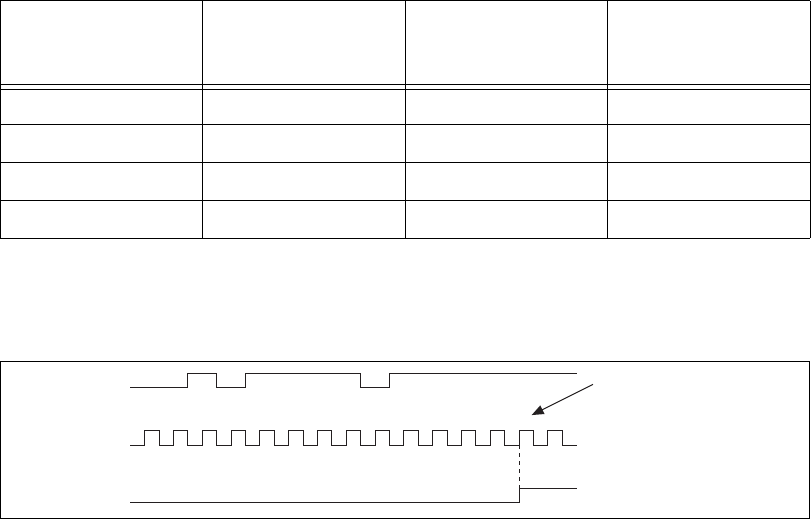
Chapter 9 Counters
NI USB-621x User Manual 9-34 ni.com
The filter setting for each input can be configured independently. On power
up, the filters are disabled. Figure 9-30 shows an example of a low to high
transition on an input that has its filter set to 125 ns (N = 5).
Figure 9-30. Filter Example
Enabling filters introduces jitter on the input signal. For the 125 ns and
6.425 µs filter settings, the jitter is up to 25 ns. On the 2.55 ms setting, the
jitter is up to 10.025 µs.
Refer to the KnowledgeBase document, Digital Filtering with M Series, for
more information about digital filters and counters. To access this
KnowledgeBase, go to ni.com/info and enter the info code rddfms.
Prescaling
Prescaling allows the counter to count a signal that is faster than the
maximum timebase of the counter. M Series devices offer 8X and 2X
prescaling on each counter (prescaling can be disabled). Each prescaler
consists of a small, simple counter that counts to eight (or two) and rolls
over. This counter can run faster than the larger counters, which simply
count the rollovers of this smaller counter. Thus, the prescaler acts as a
frequency divider on the Source and puts out a frequency that is one-eighth
(or one-half) of what it is accepting.
Table 9-8. Filters
Filter Setting
N (Filter Clocks
Needed to Pass
Signal)
Pulse Width
Guaranteed to Pass
Filter
Pulse Width
Guaranteed to Not
Pass Filter
125 ns 5125 ns 100 ns
6.425 µs 257 6.425 µs 6.400 µs
2.55 ms ~101,800 2.55 ms 2.54 ms
Disabled — — —
1 2 3 1 4 1 2 3 4 5
PFI Terminal
Filter Clock
(40 MHz)
Filtered Input
Filtered input goes high
when terminal is sampled
high on five consecutive
filter clocks.
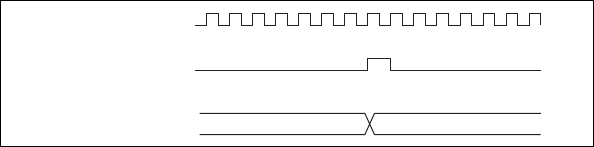
Chapter 9 Counters
© National Instruments Corporation 9-35 NI USB-621x User Manual
Figure 9-31. Prescaling
Prescaling is intended to be used for frequency measurement where the
measurement is made on a continuous, repetitive signal. The prescaling
counter cannot be read; therefore, you cannot determine how many edges
have occurred since the previous rollover. Prescaling can be used for event
counting provided it is acceptable to have an error of up to seven (or one).
Prescaling can be used when the counter Source is an external signal.
Prescaling is not available if the counter Source is one of the internal
timebases (80MHzTimebase, 20MHzTimebase, or 100kHzTimebase).
Duplicate Count Prevention
Duplicate count prevention (or synchronous counting mode) is used when
taking frequency or period measurements on USB-621x devices, which
ensures that a counter returns correct data in applications that use a slow or
non-periodic external source. Duplicate count prevention applies only to
buffered counter applications such as measuring frequency or period. In
such buffered applications, the counter should store the number of times an
external Source pulses between rising edges on the Gate signal.
External Signal
Counter Value
Prescaler Rollover
(Used as Source
by Counter)
01
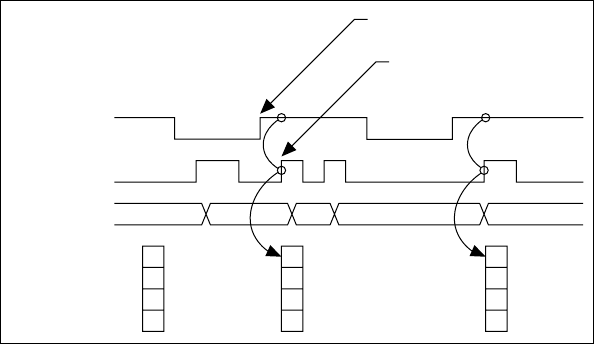
Chapter 9 Counters
NI USB-621x User Manual 9-36 ni.com
Example Application That Works Correctly
(No Duplicate Counting)
Figure 9-32 shows an external buffered signal as the period measurement
Source.
Figure 9-32. Duplicate Count Prevention Example
On the first rising edge of Gate, the current count of 7 is stored. On the next
rising edge of Gate, the counter stores a 2 since two Source pulses occurred
after the previous rising edge of Gate.
The counter synchronizes or samples the Gate signal with the Source
signal, so the counter does not detect a rising edge in Gate until the next
Source pulse. In this example, the counter stores the values in the buffer on
the first rising Source edge after the rising edge of Gate. The details of
when exactly the counter synchronizes the Gate signal vary depending on
the synchronization mode.
Gate
Source
Counter Value
Buffer 2
7
7
6 7 1 2 1
Rising Edge
of Gate
Counter detects rising edge
of Gate on the next rising
edge of Source.
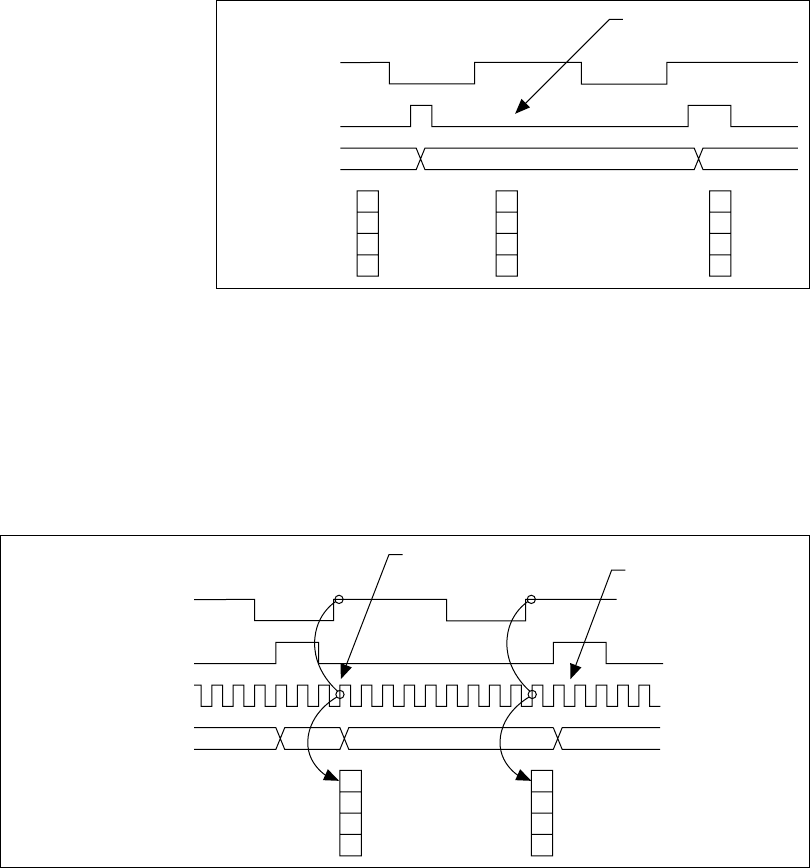
Chapter 9 Counters
© National Instruments Corporation 9-37 NI USB-621x User Manual
Example Application That Works Incorrectly
(Duplicate Counting)
In Figure 9-33, after the first rising edge of Gate, no Source pulses occur,
so the counter does not write the correct data to the buffer.
Figure 9-33. Duplicate Count Example
Example Application That Prevents Duplicate Count
With duplicate count prevention, the counter synchronizes both the Source
and Gate signals to the 80 MHz Timebase. By synchronizing to the
timebase, the counter detects edges on Gate even if the Source does not
pulse. This enables the correct current count to be stored in the buffer even
if no Source edges occur between Gate signals, as shown in Figure 9-34.
Figure 9-34. Duplicate Count Prevention Example
Gate
Source
Counter Value
Buffer 7
67 1
No Source edge, so no
value written to buffer.
Gate
Source
80 MHz Timebase
Counter Value
Buffer 0
7
7
670 1
Counter detects
rising Gate edge. Counter value
increments only
one time for each
Source pulse.
Chapter 9 Counters
NI USB-621x User Manual 9-38 ni.com
Even if the Source pulses are long, the counter increments only once for
each Source pulse.
Normally, the counter value and Counter n Internal Output signals change
synchronously to the Source signal. With duplicate count prevention, the
counter value and Counter n Internal Output signals change synchronously
to the 80 MHz Timebase.
Enabling Duplicate Count Prevention in NI-DAQmx
Duplicate count prevention is automatically used with the USB-621x
devices. Disabling duplicate count prevention is not supported.
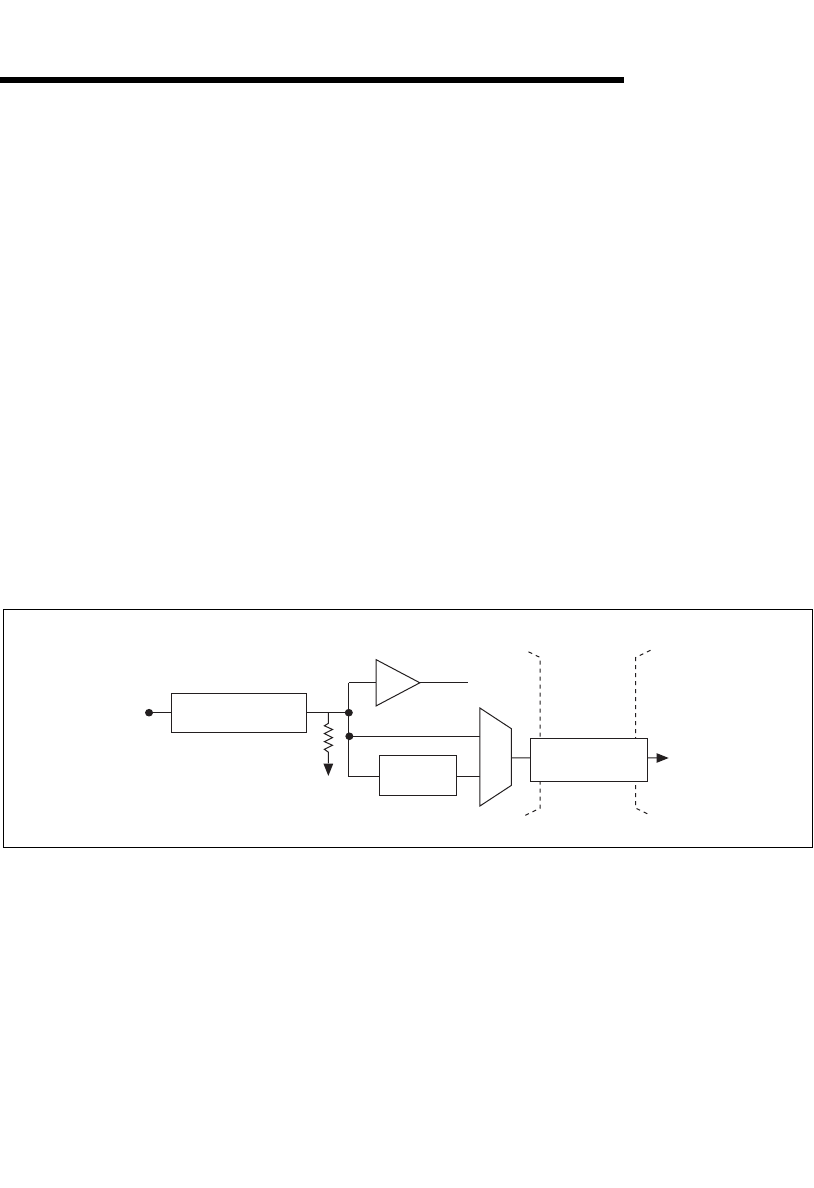
© National Instruments Corporation 10-1 NI USB-621x User Manual
10
PFI
NI 621x devices have up to eight input and eight output Programmable
Function Interface (PFI) signals, which also can be used as static digital
input or static digital output signals.
Each input PFI can be individually configured as the following:
• A static digital input
• A timing input signal for AI, AO, or counter/timer functions
Each output PFI can be individually configured as the following:
• A static digital output
• A timing output signal from AI, AO, or counter/timer functions
Each PFI input also has a programmable debouncing filter. Figure 10-1
shows the circuitry of an input PFI line.
Figure 10-1. NI 621x PFI Input Circuitry
Figure 10-2 shows the circuitry of an output PFI line.
Static DI
I/O Protection
To Input Timing
Signal Selectors
PFI
Filters
Weak Pull-Down
PFI <0..3>/P0,
PFI <8..11>/P0
Isolation
Barrier
(USB-6215
and USB-6218
devices only)
Digital
Isolators
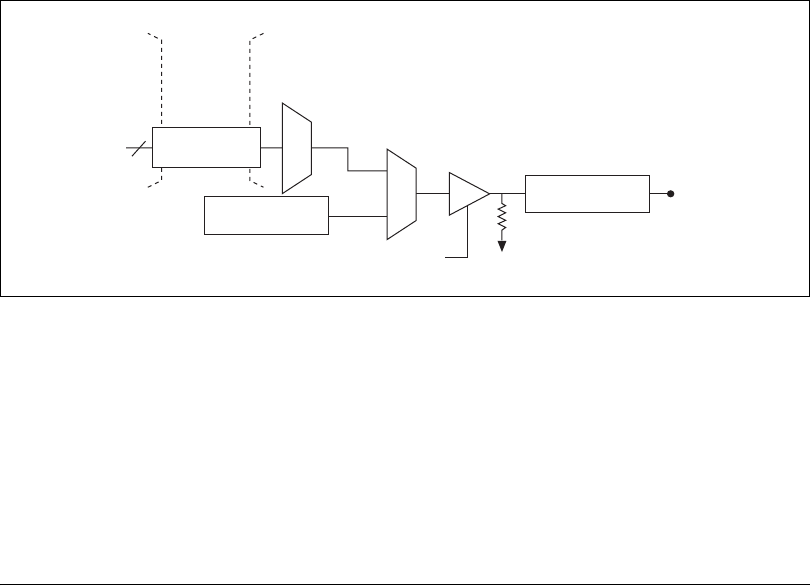
Chapter 10 PFI
NI USB-621x User Manual 10-2 ni.com
Figure 10-2. NI 621x PFI Output Circuitry
When a terminal is used as a timing input or output signal, it is called PFI x.
When a terminal is used as a static digital input or output, it is called P0.x
or P1.x. On the I/O connector, each terminal is labeled PFI x/P0 or
PFI x/P1.
The voltage input and output levels and the current drive levels of the PFI
signals are listed in the specifications of your device.
Using PFI Terminals as Timing Input Signals
Use PFI terminals to route external timing signals to many different
M Series functions. Each input PFI terminal can be routed to any of the
following signals.
• AI Convert Clock
• AI Sample Clock
• AI Start Trigger
• AI Reference Trigger
• AI Pause Trigger
• AI Sample Clock Timebase
•AO Start Trigger
• AO Sample Clock
• AO Sample Clock Timebase
• AO Pause Trigger
• Counter input signals for either counter—Source, Gate, Aux,
HW_Arm, A, B, Z
Timing Signals
Direction Control
I/O Protection
47 kΩ Pull-Down
PFI <4..7>/P1,
PFI <12..15>/P1
Static DO
Buffer
Isolation
Barrier
(USB-6215
and USB-6218
devices only)
Digital
Isolators
Chapter 10 PFI
© National Instruments Corporation 10-3 NI USB-621x User Manual
Most functions allow you to configure the polarity of PFI inputs and
whether the input is edge or level sensitive.
Exporting Timing Output Signals Using PFI Terminals
You can route any of the following timing signals to any PFI output
terminal.
• AI Convert Clock*
• AI Hold Complete Event
• AI Reference Trigger
• AI Sample Clock
• AI Start Trigger
• AO Sample Clock*
•AO Start Trigger
• Counter n Source
• Counter n Gate
• Counter n Internal Output
•Frequency Output
Note Signals with a * are inverted before being driven to a terminal; that is, these signals
are active low.
Using PFI Terminals as Static Digital I/Os
Each input PFI line can be individually configured as a static digital input,
called P0.x. Each output PFI line can be individually configured as a static
digital output, called P1.x.
Connecting PFI Input Signals
All PFI input connections are referenced to D GND. Figure 10-3 shows this
reference, and how to connect an external PFI 0 source and an external
PFI 2 source to two PFI terminals.
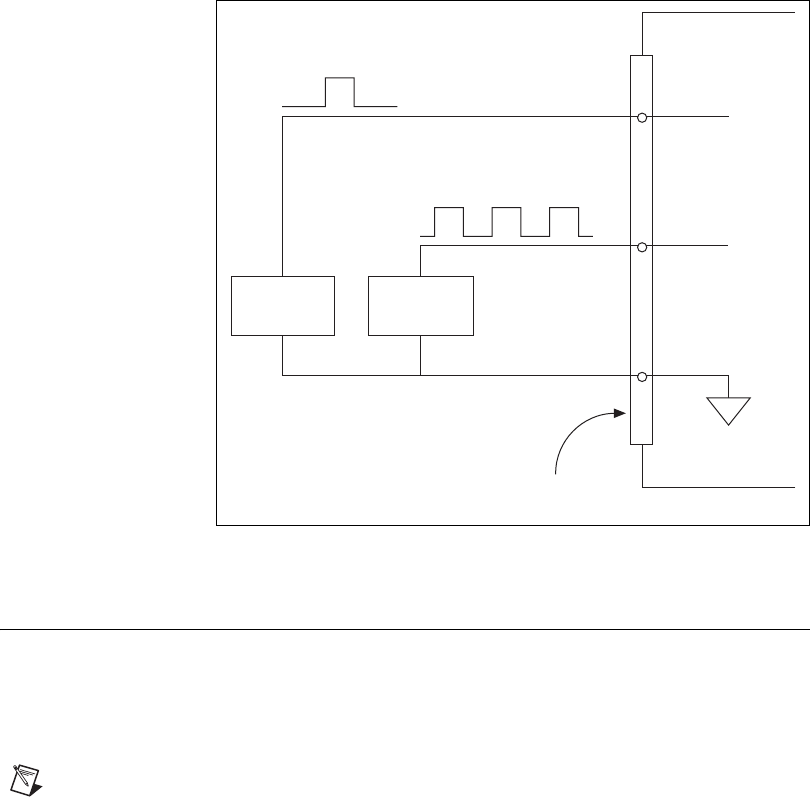
Chapter 10 PFI
NI USB-621x User Manual 10-4 ni.com
Figure 10-3. PFI Input Signals Connections
PFI Filters
You can enable a programmable debouncing filter on each PFI signal.
When the filters are enabled, your device samples the input on each rising
edge of a filter clock. M Series devices use an onboard oscillator to
generate the filter clock with a 40 MHz frequency.
Note NI-DAQmx only supports filters on counter inputs.
The following is an example of low to high transitions of the input signal.
High to low transitions work similarly.
Assume that an input terminal has been low for a long time. The input
terminal then changes from low to high, but glitches several times. When
the filter clock has sampled the signal high on N consecutive edges, the low
to high transition is propagated to the rest of the circuit. The value of N
depends on the filter setting; refer to Table 10-1.
PFI 0
Source
PFI 2
Source
M Series Device
D GND
PFI 2
PFI 0
I/O Connctor
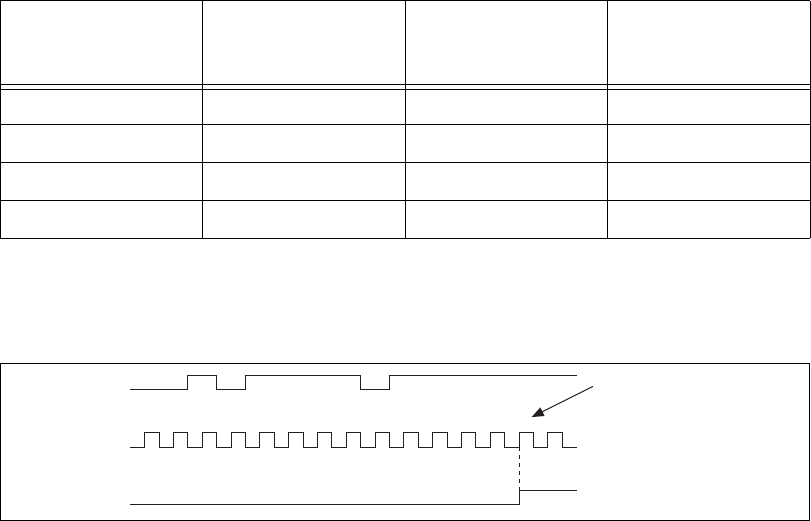
Chapter 10 PFI
© National Instruments Corporation 10-5 NI USB-621x User Manual
The filter setting for each input can be configured independently. On power
up, the filters are disabled. Figure 10-4 shows an example of a low to high
transition on an input that has its filter set to 125 ns (N = 5).
Figure 10-4. Filter Example
Enabling filters introduces jitter on the input signal. For the 125 ns and
6.425 µs filter settings, the jitter is up to 25 ns. On the 2.55 ms setting, the
jitter is up to 10.025 µs.
When a PFI input is routed directly to RTSI, or a RTSI input is routed
directly to PFI, the M Series device does not use the filtered version of the
input signal.
Refer to the KnowledgeBase document, Digital Filtering with M Series, for
more information about digital filters and counters. To access this
KnowledgeBase, go to ni.com/info and enter the info code rddfms.
Table 10-1. Filters
Filter Setting
N (Filter Clocks
Needed to Pass
Signal)
Pulse Width
Guaranteed to Pass
Filter
Pulse Width
Guaranteed to Not
Pass Filter
125 ns 5125 ns 100 ns
6.425 µs 257 6.425 µs 6.400 µs
2.55 ms ~101,800 2.55 ms 2.54 ms
Disabled — — —
1 2 3 1 4 1 2 3 4 5
PFI Terminal
Filter Clock
(40 MHz)
Filtered Input
Filtered input goes high
when terminal is sampled
high on five consecutive
filter clocks.

Chapter 10 PFI
NI USB-621x User Manual 10-6 ni.com
I/O Protection
Each DI, DO, and PFI signal is protected against overvoltage,
undervoltage, and overcurrent conditions as well as ESD events. However,
you should avoid these fault conditions by following these guidelines.
•Do not connect a DO or PFI output lines to any external signal source,
ground signal, or power supply.
• Understand the current requirements of the load connected to DO or
PFI output signals. Do not exceed the specified current output limits of
the DAQ device. NI has several signal conditioning solutions for
digital applications requiring high current drive.
•Do not drive a DI or PFI input line with voltages outside of its normal
operating range. The PFI or DI lines have a smaller operating range
than the AI signals.
• Treat the DAQ device as you would treat any static sensitive device.
Always properly ground yourself and the equipment when handling
the DAQ device or connecting to it.
Programmable Power-Up States
At system startup and reset, the hardware sets all output PFI and DO lines
to high-impedance by default. The DAQ device does not drive the signal
high or low. Each line has a weak pull-down resistor connected to it, as
described in the specifications document for your device.
NI-DAQmx 8.3 and later supports programmable power-up states for PFI
and DIO lines. Software can program any value at power up to the P1 lines.
The output PFI and DO lines can be set as:
• A high-impedance input with a weak pull-down resistor (default)
• An output driving a 0
• An output driving a 1
Refer to the NI-DAQmx Help or the LabVIEW 8.x Help for more
information about setting power-up states in NI-DAQmx or MAX.
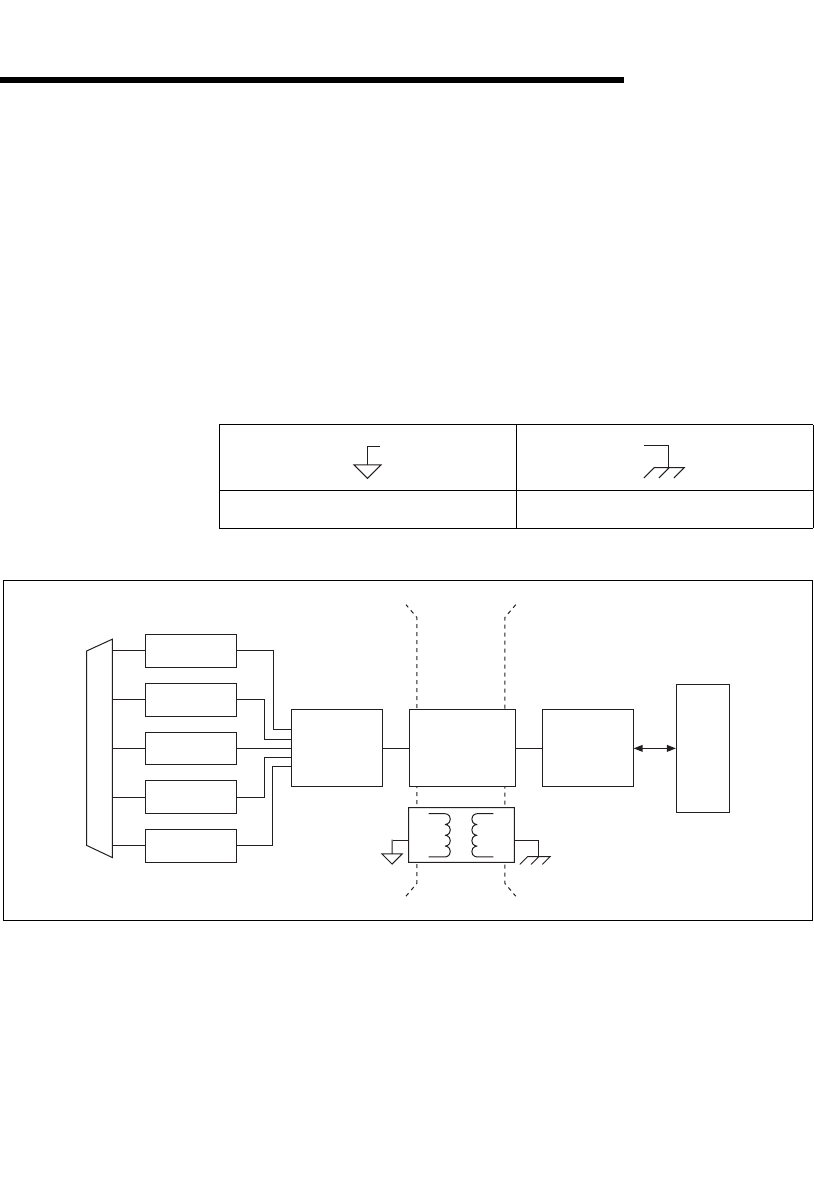
© National Instruments Corporation 11-1 NI USB-621x User Manual
11
Isolation and Digital Isolators
USB-6215/6218 devices are isolated data acquisition devices. As shown in
Figure 11-1, the analog input, analog output, counters, PFI/static DI, and
PFI/static DO circuitry, and digital routing and clock generation are
referenced to an isolated ground. The bus interface circuitry is referenced
to a non-isolated ground. Refer to Table 11-1 for an example of the
symbols for isolated ground and non-isolated ground.
Figure 11-1. General NI 621x Block Diagram
The non-isolated ground is connected to the chassis ground of the PC.
Each isolated ground is not connected to the chassis ground of the PC. The
isolated ground can be at a higher or lower voltage relative to the
non-isolated ground. All analog measurements are made relative to the
isolated ground signal.
Table 11-1. Ground Symbols
Isolated Ground Non-Isolated Ground
Analog Output
Digital I/O
Analog Input
Counters
PFI
Digital
Routing
and Clock
Generation
Bus
Interface Bus
I/O Connector
Digital
Isolators
Isolation
Barrier
(USB-6215
and USB-6218
devices only)

Chapter 11 Isolation and Digital Isolators
NI USB-621x User Manual 11-2 ni.com
The isolated ground is an input to the USB-6215/6218 device. The user
must connect this ground to the ground of system being measured or
controlled. Refer to Chapter 5, Connecting AI Signals on the
USB-6210/6211 Devices, Chapter 6, Connecting AI Signals on the
USB-6215/6218 Devices, the Connecting Analog Output Signals section of
Chapter 7, Analog Output, the Connecting Digital I/O Signals section of
Chapter 8, Digital I/O, and the Connecting PFI Input Signals section of
Chapter 10, PFI, for more information.
Digital Isolation
The USB-6215/6218 uses digital isolators. Unlike analog isolators, digital
isolators do not introduce any analog error in the measurements taken by
the device. The A/D converter, used for analog input, is on the isolated side
of the device. The analog inputs are digitized before they are sent across the
isolation barrier. Similarly, the D/A converters, used for analog output, are
on the isolated side of the device.
Benefits of an Isolated DAQ Device
With isolation, engineers can safely measure a small signal in the presence
of a large common-mode voltage signal. Some advantages of isolation are
as follows:
•Improved rejection—Isolation increases the ability of the
measurement system to reject common-mode voltages.
Common-mode voltage is the signal that is present or “common” to
both the positive and negative input of a measurement device, but is not
part of the signal to be measured.
•Improved accuracy—Isolation improves measurement accuracy by
physically preventing ground loops. Ground loops, a common source
of error and noise, are the result of a measurement system having
multiple grounds at different potentials.
•Improved safety—Isolation creates an insulation barrier so you can
make floating measurements while protecting the USB host computer
against large transient voltage spikes.
Reducing Common-Mode Noise
Isolated products require an isolated power supply to deliver power to the
isolated side from the non-isolated side. Isolated power supplies work by
switching voltages through a transformer with high-speed transistors.

Chapter 11 Isolation and Digital Isolators
© National Instruments Corporation 11-3 NI USB-621x User Manual
Switching voltages through the transformer cause charging and discharging
of the parasitic capacitances and inductances in the switching power
supplies that occur on every switch cycle, resulting in high-speed currents
flowing through the isolated side and returning to the non-isolated side,
which is earth ground.
These parasitic currents interact with parasitic and non-parasitic resistances
causing voltage spikes. These voltage spikes are called common-mode
noise, a noise source that travels in the ground and is therefore common to
both the ground and any signal referenced to the ground, such as AI, AO,
and digital signals. Common-mode noise appears at the harmonics of the
switching power supply frequency and can corrupt measurements
depending on the system setup.
To reduce common-mode noise:
• Better grounding from the front connector AI GND to the signal source
ground can reduce common-mode noise. Use low resistance cabling
and connections and verify that all ground connections are kept short.
Keep the number of connections to a minimum. If the device’s isolated
ground is being connected back to earth ground, verify that this is done
in the most direct way possible.
• Reduce source impedances if possible. The parasitic currents react
with these impedances.
Creating an AC Return Path
Caution Adding a capacitor will degrade the USB M Series device withstand voltage and
isolation specifications. Withstand voltage must be retested by an approved testing facility
after adjustments are made to the measurement system.
Isolated Systems
A fully isolated measurement system is one where the device’s isolated
front end is not connected back to earth ground.
Create an AC path back to earth ground from the device’s isolated ground
by connecting a high voltage capacitor between the isolated board ground
and earth ground. The voltage rating of the capacitor must be larger than
the voltage drop between the isolated ground and earth ground.
Non-Isolated Systems
A non-isolated measurement system is one where the device’s isolated
front end connects to earth ground.
Chapter 11 Isolation and Digital Isolators
NI USB-621x User Manual 11-4 ni.com
Add an AC return path from the device isolated ground to earth ground. For
non-isolated systems, an AC return path is only needed for high or source
impedances. An AC return path can be created by connecting a capacitor
between the device’s isolated ground and earth ground.

© National Instruments Corporation 12-1 NI USB-621x User Manual
12
Digital Routing and Clock
Generation
The digital routing circuitry has the following main functions.
• Manages the flow of data between the bus interface and the
acquisition/generation sub-systems (analog input, analog output,
digital I/O, and the counters). The digital routing circuitry uses FIFOs
(if present) in each sub-system to ensure efficient data movement.
• Routes timing and control signals. The acquisition/generation
sub-systems use these signals to manage acquisitions and generations.
These signals can come from the following sources.
– Your M Series device
– User input through the PFI terminals
• Routes and generates the main clock signals for the M Series device.
80 MHz Timebase
The 80 MHz Timebase can be used as the Source input to the 32-bit
general-purpose counter/timers.
The 80 MHz Timebase is generated from the onboard oscillator.
20 MHz Timebase
The 20 MHz Timebase normally generates many of the AI and AO timing
signals. The 20 MHz Timebase also can be used as the Source input to the
32-bit general-purpose counter/timers.
The 20 MHz Timebase is generated by dividing down the 80 MHz
Timebase.

Chapter 12 Digital Routing and Clock Generation
NI USB-621x User Manual 12-2 ni.com
100 kHz Timebase
The 100 kHz Timebase can be used to generate many of the AI and AO
timing signals. The 100 kHz Timebase also can be used as the Source input
to the 32-bit general-purpose counter/timers.
The 100 kHz Timebase is generated by dividing down the 20 MHz
Timebase by 200.

© National Instruments Corporation 13-1 NI USB-621x User Manual
13
Bus Interface
The bus interface circuitry of M Series devices efficiently moves data
between host memory and the measurement and acquisition circuits.
All M Series devices are jumperless for complete plug-and-play operation.
The operating system automatically assigns the base address, interrupt
levels, and other resources.
NI 621x devices incorporate USB-STC2 technology to implement a
Hi-Speed USB interface.
USB Signal Streams
M Series USB devices have four fully-independent USB Signal Streams for
high-performance transfers of data blocks. One USB Signal Stream is
available for each measurement and acquisition block.
• Analog input
• Analog output
• Counter 0
• Counter 1
Data Transfer Methods
The two primary ways to transfer data across the USB bus are USB Signal
Stream and programmed I/O.
USB Signal Stream
USB Signal Stream is a method to transfer data between the device and
computer memory using USB bulk transfers without intervention of the
microcontroller on the NI device. NI uses USB Signal Stream hardware and
software technology to achieve high throughput rates and increase system
utilization in USB devices.
Chapter 13 Bus Interface
NI USB-621x User Manual 13-2 ni.com
Programmed I/O
Programmed I/O is a data transfer mechanism where the user’s program is
responsible for transferring data. Each read or write call in the program
initiates the transfer of data. Programmed I/O is typically used in
software-timed (on-demand) operations. Refer to the Software-Timed
Generations section of Chapter 7, Analog Output, for more information.
Changing Data Transfer Methods
USB M Series devices have four dedicated USB Signal Stream channels.
To change your data transfer mechanism between USB Signal Streams and
programmed I/O, use the Data Transfer Mechanism property node
function in NI-DAQmx.
© National Instruments Corporation 14-1 NI USB-621x User Manual
14
Triggering
A trigger is a signal that causes an action, such as starting or stopping the
acquisition of data. When you configure a trigger, you must decide how you
want to produce the trigger and the action you want the trigger to cause. All
M Series devices support internal software triggering, as well as external
digital triggering. For information about the different actions triggers can
perform for each sub-system of the device, refer to the following sections:
• The Analog Input Digital Triggering section of Chapter 4, Analog
Input
• The Analog Output Digital Triggering section of Chapter 7, Analog
Output
• The Counter Triggering section of Chapter 9, Counters
Triggering with a Digital Source
Your DAQ device can generate a trigger on a digital signal. You must
specify a source and an edge. The digital source can be any input PFI signal.
The edge can be either the rising edge or falling edge of the digital signal.
A rising edge is a transition from a low logic level to a high logic level. A
falling edge is a high to low transition.
Figure 14-1 shows a falling-edge trigger.
Figure 14-1. Falling-Edge Trigger
5 V
0 V
Falling Edge Initiates Acquisition
Digital Trigger

© National Instruments Corporation A-1 NI USB-621x User Manual
A
Device-Specific Information
This appendix contains device pinouts, specifications, cable and accessory
choices, and other information for the following USB M Series devices.
•USB-6210
•USB-6211/6215
•USB 6218
To obtain documentation for devices not listed here, refer to ni.com/
manuals.
USB-6210
USB-6210 Pinout
Figure A-1 shows the pinout of the NI 6210.
For a detailed description of each signal, refer to the I/O Connector Signal
Descriptions section of Chapter 3, Connector Information.
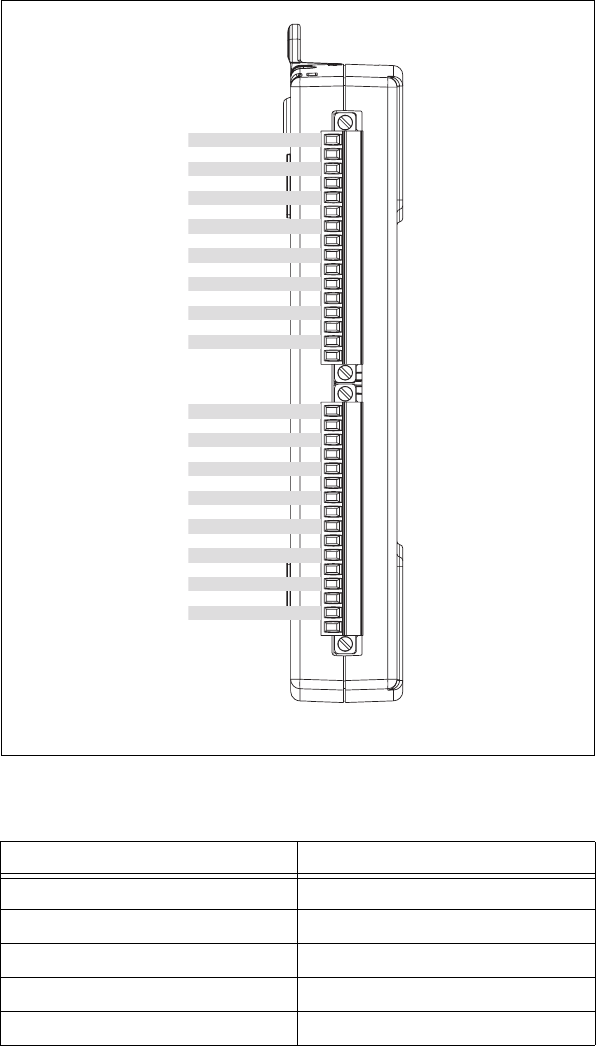
Appendix A Device-Specific Information
NI USB-621x User Manual A-2 ni.com
Figure A-1. USB-6210 Pinout
Table A-1. Default NI-DAQmx Counter/Timer Pins
Counter/Timer Signal Default Terminal Number (Name)
CTR 0 SRC 1 (PFI 0)
CTR 0 GATE 2 (PFI 1)
CTR 0 AUX 1 (PFI 0)
CTR 0 OUT 6 (PFI 4)
CTR 0 A 1 (PFI 0)
56781 2 3 4 13 14 15 169 101112
AI 1
AI 9
AI 2
AI 10
AI 3
AI 11
AI SENSE
AI 4
AI 12
AI 5
AI 13
AI GND
AI 6
AI 14
AI 7
AI 15
PFI 0/P0.0 (In)
PFI 1/P0.1 (In)
PFI 2/P0.2 (In)
PFI 3/P0.3 (In)
D GND
PFI 4/P1.0 (Out)
PFI 5/P1.1 (Out)
PFI 6/P1.2 (Out)
PFI 7/P1.3 (Out)
+5 V
D GND
NC
NC
RESERVED
AI 0
AI 8
21 22 23 2417 18 19 20 29 30 31 3225 26 27 28
NC = No Connect
Appendix A Device-Specific Information
© National Instruments Corporation A-3 NI USB-621x User Manual
Note For more information about default NI-DAQmx counter inputs, refer to Connecting
Counter Signals in the NI-DAQmx Help or the LabVIEW 8.x Help.
USB-6210 Specifications
Refer to the NI 621x Specifications for more detailed information about the
USB-6210 device.
USB-6210 PWR/ACT LED Indicator
The PWR/ACT LED indicator indicates device status.
CTR 0 Z 2 (PFI 1)
CTR 0 B 1 (PFI 0)
CTR 1 SRC 4 (PFI 3)
CTR 1 GATE 3 (PFI 2)
CTR 1 AUX 4 (PFI 3)
CTR 1 OUT 7 (PFI 5)
CTR 1 A 4 (PFI 3)
CTR 1 Z 3 (PFI 2)
CTR 1 B 4 (PFI 3)
FREQ OUT 8 (PFI 6)
Table A-2. PWR/ACT LED Status
LED State Device Status
Not lit Device not powered or device
error. Refer to ni.com/support
if device is powered.
On, not blinking Device error. Refer to
ni.com/support.
Table A-1. Default NI-DAQmx Counter/Timer Pins (Continued)
Counter/Timer Signal Default Terminal Number (Name)
Appendix A Device-Specific Information
NI USB-621x User Manual A-4 ni.com
USB-6211/6215
USB-6211/6215 Pinout
Figure A-2 shows the pinout of the NI 6211/6215.
For a detailed description of each signal, refer to the I/O Connector Signal
Descriptions section of Chapter 3, Connector Information.
Single-blink Operating normally. Connected to
USB Hi-Speed port. Refer to the
NI 621x Specifications for more
information.
Double-blink Connected to USB full speed port.
Device performance might be
affected. Refer to the NI 621x
Specifications for more
information.
Table A-2. PWR/ACT LED Status (Continued)
LED State Device Status
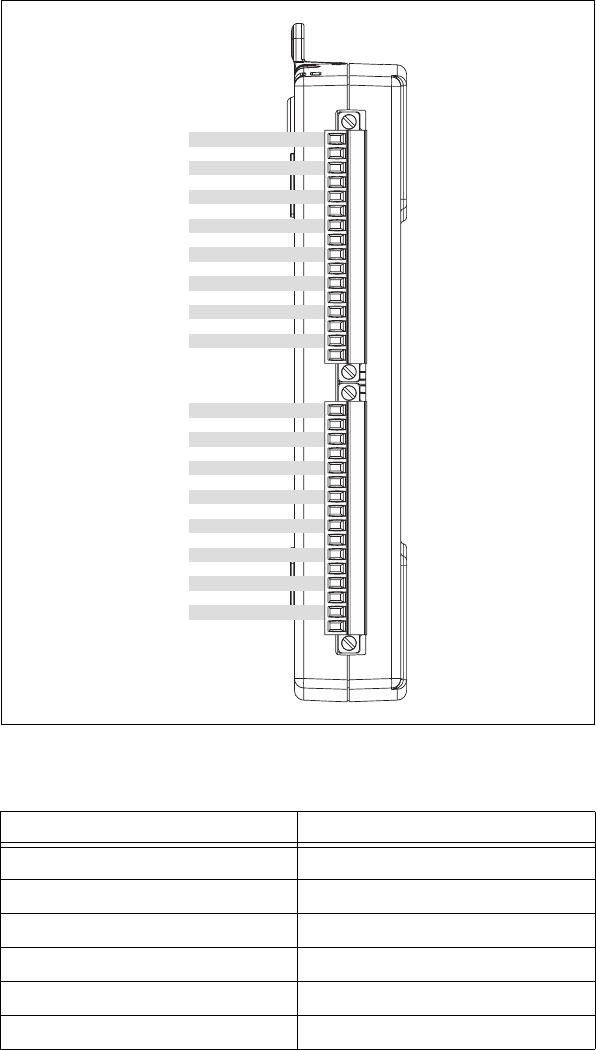
Appendix A Device-Specific Information
© National Instruments Corporation A-5 NI USB-621x User Manual
Figure A-2. USB-6211/6215 Pinout
Table A-3. Default NI-DAQmx Counter/Timer Pins
Counter/Timer Signal Default Terminal Number (Name)
CTR 0 SRC 1 (PFI 0)
CTR 0 GATE 2 (PFI 1)
CTR 0 AUX 1 (PFI 0)
CTR 0 OUT 6 (PFI 4)
CTR 0 A 1 (PFI 0)
CTR 0 Z 2 (PFI 1)
56781 2 3 4 13 14 15 169 101112
AI 1
AI 9
AI 2
AI 10
AI 3
AI 11
AI SENSE
AI 4
AI 12
AI 5
AI 13
AI GND
AI 6
AI 14
AI 7
AI 15
PFI 0/P0.0 (In)
PFI 1/P0.1 (In)
PFI 2/P0.2 (In)
PFI 3/P0.3 (In)
D GND
PFI 4/P1.0 (Out)
PFI 5/P1.1 (Out)
PFI 6/P1.2 (Out)
PFI 7/P1.3 (Out)
+5 V
D GND
AO 0
AO 1
AO GND
AI 0
AI 8
21 22 23 2417 18 19 20 29 30 31 3225 26 27 28
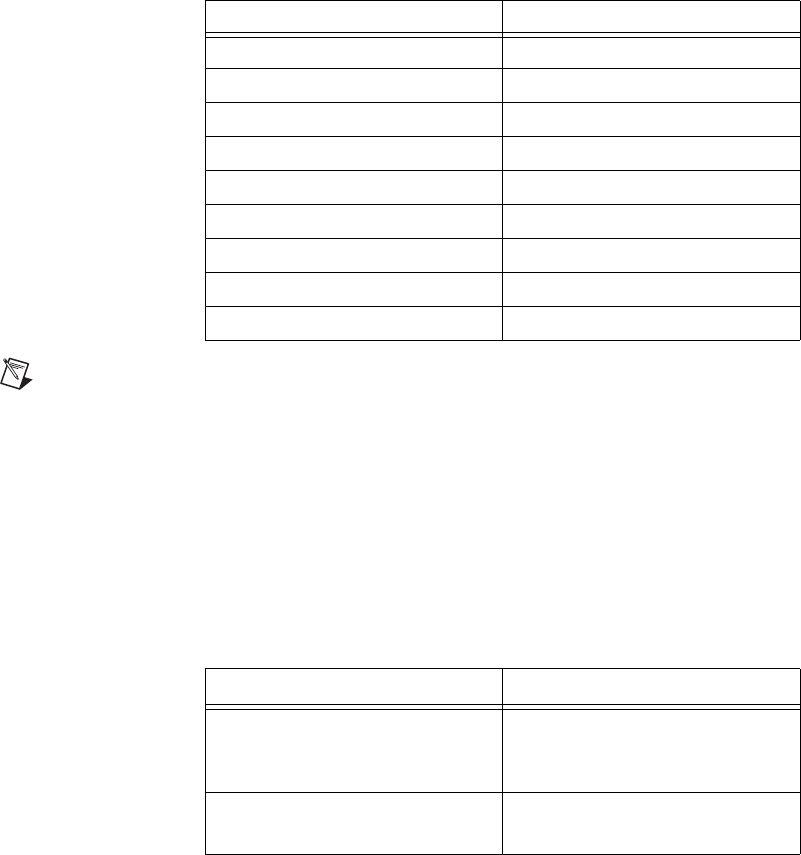
Appendix A Device-Specific Information
NI USB-621x User Manual A-6 ni.com
Note For more information about default NI-DAQmx counter inputs, refer to Connecting
Counter Signals in the NI-DAQmx Help or the LabVIEW 8.x Help.
USB-6211/6215 Specifications
Refer to the NI 621x Specifications for more detailed information about the
USB-6211/6215 device.
USB-6211/6215 PWR/ACT LED Indicator
The PWR/ACT LED indicator indicates device status.
CTR 0 B 1 (PFI 0)
CTR 1 SRC 4 (PFI 3)
CTR 1 GATE 3 (PFI 2)
CTR 1 AUX 4 (PFI 3)
CTR 1 OUT 7 (PFI 5)
CTR 1 A 4 (PFI 3)
CTR 1 Z 3 (PFI 2)
CTR 1 B 4 (PFI 3)
FREQ OUT 8 (PFI 6)
Table A-4. PWR/ACT LED Status
LED State Device Status
Not lit Device not powered or device
error. Refer to ni.com/support
if device is powered.
On, not blinking Device error. Refer to
ni.com/support.
Table A-3. Default NI-DAQmx Counter/Timer Pins (Continued)
Counter/Timer Signal Default Terminal Number (Name)
Appendix A Device-Specific Information
© National Instruments Corporation A-7 NI USB-621x User Manual
USB 6218
USB 6218 Pinout
Figure A-3 shows the pinout of the NI 6218.
For a detailed description of each signal, refer to the I/O Connector Signal
Descriptions section of Chapter 3, Connector Information.
Single-blink Operating normally. Connected to
USB Hi-Speed port. Refer to the
NI 621x Specifications for more
information.
Double-blink Connected to USB full speed port.
Device performance might be
affected. Refer to the NI 621x
Specifications for more
information.
Table A-4. PWR/ACT LED Status (Continued)
LED State Device Status
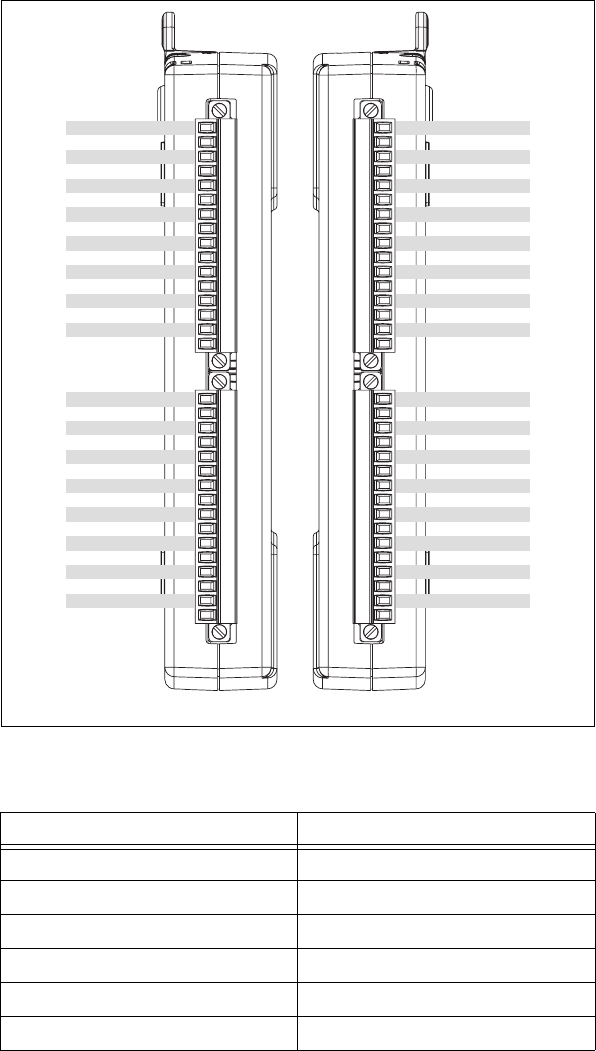
Appendix A Device-Specific Information
NI USB-621x User Manual A-8 ni.com
Figure A-3. USB 6218 Pinout
Table A-5. Default NI-DAQmx Counter/Timer Pins
Counter/Timer Signal Default Terminal Number (Name)
CTR 0 SRC 1 (PFI 0)
CTR 0 GATE 2 (PFI 1)
CTR 0 AUX 34 (PFI 9)
CTR 0 OUT 6 (PFI 4)
CTR 0 A 1 (PFI 0)
CTR 0 Z 2 (PFI 1)
AI 1
AI 9
AI 2
AI 10
AI 3
AI 11
AI SENSE
AI 4
AI 12
AI 5
AI 13
AI GND
AI 6
AI 14
AI 7
AI 15
PFI 0/P0.0 (In)
PFI 1/P0.1 (In)
PFI 2/P0.2 (In)
PFI 3/P0.3 (In)
D GND
PFI 4/P1.0 (Out)
PFI 5/P1.1 (Out)
PFI 6/P1.2 (Out)
PFI 7/P1.3 (Out)
+5 V
D GND
AO 0
AO 1
AO GND
AI 0
AI 8
56781 2 3 4 13 14 15 169 101112 2122232417 18 19 20 29 30 31 3225 26 27 28
AI 17
AI 25
AI 18
AI 26
AI 19
AI 27
AI GND
AI 20
AI 28
AI 21
AI 29
AI GND
AI 22
AI 30
AI 23
AI 31
PFI 8/P0.4 (In)
PFI 9/P0.5 (In)
PFI 10/P0.6 (In)
PFI 11/P0.7 (In)
D GND
PFI 12/P1.4 (Out)
PFI 13/P1.5 (Out)
PFI 14/P1.6 (Out)
PFI 15/P1.7 (Out)
+5 V
D GND
NC
NC
AI GND
AI 16
AI 24
56781 2 3 4 13 14 15 169 101112 2122232417 18 19 20 29 30 31 3225 26 27 28
60 59 58 5764 63 62 61 52 51 50 4956 55 54 53 44 43 42 4148 47 46 45 36 35 34 3340 39 38 37
NC = No Connect
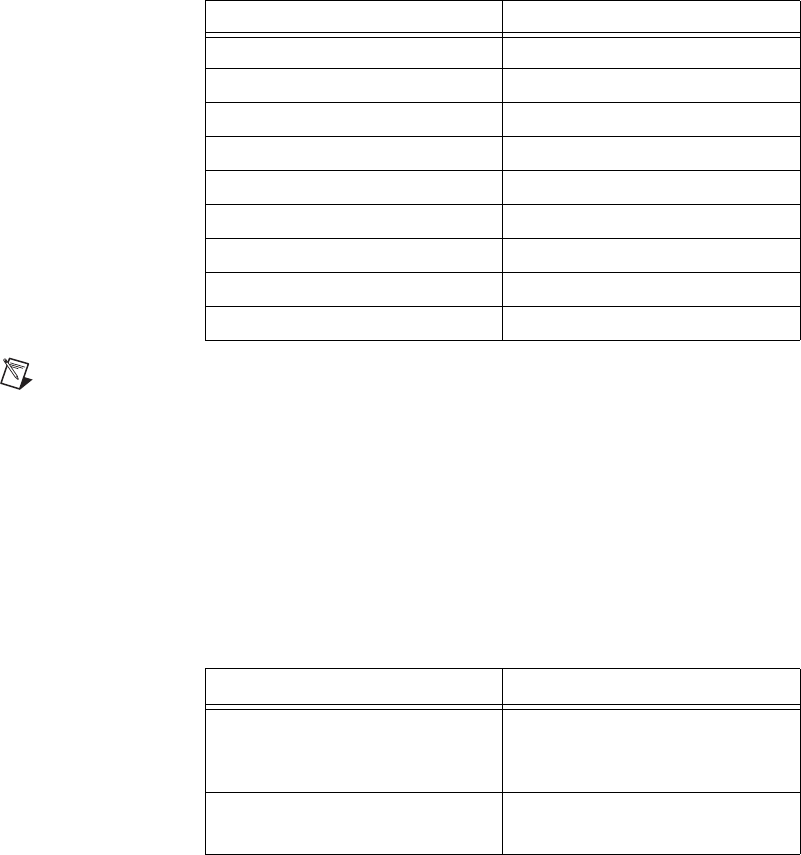
Appendix A Device-Specific Information
© National Instruments Corporation A-9 NI USB-621x User Manual
Note For more information about default NI-DAQmx counter inputs, refer to Connecting
Counter Signals in the NI-DAQmx Help or the LabVIEW 8.x Help.
USB 6218 Specifications
Refer to the NI 621x Specifications for more detailed information about the
USB 6218 device.
USB 6218 PWR/ACT LED Indicator
The PWR/ACT LED indicator indicates device status.
CTR 0 B 34 (PFI 9)
CTR 1 SRC 4 (PFI 3)
CTR 1 GATE 3 (PFI 2)
CTR 1 AUX 35 (PFI 10)
CTR 1 OUT 7 (PFI 5)
CTR 1 A 4 (PFI 3)
CTR 1 Z 3 (PFI 2)
CTR 1 B 35 (PFI 10)
FREQ OUT 8 (PFI 6)
Table A-6. PWR/ACT LED Status
LED State Device Status
Not lit Device not powered or device
error. Refer to ni.com/support
if device is powered.
On, not blinking Device error. Refer to
ni.com/support.
Table A-5. Default NI-DAQmx Counter/Timer Pins (Continued)
Counter/Timer Signal Default Terminal Number (Name)

Appendix A Device-Specific Information
NI USB-621x User Manual A-10 ni.com
Single-blink Operating normally. Connected to
USB Hi-Speed port. Refer to the
NI 621x Specifications for more
information.
Double-blink Connected to USB full speed port.
Device performance might be
affected. Refer to the NI 621x
Specifications for more
information.
Table A-6. PWR/ACT LED Status (Continued)
LED State Device Status

© National Instruments Corporation B-1 NI USB-621x User Manual
B
Troubleshooting
This section contains common questions about M Series devices. If your
questions are not answered here, refer to the National Instruments
KnowledgeBase at ni.com/kb.
Analog Input
I am seeing crosstalk or ghost voltages when sampling multiple
channels. What does this mean?
You may be experiencing a phenomenon called charge injection, which
occurs when you sample a series of high-output impedance sources with a
multiplexer. Multiplexers contain switches, usually made of switched
capacitors. When a channel, for example AI 0, is selected in a multiplexer,
those capacitors accumulate charge. When the next channel, for example
AI 1, is selected, the accumulated current (or charge) leaks backward
through channel 1. If the output impedance of the source connected to AI 1
is high enough, the resulting reading can somewhat affect the voltage in
AI 0. To circumvent this problem, use a voltage follower that has
operational amplifiers (op-amps) with unity gain for each high-impedance
source before connecting to an M Series device. Otherwise, you must
decrease the sample rate for each channel.
Another common cause of channel crosstalk is due to sampling among
multiple channels at various gains. In this situation, the settling times can
increase. For more information about charge injection and sampling
channels at different gains, refer to the Multichannel Scanning
Considerations section of Chapter 4, Analog Input.
I am using my device in differential analog input ground-reference
mode and I have connected a differential input signal, but my readings
are random and drift rapidly. What is wrong?
In DIFF mode, if the readings from the DAQ device are random and drift
rapidly, you should check the ground-reference connections. The signal can
be referenced to a level that is considered floating with reference to the
device ground reference. Even if you are in DIFF mode, you must still
reference the signal to the same ground level as the device reference. There
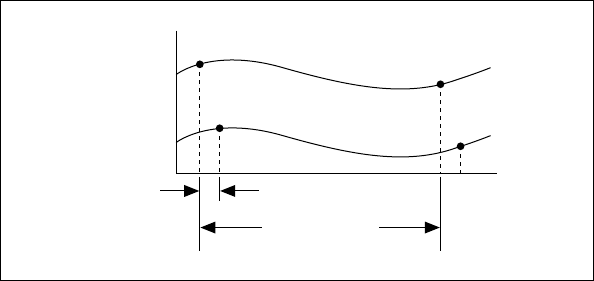
Appendix B Troubleshooting
NI USB-621x User Manual B-2 ni.com
are various methods of achieving this reference while maintaining a high
common-mode rejection ratio (CMRR). These methods are outlined in
Chapter 5, Connecting AI Signals on the USB-6210/6211 Devices and
Chapter 6, Connecting AI Signals on the USB-6215/6218 Devices.
AI GND is an AI common signal that routes directly to the ground
connection point on the devices. You can use this signal if you need a
general analog ground connection point to the device. Refer to the When to
Use Differential Connections with Ground-Referenced Signal Sources
section of Chapter 5, Connecting AI Signals on the USB-6210/6211
Devices, for more information.
How can I use the AI Sample Clock and AI Convert Clock signals on
an M Series device to sample the AI channel(s)?
M Series devices use ai/SampleClock and ai/ConvertClock to perform
interval sampling. As Figure B-1 shows, ai/SampleClock controls the
sample period, which is determined by the following equation:
1/sample period = sample rate
Figure B-1. ai/SampleClock and ai/ConvertClock
ai/ConvertClock controls the convert period, which is determined by the
following equation:
1/convert period = convert rate
This method allows multiple channels to be sampled relatively quickly in
relationship to the overall sample rate, providing a nearly simultaneous
effect with a fixed delay between channels.
Channel 0
Channel 1
Convert Period
Sample Period

Appendix B Troubleshooting
© National Instruments Corporation B-3 NI USB-621x User Manual
Analog Output
I am seeing glitches on the output signal. How can I minimize it?
When you use a DAC to generate a waveform, you may observe glitches on
the output signal. These glitches are normal; when a DAC switches from
one voltage to another, it produces glitches due to released charges. The
largest glitches occur when the most significant bit of the DAC code
changes. You can build a lowpass deglitching filter to remove some of these
glitches, depending on the frequency and nature of the output signal. Visit
ni.com/support for more information about minimizing glitches.

© National Instruments Corporation C-1 NI USB-621x User Manual
C
Technical Support and
Professional Services
Visit the following sections of the National Instruments Web site at
ni.com for technical support and professional services:
•Support—Online technical support resources at ni.com/support
include the following:
–Self-Help Resources—For answers and solutions, visit the
award-winning National Instruments Web site for software drivers
and updates, a searchable KnowledgeBase, product manuals,
step-by-step troubleshooting wizards, thousands of example
programs, tutorials, application notes, instrument drivers, and
so on.
–Free Technical Support—All registered users receive free Basic
Service, which includes access to hundreds of Application
Engineers worldwide in the NI Discussion Forums at
ni.com/forums. National Instruments Application Engineers
make sure every question receives an answer.
For information about other technical support options in your
area, visit ni.com/services or contact your local office at
ni.com/contact.
•Training and Certification—Visit ni.com/training for
self-paced training, eLearning virtual classrooms, interactive CDs,
and Certification program information. You also can register for
instructor-led, hands-on courses at locations around the world.
•System Integration—If you have time constraints, limited in-house
technical resources, or other project challenges, National Instruments
Alliance Partner members can help. To learn more, call your local
NI office or visit ni.com/alliance.
•Declaration of Conformity (DoC)—A DoC is our claim of
compliance with the Council of the European Communities using
the manufacturer’s declaration of conformity. This system affords
the user protection for electronic compatibility (EMC) and product
safety. You can obtain the DoC for your product by visiting ni.com/
certification.
Appendix C Technical Support and Professional Services
NI USB-621x User Manual C-2 ni.com
•Calibration Certificate—If your product supports calibration,
you can obtain the calibration certificate for your product at ni.com/
calibration.
If you searched ni.com and could not find the answers you need, contact
your local office or NI corporate headquarters. Phone numbers for our
worldwide offices are listed at the front of this manual. You also can visit
the Worldwide Offices section of ni.com/niglobal to access the branch
office Web sites, which provide up-to-date contact information, support
phone numbers, email addresses, and current events.

© National Instruments Corporation G-1 NI USB-621x User Manual
Glossary
Numbers/Symbols
% Percent.
+ Positive of, or plus.
– Negative of, or minus.
± Plus or minus.
< Less than.
> Greater than.
≤Less than or equal to.
≥Greater than or equal to.
/Per.
º Degree.
ΩOhm.
A
A Amperes—the unit of electric current.
A/D Analog-to-Digital. Most often used as A/D converter.
AC Alternating current.
accuracy A measure of the capability of an instrument or sensor to faithfully indicate
the value of the measured signal. This term is not related to resolution;
however, the accuracy level can never be better than the resolution of the
instrument.
ADE Application development environment.
Glossary
NI USB-621x User Manual G-2 ni.com
AI 1. Analog input.
2. Analog input channel signal.
AI GND Analog input ground signal.
AI SENSE Analog input sense signal.
analog A signal whose amplitude can have a continuous range of values.
analog input signal An input signal that varies smoothly over a continuous range of values,
rather than in discrete steps.
analog output signal An output signal that varies smoothly over a continuous range of values,
rather than in discrete steps.
analog signal A signal representing a variable that can be observed and represented
continuously.
analog trigger A trigger that occurs at a user-selected point on an incoming analog signal.
Triggering can be set to occur at a specific level on either an increasing or
a decreasing signal (positive or negative slope). Analog triggering can be
implemented either in software or in hardware. When implemented in
software (LabVIEW), all data is collected, transferred into system memory,
and analyzed for the trigger condition. When analog triggering is
implemented in hardware, no data is transferred to system memory until the
trigger condition has occurred.
AO Analog output.
AO 0 Analog channel 0 output signal.
AO 1 Analog channel 1 output signal.
AO 2 Analog channel 2 output signal.
AO 3 Analog channel 3 output signal.
AO GND Analog output ground signal.
application A software program that creates an end-user function.
arm The process of getting an instrument ready to perform a function. For
example, the trigger circuitry of a digitizer is armed, meaning that it is
ready to start acquiring data when an appropriate trigger condition is met.
Glossary
© National Instruments Corporation G-3 NI USB-621x User Manual
ASIC Application-specific integrated circuit—A proprietary semiconductor
component designed and manufactured to perform a set of specific
functions for a specific customer.
asynchronous 1. Hardware—A property of an event that occurs at an arbitrary time,
without synchronization to a reference clock.
2. Software—A property of a function that begins an operation and
returns prior to the completion or termination of the operation.
B
b Bit—One binary digit, either 0 or 1.
B Byte—Eight related bits of data, an eight-bit binary number. Also used to
denote the amount of memory required to store one byte of data.
block diagram A pictorial description or representation of a program or algorithm.
BNC Bayonet-Neill-Concelman—A type of coaxial connector used in situations
requiring shielded cable for signal connections and/or controlled
impedance applications.
buffer 1. Temporary storage for acquired or generated data.
2. A memory device that stores intermediate data between two devices.
bus, buses The group of electrical conductors that interconnect individual circuitry in
a computer. Typically, a bus is the expansion vehicle to which I/O or other
devices are connected. Examples of PC buses are the PCI, AT (ISA), and
EISA bus.
C
CCelsius.
calibration The process of determining the accuracy of an instrument. In a formal
sense, calibration establishes the relationship of an instrument’s
measurement to the value provided by a standard. When that relationship is
known, the instrument may then be adjusted (calibrated) for best accuracy.
calibrator A precise, traceable signal source used to calibrate instruments.
Glossary
NI USB-621x User Manual G-4 ni.com
cascading Process of extending the counting range of a counter chip by connecting to
the next higher counter.
CE European emissions control standard.
channel Pin or wire lead to which you apply or from which you read the analog or
digital signal. Analog signals can be single-ended or differential. For digital
signals, you group channels to form ports. Ports usually consist of either
four or eight digital channels.
clock Hardware component that controls timing for reading from or writing to
groups.
CMOS Complementary metal-oxide semiconductor.
CMRR Common-mode rejection ratio—A measure of the ability of a differential
amplifier to reject interference from a common-mode signal, usually
expressed in decibels (dB).
common-mode rejection The ability of an electronic system to cancel any electronic noise pick-up
that is common to both the positive and negative polarities of the input leads
to the instrument front end. Common mode rejection is only a relevant
specification for systems having a balanced or differential input.
common-mode signal 1. Any voltage present at the instrumentation amplifier inputs with
respect to amplifier ground.
2. The signal, relative to the instrument chassis or computer’s ground, of
the signals from a differential input. This is often a noise signal, such
as 50 or 60 Hz hum.
connector 1. A device that provides electrical connection.
2. A fixture (either male or female) attached to a cable or chassis for
quickly making and breaking one or more circuits. A symbol that
connects points on a flowchart.
convert rate Reciprocal of the interchannel delay.
count The number of events, such as zero crossings, pulses, or cycles.
counter 1. Software. A memory location used to store a count of certain
occurrences.
2. Hardware. A circuit that counts events. When it refers to an instrument,
it refers to a frequency counter.
Glossary
© National Instruments Corporation G-5 NI USB-621x User Manual
counter/timer A circuit that counts external pulses or clock pulses (timing).
D
D GND Digital ground signal.
D-SUB connector A serial connector.
DAC Digital-to-Analog Converter—An electronic device, often an integrated
circuit, that converts a digital number into a corresponding analog voltage
or current.
In the instrumentation world, DACs can be used to generate arbitrary
waveform shapes, defined by the software algorithm that computes the
digital data pattern, which is fed to the DAC.
DAQ 1. Data acquisition—The process of collecting and measuring electrical
signals from sensors, transducers, and test probes or fixtures and
inputting them to a computer for processing.
2. Data acquisition—The process of collecting and measuring the same
kinds of electrical signals with A/D and/or DIO devices plugged into a
computer, and possibly generating control signals with D/A and/or
DIO devices in the same computer.
DAQ device A device that acquires or generates data and can contain multiple channels
and conversion devices. DAQ devices include plug-in devices, PCMCIA
cards, and DAQPad devices, which connect to a computer USB or 1394
(FireWire®) port. SCXI modules are considered DAQ devices.
DAQ-STC2 Data acquisition system timing controller chip.
data acquisition The general concept of acquiring data, as in begin data acquisition or data
acquisition and control. See also DAQ.
Glossary
NI USB-621x User Manual G-6 ni.com
data transfer A technique for moving digital data from one system to another.
Options for data transfer are DMA, interrupt, and programmed I/O. For
programmed I/O transfers, the CPU in the PC reads data from the DAQ
device whenever the CPU receives a software signal to acquire a single data
point. Interrupt-based data transfers occur when the DAQ device sends an
interrupt to the CPU, telling the CPU to read the acquired data from the
DAQ device. DMA transfers use a DMA controller, instead of the CPU, to
move acquired data from the device into computer memory. Even though
high-speed data transfers can occur with interrupt and programmed I/O
transfers, they require the use of the CPU to transfer data. DMA transfers
are able to acquire data at high speeds and keep the CPU free for
performing other tasks at the same time.
dB Decibel—The unit for expressing a logarithmic measure of the ratio of
two signal levels: dB = 20log10 V1/V2, for signals in volts.
DC Direct current—although the term speaks of current, many different types
of DC measurements are made, including DC Voltage, DC current, and DC
power.
device A plug-in data acquisition product, card, or pad that can contain multiple
channels and conversion devices. Plug-in products, PCMCIA cards, and
devices such as the DAQPad-1200, which connects to your computer
parallel port, are all examples of DAQ devices. SCXI modules are distinct
from devices, with the exception of the SCXI-1200, which is a hybrid.
DIFF Differential mode—An analog input mode consisting of two terminals,
both of which are isolated from computer ground, whose difference is
measured.
differential input An input circuit that actively responds to the difference between two
terminals, rather than the difference between one terminal and ground.
Often associated with balanced input circuitry, but also may be used with
an unbalanced source.
digital I/O The capability of an instrument to generate and acquire digital signals.
Static digital I/O refers to signals where the values are set and held, or
rarely change. Dynamic digital I/O refers to digital systems where the
signals are continuously changing, often at multi-MHz clock rates.
digital signal A representation of information by a set of discrete values according to a
prescribed law. These values are represented by numbers.
Glossary
© National Instruments Corporation G-7 NI USB-621x User Manual
digital trigger A TTL level signal having two discrete levels—A high and a low level.
DIO Digital input/output.
DMA Direct Memory Access—A method by which data can be transferred to/
from computer memory from/to a device or memory on the bus while the
processor does something else. DMA is the fastest method of transferring
data to/from computer memory.
DMA controller chip Performs the transfers between memory and I/O devices independently of
the CPU.
driver Software unique to the device or type of device, and includes the set of
commands the device accepts.
E
E Series A standard architecture for instrumentation-class, multichannel data
acquisition devices.
edge detection A technique that locates an edge of an analog signal, such as the edge of a
square wave.
EEPROM Electrically Erasable Programmable Read-Only Memory—ROM that can
be erased with an electrical signal and reprogrammed. Some SCXI modules
contain an EEPROM to store measurement-correction coefficients.
encoder A device that converts linear or rotary displacement into digital or pulse
signals. The most popular type of encoder is the optical encoder, which uses
a rotating disk with alternating opaque areas, a light source, and a
photodetector.
EXTCLK External clock signal.
external trigger A voltage pulse from an external source that causes a DAQ operation to
begin.
EXTREF External reference signal.
Glossary
NI USB-621x User Manual G-8 ni.com
F
FIFO First-In-First-Out memory buffer—A data buffering technique that
functions like a shift register where the oldest values (first in) come out
first. Many DAQ products and instruments use FIFOs to buffer digital data
from an A/D converter, or to buffer the data before or after bus
transmission.
The first data stored is the first data sent to the acceptor. FIFOs are often
used on DAQ devices to temporarily store incoming or outgoing data until
that data can be retrieved or output. For example, an analog input FIFO
stores the results of A/D conversions until the data can be retrieved into
system memory, a process that requires the servicing of interrupts and often
the programming of the DMA controller. This process can take several
milliseconds in some cases. During this time, data accumulates in the FIFO
for future retrieval. With a larger FIFO, longer latencies can be tolerated. In
the case of analog output, a FIFO permits faster update rates, because the
waveform data can be stored on the FIFO ahead of time. This again reduces
the effect of latencies associated with getting the data from system memory
to the DAQ device.
filter A physical device or digital algorithm that selectively removes noise from
a signal, or emphasizes certain frequency ranges and de-emphasizes others.
Electronic filters include lowpass, band-pass, and highpass types. Digital
filters can operate on numeric data to perform equivalent operations on
digitized analog data or to enhance video images.
filtering A type of signal conditioning that allows you to filter unwanted frequency
components from the signal you are trying to measure.
floating The condition where a common mode voltage exists, or may exist, between
earth ground and the instrument or circuit of interest. Neither the high, nor
the low side of a circuit is at earth potential.
floating signal sources Signal sources with voltage signals that are not connected to an absolute
reference of system ground. Also called non-referenced signal sources.
Some common examples of floating signal sources are batteries,
transformers, and thermocouples.
FREQ OUT Frequency Output signal.
frequency The number of alternating signals that occur per unit time.
ft Feet.
Glossary
© National Instruments Corporation G-9 NI USB-621x User Manual
function 1. A built-in execution element, comparable to an operator, function, or
statement in a conventional language.
2. A set of software instructions executed by a single line of code that may
have input and/or output parameters and returns a value when executed.
G
glitch An unwanted signal excursion of short duration that is usually unavoidable.
GND See ground.
ground 1. A pin.
2. An electrically neutral wire that has the same potential as the
surrounding earth. Normally, a noncurrent-carrying circuit intended for
safety.
3. A common reference point for an electrical system.
H
hardware The physical components of a computer system, such as the circuit boards,
plug-in devices, chassis, enclosures, peripherals, and cables.
hardware triggering A form of triggering where you set the start time of an acquisition and
gather data at a known position in time relative to a trigger signal.
Hz 1. Hertz—The SI unit for measurement of frequency. One hertz (Hz)
equals one cycle per second.
2. The number of scans read or updates written per second.
hysteresis Lag between making a change and the effect of the change.
I
I/O Input/Output—The transfer of data to/from a computer system involving
communications channels, operator interface devices, and/or data
acquisition and control interfaces.
Glossary
NI USB-621x User Manual G-10 ni.com
impedance 1. The electrical characteristic of a circuit expressed in ohms and/or
capacitance/inductance.
2. Resistance.
in. Inch or inches.
instrument driver A set of high-level software functions that controls a specific GPIB, VXI,
or RS232 programmable instrument or a specific plug-in DAQ device.
Instrument drivers are available in several forms, ranging from a function
callable language to a virtual instrument (VI) in LabVIEW.
instrumentation
amplifier
A circuit whose output voltage with respect to ground is proportional to the
difference between the voltages at its two inputs. An instrumentation
amplifier normally has high-impedance differential inputs and high
common-mode rejection.
interchannel delay Amount of time that passes between sampling consecutive channels in an
AI scan list. The interchannel delay must be short enough to allow sampling
of all the channels in the channel list, within the sample interval. The
greater the interchannel delay, the more time the PGIA is allowed to settle
before the next channel is sampled. The interchannel delay is regulated by
ai/ConvertClock.
interface Connection between one or more of the following: hardware, software, and
the user. For example, hardware interfaces connect two other pieces of
hardware.
interrupt, interrupt
request line
1. A means for a device to notify another device that an event occurred.
2. A computer signal indicating that the CPU should suspend its current
task to service a designated activity.
IOH Current, output high.
IOL Current, output low.
IRQ See interrupt, interrupt request line.
K
kHz Kilohertz—A unit of frequency; 1 kHz = 103 = 1,000 Hz.
kS 1,000 samples.
Glossary
© National Instruments Corporation G-11 NI USB-621x User Manual
L
LabVIEW A graphical programming language.
LED Light-Emitting Diode—A semiconductor light source.
lowpass filter A filter that passes signals below a cutoff frequency while blocking signals
above that frequency.
LSB Least Significant Bit.
M
m Meter.
M Series An architecture for instrumentation-class, multichannel data acquisition
devices based on the earlier E Series architecture with added new features.
measurement The quantitative determination of a physical characteristic. In practice,
measurement is the conversion of a physical quantity or observation to a
domain where a human being or computer can determine the value.
measurement device DAQ devices, such as the M Series multifunction I/O (MIO) devices, SCXI
signal conditioning modules, and switch modules.
MHz Megahertz—A unit of frequency; 1 MHz = 106 Hz = 1,000,000 Hz.
micro (μ) The numerical prefix designating 10–6.
MIO Multifunction I/O—DAQ module. Designates a family of data acquisition
products that have multiple analog input channels, digital I/O channels,
timing, and optionally, analog output channels. An MIO product can be
considered a miniature mixed signal tester, due to its broad range of signal
types and flexibility. Also known as multifunction DAQ.
MITE MXI Interface To Everything—A custom ASIC designed by National
Instruments that implements the PCI bus interface. The MITE supports bus
mastering for high-speed data transfers over the PCI bus.
module A board assembly and its associated mechanical parts, front panel, optional
shields, and so on. A module contains everything required to occupy one or
more slots in a mainframe. SCXI and PXI devices are modules.
Glossary
NI USB-621x User Manual G-12 ni.com
monotonicity A characteristic of a DAC in which the analog output always increases as
the values of the digital code input to it increase.
multichannel Pertaining to a radio-communication system that operates on more than one
channel at the same time. The individual channels might contain identical
information, or they might contain different signals.
multifunction DAQ See MIO.
multiplex To assign more than one signal to a channel. See also mux.
mux Multiplexer—A set of semiconductor or electromechanical switches
arranged to select one of many inputs to a single output. The majority of
DAQ cards have a multiplexer on the input, which permits the selection of
one of many channels at a time.
A switching device with multiple inputs that sequentially connects each of
its inputs to its output, typically at high speeds, in order to measure several
signals with a single analog input channel.
N
NI National Instruments.
NI-DAQ The driver software needed to use National Instruments DAQ devices and
SCXI components. Some devices use Traditional NI-DAQ (Legacy); others
use NI-DAQmx.
NI-DAQmx The latest NI-DAQ driver with new VIs, functions, and development tools
for controlling measurement devices. The advantages of NI-DAQmx over
earlier versions of NI-DAQ include the DAQ Assistant for configuring
channels and measurement tasks for your device for use in LabVIEW,
LabWindows/CVI, and Measurement Studio; increased performance such
as faster single-point analog I/O; and a simpler API for creating DAQ
applications using fewer functions and VIs than earlier versions of
NI-DAQ.
NI-PGIA See instrumentation amplifier.
non-referenced signal
sources
Signal sources with voltage signals that are not connected to an absolute
reference or system ground. Also called floating signal sources. Some
common example of non-referenced signal sources are batteries,
transformers, or thermocouples.
Glossary
© National Instruments Corporation G-13 NI USB-621x User Manual
NRSE Non-Referenced Single-Ended mode—All measurements are made with
respect to a common (NRSE) measurement system reference, but the
voltage at this reference can vary with respect to the measurement system
ground.
O
offset The unwanted DC voltage due to amplifier offset voltages added to a signal.
P
PCI Peripheral Component Interconnect—A high-performance expansion bus
architecture originally developed by Intel to replace ISA and EISA. It offers
a theoretical maximum transfer rate of 132 MB/s.
PCI Express A high-performance expansion bus architecture originally developed by
Intel to replace PCI. PCI Express offers a theoretical maximum transfer rate
that is dependent upon lane width. A ×1 link theoretically provides
250 MB/s in each direction—to and from the device. Once overhead is
accounted for, a ×1 link can provide approximately 200 MB/s of input
capability and 200 MB/s of output capability. Increasing the number of
lanes in a link increases maximum throughput by approximately the same
factor.
PCIe See PCI Express.
period The period of a signal, most often measured from one zero crossing to the
next zero crossing of the same slope. The period of a signal is the reciprocal
of its frequency (in Hz). Period is designated by the symbol T.
periods The number of periods of a signal.
PFI Programmable Function Interface.
PGIA Programmable Gain Instrumentation Amplifier.
physical channel See channel.
Glossary
NI USB-621x User Manual G-14 ni.com
Plug and Play devices Devices that do not require DIP switches or jumpers to configure resources
on the devices. Also called switchless devices port.
1. A communications connection on a computer or a remote controller;
2. A digital port, consisting of four or eight lines of digital input and/or
output.
posttriggering The technique used on a DAQ device to acquire a programmed number of
samples after trigger conditions are met.
power source An instrument that provides one or more sources of AC or DC power. Also
known as power supply.
ppm Parts per million.
pretriggering The technique used on a DAQ device to keep a continuous buffer filled with
data, so that when the trigger conditions are met, the sample includes the
data leading up to the trigger condition.
pulse A signal whose amplitude deviates from zero for a short period of time.
pulse width The time from the rising to the falling slope of a pulse (at 50% amplitude).
PXI A rugged, open system for modular instrumentation based on CompactPCI,
with special mechanical, electrical, and software features. The PXIbus
standard was originally developed by National Instruments in 1997, and is
now managed by the PXIbus Systems Alliance.
PXI Express PCI Express eXtensions for Instrumentation—The PXI implementation of
PCI Express, a scalable full-simplex serial bus standard that operates at
2.5 Gbps and offers both asynchronous and isochronous data transfers.
PXI_STAR A special set of trigger lines in the PXI backplane for high-accuracy device
synchronization with minimal latencies on each PXI slot. Only devices in
the PXI Star controller Slot 2 can set signal on this line. For additional
information concerning PXI star signal specifications and capabilities, read
the PXI Specification located at www.pxisa.org/specs.
Glossary
© National Instruments Corporation G-15 NI USB-621x User Manual
Q
quadrature encoder An encoding technique for a rotating device where two tracks of
information are placed on the device, with the signals on the tracks offset
by 90° from each other. This makes it possible to detect the direction of the
motion.
R
range The maximum and minimum parameters between which a sensor,
instrument, or device operates with a specified set of characteristics. This
may be a voltage range or a frequency range.
real time 1. Displays as it comes in; no delays.
2. A property of an event or system in which data is processed and acted
upon as it is acquired instead of being accumulated and processed at a
later time.
3. Pertaining to the performance of a computation during the actual time
that the related physical process transpires so results of the
computation can be used in guiding the physical process.
RSE Referenced Single-Ended configuration—All measurements are made with
respect to a common reference measurement system or a ground. Also
called a grounded measurement system.
RTSI Real-Time System Integration.
RTSI bus Real-Time System Integration bus—The National Instruments timing bus
that connects DAQ devices directly, by means of connectors on top of the
devices, for precise synchronization of functions.
S
s Seconds.
S Samples.
sample counter The clock that counts the output of the channel clock, in other words, the
number of samples taken. On devices with simultaneous sampling, this
counter counts the output of the scan clock and hence the number of scans.
Glossary
NI USB-621x User Manual G-16 ni.com
scan One or more analog or digital input samples. Typically, the number of input
samples in a scan is equal to the number of channels in the input group. For
example, one pulse from the scan clock produces one scan which acquires
one new sample from every analog input channel in the group.
scan interval Controls how often a scan is initialized; is regulated by the AI Sample
Clock signal.
scan rate Reciprocal of the scan interval.
SCC Signal Conditioning Carriers—A compact, modular form factor for signal
conditioning modules.
SCXI Signal Conditioning eXtensions for Instrumentation—The National
Instruments product line for conditioning low-level signals within an
external chassis near sensors so that only high-level signals are sent to DAQ
devices in the noisy PC environment.
sensor A device that responds to a physical stimulus (heat, light, sound, pressure,
motion, flow, and so on), and produces a corresponding electrical signal.
Primary characteristics of sensors are sensitivity, frequency range, and
linearity.
signal conditioning 1. Electronic equipment that makes transducer or other signals suitable in
level and range to be transmitted over a distance, or to interface with
voltage input instruments.
2. The manipulation of signals to prepare them for digitizing.
signal source A generic term for any instrument in the family of signal generators.
signals Signals are waveforms containing information. Although physical signals
can be in the form of mechanical, electromagnetic, or other forms, they are
most often converted to electronic form for measurement.
single trigger mode When the arbitrary waveform generator goes through the staging list only
once.
single-buffered Describes a device that acquires a specified number of samples from one or
more channels and returns the data when the acquisition is complete.
single-ended input A circuit that responds to the voltage on one input terminal and ground.
See also differential input.
Glossary
© National Instruments Corporation G-17 NI USB-621x User Manual
single-ended output A circuit whose output signal is present between one output terminal and
ground.
software applications The programs that run on your computer and perform a specific user-
oriented function, such as accounting, program development,
measurement, or data acquisition. In contrast, operating system functions
basically perform the generic "housekeeping" of the machine, which is
independent of any specific application. Operating system functions
include the saving of data (file system), handling of multiple programs at
the same time (multi-tasking), network interconnection, printing, and
keyboard/user interface interaction.
software triggering A method of triggering in which you simulate an analog trigger using
software. Also called conditional retrieval.
source impedance A parameter of signal sources that reflects current-driving ability of voltage
sources (lower is better) and the voltage-driving ability of current sources
(higher is better).
synchronous 1. Hardware—A property of an event that is synchronized to a reference
clock.
2. Software—A property of a function that begins an operation and
returns only when the operation is complete. A synchronous process is,
therefore, locked and no other processes can run during this time.
T
task In NI-DAQmx, a collection of one or more channels, timing, and triggering
and other properties that apply to the task itself. Conceptually, a task
represents a measurement or generation you want to perform.
TC See terminal count.
terminal An object or region on a node through which data passes.
terminal count The highest value of a counter.
tgh Gate hold time.
tgsu Gate setup time.
tgw Gate pulse width.
Glossary
NI USB-621x User Manual G-18 ni.com
Timebase The reference signals for controlling the basic accuracy of time or
frequency-based measurements. For instruments, timebase refers to the
accuracy of the internal clock.
tout Output delay time.
Traditional NI-DAQ
(Legacy)
An upgrade to the earlier version of NI-DAQ. Traditional NI-DAQ (Legacy)
has the same VIs and functions and works the same way as
NI-DAQ 6.9.x. You can use both Traditional NI-DAQ (Legacy) and
NI-DAQmx on the same computer, which is not possible with NI-DAQ 6.9.x.
transducer A device that responds to a physical stimulus (heat, light, sound, pressure,
motion, flow, and so on), and produces a corresponding electrical signal.
See also sensor.
trigger 1. Any event that causes or starts some form of data capture.
2. An external stimulus that initiates one or more instrument functions.
Trigger stimuli include a front panel button, an external input voltage
pulse, or a bus trigger command. The trigger may also be derived from
attributes of the actual signal to be acquired, such as the level and slope
of the signal.
tsc Source clock period.
tsp Source pulse width.
TTL Transistor-Transistor Logic—A digital circuit composed of bipolar
transistors wired in a certain manner. A typical medium-speed digital
technology. Nominal TTL logic levels are 0 and 5 V.
U
USB Universal Serial Bus—A 480 Mbit/s serial bus with up to 12-Mbps
bandwidth for connecting computers to keyboards, printers, and other
peripheral devices. USB 2.0 retains compatibility with the original USB
specification.
V
V Volts.
Vcm Common-mode voltage.
Glossary
© National Instruments Corporation G-19 NI USB-621x User Manual
VgGround loop voltage.
VIH Volts, input high.
VIL Volts, input low.
Vin Volts in.
VmMeasured voltage.
VOH Volts, output high.
VOL Volts, output low.
Vout Volts out.
VsSignal source voltage.
virtual channel See channel.
W
waveform 1. The plot of the instantaneous amplitude of a signal as a function of
time.
2. Multiple voltage readings taken at a specific sampling rate.

© National Instruments Corporation I-1 NI USB-621x User Manual
Index
Symbols
+5 V power input, 3-3
+5 V power output, 3-2
+5 V power source, 3-2
.NET languages documentation, xvi
Numerics
100 kHz Timebase, 12-2
20 MHz Timebase, 12-1
80 MHz Timebase, 12-1
A
A/D converter, 4-2
AC return path, creating, 11-3
accessories
choosing for your device, 1-3
acquisition
circular-buffered, 4-10
double-buffered, 4-10
acquisitions
hardware-timed, 4-9
on-demand, 4-9
software-timed, 4-9
AI channels, sampling with AI Sample Clock
and AI Convert Clock, B-2
AI Convert Clock signal, 4-16
AI Convert Clock Timebase signal, 4-20
AI data acquisition methods, 4-9
AI FIFO, 4-2
AI Hold Complete Event signal, 4-21
AI Pause Trigger signal, 4-23
AI Reference Trigger signal, 4-22
AI Sample Clock signal, 4-14
AI Sample Clock Timebase signal, 4-16
AI Start Trigger signal, 4-21
AI timing signals, 4-11
ai/ConvertClock, 4-16
ai/ConvertClockTimebase, 4-20
ai/HoldCompleteEvent, 4-21
ai/PauseTrigger, 4-23
ai/ReferenceTrigger, 4-22
ai/SampleClock, 4-14
ai/SampleClockTimebase, 4-16
ai/StartTrigger, 4-21
analog input, 4-1
charge injection, B-1
circuitry, 4-1
connecting signals, 5-1, 6-1
connecting through I/O connector, 4-1
crosstalk when sampling multiple
channels, B-1
data acquisition methods, 4-9
differential, troubleshooting, B-1
getting started with applications in
software, 4-24
ghost voltages when sampling multiple
channels, B-1
ground-reference settings, 4-2
MUX, 4-1
sampling channels with AI Sample Clock
and AI Convert Clock, B-2
timing signals, 4-11
triggering, 4-10
troubleshooting, B-1
analog input data acquisitions, 4-9
analog input signals, 4-11
AI Convert Clock, 4-16
AI Convert Clock Timebase, 4-20
AI Hold Complete Event, 4-21
AI Pause Trigger, 4-23
AI Reference Trigger, 4-22
AI Sample Clock, 4-14
Index
NI USB-621x User Manual I-2 ni.com
AI Sample Clock Timebase, 4-16
AI Start Trigger, 4-21
analog output, 7-1
circuitry, 7-1
connecting signals, 7-4
data generation methods, 7-2
fundamentals, 7-1
getting started with applications in
software, 7-9
glitches on the output signal, 7-2
timing signals, 7-5
triggering, 7-4
troubleshooting, B-3
analog output data generation, 7-2
analog output signals, 7-5
AO Pause Trigger, 7-6
AO Sample Clock, 7-7
AO Sample Clock Timebase, 7-8
AO Start Trigger, 7-5
analog output trigger signals, 7-4
analog to digital converter, 4-2
ANSI C documentation, xv
AO FIFO, 7-1
AO Pause Trigger signal, 7-6
AO range, 7-2
AO Sample Clock, 7-2
Timebase signal, 7-8
AO sample clock
signal, 7-7
AO Sample Clock signal, 7-7
AO Sample Clock Timebase signal, 7-8
AO Start Trigger signal, 7-5
ao/PauseTrigger, 7-6
ao/SampleClock, 7-7
ao/StartTrigger, 7-5
applications
counter input, 9-2
counter output, 9-20
edge counting, 9-2
arm start trigger, 9-31
avoiding scanning faster than necessary, 4-8
B
buffered edge counting, 9-3
non-cumulative, 9-4
buffered hardware-timed acquisitions, 4-10
buffered hardware-timed generations, 7-3
buffered period measurement, 9-7
buffered pulse-width measurement, 9-5
buffered semi-period measurement, 9-9
buffered two-signal edge-separation
measurement, 9-19
bus
interface, 13-1
C
calibration, 2-2
calibration certificate (NI resources), C-2
calibration circuitry, 2-2
cascading counters, 9-33
changing data transfer methods
between USB signal stream and
programmed I/O, 13-2
channel scanning order, 4-7
channel Z behavior, 9-17
channels
sampling with AI Sample Clock and AI
Convert Clock, B-2
charge injection, B-1
choosing frequency measurement, 9-13
circular-buffered acquisition, 4-10
clock
generation, 12-1
sample, 9-32
common-mode noise, 11-2
configuring AI ground-reference settings in
software, 4-5
connecting
analog input signals, 5-1, 6-1
analog output signals, 7-4
digital I/O signals, 8-3
floating signal sources, 5-3
Index
© National Instruments Corporation I-3 NI USB-621x User Manual
ground-referenced signal sources, 5-9
PFI input signals, 10-3
connections
for floating signal sources, 5-9
single-ended for floating signal
sources, 5-9
single-ended, RSE configuration, 5-9
connector
information, 3-1
USB-6210 pinout, A-1
USB-6211 pinout, A-4
USB-6215 pinout, A-4
USB-6218 pinout, A-7
considerations
for field wiring, 4-11
for multichannel scanning, 4-6
continuous pulse train generation, 9-22
controlling counting direction, 9-2
conventions used in the manual, xiii
counter input and output, 9-29
Counter n A signal, 9-28
Counter n Aux signal, 9-27
Counter n B signal, 9-28
Counter n Gate signal, 9-27
Counter n HW Arm signal, 9-28
Counter n Internal Output signal, 9-29
Counter n Source signal, 9-26
Counter n TC signal, 9-29
Counter n Up_Down signal, 9-28
Counter n Z signal, 9-28
counter output applications, 9-20
counter signals
Counter n A, 9-28
Counter n Aux, 9-27
Counter n B, 9-28
Counter n Gate, 9-27
Counter n HW Arm, 9-28
Counter n Internal Output, 9-29
Counter n Source, 9-26
Counter n TC, 9-29
Counter n Up_Down, 9-28
FREQ OUT, 9-29
Frequency Output, 9-29
counter terminals, default, 9-29
counters, 9-1
cascading, 9-33
connecting terminals, 9-29
duplicate count prevention, 9-35
edge counting, 9-2
filters, 9-33
generation, 9-20
input applications, 9-2
other features, 9-32
output applications, 9-20
prescaling, 9-34
pulse train generation, 9-22
retriggerable single pulse
generation, 9-21
simple pulse generation, 9-20
single pulse generation, 9-20
single pulse generation with
start trigger, 9-20
timing signals, 9-25
triggering, 9-31
counting edges, 9-2
creating an AC return path, 11-3
crosstalk when sampling multiple
channels, B-1
D
DACs, 7-1
DAQ hardware, 2-1
DAQ system, 2-1
DAQ-STC2, 2-2
data
acquisition methods, 4-9
generation methods, 7-2
transfer methods, 13-1
changing, 13-2
programmed I/O, 13-2
USB signal stream, 13-1
Index
NI USB-621x User Manual I-4 ni.com
Declaration of Conformity (NI resources), C-1
default
counter terminals, 9-29
NI-DAQmx counter/timer pins, 9-29
pins, 9-29
device
information, A-1
pinouts, 1-3
specifications, 1-3, A-1
USB-6210, A-1
USB-6211, A-4
USB-6215, A-4
USB-6218, A-7
diagnostic tools (NI resources), C-1
DIFF connections
using with floating signal sources, 5-5
using with ground-referenced signal
sources, 5-12
when to use with floating signal
sources, 5-3
when to use with ground-referenced
signal sources, 5-10
differential analog input, troubleshooting, B-1
differential connections
using with floating signal sources, 5-5
using with ground-referenced signal
sources, 5-12
when to use with floating signal
sources, 5-3
when to use with ground-referenced
signal sources, 5-10
digital
isolation, 11-2
isolators, 11-1
digital I/O, 8-1
block diagram, 8-1
circuitry, 8-1
connecting signals, 8-3
getting started with applications in
software, 8-4
I/O protection, 8-2
static DIO, 8-2
triggering, 14-1
digital routing, 12-1
digital signals
connecting, 8-3
digital source, triggering, 14-1
documentation
conventions used in manual, xiii
NI resources, C-1
related documentation, xiv
double-buffered acquisition, 4-10
drivers (NI resources), C-1
duplicate count prevention, 9-35
enabling in NI-DAQmx, 9-38
example, 9-36
prevention example, 9-37
E
edge counting, 9-2
buffered, 9-3
non-cumulative buffered, 9-4
on-demand, 9-2
sample clock, 9-3
single point, 9-2
edge-separation measurement
buffered two-signal, 9-19
single two-signal, 9-18
enabling duplicate count prevention in
NI-DAQmx, 9-38
encoders, quadrature, 9-15
encoding
X1, 9-15
X2, 9-16
X4, 9-16
equivalent time sampling, 9-24
examples (NI resources), C-1
exporting timing output signals using PFI
terminals, 10-3
Index
© National Instruments Corporation I-5 NI USB-621x User Manual
F
features, counter, 9-32
field wiring considerations, 4-11
filters
counter, 9-33
PFI, 10-4
floating signal sources
connecting, 5-3
description, 5-3
using in differential mode, 5-5
using in NRSE mode, 5-8
using in RSE mode, 5-9
when to use in differential mode, 5-3
when to use in NRSE mode, 5-4
when to use in RSE mode, 5-3
FREQ OUT signal, 9-29
frequency
division, 9-24
generation, 9-23
generator, 9-23
frequency measurement, 9-10
Frequency Output signal, 9-29
G
generations
analog output data, 7-2
buffered hardware-timed, 7-3
clock, 12-1
continuous pulse train, 9-22
frequency, 9-23
hardware-timed, 7-2
pulse for ETS, 9-24
pulse train, 9-22
retriggerable single pulse, 9-21
simple pulse, 9-20
single pulse, 9-20
single pulse with start trigger, 9-20
software-timed, 7-2
getting started, 1-2
AI applications in software, 4-24
AO applications in software, 7-9
DIO applications in software, 8-4
ghost voltages when sampling multiple
channels, B-1
ground-reference connections, checking, B-1
ground-reference settings, 4-2, 4-3
analog input, 4-3
ground-referenced signal sources
connecting, 5-9
description, 5-9
using in differential mode, 5-12
using in NRSE mode, 5-13
when to use in differential mode, 5-10
when to use in NRSE mode, 5-10
when to use in RSE mode, 5-11
H
hardware, 1-3, 2-1
hardware-timed acquisitions, 4-9
hardware-timed generations, 7-2
help, technical support, C-1
I
I/O connector, 3-1
USB-6210 pinout, A-1
USB-6211 pinout, A-4
USB-6215 pinout, A-4
USB-6218 pinout, A-7
I/O protection, 8-2, 10-6
input signals
using PFI terminals as, 10-2
insertion of grounded channels between signal
channels, 4-7
installation
hardware, 1-3
NI-DAQ, 1-2
other software, 1-2
instrument drivers (NI resources), C-1
Index
NI USB-621x User Manual I-6 ni.com
instrumentation amplifier, 4-2
interface, bus, 13-1
isolated DAQ devices, 11-1
benefits, 11-2
common-mode noise, 11-2
isolators, 11-1
K
KnowledgeBase, C-1
L
LabVIEW documentation, xiv
LabWindows/CVI documentation, xv
LED
USB-6210, A-3
USB-6211, A-6
USB-6215, A-6
USB-6218, A-9
low impedance sources, 4-6
M
M Series
information, A-1
specifications, xvi, A-1
Measurement Studio documentation, xv
measurements
buffered period, 9-7
buffered pulse-width, 9-5
buffered semi-period, 9-9
buffered two-signal edge-separation, 9-19
choosing frequency, 9-13
frequency, 9-10
period, 9-6
position, 9-15
pulse-width, 9-5
semi-period, 9-9
single period, 9-7
single pulse-width, 9-5
single semi-period, 9-9
single two-signal edge-separation, 9-18
two-signal edge-separation, 9-18
using quadrature encoders, 9-15
using two pulse encoders, 9-17
measuring
high frequency with two counters, 9-11
large range of frequencies using two
counters, 9-12
low frequency with one counter, 9-10
averaged, 9-11
methods, data transfer, 13-1
minimizing
glitches on the output signal, 7-2
output signal glitches, B-3
voltage step between adjacent
channels, 4-8
multichannel scanning considerations, 4-6
MUX, 4-1
N
National Instruments support and
services, C-1
NI support and services, C-1
NI-DAQ documentation, xiv
device documentation browser, xvi
NI-DAQmx
default counter terminals, 9-29
enabling duplicate count prevention, 9-38
NI-PGIA, 4-2
non-buffered
hardware-timed acquisitions, 4-10
non-cumulative buffered edge counting, 9-4
non-referenced single-ended connections
using with floating signal sources, 5-8
using with ground-referenced signal
sources, 5-13
when to use with floating signal
sources, 5-4
Index
© National Instruments Corporation I-7 NI USB-621x User Manual
when to use with ground-referenced
signal sources, 5-10
NRSE connections
using with floating signal sources, 5-8
using with ground-referenced signal
sources, 5-13
when to use with floating signal
sources, 5-4
when to use with ground-referenced
signal sources, 5-10
O
on-demand
acquisitions, 4-9
edge counting, 9-2
timing, 4-9
order of channels for scanning, 4-7
other software, 1-2
output signal glitches, B-3
output signals, minimizing glitches, 7-2
overview, 2-1
P
pause trigger, 9-31
period measurement, 9-6
buffered, 9-7
single, 9-7
PFI, 10-1
connecting input signals, 10-3
exporting timing output signals using PFI
terminals, 10-3
filters, 10-4
I/O protection, 10-6
programmable power-up states, 10-6
using terminals as static digital I/Os, 10-3
using terminals as timing input
signals, 10-2
PFI terminals as static digital I/Os, 10-3
pin assignments. See pinouts
pinouts
counter default, 9-29
device, 1-3
USB-6210, A-1
USB-6211, A-4
USB-6215, A-4
USB-6218, A-7
pins, default, 9-29
position measurement, 9-15
power, +5 V, 3-2
power, +5 V input, 3-3
power, +5 V output, 3-2
power-up states, 10-6
prescaling, 9-34
programmable function interface, 10-1
programmable power-up states, 10-6
programmed I/O, 13-2
changing data transfer methods, 13-2
programming
devices in software, 2-4
programming examples (NI resources), C-1
pulse encoders, 9-17
pulse generation for ETS, 9-24
pulse train generation, 9-22
continuous, 9-22
pulse-width measurement, 9-5
buffered, 9-5
single, 9-5
Q
quadrature encoders, 9-15
R
reciprocal frequency measurement, 9-12
referenced single-ended connections
using with floating signal sources, 5-9
when to use with floating signal
sources, 5-3
Index
NI USB-621x User Manual I-8 ni.com
when to use with ground-referenced
signal sources, 5-11
related documentation, xiv
retriggerable single pulse generation, 9-21
routing
digital, 12-1
RSE configuration, 5-9
RSE connections
using with floating signal sources, 5-9
when to use with floating signal
sources, 5-3
when to use with ground-referenced
signal sources, 5-11
S
sample clock, 9-32
edge counting, 9-3
scanning speed, 4-8
semi-period measurement, 9-9
buffered, 9-9
single, 9-9
sensors, 2-3
settings
analog input ground-reference, 4-3
signal conditioning, 2-3
signal descriptions, 3-1
signal sources
floating, 5-3
ground-referenced, 5-9
Signal Stream, USB, 13-1
signals
AI Convert Clock, 4-16
AI Convert Clock Timebase, 4-20
AI Hold Complete Event, 4-21
AI Pause Trigger, 4-23
AI Reference Trigger, 4-22
AI Sample Clock, 4-14
AI Sample Clock Timebase, 4-16
AI Start Trigger, 4-21
analog input, 4-11
analog output, 7-5
AO Pause Trigger, 7-6
AO Sample Clock, 7-7
AO Sample Clock Timebase, 7-8
AO Start Trigger, 7-5
connecting analog input, 5-1, 6-1
connecting analog output, 7-4
connecting digital I/O, 8-3
connecting PFI input, 10-3
Counter n A, 9-28
Counter n Aux, 9-27
Counter n B, 9-28
Counter n Gate, 9-27
Counter n HW Arm, 9-28
Counter n Internal Output, 9-29
Counter n Source, 9-26
Counter n TC, 9-29
Counter n Up_Down, 9-28
Counter n Z, 9-28
counters, 9-25
exporting timing output using PFI
terminals, 10-3
FREQ OUT, 9-29
Frequency Output, 9-29
minimizing output glitches, B-3
output, minimizing glitches on, 7-2
simple pulse generation, 9-20
single
period measurement, 9-7
point edge counting, 9-2
pulse generation, 9-20
retriggerable, 9-21
with start trigger, 9-20
pulse-width measurement, 9-5
semi-period measurement, 9-9
two-signal edge-separation
measurement, 9-18
single-ended connections
RSE configuration, 5-9
single-ended connections for floating signal
sources, 5-9
Index
© National Instruments Corporation I-9 NI USB-621x User Manual
software
configuring AI ground-reference
settings, 4-5
programming devices, 2-4
software (NI resources), C-1
software-timed
acquisitions, 4-9
generations, 7-2
specifications, A-1
device, 1-3
USB-6210, A-3
USB-6211, A-6
USB-6215, A-6
USB-6218, A-9
start
trigger, 9-31
static DIO, 8-2
using PFI terminals as, 10-3
support
technical, C-1
switching from a large to a small
input range, 4-7
synchronous counting mode, 9-35
T
technical support, xvi, C-1
terminal configuration, 4-3
analog input, 4-1
terminals
connecting counter, 9-29
NI-DAQmx default counter, 9-29
Timebase
100 kHz, 12-2
20 MHz, 12-1
80 MHz, 12-1
timed acquisitions, 4-9
timing output signals, exporting using PFI
terminals, 10-3
training, xvi
training and certification (NI resources), C-1
transducers, 2-3
trigger, 14-1
arm start, 9-31
pause, 9-31
start, 9-31
triggering, 14-1
analog input, 4-10
counter, 9-31
with a digital source, 14-1
troubleshooting
analog input, B-1
analog output, B-3
troubleshooting (NI resources), C-1
two-signal edge-separation
measurement, 9-18
buffered, 9-19
single, 9-18
U
USB
Signal Streams, 13-1
USB bulk transfers, 13-1
USB signal stream
as a transfer method, 13-1
changing data transfer methods, 13-2
USB-6210, A-1
analog input signals, 5-1
LED, A-3
pinout, A-1
specifications, A-3
USB-6211, A-4
analog input signals, 5-1
LED, A-6
pinout, A-4
specifications, A-6
USB-6215, A-4
analog input signals, 6-1
LED, A-6
pinout, A-4
specifications, A-6
Index
NI USB-621x User Manual I-10 ni.com
USB-6218, A-7
analog input signals, 6-1
LED, A-9
pinout, A-7
specifications, A-9
using
low impedance sources, 4-6
using PFI terminals
as static digital I/Os, 10-3
as timing input signals, 10-2
to export timing output signals, 10-3
W
waveform generation
signals, 7-5
Web resources, C-1
X
X1 encoding, 9-15
X2 encoding, 9-16
X4 encoding, 9-16
