Neology RDR7018 Long-Range RFID Reader User Manual Installation Operation Manual 007 04 A

Neology Long-Range RFID Reader Installation Operation Manual 007 04 A

Users Manual

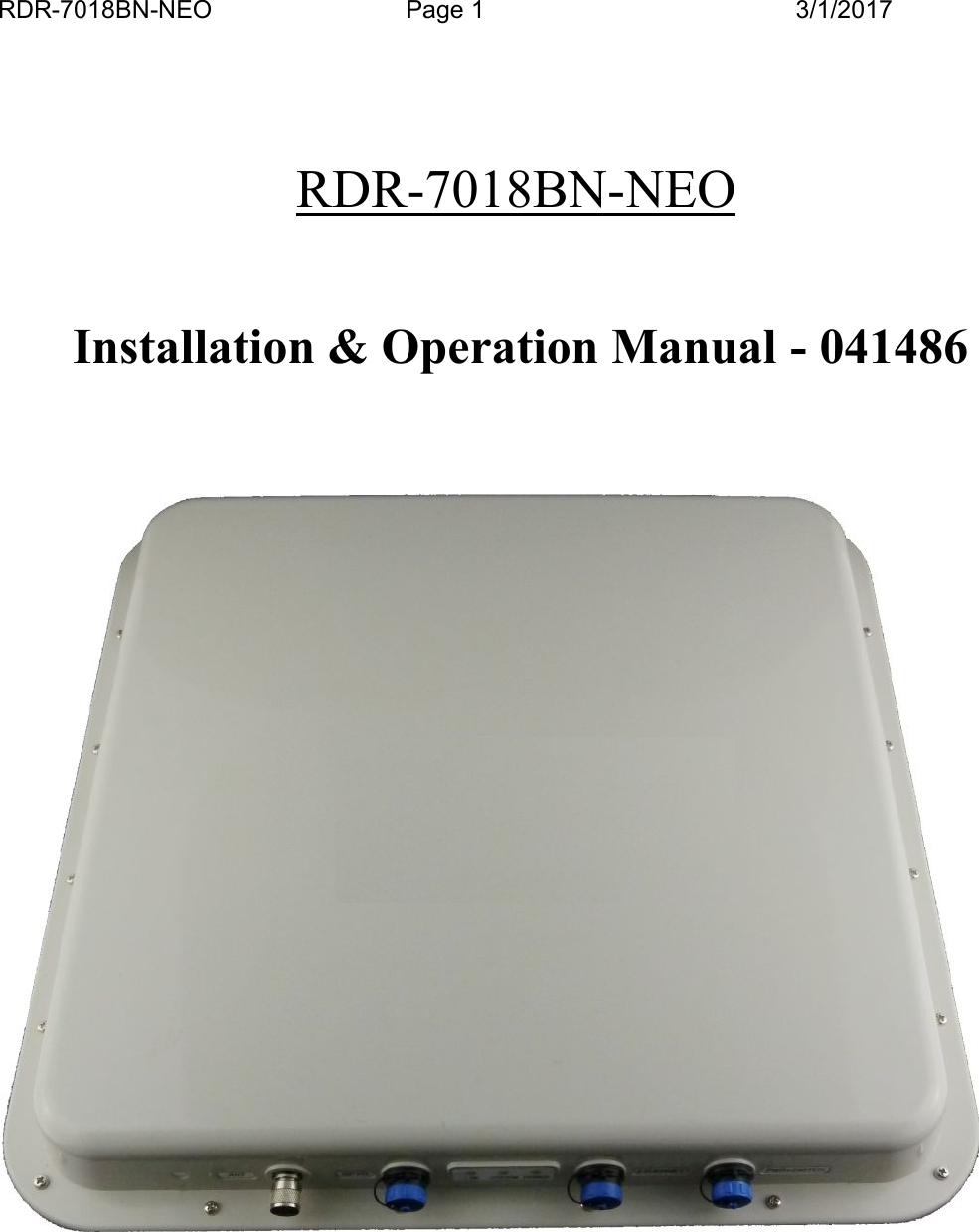
RDR-7018BN-NEO Page 1 3/1/2017RDR-7018BN-NEOInstallation & Operation Manual - 041486
RDR-7018BN-NEO Page 2 3/1/2017FCC Compliance  Sta te m entThis device co mp lies with part 15 of the FCC Ru l e s. Operation is subje ctto the condition that th is  de vice d oes not cause harmfu l inte rfe rence.Non-modifica tion  W arning StatementAny chan ge s   or modifications to this device no t expressly approved bythe party respo n sible for compliance cou ld void the user’s authority tooperate this e quipment.RF Exposure  Warning StatementThis equipmen t complies with FCC radiation e xpo sure limits set forth foran unco ntrolle d  environment and meets the FCC rad io frequency (RF)Exposure G u idelines. This equipment should be  in stalled and ope ratedkeepin g the radiator at least 90cm o r m o re away from person’s body.
RDR-7018BN-NEO Page 3 3/1/2017Table of Content1. INTRODUCTION................................................................................................................... 41.1. SPECIAL FEATURES ............................................................................................................ 42. SPECIFICATIONS................................................................................................................. 52.1. INPUT AND OUTPUT INTERFACES & CONNECTOR PIN ASSIGNMENT .................................. 52.1.1. Ethernet connector (RJ45) ........................................................................................ 52.1.2. General Purpose Input/Output ................................................................................. 52.2. MEASURING READ DISTANCE ............................................................................................ 63. INSTALLATION PROCEDURE.......................................................................................... 73.1. PARTS LIST ......................................................................................................................... 73.2. PREPARATION FOR INSTALLATION ..................................................................................... 73.2.1. Bench Top Verification ............................................................................................. 73.3. INSTALLATION STEPS ......................................................................................................... 84. NOTES ON SOFTWARE PROGRAMMING AND SYSTEM OPERATION ................ 94.1. SET UP AND SYSTEM OPERATION ...................................................................................... 94.1.1. Setting Up RDR-7018BN-NEO ................................................................................. 94.1.2. Running a Custom Software Application or the Demo Program ............................. 94.1.3. Operating Modes ...................................................................................................... 94.2. USERS NOTE .................................................................................................................... 105. REFERENCE ........................................................................................................................ 106. APPENDIX............................................................................................................................ 116.1. RDR-7018BN-NEO GPIO AND CONNECTOR ASSIGNMENT............................................. 116.2. SAMPLE WIRING DIAGRAM FOR GP I/O............................................................................. 11Figure 1 RDR-7018BN-NEO Setup in LAN ...................................................................7NOTE:  READ AND USE THIS MANUALFAILURE TO FOLLOW THE INSTALLATION (SET UP) GUIDE MAY RESULT INPOOR PERFORMANCE OR EVEN CAUSE PERMANENT DAMAGE TO THEREADER, THUS VOIDS THE PRODUCT WARRANTY.
RDR-7018BN-NEO Page 4 3/1/20171. INTRODUCTIONRDR-7018BN-NEO is a long-range (35 to 50 feet) Radio Frequency Identification (RFID)reader with TCP/IP interface and general purpose digital I/O (GP I/O - four (4) input four(4) outputs) that works with most leading passive UHF passive tags. This reader comeswith a unique combination of  long read range, small size, and low power consumption.Its  primary  applications  are  toll  collection,  asset  management  and  tracking,  and  fleetmanagement applications.In order to control the RDR-7018BN-NEO reader you will need the following:Computer with Network connectionHost software (demo software or your own custom software).RFID Tags (EPC Class 1 Gen 2, ISO Type B, etc)1.1. SPECIAL FEATURESMulti-Protocol: ISO-18000-6 Type B/C, EPC Class 1 Gen 2Thin passive tags with long-range performanceHigh performance linear polarized antennaSplash proof design for indoor or outdoor applicationsUV stabilized housingCHAPTER 1
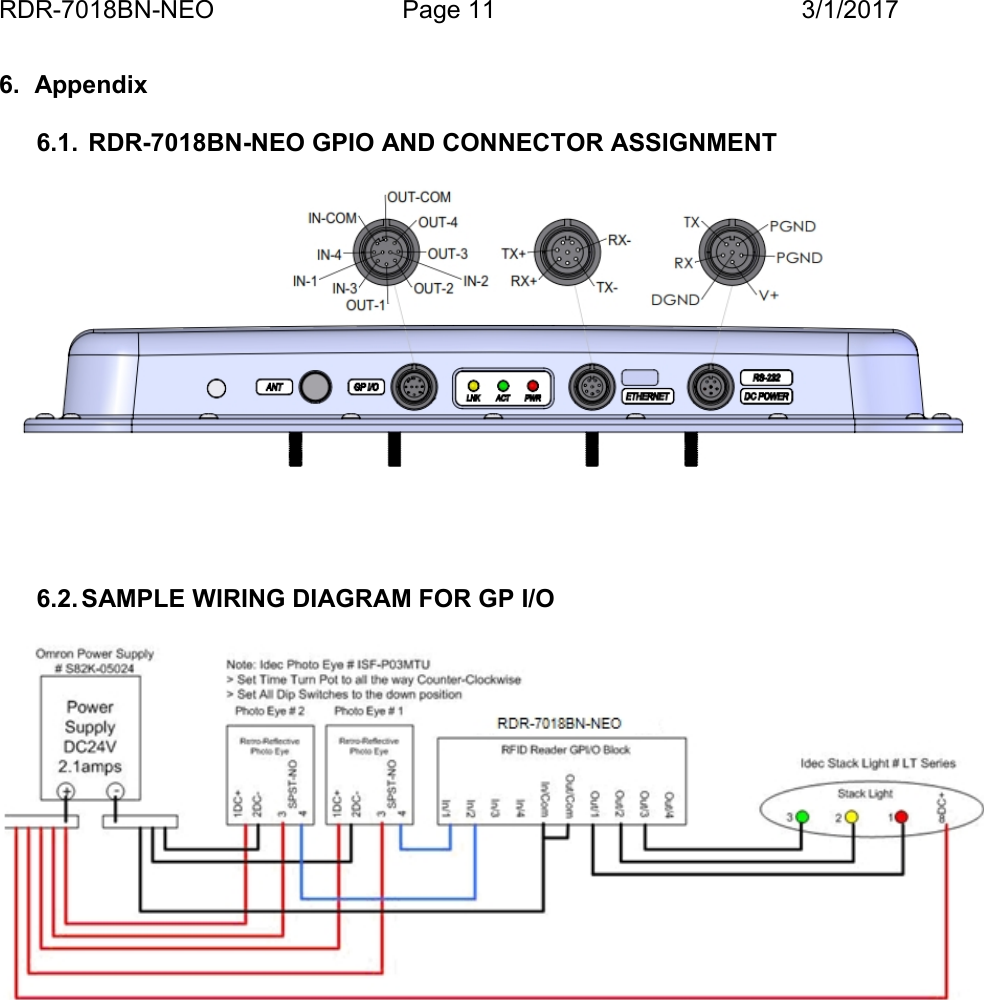
RDR-7018BN-NEO Page 5 3/1/20172. SPECIFICATIONSInput voltage ........................................................... DC 12VInput current ........................................................... 2.5A MaxProtocol language................................................... ISO 18000-6 Type B/C, EPC Class 1 Gen 2Read range ............................................................ Depends on type & size of labels usedOutput power .......................................................... Up to 3 Watts into 12.4 dBi antennaTransmit frequency................................................. 902-928 MHzReceiver frequency................................................. 902-928 MHz (Amplitude Modulated)Operating temperature range .................................-20C to +50C (-4F to 122F)Color....................................................................... WhiteOutput data formats ................................................ TCP/IP, Ethernet, RS-232GP I/O Input............................................................ 4-input, 4-outputGP I/O Connector ................................................... 10-pin MIL connectorDimension............................................................... 18.67x18.67x2.04” (47.4x47.4x5.2cm)Weight ....................................................................4lb (1.8kg)Protection Class.......................................................IP 672.1. INPUT AND OUTPUT INTERFACES & CONNECTOR PIN ASSIGNMENT(See Appendix section 6.1 for the interfaces)2.1.1. Ethernet connector (RJ45)Pin # Function description Pin # Function description1 TX+2 TX-3 RX+4 Spare+5 Spare+6 RX-7 Spare-8 Spare-2.1.2. General Purpose Input/OutputPin # Function description Pin # Function description1 Input 1 6 Output Common2 Input 2 7 Output 43 Input 3 8 Output 34 Input 4 9 Output 25 Input Common 10 Output 1The  four  general-purpose  inputs  that  use  photo  diodes  are  used  to  accept  TTL  inputcommands.  Each  input  requires  15  mA  and 5V  to  activate.  The four outputs are  solid-state  relays,  with  0.03 uA  off-state  leakage  current  and  the  ability  to  sink  120  mA  at abreakdown voltage of 400V DC.  All outputs are protected with reverse clamping diodes,and ready to drive inductive loads. The floating arrangement eliminates any ground loopconsiderations.
RDR-7018BN-NEO Page 6 3/1/2017See Appendix 6.2 for wiring diagram of a sample application.2.2. MEASURING READ DISTANCEMake sure you know the tag types. For instance, EPC tags must be pre -programmed tobe read. For certain readers and tags, user must also be mindful of the tag’s orientationand the reader’s antenna orientation, what mounting surface the tags are designed forand how the tags are supposed to be mounted. Any departure from its intended purposewill drastically affect the reader’s ability to energize the tag and its read range.When measuring the reader’s read range, make sure that the tag is properly orien ted tothe reader antenna, and for optimum performance,  be  sure the operator’s finger is notwithin three (3) inches of the tag’s antenna surface.
RDR-7018BN-NEO Page 7 3/1/20173. INSTALLATION PROCEDUREThis section provides installation and operation information for RDR-7018BN-NEO readers.3.1. PARTS LISTVerify that all items listed below are present before starting the installation.1) RDR-7018BN-NEO reader Qty=12) Documentation and demo SW Qty=13) 12 VDC wall plug power supply unit Qty=14) RJ-45 Cable Qty=13.2. PREPARATION FOR INSTALLATION3.2.1. Bench Top VerificationIt  is  always  a  good  idea  to  verify  system  operation  before  committing  to  a  full -scaleinstallation. The following are  the  necessary steps to  test reader’s operation in  a staticenvironment1.Connect reader to network with a RJ-45 cable at TCP/IP portPower up computerLoad the and launch the demo program on installation PC. Try Connect after filling inthe IP address of reader and then some commands once connected.Connect the RJ-45 cable between the reader and connector labeled “Out” on thePIPS48-0.3A, connect from Ethernet Hub/Switch to where “In” is labeled. Plug inpowerPlace the RFID tags on the exact same locations as the final configurationMeasure tag’s read distance and confirm that read distance is correct.Figure 1 RDR-7018BN-NEO Setup in LAN1Be warned that some fluorescent lighting may cause interference thereby degrades reader performance.
RDR-7018BN-NEO Page 8 3/1/20173.3. INSTALLATION STEPSoCheck to ensure that all connections are secure. Make sure all wires through thecable clamps are anchored properly; avoid dangling wires that may become asafety hazard.oMount the Reader/Antenna using the eight screw posts to fasten to reader on thedesired mounting surface. In cases where the reader aiming is critical, pleaseorder the antenna-mounting bracket that provides pan/tilt adjustment for thereader.
RDR-7018BN-NEO Page 9 3/1/20174. Notes on Software Programming and System Operation4.1. SET UP AND SYSTEM OPERATION4.1.1. Setting Up RDR-7018BN-NEOPower up with the 12-V power supply unit, connect to network through the Ethernet portwith RJ-45 cable.4.1.2. Running a Custom Software Application or the Demo ProgramIf Demo Program is not used, it is expected user will launch a custom softwareapplication to send commands defined in the Communication Protocol and/or thesupporting SDK to the reader.4.1.3. Operating ModesApplications  can  be  developed  to  support  typical  operating  modes  for  RDR-7018BN-NEOreaders as listed below.Mixed ModeThis mode assumes the user is aware of the types of protocol in use, and furthermore, theuser  made  a  determined  effort  to  operate  the reader  in  a  mixed  protocol  mode.  In  thismode, the user can decide how many and which specific protocols to be selected. OnceMix Protocol Mode is selected, the reader will routinely cycle through each protocol, dwelllong enough for the reader to wait for a response and then move onto the next protocol. Itshould  be  noted  that  in  a  mixed  protocol  mode,  the  tag  must  have  sufficient  time  torespond  to  the  reader,  and  therefore,  it  can  only  be  used  on  applications  with  specificspeed restrictions.Single Protocol ModeSingle  protocol  is  the  normal  mode  of  operation,  where  the  protocol  type  is  known  andmany tags are expected to pass through the readers.
RDR-7018BN-NEO Page 10 3/1/20174.2. USERS NOTEFor System Integrators and/or Software DevelopersSystem Integrators and/or Software developers should get familiar with the MPRCommunication Protocol (Reference I) specifications and/or the supporting SDK fordeveloping applications that control MPR network readers.For Custom System UsersFor custom system user, please refer to your host software user guide for informationregarding system and software operationsFor Demo Software UsersIf you are using the demo program which is .NET based with easy-to-follow GUIoperations, simply fill in the IP address of RDR-7018BN-NEO installed then click“Connect” should get you started.5. ReferenceI. Neology MPR Communication Protocol – Doc# 041487
RDR-7018BN-NEO Page 11 3/1/20176. Appendix6.1. RDR-7018BN-NEO GPIO AND CONNECTOR ASSIGNMENT6.2. SAMPLE WIRING DIAGRAM FOR GP I/O

Navigation menu