Next Meters Global TR-20-214 Transceiver User Manual
Next Century Submetering Systems, LLC Transceiver
User Manual
TR-201 TRANSCEIVER
Operation and Installation Manual
1|Product Review
The NextCentury TR-201 (Transceiver) is an easy to use, full-feature
device developed to remotely collect meter reads. It can be
connected to either a passive or active pulse-output meter. A
Transceiver can send/receive recorded data to/from a GW-201
Gateway, and comes with a replaceable lithium battery. The TR-201
Transceiver has the longest range in its class with easy to
understand LED light indicators. Indicators allow for immediate
verification of transmission delivery during setup/maintenance.
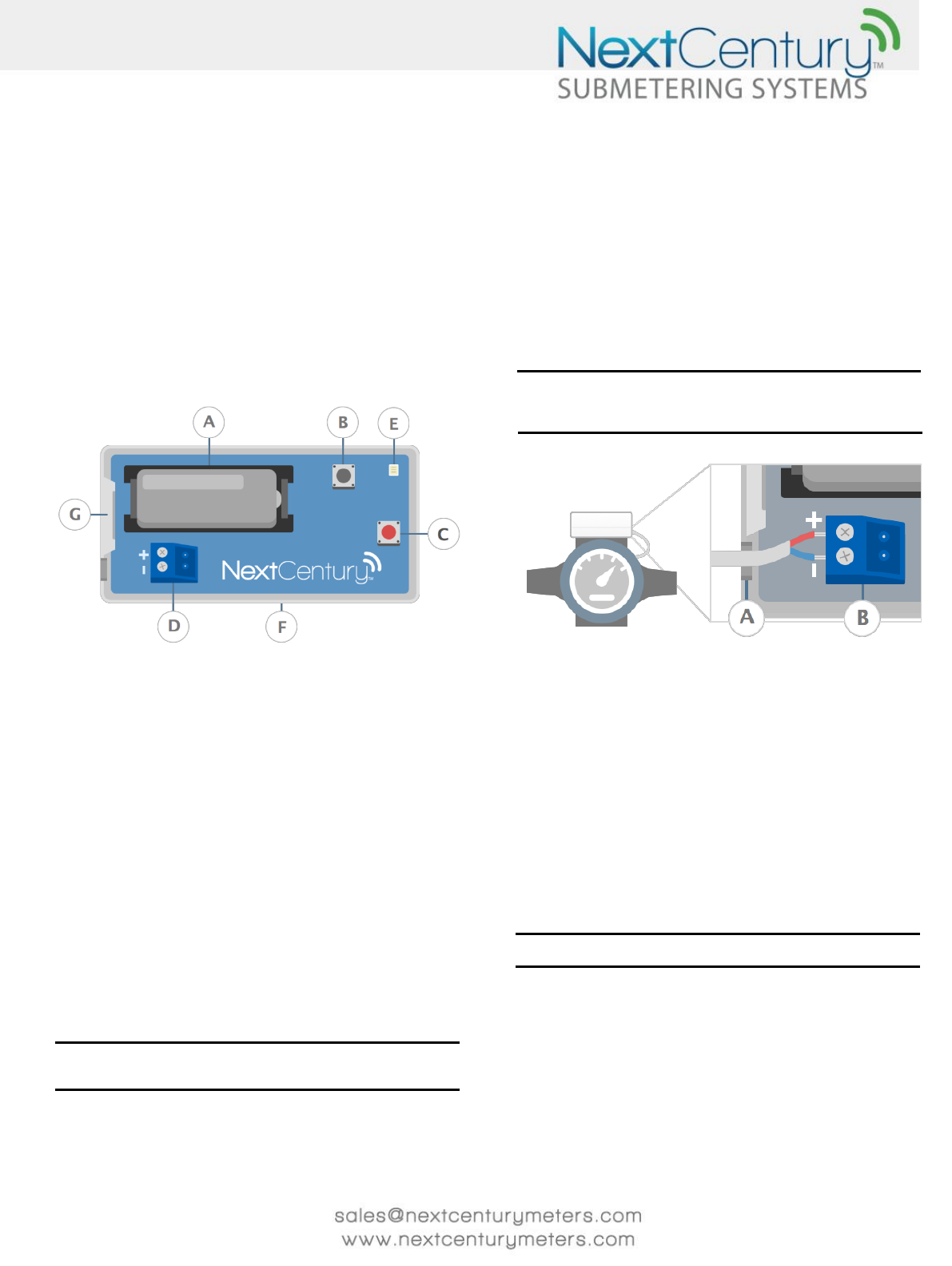
1.1 - TR-201 Hardware
Figure 1 TR-201 Hardware
A Battery B Tamper Button
C Test Button D Degson Connector (Blue)
E Signal Status LED F Mounting Plate
G Plastic Release Tab
2|Specifications
2.1 - Dimensions:
74.7mm x 40.3mm x 29.1mm
2.9in x 1.6in x 1.1in
2.2 - Operation enviorment:
-28C to 60C
-20F to 140F
Up to 90% relative humidity (non-condensing)
Must be installed in an indoor environment
2.3 Certifications:
FCC: 2A8BI-TR-20-214
IC: 20949-TR20214
2.4 Typical battery life:
6 years average
Note: Typical battery life assumes constant operating temperatures are
between 70°F and 90°F. Battery life may be reduced with operation outside
of this range.
3|Installations and Setup
3.1 - Connect Transceiver to Meter
Connect a Transceiver to a meter as follows:
1. Open the Transceiver plastics by pressing in on the plastic
release tab (Figure 1-G) while lifting away the cover.
2. Remove the Degson Connector (Figure 1-D) from the
Transceiver board by pulling up on it.
3. Insert the stripped colored wire ends from the meter into
the two-terminal Degson Connector.
4. Use a small Phillips screwdriver to tighten the screws that
secure wires to the Degson Connector.
5. Place the Degson Connector back onto the Transceiver
board as shown in Figure 2.
Note: If connected to an active pulse meter that has a polarity pulse output,
the positive (+) wire should be placed in the Degson Connector, so when the
Degson Connector is placed on the Transceiver board, the positive wire is
aligned with the (+) indicator on the board.
Figure 2 Connect Transciever to Meter
A Wire Slot B Degson Connector (Blue)
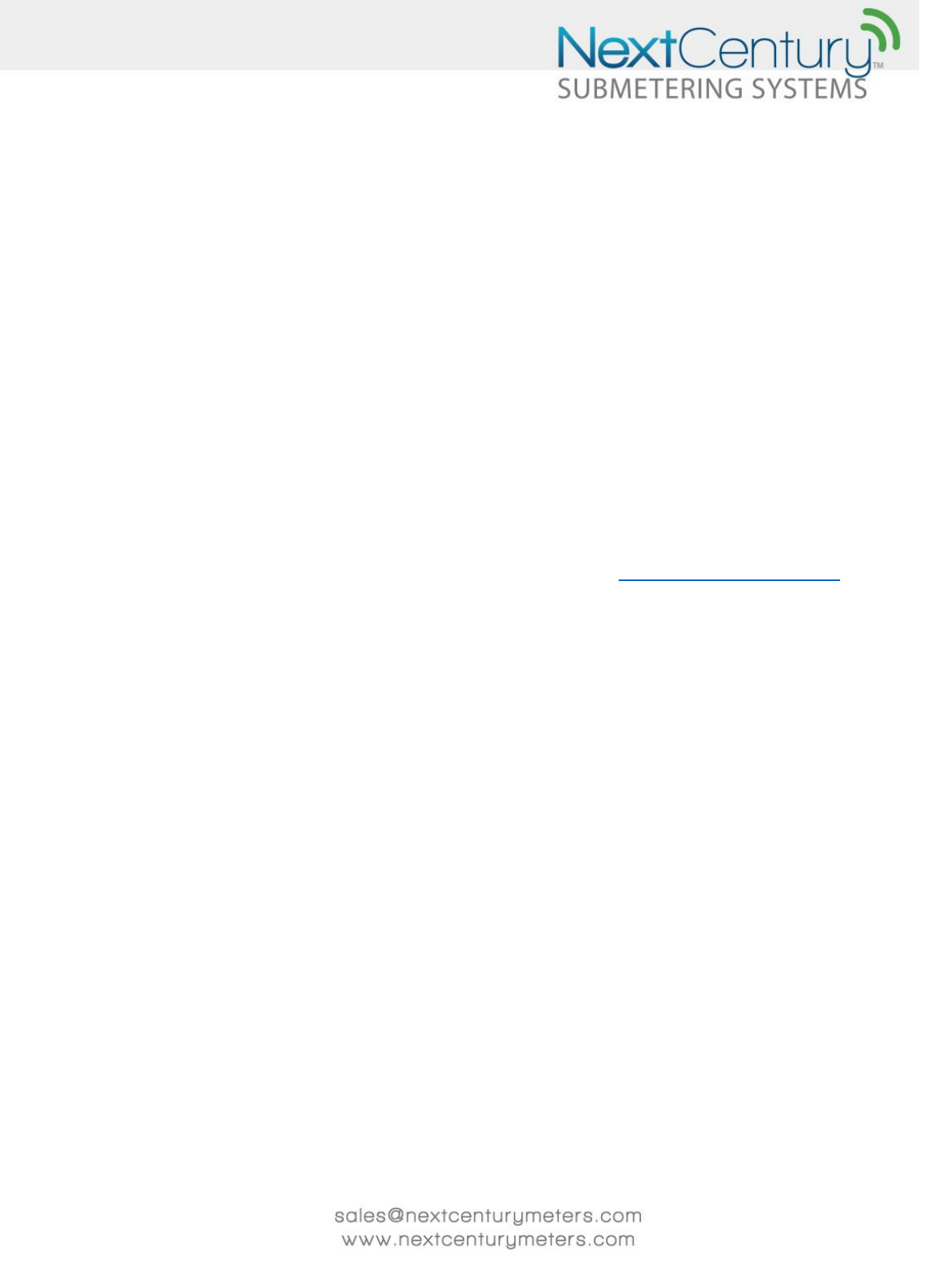
3.2 - Mount the Transceiver
Each Trasnceiver comes with a mounting plate and can be installed
in one of three different ways.
1. NextCentury’s M201C and M201CH meters have a
mounting plate that can be attached to them. Simply slide
the Transceiver onto the mounting plate. When using this
method, the Transceiver mounting plate (Figure 1-F) can
be discarded.
2. Remove the 3M double-sided protective cover and place
the Transceiver mounting plate (Figure 1-F) on a clean
wall.
3. Use the mounting screws and anchors to secure the
Transceiver mounting plate (Figure 1-F) to the wall.
Note: Ensure the wiring enters through the wire slot (Figure 2-A), allowing
the top Transceiver plastic cover to be closed completely.
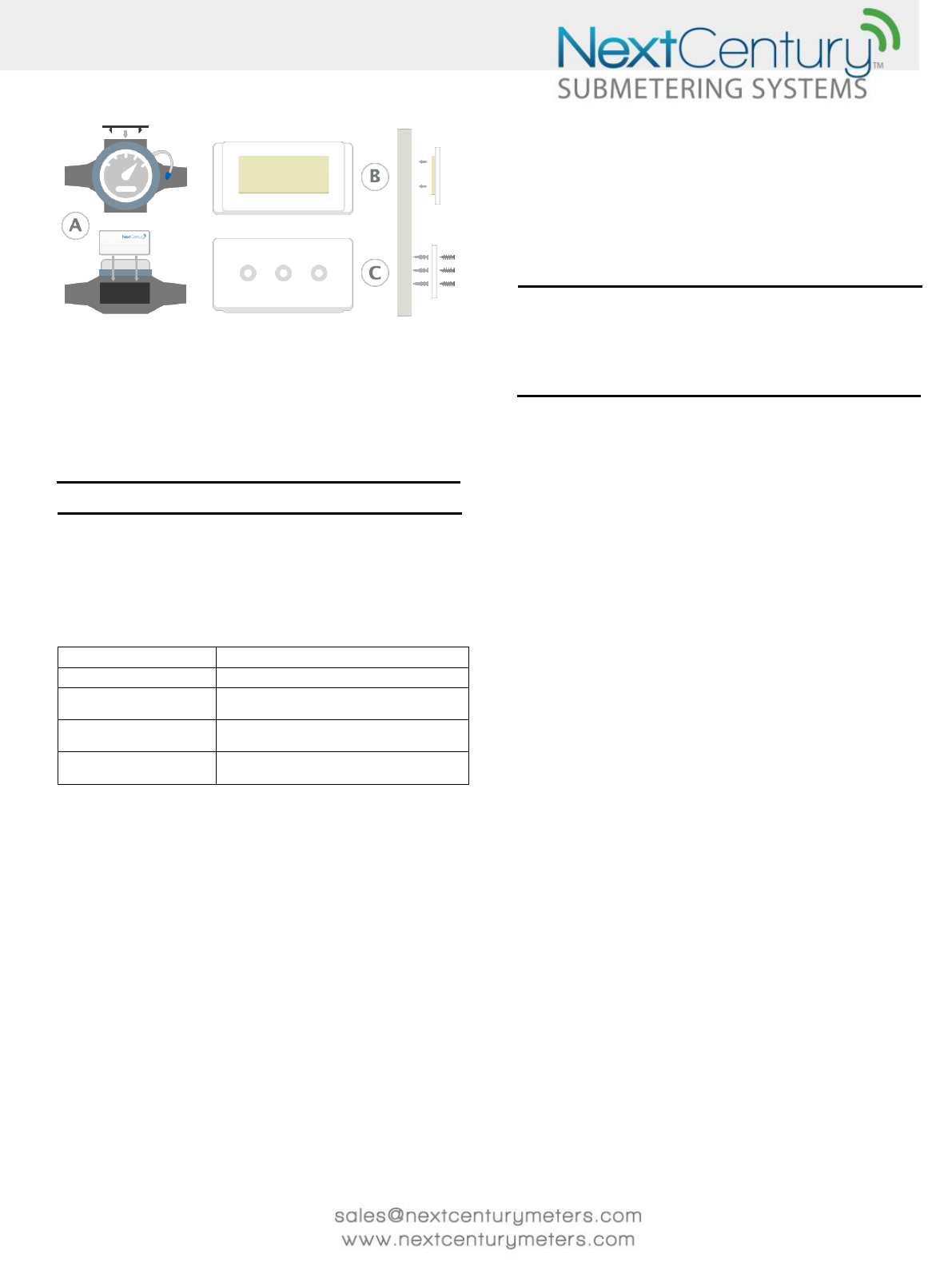
Figure 3 Mount the Transceiver
A Meter Mounting Plate B Doubled-Sided Tape
C Mounting Screws and Anchor
3.3 – Test Connection
Each Transceiver comes from NextCentury in Travel Mode. In this
mode, all radios on the device are turned off. To exit this mode,
simply press the test connect button (Figure 1-C).
Note: Once travel mode has been exited, the device will never re-enter that
mode and will remain active.
4|Signal Status LED/ Test Button
The Signal Status LED (Figure 1-E) provides a way to easily check the
status of each device. The following table (Figure 4) shows what the
different LED patterns indicate.
LED Pattern
Descipiton
4x Slow Red Blinks
In Travel Mode (see sec. 3.3).
8x Fast Red Blinks
Sending message searching for the GW-201
Gateway it should Sync with.
8x Fast Blue Blinks
Sending message to the GW-201 Gateway
that this device is Synced with.
2x Green Blinks
Message has been received succefully by its
GW-201 Gateway.
Figure 4 Signal Status LED Table
4.1 - RF Signal Indicator
When the Transceiver is out of Travel Mode (see Section
3.3) and is not Synced with a GW-201 Gateway, the RF
light will blink red when sending messages. When the
Transceiver has successfully Synced with its GW-201
Gateway, the light will blink blue when sending messages.
Anytime a message is successfully received, the LED will
blink green twice.
4.2 - Test Button
This button is pressed to see if the Transceiver
transmission is being received by its GW-201 Gateway. If
the signal is being received, the RF LED (Figure 1-E) will
blink green twice.
5|Battery Replacements
Once you get a low battery alert on the NextCentury website,
you will need to replace the CR123 battery.
1. Open the Transceiver plastics by pressing in on the plastic
release tab (Figure 1-G) while lifting away the top cover.
2. Remove the previous battery.
3. Insert the new battery in the orientation indicated on the
battery terminal.
Note: A TR-201 Transceiver permanently retains pulse data in non-volatile
memory. Reprogramming the Transceiver is not necessary once a new
battery is placed in the transceiver. Once the new battery is placed into the
TR-201 Transceiver it will automatically “Sync” to its GW-201 Gateway. Even
though re-programming is not necessary, the initial meter read should be
reset to allow for matching meter reads between the “NextCentury Cloud”
and the meter.
6|Television and Radio Interference
This equipment has been tested and found to comply with the limits
for a Class B digital device, pursuant to Part 15 of the FCC Rules.
These limits are designed to provide reasonable protection against
harmful interference in a residential installation. This equipment
generates, uses and can radiate radio frequency energy and, if not
installed and used in accordance with the instructions, may cause
harmful interference to radio communications. However, there is no
guarantee that interference will not occur in a particular installation.
If this equipment does cause harmful interference to radio or
television reception, which can be determined by interference to
radio or television reception, which can be determined by turning
the equipment off and on, the user is encouraged to try to correct
the interference by one or more of the following measures:
• Reorient or relocate the receiving antenna.
• Increase the separation between the equipment and
receiver.
• Connect the equipment into an outlet on a circuit
different from that to which the receiver is connected.
• Consult the dealer or an experienced radio/TV
technician for help.
7|FCC Part 15 and Industry Canada
Compliance
This device complies with part 15 of the FCC Rules and Industry
Canada license-exempt RSS standard(s). Operation is subject to the
following two conditions: (1) this device may not cause interference,
and (2) this device must accept any interference, including
interference that may cause undesired operation of the device.
This portable equipment with its antenna complies with FCC’s and
IC’s RF radiation exposure limits set forth for an uncontrolled
environment. Users are advised to maintain a separation distance of
20cm to comply with FCC and IC RF exposure limits.
Le présent appareil est conforme aux CNR d'Industrie Canada
applicables aux appareils radio exempts de licence. L'exploitation est
autorisée aux deux conditions suivantes : (1) l'appareil ne doit pas
produire de brouillage, et (2) l'utilisateur de l'appareil doit accepter
tout brouillage radioélectrique subi, même si le brouillage est
susceptible d'en compromettre le fonctionnement.
Cet équipement portable avec son antenne se conforme aux limites
d'exposition aux radiations RF du FCC et du IC, énoncées pour un
environnement non contrôlé. Les utilisateurs sont conseillé de
maintenir une distance de séparation de 20 cm pour se conformer
aux limites d'exposition RF du FCC et du IC.
8|Warranty/Disclaimer
Scope of Warranty
NextCentury warrants that all communication equipment
manufactured by NextCentury will be free from defects in materials
and workmanship under normal use and in accordance with
NextCentury’s documented installation and operating procedures
for a period of five (5) years from the date of manufacture.
Products not manufactured by NextCentury, including without
limitation, accessories, attachments, or batteries used in conjunction
with NextCentury equipment are warranted, if at all, only by the
original manufacturer. NextCentury’s warranties do not include
replacement of batteries used to power NextCentury products.
Limits of Liability
This warranty only applies to Read Management System
components produced by NextCentury, and does not cover any
products which have been damaged by misconduct, negligence,
vandalism, acts of God, excessive operating conditions, or
unauthorized attachments or modifications. This warranty will be
nullified and void if products are placed in non-recommended
installation application/fashion, or are converted, altered, or treated
by other than NextCentury recommended procedures and
instructions, or are read by equipment not approved by
NextCentury.
NextCentury’s liability and customer’s exclusive remedy under this
warranty is expressly limited to repair or replacement of the product
at NextCentury’s option, and is conditioned upon the customer
returning the product(s) to the location designated by NextCentury
within the warranty periods or limits stated herein and pre-paying
the freight costs both to and from specified location. In no event
shall NextCentury be liable for costs or expenses associated with the
removal or installation of products under this warranty.
NextCentury shall have no liability or responsibility to the purchaser
or any third party for any loss, cost, expense, damage, or liability,
whether direct or indirect, or for special, incidental, indirect, or
consequential damages of any kind, regardless of whether such
liability is based on breach of contract, tort, strict liability, breach of
warranties, or otherwise, and even if advised of the likelihood of
such damages. Incidental and consequential damages include, but
are not limited to, lost revenue, loss of profits, data, business, or
goodwill. In addition, damages resulting from negligence on the part
of the customer including, but not limited to, the care and
maintenance of NextCentury products, or damages resulting from
negligence regarding periodic testing of the product’s performance,
are not covered under this guarantee.
CHANGES OR MODIFICATIOONS NOT EXPRESSLY APPROVED BY
NEXTCENTURY MAY VOID THIS WARRANTY AND THE USER’S
AUTHORITY TO OPERATE THE EQUIPMENT.
THE FOREGOING WARRANTY IS THE SOLE AND EXCLUSIVE REMEDY
AVAILABLE TO THE PURCHASER AND IS IN LIEU OF ALL OTHER
WARRANTIES, GUARANTEES, OR REMEDIES, WHETHER WRITTEN OR
ORAL, EXPRESS OR IMPLIED, INCLUDING WITHOUT LIMITATION, THE
IMPLIED WARRANTIES OF MERCHANTABILITY AND FITNESS FOR A
PARTICULAR PURPOSE, ALL OF WHICH NEXTCENTURY HEREBY
EXPRESSLY DISCLAIMS.
9|NextCentury Submetering System
Contact Information
If there are any questions or concerns related to these guidelines,
please contact NextCentury Submetering Systems Product Support:
Phone: (844) 538.8203 opt. 2
Email: support@nextcenturymeters.com