Ningbo Chima wh CM-NRC Electric Winch Wireless Controller User Manual

Ningbo Chima winch co.,ltd. Electric Winch Wireless Controller Users Manual

Users Manual

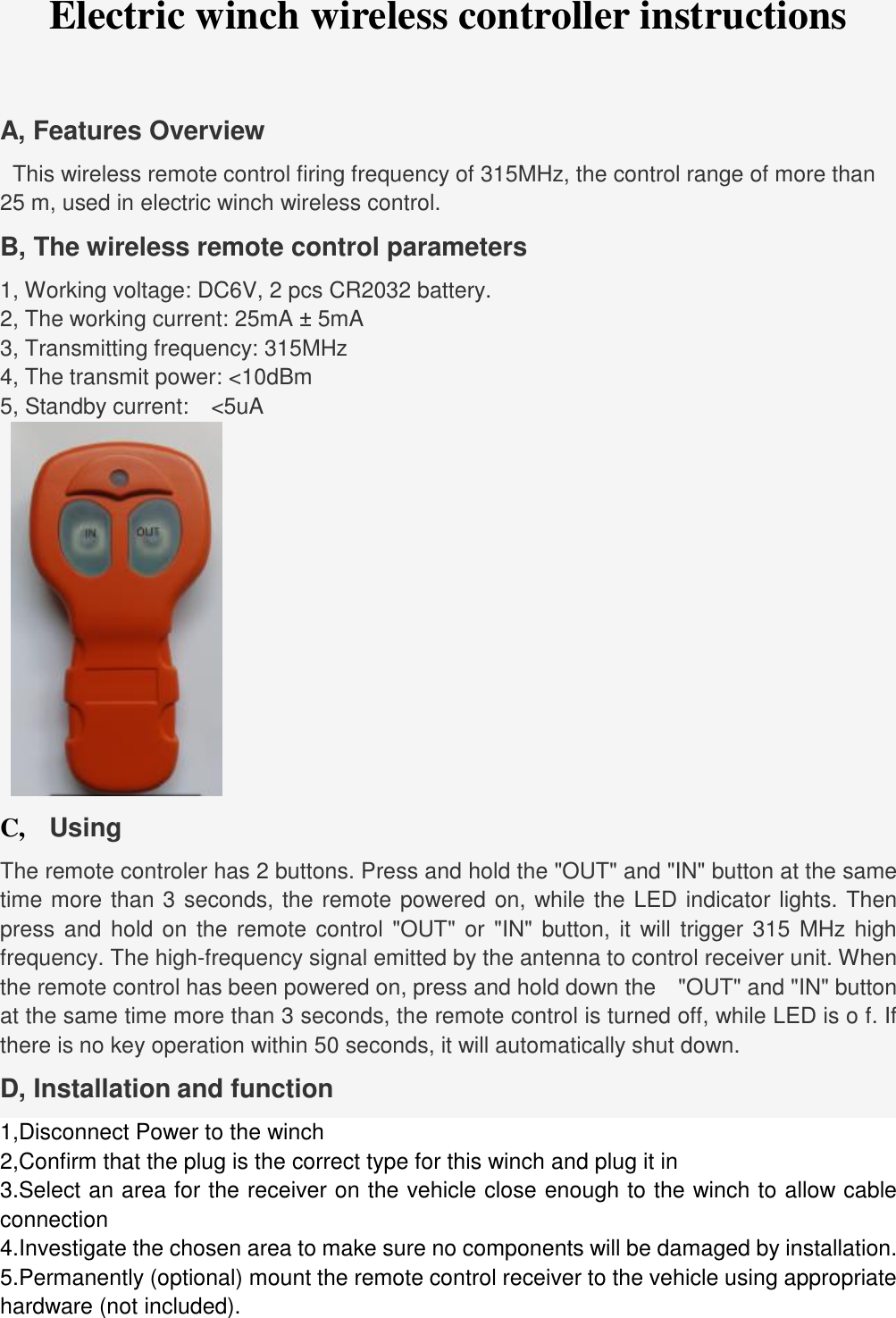
hardware (not included). Electric winch wireless controller instructions A, Features Overview   This wireless remote control firing frequency of 315MHz, the control range of more than 25 m, used in electric winch wireless control. B, The wireless remote control parameters 1, Working voltage: DC6V, 2 pcs CR2032 battery. 2, The working current: 25mA ± 5mA 3, Transmitting frequency: 315MHz 4, The transmit power: <10dBm 5, Standby current:  <5uA C,   Using The remote controler has 2 buttons. Press and hold the "OUT" and "IN" button at the same time more than 3 seconds, the remote powered on, while the LED indicator lights. Then press and hold on the remote control "OUT" or "IN" button, it will trigger 315 MHz high frequency. The high-frequency signal emitted by the antenna to control receiver unit. When the remote control has been powered on, press and hold down the  "OUT" and "IN" button at the same time more than 3 seconds, the remote control is turned off, while LED is o f. If there is no key operation within 50 seconds, it will automatically shut down.   D, Installation and function 1,Disconnect Power to the winch 2,Confirm that the plug is the correct type for this winch and plug it in 3.Select an area for the receiver on the vehicle close enough to the winch to allow cableconnection 4.Investigate the chosen area to make sure no components will be damaged by installation.5.Permanently (optional) mount the remote control receiver to the vehicle using appropriate
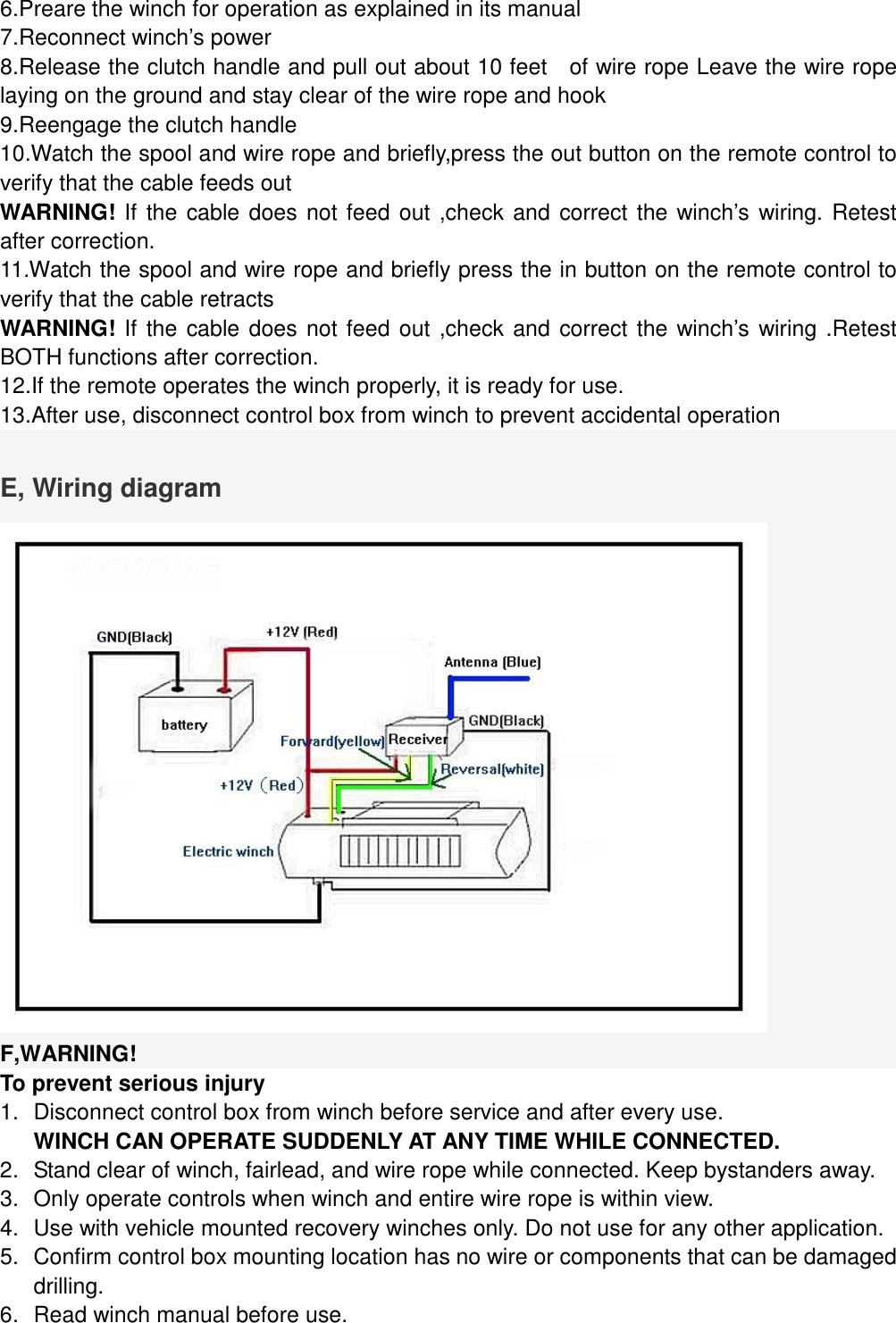
6.Preare the winch for operation as explained in its manual7.Reconnect winch’s power8.Release the clutch handle and pull out about 10 feet  of wire rope Leave the wire ropelaying on the ground and stay clear of the wire rope and hook 9.Reengage the clutch handle10.Watch the spool and wire rope and briefly,press the out button on the remote control to verify that the cable feeds out WARNING! If the cable does not feed out ,check and correct the winch’s wiring. Retest after correction. 11.Watch the spool and wire rope and briefly press the in button on the remote control to verify that the cable retracts WARNING! If the cable does not feed out ,check and correct the winch’s wiring .Retest BOTH functions after correction. 12.If the remote operates the winch properly, it is ready for use.13.After use, disconnect control box from winch to prevent accidental operationE, Wiring diagram F,WARNING! To prevent serious injury 1.Disconnect control box from winch before service and after every use.WINCH CAN OPERATE SUDDENLY AT ANY TIME WHILE CONNECTED.2.Stand clear of winch, fairlead, and wire rope while connected. Keep bystanders away.3.Only operate controls when winch and entire wire rope is within view.4.Use with vehicle mounted recovery winches only. Do not use for any other application.5.Confirm control box mounting location has no wire or components that can be damageddrilling.6.Read winch manual before use.
FCC warningAny Changes or modifications not expressly approved by the party responsible for compliance could void the user’s authority to operate the equipment.  This device complies with part 15 of the FCC Rules. Operation is subject to the following two conditions: (1) This device may not cause harmful interference (2) this device must accept any interference received, including interference that may cause undesired operation.

Navigation menu