Ningbo Lumiaudio Electronic Technology BLS LED COLOR LIGHTBULB BLUETOOTH SPEAKER User Manual BLS 01 manual 2
Ningbo Lumiaudio Electronic Technology LTD LED COLOR LIGHTBULB BLUETOOTH SPEAKER BLS 01 manual 2
Users Manual
LED
COLOR
LIGHTBULB
BLUETOOTH
SPEAKER
BLS-01
45
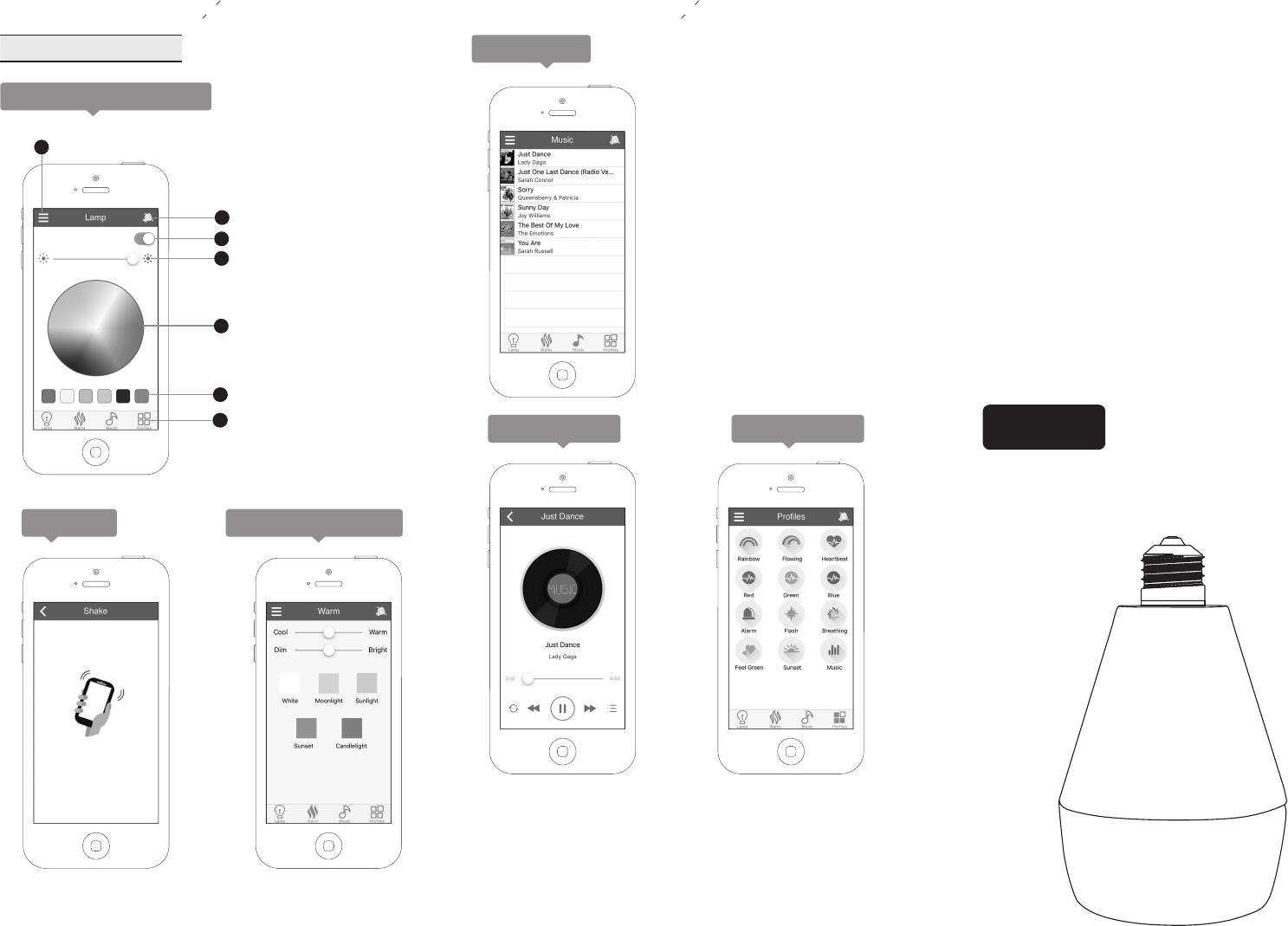
Shake to change lamp color
ON-OFF
Brightness
Color plate
Single color
Function navigation bar
2
3
4
5
6
7
Sidebar entering
1
Main page operation
A.Lamp control operation
B.Shark
Shake the phone, the
light color will change
randomly.
C.Light control page
Change the luminance
by moving the button.
D.Music page
Song list show the phone'
local music. Click a song to
enter playing page and begin
playing.
NOTE: you can use other
music APPs to play songs.
E.Playing page F.Profiles page
Click the icon to choose
different lighting scene.
Any Changes or modifications not expressly approved by the party responsible for compliance could
void the user’s authority to operate the equipment.
This device complies with part 15 of the FCC Rules.Operation is subject to the following two conditions:
(1) This device may not cause harmful interference.and(2) this device must accept any interference received, including
interference that may cause undesired operation.
This equipment complies with FCC radiation exposure limits set forth for an uncontrolled environment.
This equipment should be installed and operated with minimum distance 20cm between the radiator& your body.
Functions
Preparation before operation
Make sure the power supply voltage between100-240v.
Install the product in E27/E26 lampholder.
Open the power supply, the lamp will work at white light.
Specifications
1 2 3
Bluetooth version 4.0
LED and Bluetooth in one, support media player and
lighting.
APP remote control lamp startup &shutdown, brightness,
lamp color, and other operations(such as: lamp effect,
music rhythm, startup at a fixed time, sleeping helper)
Product Name:Led color lightbulb bluetooth speaker
Model No.: BLS-01
Product Weight: 349g
Product Dimensions: 150*98.5mm
Enclosure Material: ABS+PC
Speaker Type: 2.5" pp cone
Speaker Power: 5 Watts
Bluetooth Version: Quick pairing V4.0
Bluetooth Distance: Approximately 10M/33 Feet
Socket Type: 27 E27
26 E26
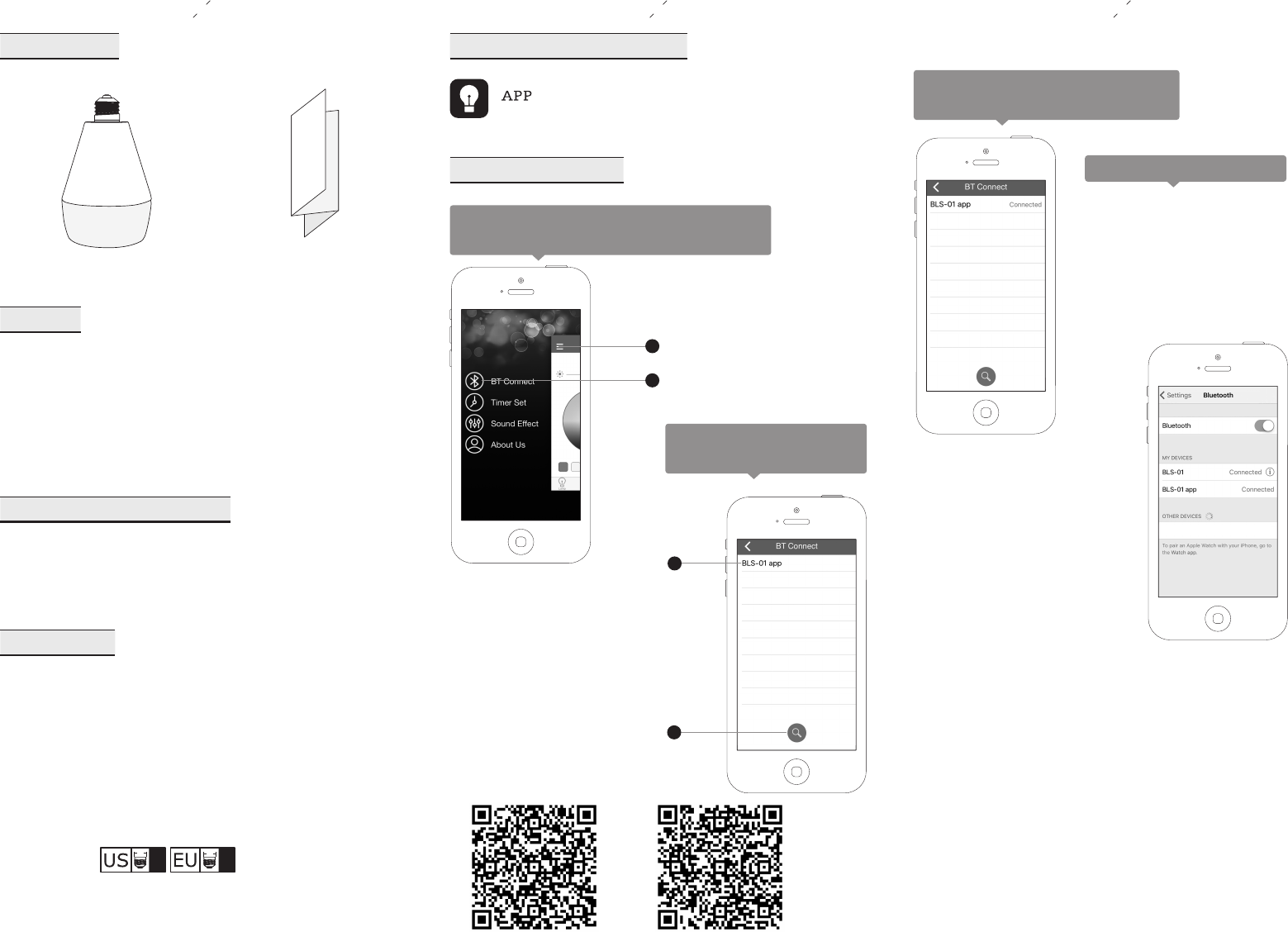
Click sidebar to choose ”BT Connect” after
entering main page, as shown in figure:
Enter BT connection page,
as shown in figure:
Packaging List
USER
MANUAL
speaker user manual
Bluetooth light APP operation
iLink.apk can be downloaded from App Store for free.
iLink
1
2
Step two:
to connect.
click device name
There is sound to prompt successful
connection,as shown in figure:
Step one:click it to search
Bluetooth light device.
Step one: click it to show
”sidebar”
Step two: click it to enter”BT
connection”
Bluetooth connection
1.Open the phone Setting button.
2.Open the Bluetooth setting.
3.Click the “BLS-01”to connect.
There is sound to prompt successful
connection.
Start to experience after successful
activation.
Bluetooth speaker connect
2
1
Scan the QR-Code download APP.
Google Play App Store
Note: This equipment has been tested and found to comply with the limits for
a Class B digital device, pursuant to part 15 of the FCC Rules. These limits
are designed to provide reasonable protection against harmful interference in
a residential installation. This equipment generates, uses and can radiate
radio frequency energy and, if not installed and used in accordance with the
instructions, may cause harmful interference to radio communications.
However, there is no guarantee that interference will not occur in a particular
installation. If this equipment does cause harmful interference to radio or
television reception, which can be determined by turning the equipment off
and on, the user is encouraged to try to correct the interference by one or
more of the following measures:
—Reorient or relocate the receiving antenna.
—Increase the separation between the equipment and receiver.
—Connect the equipment into an outlet on a circuit different from that to
which the receiver is connected.
—Consult the dealer or an experienced radio/TV technician for help.