Ningbo Tonwel Audio MDA350 MULTIPURPOSE LOUDSPEAKER User Manual

Ningbo Tonwel Audio Co.,LTD MULTIPURPOSE LOUDSPEAKER

User manual

M3502.1 Portable Pa SyStemPORTABLE PASERIESMuV¨
TABLE OF CONTENTSSAFETY INSTRUCTIONS  ........................................... 3 – 4FEATURES ....................................................................  5SYSTEM MAINTENANCE ........................................... 5 – 6SYSTEM CONFIGURATIONS ..................................... 7 – 8WHAT’S IN THE BOXES .................................................  9SETTING UP THE SYSTEM .............................................. 10PANEL CONTROLS ................................................ 11 – 13TROUBLESHOOTING  ................................................... 13SPECIFICATIONS ......................................................... 14BLOCK DIAGRAM ........................................................ 15WARRANTY ....................................................  Back CoverFCC STATEMENT ..............................................  Back Cover
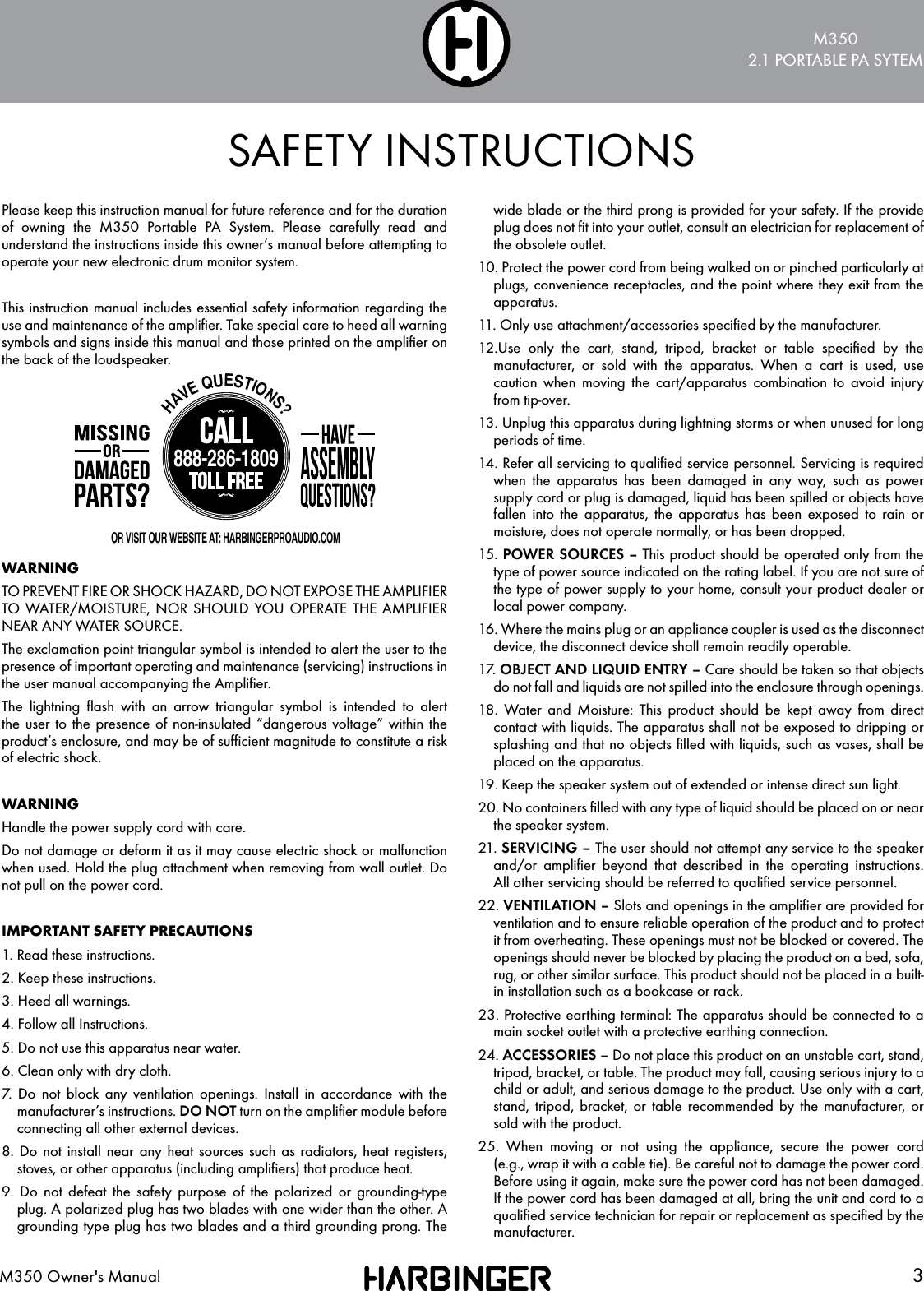
M3502.1 PORTABLE PA SYTEM3M350 Owner's ManualPlease keep this instruction manual for future reference and for the duration of owning the M350 Portable PA System. Please carefully read and understand the instructions inside this owner’s manual before attempting to operate your new electronic drum monitor system.This instruction manual includes essential safety information regarding the use and maintenance of the amplifier. Take special care to heed all warning symbols and signs inside this manual and those printed on the amplifier on the back of the loudspeaker.WARNINGTO PREVENT FIRE OR SHOCK HAZARD, DO NOT EXPOSE THE AMPLIFIER TO WATER/MOISTURE, NOR SHOULD YOU OPERATE THE AMPLIFIER NEAR ANY WATER SOURCE.The exclamation point triangular symbol is intended to alert the user to the presence of important operating and maintenance (servicing) instructions in the user manual accompanying the Amplifier.The lightning flash with an arrow triangular symbol is intended to alert the user to the presence of non-insulated “dangerous voltage” within the product’s enclosure, and may be of sufficient magnitude to constitute a risk of electric shock.WARNINGHandle the power supply cord with care.Do not damage or deform it as it may cause electric shock or malfunction when used. Hold the plug attachment when removing from wall outlet. Do not pull on the power cord.IMPORTANT SAFETY PRECAUTIONS1. Read these instructions.2. Keep these instructions.3. Heed all warnings.4. Follow all Instructions.5. Do not use this apparatus near water.6. Clean only with dry cloth.7. Do not block any ventilation openings. Install in accordance with the manufacturer’s instructions. DO NOT turn on the amplifier module before connecting all other external devices.8. Do not install near any heat sources such as radiators, heat registers, stoves, or other apparatus (including amplifiers) that produce heat.9. Do not defeat the safety purpose of the polarized or grounding-type plug. A polarized plug has two blades with one wider than the other. A grounding type plug has two blades and a third grounding prong. The wide blade or the third prong is provided for your safety. If the provide plug does not fit into your outlet, consult an electrician for replacement of the obsolete outlet.10. Protect the power cord from being walked on or pinched particularly at plugs, convenience receptacles, and the point where they exit from the apparatus.11. Only use attachment/accessories specified by the manufacturer.12.Use only the cart, stand, tripod, bracket or table specified by the manufacturer, or sold with the apparatus. When a cart is used, use caution when moving the cart/apparatus combination to avoid injury from tip-over.13. Unplug this apparatus during lightning storms or when unused for long periods of time.14. Refer all servicing to qualified service personnel. Servicing is required when the apparatus has been damaged in any way, such as power supply cord or plug is damaged, liquid has been spilled or objects have fallen into the apparatus, the apparatus has been exposed to rain or moisture, does not operate normally, or has been dropped.15. POWER SOURCES – This product should be operated only from the type of power source indicated on the rating label. If you are not sure of the type of power supply to your home, consult your product dealer or local power company.16. Where the mains plug or an appliance coupler is used as the disconnect device, the disconnect device shall remain readily operable.17.  OBJECT AND LIQUID ENTRY – Care should be taken so that objects do not fall and liquids are not spilled into the enclosure through openings.18. Water and Moisture: This product should be kept away from direct contact with liquids. The apparatus shall not be exposed to dripping or splashing and that no objects filled with liquids, such as vases, shall be placed on the apparatus.19. Keep the speaker system out of extended or intense direct sun light.20. No containers filled with any type of liquid should be placed on or near the speaker system.21. SERVICING – The user should not attempt any service to the speaker and/or amplifier beyond that described in the operating instructions. All other servicing should be referred to qualified service personnel.22. VENTILATION – Slots and openings in the amplifier are provided for ventilation and to ensure reliable operation of the product and to protect it from overheating. These openings must not be blocked or covered. The openings should never be blocked by placing the product on a bed, sofa, rug, or other similar surface. This product should not be placed in a built-in installation such as a bookcase or rack.23. Protective earthing terminal: The apparatus should be connected to a main socket outlet with a protective earthing connection.24. ACCESSORIES – Do not place this product on an unstable cart, stand, tripod, bracket, or table. The product may fall, causing serious injury to a child or adult, and serious damage to the product. Use only with a cart, stand, tripod, bracket, or table recommended by the manufacturer, or sold with the product.25. When moving or not using the appliance, secure the power cord (e.g., wrap it with a cable tie). Be careful not to damage the power cord. Before using it again, make sure the power cord has not been damaged. If the power cord has been damaged at all, bring the unit and cord to a qualified service technician for repair or replacement as specified by the manufacturer.SAFETY INSTRUCTIONSHAVE QUESTIONS?888-286-1809OR VISIT OUR WEBSITE AT: HARBINGERPROAUDIO.COM
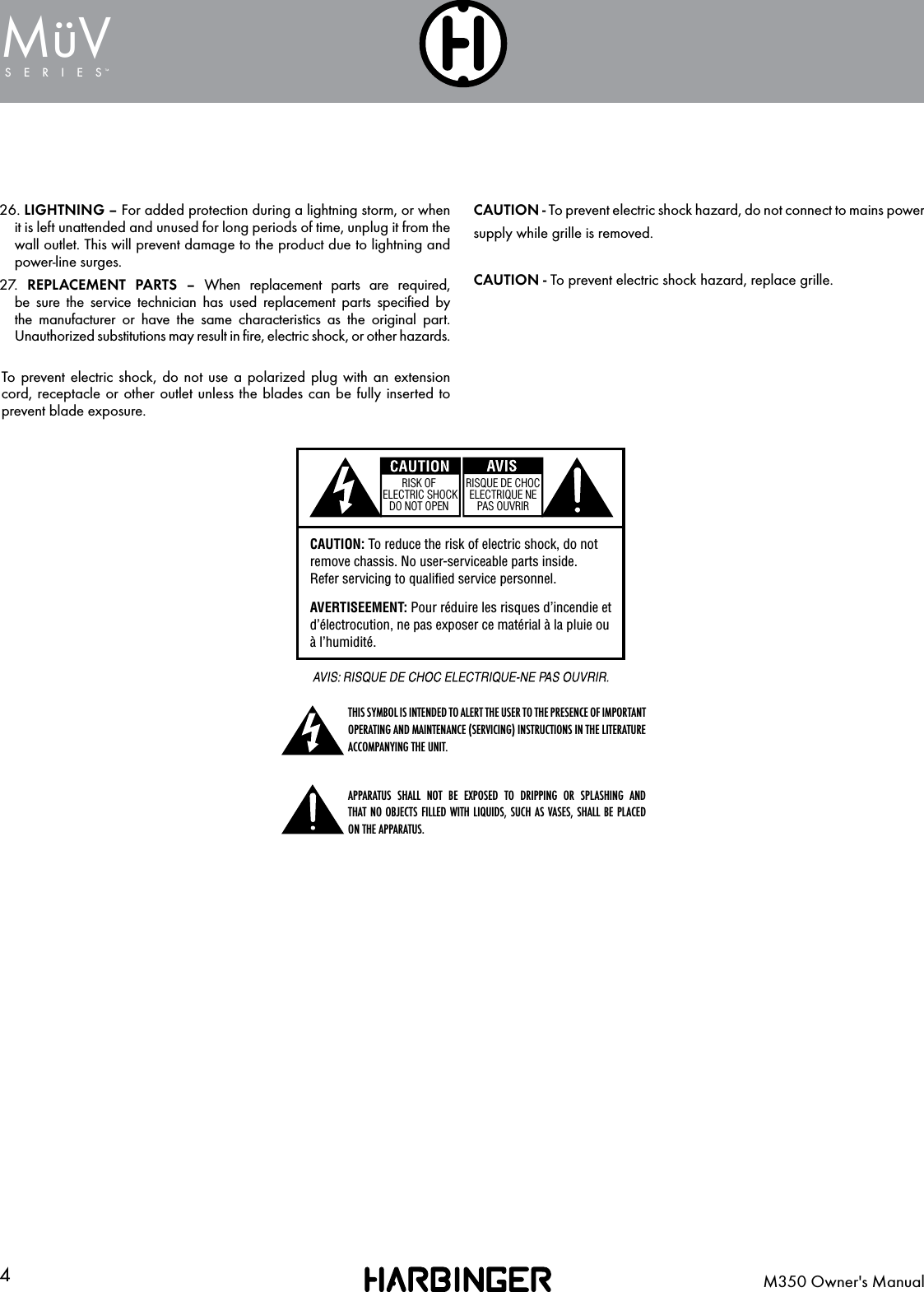
4M350 Owner's ManualSERIESMuV¨WARNING: To reduce the risk of fire or shock do not expose this equipment to rain or moisture.AVERTISEEMENT:  Pour  réduire  les  risques d’incendie et d’électrocution, ne pas exposer ce matérial à la pluie ou à l’humidité.RISK OF ELECTRIC SHOCK DO NOT OPENRISQUE DE CHOC ELECTRIQUE NE PAS OUVRIRRISK OF ELECTRIC SHOCK DO NOT OPENRISQUE DE CHOC ELECTRIQUE NE PAS OUVRIRCAUTION: To reduce the risk of electric shock, do not remove chassis. No user-serviceable parts inside.Refer servicing to qualified service personnel.AVERTISEEMENT: Pour réduire les risques d’incendie et d’électrocution, ne pas exposer ce matérial à la pluie ou à l’humidité.WARNING: To reduce the risk of fire or shock do not expose this equipment to rain or moisture.AVERTISEEMENT:  Pour  réduire  les  risques d’incendie et d’électrocution, ne pas exposer ce matérial à la pluie ou à l’humidité.RISK OF ELECTRIC SHOCK DO NOT OPENRISQUE DE CHOC ELECTRIQUE NE PAS OUVRIRRISK OF ELECTRIC SHOCK DO NOT OPENRISQUE DE CHOC ELECTRIQUE NE PAS OUVRIRCAUTION: To reduce the risk of electric shock, do not remove chassis. No user-serviceable parts inside.Refer servicing to qualified service personnel.AVERTISEEMENT: Pour réduire les risques d’incendie et d’électrocution, ne pas exposer ce matérial à la pluie ou à l’humidité.THIS SYMBOL IS INTENDED TO ALERT THE USER TO THE PRESENCE OF IMPORTANT OPERATING AND MAINTENANCE (SERVICING) INSTRUCTIONS IN THE LITERATURE ACCOMPANYING THE UNIT.WARNING: To reduce the risk of fire or shock do not expose this equipment to rain or moisture.AVERTISEEMENT:  Pour  réduire  les  risques d’incendie et d’électrocution, ne pas exposer ce matérial à la pluie ou à l’humidité.RISK OF ELECTRIC SHOCK DO NOT OPENRISQUE DE CHOC ELECTRIQUE NE PAS OUVRIRRISK OF ELECTRIC SHOCK DO NOT OPENRISQUE DE CHOC ELECTRIQUE NE PAS OUVRIRCAUTION: To reduce the risk of electric shock, do not remove chassis. No user-serviceable parts inside.Refer servicing to qualified service personnel.AVERTISEEMENT: Pour réduire les risques d’incendie et d’électrocution, ne pas exposer ce matérial à la pluie ou à l’humidité.APPARATUS SHALL NOT BE EXPOSED TO DRIPPING OR SPLASHING AND  THAT NO OBJECTS FILLED WITH LIQUIDS, SUCH AS VASES, SHALL BE PLACED ON THE APPARATUS.CAUTION - To prevent electric shock hazard, do not connect to mains powersupply while grille is removed.CAUTION - To prevent electric shock hazard, replace grille.26. LIGHTNING – For added protection during a lightning storm, or when it is left unattended and unused for long periods of time, unplug it from the wall outlet. This will prevent damage to the product due to lightning and power-line surges.27.   REPLACEMENT PARTS – When replacement parts are required, be sure the service technician has used replacement parts specified by the manufacturer or have the same characteristics as the original part. Unauthorized substitutions may result in fire, electric shock, or other hazards.To prevent electric shock, do not use a polarized plug with an extension cord, receptacle or other outlet unless the blades can be fully inserted to prevent blade exposure.
M3502.1 PORTABLE PA SYTEM5M350 Owner's ManualCONGRATULATIONS!FEATURES…on your purchase of a Harbinger M350 Electronic Drum Monitor System. By following these guidelines and suggestions, your new amplifier will provide you with many years of great sound and reliable service.• 350 Watts RMS (1100 watts peak); Class-D power• 10” Subwoofer and two 4” satellite speakers• 3-channel mixer with various inputs for multiple sound sources• 2-band shelving EQ provides complete tone control• Subwoofer level knob to mix proper low frequency content• Aux input and Bluetooth® audio• Weighs only 60 pounds for easy transport• Includes stands and stand-transport bagsSYSTEM MAINTENANCELOCATION•  To avoid deformation, discoloration, or more serious damage, do not expose the unit to direct sunlight, high temperature sources,  or excessive humidityPOWER SUPPLY• Turn the power switch off when the M350 is not in use.• The AC cable should be unplugged from the AC outlet if the M350 will not be used for an extended period• Avoid plugging the AC adapter into an AC outlet that is also powering high-consumption appliances such as electric heaters or televisions• To avoid damage, turn off the M350 power switch and all related devices prior to connecting or disconnecting cablesHANDLING AND TRANSPORT• Never apply excessive force to any parts• Unplug cables by gripping the plugs firmly• Do not pull on cables• Physical shocks caused by dropping or bumping can result in serious damage to the unit
6M350 Owner's ManualSERIESMuV¨CLEANING• Clean with a dry, soft cloth• A slightly damp cloth may be used to remove stubborn grime and dirt. Never use cleaners such as alcohol or thinner•  The M350 contains electronic circuitry that may cause interference if placed too close to radio or television receivers. If this occurs, move the M350 further away from the affected equipmentSERVICE AND MODIFICATION• There are no user serviceable parts in the M350• Do not attempt to open the M350 or make any change to circuits or parts. This will void the warrantyPROTECTIVE CIRCUIT (POLY SWITCH)The M350 is fitted with a self-resetting poly switch that protects the high-frequency driver from damage caused by excessive power. If a loudspeaker cabinet loses high-frequency output, immediately remove power from the unit and wait for two to three minutes. This should be long enough to allow the poly switch to reset. Reapply power and check the performance of the high frequency driver before continuing, with the power reduced to a level that does not cause the poly switch to interrupt the signal.INTERFERENCE FROM CELL PHONEUsing a cell phone near the speaker system can induce noise. If this occurs, move the cell phone further away from the speaker system.
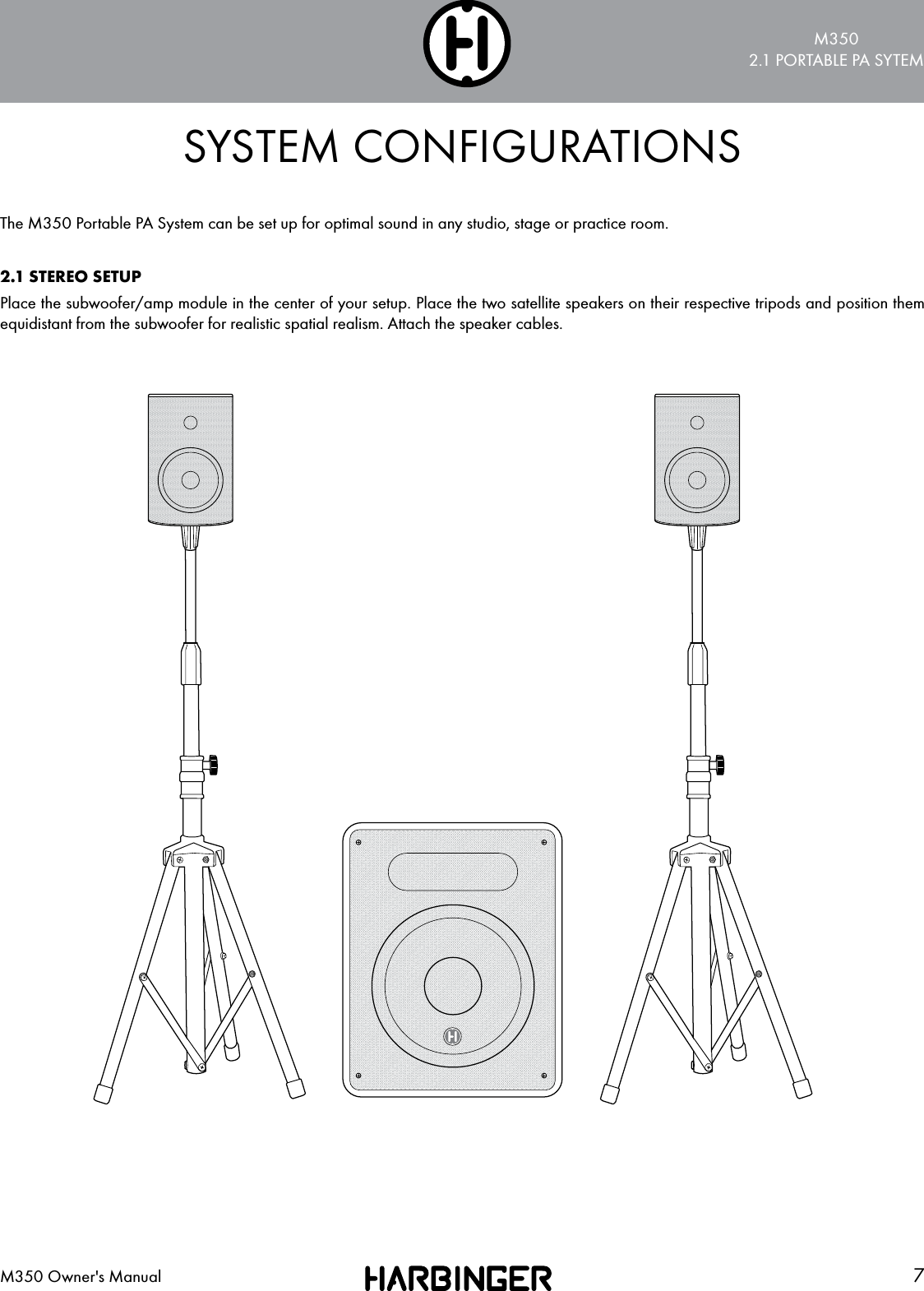
M3502.1 PORTABLE PA SYTEM7M350 Owner's ManualSYSTEM CONFIGURATIONSThe M350 Portable PA System can be set up for optimal sound in any studio, stage or practice room.2.1 STEREO SETUPPlace the subwoofer/amp module in the center of your setup. Place the two satellite speakers on their respective tripods and position them equidistant from the subwoofer for realistic spatial realism. Attach the speaker cables.
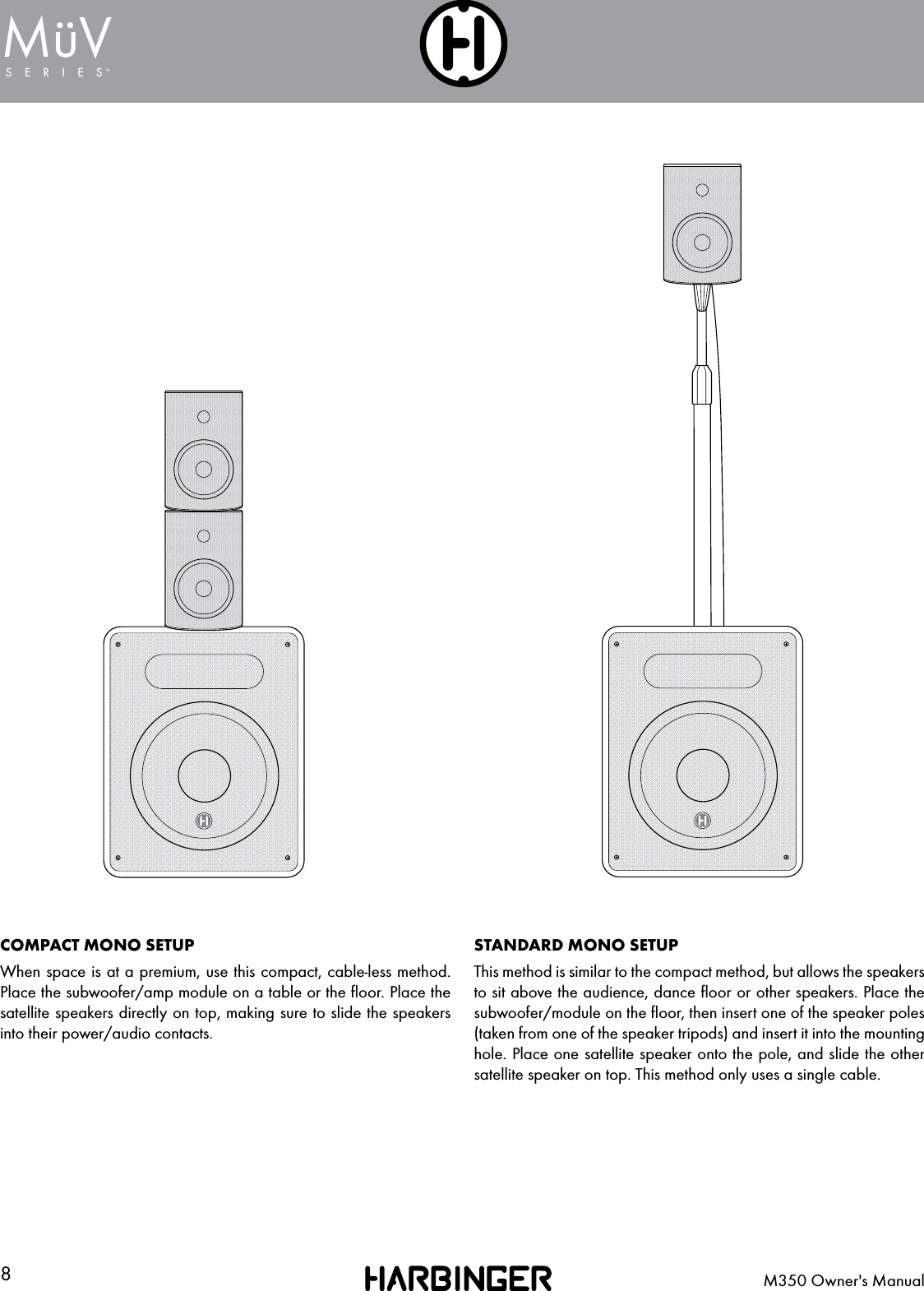
8M350 Owner's ManualSERIESMuV¨COMPACT MONO SETUPWhen space is at a premium, use this compact, cable-less method. Place the subwoofer/amp module on a table or the floor. Place the satellite speakers directly on top, making sure to slide the speakers into their power/audio contacts.STANDARD MONO SETUPThis method is similar to the compact method, but allows the speakers to sit above the audience, dance floor or other speakers. Place the subwoofer/module on the floor, then insert one of the speaker poles (taken from one of the speaker tripods) and insert it into the mounting hole. Place one satellite speaker onto the pole, and slide the other satellite speaker on top. This method only uses a single cable.
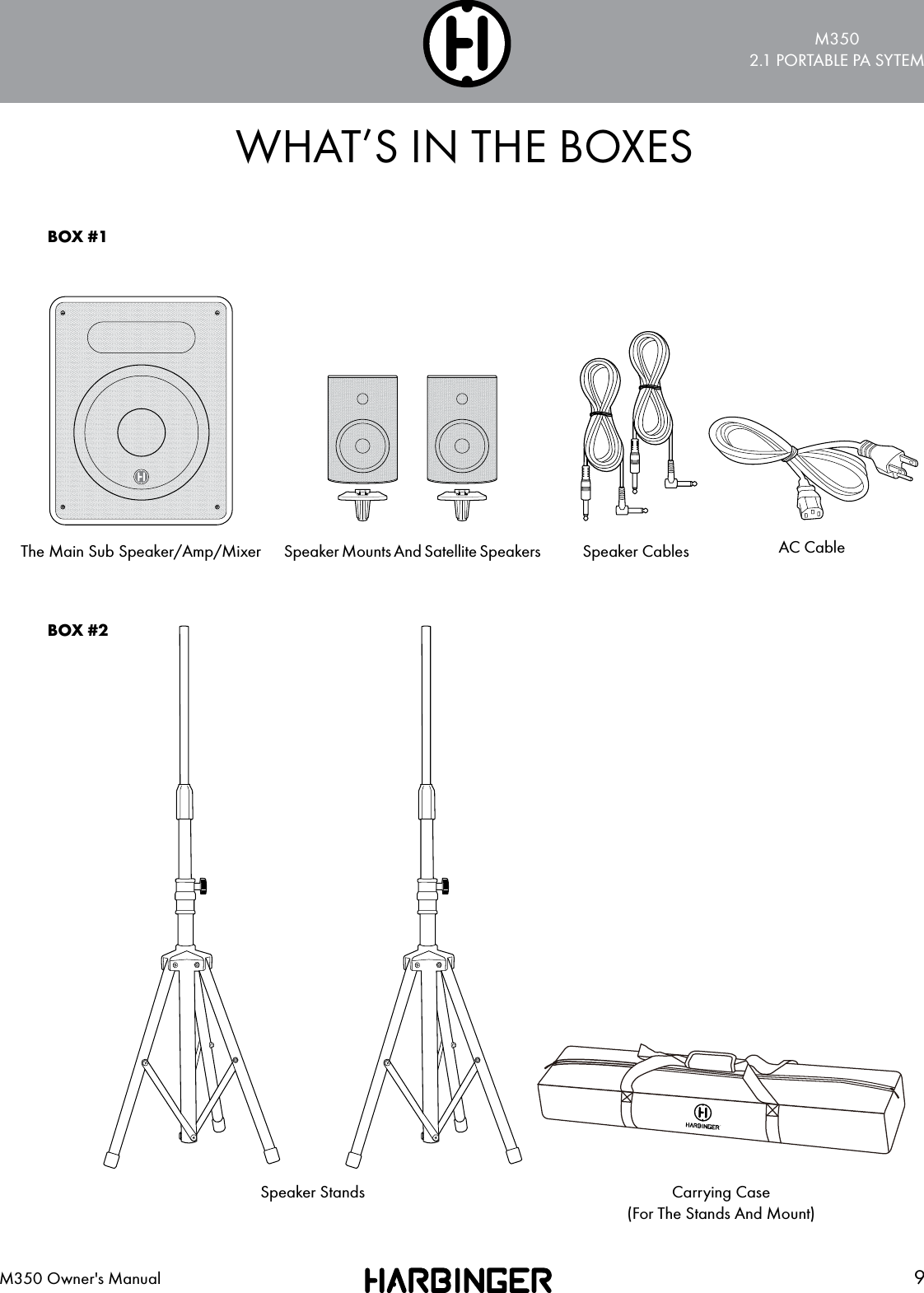
M3502.1 PORTABLE PA SYTEM9M350 Owner's ManualWHAT’S IN THE BOXESThe Main Sub Speaker/Amp/Mixer Speaker Cables AC CableSpeaker StandsSpeaker Mounts And Satellite SpeakersBOX #1BOX #2Carrying Case(For The Stands And Mount)
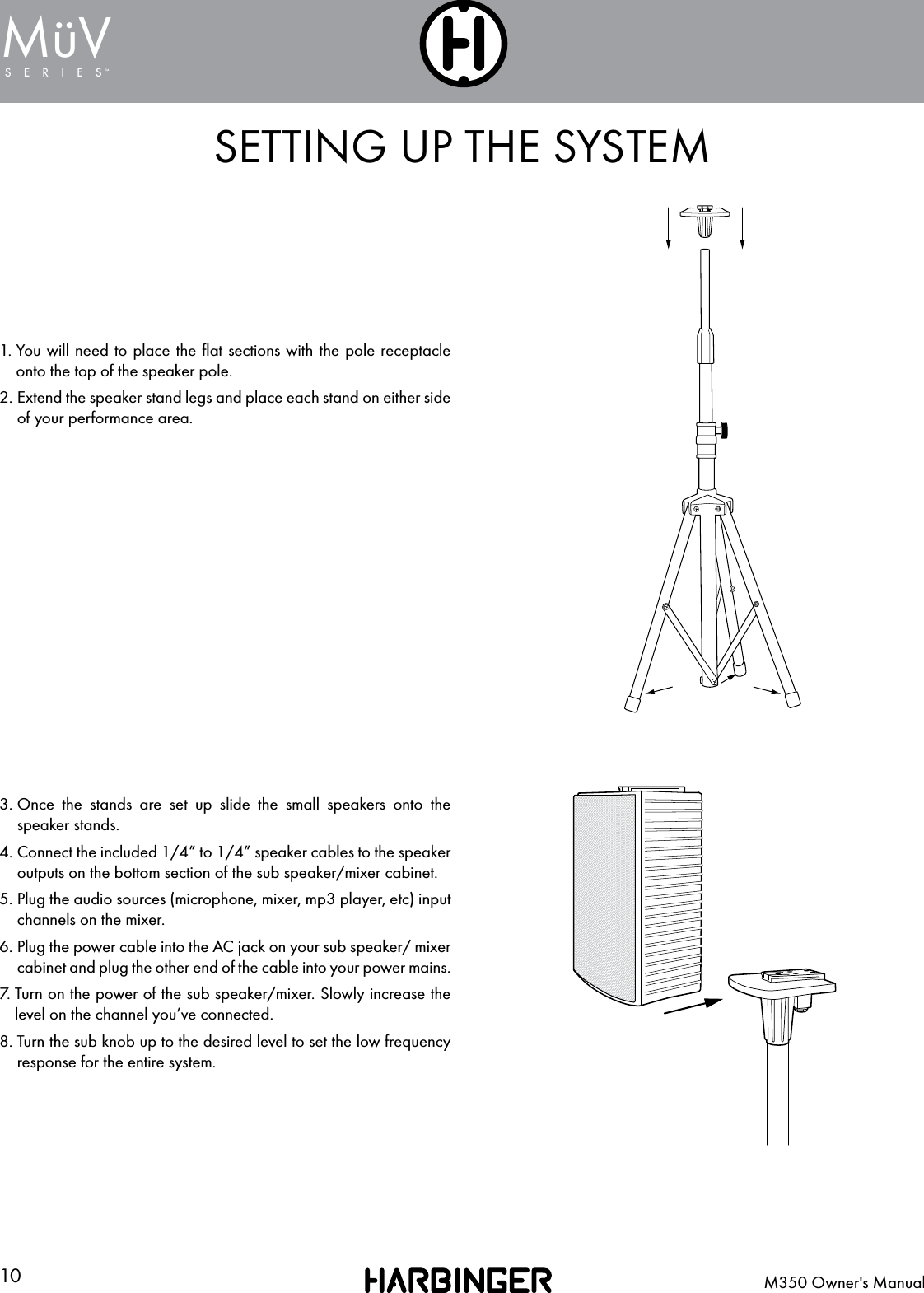
10 M350 Owner's ManualSERIESMuV¨SETTING UP THE SYSTEM1.  You will need to place the flat sections with the pole receptacle onto the top of the speaker pole.2.  Extend the speaker stand legs and place each stand on either side of your performance area.3.  Once the stands are set up slide the small speakers onto the speaker stands.4.  Connect the included 1/4” to 1/4” speaker cables to the speaker outputs on the bottom section of the sub speaker/mixer cabinet.5.  Plug the audio sources (microphone, mixer, mp3 player, etc) input channels on the mixer.6.  Plug the power cable into the AC jack on your sub speaker/ mixer cabinet and plug the other end of the cable into your power mains.7.  Turn on the power of the sub speaker/mixer. Slowly increase the level on the channel you’ve connected.8.  Turn the sub knob up to the desired level to set the low frequency response for the entire system.
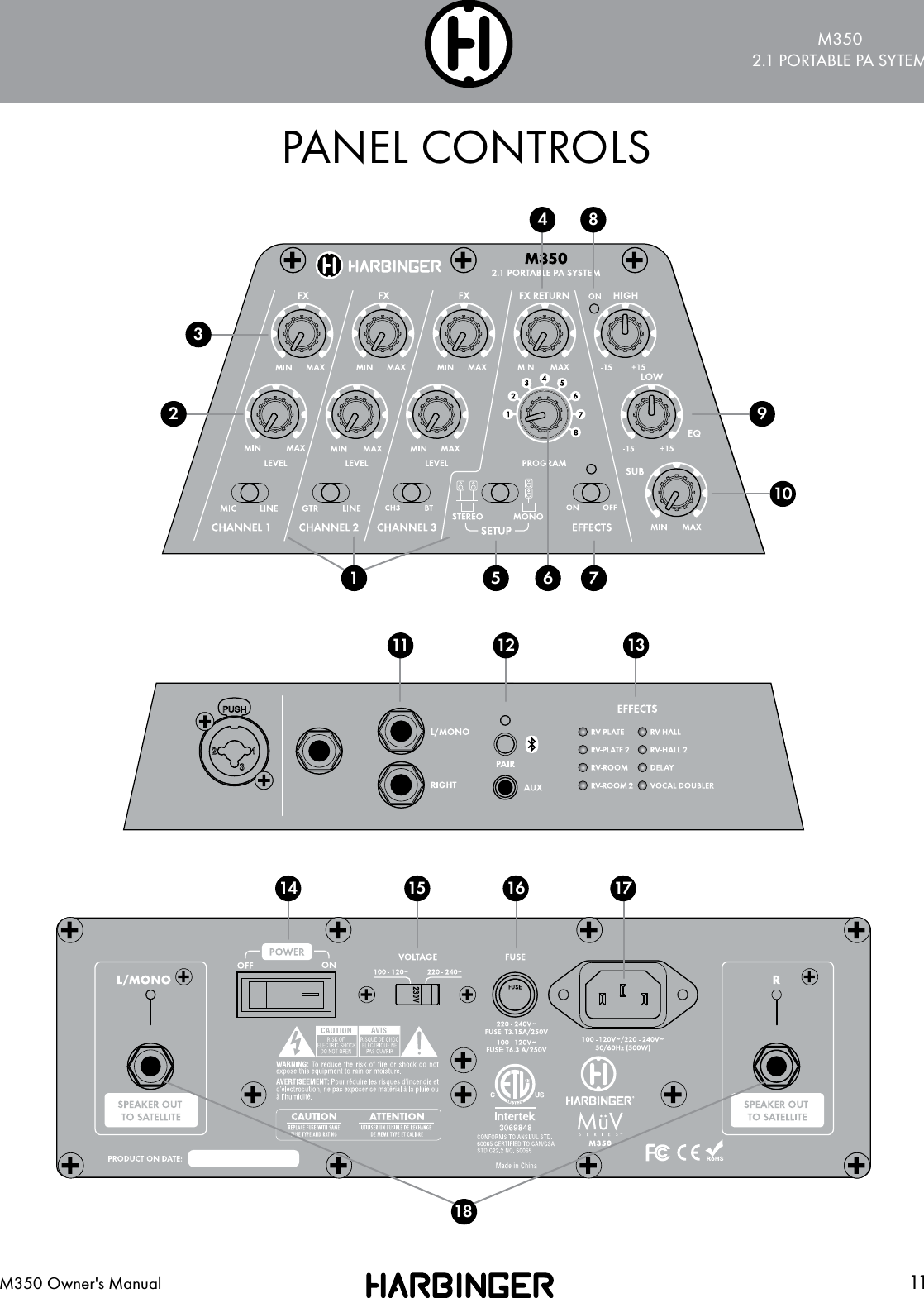
M3502.1 PORTABLE PA SYTEM11M350 Owner's ManualPANEL CONTROLS911615 171411 12 1326541837810
12 M350 Owner's ManualSERIESMuV¨PANEL CONTROLSChannel Input Select Switches These switches allow you to select the correct the input setting for your device. Microphone or line inputs on channel 1, Guitar or line inputs on channel 2 and Line or Bluetooth on channel 3. Channel Level Controls Each channel has separate Level controls to allow discrete mixing of each audio source.FX Send Controls These knobs determine the amount of send or volume being sent to the built-in effects processor.FX Return This knob will determine the amount of effects being returned to the mixer so you can balance the mix of the effect “wet” signal against the “dry” input send level.Setup Switch Sets the system into either a mono or stereo speaker configuration.FX Selection Control This knob selects the effects type for the built-in effects processor.Effects On/Off Switch This will turn off and on the built-in effects processor.Power LED The Power LED is green to indicate that the M350’s power cable is connected to an electrical outlet, and the Power Switch is turned on.EQ Controls The LOW EQ will provide +/- 15dB of boost or cut below 100Hz. Turn the LOW EQ up to add bass or warmth to the speaker. The HIGH EQ will provide +/- 15dB of boost or cut above 10kHz. Turn the HIGH EQ up to increase the volume of cymbals or other high frequency sounds.Subwoofer Volume This controls the Subwoofer volume. The “Flat” indication on the markings around the knob indicates that the system-wide balance between the high and low frequencies are equal. If you want more low frequencies turn the knob towards the Max indicator.Channel Inputs Channel 1 is intended for a line level or microphone input. Channel 2 can either be a mono line input or a guitar level input. Channel 3 can either be a physical input source that comes into the ¼” inputs or 1/8” TRS input, or you can switch it to Bluetooth® for wireless connectivity.Bluetooth Switch and Pair Button To make your mobile audio device communicate with the M350 you need to make sure the device is paired. This is done by setting your device to discoverBluetooth devices. The Device Harbringer M350 should be present when you hold down the Pair button on the M350 while your device is searching device. The Bluetooth light will light blue when connected and will play a chime. When your device is playing music, the Bluetooth light will blink slowly.When connected to Bluetooth, you can press the pair button on the M350 to stop playback of the connected device. Press the pair button again to resume playback. To disconnect, press and hold the pair button. The light will turn off and it will play a chime.Program/Effects Selection LEDs The names and LEDs located next to them indicate which effect has been selected with the built-in effects processor.12345678910111213
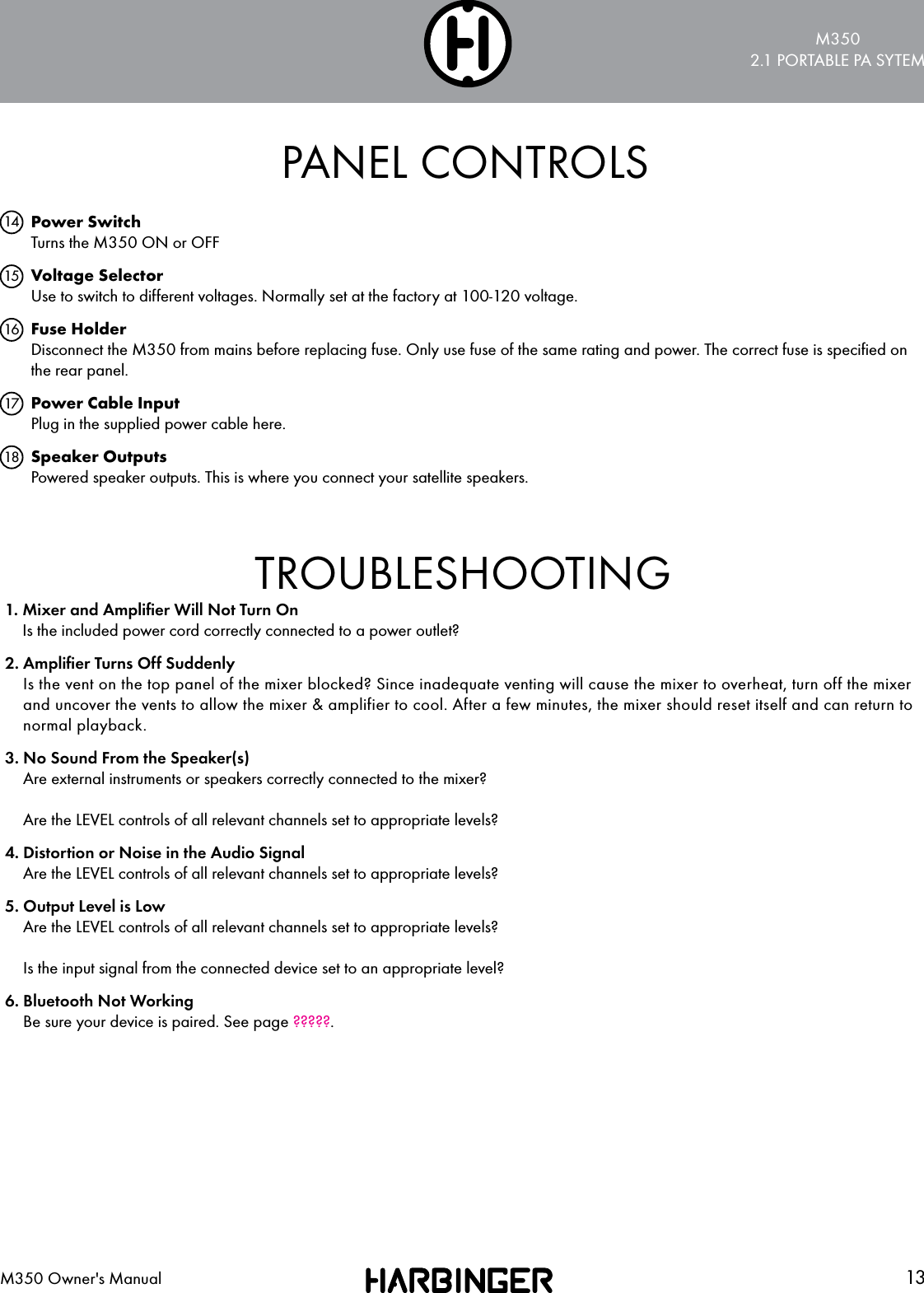
M3502.1 PORTABLE PA SYTEM13M350 Owner's ManualPANEL CONTROLSPower Switch Turns the M350 ON or OFF Voltage Selector Use to switch to different voltages. Normally set at the factory at 100-120 voltage.Fuse Holder Disconnect the M350 from mains before replacing fuse. Only use fuse of the same rating and power. The correct fuse is specified on the rear panel.Power Cable Input Plug in the supplied power cable here.Speaker Outputs Powered speaker outputs. This is where you connect your satellite speakers.1415161718TROUBLESHOOTING1.  Mixer and Amplifier Will Not Turn On Is the included power cord correctly connected to a power outlet?2.  Amplifier Turns Off Suddenly Is the vent on the top panel of the mixer blocked? Since inadequate venting will cause the mixer to overheat, turn off the mixer and uncover the vents to allow the mixer & amplifier to cool. After a few minutes, the mixer should reset itself and can return to normal playback.3.  No Sound From the Speaker(s) Are external instruments or speakers correctly connected to the mixer?  Are the LEVEL controls of all relevant channels set to appropriate levels?4.  Distortion or Noise in the Audio Signal Are the LEVEL controls of all relevant channels set to appropriate levels?5.  Output Level is Low Are the LEVEL controls of all relevant channels set to appropriate levels?  Is the input signal from the connected device set to an appropriate level?6.  Bluetooth Not Working Be sure your device is paired. See page ?????.
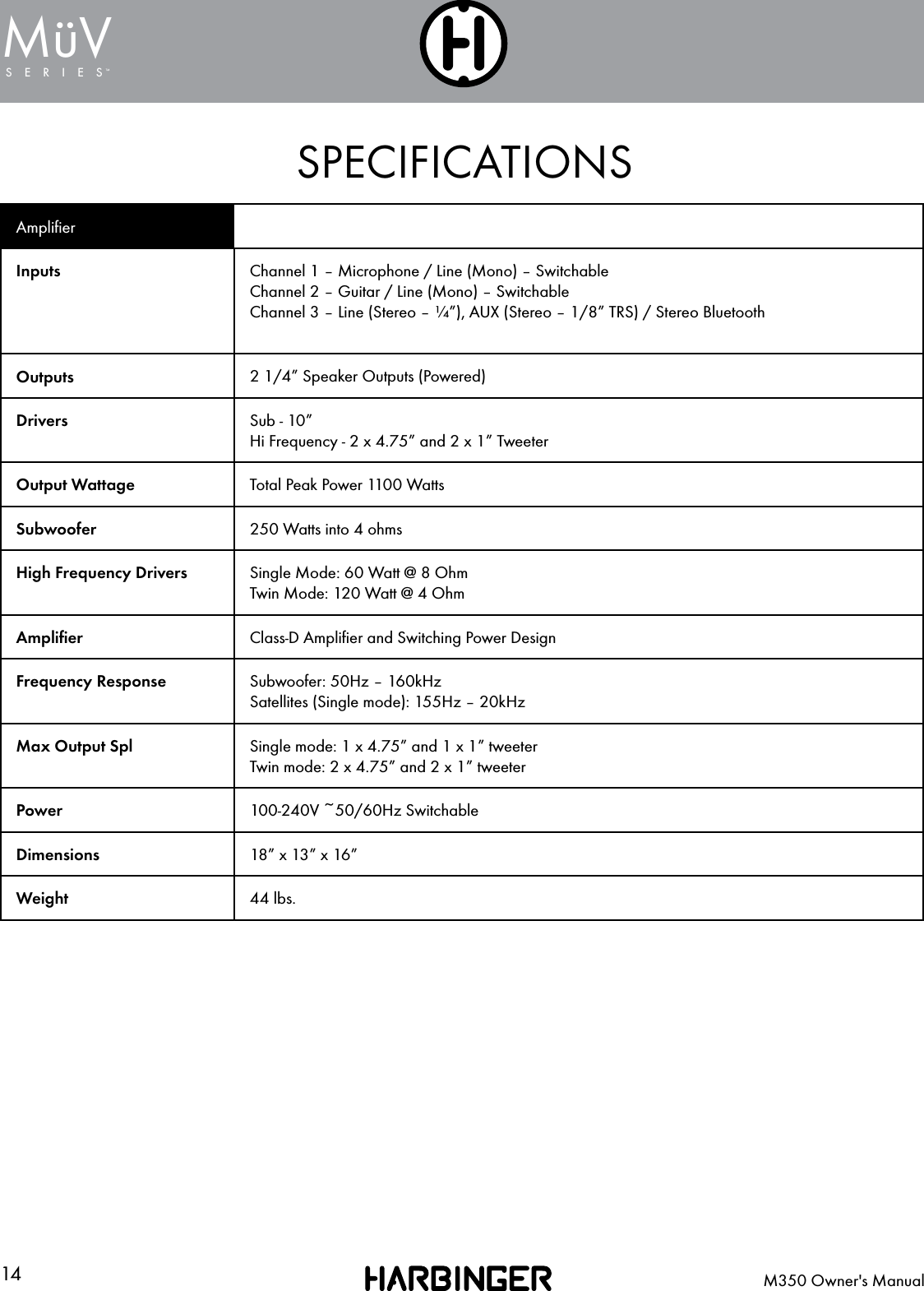
14 M350 Owner's ManualSERIESMuV¨SPECIFICATIONSAmplifierInputs Channel 1 – Microphone / Line (Mono) – SwitchableChannel 2 – Guitar / Line (Mono) – SwitchableChannel 3 – Line (Stereo – ¼”), AUX (Stereo – 1/8” TRS) / Stereo BluetoothOutputs 2 1/4” Speaker Outputs (Powered)Drivers Sub - 10”Hi Frequency - 2 x 4.75” and 2 x 1” TweeterOutput Wattage Total Peak Power 1100 WattsSubwoofer 250 Watts into 4 ohms High Frequency Drivers Single Mode: 60 Watt @ 8 OhmTwin Mode: 120 Watt @ 4 OhmAmplifier Class-D Amplifier and Switching Power DesignFrequency Response  Subwoofer: 50Hz – 160kHz Satellites (Single mode): 155Hz – 20kHzMax Output Spl Single mode: 1 x 4.75” and 1 x 1” tweeterTwin mode: 2 x 4.75” and 2 x 1” tweeterPower 100-240V ~50/60Hz SwitchableDimensions 18” x 13” x 16” Weight 44 lbs.
M3502.1 PORTABLE PA SYTEM15M350 Owner's ManualBLOCK DIAGRAMFPO BLOCK DIAGRAM
16 M350 Owner's ManualSERIESMuV¨WARRANTY2 YEAR HARBINGER LIMITED WARRANTYHarbinger provides, to the original purchaser, a two (2) year limited warranty on materials and workmanship on all Harbinger cabinets, loudspeaker and amplifier components from the date of purchase. For warranty support, please visit our website at www.HarbingerProAudio.com, or contact our Support Team at 888-286-1809 for assistance.  Harbinger will repair or replace the unit at Harbinger’s discretion.This warranty does not cover service or parts to repair damage caused by neglect, abuse, normal wear and tear and cosmetic appearance to the cabinetry not directly attributed to defects in materials or workmanship. Also excluded from coverage are damages caused directly or indirectly due to any service, repair(s), or modifications of the cabinet, which has not been authorized or approved by Harbinger. This two (2) year warranty does not cover service or parts to repair damage caused b y accident, disaster, misuse, abuse, burnt voice-coils, over-powering, negligence, inadequate packing or inadequate shipping procedures. The sole and exclusive remedy of the foregoing limited warranty shall be limited to the repair or replacement of any defective or non-conforming component. All warranties including, but not limited to, the express warranty and the implied warranties of merchantability and fitness for a particular purpose are limited to the two (2) year warranty period. Some states do not allow limitation on how long an implied warranty lasts, so the above limitation may not apply to you. There are no express warranties beyond those stated here. In the event that applicable law does not allow the limitation of the duration of the implied warranties to the warranty period, then the duration of the implied warranties shall be limited to as long as is provided by applicable law. No warranties apply after  that period. Retailer and manufacturer shall not be liable for damages based upon inconvenience, loss of use of product, loss of time, interrupted operation or commercial loss or any other incidental or consequential damages including but not limited to lost profits, downtime, goodwill, damage to or replacement of equipment and property, and any costs of recovering, reprogramming, or reproducing any program or data stored in equipment that is used with Harbinger products. This guarantee gives you specific legal rights; you may have other legal rights, which vary from state to state.Harbinger P.O. Box 5111, Thousand Oaks, CA 91359-5111All trademarks and registered trademarks mentioned herein are recognized as the property of their respective holders.1607–16125785FCC STATEMENTS1. Caution: Changes or modifications to this unit not expressly approved bythe party responsible for compliance could void the user’s authority to operatethe equipment.2. Note: This equipment has been tested and found to comply with the limits fora Class B digital device, pursuant to Part 15 of the FCC Rules. These limits aredesigned to provide reasonable protection against harmful interference in aresidential installation. This equipment generate, uses, and can radiate radiofrequency energy and , in not installed and used in accordance with the instructions, may cause harmful interference to radio communications. However, there isno guarantee that interference will not occur in a particular installation. If thisequipment does cause harmful interference to radio or television reception, which can be determined by turning the equipment off and on, the user is encouraged to try to correct the interference by one or more of the following measures:• Reorient or relocate the receiving antenna• Increase the separation between the equipment and receiver• Connect the equipment into an outlet on a circuit different from that to whichthe receiver is connected• Consult the dealer or an experienced radio/TV technician for helpHave a question about service, warranty or parts?Call 888-286-1809 (Toll Free) So we may serve you better, please register  on-line at www.HarbingerProAudio.comTo maintain compliance with FCC’s RF Exposure guidelines, This equipment should be installed and operated with minimum distance between 20cm the radiator your body: Use only the supplied antennaFCC ID: 2AIQW-MDA350

Navigation menu