Nissin AIR1 Radio transmitter for photo flash User Manual Air 1 E Jan2015 s

Nissin Industries Ltd. Radio transmitter for photo flash Air 1 E Jan2015 s

User manual

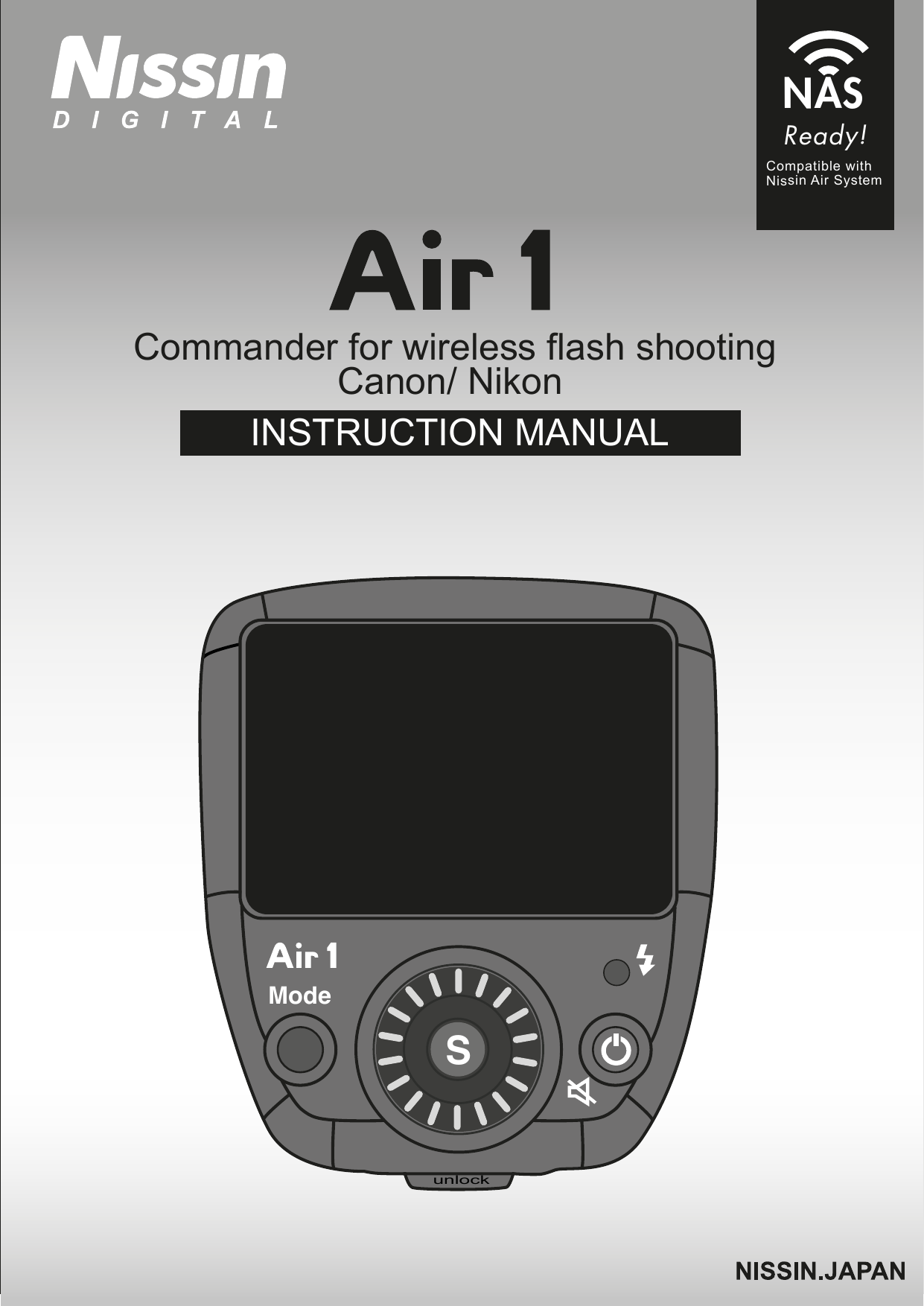
Commander for wireless flash shootingCanon/ Nikon INSTRUCTION MANUALReady!Compatible withNissin Air SystemNASunlockModeZS
Thank you for purchasing a Nissin productBefore using this commander unit, read this instruction manual and the instruction manuals of your camera and NAS Flash to familiarize yourself with the operations. The commander Air 1 (type Canon/ Nikon) is a transmitter for wireless flash shooting. It can control up to 3 groups (21 units) of NAS flash (type Canon/ Nikon) that have a wireless multiple flash shooting function using NAS (radio transmission). Please noted that Air 1 Canon and Nikon are not usable with other branded vameras for TTL operation.   Please refer Nissin’s compatibility chart shown at its home page for details and recent updates: http://www.nissin-japan.com or http://www.nissindigital.comCompatible cameras1Changes or modifications not expressly approved by  the party responsible for compliance could void the user's authority to operate the equipment. This device complies with Part 15 of the FCC Rules. Operation is subject to the following two conditions: (1) this device may not cause harmful interference, and (2) thisdevice must accept any interference received, including interference that may cause undesired operation.
NASThe Nissin commander attached to the camera is called master unit.When a NAS master is on, Di700A will automatically set to radio transmission mode. Otherwise the Di700A will automatically set to Optical Transmission.Nissin Air System (NAS) is designed for Nissin flash and Nissin commander.Transmission distance, approx. 30m (98.4 ft.)22.4 GHz TransmissionMetal/ Wire/ Wall/ another 2.4 GHz radio may reduce the NAS transmission distance
These safety instructions refer to important information on how to use this product safely and properly. Please read the following instructions before using the product.SAFETY INSTRUCTIONSDo not touch the inside parts from the opening when the unit was dropped or broken.Place the batteries correctly in position. Placing the batteries in wrong polarity may cause leakage, exothermic heat or explosion.CAUTIONSDo not leave or store the flash unit in the temperature over 40ºC/ 104ºF, such as in the automobile.The flash unit is not water resistance.  Keep the unit away from rain, snow and humidity.Do not use benzene, thinner or other alcoholic agents to clean the unit. Do not use this flash unit with cameras which are not recommended in the compatibility list at official website, otherwise it may damage the camera’s circuitry.Remove the batteries when not in use for a longer period of time.Do not have a heavy impact to the flash unit, nor throw it onto a hard surface floor.When using the external power pack, read the safety instructions carefully and follow the operation manual.This sign refers to conditions which may cause damage or defect.3
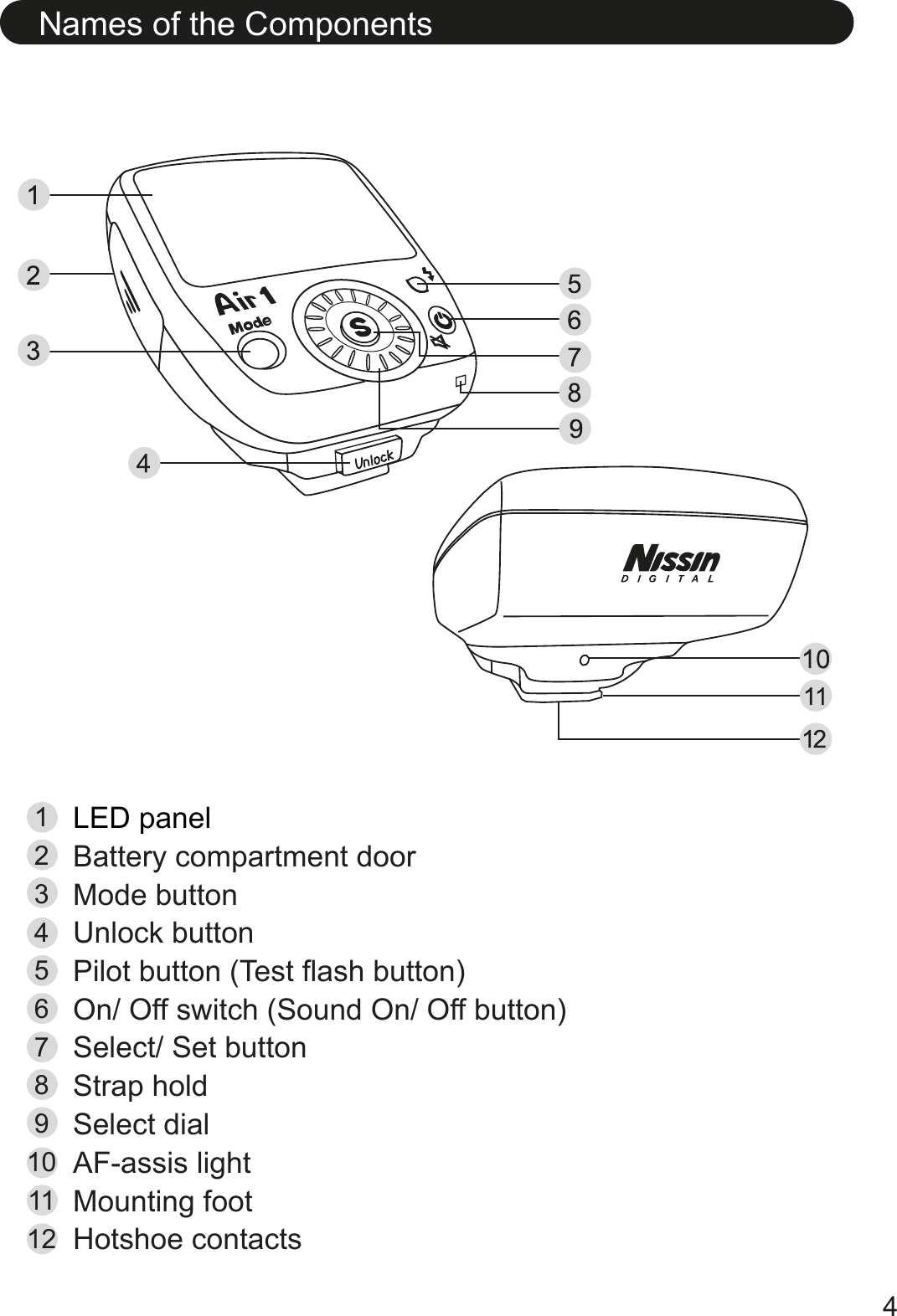
Names of the Components4LED panelBattery compartment doorMode buttonUnlock buttonPilot button (Test flash button)On/ Off switch (Sound On/ Off button)123456Select/ Set buttonStrap holdSelect dialAF-assis lightMounting footHotshoe contacts789101112
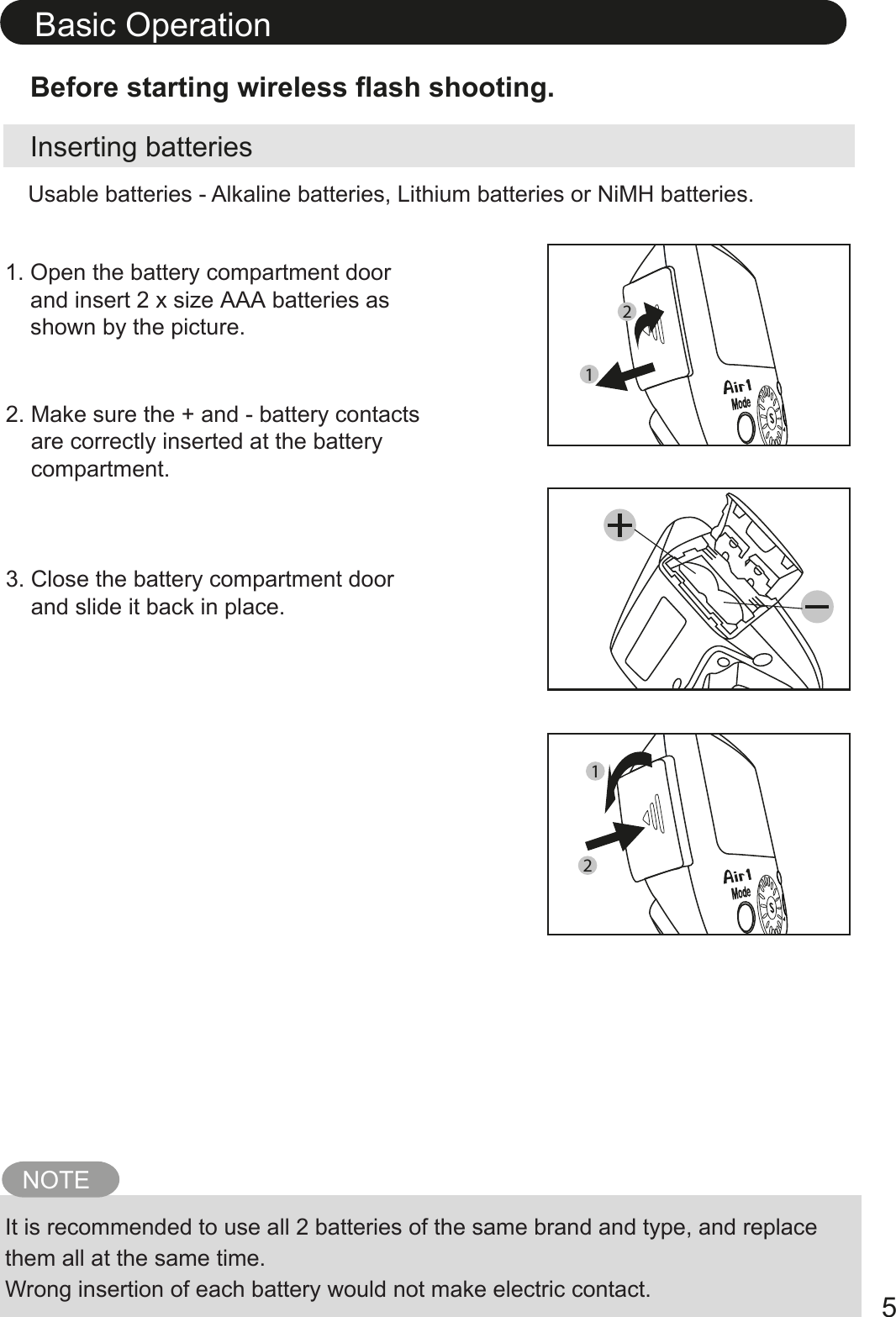
Inserting batteriesBefore starting wireless flash shooting.1. Open the battery compartment door    and insert 2 x size AAA batteries as    shown by the picture.2. Make sure the + and - battery contacts    are correctly inserted at the battery    compartment.3. Close the battery compartment door    and slide it back in place. NOTEIt is recommended to use all 2 batteries of the same brand and type, and replace them all at the same time. Wrong insertion of each battery would not make electric contact. Usable batteries - Alkaline batteries, Lithium batteries or NiMH batteries.Basic Operation52112
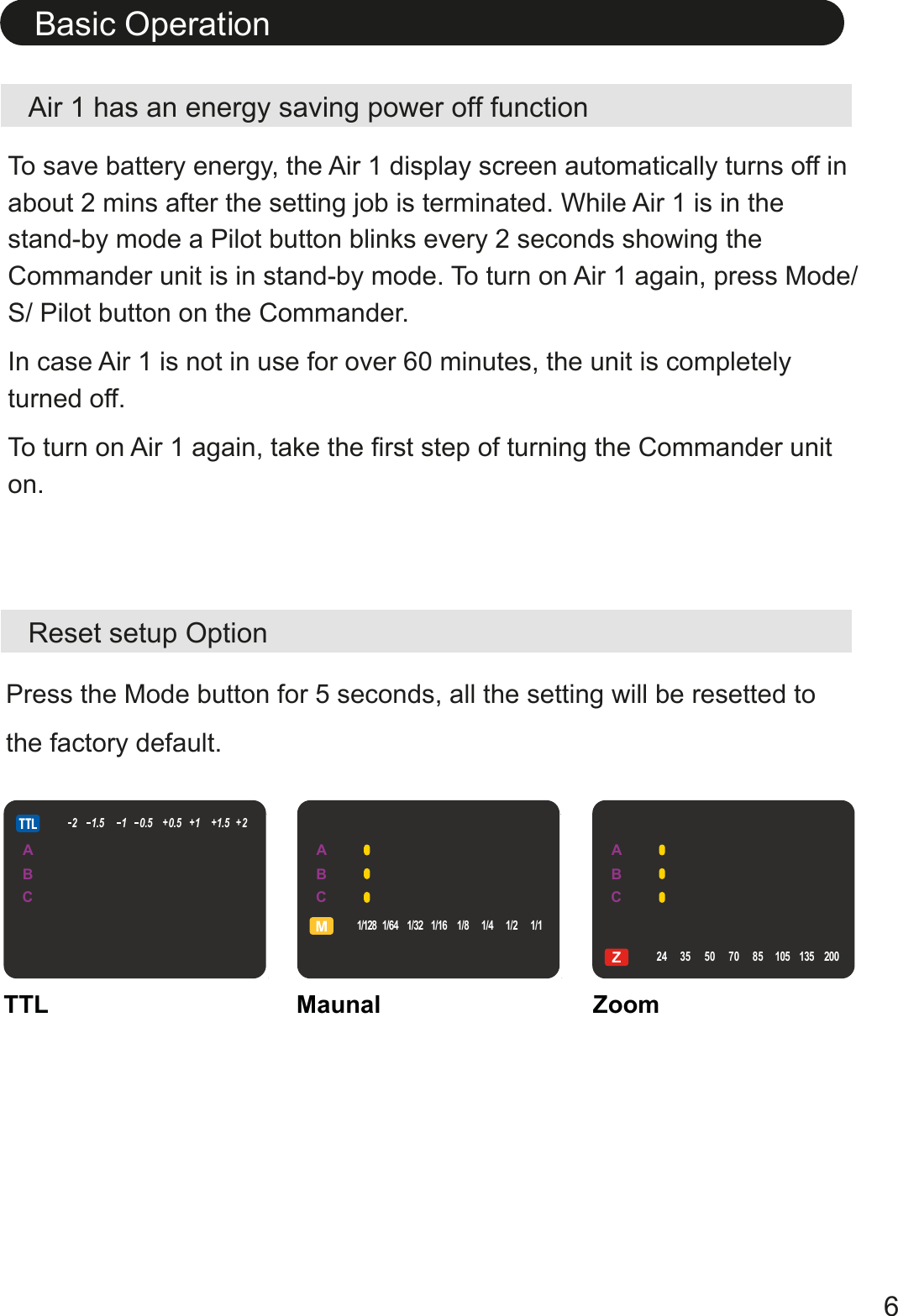
Air 1 has an energy saving power off functionReset setup OptionTo save battery energy, the Air 1 display screen automatically turns off in about 2 mins after the setting job is terminated. While Air 1 is in the stand-by mode a Pilot button blinks every 2 seconds showing the Commander unit is in stand-by mode. To turn on Air 1 again, press Mode/ S/ Pilot button on the Commander. In case Air 1 is not in use for over 60 minutes, the unit is completely turned off.To turn on Air 1 again, take the first step of turning the Commander unit on.Basic Operation6Press the Mode button for 5 seconds, all the setting will be resetted to the factory default.TTL Maunal ZoomABCZ24 35 50 70 85 105 1352001/128 1/64 1/32 1/16 1/8 1/4 1/2 1/121.5 10.5 0.5 11.5 2+++ +ABCZ24 35 50 70 85 105 1352001/128 1/64 1/32 1/16 1/8 1/4 1/2 1/121.5 10.5 0.5 11.5 2+++ +ABCZ24 35 50 70 85 105 1352001/128 1/64 1/32 1/16 1/8 1/4 1/2 1/121.5 10.5 0.5 11.5 2+++ +
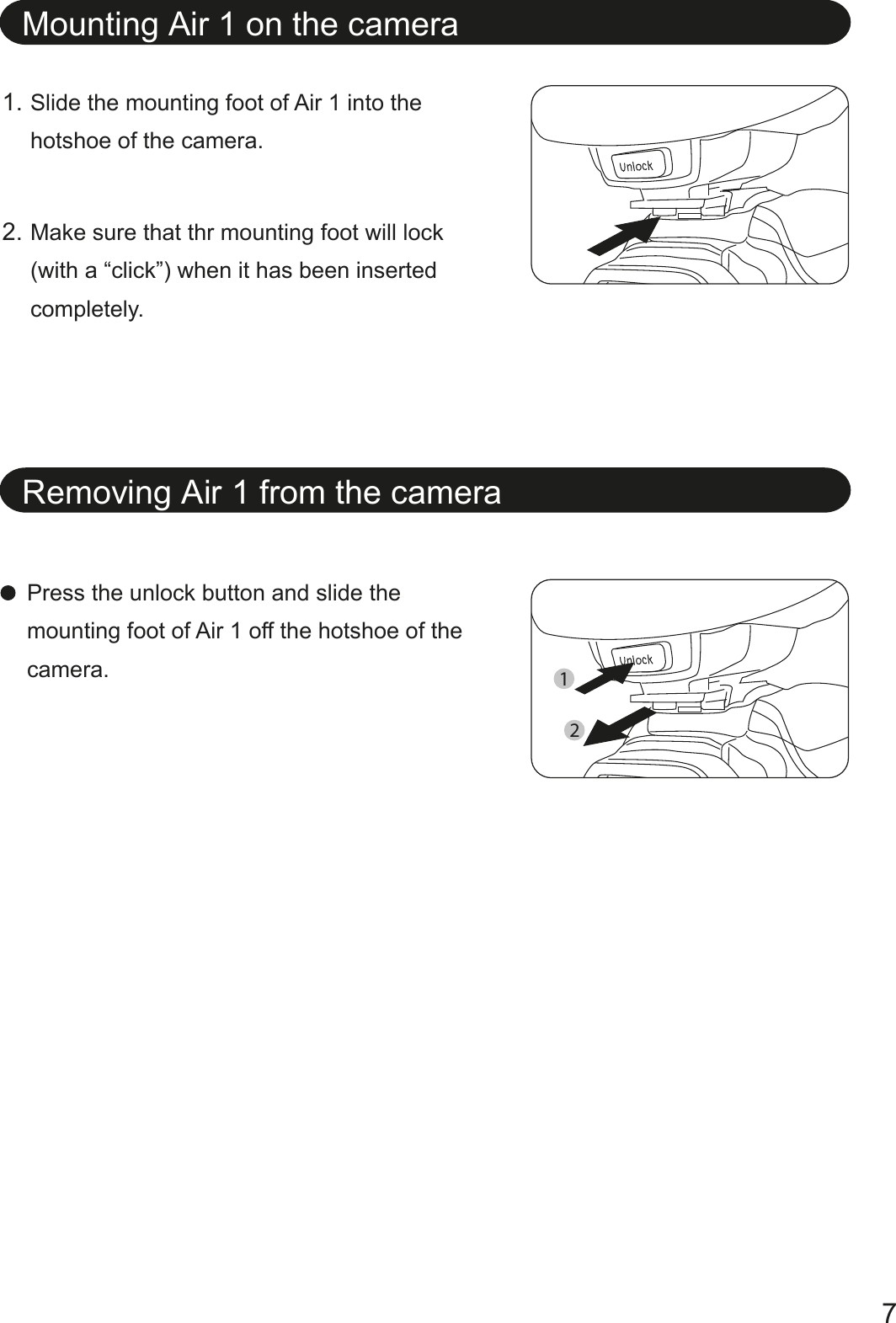
Mounting Air 1 on the cameraRemoving Air 1 from the cameraPress the unlock button and slide the mounting foot of Air 1 off the hotshoe of the camera. Slide the mounting foot of Air 1 into the hotshoe of the camera.Make sure that thr mounting foot will lock (with a “click”) when it has been inserted completely.1.2.721
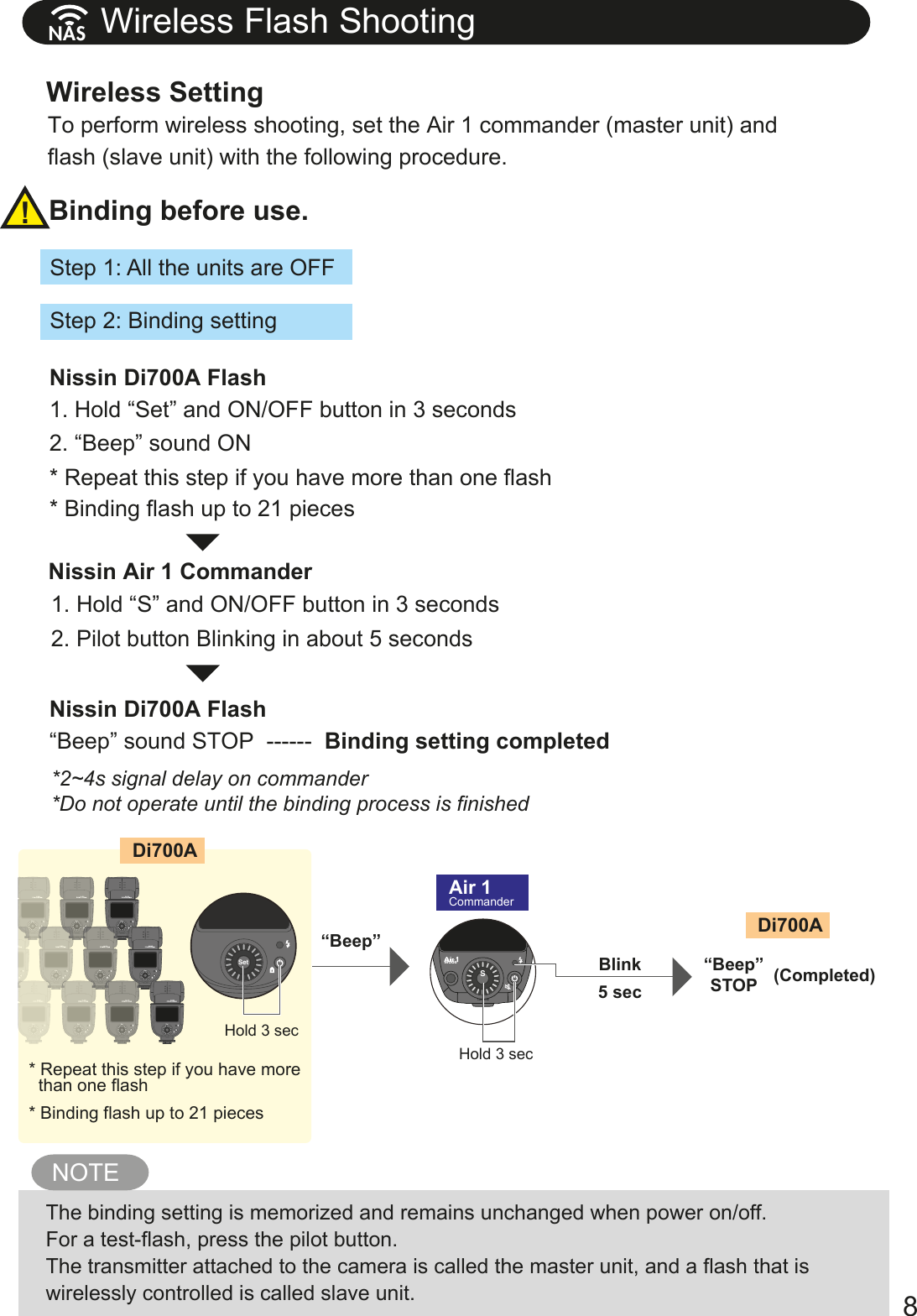
Wireless Flash ShootingBinding before use.Wireless Setting8!Step 1: All the units are OFFTo perform wireless shooting, set the Air 1 commander (master unit) and flash (slave unit) with the following procedure. Step 2: Binding settingunlockModeABCZS-2.0-1.5-1.0-0.5+0.5+1.0+2.0+1.51/128 1/64 1/32 1/16 1/8 1/4 1/2 1/1SetHold 3 secHold 3 sec“Beep”Blink “Beep”STOP5 secDi700ADi700AAir 1Commander-2.0-1.5-1.0-0.5+0.5+1.0+2.0+1.51/1281/64 1/32 1/16 1/8 1/4 1/2 1/1Set-2.0-1.5-1.0-0.5+0.5+1.0+2.0+1.51/1281/64 1/321/16 1/8 1/4 1/2 1/1-2.0-1.5-1.0-0.5+0.5+1.0+2.0+1.51/1281/64 1/32 1/16 1/8 1/4 1/2 1/1Set-2.0-1.5-1.0-0.5+0.5+1.0+2.0+1.51/1281/64 1/321/16 1/8 1/4 1/2 1/1-2.0-1.5-1.0-0.5+0.5+1.0+2.0+1.51/1281/64 1/32 1/16 1/8 1/4 1/2 1/1Set-2.0-1.5-1.0-0.5+0.5+1.0+2.0+1.51/1281/64 1/321/16 1/8 1/4 1/2 1/1-2.0-1.5-1.0-0.5+0.5+1.0+2.0+1.51/1281/64 1/32 1/16 1/8 1/4 1/2 1/1Set-2.0-1.5-1.0-0.5+0.5+1.0+2.0+1.51/1281/64 1/321/16 1/8 1/4 1/2 1/1-2.0-1.5-1.0-0.5+0.5+1.0+2.0+1.51/1281/64 1/32 1/16 1/8 1/4 1/2 1/1Set-2.0-1.5-1.0-0.5+0.5+1.0+2.0+1.51/1281/64 1/321/16 1/8 1/4 1/2 1/1-2.0-1.5-1.0-0.5+0.5+1.0+2.0+1.51/1281/64 1/32 1/16 1/8 1/4 1/2 1/1Set-2.0-1.5-1.0-0.5+0.5+1.0+2.0+1.51/1281/64 1/321/16 1/8 1/4 1/2 1/1-2.0-1.5-1.0-0.5+0.5+1.0+2.0+1.51/1281/64 1/32 1/16 1/8 1/4 1/2 1/1Set-2.0-1.5-1.0-0.5+0.5+1.0+2.0+1.51/1281/64 1/321/16 1/8 1/4 1/2 1/1-2.0-1.5-1.0-0.5+0.5+1.0+2.0+1.51/1281/64 1/32 1/16 1/8 1/4 1/2 1/1Set-2.0-1.5-1.0-0.5+0.5+1.0+2.0+1.51/1281/64 1/321/16 1/8 1/4 1/2 1/1-2.0-1.5-1.0-0.5+0.5+1.0+2.0+1.51/1281/64 1/32 1/16 1/8 1/4 1/2 1/1Set-2.0-1.5-1.0-0.5+0.5+1.0+2.0+1.51/1281/64 1/321/16 1/8 1/4 1/2 1/1-2.0-1.5-1.0-0.5+0.5+1.0+2.0+1.51/1281/64 1/32 1/16 1/8 1/4 1/2 1/1Set-2.0-1.5-1.0-0.5+0.5+1.0+2.0+1.51/1281/64 1/321/16 1/8 1/4 1/2 1/1-2.0-1.5-1.0-0.5+0.5+1.0+2.0+1.51/1281/64 1/32 1/16 1/8 1/4 1/2 1/1Set-2.0-1.5-1.0-0.5+0.5+1.0+2.0+1.51/1281/64 1/321/16 1/8 1/4 1/2 1/1-2.0-1.5-1.0-0.5+0.5+1.0+2.0+1.51/1281/64 1/32 1/16 1/8 1/4 1/2 1/1Set-2.0-1.5-1.0-0.5+0.5+1.0+2.0+1.51/1281/64 1/321/16 1/8 1/4 1/2 1/1-2.0-1.5-1.0-0.5+0.5+1.0+2.0+1.51/1281/64 1/32 1/16 1/8 1/4 1/2 1/1Set-2.0-1.5-1.0-0.5+0.5+1.0+2.0+1.51/1281/64 1/321/16 1/8 1/4 1/2 1/1* Binding flash up to 21 pieces(Completed)* Repeat this step if you have more   than one flash* Binding flash up to 21 pieces1. Hold “Set” and ON/OFF button in 3 seconds 2. “Beep” sound ON* Repeat this step if you have more than one flashNissin Di700A Flash“Beep” sound STOP  ------  Binding setting completedNissin Di700A Flash1. Hold “S” and ON/OFF button in 3 seconds 2. Pilot button Blinking in about 5 secondsNissin Air 1 Commander*2~4s signal delay on commander*Do not operate until the binding process is finishedNAS NOTEThe binding setting is memorized and remains unchanged when power on/off.For a test-flash, press the pilot button.The transmitter attached to the camera is called the master unit, and a flash that is wirelessly controlled is called slave unit.
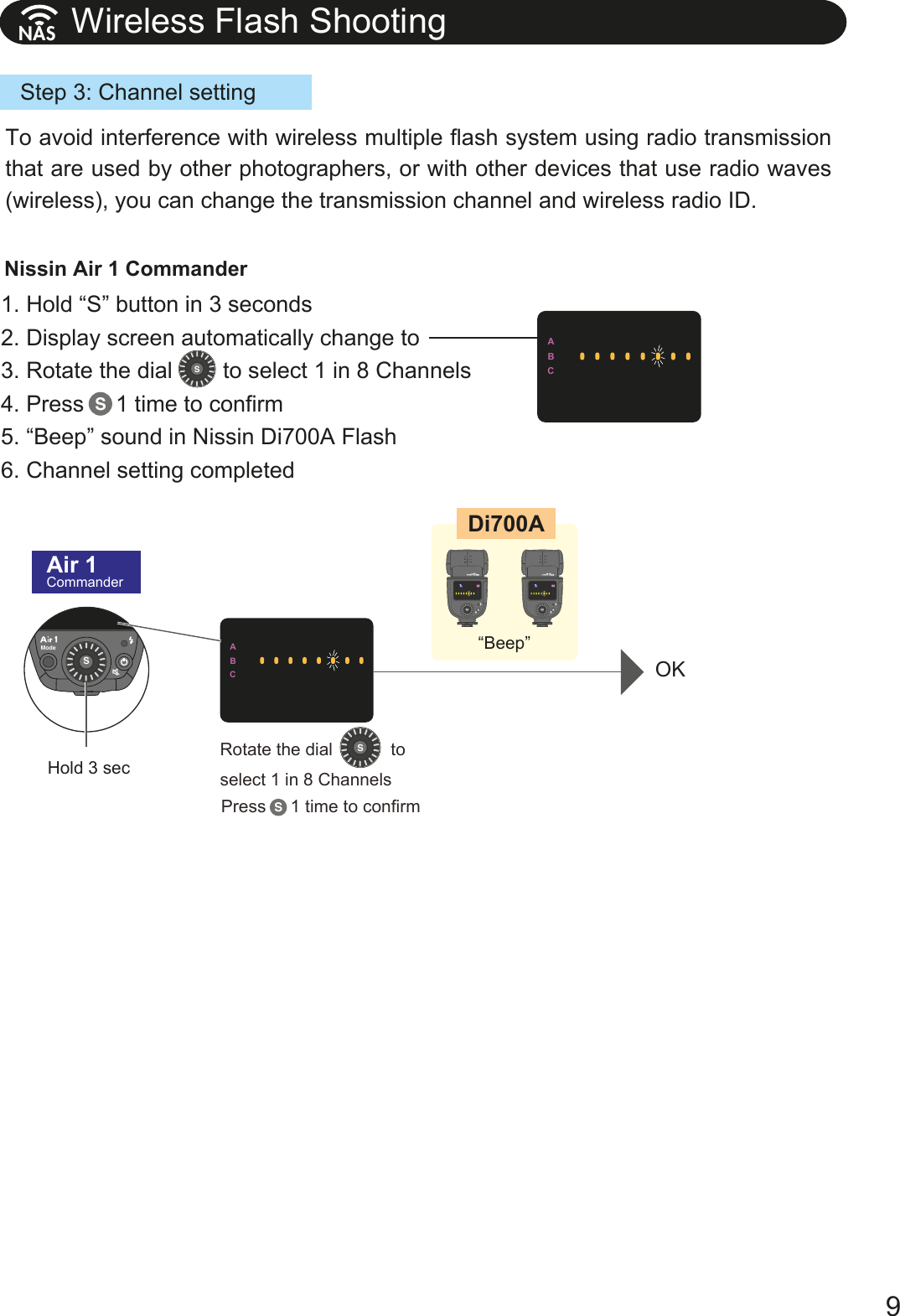
9Wireless Flash Shooting NASunlockModeABCZSABCABC“Beep”OKDi700AAir 1CommanderHold 3 secPress     1 time to confirm Rotate the dial            to select 1 in 8 ChannelsSS-2.0-1.5-1.0-0.5+0.5+1.0+2.0+1.51/1281/64 1/32 1/16 1/8 1/4 1/2 1/1Set-2.0-1.5-1.0-0.5+0.5+1.0+2.0+1.51/1281/64 1/32 1/16 1/8 1/4 1/2 1/1-2.0-1.5-1.0-0.5+0.5+1.0+2.0+1.51/1281/64 1/32 1/16 1/8 1/4 1/2 1/1Set-2.0-1.5-1.0-0.5+0.5+1.0+2.0+1.51/1281/64 1/32 1/16 1/8 1/4 1/2 1/1Step 3: Channel setting1. Hold “S” button in 3 seconds2. Display screen automatically change to 3. Rotate the dial        to select 1 in 8 Channels4. Press     1 time to confirm5. “Beep” sound in Nissin Di700A Flash6. Channel setting completedNissin Air 1 CommanderSSTo avoid interference with wireless multiple flash system using radio transmission that are used by other photographers, or with other devices that use radio waves (wireless), you can change the transmission channel and wireless radio ID.
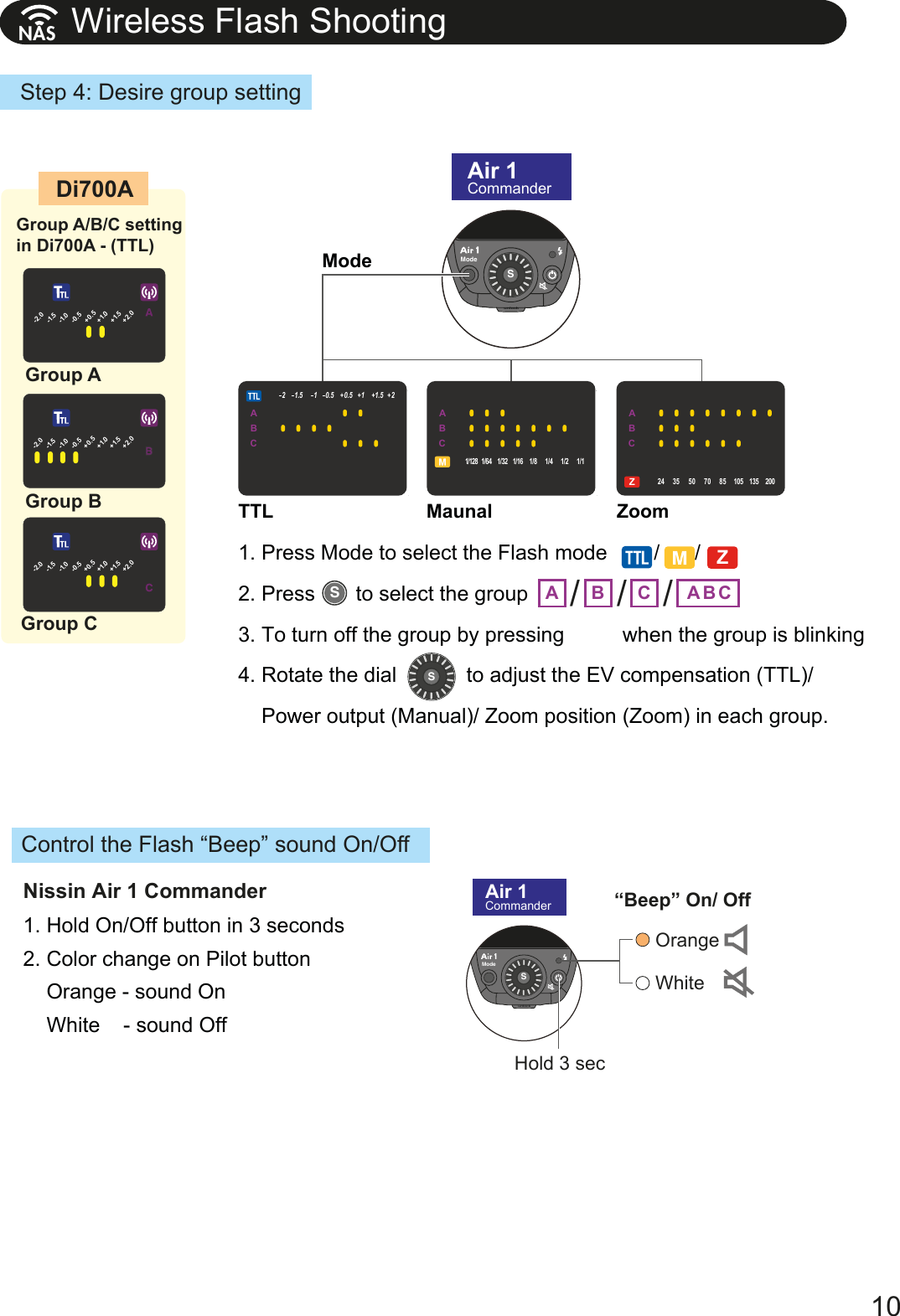
10unlockModeABCZSS1. Press Mode to select the Flash mode        /      /    2. Press       to select the group 3. To turn off the group by pressing          when the group is blinking 4. Rotate the dial            to adjust the EV compensation (TTL)/     Power output (Manual)/ Zoom position (Zoom) in each group.1. Hold On/Off button in 3 seconds2. Color change on Pilot button     Orange - sound On    White    - sound OffModeTTL Maunal Zoom-2.0-1.5-1.0-0.5+0.5+1.0+2.0+1.51/128 1/64 1/32 1/16 1/8 1/4 1/2 1/1Group AGroup B-2.0-1.5-1.0-0.5+0.5+1.0+2.0+1.51/128 1/64 1/32 1/16 1/8 1/4 1/2 1/1Group C“Beep” On/ OffDi700A Air 1CommanderAir 1CommanderunlockModeABCZSHold 3 secGroup A/B/C setting in Di700A - (TTL)-2.0-1.5-1.0-0.5+0.5+1.0+2.0+1.51/128 1/64 1/32 1/16 1/8 1/4 1/2 1/1OrangeWhiteA B C BA CABCZ24 35 50 70 85 105 1352001/128 1/64 1/32 1/16 1/8 1/4 1/2 1/121.5 10.5 0.5 11.5 2+++ +ABCZ24 35 50 70 85 105 1352001/128 1/64 1/32 1/16 1/8 1/4 1/2 1/121.5 10.5 0.5 11.5 2+++ +ABCZ24 35 50 70 85 105 1352001/128 1/64 1/32 1/16 1/8 1/4 1/2 1/121.5 10.5 0.5 11.5 2+++ +/ / /Control the Flash “Beep” sound On/OffNissin Air 1 CommanderZWireless Flash Shooting NASStep 4: Desire group settingS
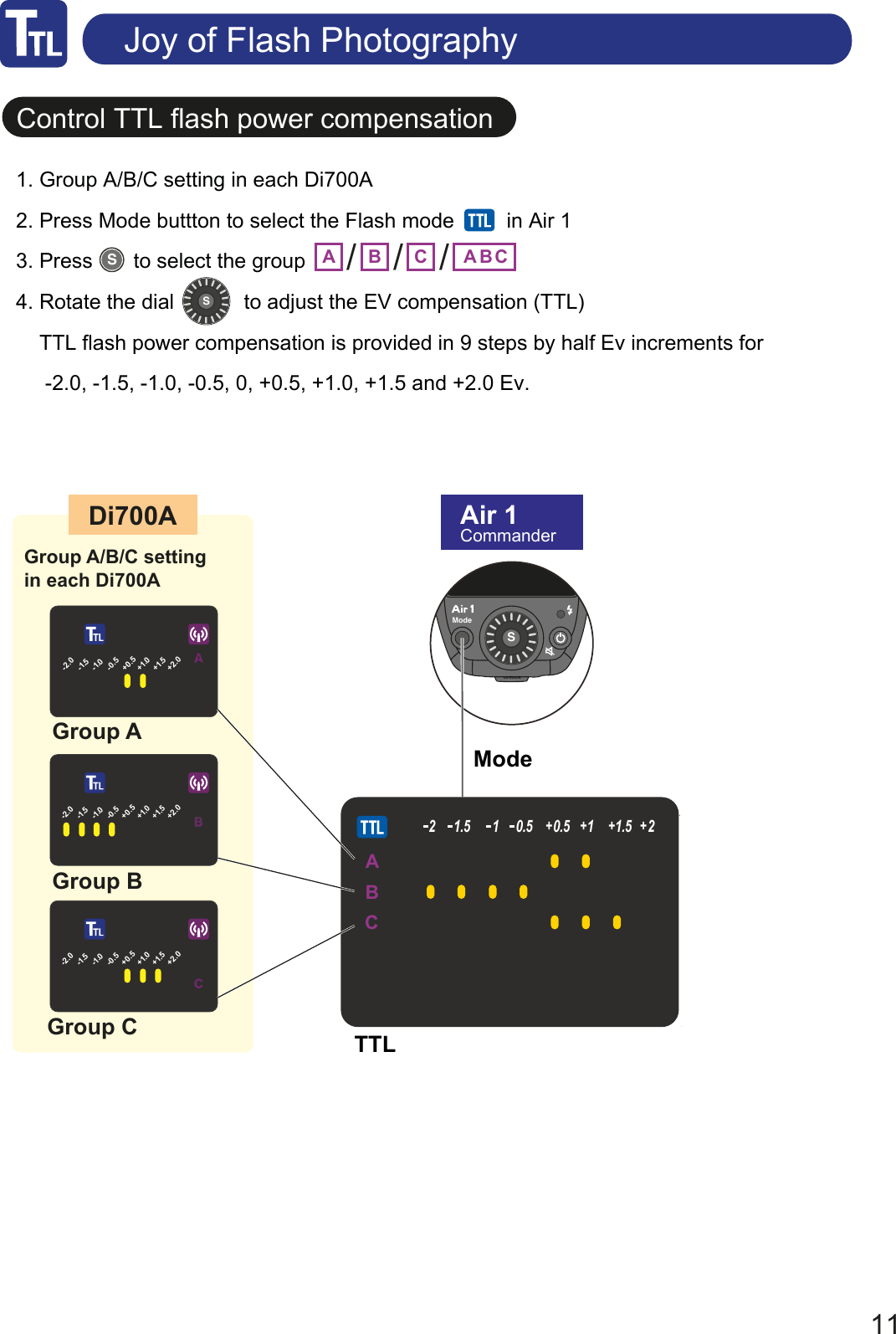
Control TTL flash power compensationJoy of Flash Photography11unlockModeABCZSSS1. Group A/B/C setting in each Di700A2. Press Mode buttton to select the Flash mode         in Air 13. Press       to select the group 4. Rotate the dial            to adjust the EV compensation (TTL)    TTL flash power compensation is provided in 9 steps by half Ev increments for          -2.0, -1.5, -1.0, -0.5, 0, +0.5, +1.0, +1.5 and +2.0 Ev.ModeTTL-2.0-1.5-1.0-0.5+0.5+1.0+2.0+1.51/128 1/64 1/32 1/16 1/8 1/4 1/2 1/1Group AGroup B-2.0-1.5-1.0-0.5+0.5+1.0+2.0+1.51/128 1/64 1/32 1/16 1/8 1/4 1/2 1/1Group CDi700A Air 1CommanderGroup A/B/C setting in each Di700A -2.0-1.5-1.0-0.5+0.5+1.0+2.0+1.51/128 1/64 1/32 1/16 1/8 1/4 1/2 1/1A B C BA CABCZ24 35 50 70 85 105 1352001/128 1/64 1/32 1/16 1/8 1/4 1/2 1/121.5 10.5 0.5 11.5 2+++ +/ / /
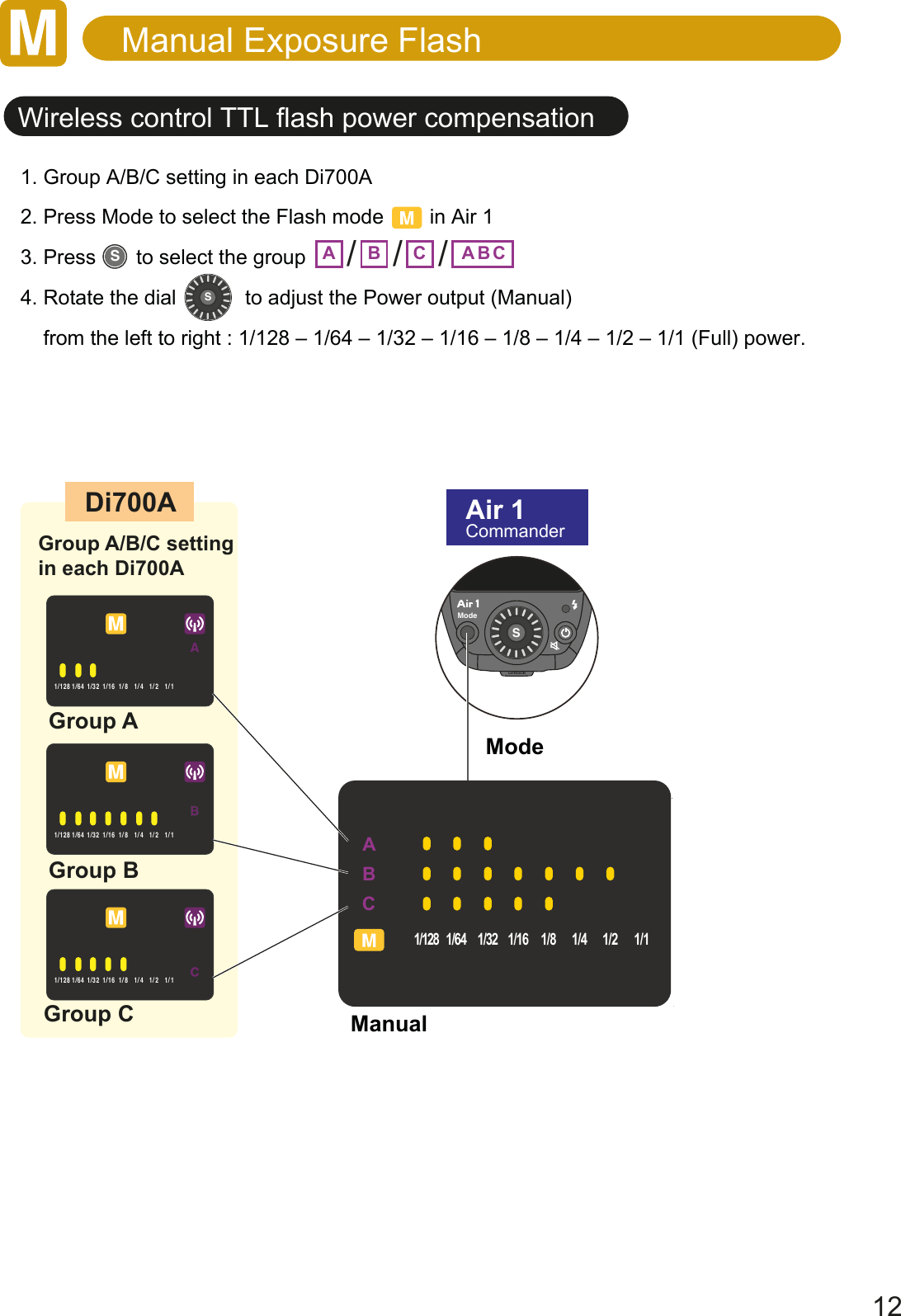
Manual Exposure Flash12ModeManualWireless control TTL flash power compensationunlockModeABCZSSS1. Group A/B/C setting in each Di700A2. Press Mode to select the Flash mode        in Air 13. Press       to select the group 4. Rotate the dial            to adjust the Power output (Manual)    from the left to right : 1/128 – 1/64 – 1/32 – 1/16 – 1/8 – 1/4 – 1/2 – 1/1 (Full) power.-2.0-1.5-1.0-0.5+0.5+1.0+2.0+1.51/128 1/64 1/32 1/16 1/8 1/4 1/2 1/1Group AGroup B-2.0-1.5-1.0-0.5+0.5+1.0+2.0+1.51/128 1/64 1/32 1/16 1/8 1/4 1/2 1/1Group CDi700A Air 1CommanderGroup A/B/C setting in each Di700A -2.0-1.5-1.0-0.5+0.5+1.0+2.0+1.51/128 1/64 1/32 1/16 1/8 1/4 1/2 1/1A B C BA CABCZ24 35 50 70 85 105 1352001/128 1/64 1/32 1/16 1/8 1/4 1/2 1/121.5 10.5 0.5 11.5 2+++ +/ / /
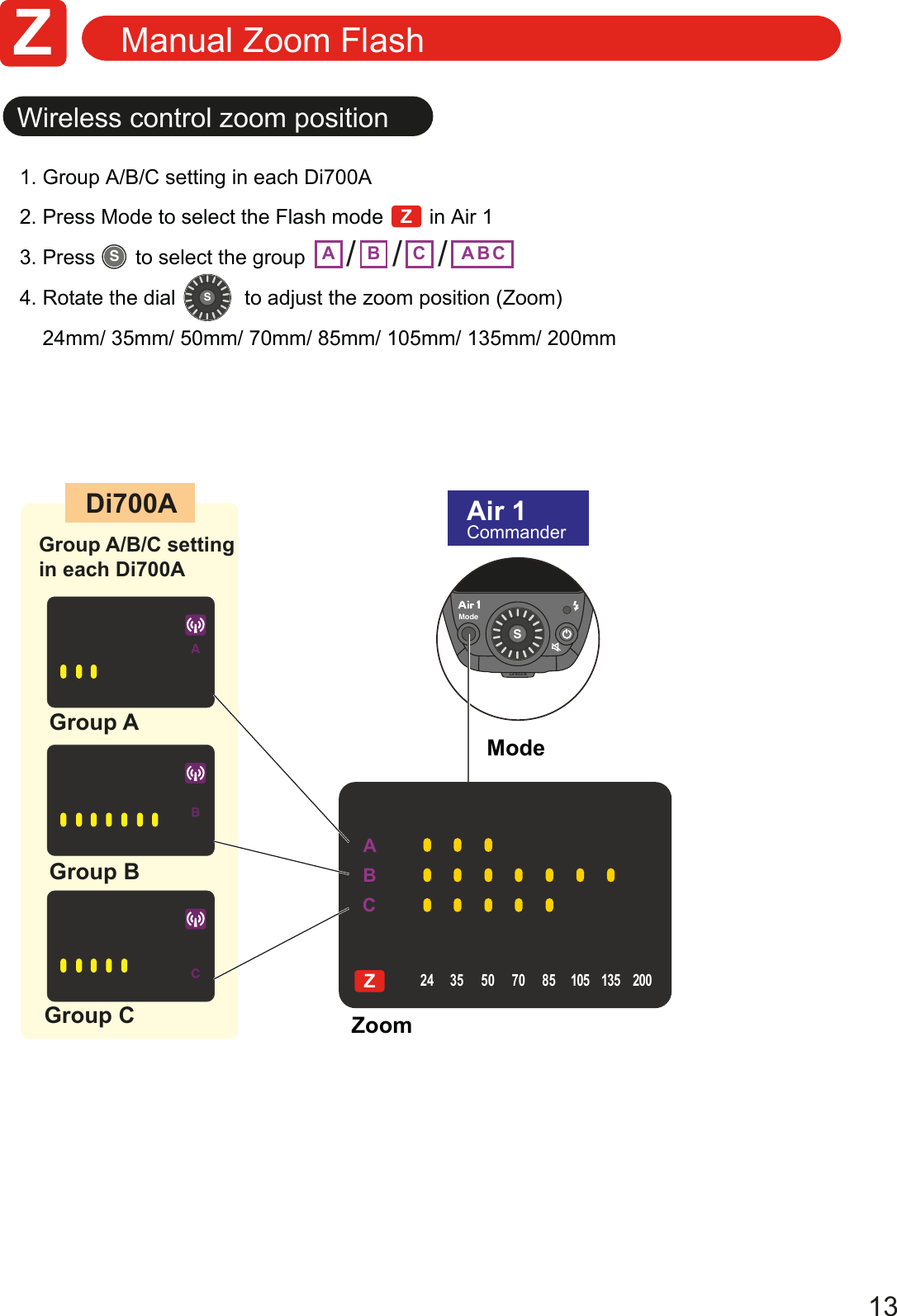
ABCZ24 35 50 70 85 105 1352001/128 1/64 1/32 1/16 1/8 1/4 1/2 1/121.5 10.5 0.5 11.5 2+++ +13Manual Zoom FlashModeZoomWireless control zoom positionunlockModeABCZSSS1. Group A/B/C setting in each Di700A2. Press Mode to select the Flash mode        in Air 13. Press       to select the group 4. Rotate the dial            to adjust the zoom position (Zoom)    24mm/ 35mm/ 50mm/ 70mm/ 85mm/ 105mm/ 135mm/ 200mm-2.0-1.5-1.0-0.5+0.5+1.0+2.0+1.51/128 1/64 1/32 1/16 1/8 1/4 1/2 1/1Group AGroup B-2.0-1.5-1.0-0.5+0.5+1.0+2.0+1.51/128 1/64 1/32 1/16 1/8 1/4 1/2 1/1Group CDi700A Air 1CommanderGroup A/B/C setting in each Di700A -2.0-1.5-1.0-0.5+0.5+1.0+2.0+1.51/128 1/64 1/32 1/16 1/8 1/4 1/2 1/1A B C BA C/ / /ZZ
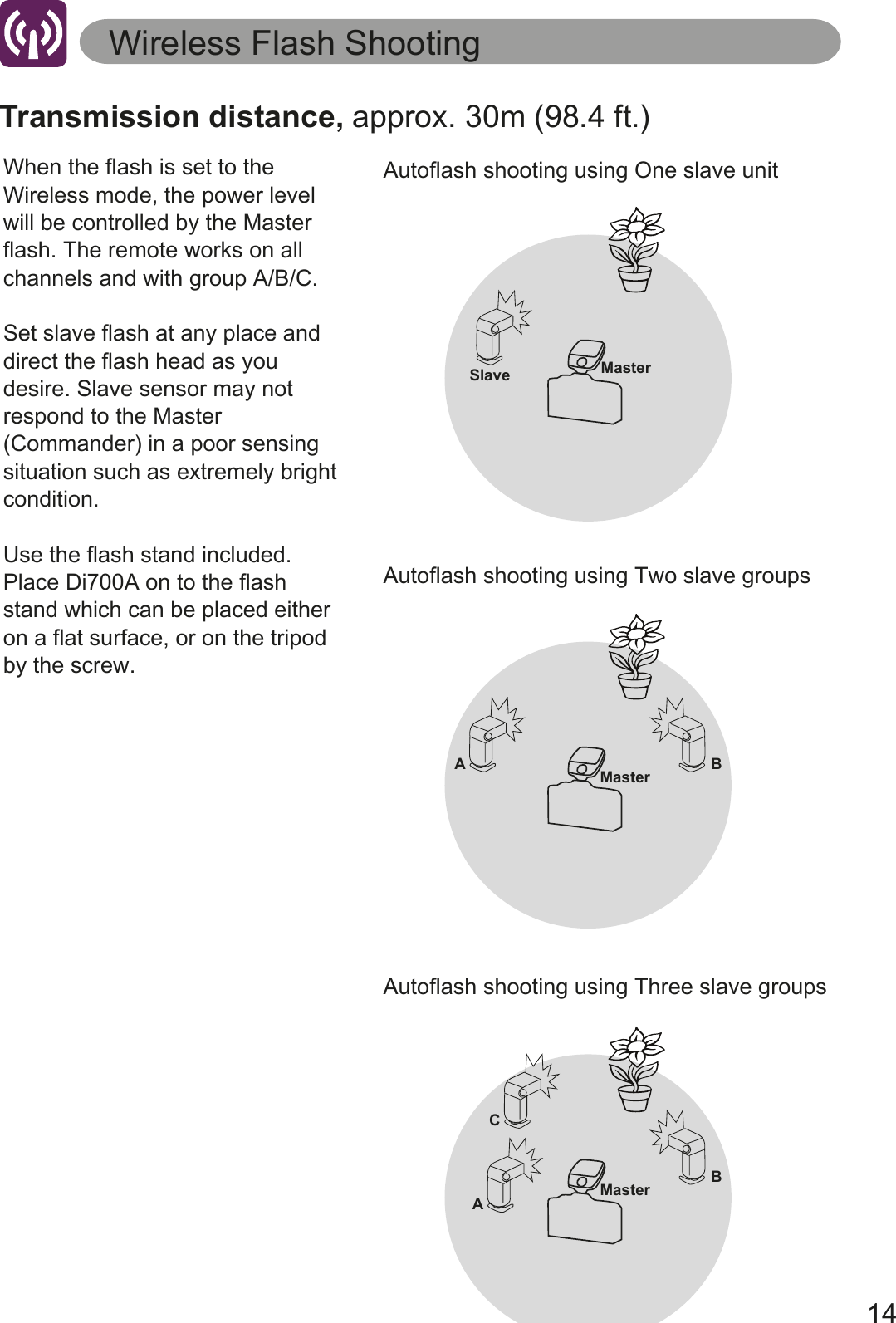
14Autoflash shooting using One slave unitWireless Flash ShootingMasterSlaveAutoflash shooting using Two slave groupsMasterA BAutoflash shooting using Three slave groupsMasterCABTransmission distance, approx. 30m (98.4 ft.)When the flash is set to the Wireless mode, the power level will be controlled by the Master flash. The remote works on all channels and with group A/B/C.Set slave flash at any place and direct the flash head as you desire. Slave sensor may not respond to the Master (Commander) in a poor sensing situation such as extremely bright condition.Use the flash stand included. Place Di700A on to the flash stand which can be placed either on a flat surface, or on the tripod by the screw.
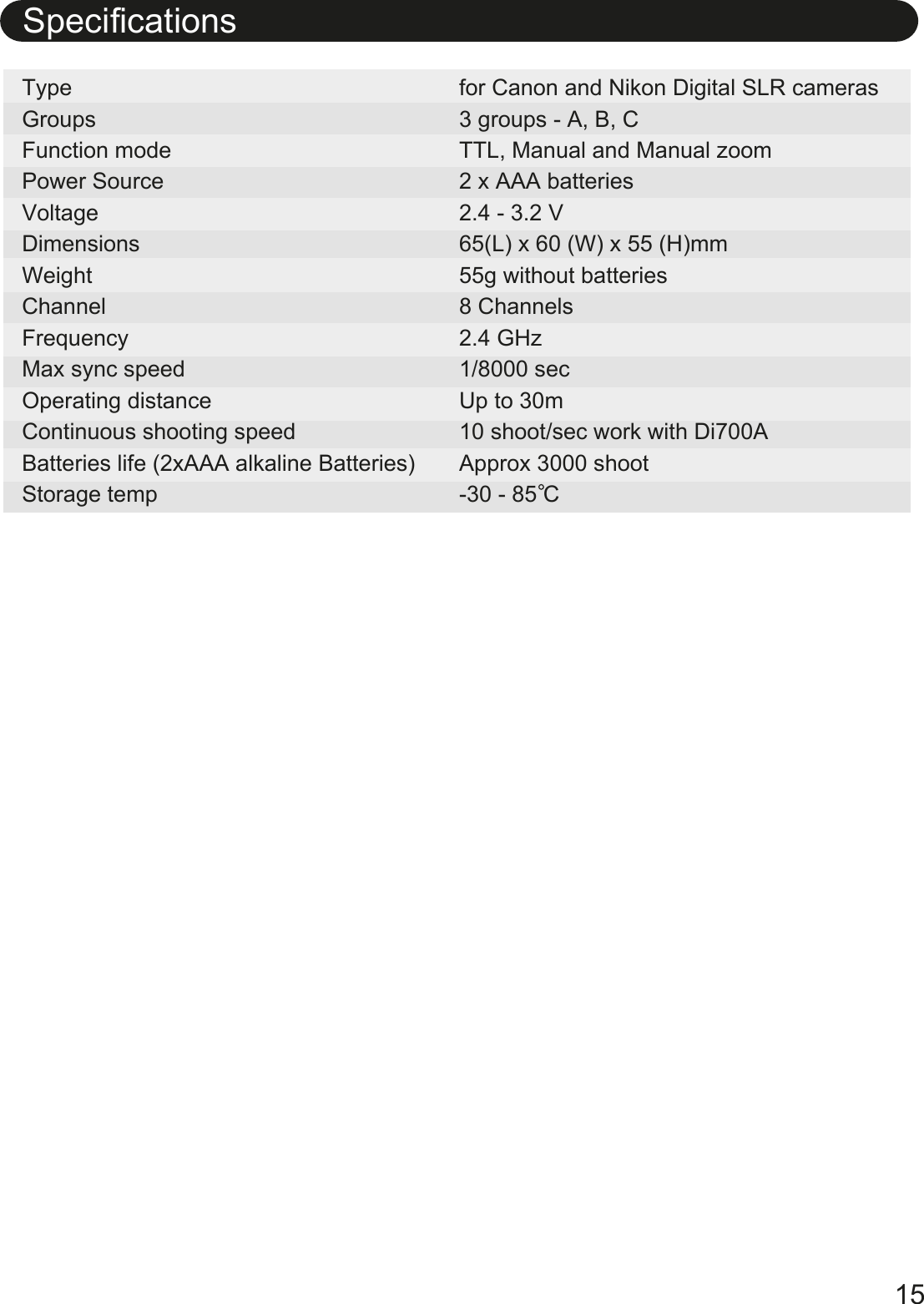
15SpecificationsType  GroupsFunction modePower SourceVoltageDimensionsWeightChannelFrequencyMax sync speedOperating distanceContinuous shooting speedBatteries life (2xAAA alkaline Batteries)Storage tempfor Canon and Nikon Digital SLR cameras3 groups - A, B, CTTL, Manual and Manual zoom2 x AAA batteries2.4 - 3.2 V65(L) x 60 (W) x 55 (H)mm55g without batteries8 Channels2.4 GHz1/8000 secUp to 30m10 shoot/sec work with Di700AApprox 3000 shoot-30 - 85 C
16WarrantyIn case of the following reason of the defect, it may void the warranty. Please refer the respective warranty condition for details which depends on the country of purchase.1. The product is not used in accordance with the instruction of     the owner’s manual.2. The product is repaired or modified by the one who is not an     authorized repair service.3. When the product is used with the cameras not applicable,     lens, adaptors or such accessories produced by the third party.4. Fault or defect caused by fire, earthquake, flood, public pollution       and such natural accident.5. In case that the product is stored in dust, moisture, extremely     high temperature or such poor condition.6. Scratch, blemish, crush or worn out by a violent use or     treatment.7. Guarantee card without name of place purchased or date of     purchase stamped, or no guarantee card.
Nissin Japan Ltd., Tokyohttp://www.nissin-japan.comNissin Marketing Ltd., Hong Konghttp://www.nissindigital.comA1C/N.Rev.0115.1.0Design and Specifications are subject to change without prior notice.

Navigation menu