Noke PB12 Access Control Panel User Manual Microsoft PowerPoint 4 x
Noke Access Control Panel Microsoft PowerPoint 4 x
Noke >
Users Manual

InstructionGuide
© 2018 Pacific Lock Company. All Rights Reserved.
ACCESS Controller
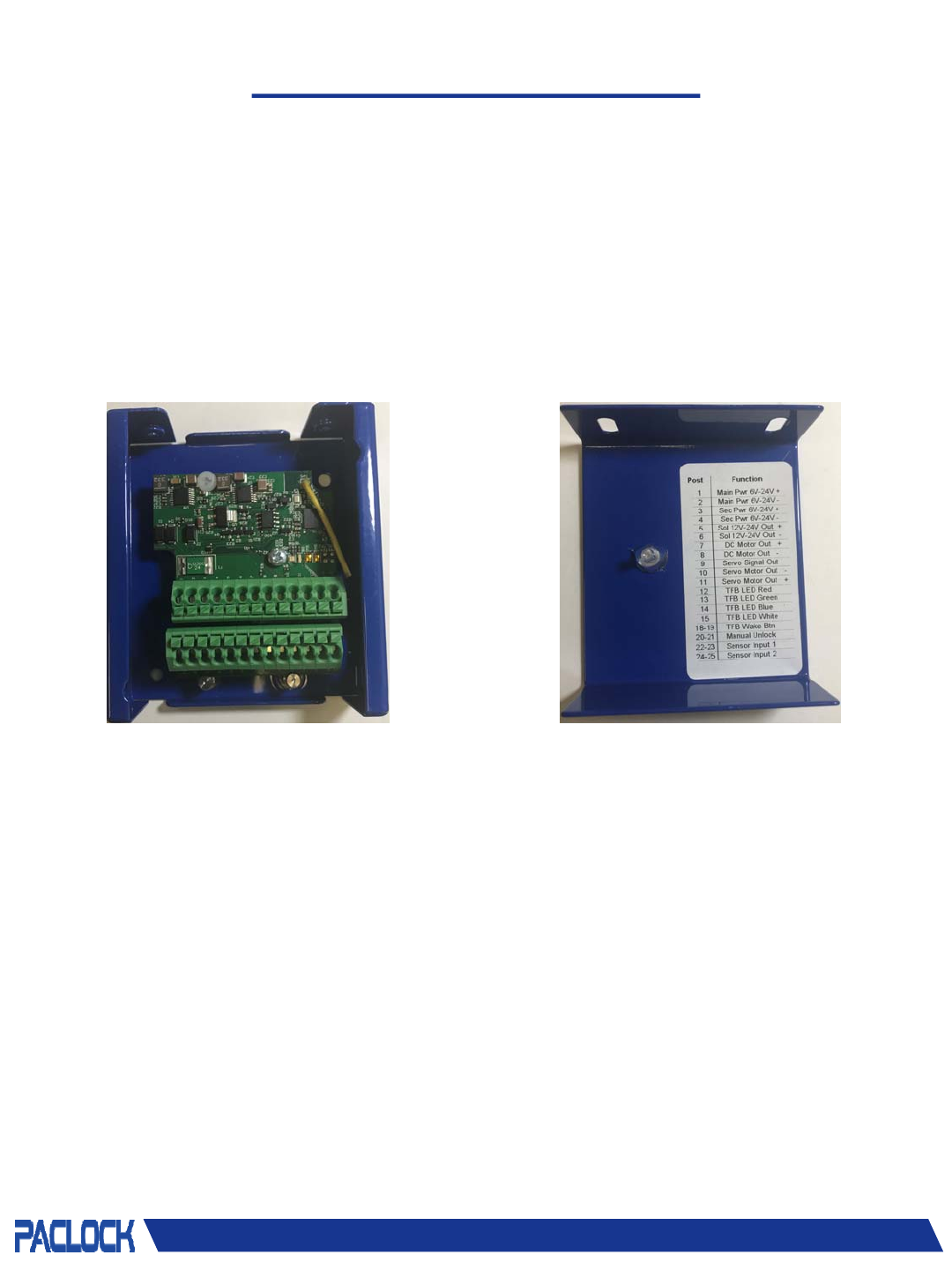
TheAccesscontrollercomesassembledwithabaseandalid.Thebaseofthecontrollercontainsthe
controlboardwithtwo13‐pinterminals.Thelidhasastickerthatshowsthefunctionforeachpost
ontheterminals.
AccessBase AccessLid
© 2018 Pacific Lock Company. All Rights Reserved.
ACCESS-Mini Controller
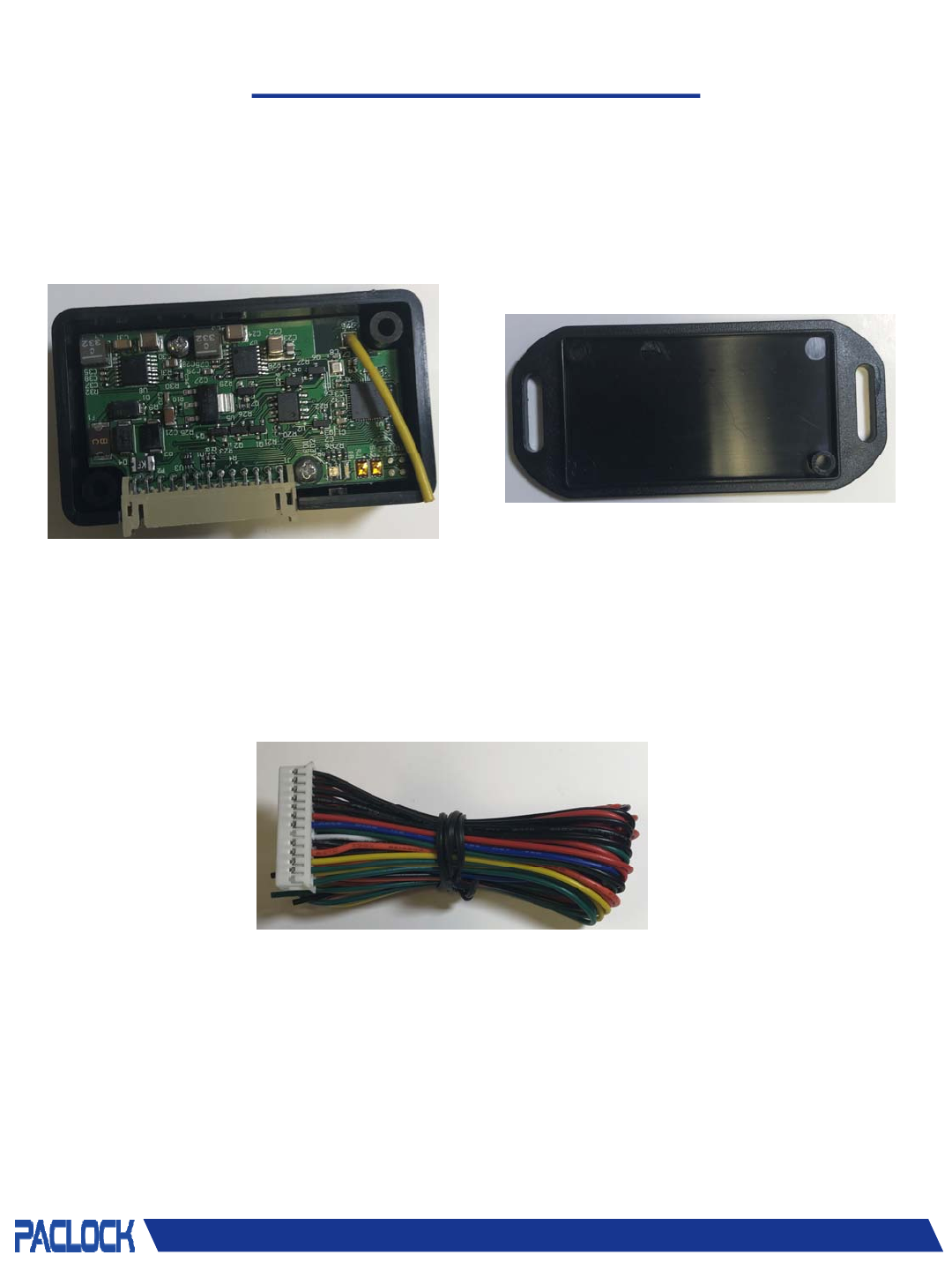
TheAccess‐Minicontrollercomesassembledwithaboxandacover.Theboxofthecontroller
containsthecontrolboardwitha26‐pinJSTconnector.
AccessBase AccessLid
PB‐CBL‐1

© 2018 Pacific Lock Company. All Rights Reserved.
Pin Assignments
PinAssignmentsforAccess
Access&Access– MiniPin# Function Pos/Neg
16V‐ 24VInput +
26V‐ 24VInput ‐
39VEmergencyPowerInput +
49VEmergencyPowerInput ‐
5 SolenoidOutput +/‐
6 SolenoidOutput +/‐
7DCMotorOutput +/‐
8DCMotorOutput +/‐
9ServoMotorSignalOutput Signaling
10 ServoMotorOutput ‐
11 ServoMotorOutput +
12 TFBLEDRED ‐
13 TFBLEDGREEN ‐
14 TFBLEDBLUE ‐
15 TFBLEDCOMMON +
16 LEDBLUE(NOTUSED) ‐
17 LEDBLUE(NOTUSED) +
18 TFBWake/Quick‐ClickButton ‐
19 TFBWake/Quick‐ClickButton +
20 ManualUnlockButton ‐
21 ManualUnlockButton +
22 SensorInput ‐
23 SensorInput +
24 GPIO(NOTUSED) +
25 GPIO(NOTUSED) ‐
26 Ground(NOTUSED) GND

© 2018 Pacific Lock Company. All Rights Reserved.
Installing Access
Step1:Determinewhichendpointyouareusing.
Accessiscompatiblewithanyelectro‐mechanicallockpullingupto3Aof
power.
•Pins5&6shouldbeusedforsolenoids,dropbolts,electricstrikes,or
electromagneticlocks.
•Pins7&8shouldbeusedforDCMotors.
•Pins9,10,&11shouldbeusedforServomotors.
Step2: Attachwiresfromendpointtothecorrectpinsfortheendpoint
typeontheAccessboard.
Step3: AttachtheTFBwirestopins12‐15and18‐19accordingtothe
PinAssignmentsonthepreviouspageorthestickerontheAccesslid.
TheTFBbuttonwill“wakeup”theboardwhentheAccesshaspower
runningtoit.TheTFBalsohascolorlightindicatorsandwillbeusedto
activatethe“QuickClick”sequence.
Step4: Attachthemanualunlockbuttonwirestopins20&21.The
manualunlockbuttonwillautomaticallyunlocktheAccessunitwhen
triggered.(Ifnecessary)
Step5: AttachanysensorwirestoPins22&23.(Ifnecessary)
Step6: Attachmainpowerwirestopins1&2.
Step7: Attachsecondarypowerwirestopins3&4.
Note: SecondarypowerwiresrunfromtheTFB,ifusing,andare
attachedto9VbackupterminalsontheTFB.

© 2018 Pacific Lock Company. All Rights Reserved.
Functions
MainPower: Themainpowerpowerstheboardwheninuse.TheAccesscan
acceptfrom6Vto24VDC.Thepolarityofthewiresonthepowerinputisvery
importantandmustbeinthecorrectpositions.Ifthewiresareswitched,the
boardwillnotfunctionproperly.
SecondaryPower: Thesecondarypowerisusedasback‐uppowerwhenthemain
powerisnotworking.Secondarypowercanacceptfrom6Vto24VDC.The
polarityofthewiresonthepowerinputisveryimportantandmustbeinthe
correctpositions.Ifthewiresareswitched,theboardwillnotfunctionproperly.
Note:Boththemainpowerandsecondarypowercanhavecurrentrunningtothe
atthesametime.ItwillnotaffecttheAccess.TheAccesswillonlyrunonone
powerinputatatime.
SolenoidOutput: Thesolenoidoutputisforusewithsolenoids,dropbolts,electric
strikes,andotherelectromechanicallocks.Thetypeofendpointusedinthis
positionmaynotexceed3A.Theendpointisconfiguredusingthe“LockSettings”
inthePAC‐BLUapp.Thefunctionsthatareconfigurableintheappare:
•Re‐LockTrigger:Relockbasedonatimerorsensor.
•Re‐LockTimer:Theamountoftimetheendpointwilllockorunlockfor.
•Sensor1TriggerOn:LoworHigh.
•SolenoidDefaultState:OnorOff.The“off”optionisforendpointthatarefail
securelocksmeaningthatthelockislockedwhenpowerisnotrunningtoit.
The“on”optionisforlockswhicharefailsafelocksandarelockedwithpower
runningtoit.
•ManualUnlock:Whenselectedtheboardwillallowamanualunlockbuttonor
switchtobeusedinsideofthedoor.
•Sleep:Whenselectedtheboardwillgotosleepwhennotinusetoconserve
power.Itmustbewokenupusingabuttonorswitchtofunction.Whennot
selected,theboardwillnevergotosleepwhenpowerisrunningtoitandwill
alwaysbebluetoothing.
•WakeUpAction:NoneorLock.When“None”ischosen,theboardwilldo
nothingwhenwokenup.When“Lock”ischosen,theboardwillperformthe
lockfunctioneachtimeitiswokenup.

ElectromagneticOption: Thesolenoidoutputisalsousedwithelectromagneticlocks.
Thetypeofendpointusedinthispositionmaynotexceed3A.Theendpointis
configuredusingthe“LockSettings”inthePAC‐BLUapp.Thefunctionsthatare
configurableintheappare:
•Re‐LockTrigger:Relockbasedonatimerorsensor.
•Re‐LockTimer:Theamountoftimetheendpointwilllockorunlockfor.
•Sensor1TriggerOn:LoworHigh.
•ManualUnlock:Whenselectedtheboardwillallowamanualunlockbuttonor
switchtobeusedinsideofthedoor.
•Sleep:Whenselectedtheboardwillgotosleepwhennotinusetoconservepower.
Itmustbewokenupusingabuttonorswitchtofunction.Whennotselected,the
boardwillnevergotosleepwhenpowerisrunningtoitandwillalwaysbe
bluetoothing.
•WakeUpAction:NoneorLock.When“None”ischosen,theboardwilldonothing
whenwokenup.When“Lock”ischosen,theboardwillperformthelockfunction
eachtimeitiswokenup.
DCMotorOutput: TheDCoutputisforusewithDCmotors.TheDCmotorusedinthis
positionmaynotexceed3A.TheDCmotorisconfiguredusingthe“LockSettings”inthe
PAC‐BLUapp.Thefunctionsthatareconfigurableintheappare:
•Re‐LockTrigger:Relockbasedonatimerorsensor.
•Re‐LockTimer:Theamountoftimetheendpointwilllockorunlockfor.
•Sensor1TriggerOn:LoworHigh.
•Motorruntime:Theamountoftimethemotorwillrunforbeforerunninginthe
oppositedirectiontore‐lock.
•MotorUnlockDirection:Configurabletorunclockwiseorcounterclockwise.
•MotorVoltage:3.3Vor5.0V.AhighvoltagemotormaybeusedwiththeAccess.
Themotorwillonlyrunatthespecifiedvoltageof3.3Vor5.0Vandwillnotrunat
thefullcapacity.
•ManualUnlock:Whenselectedtheboardwillallowamanualunlockbuttonor
switchtobeusedinsideofthedoor.
•Sleep:Whenselectedtheboardwillgotosleepwhennotinusetoconservepower.
Itmustbewokenupusingabuttonorswitchtofunction.Whennotselected,the
boardwillnevergotosleepwhenpowerisrunningtoitandwillalwaysbe
bluetoothing.
•WakeUpAction:NoneorLock.When“None”ischosen,theboardwilldonothing
whenwokenup.When“Lock”ischosen,theboardwillperformthelockfunction
eachtimeitiswokenup.
© 2018 Pacific Lock Company. All Rights Reserved.
Functions

ServoMotorOutput: TheServooutputisforusewithServomotors.TheServomotor
usedinthispositionmaynotexceed3A.TheServomotorisconfiguredusingthe“Lock
Settings”inthePAC‐BLUapp.Thefunctionsthatareconfigurableintheappare:
•Re‐LockTrigger:Relockbasedonatimerorsensor.
•Re‐LockTimer:Theamountoftimetheendpointwilllockorunlockfor.
•Sensor1TriggerOn:LoworHigh.
•ServoUnlockPosition:Thepositionthattheservoservo isinwhenunlocked.
•ServoLockPosition:Thepositionthattheservomotorisinwhenlocked.
•Motorruntime:Theamountoftimethemotorwillrunforbeforerunninginthe
oppositedirectiontore‐lock.
•MotorUnlockDirection:Configurabletorunclockwiseorcounterclockwise.
•MotorVoltage:3.3Vor5.0V.AhighvoltagemotormaybeusedwiththeAccess.
Themotorwillonlyrunatthespecifiedvoltageof3.3Vor5.0Vandwillnotrunat
thefullcapacity.
•ManualUnlock:Whenselectedtheboardwillallowamanualunlockbuttonor
switchtobeusedinsideofthedoor.
•Sleep:Whenselectedtheboardwillgotosleepwhennotinusetoconservepower.
Itmustbewokenupusingabuttonorswitchtofunction.Whennotselected,the
boardwillnevergotosleepwhenpowerisrunningtoitandwillalwaysbe
bluetoothing.
•WakeUpAction:NoneorLock.When“None”ischosen,theboardwilldonothing
whenwokenup.When“Lock”ischosen,theboardwillperformthelockfunction
eachtimeitiswokenup.
TFBLEDLightColorInputs: ThethreeTFBcolorinputsarefortheindicatorlightsonthe
TFB.Thelightsindicatethecurrentstatusoftheboard.
•Red:Theboardhaspowerandisawake.
•Green:Thecurrentfunctionisrunning.
•Blue:Theboardisupdatingtothenewsettingsindicatedintheapp.
TFBWake/QuickClickButton: Thesetwoinputsservetwofunctions.
•Wake:ThebuttonwillwaketheAccessuptobeginbluetoothing whenpushed.
•QuickClick:ThepatentedQuickClickopensthelockusingMorseCodetype
sequenceswithbuttonclicks.
ManualUnlockButton: Themanualunlockbuttoninputisforamanualunlockswitch,
button,orsensor.Themanualunlockisusedtounlocktheendpointfrominsideofthe
roomorenclosure.Whenusingthemanualunlock,thelockwillopenwithouttheuseof
eKeys.
SensorInput: Thesensorinputallowsforasensorthatfunctionsasarelocktrigger
whenselected.
Functions

Caution: Theuseriscautionedthatchangesormodificationsnotexpresslyapprovedby
thepartyresponsibleforcompliancecouldvoidtheuser'sauthoritytooperatethe
equipment.
ThisdevicecomplieswithPart15oftheFCCRules.Operationissubjecttothefollowing
twoconditions:(1)thisdevicemaynotcauseharmfulinterference,and(2)thisdevice
mustacceptanyinterferencereceived,includinginterferencethatmaycauseundesired
operation.
NOTE:ThisequipmenthasbeentestedandfoundtocomplywiththelimitsforaClassB
digitaldevice,pursuanttoPart15oftheFCCRules.Theselimitsaredesignedtoprovide
reasonableprotectionagainstharmfulinterferenceinaresidentialinstallation.This
equipmentgenerates,usesandcanradiateradiofrequencyenergyand,ifnotinstalled
andusedinaccordancewiththeinstructions,maycauseharmfulinterferencetoradio
communications.However,thereisnoguaranteethatinterferencewillnotoccurina
particularinstallation.
Ifthisequipmentdoescauseharmfulinterferencetoradioortelevisionreception,which
canbedeterminedbyturningtheequipmentoffandon,theuserisencouragedtotryto
correcttheinterferencebyoneormoreofthefollowingmeasures:
‐‐ Reorientorrelocatethereceivingantenna.
‐‐ Increasetheseparationbetweentheequipmentandreceiver.
‐‐ Connecttheequipmentintoanoutletonacircuitdifferentfromthattowhichthe
receiverisconnected.
‐‐ Consultthedealeroranexperiencedradio/TVtechnicianforhelp.
FCCRadiationExposureStatement:
ThisequipmentcomplieswithFCCradiationexposurelimitssetforthforanuncontrolled
environment.Thisequipmentshouldbeinstalledandoperatedwithaminimumdistance
of20cmbetweentheradiatorandyourbody.
Thistransmittermustnotbeco‐locatedoroperatinginconjunctionwithanyother
antennaortransmitter.
Disclaimer

PAC-BLU