Nomad Goods POWERPACK POWERPACK with Bluetooth User Manual Book with FCC 2

Nomad Goods, Inc. POWERPACK with Bluetooth Book with FCC 2

User Manual

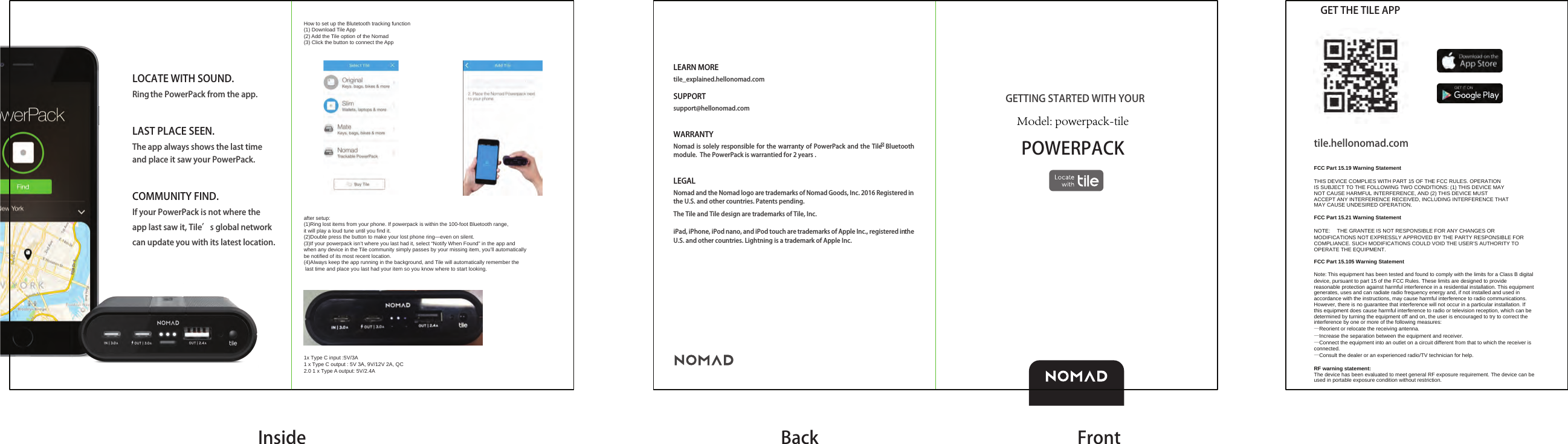
LOCATE WITH SOUND.Ring the PowerPack from the app.LAST PLACE SEEN.The app always shows the last time and place it saw your PowerPack.COMMUNITY FIND.If your PowerPack is not where the app last saw it, Tile’s global network can update you with its latest location.POWERPACKLEARN MOREtile_explained.hellonomad.com SUPPORTsupport@hellonomad.comWARRANTYNomad is solely responsible for the warranty of PowerPack and the Tile Bluetooth module.  The PowerPack is warrantied for 2 years . LEGALNomad and the Nomad logo are trademarks of Nomad Goods, Inc. 2016 Registered in the U.S. and other countries. Patents pending. The Tile and Tile design are trademarks of Tile, Inc.iPad, iPhone, iPod nano, and iPod touch are trademarks of Apple Inc., registered in the U.S. and other countries. Lightning is a trademark of Apple Inc.GETTING STARTED WITH YOUR Inside Back FrontGET THE TILE APPtile.hellonomad.comFCC Part 15.19 Warning StatementTHIS DEVICE COMPLIES WITH PART 15 OF THE FCC RULES. OPERATIONIS SUBJECT TO THE FOLLOWING TWO CONDITIONS: (1) THIS DEVICE MAYNOT CAUSE HARMFUL INTERFERENCE, AND (2) THIS DEVICE MUSTACCEPT ANY INTERFERENCE RECEIVED, INCLUDING INTERFERENCE THATMAY CAUSE UNDESIRED OPERATION.FCC Part 15.21 Warning StatementNOTE:   THE GRANTEE IS NOT RESPONSIBLE FOR ANY CHANGES OR MODIFICATIONS NOT EXPRESSLY APPROVED BY THE PARTY RESPONSIBLE FOR COMPLIANCE. SUCH MODIFICATIONS COULD VOID THE USER’S AUTHORITY TO OPERATE THE EQUIPMENT.FCC Part 15.105 Warning StatementNote: This equipment has been tested and found to comply with the limits for a Class B digital device, pursuant to part 15 of the FCC Rules. These limits are designed to provide reasonable protection against harmful interference in a residential installation. This equipment generates, uses and can radiate radio frequency energy and, if not installed and used in accordance with the instructions, may cause harmful interference to radio communications. However, there is no guarantee that interference will not occur in a particular installation. If this equipment does cause harmful interference to radio or television reception, which can be determined by turning the equipment off and on, the user is encouraged to try to correct the interference by one or more of the following measures:—Reorient or relocate the receiving antenna.—Increase the separation between the equipment and receiver.—Connect the equipment into an outlet on a circuit different from that to which the receiver is connected.—Consult the dealer or an experienced radio/TV technician for help.RF warning statement:The device has been evaluated to meet general RF exposure requirement. The device can be used in portable exposure condition without restriction.How to set up the Blutetooth tracking function(1) Download Tile App (2) Add the Tile option of the Nomad(3) Click the button to connect the Appafter setup:(1)Ring lost items from your phone. If powerpack is within the 100-foot Bluetooth range, it will play a loud tune until you find it.(2)Double press the button to make your lost phone ring—even on silent.(3)If your powerpack isn’t where you last had it, select “Notify When Found” in the app and when any device in the Tile community simply passes by your missing item, you’ll automatically be notified of its most recent location. (4)Always keep the app running in the background, and Tile will automatically remember the last time and place you last had your item so you know where to start looking.1x Type C input :5V/3A1 x Type C output : 5V 3A, 9V/12V 2A, QC 2.0 1 x Type A output: 5V/2.4AModel: powerpack-tile

Navigation menu