Nortek Security and Control 2GIG DBELL345 Door Bell Switch User Manual DBELL1 IG 77 000004 001 Rev Be

2GIG Technologies, Inc. Door Bell Switch DBELL1 IG 77 000004 001 Rev Be

Users manual

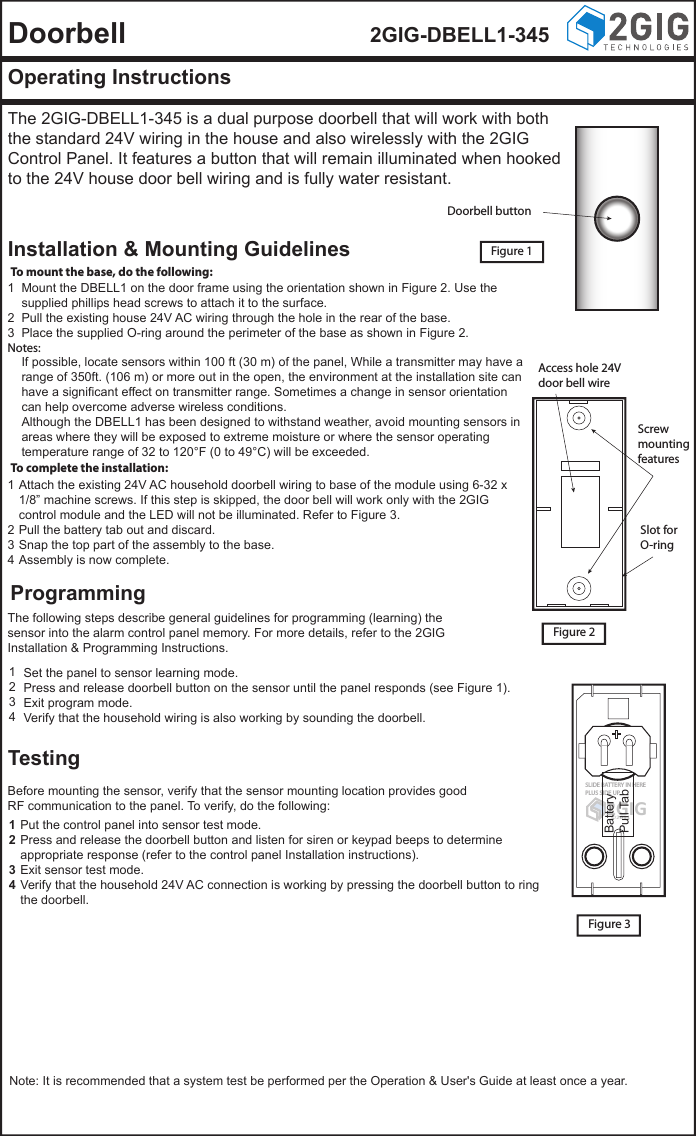
Doorbell 2GIG-DBELL1-345Operating InstructionsThe 2GIG-DBELL1-345 is a dual purpose doorbell that will work with both the standard 24V wiring in the house and also wirelessly with the 2GIG Control Panel. It features a button that will remain illuminated when hooked to the 24V house door bell wiring and is fully water resistant.Installation & Mounting GuidelinesProgrammingTestingFigure 1Figure 3To complete the installation:To mount the base, do the following:Mount the DBELL1 on the door frame using the orientation shown in Figure 2. Use the supplied phillips head screws to attach it to the surface.Pull the existing house 24V AC wiring through the hole in the rear of the base.Place the supplied O-ring around the perimeter of the base as shown in Figure 2.123Notes:If possible, locate sensors within 100 ft (30 m) of the panel, While a transmitter may have a range of 350ft. (106 m) or more out in the open, the environment at the installation site can have a significant effect on transmitter range. Sometimes a change in sensor orientation can help overcome adverse wireless conditions.Although the DBELL1 has been designed to withstand weather, avoid mounting sensors in areas where they will be exposed to extreme moisture or where the sensor operating temperature range of 32 to 120°F (0 to 49°C) will be exceeded.Set the panel to sensor learning mode.Press and release doorbell button on the sensor until the panel responds (see Figure 1).Exit program mode.Verify that the household wiring is also working by sounding the doorbell.1234Put the control panel into sensor test mode.Press and release the doorbell button and listen for siren or keypad beeps to determine appropriate response (refer to the control panel Installation instructions).Exit sensor test mode.Verify that the household 24V AC connection is working by pressing the doorbell button to ring the doorbell.1234Attach the existing 24V AC household doorbell wiring to base of the module using 6-32 x 1/8” machine screws. If this step is skipped, the door bell will work only with the 2GIG control module and the LED will not be illuminated. Refer to Figure 3.Pull the battery tab out and discard.Snap the top part of the assembly to the base.Assembly is now complete.1234The following steps describe general guidelines for programming (learning) the sensor into the alarm control panel memory. For more details, refer to the 2GIG Installation & Programming Instructions.Before mounting the sensor, verify that the sensor mounting location provides good RF communication to the panel. To verify, do the following:Note: It is recommended that a system test be performed per the Operation & User's Guide at least once a year.2GIG     ©2011SLIDE BATTERY IN HEREPLUS SIDE UPBatteryPull TabAccess hole 24Vdoor bell wireScrewmountingfeaturesFigure 2Slot forO-ringDoorbell button
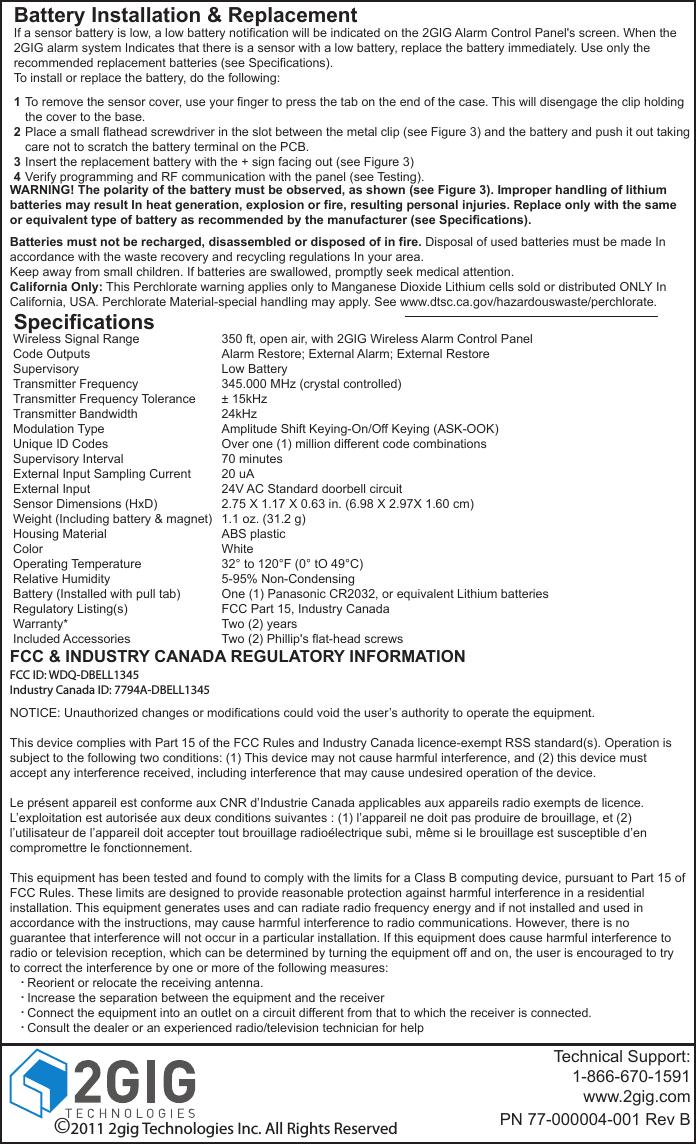
Battery Installation & ReplacementWARNING! The polarity of the battery must be observed, as shown (see Figure 3). Improper handling of lithium batteries may result In heat generation, explosion or fire, resulting personal injuries. Replace only with the same or equivalent type of battery as recommended by the manufacturer (see Specifications).Batteries must not be recharged, disassembled or disposed of in fire. Disposal of used batteries must be made In accordance with the waste recovery and recycling regulations In your area.Keep away from small children. If batteries are swallowed, promptly seek medical attention.California Only: This Perchlorate warning applies only to Manganese Dioxide Lithium cells sold or distributed ONLY In California, USA. Perchlorate Material-special handling may apply. See www.dtsc.ca.gov/hazardouswaste/perchlorate.SpecificationsWireless Signal RangeCode OutputsSupervisoryTransmitter FrequencyTransmitter Frequency ToleranceTransmitter BandwidthModulation TypeUnique ID CodesSupervisory IntervalExternal Input Sampling CurrentExternal InputSensor Dimensions (HxD)Weight (Including battery & magnet)Housing MaterialColorOperating TemperatureRelative HumidityBattery (Installed with pull tab)Regulatory Listing(s)Warranty*Included Accessories350 ft, open air, with 2GIG Wireless Alarm Control PanelAlarm Restore; External Alarm; External RestoreLow Battery345.000 MHz (crystal controlled)± 15kHz24kHzAmplitude Shift Keying-On/Off Keying (ASK-OOK)Over one (1) million different code combinations70 minutes20 uA24V AC Standard doorbell circuit2.75 X 1.17 X 0.63 in. (6.98 X 2.97X 1.60 cm)1.1 oz. (31.2 g)ABS plasticWhite32° to 120°F (0° tO 49°C)5-95% Non-CondensingOne (1) Panasonic CR2032, or equivalent Lithium batteriesFCC Part 15, Industry CanadaTwo (2) yearsTwo (2) Phillip's flat-head screwsTechnical Support:1-866-670-1591www.2gig.comPN 77-000004-001 Rev BTo remove the sensor cover, use your finger to press the tab on the end of the case. This will disengage the clip holding the cover to the base.Place a small flathead screwdriver in the slot between the metal clip (see Figure 3) and the battery and push it out taking care not to scratch the battery terminal on the PCB.Insert the replacement battery with the + sign facing out (see Figure 3)Verify programming and RF communication with the panel (see Testing).1234If a sensor battery is low, a low battery notification will be indicated on the 2GIG Alarm Control Panel's screen. When the 2GIG alarm system Indicates that there is a sensor with a low battery, replace the battery immediately. Use only the recommended replacement batteries (see Specifications).To install or replace the battery, do the following:©2011 2gig Technologies Inc. All Rights ReservedFCC & INDUSTRY CANADA REGULATORY INFORMATIONNOTICE: Unauthorized changes or modifications could void the user’s authority to operate the equipment.This device complies with Part 15 of the FCC Rules and Industry Canada licence-exempt RSS standard(s). Operation is subject to the following two conditions: (1) This device may not cause harmful interference, and (2) this device must accept any interference received, including interference that may cause undesired operation of the device.Le présent appareil est conforme aux CNR d’Industrie Canada applicables aux appareils radio exempts de licence. L’exploitation est autorisée aux deux conditions suivantes : (1) l’appareil ne doit pas produire de brouillage, et (2) l’utilisateur de l’appareil doit accepter tout brouillage radioélectrique subi, même si le brouillage est susceptible d’en compromettre le fonctionnement.This equipment has been tested and found to comply with the limits for a Class B computing device, pursuant to Part 15 of FCC Rules. These limits are designed to provide reasonable protection against harmful interference in a residential installation. This equipment generates uses and can radiate radio frequency energy and if not installed and used in accordance with the instructions, may cause harmful interference to radio communications. However, there is no guarantee that interference will not occur in a particular installation. If this equipment does cause harmful interference to radio or television reception, which can be determined by turning the equipment off and on, the user is encouraged to try to correct the interference by one or more of the following measures:     Reorient or relocate the receiving antenna.     Increase the separation between the equipment and the receiver     Connect the equipment into an outlet on a circuit different from that to which the receiver is connected.     Consult the dealer or an experienced radio/television technician for help....FCC ID: WDQ-DBELL1345Industry Canada ID: 7794A-DBELL1345

Navigation menu