Nortek Security and Control 2GIG GB1345 Door Window Sensor User Manual

2GIG Technologies, Inc. Door Window Sensor Users Manual

Users Manual

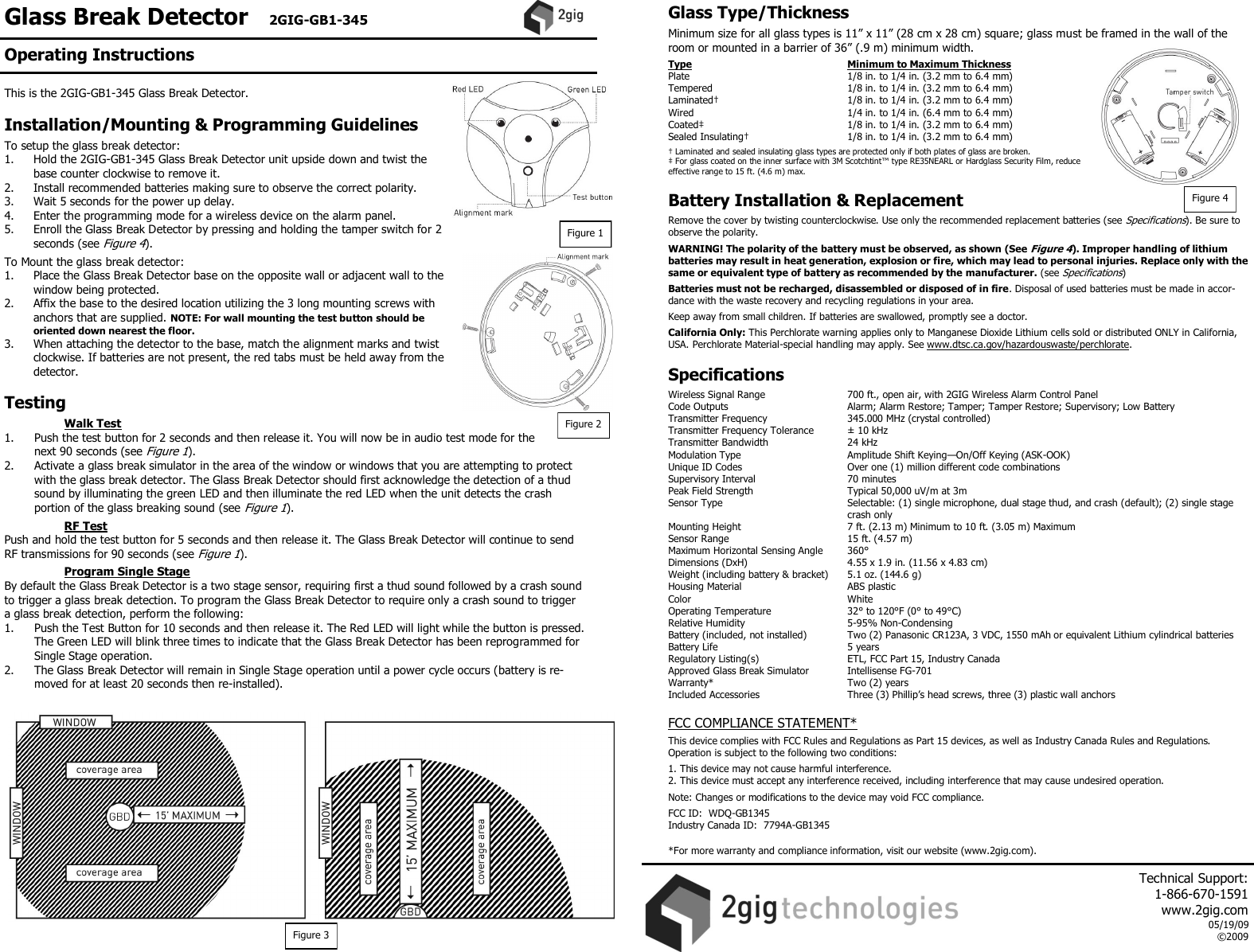
Glass Break Detector   2GIG-GB1-345    This is the 2GIG-GB1-345 Glass Break Detector.   Installation/Mounting & Programming Guidelines  To setup the glass break detector: 1.   Hold the 2GIG-GB1-345 Glass Break Detector unit upside down and twist the base counter clockwise to remove it. 2.   Install recommended batteries making sure to observe the correct polarity. 3.   Wait 5 seconds for the power up delay. 4.   Enter the programming mode for a wireless device on the alarm panel. 5.   Enroll the Glass Break Detector by pressing and holding the tamper switch for 2 seconds (see Figure 4).  To Mount the glass break detector: 1.   Place the Glass Break Detector base on the opposite wall or adjacent wall to the window being protected. 2.   Affix the base to the desired location utilizing the 3 long mounting screws with anchors that are supplied. NOTE: For wall mounting the test button should be oriented down nearest the floor. 3.  When attaching the detector to the base, match the alignment marks and twist clockwise. If batteries are not present, the red tabs must be held away from the detector.  Testing    Walk Test 1.   Push the test button for 2 seconds and then release it. You will now be in audio test mode for the next 90 seconds (see Figure 1). 2.   Activate a glass break simulator in the area of the window or windows that you are attempting to protect with the glass break detector. The Glass Break Detector should first acknowledge the detection of a thud sound by illuminating the green LED and then illuminate the red LED when the unit detects the crash portion of the glass breaking sound (see Figure 1).    RF Test Push and hold the test button for 5 seconds and then release it. The Glass Break Detector will continue to send RF transmissions for 90 seconds (see Figure 1).   Program Single Stage By default the Glass Break Detector is a two stage sensor, requiring first a thud sound followed by a crash sound to trigger a glass break detection. To program the Glass Break Detector to require only a crash sound to trigger a glass break detection, perform the following: 1.  Push the Test Button for 10 seconds and then release it. The Red LED will light while the button is pressed. The Green LED will blink three times to indicate that the Glass Break Detector has been reprogrammed for Single Stage operation. 2.  The Glass Break Detector will remain in Single Stage operation until a power cycle occurs (battery is re-moved for at least 20 seconds then re-installed).   Glass Type/Thickness  Minimum size for all glass types is 11” x 11” (28 cm x 28 cm) square; glass must be framed in the wall of the room or mounted in a barrier of 36” (.9 m) minimum width.  Type      Minimum to Maximum Thickness Plate      1/8 in. to 1/4 in. (3.2 mm to 6.4 mm) Tempered      1/8 in. to 1/4 in. (3.2 mm to 6.4 mm) Laminated†      1/8 in. to 1/4 in. (3.2 mm to 6.4 mm) Wired      1/4 in. to 1/4 in. (6.4 mm to 6.4 mm) Coated‡      1/8 in. to 1/4 in. (3.2 mm to 6.4 mm) Sealed Insulating†    1/8 in. to 1/4 in. (3.2 mm to 6.4 mm)  † Laminated and sealed insulating glass types are protected only if both plates of glass are broken. ‡ For glass coated on the inner surface with 3M Scotchtint™ type RE35NEARL or Hardglass Security Film, reduce effective range to 15 ft. (4.6 m) max.   Battery Installation & Replacement  Remove the cover by twisting counterclockwise. Use only the recommended replacement batteries (see Specifications). Be sure to observe the polarity.  WARNING! The polarity of the battery must be observed, as shown (See Figure 4). Improper handling of lithium batteries may result in heat generation, explosion or fire, which may lead to personal injuries. Replace only with the same or equivalent type of battery as recommended by the manufacturer. (see Specifications)  Batteries must not be recharged, disassembled or disposed of in fire. Disposal of used batteries must be made in accor-dance with the waste recovery and recycling regulations in your area.  Keep away from small children. If batteries are swallowed, promptly see a doctor.  California Only: This Perchlorate warning applies only to Manganese Dioxide Lithium cells sold or distributed ONLY in California, USA. Perchlorate Material-special handling may apply. See www.dtsc.ca.gov/hazardouswaste/perchlorate.   Specifications  Wireless Signal Range    700 ft., open air, with 2GIG Wireless Alarm Control Panel Code Outputs    Alarm; Alarm Restore; Tamper; Tamper Restore; Supervisory; Low Battery Transmitter Frequency     345.000 MHz (crystal controlled) Transmitter Frequency Tolerance   ± 10 kHz Transmitter Bandwidth     24 kHz Modulation Type     Amplitude Shift Keying—On/Off Keying (ASK-OOK) Unique ID Codes     Over one (1) million different code combinations Supervisory Interval    70 minutes Peak Field Strength     Typical 50,000 uV/m at 3m Sensor Type      Selectable: (1) single microphone, dual stage thud, and crash (default); (2) single stage       crash only          Mounting Height    7 ft. (2.13 m) Minimum to 10 ft. (3.05 m) Maximum  Sensor Range    15 ft. (4.57 m)  Maximum Horizontal Sensing Angle  360° Dimensions (DxH)     4.55 x 1.9 in. (11.56 x 4.83 cm) Weight (including battery & bracket)   5.1 oz. (144.6 g) Housing Material    ABS plastic Color      White Operating Temperature     32° to 120°F (0° to 49°C) Relative Humidity    5-95% Non-Condensing Battery (included, not installed)  Two (2) Panasonic CR123A, 3 VDC, 1550 mAh or equivalent Lithium cylindrical batteries  Battery Life      5 years Regulatory Listing(s)    ETL, FCC Part 15, Industry Canada Approved Glass Break Simulator  Intellisense FG-701  Warranty*      Two (2) years Included Accessories    Three (3) Phillip’s head screws, three (3) plastic wall anchors  FCC COMPLIANCE STATEMENT*  This device complies with FCC Rules and Regulations as Part 15 devices, as well as Industry Canada Rules and Regulations.  Operation is subject to the following two conditions:  1. This device may not cause harmful interference. 2. This device must accept any interference received, including interference that may cause undesired operation.  Note: Changes or modifications to the device may void FCC compliance.  FCC ID:  WDQ-GB1345 Industry Canada ID:  7794A-GB1345  *For more warranty and compliance information, visit our website (www.2gig.com). Figure 2 Figure 3 Figure 4 Figure 1 Operating Instructions     Technical Support:  1-866-670-1591 www.2gig.com 05/19/09 ©2009

Navigation menu