Nortek Security and Control 2GIG WL00Z1 Smart Water Flow Detector User Manual 10008194B WL00Z 1 Instructions indd
2GIG Technologies, Inc. Smart Water Flow Detector 10008194B WL00Z 1 Instructions indd
Users Manual
1
GOCONTROL SMART Flow detector
The GoControl™ family of Z-Wave® certifi ed wireless lighting products (smart
LED bulbs, switches, dimmers, outlets, plug-in modules), security devices
(alert sounder, motion sensor, and door/window sensor), and control products
(garage door controller and thermostat) bring a new level of intelligent wireless
capability to commercial and residential environments.
The Z-Wave wireless protocol is an international wireless standard for remote
home automation, security and other applications. Embedded in each device,
the Z-Wave smart chip enables two-way RF communication among hundreds
of Z-Wave enabled devices, allowing products and services from multiple
manufacturers to work seamlessly.
The FlowZ WL00Z-1 Smart Flow detector is simple to set up and provides
whole house monitoring of water fl ow that can alert you to catastrophic water
leaks like slab leaks, cracked pipes or a chronically running faucet.
GoControl Z-Wave products are easy to install, are Z-Wave Plus certifi ed, and
allow dealers to create an integrated wireless network with nearly limitless
expansion and interoperability with security, energy management, home
entertainment, appliances, and more.
As part of a Z-Wave network, the WL00Z-1 will also act as a wireless repeater
to insure that commands intended for another device in the network are
received. This is useful when the device would otherwise be out of the radio
range of the wireless controller.
For indoor use only. Retain instructions for future use.
Z-WAVE PLUS FEATURES
The WL00Z-1 contains a Z-Wave 500 Series Module that supports
Z-Wave Plus® features. A Z-Wave certifi ed portable or stationary Controller
can communicate with the Z-Wave 500 Series Module.
Depending on the capability of the Controller or gateway software, the following
operations will be performed by Smart Flow Detector. Refer to the controller or
gateway manual for details.
• Send an alert if water is running.
• Add or Remove Smart Flow Detector. Over-the-air firmware update by the
gateway or static Controller.
• Lifeline function which automatically notifies the associated modules and
the network that a manually reset device is no longer in the network, thus,
the corresponding association becomes invalid.
INSTALLATION
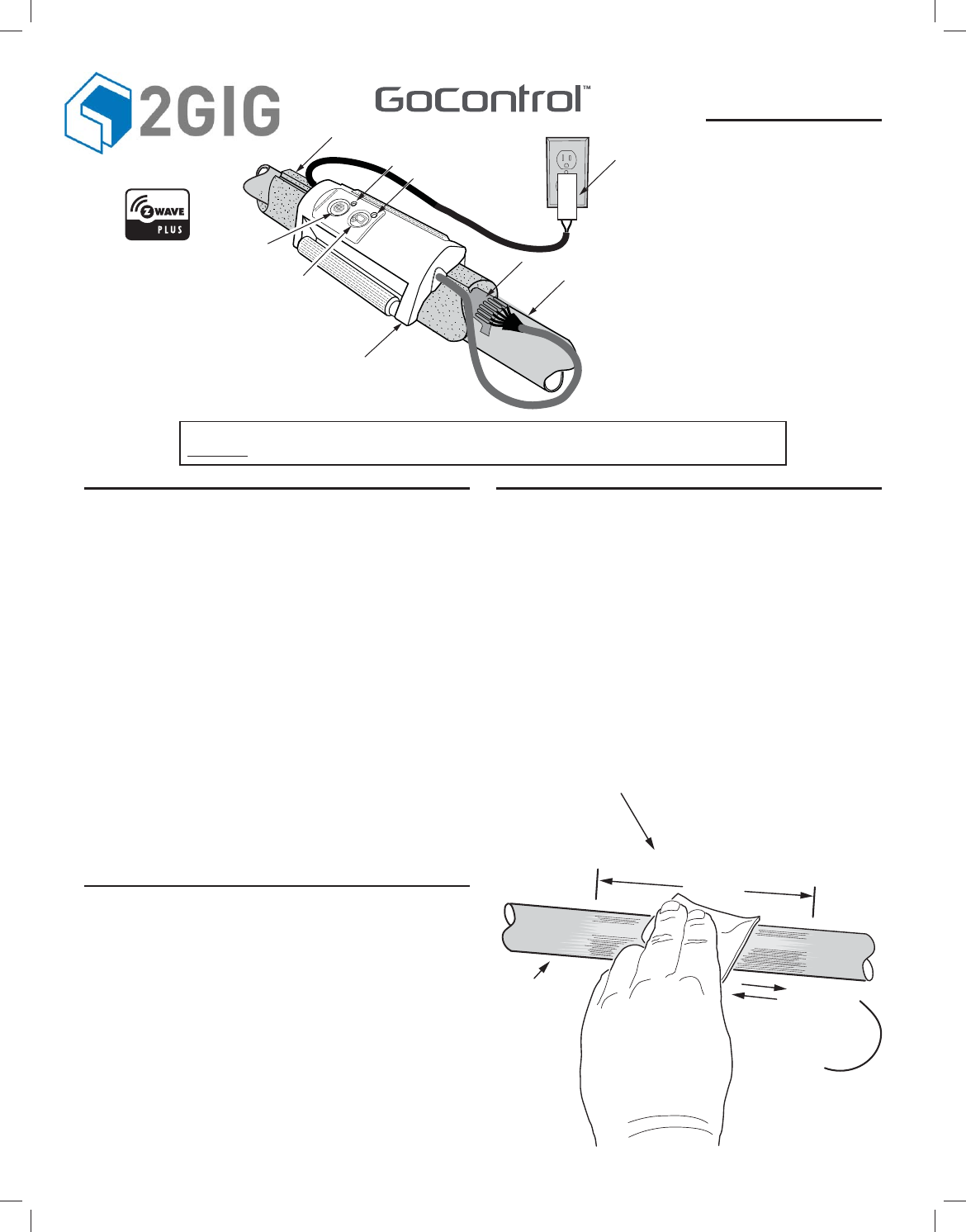
The WL00Z-1 Smart Flow detector module straps on a water pipe over the
foam pipe insulator covering the stick-on sensor strip that directly contacts the
pipe. The sensor strip that detects water fl ow plugs into the detector module.
The detector module is powered by a UL Listed plug-in power supply that also
plugs into the detector.
Pipe Preparation
1. Examine the water piping of the installation. Find the incoming line from
the meter or the line to be monitored. The WL00Z-1 must be installed
indoors on a copper pipe 3/4 to 1”diameter. Monitoring of PVC,cast iron,
galvanized or any other type of pipe is not supported.
2. Determine the direction of the water fl ow through the pipe to be monitored.
3. Clean a 6” section of the pipe with the included abrasive cleaning pad.
To ensure good contact with the fl ow sensor, be sure to clean completely
around the pipe.
PRINTER’S INSTRUCTIONS:
INSTR, INSTL, WL00Z-1, GO CONTROL; P/N: 10008194 B; INK: BLACK; MATERIAL: 20# MEAD BOND; SIZE: FLAT 17.000” x 11.000”, FOLDED 8.500” x 11.000”; TOLERANCE ± .125”; SCALE: 1-1
WL00Z-1
Z-Wave Radio Frequency (RF) Controlled
Pipe Mounted Flow Detector
NOTE: This unit must be added to the Network only where it will be permanently installed. The proper operation of this node in the
mesh network is dependent on it knowing its location with respect to other nodes. You cannot “test bench” confi gure this unit, then install.
Z-Wave® and Z-Wave Plus® are registered trademarks of Sigma Designs
and its subsidiaries in the United States and other countries.
COPPER
WATER PIPE
CLEAN A 6-INCH AREA
OF THE WATER PIPE
WHERE THE SENSOR STRIP
WILL CONTACT THE PIPE
6 INCHES
CLEAN ALL THE WAY
AROUND THE PIPE
PIPE INSULATOR
COPPER WATER
SUPPLY PIPE
LEARN INDICATOR
WLOOZ-1 FLOW
DETECTOR
CALIBRATE INDICATOR
LEARN
BUTTON
CALIBRATE
BUTTON
PLUG-IN
POWER
SUPPLY
FLOW SENSOR STRIP
2
Flow Detector Installation
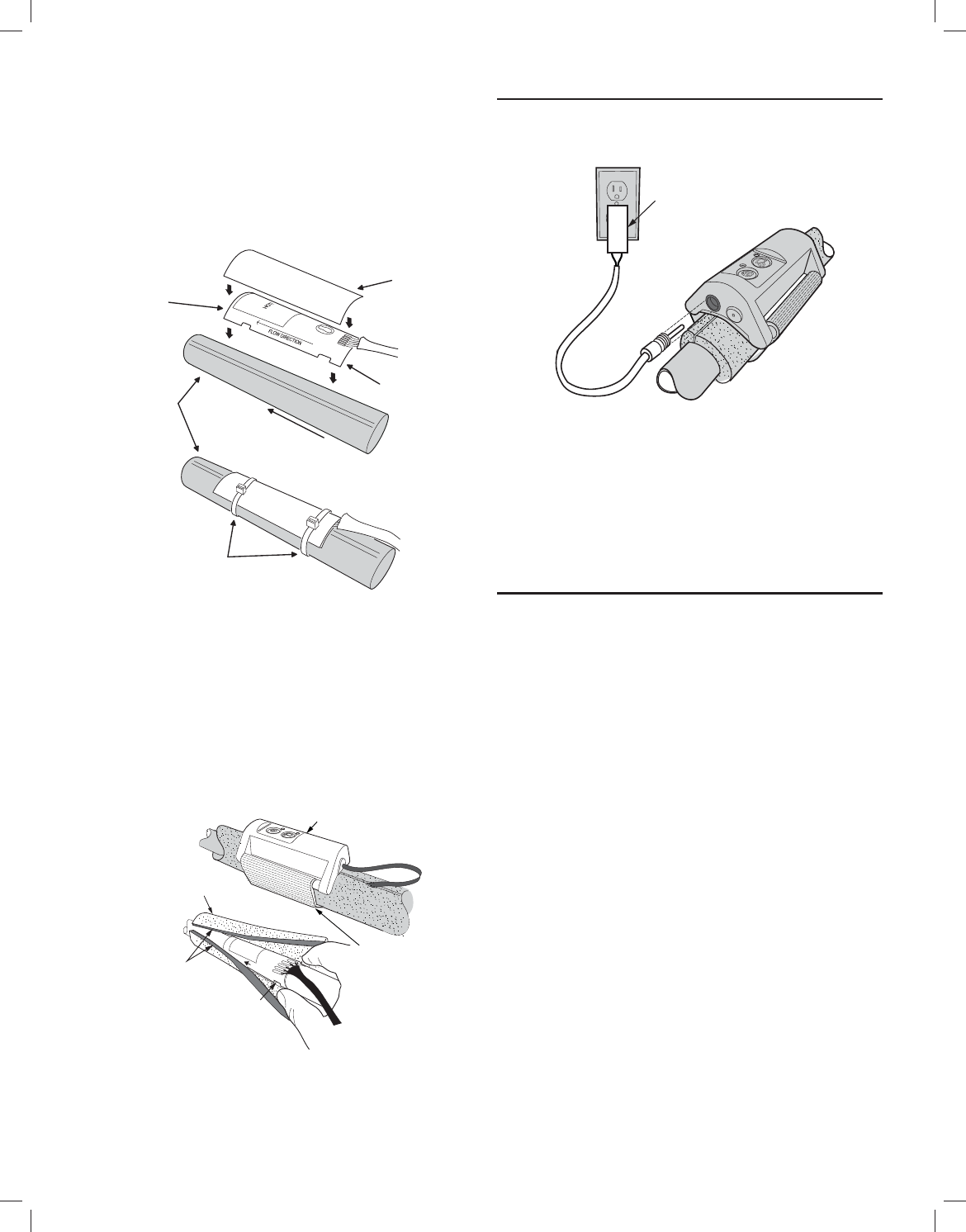
1. Look for the water fl ow direction arrow on the stick-on sensor strip.
2. Carefully peel off the stick-on sensor strip backing and affi x the sensor strip
long-wise to the cleaned off section of the pipe. Be sure the water fl ow
direction in the pipe matches the fl ow direction arrow on the sensor
strip.
3. Position the red silicone insulator completely over the sensor strip, then
secure the insulator and sensor to the pipe with two evenly spaced wire
ties (included).
Flow detector Module Installation
1. Fit the gray foam pipe insulator over the sensor assembly and onto the pipe
with the sensor cable exiting one end of the pipe insulator.
2. Fit the fl ow detector over the gray foam pipe insulator.
3. Secure the fl ow detector to the pipe using the attached hook and loop strap.
Power Supply Installation
1. Insert the power supply connector into the power input plug on the side of
the fl ow detector.
2. Plug the power supply into a non-switched 120 VAC outlet.
3. The green indicator on the fl ow detector should light.
CALIBRATION
Before the fl ow detector can accurately measure the water fl ow in the
monitored pipe, it will need to be calibrated. Perform the following steps to
calibrate the unit.
1. Turn off the water to the home by closing the incoming water line valve at
nearest point to entry of home (typically the valve to turn off water is near
where it enters the home).
2. Press the CALIBRATE button on the fl ow detector. The red and green
indicators will alternatively blink every second.
3. Wait for the calibration process (about 30 seconds).
4. The system will confi rm that the calibration is completed. by fl ashing the
Green LED three (3) times and then staying on. If the calibration failed, the
Red LED will fl ash three (3) times and stay Red.
5. Turn the water back on to the home.
OPERATION
Once installed and calibrated, the Smart Flow detector will continuously
monitor the water fl owing through the pipe. If water is running continuously at a
rate of approximately ten (10) oz. per minute, an alert will be sent to the Z-Wave
hub. The default Water Flow Time for the Smart Flow detector is 21 minutes.
You can change the Water Flow Time from 14 to 350 minutes (see
Confi guration). The Smart Flow detector will send an alert based on the Water
Flow Time with a variation of up to seven (7) minutes. So out of the box, the
Smart Flow detector will send an alert if water is fl owing for 21 to 28 minutes.
If the Water Flow Time is changed to 14 minutes, an alert will be sent between
14 and 21 minutes.
✓Note: It may take up to seven (7) minutes for a water fl owing alert to be
cleared.
✓Note: This product should be tested periodically to make sure it is working
properly. The product, if used properly, may reduce the risk of water
damage. However it may fail to warn for a variety of reasons, including, but
not limited to improper installation or positioning, improper maintenance,
component failures, Z-Wave communication failures, water fl ow may be
outside of the product’s designed range of ten (10) oz. per minute and
certain environmental conditions may impact performance.
FLOW
SENSOR
SILICONE
INSULATOR
COPPER
WATER
PIPE
WATER FLOW
DIRECTION
PEEL OFF
ADHESIVE
BACKING
SECURE SENSOR AND
INSULATOR TO WATER PIPE
WITH TWO ZIP TIES
PLUG POWER
SUPPLY INTO
OUTLET
PLUG POWER
SUPPLY INTO
DETECTOR
HOOK AND LOOP
STRAP
PLUG SENSOR CABLE
INTO DETECTOR
DETECTOR
FLOW DIRECTION
FIT PIPE INSULATOR
OVER SENSOR
STICK TOGETHER
SENSOR
3
e
o
t
r
n
e
e
y
a
e
e
r
e
.
n
e
g
r
t
,
e
d
Z-WAVE PROGRAMMING
Adding to a Network:
Refer to your Controller operating instructions to add this device under the
command of the Wireless Controller.
6. With your Controller in Discovery or Add Mode, press the LEARN button.
The green indicator will blink slowly.
7. When the Smart Flow Detector is added, the green indicator will blink
quickly three times, then stay on.
8. You should see an indication on your Controller that the “device was added”
to the network and the green indicator will turn off.
9. The device will appear in the list of sensors at the hub.
If the Controller/Gateway shows the addition failed, the red indicator will fl ash
three times then stay on. If this occurs, repeat Steps 1-3.
✓NOTE: If you have trouble adding the WL00Z-1 to a group it may be that
the Home ID and Node ID were not cleared from it after testing. You must
fi rst “RESET UNIT” to remove it from the network. Although adding it to a
group includes it in the network, removing it from a group does not remove it
from the network. If removed from a group, it functions as a repeater (only).
“RESET UNIT” removes it completely from the network.
To Reset Unit (If Required):
In the event that your primary Controller is lost or otherwise inoperable, to reset
the WL00Z-1 and clear all network information, follow these steps:
1. Press the LEARN button fi ve (5) times quickly. The green indicator will start
to blink quickly.
2. Immediately press and hold the CALIBRATION button for 15 seconds.
3. The green indicator will turn off when the reset is successful.
Removing from a Network:
The WL00Z-1 can be removed from the network by the Controller/Gateway.
Refer to the Controller operating instructions for details.
1. Set the Controller into Removal Mode.
2. Press the LEARN button.
3. The green indicator will begin to blink slowly. When the Smart Flow Detector
is successfully removed, the green indicator will blink quickly three times
then stay on.
4. You should see an indication on your Controller that the device was removed
from the network.
✓NOTE: If the Controller/Gateway shows the remove failed, the red indicator
will fl ash three times and stay on. If this occurs, repeat Steps 1-3.
CONFIGURATION
The WL00Z-1 supports the Confi guration command. It can be confi gured to
operate slightly differently than how it works when you fi rst install it.
Using the Confi guration command you can confi gure the following:
Flow Detection Alert Timing
By default, the WL00Z-1 will send an alert after approximately 21 minutes of
continuous water fl ow.
The length of time for continuous water fl ow before an alert is sent can be
set to a minimum of 14 minutes and a maximum of 350 minutes by using the
Confi guration Command Class, Parameter 0.
By default, the WL00Z will send an alert when water is running from 21 to
27minutes.
Parameter Length Valid Values Confi guration Option
02
Bytes
2 to 50
in whole
number
increments.
Default =3
Alert is sent when water is
fl owing for x 7 + 7minutes
Associations
The WL00Z-1 supports one level of Z-Wave association.
Group 1 association is used to identify another Z-Wave device in the network
that will receive unsolicited state changes and notifi cation (alarm) events.
For instructions on how to “set lifeline association” please refer to your wireless
controller instructions.
INDICATOR LEGEND
GREEN
INDICATOR
RED
INDICATOR DESCRIPTION
Solid Off
Powered on with no error conditions.
(Note: the unit can be uncalibrated and/or
unpaired in this state)
Blinks every
second Off
Indicates the WL00Z-1 is in the process
on Learning or Unlearning into a Z-Wave
network.
Fast blink
(200ms) for
3 seconds,
then Solid
Off Indicates the WL00Z-1 succeeded Learning
or Unlearning into a Z-Wave network.
Super fast
(100ms) blink Off
This is the result of tapping the Learn
button 5 times within 2 seconds to initiate a
Z-Wave reset of the WL00Z-1
This is the fi rst step, the second step is to
then hold down the Calibrate button for 15
seconds.
If the Calibrate button is not held down
during this state, it will end after 5 seconds.
Solid Blink every
second The WL00Z-1 detects water fl owing.
Blink every
400ms,
alternately
with Red LED
Blink every
400ms,
alternately
with Green
LED
Indicates the WL00Z-1is in the process of
Calibration.
Off Solid
Indicates the last action performed by
the WL00Z-1 failed. This can be Learn or
Unlearn into the Z-Wave network, or a failed
Calibration.
Off Blink every
second
The WL00Z-1detects water fl owing, after the
last action performed by the WL00Z-1 failed.
Off
Fast blink
(200ms) for
3 seconds,
then Solid
Indicates the WL00Z-1 failed Learning or
Unlearning into a Z-Wave network.
SPECIFICATIONS
Power: 120 VAC, 60 Hz Input, 14V 1700 mA Output
Signal (Frequency): 908.42 MHz / 916 MHz
Range: Up to 130 feet line of sight
REGULATORY INFORMATION
The WL00Z-1 is certifi ed to comply with applicable FCC and IC rules and regulations governing RF and EMI emissions.
This device complies with part 15 of the FCC Rules. Operation is subject to the following two conditions: (1) This device
may not cause harmful interference, and (2) This device must accept any interference received, including interference
that may cause undesired operation.
FCC Notice
This equipment has been tested and found to comply with the limits for a Class B digital device, pursuant to Part 15 of
the FCC Rules. These limits are designed to provide reasonable protection against harmful interference in a residential
installation.
This equipment generates, uses, and can radiate radio frequency energy and, if not installed and used in accordance
with the instructions may cause harmful interference to radio communications. However, there is no guarantee that
interference will not occur in a particular installation. If this equipment does cause harmful interference to radio or
television reception, which can be determined by turning the equipment off and on, the user is encouraged to try to
correct the interference by one or more of the following measures:
• Reorient or relocate the receiving antenna.
• Increase the separation between the equipment and receiver
• Connect the equipment into an outlet on a circuit different from that to which the receiver is connected
• Consult the dealer or an experienced radio/TV technician to help.
• Changes or modifications not expressly approved by the party responsible for compliance could void the user’s
authority to operate the equipment
IC Notice
This Class B digital apparatus complies with Canadian ICES-003
Cet appareil numérique de la classe B est conforme à la norme NMB-003 du Canada. Le présent appareil est conforme
aux CNR d’Industrie Canada applicables aux appareils radio exempts de licence. L’exploitation est autorisée aux deux
conditions suivantes : (1) l’appareil ne doit pas produire de brouillage, et (2) l’utilisateur de l’appareil doit accepter tout
brouillage radioélectrique subi, même si le brouillage est susceptible d’en compromettre le fonctionnement.
This device complies with the Industry Canada license exempt RSS standard(s). Operation is subject to the following
two conditions: (1) this device may not cause interference, and (2) this device must accept any interference, including
interference that may cause undesired operation of the device.
WARRANTY
What is Covered?
Nortek Security & Control (“NS&C”) warrants to consumers who purchase this product for personal, family or
household purposes new from NS&C directly or from an authorized NS&C dealer, that the product will be free from
defects in materials and workmanship for a period of (1) year from the date of purchase. This warranty only applies if
the product is installed at a residence in the 50 United States or District of Columbia, and only at the site of the original
installation. It is not transferable. This warranty is not extended to resellers.
If a defect exists, NS&C will have you ship the defective part or product to us and we will, at our option, either repair
or replace it. This warranty does not cover the cost of labor to remove a defective part or product or to reinstall any
repaired or replacement part or product.
This warranty does not cover defects or damages caused by improper handling, maintenance, storage, installation,
removal or re-installation, misuse, non-factory authorized modifi cation or alteration, use of incompatible accessories,
electrical power problems or surges, impact by foreign objects, accident, fi re, acts of God, normal wear and tear
or shipping damage other than a shipment from NS&C. Note that all NS&C products are designed to be installed,
removed and serviced by trained individuals or professionals.
Keep your original sales receipt as it will be required to obtain warranty service.
This warranty shall not be extended or restarted upon receipt of any repaired or replacement part or product under this
warranty. No person is authorized to extend or otherwise modify this warranty.
How do I Obtain Warranty Service?
To obtain warranty service, email our Returns Department at returns@nortek.com. Include your name, address,
telephone number, the model number of your product, a copy of your original sales receipt, and a description of the
problem. Unless we need to discuss the situation further with you, you will be emailed a Return Authorization Number
and shipping instructions. If we need to discuss the situation further with you, we will call or email you. NS&C may
require troubleshooting on installed product before a Return Authorization Number is issued. Anything shipped to us
without a Return Authorization Number will be automatically returned unopened. You are responsible for the charges
for shipment to us, unless you are a California resident.
Limitations
THE DURATION OF ANY IMPLIED WARRANTY, INCLUDING THE WARRANTIES OF
MERCHANTABILITY AND FITNESS FOR A PARTICULAR PURPOSE, SHALL NOT
EXCEED THE WARRANTY PERIOD PROVIDED HEREIN.
Some states do not allow limitations on how long an implied warranty lasts, so the above limitation may not apply
to you.
NS&C SHALL NOT BE LIABLE FOR ANY INCIDENTAL OR CONSEQUENTIAL
DAMAGES RESULTING FROM THE BREACH OF ANY WRITTEN OR IMPLIED
WARRANTY.
Some states do not allow the exclusion or limitation of incidental or consequential damages, so the above limitation
or exclusion may not apply to you.
This warranty gives you specifi c legal rights, and you may also have other legal rights which vary from State to State.
IMPORTANT !!!
Radio controls provide a reliable communications link and fi ll an important need in portable wireless signaling.
However, there are some limitations which must be observed.
• For U.S. installations only: The radios are required to comply with FCC Rules and Regulations as Part 15 devices.
As such, they have limited transmitter power and therefore limited range.
• A receiver cannot respond to more than one transmitted signal at a time and may be blocked by radio signals that
occur on or near their operating frequencies, regardless of code settings.
• Changes or modifications to the device may void FCC compliance.
• Infrequently used radio links should be tested regularly to protect against undetected interference or fault.
• A general knowledge of radio and its vagaries should be gained prior to acting as a wholesale distributor or dealer,
and these facts should be communicated to the ultimate users.
Copyright © 2016 Nortek Security & Control LLC 10008194 B