North tech Group NT-Z3 Headphone User Manual
North tech Group corp Headphone Users Manual
User Manual
030201
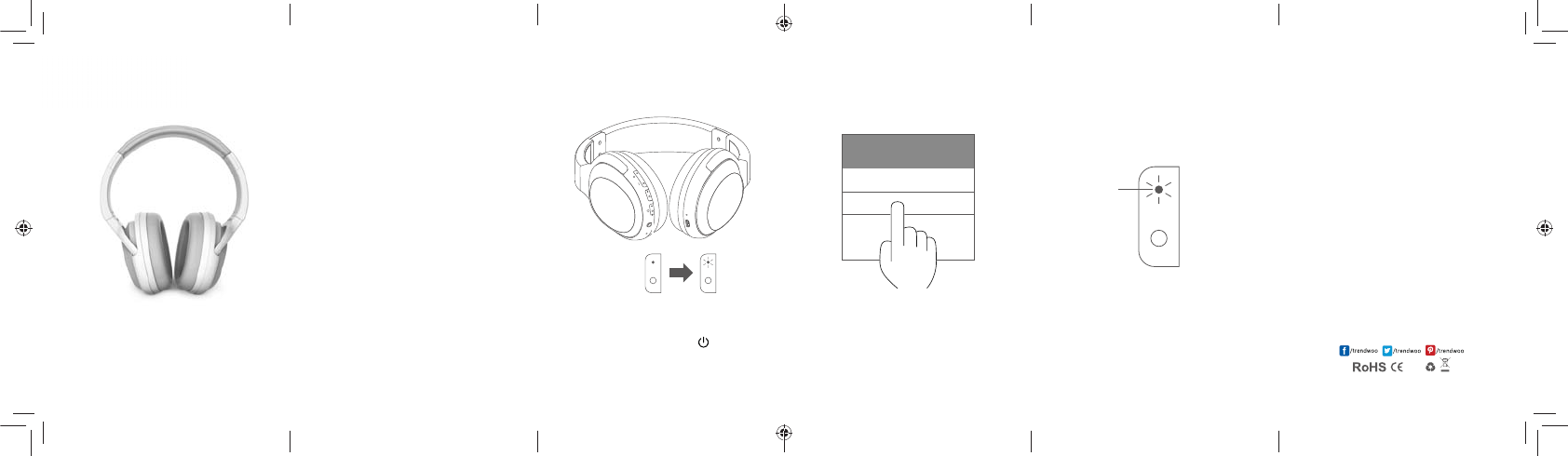
Step1 Power on
Press for 2 seconds until red and blue indicator ashes
alternatively, then entering the setting and swith on
the Bluetooth in cell phone
Step2 Choose the device
Find the Zod from the Bluetooth name list
in the phone
Step3 Connection nish
In the phone, it shows Zod is connected, the blue
indicator ashes, it means the connection succeeded
and you can start to play music.
BLUETOOTH CONNECTION
Bluetooth
My device
Zod
Indicator
NC
CONTENTS
Bluetooth connection-------01~03
Basic operation-----------------04~05
Ports description---------------06
Specications-------------------07
Simple troubleshooting------08
Safety notice--------------------09
Zod
Bluetooth Active Noise
Cancellation Headphone
Insctruction user manual
www.trendwoo.com
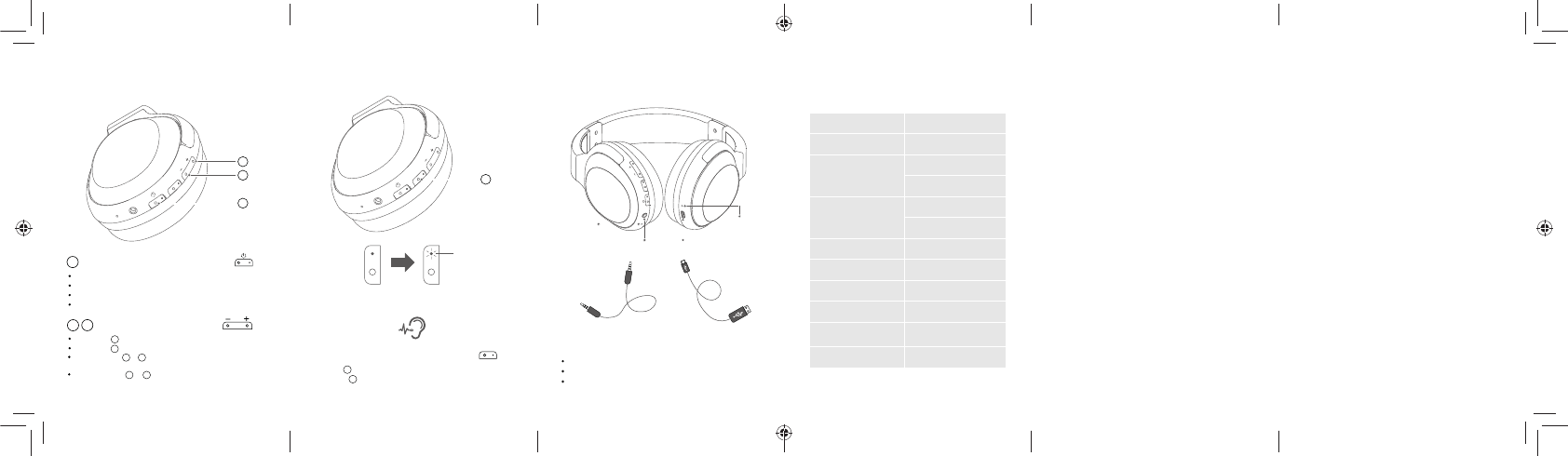
Power/Multi-function
button
If any questions, please email support@trendwoo.com for inquiry or website visit.
MADE IN CHINA
090807060504
Noise cancellation function /$
-POHQSFTT GPSTFDPOETGPS/$0/UIFJOEJDBUPSUVSOTHSFFO
-POHQSFTT GPSTFDPOETGPS/$0''UIFJOEJDBUPSHFUTP
MIC
Micro USB port3.5mm aux cable port
During charging, red LED is ON
When charging is nished, green LED is on
When battery is low, red LED ashes slowly
Charging LED Indicators:
Product name Zod
Model TR-HP901
Phone call talking
time
NC ON: 15~18Hs
NC OFF: 26~29Hs
Music play time
NC ON: 12~14Hs
NC OFF: 18~23Hs
Charging time 2~3Hs
Battery Capacity 500mAh
Battery voltage 3.7V
Charging current 5V/400mA
Dimensions 80 x 171.5 x 188mm
Weight 222g
Volume control buttons
Short press to turn up and long press to next track.
Short press to turn down and long press to previous track.
Press and hold & together for 2 seconds to disconnect
the current pairing (under Bluetooth connection mode).
Press and hold & together for 5 seconds to default
setting (under Bluetooth pairing mode).
NC
NC
Short press for pause/play
When a call is coming, short press to answer
During call conversation, short press to hang o
When a call is coming, double click to refuse the call
Power/Multi-function button
NC
BASIC OPERATION PORTS DESCRIPTION PRODUCT SPECIFICATIONS
Indicator
Indicator
SAFETY NOTICE
For safety purpose rstly to read and obey
below notices
Any sharp cutting edge, Non-smoothy surface, metal
accessories and package will cause harm injury and
bleeding, please be careful during use. Its not edible
please make sure its beyond the reach of children.
Please don’t modify, x or disassemble this product.
Inappropriate handle may cause short-circuit, damage
or re. Its not accepted for repairing if its disassembled
by users.
Please don’t clean the headphone's surface by detergent
and liquid, only by dry cloth to clean.
Inappropriate adjustment of the volume(such as frequent
adjustment) will aect the sound quality or cause damage.
Try to avoid drop, clash or crack or don’t use under dangerous
environment (such as lab) because it may cause interference.
If anything abnormal happens please stop immediately. It
may cause explosion under open re and high temperature
environment.
SIMPLE TROUBLESHOOTING
When you meet below problems please refer to below ways
to solve, if the problems cant be solved please contact with
the local distributors. Don’t x by yourself. Avoid electric
shock or enlarge the trouble scape.
1. What if no sound from the headphone?
To check if its connected and power on again.
To check if the Line in status.
2. What if the distortion happens when the
volume is max.
To make sure the headphone is put on in the
correct way and the battery power is sucient.
To make sure the audio cable is not loose and
make sure it is properly connected.
FCC RF Exposure Information and Statement
The device has been evaluated to meet general RF exposure requirement. The device can be used
in portable exposure condition without restriction.
FCC Warning
This device complies with Part 15 of the FCC Rules. Operation is subject to the following two
conditions:
(1) This device may not cause harmful interference, and (2) this device must accept any
interference received, including interference that may cause undesired operation.
NOTE 1: This equipment has been tested and found to comply with the limits for a Class B digital
device, pursuant to part 15 of the FCC Rules. These limits are designed to provide reasonable
protection against harmful interference in a residential installation. This equipment generates, uses
and can radiate radio frequency energy and, if not installed and used in accordance with the
instructions, may cause harmful interference to radio communications. However, there is no
guarantee that interference will not occur in a particular installation. If this equipment does cause
harmful interference to radio or television reception, which can be determined by turning the
equipment off and on, the user is encouraged to try to correct the interference by one or more of
the following measures:
- Reorient or relocate the receiving antenna.
- Increase the separation between the equipment and receiver.
-Connect the equipment into an outlet on a circuit different from that to which the receiver is
connected.
-Consult the dealer or an experienced radio/TV technician for help.
NOTE 2: Any changes or modifications to this unit not expressly approved by the party
responsible for compliance could void the user's authority to operate the equipment.