Nubia Technology NX597J LTE Digital Mobile Phone User Manual UM

Nubia Technology Co., Ltd. LTE Digital Mobile Phone UM

User Manual

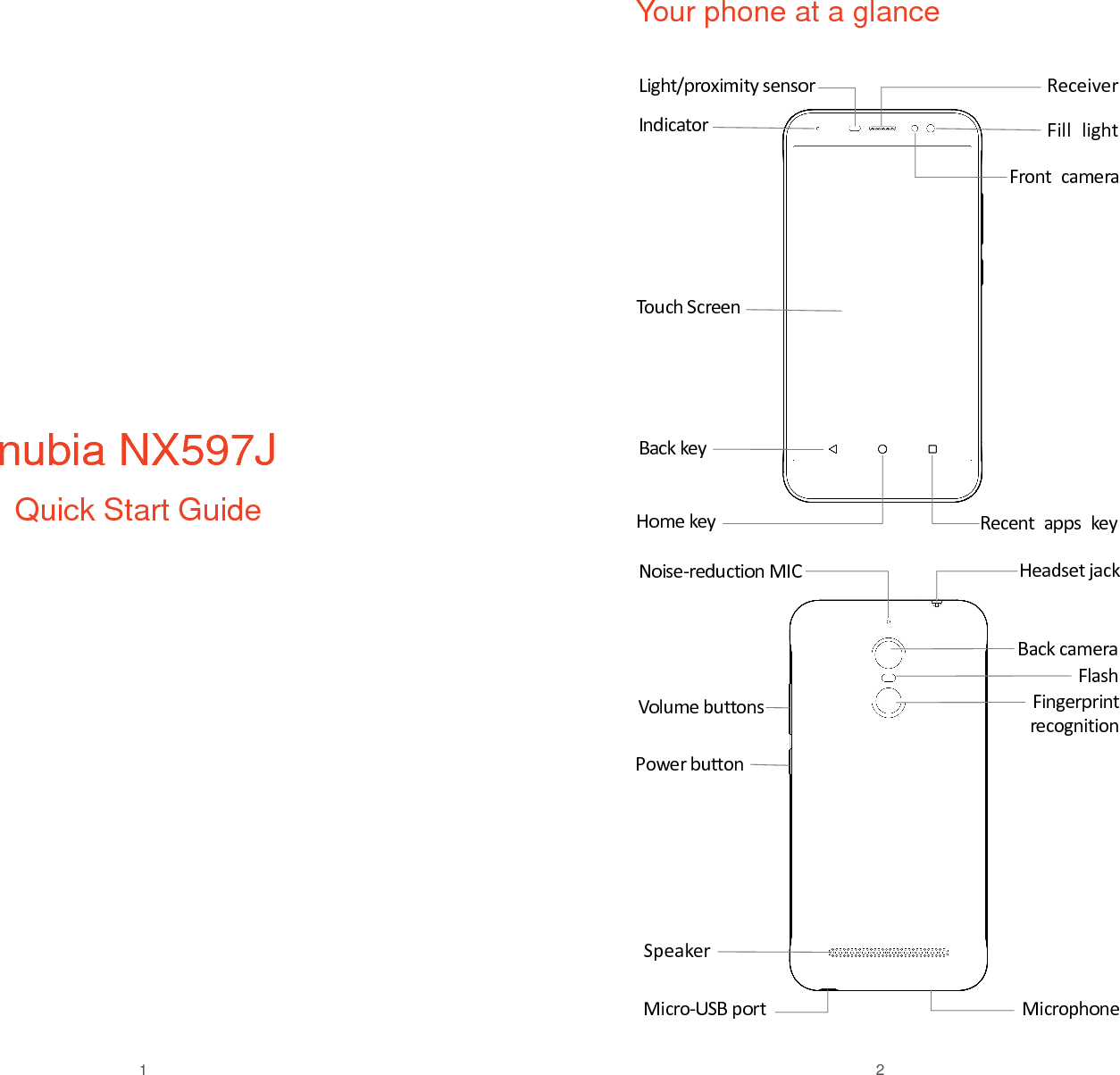
 1              nubia NX597J  Quick Start Guide       2 Your phone at a glance    Light/proximity sensor  Back key Indicator Volume buttons Power button Noise-reduction MIC Back camera Flash Speaker Home key  Speaker Recent  apps key Touch Screen  ReceiverFront  camera Headset jack  Fingerprint recognition Microphone Micro-USB port Fill  light
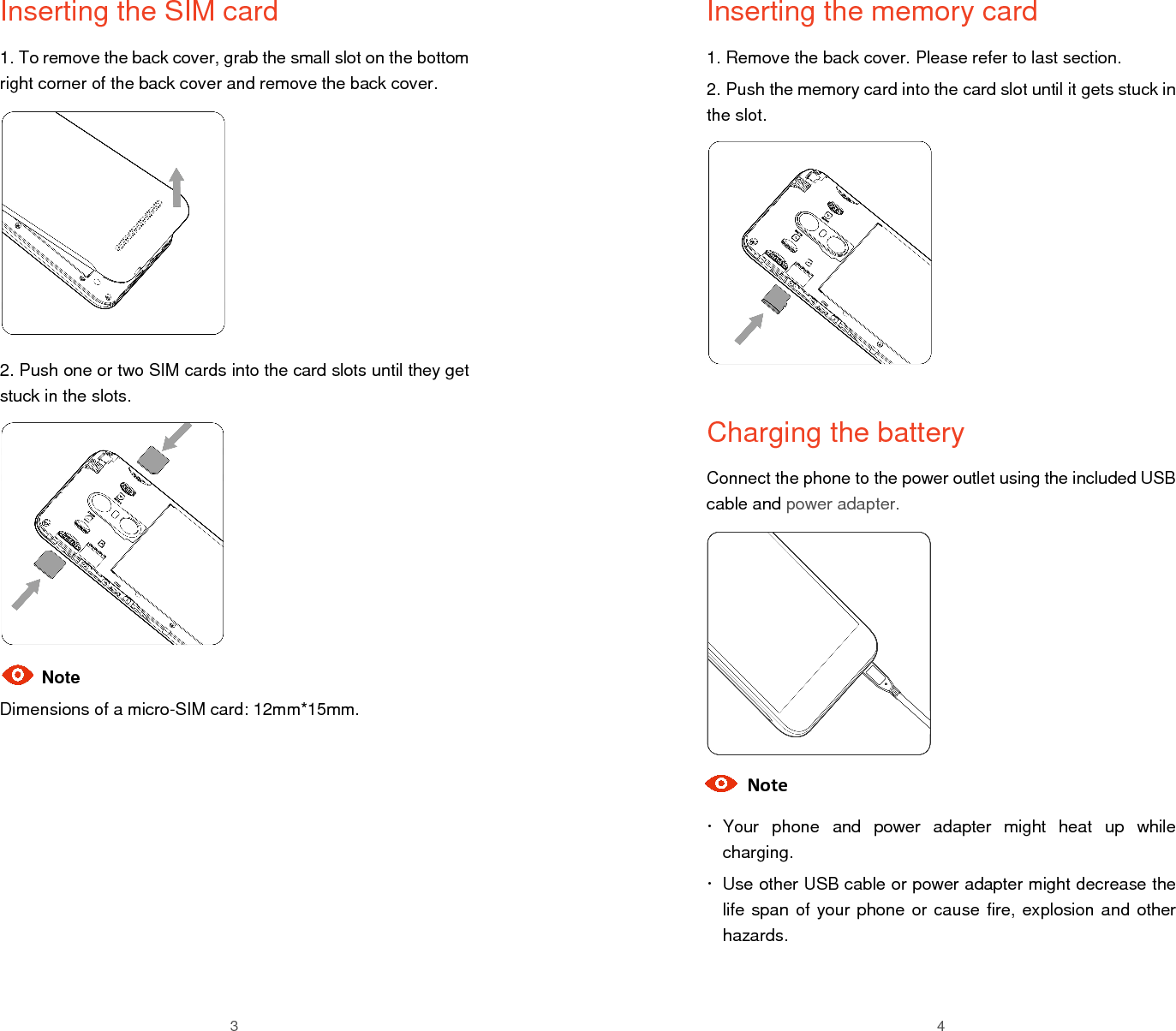
 3 Inserting the SIM card 1. To remove the back cover, grab the small slot on the bottom right corner of the back cover and remove the back cover.         2. Push one or two SIM cards into the card slots until they get stuck in the slots.        Note Dimensions of a micro-SIM card: 12mm*15mm.       4 Inserting the memory card 1. Remove the back cover. Please refer to last section. 2. Push the memory card into the card slot until it gets stuck in the slot.          Charging the battery Connect the phone to the power outlet using the included USB cable and power adapter.          Note   Your  phone  and  power  adapter  might  heat  up  while charging.   Use other USB cable or power adapter might decrease the life span of your phone or cause fire, explosion and other hazards.
 5 Disposal of your old phone   When the wheelie bin symbol is attached to a product, it means the product is covered by the European Directive 2012/19/EU.  All electrical and electronic products should be disposed of  separately  from  normal  household  waste  via  designated collection points provided by government or local authorities.  The correct disposal of electrical and electronic products will help protect the environment and human health.  Declaration of RoHS Compliance We’re determined to reduce the impact we have on the environment and take responsibility for the earth we live on. So this document allows  us  to  formally  declare  that  the  NX597J,  manufactured  by Nubia  Technology  Co.,  Ltd,  fully  complies  with  the  European Parliament’s RoHS (Restriction of Hazardous Substances) Directive 2011/65/EU, with respect to all the following substances: (1) Lead (Pb) (2) Mercury (Hg) (3) Cadmium (Cd) (4) Hexavalent Chromium (Cr (VI)) (5) Polybrominated biphenyl (PBB) (6) Polybrominated diphenyl ether (PBDE) Our  compliance  is  witnessed  by  written  declaration  from  our suppliers.  This  confirms  that  any  potential  trace  contamination levels of the substances listed above are below the maximum level set by EU 2011/65/EU, or are exempt due to their application. The NX597J manufactured by Nubia Technology Co., Ltd meets all the requirements of EU 2011/65/EU.     6 Safety warning   To  prevent  possible  hearing  damage  when  using  a headset, do not use high volume for long period.   Use  the  earphone  carefully.  Excessive  sound pressure from headsets and headphones can cause hearing loss.   Adapter shall be installed near the equipment and shall be easily accessible.  The  phone's  normal  operating  temperature is  -10℃  ~  45℃.  In order  to  ensure  the  normal  phone  functions,  do  not  use  this phone outside the temperature range.     FCC Regulatory Compliance  FCC Regulations: This mobile phone has been tested and found to comply with the limits for a Class B digital device, pursuant to Part 15 of the FCC Rules. These limits are designed to provide reasonable protection against  harmful  interference  in  a  residential  installation.  This equipment  generates,  uses  and  can  radiated  radio  frequency energy  and,  if  not  installed  and  used  in  accordance  with  the instructions,  may  cause  harmful  interference  to  radio communications. However, there is no guarantee that interference will  not  occur  in  a  particular  installation.  If  this  equipment  does cause  harmful  interference  to radio  or  television  reception,  which can be determined by turning the equipment off and on, the user is encouraged to try to correct the interference by one or more of the following measures: --Reorient or relocate the receiving antenna. --Increase the separation between the equipment and receiver. --Connect the equipment into an outlet on a circuit different from that to which the receiver is connected. --Consult the dealer or an experienced radio/TV technician for help. Caution: Changes  or  modifications  not  expressly  approved  by  Nubia Technology Co., Ltd. for compliance could void the user‘s authority to operate the equipment.
7  RF exposure information (SAR) This phone is designed and manufactured not to exceed the emission limits for exposure to radio frequency (RF) energy set by the Federal Communications Commission of the United States.  This device is complied with SAR for general population /uncontrolled exposure limits in ANSI/IEEE C95.1-1992 and had been tested in accordance with the measurement methods and procedures specified in IEEE1528.  The FCC has granted an Equipment Authorization for this model phone with all reported SAR levels evaluated as in compliance with the FCC RF exposure guidelines. SAR information on this model phone is on file with the FCC and can be found under the Display Grant section of www.fcc.gov/oet/ea/fccid after searching on FCC ID: 2AHJO-NX597J. The SAR limit set by the FCC is 1.6W/kg. The highest reported SAR value for this device when using against the head is 0.95 W/kg, for usage near the body is 1.03 W/kg. Body worn operation SAR compliance for body-worn operation is based on a separation distance of  10 mm  between the  unit and  the human  body. Carry this  device  at  least  10  mm  away  from  your  body  to  ensure  RF exposure level compliant or lower to the reported level. Ensure that the  device  accessories,  such  as  a  device  case  and  device holster,  are  not  composed  of  metal  components.  Keep  the device away from your body to meet the distance requirement.  Note: This device does not support V.O.I.P. function. It means that the functions of WLAN and Bluetooth do not have voice capability in the held to ear mode for phone service. 8 Legal notice Copyright Statement Copyright © 2017 by Nubia Technology Co., Ltd. All  the  copyrights  of  this  document  herein  belong  to  Nubia Technology  Co.,  Ltd. Without  the  written  permission  of  copyright owner,  no  part of  this publication may be  excerpted, reproduced, translated by any person or entity in any form or by any means. This document is subject to change without prior notice. Nubia  Technology  Co.,  Ltd  keeps  the  right  to  make  the  final explanation to this document. Trademarks Android is a trademark of Google, Inc. All other trademarks remain the property of their respective owners. Statement of Third-party Applications During the installation process of some third-party applications, the issues  of  repeated  restart  or  abnormal  use  of  software  might  be caused by incompatibility of the third-party applications, rather than the phone itself.   Please download your software upgrade packages from the reliable official website. The  installation  of  a  third-party  ROM  or  non-official  operating system  might  bring  safety  risks  and  security  threats.  Nubia Technology Co., Ltd. shall not be liable for these risks and threats caused by upgrade of the operating system.

Navigation menu