User Manual

NIRSIT Version 1.0
Operation Manual
OBELAB Confidential 1
NIRSIT
Operator’s Manual
Date: April 07, 2016
Version: 1.0
OBELAB Inc.
Hyojae Bldg, 11F, 708-37, Yeoksam-dong,
Gangnam-gu, Seoul, Korea
Tel: +82-2-6407-3889
Fax: +82-2-6407-3891
Copyright 2015 All rights reserved. [CE/FCC Mark]

NIRSIT Version 1.0
Operation Manual
OBELAB Confidential 2
Table of Contents
NOTICE ............................................................................................................................. 3
SAFETY ............................................................................................................................ 3
1 Product features ....................................................................................................... 5
2 Product Overview ..................................................................................................... 7
2.1 External and Operational components ..................................................................................... 7
2.2 Application Software ............................................................................................................... 10
3Using the system .................................................................................................... 13
3.1 Operating NIRSIT ................................................................................................................... 13
3.2 Operating Application Software .............................................................................................. 15
3.3 NIRSIT Application Software Menu Usage ............................................................................ 16
3.3.1 NIRSIT APP user menu tree ....................................................................................... 16
3.3.2 Application Menu details ............................................................................................. 18
3.4 Operation Scenario ................................................................................................................. 39
4Product Specifications ........................................................................................... 41
5Maintenance ............................................................................................................ 42
5.1 Storage Conditions ................................................................................................................. 42
5.2 External Conditions ................................................................................................................ 42
5.3 Caution while Operation ......................................................................................................... 42
6Warranty and Repair .............................................................................................. 42
6.1 Customer’s Rights .................................................................................................................. 42
6.2 Warranty ................................................................................................................................. 42
6.3 Service for Fee ....................................................................................................................... 43
6.4 Quality Assurance Certificate ................................................................................................. 45
NIRSIT Version 1.0
Operation Manual
OBELAB Confidential 3
NOTICE
This manual is a copyrighted material explaining the system of OBELAB, Inc. (hereinafter
“OBELAB”). Use of any information in this material without prior approval of OBELAB is
strictly prohibited.
The contents in this manual are subject to amendment by OBELAB without prior notice.
SAFETY
Important! Before use, read this operator’s manual carefully and all accessory directions
for use, precautionary information and specifications.
This section contains important safety information related to general use of NIRSIT.
Please follow the instructions.
Warnings are identified by the WARNING symbol shown below.
Warnings alert you to potential serious outcomes (death, injury, or adverse events) to the
user. Failure to heed the warnings may result in potential serious outcomes.

NIRSIT Version 1.0
Operation Manual
OBELAB Confidential 4
FCC ( Federal Communications Commission)
This equipment has been tested and found to comply with limits for a Class B digital
device, pursuant to Part 15 of the FCC Rules. These limits are residential installation.
This equipment generates uses and can radiate radio frequency energy and, if not install
and use in accordance with the instructions, may cause harmful interference to radio
communications.
However, there is no guarantee that interference will not occur in a particular installation.
If this equipment dose cause harmful interference to radio or television reception , which
can be determined by turning the equipment off and on, the user is encouraged to try to
correct the interference by one or more of the following measures:
Reorient or relocate the receiving antenna.
Increase the separation between the equipment and receiver.
Connect the equipment into an outlet in a circuit different
from that to which the receiver is connected.
Consult the dealer or an experienced radio/ TV technical for help.
WARNING: this equipment may generate or use radio frequency energy. Changes or
modifications or this equipment may cause harmful interference unless the modifications
are expressly approved in the instruction manual. The user could lose the authority to
operate this equipment if an unauthorized change or modification is made.
This device complies with Par 15 of the FCC’s Rules. Operation is subject to the
following two Conditions:
1. This device may not cause harmful interference, and
2. This device must accept interference received, interference received, including
interference that may cause undesirable operation.
NIRSIT Version 1.0
Operation Manual
OBELAB Confidential 5
1 Product features
NIRSIT is a brain imaging system utilizing the functional near-infrared spectroscopy
and measures the changes in the hemoglobin level in the blood at the prefrontal
cortex region.
Functional Near Infrared Spectroscopy; fNIRS
NIRSIT uses two light waves in the ~700nm and ~800nm range. The device emits
light from the lasers pass through the cerebral cortex and measures the changes in
the hemoglobin level in the blood. The light is less than 5mW in power, so the use of
the device is harmless to the user. It is intended for use by researchers to monitor in
real-time the functionality of the brain during cognitive activities.
NIRSIT composition
Opening NIRSIT product package
Open the outer box and take out NIRSIT device and the accessories.
Fill out the warranty card and send it to OBELAB.
Register on OBELAB website www.obelab.com the serial number on NIRSIT
device
Read the Operator’s Manual
User would need adequate training before operating NIRSIT device
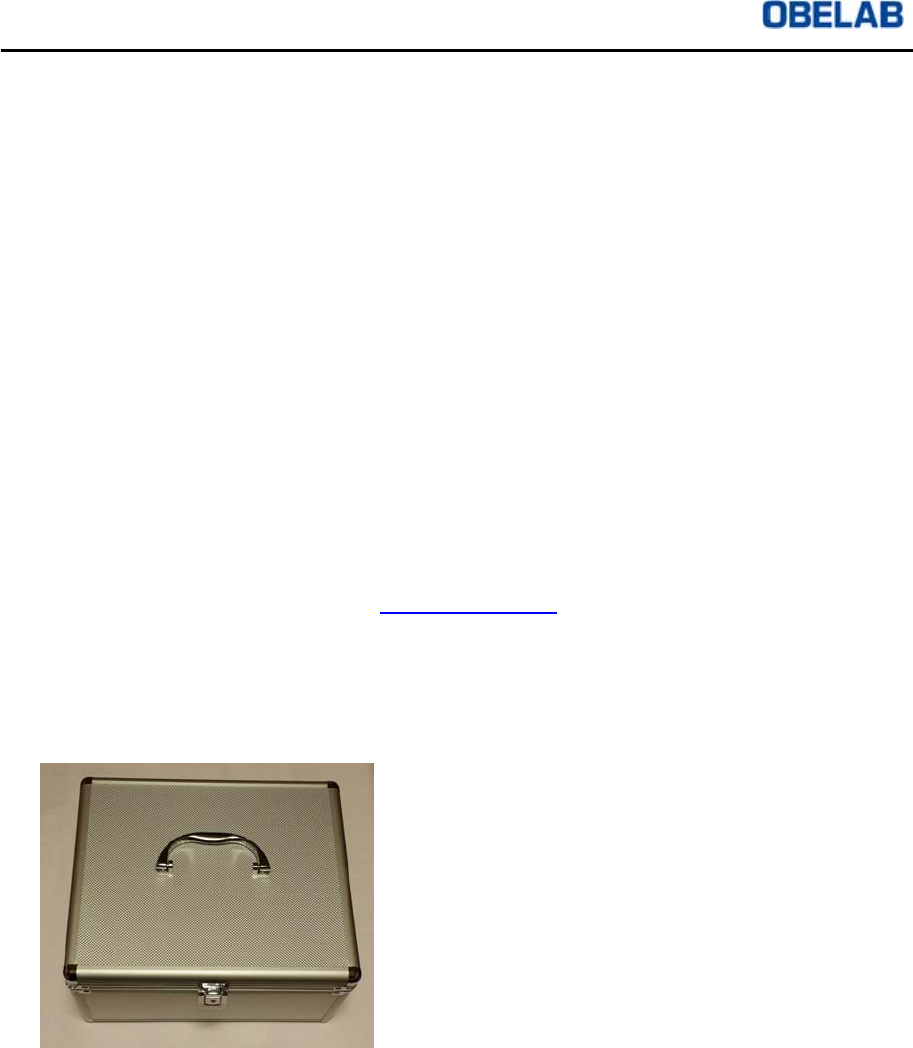
<Storage and Carry-on box for NIRSIT>
NIRSIT Version 1.0
Operation Manual
OBELAB Confidential 6
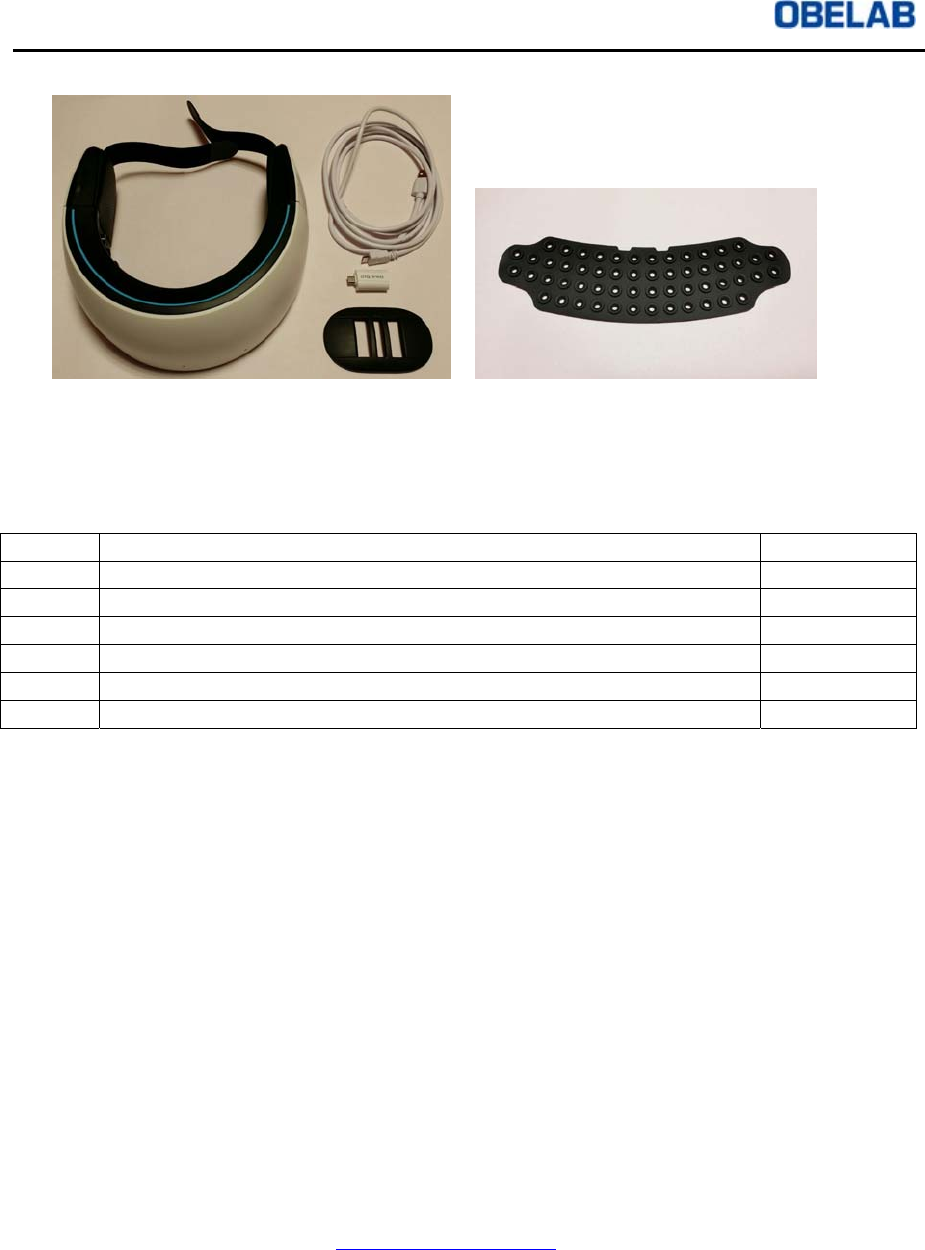
<NIRSIT device, strap holder, OTG connector, USB cable, silicon pad/sensor skin>
Figure 1. NIRSIT system components
No. Components Quantity
1 NIRSIT device 1
2 Strap holder 1
3 Sensor skin 1
4 USB cable 1
5 USB OTG Connector 1
6 Storage and Carry-on box for NIRSIT 1
Notes
Please note that the user will be unable to receive warranty service/repair through
OBELAB or its distributor in the event of any of the following:
1 Making unauthorized changes to NIRSIT device
2 Using unauthorized accessories
3 Not following instructions in the Operator’s Manual when operating NIRSIT device
4 Removal or switch of serial number on NIRSIT device
5 Storage or use of NIRSIT device, silicon pad/sensor skin, or battery in an
environment outside of the recommended conditions
All repair requests during the warranty period must be made by the purchaser of
NIRSIT system. Proof of purchase of NIRSIT system is required in order to receive
repair service within the warranty period. NIRSIT system must be used for the
intended purpose only in accordance with the instructions in the Operator’s Manual.
Please send all inquiries to contact@obelab.com.
NIRSIT Version 1.0
Operation Manual
OBELAB Confidential 7
2 Product Overview
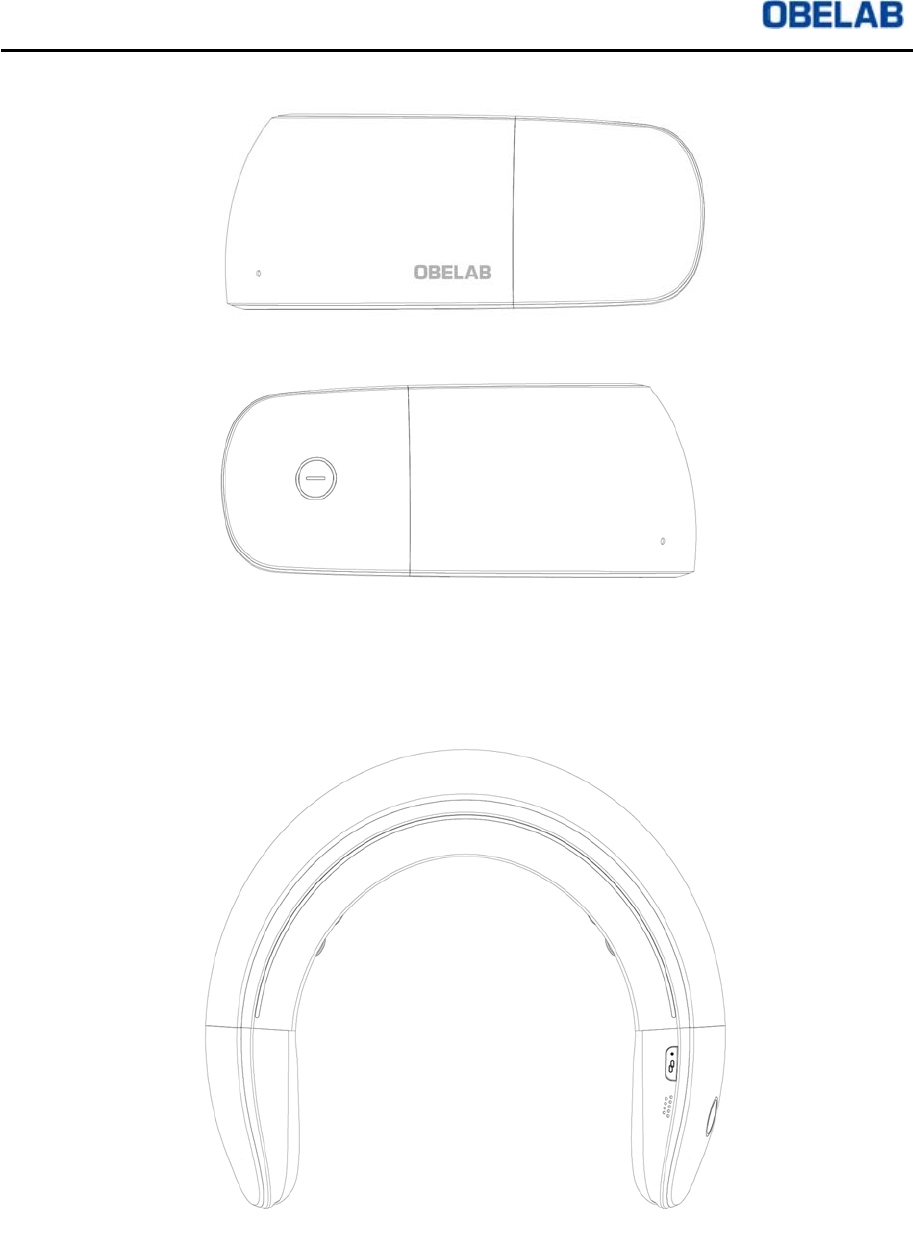
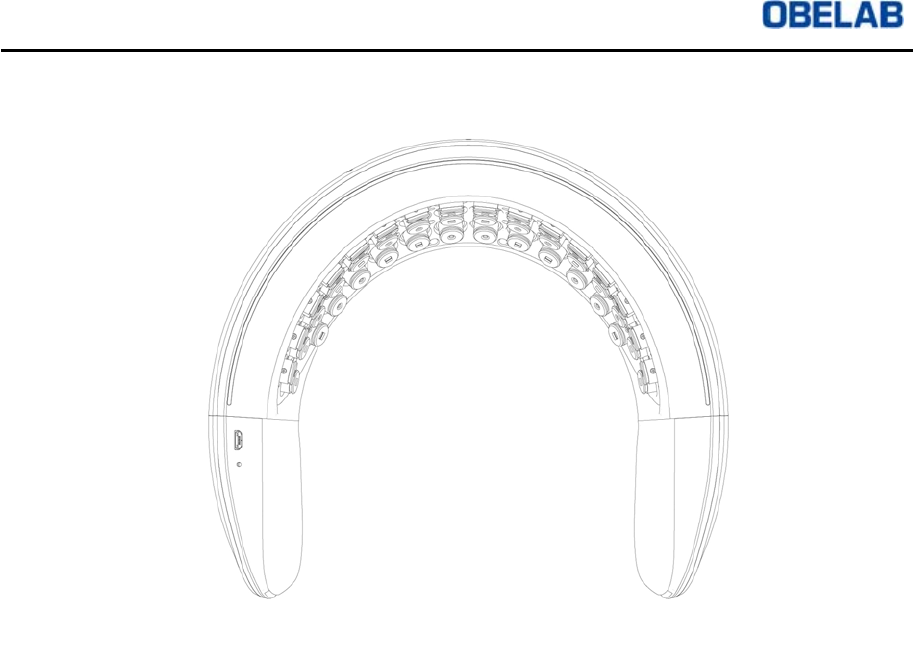
2.1 External and Operational components
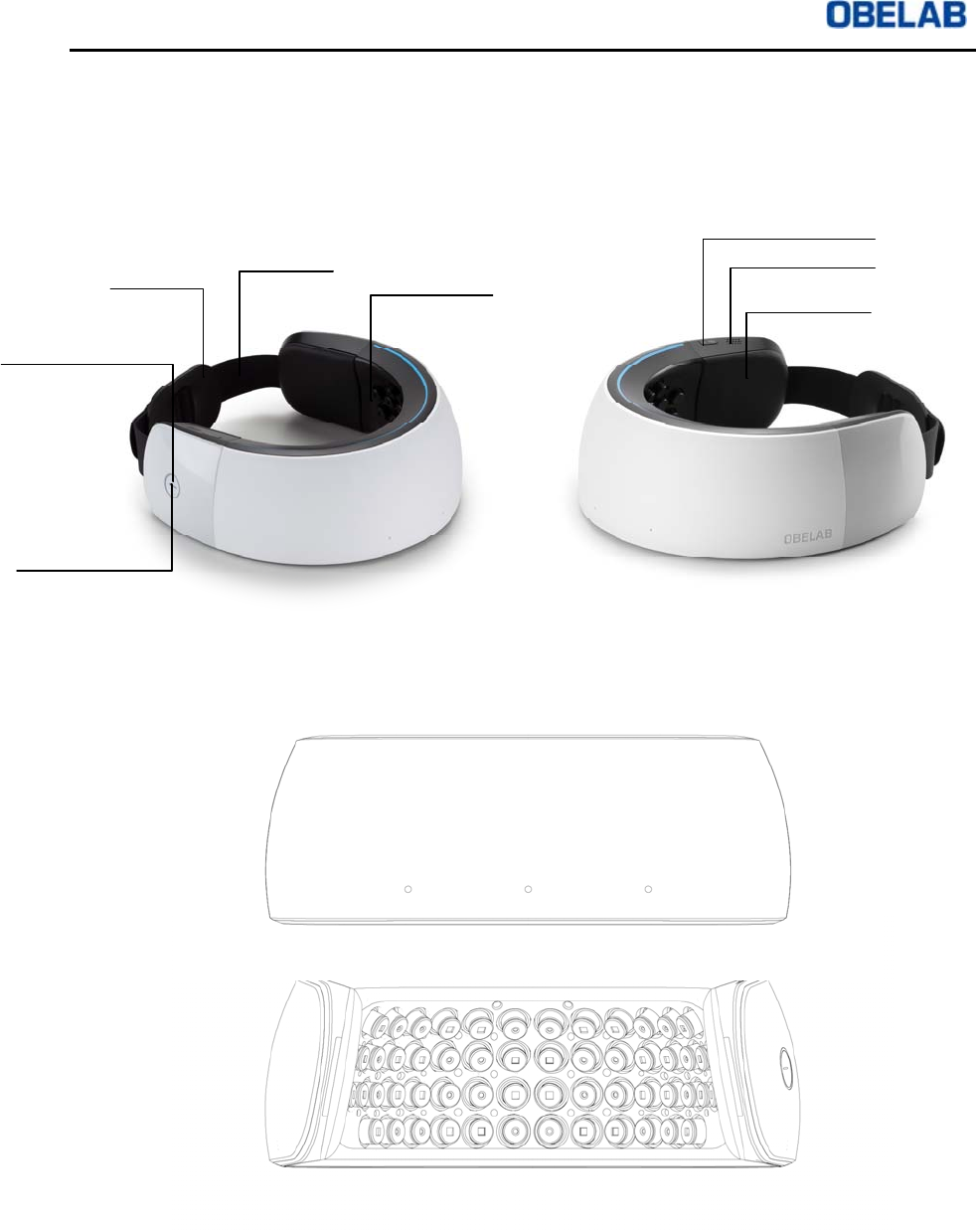
Figure 2 External and operational components
Figure 3 Front view (above) and rear view (below)
Power on/off button and
light
Sensor Components
Strap Holder Strap
Mode select button
Speaker hole
Cushion Part
Status light
NIRSIT Version 1.0
Operation Manual
OBELAB Confidential 8
Figure 4 Left side view (above) and Right side view (below)
Figure 5 Top View
NIRSIT Version 1.0
Operation Manual
OBELAB Confidential 9
Figure 6 Bottom View
NIRSIT Version 1.0
Operation Manual
OBELAB Confidential 10
2.2 Application Software
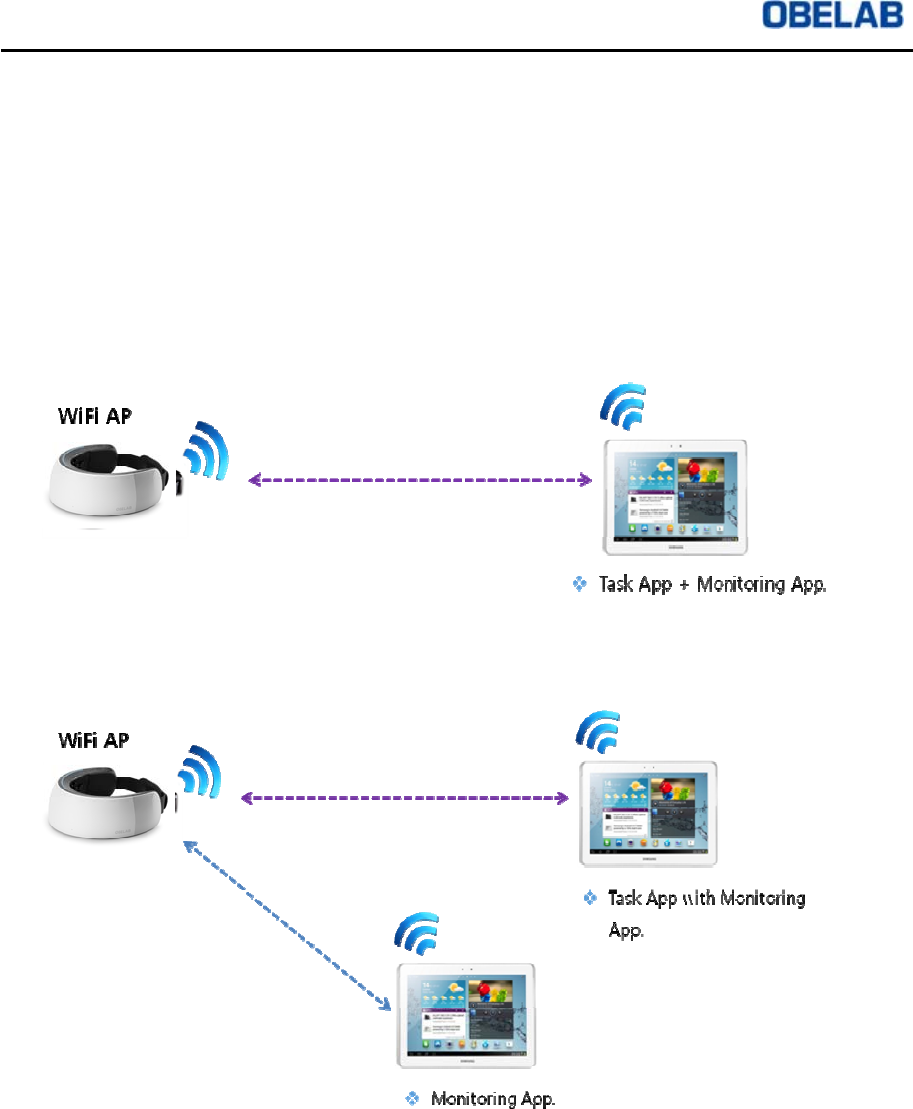
NIRSIT Software operates under iOS/Android environment on Tablet and is
wirelessly connected to NIRSIT device via WLAN communication. Depending on the
use settings, the user can connect NIRSIT device on one Tablet or two Tablets
utilizing both Task App and Monitoring App. Option to use two Tablets allows the
monitoring personnel (either a researcher or a clinician) to monitor the status on one
Tablet when the user is engaged in performing any Task within the Task Mode on
another Tablet.
Figure 7 Using one Tablet for Task App and Monitoring App purposes
Figure 8 Using two Tablets separately for Task App and Monitoring App, respectively
There are two types of App within NIRSIT Software: Monitoring Mode App and Task
Mode App, as shown below
NIRSIT Version 1.0
Operation Manual
OBELAB Confidential 11
Monitoring mode
3D Mode
3D Mode visualizes the changes in the hemoglobin level in real-time on a 3D brain
model. Depending on the intended use, the user can choose to monitor among HbO2,
HbR, or HbT changes.
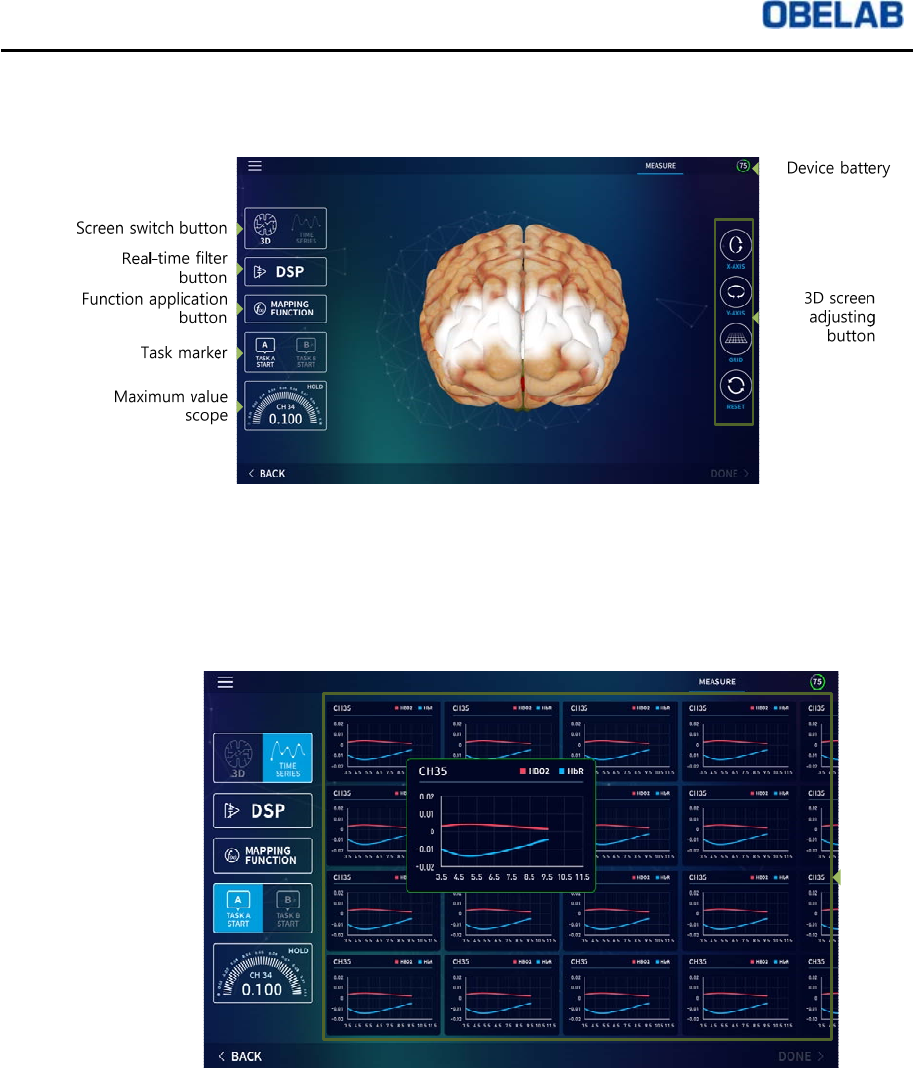
Time series mode
Time series
Graph
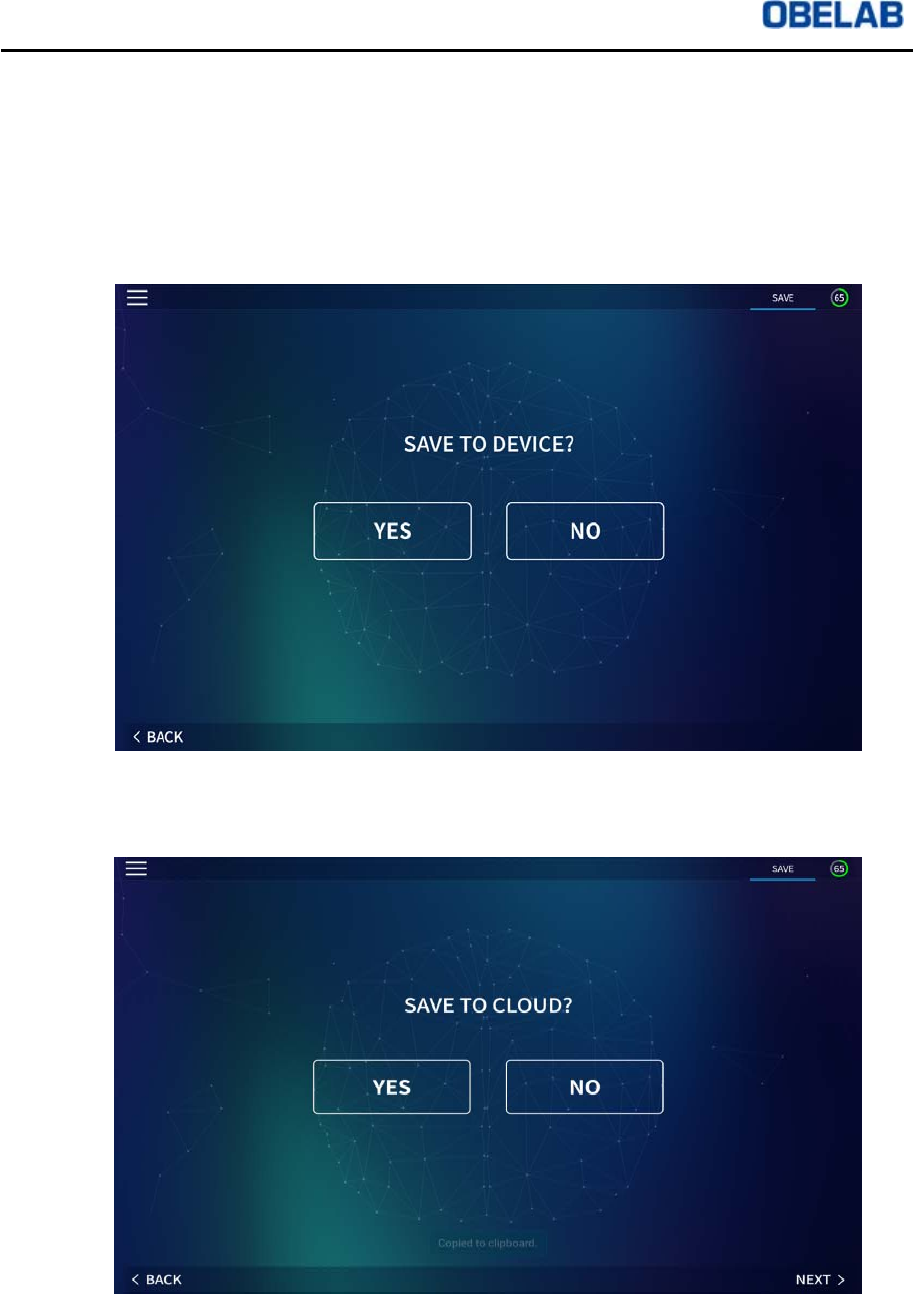
Time Series Mode shows HbO2 and HbR changes in a graph format in real-time on a
channel by channel basis.
NIRSIT Version 1.0
Operation Manual
OBELAB Confidential 12
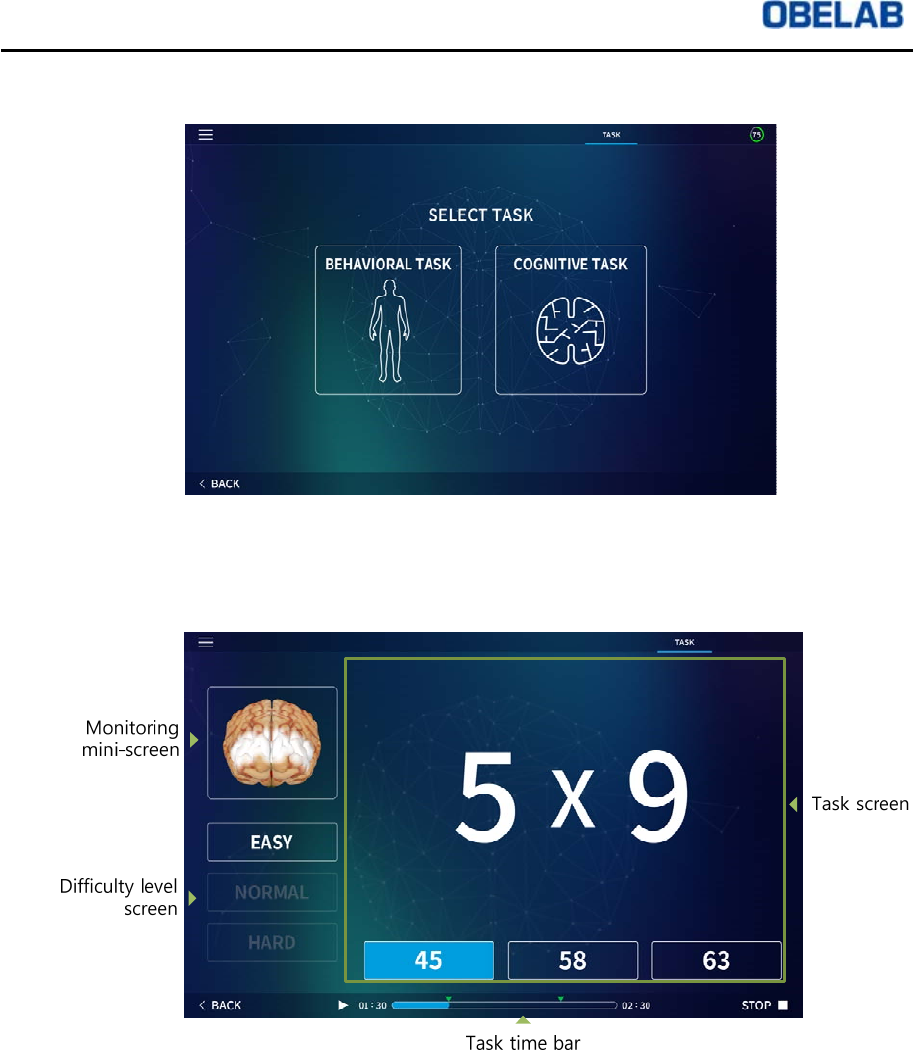
Task mode
Task Mode can be classified into (i) Behavioral Task, showing hemodynamic
changes during physical movements and (ii) Cognitive Task, showing hemodynamic
changes during cognitive activities.
`
Once the user chooses a task from the Task Mode, the Tablet displays both the Task
screen as well as the Monitoring mini-screen. Monitoring function can be de-activated
depending on the choice by the user.
NIRSIT Software App can be downloaded from Google Play store or Apple store.
NIRSIT Version 1.0
Operation Manual
OBELAB Confidential 13
3 Using the system
3.1 Operating NIRSIT
Installing silicon pad/sensor skin
①Peel a package and take out the silicon pad/sensor skin.
②Align the holes on the silicon pad/sensor skin and the sensor modules on the inner
part of NIRSIT device.
③Lightly press the silicon pad/sensor skin holes against each sensor on NIRSIT
device so that the silicon pad/sensor skin attaches to NIRSIT device.
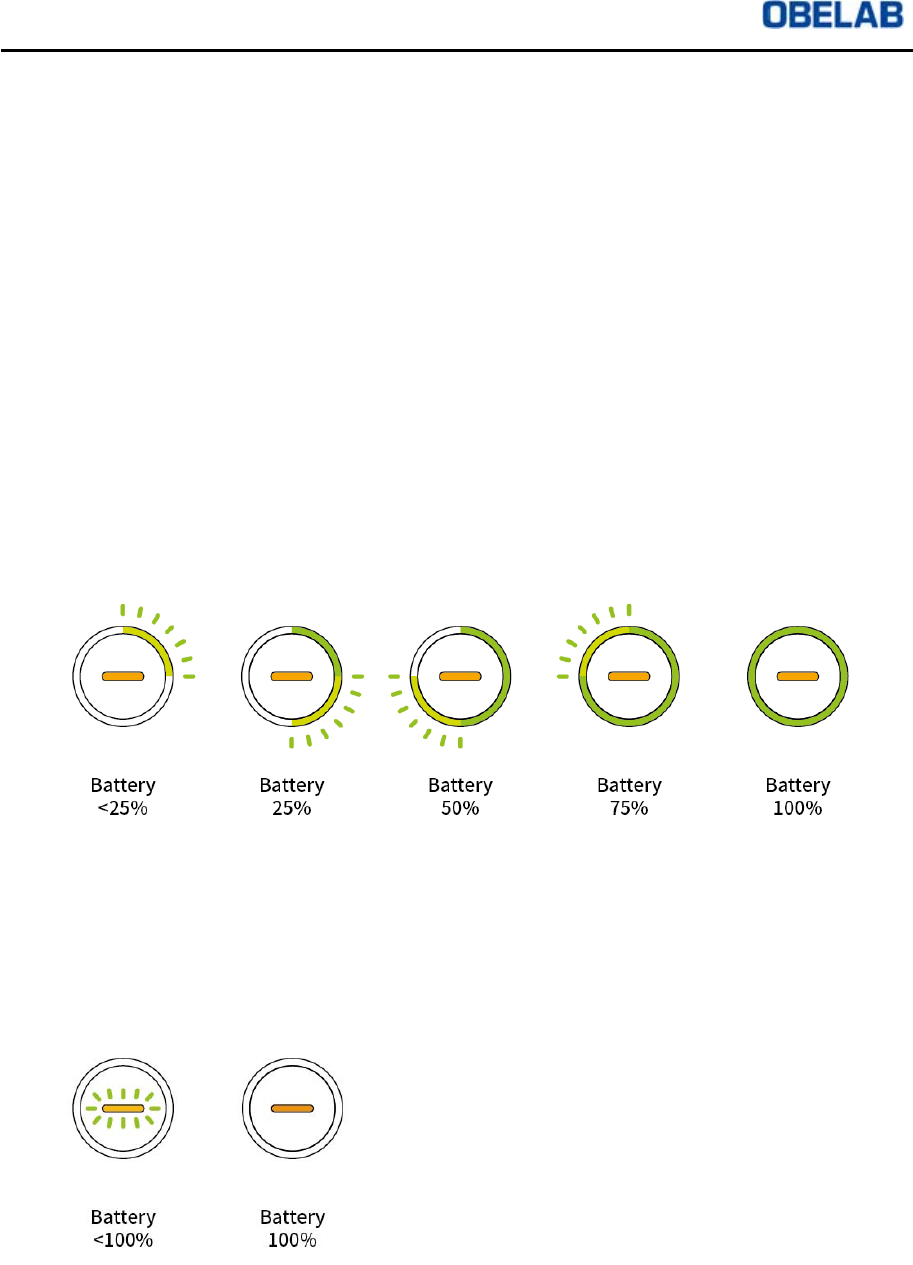
Charging while power button is ON
①Press power button for 3 seconds.
②Once the power button status light turns green and the power on sound is heard,
the user can hook up micro USB charger to NIRSIT device and charge it.
③The user can see the charging status by checking the status light as shown below:
Charging while power button is OFF
①The user can hook up USB charger to NIRSIT device, and the LED in the middle
of the power button blinks while being charged and LED stays turned on once the
charging is complete, as shown below:
NIRSIT Version 1.0
Operation Manual
OBELAB Confidential 14
Confirming NIRSIT device operation
①Press power button ON for 3 seconds.
②Check to see if the status light turns green and the ON sound is heard
simultaneously.
③Check to see if the status light is turned off and the OFF sound is heard.
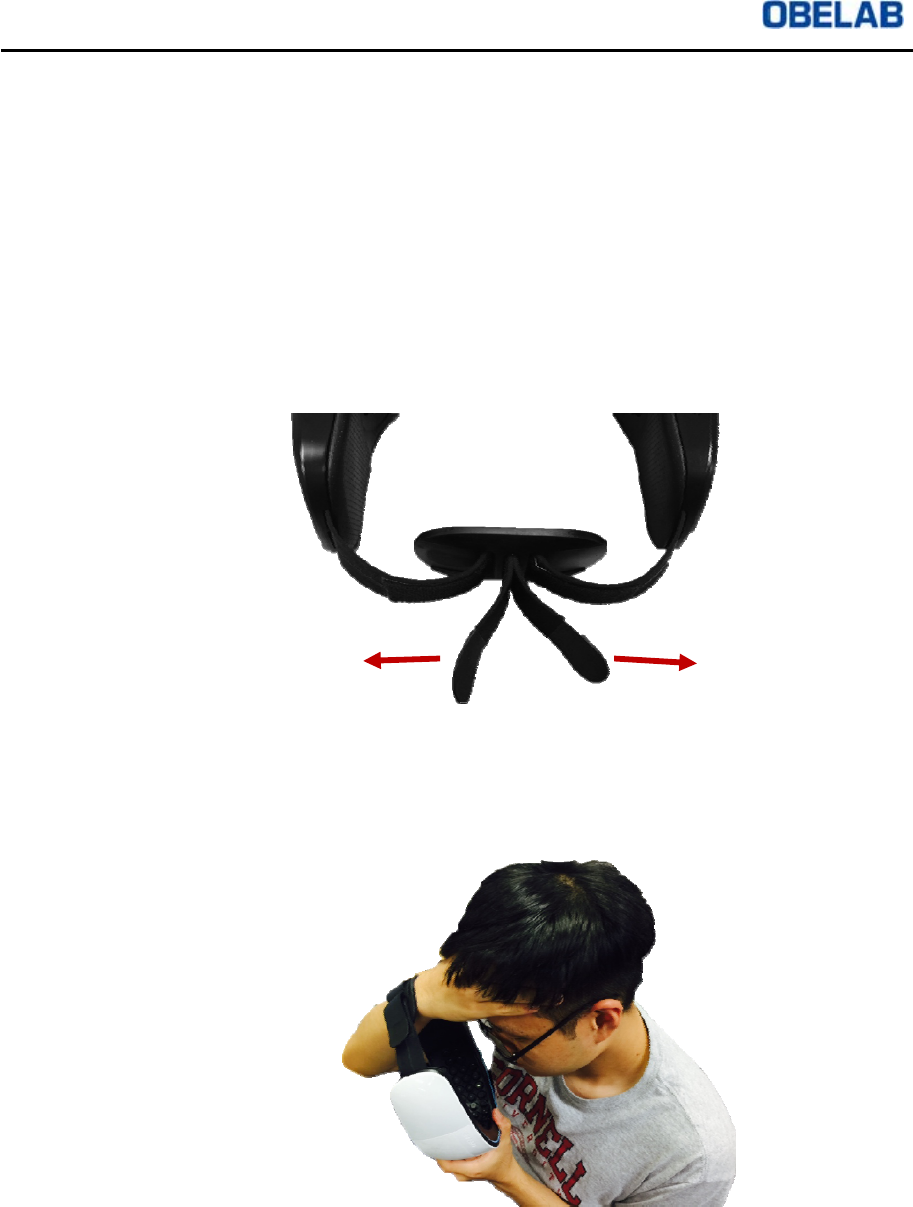
Putting on NIRSIT device
①Before putting on, make sure the strap tied to the strap holder is loose on one end
so that there is ample room for the user’s forehead to fit comfortably into NIRSIT
device.
②As shown below, remove all hair from the forehead region with one hand, and use
the other hand to place NIRSIT device on the forehead where there is no hair.
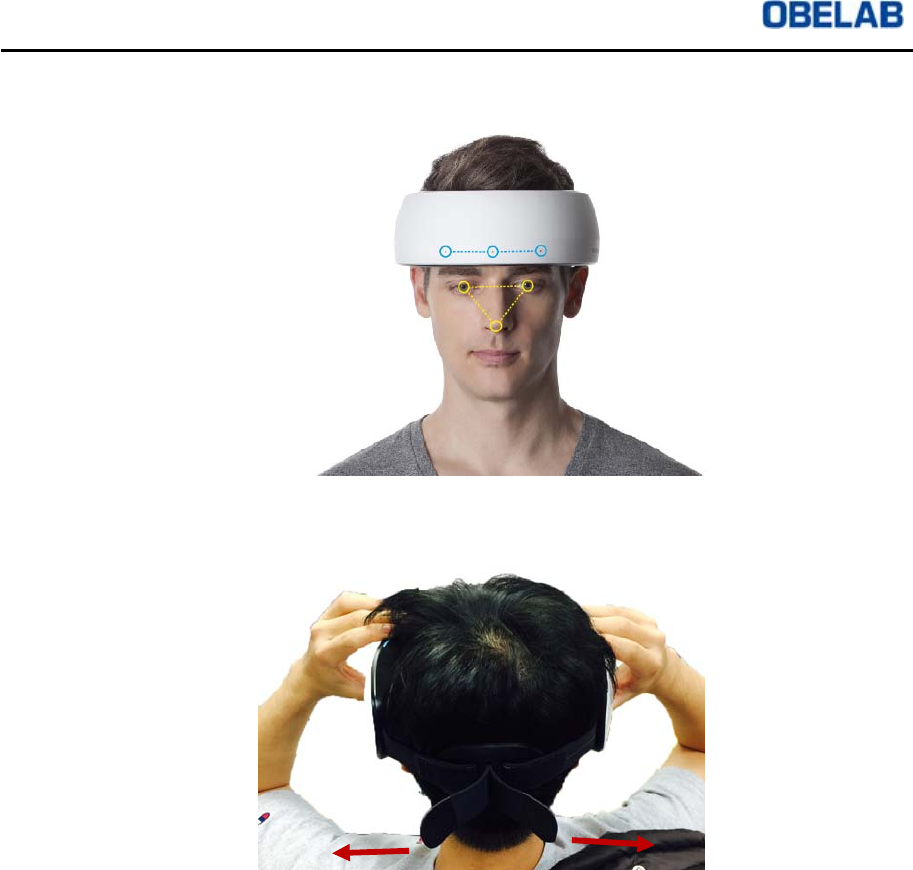
③Take extra care to align the markers on NIRSIT device with the user’s eyes, nose,
NIRSIT Version 1.0
Operation Manual
OBELAB Confidential 15
and the eyebrows, so that NIRSIT device is placed adequately on the forehead.
④The user can now pull the strap and secure the strap on the Velcro to ensure
NIRSIT device adequately contacts the forehead of the user.
Using NIRSIT device
①Turn on NIRSIT device by pressing the Power Button ON for 3 seconds.
②Turn on NIRSIT Software on the Tablet.
3.2 Operating Application Software
Connection with NIRSIT device
①When using IOS Tablet, NIRSIT device connects to NIRSIT Application under the
WIFI setting. Password: obelab1234.
②Touch NIRSIT Application icon on Tablet screen and activate the Application.
③If a new user, click on New Account and register with the user’s existing email
address. If an existing user, simply input email and password to log in.
NIRSIT Version 1.0
Operation Manual
OBELAB Confidential 16
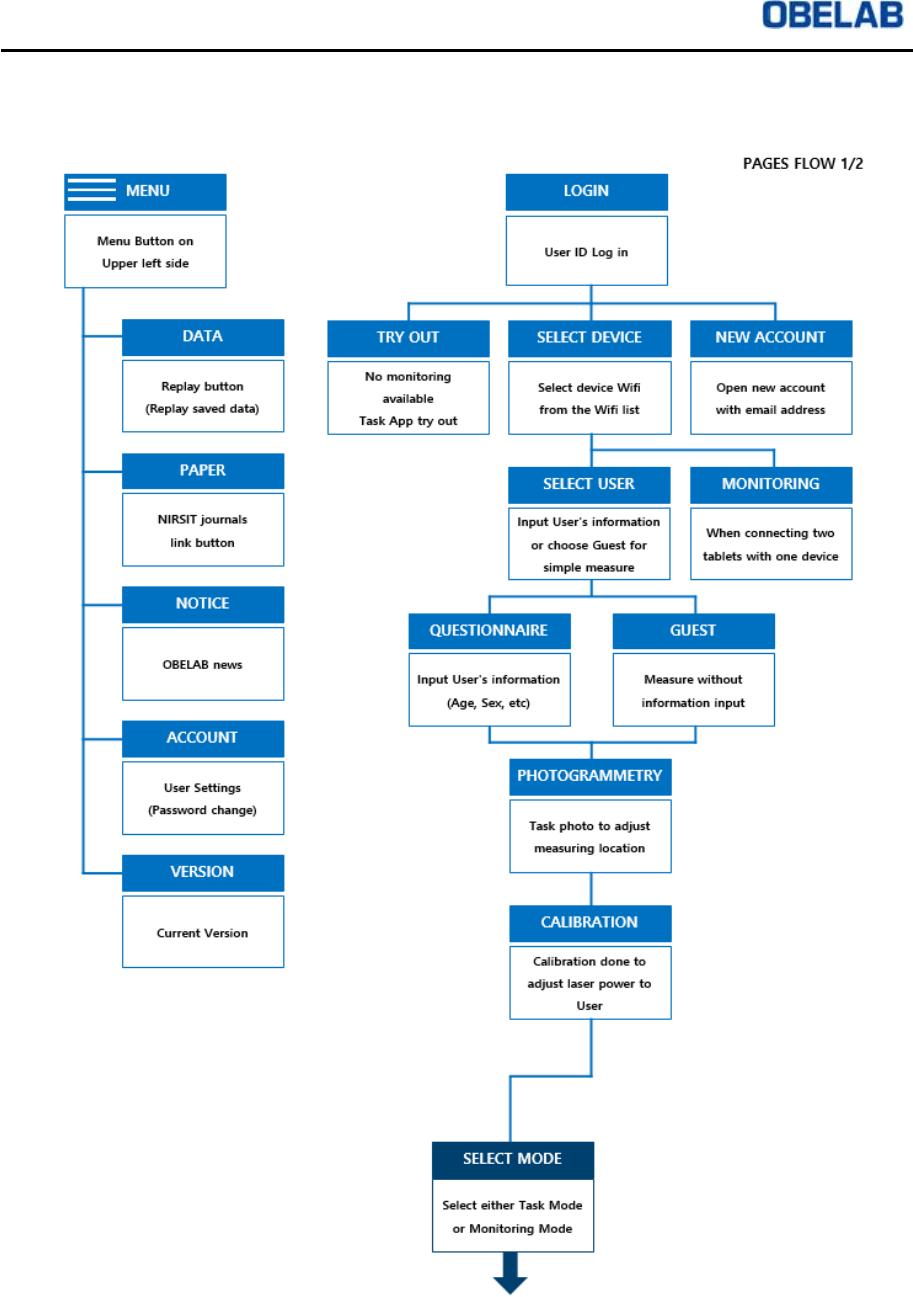
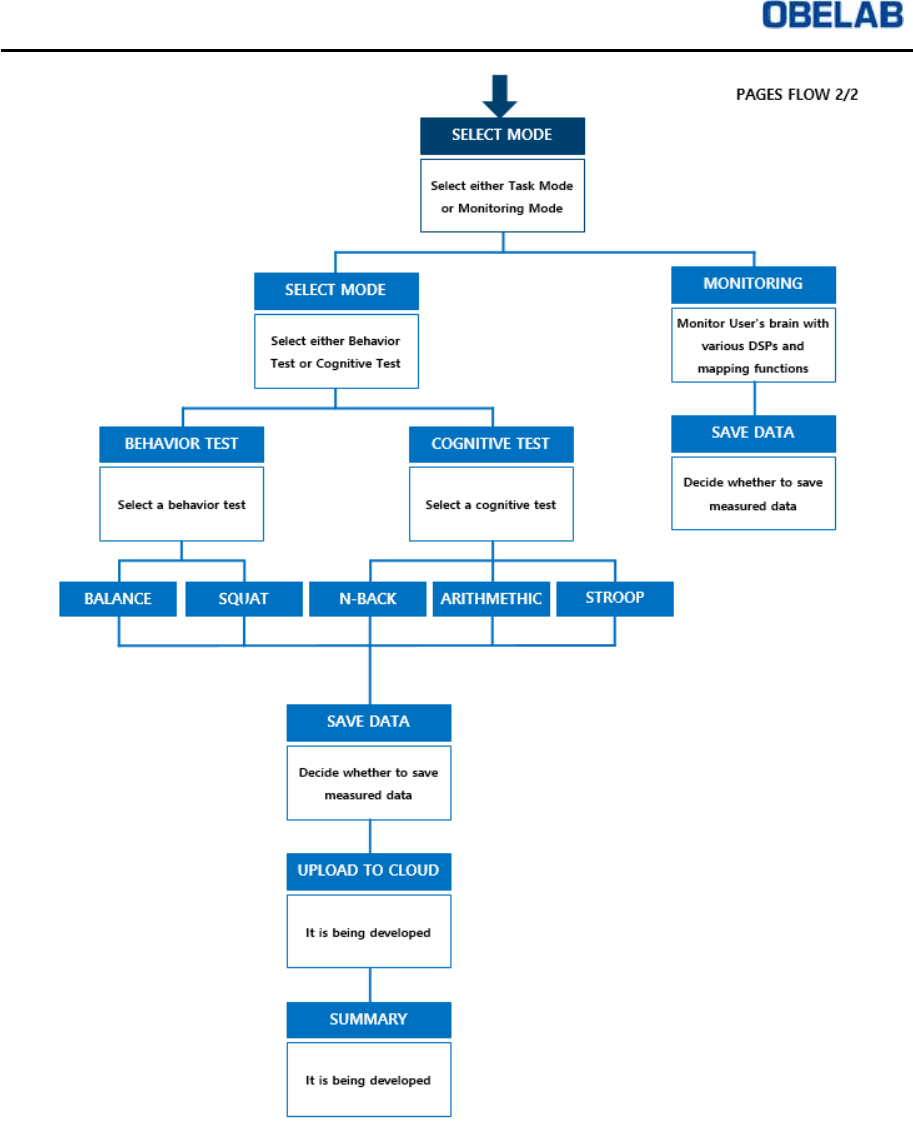
3.3 NIRSIT Application Software Menu Usage
3.3.1 NIRSIT APP user menu tree
NIRSIT Version 1.0
Operation Manual
OBELAB Confidential 17
NIRSIT Version 1.0
Operation Manual
OBELAB Confidential 18
3.3.2 Application Menu details
Initial Steps
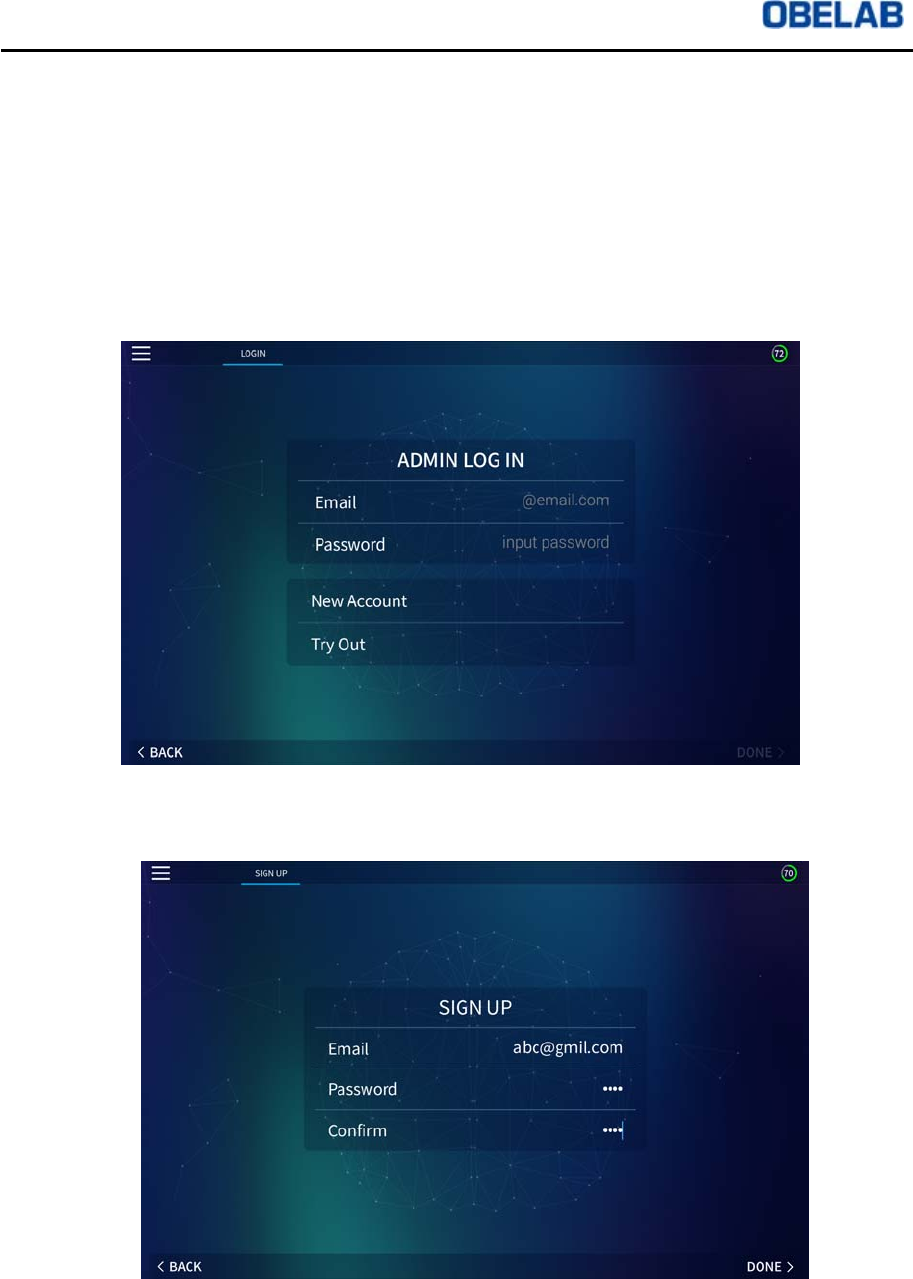
①When activated, NIRSIT APP shows Log In page after the introduction page. On
the Log In page, the following menu appears.
ADMIN LOG IN: Menu for existing User with NIRSIT account
New Account: Menu for new User to create new NIRSIT account
Try Out: Menu for trying out Task Test without NIRSIT account
②When there is no existing account, choose New Account menu and move on to
Sign Up page.
NIRSIT Version 1.0
Operation Manual
OBELAB Confidential 19
③To register new User Account, input user’s email address and password in the
Sign Up page.
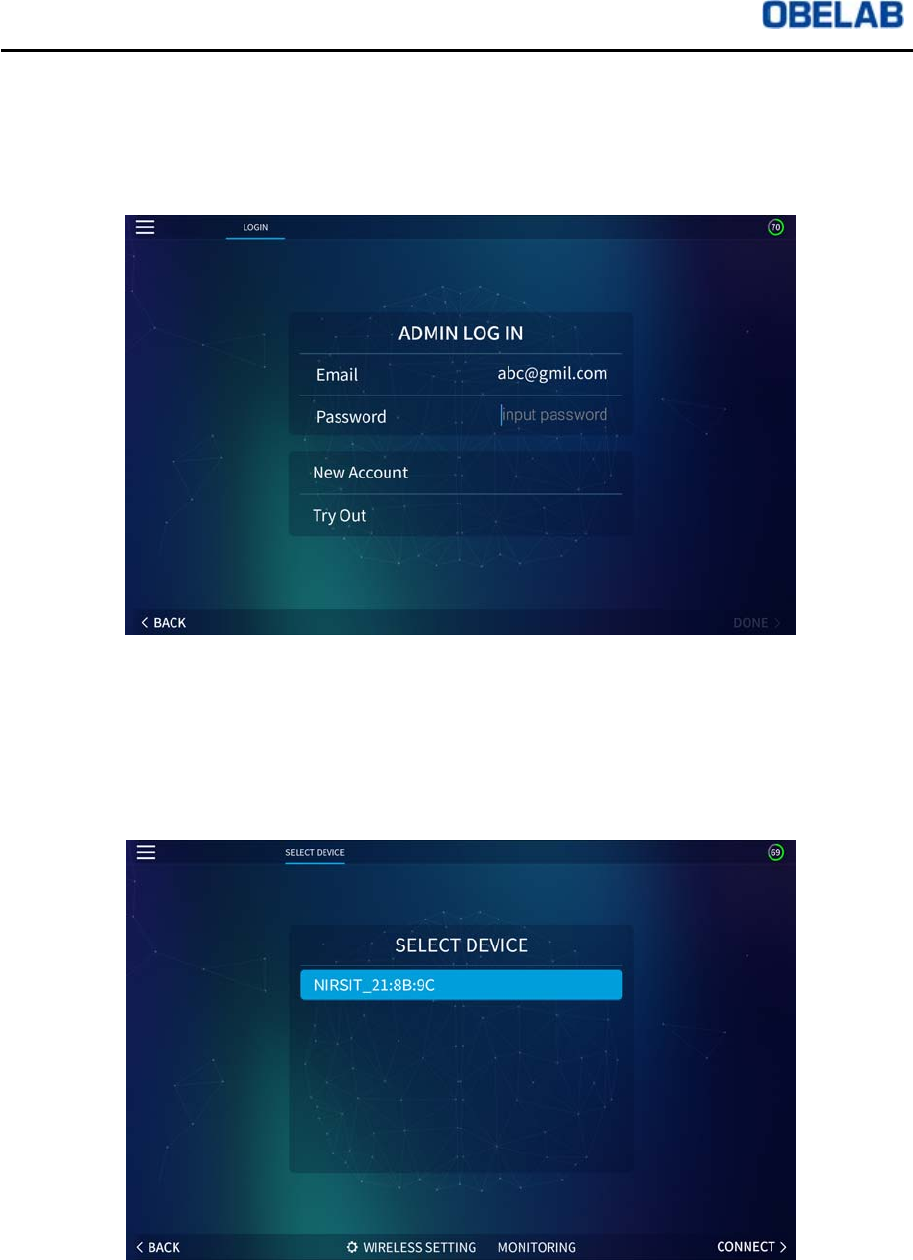
④After confirming all information on newly created User Account, click DONE button
and enter Log In page as shown below.
⑤Enter password in the Log In page and click DONE button to move onto SELECT
DEVICE page. On the screen, there will appear a list of NIRSIT devices available
for connection. NIRSIT device will be shown as NIRSIT (ssid) + MAC_ID. Select
NIRSIT device you want to connect to NIRSIT APP and click CONNECT button to
move onto SELECT USER page.
NIRSIT Version 1.0
Operation Manual
OBELAB Confidential 20
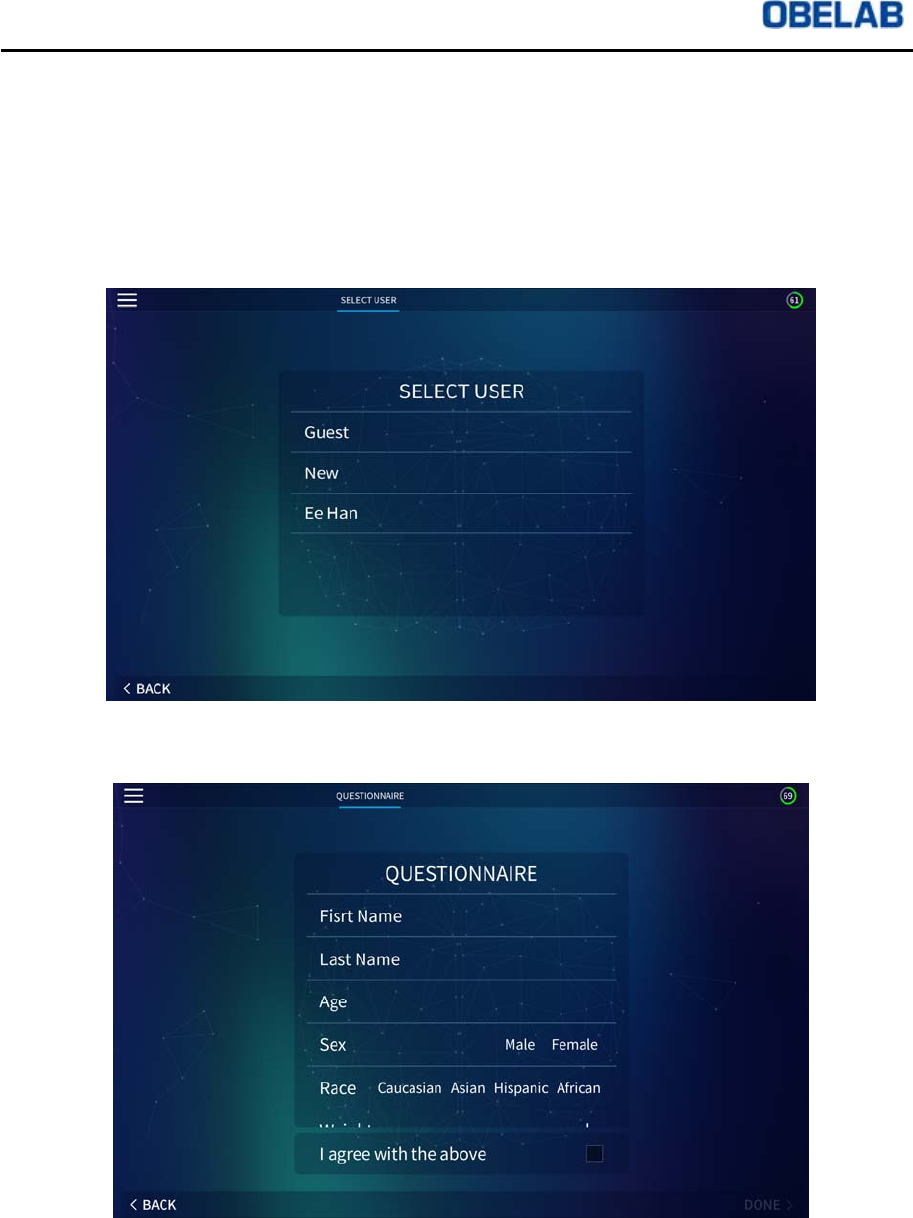
⑥On SELECT USER page, there are buttons with function defined as shown below:
Guest: This menu allows use of NIRSIT device without User registration
New: This menu allows User to register as new User by answering
QUESTIONNAIRE. The User will then appear on the SELECT USER list.
Registered User: This menu show the list of Users added on through NEW
menu.
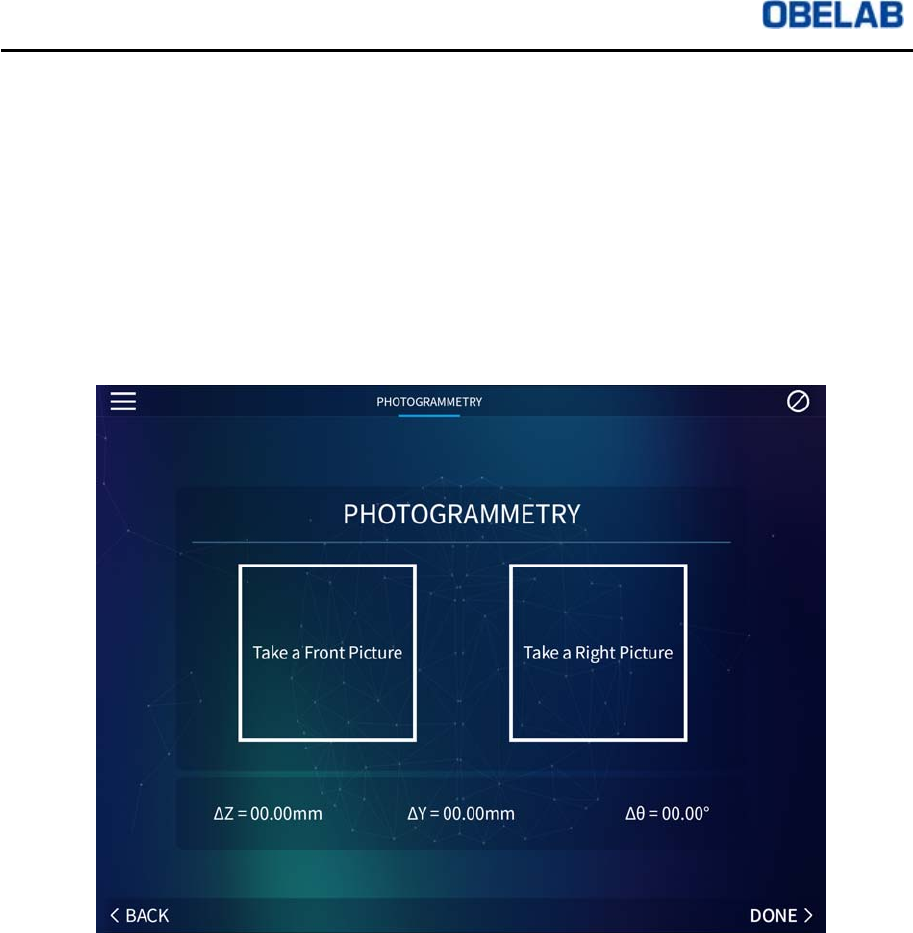
⑦QUESTIONNAIRE page allows new User to register.
NIRSIT Version 1.0
Operation Manual
OBELAB Confidential 21
Measurement preparations
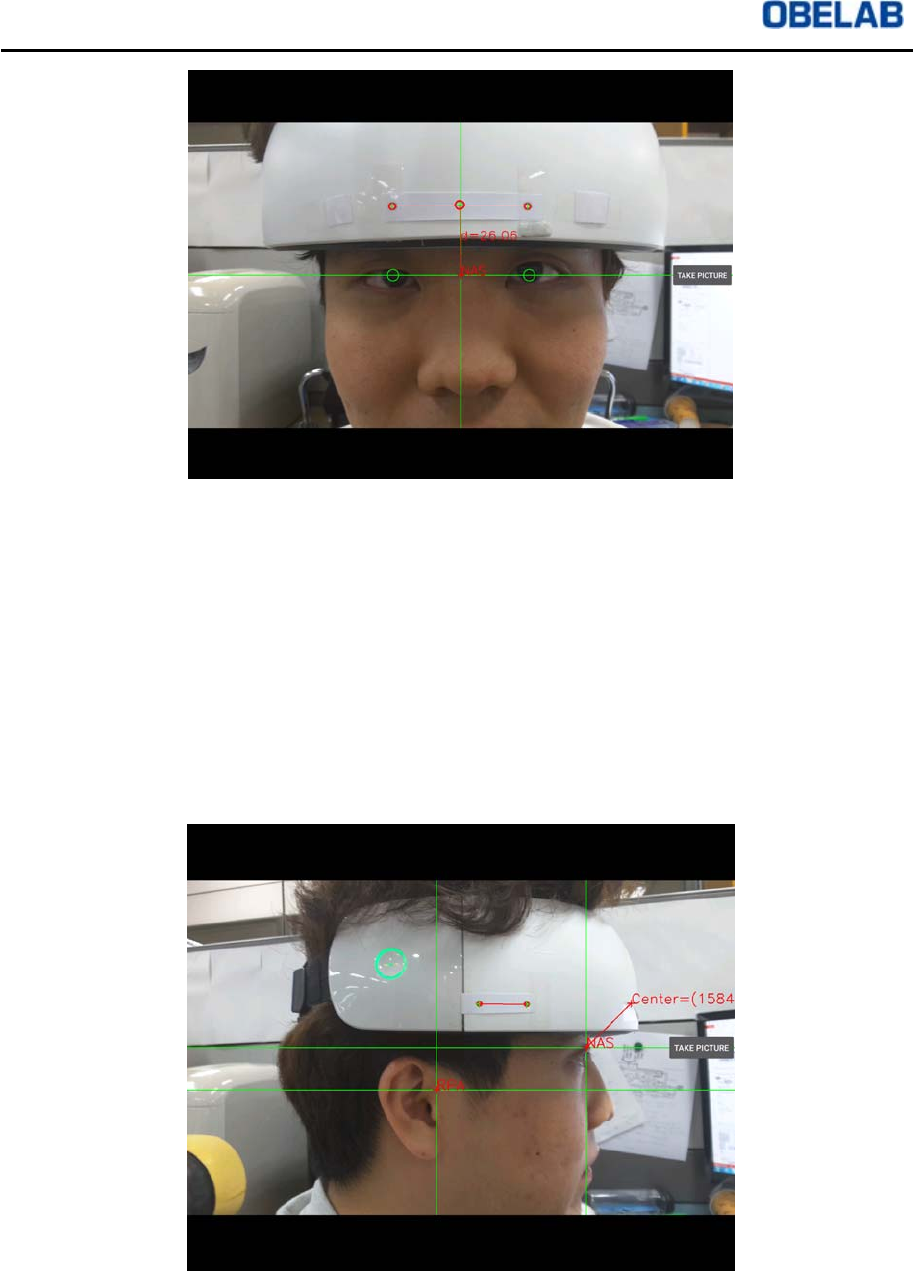
①Select either Guest or Registered User from the SELECT USER page and move
onto PHOTOGRAMMETRY page. PHOTOGRAMMETRY page allows the user to
adjust the measurements to match the exact location where NIRSIT device is
actually placed (on the user’s forehead). PHOTOGRAMMETRY page shows the
phrases: Take a Front Picture, Take a Right Picture, ᇞZ, ᇞY, and ᇞQ. By clicking
“Take a Front Picture” button, the User can take picture of the front view, and the
value of ᇞZ will be recorded automatically. By clicking “Take a Right Picture”
button, the User can take picture of the right side view, and the value of ᇞY, and
ᇞQ will be recorded automatically.
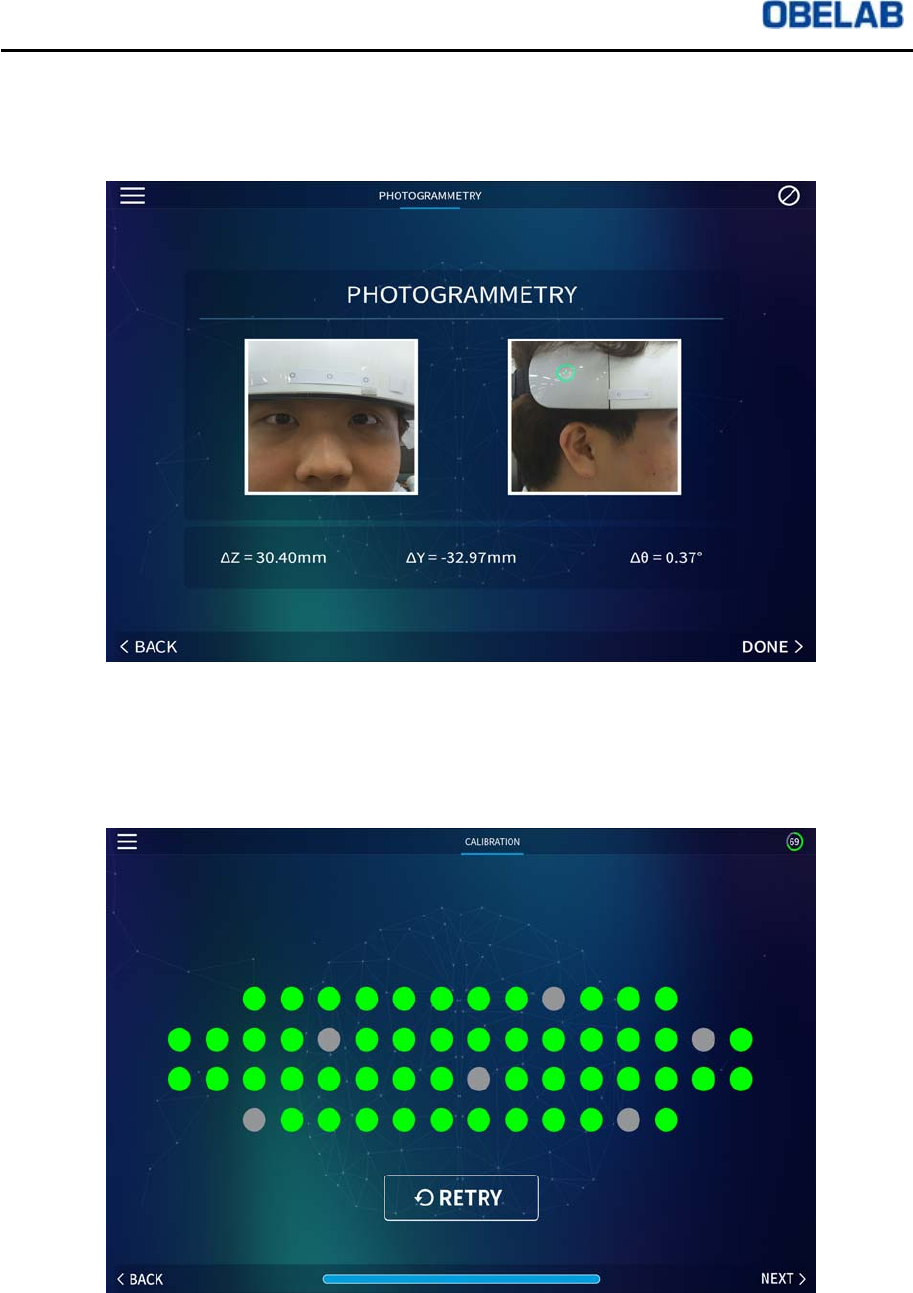
②On the “Take a Front Picture” page, three upper circles, two lower circles will
appear and in the middle, a cross sign will appear to show NAS (Nasion) location.
Adjust the Tablet camera to match the two lower circles with the user’s eyes, the
cross sign with the middle of the forehead (nasion), and three upper circles with
the markers on NIRSIT device. Click on “Take picture” button and the User can
check the picture taken.
NIRSIT Version 1.0
Operation Manual
OBELAB Confidential 22
③The User can take picture of the Side view by clicking “Take a Right Picture”
button. Place a cross sign (NAS) to match the Nasion location and the RPA cross
to match the pre-auricular point as shown in the picture below. The two markers
on the right side of NIRSIT device will be detected and a new cross sign will
appear on the screen, indicating the center. Placing the new cross sign at the far
right corner of the screen will ensure the measurement is taken of the User from
the very center of NIRSIT device. After such adjustment, take a picture and the
PHOTOGRAMMETRY measurement is complete.
NIRSIT Version 1.0
Operation Manual
OBELAB Confidential 23
④After taking pictures of both the front picture and the right side picture, the User
can check the actual picture taken from the PHOTOGRAMMETRY page and
check the values of ᇞZ, ᇞY, and ᇞQ.
.
⑤After completing location adjustment in PHOTOGRAMMETRY page, press DONE
button and move onto CALIBRATION menu page. CALIBRATION menu allows
adjustment of gains from sensors.
NIRSIT Version 1.0
Operation Manual
OBELAB Confidential 24
Measurement Mode Selection
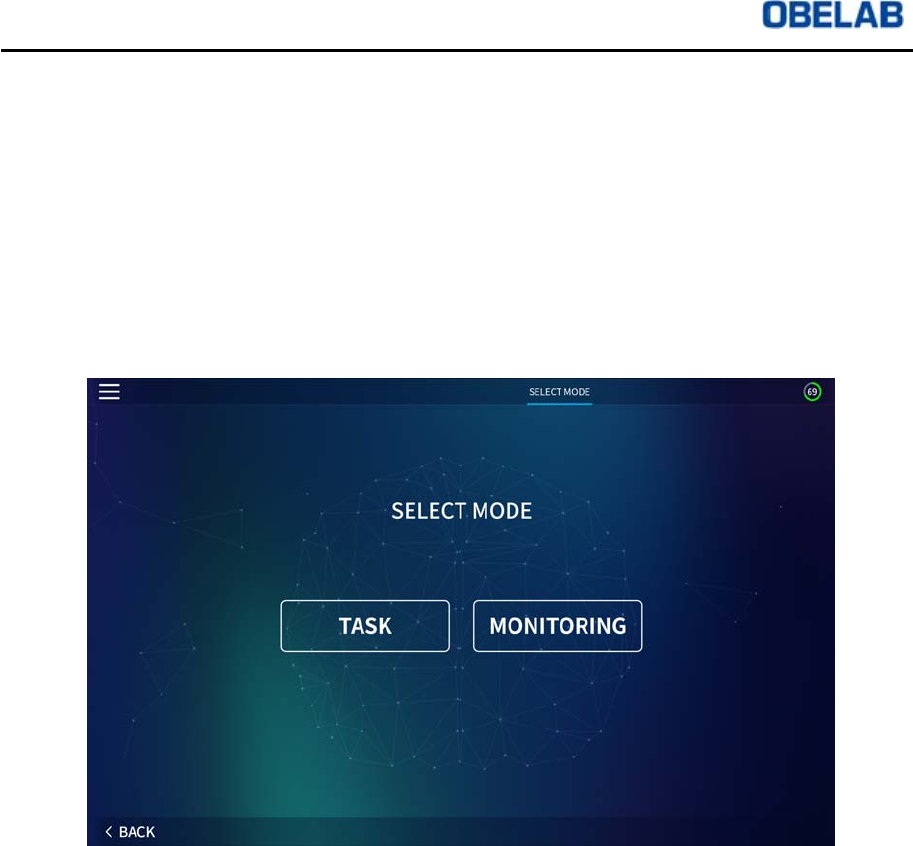
Once gain calibration is complete, click on NEXT button and move onto SELECT
MODE page. There are two types of SELECT MODE.
TASK MODE: This menu allows the User to monitor functionality of the brain
while the User performs tasks implemented within the NIRSIT APP
.
MONITORING MODE: This menu allows the User to monitor functionality of the
brain while the User performs any tasks designed by the User.
Task Mode
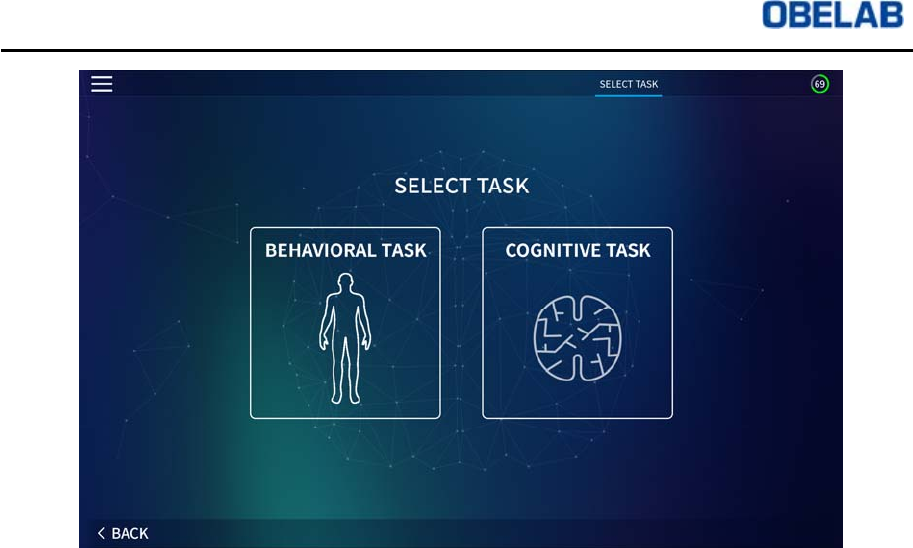
①Click TASK button from the SELECT MODE page. There are two types of TASK
MODE:
BEHAVIORAL TASK: The User can monitor brain activation from performance
of simple behavioral tasks.
COGNITIVE TASK: The User can monitor brain activation from performance of
simple cognitive tasks.
NIRSIT Version 1.0
Operation Manual
OBELAB Confidential 25
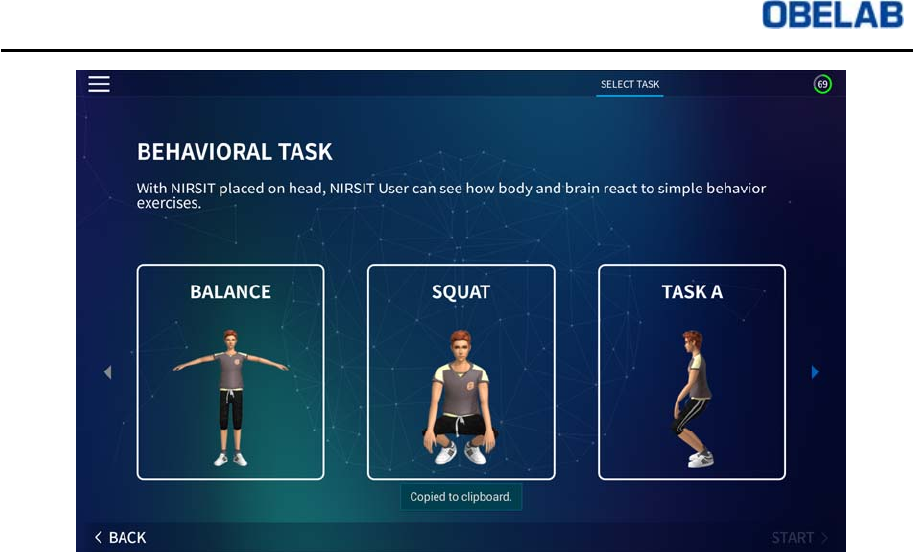
②Click BEHAVIORAL TASK button from the SELECT TASK page and move onto
BEHAVIORAL TASK menu. BEHAVIORAL TASK menu is composed of the
following:
BALANCE TASK
SQUAT TASK
T
ASK A
Once a task is chosen, the User can perform the chosen task by following the
instructions played on the screen. During performance, the User can monitor the
brain activation.
NIRSIT Version 1.0
Operation Manual
OBELAB Confidential 26
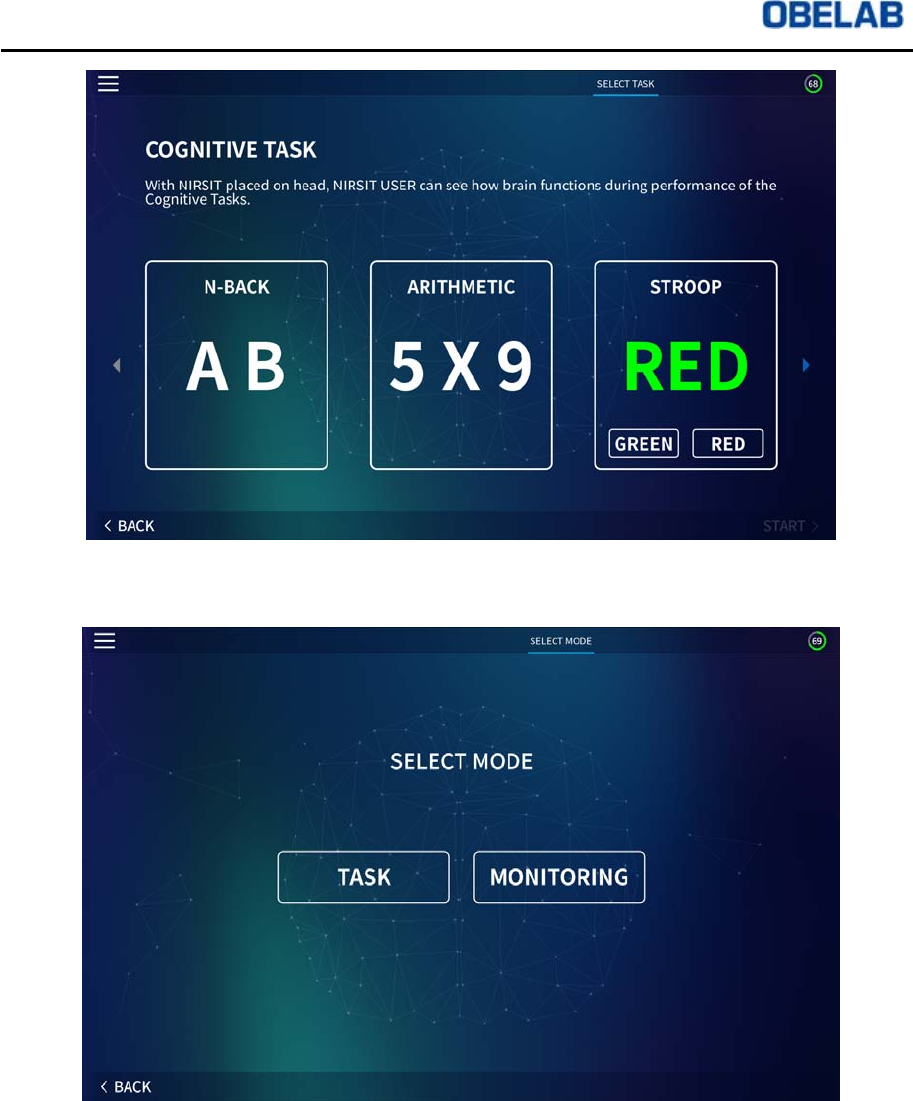
③Click COGNITIVE TASK button from the SELECT TASK page and move onto
COGNITIVE TASK menu. COGNITIVE TASK menu is composed of the following:
N-BACK TASK
ARITHMETIC TASK
STROOP TASK
Once a task is chosen, the User can perform the chosen task by following the
instructions played on the screen. During performance, the User can monitor the
brain activation.
NIRSIT Version 1.0
Operation Manual
OBELAB Confidential 27
④From SELECT MODE page, the User can move onto MONITORING MODE menu.
Monitoring Mode
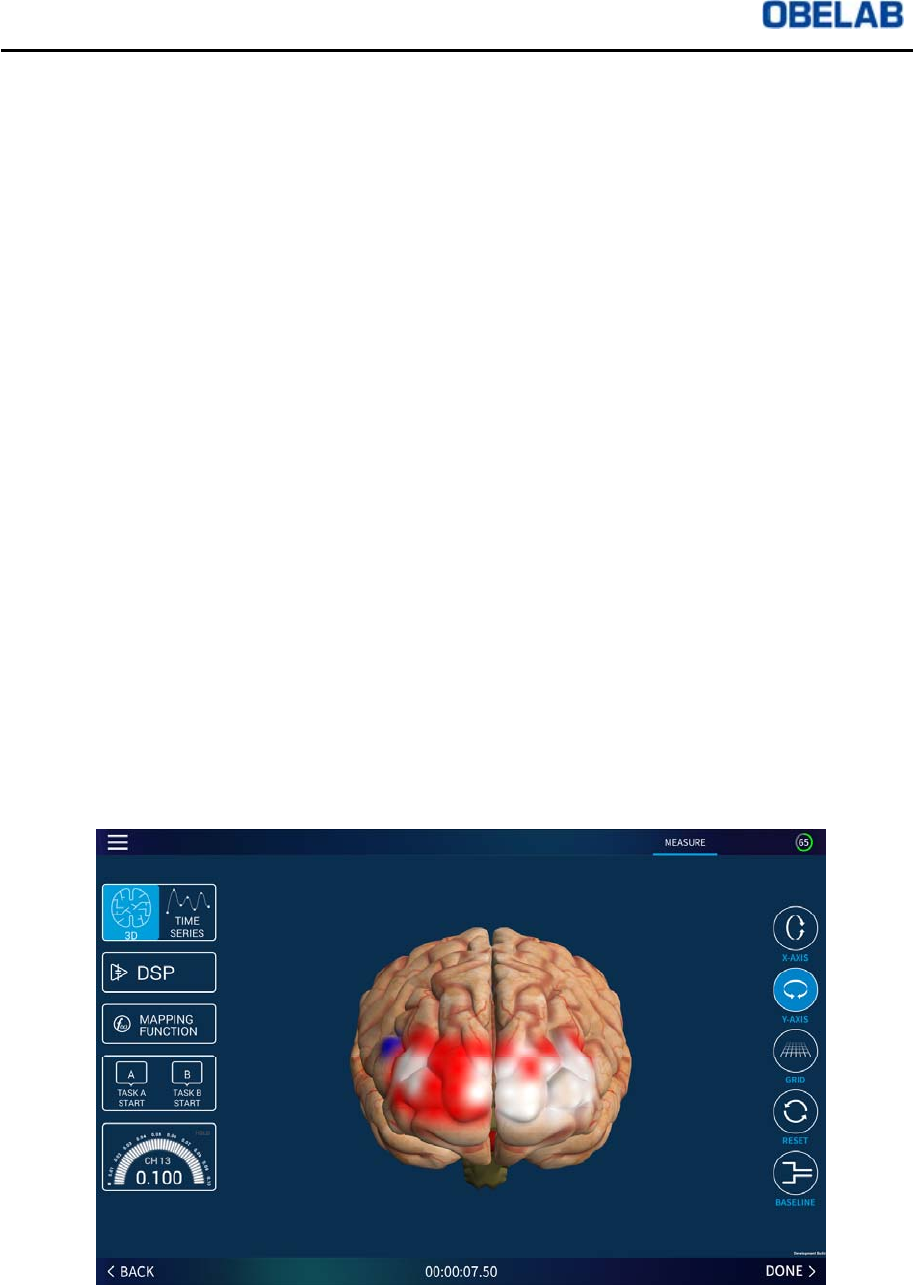
Monitoring mode can offer various features with which test can monitor brain activity
in real time. Monitoring mode menus are explained in the following sections. .
NIRSIT Version 1.0
Operation Manual
OBELAB Confidential 28
①Below are descriptions of the left side menu buttons.
3D: 3D Brain Image display
TIME SERIES: HbO2 and HbR graph display on time axis
DSP: Displayed separately
MAPPING FUNCTION: Displayed separately
TASK START: During measurement, the User can mark the start of a task up to
two tasks (Task A, Task B) for recording purposes
Peak Motor: Indicates which channel shows highest HbO2 and the level of
HbO2
②Below are descriptions of the Right side menu buttons.
X-AXIS: By clicking X-AXIS button, the User can spin the 3D Brain Image at the
X axis
Y-AXIS: By clicking Y-AXIS button, the User can spin the 3D Brain Image at the
Y axis
GRID: GRID button shows the 3D grid coordinates of the brain region being
monitored
RESET: Resets the 3D Brain Image
BASELINE: Resets the baseline of hemoglobin level (Initial value of MBLL) to a
current level
③Color Indication for Brain Activity is explained below.
White: Baseline indicating brain activity immediately after gain calibration
White Yellow Red: Incremental increase of HbO2 level
W
hite Sky Blue Dark blue: Incremental decrease of HbO2 level

NIRSIT Version 1.0
Operation Manual
OBELAB Confidential 29
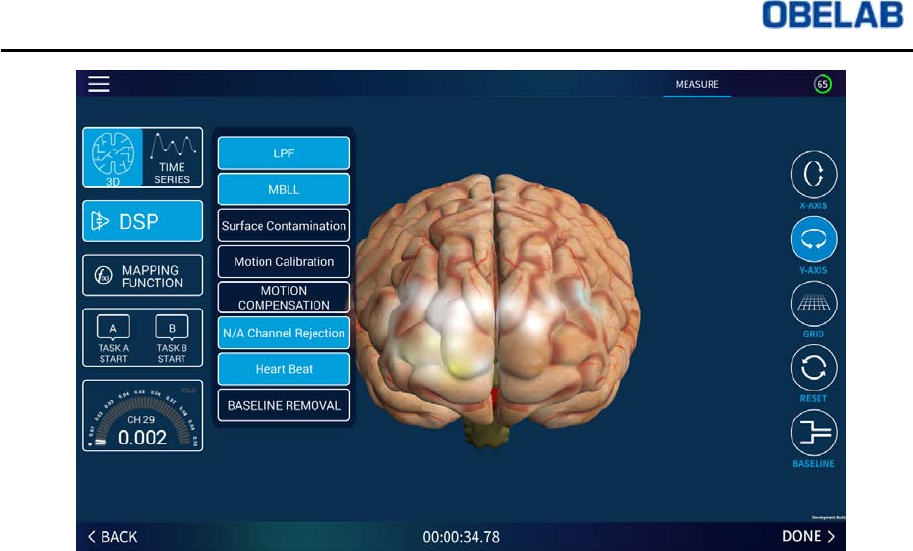
④Clicking DSP button will show the following DSP menu:
LPF: Initiating low frequency filter to suppress high frequency noise.
MBLL: Showing changes in HbO2 and HbR levels by solving Modified Beer
Lambert Law.
Surface Contamination: Eliminating artifact from scalp.
Motion Calibration: Calibration process by creating motion data for one minute.
Motion calibration process involves sitting up straight with head upright for 30
seconds, tilting head for 30 seconds, and then maintaining tilting position for 30
seconds.
Motion Compensation: Compensating motion artifact. Before Motion
Compensation, Motion Calibration must be executed before Motion
Compensation
N/A Channel Rejection: Eliminating channels that are not performing
measurement properly
Heart Beat: Eliminating noise from heart beat
Baseline Removal: Eliminating gradual change in the Baseline.
NIRSIT Version 1.0
Operation Manual
OBELAB Confidential 30
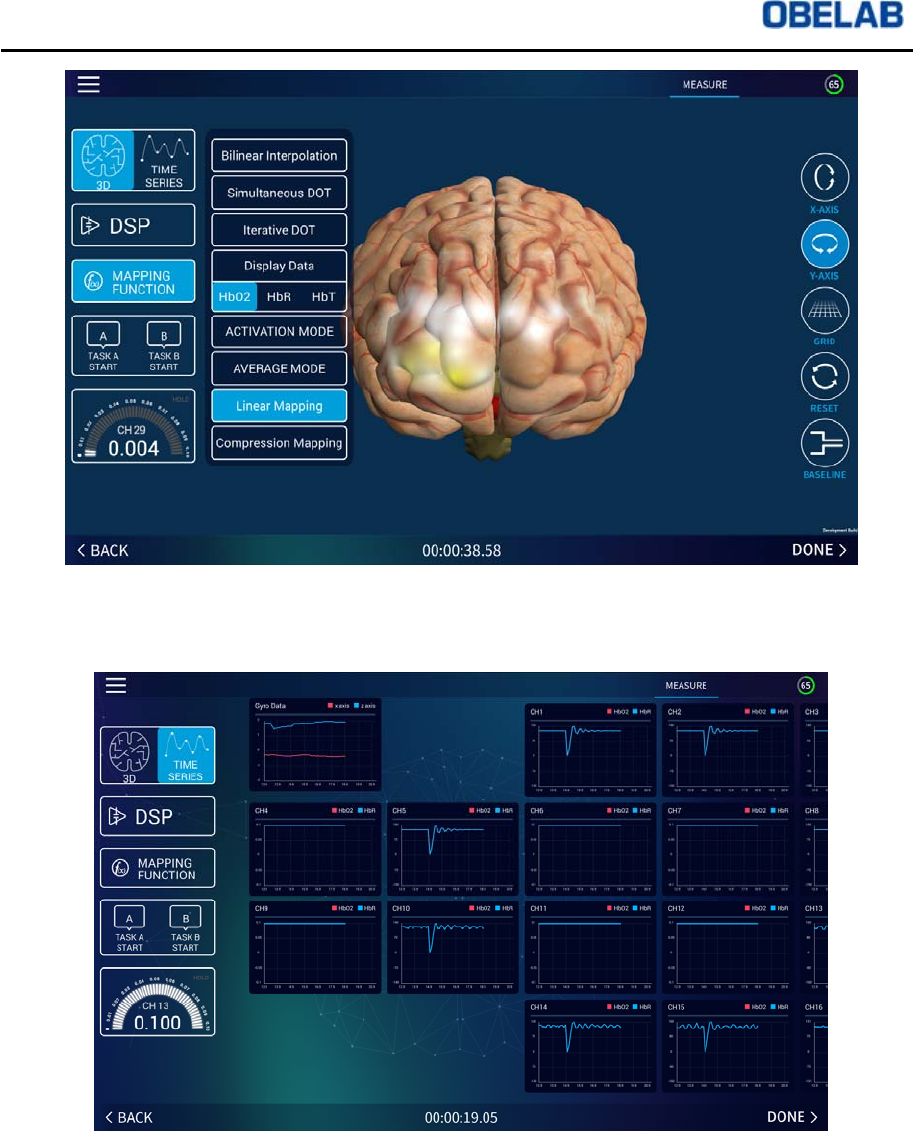
⑤Clicking MAPPING FUNCTION button will show the following MAPPING
FUNCTION menu:
Bilinear Interpolation: Color mapping of channels on 3D mapping display by
interpolation
Simultaneous DOT: Color mapping in pixel unit utilizing simultaneous DOT
(Diffuse Optical Tomography)
Iterative DOT: Color mapping in pixel unit utilizing iterative DOT (Diffuse Optical
Tomography)
HbO2 from DISPLAY DATA: Color mapping showing HbO2 level changes
HbR from DISPLAY DATA: Color mapping showing HbR level changes
HbT from DISPLAY DATA: Color mapping showing the HbO2 + HbR level
changes
Activation Mode: Color mapping only the increased level
Average Mode: Color mapping of average value of left side vs. right side
Linear Mapping: Color mapping of RGB value and data value in linear mapping
format
Compensation Mapping: Color mapping of RGB and data value through
compression function
NIRSIT Version 1.0
Operation Manual
OBELAB Confidential 31
⑥ Clicking TIME SERIES button will show the following TIME SERIES graph.
NIRSIT Version 1.0
Operation Manual
OBELAB Confidential 32
Measurement Data Save and replay
①Click DONE button once measurement is done and move onto SAVE page. User
can save data by clicking YES button on SAVE TO DEVICE page, and then move
onto Cloud server data save menu page. When User clicks NO button, the screen
moves onto SELECT MODE page.
②Save data by on Cloud server by clicking YES button on SAVE TO CLOUD page.
When the User clicks NO button, the User moves onto SELECT MODE page.
NIRSIT Version 1.0
Operation Manual
OBELAB Confidential 33
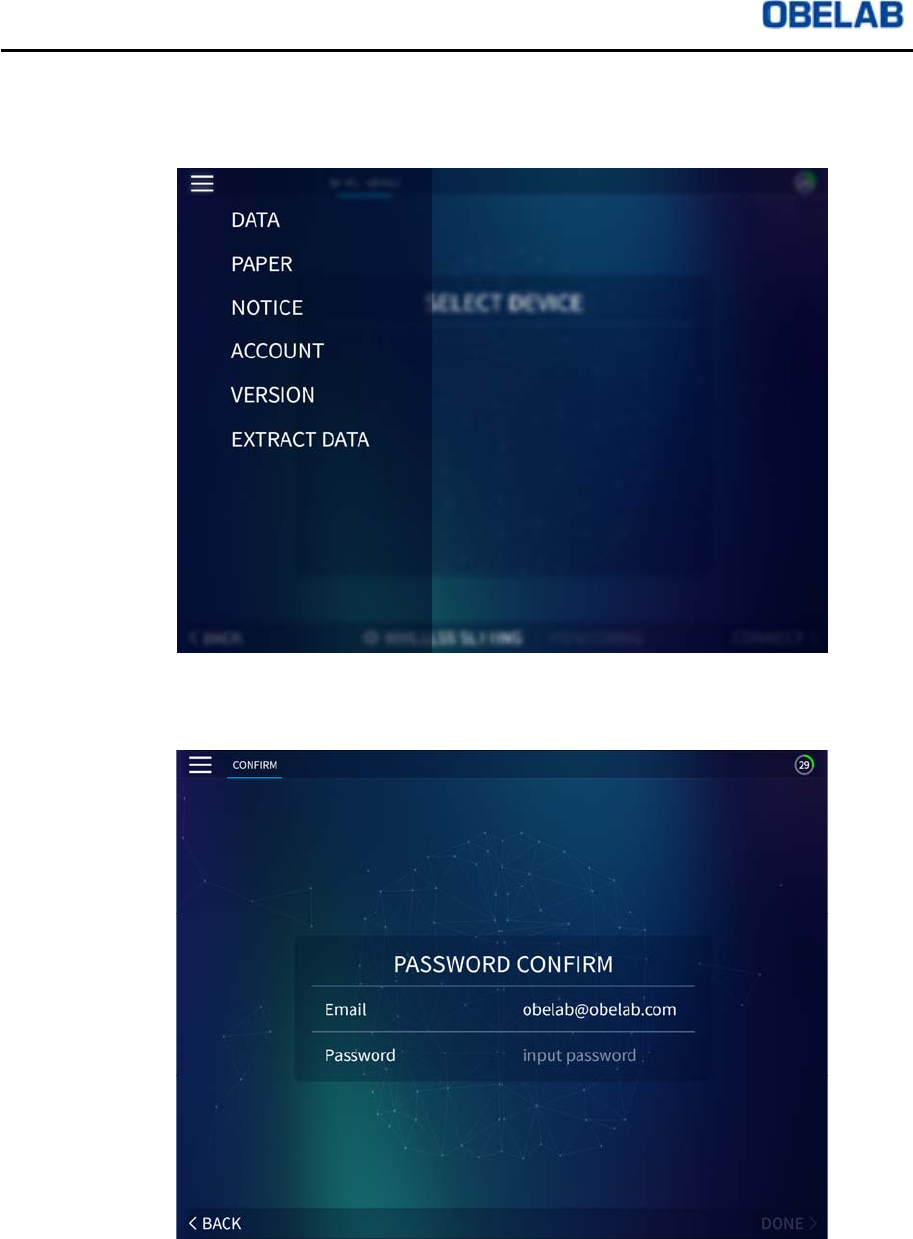
③By clicking the top left corner of the menu bar on the screen and clicking DATA
button in the menu bar, you can replay and check the saved measurement data.
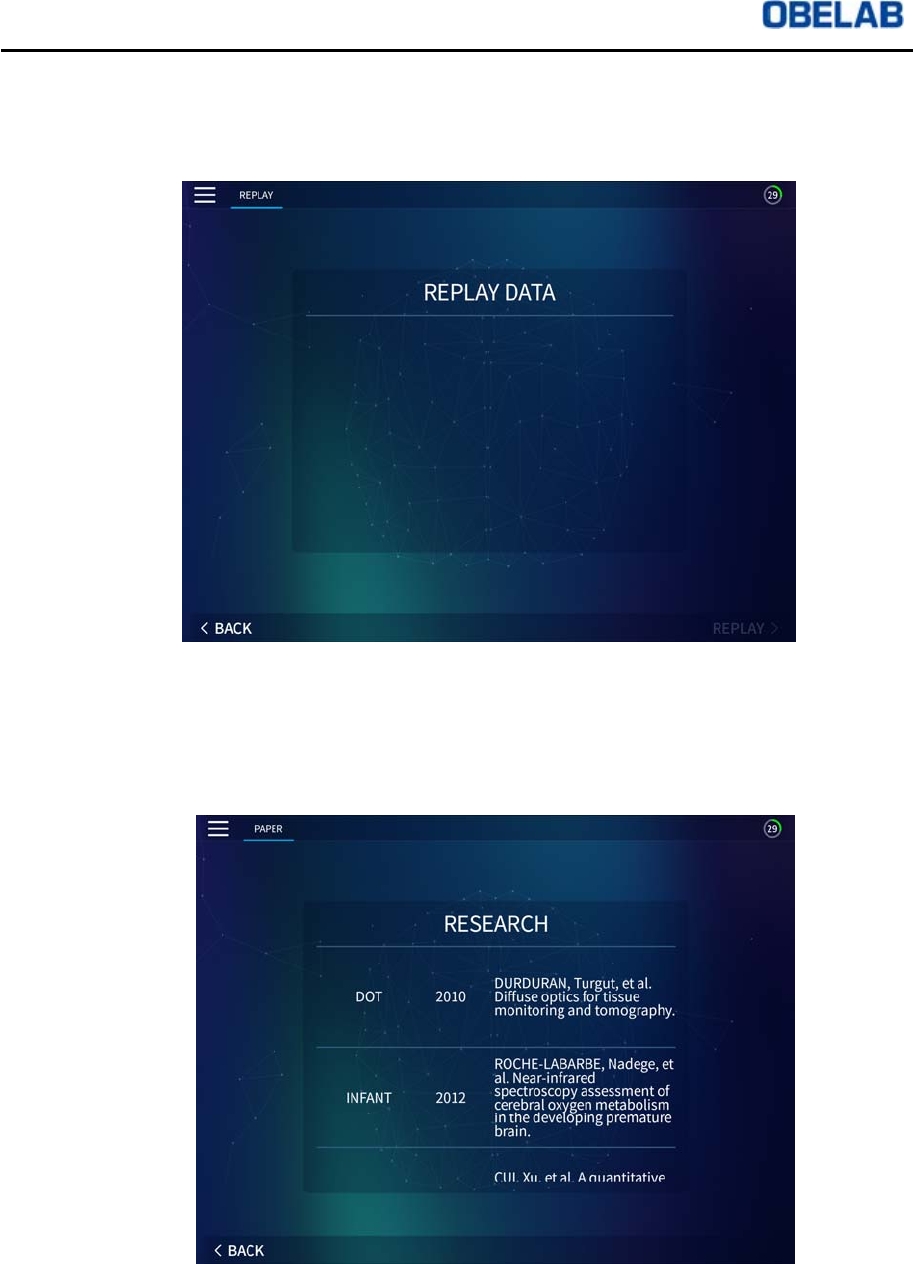
④To check saved data, the User needs to Log In through Admin Account. Enter
Password and click DONE page to move onto DATA page.
NIRSIT Version 1.0
Operation Manual
OBELAB Confidential 34
⑤Saved data are listed under the User name and the data saving date. The User
can replay the saved data by clicking the User name and data saving date.
Additional Information - Paper, Notice, Account, and Version
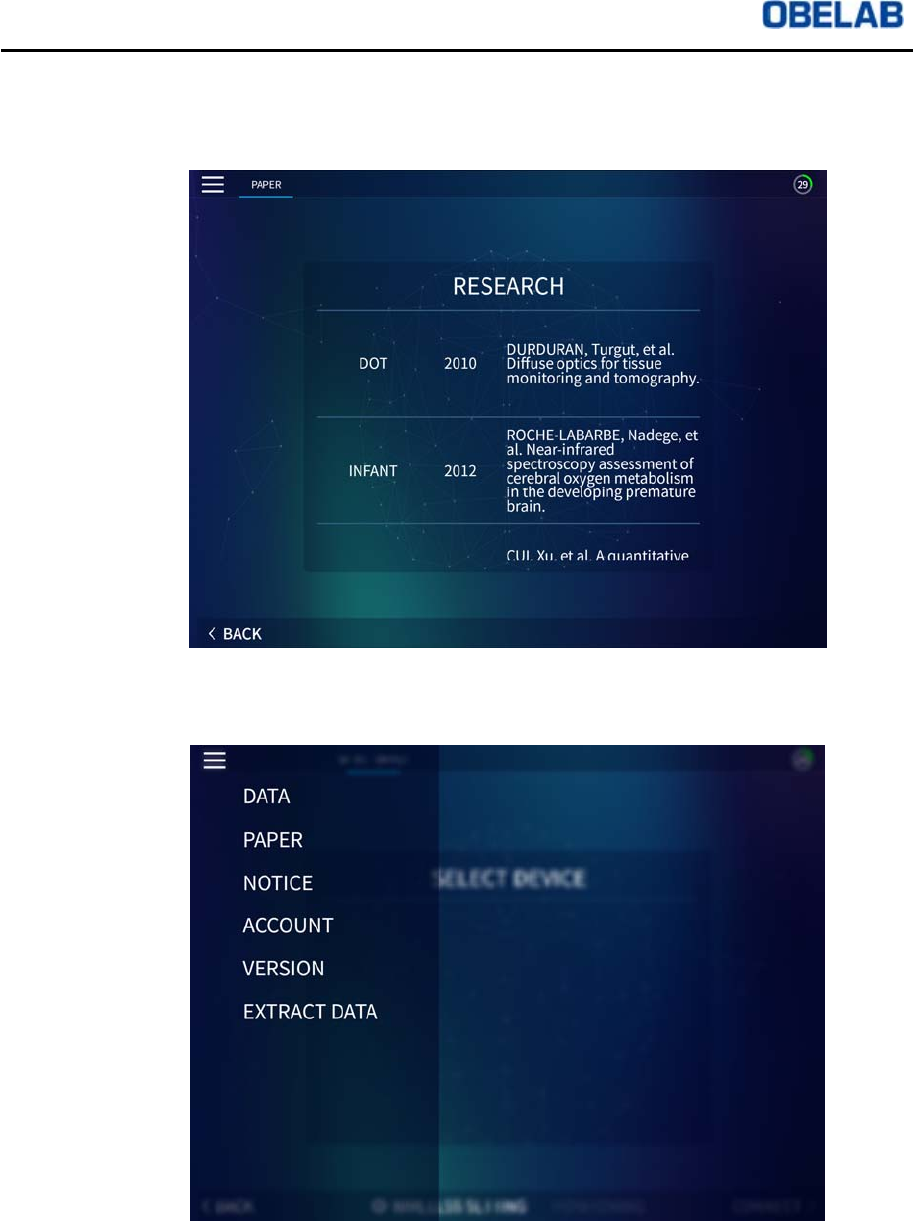
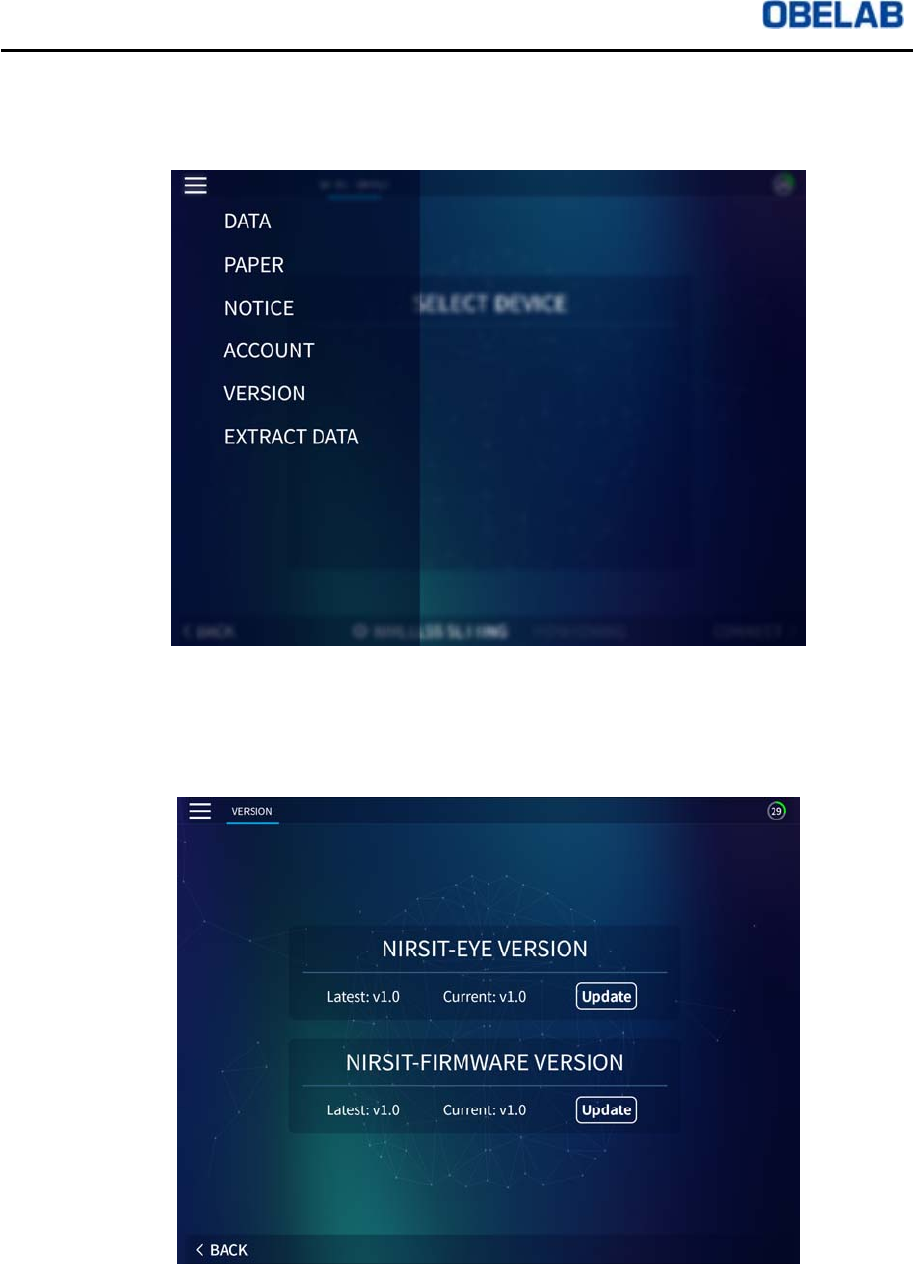
①By clicking PAPER button on the top left corner of the menu bar on the screen, the
User can find a list of research papers and journals on the PAPER page.
NIRSIT Version 1.0
Operation Manual
OBELAB Confidential 35
②On the PAPER page, the research papers and journals are listed under category,
published year, author, and the name of the journal. By clicking the name of the
journal, the User is connected automatically to the publisher’s homepage.
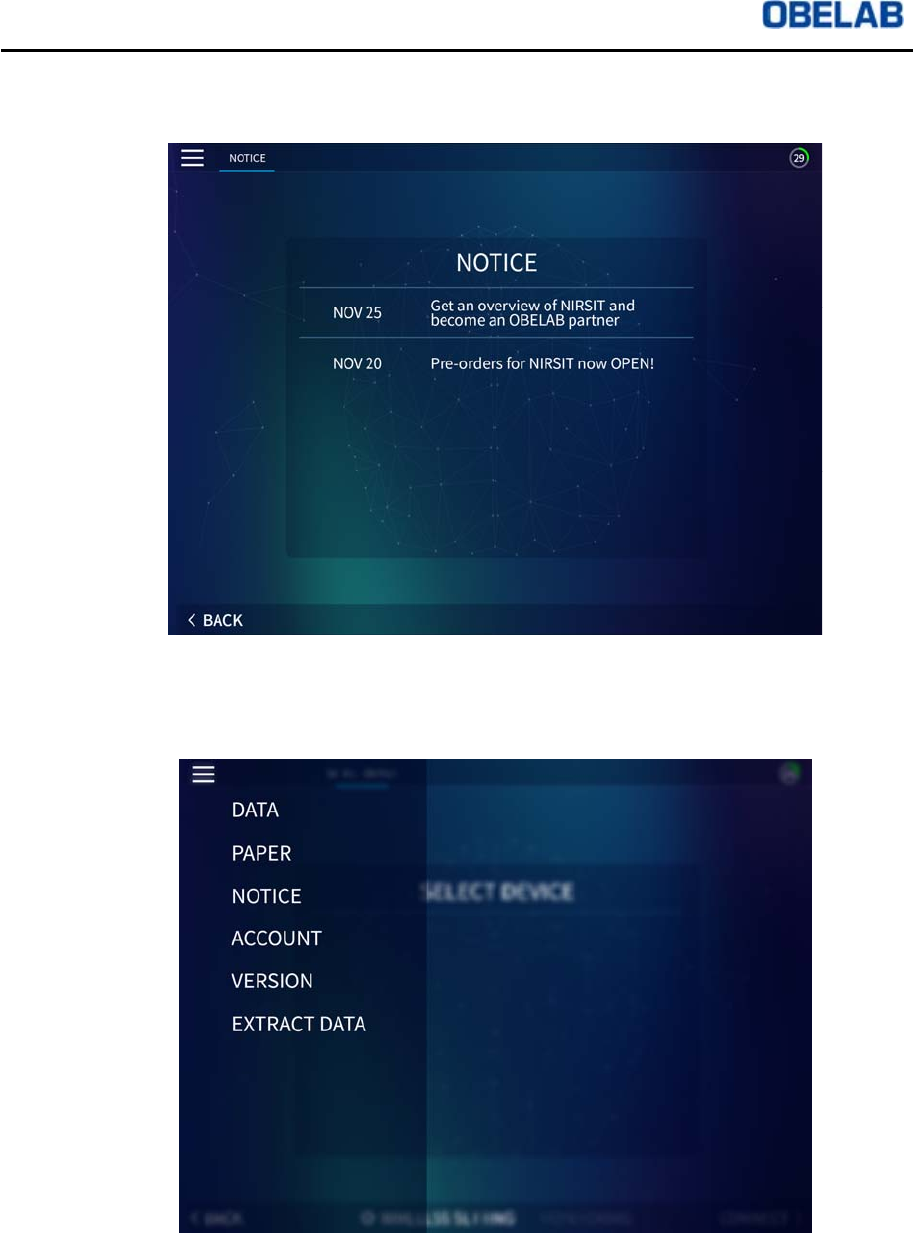
③By clicking NOTICE button on the top left corner of the menu bar on the screen,
the User can find notices relating to OBELAB on the NOTICE page
NIRSIT Version 1.0
Operation Manual
OBELAB Confidential 36
④On the NOTICE page, the User can check all the latest news on OBELAB. By
clicking the name of the news, the User can check more detailed information.
⑤By clicking ACCOUNT button on the top left corner of the menu bar on the screen,
the User can change Password from the ADMIN ACCOUNT on the ACCOUNT
page.
NIRSIT Version 1.0
Operation Manual
OBELAB Confidential 37
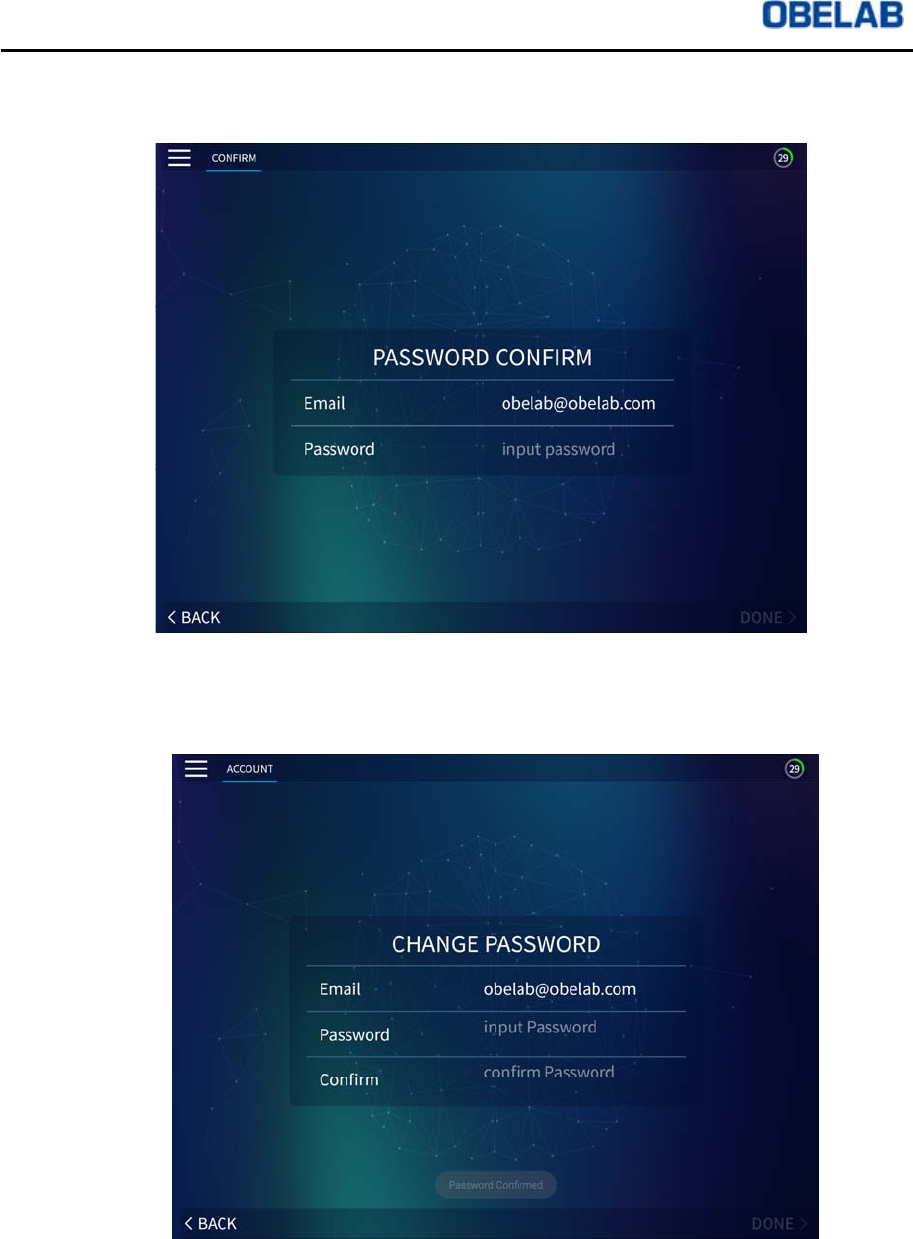
⑥In order to move onto ACCOUNT page, the User needs to Log In to ADMIN
ACCOUNT by using existing Password.
⑦Once Log In process is complete, the User can move onto the ACCOUNT page
and can change existing Password to a new Password.
NIRSIT Version 1.0
Operation Manual
OBELAB Confidential 38
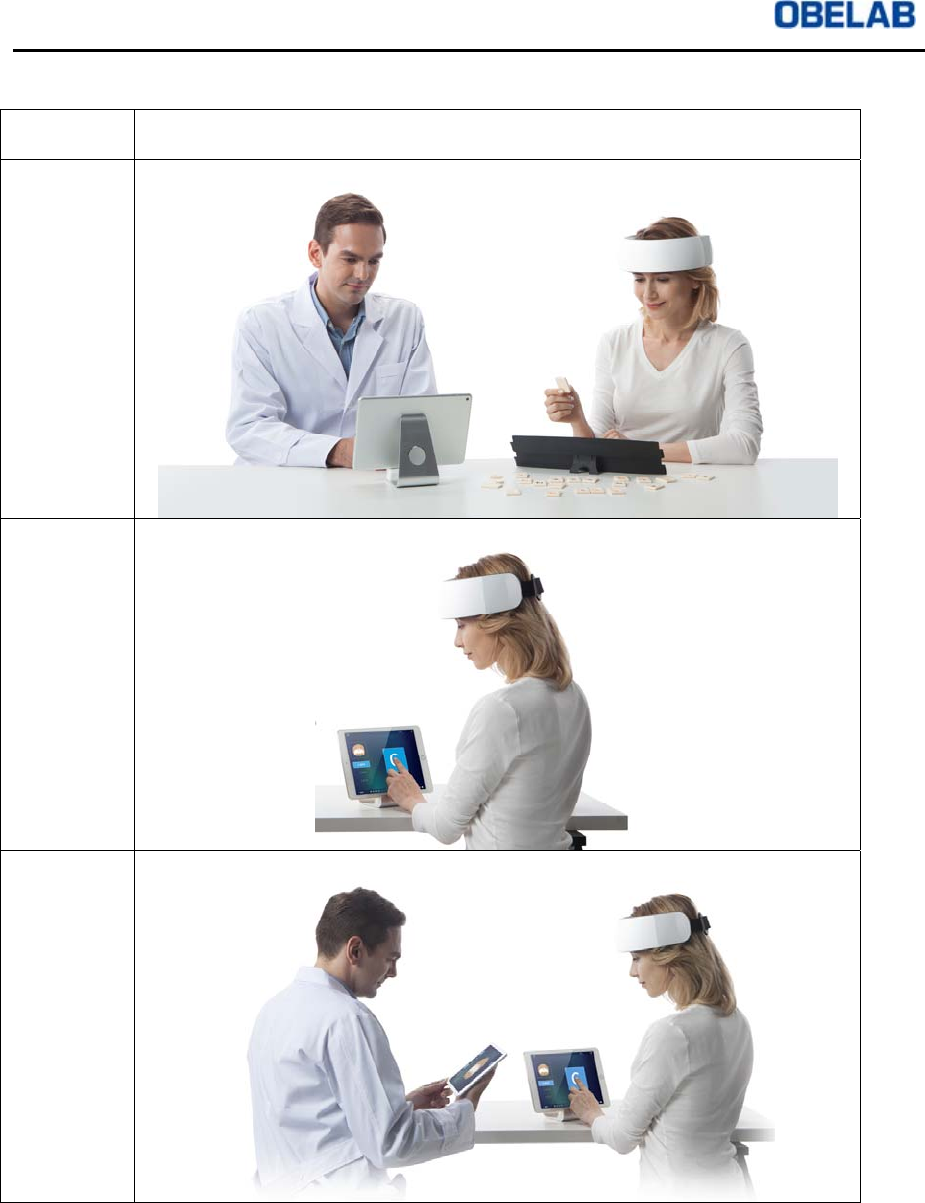
⑧By clicking VERSION button on the top left corner of the menu bar on the screen,
the User can check the versions of NIRSIT APP (NIRSIT-EYE and NIRSIT-
FIRMWARE) on the VERSION page
⑨On the VERSION page, the User can check latest version and the currently
installed version of NIRSIT APP (NIRSIT-EYE and NIRSIT-FIRMWARE). To
update the APP to the most current version, the User can click Update button for
the latest version download.
NIRSIT Version 1.0
Operation Manual
OBELAB Confidential 39
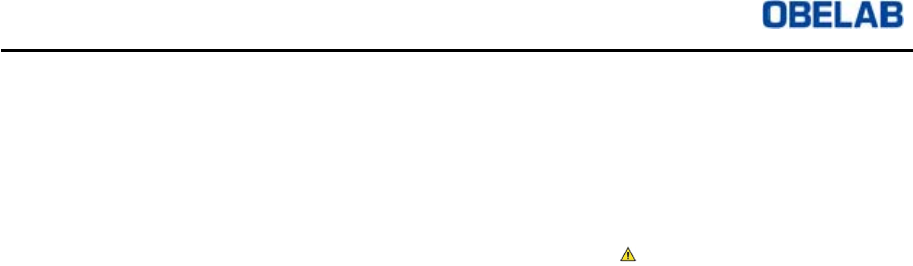
3.4 Operation Scenario
Operation
Mode
Picture
Monitoring
mode
Task mode
Monitoring
+Task
mode
Table 1: Operation Scenario

NIRSIT Version 1.0
Operation Manual
OBELAB Confidential 40
Operation Scenario can be classified into three (3) types.
Monitoring Mode
This is a commonly utilized Mode that allows the User to monitor the User’s brain
activations in real time. One NIRSIT device can be connected to the Tablet. The User
can perform any type of task he/she wishes, and the User can record the data from
performance of the task by marking the start of a task by a triggering method.
Task Mode
Task Mode allows the User to utilize either Cognitive Task or Behavioral Task
implemented within the NIRSIT APP. At the same time, the User can monitor the brain
activation on a monitoring mini-screen during performance of the chosen Cognitive
Task or Behavioral Task. One NIRSIT device can be connected to the Tablet. Each
Task is composed of a single protocol and the measurement data from NIRSIT device
are triggered according to the protocol of each Task and are marked on the
measurement data.
Monitoring Mode + Task Mode
Monitoring Mode + Task Mode allows the User to connect one NIRSIT device to two
Tablets. Task Mode Tablet can be used by the User who is performing the Task in the
Task Mode, and Monitoring Mode Tablet can be used by another User who is
monitoring the brain activations of the User performing the Task simultaneously.

NIRSIT Version 1.0
Operation Manual
OBELAB Confidential 41
4 Product Specifications
Model: NIRSIT
Input Voltage (via USB port): 5V
Maximum Current (via USB port): 2.1A
Battery
Type: Lithium ion polymer battery
Usage Time: Up to 8 hours (when fully charged)
Voltage: 3.7 V
Capacity: 3000mAh
Physical Specifications
Size: 215 x 195 x 75 (mm)
Weight (including battery): 550g
Source
Source Type: Dual wavelength VCSEL laser
Number of Sources: 24
Laser Output: 3mW
Wavelength: 780nm, 850nm
Operation Mode: CW
Detector
Detector Type: Active detection sensor
Number of Detectors: 32
Number of channels: Up to 204 channels
Measurement
Source-Detector distance: 1.5cm, 2.12cm, 3cm, 3.35cm
System Scan Rate: Up to 16.276Hz
Operation Mode: CW
Data Storage and Communication
Built-in memory in Tablet or PC storage
Wireless communication between Tablet and NIRSIT device through WLAN,
and Serial communication between USB and PC.
This equipment should be installed and operated with minimum 1cm between
the radiator and your body.

NIRSIT Version 1.0
Operation Manual
OBELAB Confidential 42
5 Maintenance
5.1 Storage Conditions
① Keep NIRSIT device where there is little dust and humidity.
② When not in use, store NIRSIT device in a case enclosed in the package box.
③ Do not apply excessive shake or impact and maintain stability.
④ Keep away from chemicals or explosive gas products.
⑤ Keep away from direct sunlight.
⑥ Make sure all the essential goods and accessories in the package box are without
damage and within shelf life.
⑦ Make sure NIRSIT device is without external crack or damage. In case any
damage is found, please contact OBELAB immediately.
5.2 External Conditions
While Operating
Temperature (0~35 Celsius)
Humidity (20~80%)
While Stored
Temperature (-10~40 Celsius)
Humidity (20~80%)
5.3 Caution while Operation
NIRSIT device is made flexible to fit average adult head size. However, if bent too
extensively with excessive force, NIRSIT device may be damaged.
6 Warranty and Repair
6.1 Customer’s Rights
The Customer has the right to receive free repair service during one year from the
date of purchase of NIRSIT system, provided that in the event the damage to NIRSIT
system is due to Customer’s fault or other causes as specified in 6.2 below, please
note that the repair service will be provided for a fee.
6.2 Warranty
If the NIRSIT system Customer purchased is a non-conforming product or is
damaged during normal usage conditions, OBELAB will provide repair services free
of charge for one year from the date of purchase.
NIRSIT Version 1.0
Operation Manual
OBELAB Confidential 43
Customer will receive quality assurance as referenced in the Warranty Card.
Please fill out the date of purchase to ensure receipt of one year warranty period
which is triggered by the date of purchase.
Please contact local dealer of OBELAB regarding any questions on warranty
period.
Warranty will not be provided in the following cases:
In the event NIRSIT system is not installed, repaired, or placed by OBELAB
personnel or any other authorized personnel trained by OBELAB.
In the event NIRSIT system is damaged due to the use of any other devices in
connection with NIRSIT system
In the event NIRSIT system is damaged due to the User’s mishandling
In the event NIRSIT system is damaged due to repairs and maintenance being
performed utilizing equipment(s) authorized by OBELAB
In the event NIRSIT system is damaged due to random alteration or use of
unauthorized accessories by the Customer
In the event NIRSIT system is damaged due to natural disaster, such as
accident, earthquake, flood, etc.
In the event NIRSIT system is damaged after the one year warranty period, as
referred to in this Manual
In the event NIRSIT system is damaged due to the Customer’s failure to
comply with the appropriate maintenance procedures as recommended
The warranty applies to NIRSIT hardware only. It does not apply to the following:
Damage to the measurement results due to the accessories or movement
In case of problem while using NIRSIT system, please contact local dealer of
OBELAB
6.3 Service for Fee
In case of requesting for service as specified below, the service will be provided for a
fee even during the one year warranty period.
In the event NIRSIT system is not installed, repaired, or placed by OBELAB
personnel or any other authorized personnel trained by OBELAB.
In the event NIRSIT system is damaged due to the use of any other devices in
connection with NIRSIT system
In the event NIRSIT system is damaged due to the Customer’s mishandling
In the event NIRSIT system is damaged due to repairs and maintenance being
performed utilizing equipment(s) authorized by OBELAB
In the event NIRSIT system is damaged due to random alteration or use of
unauthorized accessories by the Customer

NIRSIT Version 1.0
Operation Manual
OBELAB Confidential 44
In the event NIRSIT system is damaged due to natural disaster, such as
accident, earthquake, flood, etc.
In the event NIRSIT system is damaged after the one year warranty period, as
referred to in this Manual
In the event NIRSIT system is damaged due to the Customer’s failure to comply
with the appropriate maintenance procedures as recommended
NIRSIT Version 1.0
Operation Manual
OBELAB Confidential 45
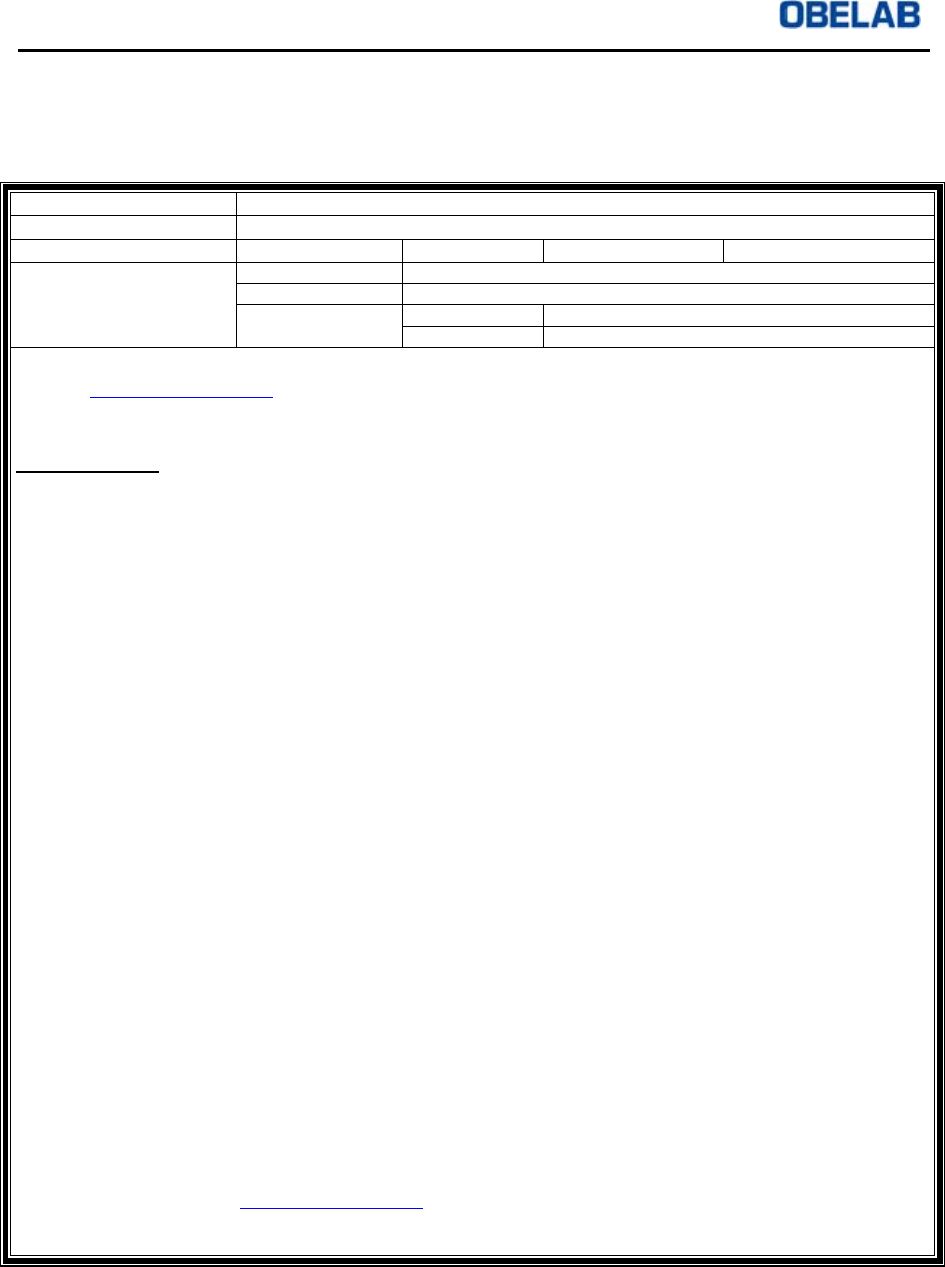
6.4 Quality Assurance Certificate
OBELAB provides quality assurance on the following items:
Manufacture Number
Warranty Period One year from the date of purchase
Place of Purchase Name of Office TEL
Customer Information Name
Address
TEL TEL
CELL
- Upon purchase of OBELAB product, please fill out the form and send the scanned document to
contact@obelab.com via email as attachment.
- In case the certificate is not received by OBELAB, OBELAB will not be responsible for any
disadvantages in terms of service provisions or others.
Warranty Rules
1. Warranty period
- Damages to the product arising from the normal use of the product will be repaired at OBELAB
service center free of charge for one year from the date of purchase.
2. Exceptions to Warranty provision
- In the event the product is not installed, repaired, or placed by OBELAB personnel or any other
authorized personnel trained by OBELAB.
- In the event the product is damaged due to the use of any other devices in connection with
NIRSIT system
- In the event the product is damaged due to the Customer’s mishandling
- In the event the product is damaged due to repairs and maintenance being performed utilizing
equipment(s) authorized by OBELAB
- In the event the product is damaged due to random alteration or use of unauthorized accessories
by the Customer
- In the event the product is damaged due to natural disaster, such as accident, earthquake, flood,
etc.
- In the event the product is damaged after the one year warranty period, as referred to in this
Manual
- In the event the product is damaged due to the Customer’s failure to comply with the appropriate
maintenance procedures as recommended
3. Service after Warranty Period
- Damages to the product arising after the Warranty period will be serviced for a fee.
- All other matters not referenced in this Warranty Rules will be handled in accordance with the
consumer injury compensation rule in Consumer Protection Act.
- Please contact OBELAB customer services in case of product failure or questions.
4. Precautions
- Please read the product Operator’s Manual carefully before actual use of the product.
This Quality Assurance Certificate is effective only within Korea.
This Quality Assurance Certificate will not be re-issued. Please be sure to fill out this Certificate and send
the scanned document to contact@obelab.com.
Please contact the local dealer or OBELAB customer service if any questions.