OE Power Systems TL201 TracUSA Model TL201 Personal GPS Tracker User Manual

OE Power Systems Inc. TracUSA Model TL201 Personal GPS Tracker

user manual

  1 TracUSA™ MODEL TL201 PERSONAL GPS TRACKING USER MANUAL   Contents Tables 1. Introduction------------------------------------------------------------------------------------------------------2 2. What’s new? ----------------------------------------------------------------------------------------------------3 3. Main Features---------------------------------------------------------------------------------------------------3 4. Applications-----------------------------------------------------------------------------------------------------3 5. Specification----------------------------------------------------------------------------------------------------3 6. Start up-----------------------------------------------------------------------------------------------------------4 7. Get the position by calling the tracker-----------------------------------------------------------------5 8. Set the authorized number---------------------------------------------------------------------------------5 9. Delete authorized number----------------------------------------------------------------------------------5 10. Get position by sending SMS command-------------------------------------------------------------6 11. Continuous tracking function----------------------------------------------------------------------------6 12. SOS function---------------------------------------------------------------------------------------------------6 13. Listen in function---------------------------------------------------------------------------------------------6 14. Speeding alert-------------------------------------------------------------------------------------------------6 15. GEO-FENCE----------------------------------------------------------------------------------------------------7 16. Low battery alert----------------------------------------------------------------------------------------------7 17. Set the local time---------------------------------------------------------------------------------------------7 18. Modify the password----------------------------------------------------------------------------------------8 19. GPRS setting---------------------------------------------------------------------------------------------------8 20. Displaying location on Google map--------------------------------------------------------------------8 21. Displaying location on your cell phone---------------------------------------------------------------9 22. Tracking in the PC software------------------------------------------------------------------------------9 23. Caution & User Instructions    IMPORTANT !!-----------------------------------------------------10
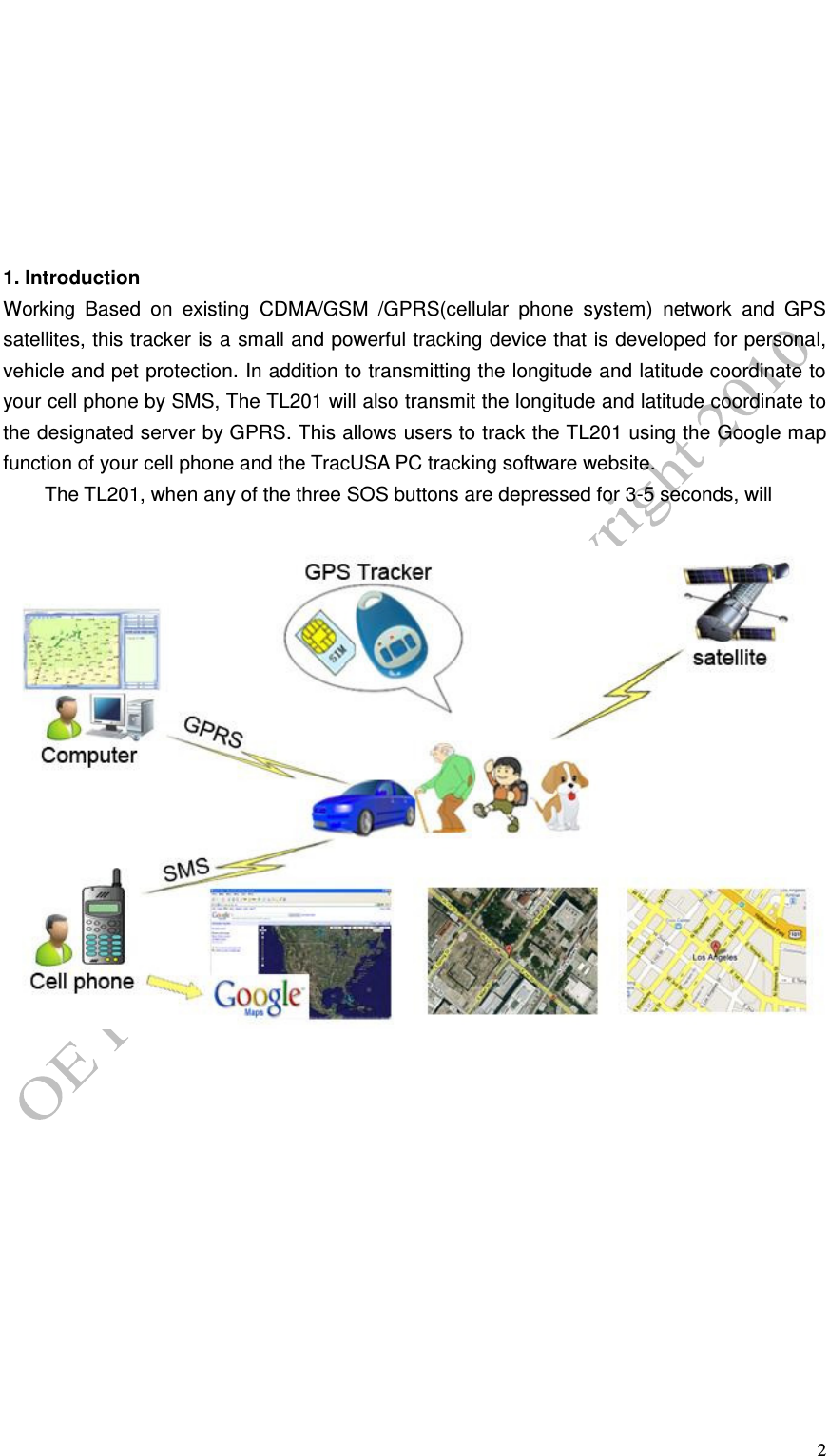
  2         1. Introduction Working  Based  on  existing  CDMA/GSM  /GPRS(cellular  phone  system)  network  and  GPS satellites, this tracker is a small and powerful tracking device that is developed for personal, vehicle and pet protection. In addition to transmitting the longitude and latitude coordinate to your cell phone by SMS, The TL201 will also transmit the longitude and latitude coordinate to the designated server by GPRS. This allows users to track the TL201 using the Google map function of your cell phone and the TracUSA PC tracking software website.   The TL201, when any of the three SOS buttons are depressed for 3-5 seconds, will
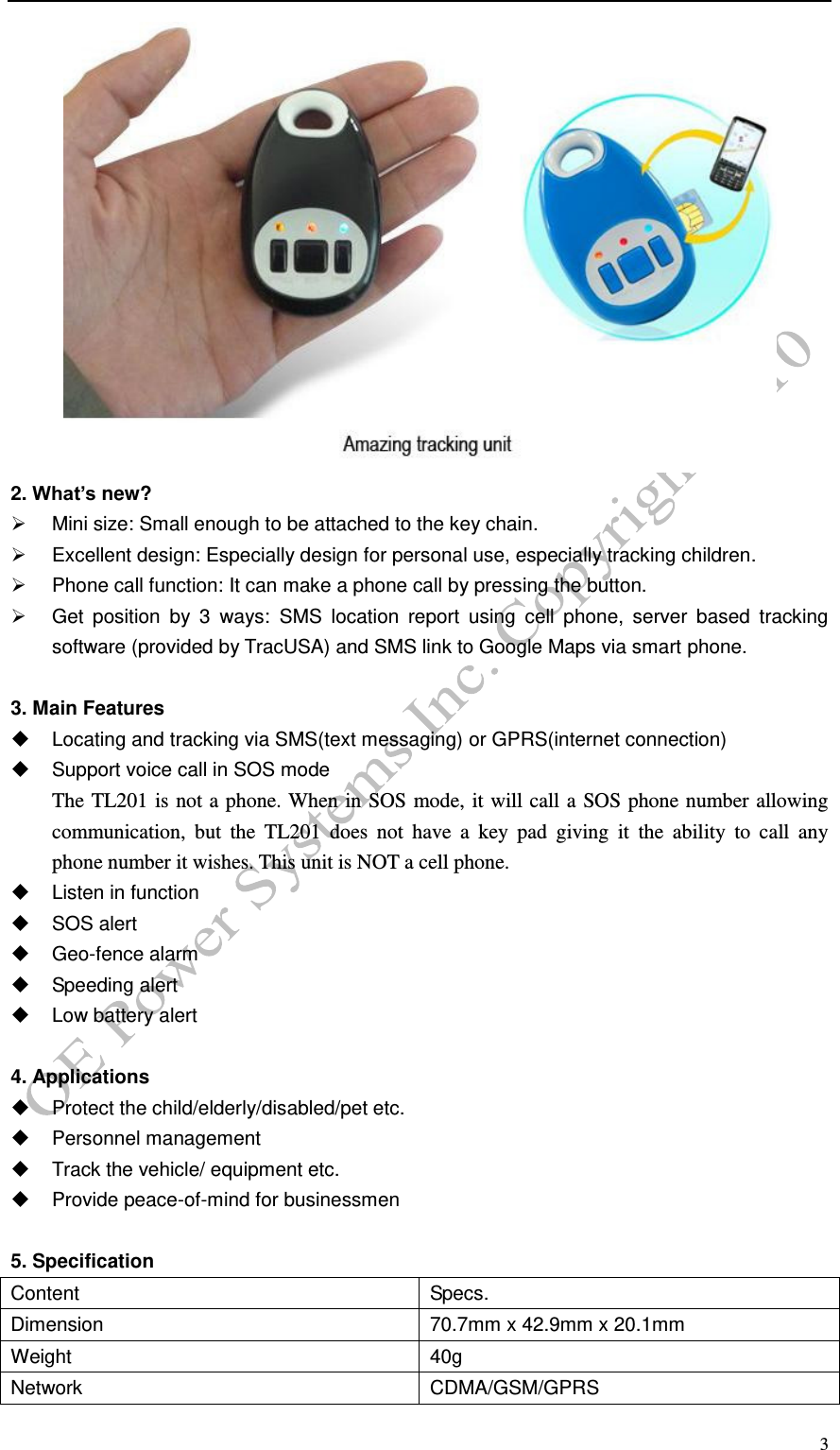
  3  2. What’s new?   Mini size: Small enough to be attached to the key chain.   Excellent design: Especially design for personal use, especially tracking children.   Phone call function: It can make a phone call by pressing the button.   Get  position  by  3  ways:  SMS  location  report  using  cell  phone,  server  based  tracking software (provided by TracUSA) and SMS link to Google Maps via smart phone.  3. Main Features   Locating and tracking via SMS(text messaging) or GPRS(internet connection)   Support voice call in SOS mode The TL201 is not a phone. When in SOS mode, it will call a SOS phone number allowing communication,  but  the  TL201  does  not  have  a  key  pad  giving  it  the  ability  to  call  any   phone number it wishes. This unit is NOT a cell phone.     Listen in function   SOS alert   Geo-fence alarm   Speeding alert   Low battery alert  4. Applications   Protect the child/elderly/disabled/pet etc.   Personnel management   Track the vehicle/ equipment etc.   Provide peace-of-mind for businessmen  5. Specification Content Specs. Dimension 70.7mm x 42.9mm x 20.1mm Weight 40g Network CDMA/GSM/GPRS
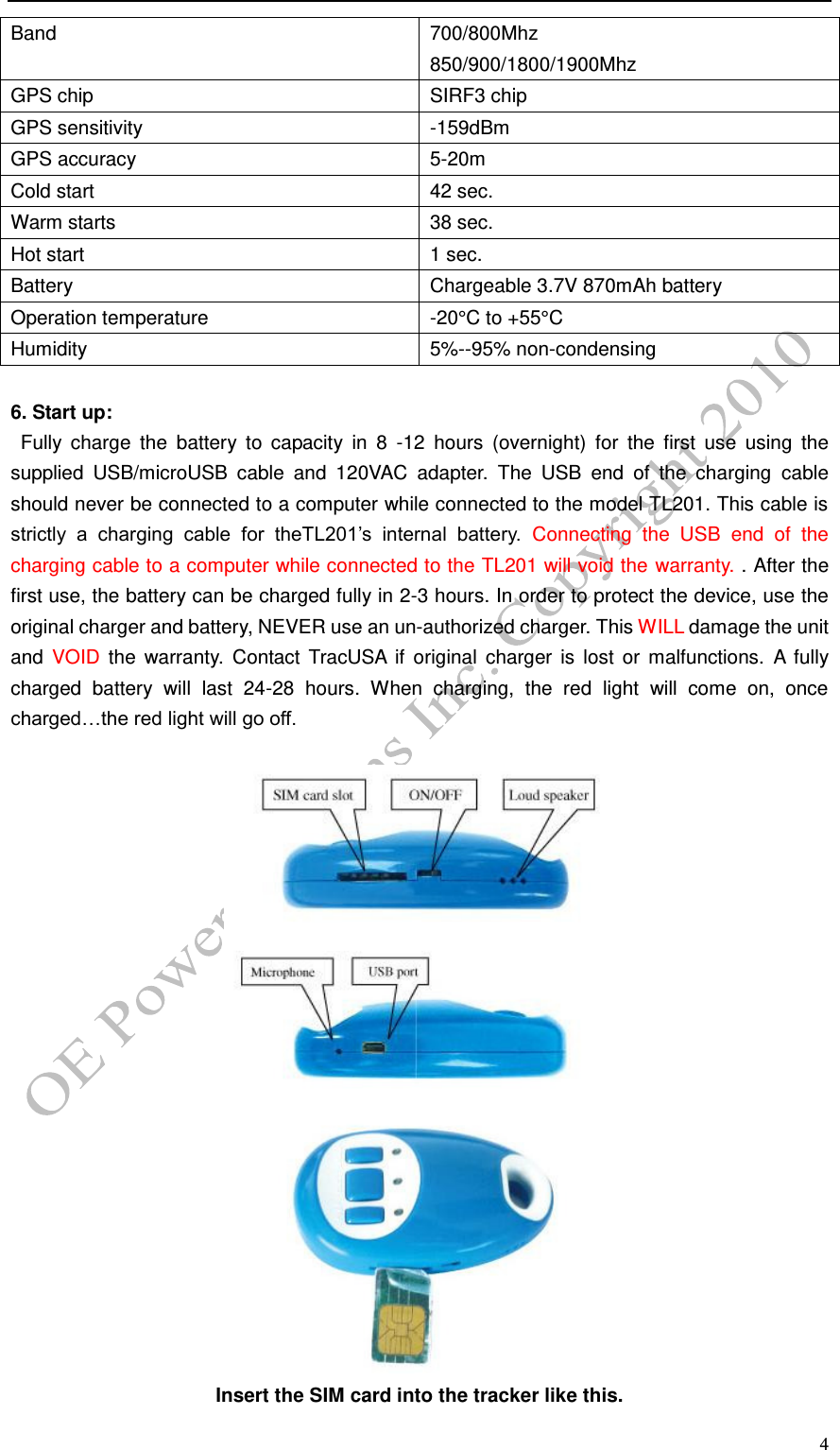
  4 Band 700/800Mhz 850/900/1800/1900Mhz GPS chip SIRF3 chip GPS sensitivity -159dBm GPS accuracy 5-20m Cold start 42 sec. Warm starts 38 sec. Hot start 1 sec. Battery Chargeable 3.7V 870mAh battery Operation temperature -20°C to +55°C Humidity 5%--95% non-condensing  6. Start up:   Fully  charge  the  battery  to  capacity  in  8  -12  hours  (overnight)  for  the  first  use  using  the supplied  USB/microUSB  cable  and  120VAC  adapter.  The  USB  end  of  the  charging  cable should never be connected to a computer while connected to the model TL201. This cable is strictly  a  charging  cable  for  theTL201’s  internal  battery.  Connecting  the  USB  end  of  the charging cable to a computer while connected to the TL201 will void the warranty. . After the first use, the battery can be charged fully in 2-3 hours. In order to protect the device, use the original charger and battery, NEVER use an un-authorized charger. This WILL damage the unit and  VOID  the  warranty.  Contact  TracUSA  if  original  charger  is lost or malfunctions.  A  fully charged  battery  will  last  24-28  hours.  When  charging,  the  red  light  will  come  on,  once charged…the red light will go off.    Insert the SIM card into the tracker like this.
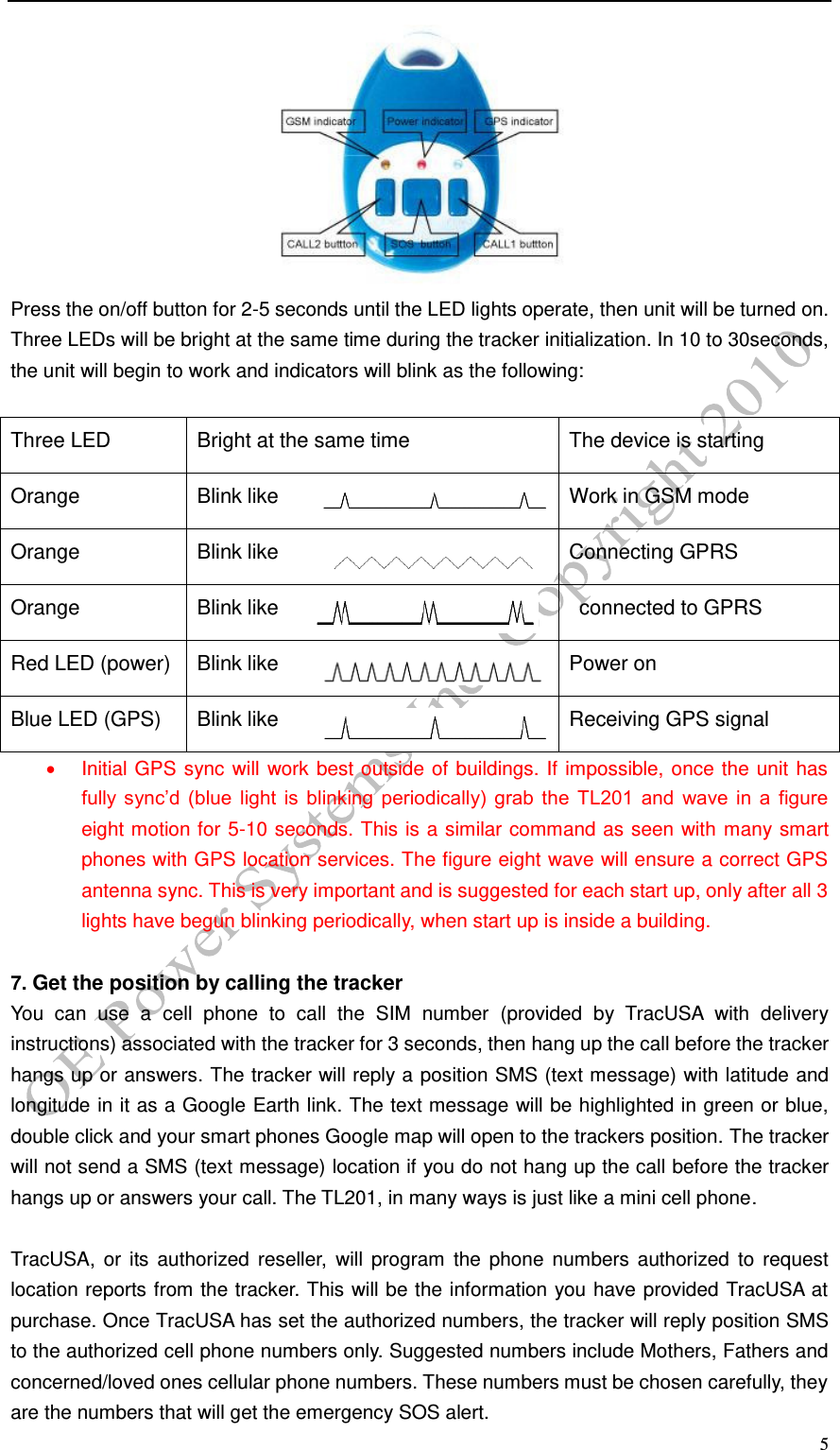
  5  Press the on/off button for 2-5 seconds until the LED lights operate, then unit will be turned on. Three LEDs will be bright at the same time during the tracker initialization. In 10 to 30seconds, the unit will begin to work and indicators will blink as the following:  Three LED Bright at the same time The device is starting Orange LED(GSM) Blink like Work in GSM mode Orange LED(GSM) Blink like Connecting GPRS Orange LED(GSM) Blink like   connected to GPRS Red LED (power) Blink like Power on Blue LED (GPS) Blink like Receiving GPS signal   Initial GPS sync will work best outside of buildings. If impossible, once the unit has fully  sync’d  (blue  light  is  blinking  periodically)  grab  the  TL201  and  wave  in  a  figure eight motion for 5-10 seconds. This is a similar command as seen with many smart phones with GPS location services. The figure eight wave will ensure a correct GPS antenna sync. This is very important and is suggested for each start up, only after all 3 lights have begun blinking periodically, when start up is inside a building.    7. Get the position by calling the tracker You  can  use  a  cell  phone  to  call  the  SIM  number  (provided  by  TracUSA  with  delivery instructions) associated with the tracker for 3 seconds, then hang up the call before the tracker hangs up or answers. The tracker will reply a position SMS (text message) with latitude and longitude in it as a Google Earth link. The text message will be highlighted in green or blue, double click and your smart phones Google map will open to the trackers position. The tracker will not send a SMS (text message) location if you do not hang up the call before the tracker hangs up or answers your call. The TL201, in many ways is just like a mini cell phone.  TracUSA, or  its authorized  reseller,  will  program  the  phone  numbers  authorized  to  request location reports from the tracker. This will be the information you have provided TracUSA at purchase. Once TracUSA has set the authorized numbers, the tracker will reply position SMS to the authorized cell phone numbers only. Suggested numbers include Mothers, Fathers and concerned/loved ones cellular phone numbers. These numbers must be chosen carefully, they are the numbers that will get the emergency SOS alert.
  6      THE FOLLOWING INSTRUCTIONS ARE INFORMATIONAL ONLY,  THESE  SETTINGS  WILL  BE  PRE-SET  BY  YOUR TracUSA      REPRESENTATIVE AT TIME OF PURCHASE:   8. Set the authorized number.   Send SMS“123456A1, phone number” to set the first SOS number. Send SMS“123456A2, phone number” to set the second SOS number. Send SMS“123456A3, phone number” to set the third SOS number. Send SMS“123456A4, phone number” to set the CALL1 number. Send SMS“123456A5, phone number” to set the CALL2 number. Note: 123456 is the default password. A must be English in capital and make sure there is no space in the command. Phone number must include the country code E.g.  send  SMS  “123456A1,+8613812345678”  to  set  +8613812345678  as  the  first  SOS number. +86 is the country code of China. Please do not use 00 instead of +.  All five authorized numbers are not required, but at least one number will be programmed at time of purchase by your TracUSA representative . The device accepts the SMS commands from the authorized numbers only.  9. Delete authorized number. Send SMS“123456A1,D” to delete the first SOS number. Send SMS“123456A2,D” to delete the second SOS number. Send SMS“123456A3,D” to delete the third SOS number. Send SMS“123456A4,D” to delete the CALL1 number. Send SMS“123456A5,D” to delete the CALL2 number. E.g. send “123456A1,D” to delete the first SOS number.  10. Get a single GPS location position by sending SMS (text message) command. Send SMS “123456F” to the device’s cellular phone number (provided at purchase from your TracUSA representative) and it will reply its position by SMS. Only the authorized number can get the reply. Note: F must be English in capital. E.g. send “123456F” to the unit. It will reply its position.  11. Continuous tracking function Send SMS “123456M0/M1,xxxS/M/H” to the unit, the tracker will reply the position message according to the time interval. If the device does not connect to the server, the message will
  7 reply to A1 number or it will reply to server.  Note: M must be English In capital.   M0 means turn off, M1 means turn on xxx means time interval and must be three numbers,030S means 30 seconds S means second, M means minute, H means hour   H should be≤90, S,M should be <255 E.g.  send“123456M1,030S”  to  the  tracker  means  every  30  seconds  send  back  a  position coordinate to the A1 number. Send“123456M0,030S” to the tracker means stop the continuous tracking.  12. SOS function USER Presses ANY of the 3 black buttons and hold for 3-5 seconds. Nothing else is needed, this starts the powerful tracking and emergency alert functions of the TL201. It  will  send  “help  me!  + GPS  info”  to  A1,  A2,  A3  authorized  numbers  if  the SOS  button  is pressed for 3 seconds. After that, it will dial the 3 authorized numbers (A1, A2, A3).The first preset number will take priority over the second one and the third one. If the tracker fails to connect to the first number, it will switch to the second one, In the event the second number fail’s to be connected too, the system will connect to the third number, This will go on and on until  one  of  the  telephone  number’s  pick  up,  then  two  way  communication  starts.  Once communication is established, the receiving phone can silently listen in to the surroundings of the TL201. The TL201 comes installed with a speaker and microphone, so after depressing the SOS buttons, besides sending the GPS location SMS (Text), the user can talk to one of the preset numbers, or the preset number can listen in to the surroundings. The model TL201 is NOT a cell phone. It does not have a key pad that enables the TL201 user to call out. The only circumstance  when  voice  communications  is  enabled  is  when  the  SOS  button  has  been depressed. Then only the preset numbers can listen in and communicate.   ****This device is never to be held near a users head, ear etc like a cell phone; the TL201 is not a cell phone.     13. Listen in function The tracker will answer the call from the authorized numbers automatically. This allows the caller to listen in to the sounds around the tracker.  14. Speeding alert Sent SMS “123456J0/J1,speed” to set the Speeding alert function. Note: J must be English in capital. J0 means turn off the over speed alert function; J1 means turn on the speeding alert function. speed should be<250 and must 3 numbers, e.g. 055= 55 MPH. For example, send “123456J1,080” to tracker. When the object moves exceeds 55MPH, the unit  will  send  SMS  as  “Over  speed!  +GPS  info”  to  the  A1,A2,A3 number’s.  Send “123456J0,080” to tracker will turn off the speeding alert function.   15. GEO-FENCE
  8  Geo-Fence  is  a  system  whereby  the  user  can  set  a  defined  region,  where  if  the  device exceeds this region, a special SMS/Web Tracking System alert will be sent. This MUST be programmed by a qualified TracUSA representative. Contact your TracUSA representative if you desire this function added to your Model TL201.      16. Low battery alert Send SMS “123456 N 0/N1),xx” to set the low-battery alert. Note: N must be English in capital, N0 means turn off the low-battery alert function; N1 means turn on the low-battery alert function. xx should be <45 and must be 2 numbers. E.g. send“123456N1,30” to the tracker means when the battery is lower then 30%,it will send a alert  to  the  authorized  number.  Send“123456N0,30”  to  the  tracker  means  turn  off  the  low battery alert function.  17. Set the local time Send SMS “123456L,time zone” to set the local time Note: L must be English in capital, + in the time zone means east,- in the time zone means west. Time zone must be 2 numbers. So Central US time zone should be like this: -05 E.g. send “123456L-05” to set the time to the Central Time. This time settings are based from Greenwich Mean Time, being +00. Below is standard(non daylight savings time) US time one settings: Eastern US    -04 Central US    -05 Western US    -06 Pacific US    -07   These settings will be pre set by your TracUSA representative before delivery of unit.    18. Modify the password Send SMS “123456H******” to change the password. Note: ****** is the New password. H must be English in capital, send it to tracker to modify the password. (Default password: 123456) E.g. send “123456H456789” means change the password 123456 to 456789 The password won’t be erased by changing SIM card. Be sure keep the password in mind, otherwise you have to update the software to restore the original setting in case of losing the password. Call TracUSA customer service is you forget the password and need software update. The password must be 6 numbers- the tracker will not recognize fewer numbered password.    19. GPRS setting In  order  to  use  GPRS(  internet  connection  to  web  based  Tracking  software-TracUSA  will provide address and login information at new user account set up.) function, the user needs to set IP, Port and APN (access point name) by sending SMS commands. Make sure that your SIM card that in the tracker supports the GPRS function. TracUSA will program these settings
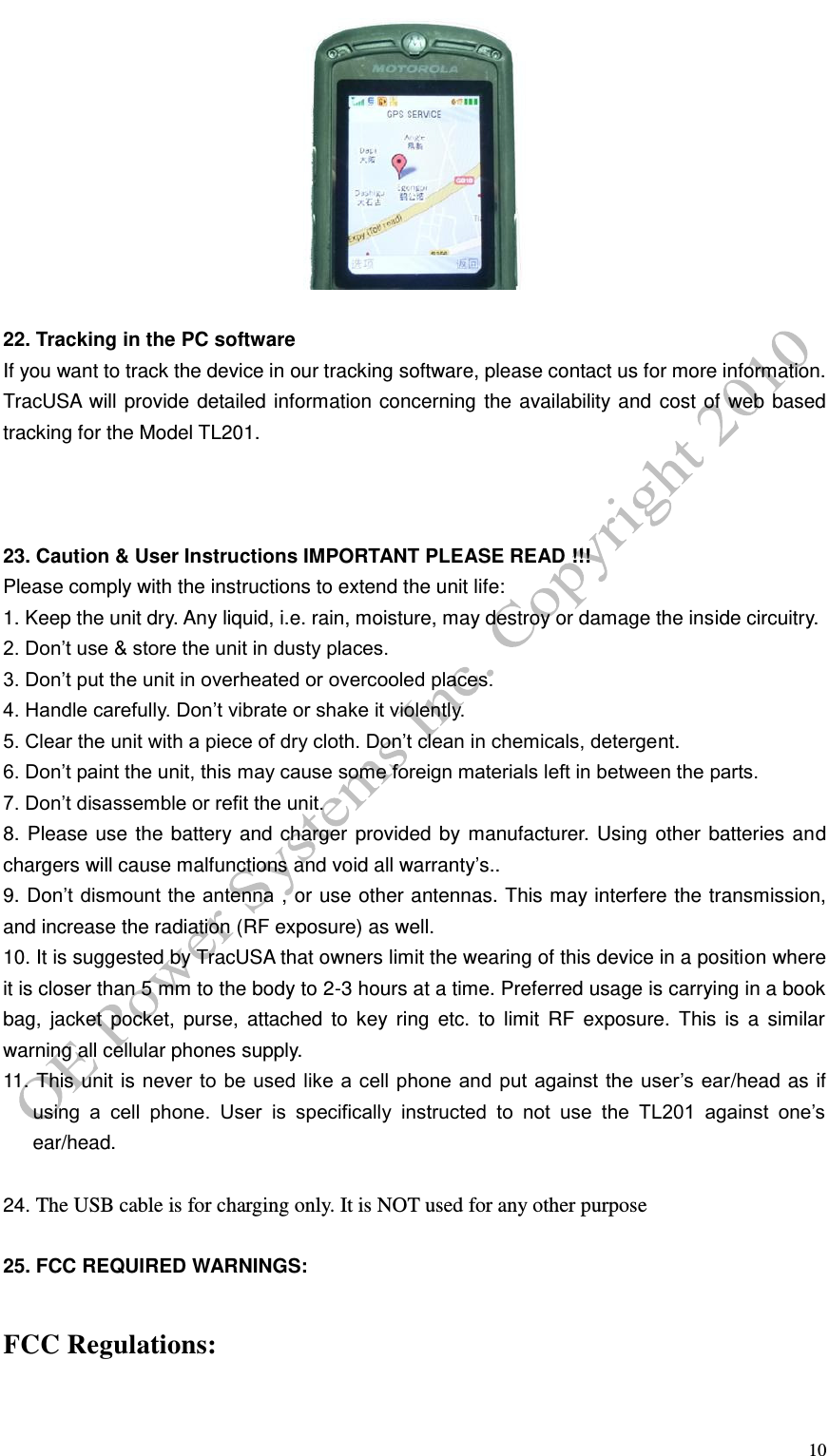
  9 before delivery to customer. This is for informational use only. DO NOT try and reset these settings, the settings provided by TracUSA are the only setting’s that will work with the web based tracking software.  Send SMS “123456C$$$$,IP:Port” to set the APN, IP and port. Note: C must be English in Capital. Please get APN from your local GSM operators and pay attention to the lower case or upper case of those letters. E.g.  send  SMS  “123456Cinternet2.voicestream.com, 119.122.101.91:7289”.internet2.voicestream.com is the APN for T Mobile and is provided as an example only, TracUSA will set the APN depending on which provider TracUSA supplies..  Send SMS “123456O&&&&, @@@@” to set the username and password for GPRS. Note:&&&& is the username and @@@@ is the password. O must be English in capital. This setting depends on different providers. If the provider doesn’t need username and password for the GPRS, you do not need to send this command. E.g. send SMS “123456Owap, wap”. The username will be wap and the password will be wap.  Send SMS “123456D” to enable GPRS Note: D must be English in capital. E.g. send SMS “123456D”  Send SMS “123456E” to disable GPRS Note: E must be English in capital. E.g. send SMS “123456E”  Send SMS “123456B” to get the IMEI number of the unit. Note: B must be English in capital. E.g. send SMS “123456B”  20. Search location on Google map   Double  click  on  the  SMS(Text  message)  received  from  the  model  TL201  personal  GPS tracker. This will open up your smart phones Google map service, using the supplied GPS data from the model TL201.     21.Displaying location on your cell phone It will reply a URL within the location SMS(text message) like: http://grpsgprs.vip3.dns12580.com/?22.7640783/114.3976533   Click the URL then you can see the location
  10   22. Tracking in the PC software If you want to track the device in our tracking software, please contact us for more information. TracUSA will provide detailed information concerning the availability and cost of web based tracking for the Model TL201.    23. Caution & User Instructions IMPORTANT PLEASE READ !!! Please comply with the instructions to extend the unit life:   1. Keep the unit dry. Any liquid, i.e. rain, moisture, may destroy or damage the inside circuitry. 2. Don’t use & store the unit in dusty places. 3. Don’t put the unit in overheated or overcooled places. 4. Handle carefully. Don’t vibrate or shake it violently. 5. Clear the unit with a piece of dry cloth. Don’t clean in chemicals, detergent. 6. Don’t paint the unit, this may cause some foreign materials left in between the parts. 7. Don’t disassemble or refit the unit. 8. Please use the battery and charger provided by manufacturer. Using other batteries and chargers will cause malfunctions and void all warranty’s.. 9. Don’t dismount the antenna , or use other antennas. This may interfere the transmission, and increase the radiation (RF exposure) as well. 10. It is suggested by TracUSA that owners limit the wearing of this device in a position where it is closer than 5 mm to the body to 2-3 hours at a time. Preferred usage is carrying in a book bag,  jacket  pocket,  purse,  attached  to  key  ring  etc.  to  limit  RF  exposure.  This  is  a  similar warning all cellular phones supply. 11. This unit is never to  be used like a cell phone and put against the  user’s ear/head as if using  a  cell  phone.  User  is  specifically  instructed  to  not  use  the  TL201  against  one’s ear/head.     24. The USB cable is for charging only. It is NOT used for any other purpose  25. FCC REQUIRED WARNINGS:   FCC Regulations:
  11 This TracUSA model TL201 personal GPS tracking device/ mobile phone complies with part 15 of the FCC Rules. Operation is subject to the following two conditions: (1) This device may not cause harmful interference, and (2) this device must accept any interference received, including interference that may cause undesired operation.  This TracUSA  model  TL201personal GPS  tracking device/mobile phone  has  been  tested  and found to comply with the limits for a Class B digital device, pursuant to Part 15 of the FCC Rules. These  limits  are  designed  to  provide  reasonable  protection  against  harmful  interference  in  a residential installation. This equipment generates ,uses and can radiate radio frequency energy and, if not installed and used in accordance with the instructions, may cause harmful interference to radio  communications.  However,  there  is  no  guarantee  that  interference  will  not  occur  in  a particular  installation  If  this  equipment  does  cause  harmful  interference  to  radio  or  television reception, which can be determined by turning the equipment off and on, the user is encouraged to try to correct the interference by one or more of the following measures:  -Reorient or relocate the receiving antenna. -Increase the separation between the equipment and receiver. -Connect the  equipment into  an outlet  on  a  circuit different  from  that  to  which  the receiver is connected. -Consult the dealer or an experienced radio/TV technician for help.  Changes or modifications not expressly approved by the party responsible for compliance could void the user‘s authority to operate the equipment.  The antenna(s) used for this transmitter must not be co-located or operating in conjunction with any other antenna or transmitter. RF Exposure Information (SAR)  This TracUSA model TL201 personal GPS tracking device / mobile phone meets the government’s requirements for exposure to radio waves. This TracUSA model TL201 personal GPS tracking device/phone is designed and manufactured not to exceed the emission limits for exposure to radio frequency (RF) energy set by the Federal Communications Commission of the U.S. Government.      The exposure standard for wireless mobile phones employs a unit of measurement known as the Specific Absorption Rate, or SAR.    The SAR limit set by the FCC is 1.6W/kg.    *Tests for SAR are conducted using standard operating positions accepted by the FCC with the phone/TracUSA model TL 201 personal GPS tracking device transmitting at its highest certified power level in all tested frequency bands.    Although the SAR is determined at the highest certified power level, the actual  SAR  level  of  the  phone/  TracUSA  model  TL201  personal  GPS  tracking  device  while operating can be well below the maximum value.    This is because the TracUSA model TL201 personal GPS tracking device/ phone is designed to operate at multiple power levels so as to use only the power required to reach the network.    In general, the closer you are to a wireless base station antenna, the lower the power output.
  12  The highest SAR value for the TracUSA Model TL201 personal GPS tracking device/ phone as reported  to  the  FCC  when  worn  on  the  body,  as  described  in  this  user  guide,  is.929 W/kg  .(Body-worn  measurements  differ  among  device  models,  depending  upon  available accessories and FCC requirements.) This device is not recommended for use on the ear per the user manual instructions.    While  there  may  be  differences  between  the  SAR  levels  of  various  devices  and  at  various positions, they all meet the government requirement.  The FCC has granted an Equipment Authorization for this TracUSA Model TL201personal GPS tracking device/ phone with all reported SAR levels evaluated as in compliance with the FCC RF exposure guidelines.    SAR information on this  TracUSA Model TL201 personal GPS  tracking device/  phone  is  on  file  with  the  FCC  and  can  be  found  under  the  Display  Grant  section  of http://www.fcc.gov/oet/fccid after searching on FCC ID YEATL201.  For body worn operation, this TracUSA Model TL201 personal GPS tracking device/ phone has been tested and meets the FCC RF exposure guidelines for use with an accessory that contains no metal  and  the  positions  the  handset  a  minimum  of  1.5  cm  from  the  body.    Use  of  other accessories may not ensure compliance with FCC RF exposure guidelines.    If you do not use a body-worn accessory and are not holding the phone at the ear, position the handset a minimum of 1.5  cm  from  your  body  when  the  TracUSA  Model  TL201  personal  GPS  tracking  device  is switched on.  This  device  is  compliant  with  SAR  for  general  population  /uncontrolled  exposure  limits  in ANSI/IEEE C95.1-1999 and had been tested in accordance with the measurement methods and procedures specified in OET Bulletin 65 Supplement C.

Navigation menu