OKAYO Electronics EJ-701TS-A Wireless Handheld Microphone User Manual Exhibit 8 Users Manual
OKAYO Electronics Co., Ltd. Wireless Handheld Microphone Exhibit 8 Users Manual
Exhibit 8 Users Manual
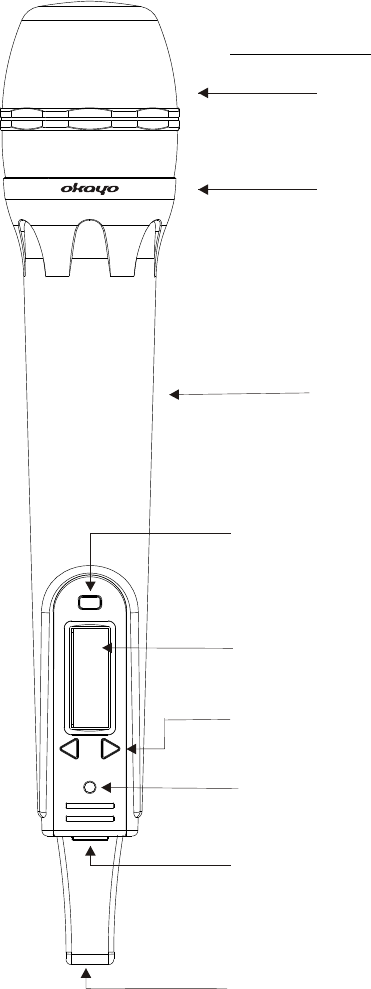
Mesh Screen: Protects cartridge.
Contains sponge to eliminate popping
Mark Ring: Connects the cartridge and
the main body
Main Body: Contain Wireless Transmitted
PCB.
SET button/Frequency settings
LCD panel: Channel and frequency appearance.
UP and DOWN button: Adjustments of channels.
LED Light: Show the power status of microphone.
Power Switch: Turn the microphone
Charging hole: Charge the microphone by
connecting this input with adaptor
Description of Functions for Handheld Microphone
Front Panel
-9-
EJ-701TS-A
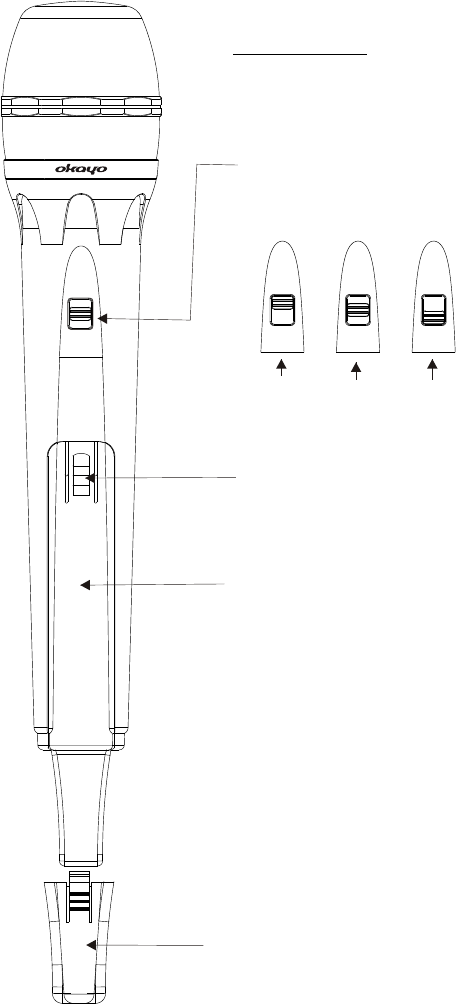
High MID MUTE
Volume Control: Three level settings, including
mute, medium and loud.
Pushing point: Slide the battery cover down by
pressing here.
Battery Cover
Lower Housing: This is used to fix the battery cover
so that it won't be fallen off.
-10-
LOW
HI
MUTE
LOW
HI
MUTE
LOW
HI
MUTE
LOW
HI
MUTE
Description of Functions for Handheld Microphone
Rear Panel
EJ-701TS-A