OKAYO Electronics EJ-701TSPLUS Wireless Handheld Microphone User Manual

OKAYO Electronics Co., Ltd. Wireless Handheld Microphone

User Manual

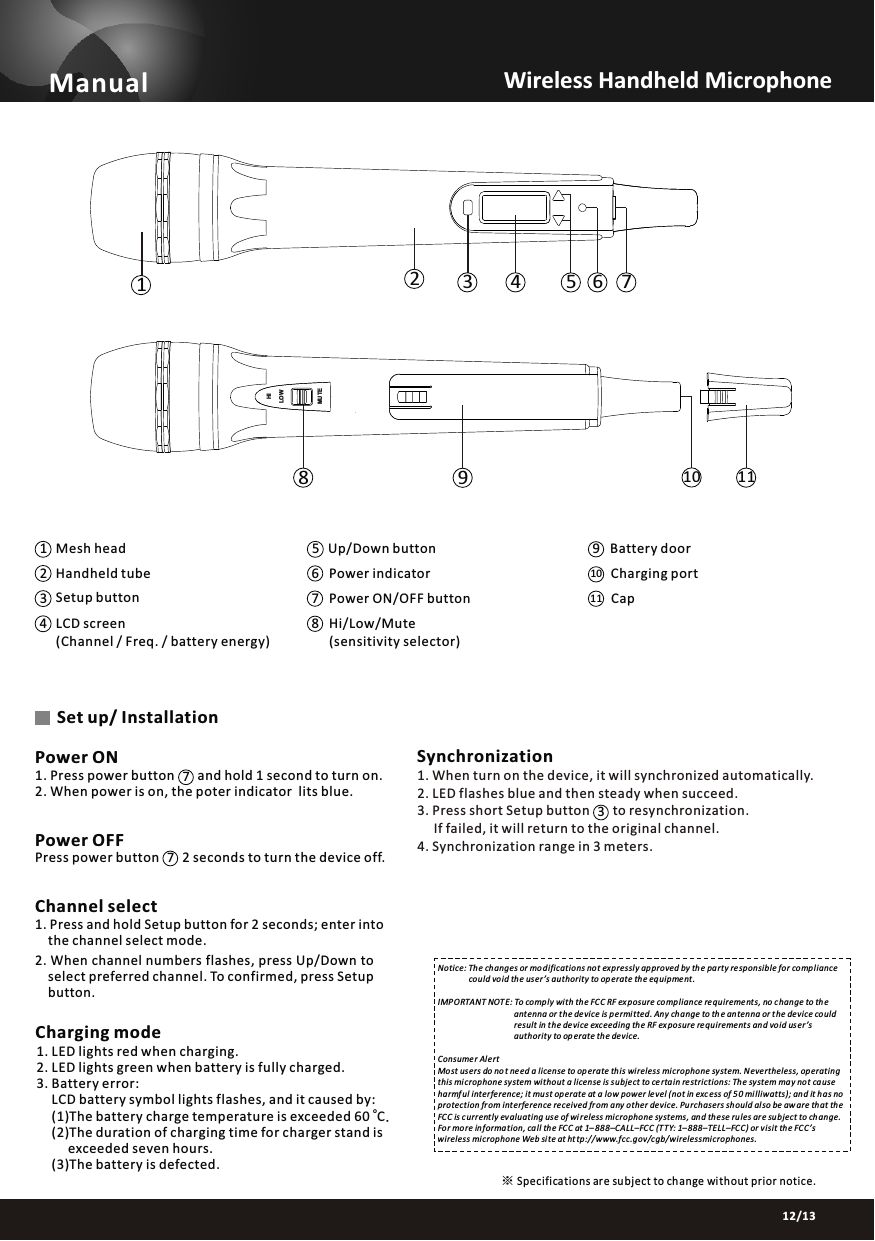
Manual91210 Charging port5Up/Down button 11 Cap678Hi/Low/Mute(sensitivity selector)03/1312/13Channel select1. Press and hold Setup button for 2 seconds; enter into     the channel select mode.2. When channel numbers flashes, press Up/Down to     select preferred channel. To confirmed, press Setup     button.Power OFFPress power button       2 seconds to turn the device off.Set up/ Installation1. Press power button       and hold 1 second to turn on.2. When power is on, the poter indicator  lits blue. Power ONWireless Handheld Microphone   SynchronizationNotice: Th e changes or mo difications not expressly approved by th e party responsible for comp liance                could vo id th e us er ’s authority to op erate th e equipment .IMP ORTANT NOT E: To comp ly wi th th e FC C RF exposure co mpliance requireme nts, no c hange to th e                                      ant enna or t he de vice is p ermitted. An y ch ange to th e an tenna or the device could                                      result in the device exceeding th e RF exposure re quirements an d void us er ’s                                      authority to op erate the de vice.Consumer Al ertMost us ers do no t need a license to op erate this wireless mi crophone system. Nevertheless, operating this microphone sy stem wi thout a license is subject to ce rta in re strictions: The system may not ca use harmful interfe rence; it mu st op erate at a low power level (not in exc ess of 5 0 milliwatts); and it has no protection fr om interference received fr om any other device. Pu rchasers should al so be aw are th at th e FCC is currently ev aluating us e of wi reless mi crophone systems, and th ese rules ar e subject to ch ange. For more information, call th e FCC at 1– 888–CALL–FC C (TTY: 1–888–TELL–FCC) or v isit the FCC’s wireless mi crophone Web site at ht tp://www.fcc.gov/cgb/wirelessmi crophones.Specifications ar e subject to change without prior notice.※Mesh headHandheld tube Power indicatorPower ON/OFF button(Channel / Freq. / battery energy)Setup buttonBattery doorCharging mode1. LED lights red when charging.2. LED lights green when battery is fully charged. 3. Battery error:      LCD battery symbol lights flashes, and it caused by: o     (1)The battery charge temperature is exceeded 60  C.     (2)The duration of charging time for charger stand is           exceeded seven hours.       (3)The battery is defected.34LCD screen 23 4 5 6 718911LOWHIMUTE101. When turn on the device, it will synchronized automatically.2. LED flashes blue and then steady when succeed.3. Press short Setup button       to resynchronization.     If failed, it will return to the original channel.4. Synchronization range in 3 meters.377

Navigation menu