ORBCOMM License OGI100 Mobile Satellite Earth Station Modem User Manual

ORBCOMM License Corp. Mobile Satellite Earth Station Modem Users Manual

Users Manual

         OGi Modem Hardware Guide   T401, Version .15    © ORBCOMM Proprietary Jan 2016
OGi Modem - Hardware Guide T401, Version .15                                                      ii                                            © ORBCOMM Proprietary Legal Notice This documentation is owned by ORBCOMM and protected by applicable copyright laws and international treaty provisions. Other copyrighted names used are the property of their respective owners. Therefore, you must treat this documentation like any other copyrighted material. You may not make the documentation, or copies thereof, available in any manner or form, or use, copy or transfer any part, to anyone outside your company. If  you  received  this  documentation  by  electronic  transmission  or  download,  by  installation  or  use  of  the documentation, you acknowledge that you have read and understand this license agreement and agree to be bound by its terms and conditions. This documentation is provided on an as-is basis without any warranty of any kind. You assume the entire risk as to the results or performance of the software. Under no circumstance shall ORBCOMM be held liable for any direct, indirect, consequential, or incidental damages arising from the use or inability to use the software or documentation. All trademarks or registered trademarks are the property of their respective owners. INMARSAT, the Inmarsat logo and IsatData Pro are trademarks of Inmarsat used under license by SkyWave (an ORBCOMM company). Inmarsat is not responsible for the operation and regulatory compliance of the products and services referred to in this document that connect to the Inmarsat system.  ORBCOMM reserves the right to make changes to products and or specifications without notice. Contact Information SkyWave Mobile Communications Inc., an ORBCOMM company Online:  Website www.SkyWave.com  Online Documentation:  Login at support.skywave.com and follow the link to the downloads section Customer Support by Email:  support@skywave.com  Customer Support by Telephone:  +1.613.836.2222 Documentation Feedback: The Customer Documentation Department creates the technical manuals. Use the address below to tell us what you think about our technical documentation and if you have suggestions for improvement.  In your feedback please reference a specific document number or title. We read all feedback carefully, but please note that we cannot respond to the comments you submit. If you require technical assistance, please contact Customer Support.  documentation@skywave.com
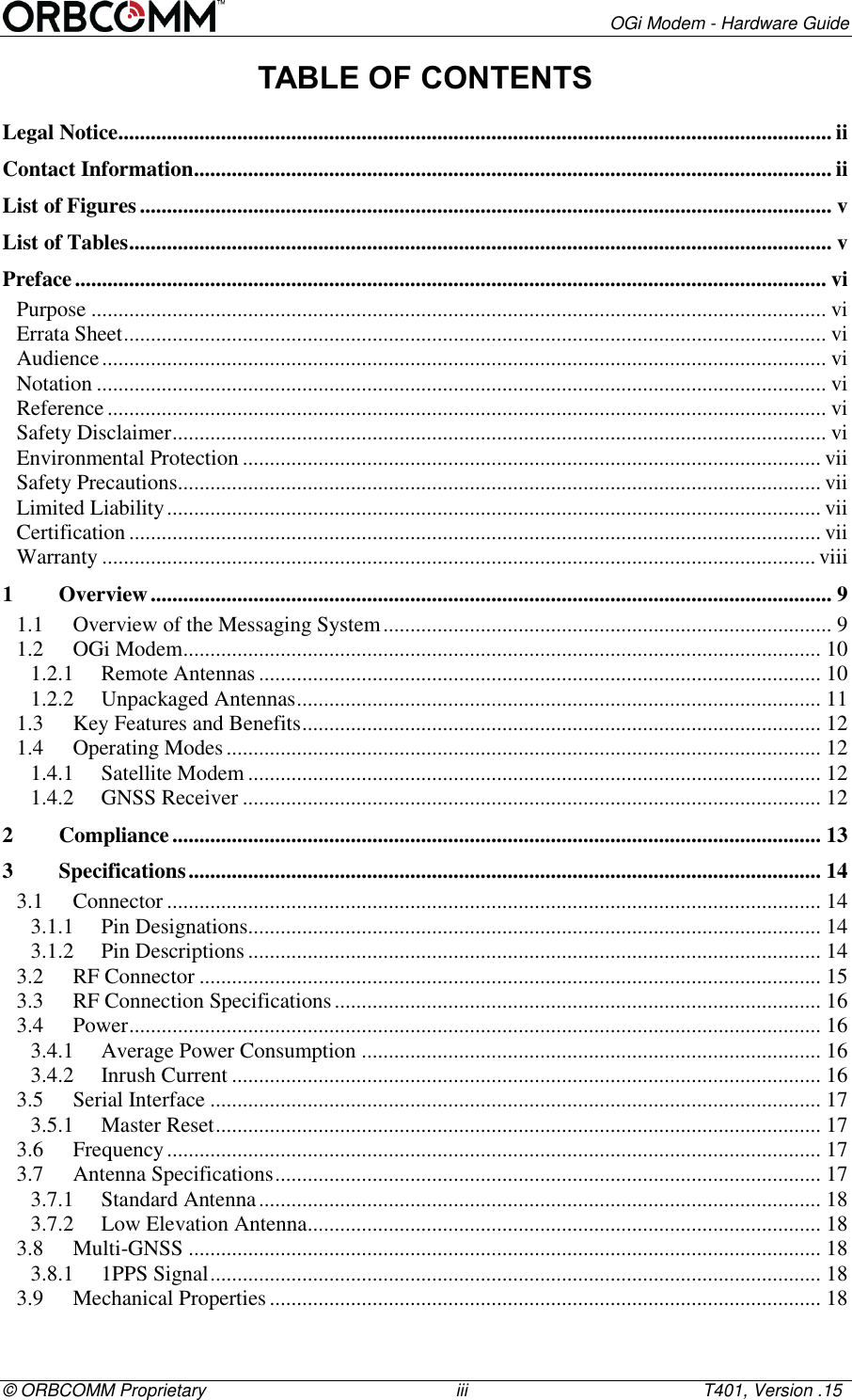
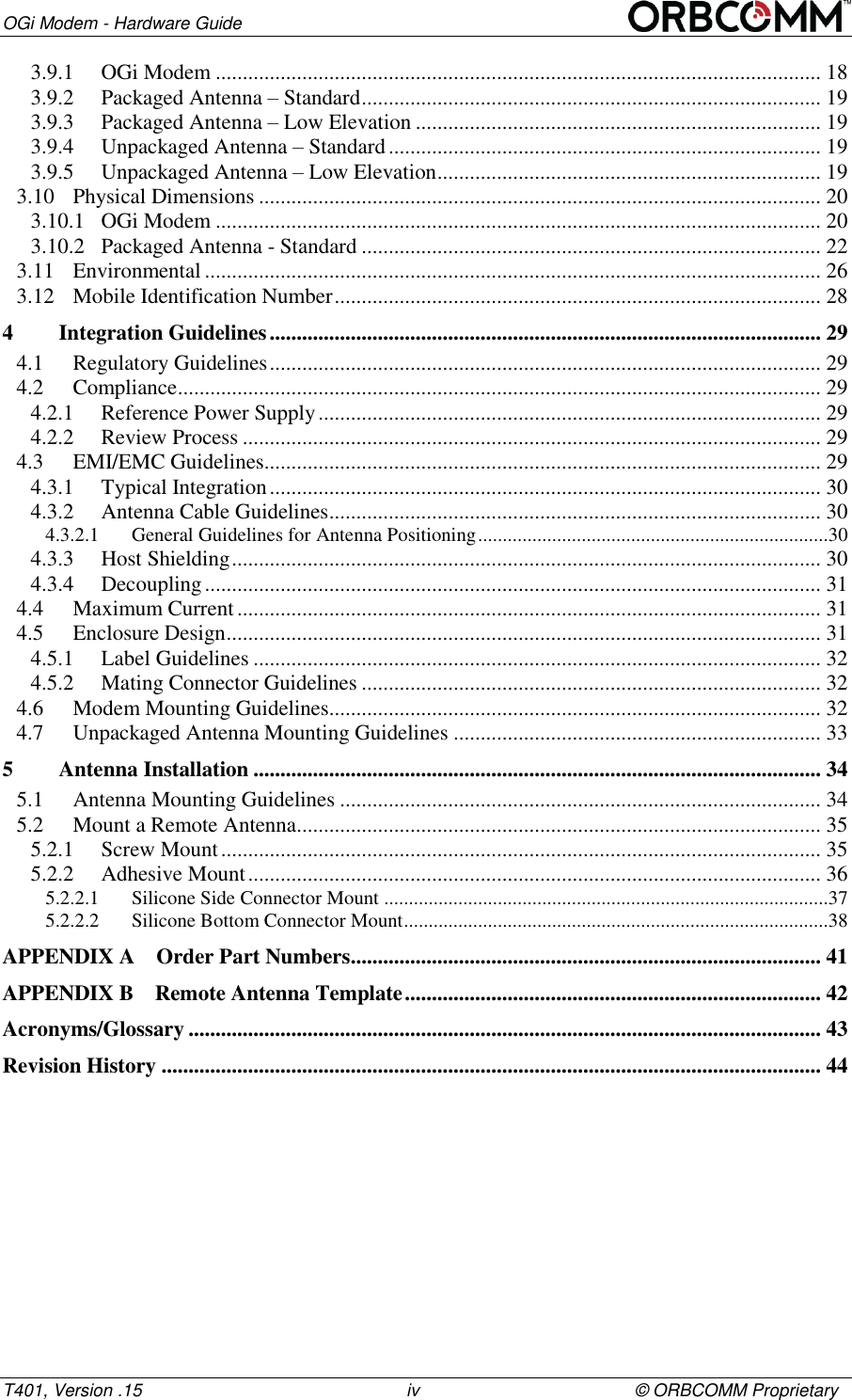
       OGi Modem - Hardware Guide © ORBCOMM Proprietary                                                   iii                                                T401, Version .15 TABLE OF CONTENTS Legal Notice .................................................................................................................................... ii Contact Information ...................................................................................................................... ii List of Figures ................................................................................................................................ v List of Tables .................................................................................................................................. v Preface ........................................................................................................................................... vi Purpose ........................................................................................................................................ vi Errata Sheet .................................................................................................................................. vi Audience ...................................................................................................................................... vi Notation ....................................................................................................................................... vi Reference ..................................................................................................................................... vi Safety Disclaimer ......................................................................................................................... vi Environmental Protection ........................................................................................................... vii Safety Precautions....................................................................................................................... vii Limited Liability ......................................................................................................................... vii Certification ................................................................................................................................ vii Warranty .................................................................................................................................... viii 1 Overview .............................................................................................................................. 9 1.1 Overview of the Messaging System ................................................................................... 9 1.2 OGi Modem ...................................................................................................................... 10 1.2.1 Remote Antennas ........................................................................................................ 10 1.2.2 Unpackaged Antennas ................................................................................................. 11 1.3 Key Features and Benefits ................................................................................................ 12 1.4 Operating Modes .............................................................................................................. 12 1.4.1 Satellite Modem .......................................................................................................... 12 1.4.2 GNSS Receiver ........................................................................................................... 12 2 Compliance ........................................................................................................................ 13 3 Specifications ..................................................................................................................... 14 3.1 Connector ......................................................................................................................... 14 3.1.1 Pin Designations.......................................................................................................... 14 3.1.2 Pin Descriptions .......................................................................................................... 14 3.2 RF Connector ................................................................................................................... 15 3.3 RF Connection Specifications .......................................................................................... 16 3.4 Power ................................................................................................................................ 16 3.4.1 Average Power Consumption ..................................................................................... 16 3.4.2 Inrush Current ............................................................................................................. 16 3.5 Serial Interface ................................................................................................................. 17 3.5.1 Master Reset ................................................................................................................ 17 3.6 Frequency ......................................................................................................................... 17 3.7 Antenna Specifications ..................................................................................................... 17 3.7.1 Standard Antenna ........................................................................................................ 18 3.7.2 Low Elevation Antenna ............................................................................................... 18 3.8 Multi-GNSS ..................................................................................................................... 18 3.8.1 1PPS Signal ................................................................................................................. 18 3.9 Mechanical Properties ...................................................................................................... 18
OGi Modem - Hardware Guide T401, Version .15                                                      iv                                            © ORBCOMM Proprietary 3.9.1 OGi Modem ................................................................................................................ 18 3.9.2 Packaged Antenna – Standard ..................................................................................... 19 3.9.3 Packaged Antenna – Low Elevation ........................................................................... 19 3.9.4 Unpackaged Antenna – Standard ................................................................................ 19 3.9.5 Unpackaged Antenna – Low Elevation ....................................................................... 19 3.10 Physical Dimensions ........................................................................................................ 20 3.10.1 OGi Modem ................................................................................................................ 20 3.10.2 Packaged Antenna - Standard ..................................................................................... 22 3.11 Environmental .................................................................................................................. 26 3.12 Mobile Identification Number .......................................................................................... 28 4 Integration Guidelines ...................................................................................................... 29 4.1 Regulatory Guidelines ...................................................................................................... 29 4.2 Compliance ....................................................................................................................... 29 4.2.1 Reference Power Supply ............................................................................................. 29 4.2.2 Review Process ........................................................................................................... 29 4.3 EMI/EMC Guidelines ....................................................................................................... 29 4.3.1 Typical Integration ...................................................................................................... 30 4.3.2 Antenna Cable Guidelines ........................................................................................... 30 4.3.2.1 General Guidelines for Antenna Positioning .......................................................................30 4.3.3 Host Shielding ............................................................................................................. 30 4.3.4 Decoupling .................................................................................................................. 31 4.4 Maximum Current ............................................................................................................ 31 4.5 Enclosure Design .............................................................................................................. 31 4.5.1 Label Guidelines ......................................................................................................... 32 4.5.2 Mating Connector Guidelines ..................................................................................... 32 4.6 Modem Mounting Guidelines........................................................................................... 32 4.7 Unpackaged Antenna Mounting Guidelines .................................................................... 33 5 Antenna Installation ......................................................................................................... 34 5.1 Antenna Mounting Guidelines ......................................................................................... 34 5.2 Mount a Remote Antenna ................................................................................................. 35 5.2.1 Screw Mount ............................................................................................................... 35 5.2.2 Adhesive Mount .......................................................................................................... 36 5.2.2.1 Silicone Side Connector Mount ..........................................................................................37 5.2.2.2 Silicone Bottom Connector Mount ......................................................................................38 APPENDIX A Order Part Numbers ....................................................................................... 41 APPENDIX B Remote Antenna Template ............................................................................. 42 Acronyms/Glossary ..................................................................................................................... 43 Revision History .......................................................................................................................... 44
       OGi Modem - Hardware Guide © ORBCOMM Proprietary                                                   v                                                T401, Version .15 List of Figures Figure 1 Messaging Gateway ...................................................................................................... 9 Figure 2 OGi Modem ................................................................................................................ 10 Figure 3 Antennas ...................................................................................................................... 11 Figure 4 Antenna Bottom Mount (standard antenna shown) ..................................................... 11 Figure 5 Unpackaged Standard Antenna ................................................................................... 11 Figure 6 Unpackaged Low Elevation Antenna .......................................................................... 12 Figure 7 Modem Connector Pinout - Top View of Modem (odd numbers) .............................. 14 Figure 8 Modem Connector Pinout - Bottom View of Modem (even numbers) ....................... 14 Figure 9 Top View Dimensions (mm) ....................................................................................... 20 Figure 10 Side Views (mm) ....................................................................................................... 21 Figure 11 Bottom View ............................................................................................................. 21 Figure 12 Packaged Antenna (Standard and Low Elevation) - Bottom View (mm) ................. 22 Figure 13 Packaged Standard Antenna Height Dimensions (mm) ............................................ 22 Figure 14 Packaged Low Elevation Antenna Height Dimensions (mm) ................................... 23 Figure 15 Standard Unpackaged Antenna – Top View (mm).................................................... 23 Figure 16 Standard Unpackaged Antenna – Side View (mm) ................................................... 24 Figure 17 Unpackaged Antenna (Standard and Low Elevation) – Bottom View (mm) ............ 24 Figure 18 Unpackaged Antenna (Low Elevation) – Top View (mm) ....................................... 25 Figure 19 Unpackaged Antenna (Low Elevation) – Side View (mm) ....................................... 25 Figure 20 Mobile ID Location ................................................................................................... 28 Figure 21 Typical OEM Integrator Modem Design ................................................................... 30 Figure 22 Modem Mounting Holes ............................................................................................ 32 Figure 23 Antenna Cable Bend Radius ...................................................................................... 35 Figure 24 Air Vent Feature ........................................................................................................ 36 Figure 25 Air Vent Feature ........................................................................................................ 37 Figure 26 Apply Silicone to Remote Antenna ........................................................................... 37 Figure 27 Drill Mounting Hole .................................................................................................. 38 Figure 28 Attach Cable to Antenna ........................................................................................... 39 Figure 29 Apply Silicone to Hole in Asset ................................................................................ 39 Figure 30 Apply Silicone to Terminal ....................................................................................... 40  List of Tables Table 1 Satellite Modem Operating Modes ............................................................................. 12 Table 2 Modem Electrical Pin Assignment .............................................................................. 14 Table 3 Typical Power Consumption (current) ........................................................................ 16 Table 4 Multi-GNSS Typical Specifications............................................................................ 18
OGi Modem - Hardware Guide T401, Version .15                                                      vi                                            © ORBCOMM Proprietary Preface Purpose This document provides an overview of the hardware characteristics and specifications for the OGi modem.  Errata Sheet Refer to the SkyWave Customer Support website for updates or for an Errata Sheet that might be available after the release of this document. Always check the website for the most current documentation. Audience This document is for technical readers. It provides information to ensure successful integration of the OGi modem. Notation An OEM Integrator is an ORBCOMM customer who purchases an OGi modem for integration into their own enclosure. To become an OEM Integrator certain commercial criteria must be met. Contact your Account Executive for further details. Hardware components and hardware labels in this document might not be exactly as shown and are subject to change without notice. CAUTION This safety symbol warns of possible hazards to personnel, equipment, or both. It includes hazards that will or can cause personal injury, property damage, or death if the hazard is not avoided. Note: A note indicates information with no potential hazard. A note indicates points of interest or provides supplementary information about a feature or task. Numbered lists indicate a series of steps required to complete a task or function.  Bulleted lists highlight information where order or sequence is not crucial. Reference The content of the following documents might be useful in conjunction with this guide. These documents are available from the downloads section at support.skywave.com or from the OG Toolkit, which is also available from the website.  [T402]    OG Interface Developer Guide [T403]    AT Interface Developer Guide Safety Disclaimer ORBCOMM makes no warranties, representations or guarantees that the products and network services are suitable for any use in any hazardous environments requiring fail
       OGi Modem - Hardware Guide © ORBCOMM Proprietary                                                   vii                                                T401, Version .15 safe performance (including without limitation marine safety and distress systems, operation of nuclear facilities, aircraft navigation or communications systems, weapons systems, air traffic control and life support services) or any other application in which the failure of the products or network services could result in death or personal injury. Purchasers assume all liability associated with selling any products and network services for any such applications, and the Purchaser will defend, indemnify, and hold ORBCOMM harmless against any claims against ORBCOMM for loss, damage, liability, or expense (including lawyers’ fees) arising out of or related to the sale by Purchasers or any Reseller, or the use by any end user, of any product or network service. Please read all cautions and warnings throughout this document. Environmental Protection The Purchaser’s enclosure must provide environmental protection for the OG ISAT modem. Safety Precautions The terminal must comply with all safety precautions relating to the operation, usage, service and repair of the terminal. ORBCOMM assumes no liability for the customer’s failure to comply with any of these precautions. Caution warnings appear throughout this document. Limited Liability  ORBCOMM’s liability is limited to the cost of repair or replacement of any of ORBCOMM’s products during the warranty period. To the maximum extent permitted by applicable law, ORBCOMM’s total liability for damages of any kind, whether based on breach of contract, tort (including negligence), product liability, incidental, special, consequential, indirect or similar damages with product application and usages will be limited to an amount equal to the product's original price paid by the Purchaser to ORBCOMM and this limitation of liability is reasonable given the price of ORBCOMM's products. In no event will ORBCOMM be liable to the Purchaser, any resellers of the Purchaser or any end user for any lost profits or savings, lost business, loss of data, any telecommunications breakdown, unavailability, downtime, interruption or delay, any suspension of service by any third party service provider including Inmarsat or any incidental, special, indirect, or consequential damages, whether based on breach of contract, tort (including negligence), product liability, incidental, special, consequential, indirect or similar damages and whether or not ORBCOMM has been advised of the possibility of such occurrence or damage. The parties agree that the foregoing represents a fair allocation of risk hereunder. Certification The Purchasers is responsible for ensuring that the Purchaser's integrated product complies with all local electrical and safety codes. The Purchaser is also responsible for certifying all of their integrated products.
OGi Modem - Hardware Guide T401, Version .15                                                      viii                                            © ORBCOMM Proprietary Warranty ORBCOMM provides a manufacturer’s warranty to the original purchaser (Purchaser) that its products and services will perform in accordance with ORBCOMM’s specifications and will be free from defects in material and workmanship for a limited period of time. This warranty is limited to the repair and/or replacement of any defective components experienced under normal specified operating use and storage conditions, at ORBCOMM’s discretion. It does not cover any damages caused or associated with the product’s misuse. Please check your agreement for warranty details and conditions. The end-user’s only remedy or recourse is against the Purchaser, and any experience with defective products should be communicated to the authorized distributor from whom they have been purchased. Shipping of defective product, back to the authorized distributor will be in accordance with the authorized distributor's instructions and should be accompanied with a fault report. ORBCOMM is not responsible for corrosion damage caused by inadequate enclosure or cable assembly or installation. Warranty is void if unit is opened. A fault report is required for each unit returned under warranty. Please contact your authorized distributor's customer support for additional information.
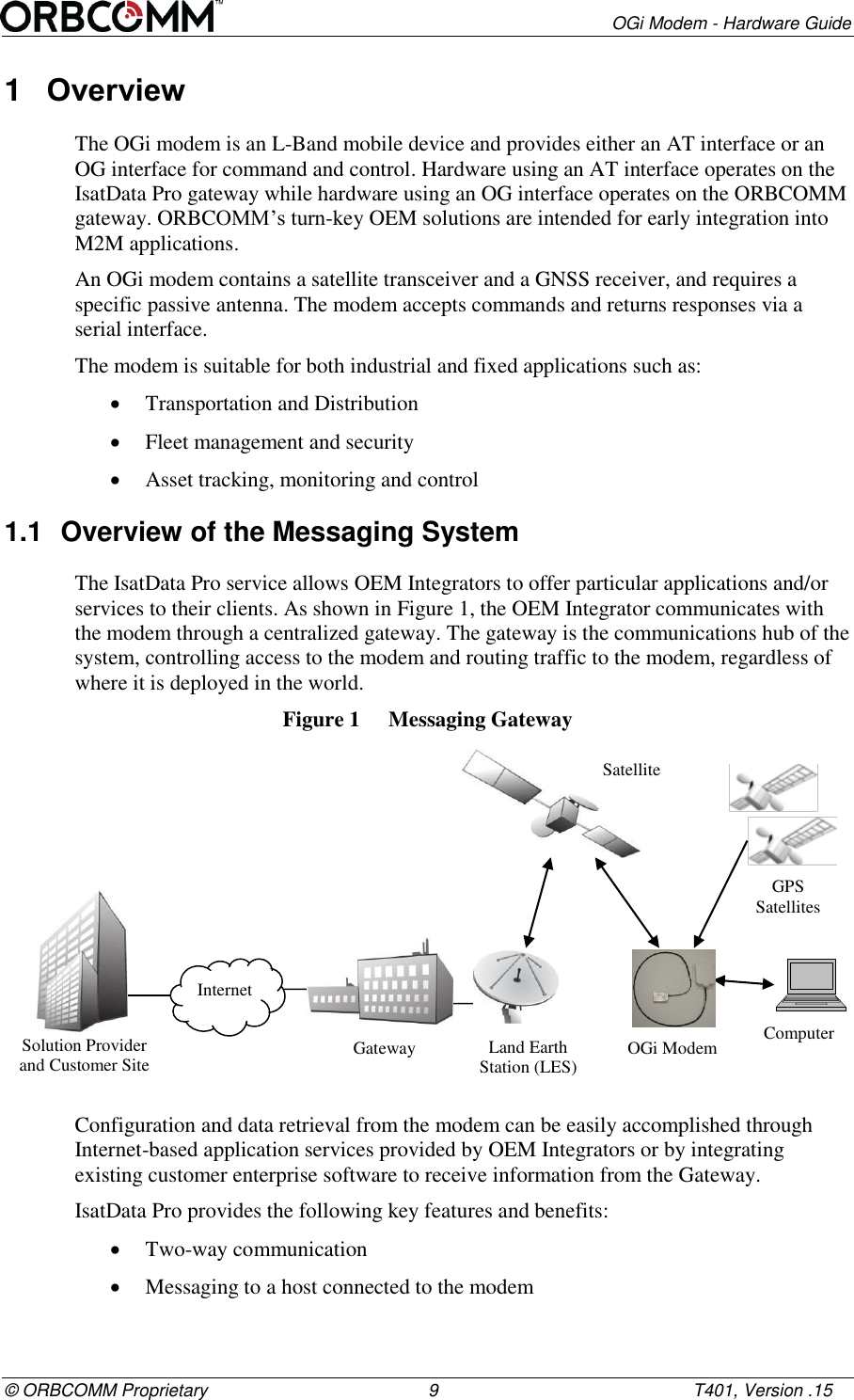
       OGi Modem - Hardware Guide © ORBCOMM Proprietary                                             9                                                    T401, Version .15 1  Overview The OGi modem is an L-Band mobile device and provides either an AT interface or an OG interface for command and control. Hardware using an AT interface operates on the IsatData Pro gateway while hardware using an OG interface operates on the ORBCOMM gateway. ORBCOMM’s turn-key OEM solutions are intended for early integration into M2M applications.  An OGi modem contains a satellite transceiver and a GNSS receiver, and requires a specific passive antenna. The modem accepts commands and returns responses via a serial interface.  The modem is suitable for both industrial and fixed applications such as:   Transportation and Distribution   Fleet management and security  Asset tracking, monitoring and control 1.1  Overview of the Messaging System The IsatData Pro service allows OEM Integrators to offer particular applications and/or services to their clients. As shown in Figure 1, the OEM Integrator communicates with the modem through a centralized gateway. The gateway is the communications hub of the system, controlling access to the modem and routing traffic to the modem, regardless of where it is deployed in the world. Figure 1  Messaging Gateway  Configuration and data retrieval from the modem can be easily accomplished through Internet-based application services provided by OEM Integrators or by integrating existing customer enterprise software to receive information from the Gateway.  IsatData Pro provides the following key features and benefits:  Two-way communication  Messaging to a host connected to the modem Solution Provider and Customer Site Internet Gateway Land Earth Station (LES) Satellite OGi Modem GPS Satellites Computer
OGi Modem - Hardware Guide T401, Version .15                                                      10                                            © ORBCOMM Proprietary  Broadcast messages  Low latency messaging  Up to 6,400 bytes from-mobile messages for the AT Interface; up to 6,000 bytes from-mobile messages for the OG Interface  Up to 10,000 bytes to-mobile messages for the AT Interface; to-mobile messages for the OG Interface are truncated  Acknowledged messages  Global service 1.2  OGi Modem The OGi modem provides easy integration and the highest level of EMI/EMC shielding that reduces integration risk when the modem is co-located with other electronics.  Figure 2  OGi Modem  1.2.1  Remote Antennas Two passive antenna types are available: a standard antenna (Figure 3) and a low elevation antenna (Figure 3). The standard antenna has an elevation angle of 20 to 90° and the low elevation antenna has an elevation angle of -15 to 90°. The OEM Integrator is responsible for providing a specific RF cable to connect the antenna to the modem. Both the standard and low elevation antennas are:  Available with a side or bottom connector   Sealed for operating in outdoor environments   Provide four mounting tabs for installation  Available with an SMA connector  Available packaged or unpackaged
       OGi Modem - Hardware Guide © ORBCOMM Proprietary                                             11                                                    T401, Version .15 Figure 3  Antennas  Figure 4  Antenna Bottom Mount (standard antenna shown)  1.2.2  Unpackaged Antennas Both antenna types, standard and low elevation, are also available in an unpackaged form. Both feature an IPX connector for connection to the modem and four mounting holes for installation. Figure 5  Unpackaged Standard Antenna  Standard Antenna Low Elevation Antenna
OGi Modem - Hardware Guide T401, Version .15                                                      12                                            © ORBCOMM Proprietary Figure 6  Unpackaged Low Elevation Antenna  1.3  Key Features and Benefits The OGi modem offers the following key features and benefits:  Designed to be incorporated into an OEM Integrator's solution  Built-in GNSS receiver to provide position, speed and heading information   Broad operational temperature range  IsatData Pro message payload and latency capabilities 1.4  Operating Modes 1.4.1  Satellite Modem For the most part, the modem operates independently from the host application. The modem operating modes are described in Table 1. Table 1  Satellite Modem Operating Modes Operating Mode Description Transmit Mode In transmit mode the modem is transmitting a signal to the gateway. Receive Mode In receive mode the modem is attempting or actively listening to the satellite (listening on the bulletin board channel or on a traffic channel). 1.4.2  GNSS Receiver The GNSS receiver is a module peripheral that is either on or off.
       OGi Modem - Hardware Guide © ORBCOMM Proprietary                                             13                                                    T401, Version .15 2  Compliance  At this time, all certifications listed in this section are pending for the OGi modems. Once approved, these certifications and test results will be available to OEM Integrators for use as a baseline for the certification approval of their enclosure.  However, the OEM Integrator is responsible for ensuring that their final enclosure complies with all local regulatory requirements, and electrical and safety codes wherever the enclosures are sold or used. As the OEM Integrator’s enclosure contains the OEM Integrator’s power supply and possibly other circuitry that affects the modem, the OEM Integrator most likely needs to perform additional testing or repeat some of the tests listed below.  Inmarsat Type Approval Industry Canada RSS-170  Pending FCC Part 25  CFR Title 47: Telecommunication, Part 25 - Satellite Communications CE Mark  EN 301 426 RoHS  Restriction of Hazardous Substances (RoHS)1                                                        1 European Union's (EU) Directive 2002/95/EEC "Restriction of Hazardous Substances" (RoHS) in Electronic and Electrical Equipment.
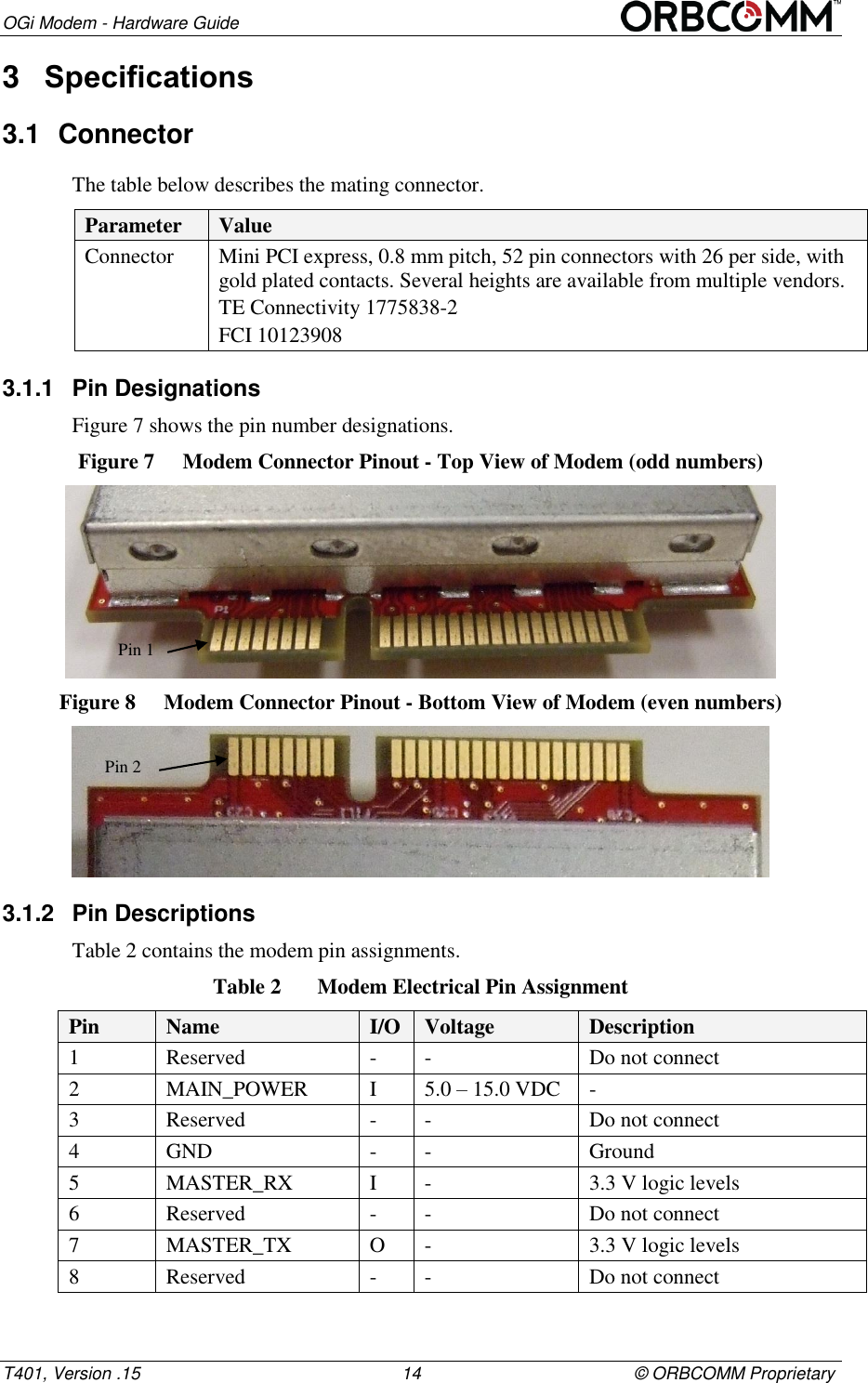
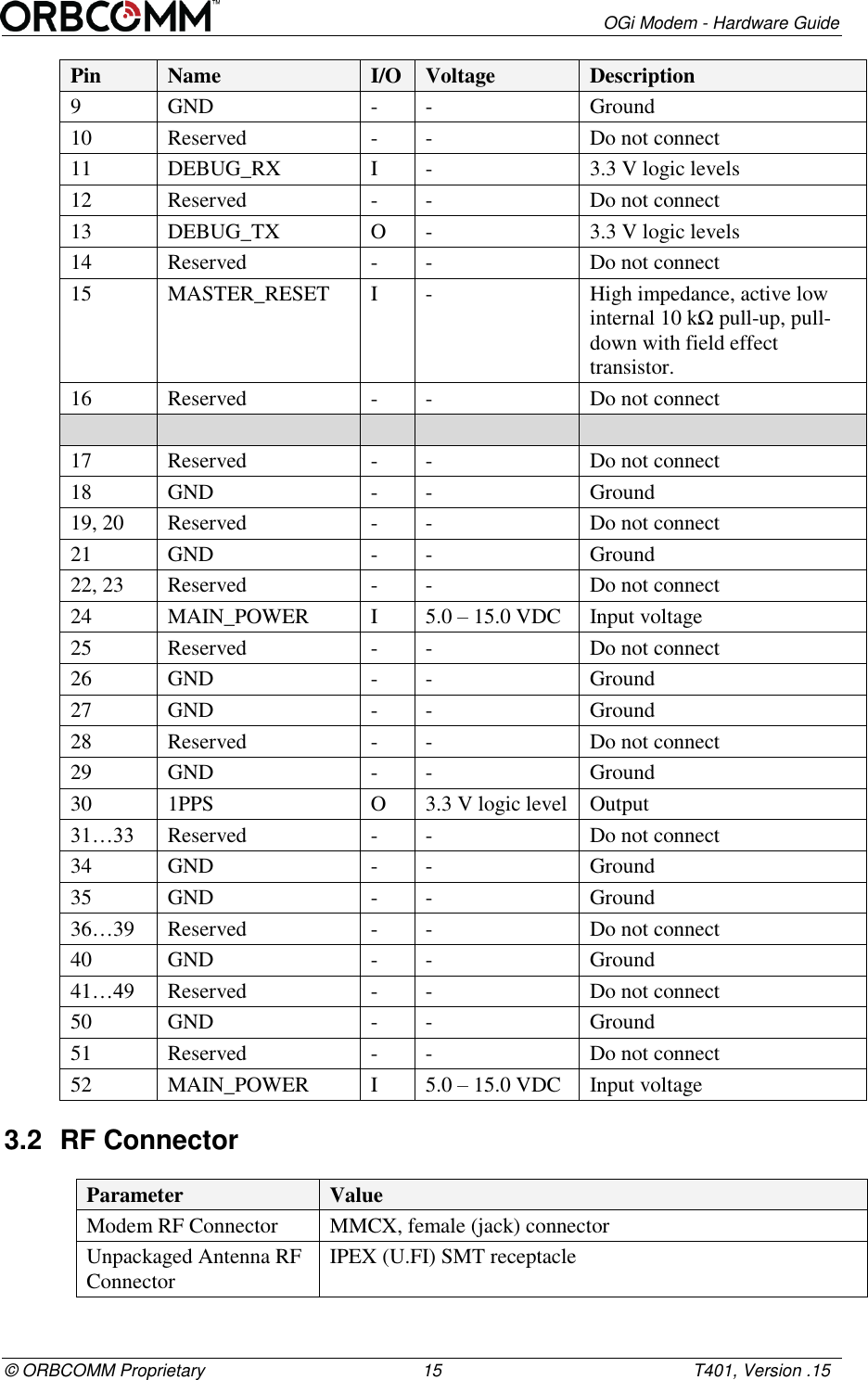
OGi Modem - Hardware Guide T401, Version .15                                                      14                                            © ORBCOMM Proprietary 3  Specifications 3.1  Connector The table below describes the mating connector. Parameter Value Connector Mini PCI express, 0.8 mm pitch, 52 pin connectors with 26 per side, with gold plated contacts. Several heights are available from multiple vendors. TE Connectivity 1775838-2 FCI 10123908 3.1.1  Pin Designations Figure 7 shows the pin number designations.  Figure 7  Modem Connector Pinout - Top View of Modem (odd numbers)  Figure 8  Modem Connector Pinout - Bottom View of Modem (even numbers)  3.1.2  Pin Descriptions Table 2 contains the modem pin assignments. Table 2  Modem Electrical Pin Assignment Pin Name I/O Voltage Description 1 Reserved - - Do not connect 2 MAIN_POWER I 5.0 – 15.0 VDC - 3 Reserved - - Do not connect 4 GND - - Ground 5 MASTER_RX I  - 3.3 V logic levels 6 Reserved - - Do not connect 7 MASTER_TX O - 3.3 V logic levels 8 Reserved - - Do not connect Pin 1 Pin 2
       OGi Modem - Hardware Guide © ORBCOMM Proprietary                                             15                                                    T401, Version .15 Pin Name I/O Voltage Description 9 GND - - Ground 10 Reserved - - Do not connect 11 DEBUG_RX I - 3.3 V logic levels 12 Reserved - - Do not connect 13 DEBUG_TX O - 3.3 V logic levels 14 Reserved - - Do not connect 15 MASTER_RESET I - High impedance, active low  internal 10 kΩ pull-up, pull-down with field effect transistor. 16 Reserved - - Do not connect      17 Reserved - - Do not connect 18 GND - - Ground 19, 20 Reserved - - Do not connect 21 GND - - Ground 22, 23 Reserved - - Do not connect 24 MAIN_POWER I 5.0 – 15.0 VDC Input voltage 25 Reserved - - Do not connect 26 GND - - Ground 27 GND - - Ground 28 Reserved - - Do not connect 29 GND - - Ground 30 1PPS O 3.3 V logic level Output 31…33 Reserved - - Do not connect 34 GND - - Ground 35 GND - - Ground 36…39 Reserved - - Do not connect 40 GND - - Ground 41…49 Reserved - - Do not connect 50 GND - - Ground 51 Reserved - - Do not connect 52 MAIN_POWER I 5.0 – 15.0 VDC Input voltage 3.2  RF Connector Parameter Value Modem RF Connector MMCX, female (jack) connector Unpackaged Antenna RF Connector IPEX (U.FI) SMT receptacle
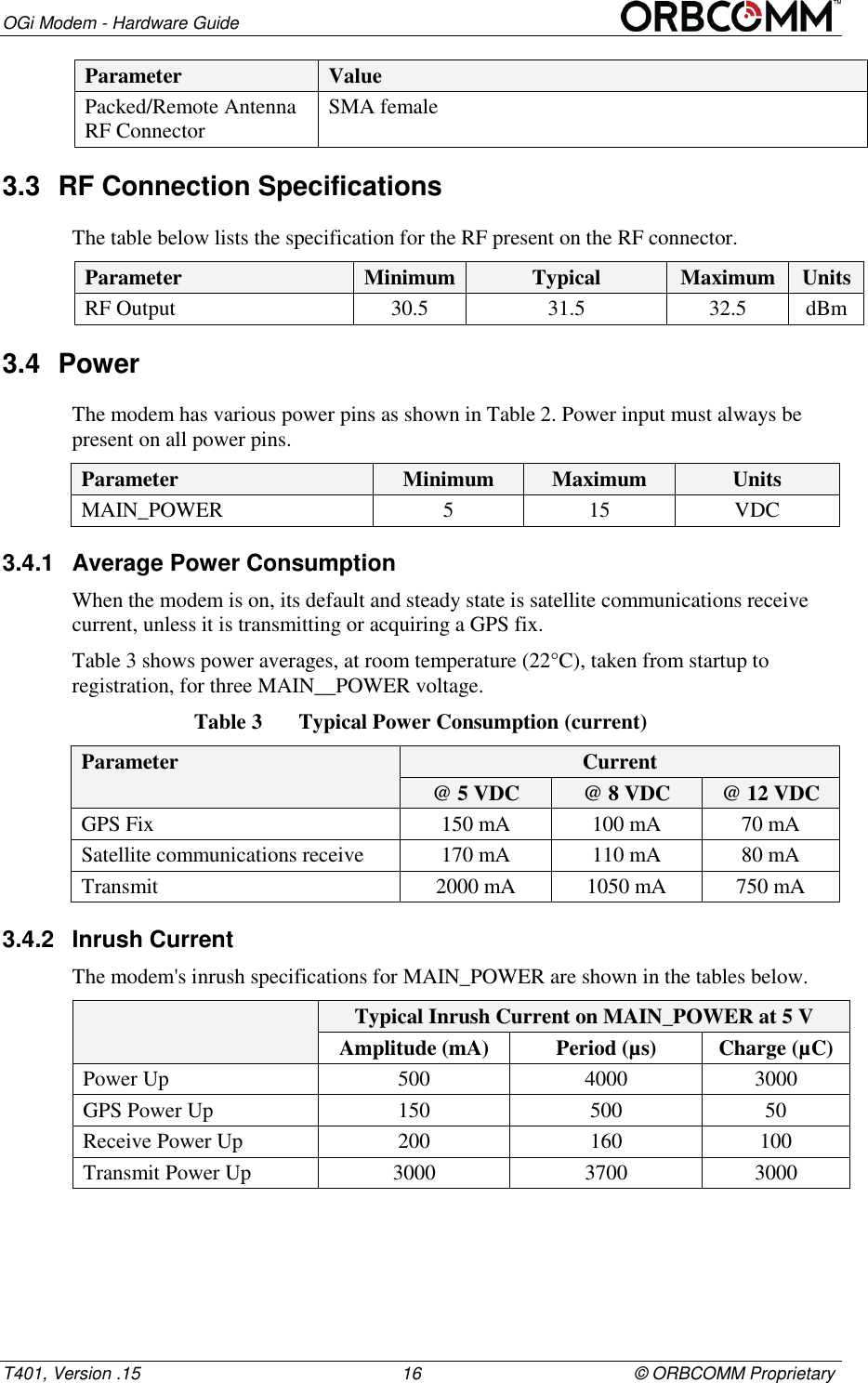
OGi Modem - Hardware Guide T401, Version .15                                                      16                                            © ORBCOMM Proprietary Parameter Value Packed/Remote Antenna RF Connector SMA female 3.3  RF Connection Specifications The table below lists the specification for the RF present on the RF connector.  Parameter Minimum Typical Maximum Units RF Output 30.5 31.5 32.5 dBm 3.4  Power The modem has various power pins as shown in Table 2. Power input must always be present on all power pins.  Parameter Minimum Maximum Units MAIN_POWER 5 15 VDC 3.4.1  Average Power Consumption When the modem is on, its default and steady state is satellite communications receive current, unless it is transmitting or acquiring a GPS fix. Table 3 shows power averages, at room temperature (22°C), taken from startup to registration, for three MAIN__POWER voltage.  Table 3  Typical Power Consumption (current) Parameter Current @ 5 VDC @ 8 VDC @ 12 VDC GPS Fix 150 mA 100 mA 70 mA Satellite communications receive  170 mA 110 mA 80 mA Transmit  2000 mA 1050 mA 750 mA 3.4.2  Inrush Current The modem's inrush specifications for MAIN_POWER are shown in the tables below.   Typical Inrush Current on MAIN_POWER at 5 V Amplitude (mA) Period (µs) Charge (µC) Power Up 500 4000 3000 GPS Power Up 150 500 50 Receive Power Up 200 160 100 Transmit Power Up 3000 3700 3000
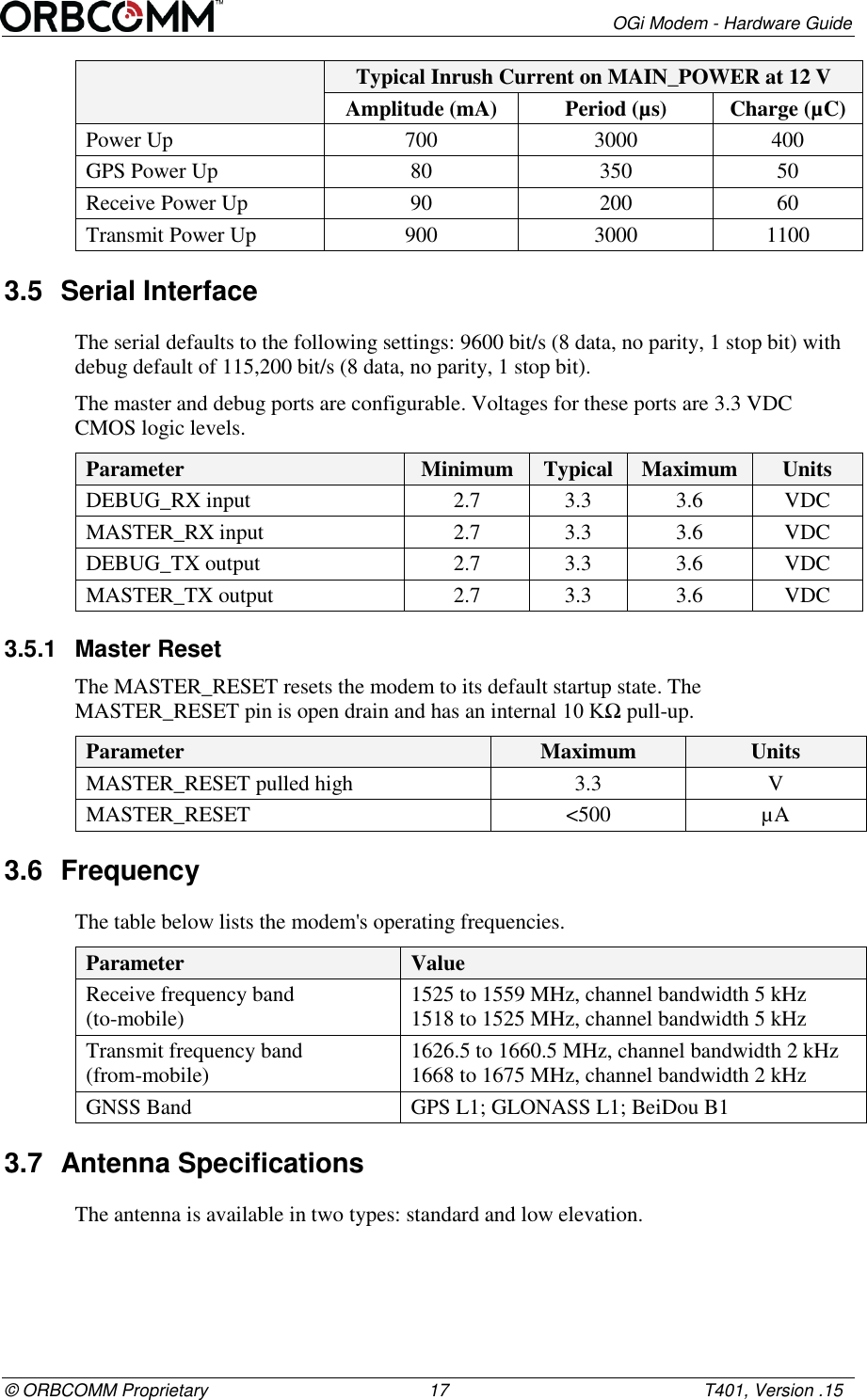
       OGi Modem - Hardware Guide © ORBCOMM Proprietary                                             17                                                    T401, Version .15  Typical Inrush Current on MAIN_POWER at 12 V Amplitude (mA) Period (µs) Charge (µC) Power Up 700 3000 400 GPS Power Up 80 350 50 Receive Power Up 90 200 60 Transmit Power Up 900 3000 1100 3.5  Serial Interface The serial defaults to the following settings: 9600 bit/s (8 data, no parity, 1 stop bit) with debug default of 115,200 bit/s (8 data, no parity, 1 stop bit). The master and debug ports are configurable. Voltages for these ports are 3.3 VDC CMOS logic levels. Parameter Minimum Typical Maximum Units DEBUG_RX input 2.7 3.3 3.6 VDC MASTER_RX input 2.7 3.3 3.6 VDC DEBUG_TX output 2.7 3.3 3.6 VDC MASTER_TX output 2.7 3.3 3.6 VDC 3.5.1  Master Reset The MASTER_RESET resets the modem to its default startup state. The MASTER_RESET pin is open drain and has an internal 10 KΩ pull-up.  Parameter Maximum Units MASTER_RESET pulled high 3.3 V MASTER_RESET <500 µA 3.6  Frequency The table below lists the modem's operating frequencies. Parameter Value Receive frequency band (to-mobile) 1525 to 1559 MHz, channel bandwidth 5 kHz 1518 to 1525 MHz, channel bandwidth 5 kHz Transmit frequency band (from-mobile) 1626.5 to 1660.5 MHz, channel bandwidth 2 kHz 1668 to 1675 MHz, channel bandwidth 2 kHz GNSS Band GPS L1; GLONASS L1; BeiDou B1 3.7  Antenna Specifications The antenna is available in two types: standard and low elevation.
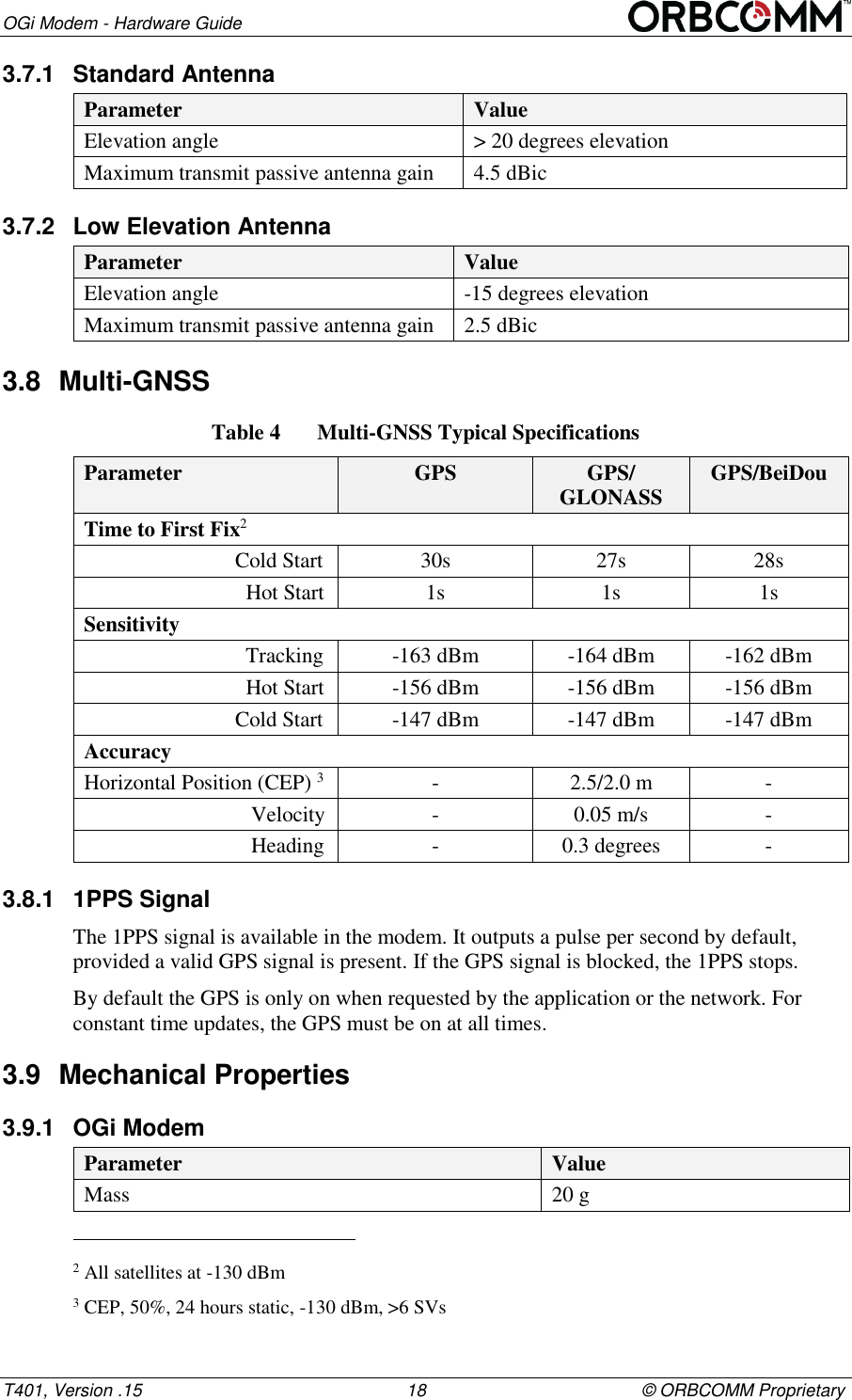
OGi Modem - Hardware Guide T401, Version .15                                                      18                                            © ORBCOMM Proprietary 3.7.1  Standard Antenna Parameter Value Elevation angle > 20 degrees elevation Maximum transmit passive antenna gain 4.5 dBic 3.7.2  Low Elevation Antenna Parameter Value Elevation angle -15 degrees elevation Maximum transmit passive antenna gain 2.5 dBic 3.8  Multi-GNSS Table 4  Multi-GNSS Typical Specifications  Parameter GPS GPS/ GLONASS GPS/BeiDou Time to First Fix2                             Cold Start 30s 27s 28s                               Hot Start 1s 1s 1s Sensitivity                               Tracking -163 dBm -164 dBm -162 dBm                               Hot Start -156 dBm -156 dBm -156 dBm                             Cold Start -147 dBm -147 dBm -147 dBm Accuracy Horizontal Position (CEP) 3 - 2.5/2.0 m -                                Velocity - 0.05 m/s -                                Heading - 0.3 degrees - 3.8.1  1PPS Signal The 1PPS signal is available in the modem. It outputs a pulse per second by default, provided a valid GPS signal is present. If the GPS signal is blocked, the 1PPS stops. By default the GPS is only on when requested by the application or the network. For constant time updates, the GPS must be on at all times. 3.9  Mechanical Properties 3.9.1  OGi Modem Parameter Value Mass 20 g                                                       2 All satellites at -130 dBm 3 CEP, 50%, 24 hours static, -130 dBm, >6 SVs
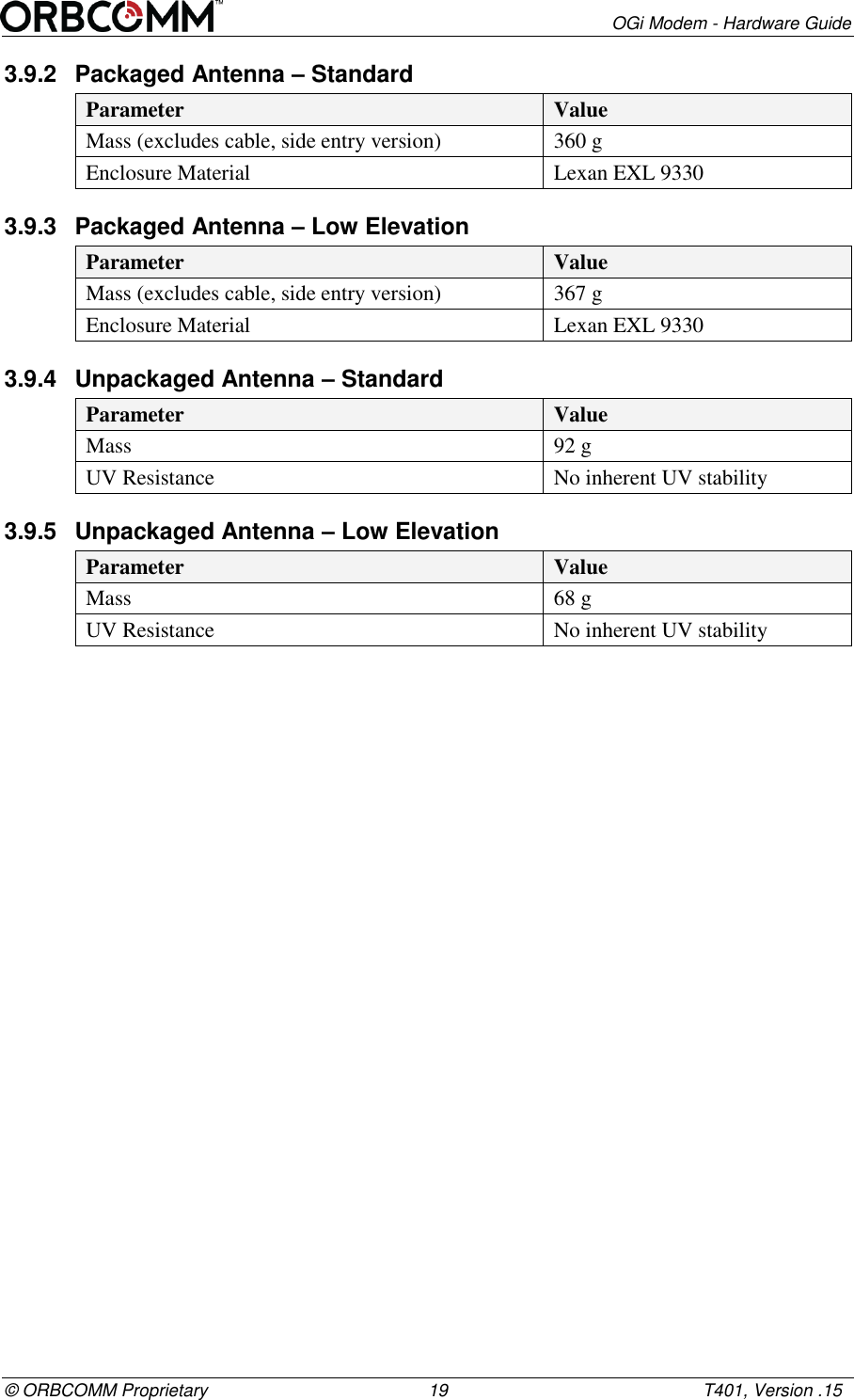
       OGi Modem - Hardware Guide © ORBCOMM Proprietary                                             19                                                    T401, Version .15 3.9.2  Packaged Antenna – Standard Parameter Value Mass (excludes cable, side entry version) 360 g  Enclosure Material Lexan EXL 9330 3.9.3  Packaged Antenna – Low Elevation Parameter Value Mass (excludes cable, side entry version) 367 g  Enclosure Material Lexan EXL 9330 3.9.4  Unpackaged Antenna – Standard Parameter Value Mass 92 g  UV Resistance No inherent UV stability 3.9.5  Unpackaged Antenna – Low Elevation Parameter Value Mass  68 g  UV Resistance No inherent UV stability
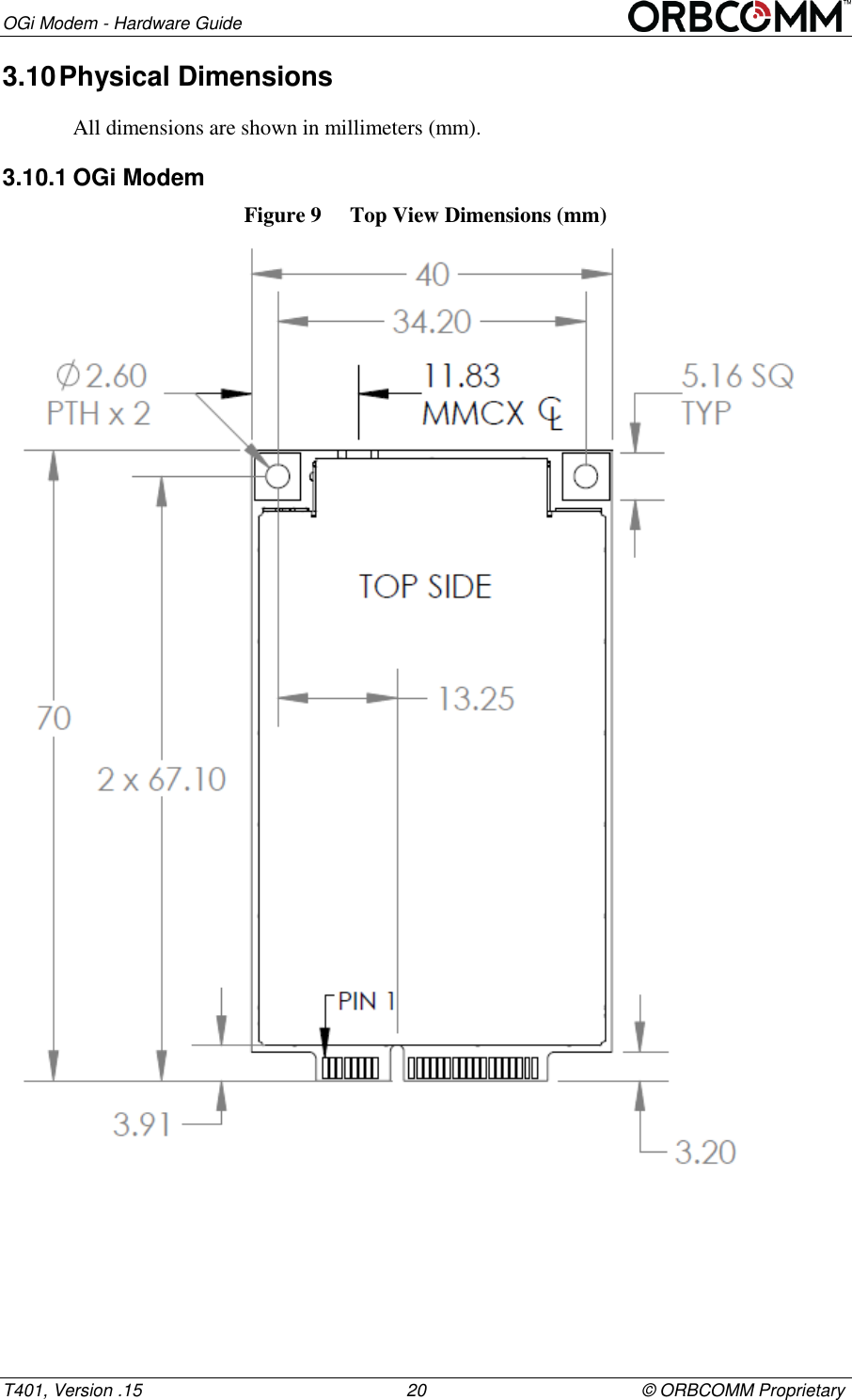
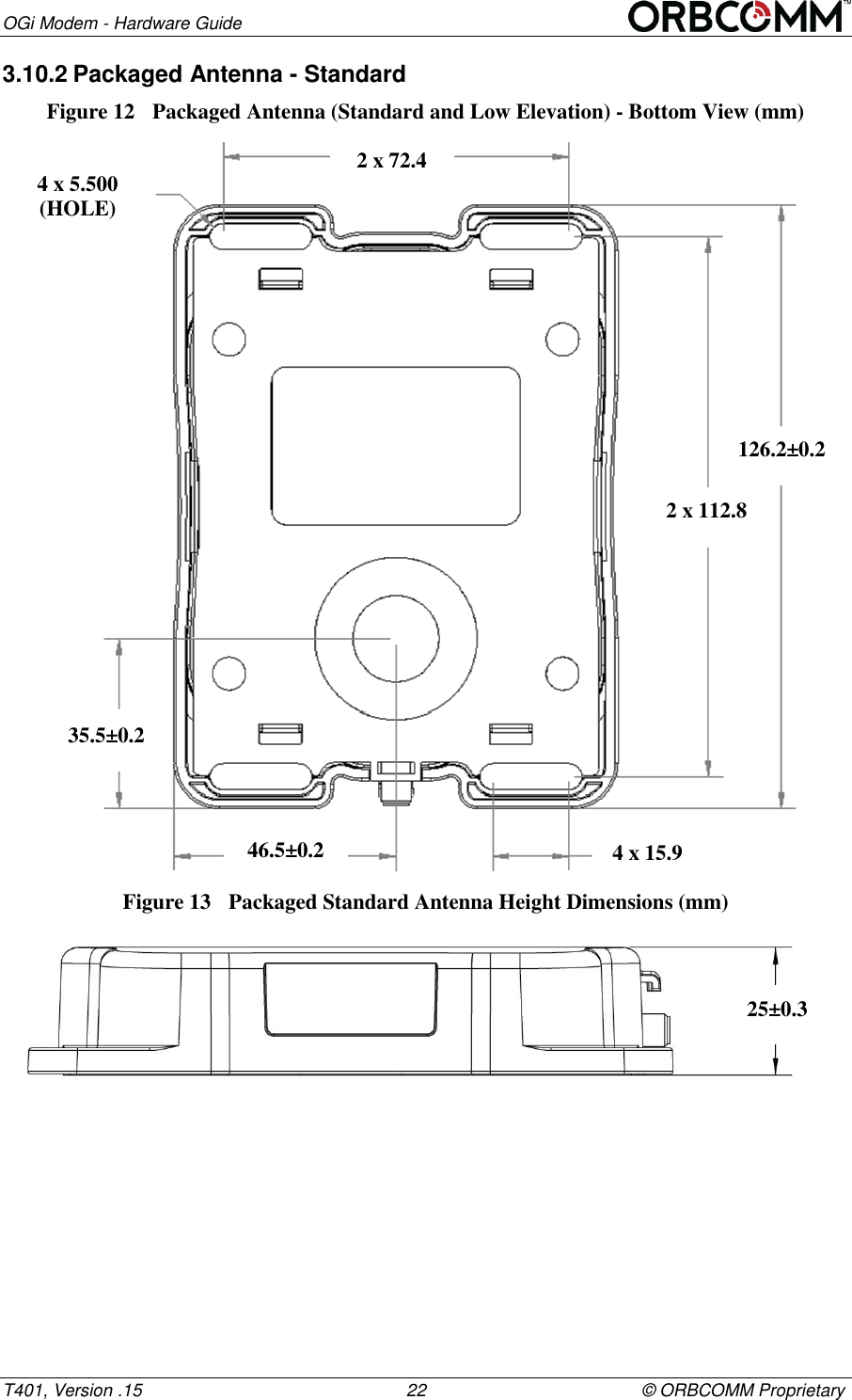
OGi Modem - Hardware Guide T401, Version .15                                                      20                                            © ORBCOMM Proprietary 3.10 Physical Dimensions  All dimensions are shown in millimeters (mm). 3.10.1 OGi Modem Figure 9  Top View Dimensions (mm)
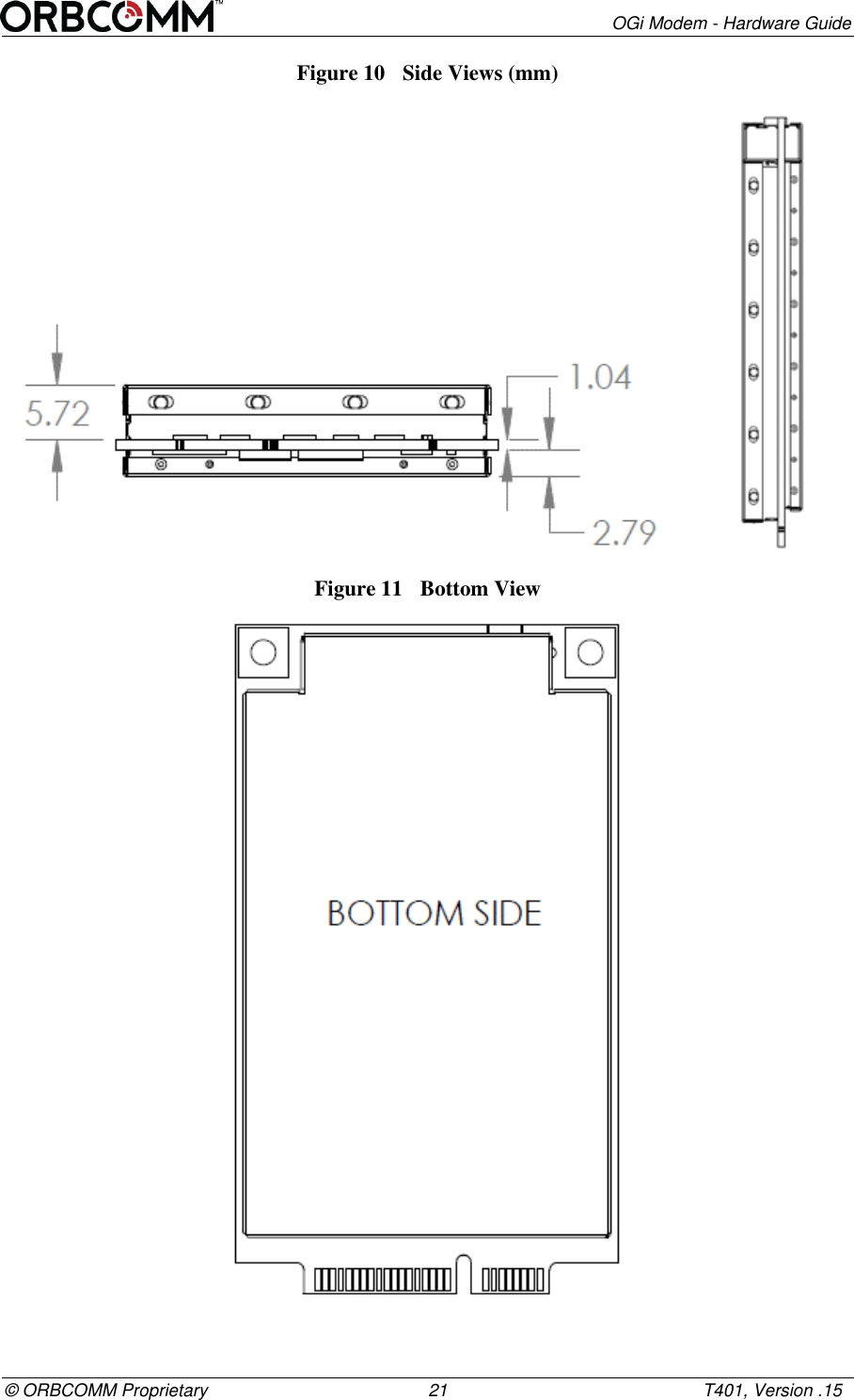
       OGi Modem - Hardware Guide © ORBCOMM Proprietary                                             21                                                    T401, Version .15 Figure 10  Side Views (mm)            Figure 11  Bottom View
OGi Modem - Hardware Guide T401, Version .15                                                      22                                            © ORBCOMM Proprietary 3.10.2 Packaged Antenna - Standard Figure 12  Packaged Antenna (Standard and Low Elevation) - Bottom View (mm)  Figure 13  Packaged Standard Antenna Height Dimensions (mm)  126.2±0.2 2 x 112.8 4 x 15.9 35.5±0.2 46.5±0.2 4 x 5.500 (HOLE) 2 x 72.4 25±0.3
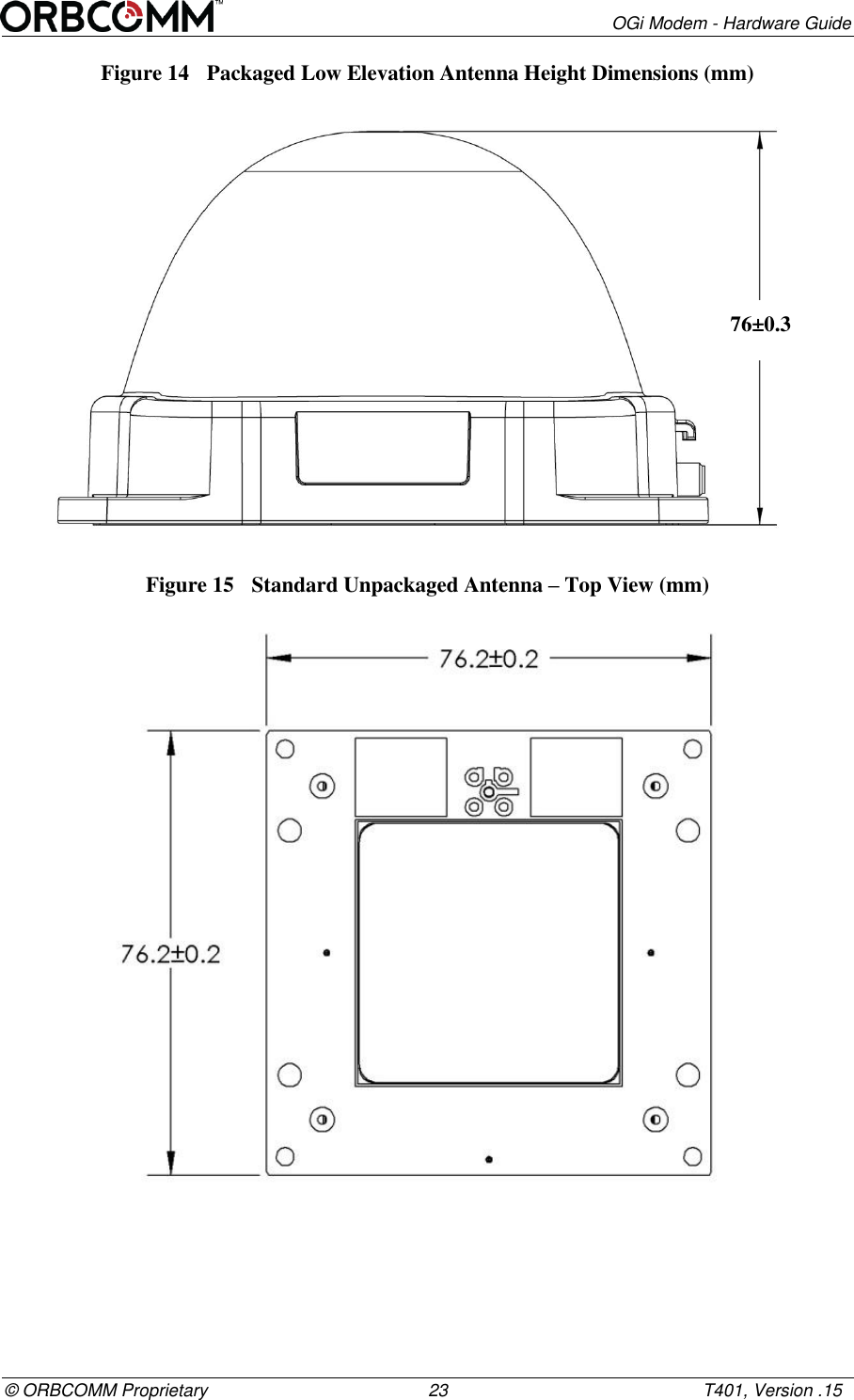
       OGi Modem - Hardware Guide © ORBCOMM Proprietary                                             23                                                    T401, Version .15 Figure 14  Packaged Low Elevation Antenna Height Dimensions (mm)  Figure 15  Standard Unpackaged Antenna – Top View (mm)  76±0.3
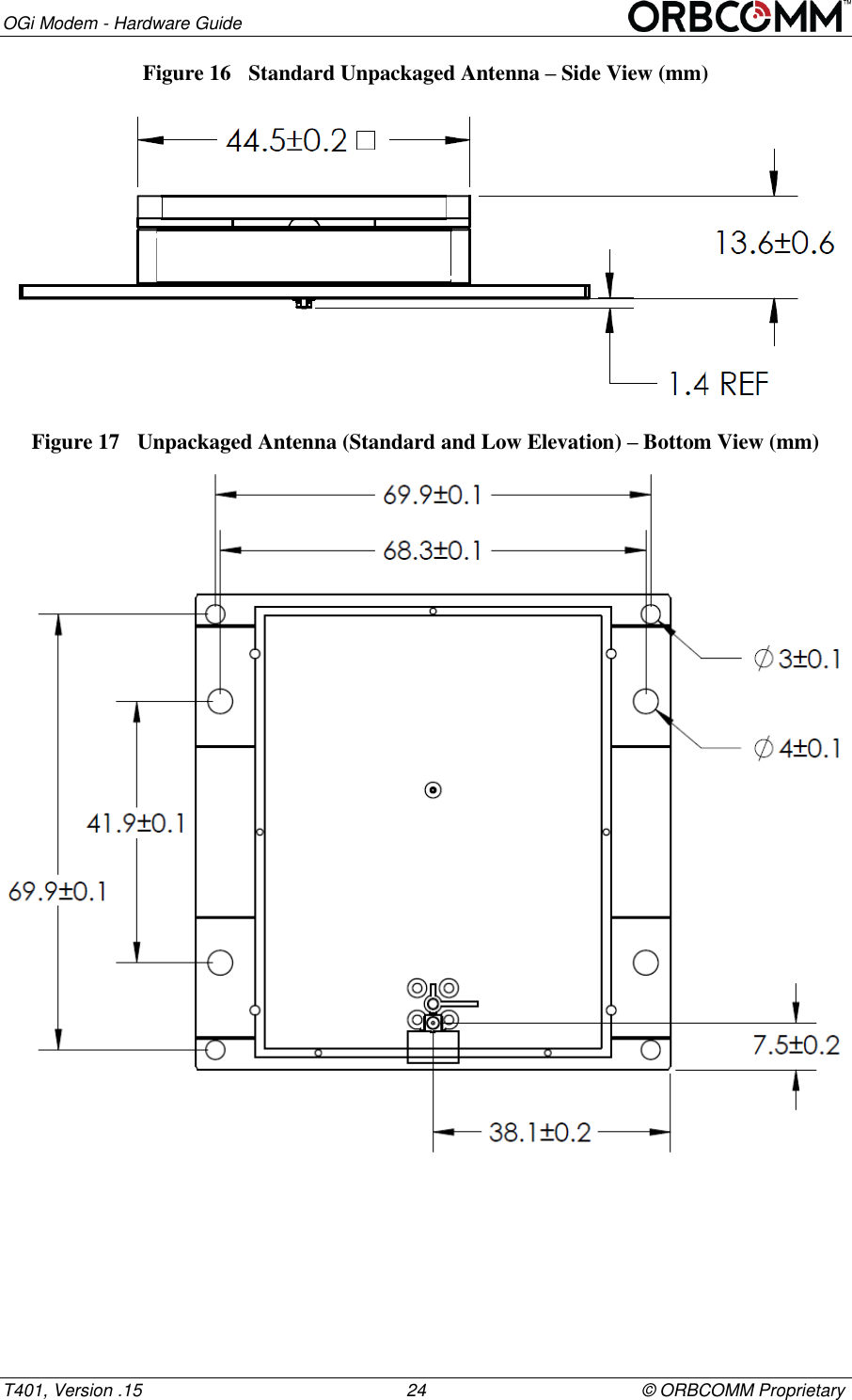
OGi Modem - Hardware Guide T401, Version .15                                                      24                                            © ORBCOMM Proprietary Figure 16  Standard Unpackaged Antenna – Side View (mm)  Figure 17  Unpackaged Antenna (Standard and Low Elevation) – Bottom View (mm)
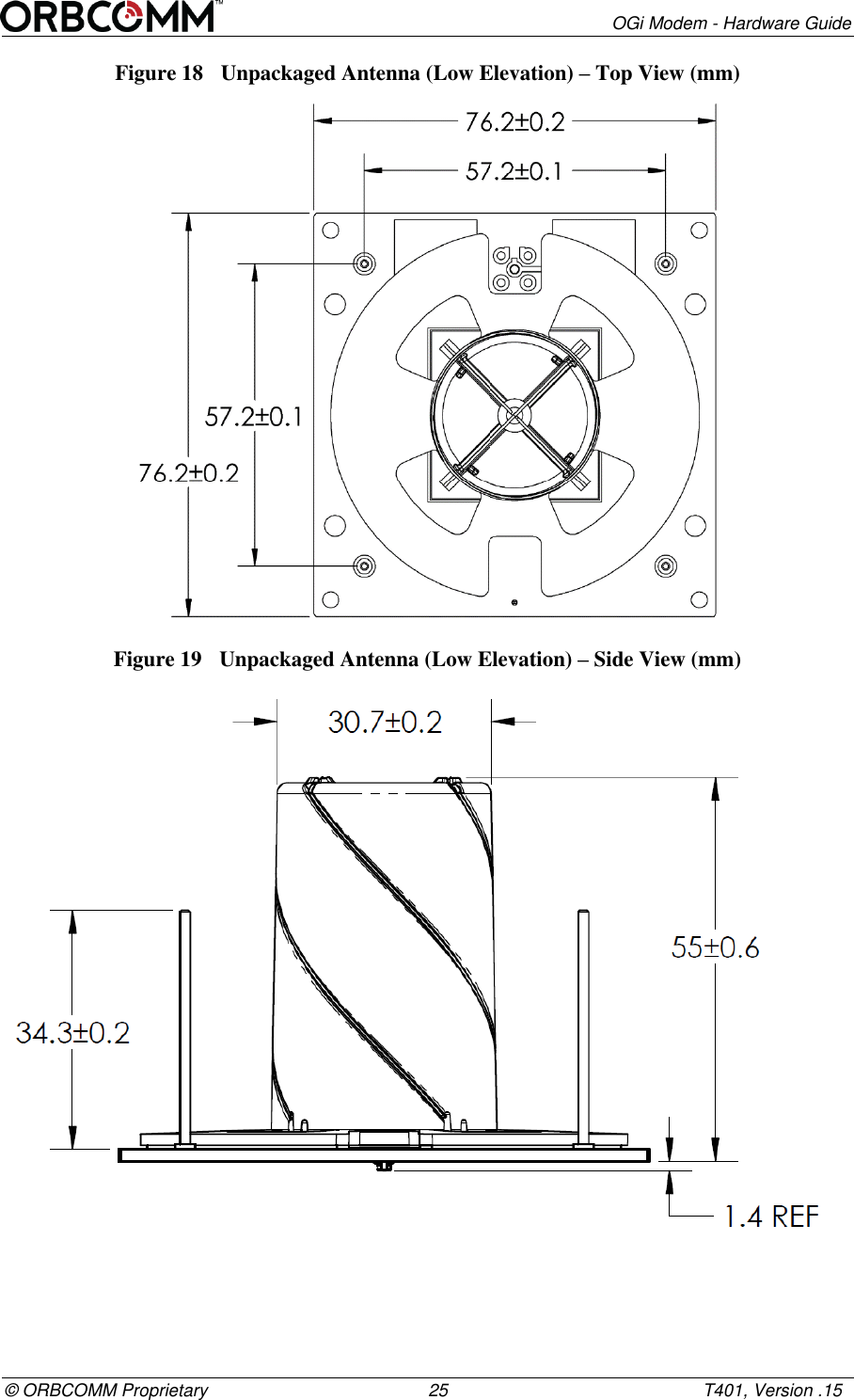
       OGi Modem - Hardware Guide © ORBCOMM Proprietary                                             25                                                    T401, Version .15 Figure 18  Unpackaged Antenna (Low Elevation) – Top View (mm)  Figure 19  Unpackaged Antenna (Low Elevation) – Side View (mm)
OGi Modem - Hardware Guide T401, Version .15                                                      26                                            © ORBCOMM Proprietary 3.11 Environmental4 Temperature Parameter  Value Operating temperature range -40°C to +85°C Storage temperature -40°C to +85°C Modem Parameter Description Vibration The modem meets all its specifications during exposure to random vehicular vibration levels per SAE J1455, section 4.10.4.2 and MIL-STD-810G, section 514.6, fig 514.6C-1. Mechanical Shock The modem meets all its specifications after exposure to positive and negative saw tooth shock pulses with peaks of 20G and durations of 11 ms as specified in MIL-STD-810G, section 516.6, Procedure I, section 2.3.2c, 3/axis/(positive and negative direction).  Packaged Antenna The antenna is an IP67 enclosure that contains no user serviceable parts.  Parameter Description Humidity The packaged antenna meets all its specifications during exposure to 90% relative humidity at +85°C, per the test methodology of SAE J1455, section 4.2.3.  Vibration The packaged antenna meets all its specifications during exposure to random vehicular vibration levels per SAE J1455, section 4.9.4.2 and MIL-STD-810G, section 514.6, fig 514.6C-1. Mechanical Shock The packaged antenna meets all its specifications after exposure to positive and negative saw tooth shock pulses with peaks of 20G and durations of 11 ms as specified in MIL-STD-810G, section 516.6, Procedure I, section 2.3.2c, 3/axis/(positive and negative direction). Altitude The packaged antenna meets all of its specifications after a non-operating 12.2 km altitude test as detailed in SAE J1455, section 4.9.3, except with an ambient temperature of -40°C. Thermal Shock The packaged antenna meets all of its specifications after a thermal shock test as detailed in SAE J1455, section 4.1.3.2. Salt Spray Atmosphere The packaged antenna meets all of its specifications after a salt spray test as detailed in SAE J1455, section 4.3.3.1.  Immersion The packaged antenna meets all of its specifications after a 6 hour alternating hot/cold salt water immersion test as detailed                                                       4 References to SAE J1455 (section 4.1.3.1) refer to the 2006 version.
       OGi Modem - Hardware Guide © ORBCOMM Proprietary                                             27                                                    T401, Version .15 Parameter Description in SAE J1455, section 4.3.3.2. The remote antenna meets all of its specifications after a 30 minute, 1 m depth fresh water immersion test as detailed in IEC 60529, section 14.2.7. Exposure to Chemicals and Oils The packaged antenna meets all of its specifications after a light to moderate splash test as detailed in SAE J1455 section 4.4.3.2, for the following chemicals: Window Washer Solvent Gasoline Diesel Fuel Fuel Additives Alcohol Anti-Freeze Water Mixture Degreasers Soap and Detergents Steam Waxes Kerosene Freon Spray Paint Paint Strippers Ether Dust Control Agents (magnesium chloride) Moisture Control Agents (calcium chloride) Ammonia Aluminum brightener (acid wash) Steam Cleaning and Pressure Washing The packaged antenna meets all of its specifications after a steam cleaning and pressure wash test as detailed in SAE J1455, section 4.5.3. Fungus The packaged antenna meets all of its specifications after a fungus test as detailed in SAE J1455, section 4.6.3. Dust and Sand Bombardment The packaged antenna meets all of its specifications after a dust and sand bombardment test as detailed in SAE J1455 section 4.7.3. The remote antenna meets the acceptance conditions of IEC 60529 section 13.6.2 after a dust and sand bombardment test as detailed in IEC 60529 section 13.4. The RF connector at the end of the remote antenna cable intended to be mated with the enclosed modem card was not subjected to dust and sand bombardment during the tests. Drop Test The packaged antenna meets all its specifications after a handling drop test as specified in SAE J1455 section 4.11.3.1. Flammability UL94, IEC 60707, 60695-11-10 and 60695-11-20
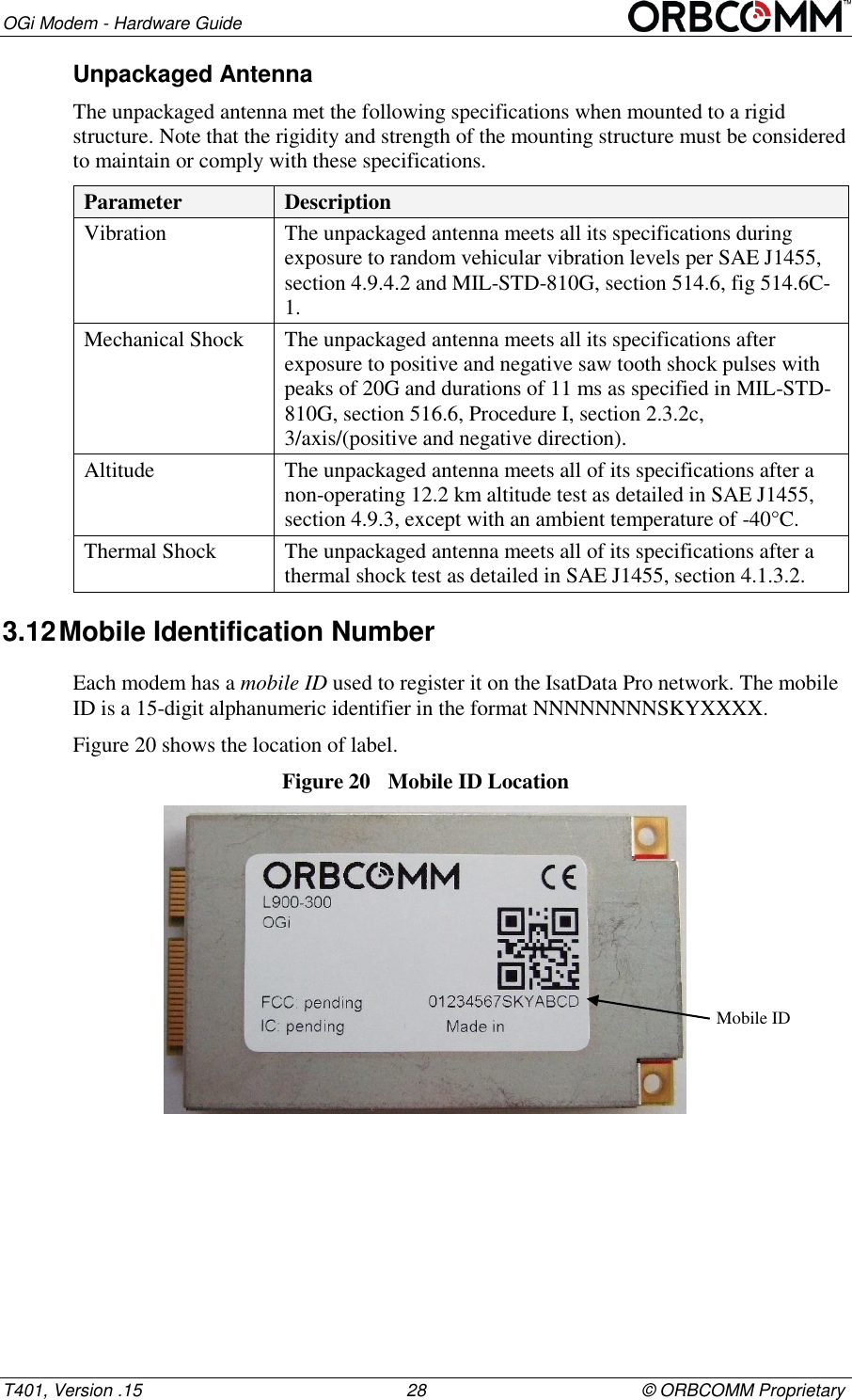
OGi Modem - Hardware Guide T401, Version .15                                                      28                                            © ORBCOMM Proprietary Unpackaged Antenna The unpackaged antenna met the following specifications when mounted to a rigid structure. Note that the rigidity and strength of the mounting structure must be considered to maintain or comply with these specifications. Parameter Description Vibration The unpackaged antenna meets all its specifications during exposure to random vehicular vibration levels per SAE J1455, section 4.9.4.2 and MIL-STD-810G, section 514.6, fig 514.6C-1. Mechanical Shock The unpackaged antenna meets all its specifications after exposure to positive and negative saw tooth shock pulses with peaks of 20G and durations of 11 ms as specified in MIL-STD-810G, section 516.6, Procedure I, section 2.3.2c, 3/axis/(positive and negative direction). Altitude The unpackaged antenna meets all of its specifications after a non-operating 12.2 km altitude test as detailed in SAE J1455, section 4.9.3, except with an ambient temperature of -40°C. Thermal Shock The unpackaged antenna meets all of its specifications after a thermal shock test as detailed in SAE J1455, section 4.1.3.2. 3.12 Mobile Identification Number Each modem has a mobile ID used to register it on the IsatData Pro network. The mobile ID is a 15-digit alphanumeric identifier in the format NNNNNNNNSKYXXXX. Figure 20 shows the location of label. Figure 20  Mobile ID Location  Mobile ID
       OGi Modem - Hardware Guide © ORBCOMM Proprietary                                             29                                                    T401, Version .15 4  Integration Guidelines This section contains a number of guidelines to assist the OEM Integrator in building their enclosure. It must be recognized that this section provides guidelines only and each OEM Integrator must use their own discretion to finish the integration approach that works for them.  4.1  Regulatory Guidelines The OEM Integrator must recognize the importance of regulatory requirements for their integrated design. These requirements can have a major impact on the product design functioning and schedule. Further, as the regulatory requirements can be quite complex, ORBCOMM recommends that OEM Integrators always seek the advice of a regulatory expert prior to starting integration. This advice allows the OEM Integrator to properly plan and schedule design and test requirements. When the regulatory tests are defined, it is also important to identify authorized test labs that are qualified to perform the required tests. Prior to a design, critical tests should be identified. It is recommended that the OEM Integrator pretest any high risk critical specifications early in the design stage. 4.2  Compliance Refer to section 2 for compliance information. 4.2.1  Reference Power Supply The internal power supply operates between 5.0 and 15.0 VDC. A full RF output requires an input voltage above the minimum operating voltage. 4.2.2  Review Process The OGi modem integration can be challenging as the modem is a sensitive receiver that has stringent emission specifications. To help minimize integration risk, ORBCOMM recommends that the OEM Integrator consult with ORBCOMM and review the mechanical integration prior to starting a detailed design. 4.3  EMI/EMC Guidelines The modem and antenna form a highly sensitive receiver that can receive very weak satellite or GNSS signals. The highly sensitive receiver can also pick up noise or other interference. Components such as processors and support circuitry should be shielded with good quality shielding. It is also recommended that RF coupling/bypass capacitors be added to the power supply rail, as close as possible to the modem's power pin. Digital interface devices should be shielded, and care must be taken to ensure the digital interface cable does not run close to the antenna.
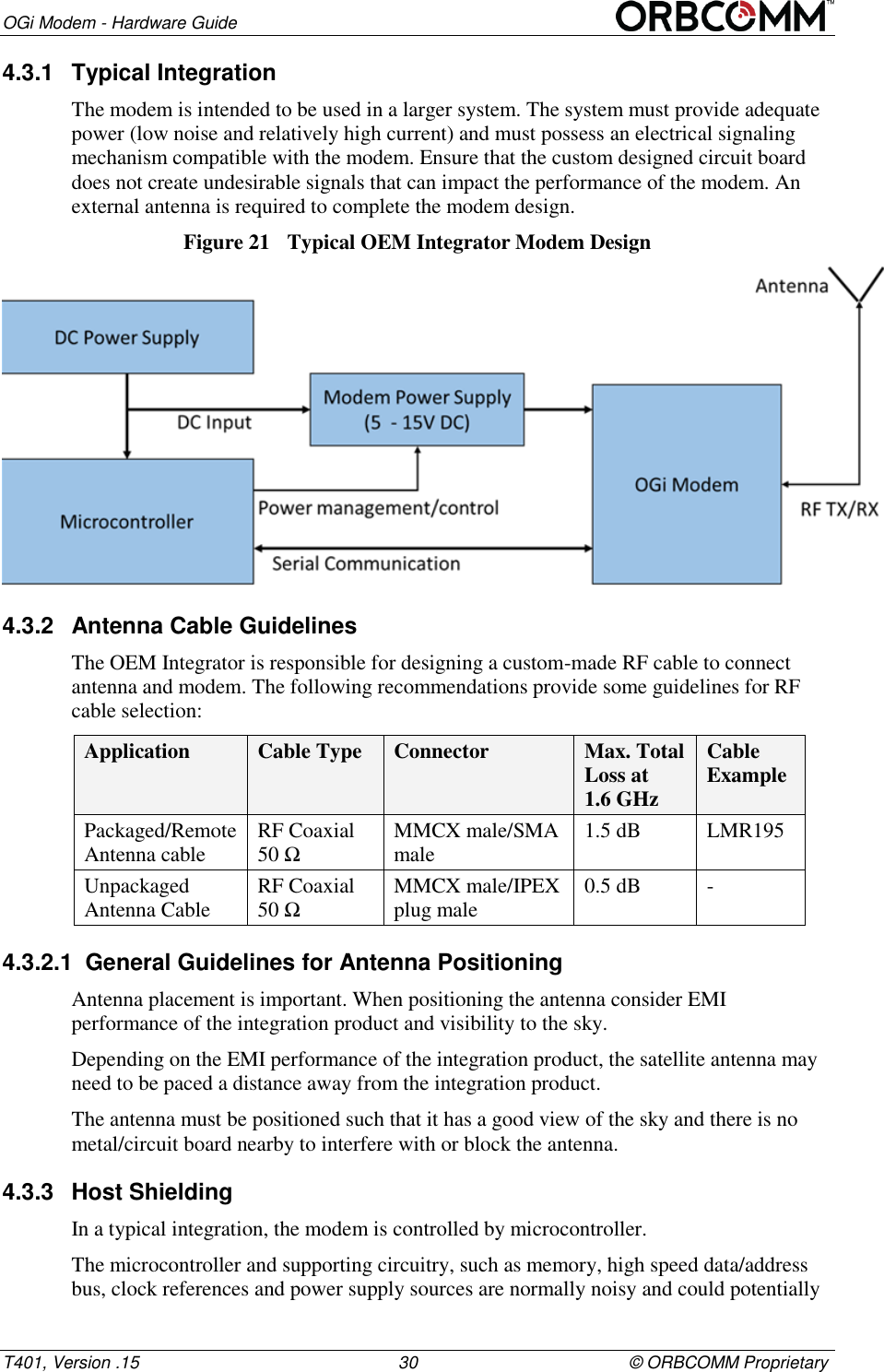
OGi Modem - Hardware Guide T401, Version .15                                                      30                                            © ORBCOMM Proprietary 4.3.1  Typical Integration The modem is intended to be used in a larger system. The system must provide adequate power (low noise and relatively high current) and must possess an electrical signaling mechanism compatible with the modem. Ensure that the custom designed circuit board does not create undesirable signals that can impact the performance of the modem. An external antenna is required to complete the modem design. Figure 21  Typical OEM Integrator Modem Design  4.3.2  Antenna Cable Guidelines The OEM Integrator is responsible for designing a custom-made RF cable to connect antenna and modem. The following recommendations provide some guidelines for RF cable selection: Application Cable Type Connector Max. Total Loss at  1.6 GHz Cable Example Packaged/Remote Antenna cable RF Coaxial 50 Ω MMCX male/SMA male 1.5 dB LMR195 Unpackaged Antenna Cable RF Coaxial 50 Ω MMCX male/IPEX plug male 0.5 dB - 4.3.2.1  General Guidelines for Antenna Positioning Antenna placement is important. When positioning the antenna consider EMI performance of the integration product and visibility to the sky. Depending on the EMI performance of the integration product, the satellite antenna may need to be paced a distance away from the integration product. The antenna must be positioned such that it has a good view of the sky and there is no metal/circuit board nearby to interfere with or block the antenna. 4.3.3  Host Shielding In a typical integration, the modem is controlled by microcontroller. The microcontroller and supporting circuitry, such as memory, high speed data/address bus, clock references and power supply sources are normally noisy and could potentially
       OGi Modem - Hardware Guide © ORBCOMM Proprietary                                             31                                                    T401, Version .15 affect the highly sensitive satellite or GPS receiver performance if the antenna is placed too close to the circuitry.  The following guidelines are provided when building a microcontroller using the modem.  Microcontroller and circuitry should be fully shielded.  Digital interfaces such as serial ports, USBs and I2C along with their tracks should be shielded.  Avoid running any digital interface connector and cable close to the antenna. Do not route any metal or cable above the ground plane of the antenna card or above the antenna. 4.3.4  Decoupling The following are recommendations for the power supply and digital lines to reduce emissions that could be picked up by the modem.  RF decoupling/bypass capacitors (22pF 0403 or 33pF 0603 typical) be added as close as possible to the modem's power pin on the power supply rail of the processor and high speed digital circuitry.  RF decoupling/bypass capacitors added on the interface power rails. 4.4  Maximum Current  It is recommended that the power supply be designed with a margin to supply the maximum current required by the modem. Refer to sections 3.4.1 and 3.4.2 for maximum current and inrush current requirements when designing a power supply. 4.5  Enclosure Design The modem is not designed for outdoor environments. Consequently, the enclosure typically requires a robust environmentally sealed enclosure that can house the modem. The following guidelines are recommended for the enclosure design.  An IP67 rating5 or better for outdoor use.  Use enclosure materials that are transparent to L-Band (1-2 GHz) radio signals.  Lexan Resin EXL 9330 is a common recommended enclosure material, but there are many other suitable materials.  The unpackaged standard antenna is supplied with a dielectric cap, a piece of plastic over the ceramic patch antenna that helps to negate the effects of different enclosure materials on the performance of the antenna. With the dielectric cap, the standard unpackaged antenna can be placed as close as desired to the adjacent enclosure material.   The unpackaged low elevation antenna is less sensitive to enclosure material selection and does not require a dielectric cap.                                                        5 IEC 60529
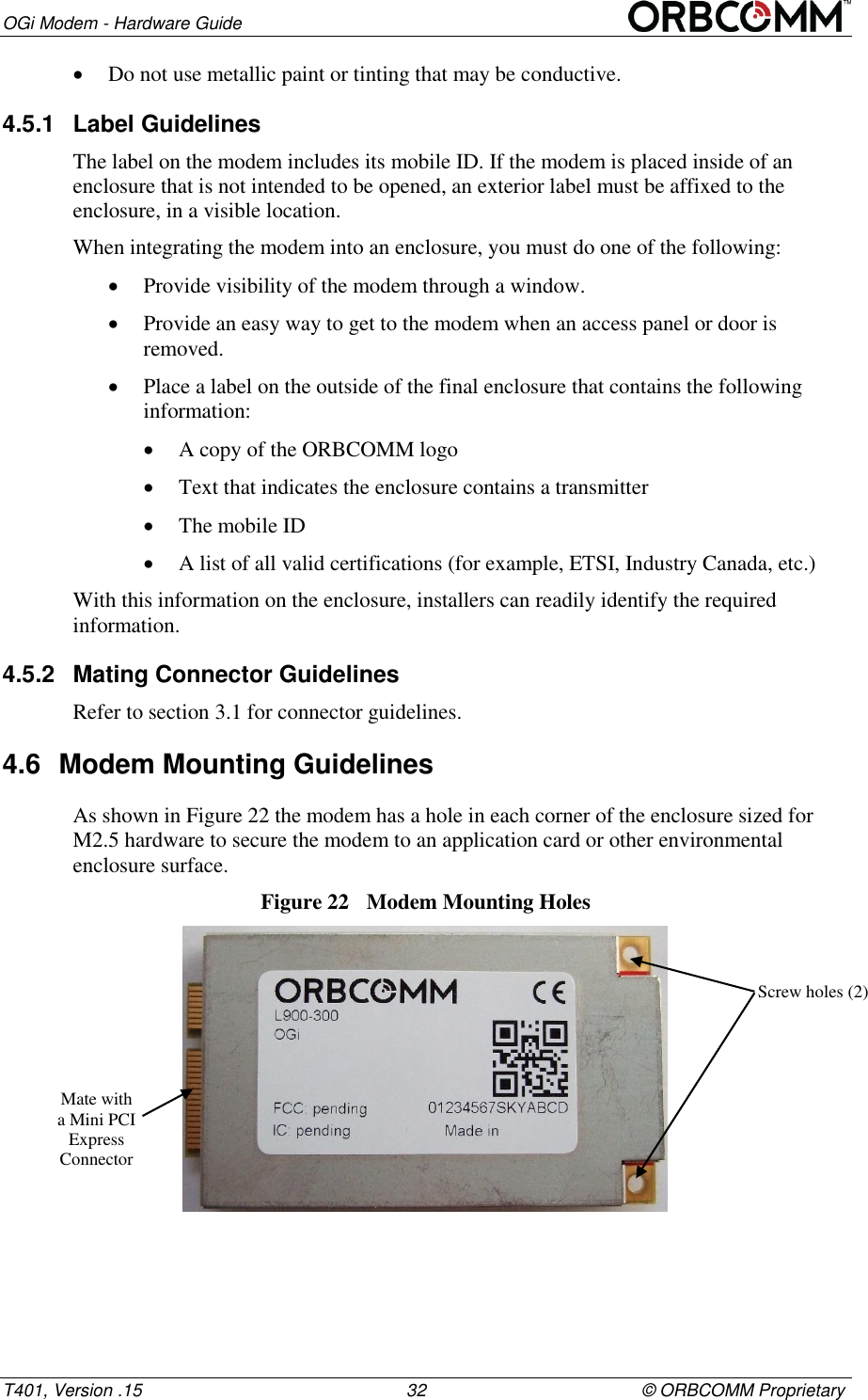
OGi Modem - Hardware Guide T401, Version .15                                                      32                                            © ORBCOMM Proprietary  Do not use metallic paint or tinting that may be conductive. 4.5.1  Label Guidelines The label on the modem includes its mobile ID. If the modem is placed inside of an enclosure that is not intended to be opened, an exterior label must be affixed to the enclosure, in a visible location. When integrating the modem into an enclosure, you must do one of the following:  Provide visibility of the modem through a window.  Provide an easy way to get to the modem when an access panel or door is removed.  Place a label on the outside of the final enclosure that contains the following information:  A copy of the ORBCOMM logo   Text that indicates the enclosure contains a transmitter  The mobile ID   A list of all valid certifications (for example, ETSI, Industry Canada, etc.) With this information on the enclosure, installers can readily identify the required information. 4.5.2  Mating Connector Guidelines Refer to section 3.1 for connector guidelines. 4.6  Modem Mounting Guidelines  As shown in Figure 22 the modem has a hole in each corner of the enclosure sized for M2.5 hardware to secure the modem to an application card or other environmental enclosure surface. Figure 22  Modem Mounting Holes  Screw holes (2) Mate with a Mini PCI Express Connector
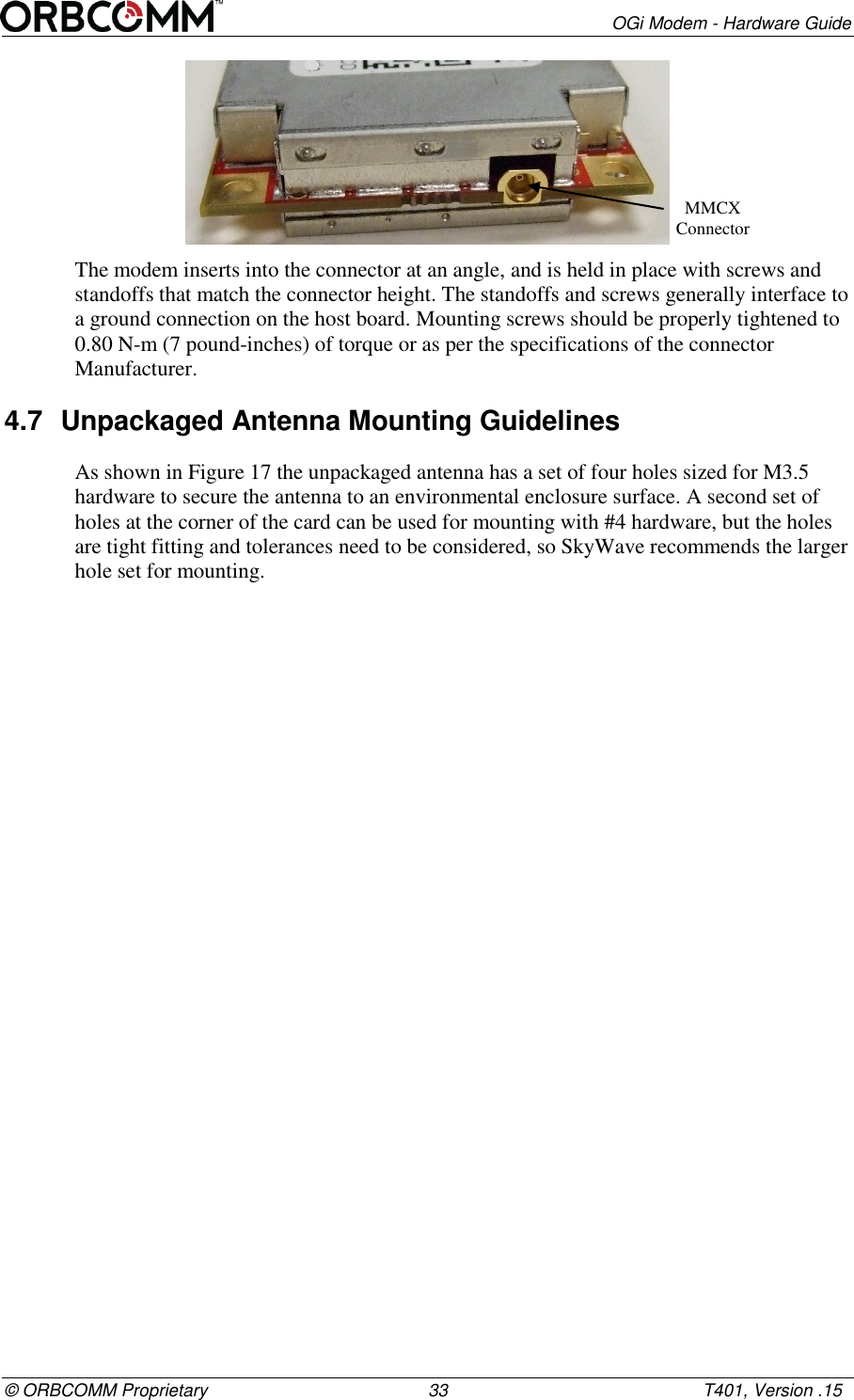
       OGi Modem - Hardware Guide © ORBCOMM Proprietary                                             33                                                    T401, Version .15  The modem inserts into the connector at an angle, and is held in place with screws and standoffs that match the connector height. The standoffs and screws generally interface to a ground connection on the host board. Mounting screws should be properly tightened to 0.80 N-m (7 pound-inches) of torque or as per the specifications of the connector Manufacturer. 4.7  Unpackaged Antenna Mounting Guidelines As shown in Figure 17 the unpackaged antenna has a set of four holes sized for M3.5 hardware to secure the antenna to an environmental enclosure surface. A second set of holes at the corner of the card can be used for mounting with #4 hardware, but the holes are tight fitting and tolerances need to be considered, so SkyWave recommends the larger hole set for mounting. MMCX Connector
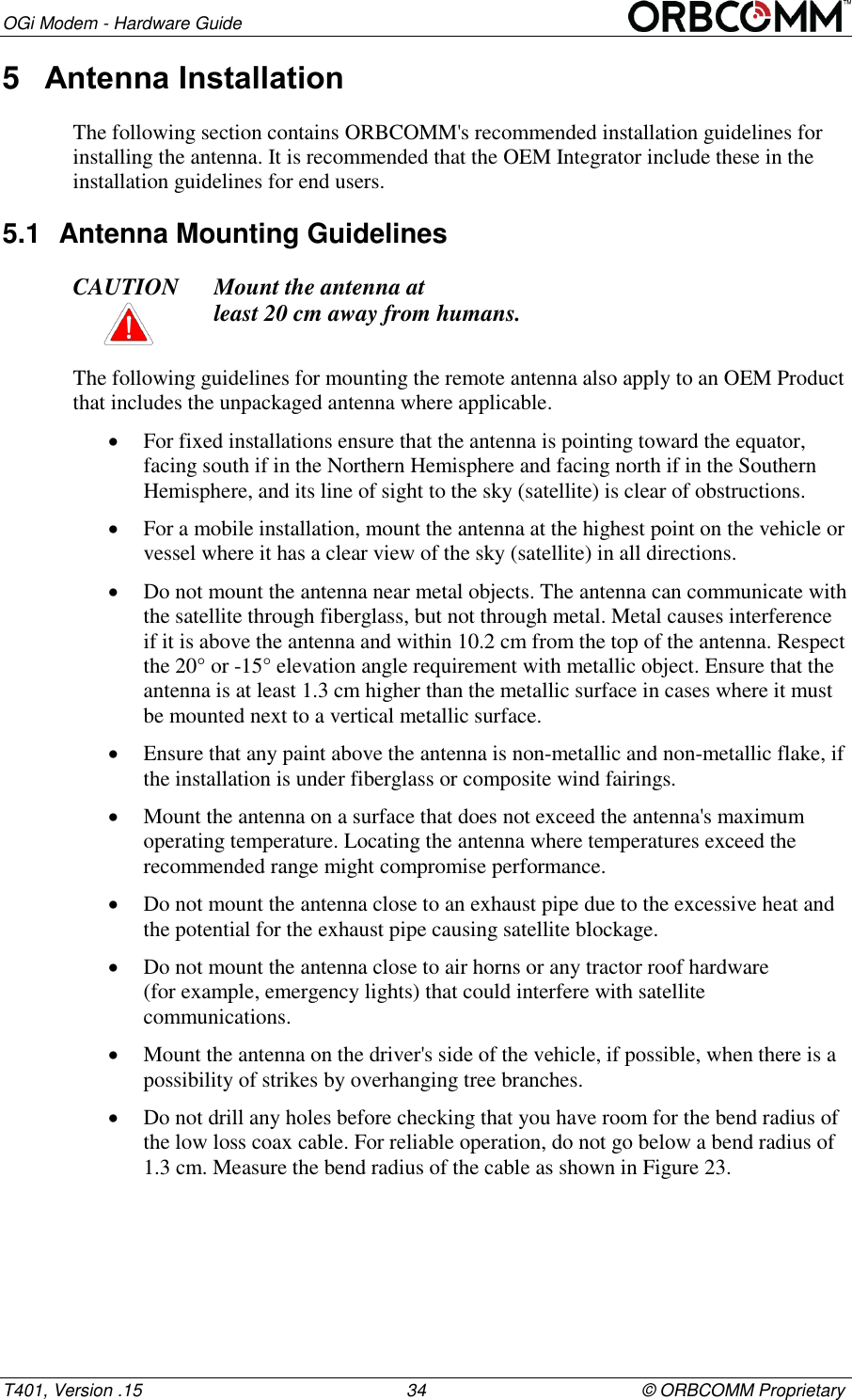
OGi Modem - Hardware Guide T401, Version .15                                                      34                                            © ORBCOMM Proprietary 5  Antenna Installation The following section contains ORBCOMM's recommended installation guidelines for installing the antenna. It is recommended that the OEM Integrator include these in the installation guidelines for end users. 5.1  Antenna Mounting Guidelines  CAUTION Mount the antenna at  least 20 cm away from humans.  The following guidelines for mounting the remote antenna also apply to an OEM Product that includes the unpackaged antenna where applicable.  For fixed installations ensure that the antenna is pointing toward the equator, facing south if in the Northern Hemisphere and facing north if in the Southern Hemisphere, and its line of sight to the sky (satellite) is clear of obstructions.  For a mobile installation, mount the antenna at the highest point on the vehicle or vessel where it has a clear view of the sky (satellite) in all directions.  Do not mount the antenna near metal objects. The antenna can communicate with the satellite through fiberglass, but not through metal. Metal causes interference if it is above the antenna and within 10.2 cm from the top of the antenna. Respect the 20° or -15° elevation angle requirement with metallic object. Ensure that the antenna is at least 1.3 cm higher than the metallic surface in cases where it must be mounted next to a vertical metallic surface.  Ensure that any paint above the antenna is non-metallic and non-metallic flake, if the installation is under fiberglass or composite wind fairings.  Mount the antenna on a surface that does not exceed the antenna's maximum operating temperature. Locating the antenna where temperatures exceed the recommended range might compromise performance.  Do not mount the antenna close to an exhaust pipe due to the excessive heat and the potential for the exhaust pipe causing satellite blockage.  Do not mount the antenna close to air horns or any tractor roof hardware  (for example, emergency lights) that could interfere with satellite communications.  Mount the antenna on the driver's side of the vehicle, if possible, when there is a possibility of strikes by overhanging tree branches.  Do not drill any holes before checking that you have room for the bend radius of the low loss coax cable. For reliable operation, do not go below a bend radius of  1.3 cm. Measure the bend radius of the cable as shown in Figure 23.
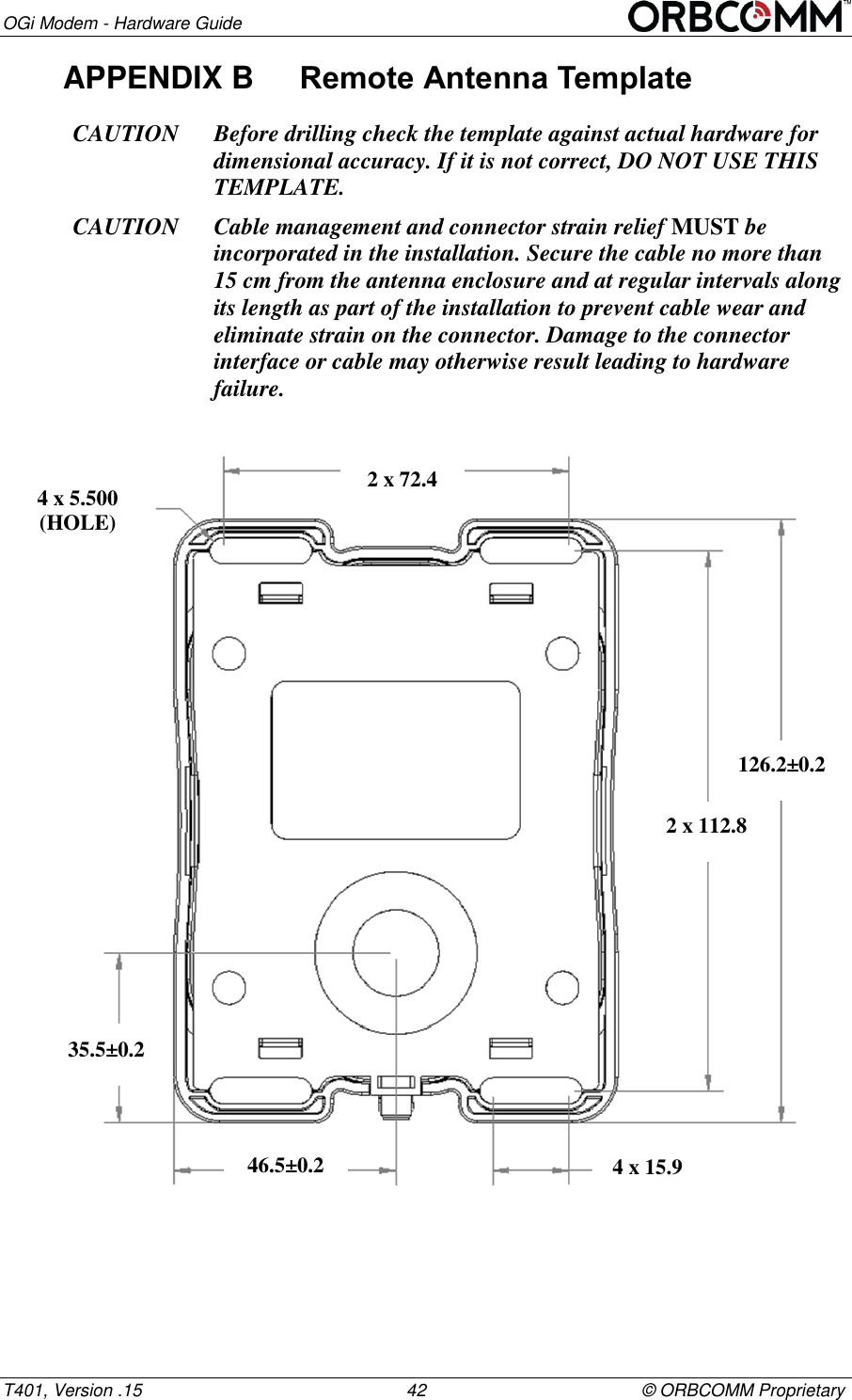
       OGi Modem - Hardware Guide © ORBCOMM Proprietary                                             35                                                    T401, Version .15 Figure 23  Antenna Cable Bend Radius   Mount on a surface that is free from dirt, grime, water and grease to avoid damaging the mounting surface or the vehicle’s paint.  Mount so that the cable end faces the rear of the vehicle. 5.2  Mount a Remote Antenna  Two mounting options are available for the remote packaged satellite antennas: screw mount or silicone mount. OEM Integrators, who have included an unpackaged antenna within their product, should apply any packaged antenna restrictions mentioned in this section, to the mounting of their own product. 5.2.1  Screw Mount If mounting a remote antenna the following tools and materials are required:  Drill  M4 hardware   Outdoor waterproof adhesive sealant (silicone) To mount the antenna, follow the steps below. 1. Find a location for the remote antenna following the guidelines provided in  Section 5.1. 2. Use the mounting template (APPENDIX A) or the antenna as a template, to mark the location of the mounting holes. CAUTION Cable management and connector strain relief MUST be incorporated in the installation. Secure the cable no more than 15 cm from the antenna enclosure and at regular intervals along its length as part of the installation to prevent cable wear and eliminate strain on the terminal connector. Damage to the terminal connector interface or cable might otherwise result leading to hardware failure. 3. Drill the mounting holes using the drill. 4. Apply waterproof sealing compound, such as RTV silicone, around the drill holes so water does not seep into the asset. Bend Radius  Correct (Minimum 1.3 cm)
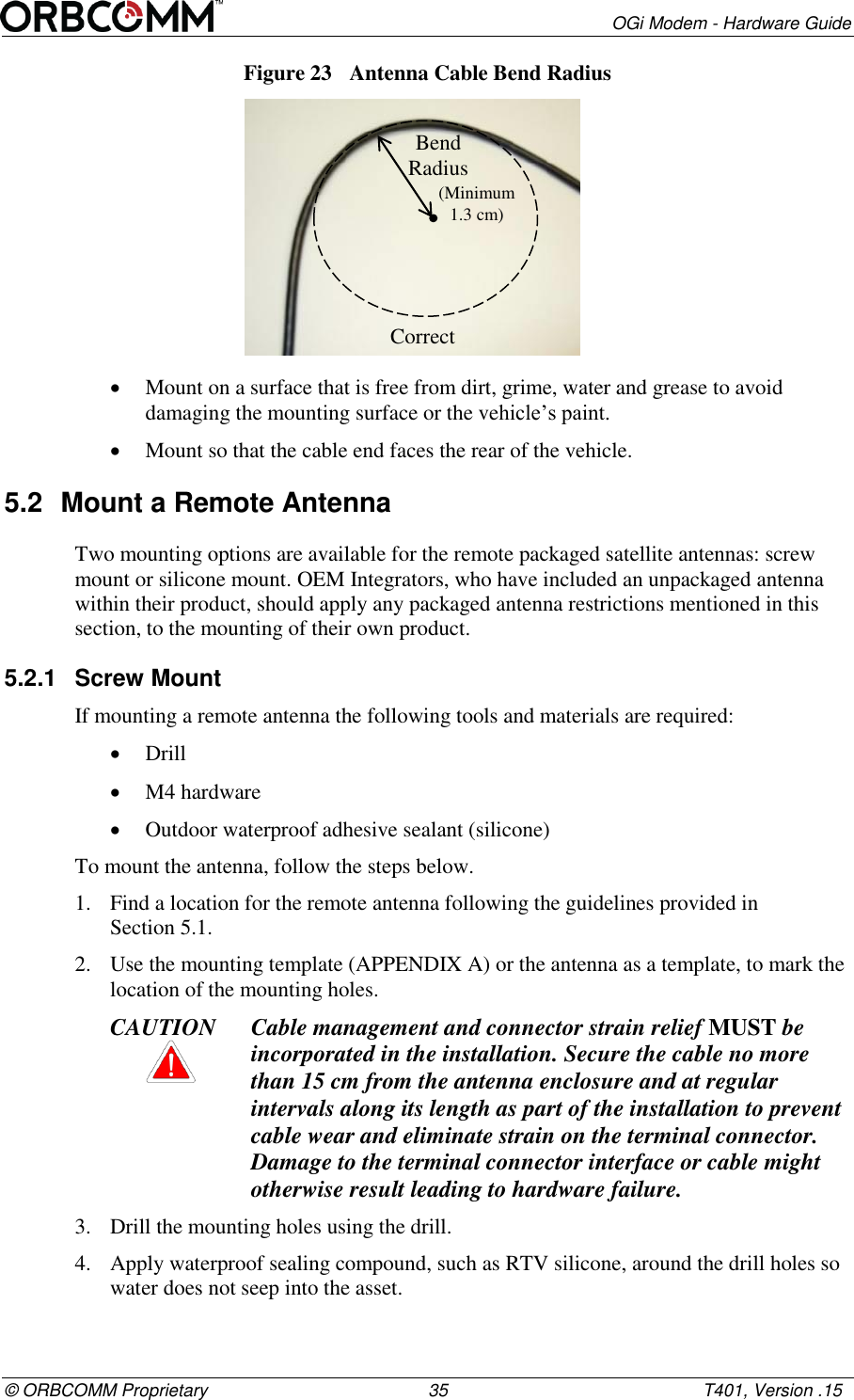
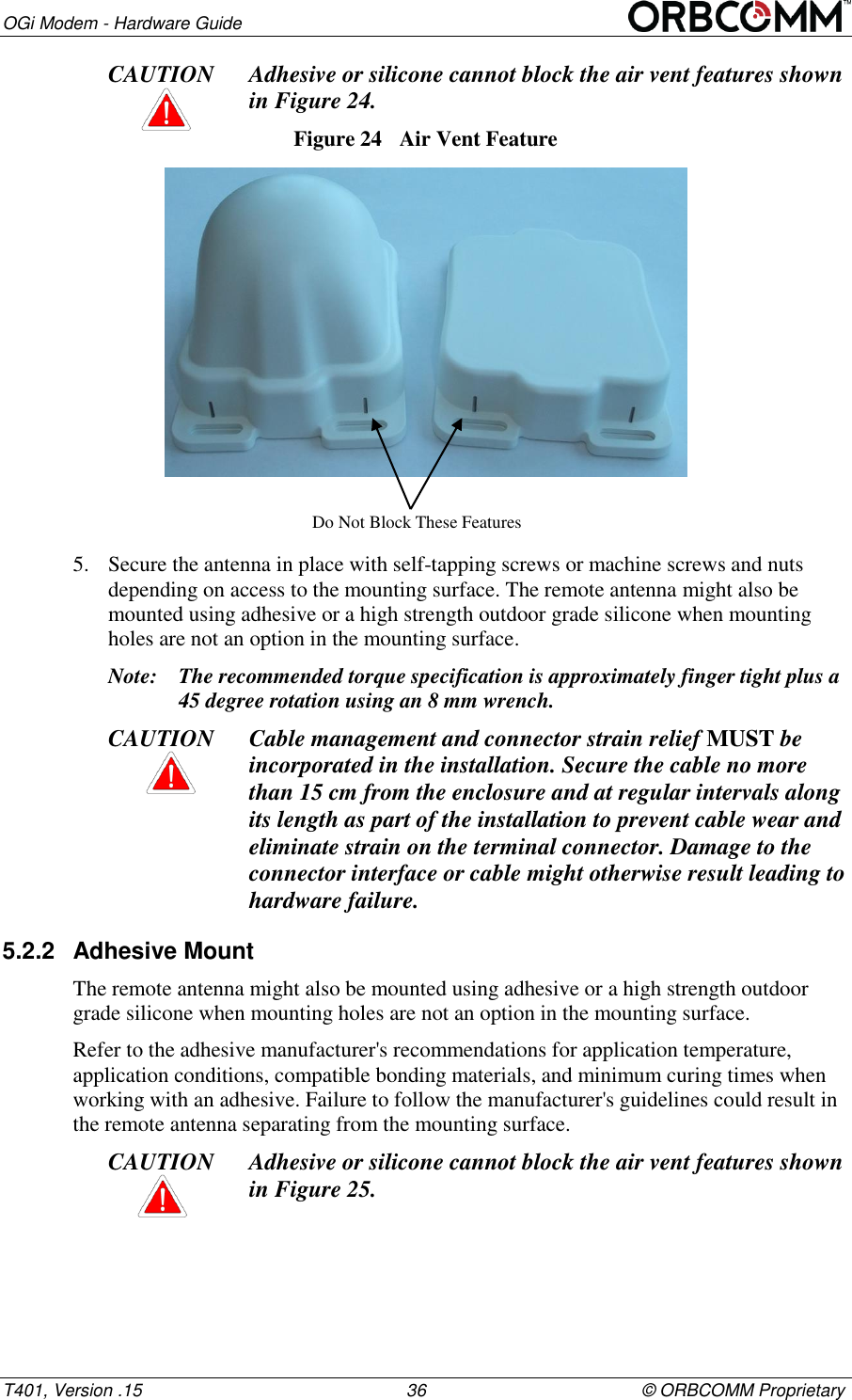
OGi Modem - Hardware Guide T401, Version .15                                                      36                                            © ORBCOMM Proprietary CAUTION Adhesive or silicone cannot block the air vent features shown  in Figure 24. Figure 24  Air Vent Feature  5. Secure the antenna in place with self-tapping screws or machine screws and nuts depending on access to the mounting surface. The remote antenna might also be mounted using adhesive or a high strength outdoor grade silicone when mounting holes are not an option in the mounting surface. Note: The recommended torque specification is approximately finger tight plus a 45 degree rotation using an 8 mm wrench. CAUTION Cable management and connector strain relief MUST be incorporated in the installation. Secure the cable no more than 15 cm from the enclosure and at regular intervals along its length as part of the installation to prevent cable wear and eliminate strain on the terminal connector. Damage to the connector interface or cable might otherwise result leading to hardware failure. 5.2.2  Adhesive Mount The remote antenna might also be mounted using adhesive or a high strength outdoor grade silicone when mounting holes are not an option in the mounting surface. Refer to the adhesive manufacturer's recommendations for application temperature, application conditions, compatible bonding materials, and minimum curing times when working with an adhesive. Failure to follow the manufacturer's guidelines could result in the remote antenna separating from the mounting surface. CAUTION Adhesive or silicone cannot block the air vent features shown  in Figure 25. Do Not Block These Features
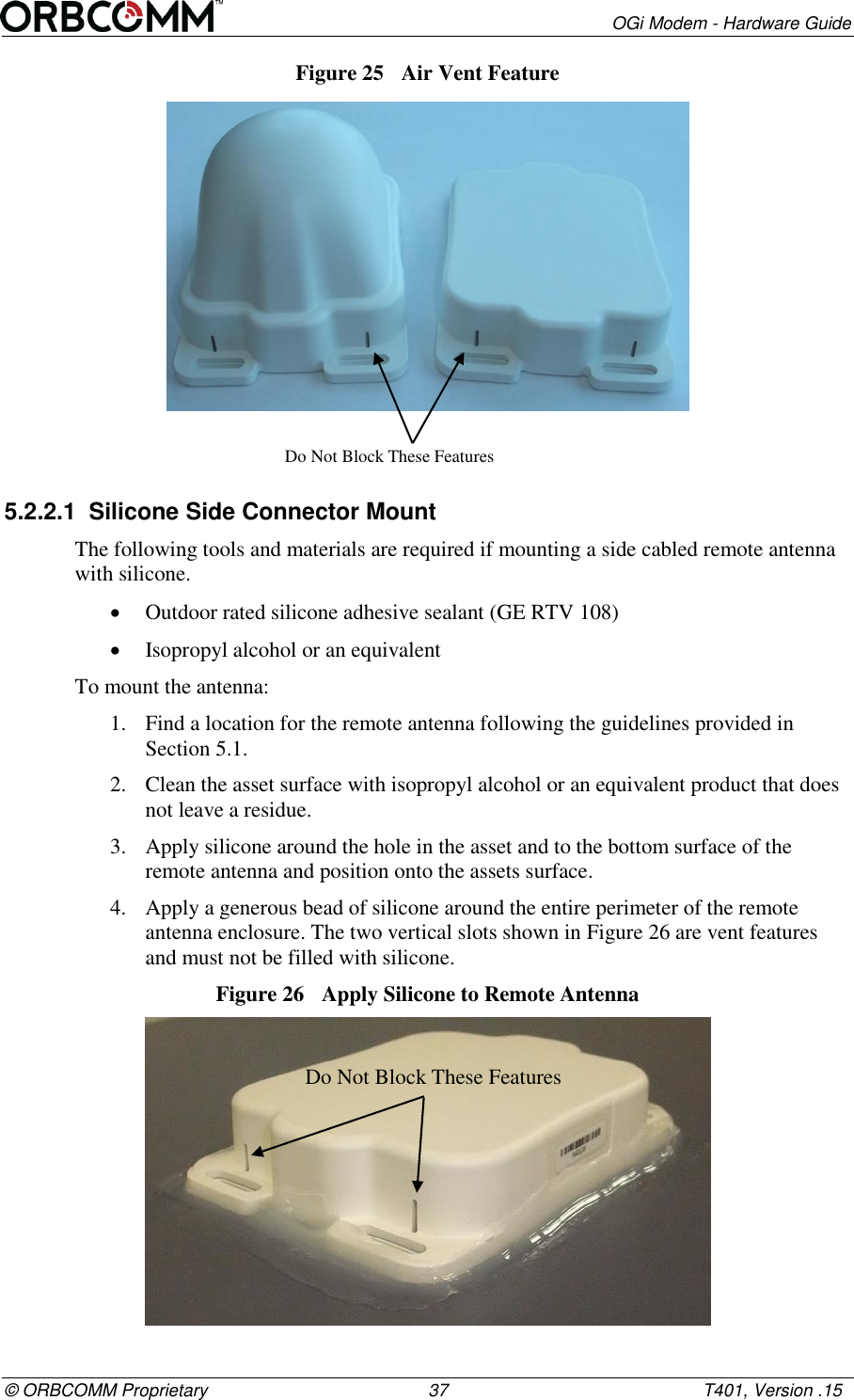
       OGi Modem - Hardware Guide © ORBCOMM Proprietary                                             37                                                    T401, Version .15 Figure 25  Air Vent Feature  5.2.2.1  Silicone Side Connector Mount The following tools and materials are required if mounting a side cabled remote antenna with silicone.  Outdoor rated silicone adhesive sealant (GE RTV 108)  Isopropyl alcohol or an equivalent To mount the antenna: 1. Find a location for the remote antenna following the guidelines provided in  Section 5.1. 2. Clean the asset surface with isopropyl alcohol or an equivalent product that does not leave a residue. 3. Apply silicone around the hole in the asset and to the bottom surface of the remote antenna and position onto the assets surface. 4. Apply a generous bead of silicone around the entire perimeter of the remote antenna enclosure. The two vertical slots shown in Figure 26 are vent features and must not be filled with silicone. Figure 26  Apply Silicone to Remote Antenna  Do Not Block These Features Do Not Block These Features
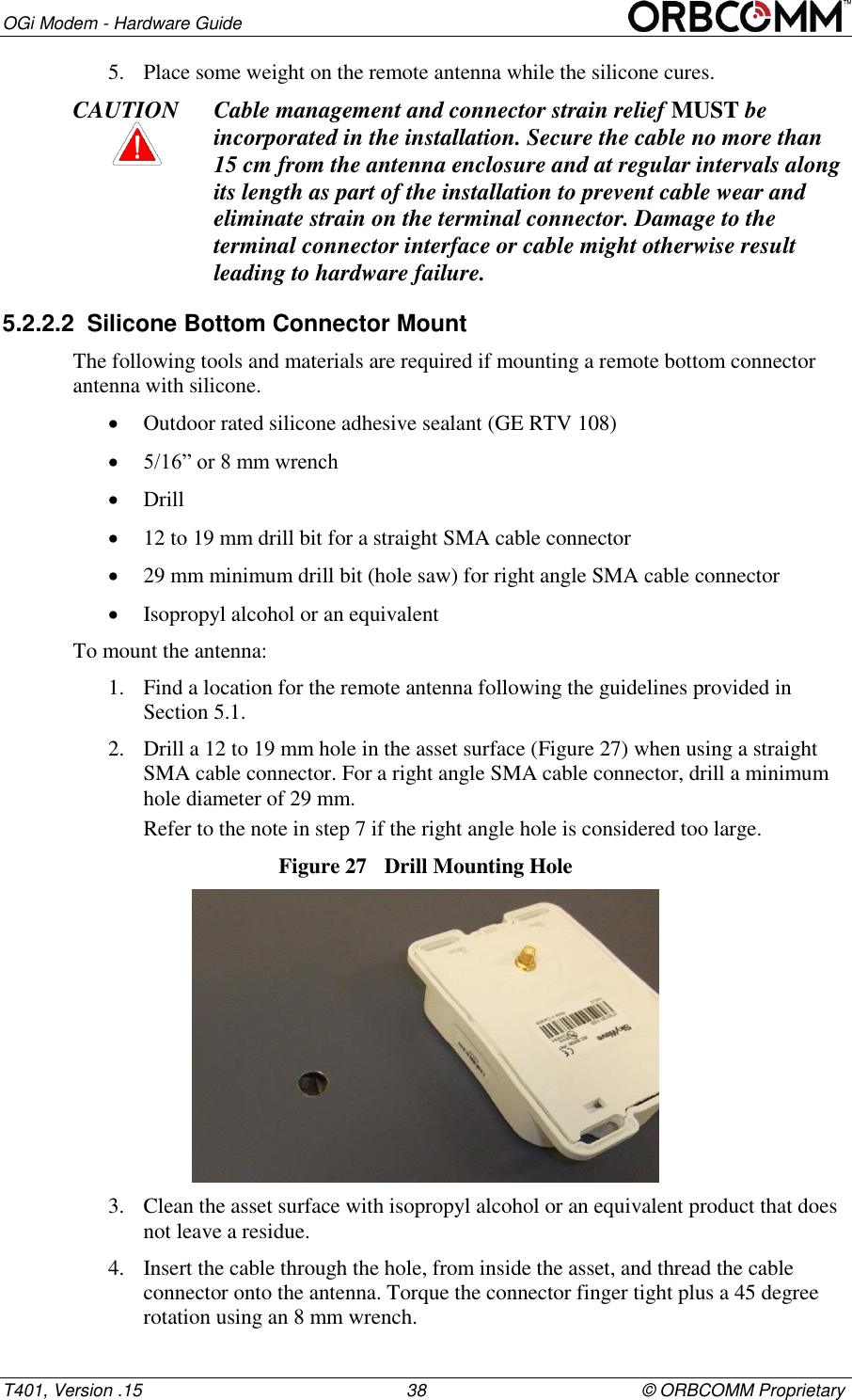
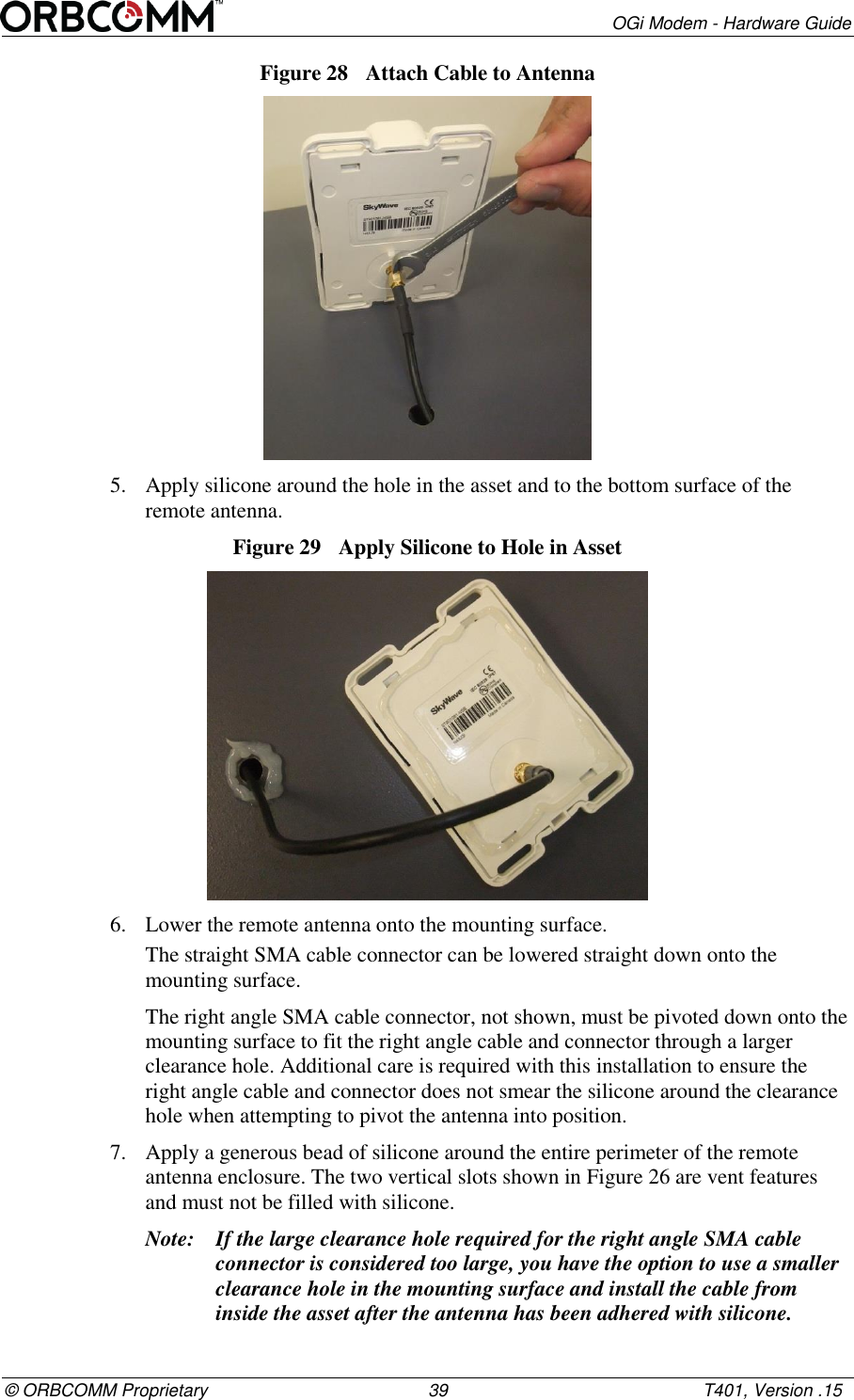
OGi Modem - Hardware Guide T401, Version .15                                                      38                                            © ORBCOMM Proprietary 5. Place some weight on the remote antenna while the silicone cures. CAUTION Cable management and connector strain relief MUST be incorporated in the installation. Secure the cable no more than 15 cm from the antenna enclosure and at regular intervals along its length as part of the installation to prevent cable wear and eliminate strain on the terminal connector. Damage to the terminal connector interface or cable might otherwise result leading to hardware failure. 5.2.2.2  Silicone Bottom Connector Mount The following tools and materials are required if mounting a remote bottom connector antenna with silicone.  Outdoor rated silicone adhesive sealant (GE RTV 108)  5/16” or 8 mm wrench  Drill  12 to 19 mm drill bit for a straight SMA cable connector  29 mm minimum drill bit (hole saw) for right angle SMA cable connector  Isopropyl alcohol or an equivalent To mount the antenna: 1. Find a location for the remote antenna following the guidelines provided in  Section 5.1. 2. Drill a 12 to 19 mm hole in the asset surface (Figure 27) when using a straight SMA cable connector. For a right angle SMA cable connector, drill a minimum hole diameter of 29 mm. Refer to the note in step 7 if the right angle hole is considered too large. Figure 27  Drill Mounting Hole  3. Clean the asset surface with isopropyl alcohol or an equivalent product that does not leave a residue. 4. Insert the cable through the hole, from inside the asset, and thread the cable connector onto the antenna. Torque the connector finger tight plus a 45 degree rotation using an 8 mm wrench.
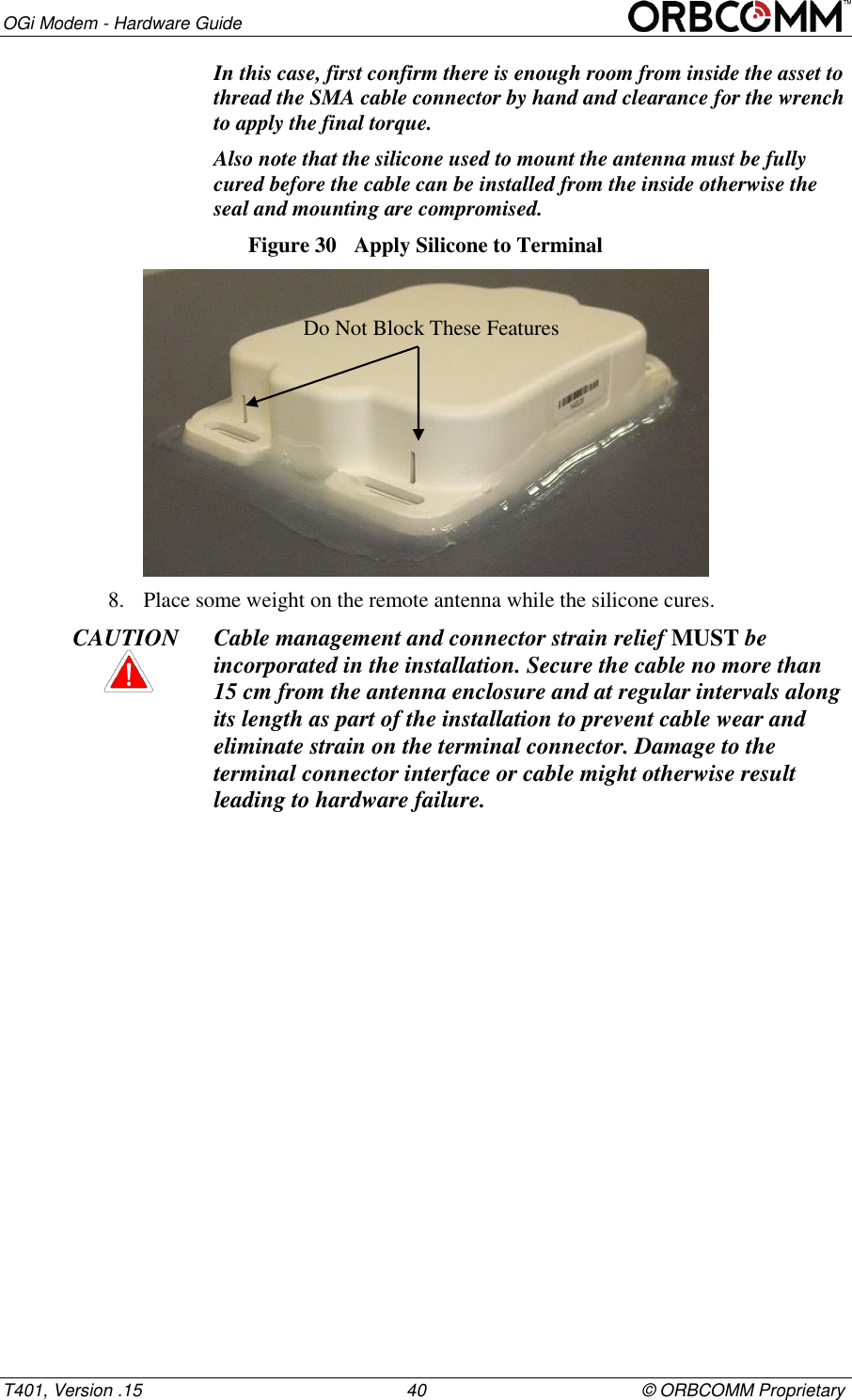
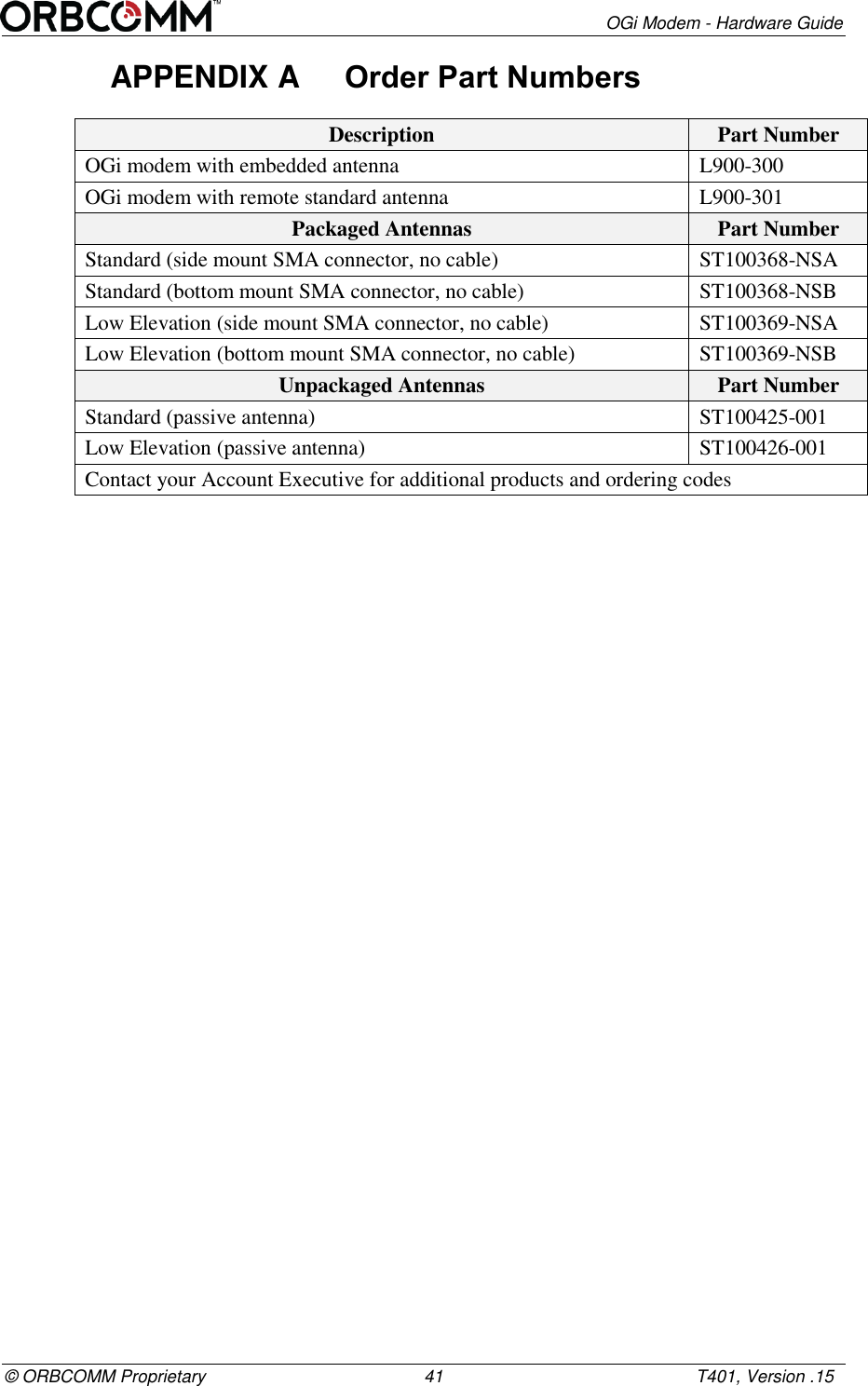
       OGi Modem - Hardware Guide © ORBCOMM Proprietary                                             39                                                    T401, Version .15 Figure 28  Attach Cable to Antenna  5. Apply silicone around the hole in the asset and to the bottom surface of the remote antenna. Figure 29  Apply Silicone to Hole in Asset  6. Lower the remote antenna onto the mounting surface. The straight SMA cable connector can be lowered straight down onto the mounting surface.  The right angle SMA cable connector, not shown, must be pivoted down onto the mounting surface to fit the right angle cable and connector through a larger clearance hole. Additional care is required with this installation to ensure the right angle cable and connector does not smear the silicone around the clearance hole when attempting to pivot the antenna into position. 7. Apply a generous bead of silicone around the entire perimeter of the remote antenna enclosure. The two vertical slots shown in Figure 26 are vent features and must not be filled with silicone. Note: If the large clearance hole required for the right angle SMA cable connector is considered too large, you have the option to use a smaller clearance hole in the mounting surface and install the cable from inside the asset after the antenna has been adhered with silicone.
OGi Modem - Hardware Guide T401, Version .15                                                      40                                            © ORBCOMM Proprietary In this case, first confirm there is enough room from inside the asset to thread the SMA cable connector by hand and clearance for the wrench to apply the final torque.  Also note that the silicone used to mount the antenna must be fully cured before the cable can be installed from the inside otherwise the seal and mounting are compromised. Figure 30  Apply Silicone to Terminal  8. Place some weight on the remote antenna while the silicone cures. CAUTION Cable management and connector strain relief MUST be incorporated in the installation. Secure the cable no more than 15 cm from the antenna enclosure and at regular intervals along its length as part of the installation to prevent cable wear and eliminate strain on the terminal connector. Damage to the terminal connector interface or cable might otherwise result leading to hardware failure.    Do Not Block These Features
       OGi Modem - Hardware Guide © ORBCOMM Proprietary                                             41                                                    T401, Version .15 APPENDIX A  Order Part Numbers Description  Part Number OGi modem with embedded antenna  L900-300 OGi modem with remote standard antenna L900-301 Packaged Antennas Part Number Standard (side mount SMA connector, no cable) ST100368-NSA Standard (bottom mount SMA connector, no cable) ST100368-NSB Low Elevation (side mount SMA connector, no cable) ST100369-NSA Low Elevation (bottom mount SMA connector, no cable) ST100369-NSB Unpackaged Antennas Part Number Standard (passive antenna) ST100425-001 Low Elevation (passive antenna) ST100426-001 Contact your Account Executive for additional products and ordering codes
OGi Modem - Hardware Guide T401, Version .15                                                      42                                            © ORBCOMM Proprietary APPENDIX B  Remote Antenna Template CAUTION Before drilling check the template against actual hardware for dimensional accuracy. If it is not correct, DO NOT USE THIS TEMPLATE. CAUTION Cable management and connector strain relief MUST be incorporated in the installation. Secure the cable no more than 15 cm from the antenna enclosure and at regular intervals along its length as part of the installation to prevent cable wear and eliminate strain on the connector. Damage to the connector interface or cable may otherwise result leading to hardware failure.        126.2±0.2 2 x 112.8 4 x 15.9 35.5±0.2 46.5±0.2 4 x 5.500 (HOLE) 2 x 72.4
       OGi Modem - Hardware Guide © ORBCOMM Proprietary                                             43                                                    T401, Version .15 Acronyms/Glossary CFR Code of Federal Regulations DC direct current FCC Federal Communications Commission GND ground GPS Global Positioning System. A satellite-based system that allows the modem to determine the longitude and latitude (and hence the location) of a monitored mobile device. I/O input/output IC Industry Canada IEC International Electrotechnical Commission N-m Newton-Meters PCB printed circuit board PPS pulse per second R&TTE Radio and Telecommunications Terminal Equipment RF radio frequency RoHS Restriction of Hazardous Substances Rx receive Tx transmit UART Universal Asynchronous Receiver/Transmitter
OGi Modem - Hardware Guide T401, Version .15                                                      44                                            © ORBCOMM Proprietary Revision History Version Date Details .15 Jan 2016 Limited customer release .13 Jan 2016 Limited customer release .02 Aug 2015 Limited customer release

Navigation menu