Ogemray Technology 5M02 WIFI Module User Manual Tekom

Shenzhen Ogemray Technology Co.,Ltd WIFI Module Tekom

User Manual

1 / 13All rights reservedAll information contained in this specification may not be changed without permissionMODEL: GWF-5M02VERSION: V1.0DATE: 2017-06-13GWF-5M02PRODUCT SPECIFICATION
2 / 13Historical ReleasesVersionModified ContentWriterAuditingdateDepartmentV1.0the first versionJasmineNing Qing2017-06-13Product dept.
3 / 13CatalogueCatalogue1.Product Basic Information 41.1 Product Introduction 41.2 Product Features 52 Product Basic Function 52.1 Brief Specification 52.2 Hardware Information 52.3 Software Information 92.4 Mechanical Information 92.4.1 Product Appearance 92.4.2 Product Dimension 92.4.3 RF output Connection Information 103. Approval and Certification 124.Environment Requirements 124.1 Suitable Temperature 124.2 Suitable Humidity 125. Available WLAN Channels in Major Countries 136. Disclaimer 13
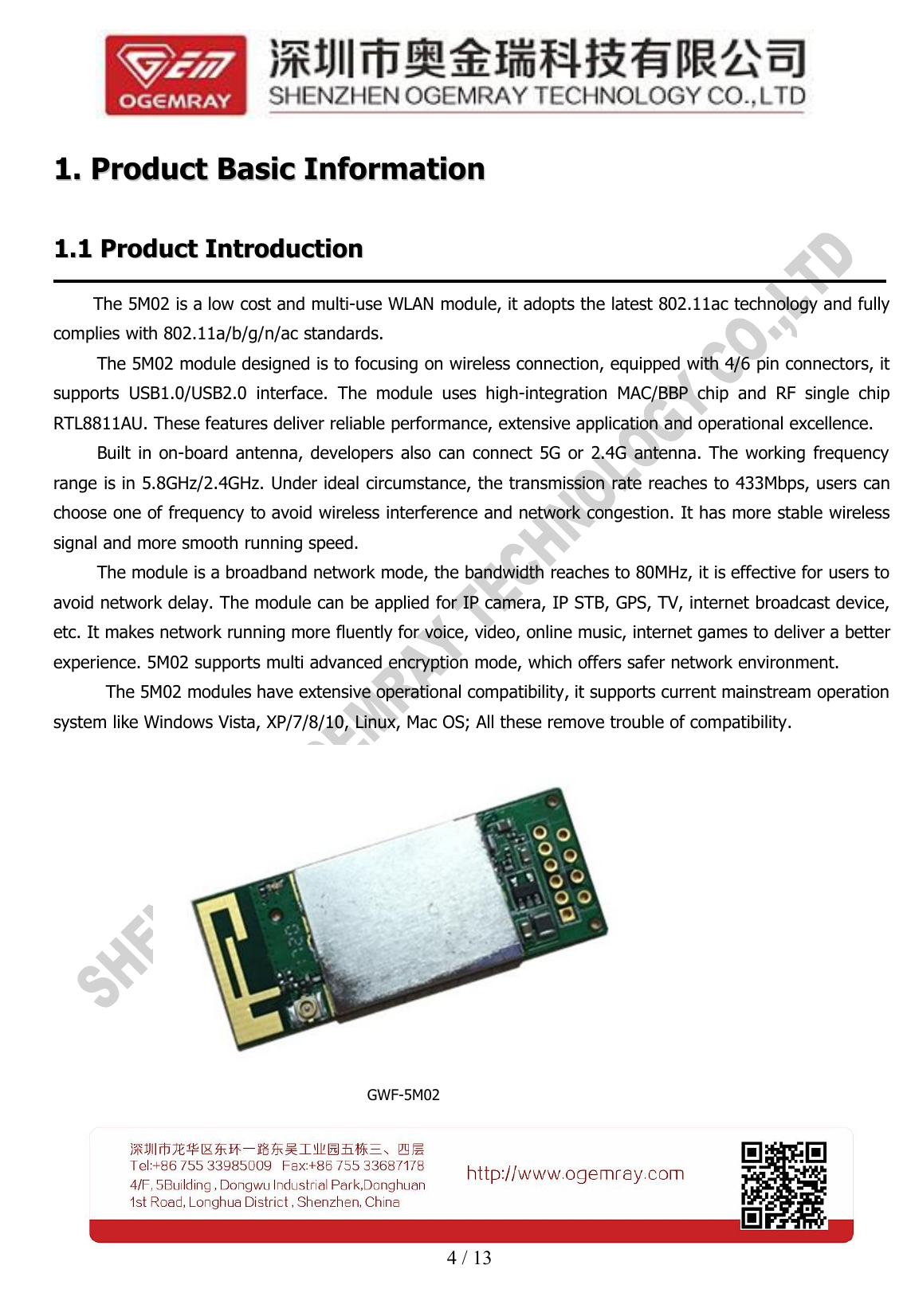
4 / 131.1. ProductProduct BasicBasic InformationInformation1.11.1 ProductProduct IntroductionIntroductionThe 5M02 is a low cost and multi-use WLAN module, it adopts the latest 802.11ac technology and fullycomplies with 802.11a/b/g/n/ac standards.The 5M02 module designed is to focusing on wireless connection, equipped with 4/6 pin connectors, itsupports USB1.0/USB2.0 interface. The module uses high-integration MAC/BBP chip and RF single chipRTL8811AU. These features deliver reliable performance, extensive application and operational excellence.Built in on-board antenna, developers also can connect 5G or 2.4G antenna. The working frequencyrange is in 5.8GHz/2.4GHz. Under ideal circumstance, the transmission rate reaches to 433Mbps, users canchoose one of frequency to avoid wireless interference and network congestion. It has more stable wirelesssignal and more smooth running speed.The module is a broadband network mode, the bandwidth reaches to 80MHz, it is effective for users toavoid network delay. The module can be applied for IP camera, IP STB, GPS, TV, internet broadcast device,etc. It makes network running more fluently for voice, video, online music, internet games to deliver a betterexperience. 5M02 supports multi advanced encryption mode, which offers safer network environment.The 5M02 modules have extensive operational compatibility, it supports current mainstream operationsystem like Windows Vista, XP/7/8/10, Linux, Mac OS; All these remove trouble of compatibility.GWF-5M02
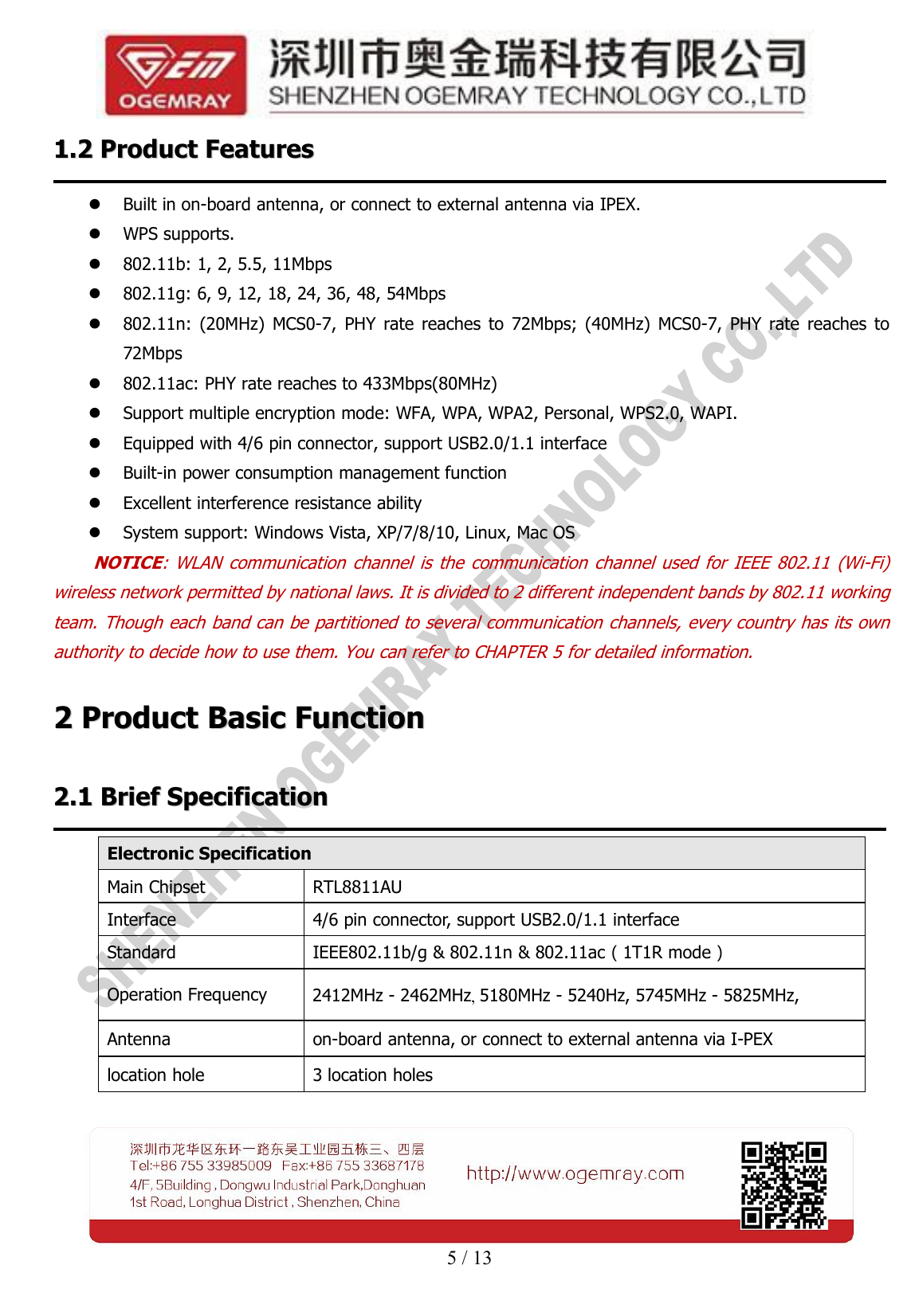
5 / 131.21.2 ProductProduct FeaturesFeaturesBuilt in on-board antenna, or connect to external antenna via IPEX.WPS supports.802.11b: 1, 2, 5.5, 11Mbps802.11g: 6, 9, 12, 18, 24, 36, 48, 54Mbps802.11n: (20MHz) MCS0-7, PHY rate reaches to 72Mbps; (40MHz) MCS0-7, PHY rate reaches to72Mbps802.11ac: PHY rate reaches to 433Mbps(80MHz)Support multiple encryption mode: WFA, WPA, WPA2, Personal, WPS2.0, WAPI.Equipped with 4/6 pin connector, support USB2.0/1.1 interfaceBuilt-in power consumption management functionExcellent interference resistance abilitySystem support: Windows Vista, XP/7/8/10, Linux, Mac OSNOTICE: WLAN communication channel is the communication channel used for IEEE 802.11 (Wi-Fi)wireless network permitted by national laws. It is divided to 2 different independent bands by 802.11 workingteam. Though each band can be partitioned to several communication channels, every country has its ownauthority to decide how to use them. You can refer to CHAPTER 5 for detailed information.22ProductProduct BasicBasic FunctionFunction2.12.1 BriefBrief SpecificationSpecificationElectronic SpecificationMain ChipsetRTL8811AUInterface4/6 pin connector, support USB2.0/1.1 interfaceStandardIEEE802.11b/g & 802.11n & 802.11ac(1T1R mode)Operation Frequency2412MHz - 2462MHz, 5180MHz - 5240Hz, 5745MHz - 5825MHz,Antennaon-board antenna, or connect to external antenna via I-PEXlocation hole3 location holes
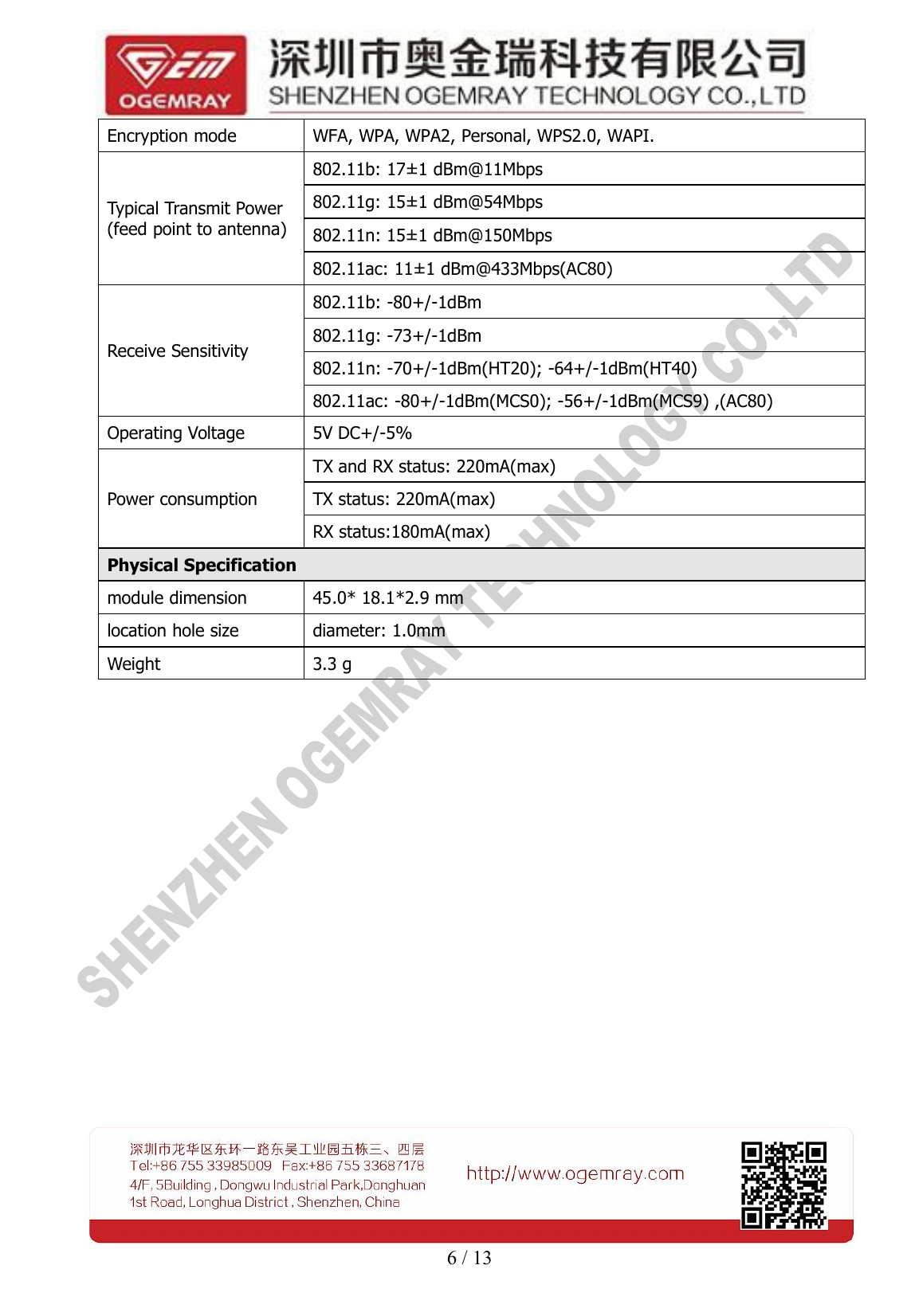
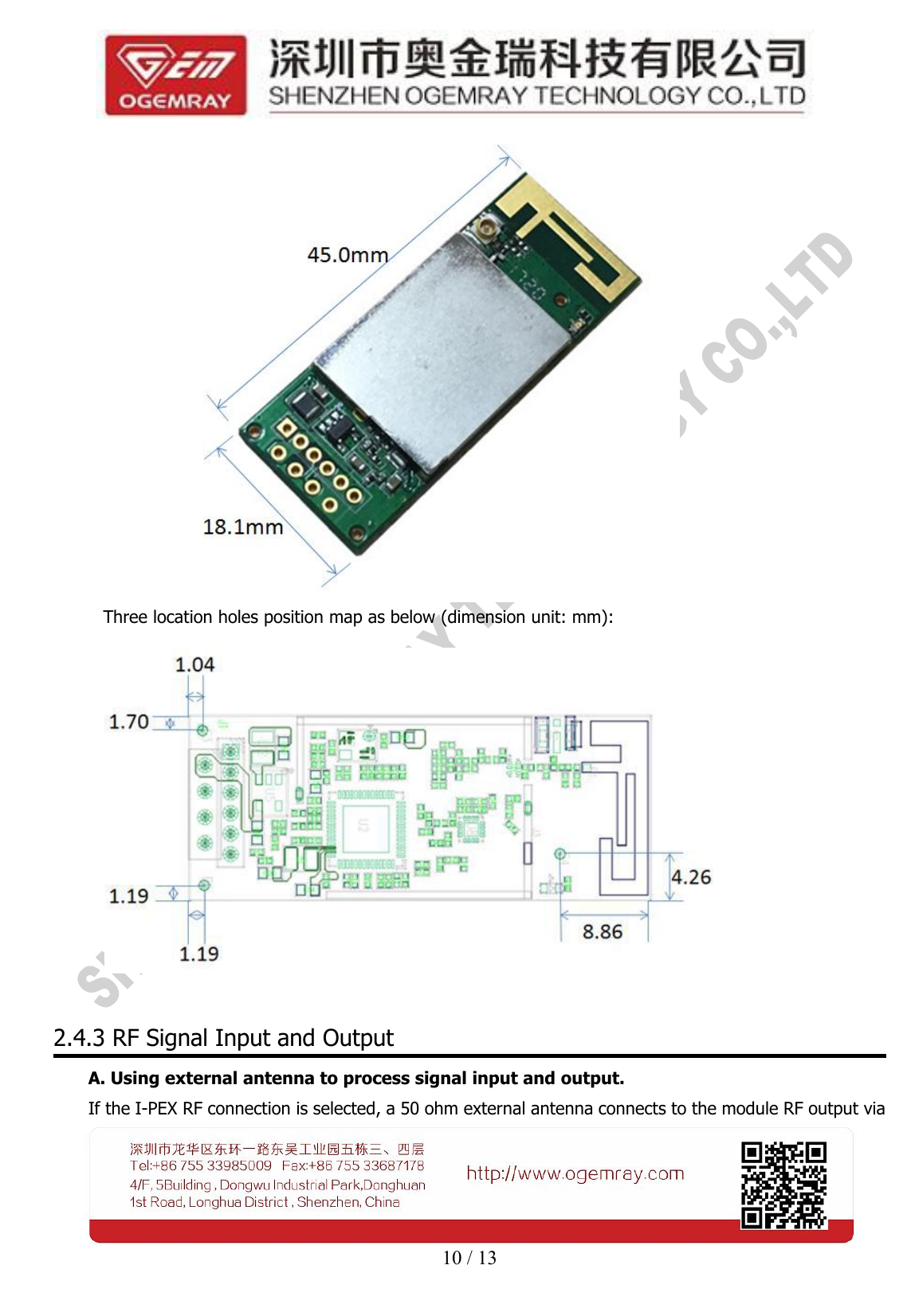
6 / 13Encryption modeWFA, WPA, WPA2, Personal, WPS2.0, WAPI.Typical Transmit Power(feed point to antenna)802.11b: 17±1 dBm@11Mbps802.11g: 15±1 dBm@54Mbps802.11n: 15±1 dBm@150Mbps802.11ac: 11±1 dBm@433Mbps(AC80)Receive Sensitivity802.11b: -80+/-1dBm802.11g: -73+/-1dBm802.11n: -70+/-1dBm(HT20); -64+/-1dBm(HT40)802.11ac: -80+/-1dBm(MCS0); -56+/-1dBm(MCS9) ,(AC80)Operating Voltage5V DC+/-5%Power consumptionTX and RX status: 220mA(max)TX status: 220mA(max)RX status:180mA(max)Physical Specificationmodule dimension45.0* 18.1*2.9 mmlocation hole sizediameter: 1.0mmWeight3.3 g
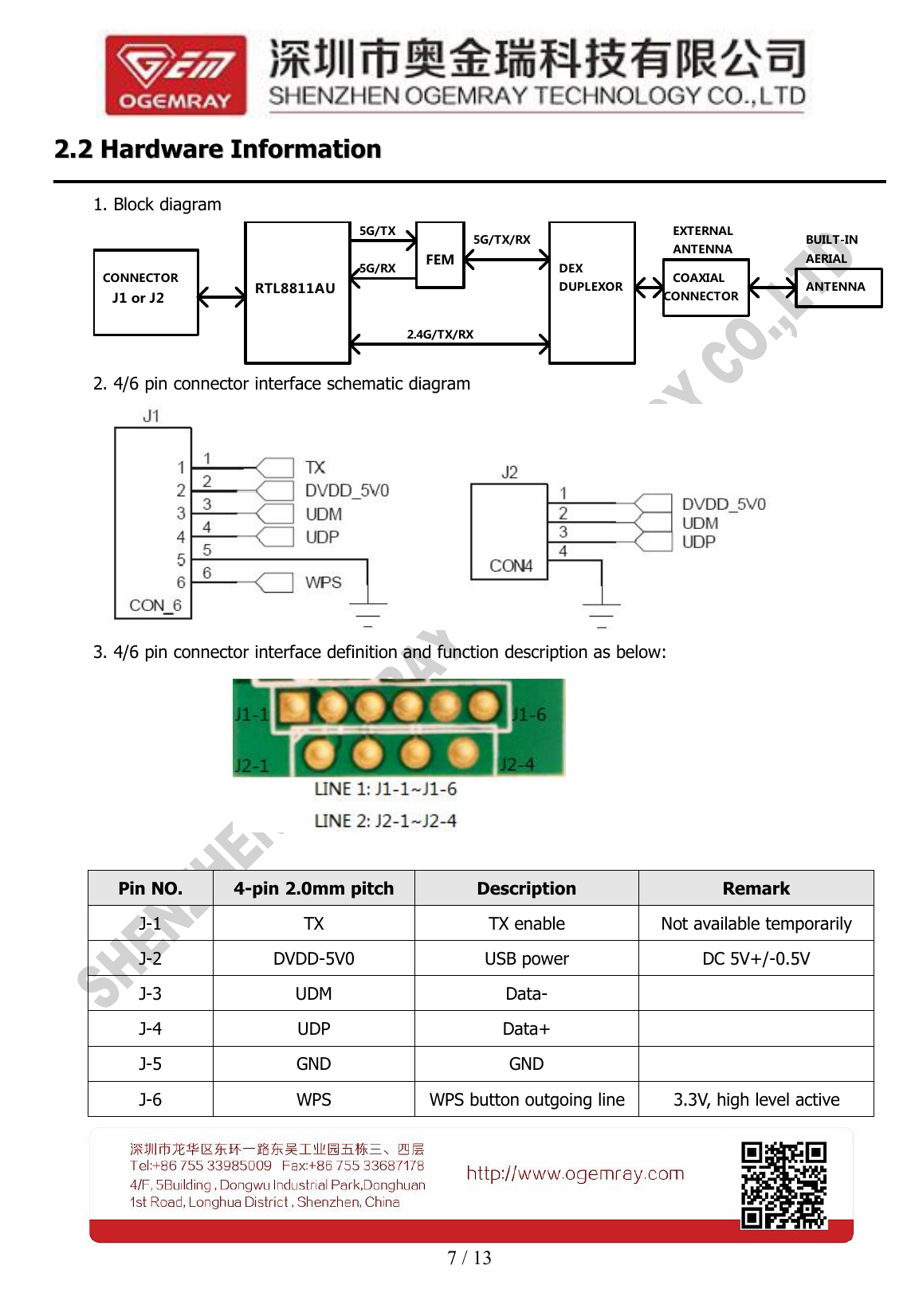
7 / 132.22.2 HardwareHardware InformationInformation1. Block diagramJ1 or J2CONNECTORFEMRTL8811AU5G/RX5G/TXDEX5G/TX/RXDUPLEXOR2.4G/TX/RXCOAXIALCONNECTORANTENNAEXTERNALAERIALBUILT-INANTENNA2. 4/6 pin connector interface schematic diagram3. 4/6 pin connector interface definition and function description as below:Pin NO.4-pin 2.0mm pitchDescriptionRemarkJ-1TXTX enableNot available temporarilyJ-2DVDD-5V0USB powerDC 5V+/-0.5VJ-3UDMData-J-4UDPData+J-5GNDGNDJ-6WPSWPS button outgoing line3.3V, high level active
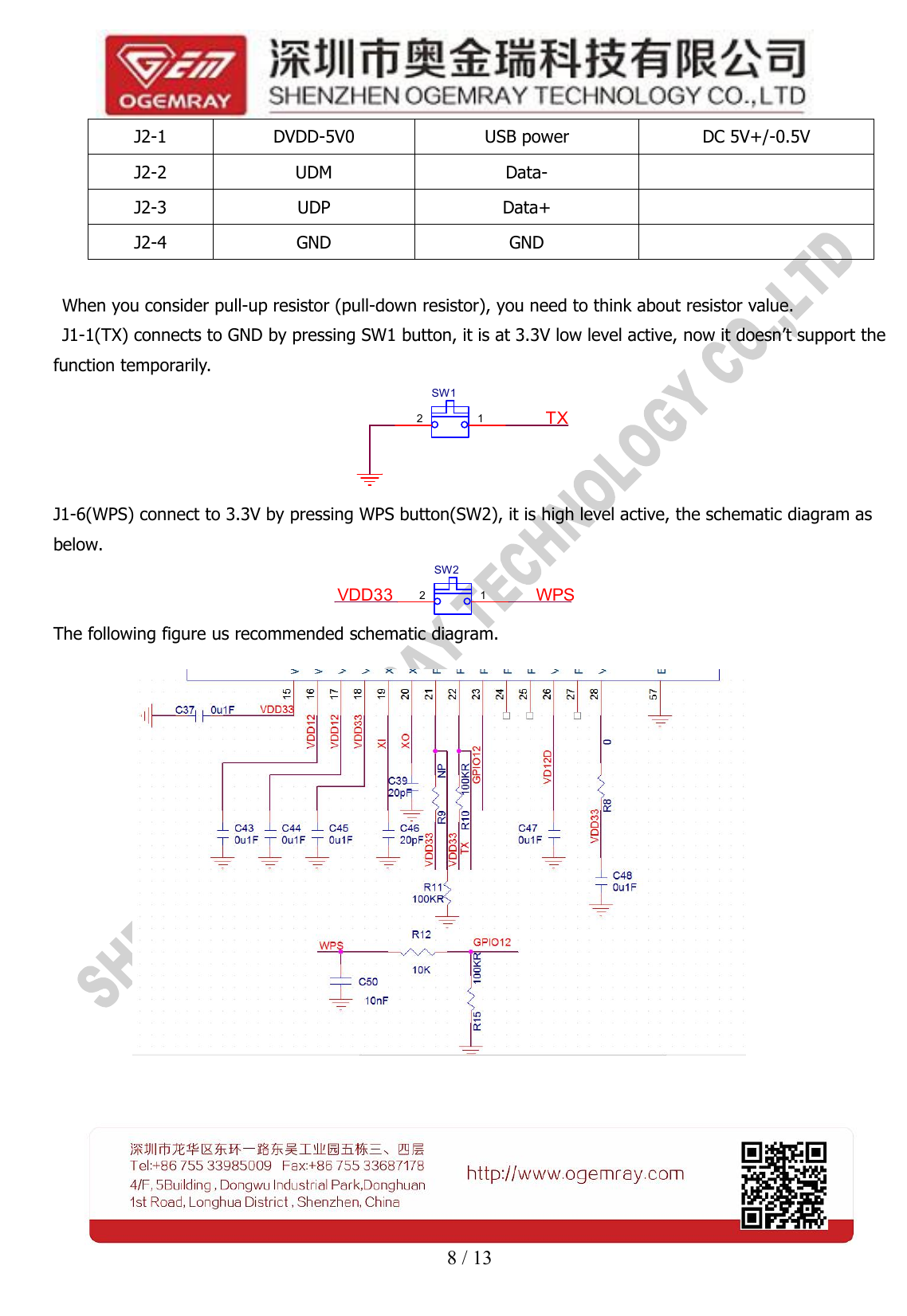
8 / 13When you consider pull-up resistor (pull-down resistor), you need to think about resistor value.J1-1(TX) connects to GND by pressing SW1 button, it is at 3.3V low level active, now it doesn’t support thefunction temporarily.SW12 1 TXJ1-6(WPS) connect to 3.3V by pressing WPS button(SW2), it is high level active, the schematic diagram asbelow.SW22 1 WPSVDD33The following figure us recommended schematic diagram.J2-1DVDD-5V0USB powerDC 5V+/-0.5VJ2-2UDMData-J2-3UDPData+J2-4GNDGND
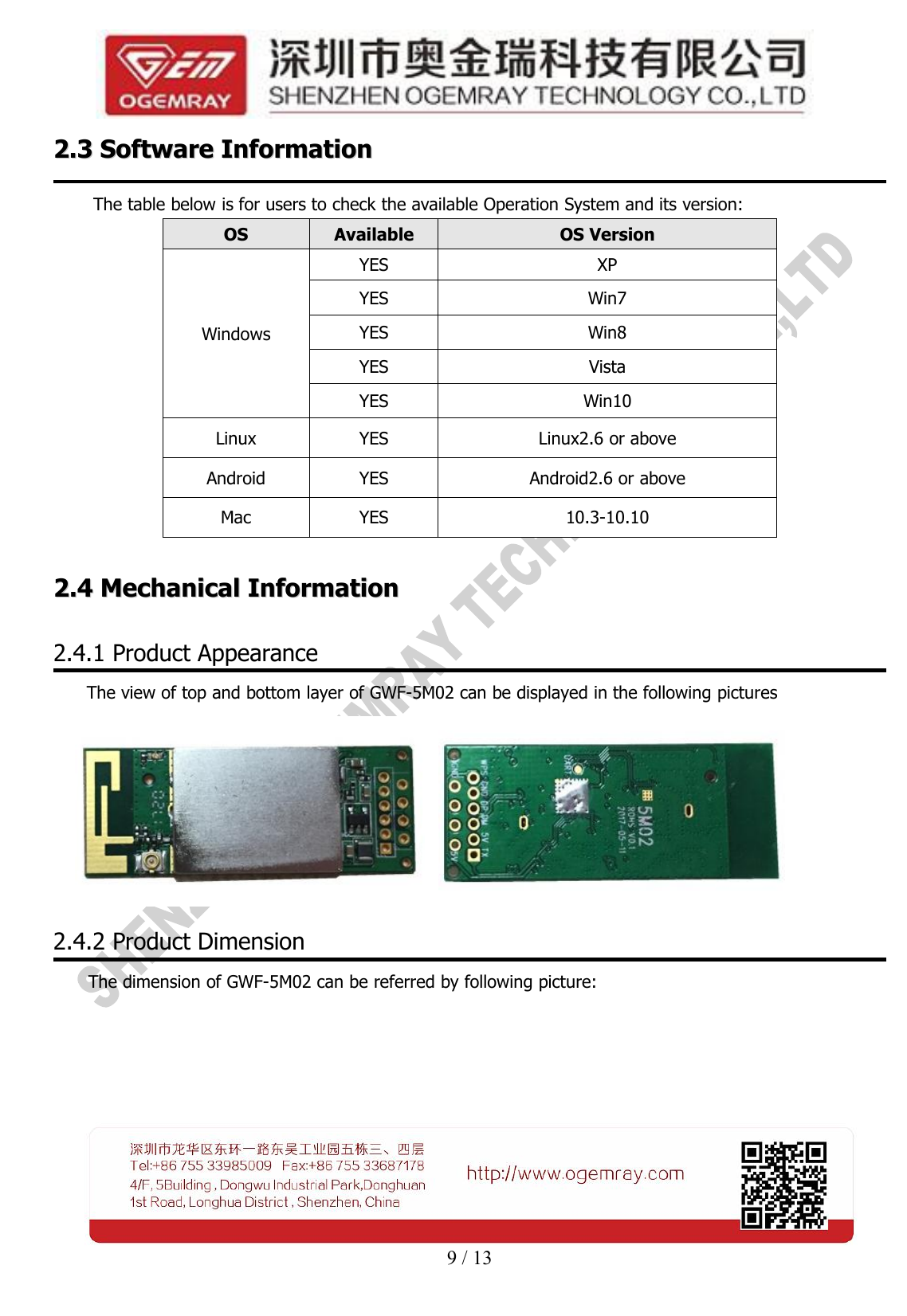
9 / 132.32.3 SoftwareSoftware InformationInformationThe table below is for users to check the available Operation System and its version:OSAvailableOS VersionWindowsYESXPYESWin7YESWin8YESVistaYESWin10LinuxYESLinux2.6 or aboveAndroidYESAndroid2.6 or aboveMacYES10.3-10.102.42.4 MechanicalMechanical InformationInformation2.4.1 Product AppearanceThe view of top and bottom layer of GWF-5M02 can be displayed in the following pictures2.4.2 Product DimensionThe dimension of GWF-5M02 can be referred by following picture:
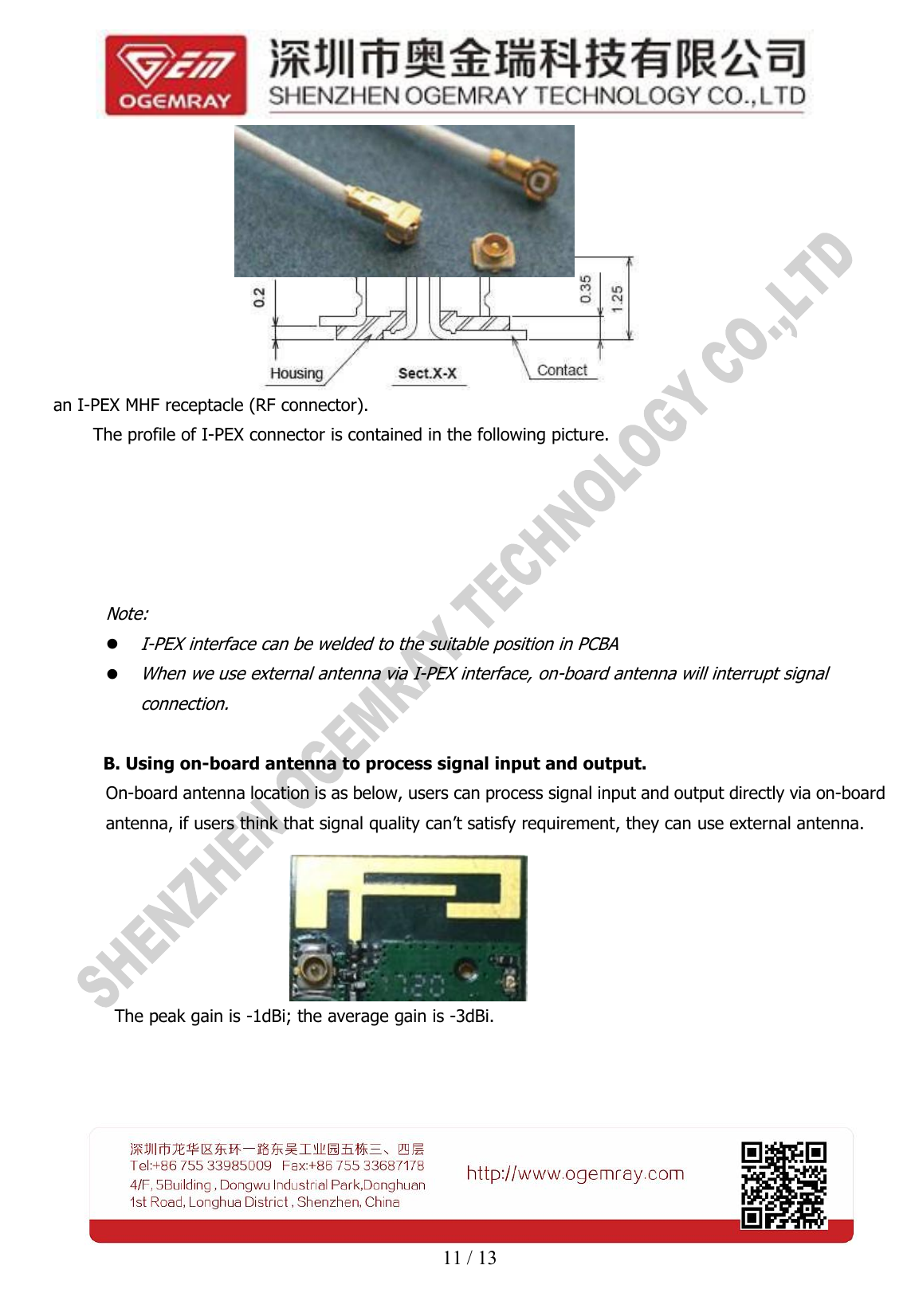
10 / 13Three location holes position map as below (dimension unit: mm):2.4.3 RF Signal Input and OutputA. Using external antenna to process signal input and output.If the I-PEX RF connection is selected, a 50 ohm external antenna connects to the module RF output via
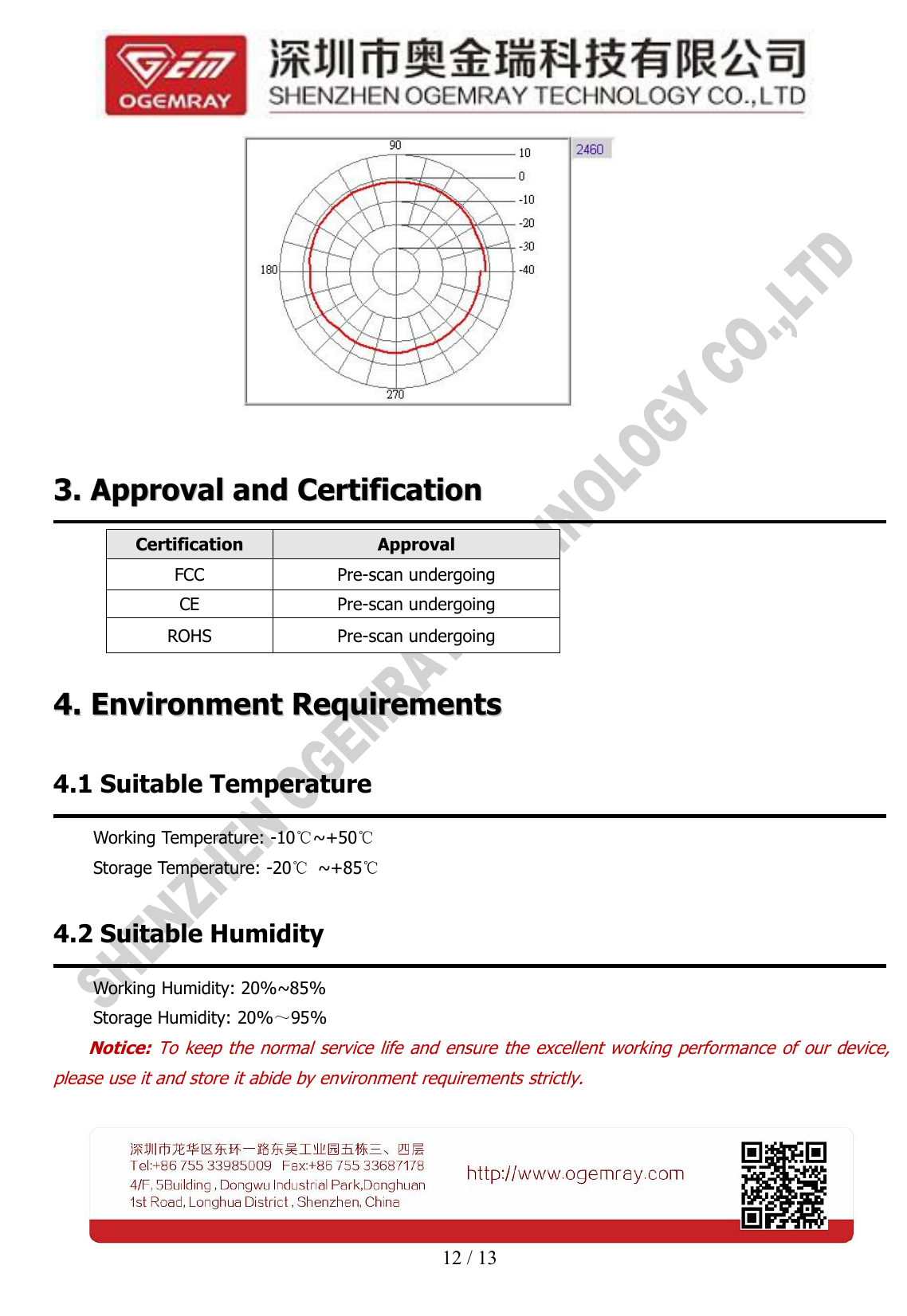
11 / 13an I-PEX MHF receptacle (RF connector).The profile of I-PEX connector is contained in the following picture.Note:I-PEX interface can be welded to the suitable position in PCBAWhen we use external antenna via I-PEX interface, on-board antenna will interrupt signalconnection.B. Using on-board antenna to process signal input and output.On-board antenna location is as below, users can process signal input and output directly via on-boardantenna, if users think that signal quality can’t satisfy requirement, they can use external antenna.The peak gain is -1dBi; the average gain is -3dBi.
12 / 133.3. ApprovalApproval andand CertificationCertificationCertificationApprovalFCCPre-scan undergoingCEPre-scan undergoingROHSPre-scan undergoing4.4. EnvironmentEnvironment RequirementsRequirements4.1 Suitable TemperatureWorking Temperature: -10℃~+50℃Storage Temperature: -20℃~+85℃4.2 Suitable HumidityWorking Humidity: 20%~85%Storage Humidity: 20%~95%Notice: To keep the normal service life and ensure the excellent working performance of our device,please use it and store it abide by environment requirements strictly.
13 / 136.6. DisclaimerDisclaimerThis SPECIFICATION document is the guidance of the installation and tentative usage of our products.Before operating the product, please read this data sheet carefully.All rights reserved. Any reproduction, translation or simplification of this data sheet in whole or in part isstrictly prohibited without written permission from our company.We do not provide any guarantee about this data sheet, software or other relevant information. Wesolemnly state that there is no implied business warranty or commercial contract assurance in the sheet,software or other related information. The data sheet is only for operation guidance and reference; it cannotbe used as basis or supplement of any other contract or duty.
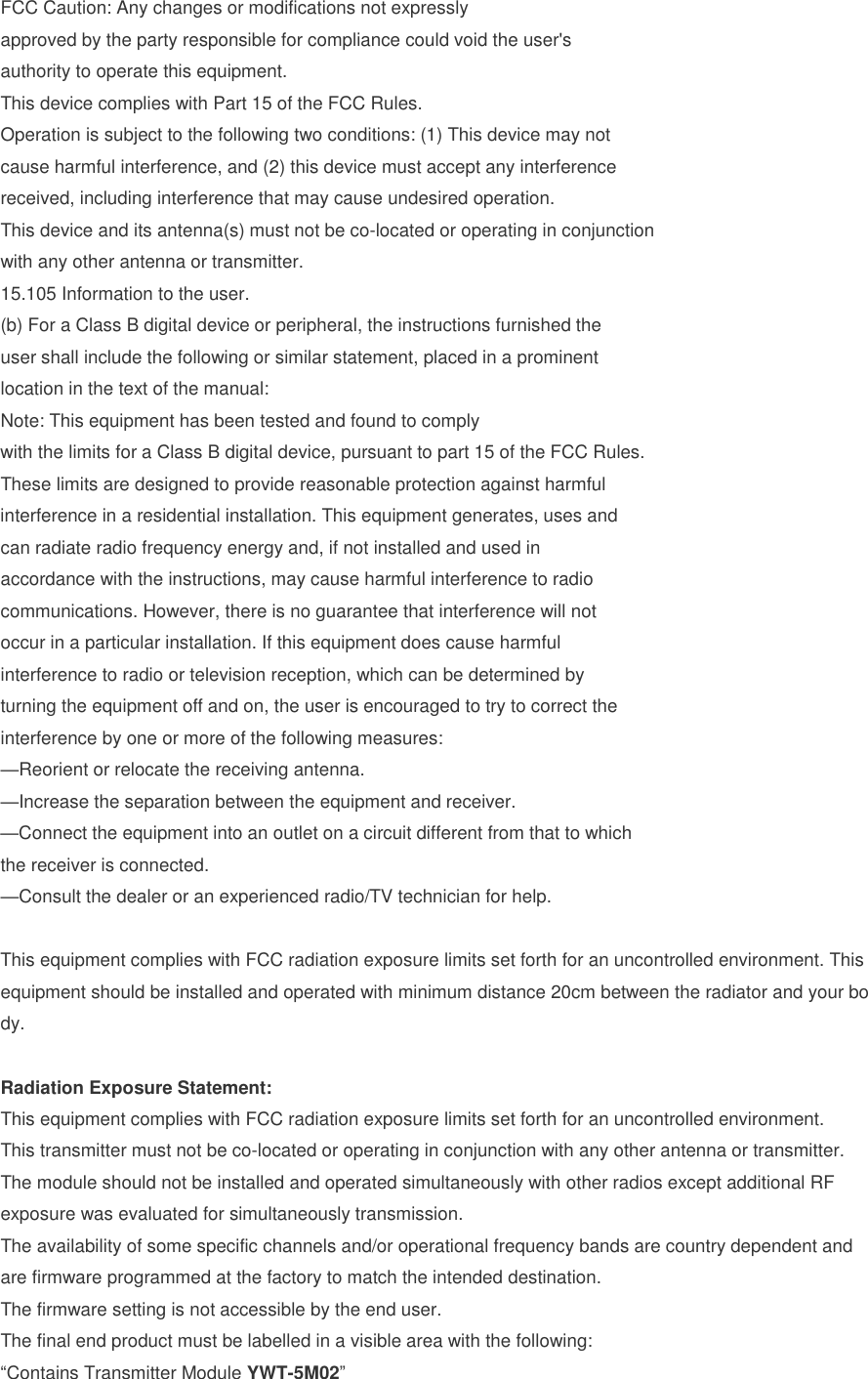
FCC Caution: Any changes or modifications not expressly approved by the party responsible for compliance could void the user's authority to operate this equipment. This device complies with Part 15 of the FCC Rules. Operation is subject to the following two conditions: (1) This device may not cause harmful interference, and (2) this device must accept any interference received, including interference that may cause undesired operation. This device and its antenna(s) must not be co-located or operating in conjunction with any other antenna or transmitter. 15.105 Information to the user. (b)For a Class B digital device or peripheral, the instructions furnished theuser shall include the following or similar statement, placed in a prominentlocation in the text of the manual:Note: This equipment has been tested and found to complywith the limits for a Class B digital device, pursuant to part 15 of the FCC Rules.These limits are designed to provide reasonable protection against harmfulinterference in a residential installation. This equipment generates, uses andcan radiate radio frequency energy and, if not installed and used inaccordance with the instructions, may cause harmful interference to radiocommunications. However, there is no guarantee that interference will notoccur in a particular installation. If this equipment does cause harmfulinterference to radio or television reception, which can be determined byturning the equipment off and on, the user is encouraged to try to correct theinterference by one or more of the following measures:—Reorient or relocate the receiving antenna.—Increase the separation between the equipment and receiver.—Connect the equipment into an outlet on a circuit different from that to whichthe receiver is connected.—Consult the dealer or an experienced radio/TV technician for help.This equipment complies with FCC radiation exposure limits set forth for an uncontrolled environment. This equipment should be installed and operated with minimum distance 20cm between the radiator and your body. Radiation Exposure Statement: This equipment complies with FCC radiation exposure limits set forth for an uncontrolled environment. This transmitter must not be co-located or operating in conjunction with any other antenna or transmitter. The module should not be installed and operated simultaneously with other radios except additional RF exposure was evaluated for simultaneously transmission. The availability of some specific channels and/or operational frequency bands are country dependent and are firmware programmed at the factory to match the intended destination. The firmware setting is not accessible by the end user. The final end product must be labelled in a visible area with the following: “Contains Transmitter Module YWT-5M02”

Navigation menu