Olympus Om Pc Operating Instructions
Om-Pc-Instruction-Manual-1-4-Mb om-pc-instruction-manual-1-4-mb
OM-PC instruction manual OM-PC instruction manual
OM-PC instruction manual OM-PC instruction manual
OM-PC - Operating Instructions PC_eng Free User Guide for Olympus Camera, Manual - page3
2015-07-27
: Olympus Olympus-Om-Pc-Operating-Instructions-777434 olympus-om-pc-operating-instructions-777434 olympus pdf
Open the PDF directly: View PDF  .
.
Page Count: 78
- TABLE OF CONTENTS
- < Preparations before Taking Pictures >
- < Taking Photographs (I) >
- < Taking Photographs (ll)>
- < Other Operations >
- Advanced Techniques
- SELECTING THE METERING MODE (A Choice of Two Metering Modes)
- SELECTING THE METERING MODE (How to Use ESP Metering)
- GUIDE TO SELECTION OF EXPOSURE MODE
- SELECTING THE EXPOSURE MODE - PROGRAM -
- PROGRAM DIAGRAMS
- SELECTING THE EXPOSURE MODE - AUTO (Aperture Preferred)
- DEPTH OF FIELD
- PREVIEW BUTTON
- SHUTTER SPEEDS
- VIEWFINDER DISPLAY FOR AUTOMATIC EXPOSURE
- SELECTING THE EXPOSURE MODE - MANUAL
- COMBINATIONS OF METERING MODE AND EXPOSURE MODE
- SELECTING THE FILM SPEED SETTING MODE
- BULB EXPOSURE
- MULTIPLE EXPOSURE / INFRARED PHOTOGRAPHY
- OM SYSTEM
- For Longer Service of Your Camera

Thank you for choosing the Olympus OM-PC. This
camera is equipped with a unique "ESP" (Electro-Selective
Pattern) metering system. By combining this metering
mode with the automatic film speed setting mode and
programmed exposure mode, anyone can take perfectly
exposed
pictures
with
ease.
Before
using
the
camera,
please
read this operation manual carefully through while check-
ing with your camera to become familiar with this ver-
satile SLR.
Note: All the components of the Olympus OM-PC are carefully designed and their production and
assembly is strictly controlled to enhance the unmatched performance of the system. If any
interchangeable lenses, flashes, or accessories other than Olympus products are used, Olympus
cannot be responsible for poor results or damage of the OM-PC.
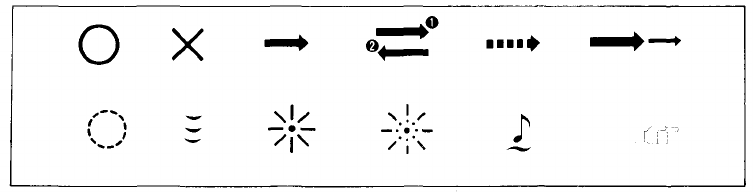
Correct
Incorrect
Operation
Operation order
Automatic
operation
Two-step operation
Attention
Press
lightly
Lamp on
Lamp blinking
Continuous sound
Reference
1
TABLE OF CONTENTS
< Preparations before Taking Pictures >
•
Mounting
the
Lens
.................
5
•
Loading
the
Batteries
...............
7
•
Checking
the
Batteries
...............
8
• Setting the Camera for Automatic Film
Speed
Setting
...................
9
•
Loading
the
Film
...................
10
< Taking photographs (I) >
• How to Take Programmed Automatic Exposure
Pictures
with
ESP
Metering
...........
14
• Rewind the Film .................. 17
< Taking Photographs (II) >
• How to Take Aperture-Preferred
Automatic
Exposure
Pictures
..........
20
•
Manual
Exposure
..................
23
•
Manual
Film
Speed
Setting
............
25
•
Exposure
Compensation
..............
27
< Other Operations >
•
Using
the
Self-Timer
................
29
•
Bulb
Exposure
...................
31
< Advanced Techniques >
• Selecting the Metering Mode
(A
Choice
of Two
Metering
Modes)
......
33
• Selecting the Metering Mode
(How
to Use ESP
Metering)
...........
35
•
Guide
to
Selection
of
Exposure
Mode
......
40
• Selecting the Exposure Mode
–
PROGRAM
–
.................
41
•
Program
Diagrams
.................
42
• Selecting the Exposure Mode
-
AUTO
(Aperture
Preferred)
.........
44
•
Depth
of
Field
...................
45
•
Preview
Button
...................
46
•
Shutter
Speeds
...................
47
• Viewfinder Display for Automatic Exposure . .
48
• Selecting the Exposure Mode — MANUAL — . . 49
• Combinations of Metering Mode and
Exposure
Mode
..................
50
• Selecting the Film Speed Setting Mode .....
51
•
Bulb
Exposure
...................
53
• Multiple Exposure/Infrared Photography . . . 54
< OM SYSTEM >
•
Flash
Photography
.................
56
•
T-Series
Flashes/Mounting
the
Flash
......
57
• How to Use
T-Series
Flashes
..........
58
•
Bounce
Flash/Close-up
Flash
..........
59
• Using Electronic Flashes Other Than
Olympus
T-Series
Units
.............
60
•
Shooting
with
Motor
Drive
............
61
•
Motor
Drive
Group
Units
.............
62
•
Macrophotography
.................
63
•
Macrophoto
Group
Units
.............
64
•
Other
System
Units
................
65
< For Longer Service of Your Camera >
•
Handling
Care
....................
67
•
Storage
Care
....................
68
•
Questions
and
Answers
..............
69
•
Description
of
Controls
..............
73
•
Specifications
....................
76
2
3

< Preparations before Taking Pictures >
The Olympus OM-PC is basically designed for automatic film speed setting
with DX coded film.
4
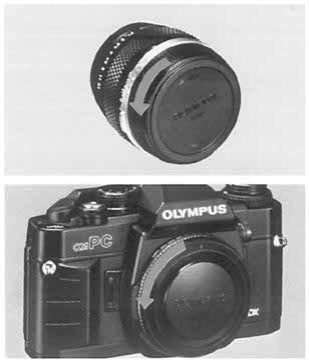
Remove the rear lens cap.
Remove the body cap.
1
2
Mounting the Lens
5
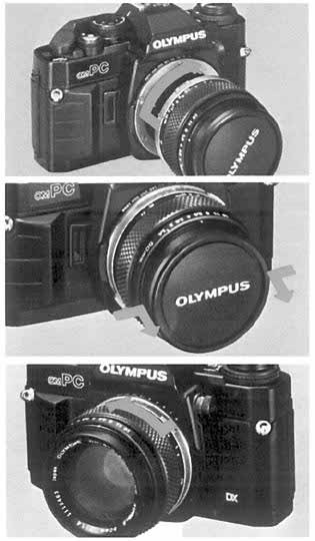
Align the red dots and rotate the lens clockwise
until it locks.
3
4
Remove
the
front
lens
cap.
(Press
in the
mount
tabs on the edges of the lens cap parallel with
"OLYMPUS").
Removing the Lens:
Press
the
lens
release
button
and
turn
the
lens
counter-clockwise.
6
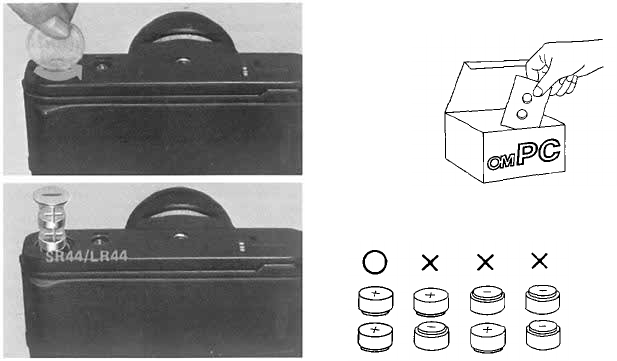
Loading the Batteries
Remove the battery cover.
Wipe battery surfaces clean. Make sure that +
signs are facing upwards. Replace the battery cover.
2
1
7
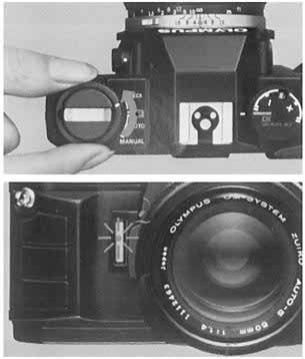
After inserting the batteries, always check as follows:
Rotate the mode selector dial to the "BAT-
TERY CHECK" position.
1
2
The
audible
and
visual
signals
will
tell
you
that
the battery voltage is sufficient.
If these signals are emitted intermittently, it means
that the batteries are almost worn out. Replace them
with new ones as soon as possible.
Checking the Batteries
8
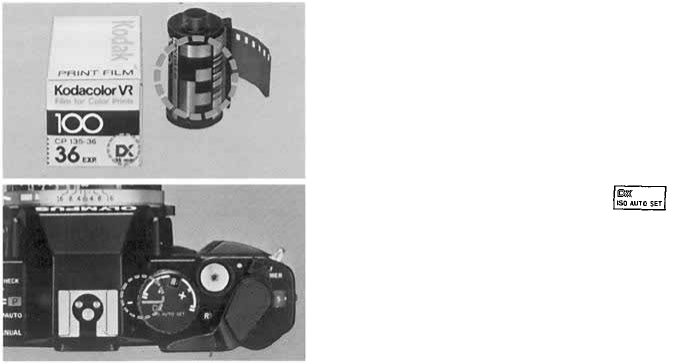
With
DX
coded
film,
the
OM-PC
sets
the
film
speed
automatically.
1
Make sure the film you are using is marked
"DX".
If the film you are using is not marked "DX" refer
to page 25.
2
Set the film speed dial to
Setting the Camera for Automatic Film Speed Setting
9
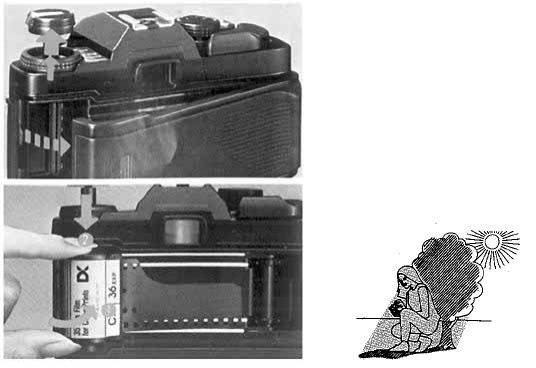
1
Pull up on the rewind knob to open the camera
back.
2
Place
the
film
cartridge
in the
film
chamber.
Always load film in the
shade.
Loading the Film
10
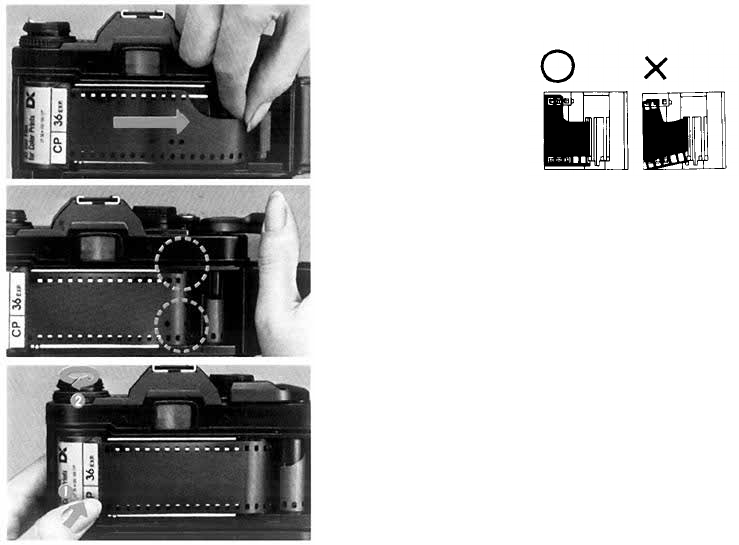
3
Insert the film leader into the take-up spool.
4
Wind the film and make sure the sprocket teeth
catch both the upper and lower film perforations.
5
Take up the slack by turning the rewind crank
clockwise.
11
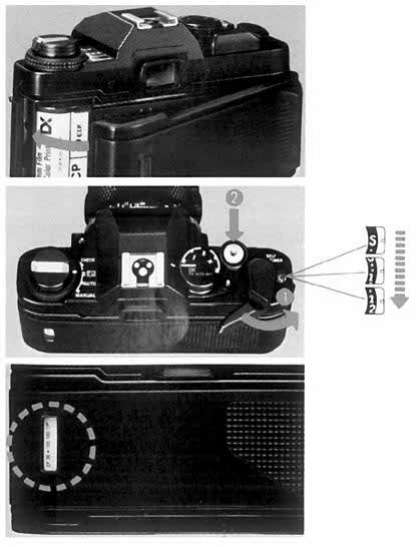
6
Close
the
camera
back
until
it
clicks
into
place.
7
Take two blank shots to bring the film to the
first frame.
Checking the type of film:
The film check window in the camera back will
allow you to check the type of film loaded in the
camera.
12

< Taking Photographs (I) >
This chapter explains how to take programmed automatic exposure pic-
tures with ESP metering. In this mode, anyone can enjoy taking pictures with
ease, even in difficult lighting conditions such as backlight.
13
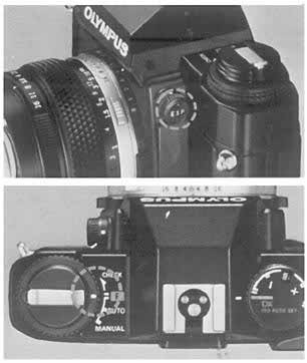
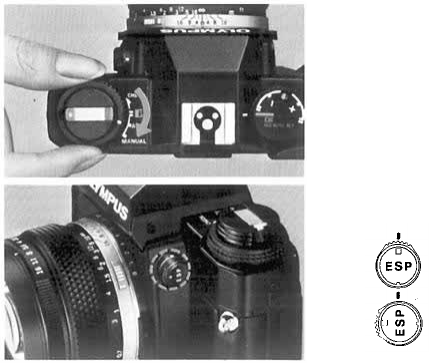
1
Make sure the camera is set for the ESP meter-
ing.
2
Set the mode selector dial to the "PROGRAM"
position.
ESP Metering
How to Take Programmed Automatic Exposure Pictures with
14
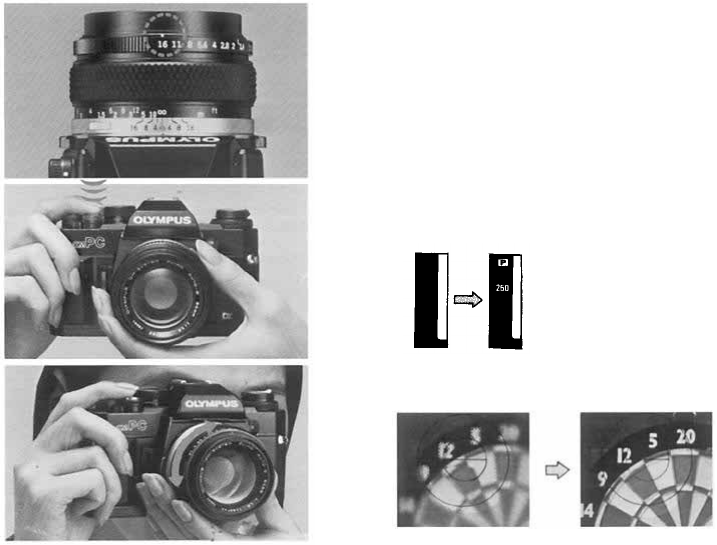
3
Set the lens to its minimum aperture, which is
the largest number on the aperture ring.
4
Press
the
shutter
release
lightly
to
activate
the
viewfinder display.
5
Focus on your subject.
15
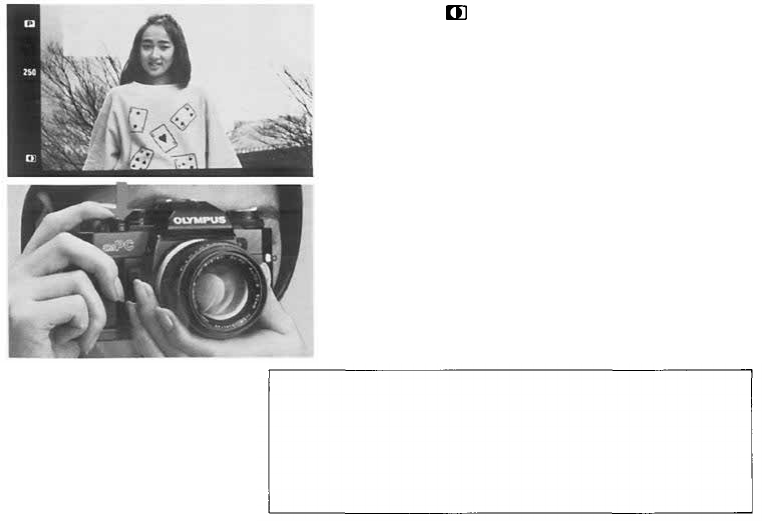
6
7
The mark will appear in the finder when
ESP metering is adjusting the exposure.
Press the shutter release to take the picture.
(A built-in battery conserver turns off the viewfinder
display after 60 sec.)
16
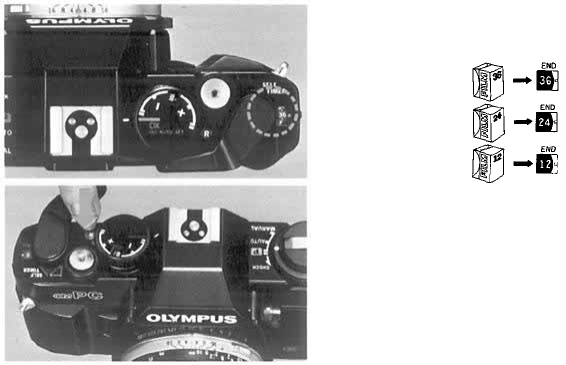
Rewinding the Film
1
When the exposure counter indicates the end of
your roll of film.
2
Push the "R" button.
17
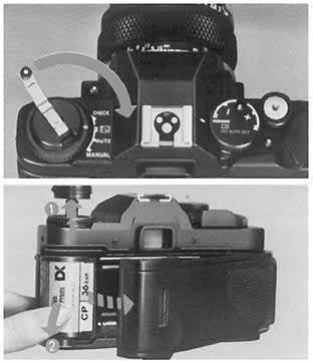
3
Fold out the rewind crank and wind it until the
film tension is released.
4
Open the camera back by pulling up on the
rewind knob and remove the film.
18

< Taking Photographs (ll)>
This mode allows you to respond creatively to the photo situation by free
selection of the lens aperture, shutter speed and exposure compensation settings.
19
How to Take Aperture-Preferred Automatic Exposure Pictures
1
Set the mode selector dial to the "AUTO"
position.
2
Select the light metering mode.
ESP Metering.
"OTF" Light Metering (Center-
Weighted Average Metering)
20
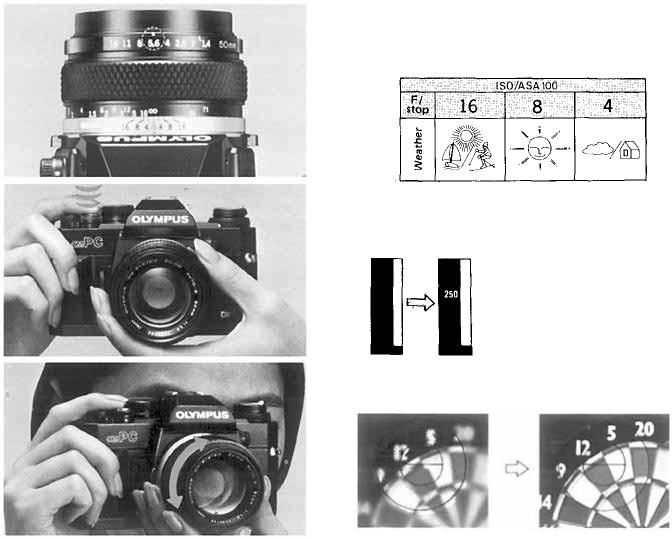
3
Set the aperture.
Basic aperture settings.
Press the shutter release lightly to activate the
viewfinder display.
Focus on your subject.
4
5
21
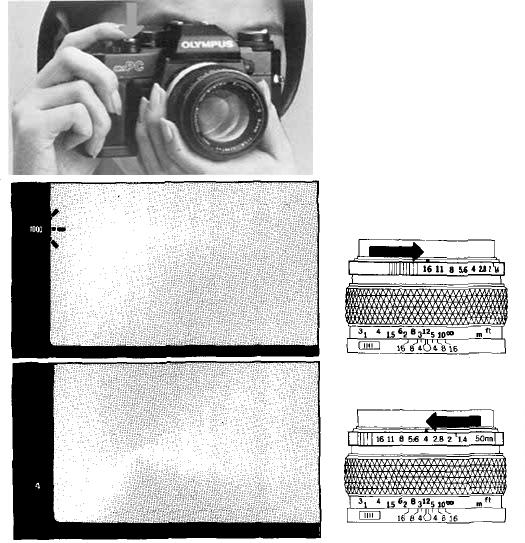
6
Press the shutter release to take the photograph.
If you see an overexposure warning signal (the
number
"1000"
blinks),
set the
aperture
to a
larger
number.
If the shutter speed is too slow, set the apeture
to a smaller number to prevent camera shake.
22
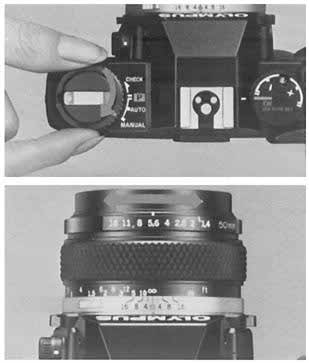
Manual Exposure
1
Set the mode selector dial to the "MANUAL"
position.
2
Set the aperture.
23
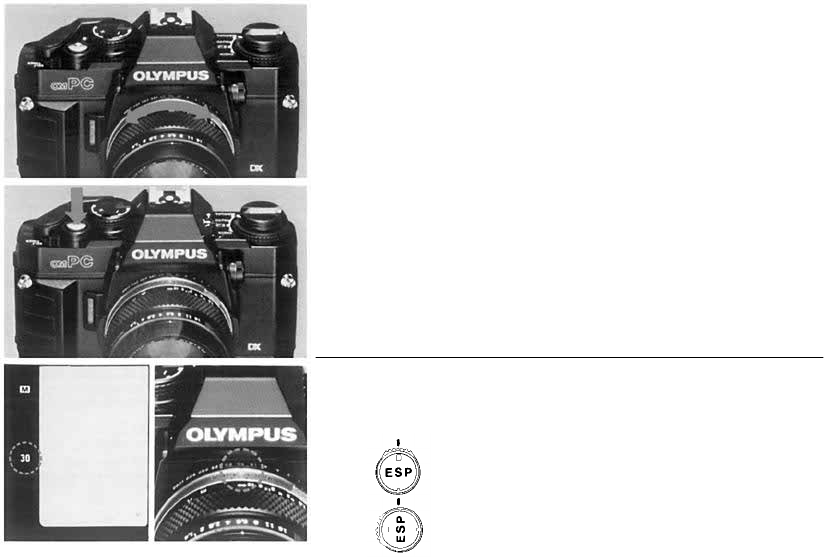
Select the shutter speed.
3
4
Focus, then press the shutter release.
To obtain the proper exposure, set the shutter
speed ring to the setting indicated in the viewfinder.
ESP
Metering.
Center Weighted Averaged Metering.
24
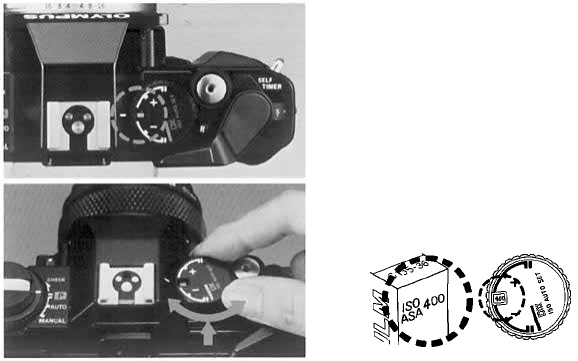
Manual Film Speed Setting
1
Release the DX ISO AUTO SET mode.
2
Lift up the outer collar and rotate until the
desired ISO speed appears in the window.
ISO/ASA25~3200
25
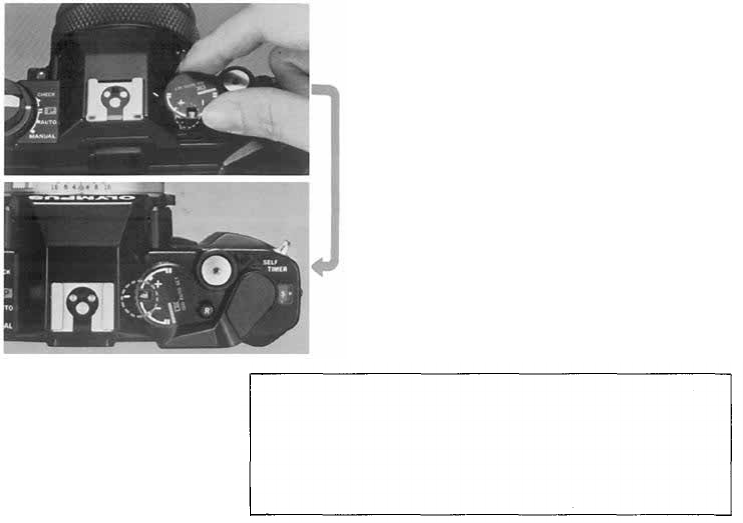
Readjust the Index line.
3
If the
film
speed
dial
(exposure
compensation
dial)
cannot be turned to the ISO number of the film used, set
it once at an intermediate value then repeat steps 2 to 3
until the desired ISO number is set.
26
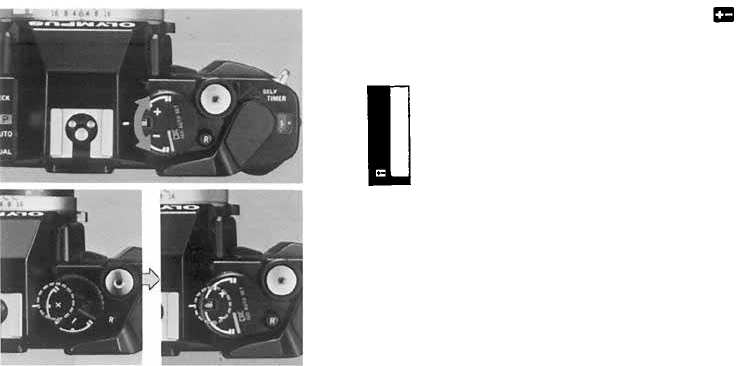
Exposure Compensation
For exposure compensation, set the dial anywhere except at "DX ISO AUTO SET".
When an exposure compensation is set, the
indicator lights in the viewfinder.
1
2
After use, be sure to return the dial to the"
normal setting.
27

< Other Operations >
28
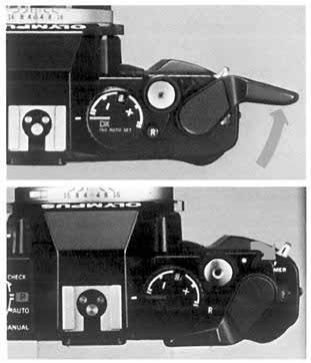
Using the Self-Timer
1
2
Wind the film once.
Set the self-timer lever.
29
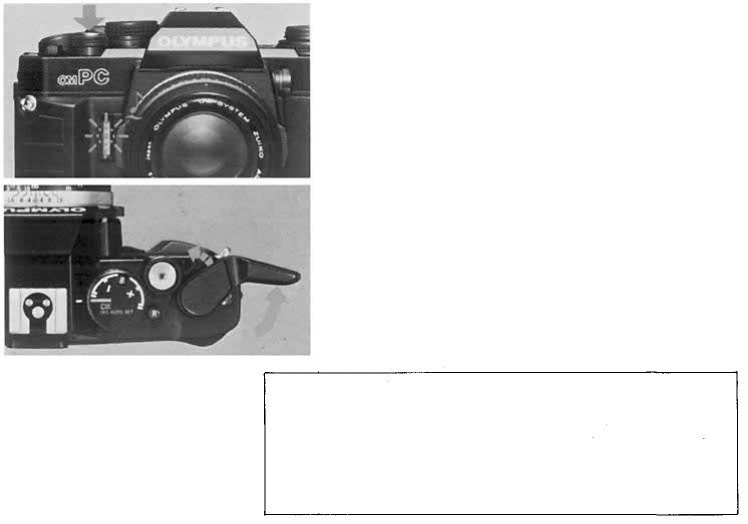
3
Press the shutter release to start the self-timer.
The shutter will fire in 12 seconds.
4
Wind the film for the next shot. The self-timer
lever will automatically return to its original position.
If you continue to use the self-timer, wind the film in
several
short
strokes,
and it
will
remain
activated.
Take
note
that
shutter
will
fire
even
if you
return
the
self-timer
lever
to its original position while it is running.
30
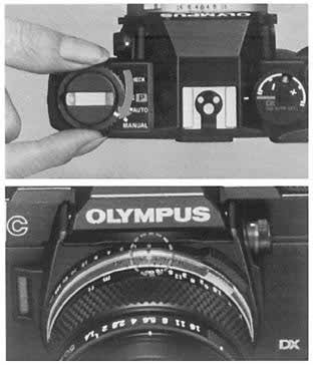
Bulb Exposure
1
2
Set the exposure mode selector dial to the
"MANUAL" position.
Set the shutter speed dial to "B" (bulb).
("B" is not displayed in the viewfinder.)
31

Advanced Techniques
If you want to improve your pictures or refine your shooting
techniques, it is important to understand the operation of your
camera thoroughly. The following pages will provide detailed
technical information on the OM-PC to help you create more
sophisticated photographs.
32
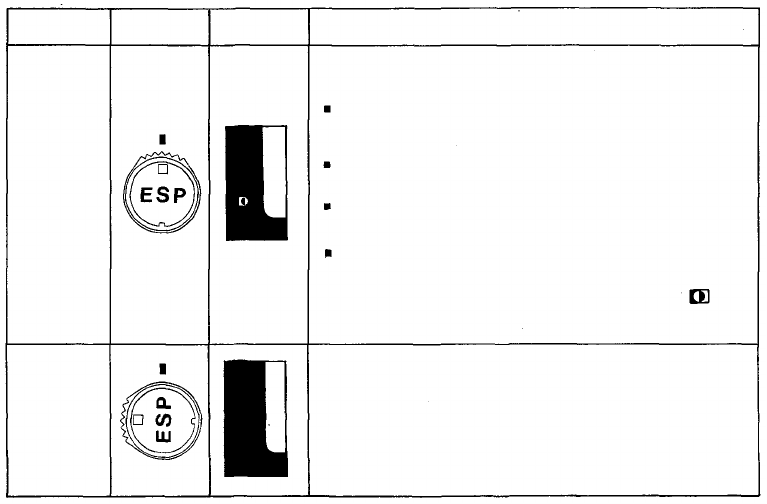
Mode
Selector
switch
Viewfinder
Display
Features
1.
2.
This mode can be selected for general use at all times.
Depending on the light distribution in the composition,
metering is carried out
as follows:
When the central part of the composition is darker than
areas on the periphery, the camera computer increases the
exposure to compensate according to the degree of differ-
ence in brightness indicated.
When the central area is brighter than the rest of the com-
position the camera sets a predetermined compensation
value to reduce the exposure.
When the sun or other extremely bright light sources ap-
pear directly in the composition they are ignored in making
the exposure calculation.
When the whole composition is illuminated evenly the
camera operates in the same way as in TTL Direct
"OTF" Auto Mode (using center-weighted average
metering). In this case the ESP Metering symbol
does not appear.
SELECTING THE METERING MODE (A Choice of Two Metering Modes)
ESP
Metering
This symbol
appears only
when ESP
Metering is
operational.
TTL Direct
"OTF" Light
Measuring
(Center-
weighted
average
metering)
1. This mode should be selected when you do not want to
leave everything up to the camera, but prefer to set the ex-
posure according to your own experience, 'feel' and crea-
tive requirements.
2. In this mode the
camera decides the exposure by taking an
average (center-weighted) of the brightness of the overall
composition, without analyzing light distribution in differ-
ent parts of the composition.
33

ESP (Electro-Selective Pattern) Metering
Generally, a photograph includes objects with
different levels of brightness. Center-weighted,
averaged light metering is an excellent method for
the majority of ordinary subjects. It averages the
light intensity in a picture frame to determine
exposure. With backlighting and other types of
illumination, however, this metering method may
not provide correct exposure because the light
level often differs between the subjects and back-
grounds. The Olympus OM-4, OM-3 and OM-2S
PROGRAM have adopted spot metering systems
which allow the photographer to isolate the subject
for specific metering and therefore to obtain more
accurate exposures.
The new ESP metering system has been specifically
developed for the OM-PC to simplify exposure in
these difficult lighting conditions. As soon as you
fire the shutter, the camera will measure the light
intensity in both the center of the frame and outer
area separately. The micro computer then processes
this information, including contrast data, and auto-
matically sets optimum exposure according to the
ESP algorithm*. By simply depressing the shutter
release, you can produce a photograph in which the
subject will appear as you see it with your eyes.
* For further information on ESP algorithm, refer
to page 39.
TTL Direct Off-The-Film "OTF" Light Metering
(Center-Weighted Average Metering)
This is the direct, center-weighted, averaged light
metering system which Olympus pioneered in the
original model OM-2. It measures the brightness of
the subject as the light registers on the film during
the actual exposure. "OTF" metering can respond
to any sudden changes in light during exposure, and
therefore it is very advantageous for taking quick
candid shots and fast moving subjects. In flash
photography with an Olympus T-Series flash, this
"OTF" Light Metering method will also fully
control the flash exposure, thereby eliminating any
need for complicated guide number exposure
calculations. You can work with all available aper-
tures of your lens and use sophisticated techniques
such as bounce flash and multi flash in a fully
automatic mode. It has also solved difficult ex-
posure problems with macrophotography.
34
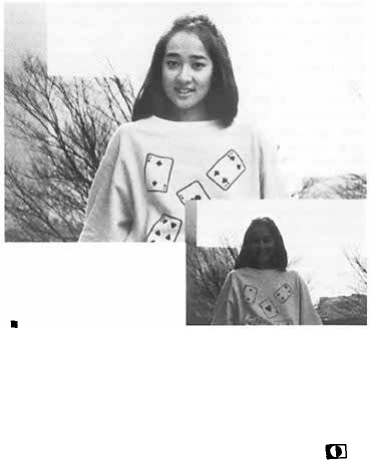
SELECTING THE METERING MODE (How to Use ESP Metering)
ESP Metering is the mode to set for general use. In
this mode, you don't have to worry about how the
picture
will
turn
out.
All you
need
do is
press
the
shutter release. Even in tricky situations such as
sharp backlighting, the camera responds flexibly to
give you correctly exposed shots. This mode
assures
trouble-free
shooting
even
with
the
kind
of
pictures that often turned out as failures because
the exposure was wrong. In fact, ESP Metering
greatly increases the range of auto exposure tech-
nology. The following examples should provide a
useful reference.
* When taking pictures in ESP metering mode, acti-
vate the viewfinder display by pressing the shutter
release button lightly, then shoot.
Subjects for which ESP Metering is Specially Effective
Backlighting
With center-weighted average metering, this kind of
situation tends to leave the subject's face pitch
black. But ESP Metering assures even the fine
shades of the subject's expression are faithfully
conveyed. For the best results, try to keep the
main subject fairly near the center of the composi-
tion. Check for the ESP Metering symbol in
the viewfinder.
35
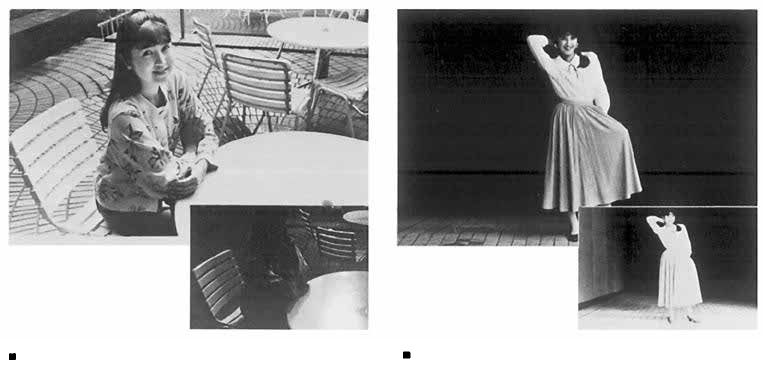
When part of the subject area is extremely bright
If a part of the picture frame is extremely bright,
the subject is underexposed under the influence of
a
strong
light
on the
table
in the
case
of
center-
weighted, averaged metering. In the same picture
taken with the ESP metering, even the expression
of her face is clearly seen.
When the surrounding area is very dark
In center-weighted, averaged light metering, the
subject appears slightly overexposed under the
influence of a dark surrounding. In ESP metering
mode, however, it is correctly exposed. In this
case
too,
you
will
get the
best
results
by
keeping
the main subject close to the center of the com-
position.
36
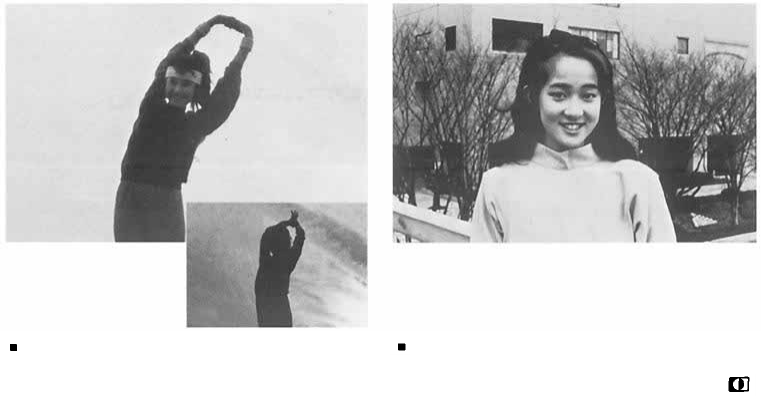
When the background is extremely bright in
sunlight
In center-weighted, averaged light metering, the
subject appears completely dark; in ESP metering
mode, you will see even her face clearly. If there is
an extremely bright object in the viewfinder frame,
ESP metering mode disregards this object when
determining exposure, as shown in this example.
Ordinary lighting conditions
In this case, the exposure is the same as in center-
weighted, averaged light metering. The mark
will not appear.
37

Notes on ESP metering
The ESP metering mode works properly for the
majority of subjects, but it may not be as effective
in the following cases:
When the subject is too small
In this case, the metering method is practically the
same as the center-weighted averaged metering.
When the subject is not in the center of the
viewfinder
Because
ESP
metering
measures
with
emphasis
on
the center of the viewfinder frame, it will give
substantially the same result as the center-weighted,
averaged metering. In this case, use manual ex-
posure in ESP metering mode as follows.
Manual exposure in ESP metering mode
Set the metering mode switch to the ESP and the
exposure mode to manual.
Compose your photograph.
Aim the camera so that your subject is located
in the center of the viewfinder. Now, the
mark will turn on.
Set the shutter speed at the same value as
indicated in the viewfinder.
Reframe your subject again as you originally
did in , then focus and shoot it by depressing
the shutter release button.
38
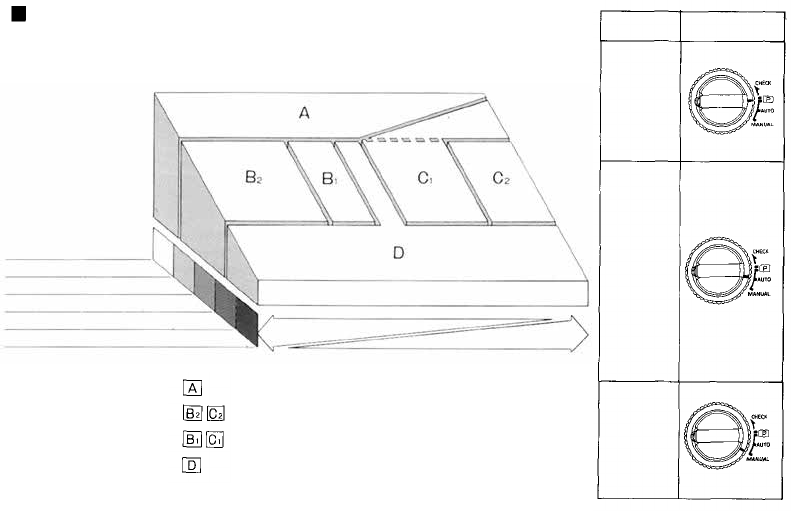
ESP Metering Chart (ESP Algorithm)
Compositions with the sun in the scene
Bright outdoor scenes
Normally lit outdoor scenes
Evening shots and interiors
Night shots
Main subject bright
Subject Contrast
Background bright
Concentration on low light areas
Center weighted metering for high contrast subjects
Center weighted metering
Averaged metering
Modes
Mode
Selector Dial
PROGRAM
AUTO
(Aperture
preferred
exposure)
MANUAL
39
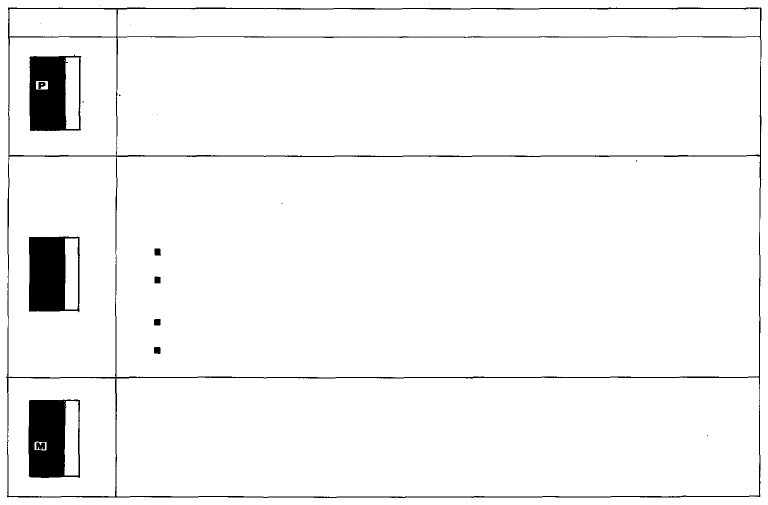
GUIDE TO SELECTION OF EXPOSURE MODE
Viewfinder
Indication
Features
1. This is the ideal normal mode for snapshots and general photography.
2. When this mode is set the camera automatically decides both the shutter
speed and the aperture. Fully automatic exposures are possible over a wide
range of subject brightnesses.
3. You can concentrate on following the subject in the viewfinder without
worrying about exposure or shutter speed settings.
4. If you set an intermediate aperture on the lens, the program automatically
becomes a continuously variable program.
1. This is basically an aperture preferred mode, but it is possible to use it also
as a shutter speed preferred system. This mode is the one to select when you
want
to put
your
creative
ideas
into
the
picture.
2. In this mode you can concentrate on special depth of field effects, adjusting
the aperture to determine whether the background, etc., will be blurred or in
clear focus.
Here the background is blurred to make the main subject stand out. (Wide
open lens aperture)
Here the background is also in sharp focus, giving a feeling of greater spa-
ciousness and expansiveness. (Stopped down aperture)
3. You can concentrate on shutter speed effects (blurring with motion, etc.).
Here a fast shutter speed arrests the movement of the subject, giving it a kind
of timelessness. (Wide open aperture)
Here use of a slow shutter speed results in a blurred subject, emphasizing the
sense of speed. (Stopped down aperture)
1. In Manual Mode, both the lens aperture and the shutter speed are set by
hand, giving free reign to your experience and 'feel' for the picture situation.
2. Use when you want to keep the same exposure settings regardless of the
brightness of the subject.
3. Use for
"Bulb"
photography
when
the
shutter
is
both
opened
and
closed
manually.
4. Use when you are basing the exposure on the values given by a separate
exposure meter.
40
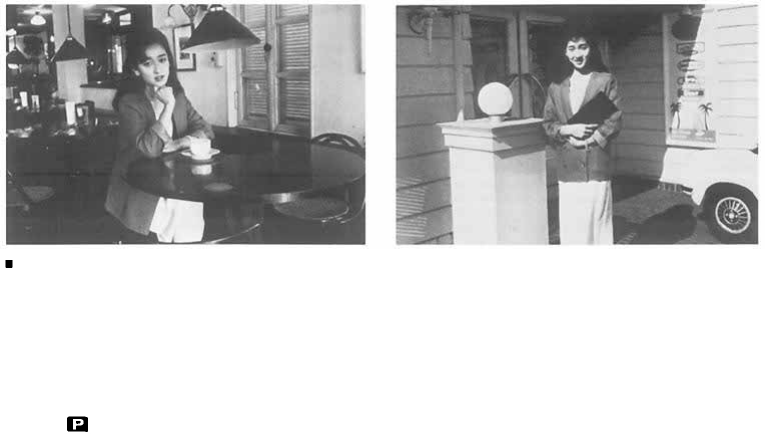
SELECTING THE EXPOSURE MODE - PROGRAM -
Program Exposures
In this mode the camera automatically selects the
ideal lens aperture and shutter speed for the sub-
ject brightness, making you highly responsive even
to unexpected shots. In Program Mode, the photo-
grapher can forget about exposures and shutter
speeds completely, and give full concentration to
the subject in the viewfinder. The only settings
needed are to turn the Mode Selector Dial to
Program , and set the aperture ring to the
smallest available aperture (largest F number).
Whether the subject is extra bright or unusually
dark, you can still rely on fully automatic shots
with the best possible aperture and shutter speed
settings. Even if you suddenly come from a dark
place out into bright sunlight, the camera responds
immediately, assuring you fine photos in both
situations. Better still, when you use the Program
exposure mode together with the ESP Metering
mode, even raw beginners are assured of great shots
in every situation — including tricky backlit or high
contrast shots that used to stump the experts too!
This is the perfect mode for snapshots and general
photography, as well as for such special fields as
news photography, where being ready for every-
thing at all times is the most important require-
ment.
41

PROGRAM DIAGRAMS
Regular Program Diagram
Continuously Variable Program
Diagram
Program Diagram with Use of T
Series Flash Unit
This program shows the regular
program settings that will be
obtained with a 50mm F 1.8 lens
on the camera. From dim light
conditions up to a shutter speed
of 1/60 sec. the lens aperture
remains wide open. At faster
speeds than 1/60 sec. the shutter
speed and lens aperture settings
change in coordination at a ratio
of 6/5 as shown. Thus the pro-
gram is designed to assure
adequate shutter speeds and
minimize the risk of camera
shake spoiling the picture. With
still brighter subjects, the pro-
gram concentrates on closing
down the lens aperture suffi-
ciently to assure sharp and clear
depth of field effects.
The special OM-PC program
system also allows you to inten-
tionally set different lens aper-
tures for a continuously variable
program able to assure precise
depth of field effects, etc. For a
quick unexpected shot, the
program
will
assure
a
correct
exposure providing the shutter
speed you need is not over 1/
1000 sec. If the lens aperture
setting calls for a shutter speed
faster than 1/1000 sec., this
symbol and the 1000 in-
dicator in the viewfinder will
flash on and off, and will warn
you to reset the aperture to the
largest number.
The OM-PC assures you "OTF"
Program Auto flash perform-
ance when you use an OM
System
T
Series
flash
unit.
The
flash will fire automatically at
program shutter speeds of 1/60
sec. or slower, whenever the
flash unit is switched ON. In
this situation the camera pro-
gram automatically shifts three
settings to the special Flash
Program. The final exposure is
made precisely accurate by the
camera computer, which shuts
off the flash the instant the right
amount of light has reached the
film.
42
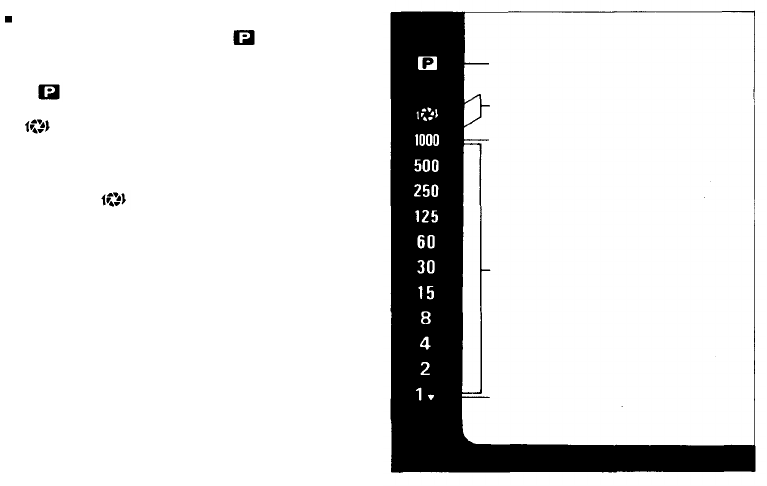
Viewfinder Display in the Program Mode
Set the exposure mode dial to and press the
shutter release button lightly while looking through
the viewfinder.
The mark will be lighted and the shutter speed
will be displayed in the left side of the viewfinder.
If and
"1000"
blink
alternately,
it
means
you
have not set the aperture ring to its minimum
aperture. Even if it is set at other positions, how-
ever, the camera will operate on programmed ex-
posure and
will not turn on if the shutter
speed does not exceed 1/1000 sec. This is another
intelligent and functional feature of the OM-PC.
If
"1000"
alone
blinks,
it
means
your
subject
will
be overexposed. Use a Neutral density (ND) filter
to reduce the amount of light entering the lens, or
a slower film depending on shooting conditions.
Lights to Show Program Mode
Setting.
Both indications blink to war n
lens aperture must be stopped
down to avoid overexposure.
Blinks to show overexposure.
Shutter speed indications. Appro-
priate figure lights up.
Shutter speed of 1 sec. or slower.
43
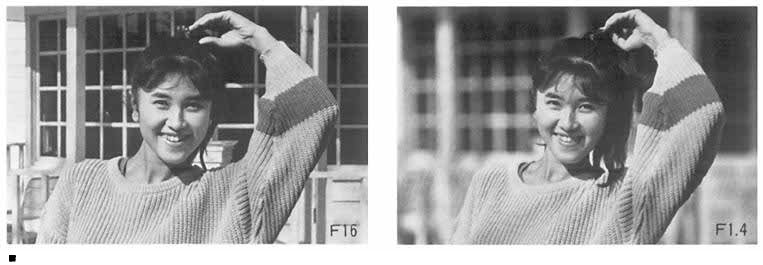
SELECTING THE EXPOSURE MODE - AUTO (Aperture Preferred) -
Auto Exposures
This is an aperture preferred auto mode in which
the shutter speed is set automatically by the camera
to give the correct exposure for the aperture which
the photographer has set after considering the kind
of picture desired. Settings are simple. First set the
Mode Selector Dial to AUTO. Then set the desired
aperture on the aperture ring. In this mode you
have a creative freedom to select desired depth of
field and other effects, for the kind of results it is
hard to obtain in Program Mode. For example, if
you want to eliminate the background in a portrait
shot, open up the lens aperture as far as you can.
When you want the background to appear sharply
too, close the aperture down. In this way you can
precisely adjust the lens depth of field for just the
effect you want. Although this mode is basically
aperture preferred, you can also use it as a shutter
speed preferred mode by adjusting the lens aperture
to get the shutter speed you require in the view-
finder display. Used in this way it is also highly
suitable for getting the effects you want with mov-
ing subjects.
44
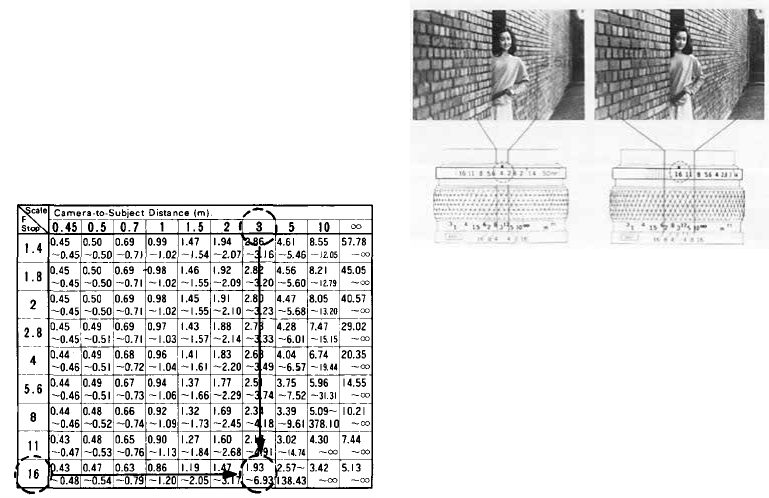
DEPTH OF FIELD
Depth of field is the area of acceptable sharpness
in front of and behind the subject in focus. As you
get closer to your subject or as you open your lens
(e.g. from F16 to F2.8) the depth of field becomes
shallower. By stopping your lens down (e.g. from
F2.8 to F16) or getting farther away from your
subject this depth of field can be increased.
The table below shows that when the camera-to-
subject distance is 3m, the depth of field at F16
ranges from 1.93m to 6.93m.
As you press the preview button, looking through
the viewfinder, you can ascertain the actual depth
of field.
Depth of Field Table (F1.8 & F1.4 50mm Lenses)
Circle of least confusion 1/30mm
The double series of numbers engraved on the
depth of field scale represent F stops: F4, F8 and
F16. Once you have focused on your subject, all
objects within the distance range indicated on the
lens distance scale between the marks for the F/
stop
you
have
selected
will
have
acceptable
sharp-
ness.
* For other lenses, see the lens
instruction manual.
45
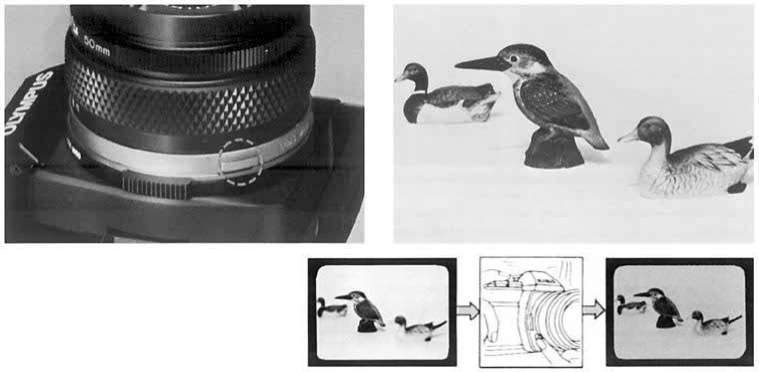
PREVIEW BUTTON
When you wish to see which objects
fall within the acceptable zone of
sharpness (depth of field), press the
preview button on your lens. The dia-
phragm of the lens will stop down to
the preset F stop enabling you to see
the depth of field in the viewfinder.
In PROGRAM mode, it is impossible to check
the depth of field with the preview button.
CAUTION: • Do not take pictures in the pro-
grammed exposure mode with the preview button
depressed.
46
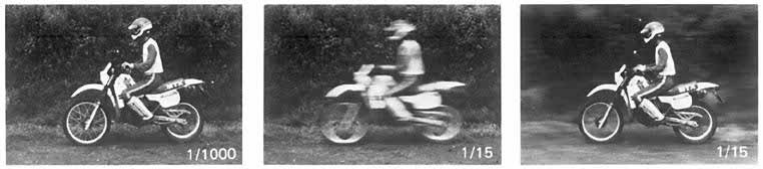
SHUTTER SPEEDS
This camera offers various possibilities for visual
expression by changing the shutter speed.
High shutter speeds can be used to "freeze" a
moving subject to give sharp definition of the im-
age.
Shutter
speeds
of
1/1000
sec.
can
"stop"
the
movement of a considerably fast moving subject.
A shutter speed of about 1/250 sec. will be enough
to shoot a child at play, if he is not moving too
quickly.
There are two methods for giving dynamic expres-
sions. The first one is to blur out the movement of
the subject itself, thereby creating a moving image.
The second one is to pan the camera according to
the movement of the subject. While the background
is blurred, the subject is sharply defined to create
a moving image.
* In using slow shutter speeds, it is necessary to
guard against camera shake. We will suggest a
very practical method for choosing shutter speeds.
Generally, shutter speeds of which denominator
value is larger than the focal length value of the
lens used are good for preventing camera shake.
If you are using a 50mm lens, for example, shut-
ter speeds of 1/60 sec. or higher are best; and if
you are using a 200mm lens, shutter speeds of
1/250 sec. or higher are best.
47
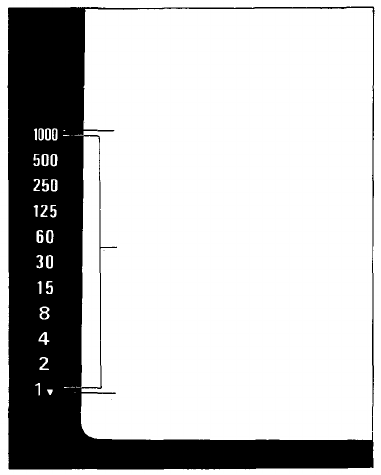
VIEWFINDER DISPLAY FOR AUTOMATIC EXPOSURE
If you press the shutter release button lightly while
looking through the viewfinder, you will see the
automatic shutter speed in the left side of the
frame.
However,
if the
"1000"
blinks,
it
means
overexposure
and you
will
have
to
close
down
the
aperture.
If the
"1000"
does
not
disappear
even
when
the
lens is set to its minimum aperture, the subject is
outside the range of automatic exposure control.
In
this
case
use an ND
(neutral
density)
filter
or
shoot with film having a lower ISO number.
Blinks to warn lens aperture must
be stopped down to avoid over-
exposure.
Shutter speed indications. Appro-
priate figure lights up.
Shutter speed of 1 sec. or slower.
48
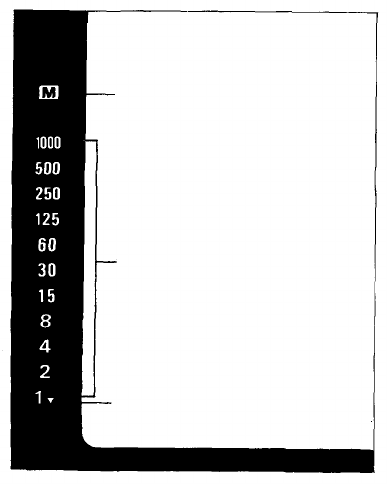
SELECTING THE EXPOSURE MODE - MANUAL -
The OM-PC also provides manual exposure con-
trol.
With
the
exposure
mode
dial
set to
MANUAL,
you can choose your desired aperture and shutter
speed combination. You will see the following
display in the viewfinder.
As you adjust the aperture ring, the appropriate
shutter
speed
for the
aperture
you
have
set
will
be
displayed in the viewfinder. Set the shutter speed
dial to that value.
If you are shooting fast moving subjects such as
sports scenes, you may prefer to set your shutter
speed
first.
If so,
then
adjust
your
aperture
until
the preselected shutter speed is indicated in the
viewfinder. This technique is useful when a specific
shutter speed is needed.
Shutter speed of 1 sec. or slower.
Shutter speed indications.
Appropriate figure lights up.
Lights to Show Manual Mode Set-
ting.
49

COMBINATIONS OF METERING MODE AND EXPOSURE MODE
Exposure
Modes
Metering
Modes
PROGRAM
AUTO (aperture preferred)
MANUAL
ESP
Metering
The ideal mode for snap-
shots and general photogra-
phy, that lets you take pro-
perly exposed shots easily,
even
in
difficult
lighting
conditions.
It is still simpler and more
convenient when combined
with the DX ISO AUTO
SET Mode for automatic
setting of the film speed.
A creative photographic
mode that allows control
over depth of field and
other effects for portraits,
souvenir photos, etc. Fea-
tures automatic exposure
compensation for backlit
situations.
Useful for situations such
as when the main subject
is on the edge of the com-
position in a backlit situa-
tion, etc.
TTL Direct
"OTF"Light
Measuring
(center-
weighted
average
metering)
The simple snapshot mode
that guarantees good results.
This
mode
does
full
justice
to the photographer's crea-
tive intentions, assuring the
full
range
of
control
avail-
able with conventional high
quality 35mm Single Lens
Reflex cameras.
This is the sphere of total
manual control. Both the
aperture and the shutter
speed are entirely in the
hands of the photographer.
In this situation creativity
is everything, based on the
photographer's own experi-
ence and instincts. And
when needed, the view-
finder indications are still
there to offer helpful sug-
gestions.
50
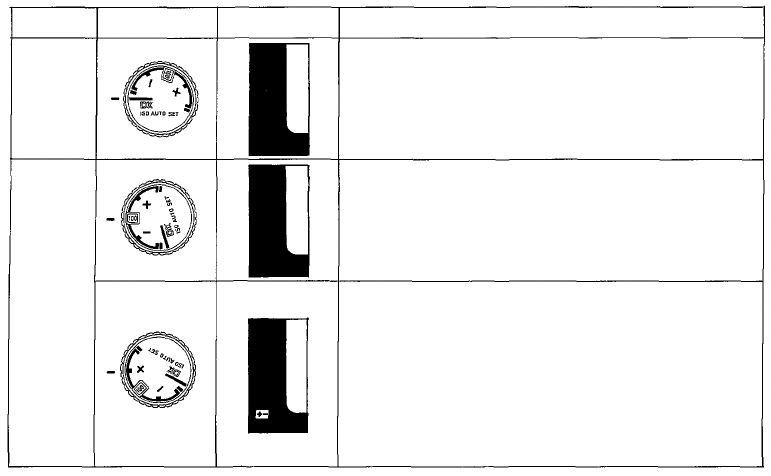
SELECTING THE FILM SPEED SETTING MODE
Mode
DX ISO
AUTO
SET
ISO
MANUAL
SET
Mode
Selector Dial
Finder
Indication
Features
1. If you use film that has the DX code and set the selector
dial
to
this
mode,
the
film
speed
is set
automatically
on
the camera. (The range of auto settings available is from
ISO 25 to 3,200.)
1. For when you use film without the DX code.
(The range of settings is from ISO 25 to 3,200.)
2. For
when
you
prefer
to set a
different
film
speed
ac-
cording to your own experience or preference.
3. For when you plan to use forced or under-developing of
the film.
1. You can make this setting manually according to your
own experience in order to prevent darkening of the
model's face, etc., in backlit or strong contrast situa-
tions. (The exposure compensation range is from —2 to
+2 stops, in 1/3 stop increments.)
2. When using a super wide angle lens in situations where
the sky unavoidably forms a large part of the composi-
tion,
it may be
useful
to set a
plus
exposure compensa-
tion.
3. When using together with ESP Metering mode, exposure
compensation set by the ESP Metering system are added
to those that are manually set.
51
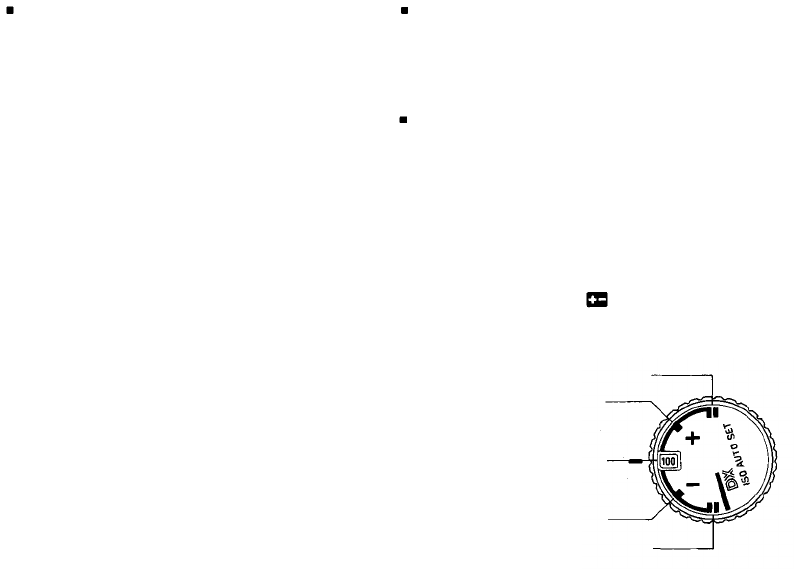
DX ISO AUTO Film Speed Setting
Film speed information is recorded in the digital
pattern imprinted on the cassette of DX type film.
The OM-PC reads this information through the
electrical contacts located at six positions in the
film chamber, and conveys it to the camera's
computer. On reading this information, the film
speed is automatically set on the camera. In other
words, when you turn the OM-PC film speed dial
to the DX ISO AUTO SET position, whatever the
film speed it is automatically set on the camera.
There is no risk of getting a mistaken setting when
you change to a different film speed ... a common
disaster in the past! When using the DX ISO AUTO
setting, first make sure that you are using DX
film. Also note that if there is any damage to the
digital pattern on the film cassette, this could re-
sult in a mistaken film speed setting.
ISO Manual Setting
The OM-PC also allows manual setting of the film
speed in exactly the same way as previous cameras.
Also use this mode at times when you wish to set
an exposure compensation on the dial.
Exposure compensation
Whether it is in the programmed exposure mode,
automatic exposure mode, or manual mode, the
OM-PC permits exposure compensation with the
exposure compensation dial. (Remember, exposure
compensation is not possible in the film speed
auto-set mode.) For example, if the background is
brighter than the subject (backlighting), turn and
set the dial to the (+) side. This will provide more
light for the subject.
As you turn the dial, the sign will blink in the
viewfinder and the displayed shutter speed will
shift depending on the amount of compensation.
The dial can also be set
at the intermediate click
positions providing
accurate 1/3 stop
exposure com-
pensations.
+ 2 Stops
+ 1 Stop
0
– 1 Stop
-2 Stops
52
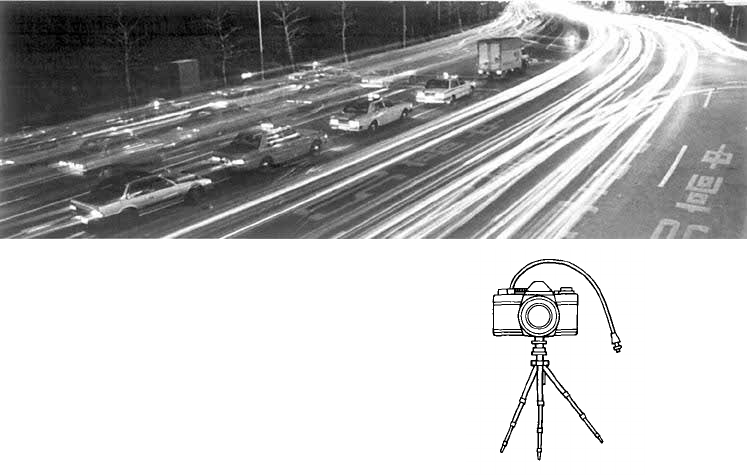
BULB EXPOSURE
If you require long exposure,
set the shutter speed dial at
"B" (bulb). This is useful for
night exposures or other spe-
cial effects.
* When taking pictures with
the shutter speed dial set at
"B", it is recommended that
you use a tripod and cable
release to prevent camera
shake.
53
MULTIPLE EXPOSURE
By tripping the shutter several times on the same
frame, multiple images are produced on the same
frame.
This is how to do:
After the first exposure is ended, erect the re-
wind crank and turn it clockwise as far as it
will
go to
take
up
film
slack.
While holding both the rewind knob and rewind
button with your fingers to prevent them from
moving, wind the film advance lever.
In fact, the film is not wound and the shutter is
cocked by this operation.
Press the shutter release as you would do normal-
ly, and double exposure will occur.
By repeating the steps and , the frame
will be exposed as many times as you want. How-
ever, the frame counter advances each time the
shutter release is pressed.
After ending the multiple exposure, put the
front lens cap on and make a blind shot.
Note: The frame may shift slightly.
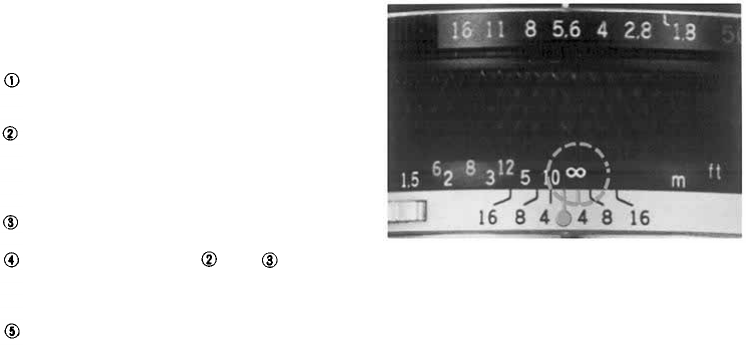
INFRARED PHOTOGRAPHY
When shooting infrared pictures with infrared film
and a red filter, the point of focus will slightly dif-
fer if you focus visually. The amount of shift varies
with the lens and a red line or red dot is marked on
the lens' depth of field scale to compensate for it.
First, focus the lens without a red filter on as you
would do normally. Next, read that distance on the
distance scale and shift it opposite the infrared
mark, then put on a red filter and shoot. (The above
picture was taken with the distance at infinity.)
54
55
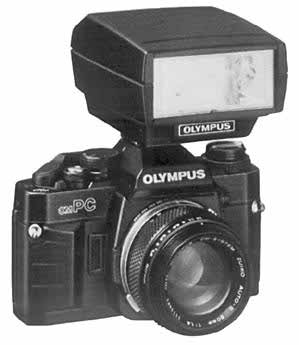
Flash Photography
The OM-PC is designed to provide "OTF" Auto-
matic Exposure with Olympus T-Series electronic
flashes. There is nothing to set since exposure is
determined by the sensors in the camera body
itself. You can even adjust exposures using the
compensation dial on the camera. Because it
directly measures the light at the film plane, it
does not allow for flash exposure error utilizing
the
sensor
built
into
the
flash.
Such special techniques as bounce flash, diffused
illumination and ultra close-ups can now be ac-
complished
with
full
automatic
ease.
Combined with T-Series flashes, the OM-PC per-
mits flash exposure in three modes: "OTF" pro-
grammed exposure mode, "OTF" automatic ex-
posure mode and manual mode.
56
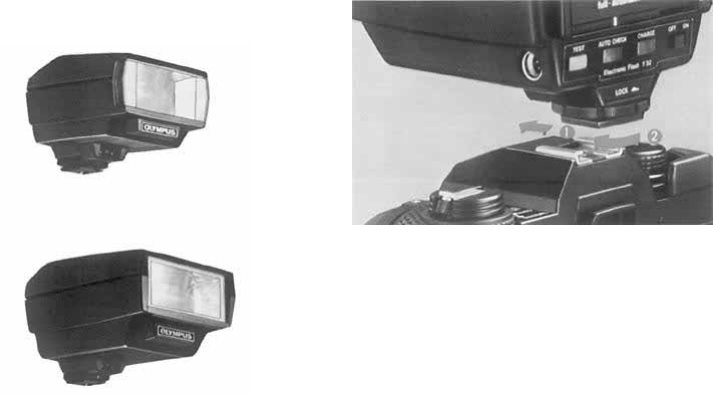
T-Series Flashes
Mounting the Flash
Electronic flash T20 (small-size flash with a guide
number of 20)
Electronic flash T32 (high-capacity flash with a
guide number of 32)
Slide
the
flash
into
the
camera's
accessory
shoe
and
lock it by turning knob until the flash is tight.
Make sure the flash is pushed fully forward, to
insure proper electrical contact.
* The electronic flash T45 and other flashes that
have no direct hot shoe contact cannot be used.
* If the flash unit switch is left on, the camera
batteries will be drained. Make sure to turn off
the flash switch after taking pictures.
57
How to Use T-Series Flashes
With a T-Series flash on the camera, the flash mode
will
be
automatically
set to
match
the
camera's
ex-
posure mode. To take pictures in the programmed
mode, switch the mode selector dial of the OM-PC
to PROGRAM, set the lens' aperture ring to its
minimum aperture and turn on the flash. The
camera will determine the appropriate aperture
depending on the brightness of the subject.
To take pictures in the auto mode, set the mode
selector dial to AUTO and choose your desired
aperture.
To shoot in the manual mode, switch the camera's
mode selector dial to MANUAL and set the shutter
speed dial at 1/60 sec. or slower. Select the appro-
priate aperture based on existing conditions. In
MANUAL mode, the flash will always fire at full
power output.
* When the power switch of a T-Series flash is
turned on in the programmed mode, the camera's
exposure mode will switch to the flash program
if the light intensity is below the specified level.
You will see it because the indicated shutter
speed is "8" or slower. In this case, the shutter
will trip at 1/60 sec.
* In the "OTF" auto flash mode, T-Series flashes
will fire when the shutter speed is 1/60 sec. or
slower. If you want to ensure that the flash will
fire, however, adjust the aperture so that the
shutter speed in the viewfinder becomes 1/30 sec.
or slower.
Lights
to
show
full
flash charge,
and blinks no less than 2 sec. to
confirm correct flash exposure.
Lights to Show Program Mode
Setting
Lights to Show Manual Mode Set-
ting
58
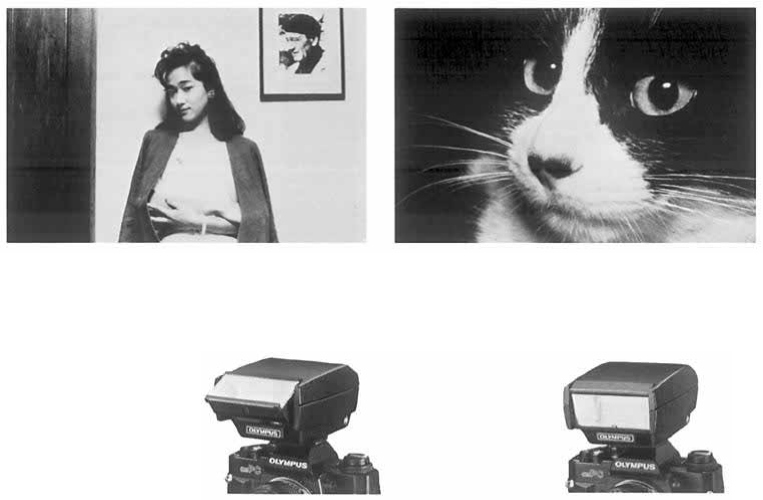
Bounce Flash
Close-up Flash
The T32 has an adjustable flash head that tilts
as much as 90° upward. As it operates on "OTF"
auto, it allows you to use bounce flash automati-
cally by simply activating the flash switch.
* Set the tilting angle so that the subject is ilumi-
nated by reflected light.
On the T32, the flash head also can be adjusted as
much as 15° downward. As it operates with all
available apertures on "OTF" auto, this feature
allows you to take close-ups automatically by sim-
ply activating flash switch.
59

Using Electronic Flashes Other Than Olympus T-Series Units
(1) Mount the flash on the accessory shoe.
The OM-PC does not accept flash units with-
out direct hot shoe contacts.
(2) Setting the aperture
If you are using an automatic flash, check the
specifications on the flash and set the aperture
accordingly.
If you are using a manual flash, determine the
required aperture by the following formula.
You can also use the flash's calculator panel
and set the aperture based on this information.
Aperture =
Flash guide number
Flash-to-subject distance
(3) Switch the camera's mode selector dial to
MANUAL and shoot with a shutter speed of
1/60 sec. or slower.
* Read the instruction manual of your flash
carefully.
60
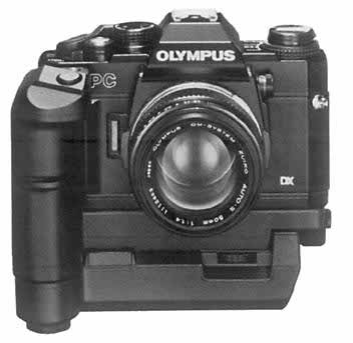
Shooting with Motor Drive
Shooting with motor drive is both functional and
very exciting. It enables you to capture your sub-
ject in a critical moment by making several shots in
a second.
The high speed OM System motor drive has achiev-
ed an extremely compact and lightweight design to
take
full
advantage
of
operational
ease
and
high
maneuverability.
The OM-PC is designed to accept the high-speed
Motor Drive 2* as well as the Winder 2. Both offer
single-frame exposures and sequential exposures
by simply turning a dial.
The OM System's outstanding maneuverability and
operability are ideal for shooting dynamic sports
photos and documentary press photos.
To shoot on the ESP metering, first activate the
viewfinder display by pressing the camera's shutter
release
softly.
The
display
will
remain
on for 60
seconds. Then shoot by pressing the Motor Drive's
shutter release.
* Up to 3.5 frames a second with OM-PC, OM-
2S PROGRAM and up to 5 frames a second
with OM-1, OM-2, OM-3, OM-4, OM-G and
OM-F.
* *
When
shooting
a
sequence
with
Motor
Drive,
Aperture priority or Manual Mode is recom-
mended. In Program mode, the shutter speed
may be slowed depending on the shooting
condition.
61
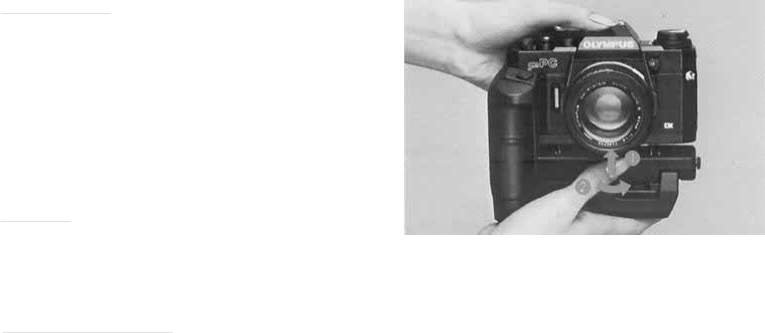
Motor Drive Group Units
Motor Drive 2. If you want to shoot very fast
moving subjects such as a dashing animal or a racing
car driving at full speed, the Motor Drive 2 is the
best choice because it permits continuous shooting
at a maximum speed of 5 frames a second (up to
3.5 frames a second with OM-PC.) This quick
shooting capability will often allow you to catch a
dramatic instant that would be missed with a
slower drive.
The power sources for Motor Drive 2 are a flat-
type, rechargeable M.15V Ni-Cd Control Pack 2
and a pistol grip-type replaceable battery powered
M.18V Control Grip 2.
Winder
2. The
Winder
2 is
compactly
built
and
very convenient for shooting. While not as fast as
Motor Drive 2, it can help you capture impressive
moments such as sports scenes and children at play.
The Winder 2 has a self-contained power supply,
but two external power units ("AA" battery type)
are also available.
Remote Control System In addition, the M. Quartz
Remote Controller 1 permits interval shooting with
remote control and LCD display. The Remote
Cords 1.2m and 5m allow you to shoot away from
the camera by simple button operation.
62
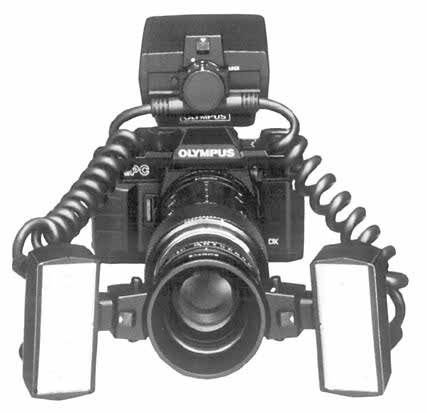
Macrophotography
The world of macrophotography is filled with mar-
velous discoveries. However, macrophotography
has been generally considered difficult technically.
In particular, calculations for correct macro expo-
sures in available light photography as well as in
flash
photography
have
been
a
difficult
job
even
for professionals.
Equipped with an "OTF" Light Metering system,
the OM-PC has solved this difficult problem
and
will
always
provide
correct
exposure.
The OM Macro System includes a wide choice of
macro lenses that offer excellent life-size and larger
than
life
size
photographs.
Extension
units
and
other components enable you to take hand-held
macro shots that previously required a tripod.
63
Macrophoto Group Units
• Simplified Macro System
These units allow you to take close-ups up to life
size
with
ease.
For example, Close-up lenses 49mm and 55mm
(f=40cm) — the 49mm can be used on normal
50mm F 1.8, F 1.4 and F 1.2 standard lenses. You
can take up to 0.63X life size close-ups by simply
screwing them into the front of the standard lens.
• Auto Extension Tubes 7, 14 and 25. These com-
ponents are placed between the lens and camera
body and available in three thicknesses: 7mm,
14mm and 25mm. Used in combination up to
seven variations, they allow you to take up to
1.1 X close-ups with a 50mm lens.
• Basic System
This is a full-scale macro system that permits low
to high magnifications. It will produce brilliant
images of the marvelous world of tiny things such
as the geometric beauty of the compound eye of a
dragon fly, or extreme close-ups of flowers. A
studio type and a field type are available.
Studio type: This system is suited for taking high-
magnification pictures in a studio or other indoor
situation.
• Auto Bellows. A basic unit that helps you take
full
advantage
of the
system's
capabilities
in
com-
bination with various lighting units and mounts
for extended magnification ratios.
• Zuiko Auto Macro 20mm F2. Large-aperture
macro lens designed exclusively for macrophoto-
graphy. Combined with the Auto Bellows, it
permits magnifications ranging from 4.2X to 16X.
• Zuiko Auto Macro 38mm F2.8. This lens is de-
signed exclusively for macrophotography and
permits magnifications of 2.3X to 6.7X with the
Auto Bellows. (Provided with a helicoid for fine
focusing.)
• Macrophoto Stand VST-1. A compact and sturdy
multi-purpose stand for solid camera support in
close-up and macrophoto work. Comes with
frosted
stage
glass
for
incident
light.
• Epi-illuminator PM-LSD2. A two-piece lighting
set which provides ideal reflected light for macro-
photography.
Field type: This is a handy and highly maneuvera-'
ble system which includes various macro lenses
and a telescopic extension tube.
• Telescopic Auto Extension Tube 65 ~ 116. With
its variable tube length, this auto extension tube
enables you to change the shooting distance,
magnification and angle of view freely. Combined
with the Zuiko Macro 80mm F4 and 135mm
F4.5, it constitutes a highly maneuverable system
suited for outdoor shooting from infinity to 2X
life size.
• Zuiko 1:1 Macro 80mm F4. This lens is designed
exclusively for macrophotography and permits
image magnifications of 1/2 ~ 2X.
64
• Zuiko Macro 135mm F4.5. Permits magnifica-
tions up to 0.43X with the Telescopic Auto Ex-
tension
Tube
65 ~
116.
This
lens
will
find
wide
application because it can also be used as a super
sharp 135mm telephoto lens.
• Zuiko Macro 50mm F3.5. A convenient lens that
can be used not only for close-ups, but also as a
standard lens for normal shooting situations.
OTHER SYSTEM UNITS
Interchangeable Lenses: There are lenses to fit
every subject, from fisheyes to super telephotos.
Filters: Used to change the color temperature, or
for special effects.
Eyecup 1: Attached to the camera eyepiece to
prevent stray light spoiling the viewfinder image.
Dioptric Correction Lenses: Used to correct the
photographer's own vision. Available in a range
from +2 to –5 diopters.
Varimagni Finder: Allows easy, unstrained viewing
for low angle shots, copying work, etc. Can be
switched between 1.2 and 2.5 magnifications.
Semi-Hard Case: Protects the camera from dust
and scratches.
Be sure to get the OM-PC version.
65

For Longer Service of Your Camera
66

Handling Care
Take care in handling the camera.
Do not apply excessive force.
67
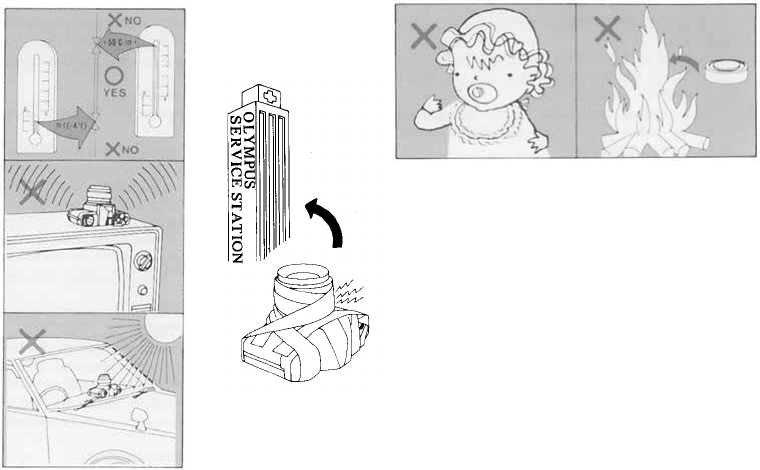
Storage Care
Guard against high temperature and magnetic fields.
Battery Precaution
In
case
of
malfunction,
take
the
camera
to
your nearest Olympus service station.
68
QUESTIONS AND ANSWERS
Q: The film rewind knob does not turn when
winding the film, although the camera is loaded
with film.
A: This indicates the film is not being wound be-
cause it has slipped out of the take-up spool.
Load the film correctly again.
Q: A dark shadow "shimmers" in the microprism
collar or in the split image rangefinder in the
center of the viewfinder.
A: This phenomenon will occur when an inter-
changeable lens of F5 or slower is used or when
the preview button is pressed with the aperture
set to F5.6 or smaller. However, there is nothing
wrong with the microprism.
Q: The display in the viewfinder turned off while I
was looking through the viewfinder.
A: To conserve battery power, it will automatically
turn off after 60 seconds. To turn it on again,
press
the
shutter
release
button
lightly.
Q: In the auto mode, the actual shutter speed
seems to be slower than the one displayed in
the viewfinder.
A: If the shutter is fired in auto mode with no
film in the camera, the shutter speed will be
slower than that displayed in the viewfinder.
This is because the OM-PC uses an "OTF"
Light Metering that measures the light reflected
off the film plane. To test the shutter, load an
unwanted roll of film that has not been de-
veloped or the test card that comes with your
camera.
Q: The film rewind crank won't turn.
A:
Press
in the
film
rewind
button.
Do not
force
the rewind crank.
Q: The film advance lever does not operate. Why?
A: You
have
wound
the
film,
but you
have
not yet
tripped the shutter. If you depress the shutter
release
button,
you
will
be
able
to
operate
the
advance lever. It is also possible that the film
has come to its end. If the exposure counter
shows
the
last
frame
of
your
film,
do not
force
the lever, but rewind the film back into its
cartridge.
Q: The film advance lever does not operate and I
see nothing in the viewfinder.
A: The camera is designed to be switched off for
safety when the batteries are exhausted. If the
audible and visual signals do not function when
you rotate the mode selector dial to the "BAT-
TERY CHECK" position, be sure to replace
both batteries.
Q: When must the batteries be checked?
69

A: (
1)
When new batteries are inserted into the
camera, (2) when you are using the camera after
it hasn't been used for a long time, (3) when
you think the batteries may be worn out, and
(4) when the temperature is extremely low.
(If the battery voltage is low, the shutter may
not fire when using the self-timer; even if the
batteries check out OK.)
Q: What type of batteries should I buy?
A: Buy two SR44 silver-oxide batteries or LR44
alkaline batteries. Do not use HR44 mercury
batteries or two different types of batteries of
the same size, or mix an old battery with a new
battery.
Always replace both batteries at the same time.
Q: How long do the batteries last?
A: Generally, SR44 batteries will last about one
year and LR44 batteries about six months.
Q: The batteries seem to have been worn out while
I was shooting in cold weather. What can I
then do to take pictures?
A: Bring them to room temperature by keeping
the camera inside your coat close to your body.
They may recover and allow you to resume
shooting. Never heat batteries with an electrical
appliance or other device.
Q: I took my picture at an intermediate point be-
tween two aperture numbers.
A: No problem. Your picture is correctly exposed.
Q: In the manual mode, I took my picture at an
intermediate shutter speed.
A: Intermediate shutter speeds cannot be used. If
you have set the shutter speed dial at an inter-
mediate position, the shutter will fire at either
of its neighboring shutter speeds.
Q: I want to take macro pictures with flash in the
programmed mode. Is it possible?
A: The programmed mode tends to give a larger
aperture, causing the picture to turn out over-
exposed or not have enough depth of field. It is
recommended, therefore, to use the aperture-
preferred "OTF" auto flash mode for macro
shots.
Q: In the
program
mode,
"1000"
and
blink even with the lens set at its minimum
aperture.
A: This indicates overexposure with a lens having
less than five aperture stops. In this case, use an
ND
filter
suited
or a
slower
film.
Q: In the program mode, it seems that the
shutter speed displayed in the viewfinder differs
from the actual shutter speed.
70

A: When using a 50mm F1.2, 50mm F1.4, 75 ~
150mm ZOOM or 35 ~ 105mm ZOOM lens,
the shutter speed displayed in the viewfinder
can differ from the actual one; but by approxi-
mately less than one stop. However, correct
exposure is always insured.
Q: Are there any lenses that cannot be used?
A: The 1000mm F11 lens cannot be used. The
following three lenses cannot be used in the
programmed mode. Use them in the aperture-
preferred auto mode or manual.
250mm F2, 350mm F2.8, 600mm F6.5
Q: My pictures tend to be overexposed when
shooting transparencies with flash in the pro-
grammed mode.
A: In this case, the pictures may turn out over-
exposed depending on the shooting conditions.
Use the aperture-preferred auto mode and stop
down the aperture.
Q: The shutter speed display and ESP mark
sometimes blink during metering.
A: In the case of a subject with an intermediate
luminance, the LED shutter speed display will
apparently blink because the adjacent figures
turn on alternately. When shooting under a
fluorescent lamp, they may blink more fre-
quently. The reason of this phenomenon is as
follows: Though the fluorescent lamp appears
to the human eye as if it were lighting con-
tinuously, it is in fact blinking repeatedly at a
frequency of 50 — 60 cycles a second. In both
cases, however, exposure is correct and there is
no problem at all.
Q: The flash does not fire.
A: The flash will not fire when the shutter speed is
faster then 1/60 sec.
Q: The shutter release button cannot be depressed.
A: You may not have wound the film properly,
or the
film
may
have
come
to its
end.
Q: Though the audible and visual signals do not
turn on when checking the batteries, the view-
finder display appears faintly.
A: If the battery voltage is extremely low, the
LED for viewfinder display may sometimes
turn on because the camera circuit allows it.
Q: Even when I gently push down the shutter
button, the viewfinder display doesn't come on.
A: Check the batteries by turning the Exposure
mode selector dial to the CHECK position. If
the batteries are all right, you have probably set
the camera to the "B" (Bulb) position on the
shutter speed dial. On "B" the finder display
does not light.
71

Q: The mirror does not spring back.
A: Check the batteries. If the batteries are in good
condition, and in case the mirror should not
spring back or the shutter should not close, the
safety mechanism will operate to return them
to their original position.
Q: The mark does not turn on when the pic-
ture is composed with the sun in a corner of the
picture frame.
A: If the sun is located in a corner of the picture
frame, exposure correction with the ESP meter-
ing is not effected. Because the four corners of
the picture frame have a reduced metering
sensitivity, the ESP metering need not be
operated.
Other cautions
•
When
the
OM-PC
is
used
with
other
brand
lenses, Olympus can not assume any responsi-
bility
for
poor
image
quality
or
other
problems.
This Is particularly true when other brand lenses
are used in PROGRAM mode.
• The exposure value will shift on spot metering
with
a
linear
polarizing
filter.
In
this
case,
use a
circular polarizing filter.
• If the exposure mode is switched while the self-
timer is running, the shutter will trip.
• The DX ISO auto-setting is not effective when
the ISO speed window shows a number "800" or
larger. First, set it at "640" or smaller then adjust
for ISO auto setting.
• If you are not likely to use the camera for a long
time, remove the batteries before putting it away.
• The batteries that come with your camera may
not last so long as stated in the camera specifica-
tions because they are supplied for test at the
time of purchase.
72
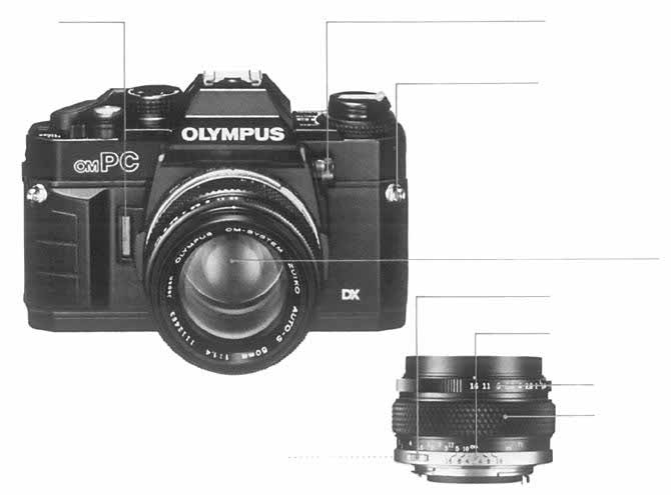
Description of Controls
Self-Timer/Battery
Check Signal
Light Metering Mode
Selector Lever
Shoulder Strap Eyelet
Lens
Lens Release Button
Depth of Field Scale
Aperture Ring
Focusing Ring
Preview Button
73
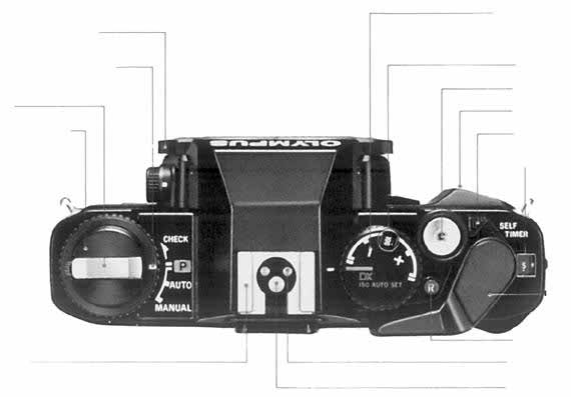
Manual Shutter Speed Dial
Exposure Mode Selector Dial
Rewind Crank
Rewind Knob/Camera
Back Release
Accessory Shoe
Film Speed Dial/Exposure
Compensation Dial
ISO/ASA Film Speed
Window
Shutter Release Button
Grip
Self-Timer Lever
Exposure Counter
Film Advance Lever
Rewind Release Button
Flash Control Contact
X Contact
74
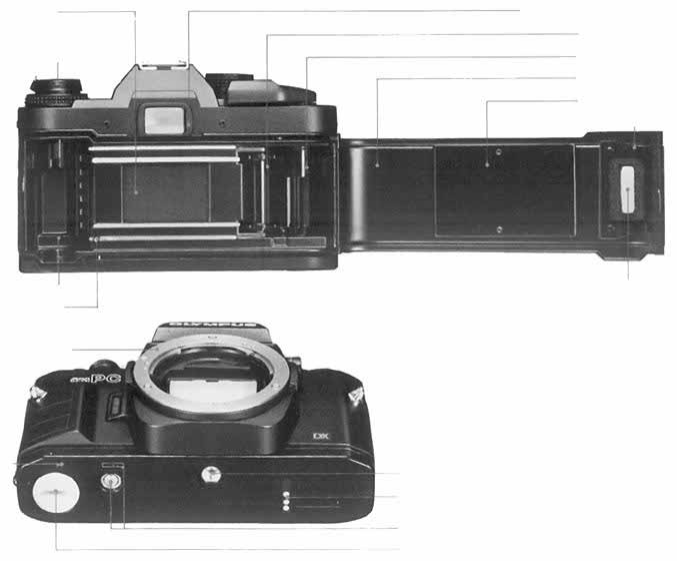
Shutter Curtain
Film Rewind Shaft
Viewfinder Eyepiece Frame
Sprocket
Film Take-up Spool
Camera Back
Pressure Plate
Film Cartridge Pressure
Plate
Film Chamber
Film Guide Pins
Lens Mount Ring
Motor
Guide
Pin Hole
Tripod Socket
Motor Coupling Terminals
Motor Coupling Socket
Battery Chamber
Film Window
75
SPECIFICATIONS
Type: TTL auto-exposure 35mm SLR camera.
Film Format: 24mm × 36mm.
Lens Mount: Olympus OM Mount.
Shutter: Horizontal running electronic control type
focal plane shutter with automatic exposure con-
trols from 2 sec. to 1/1000 sec.
Synchronization: X contact. Hot shoe with direct
contact for OM T-Series electronic flash units.
Metering System: ESP (Electro-Selective Pattern)
Metering and TTL Direct "off-the-film" Light
Metering (center-weighted averaged metering).
Programmed Automatic Exposure: Type; Electronic
shutter with automatic settings of aperture and
shutter speed. Light measuring range; 2—1/1000
sec. (with ISO 100 film and 50mm F1.4 lens).
EV0–18.
Aperture-Preferred Automatic Exposure: Type;
Automatic exposure control with aperture-pre-
ferred electronic shutter. Light measuring range:
2-1/1000 sec. (with ISO 100 film and 50mm
F1.4 lens). EV 0–18.
Manual Exposure: B, 1—1/1000 sec.
Auto Flash Exposure: Choice of "OTF" Auto Flash
or "OTF" Program Flash. Direct contacts for
"OTF" Auto Flash. (Full automatic f lash with T-
Series Flash); Automatic shutter speed setting
for flash exposures.
Exposure Compensation: ±2 EV in 1/3 stop incre-
ments.
Film
Speed:
ISO
25-3200.
Selection
of
automatic
setting for DX coded films or manual setting.
Film Advance: Film advance lever with 130° angle
for one long or several short strokes and pre-
advance angle 30°. Motor drive and winder usable.
Film Rewind: Rewind crank.
Viewfinder: Pentaprism eye-level type. Wide field
finder with bright Lumi-Micron Matte focussing
screen with central microprism/split image range-
finder. Finder view-field: 93% of actual picture
field. Finder magnification: 0.92X with 50mm
lens
at
infinity.
Viewfinder Information: LED multi-mode display (1
min. limiter).
Self-timer: 12 second delay electronic self-timer. Set-
ting by lever. Automatically cancelled by film ad-
vance. Audio-visual LED and PCV indications.
Battery Check: 3-level display with LED and alarm
sound.
Camera Back: Non-detachable, with window for read-
ing DX coded film information.
Grip: Large elastic grip on front and rear of camera
with non-slip texture.
Power Source: Two 1.5V silver oxide (SR44) batteries
or alkaline-manganese (LR44) batteries.
Dimensions: 135.5x86x53mm (5.33"x3.39"x2.09")
(Body only).
Weight: 460 g. (16.2 oz.) (Body only).
76
OLYMPUS
®
OLYMPUS OPTICAL CO.,LTD.
San-Ei Building,
22-2,
Nishi Shinjuku 1-chome, Shinjuku-ku Tokyo, Japan. Tel. 03-340-2211
OLYMPUS CORPORATION
Crossways Park, Woodbury, New York 11797, U.S.A. Tel. 516-364-3000
OLYMPUS OPTICAL CO.(EUROPA) GMBH
Postfach 104908, Wendenstrasse 14-16, 2 Hamburg 1, West Germany. Tel: 040-23773-0
OLYMPUS OPTICAL CO. (U.K.) LTD.
2-8 Honduras Street, London EC1Y OTX, England. Tel. 01-253-2772
PRINTED IN JAPAN 0985 •18MS
