One For All Ofa Kameleon Urc 6690 Users Manual Kam 6 Hybrid Owners
URC-6690 to the manual 975fce57-e4fe-4232-abe9-ee1d6a51eb67
2015-01-26
: One-For-All One-For-All-Ofa-Kameleon-Urc-6690-Users-Manual-343798 one-for-all-ofa-kameleon-urc-6690-users-manual-343798 one-for-all pdf
Open the PDF directly: View PDF  .
.
Page Count: 44
OFA Kameleon™ 6-Device Hybrid Remote
(URC-6690)
User’s Guide
OFA Kam 6 Hybrid Owners Manual.fm Page -1 Wednesday, March 30, 2005 3:09 PM
OFA Kam 6 Hybrid Owners Manual.fm Page 0 Wednesday, March 30, 2005 3:09 PM

OWNER’S MANUAL
Table Of Contents 1
TABLE OF CONTENTS
Introduction . . . . . . . . . . . . . . . . . . . . . . . . . . . . . . . .2
Features and Functions . . . . . . . . . . . . . . . . . . . . . . .3
Key Charts . . . . . . . . . . . . . . . . . . . . . . . . . . . . . . .4
Device Table. . . . . . . . . . . . . . . . . . . . . . . . . . . . . .6
Installing The Batteries. . . . . . . . . . . . . . . . . . . . . . . .7
Before Using The Remote . . . . . . . . . . . . . . . . . . . . . .7
Adjusting The Display . . . . . . . . . . . . . . . . . . . . . . . . .7
Adjusting Brightness . . . . . . . . . . . . . . . . . . . . . . .7
Adjusting How Long The Screen Light Is On. . . . . .8
Programming Device Control . . . . . . . . . . . . . . . . . . .8
Programming Combo Device Control. . . . . . . . . . . . .9
Searching For Your Code . . . . . . . . . . . . . . . . . . . . .10
Checking The Codes . . . . . . . . . . . . . . . . . . . . . . . . .10
Using Macros. . . . . . . . . . . . . . . . . . . . . . . . . . . . . . .11
Programming A Favorite Channel . . . . . . . . . . . .11
Programming A Master Power Macro . . . . . . . . .11
To Operate Master Power Macro. . . . . . . . . . . . .12
Clearing A Macro . . . . . . . . . . . . . . . . . . . . . . . . .12
Using Channel Scan . . . . . . . . . . . . . . . . . . . . . . . . .12
Programming Favorite Channel Scan. . . . . . . . . . . .13
Using Learning . . . . . . . . . . . . . . . . . . . . . . . . . . . . .13
Learning Precautions. . . . . . . . . . . . . . . . . . . . . .13
Programming A Learning Key . . . . . . . . . . . . . . .14
Deleting Functions From The Learning Keys: . . .14
Re-Assigning Device Keys. . . . . . . . . . . . . . . . . . . . .14
Using Keymover. . . . . . . . . . . . . . . . . . . . . . . . . . . . .15
Programming Keymover . . . . . . . . . . . . . . . . . . .15
Restoring Keymoved Keys To Default Setting . . .16
Changing Volume Lock . . . . . . . . . . . . . . . . . . . . . . .16
Locking Volume Control To One Mode (Global
Volume Lock):. . . . . . . . . . . . . . . . . . . . . . . . . . . .16
Unlocking Volume Control For A Single Device
(Individual Volume Unlock):. . . . . . . . . . . . . . . . .16
Unlocking All Volume Control (Restoring Default
Setting): . . . . . . . . . . . . . . . . . . . . . . . . . . . . . . . .16
Restoring Factory Default Settings . . . . . . . . . . . . .17
About Upgrading . . . . . . . . . . . . . . . . . . . . . . . . . . . .17
Upgrade Exclusions . . . . . . . . . . . . . . . . . . . . . . .17
Device Screens . . . . . . . . . . . . . . . . . . . . . . . . . . . . .18
TV Screen . . . . . . . . . . . . . . . . . . . . . . . . . . . . . . .18
AUX Screen . . . . . . . . . . . . . . . . . . . . . . . . . . . . . 18
CBL/SAT Screen. . . . . . . . . . . . . . . . . . . . . . . . . . 18
DVD Screen. . . . . . . . . . . . . . . . . . . . . . . . . . . . . 19
AUD Screen. . . . . . . . . . . . . . . . . . . . . . . . . . . . . 19
VCR/PVR Screen . . . . . . . . . . . . . . . . . . . . . . . . . 19
Troubleshooting. . . . . . . . . . . . . . . . . . . . . . . . . . . . 19
FCC Compliance . . . . . . . . . . . . . . . . . . . . . . . . . . . 21
Manufacturer’s Codes . . . . . . . . . . . . . . . . . . . . . . . 21
Setup Codes For Audio Amp/Tuners . . . . . . . . . . 21
Setup Codes For Audio Amplifiers . . . . . . . . . . . 23
Setup Codes For Cable Converters . . . . . . . . . . 23
Setup Codes For Cable/DVR Combination . . . . . 25
Setup Codes For CD Players. . . . . . . . . . . . . . . . 25
Setup Codes For CD-R . . . . . . . . . . . . . . . . . . . . 26
Setup Codes for DBS/PVR Combination . . . . . . . 26
Setup Codes For DVD Players. . . . . . . . . . . . . . . 26
Setup Codes for DVD/PVR Combination . . . . . . . 28
Setup Codes for DVD/PVR Combination . . . . . . . 28
Setup Codes For DVD/VCR Combination. . . . . . . 28
Programmed Using the DVD Key . . . . . . . . . . 28
Programmed Using the VCR Key . . . . . . . . . . 29
Setup Codes for DVD-R. . . . . . . . . . . . . . . . . . . . 29
Setup Codes for HD-TV Decoder. . . . . . . . . . . . . 29
Setup Codes For Home Automation . . . . . . . . . . 29
Setup Codes For HTiB - Home Theater in-a-Box 30
Setup Codes For Miscellaneous Audio . . . . . . . . 30
Setup Codes For PVRs . . . . . . . . . . . . . . . . . . . . 30
Setup Codes For Satellite Receiver/PVR
Combination . . . . . . . . . . . . . . . . . . . . . . . . . . . . 31
Setup Codes For Satellite Receivers . . . . . . . . . 31
Setup Codes For TVs. . . . . . . . . . . . . . . . . . . . . . 32
Setup Codes For TV/DVD Combination . . . . . . . . 35
Setup Codes For TV/VCR Combination . . . . . . . . 35
Setup Codes For TV/VCR/DVD Combination . . . . 36
Setup Codes For VCRs . . . . . . . . . . . . . . . . . . . . 36
Setup Codes For Video Accessories. . . . . . . . . . 38
Limited Warranty. . . . . . . . . . . . . . . . . . . . . . . . . . . 39
Additional Information. . . . . . . . . . . . . . . . . . . . . . . 40
OFA Kam 6 Hybrid Owners Manual.fm Page 1 Wednesday, March 30, 2005 3:09 PM

OFA Kameleon™ 6-Device Hybrid Remote
2 Introduction
INTRODUCTION
The OFA Kameleon™ 6-Device Hybrid
Remote (URC-6690) is an advanced 6-
device universal remote control. It offers the
perfect combination of exclusive
touchscreen technology with classic hard
button familiarity. This allows you to easily
operate up to 6 different home
entertainment devices with the functionality
and flexibility to support novice as well as
advanced users.
Advanced features include:
•Kameleon Technology – dynamic
menu screens that respond to device
selection and illuminate only active
keys
•Hard Button Functionality – Hard
buttons complement the Kameleon
screen for the most comprehensive
functionality across a vast range of
devices.
•Macros – for instant activation of
favorite key sequences
•Learning – to capture unique
functions from your devices’ original
remote controls
•Key Mover – for copying keys from
one device to another, or to a different
position in the same mode
•Direct Code Setup – for easy device
programming with setup codes
•Innovative Code Search – allows
setup of your devices without looking
up codes
•Favorite Channel Scan – for easy
channel surfing of favorite channels
•Volume Lock – to assign volume
controls to individual devices or to one
global device
•Extensive Code Library – largest and
most efficient group of IR remote
control codes for virtually every
current brand and make
•Upgradeability – Customer support
upgrade system ensures your remote
control always has the latest setup
codes when adding new devices in the
future
After installing two (2) new AA alkaline
batteries (not included), you can
immediately use the unit to control a Sony
TV, an RCA DirecTV receiver, a Sony DVD
player, a Pioneer Audio Receiver, a Sony Tivo
PVR (VCR/PVR key), and a Pioneer CD
player (AUX Key). To control other brands
than the default ones, see Programming
Device Control on page 8.
OFA Kam 6 Hybrid Owners Manual.fm Page 2 Wednesday, March 30, 2005 3:09 PM
OWNER’S MANUAL
Features and Functions 3
FEATURES AND FUNCTIONS
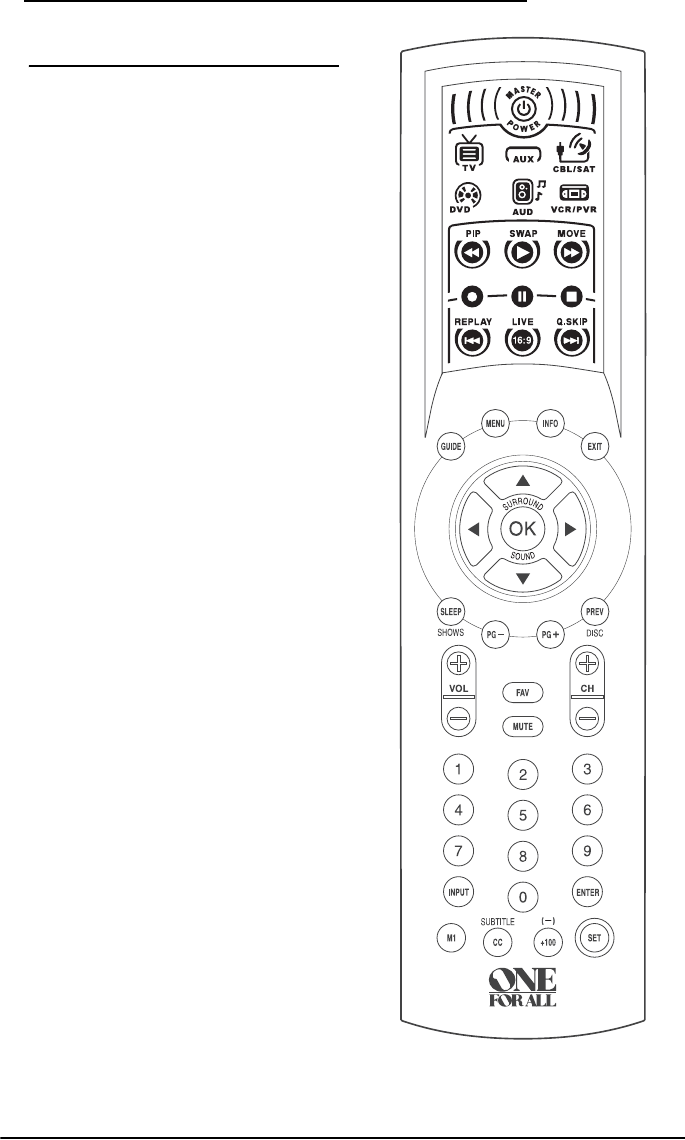
Use the illustration to the right to locate
features on the OFA Kameleon 6-Device
Hybrid Remote (URC-6690) and then refer
to the Key Charts (starting on page 4) to
learn how they function.
NOTE: The illustration shows all remote
control keys in the screens. In actual
operation, only active keys used by the
selected device are displayed and non-active
keys are hidden. To find out what type of
devices can be controlled by each device key
after programming, see the Device Table on
page 6.
OFA Kam 6 Hybrid Owners Manual.fm Page 3 Wednesday, March 30, 2005 3:09 PM
OFA Kameleon™ 6-Device Hybrid Remote
4 Features and Functions
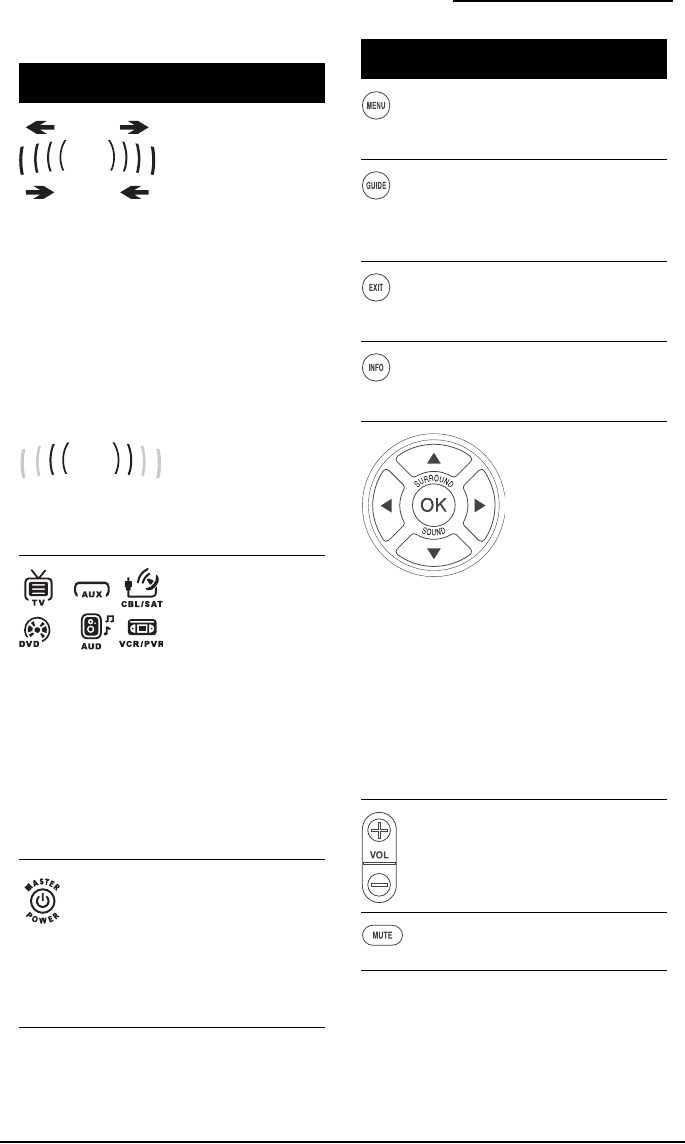
KEY CHARTS
Key Function
When a key is pressed,
the IR Segments
animate. Outgoing
animation (see arrows)
indicates the remote
control is sending IR
signals to a selected
device.
Incoming animation
(see arrows) indicates
the remote control is
receiving IR signals
from a device being
learned (see Using
Learning on page 13)
The inner IR segments
flash to display success
or error message
during programming
of remote features.
Press TV, AUX, CBL/
SAT, DVD, AUD or VCR/
PVR once to select a
desired home
entertainment device
to control. When
selected, the Device
Key becomes brighter
than the other device
keys to indicate it is
currently active. Also
see the Device Table on
page 6
Press MASTER POWER
once to turn on or off
the selected device. For
master power control,
see Programming a
Master Power Macro
on page 11.
Outgoing
Incoming
Press MENU once to
display your selected
device’s main menu.
Use GUIDE to display
your selected device’s
program guide or setup
menu.
Use EXIT to exit from
your selected device’s
guide or menu.
Use INFO to display the
current channel and
program information.
Use the cursor keys to
move the cursor in the
program guide and
menu screens.
Use OK to choose
options from your
selected device’s menu
or guide.
In the AUD mode, use
OK to set the surround
sound. Use Up (or
Down) to adjust the
volume higher (or
lower). Use Left (or
Right) to adjust the
balance left (or right).
Use VOL+ (or VOL-) to
raise (or lower) the
sound volume.
P
ress
MUTE
once to turn
the sound off or on
.
Key Function
OFA Kam 6 Hybrid Owners Manual.fm Page 4 Wednesday, March 30, 2005 3:09 PM
OWNER’S MANUAL
Features and Functions 5
I
n
TV
,
VCR/PVR
,
DVD
or
CBL/SAT
modes, use
FAV
to scan favorite channels
and/or all channels. (See
Using Channel Scan and
Programming Favorite
Channel Scan on page 13
)
Use CH+ (or CH-) to
select the next higher
(or lower) channel.
Press PREV once to
recall the last-viewed
channel and to page
back one screen on the
main menu.
In the AUD, DVD and
AUX modes, use DISC
to change disk (if
available on your
device).
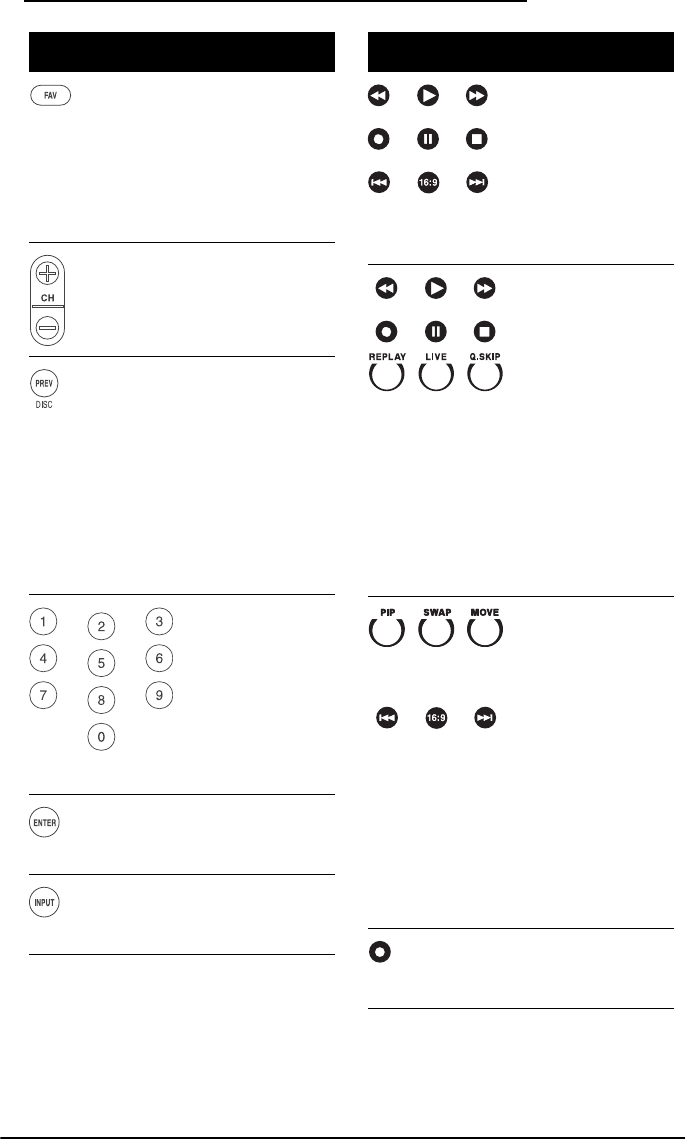
Use the keypad (1 - 9
and 0) to directly select
channels (for example,
009 or 031).
In the AUD mode, use
the keypad (1 - 9 and
0) to select audio
sources 1 through 10.
Press ENTER once after
entering the channel
numbers on some TVs.
Use INPUT to switch
the TV’s input to view
TV or video programs.
Key Function
In the AUX, AUD and
DVD modes, the
Kameleon screen
displays the transport
keys to control your
DVD, Home Theater in
a box system or CD
player.
In the CBL/SAT and
VCR/PVR modes, the
Kameleon screen
displays the transport
keys to control your
VCR functions. If a
PVR/DVR device is
programmed onto the
CBL/SAT or VCR/PVR
modes, you can control
PVR/DVR functions
such as REPLAY, LIVE
(Return to Live) or Q.
SKIP (Quick Skip).
In the TV mode, the
Kameleon screen
displays the PIP
(picture-in-picture)
controls PIP, SWAP
and MOVE, to control
your TVs PIP
functions. Also, the
16:9 Key to control the
aspect Ratio of the TV.
Use the Skip back and
Skip forward keys, to
control the Channel up/
down for the PIP Box.
To record to a DVD or
VCR program, press
REC.
Key Function
OFA Kam 6 Hybrid Owners Manual.fm Page 5 Wednesday, March 30, 2005 3:09 PM
OFA Kameleon™ 6-Device Hybrid Remote
6 Features and Functions
DEVICE TABLE
NOTE: Please refer to the table below when
performing the instructions in
Programming Device Control on page 8.
After programming, the OFA Kameleon™
6-Device Hybrid Remote (URC-6690) will be
able to control the following types of
devices:
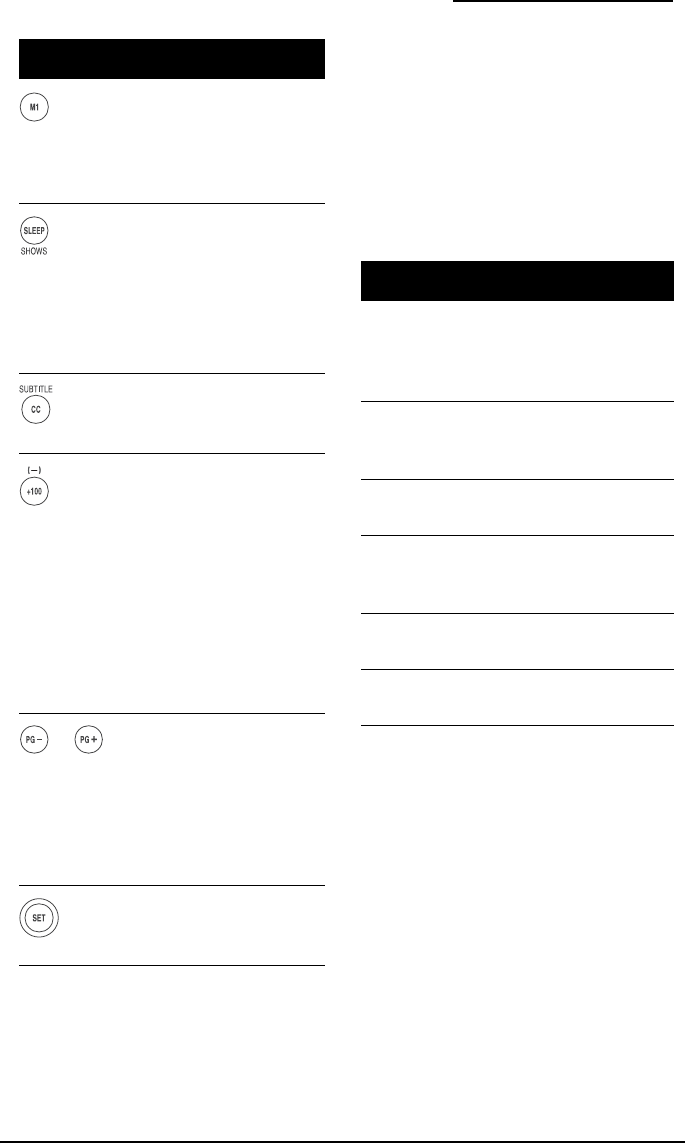
After programming,
press the M1 key once
to run a desired macro
(see Using Macros on
page 11).
Press SLEEP to activate
your device’s sleep
timer (not available for
all devices). If you have
a PVR device, use
SHOWS to access your
list of recorded shows.
Use CC to turn on
closed caption or
subtitles.
Use +100 if your
device requires this key
to access channels
grater than 100 (same
as your original
device). Use the (-)
function to access your
High Definition
Channels (e.g., if your
HD channel is 2.5,
press 2 (-) 5).
Use PG+ and PG- to
change the page in you
Cable or Satellite
device’s guide. In DVD
mode, use PG+ and
PG- to change disks in
a multi disk system
Use SET for all
programming
sequences.
Key Function
Device Key Controls These Devices
TV TV (including HDTV, Plasma
and LCD), TV/DVD Combo
(Listed as TV Codes), TV/VCR
Combo (Listed as TV Codes).
CBL/SAT Satellite, Satellite/PVR, Cable,
Cable/DVR, HDTV Decoder,
Video Accessories
VCR/PVR VCR, TV/VCR, Stand Alone
PVR
DVD DVD, DVD/R, DVD/VCR, TV/
DVD/VCR, HTIB (Home
Theater In A Box)
AUD Tuner, Amp, CD Misc. Audio,
HTIB (Home Theater In A Box)
AUX Tuner, Amp, CD Misc. Audio,
HTIB (Home Theater In A Box)
OFA Kam 6 Hybrid Owners Manual.fm Page 6 Wednesday, March 30, 2005 3:09 PM
OWNER’S MANUAL
Installing The Batteries 7
INSTALLING THE BATTERIES
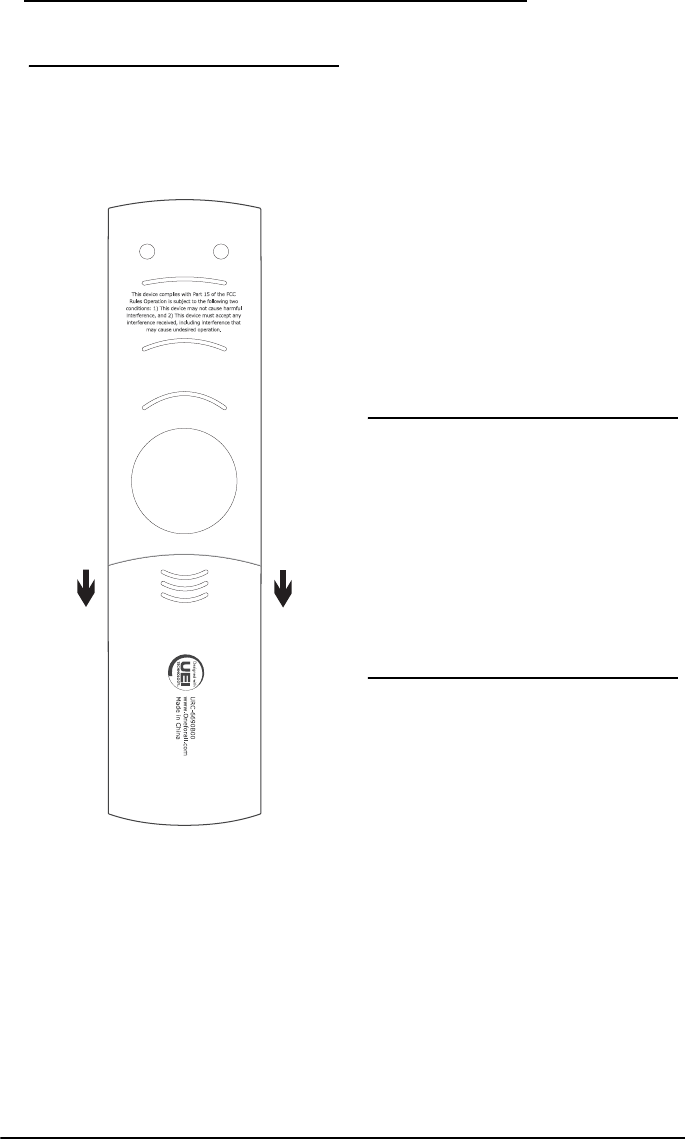
1. On the remote control’s back, push
down on the top of the battery cover
(where indicated by the arrows). Then
slide the battery cover out.
2. Obtain two (2) new AA alkaline
batteries. Match the + and - marks on
the batteries to the + and - marks in
the battery case, then insert the new
batteries.
3. Slide the battery cover back into place.
The tab should click when the cover is
locked.
4. If batteries are inserted correctly, the
Kameleon display will turn on when a
key is pressed. Test the remote control
by pressing POWER and observing the
IR Animation.
NOTE: When batteries are low, the Inner IR
segments will blink 5 times after each key
press. The remote will stop operating when
the batteries need replacement. The
permanent memory retention ensures that
your codes are stored permanently even
during battery replacement.
BEFORE USING THE
REMOTE
By design, the first key press will always
make the screen turn on but will not cause
the remote to take any action until a key is
pressed after the screen is on.
Keep this in mind when programming the
features of your OFA KameleonTM 6 Device
Hybrid Remote.
ADJUSTING THE DISPLAY
T
he OFA Kameleon™ 6-Device Hybrid Remote
(URC-6690) has several ways to adjust the
display for your comfort and best use
.
ADJUSTING BRIGHTNESS
The OFA Kameleon™ 6-Device Hybrid
Remote (URC-6690) has five levels of
brightness adjustment and is set to the
middle setting at the factory. To increase or
decrease the brightness, perform the
following steps:
1. Press and hold SET until the two Inner
IR segments flash twice. The current
mode key will blink on and off during
programming.
OFA Kam 6 Hybrid Owners Manual.fm Page 7 Wednesday, March 30, 2005 3:09 PM

OFA Kameleon™ 6-Device Hybrid Remote
8 Programming Device Control
NOTE: If the display turns off because of
inactivity, you must start the programming
sequence again by repeating this step.
2. Press 9 7 4 (Inner IR segments blinks
twice).
3. Press Arrow Up key to increase the
screen brightness (to decrease
brightness press Arrow Down key).
4. Press and release the SET key to lock in
the desired brightness. The remote will
exit the programming mode.
ADJUSTING HOW LONG THE SCREEN LIGHT
IS ON
The OFA Kameleon™ 6-Device Hybrid
Remote (URC-6690) allows you to control
how long the screen light remains on after
the last button is pressed. The display-on
time is set at the factory to run for about 8
seconds. To increase or decrease that time,
perform the following steps:
1. Press and hold SET until the two Inner
IR segments flash twice. The current
mode key will blink on and off during
programming.
NOTE: If the display turns off because of
inactivity, you must start the programming
sequence again by repeating this step.
2. Press 9 7 8 (Inner IR segments blinks
twice).
3. Use the following table to choose the
“light on” time:
4. The Kameleon display’s “On” time is
now programmed for the selected time
(in step 3).
PROGRAMMING DEVICE
CONTROL
The OFA Kameleon™ 6-Device Hybrid
Remote (URC-6690) is preprogrammed at
the factory to control a Sony TV, an RCA
DirecTV receiver, a Sony DVD player, a
Pioneer Audio Receiver, a Sony Tivo PVR
(VCR/PVR key), and a Pioneer CD player
(AUX Key). To control devices other than the
default brands, perform the following steps;
otherwise skip this section:
NOTE: For Combo Device control, see the
next section.
1. Turn on a device (e.g., TV, VCR or DVD
player) and, if applicable, insert media
(e.g., cassette or disc).
NOTE: Please read steps 2 through 4
completely before proceeding. Highlight or
write down the codes and device you wish to
program before starting step 2.
2. On the remote control, press a device
key once (i.e., TV, AUX, CBL/SAT, DVD,
AUD or VCR/PVR).
NOTE: Use the AUX key to program control of
an audio device such as a CD player, AMP,
HTIB (Home theater in a box), or a tuner.
Alternately, use the AUX key to program
control of a second device type (e.g., a
second DVD; see Re-assigning Device Keys
on page 14).
Press…
…to set the
light for
1 4 seconds
2 8 seconds
3 12 seconds
4 16 seconds
5 20 seconds
Press…
…to set the
light for
OFA Kam 6 Hybrid Owners Manual.fm Page 8 Wednesday, March 30, 2005 3:09 PM

OWNER’S MANUAL
Programming Combo Device Control 9
3. Press and hold SET until the two Inner
IR segments flash twice. The current
mode key will blink on and off during
programming.
4. Use the Manufacturer’s Codes (starting
on page 21) to locate the type of device
and brand name and then enter the
first four-digit code for your device. If
performed correctly, the Inner IR
segments blink twice.
NOTE: If the Inner IR segments did not blink
twice, repeat steps 2 through 4 and try
entering the same code again.
5. Aim the remote control at the device
and press POWER once. The device
should turn off. If it does not respond,
repeat steps 2 through 5, trying each
code for your brand until you find one
that works. If it still does not work, try
Searching For Your Code.
NOTE: If the device does not respond to the
POWER key, press Vol+ or the Play key..
6. Repeat steps 1 through 5 for each
device you want to control. For future
reference, write down each working
device code in the boxes below:
PROGRAMMING COMBO
DEVICE CONTROL
You can set the OFA Kameleon™ 6-Device
Hybrid Remote (URC-6690) to control your
combo devices such as TV/VCR, TV/DVD,
Satellite/DVR, Home-Theater-In-A-Box,
and many others with a single code. For a
complete list of combo devices, refer to the
“Device Table” on page 6.
NOTE: Some combo device types have codes
that you can program on separate device
keys. For example, you can program DVD
Player/VCR Combo codes under the
VCR/PVR or DVD mode keys. See Setup
Codes for DVD/VCR Combos on page 28;
note that there are two sections under this
device type.
Perform the following instructions to
control a TV/DVD Combo:
1. Turn on the TV/DVD Combo and
insert a DVD.
NOTE: Please read steps 2 through 4
completely before proceeding. Highlight or
write down the codes and device you wish
to program before starting step 2.
2. On the remote control, press TV.
3. Press and hold SET until the two Inner
IR segments flash twice. The current
mode key will blink on and off during
programming.
4. Use the Setup Codes under the TV/
DVD Combos heading (use codes
listed as “TV Codes”) on page 35.
Locate the brand name and then enter
the first four-digit code for your
device. If performed correctly, the
Inner IR Segments will blink twice.
TV Code:
AUX Code:
AUX. Device Type:
__________________________
CBL/SAT Code:
DVD Code:
AUD Code:
VCR/PVR Code:
OFA Kam 6 Hybrid Owners Manual.fm Page 9 Wednesday, March 30, 2005 3:09 PM

OFA Kameleon™ 6-Device Hybrid Remote
10 Searching For Your Code
NOTE: If the Inner IR segments did not blink
twice, repeat steps 2 through 4 and try
entering the same code again.
5. Aim the remote control at the device
and press POWER once (or PLAY). It
should turn off (or begin playing). If
the device does not respond, repeat
steps 2 through 5, trying each code for
your brand until you find one that
works. If it still does not work, try
Searching For Your Code.
SEARCHING FOR YOUR
CODE
If your device does not respond to the
remote control after trying all codes listed
for your brand, or if your brand is not listed
at all, try searching for your code.
For example, to search for a code for your
TV:
1. Turn on your TV and on the remote
control, press TV once.
2. Press and hold SET until the two Inner
IR segments flash twice. The current
mode key will blink on and off during
programming.
3. Enter 9 9 1. The Inner IR Segments will
blink twice.
4. Select a test function from the list
below or use the default test function
(Power) and skip step 4
NOTE: Use any of the following keys for the
test function: 0, 1, 2, 3, Power, Volume Up,
Play, Stop or Mute.
5. Press the ^ (Arrow Up) key to begin
searching for your code. Stop the
search when the device turns off or
performs the function selected in step
4 (if other than Power).
NOTE: In the search mode, the remote
control will send IR codes from its library to
the selected device, starting with the most
popular code first. Every press of the ^
(Arrow Up) key will send a new code. If you
go past the code that performed the Test
Function (selected in step 4), you can go
back by pressing the v (Arrow Down) key.
6. To lock in the code, press and release
the SET key. The Inner IR Segments
blinks twice.
7. To search for the codes of your other
devices, repeat steps 1 through 6, but
substitute the appropriate device key
for the device you are searching for, in
step 1.
CHECKING THE CODES
If you have set up the remote control using
the Searching For Your Code procedure, you
may need to find out which four-digit code
is operating your equipment. For example,
to find out which code is operating your TV:
1. On the remote control, press TV once.
2. Press and hold SET until the two Inner
IR segments flash twice. The current
mode key will blink on and off during
programming.
3. Enter 9 9 0. The Inner IR Segments will
blink twice.
4. To view the code for the first digit,
press 1 once. Wait 3 seconds, count the
LED blinks (e.g., three blinks = 3) and
write down the number.
NOTE: If a code digit is “0”, the LED will not
blink.
OFA Kam 6 Hybrid Owners Manual.fm Page 10 Wednesday, March 30, 2005 3:09 PM

OWNER’S MANUAL
Using Macros 11
5. Repeat step 4 three more times for
remaining digits. Use 2 for the second
digit, 3 for the third digit, and 4 for the
fourth digit.
6. To check for codes of other devices,
repeat steps 1 through 5, but substitute
the appropriate device key for each
device you are checking.
USING MACROS
With programming, the M1 and POWER
keys on your OFA Kameleon™ 6-Device
Hybrid Remote (URC-6690) can be setup to
perform repetitive, time-consuming
operations for easy, convenient access
through the press of a single key. Macro
keys are ideal for home theater operations,
setting a favorite channel, guide steps, or
other multiple functions you would like to
control with one key press. Moreover, each
macro key can hold up to 15 key presses
total.
NOTE: Programming a new macro over an
existing one will erase the original macro.
PROGRAMMING A FAVORITE CHANNEL
With so many channels available through
your cable or satellite system provider, you
can program a macro that directly selects a
favorite channel with one key press. For
example, let’s assume your favorite cable
programs are on channel 52. Use the
following instructions to program a macro
key for direct access of this channel:
NOTE: This example assumes the TV is
tuned to the correct Input to view your cable
box.
1. Press and hold SET until the two Inner
IR segments flash twice. The current
mode key will blink on and off during
programming.
2. Enter 9 9 5. The Inner IR segments
will blink twice.
3. Select an open macro key (e.g., M1)
and press it once.
4. Press CBL once.
5. Enter the channel number, 5 2.
NOTE: If you have access to over 100
channels, enter 0 5 2. Also, if the original
remote control required pressing Enter to
change the channel, also press Enter after
the channel number (e.g., 0 5 2 Enter).
NOTE: You can program up to 15 keypresses
on each macro key.
6. P
ress and hold
SET
until the Inner IR
segments blinks twice, then release
SET
.
Now when you press M1, you will instantly
see cable channel 52 on your TV set.
PROGRAMMING A MASTER POWER MACRO
In its default state, the POWER key on the
OFA Kameleon™ 6-Device Hybrid Remote
(URC-6690) will individually power your
home entertainment devices on or off.
However, you can also program a Master
Power Macro onto the POWER key that will
sequentially turn on or off all the devices
with a single key press.
To program the Master Power Macro:
1. Press and hold SET until the two Inner
IR segments flash twice. The current
mode key will blink on and off during
programming.
2. Enter 9 9 5. The Inner IR Animation
will blink twice.
3. Press the POWER key once.
4. For the first device you want in the
power-on sequence, press its device
key (e.g., TV) once.
OFA Kam 6 Hybrid Owners Manual.fm Page 11 Wednesday, March 30, 2005 3:09 PM

OFA Kameleon™ 6-Device Hybrid Remote
12 Using Channel Scan
5. For the second device you want in the
power-on sequence, press its device
key (e.g., CBL/SAT) once.
6. For the third device you want in the
power-on sequence, press its device
key (e.g., AUD) once.
7. Repeat step 6 up to three more times to
add the other desired devices to the
power-on sequence (e.g., AUX,
VCR/PVR, etc.).
8. To save the settings and exit the
program, press and hold SET until the
Inner IR segments blink twice, then
release SET.
TO OPERATE MASTER POWER MACRO
1. After programming, point the remote
control at the devices and press POWER
for at least 3 seconds to sequentially
turn on (or off) your devices.
NOTE: When POWER is pressed for less than
3 seconds, a power command will only be
sent to the currently-selected device. This
allows you to still individually power devices
on or off.
2. Devices will turn on (or off) according
to your programmed sequence.
NOTE: The currently-selected device will
always turn on or off first, followed by the
remaining programmed sequence. After the
master power sequence has been completed,
the remote control will be set to control the
first powered-on device.
NOTE: If one or more devices does not have a
POWER key, the power off/on sequence may
be slightly delayed when the remote control
signals the device(s).This action is normal.
CLEARING A MACRO
1. Press and hold SET until the two Inner
IR segments flash twice. The current
mode key will blink on and off during
programming.
2. Enter 9 9 5. The Inner IR Animation
will blink twice.
3. Select a macro key (e.g., M1, POWER or
any key programmed with a macro)
you want to clear and press it once.
4. Press and hold SET until the two Inner
IR segments flash twice, then release
SET. The macro is now deleted but the
keys (in the case of power), will retain
their original function.
USING CHANNEL SCAN
In the TV, VCR/PVR, DVD and CBL/SAT
modes, use the FAV key to start a 3-second
scan of all favorite channels (if
programmed, see Programming Favorite
Channel Scan below) and/or all channels for
the selected mode.
1. Press TV, VCR/PVR, DVD or CBL/SAT
once.
2. Press FAV once.
• If Favorite Channel Scan has been
set up, scanning of favorite
channels will start and, upon
completion, continue to scan all
channels upward for the same
device.
• If Favorite Channel Scan has not
been set up, scanning will start
with the current channel, then
proceed to the next channel up,
and continue until all channels of
the selected device is scanned.
OFA Kam 6 Hybrid Owners Manual.fm Page 12 Wednesday, March 30, 2005 3:09 PM

OWNER’S MANUAL
Programming Favorite Channel Scan 13
3. To stop scanning channels at any time,
press any key once.
PROGRAMMING FAVORITE
CHANNEL SCAN
In the TV, VCR/PVR, DVD and CBL/SAT
modes, you can store a list of up to 10
favorite channels, in any order, that will be
immediately scanned when FAV is pressed
(see Using Channel Scan).
NOTE: Only channels of one mode can be
stored for Favorite Channel Scan.
1. On the remote control, press TV,
VCR/PVR, DVD or CBL/SAT once.
2. Press and hold SET until the two Inner
IR segments flash twice. The current
mode key will blink on and off during
programming.
3. Enter 9 9 6. The Inner IR Animation
will blink twice.
4. Use the keypad to enter a favorite
channel number (e.g., 0 3 1). Then
press SET once.
NOTE: If the original remote control required
pressing an Enter key to change the channel,
also press the Enter key after the channel
number (e.g., 0 3 1 Enter).
5. If desired, repeat step 4 (in this
section) for each favorite channel to be
stored, up to a total of 10 channels.
NOTE: If you try entering more than 10
channels, the remote control will
automatically exit programming.
6. To exit programming, press and hold
SET for 3 seconds. The Inner IR
Animation will blink twice.
USING LEARNING
The OFA Kameleon™ 6-Device Hybrid
Remote (URC-6690) includes a Learning
feature so you can add functions that are
unique to your home entertainment devices
(e.g., DVD EJECT). However, there are some
considerations.
LEARNING PRECAUTIONS
• Your original remote controls must be
in working order for learning to work
properly.
• Learned keys are mode specific, so
each one can store a unique function
for each mode.
• Learned keys can be used in macros
(see Using Macros on page 11).
• Do not use the following keys for
learning: Device Keys, SETUP, FAV, or
Record (•) Key.
• Learning capacity is approximately 50
to 70 keys, depending on the code
being learned.
• If both learned and keymoved
functions are assigned to the same key,
the last programmed function is
stored.
• A learned function cannot be used as a
source for Keymover (see Using
Keymover on page 15).
• Certain device codes are not learnable
including multi-frequency types, some
high frequency ones, and other
unusual formats.
• For optimum learning, avoid high
levels of ambient light such as natural
sunlight or energy-efficient fluorescent
lights.
OFA Kam 6 Hybrid Owners Manual.fm Page 13 Wednesday, March 30, 2005 3:09 PM
OFA Kameleon™ 6-Device Hybrid Remote
14 Re-Assigning Device Keys
NOTE: Please have your original remote
controls handy before programming
learning. Be sure to press each teaching key
within 5 seconds of the previous entry.
Otherwise, the OFA Kameleon™ 6-Device
Hybrid Remote (URC-6690) exits the
learning mode.
PROGRAMMING A LEARNING KEY
1. Press and hold SET until the two Inner
IR segments flash twice. The current
mode key will blink on and off during
programming.
2. Enter 9 7 5. The Inner IR Segments will
blink twice.
3. Press a device key once (e.g., TV) to
assign a mode for learning.
4. Press the desired key once (e.g., +100
Key) to store a feature to be learned.
The unit will display the learning
animation of the IR segments and will
then turn off the screen
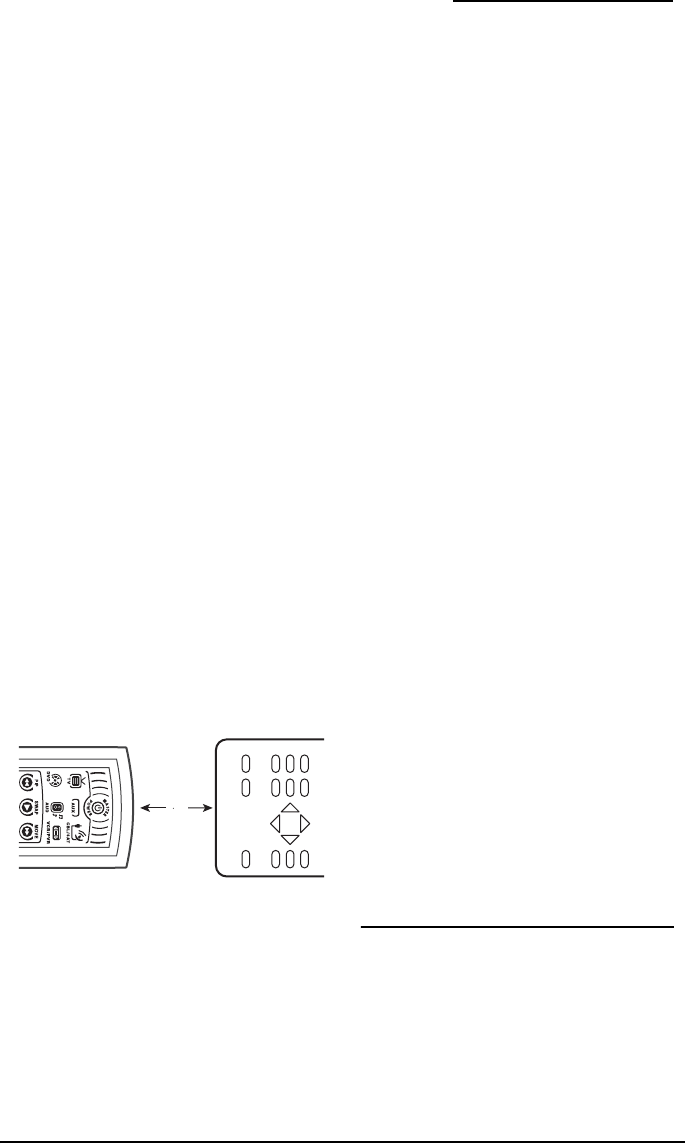
5. Place your original remote control (e.g.,
TV remote control) head-to-head
(about 2" apart) from the OFA
Kameleon™ 6-Device Hybrid Remote
(URC-6690).
6. On your original remote control, press
and hold the key (i.e., feature) to be
learned until the display on the OFA
Kameleon™ 6-Device Hybrid Remote
(URC-6690) turns on and the Inner IR
segments blink twice. If the Inner IR
segments does not blink twice (shows a
long blink), repeat steps 3 through 6.
7. To learn functions onto other learning
keys (e.g., M1, PG+, PG-, etc.), repeat
steps 3 through 6.
8. To lock in new feature(s) on the OFA
Kameleon™ 6-Device Hybrid Remote
(URC-6690), press and hold SET until
the Inner IR segments, then release
SET.
9. To test a learned feature, press a device
key (e.g., TV) once where the learning
mode was assigned. Then press the
learning key (e.g., +100) where the
learned feature is stored.
DELETING FUNCTIONS FROM THE LEARNING
KEYS:
1. Press and hold SET until the two Inner
IR segments flash twice. The current
mode key will blink on and off during
programming.
2. Enter 9 7 6. The Inner IR Segments will
blink twice.
3. Press the device key once where the
learned feature is stored (e.g., TV).
4. Press the learning key (e.g., +100) to
be deleted twice. The Inner IR
Segments will blink twice after the
second press.
5. To clear additional functions stored on
other learning keys, repeat steps 1
through 4 (in this section).
RE-ASSIGNING DEVICE
KEYS
The OFA Kameleon™ 6-Device Hybrid
Remote (URC-6690) can be set to control a
second TV, VCR, DVD player, or other
device. For example, to control a TV, a cable
box, and two DVDS, you will need to re-
2"
OFA Kam 6 Hybrid Owners Manual.fm Page 14 Wednesday, March 30, 2005 3:09 PM

OWNER’S MANUAL
Using Keymover 15
assign the unused AUX key to operate the
second DVD as follows:
1. On the remote control, press and hold
SET until the two Inner IR segments
flash twice. The current mode key will
blink on and off during programming.
2. Enter 9 9 2. The Inner IR Segments
will blink twice.
3. Press DVD once, then press AUX once.
The AUX key is now ready to be
programmed for your second DVD. (See
Programming Device Control on page 8.)
To re-assign other device keys to the AUX
key, repeat steps 1 through 4 above by
substituting the sequence from the chart:
You can also re-assign another unused
device key by substituting an open key for
the AUX key in the above chart and
performing the sequence. For example, to
re-assign an unused CBL/SAT key as a 2nd
TV key, perform SETÖ9Ö9Ö2ÖTVÖ
CBL/SAT. When a re-assignment is done, the
Inner IR Segments will blink twice to
confirm your choice. At that time, you will
need to program the remote control for the
new device (see Programming Device
Control on page 8).
USING KEYMOVER
OFA Kameleon™ 6-Device Hybrid Remote
(URC-6690) includes a Keymover feature
that allows you to map (or copy) keys from
one mode (i.e., source mode) to another
mode (i.e., destination mode).
NOTE: The following keys cannot be used as
a source or destination: TV, CBL/SAT,
VCR/PVR, DVD, AUD, AUX, FAV, and SET.
PROGRAMMING KEYMOVER
For example, if your VCR does not have
volume control, you can map the volume
and mute keys from the TV mode to the
VCR mode as follows:
1. Press and hold SET until the two Inner
IR segments flash twice. The current
mode key will blink on and off during
programming.
2. Enter 9 9 4. The Inner IR Segments
will blink twice.
3. For the source mode, press TV once.
4. For the source key, press VOL+ once.
5. For the destination mode, press
VCR/PVR once.
6. For the destination key, press VOL +
once.
IR Segments will blink twice
indicating the keymoved sequence is
correct.
7. Repeat steps 1 through 7 twice more,
substituting VOL- and MUTE as source
and destination keys in steps 4 and 6.
Upon completion of the above procedure,
you can now use your OFA Kameleon™ 6-
Device Hybrid Remote (URC-6690) to
control the TV’s volume and mute in the
VCR mode, as well as in the TV mode.
To Re-Assign
Device Key… Perform Sequence…
AUX as 2nd TV key: SETÖ9Ö9Ö2ÖTV
ÖAUX
AUX as 2nd
VCR/ PVR key:
SETÖ9Ö9Ö2Ö
VCR/PVRÖAUX
AUX as 2nd
CBL/SAT key:
SETÖ9Ö9Ö2Ö
CBL/SATÖAUX
AUX as 2nd AUD
key: SETÖ9Ö9Ö2Ö
AUDÖAUX
OFA Kam 6 Hybrid Owners Manual.fm Page 15 Wednesday, March 30, 2005 3:09 PM

OFA Kameleon™ 6-Device Hybrid Remote
16 Changing Volume Lock
RESTORING KEYMOVED KEYS TO DEFAULT
SETTING
Restoring A Single Keymoved Key
1. Press a device (e.g. VCR/PVR) key that
has a keymoved key.
2. Press and hold SET until the two Inner
IR segments flash twice. The current
mode key will blink on and off during
programming.
3. Enter 9 9 4. The Inner IR Segments will
blink twice.
4. Press the destination key twice (where
the keymoved key is stored). The Inner
IR Segments will blink twice.
Restoring All Keymoved Keys In A Single
Mode
1. Press and hold SET until the two Inner
IR segments flash twice. The current
mode key will blink on and off during
programming.
2. Enter 9 9 4. The Inner IR Segments will
blink twice.
3. Press the destination mode twice
(where keymoved keys are stored). The
Inner IR segments flash twice.
CHANGING VOLUME LOCK
The OFA Kameleon™ 6-Device Hybrid
Remote (URC-6690) is set at the factory for
independent volume control of each selected
device. However, you may change the
Volume Lock setting to Global Volume Lock
so that a device’s volume will be locked to
one mode (e.g., to control TV volume in all
other modes). After that, if desired, you can
perform Individual Volume Unlock on a
selected device to set its volume control for
independent operation.
LOCKING VOLUME CONTROL TO ONE MODE
(GLOBAL VOLUME LOCK):
1. Press and hold SET until the two Inner
IR segments flash twice. The current
mode key will blink on and off during
programming.
2. Enter 9 9 3 and then press any mode
key once (e.g., TV). The Inner IR
Segments will blink twice.
Now, when you press VOL+, VOL-, or MUTE,
the volume of the selected device (e.g., TV)
will be controlled regardless of the mode you
have selected.
UNLOCKING VOLUME CONTROL FOR A
SINGLE DEVICE (INDIVIDUAL VOLUME
UNLOCK):
1. Press a desired mode key where you
want volume to be unlocked (e.g., AUD)
and controlled within its own mode.
2. Press and hold SET until the two Inner
IR segments flash twice. The current
mode key will blink on and off during
programming.
3. Enter 9 9 3 and then press VOL- once.
The Inner IR Segments will blink four
times.
4. If desired, repeat steps 1 through 3 (of
this section) for each device that you
want volume to be unlocked.
Now, after you select a device that has
volume unlocked (e.g., AUD), pressing VOL+,
VOL-, or MUTE, will control the device’s
volume only in its own mode.
UNLOCKING ALL VOLUME CONTROL
(RESTORING DEFAULT SETTING):
NOTE: Performing these instructions will
restore independent volume control for all
programmed devices (e.g., TV volume
OFA Kam 6 Hybrid Owners Manual.fm Page 16 Wednesday, March 30, 2005 3:09 PM

OWNER’S MANUAL
Restoring Factory Default Settings 17
control in TV mode, VCR volume in VCR
mode, etc.).
1. On the remote control, press and hold
SET until the two Inner IR segments
flash twice. The current mode key will
blink on and off during programming.
1. Enter 9 9 3 and then press VOL+ once.
The Inner IR Segments will blink four
times.
Volume will again be independently
controlled according to its default states for
all programmed devices.
RESTORING FACTORY
DEFAULT SETTINGS
The OFA Kameleon™ 6-Device Hybrid
Remote (URC-6690) includes a Setup Code
Reset program. You can use it to restore all
of your programmed codes to factory
settings and delete all custom
programming.
IMPORTANT. Executing this program erases
all code settings and all custom settings
including, Macros, Learned Keys,
Reassigned Device Keys, Keymoved Keys,
Favorite Channels, and all device settings.
1. On the remote control, press and hold
SET until the two Inner IR segments
flash twice. The current mode key will
blink on and off during programming.
2. Enter 9 8 1. The Inner IR Segments
will blink four times.
Y
our remote is now ready for programming
.
ABOUT UPGRADING
T
he OFA Kameleon™ 6-Device Hybrid Remote
(URC-6690) has the largest infrared code library
available. However, if you purchase a brand new
home entertainment or home automation device,
it may not respond to the codes stored in the
remote control’s memory. If this happens, please
contact our Customer Support department (see
Troubleshooting Section below) to upgrade the
remote control
.
The Customer Support representative will
search our entire database for a code that
matches your device and instruct you how
to enter it into your OFA Kameleon™ 6-
Device Hybrid Remote (URC-6690). If the
code for your home entertainment or home
automation device is not in our database,
we will need to “capture” the code for that
device from its original remote control. A
new code would then be created and entered
into your OFA Kameleon™ 6-Device Hybrid
Remote (URC-6690). If necessary, the
Customer Support representative can
instruct you how to begin the capture
procedure.
NOTE: One For All reserves the right to
replace a returned remote control with a
new one of equal or superior functionality.
UPGRADE EXCLUSIONS
• Home entertainment or home
automation devices controlled by radio
frequency (RF/UHF), wired, or
ultrasonic remote controls. Only
devices controlled by infrared remote
controls are covered.
• Home entertainment or home
automation devices not controlled by
remote controls.
•Broken or defective product.
• Products that operate over 100 kHz.
• Infrared keyboards and infrared
pointing devices (such as mouse
substitutes).
• All products for sale and/or use
outside the continental United States,
Hawaii, Alaska, or Canada.
OFA Kam 6 Hybrid Owners Manual.fm Page 17 Wednesday, March 30, 2005 3:09 PM
OFA Kameleon™ 6-Device Hybrid Remote
18 Device Screens
DEVICE SCREENS
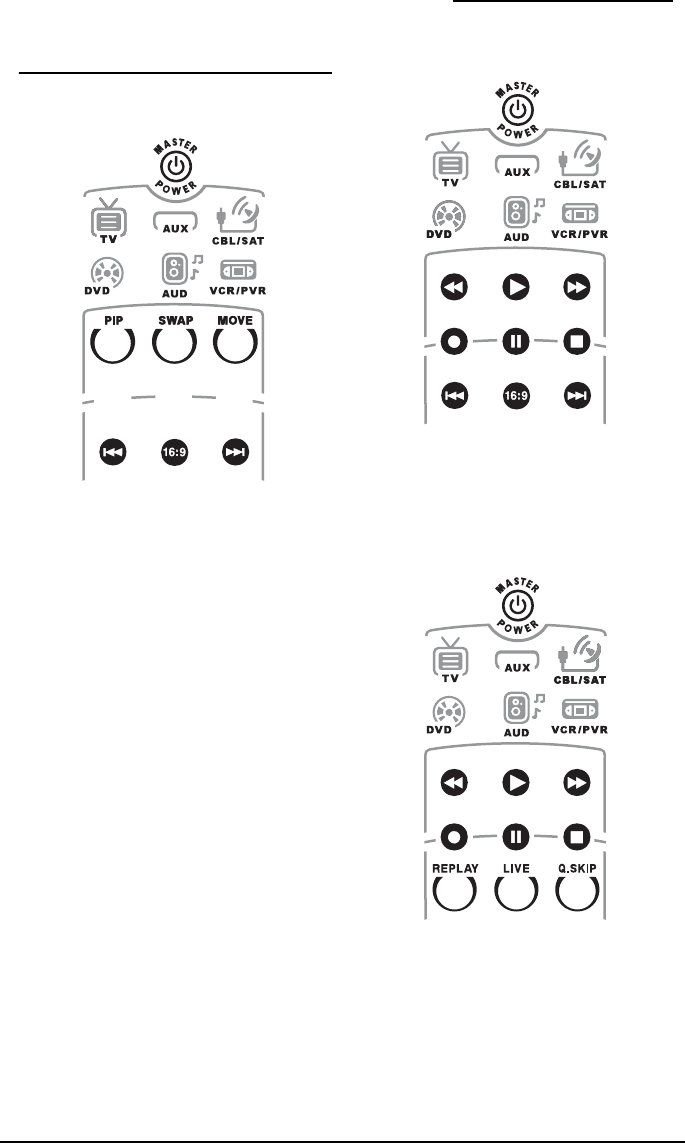
TV SCREEN
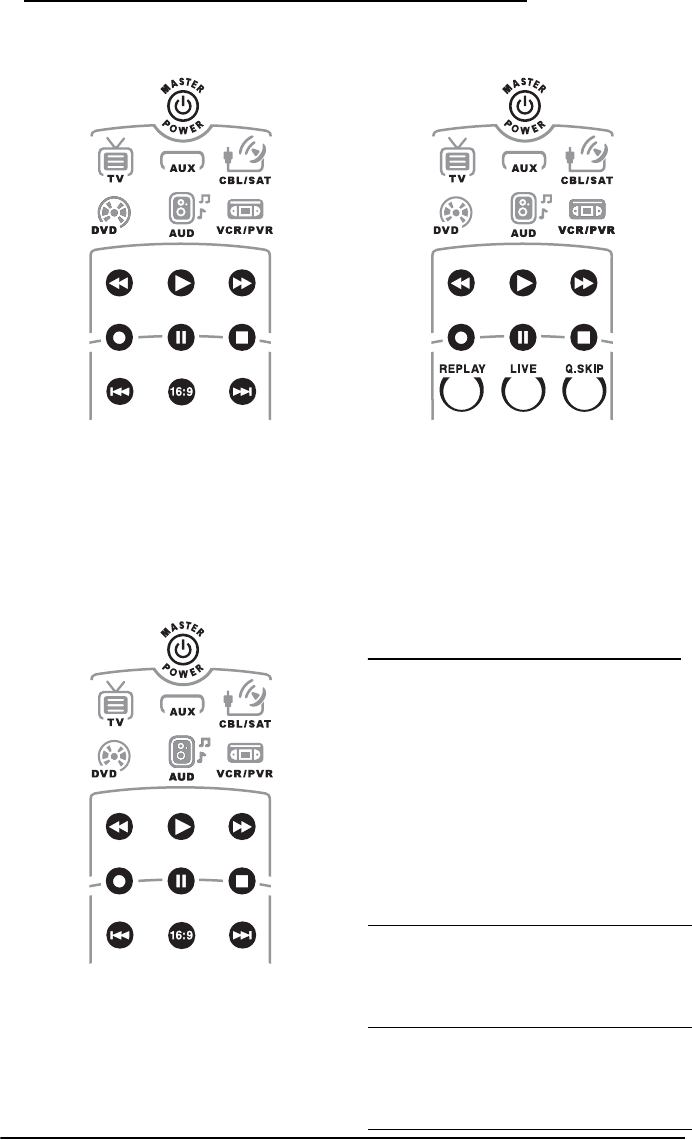
The TV screen displays the PIP and Format
keys. Use these keys to remotely control all
your TV’s common PIP features. Also use
the 16:9 to change the aspect ration of your
TV. Use the |<< and the >>| keys to change
the channel of the PIP Box.
AUX SCREEN
The AUX screen displays the transport keys
to allow you to control your CD player or
other audio device.
CBL/SAT SCREEN
The CBL/SAT screen displays the transport
keys to allow you to control the PVR/DVR
functions of your CBL/DVR or SAT/PVR
device. It also allows you to control the
Instant Replay, Return to Live and Quick
Skip functions.
OFA Kam 6 Hybrid Owners Manual.fm Page 18 Wednesday, March 30, 2005 3:09 PM
OWNER’S MANUAL
Troubleshooting 19
DVD SCREEN
The DVD screen displays the transport keys
to allow you to control your DVD player. The
|<< and >>| keys will also allow you to skip
forward or skip back through the DVD
Chapters.
AUD SCREEN
The AUD screen displays the transport keys
to allow you to control the DVD functions of
a Home Theater In-a-Box device.
VCR/PVR SCREEN
The VCR/PVR screen displays the transport
keys to allow you to control the VCR
functions of your VCR player. Also, if you
have programmed stand alone PVR device
on the VCR/PVR device key, the screen keys
will allow you to control the Instant Replay,
Return to Live and Quick Skip functions.
TROUBLESHOOTING
PROBLEM: Remote does not enter
programming mode or will
not send a command to my
device.
SOLUTION: By design, the first key press
will always make the screen
turn on but will not cause the
remote to take any action until
a key is pressed after the
screen is on.
PROBLEM: Display does not turn on when
you press a key.
SOLUTION: Replace batteries with two
new AA alkaline batteries.
PROBLEM: Inner IR Segments light five
times after you press a key.
SOLUTION: Replace batteries with two
new AA alkaline batteries.
OFA Kam 6 Hybrid Owners Manual.fm Page 19 Wednesday, March 30, 2005 3:09 PM

OFA Kameleon™ 6-Device Hybrid Remote
20 Troubleshooting
PROBLEM: No display when
programming.
SOLUTION: Display has turned off due to
inactivity. Start programming
again and do not pause while
performing instructions.
PROBLEM: During programming, the two
inner IR segments display a
long flash.
SOLUTION: An invalid entry has occurred.
Check the keys to be pressed
and start programming again.
PROBLEM: IR sent animation is displayed
when you press a key, but
home entertainment device
does not respond.
SOLUTION: Make sure the remote control
is aimed at your home
entertainment device and is
not farther than15 feet away.
PROBLEM: The unit does not control
home entertainment devices
or commands are not working
properly.
SOLUTION: Try all listed codes for the
device brands being set up.
Make sure they can be
operated with an infrared
remote control.
PROBLEM: Tried Searching For Your Code
method and still could not
find a working code.
SOLUTION: Perform Restoring Factory
Default Settings on page 17.
Then repeat Searching For
Your Code on page 10.
PROBLEM: Cannot program a macro onto
M1, POWER or other keys.
SOLUTION: Make sure the total number of
key presses being
programmed is less than 15
and that you are not trying to
program a macro on an
invalid key (Device keys, Set
Key and Fav key).
PROBLEM: Power macro does not execute.
SOLUTION: Make sure to press and hold
the POWER for at least three
seconds to initiate Power
Macro.
PROBLEM: Changing channels does not
work properly.
SOLUTION: If original remote control
required pressing ENTER or OK
to change channels, press
ENTER or OK on the remote
control after entering the
channel number.
PROBLEM: During learning, Inner IR
Segments display a long blink
after pressing and holding key
to be learned.
SOLUTION: Memory is full or a bad
capture has occurred. Avoid
high-ambient light sources,
such as direct daylight and
fluorescent bulbs. Try
readjusting positions of
remote controls before
performing the procedure
again.
PROBLEM: Tried Search For Your Code
method and still could not
find a working code.
OFA Kam 6 Hybrid Owners Manual.fm Page 20 Wednesday, March 30, 2005 3:09 PM

OWNER’S MANUAL
FCC Compliance 21
FCC COMPLIANCE
This equipment has been tested and found
to comply with the limits for a class B digital
device, pursuant to part 15 of the FCC Rules.
These limits are designed to provide a
reasonable protection against harmful
interference in a residential installation.
This equipment generates, uses, and can
radiated radio frequency energy and if not
installed and used in accordance with the
instructions, may cause harmful
interference to radio communications.
However, there is no guarantee that
interference will not occur in a particular
installation. If this equipment does cause
harmful interference to radio or television
reception, which can be determined by
turning the equipment off and on, the user
is encouraged to try to correct the
interference by one or more of the following
measures:
• Reorient or relocate the receiving
antenna.
• Increase the separation between the
equipment and receiver.
• Connect the equipment into an outlet
or a circuit different from that to which
the receiver is connected.
• Consult the dealer or an experienced
radio/TV technician for help.
MANUFACTURER’S CODES
SETUP CODES FOR AUDIO AMP/TUNERS
SOLUTION: Clear the device key as follows:
1. Press and hold SET until
the Inner IR Segments
blink twice, then release.
2. Enter 9 9 2.
3. Press the device key to be
cleared twice.
4. Repeat the Search For
Your Co de met h o d .
PROBLEM: The remote changes TV
channels when entered with
the digit keys but does not
operate the channel up or
down correctly (channels are
skipped).
SOLUTION: You will need to “Auto
program” the channels on
your TV. Consult your TVs
owners manual for this
feature.
PROBLEM: No remote control of volume.
SOLUTION: See Changing Volume Lock on
page page 16 to lock/unlock
volume.
PROBLEM: If the above does not work.
SOLUTION: Please contact us in any of the
following ways:
•Please visit
www.oneforall.com
• If the above website is not
able to provide you with
the information you
need, please email us at
ofasupport@ueic.com
and refer to
“Troubleshooting”
•Customer Support:
(330) 405-8620
Mon – Fri from
9AM to 5:30 PM EST
ADC 0531
Adcom 0616
Aiwa 1405, 0158, 0189, 1388,
0121, 0405, 1641
Akai 1512, 0224
Alco 1390
OFA Kam 6 Hybrid Owners Manual.fm Page 21 Wednesday, March 30, 2005 3:09 PM

OFA Kameleon™ 6-Device Hybrid Remote
22 Manufacturer’s Codes
Amphion Media
Works
1563
AMW 1563, 1615
Anam 1609, 1074
Apex Digital 1257, 1430
Arcam 1120
Audiotronic 1189
Audiovox 1627, 1390
Bose 1229, 0639, 1253
Brix 1602
Cambridge
Soundworks
1624, 1370
Capetronic 0531
Carver 1189, 0189, 0360, 0042,
0008
Casio 0195
Clarinette 0195
Classic 1352
Coby 1389, 1263
Criterion 1420
Curtis Mathes 0080
Daewoo 1250
Dell 1383
Denon 1360, 0273, 0004, 0771
Emerson 0424
Fisher 0042, 1801, 0360, 0219
Garrard 0463, 0424
Gateway 1517, 1567
Glory Horse 1263
Go Video 1532
Harman/Kardon 0110, 0189, 0891, 1306
Hewlett Packard 1181
Hitachi 1801
Initial 1426
Inkel 0062
Integra 0135
JBL 0110, 1306
JVC 0074, 1263, 1495, 1374
Kenwood 1313, 1570, 1569, 0027,
0186, 0077, 0042, 0239
KLH 1428, 1412, 1390
Koss 1497, 1366, 0424
Lasonic 1798
Lenoxx 1437
Lexicon 1076
Linn 0189
Liquid Video 1497
Lloyd's 0195
LXI 0181
Magnavox 1189, 1269, 0189, 0195,
0531, 1514, 0128, 0391
Marantz 1189, 1269, 0039, 0189,
1289, 0128
MCS 0039, 0346
Mitsubishi 1393
Modulaire 0195
NAD 0320
Nakamichi 1555, 0347, 0097
NEC 0235
Norcent 1389
Onkyo 0135, 1298, 0842, 0380,
1531
Optimus 1023, 0219, 0738, 1074,
0080, 0186, 0670, 0042
0181, 0531, 0801, 0177
Oritron 1497, 1366
Panasonic 1518, 0039, 1633, 1288,
1548, 1764, 0367, 1763
0309, 1316
Penney 0195
Philips 1189, 1269, 0189, 1120,
0391, 1266
Pioneer 1023, 0150, 0630, 0080,
0531, 1384, 0014, 0244
Polaroid 1508
Polk Audio 0189, 1289
Proscan 1254
Quasar 0039
RadioShack 1263
RCA 1023, 1609, 1254, 1154,
1511, 0080, 0530, 1074
1390, 0054, 0360, 0346,
0531
Realistic 0181, 0163, 0195
Regent 1437
Rio 1383, 1869
Saba 1519
Samsung 1295, 1500
Sansui 0189, 0346
OFA Kam 6 Hybrid Owners Manual.fm Page 22 Wednesday, March 30, 2005 3:09 PM

OWNER’S MANUAL
Manufacturer’s Codes 23
SETUP CODES FOR AUDIO AMPLIFIERS SETUP CODES FOR CABLE CONVERTERS
Sanyo 0219, 1469, 1251, 0801
Scott 0322, 0163
Sharp 0186, 1286
Sharper Image 1556, 1263
Sherwood 0502, 1653, 0491, 1423,
0062, 1077
Sonic Blue 1383, 1532
Sony 1058, 1441, 1258, 1759,
0158, 1758, 0168, 1658
1858, 1406, 1558, 0474,
1349, 1442
Soundesign 0670
Stereophonics 1023
Sunfire 1313
Teac 0163, 1390, 1074, 0463,
1528
Technics 1308, 1518, 0039, 0208,
0309
Thorens 1189
Venturer 1390
Victor 0074
Wards 0158, 0189, 0014, 0080,
0054
Yamaha 0176, 0186, 1331, 1276,
1176, 1375
Yorx 0195
Zenith 1293, 0857
Accuphase 0382
Acurus 0765
Adcom 0577, 1100
Aiwa 0406
AudioSource 0011
Bel Canto Design 1583
Bose 0674
Carver 0269
Classe 1462, 1461
Curtis Mathes 0300
Denon 0160
Durabrand 1561
GE 0078
Harman/Kardon 0892
JVC 0331
Kenwood 0356
Left Coast 0892
Lenoxx 1561
Linn 0269
Luxman 0165
Magnavox 0269
Marantz 0892, 0321, 0269
Mark Levinson 1483
Nakamichi 0321
NEC 0264
Optimus 0395, 0300
Panasonic 0308, 0521
Parasound 0246
Philips 0892, 0269
Pioneer 0300, 0013
Polk Audio 0892, 0269
RCA 0300
Realistic 0395
Sansui 0321
Shure 0264
Sony 0689, 0220, 0815
Soundesign 0078, 0211
Technics 0521, 0308
Victor 0331
Wards 0078, 0013, 0211
Yamaha 0354, 0143, 0133, 0504
ABC 0003, 0008, 0014, 0007,
0013, 0011, 0017
Allegro 0153, 0315
Americast 0899
Antronix 0022
Archer 0797, 0153, 0022
Belcor 0056
Bell & Howell 0014
Bell South 0899
Cable Star 0056
Cabletenna 0022
Cableview 0022
Century 0153
OFA Kam 6 Hybrid Owners Manual.fm Page 23 Wednesday, March 30, 2005 3:09 PM

OFA Kameleon™ 6-Device Hybrid Remote
24 Manufacturer’s Codes
Citizen 0315, 0153
Clearmaster 0883
ClearMax 0883
Cleartron 1327
Colour Voice 0025
Comtronics 0040
Contec 0019
Coolmax 0883
Digi 0637
Director 0476
Dumont 0637
Eastern 0002
Emerson 0797
Everquest 0040, 0015
Focus 0400
Garrard 0153
GC Electronics 0056
Gemini 0797, 0015
General Instrument 0476, 0810, 0276, 0003,
0011
Global 1327
GoldStar 0144, 0040
Goodmind 0797
Hamlin 0009, 0273, 0020, 0259,
0034
Hitachi 0011
Hytex 0007
Jasco 0015, 0315, 0153
Jerrold 0476, 0810, 0276, 0003,
0012, 0014, 0015, 0011
Memorex 0000
Motorola 0476, 0810, 0276, 1254,
1106, 1376
Movie Time 0063
Multitech 0883
NSC 0063
Oak 0019, 0007
Optimus 0021
Pace 1877, 0237
Panasonic 0000, 0107, 0021
Panther 0637
Paragon 0000
Philips 0317, 0153, 0025, 1305
Pioneer 1877, 0877, 0144, 0533
Popular Mechanics 0400
Pulsar 0000
Quasar 0000
RadioShack 0015, 0883, 0797, 0315
RCA 0021
Recoton 0400
Regal 0279, 0273, 0020, 0259
Regency 0002
Rembrandt 0011
Runco 0000
Samsung 0144, 0040
Scientific Atlanta 1877, 0877, 0477, 0008,
0017
Signal 0040, 0015
Signature 0011
SL Marx 0040
Sony 1006
Sprucer 0021
Starcom 0003, 0015
Stargate 0040, 0015, 0797
Starquest 0015
Supercable 0276
Supermax 0883
Tandy 0258
Teleview 0040
Timeless 0040
Tocom 0012, 0013
Torx 0003
Toshiba 0000
Tristar 0883
Tusa 0015
TV86 0063
Unika 0153, 0022
United Artists 0007
Universal 0056, 0022, 0191, 0153
V2 0883
Viewmaster 0883
Viewstar 0258, 0063
Vision 0883
Vortex View 0883
OFA Kam 6 Hybrid Owners Manual.fm Page 24 Wednesday, March 30, 2005 3:09 PM

OWNER’S MANUAL
Manufacturer’s Codes 25
SETUP CODES FOR CABLE/DVR
COMBINATION
SETUP CODES FOR CD PLAYERS
Zenith 0000, 0525, 0899
Zentek 0400
Americast 0899
General Instrument 0476, 0810
Jerrold 0476, 0810
Motorola 0476, 0810, 1106, 1376
Pace 1877, 0237
Pioneer 1877, 0877
Scientific Atlanta 1877, 0877
Sony 1006
Supercable 0276
Zenith 0899
ADC 0018
Adcom 0234, 0155
Aiwa 0157, 0012, 0124
Akai 0156
Audio Alchemy 0194
Audio-Technica 0170
BSR 0194, 0245
Burmester 0420
California Audio Labs 0029, 0303
Carrera 0194
Carver 0157, 0179, 0437
Classic 1297
Crown 0122
DAK 0245
DBX 0254
Denon 0873, 0003
DKK 0000
DMX Electronics 0157
Emerson 0305, 0164, 0155, 0469
Fisher 0179, 0174, 1325, 0088,
0342
Garrard 0245, 0420, 0393, 0280,
0425
GE 0009
Gemini 0625
Genexxa 0032, 0305, 0164
GoldStar 0417
GPX 1296
Harman/Kardon 0157, 0173, 1202, 0426
Hitachi 0032, 0155
Integra 0101
JVC 0072, 1294, 0655
Kenwood 0681, 0826, 0028, 0037,
0190
KLH 1318
Kodak 0287
Koss 1317
Krell 0157
Kyocera 0018
Linn 0157
Luxman 0093
LXI 0305
Magnavox 0157, 0305
Marantz 0626, 0029, 0157, 0180
Mark Levinson 1484
McIntosh 0287
MCS 0029, 0043
Miro 0000
Mission 0157
MTC 0625, 0420
Nakamichi 0147
NEC 0234, 0043
Nikko 0174, 0170, 0164, 0625
NSM 0157
Onkyo 0868, 0101
Optimus 1063, 0000, 0032, 0037,
0175, 0196, 0342, 0437
1075, 0145, 0194, 0305,
0426, 0087, 0179, 0280
0420, 0468
Panasonic 0029, 0752, 0303
Parasound 0194, 0420
Philips 0626, 0157, 0287
Pioneer 1063, 0032, 0305, 0468
Polk Audio 0157
Proton 0157
QED 0157
Quad 0157
OFA Kam 6 Hybrid Owners Manual.fm Page 25 Wednesday, March 30, 2005 3:09 PM

OFA Kameleon™ 6-Device Hybrid Remote
26 Manufacturer’s Codes
SETUP CODES FOR CD-R
SETUP CODES FOR DBS/PVR
COMBINATION
(Programmed using the VCR/PVR Key)
SETUP CODES FOR DVD PLAYERS
Quasar 0029
RadioShack 1075
RCA 1062, 0032, 0179, 0468,
0009, 0155, 0420, 0053
0305, 0764
Realistic 0180, 0155, 0179, 0175,
0420, 0164
Rotel 0157, 0420
SAE 0157
Sansui 0157, 0202, 0305
Sanyo 0179, 0087
Scott 0305, 0164, 0155
Sears 0305
Sharp 0861, 0037, 0180
Sherwood 1067, 0426, 0196, 0180
Shure 0043
Sonic Frontiers 0157
Sony 0490, 0000, 0185, 0605,
0100, 0604, 1364
Soundesign 0425, 0145
STS 0018
Symphonic 0305
TAG McLaren 0157
Tascam 0420
TDK 1208
Teac 0180, 0174, 0420, 0393
Technics 0029, 0303, 0207
Tivoli Audio 1553
Vector Research 0417, 0194
Victor 0072
Wards 0157, 0053
Yamaha 0888, 0036, 0170, 1292,
0187
YBA 0625
Yorx 0461
Classic 1297
Fisher 1325
GPX 1296
Harman/Kardon 1202
JVC 1294
Kenwood 0626
LG 1208
Marantz 0626
Philips 0626
Pioneer 1062, 1087
Sony 0000, 0100, 1364
TDK 1208
Teac 0420
Yamaha 0888, 1292
Echostar 1945, 1944, 1943, 1946
Expressvu 1944
Hughes Network
Systems
0739, 1239, 0745, 1949,
0740, 1240
Hyundai 1951
JVC 1945
Philips 1949, 0739
Proscan 1954
RCA 1989, 1964
Sony 1956, 1957
Adcom 1094
Advent 1016
Aiwa 0641, 1912
Akai 0770, 1975, 1089, 0899
Alco 0790
Allegro 0869
Amphion Media
Works
1176, 0872, 2001
AMW 1176, 0872, 2016, 2001
Anaba 0813
Anam 1913
Apex Digital 0672, 0717, 1020, 1100,
0796, 1004, 1061, 1937
0794, 0830, 1056, 1915,
0755, 0797
Aspire Digital 1168
Audiologic 0736
OFA Kam 6 Hybrid Owners Manual.fm Page 26 Wednesday, March 30, 2005 3:09 PM

OWNER’S MANUAL
Manufacturer’s Codes 27
Audiovox 1071, 1122, 1041, 1121,
1072
Axion 1072, 1071
B & K 0662, 0655
Bel Canto Design 1571
Blaupunkt 0717
Blue Parade 0571
Boss Audio Systems 1093
Broksonic 0868, 0695
Cambridge
Soundworks
1916
CAVS 1057
CineVision 0876, 0869
Clarion 0892, 0891, 1039
Classic 1917
Coby 0852, 1165, 0778, 1107,
1086, 1923
Criterion 2007
Curtis Mathes 1087
CyberHome 1023, 1129, 1019, 1117,
0816, 1024
Daewoo 0784, 0869, 1918, 0833,
1234, 1172, 0705
Denon 0490, 0634
Disney 0675
Dual 1085, 1068
DVD2000 0521
Emerson 0591, 0821, 0675
Enterprise 0591
Farenheit 1054, 0890, 1142, 0887,
1066
Fisher 0670, 1919
FlexVision 1134
Fun TV 1055
Funai 0675
Gateway 1077, 1073, 1158
GE 0522, 0815, 0717
Go Video 0744, 0833, 1075, 1158,
0783, 1044, 1144, 1970
0869, 1099, 1730
Go Vision 1071, 1072
GPX 0769, 0699
Greenhill 0717
Harman/Kardon 0702, 0582
Hitachi 0573, 0664, 1919
Hiteker 0672
Honda 1114
Honyas 1142
Initial 0717, 1931
Integra 0627, 1924
Jamo 2003
Jaton 1078
JBL 0702, 1926
JVC 0558, 0623, 0867, 1940,
1901
jWin 1049, 1051
Kawasaki 0790
Kenwood 0490, 0534, 0737, 0682
KLH 0717, 1020, 0790, 1939,
1149
Konka 0719, 0711, 0721, 0720
Koss 0651, 1980
Landel 0826
Lasonic 0798, 1173
Lenoxx 1938
LG 0591, 0869
Liquid Video 1980
Lite-On 1058, 1158
Magnavox 0503, 0539, 0675, 1976,
1914, 0821
Malata 1159, 0782
Marantz 0539
Memorex 0695
Microsoft 0522
Mintek 0839, 0717
Mitsubishi 1521, 0521
Momitsu 1082
Nesa 0717
Next Base 0826
Niro 2024
Nissho Iwai 1055
Norcent 1003, 0872, 1923, 1107
Onkyo 0503, 0627, 1985, 1924
Optiview 0813
Oritron 0651, 1980
OFA Kam 6 Hybrid Owners Manual.fm Page 27 Wednesday, March 30, 2005 3:09 PM

OFA Kameleon™ 6-Device Hybrid Remote
28 Manufacturer’s Codes
SETUP CODES FOR DVD/PVR
COMBINATION
SETUP CODES FOR DVD/VCR
COMBINATION
Programmed Using the DVD Key
Panasonic 0490, 1362, 1762, 1909,
1990, 0824, 1490, 1908
1986, 0632, 1462, 1907,
1925, 2017
Philco 2000
Philips 0503, 0539, 0646, 1914,
0885, 0854
Pioneer 0525, 0571, 0632, 1902,
1059
Polaroid 1061, 1998, 1200, 1086
Polk Audio 0539
Portland 0770
Princeton 0674
Proscan 0522
ProVision 0778
Qwestar 0651
RCA 0522, 0571, 0717, 0822,
1193, 1974, 1132, 1965
1022, 1913
Regent 1938
Rio 2002
Rotel 0623
Rowa 0823
Saba 1977
Sampo 0752, 0698
Samsung 0490, 0573, 0820, 1075,
1044, 1979, 0899, 1932
Sansui 0695
Sanyo 1967, 0873, 0695, 0670
Sensory Science 1158
Sharp 0630, 0752
Sharper Image 1995, 1117
Sherwood 0633, 1077, 1043, 0770
Shinsonic 0533, 0839, 1931
Sigma Designs 0674
Sonic Blue 1970, 1099
Sony 0533, 1533, 0864, 1095,
1904, 2020, 1033, 1903
1981, 1934
Sova 1122
Sungale 1074
SVA 0860, 1105
Sylvania 0821, 0675
Symphonic 0675
Teac 1984, 0790
Technics 0490
Technosonic 0730
Techwood 0692
Terapin 1031
Theta Digital 0571
Tivo 1996
Toshiba 0503, 1154, 2006, 1045,
1996, 0695, 1988
Tredex 0799, 0804, 0803, 0800
TView 0813
Urban Concepts 0503
US Logic 0839
V Inc. 1226, 1064
Venturer 0790
Vocopro 1027
Xbox 0522
Xwave 1001
Yamaha 0490, 0539, 0545
Zenith 0503, 0591, 1906, 0869
RCA 0880
Toshiba 1503, 1008
Allegro 0869
Apex Digital 1061
Broksonic 0695
CineVision 0869
Daewoo 0869, 0833
Emerson 0675
Funai 0675
Go Video 0744, 1044, 0715, 0869,
0833, 1075
Hitachi 0664
JVC 0867
OFA Kam 6 Hybrid Owners Manual.fm Page 28 Wednesday, March 30, 2005 3:09 PM

OWNER’S MANUAL
Manufacturer’s Codes 29
Programmed Using the VCR Key
SETUP CODES FOR DVD-R
SETUP CODES FOR HD-TV DECODER
SETUP CODES FOR HOME AUTOMATION
Memorex 0695
Panasonic 1762
Philips 0675
Polaroid 1061
RCA 0822
Rio 2002
Samsung 1075, 1044, 0820
Sansui 0695
Sanyo 0873
Sharp 0630
Sonic Blue 2002
Sony 0864
Sylvania 0675
Symphonic 0675
Toshiba 0503
Zenith 0869
Emerson 1593
Funai 1593
Hitachi 0000
RCA 0060
Sanyo 0104
Sharp 0848
Sylvania 0000, 1593, 0593
Symphonic 0000, 1593
Apex Digital 1056
Aspire Digital 1168
Coby 1086
CyberHome 1129
Funai 0675
Gateway 1073, 1158
Go Video 1730, 1158
Lite-On 1158
Panasonic 0490
Philips 0646
Polaroid 1086
Samsung 0490
Sensory Science 1158
Sony 1033
Sylvania 0675
Toshiba 1988
LG 1415
Macro Image
Tec hno log y
1383
Motorola 1363
MyHD 1383
Panasonic 1120
Pioneer 1010
Princeton 0113, 0295
Samsung 1190, 1490
Sensory Science 1126
Sharp 1010
Viewsonic 1329
Accutek 1215
Bionaire 1215
Da-Lite 0780
Frigidaire 1333
GE 0240
GoldStar 1537
Holmes 1215
KENMORE 1537
Lasko 0846
LG 1537
Lightolier 0184
LiteTouch 0084
Lutron 0597, 1239, 1597
One For All 0167
RadioShack 0240
Security System 0167
Sharper Image 0846
Somfy 0780
Universal X10 0167
Whirlpool 1332
Windmere 1215
X10 0167
OFA Kam 6 Hybrid Owners Manual.fm Page 29 Wednesday, March 30, 2005 3:09 PM

OFA Kameleon™ 6-Device Hybrid Remote
30 Manufacturer’s Codes
SETUP CODES FOR HTIB - HOME THEATER
IN-A-BOX
(Programmed using the DVD key)
SETUP CODES FOR MISCELLANEOUS AUDIO
SETUP CODES FOR PVRS
(Programmed using the VCR/PVR key)
Aiwa 0641, 1912
Akai 1975
Amphion Media
Works
2016, 2001
AMW 2001, 2016
Anam 1913
Apex Digital 1915, 1937
Audiovox 0790
Cambridge
Soundworks
1916
Classic 1917
Coby 1923
Criterion 2007
Daewoo 1918
Fisher 1919
Go Video 1970
Hitachi 1919
Initial 1931
Jamo 2003
JBL 1926
JVC 1940, 1901
KLH 0790, 1939
Koss 0651, 1980
LG 1906
Liquid Video 1980
Magnavox 1976
Niro 2024
Norcent 1923
Onkyo 0627, 1924, 1985
Oritron 0651, 1980
Panasonic 1990, 1909, 1986, 1908,
1925, 2017, 1907, 1910
Philips 1914, 0885
Pioneer 1902
Polaroid 1998
Polk Audio 0539
RCA 1965, 1913, 0790, 1974
Regent 1938
Rio 0869, 2002
Saba 1977
Samsung 1979, 1932
Sanyo 1967
Sharper Image 1995
Sonic Blue 0869, 2002, 1970
Sony 1903, 1981, 1934, 1904,
2020
Teac 1984, 0790
Toshiba 2006
Venturer 0790
Zenith 1906
Aiwa 0010, 0159
Altec Lansing 1485
Cambridge
Soundworks
1530
Creative 0872
Jerrold 0520, 0459
Marantz 1491
Motorola 1464
Omnifi 1605
Scientific Atlanta 0460
Sony 0010, 0159
Starcom 0459
ABS 1972
Alienware 1972
CyberPower 1972
Dell 1972
DirecTV 1949, 0739, 1989, 1954
Dish Network System 1943, 1946, 1945, 1944
Dishpro 1943, 1944
Echostar 1944, 1943, 1946, 1945
Expressvu 1944
Gateway 1972
GOI 1944
Hauppauge 1992
Hewlett Packard 1972
Howard Computers 1972
OFA Kam 6 Hybrid Owners Manual.fm Page 30 Wednesday, March 30, 2005 3:09 PM

OWNER’S MANUAL
Manufacturer’s Codes 31
SETUP CODES FOR SATELLITE RECEIVER/
PVR COMBINATION
(Programmed using the CBL/SAT key)
SETUP CODES FOR SATELLITE RECEIVERS
HP 1972
HTS 1944
Hughes Network
Systems
1949, 0739
Humax 0739
Hush 1972
Hyundai 1951
iBUYPOWER 1972
JVC 1945, 1944
LG 2010
Linksys 1972
Media Center PC 1972
Microsoft 1972
Mind 1972
Niveus Media 1972
Northgate 1972
Panasonic 0616
Philips 1949, 0739, 0618
Proscan 1954
RCA 1954, 0880, 1989
ReplayTV 0616, 0614
Sonic Blue 0616, 0614
Sony 0636, 1972, 1957, 1956
Stack 9 1972
Systemax 1972
Tagar Systems 1972
Tivo 0618, 0740, 1240, 0739,
1239, 1957, 0636, 0745
1956
Toshiba 1008, 1972
Touch 1972
UltimateTV 1989
Viewsonic 1972
Voodoo 1972
ZT Group 1972
Echostar 0775, 1505, 1170
Expressvu 0775
Hughes Network
Systems
1142, 1442, 1538, 1444,
1443, 1539
JVC 1170
Philips 1142, 1442
Proscan 0392
RCA 1392
Sony 0639, 1640
AlphaStar 0772
Century 0856
Chaparral 0216
Crossdigital 1109
DirecTV 0392, 0566, 0639, 1639,
1142, 0247, 0749, 1749
0724, 0819, 1856, 1076,
1109, 0099, 1392, 1443
1539, 1442, 1538, 1640,
1414, 1444, 1108
Dish Network System 1005, 0775, 1775, 1505,
1170
Dishpro 1005, 0775, 1775, 1505
Echostar 1005, 0775, 1170, 1775,
1505
Expressvu 0775, 1775
GE 0566
General Instrument 0869
GOI 0775, 1775
Gradiente 0856
Hisense 1535
Hitachi 0819
HTS 0775, 1775
Hughes Network
Systems
1142, 0749, 1749, 1443,
1539, 1442, 1538, 1444
I-Lo 1535
JVC 0775, 1775, 1170
LG 1414
Magnavox 0724, 0722
Memorex 0724
Mitsubishi 0749
Motorola 0869, 0856
Next Level 0869
Panasonic 0247, 0701
OFA Kam 6 Hybrid Owners Manual.fm Page 31 Wednesday, March 30, 2005 3:09 PM

OFA Kameleon™ 6-Device Hybrid Remote
32 Manufacturer’s Codes
SETUP CODES FOR TVS
Paysat 0724
Philips 1142, 0749, 1749, 0724,
1076, 0722, 0099, 1442,
0856
Proscan 0392, 0566
Proton 1535
RadioShack 0869
RCA 0392, 0566, 0855, 0143,
1392
Samsung 1276, 1109, 1108
SKY 0856
Sony 0639, 1639, 1640
Star Choice 0869
Tivo 1142, 1443, 1539, 1442,
1538, 1444
Toshiba 0749, 1749, 0790, 1285
UltimateTV 1640, 1392
Uniden 0724, 0722
US Digital 1535
USDTV 1535
Viva 0856
Voom 0869
Zenith 1856, 0856
A-Mark 0003
Abex 0032
Admiral 0093, 0463
Advent 0761, 0815, 1933, 0783,
0842, 0817
Adventura 0046
Aiko 0092
Aiwa 1914
Akai 0812, 0702, 0030, 0672,
1903
Alaron 0179
Albatron 0700, 0843
Ambassador 0177
America Action 0180
Ampro 0751
Anam 0180
Anam National 0055
AOC 0030, 0052, 0019, 0185,
0003
Apex Digital 0748, 0765, 1943, 0879,
0767
Archer 0003
Audiovox 0451, 0180, 1951, 0092,
0623, 1937, 0003, 0875
1952, 0802
Aventura 0171
Axion 1937
Belcor 0019
Bell & Howell 0154, 0016
BenQ 1032
Bradford 0180
Brockwood 0019
Broksonic 0236, 0463, 1938, 0003,
1935
Candle 0030, 0046, 0186, 0056
Carnivale 0030
Carver 0054
CCE 0217
Celebrity 0000
Celera 0765
Changhong 0765
Citizen 0060, 0030, 0280, 0056,
0186, 0046, 0092, 0039
Clairtone 0185
Clarion 0180
Commercial Solutions 1447, 0047
Concerto 0056
Contec 0180, 0157, 0185
Craig 0180
Crosley 0054
Crown 0180, 0039
Curtis Mathes 0047, 0054, 0154, 0451,
0093, 0060, 0702, 0030
0145, 0166, 0466, 1347,
0039, 0056, 1147, 0016
CXC 0180
Daewoo 0451, 1661, 0092, 0672,
0039, 0623, 1909, 0019
Daytron 0019
Dell 1178, 1080
OFA Kam 6 Hybrid Owners Manual.fm Page 32 Wednesday, March 30, 2005 3:09 PM

OWNER’S MANUAL
Manufacturer’s Codes 33
Denon 0145
Dumont 0017, 0019
Durabrand 0463, 0180, 0178, 0171,
0003, 1034
Dwin 0774, 0720
Electroband 0000, 0185
Electrograph 1755
Electrohome 0381
Emerson 0154, 0236, 0463, 0180,
0178, 0171, 0280, 0623
0038, 1944, 0179, 0019,
1911, 0185, 0282, 1909
0039, 0177
Envision 0030, 0813
Epson 0833, 0840
ESA 0812, 0171
Fisher 0154, 0159
Fujitsu 0683, 0179, 0853, 0809
Funai 0180, 0171, 0179
Futuretech 0180
Gateway 1756, 1755
GE 1447, 0047, 0051, 0451,
0178, 0055, 0282, 1347
0021, 1147, 0135, 0027
Gibralter 0017, 0030, 0019
Go Video 0886
GoldStar 0030, 0178, 0001, 0032,
0019
Grunpy 0180, 0179
Haier 0768, 1034
Hallmark 0178
Harley Davidson 0179
Harman/Kardon 0054
Harvard 0180
Havermy 0093
Helios 0865
Hello Kitty 0451
Hisense 0748
Hitachi 1145, 0145, 0056, 0038,
0151, 0032, 0016
Hyundai 0849
Infinity 0054
Inteq 0017
Janeil 0046
JBL 0054
JCB 0000
Jensen 0761, 0817, 0815
JVC 0053, 1253
Kaypani 0052
KEC 0180
Kenwood 0030, 0019
KLH 0765, 0767
Kloss 0046, 0024
Konka 0638, 1939, 0632, 0707,
0628, 0703, 1940
KTV 0180, 0030, 0280, 0039,
0217, 0185
LG 0178, 0856, 0700, 1178,
0007
Logik 0016
Luce 1031
Luxman 0056
LXI 0047, 0054, 0154, 0156,
0178
Magnasonic 1913
Magnavox 1454, 0054, 0030, 0706,
0179, 0386, 0024, 0096
0187, 1254, 1944, 0020,
0186, 1913
Majestic 0016
Marantz 0054, 0030, 0854, 0704,
1154, 0855
Matsushita 0250, 0650
Maxent 1755
Megapower 0700
Megatron 0178, 0145, 0003
MEI 0185
Memorex 0154, 0463, 0150, 0178,
0179, 1920, 0016, 1911
MGA 0150, 0030, 0178, 0019
Midland 0047, 0017, 0051, 0039,
0135, 0032
Minutz 0021
Mitsubishi 0093, 1250, 0150, 0178,
0868, 0836, 0019
Monivision 0843, 0700
OFA Kam 6 Hybrid Owners Manual.fm Page 33 Wednesday, March 30, 2005 3:09 PM

OFA Kameleon™ 6-Device Hybrid Remote
34 Manufacturer’s Codes
Motorola 0093, 0055
MTC 0060, 0030, 0185, 0019,
0056
Multitech 0180, 0217
NAD 0156, 0178, 0866
NEC 0030, 0019, 0497, 0056,
1704, 0882
NetTV 1755
Nikko 0030, 0178, 0092
Norcent 0748, 0824
Noshi 0018
NTC 0092
Onwa 0180
Optimus 0154, 0250, 0166, 1913,
0650, 1927, 1924
Optoma 0887
Optonica 0093, 0165
Orion 0236, 0463, 1911, 0179,
1463
Panasonic 0250, 0051, 1924, 1946,
0055, 1410, 1941, 0650
1927, 1947
Penney 0047, 0156, 0051, 0060,
0030, 0178, 0019, 0135
1347, 0018, 0027, 0039,
0003, 0021, 0032
Philco 0054, 0030, 0020, 0096,
0019
Philips 1454, 0054, 0690, 1154
Pilot 0030, 0019, 0039
Pioneer 0166, 0038, 0866, 0679
Portland 0092, 0039, 0019
Prima 0761, 0817, 0815, 0783
Princeton 0717, 0700
Prism 0051
Proscan 1447, 0047, 1347, 1922
Proton 0178, 0052, 0003, 0466
Pulsar 0017, 0019
Quasar 0250, 0051, 0165, 0055,
0650
RadioShack 0047, 0154, 0180, 0030,
0178, 1904, 0019, 0039
0032, 0056, 1920, 0165
RCA 1447, 0047, 1948, 0019,
0090, 1047, 1347, 1922
0018, 1958, 0679, 1247,
1547, 1953, 0038, 0135
1147
Realistic 0154, 0180, 0030, 0178,
0019, 0039, 0165, 0032
0056
Rhapsody 0185
Runco 0017, 0030, 0603, 0497
Sampo 0030, 0039, 0032, 1755,
0052
Samsung 0060, 0812, 0702, 0030,
0178, 1060, 0019, 0056
0814, 0032, 1903, 0766
Samsux 0039
Sansui 0463, 1935, 1911
Sanyo 0154, 0146, 0799, 0159,
0893
Scimitsu 0019
Scotch 0178
Scott 0236, 0180, 0178, 0179,
0019
Sears 0047, 0054, 0154, 0156,
0178, 0171, 0146, 0159
0179, 0056
Sharp 0093, 0386, 0689, 0039,
0165, 0688, 1917, 0157
0491, 0851
Sharper Image 1950
Sheng Chia 0093
Shogun 0019
Signature 0016
Simpson 0187, 0186
Sony 1100, 0000, 0834, 0111,
0080
Soundesign 0180, 0178, 0179, 0186
Sova 1952
Spectricon 0003
Squareview 0171
SSS 0180, 0019
Starlite 0180
Studio Experience 0843
Superscan 0864
OFA Kam 6 Hybrid Owners Manual.fm Page 34 Wednesday, March 30, 2005 3:09 PM

OWNER’S MANUAL
Manufacturer’s Codes 35
SETUP CODES FOR TV/DVD COMBINATION
(Programmed using the TV key)
SETUP CODES FOR TV/VCR COMBINATION
(Programmed using the TV key)
Supre-Macy 0046
Supreme 0000
SVA 0748, 0870, 0587, 0865,
0872, 0768, 0871
Sylvania 0054, 0030, 0171, 0020,
0096, 1944, 0381
Symphonic 0180, 0171, 1913
Tandy 0093
Tatung 1756, 0055, 0003
Technics 0250, 0051
Technol Ace 0179
Techview 0847
Techwood 0051, 0003, 0056
Teco 1040
Teknika 0054, 0180, 0150, 0060,
0056, 0186, 0016, 0092
0039, 0179, 0019
Telefunken 0702, 0056
TMK 0178, 0056, 0177
TNCi 0017
Toshiba 0154, 1256, 0156, 0060,
0650, 1156, 1656, 1935
0845, 1356, 1918, 0832,
1704, 1945
Tosonic 0185
Totevision 0039
Trical 0157
TVS 0463
Universal 0027
V Inc. 0864, 1756, 0885
Vector Research 0030
Victor 0053
Vidikron 0054
Vidtech 0178, 0019
Viewsonic 0864, 0857, 1755, 0885
Viking 0046
Wards 0054, 0030, 0178, 0021,
0096, 1156, 0020, 0080
0165, 0866, 0019, 0027,
0056, 0111, 0179, 0016
Waycon 0156
Westinghouse 0889
White Westinghouse 0463, 0623, 1909
Yamaha 0030, 0839, 0019, 0833,
0769
Zenith 0017, 0463, 0178, 0092,
1909, 0016, 1911
Zonda 0003
Advent 1933
Apex Digital 1943
Audiovox 1937, 1952, 1951
Axion 1937
Broksonic 1935
Jensen 1933
Konka 1939, 1940
Panasonic 1941
Prima 1933
RCA 1948, 1958
Samsung 1903
Sansui 1935
Sova 1952
Sylvania 0171
Toshiba 1935
Aiwa 1914
America Action 0180
Audiovox 0180
Broksonic 1929, 1911, 1905
Citizen 1928
Colt 1906
Curtis Mathes 1919
Daewoo 1928, 1909
Emerson 0236, 1905, 1928, 1911,
1909, 1929
Funai 1904
GE 1907, 1922, 1919, 1917
GoldStar 1926
Harley Davidson 1904
Hitachi 1904
JVC 1923
OFA Kam 6 Hybrid Owners Manual.fm Page 35 Wednesday, March 30, 2005 3:09 PM

OFA Kameleon™ 6-Device Hybrid Remote
36 Manufacturer’s Codes
SETUP CODES FOR TV/VCR/DVD
COMBINATION
(Programmed using the TV key)
SETUP CODES FOR VCRS
Lloyd's 1904
Magnasonic 1928, 1913
Magnavox 1931, 1913, 1904
Magnin 1907
Memorex 1924, 1920, 1927, 1926
MGA 1907
Mitsubishi 1917
Optimus 1924, 1913, 1927
Orion 1929, 1911, 1905
Panasonic 1927, 1924, 1919
Penney 1926, 1919, 1907
Quasar 1924, 1919
RadioShack 1904, 1920
RCA 1917, 1907, 1922, 1919
Sansui 1911, 1904, 1929
Sanyo 1907
Sears 1904, 1926
Sony 1925, 1904
Sylvania 1931
Symphonic 1913, 1904
Thomas 1904
Toshiba 1936, 1918
White Westinghouse 1909
Zenith 1929, 1911, 1904
Akai 1903
Broksonic 1938
Emerson 1944
Panasonic 1947, 1946
RCA 1953
Sharp 1917
Sylvania 1944
Toshiba 1945
ABS 1972
Admiral 0048, 0209
Adventura 0000
Aiko 0278
Aiwa 0037, 0000, 0307
Akai 0041, 0106, 0061
Alienware 1972
America Action 0278
American High 0035
Asha 0240
Audiovox 0037, 0278
Beaumark 0240
Bell & Howell 0104
Broksonic 0184, 0121, 0209
Calix 0037
Canon 0035
Capehart 0020
Carver 0081
CCE 0072, 0278
Citizen 0037, 0278
Colt 0072
Craig 0037, 0047, 0240, 0072,
0271
Curtis Mathes 0060, 0035, 0162, 0041,
0760
Cybernex 0240
CyberPower 1972
Daewoo 0045, 0278, 0020, 0561
Daytron 0020
Denon 0042
DirecTV 0739, 1239, 1954, 0745,
1949, 0740, 1240, 1989
Dish Network System 1944, 1943, 1946, 1945
Dishpro 1943, 1944
Durabrand 0039, 0038
Dynatech 0000
Echostar 1945, 1944, 1943, 1946
Electrohome 0037
Electrophonic 0037
Emerex 0032
Emerson 0037, 0184, 0000, 0121,
0043, 0209, 0002, 0278
0561, 0061, 0208, 0479,
1593, 0593
Euro1 1962
OFA Kam 6 Hybrid Owners Manual.fm Page 36 Wednesday, March 30, 2005 3:09 PM

OWNER’S MANUAL
Manufacturer’s Codes 37
Expressvu 1944
Fisher 0047, 0104
Fuji 0035, 0033
Funai 0000, 0593, 1593
Garrard 0000
Gateway 1972
GE 0060, 0035, 0760, 0202,
0761
Go Video 0526, 0432
GOI 1944
GoldStar 0037, 0038
Gradiente 0000
Harley Davidson 0000
Harman/Kardon 0081, 0038
Harwood 0072
Hauppauge 1992
Headquarter 0046
Hewlett Packard 1972
HI-Q 0047
Hitachi 0000, 0042, 0041, 0105
HTS 1944
Hughes Network
Systems
0042, 0739, 1239, 0745,
1949, 0740, 1240
Humax 0739
Hush 1972
iBUYPOWER 1972
Jensen 0041
JVC 0067, 0041, 0008, 1944,
1945
KEC 0037, 0278
Kenwood 0067, 0041, 0038
KLH 0072
Kodak 0035, 0037
LG 2010
Linksys 1972
Lloyd's 0000, 0208
Logik 0072
LXI 0037
Magnasonic 0593
Magnavox 0035, 0039, 0081, 0149,
0593, 0563
Magnin 0240
Marantz 0035, 0081
Marta 0037
Matsushita 0035, 0162, 1162
MEI 0035
Memorex 0035, 0037, 0048, 0039,
0047, 0240, 0000, 0104
0209, 0479, 0046, 0307,
1037
MGA 0043, 0061
MGN Technology 0240
Microsoft 1972
Mind 1972
Minolta 0042, 0105
Mitsubishi 0067, 0043, 0061
Motorola 0035, 0048
MTC 0240, 0000
Multitech 0000, 0072
NEC 0104, 0067, 0041, 0038
Nikko 0037
Niveus Media 1972
Noblex 0240
Northgate 1972
Olympus 0035
Optimus 1062, 0162, 0037, 0048,
0104, 0593, 1162, 0432
1048, 1262
Optonica 0062
Orion 0184, 0209, 0479
Panarex 1950
Panasonic 1062, 0035, 0162, 1262,
0225, 1162, 0616
Pansat 1950
Penney 0035, 0037, 0240, 0042,
0038
Pentax 0042, 0105
Philco 0035
Philips 0035, 0081, 1181, 1081,
0062, 0739, 1949, 0618
Pilot 0037
Pioneer 0067
Polk Audio 0081
Portland 0020
Profitronic 0240
OFA Kam 6 Hybrid Owners Manual.fm Page 37 Wednesday, March 30, 2005 3:09 PM

OFA Kameleon™ 6-Device Hybrid Remote
38 Manufacturer’s Codes
SETUP CODES FOR VIDEO ACCESSORIES
Proscan 0060, 0760, 1954, 0202,
1060, 0761
Protec 0072
Pulsar 0039
Quarter 0046
Quartz 0046
Quasar 0035, 0162, 1162
RadioShack 0000, 1037
Radix 0037
Randex 0037
RCA 0060, 0042, 0149, 0880,
1964, 0761, 1954, 0106
0760, 1060, 1989, 0105,
0202
Realistic 0035, 0037, 0048, 0047,
0000, 0104, 0046, 0062
ReplayTV 0616, 0614
Ricavision 1972
Runco 0039
Samsung 0240, 0045, 1014
Sanky 0048, 0039
Sansui 0067, 0209, 0041, 0271,
0479
Sanyo 0047, 0240, 0104, 0046
Scott 0184, 0045, 0121, 0043
Sears 0035, 0037, 0047, 0042,
0104, 0046, 0105
Sharp 0048, 0738, 0062, 0848,
0807
Shintom 0072
Shogun 0240
Singer 0072
Sonic Blue 0616, 0614
Sony 0035, 0032, 0033, 1972,
1032, 0636
Stack 9 1972
STS 0042
Sylvania 0035, 0081, 0000, 0043,
0593, 1593
Symphonic 0000, 0593, 1593
Tagar Systems 1972
Tatung 0041
Teac 0000, 0041
Technics 0035, 0162
Teknika 0035, 0037, 0000
Tivo 0739, 1239, 1956, 0636,
0745, 1503, 0618, 0740
1240, 1957
TMK 0240, 0208
Toshiba 0045, 0043, 0845, 1503,
1008
Totevision 0037, 0240
Touch 1972
UltimateTV 1989
Unitech 0240
Vector 0045
Vector Research 0038
Video Concepts 0045, 0061
Videomagic 0037
Videosonic 0240
Viewsonic 1972
Villain 0000
Voodoo 1972
Wards 0060, 0035, 0048, 0047,
0081, 0240, 0000, 0042
0072, 0149, 0062, 0760
White Westinghouse 0209, 0072
XR-1000 0035, 0000, 0072
Yamaha 0038
Zenith 0039, 0033, 0209, 1139,
0479
ZT Group 1972
ABS 1272
Alienware 1272
Archer 0160
Bantor 0160
CyberPower 1272
Dwin 1093
Faroudja 0300
Focus Enhancements 1357, 1346, 1345
Gateway 1272
GC Electronics 0160
Hewlett Packard 1272, 1267
OFA Kam 6 Hybrid Owners Manual.fm Page 38 Wednesday, March 30, 2005 3:09 PM

OWNER’S MANUAL
Limited Warranty 39
LIMITED WARRANTY
One For All® warrants, to the original
purchaser only, that this product will be free
from defects in materials and
workmanship, under normal use, for ninety
(90) days from the date of original
purchase.
This limited warranty is valid only on ONE
FOR ALL® product purchased and used in
the United States of America or Canada, and
does not apply to products used for
industrial or commercial purpose.
The limited warranty does not cover
damage or failure caused by products or
services not supplied by ONE FOR ALL®, or
which result from accident, misuse, abuse,
neglect, mishandling, misapplication, faulty
installation, set-up adjustment, improper
maintenance, alteration, maladjustment of
consumer controls, modifications,
commercial use, or that is attributable to
acts of God.
There are no express warranties except as
listed above. ONE FOR ALL¨ SHALL NOT
BE LIABLE FOR INCIDENTAL OR
CONSEQUENTIAL DAMAGES RESULTING
FROM THE USE OF THIS PRODUCT OR
ARISING OUT OF ANY BREACH OF
WARRANTY. ALL EXPRESS AND IMPLIED
WARRANTIES, INCLUDING THE
WARRANTIES OF MERCHANTABILITY
AND FITNESS FOR A PARTICULAR
PURPOSE, ARE LIMITED TO THE
WARRANTY PERIOD SET FORTH ABOVE.
Some states do not allow the exclusion or
limitation of incidental or consequential
damages, or limitations on how long an
implied warranty lasts, so the above
Howard Computers 1272
HP 1272
Hush 1272
iBUYPOWER 1272
InterVideo 1393
Jebsee 0160
Jensen 1165
JVC 1384
Keyspan 1344
KWorld 1403
LG 1415
Linksys 1272, 1365
Macro Image
Te chn olo g y
1383
Media Center PC 1272
Microsoft 1272
Mind 1272
Motorola 1363
MyHD 1383
Niveus Media 1272
Northgate 1272
Panasonic 1120
Pinnacle Systems 1268
Princeton 0113, 0295
Rabbit 0081
RadioShack 0160
RCA 1217
Ricavision 1272
Roku 1486
Samsung 1190, 1490
Sensory Science 1126
Sharp 1010
SMC 1456
Sony 1272, 1324, 1364
Stack 9 1272
Streamzap 1309
Systemax 1272
Tagar Systems 1272
TeleCaption 0171
Toshiba 1272
Touch 1272
Viewsonic 1272, 1329
Voodoo 1272
ZT Group 1272
OFA Kam 6 Hybrid Owners Manual.fm Page 39 Wednesday, March 30, 2005 3:09 PM
This product has been discontinued and is
no longer supported

OFA Kameleon™ 6-Device Hybrid Remote
40 Additional Information
exclusions or limitations may not apply to
you. This warranty gives you specific legal
rights and you may also have other rights
which vary from state to state.
To obtain warranty service for a defective
product during the warranty period, please
return the product, preferably in the original
carton, along with your purchase receipt, to
the store of original purchase. A note
detailing the complaint would be helpful.
The store, at its option, will replace or repair
this product if found to be defective.
One For All (330) 405-8655
ADDITIONAL INFORMATION
As you update your home entertainment
system, One For All® has a universal remote
control that will fit your needs. Please visit
our Website at www.oneforall.com to see our
full product lineup.
ONE FOR ALL® is the registered trademark
of Universal Electronics Inc. Computime
International Ltd. is the Licensee of the ONE
FOR ALL® brand for USA and Canada.
Copyright 2005 by Universal Electronics Inc.
No part of this publication may be
reproduced, transmitted, transcribed,
stored in any retrieval system, or translated
to any language, in any form or by any
means, electronic, mechanical, or magnetic.
URC-6690B00 03/05
OFA Kam 6 Hybrid Owners Manual.fm Page 40 Wednesday, March 30, 2005 3:09 PM
URC-6692
OFA Kam 6 Hybrid Owners Manual.fm Page 41 Wednesday, March 30, 2005 3:09 PM

OFA Kam 6 Hybrid Owners Manual.fm Page 42 Wednesday, March 30, 2005 3:09 PM
