One For All URC8204 Manual EN
User Manual: One For All URC8204 Manual EN Support | One For All
Open the PDF directly: View PDF  .
.
Page Count: 52
SET UP
ABOUT YOUR KAMELEON 4 . . . . . . . . . . . . . . . . . . . . . . . . . . . . . . . . . . . . . . . . . . . . . 2
BATTERIES . . . . . . . . . . . . . . . . . . . . . . . . . . . . . . . . . . . . . . . . . . . . . . . . . . . . . . . . . . . . . . 2
THE KEYPAD . . . . . . . . . . . . . . . . . . . . . . . . . . . . . . . . . . . . . . . . . . . . . . . . . . . . . . . . . 3 - 9
• “EL” Screen activation setting . . . . . . . . . . . . . . . . . . . . . . . . . . . . . . . . . . . . . . . 3
(Activation by touching screen and remote simultaneously and/or by keypress)
• “EL” Screen brightness adjustment . . . . . . . . . . . . . . . . . . . . . . . . . . . . . . . . . . 3
• “EL” On time setting . . . . . . . . . . . . . . . . . . . . . . . . . . . . . . . . . . . . . . . . . . . . . . . . . 4
• SETTING UP THE KAMELEON 4 . . . . . . . . . . . . . . . Page 10
(How to set up the KAMELEON 4 to control your devices)
• Search Method . . . . . . . . . . . . . . . . . . . . . . . . . . . . . . . . . . . . . . . . . . . . . . . 11
SET-UP CODES
• Televisions . . . . . . . . . . . . . . . . . . . . . . . . . . . . . . . . . . . . . . . . . . . . . . . . . . . . 25
• Video Recorders . . . . . . . . . . . . . . . . . . . . . . . . . . . . . . . . . . . . . . . . . . . . . . 37
• Satellite Receivers . . . . . . . . . . . . . . . . . . . . . . . . . . . . . . . . . . . . . . . . . . . . . 41
• Cable Converters . . . . . . . . . . . . . . . . . . . . . . . . . . . . . . . . . . . . . . . . . . . . . . 46
• Video Accessory . . . . . . . . . . . . . . . . . . . . . . . . . . . . . . . . . . . . . . . . . . . . . . . 47
• DVD Players . . . . . . . . . . . . . . . . . . . . . . . . . . . . . . . . . . . . . . . . . . . . . . . . . . 47
CODE BLINK OUT . . . . . . . . . . . . . . . . . . . . . . . . . . . . . . . . . . . . . . . . . . . . . . . . . . . . . 12
(To find out wich code is currently programmed)
QUICK CODE REFERENCE . . . . . . . . . . . . . . . . . . . . . . . . . . . . . . . . . . . . . . . . . . . . . . 12
LEARNING FEATURE . . . . . . . . . . . . . . . . . . . . . . . . . . . . . . . . . . . . . . . . . . . . . . . 13 - 15
(How to copy functions from your original working remote
onto the KAMELEON 4)
EXTRA FEATURES
• Mode re-assignment
(How to set up two of the same devices on the KAMELEON 4) . . . . . . 16
• Colour & Brightness . . . . . . . . . . . . . . . . . . . . . . . . . . . . . . . . . . . . . . . . . . . . . 17
• Channel +/- simulation . . . . . . . . . . . . . . . . . . . . . . . . . . . . . . . . . . . . . . . . . . 17
• Volume Punch-Through . . . . . . . . . . . . . . . . . . . . . . . . . . . . . . . . . . . . . . . . . 18
• Device Sleeptimer . . . . . . . . . . . . . . . . . . . . . . . . . . . . . . . . . . . . . . . . . . . . . . 19
• KAMELEON 4 - Timer . . . . . . . . . . . . . . . . . . . . . . . . . . . . . . . . . . . . . . . . . . . 19
• KAMELEON 4 - Recall . . . . . . . . . . . . . . . . . . . . . . . . . . . . . . . . . . . . . . . . . . . 20
• Macros (sequence of commands) . . . . . . . . . . . . . . . . . . . . . . . . . . . . . 21 - 22
• Key Magic® (How to program missing functions) . . . . . . . . . . . . . . . . . 23
TROUBLE-SHOOTING
• Problem & Solution . . . . . . . . . . . . . . . . . . . . . . . . . . . . . . . . . . . . . . . . . . . . . 24
TABLE OF CONTENTS
English
WWW.ONEFORALL.COM 1
Kameleon_4_nieuw_2004_11x23 Eur 23-08-2004 11:45 Pagina 1

2WWW.ONEFORALL.COM
About Your KAMELEON 4
Easy to use unique “EL” display
By choosing the ONE FOR ALL KAMELEON 4 universal remote control you have
opted for easy use. Your KAMELEON 4 features a unique, user-friendly backlit
display, which ensures you have easy access to all the keys you need, whilst
hiding those you don’t. Made of the strictest quality, it will provide long-term
satisfaction. After replacing batteries, you will need to first press any key before
the screen will light up. From then on, the display will automatically illuminate
whenever the remote is picked up (touching screen and remote simultaneously).
It is also possible to change the activation-mode into activation by key press. To
set the ”EL” display to activation by key press, see page 3, section: ”EL” screen
activation setting. Also, this product comes with a build-in light sensor which
will increase the brightness in a bright environment and decrease the brightness
in a dark environment.
Controls up to 4 devices
Your KAMELEON 4 is designed to let you use one remote to operate four devices
(a television, satellite receiver / cable box, video recorder, DVD player) designed
to be operated by an infrared signal. Your KAMELEON 4 comes with 2 IR (infra-
red) wide range transmitters for maximum range and is High Frequency capable
up to 450 kHz.
Learning feature
The KAMELEON 4 comes equipped with the unique “learning feature”, which
means that you can copy almost any function (max. ± 30) from your original
(working) remote control onto your new KAMELEON 4 (See “Learning Feature”
on page 13). This comes in handy, when after having setup your KAMELEON 4
you may find that some functions from your original remote are missing on your
KAMELEON 4 key pad.
Macros (sequence of commands)
Your KAMELEON 4 comes with an easy-to-use Macro feature, allowing you to
send several commands with the press of a single key (for example turning a few
devices on or off). You can use the custom keys (A, B, C) for this feature. Once
you programmed a macro on one of these keys, the sequence will be performed
in every mode.
Your KAMELEON 4 requires 2 AA/LR6 batteries.
1. Push the battery door upwards and lift it up to remove it.
2. Match the batteries to the (+) and (–) marks inside the battery case, then
insert the batteries.
3. Replace the battery cover by pushing downwards and allowing it to click
back into position.
-After re-installing the batteries, the entire ”EL” display will be lit for a
duration of 6 seconds upon the first key press after which it will default to
the TV mode.
Low Voltage Indicator
As soon as the batteries run out of power the KAMELEON 4 will indicate this.
The IR indicator will flash 5 times whenever you press a key.
Please make sure to replace the batteries with 2 new AA/LR6 alkaline batteries.
Batteries
Kameleon_4_nieuw_2004_11x23 Eur 23-08-2004 11:45 Pagina 2
WWW.ONEFORALL.COM 3
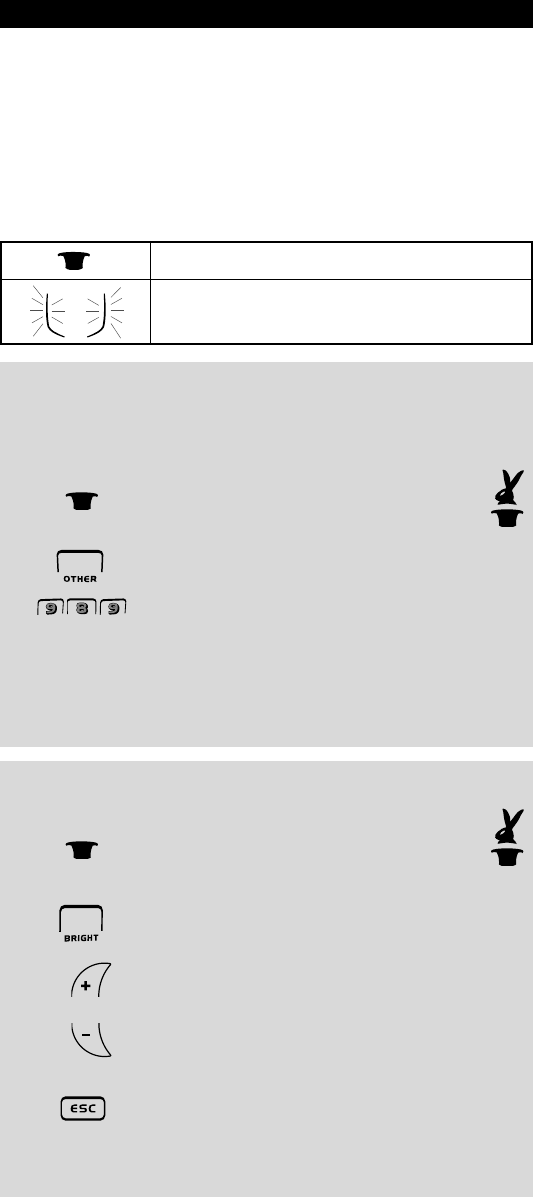
“EL” Screen brightness adjustment
To increase or decrease the brightness of the KAMELEON 4 “EL” screen:
1. Press and hold the MAGIC key until the rabbit
comes out of the hat (the screen will change to
the setup screen).
2. Press BRIGHT.
3. -> To increase the brightness of the “EL” screen press
and hold CH+.
-> To decrease the brightness of the “EL” screen press
and hold CH-.
4. Press ESC to store the brightness setting and return to the
setup screen.
- Increasing the brightness of the KAMELEON “EL” panel can decrease the battery
life. Battery life varies from 3 - 12 months (depending on brightness setting and
usage).
This product features an “EL” panel (Electro Luminescence technology) which is
activated by touching screen and remote simultaneously and/or by keypress. In
order to save battery life, the “EL” screen will stay illuminated for 8 seconds
during normal use. If you want you can change the “EL” Screen activation
setting from activation by touching screen and remote simultaneously and/or
by keypress. If you want you can also change the “EL” On time setting. It is
also possible to adjust the “EL” Screen brightness-settings on the
KAMELEON 4 “EL” panel. One of the key features of the KAMELEON 4 is the
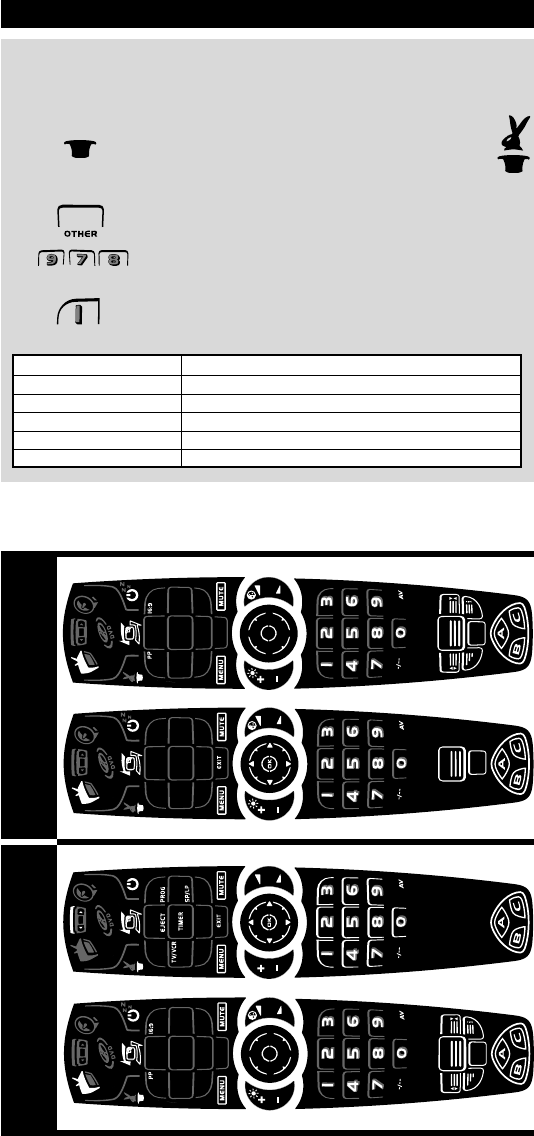
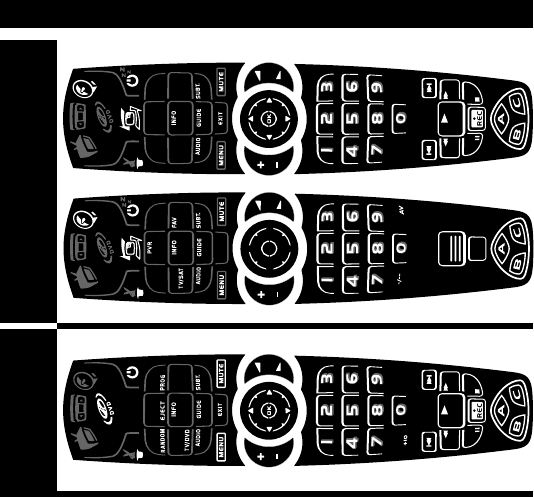
“EL” display, which changes to suit the device you are controlling. The overview
on page 4 and 5 will show you all the possible screens and the functions that
you will obtain.
“EL” Screen activation setting
The KAMELEON 4 features an “EL” panel which is activated by touching screen
and remote simultaneously or by keypress.
It is possible to lock the KAMELEON 4 to one activation setting:
1. Press and hold the MAGIC key until the rabbit
comes out of the hat (the screen will change to
the setup screen).
2. Press OTHER.
3. Now press 9 8 9. The IR Indicator will blink twice (or 4 times).
-> If the animated IR Indicator blinks twice the “EL” panel will be activated only
by touching screen and remote simultaneously.
-> If the animated IR Indicator blinks four times the “EL” panel will be activated
only by keypress.
Simply perform these steps to lock the KAMELEON 4 to the activation
setting that you prefer.
The Keypad
= MAGIC (hat) key
= The animated IR Indicator that will light up during
programming
Kameleon_4_nieuw_2004_11x23 Eur 23-08-2004 11:45 Pagina 3
4WWW.ONEFORALL.COM
The Keypad
TV
VCR
“EL” On time setting
To change the time (default: 8 sec.) that the KAMELEON 4 “EL” screen will be ON,
after each keypress during use of the remote (not programming mode):
1. Press and hold the MAGIC key until the rabbit
comes out of the hat (the screen will change to
the setup screen).
2. Press OTHER.
3. Press 9 7 8.
4. Press 1, 2, 3, 4 or 5 (e.g. 1 = 4 seconds) depending on your
choice, see table below. The animated IR Indicator will blink
twice and the remote will return to the setup screen.
Selection “EL” On Time
14seconds
28 seconds (default)
312seconds
416seconds
520seconds
MenuTextMenu
Kameleon_4_nieuw_2004_11x23 Eur 23-08-2004 11:45 Pagina 4
WWW.ONEFORALL.COM 5
The Keypad
SAT
DVD Menu/PVR
Kameleon_4_nieuw_2004_11x23 Eur 23-08-2004 11:45 Pagina 5
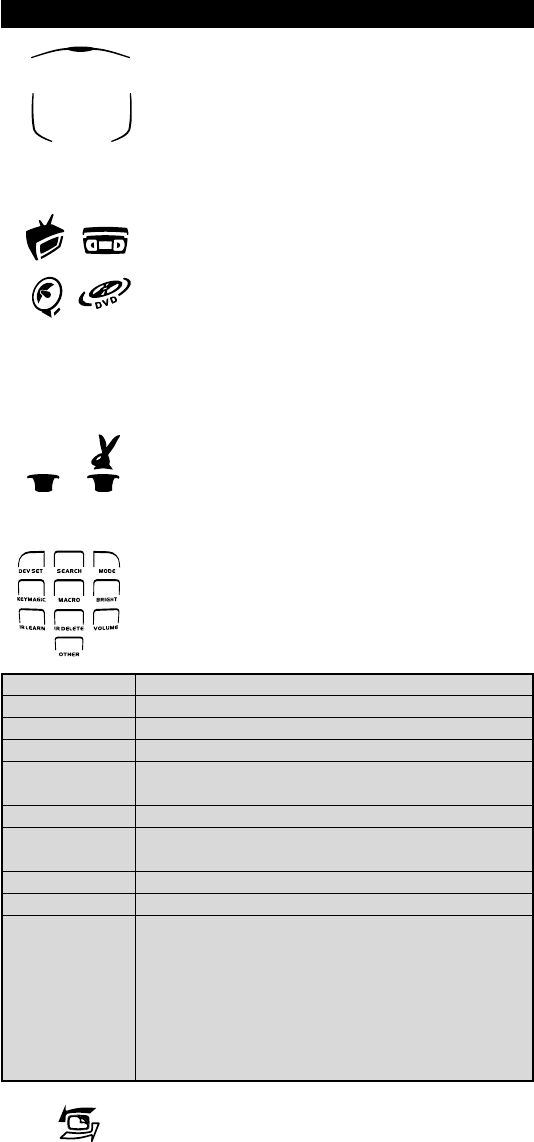
6WWW.ONEFORALL.COM
1. IR (infra-red) Indicator
The IR Indicator animates when IR is being “sent” or
“received”. The KAMELEON 4 animated IR Indicator will
show “outgoing IR” whenever a function key is pressed.
When using the “Learning Procedure” the animated IR
indicator will show “incoming IR”. The IR Indicator will
give feedback when keys are pressed both during normal
use and in programming mode (the bottom part of the IR
indicator will blink).
2. Device keys
The TV, VCR, SAT and DVD keys select the device to be
controlled. For example pressing the TV key allows the
remote to control the functions of your Television, after
pressing VCR you can operate your Video Recorder, after
pressing the SAT key you can operate your Satellite
Receiver or Cable Converter etc. (see page 10 for more
details). After pressing a device (mode) key on your
KAMELEON 4 the applicable device icon will light up, to
show the currently activated mode. Pressing the device key
will allow you to return to the main screen (TV, VCR, SAT
modes).
3. MAGIC (in ”shifted” or ”programming” mode)
The MAGIC key is used to set up your KAMELEON 4 and to
access special functions. If you press this key shortly, the
screen will go into ”shifted” mode (for 10 seconds) which
will give access to some secondary functions such as color,
brightness and sleeptimer.
Programming mode
If you press the MAGIC key longer (about 3 seconds),
the KAMELEON 4 will go into ”programming” mode.
The screen will change to the “setup screen” and the
rabbit appears.
You will obtain the following setup functions:
4. SCROLL
The SCROLL key gives you the possibility to move through
the different screens (if applicable) within a certain mode
during normal use and programming mode. This only
applies in TV, VCR and SAT modes.
The Keypad
DEV SET
SEARCH
MODE
KEY MAGIC
MACRO
BRIGHT
IR LEARN
IR DELETE
VOLUME
OTHER
• Device Setup mode
• Search Method
• Mode re-assignment
• How to program missing functions
• How to setup a key (A, B or C) with a Sequence
of commands
• “EL” Screen brightness adjustment
• How to copy functions from your original working
remote onto the KAMELEON 4
• Deleting learned function
• Volume punch through feature
• Channel simulation
• Variable EL On time (4 sec, 8 sec, 12 sec, 16 sec, 20 sec)
• Operational Reset
• KAMELEON 4 - Timer
• EL screen activation setting
• Code Verification
• Modem Upgrade
( )
Kameleon_4_nieuw_2004_11x23 Eur 23-08-2004 11:45 Pagina 6
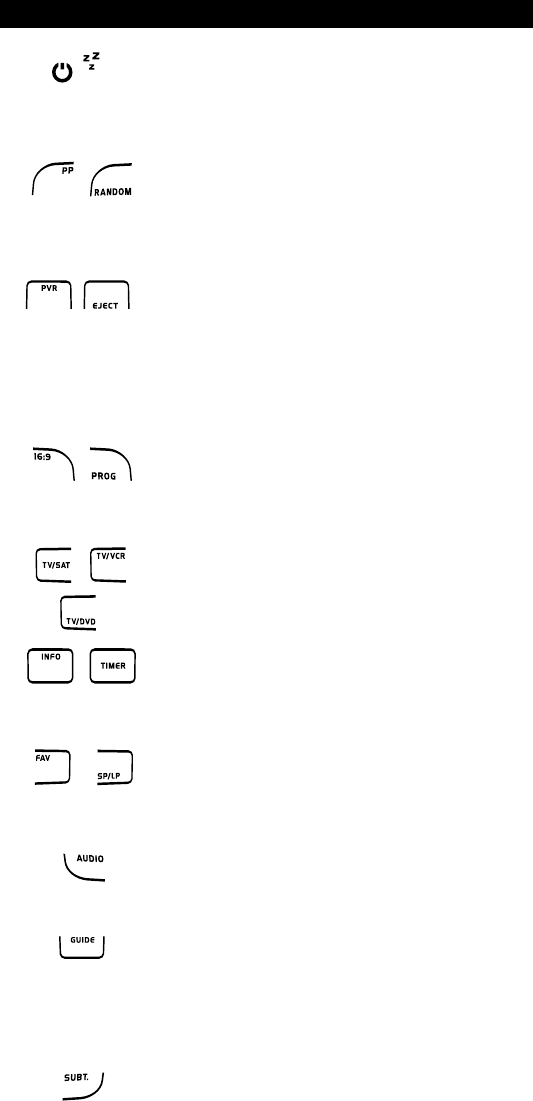
WWW.ONEFORALL.COM 7
5. POWER (in shifted mode; Sleeptimer)
The POWER key controls the same function as on your
original remote. In shifted mode (accessed by pressing
MAGIC shortly and releasing it) the POWER key becomes
the Sleeptimer function (see page 19).
6. PP / RANDOM
In TV and SAT mode this key may feature the “Last
Channel”, “Previous Program” or “Recall” function
(depending on your original remote control). In DVD mode
you will obtain the RANDOM (or shuffle) function.
7. PVR / EJECT
In SAT mode the “PVR” key will change the screen into
SAT PVR (Personal Video Recorder), which will bring up the
transport functions (REW, PLAY, FF etc.). If your digital
satellite receiver or cable converter has a built in recording
function, you can operate it with these keys.
If available on your original remote you will obtain the
EJECT function (in VCR, DVD modes).
8. 16:9 / PROG
In TV mode you will obtain the 16:9 (screen format) func-
tion. In VCR, DVD mode you will obtain the PROG
(program) function.
9. TV/SAT / TV/VCR / TV/DVD
In SAT mode you will obtain the TV/SAT function. In VCR
mode you will obtain the TV/VCR function. In DVD mode
you will obtain the TV/DVD function.
10. INFO / TIMER
In SAT and DVD mode you can select the “info” function.
In VCR mode you will obtain the TIMER RECORD or TIMER
ON/OFF function.
11. FAV / SP/LP
In SAT mode you will obtain the FAV (favourite) function.
In VCR mode you will obtain the SP/LP (tape speed)
function.
12. AUDIO
In DVD and SAT mode you will obtain the “Audio”
function.
13. GUIDE
In SAT mode the “GUIDE” key will change the screen into
SAT-menu mode and give you the “Guide” function, if
available on your original remote. In DVD mode you will
obtain the “Guide” function, if available on your original
remote.
14. SUBT.
In SAT and DVD main mode you will obtain the SUBTITLE
function.
The Keypad
( )
Kameleon_4_nieuw_2004_11x23 Eur 23-08-2004 11:45 Pagina 7
8WWW.ONEFORALL.COM
The Keypad
( )
( )
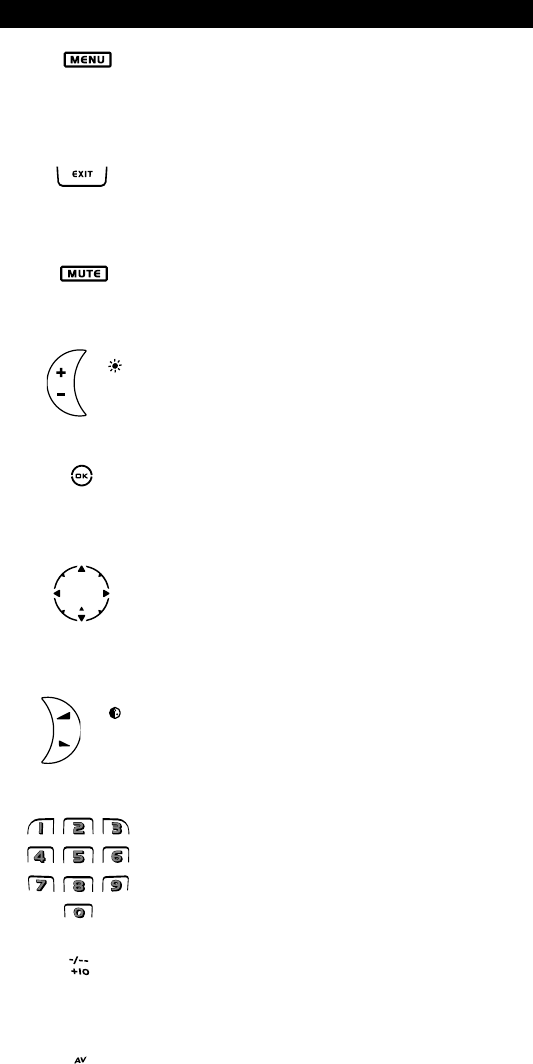
15. MENU
Pressing this key will allow you to operate the Menu and
in TV, VCR and SAT mode will also change the screen to
the menu mode. The MENU key operates the same func-
tion it did on your original remote control.
16. EXIT
The EXIT key will operate the same as on your original
remote. To return to the main screen (TV, VCR, SAT mode)
press the device key or use the SCROLL key.
17. MUTE
The Mute key operates the same function it did on your
original remote control.
18. CH +/- (in shifted mode; brightness +/-)
These keys operate just as those on your original remote.
In shifted TV mode (accessed by pressing MAGIC shortly
and releasing it) these keys may provide you the bright-
ness +/- function.
19. OK
In menu mode this key will confirm your choice. On some
devices you can confirm your menu option simply by
pressing MENU.
20. Directional keys
If available on your original remote control, these keys will
allow you to navigate through the menu. On some TV’s
you may have to press CH+/- and VOL+/- keys OR the color
keys (red, green, yellow, blue) to navigate through the
menu, depending on your model of TV.
21. VOL +/- (in shifted mode; colour +/-)
The volume keys operate just as those on your original
remote. In shifted TV mode (accessed by pressing MAGIC
shortly and releasing it) these keys may provide you the
colour +/- function.
22. Number keys (in prog. Mode; setup features)
The number (1 – 9, 0) keys provide functions just like your
original remote. When in programming mode the
digit keys will display the various setup features.
23. -/-- / +10
If your original remote uses one/two digit input switching
(-/-- symbol), this function can be obtained by pressing
the -/-- key. In DVD mode you will obtain the +10 function.
24. AV
The AV key operates the same function it did on your
original remote control. If your original remote uses a 20
key, this function can be found by pressing the AV key.
Kameleon_4_nieuw_2004_11x23 Eur 23-08-2004 11:45 Pagina 8
WWW.ONEFORALL.COM 9
The Keypad
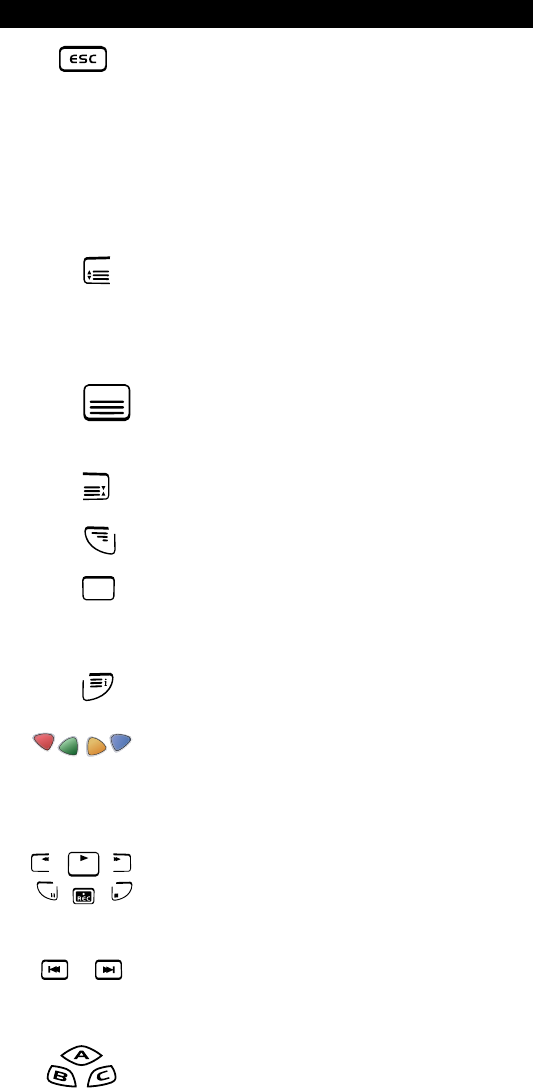
25. ESC
This key only appears in programming mode and is used to
return to the Setup screen or to exit programming mode.
26. Teletext Keys
These keys are used to operate the main teletext
functions. Of course, your Television must have teletext
capability. For a more detailed explanation of teletext and
fastext, please refer to the manual of your television.
Remember, different televisions control teletext and
fastext functions in different ways. Not all of the teletext
functions may be available on your particular model.
EXPAND: Shows the top half of the teletext page
in larger letters. By pressing again, you
can see the bottom half of the teletext
page enlarged. To return to regular
teletext viewing, press the EXPAND key
again, or press the TEXT ON key,
depending on your television.
TEXT ON: In TV mode: once in text mode, pressing
this key may switch to MIX or TURN OFF
text, depending on your television. This
function is also available in SAT mode.
HOLD/STOP: Stops changing pages.
MIX: Shows both text and TV picture.
TEXT OFF: In TV mode: switches the television back
to regular viewing mode. On some
televisions this may be done by pressing
the “TEXT ON” key several times. This
function is also available in SAT mode.
TEXT INDEX: This key will give you access to the index
function within the text mode.
27. Red / Green / Yellow / Blue
When accessing the text mode, the colour keys marked
red, green, yellow and blue, allow you to access the
fastext functions of your television. If on your original
remote control these keys are used for Menu navigation,
the KAMELEON 4 Fastext keys may operate the same.
28. Transport keys (PLAY, STOP etc.)
When in VCR, DVD and SAT (”PVR”) mode;
these keys operate the transport functions (PLAY, FF, REW
etc.) of your device. To prevent accidental recording, the
RECORD key must be pressed twice to start recording.
29. SKIP (+/-)
These keys operate just as those on your original remote.
In SAT (”PVR”) and/or DVD mode they will
function as SKIP (TRACK) +/- keys.
30. Custom keys (A, B, C)
The custom keys are spare keys that give you the
possibility to customize the KAMELEON 4 according to
your original remote control using the “Learning feature”
(see page 23) or ”Key Magic®” (see page 24). These keys
are also ideal for use as “Macro keys” (see page 21).
Kameleon_4_nieuw_2004_11x23 Eur 23-08-2004 11:45 Pagina 9
10 WWW.ONEFORALL.COM
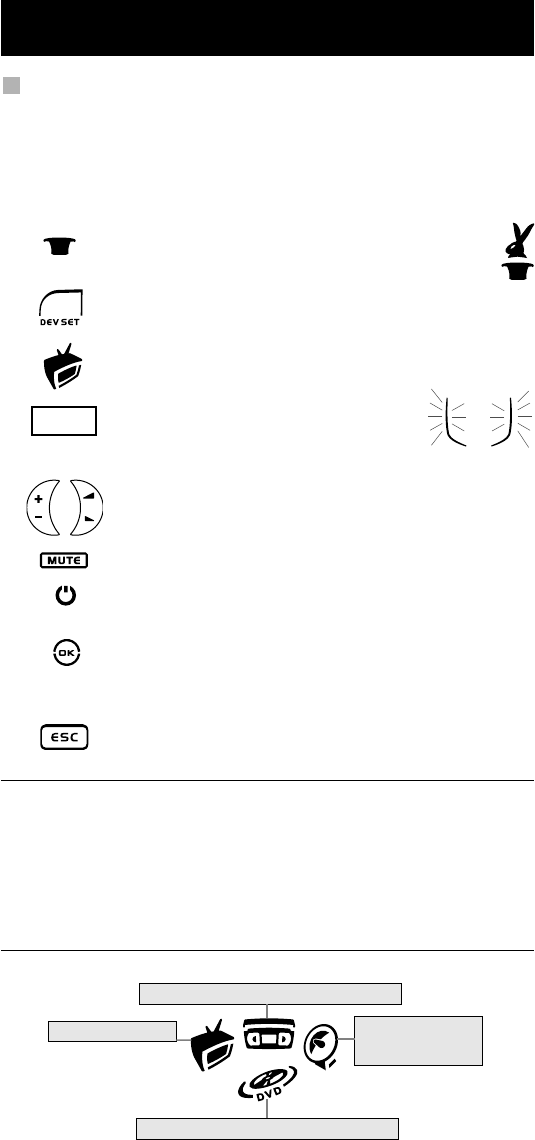
Example: To set up the KAMELEON 4 for your television:
1. Make sure your television is switched ON (not on standby).
2. Find your device code in the Codelist (page 183-216). Codes are listed
by device mode and brand name. The most popular code for each brand is
listed first. If your brand is not listed at all in the code section, try the Search
Method on page 11.
3. Press and hold down the MAGIC key
(for about 3 seconds) until the rabbit comes
out of the hat (the screen will change to the setup screen).
4. Press the DEV SET key.
5. Press and release the TV key to select the device type you like
to setup.
6. Enter your four-digit code using
the number keys. The animated IR Indicator
will blink twice.
7. Now, aim your KAMELEON 4 at your television and try the
following keys to test if the KAMELEON 4 will work with your
device;
• CHANNEL +, CHANNEL-
• VOLUME +, VOLUME -
• MUTE
• POWER.
8. If your device is responding, press OK to save the code. If your
device does not respond, just enter the next code listed under
you brand. If none of the codes listed for your brand operate
your device, then try the Search Method described on page 11.
9. Press ESC twice to return to user mode (all keys are
displayed), OR press a device key to select the next
device you like to setup.
- Most TV’s do not switch back on pressing the POWER key, please try
pressing “CHANNEL+” key to switch your TV back on.
- Some codes are quite similar. If your device does not respond or is not
functioning properly with one of the codes, try another code listed under
your brand.
- To set up your other devices, follow the same instructions above, only press
the appropriate device key during step 5.
- Remember to press the correct device key before operating your device.
Only one device can be assigned to a device key.
Setting up the KAMELEON 4
(How to set up the KAMELEON 4 to control your devices)
To set up a second TV, VCR, SAT or DVD (See page 16).
Television
Video Recorder
Satellite Receiver
Video Accessory
DVD Player
____
(x2)
Kameleon_4_nieuw_2004_11x23 Eur 23-08-2004 11:45 Pagina 10
WWW.ONEFORALL.COM 11
Search Method
--> If your device does not respond to the KAMELEON 4 after you have tried
all the codes listed for your brand.
--> If your brand is not listed at all.
The Search Method allows you to scan through all the codes contained in the
memory of the KAMELEON 4.
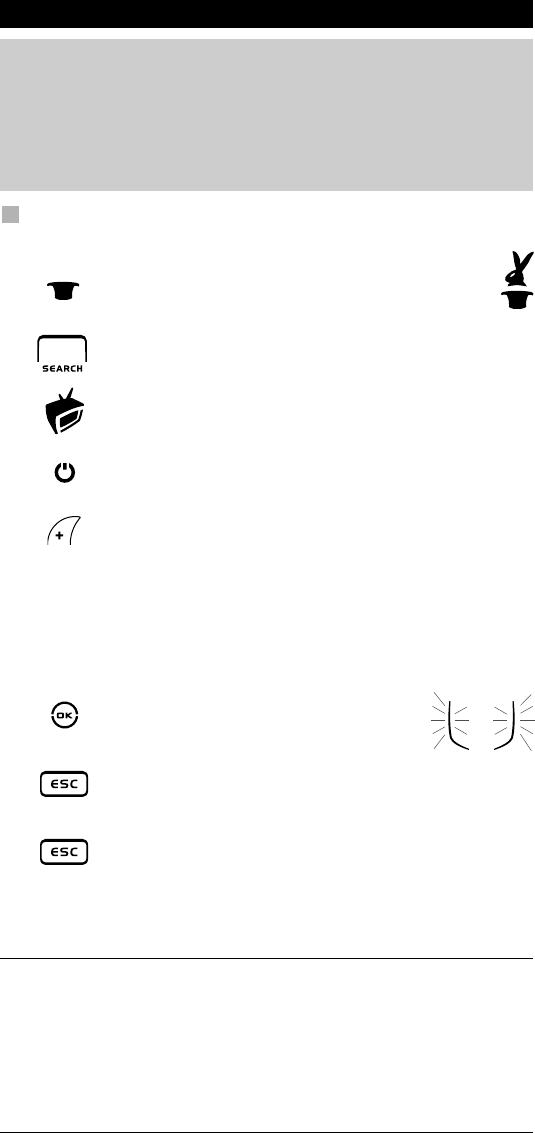
Example: To search for your TV code:
1. Switch ON your Television (not on standby).
2. Press and hold down the MAGIC key (for about
3 seconds) until the rabbit comes out of the hat
(the screen will change to the setup screen).
3. Press SEARCH.
4. Press and release the TV key to select the device type you like
to setup.
5. Next, press POWER.
6. Point the KAMELEON 4 at your Television. Now press CH+
over and over, until your Television turns off (every time
you press the CH+ key the KAMELEON 4 will send out a POWER
signal from the next code contained in the memory).
You may have to press CH+ many times (up to 150 times)
so please be patient. Remember to keep pointing the
KAMELEON 4 at your Television while pressing this key.
(If you skip past a code, you can go to the previous code(s) by
pressing the CH - key.)
7. When your Television switches off,
press the OK key to store the Code.
The animated IR Indicator will light up twice.
8. Press ESC to return to the setup screen, or press a device
key if you want to perform the Search Method for another
device.
9. Press ESC again to return to user mode
(all keys are displayed).
Turn your device (television) back on and try all the remote’s
functions to ensure they are working properly.
If you cannot control your Television properly, please continue
the Search Method, you may be using the wrong Code.
- During step 5, instead of POWER you can also press any other key displayed.
This will be the function sent for the next key presses of CH+ or CH- in step
6. If for example; during step 5, you press “2” instead of “POWER”, the
KAMELEON 4 will send the “number 2” signal every time you press CH+
during step 6 (make sure your TV is switched to another channel).
- To search for your other devices, follow the same instructions above, only
press the appropriate device key during step 4.
- If your Video’s original remote control does not have a POWER key, press
PLAY instead of POWER during step 5.
Setting up the KAMELEON 4
Kameleon_4_nieuw_2004_11x23 Eur 23-08-2004 11:45 Pagina 11
12 WWW.ONEFORALL.COM
Code blink out
(To find out which code is currently programmed)
If you have set up your KAMELEON 4 via the Search Method, you can blink
back your code for future reference. Please note that the animated IR Indicator
will indicate the 4 digits by animated blinks.
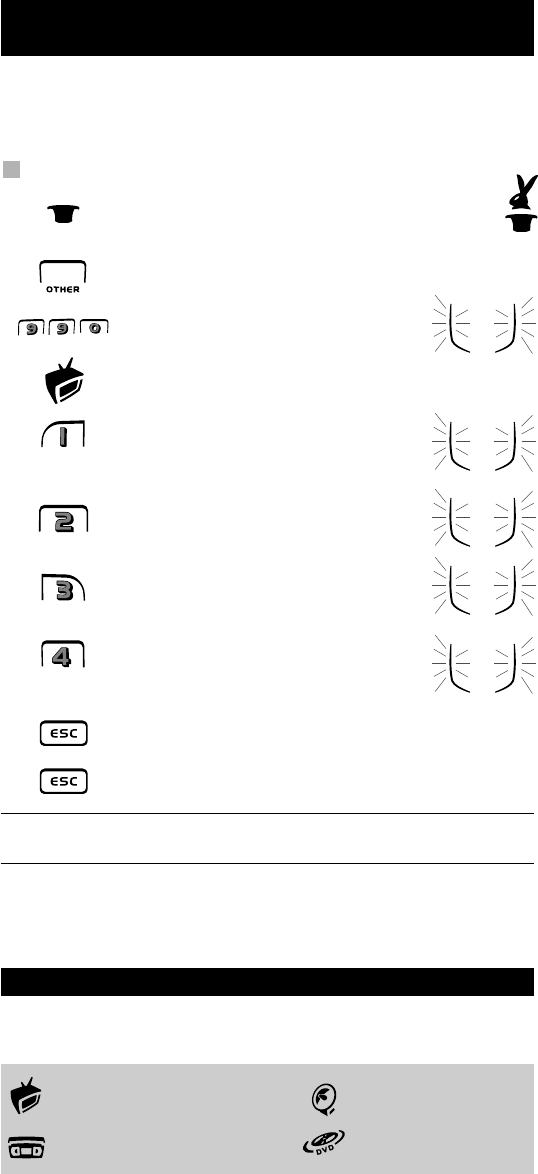
Example: To blink out your television code:
1. Press and hold down the MAGIC key (for about
3 seconds) until the rabbit comes out of the hat
(the screen will change to the setup screen).
2. Press OTHER.
3. Press 9 9 0, the animated IR Indicator
will light up twice.
4. Press and release the TV key to select the device type you like
check the code for.
5. For the first digit of your four-digit code,
press 1 and count the blinks of the animated
IR Indicator. If there are no blinks,
the digit is “0”.
6. For the second digit, press 2 and count
the animated blinks. If there are no blinks,
the digit is “0”.
7. For the third digit, press 3 and count
the animated blinks. If there are no blinks,
the digit is “0”.
8. For the fourth digit, press 4 and count
the animated blinks. If there are no blinks,
the digit is “0”. Now you have found your
four-digit code.
9. Press ESC to return to the setup screen OR press a device key
if you want to perform the blink out for another device.
10. Press ESC again to return to user mode.
- To blink back the code for your other devices follow the instructions above,
only press the appropriate device key during step 4.
Quick code Reference
Write down the codes for your devices in the boxes below for quick and
easy reference.
■■■■■■ ■■
■■■■■■ ■■
■■■■■■ ■■
■■■■■■ ■■
Kameleon_4_nieuw_2004_11x23 Eur 23-08-2004 11:45 Pagina 12
WWW.ONEFORALL.COM 13
The KAMELEON 4 comes with a complete library of pre-programmed codes.
After you have set up the KAMELEON 4 for your device, you may find that there
are one or more keys that you had on the original remote control, which do not
have a place on the KAMELEON 4 keypad.
The KAMELEON 4 offers a special Learning feature that allows you to copy
almost any function from your original remote control onto the keypad of the
KAMELEON 4.
Before you start:
- Make sure your original remote is working correctly.
- Make sure neither your KAMELEON 4, nor your original remote
control is pointing at your device.
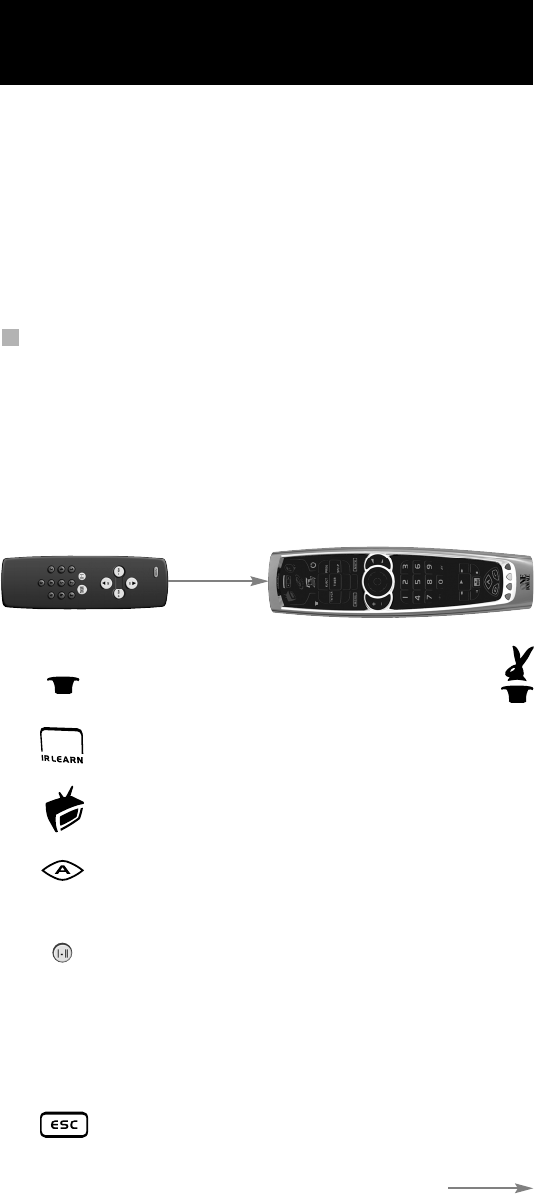
Learning (direct)
Example: To copy the “mono/stereo” function from your original TV
remote control onto the ”A”-key of your KAMELEON 4.
1. Place the KAMELEON 4 and your original remote control on a flat
surface. Make sure the ends which you normally point at your device
are facing each other. Point the original remote to the front of the
KAMELEON 4 (see picture below). Keep the remotes at a
distance of 2 to 5 cm (0.8 to 2 inches).
2. Press and hold down the MAGIC key (for about
3 seconds) until the rabbit comes out of the hat
(the screen will change to the setup screen).
3. Press IR LEARN.
4. Press the device key (Example: TV key) on the KAMELEON 4
remote to select the mode to which you want to copy the
learned function.
5. Press the key (Example: ”A” key) on the KAMELEON 4 remote
where you want to place the learned function. The IR Indicator
will show “incoming IR” three times and then the display will
switch off.
6. Press and hold the key that you want to copy (Example:
mono/stereo) on your original remote control. The display
switches back on and you will see two blinks to indicate suc-
cessful learning operation.
7. If you want to copy other functions within the same mode, simply repeat
steps 5 and 6 pressing the next key you want to copy by learning. If you
want to copy another function in a different mode, simply continue with
step 4 followed by steps 5 and 6.
8. To exit the learning mode and return to the user screen,
press the ESC key twice.
Learning Feature
(How to copy functions from your original working remote onto the
KAMELEON 4)
(x2)
Kameleon_4_nieuw_2004_11x23 Eur 23-08-2004 11:45 Pagina 13

14 WWW.ONEFORALL.COM
- As soon as the display switches off in step 5 you need to press the key (in
this example: the ”mono/stereo” key) on your original remote within 10 sec-
onds. If no key is pressed while in learning mode, the remote will return to
user mode after 30 seconds.
- During learning, keys such as (TV) menu, (VCR) menu etc. will not change
screen when pressed.
- If you learn a function on a key, the original KAMELEON 4 function auto-
matically becomes shifted. Press the MAGIC key then the key to access it
(this excludes the POWER, Channel and Volume keys). If you learned on a
digit key, access the original function by pressing magic twice and then the
digit.
- If you want to learn a function on a key that is not in the main screen, use
the SCROLL key to change the screen.
- The learning feature is mode specific. Therefore you can place one learned
function per mode on the same key.
- The KAMELEON 4 can learn approximately 30 functions. The amount of keys
depends on the other programmed functions and on the remote to be
learned from.
- You can replace a learned function by placing another learned function on
top.
- Please make sure not to use the learning procedure when in direct sunlight
or under incandescent lights.
- Make sure you are using new batteries before following the learning
instructions above.
- Upon changing the batteries, your learned functions will be retained.
Shifted Learning
It is also possible to place a function shifted on a key to maintain the original
function.
Example: to place the mono/stereo function shifted on the “red” key.
To place the (e.g. mono/stereo) function shifted on the red key, simply follow
steps 1-8 on page 13, only press ”MAGIC” then the ”red” key (instead of
”A”) during step 5.
To access the e.g. ”mono/stereo” function in this example; simply press
”MAGIC” and then the ”red” key.
- If a Shifted Learned function is placed on the POWER, Channel and Volume
keys then the “Sleeptimer” and “Colour & Brightness“ features will be
sacrificed.
- If you place a function shifted on a digit key (0 - 9) you need to press
MAGIC twice then the digit key to access this shifted function.
Learning Feature
Kameleon_4_nieuw_2004_11x23 Eur 23-08-2004 11:45 Pagina 14

WWW.ONEFORALL.COM 15
To delete a learned function:
To delete one single learned function, follow the steps below.
Example: to delete the mono/stereo function learned on the “A” key in TV
mode:
1. Press and hold the MAGIC key until the rabbit comes out of the hat
(the screen will change to the setup screen).
2. Press IR DELETE.
3. Press the device key (example TV) in which the function will be deleted.
4. Press the learned key which you want to restore (example “A”) twice. The
IR Indicator will blink twice and the unit will return to the setup screen.
- The original function (if present) of the KAMELEON 4 will be restored.
- If there is another learned function you want to delete, repeat steps 2 – 4.
To delete a ”Shifted” learned function:
To delete one single ”shifted” learned function, follow the steps below.
Example: to delete the mono/stereo function learned shifted on the ”red” key
in TV mode:
1. Press and hold the MAGIC key until the rabbit comes out of the hat
(the screen will change to the setup screen).
2. Press IR DELETE.
3. Press the device key (example TV) in which the function will be deleted.
4. Press MAGIC then press twice the learned key which you want to restore
(example ”red” key). The IR Indicator will blink twice and the unit will return to
the setup screen.
- The original function (if present) of the KAMELEON 4 will be restored.
- If there is another Shifted learned function you want to delete, repeat steps
2 – 4.
To delete all learned functions within a certain mode:
Example: to delete all learned functions within the TV mode:
1. Press and hold the MAGIC key until the rabbit comes out of the hat
(the screen will change to the setup screen).
2. Press IR DELETE.
3. Press the mode key in which you want to delete all functions twice. In our
example, press TV twice. The IR Indicator will blink twice and the remote
will return to the setup screen.
Operational Reset:
The Operational Reset will erase all learned functions across all modes.
It may also delete some other programmed functions like Key Magic or Macros.
1. Press and hold the MAGIC key until the rabbit comes out of the hat
(the screen will change to the setup screen).
2. Press OTHER.
3. Press 9 8 0. The IR Indicator will blink four times and the remote will return
to the setup screen.
Learning Feature
Kameleon_4_nieuw_2004_11x23 Eur 23-08-2004 11:45 Pagina 15
16 WWW.ONEFORALL.COM
Mode re-assignment
(How to set up two of the same devices on the KAMELEON 4)
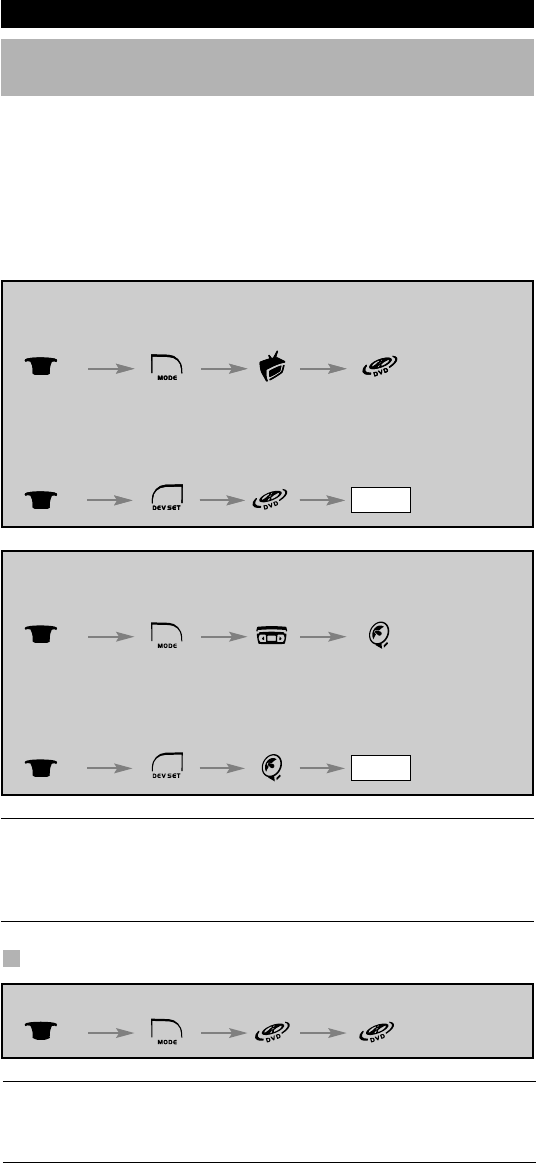
It is possible to change the mode of any device key. This is useful if you want to
set up two of the same devices on the KAMELEON 4. The modified device key
will display the applicable keys for the revised mode. The code can be set up
using the “Direct set up” (p. 10) or “Search method” (p. 11). To change a device
key, see the two examples below.
Example 1; if you like to program a second TV on the DVD key.
Example 2; if you like to program a second VCR on the SAT key.
Example 1:
To program a second Television on the DVD key (for example), you need to
change the DVD key into a TV key, so press:
The DVD key has now become a second TV key and will
display the applicable keys for this mode.
Now enter the Set-Up code for your second TV by pressing:
Example 2:
To program a second Video Recorder on the SAT key (for example), you need
to change the SAT key into a VCR key, so press:
The SAT key has now become a second VCR key and will display the
applicable keys for this mode.
Now enter the Set-Up code for your second VCR by pressing:
- If you program a different device type on another key (e.g. second TV on
the DVD key) the original device key icon will remain, but the displayed
function keys will change to suit the new device mode. For example; if a
second TV is programmed on the DVD key, TV-text functions will be
displayed in DVD mode.
Resetting a Device key
Example: To reset the DVD key to its original mode, press:
(*) Hold down the MAGIC key until the rabbit comes out of the hat
(the screen will change to the setup screen).
(**) The animated IR Indicator will blink twice (the screen will
change to the setup screen).
Extra Features
(*) (**)
(*) (TV Code) (**)
____
(*) (**)
(*) (TV Code) (**)
____
(*) (**)
(*) (VCR Code) (**)
____
(*) (**)
Kameleon_4_nieuw_2004_11x23 Eur 23-08-2004 11:45 Pagina 16

WWW.ONEFORALL.COM 17
Colour & Brightness
Depending on the functions of your original remote control, the KAMELEON 4
can operate the colour and brightness settings of your Television.
To adjust the colour:
Press the MAGIC key followed by Volume + (for colour +) or
Volume - (for colour -).
To adjust the brightness:
Press the MAGIC key followed by Channel + (for brightness +) or
Channel - (for brightness -).
Depending on how you used colour and brightness on the original remote, you
may need to access colour and brightness in a different way (through menu for
example).
Channel +/- simulation
If your original TV, VCR or SAT remote control does not have any
channel +/- keys, your KAMELEON 4 can simulate this function.
Example: to program “Channel +/- Simulation” in TV mode:
1. Press and hold the MAGIC key until the rabbit comes out of the hat
(the screen will change to the setup screen).
2. Press OTHER.
3. Press 9 7 1. The IR Indicator will light up twice.
4. Press the device (e.g. TV) which should give a channel simulation function.
The animated IR Indicator will blink twice (the screen will change to the
setup screen).
The original channel +/- function of your TV (if present) on the CH+/- key will
now be sacrificed.
Example: to cancel the “Channel +/- Simulation” in TV mode:
1. Press and hold the MAGIC key until the rabbit comes out of the hat
(the screen will change to the setup screen).
2. Press OTHER.
3. Press 9 7 1. The IR Indicator will light up twice.
4. Press the device (e.g. TV) which should give you the original CH+/- function.
The animated IR Indicator will blink four times (the screen will change to
the setup screen).
The CH+/- function of your TV (if present) will now be restored.
-The Channel +/- simulation will be limited to: 1 – 9, 0.
-It is only possible to switch Channel +/- simulation on for one mode at a
time.
Extra Features
Kameleon_4_nieuw_2004_11x23 Eur 23-08-2004 11:45 Pagina 17

18 WWW.ONEFORALL.COM
Volume Punch-Through
This feature allows you to adjust the volume of a certain mode (e.g. TV mode)
while being in a different mode (e.g. VCR). If for example you’re watching a
programme on your Video, you can adjust the volume (a TV function) without
first pressing the TV key. The chart below lists some of the possibilities:
Last key pressed: You can control:
SAT : TV volume up and down, mute
VCR : TV volume up and down, mute
DVD : TV volume up and down, mute
Example: To punch through to TV volume, being in any other mode (e.g. VCR,
SAT or DVD mode):
1. Press and hold down the MAGIC key until the rabbit comes out of the
hat (the screen will change to the setup screen).
2. Press VOLUME.
3. Then press the TV key and the animated IR Indicator will blink twice and
the remote will return to the setup screen.
Result: being in any (e.g. DVD) mode, you will be able to control VOL+/- and
MUTE functions of your TV.
To cancel the “Volume Punch Through” per mode:
Example: to cancel the “Volume Punch Through” for the VCR mode:
1. Press and hold down the MAGIC key until the rabbit comes out of the
hat (the screen will change to the setup screen).
2. Press VOLUME.
3. Then press the VOL (-) key.
4. Press VCR once. The IR Indicator will blink four times and the unit will
return to the SETUP screen.
Result: being in VCR mode, you will be able to control VOL+/- and MUTE
functions of your VCR (provided it has volume control).
To cancel the “Volume Punch Through” for all modes:
1. Press and hold down the MAGIC key until the rabbit comes out of the
hat (the screen will change to the setup screen).
2. Press VOLUME.
3. Then press the VOL (+) key and the IR Indicator will blink four times and
the screen will return to the setup screen.
Result: In all modes the VOL+, VOL- and MUTE keys will now operate
the original functions again.
Extra Features
Kameleon_4_nieuw_2004_11x23 Eur 23-08-2004 11:45 Pagina 18

WWW.ONEFORALL.COM 19
Device Sleeptimer
If your device has a “Sleeptimer” function built in, you can access this function
with your KAMELEON 4 remote. To do so:
1. Make sure your device is switched on.
2. Press the device key TV (or SAT).
3. Point the KAMELEON 4 at your device and press and release the MAGIC key
then press POWER. You should see the Sleeptimer activate on your device.
To increase the timer, simply press POWER again (within 10 seconds) until
the timer gets to the desired time.
- To deactivate the “Sleeptimer”, repeat steps 1 – 3 above. During step 3, con-
tinue pressing POWER again (within 10 seconds) until the timer indicates
zero minutes.
- Depending on how you used sleeptimer on the original remote, you might
need to access sleeptimer in a different way (through menu for example).
The KAMELEON 4 - Timer
The KAMELEON 4 – Timer function allows you to activate a <desired function>
from a specific <device mode> within a <specific amount of minutes>
(max. amount of timer is 60 minutes).
- The <desired function> can be an existing function within a specific mode,
a Macro, a Key Magic function or a Learned function.
Example: you want your TV to switch off after 45 minutes.
1. Press and hold the MAGIC key until the rabbit comes out of the hat
(the screen will change to the setup screen).
2. Press OTHER.
3. Press 9 8 5 to enter the KAMELEON 4 –Timer programming mode.
The animated IR Indicator will blink twice.
4. Press TV to select the mode where the KAMELEON 4 – Timer function will
come from. The animated IR Indicator will blink twice.
5. Press the POWER key to select the desired function. The animated IR
Indicator will blink twice.
6. Now press 4 5 to enter the amount of minutes after which the <Desired
function> needs to be activated (e.g. for 5 min. press 05, max. up to 60).
7. Press and hold OK for a duration of 3 seconds to activate the KAMELEON 4
– Timer function.
- Invalid key presses during the programming of KAMELEON 4 - Timer will be
ignored.
- The <Desired function> can be any key except for Device keys, SCROLL and MAGIC.
- While the KAMELEON 4 – Timer is running, the IR animation will light every
15 seconds.
- The KAMELEON 4 –Timer function is cancelled by setting up a new
KAMELEON 4 – Timer function.
- Upon entry of an invalid key sequence, the remote control shall display one
long IR illumination of the IR animation and the remote will return to the
SETUP screen.
- If no key is pressed while setting up a KAMELEON 4 – Timer function, the
remote will return to user mode after 30 seconds.
- The SCROLL key can be accessed any time during programming if applicable
in the current device mode.
Extra Features
Kameleon_4_nieuw_2004_11x23 Eur 23-08-2004 11:45 Pagina 19

20 WWW.ONEFORALL.COM
Extra Features
KAMELEON 4 - Recall
The KAMELEON 4 - Recall function allows you to program up to two
channels, each consisting of a maximum of 4 key presses per channel
entry. This allows you to swap back and forth between two channels
with the press of a single key.
1. Press the MAGIC and PP keys together until the rabbit comes out of
the hat. The animated IR Indicator will blink twice.
2. Enter the first channel number exactly as you would on your original
remote (e.g. <-/-->, <1>, <2> to get channel number 12).
3. Press PP once and release. The animated IR Indicator will blink once.
4. Enter the second channel number exactly as you would on your original
remote (e.g. <-/-->, <2>, <3> to get channel number 23).
5. Press the MAGIC key, the IR animation blinks twice.
If you press PP, you will obtain the second channel programmed (being
<23>) and if you press PP again you will obtain the first channel
programmed (being <12>).
-The KAMELEON 4 - Recall is mode dependant and can only be programmed
in TV or SAT mode.
-The KAMELEON 4 - Recall Feature is only programmable in one mode
at a time.
-To enter only one channel number, skip steps 3 and 4.
-If two channel numbers have been stored previously, entering one new
channel will delete the oldest entry.
-If no key is pressed while in KAMELEON 4 – Recall mode, the remote will
return to user mode after 30 seconds.
To reset the PP key:
1. Press the MAGIC and PP keys together until the rabbit comes out of
the hat. The animated IR Indicator will blink twice.
2. Press PP and release. The animated IR Indicator will blink once.
3. Press MAGIC and release. The animated IR Indicator will blink twice.
Kameleon_4_nieuw_2004_11x23 Eur 23-08-2004 11:45 Pagina 20

WWW.ONEFORALL.COM 21
Macros (sequence of commands)
Macros (direct)
You can program your KAMELEON 4 to issue a sequence of commands at the
press of one button. For example, you may want to turn off your TV, VCR and
Satellite at the same time. Any sequence of commands you regularly use can be
reduced to one key stroke for your convenience. A key that is programmed with
a Macro works through all modes (provided it’s accessible in that mode).
Therefore a Macro can best be set on either the A, B or C key. However, you can
install a Macro on any key (provided it’s accessible in that mode), except for the
device keys (TV, VCR, SAT and DVD), the MAGIC key and the SCROLL key.
Example: To set up a Macro that switches off your TV, VCR and SAT on the
“A” key on your KAMELEON 4:
1. Press and hold MAGIC until the rabbit comes out of the hat (the screen
will change to the setup screen).
2. Press MACRO.
3. Press the device key (e.g. TV) to display all keys of the mode.
4. Then press the key to which the Macro will be assigned, in this case the
“A” key.
5. Next press TV, POWER, VCR, POWER, SAT, POWER.
6. To store the Macro, press and hold MAGIC until you get two blinks on
the IR Indicator and the rabbit disappears (the screen will return to the
setup screen).
Result: Whenever you press the “A” key, the KAMELEON 4 will turn off your TV,
VCR and Satellite receiver.
- Each MACRO can consist of a maximum of 15 keystrokes.
- To include a function from a particular screen in a mode, use the SCROLL
key.
- Make sure that you program a Macro on a spare key that you don’t use in
any mode.
- Once you program a Macro on a specific key, the sequence will work regard-
less of the mode (TV, VCR, SAT or DVD) you are using (if the label is the
same as the label on which the Macro was programmed). This means that
the function picked on that specific key will be sacrificed.
- To avoid accidental recordings with the KAMELEON 4, you must press the
RECORD key twice to begin recording. Please note that if you assign a
Macro or Shifted Macro to the RECORD key, this will deactivate the double
key press. Therefore we recommend not to assign a Macro to this key.
- If you had to hold down a key for a few seconds on the original remote
control to get a function, this function may not work in a macro on your
KAMELEON 4 remote.
- Keys such as (TV) menu, (VCR) menu etc. will not change screen when
pressed during Macro programming.
- Upon changing the batteries your Macro(s) will be retained.
- If you program a Macro on a key, the original function will become shifted
(excluding POWER, CH+/- and VOL+/- keys). Press MAGIC then the key to
access it. If you place a Macro on a digit key, access the original function by
pressing MAGIC twice and then the digit key.
- You can replace a Macro by placing another Macro on top.
Extra Features
Kameleon_4_nieuw_2004_11x23 Eur 23-08-2004 11:45 Pagina 21
22 WWW.ONEFORALL.COM
Shifted Macros
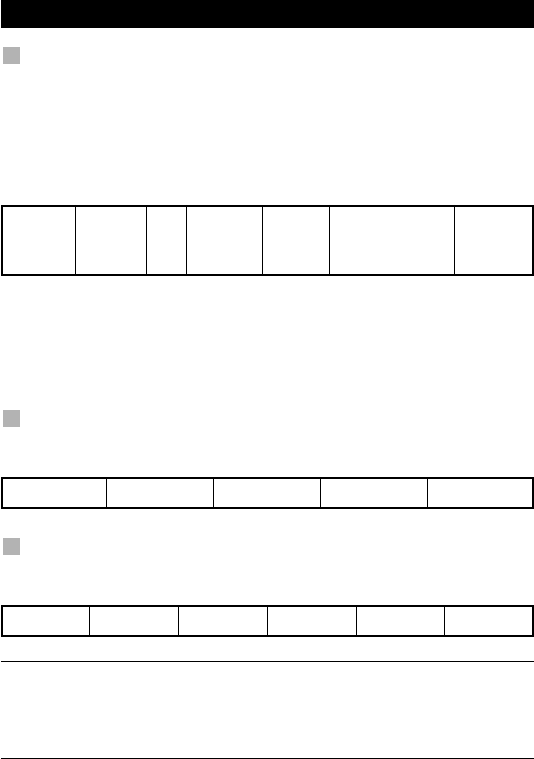
It is also possible to place a shifted Macro on a key to maintain
the original function.
Example: To set up a Shifted Macro that switches off your TV, VCR and SAT on
the “RED” key on your KAMELEON 4: (so that you will keep the original func-
tion on the “RED” key).
Now every time you press ”MAGIC”, then the ”red”key, the KAMELEON 4 will
turn off your TV, VCR and Satellite.
- If a Shifted Macro is placed on the POWER, CH+/- or VOL+/- keys, the
Sleeptimer and Colour/Brightness features will be sacrificed.
To erase a (direct) Macro
Example: To erase the Macro from the “A” key, press:
To erase a (shifted) Macro
Example: To erase the Shifted Macro from the ”red” key press:
(*) Hold down the MAGIC key until the rabbit comes out of the hat
(the screen will change to the setup screen).
(**) Hold down MAGIC until the IR Indicator will blink twice and the
rabbit will disappear (the screen will change to the setup
screen).
Extra Features
MAGIC* MACRO TV MAGIC “Red” MAGIC**
TV, POWER,
VCR, POWER,
SAT, POWER
MAGIC* MACRO TV “A” MAGIC**
MAGIC* MACRO TV MAGIC ”red” MAGIC**
Kameleon_4_nieuw_2004_11x23 Eur 23-08-2004 11:45 Pagina 22

WWW.ONEFORALL.COM 23
EXTENDED FUNCTION REFERENCE
(first entry is an example):
DEVICE SET-UP CODE FUNCTION FUNCTIONCODE
TV 0556 16/9 format 00234
Key Magic®
(How to program missing functions)
Key Magic® is an exclusive ONE FOR ALL feature. The design of the KAMELEON
4 ensures that many functions of your original remote control can be operated -
even those that do not have their own key on the KAMELEON 4 keypad.
Frequently used functions can be assigned to a key of your choice using the Key
Magic® feature of your KAMELEON 4. In order to program a certain function
with Key Magic® you need to know the corresponding function code. As the
function codes vary with different types of devices, they cannot be found in the
manual. You can request your function codes through our consumer service
help-line, by letter, fax or e-mail.
All we need to know is:
•Brand and Model number of the device in question (for verification if you
are using the correct code).
•The 4-digit set-up code your device is working with.
•How the function was labeled on your original remote control.
You can also visit our website (www.oneforall.com) to find an answer to your
questions.
Once you obtain(ed) your function code(s) from customer service,
programming the code is easy:
1. Press and hold the MAGIC key until the rabbit comes out of the hat
(the screen will change to the setup screen).
2. Press KEY MAGIC.
3. Press the device key (TV, VCR, SAT or DVD).
4. Press the MAGIC key once.
5. Enter the 5-digit function code (provided by customer service).
6. Press the key to which the function will be assigned (if this key is
located in a different screen than the main screen, use the SCROLL key to
access the screen). The IR Indicator will blink twice and the screen will return
to the Setup screen.
- Key Magic® functions are mode specific. To access the function you have
programmed, press the device key first.
- Key Magic® can be assigned to any key EXCEPT the following: Device keys,
MAGIC key and the SCROLL key.
- Please note all the extended function codes you obtain from customer
service for easy future reference.
- Keys such as (TV) menu, (VCR) menu etc. will not change screen when
pressed during Key Magic® programming.
Extra Features
Kameleon_4_nieuw_2004_11x23 Eur 23-08-2004 11:45 Pagina 23

24 WWW.ONEFORALL.COM
Trouble-Shooting
Problem & Solution
Problem:
Your brand is not listed in the
code section?
The KAMELEON 4 does not
operate your device(s)?
The KAMELEON 4 is not
performing commands
properly?
Problems changing channels?
Video / PVR / DVD not
recording?
The KAMELEON 4 does not
respond after pressing a key?
Your original remote had a
“20” key?
Upon each keypress,
the IR indicator will blink
5 times.
You are not able to enter
programming mode?
Solution:
Try the search method on page 11.
A) Try all the codes listed for your brand.
B) Try the search method on page 11.
You may be using the wrong code. Try
repeating the Direct Set-Up using another
code listed under your brand or start the
search method over again to locate the
proper code.
Enter the program number exactly as you
would on your original remote.
As a safety feature on your KAMELEON 4,
you must press the Record key twice.
Make sure you are using new batteries and
are aiming the KAMELEON 4 at your
device.
You can find this function on the AV key.
Replace batteries with 2 fresh, new
“AA/LR6” alkaline batteries.
Replace batteries with 2 fresh, new
“AA/LR6” alkaline batteries.
To conserve battery life, your Kameleon remote is fitted with a light sensor,
which adjusts the brightness of the display to suit its environment. For example,
it is not necessary to have the display at full brightness in a darkened room,
so the remote dims the display somewhat.
If you do not require this function, it can be disabled. To do this:
1. Press and hold down the Magic key (for about 3 seconds) until the rab-
bit comes out of the hat (the screen will change to the setup screen).
2. Press OTHER.
3. Press 9 9 9.
The animated IR Indicator will blink four times and the light sensor is now
disabled.
To re-enable it, repeat the above steps and the IR Indicator will blink twice.
Kameleon_4_nieuw_2004_11x23 Eur 23-08-2004 11:45 Pagina 24

WWW.ONEFORALL.COM 25
TV
TV
Televisions
Fernseher
Téléviseurs
Televisores
Televisões
Televisori
Televisies
A.R. Systems 0037 0556 0374 0455
Abex 0032
Accent 0009 0037 0556
Accuphase 0556 1909
Acec 0012
Adcom 0625 0284
Admiral 0093 0363 0418 0087 0305 0163
0264
Adyson 0217 0216 0032
AEA 0037 0556
Agashi 0216 0264 0217
AGB 0516
Agef 0087
Aiko 0009 0037 0556 0216 0371 0035
0433 0072 0361 0191 0264 0217
Aim 0037 0072 0412 0556 0753 0208
0706 0805
Aiwa 0705 0701 1904 1916 1908 1914
1915
Akai 0361 0208 0371 1537 0037 0803
0433 0745 0191 0702 0035 0284
0672 0009 0696 0072 0753 0218
0806 0729 0714 0163 0516 0715
0602 0556 0548 0581 0480 0217
0631 0216 0264 0448 0178 0329
0377 0606 0708 1037 1908 0473
0648
Akiba 0218 0282 0455 0037 0556 0294
Akira 0190
Akito 0272 0037 0556
Akura 0037 0556 0668 1668 0359 0412
0493 0009 0218 0282 0264 0171
0714
Alaron 0179 0216
Alba 0009 0418 0370 0235 0371 0668
0037 0556 1037 0355 0218 0216
0247 0431 0163 0487 0581 0036
1668 0579 1904 1908 0714 0443
Alkos 0035
Allorgan 0206 0294 0217
Allstar 0037 0556
Ambassador 0177
Amplivision 0217 0400 0370 0320
Amstrad 0177 0009 0516 0264 0354 0371
0218 0171 0037 0556 0433 0412
0362 1037 0648 0581 1904
Anam 0037 0556 0009 0250
Anam
National 0037 0250 0556 0650 0055
Anex 0421
Anglo 0009 0264
Anitech 0009 0264 0037 0556 0282 0102
Ansonic 0370 0037 0556 0009 0668 0374
0163 0292 0102 0411 0259 0247
1437 0012 0284 0428 1904 0104
1668
Apex Digital 1943
Apollo 0473
Arc en Ciel 0399 0501 0109 0196 0198
Arcam 0216 0399 0217
Ardem 0486 0714 0037 0633 0556
Aristona 0556 0037 0012
Arthur
Martin 0163 0400
ASA 0105 0346 0070 0104 0087
Asberg 0037 0556 0102
Asora 0009
Astra 0037 0556
Asuka 0218 0217 0216 0264 0282 1904
ATD 0698
Atlantic 0037 0556 0216 0206 0320 0259
Atori 0009
Auchan 0163 0400
Audiosonic 0009 0037 0374 0556 0109 0714
0715 0217 0370 0337 0264 0218
0486 0428
Audioton 0217 0486 0370 0264 0428
Audiovox 0451
Aumark 0060
Autovox 0087 0206 0544 0349 0217 0247
AVP 1904 1908
AWA 0011 0036 0009 0157 0374 0451
0412 0037 0556 0216 0606 0217
0108 0264 0785
Axxent 0009
Axxon 0714
Baird 0109 0193 0343 0190 0192 0072
0073 0217 0208 1904
Kameleon_4_nieuw_2004_11x23 Eur 23-08-2004 11:48 Pagina 183

26 WWW.ONEFORALL.COM
TV
TV
Bang
& Olufsen 0565 0087 0275
Barco 0380 0163
Basic Line 0374 0037 0163 0668 0556 0009
0218 0567 0282 0217 0455 0339
1037 1668
Bastide 0217
Bauer 0805
Baur 0009 0146 0303 0535 0195 0512
0037 0556 0554 0191 0361 0544
0349 1505 0505 1010
Bazin 0217
Beaumark 0178
Beko 0486 0035 0428 0714 0370 0418
0037 1037 0556 0606 0715
Bennett 0556 0037
Beon 0037 0556 0418 0032
Berthen 0668 1668
Best 0337 0370 0421
Bestar 0037 0556 0370 0374
Bestar-
Daewoo 0374
Binatone 0217
Black
Diamond 0614 1037 0556
Black Panther0102
Black Star 0247
Black Strip 0035
Blacktron 0282
Blackway 0282 0218
Blaupunkt 0554 0191 0535 0195 0200 0327
0328 0448 0455 0170 0036
Blue Sky 0037 0714 1037 0487 0668 0715
1909 0556 0218 0282 0455 1934
1904 1908 1668
Blue Star 0282
Bondstec 0247
Boots 0272 0217 0009
Bosch 0320 0327
BPL 0037 0556 0282
Brandt 0625 0501 0109 0399 0196 0198
0287 0335 0471 0343 0560
Brandt Electronique
0287 0335 0501
Brinkmann 0037 0556 0668 0519 0418 0486
1668
Brionvega 0037 0556 0362 0087
Britannia 0216 0217
Broksonic 0236 1905
Brother 0264
Bruns 0087 0428
BSR 0163 0294 0361
BTC 0218
Bush 0668 0218 0163 0349 0009 0036
0037 0371 0235 0282 0272 0355
0363 0374 0519 0264 0361 1037
0487 0208 0217 0614 0617 0698
0581 0294 0284 0556 0714 1900
1904 1908 0778 1668
Candle 0186
Canton 0218
Capsonic 0264
Carad 0610 0037 0556 0668 1037 1668
Carena 0455 0037 0556
Carrefour 0036 0070 0037 0556
Carver 0170
Cascade 0009 0037 0556
Casio 0037 0556 0163 0349 1904
Cathay 0037 0556
CCE 0037 0556 0217 0329
Celebrity 0000
Celestial 0819 0820 0821
Centrex 0780 0826
Centrum 1037
Centurion 0037 0556
Century 0087 0247 0238
CGE 0074 0084 0306 0418 0247 0370
0163 0399 1904
Changhong 0827
Cimline 0009 0235 0218
Cineral 0451
Cinex 0648
Citizen 0451 0060 0186
City 0009
Clarivox 0418 0037 0556 0070 0102
Clatronic 0037 0370 0371 0714 0218 0264
0556 0217 0247 0009 0102 0320
0579 0648 1904
Clayton 0385 1037
CMS 0216
CMS hightec 0217
Combitech 1908
Concorde 0009
Condor 0320 0037 0556 0370 0216 0009
0282 0102 0247 0418 0411 0163
0264
Conia 0754 0821
Conic 0032
Conrad 0037 0556
Kameleon_4_nieuw_2004_11x23 Eur 23-08-2004 11:48 Pagina 184

WWW.ONEFORALL.COM 27
TV
TV
Contec 0216 0009 0157 0011 0036 0264
0037 0556
Continental
Edison 0501 0109 0196 0198 0399 0287
0487
Cosmel 0009 0337 0037 0556
Crosley 0087 0247 0074 0084 0163
Crown 0009 0712 0370 0486 0037 0556
0487 0714 0606 0715 0421 0418
0359 0579 0208 0039 0672 0339
1934 1928
Crystal 0431
CS
Electronics 0216 0218 0247
CTC 0247
Curtis
Mathes 0047 0060 0093 0145 0451 0166
Cybertron 0218
D-Vision 0037 0556
Daewoo 0634 0374 1909 0499 0037 0556
0009 0216 0218 0661 0217 0451
0039 1137 1902 1928 1908
Dainichi 0218 0216
Dansai 0037 0556 0264 0032 0035 0216
0009 0036 0217 0208
Dansette 0412
Dantax 0370 0486 0714 0606 0715 1908
Datsura 0208
Dawa 0009 0037 0556
Daytek 0698 0706
Daytron 0009 0374 0037 0556 0039
de Graaf 0208 0044 0227 0163 0548 0363
DEC 0795 0785
Decca 0072 0033 0516 0037 0556 0272
0217 1137 0621 1904 1908
Deitron 0037 0556 0374 0218
Denko 0264
Denon 0145
Denver 0037 0556 0606
DER 0193 0190
Desmet 0320 0037 0556 0009 0087
Diamant 0037 0556
Diamond 0264 0698 0696 0009 0804 0825
0216 0371
Digatron 0037 0556
Digiline 0037 0556 0105 0668 1668
Digitor 0037 0556
Digivision 0361
DiK 0037 0556
Dixi 0009 0037 0556 0247 0217 0087
DL 0848 0780 0037
Domeos 0668 1668
Domland 0394
Doric 0349
DTS 0009
Dual 0544 0349 0217 0343 0519 0037
0556 0259 0394 0399 0303 0163
0531 1904 1137
Dumont 0087 0104 0102 0217 0070 0072
1904
Dunai 0544 0163
Durabrand 1437
Dux 0037 0556 0012
Dynatron 0037 0556 0012
E-Elite 0218
Ecco 0773 0706
Edison-
Minerva 0487
Elbe 0435 0238 0259 0362 0292 0370
0163 0037 0556 0218 0191 0284
0411 0610 0217 0516 0361 0630
Elbe-Sharp 0516
Elcit 0087 0247 0516 0102 0163
Electroband 0000
Elekta 0009 0037 0556 0264 0282
ELG 0037 0556
Elin 0216 0037 0556 0105 0104 0548
0361 0448 0305 0349 0163 0009
Elite 0218 0037 0556 0320 0305
Elman 0102
Elta 0009 0264 0216 0431
Emco 0247
Emerson 0177 0714 0178 0087 0179 0247
0037 0556 0371 0070 0236 0039
0282 0320 0361 1909 0486 0370
0163 0321 1904 1906 1905
Emperor 0282
Enzer 0696 0753
Erres 0037 0556 0012
ESC 0037 0556 0217
Estèle 0163
Etron 0001 0037 0556 0009 0163
Eurofeel 0264 0217
EuroLine 0037
Euroman 0216 0264 0037 0556 0217 0421
0370
Europa 0037 0556
Europhon 0037 0516 0102 0163 0217 0556
0247 0431 0216
Excel 0037 0556
Kameleon_4_nieuw_2004_11x23 Eur 23-08-2004 11:48 Pagina 185

28 WWW.ONEFORALL.COM
TV
TV
Expert 0206 0400 0259 0163 0305
Exquisit 0037 0556 0247
Fagor 0037 0556
Family Life 0037 0556
Fenner 0374 0009
Ferguson 0073 0625 0287 0192 0190 0335
0238 0193 0109 0560 0037 0556
0035 0343 0104 0108 0361 0471
1904 0548
Fidelity 0163 0512 0171 0363 0037 0556
0371 0412 0531 0193 0216 0264
0544 1904 1906 1907 1908 0361
Filsai 0217
Finlandia 0208 0346 0359 0548 0361 0163
0363 0072 0287 0343 0045
Finlux 0105 0104 0037 0556 0714 0346
0217 0072 0163 0516 0715 0070
0087 0179 0102 0411 0631 0492
0480 0629 0473 0418 0606 0621
Firstline 0037 0556 0374 0668 0714 0163
0009 0294 0321 0216 0385 0247
1909 0102 0217 0411 0544 0349
0531 0238 0072 0235 0208 0361
1037 1668
Fisher 0104 0217 0036 0208 0370 0555
0045 0087 0157 0361 0163 0303
0544 0349 0072 0047
Flint 0037 0556 0610 0072 0218 0455
0264
FNR 0102
Forgestone 0193
Formenti 0163 0037 0556 0486 0216 0087
0320
Formenti-
Phoenix 0216 0320
Fortress 0093 0087
Fraba 0037 0556 0370 0531
Friac 0009 0037 0556 0102 0421 0370
0499 0655 0610
Frontech 0247 0264 0349 0363 0431 0448
0217 0009 0163
Fujitsu 0179 0206 0072 0102 0217 0163
0009 0683 0037 0556 0361 0259
0853
Fujitsu
General 0009 0186 0217 0206 0163
Funai 0668 0179 0264 0294 0303 0412
1668
Futronic 0264 0795 0860
Future 0037 0556
Galaxi 0102 0037 0556 0361 0163
Galaxis 0370 0418 0037 0102 0556
Galeria 0009
GBC 0163 0009 0374 0218 0363
GE 0343 0047 0178 0055 0282 0451
0560 0287 0109 0335 0625
Geant Casino 0163 0400
GEC 0163 0361 0349 0037 0516 0556
0043 0072 0217
Geloso 0247 0009 0363 0163 0374
General 0590 0109 0287 0471 0186
General
Electric 0343 0287
General
Technic 0009
Genesis 0009 0037 0556
Genexxa 0218 0037 0556 0412 0493 0163
0009
Gericom 0865
Giant 0217
Goldfunk 0668 1668
Goldhand 0216
Goldline 0337
GoldStar 0037 0009 0370 0001 0290 0032
0002 0377 0217 0178 0247 0216
0556 0431 0163 0361 0109 0363
0606 0044 0039 1934 1926 0714
0715
Gooding 0487
Goodmans 0634 0374 0037 0499 0556 1037
0668 1909 0036 0264 0072 0516
0009 0290 0179 0487 0364 0371
0343 0235 0035 0480 0560 0032
0217 0335 0218 0451 1928 1908
0579 0630 0661 1900 1668
Gorenje 0370 0421
GPM 0218
Gradiente 0170 0037 0556
Graetz 0361 0371 0163 0037 0339 0556
Gran Prix 0648
Granada 0400 0037 0556 0226 0356 0359
0012 0045 0072 0146 0108 0208
0217 0036 0339 0516 0502 0473
0335 0560 0047 0163 0363 0225
0343 0548
Grandin 0037 0556 0009 0163 0610 0714
0715 0668 0374 0320 0282 0218
0455 0400 0579 1037 1668
Gronic 0102 0217 0163
Kameleon_4_nieuw_2004_11x23 Eur 23-08-2004 11:48 Pagina 186

WWW.ONEFORALL.COM 29
TV
TV
Grundig 0535 0195 0191 0554 0487 0070
0706 0037 0556 0587 0009 0036
0443 0370 0740 1935 1908 0630
0757
Grunpy 0179
Haaz 0706
Haier 0698 0869 0264
Halifax 0264 0216 0217
Hammerstein 0264 0060
Hampton 0216 0217
Hanimex 0218 0294 1908
Hanseatic 0037 0556 0499 0519 0349 0163
0361 0292 0544 0282 0394 0320
0634 0428 0370 0661 0009 0294
0217 0431 0087 0377 0714
Hantarex 0009 0037 0556 0102 0516 0238
Hantor 0037 0556
Harley
Davidson 0179 0043
Harsper 0865
Harwood 0009 0412 0032 0037 0556 0487
Hauppauge 0037 0556
HCM 0009 0412 0037 0556 0217 0218
0418 0282 0264
Hedzon 0556 0037
Hema 0217 0009
Hemmermann
0349 0544
Hifivox 0501 0109 0196 0399 0198
Higashi 0216
Highline 0264 0037 0556
Hikona 0218
Hinari 0208 0037 0556 0009 0218 0036
0179 0163 0364 0039 0355 0443
0487 0235 0294 0264 1908
Hisawa 0282 0218 0400 0455 0610 1908
0714
HISense 0848 0208
Hit 0087
Hitachi 0225 1225 0349 0036 0356 0044
0043 0108 0473 0163 0343 0578
0196 0198 0217 0306 0227 0576
0032 0194 0516 0072 0481 0499
0037 0563 0145 0556 0109 0363
0548 0719 0634 0744 0178 1137
0105 0492 1481 0047 0359 0361
0512 0480 1045 0629 1037 0884
Hitachi Fujian0108 0828 0225 0576
Hitsu 0009 0455 0218 0610
HMV 0087 0193
Höher 0714
Home
Electronics 0606
Hornyphon 0037 0556 0012
Hoshai 0218 0455 0282
Huanyu 0374 0216
Hygashi 0217 0216
Hyper 0009 0216 0217 0247
Hypersonic 0361
Hypson 0037 0556 0714 0715 1934 0264
0217 0282 0455 0400 0238 1908
0668 1668
Hyundai 0037 0803 0865 0556 0706 0753
Iberia 0037 0556
ICE 0264 0037 0371 0009 0556 0218
0217 0216
Ices 0218 0216
Icos 0012
Ict 0037 1137 0556
Imperial 0037 0163 0370 0074 0084 0556
0630 0411 0361 0349 0418 0247
0196 0431 0531
Indiana 0037 0556
Ingelen 0487 0610 0714 0163 0361
Ingersoll 0009
Inno Hit 0009 0072 0037 0556 0218 0290
0217 0516 0247 0102 0282
Innovation 0519 0037 0556
Interactive 0037 0556 0012 0087 0512 0275
0327 0163 0361 0370 0501 0109
0411
Interbuy 0009 0037 0264 0247 0512 0556
Interfunk 0037 0556 0012 0087 0512 0275
0327 0163 0361 0370 0501 0109
0349 0247 0200
Internal 0037 0556 0499 0374 1909
International 0216
Intervision 0282 0217 0455 0037 0371 0377
0519 0448 0486 0370 0394 0487
0218 0102 0431 0163 0264 0247
0009 0556
Irradio 0009 0037 0556 0218 0247 0290
0371
Isukai 0218 0037 0556 0282 0455
ITC 0217 0320
ITS 0037 0371 0218 0282 0264 0216
0009 0556
ITT 0163 0480 0349 0361 0473 0548
0567 0193 0346 0339 0208 0179
0544 0610
Kameleon_4_nieuw_2004_11x23 Eur 23-08-2004 11:48 Pagina 187

30 WWW.ONEFORALL.COM
TV
TV
ITT Nokia 0361 0548 0163 0473 0480 0349
0346 0208 0179 0339 0567 0606
0610 0631 0363 0431
ITV 0264 0037 0556 0247 0284 0374
Jean 0036
JEC 0035 0502
JMB 0037 0499 0634 0374 0556 0443
1908
Jocel 0712
Jubilee 0556
JVC 0653 0190 0036 0192 0193 0371
0218 0606 0418 0093 1923
Kaisui 0218 0282 0037 0556 0216 0455
0217 0009
Kamp 0216
Kapsch 0163 0361 0206 0259 0104
Karcher 0037 0556 0421 0370 0610 0163
0282 0102 0264 0778 0714
Kathrein 0556 0037
Kawa 0371
Kawasho 0216
KB Aristocrat 0163
Kendo 0610 0037 0556 0163 0519 0512
0370 0377 0363 0428 0411 0102
0235 0247 0362
Kennedy 0163 0206 0435
Kenwood 0105
KIC 0217 0329
Kingsley 0216
Kiota 0001
Kiton 0556 0037 0668 1668
Kneissel 0037 0385 0370 0610 0411 0374
0499 0556 0435 0259 0292 0238
0362 1908
Kolster 0037 0556 0102 0349 0247
Konichi 0009
Konka 0037 0556 0371 0714 0418 0218
0725 0726 0641 0816 0587 0754
0779
Kontakt 0487
Korpel 0037 0556
Korting 0087 0421 0370 0320
Kosmos 0037 0556
Kotron 0412 0264
Koyoda 0009
Kraking 0238
Kriesler 0012
KTV 0039 0217
Kuba 0349 0163
Kuba
Electronic 0303 0349 0163
Kyoshu 0412 0418 0264 0032
Kyoto 0385 0032 0163 0216 0217
LaSAT 0486 0370
Leader 0009
Lecson 0037 0556
Legend 0009
Lemair 0411 0032
Lenco 0037 0009 0163 0374 0556 0104
Lenoir 0009
Lesa 0247
Levis Austria 0037 0556
Leyco 0264 0072 0037 0556 0294 0579
LG 0037 0370 0009 0377 0032 0001
0217 0002 0556 0714 0247 0216
0431 0290 0163 0178 0361 0606
0109 1934 1926 0698 0715 0823
0442
Liesenk
& Tter 0327 0037 0556
Liesenkotter 0037 0327 0328 0012 0556
Lifetec 0037 0009 0519 0374 0668 0512
0655 1037 1137 0556 0218 0264
1668
Lloyd's 0001 0009
Lloytron 0032
LME 0431
Loewe 0512 0037 0556 0655 0370 0633
0087 0292 0362 0790 0516 1790
Logik 0011 0033 0060 0698 0773 0009
0193 0264 0371 0001
Logix 0668 1668
Luma 0037 0363 0206 0305 0163 0411
0556 0374 0009 0362 0259
Lumatron 0363 0206 0305 0037 0556 0362
0163 0259 0361 0217 0264 0073
Lux May 0037 0009 0556 0581
Luxman 0579
Luxor 0194 0290 0363 0480 0492 0349
0361 0208 0356 0548 0163 0346
0473 0179 0217 0631 1037
LXI 0047 0178
Madison 0037 0556
Magnadyne 0087 0247 0516 0102 0163 0544
Magnafon 0516 0102 0216 0073
Magnavox 0037 0556 0036 0179 0780
Magnum 0648 0714 0037 0556 0715
Mandor 0264
Kameleon_4_nieuw_2004_11x23 Eur 23-08-2004 11:48 Pagina 188

WWW.ONEFORALL.COM 31
TV
TV
Manesth 0037 0556 0235 0217 0264 0320
0035 0294 0163 0363
Manhattan 0037 0556 0668 1037 0163 0778
1668
Marantz 0037 0556 0412
Marelli 0087
Mark 0037 0556 0217 0216 0374 0009
0714 0715
Master's 0499
Masuda 0218 0371 0009 0264 0037 0217
0556
Materin 0858
Matsui 0037 0556 0487 0009 0235 0177
0011 0355 0072 0033 0036 0217
0354 0294 0371 0433 0443 0363
0579 0455 0163 0272 0349 0516
0035 0431 0208 0045 0195 0191
0335 0544 1908 0714 1037 0629
Matsushita 0250 0650
Matsuviama 0587
Maxam 0264
MCE 0009
McMichael 0043
Mediator 0037 0556 0012
Medion 0037 0668 0519 0512 0556 1137
0698 0808 1908 1037 1437 1900
1668
Megas 0610
Megatron 0145 0178
MEI 1037 0037 0556
Melectronic 0346 0037 0512 0109 0343 0247
0105 0104 0374 0009 0217 0480
0492 0216 0411 0349 0163 0287
0556 0634 0361 0191 0195 0661
Melvox 0400
Memorex 0009 1920 0178 0250 0060 1924
Memphis 0337 0072 0009 0385
Mercury 0001 0037 0009 0556 0329
Metz 0195 0535 0447 0554 0191 0367
0388 0746 0037 0087 0556 0275
0587 0668 1037 1668
MGA 0178 0037 0556 0218 0104
Micromaxx 0037 0556 0668 1037 0630 0808
1668
Microstar 0808
Midland 0032 0039 0047
Minato 0037 0556
Minerva 0487 0535 0195 0070 0191 0554
0516 0108
Minoka 0412 0037 0556 0359
Mirror 1900
Mistral
Electronics 0193
Mitsubishi 0108 0093 0512 0037 0178 0354
0087 0033 0036 0193 0535 0556
0208 1934 1037 1917
Mitsuri
General 0163
Mivar 0292 0290 0291 0370 0216 0609
0516 0217
Monaco 0009
Morgan's 0037 0556
Motorola 0055 0093
MTC 0060 0370 0349 0512 0163 0216
0361 0448
MTEC 0272 0032
MTlogic 0714
Multi-
broadcast 0193
Multistandard
0102
Multitec 0037 0556 0486 0668 1037 1668
Multitech 0349 0009 0363 0486 0037 0370
0556 0217 0216 0247 0102 0264
Murphy 0104 0216 0039 0072 0163
Musikland 0037 0218 0247 0556
Myryad 0556 0037
NAD 0166 0178 0361 0163
Naiko 0037 0606 0556
Nakimura 0374 0037 0556
Naonis 0363 0163
NAT 0226 0340 0214
National 0214 0226 0340
NEC 0170 1170 1270 0036 0320 0455
0009 0374 0217 0037 0556 0011
0704 0499 1704 0661
Neckermann 0037 0191 0370 1505 0505 1010
0200 0554 0556 0163 0327 0418
0349 0087 0247 0217 0411 0320
0363 0512
NEI 0037 0556 0337 0431 0371 0163
Nesco 0247 0179 1908
Netsat 0037 0556
Network 0032 0337
Neufunk 0037 0009 0556 0610 0218 0282
0714
New Tech 0037 0009 0556 0343 0217 0448
New World 0218
Nicamagic 0216
Kameleon_4_nieuw_2004_11x23 Eur 23-08-2004 11:48 Pagina 189

32 WWW.ONEFORALL.COM
TV
TV
Nikkai 0072 0218 0037 0556 0217 0264
0032 0035 0337 0216 0009 0036
Nikko 0178
Nishi 0482
Nobliko 0102 0070 0216
Nogamatic 0399 0501 0109 0196
Nokia 0361 0163 0480 0349 0548 0492
0359 0473 0339 0208 0374 0631
0606 0346 0179 0320 0567 0610
0109 1912
Nordic 0217
Nordmende 0109 0714 0501 0287 0399 0196
0343 0198 0560 0195 0037 0556
0335 0163 0471
Norfolk 0163
Normerel 0037 0556
Novak 0012 0037 0556
Novatronic 0037 0105 0374 0531 0556
NU-TEC 0455 0698
Nurnberg 0163 0361
Oceanic 0567 0163 0400 0361 0294 0208
0563 0473 0548 0480
Odeon 0264
Okano 0370 0037 0556 0264 0072 0009
Omega 0264
Omni 0780 0698 0826
Onwa 0371 0602 0218 0433 0581 0102
0431
Opera 0037 0556
Optimus 0250 0650 0166 1924
Optonica 0093
Orbit 0037 0556
Orion 0037 0179 0236 0355 0556 0655
0714 0235 0443 0294 0177 0320
0011 0009 0321 0364 0102 0264
0412 0516 0531 0544 1916 1908
0033 1905
Orline 0037 0218 0556
Ormond 0385 0668 1037 0037 0556 1668
Orsowe 0516
Osaki 0072 0218 0032 0217 0264 0493
0037 0412 0272 0374 0355 0556
Osio 0037 0556 0290
Oso 0218
Osume 0157 0072 0036 0032 0218 0037
0556
Otto Versand 1505 0505 1010 0036 0093 0512
0037 0556 0535 0195 0544 0349
0554 0191 0361 0235 0109 0294
0226 0247 0303 0320 0217 0009
0282 0343 0428 0431 0516 0519
Pace 1908
Pacific 0037 0556 1137 0714 1037
Pael 0216
Palladium 0370 0037 0191 1505 0505 1010
0200 0418 0554 0556 0247 0327
0349 0087 0163 0217 0411 0655
0519 0363 0630 0714 1137
Palsonic 0264 0412 0037 0284 0217 0377
0218 0698 0556 0448 0773 0779
0001 0418
Panama 0009 0217 0264 0216 0037 0556
0247
Panashiba 0001
Panasonic 0650 0055 1650 0108 0250 1924
0226 0214 0361 0367 0340 0516
0037 0556 0163 0548 1210 1310
1930 0001 0853 1941
Panavision 0037 0411 0556
Pathe
Cinema 0163 0238 0216 0400 0320 0292
0349 0431 0370
Pathe
Marconi 0501 0109 0196 0198 0399
Pausa 0009
Penney 0039 0047
Perdio 0072 0320 0163 0037 0216 0282
0556
Perfekt 0037 0556
Pershin 0400
Phase 0032
Philco 0087 0084 0074 0418 0145 0247
0163 0370 0037 0556 0186 0519
Philex 0193 0163
Philharmonic 0217
Philips 0556 0037 0238 0012 0721 0554
0191 0043 0087 0193 0423 0343
0570 0374 0000 0772 0009 0200
Phoenix 0037 0556 0370 0486 0163 0087
0072 0216 0320 0385
Phonola 0037 0556 0012 0087 0193 0216
Pilot 0556 0037 0039 0712
Pioneer 0166 0011 0037 0170 0556 0423
0428 0370 0343 0361 0109 0163
0287 0486 0512 0760
Pionier 0370 0486
Kameleon_4_nieuw_2004_11x23 Eur 23-08-2004 11:48 Pagina 190

WWW.ONEFORALL.COM 33
TV
TV
Plantron 0037 0556 0264 0009
Playsonic 0714 0037 0217 0339 0715
Policom 0102 0109 0196 0198 0206 0238
0275 0361 0163 0070 0074 0084
0087 0501 0535
Polytron 0697 0282
Poppy 0009
Portland 0374 0039 1909
Powerpoint 0487 0037 0556
Prandoni-
Prince 0247 0516 0361 0363
Precision 0217
Premier 0009 0264
Prima 0032 0009 0264 0303 0412
Princess 0698
Prinston 1037
Prinz 0072 0544 0349 0361 0194
Profex 0009 0163 0431 0361 0363
Profi 0009
Profitronic 0037 0556 0102
Proline 0037 0556 0625 0634 0630 0411
0012 0321 0072 0621
Proscan 0047
Prosonic 0037 0556 0370 0374 0371 0668
0714 0451 0216 0214 0579 0217
1668
Protech 0037 0556 0217 0009 0247 0349
0102 0264 0431 0418 0337 0668
0282 0163 0486 1037 1668
Proton 0178
Provision 0499 0037 0556 1037 0714
Pye 0037 0556 0012 0087 0554 0374
0349 0412
Pymi 0009
Quadra
Vision 0400
Quadral 0218
Qualcraft 0039
Quasar 0247 0650 0250 0009 0055 1924
Quelle 0037 1505 0505 1010 0011 0501
0109 0512 0535 0544 0349 0554
0191 0361 0032 0036 0217 0247
0074 0327 0084 0328 0306 0070
0104 0105 0668 0556 0157 0195
0200 0264 0290 0146 0294 0346
0421 0009 1668
Questa 0036 0032
R-Line 0037 0556 0163
Radialva 0109 0218 0431 0163 0037 0556
0287 0337
Radiola 0037 0556 0012 0217
Radiomarelli 0087 0516 0247 0037 0556
RadioShack 0037 0556 0032 0039 0047 0178
Radiotone 0009 0037 0556 0428 0370 0579
0418 0412 0648 0668 0264 1037
1668
Rank 0070
Rank Arena 0036 0796 0157 0602 0753
RBM 0070
RCA 0047 0625 0093 0560 0335 0343
0753
Realistic 0032 0039 0178
Recor 0037 0418 0556
Rectiligne 0037 0556
Rediffusion 0361 0548 0036 0346
Redstar 0037 0556
Reflex 0037 0556 1037 0668 1668
Relisys 0865
Reoc 0714 0634 1909
Revox 0037 0556 0370
Rex 0305 0206 0363 0411 0247 0163
0259 0264
RFT 0087 0292 0370 0428 0072 0264
0037 0556
Rhapsody 0216
Ricoh 0037 0556
Roadstar 1037 0009 0418 0037 0556 0668
0218 0264 0282 1916 1668
Robotron 0087
Rodex 0037 0556
Rowa 0264 0698 0217 0712 0009 0216
0587
Roxy 0448
Royal Lux 0421 0370 0412 0335
Rukopir 0556 0037
Saba 0625 0287 0087 0399 0163 0109
0501 0516 0343 0361 0498 0196
0198 0335 0548 0471 0560 0250
0714
Saccs 0238
Sagem 0610 0455 0282
Saisho 0235 0516 0177 0009 0011 0033
0217 0431 0163 0264 0354 0544
Saivod 0037 0556 0668 0712 1037 1668
Sakaï 0163
Sakyno 0455
Salora 0290 0194 0349 0163 0356 0359
0361 0364 0516 0363 0548 0339
0208 0480 0621
Salsa 0335
Kameleon_4_nieuw_2004_11x23 Eur 23-08-2004 11:48 Pagina 191

34 WWW.ONEFORALL.COM
TV
TV
Sambers 0516 0102
Sampo 0032 0039
Samsung 0618 0587 0037 0178 0556 0009
0702 0093 0217 0448 0482 0370
0264 0329 0216 0290 0644 0060
0032 0072 0208 0519 0039 0163
0625 0812
Samsux 0039
Sandra 0216 0217
Sanela 0238
Sansei 0451
Sansui 0037 0729 0556 0706 0371 0655
0727 0726 0725 0602 0421 0455
0861
Santon 0009
Sanyo 0208 0157 0292 0721 0036 0011
0370 0339 0072 0216 0217 0104
0045 0555 0146 0009 0544 0163
0037 0108 0556 0486 0799
Save 0037 0556
Saville 1908
SBR 0037 0556 0012 0193 0043
Schaub
Lorenz 0349 0548 0714 0606 0361 0486
0374
Schneider 1137 0037 0556 0519 0012 0303
0544 0349 0394 0259 0343 0217
0247 0371 0361 0218 0668 1037
0163 0648 0714 1909 1908 1668
Scotland 0163
Scott 0236 0178 0179
Sears 0047 0146 0171 0178 0179
Seaway 0634
Seelver 0556 1037 0037
SEG 0037 0556 1037 1437 0668 0217
0487 0009 0349 0163 0264 0634
0036 0102 0247 0362 0216 0218
1909 1668 1901
SEI 0087 0102 1505 0505 1010 0163
0516 0544 0349 0294 0206 0037
0556 0177
Sei-Sinudyne 0102 0206 0294 0516 1505 0505
1010 0544 0037 0556 0087
Seleco 0305 0206 0363 0259 0362 0163
0411 0371 0036 0264 0346 0435
Sencora 0009
Sentra 0035 0218 0009 0349
Serino 0610 0455 0216 0093
Sharp 0093 0039 1193 0157 0036 0294
0653 0256 0193 0186 0516 0200
0760 0818 1917
Shintoshi 0037 0556
Shivaki 0037 0556 0443 0451 0374 0178
Shorai 0294 0179
Show 0418 0009 0072
Siarem 0163 0087 0102 0516
Siemens 0191 0535 0554 0200 0195 0327
0328 0157 0032 0146 0037 0556
0361
Siera 0037 0556 0012
Siesta 0370
Silva 0037 0556 0216 0361 0648
Silver 0036 0037 0455 0361 0556 0179
0715 0163
Simpson 0186
Singer 0009 1537 0087 0806 0037 0556
0102 0247 0435 0400 0567 0335
0163
Sinotec 0773
Sinudyne 0177 0087 0235 0102 0294 0163
0361 0516 0544 0349 1505 0505
1010 0206 0037 0556 1908
Skantic 0356
Sky 0037 0282 0556
Skymaster 0105
Skysonic 0696 0753
SLX 0668 1668
Smaragd 0487
Soemtron 0865
Sogera 0320
Solavox 0032 0361 0072 0163 0548 0037
0556
Sonawa 0218
Soniko 0037 0556
Sonitron 0208 0370 0339 0217
Sonneclair 0037 0556
Sonoko 0037 0556 0009 0264 0282 0217
Sonolor 0208 0567 0163 0400 1505 0505
1010 0548 0361 0282
Sontec 0037 0556 0370 0294 0009
Sony 1505 1651 1010 0505 0011 0000
0036 0102 0353 0037 0556 0157
1925
Sound
& Vision 0102 0218 0374 0037 0556
Soundesign 0178 0179 0186
Soundwave 0037 0556 0320 0418 0032 0715
Spectra 0009
Kameleon_4_nieuw_2004_11x23 Eur 23-08-2004 11:48 Pagina 192

WWW.ONEFORALL.COM 35
TV
TV
Ssangyong 0032 0009
Stag 0032
Staksonic 0009
Standard 0037 0556 1037 0218 0009 0217
0320 0374
Starlite 0009 0163 0037 0556 0264 0412
Stenway 0282 0218
Stern 0305 0206 0259 0163 0363 0264
0411 0435
Strato 0037 0556 0264 0009
Stylandia 0217
Sunic Line 0037 0556
Sunkai 0294 0355 0321 0455 0218 0235
0610 0037 0556 0487 0531
Sunstar 0371 0037 0556 0009 0579 0264
Sunwood 0037 0556 0009
Superla 0516 0216 0217
Supersonic 0208 0556 0698 0264 0805
SuperTech 0009 0037 0556 0216 0218
Superton 0431
Supra 0178 0374 0009 0039
Susumu 0335 0218 0287
Sutron 0009
Swissline 0247
Sydney 0216 0217
Sylvania 0186
Symphonic 0171 1904
Sysline 0037 0556
Sytong 0216
T+A 0447
Tactus 0272
Tandberg 0367 0411 0109 0337 0196 0362
0361 0163
Tandy 0039 0218 0072 0217 0247 0093
0163
Tashiko 0036 0043 0217 0146 0170 0032
0216 0359 0163 0363
Tatung 0055 0037 0556 0072 0516 0217
0272 0011 0629 0621 0033 1908
TCM 0714
Teac 0698 0512 0037 1437 1037 0556
0712 0668 0455 0217 0706 0264
0544 1909 0686 0178 0009 0171
0412 0349 0721 0282 0418 0431
0755 0170 0714 1932 1668 1913
1949 1724
TEC 0217 0009 0247 0471 0335 0337
0259 0037 0556 0361 0163
Tech Line 0037 0556 0668 1437 1668
Techica 0218
Technema 0320
Technics 0250
TechniSat 0655 0037 0556 0163
Technol Ace 0179
Tecnimagen 0556
Tedelex 0217 0418 0606 1537 0009 0706
0208 0698 0587 0037 0284 0556
0431
Teiron 0009
Teknika 0060 0179 0186 0039
Teleavia 0109 0501 0287 0196 0399 0343
Telecor 0037 0556 0163 0218 0217 0259
0284 0394
Telefunken 0109 0625 0702 0501 0587 0698
0498 0712 0471 0820 0399 0287
0074 0084 0101 0335 0262 0306
0073 0343 0196 0037 0556 0486
Telefusion 0037 0556
Telegazi 0037 0163 0259 0218 0264 0284
0556
Telemeister 0320 0037 0556
Telesonic 0037 0556
Telestar 0009 0037 0556 0579 0412
Teletech 0037 0556 0668 0009 0247 0337
1037 1668
Teleton 0217 0275 0206 0163 0349 0259
0186 0036 0363
Televideon 0320 0163 0216
Teleview 0037 0556
Televiso 0400
Telexa 0102
Temco 0294
Tempest 0009 0037 0556 0264
Tennessee 0037 0556
Tensai 0104 0218 0037 0556 0217 0294
0320 0009 0105 0374 0371 0377
0247 0715 0163
Tenson 0320 0009
Tesla 0037
Tevion 0519 0037 0556 0648 0668 1137
0714 1037 1668
Texet 0217 0374 0009 0216 0218
Thomas 1904
Thomson 0625 0560 0287 0109 0501 0399
0471 0335 0196 0198 0343 0037
0556 0574 0349
Kameleon_4_nieuw_2004_11x23 Eur 23-08-2004 11:48 Pagina 193

36 WWW.ONEFORALL.COM
TV
TV
Thorn 0108 0193 0109 0073 0225 0343
0190 0361 0238 1505 0505 0192
1010 0074 0084 0499 0535 0037
0072 0556 0011 0104 0012 0335
0512 0033 0359 0036 0043 0272
0045 0374 0035 0070 0101 0356
0501
Thorn-
Ferguson 0104 0108 0109 0190 0192 0238
0193 0361 0335 0499 0073 0035
TMK 0178 0177
Tobishi 0218
Tokai 0072 0037 0556 0337 0668 0448
0163 0217 0374 0009 1037 1668
Tokaido 1037
Tokyo 0216 0035 0448 0329 0303
Tomashi 0282 0218
Tongtel 0780
Toshiba 0035 0060 0502 0508 0243 0036
0070 0102 1508 0217 0109 0718
0195 0191 0618 1916 1908 0009
0698 0037 1945
Totevision 0039
Towada 0349 0102 0217
Toyoda 0009 0371 0493 0264
Trakton 0009 0264 0217
Trans
Continens 0668 0217 1037 0037 1668 0556
0486
TRANS-
continents 0621
Transonic 0037 0556 0455 0587 0512 0264
0698 0712 0418 0009
Transtec 0216
Triad 0037 0556
Trical 0157
Trident 0516 0217
Tristar 0264 0218 0193
Triumph 0177 0516 0346 0556 0037 0243
Tsoschi 0282
TVTEXT 95 0556
Uher 0037 0556 0206 0320 0303 0374
0418 0486 0370 0259 0480
Ultra 0192
Ultravox 0087 0102 0374 0247 0216 0163
0037 0556
Unic Line 0037 0556 0473 0455 0349
United 0037 0556 0714 0715
Universal 0037 0556
Universum 0346 0105 0535 0195 0473 0361
0247 0492 0480 0370 0200 0418
0011 0146 0512 0294 0036 0157
0032 0070 0163 0264 0104 0037
0556 0421 0411 0290 0074 0306
0327 0328 1505 0505 1010 0668
0544 0349 0217 0501 0109 0362
0337 0177 0631 0554 0009 0084
1901 1037 1437 0170 1668
Univox 0037 0556 0337 0087 0163 0238
Utax 0163
Vestel 0037 0163 0217 0556 0668 1037
1668
Vexa 0009 0037 0556
Vibrant 0272
Videologic 0218 0216
Videologique0216 0218 0217
Videosat 0247
VideoSystem 0037 0556
Videotechnic 0216 0320 0217 0374
Videoton 0356 0163 0431
Vidikron 0102
Vidtech 0036 0178
Viper 0337
Visiola 0216
Vision 0032 0037 0264 0556 0320 0217
Vistar 0206 0361 0567
Vortec 0037 0556
Voxson 0087 0037 0556 0363 0418 0163
0178
Waltham 0217 0356 0418 0287 0385 0037
0556 0668 0109 1037 0431 1668
Wards 0179
Watson 0037 0556 0320 0163 0218 0305
0579 0519 0394 0009 0668 1037
1908 1437 1668
Watt Radio 0102 0544 0349 0163 0216
Wega 0037 0556 0036 0087
Wegavox 0009 0037 0556
Weltblick 0037 0556 0320 0217
Welttech 0284
Weston 0037 0556
Wharfedale 0037 0861 0519 0556
White Wes-
tinghouse 0320 0216 0037 0556 0337 1909
Windsor 0668 1037 1668
Windstar 0282 0337
Windy Sam 0556
Wintel 0714
Worldview 0455
Kameleon_4_nieuw_2004_11x23 Eur 23-08-2004 11:48 Pagina 194

WWW.ONEFORALL.COM 37
VCR
VCRTV
Xenius 0634
XLogic 0698 0860
Xrypton 0037 0556
Yamaha 0650
Yamishi 0282 0455 0218 0037 0556 0217
Yokan 0037 0556
Yoko 0217 0037 0556 0218 0264 0009
0431 0421 0370 0305 0339 0216
0247
Yorx 0218
Zanela 0238
Zanussi 0206 0305 0363 0217
Zenith 1909
Zenor 0339
ZX 0284 1908
Video Recorders
Videorecorder
Magnétoscopes
Vídeos
Vídeo Gravadores
Videoregistratori
Videorecorders
@sat 1966
Accent 0072
Accuphase 0637
Adyson 0072
Aim 0278
Aiwa 0307 0000 0209 0348 0352 0037
0687 0742 0041 0680 0468
Akai 0037 0106 0315 0642 0041 0020
0352 0240
Akashi 0072
Akiba 0072
Akura 0072 0041
Alba 0278 0072 0209 0352 0020 0000
0315 0348 0081
Allorgan 0240
Allstar 0081
Ambassador 0020
Amstrad 0000 1942 0278 0072
Anitech 0072
Ansonic 0000
Aristona 0081
ASA 0037 0081
Asuka 0072 0037 0081 0000 0038
Audiosonic 0278
Audioton 0020
AVP 0352 0000
AWA 0037 0278 0642 0043
Baird 0106 0278 0104 0041 0000
Bang
& Olufsen 0499
Basic Line 0278 0209 0020 0072 0104
Baysonic 0294
Beko 0104
Bestar 0278 0020
Black
Diamond 0642 0278
Black
Panther 0278
Blaupunkt 1562 0226 1162 1262 0081 0034
Blue Sky 0037 0209 0348 0072 0352 0278
0000 0480 0642
Bondstec 0020 0072
Brandt 0041 0320 0321
Brandt Electronique
0041
Brinkmann 0209 0348
Broksonic 0294 0479
Bush 0072 0278 0315 0209 0352 0000
0348 0081 0642
Carena 0209 0081
Carrefour 0045
Casio 0000
Cathay 0278
Catron 0020
CGE 0041 0000
Cimline 0072 0209
Clatronic 0020 0072 0000
Comag 2009
Combitech 0352
Condor 0020 0278
Crown 0037 0278 0072 0480 0020
Cyrus 0081
Daewoo 0278 0642 0637 0844 0209 0348
0352 0045 0020
Dansai 0072 0278
Dantax 0352
Daytron 0278
de Graaf 0042 0166 0081 0104 0048
Decca 0000 0041 0081 0067 0348 0209
0352
Deitron 0278
Denko 0072
Kameleon_4_nieuw_2004_11x23 Eur 23-08-2004 11:48 Pagina 195

38 WWW.ONEFORALL.COM
VCR
VCR
Diamant 0037
Domland 0209
DREAM multi-
media.TV 1968
Dual 0041 0081 0278 0000 0348
Dumont 0000 0081 0104
Echostar 1961
Elbe 0278 0038
Elcatech 0072
Elin 0240
Elsay 0072
Elta 0072 0278
Emerson 0072 0045 0479 0294 0000
ESC 0278 0240 0020
Etzuko 0072
Europhon 0020
Fast 0897
Fenner 0020
Ferguson 0041 0320 0321 0000 0278
Fidelity 0000 0072 0240 0432 0352
Finlandia 0104 0081 0042 0166 0000 0048
0384 0037 0043 0106 0226
Finlux 0000 0081 0104 0042
Firstline 0072 0209 0348 0043 0037 0045
0042 0278
Fisher 0047 0104 0038 0020
Flint 0209 0348
Force 1963
Frontech 0020 0072
Fujitsu 0000
Fujitsu
General 0037
Funai 0000
Galaxi 0000
Galaxis 0278
GBC 0020
GbSAT 1947
GE 0320 0760
GEC 0081
Gecco 2009
General 0020
General
Technic 0348
Genexxa 0104
Goldhand 0072
GoldStar 0037 1237 0480 0000
Goodmans 0000 0072 0240 0278 0062 0037
0020 0343 0081 0348 0209 0637
0352 0642
GPX 0037
Graetz 0041 0104 0240
Granada 0104 0048 0081 0240 0037 0226
0042 0000 1162 1262
Grandin 0072 0037 0020 0000 0278 0209
Grundig 0081 0347 0349 0226 0320 0348
0072 1162 1262 0209 0352 0742
0034 1948
Haaz 0348 0209
Hanimex 0352
Hanseatic 0037 0209 0278 0081 0038
Hantor 0020
Harwood 0072
HCM 0072
HDT 1951
Hewlett
Packard 1972
Hinari 0072 0209 0352 0041 0343 0278
0240
Hisawa 0209 0352
Hischito 0045
Hitachi 0042 0166 0041 0000 0240 0081
0104 0384 0593
Höher 0278 0642
Hornyphon 0081
Humax 2004
Hypson 0072 0209 0278 0352 0000 0037
0480
Hyundai 1950 1951
Impego 0020
Imperial 0000 0240
Ingersoll 0209 0240
Inno Hit 0020 0240 0278 0072
Interbuy 0037 0072
Interfunk 0081 0104
Internal 0278 0637
International 0278 0037
Intervision 0000 0278 0037 0209 0348
Irradio 0072 0037 0081
ITT 0106 0041 0384 0104 0240
ITT Nokia 0048 0552
ITV 0278 0037 0020
JMB 0209 0352 0348
Joyce 0000
JVC 0041 0067 0384
Kaisui 0072
Kambrook 0037
Karcher 0278
Kathrein 1952 1953
Kendo 0106 0209 0315 0348 0072 0037
0278
Kameleon_4_nieuw_2004_11x23 Eur 23-08-2004 11:48 Pagina 196

WWW.ONEFORALL.COM 39
VCR
VCR
Kenwood 0041 0038
KIC 0000
Kimari 0047
Kneissel 0352 0209 0348 0037 0278
Kolster 0209 0348
Korpel 0072
Kuba 0047
Kuba
Electronic 0047
Kuwa 0226 1162 1262
Kyoto 0072
Lenco 0278
Leyco 0072
LG 0037 1237 0480 0000 0278
Lifetec 0209 0348
Loewe 0081 1562 1162 1262 0226 0037
Logik 0240 0072 0106 0209
Lumatron 0278 0593
Lux May 0072
Luxor 0106 0043 0072 0062 0104 0047
0048 0315
Magnavox 0081 0642
Magnum 0642
Manesth 0072 0045 0081 0209
Marantz 0081 0038 0062 0209
Mark 0278 0020 0000
Master's 0278
Matsui 0209 0348 0037 0240 0352 0000
0687 0742
Mediator 0081
Medion 0209 0348 0352 2009
Melectronic 0000 0037 0038
Memorex 0104 0000 0037 0048 0047
Memphis 0072
Mercury 0020
Metronic 0081
Metz 1562 1162 1262 0226 0347 0081
0037 0836 0837
Micormay 0348
Micromaxx 0209 0348
Microstar 1960
Migros 0000
Mitsubishi 0043 0067 0081 0480 0608 0000
0642
Multitec 0037
Multitech 0000 0072 0020 0104
Murphy 0000
Myryad 0081
NAD 0104
Naiko 0642
National 1562 1162 1262 0226
Nebula
Electronics 0033
NEC 0041 0038 0067 0040 0104 0037
0278
Neckermann 0041 0081
Nesco 0072 0000 0352
Neufunk 0209 0037
Nikkai 0020 0072 0278
Nokia 0104 0106 0315 0041 0278 0240
0048 0042 0081 0552
Nordmende 0041 0384 0320 0321 0494 0067
NU-TEC 0209 0348
Oceanic 0000 0048 0106 0081 0104 0041
Okano 0315 0209 0348 0072 0278
Onimax 0642
Opentel 2009
Orbit 0072
Orion 0209 0294 0352 0343 0348 0479
0349 0742
Orson 0000
Osaki 0000 0037 0072
Osume 0072
Otake 0209
Otto Versand 0081
Pace 0352 1942 1973
Pacific 0000
Palladium 0072 0315 0037 0041 0209 0240
0348 0432
Palsonic 0072 0000 0642
Panasonic 1562 1662 1162 1262 0226 0836
0837 1941
Pathe
Cinema 0043
Pathe
Marconi 0041
Perdio 0000 0209
Philco 0038 0072 0479
Philips 0081 0384 0593
Phoenix 0278 1959
Phonola 0081
Pilotime 1971
Pioneer 0067 0081 0042
Portland 0020 0278 0637
Prinz 0000
Profitronic 0081 0240
Proline 0000 0278 0320 0642 0321
Prosco 0278
Prosonic 0209 0278 0000
Protech 0081 0278
Kameleon_4_nieuw_2004_11x23 Eur 23-08-2004 11:48 Pagina 197

40 WWW.ONEFORALL.COM
VCR
VCR
Provision 0278
Pye 0081 0000
Quasar 0278
Quelle 0081
Radialva 0037 0072 0081 0048
Radiola 0081
Radionette 0037
Rank 0041
Rank Arena 0041
RCA 0760 0320
Rebox 1947
Reoc 0209 0348 0637 0278
Rex 0041 0384
RFT 0020 0072
Roadstar 0240 0072 0037 0278 0742 0081
Royal 0072
Saba 0041 0320 0321 0384 0494 0062
0278
Sagem 1955
Saisho 0209 0348
Salora 0043 0106 0104
Samsung 0240 0432 0620 1959
Samurai 0020
Sansui 0041 0067 0106 0072 0348 0479
Sanyo 0104 0047 0048 0067
Sat Control 1966
Saville 0352 0278 0240
SBR 0081
Scan Sonic 0240
Schaub
Lorenz 0041 0104 0000 0106 0315
Schneider 0072 0000 0037 0081 0278 0240
0042 0897 1959 0352 0642
Scott 0294
Seaway 0278
SEG 0072 0240 0278 0642 0081 0637
SEI 0081
Sei-Sinudyne 0081
Seleco 0041 0384 0020 0037
Sentra 0072 0020
Setron 0072
Sharp 0048 0062 0037 0569
Shintom 0072 0104
Shivaki 0037
Siemens 0037 0104 0081 0320 0347
Siera 0081
Silva 0037
Silver 0278
Singer 0348 0045
Sinudyne 0081 0209 0352
skyplus 2009
Smaragd 0348
Solavox 0020
Sonitron 0047
Sonneclair 0072
Sonoko 0278
Sonolor 0048 0062
Sontec 0037 0278
Sony 0033 0034 0032 0106 1032 1232
Soundwave 0037 0209 0348
Ssangyong 0072
Standard 0278
Starlite 0037 0104
Stern 0278
Strong 1966 1958
Sunkai 0209 0348 0278
Sunstar 0000
Suntronic 0000
Sunwood 0072
Supra 0037 0240 0348
Symphonic 0000 0072
T+A 1162 1262 0226
Taisho 0209
Tandberg 0278
Tashiko 0000 0048 0240 0081 0037
Tatung 0000 0041 0081 0048 0043 0209
0348 0352
Tchibo 0348
TCM 0348
Teac 0072 0041 0000 0278 0642 0037
0081 0307 0781 0593 0637 0844
TEC 0020 0278 0072
Tech Line 0072
Technics 0226 1162
TechniSat 0348 0209
Tedelex 0037 0348
Teleavia 0041
Telefunken 0642 0041 0209 0320 0321 0384
0494 0278
Telestar 0037
Teletech 0072 0278 0000
Tempest 0020
Tenosal 0072
Tensai 0000 0037 0072 0278
Tevion 0348 0209
Texet 0278 0020
Thomson 0320 0722 0321 0041 0067 0384
0494 0278
Thorn 0041 0104 0037
Kameleon_4_nieuw_2004_11x23 Eur 23-08-2004 11:48 Pagina 198

WWW.ONEFORALL.COM 41
SAT
VCR
Thorn-
Ferguson 0320
Tokai 0072 0037 0041 0104
Tokiwa 0072
Topfield 1959
Topline 0348
Toshiba 0045 0041 0384 0043 0081 0352
0742
Towada 0072
Tradex 0081
Trakton 0020
Tredex 0278
Triad 0278
TVA 0020
Uher 0037 0240
Ultravox 0278
Unitech 0240
United 0348
United
Quick Star 0278
Universum 0000 0081 0240 0037 0106 0348
0209 0104
Victor 0067
Video Pro 0020
Video Technic0000
VideoPro 0020
Watson 0081 0352 0278 0642
Weltblick 0037
Wharfedale 0593 0642
World 0348
Yamaha 0041
Yamishi 0072 0278
Yokan 0072
Yoko 0037 0072 0020 0240
Zehnder 1960 2009
Zenith 0637
ZX 0209 0348 0352
Satellite Receivers
Satellitenempfänger
Récepteurs satellites
Receptores de satélite
Receptores de satélite
Ricevitori via Satellite
Satelliet-ontvangers
@sat 1300
ABsat 0832 0668 0123 1323 0710 0713
ADB 0642 1259 1367 1491 1493 1494
1495 1473
Adcom 0200
Aegir 0520
AGS 0668 0710
Akai 0200
Akena 0668
Alba 0455 0713 1284
Aldes 0520
Allsat 0200 1017 1043
Allsonic 0369
Alltech 0713
Alpha 0668 0200
Altai 0396
Amitronica 0713
Ampere 0396 0132
Amstrad 0345 0847 1175 0713 0742 0396
0132 0882 0885 0863 0501 0795
1113
Anglo 0713
Ankaro 0369 0713 1279
AntSat 1017 1083
Apollo 0455
Arcon 1205 1043 0834 0132 1075 1279
Armstrong 0200
Arnion 1300
ASA 0397
Asat 0200
ASCI 0114
ASLF 0713
AssCom 0853
Astacom 0668 0710
Aston 1129 0142 1261
Astra 0108 0607 0713
Astrastar 0548
Kameleon_4_nieuw_2004_11x23 Eur 23-08-2004 11:48 Pagina 199

42 WWW.ONEFORALL.COM
SAT
SAT
Astro 0133 0173 0520 0369 0501 0658
0548 0607 1113 1099 1100 0200
0292
Athena 0668
Atlanta 0871
Aurora 0879 0642
Austar 1259 0863 0642 0497 0879 1176
1173
Avalon 0396
Axiel 0668 0710
Axis 1111 0369 0834
Barcom 0108
Beko 0455
Bentley
Walker 1017
Best 0369
Blaupunkt 0173
Blue Sky 0713 0885
Boca 0132 0794 0713
Boston 0132 0710 0668 0794
Broco 0713
BskyB 0847 1175
BT 0668 0710 1296
Bubu Sat 0713
Bush 1471 1475
Cambridge 0501
Canal
Satellite 0853 1339 0292
Canal+ 0853 0292
CCE 0345
Cherokee 0123 0710 1323 1480
Chess 0114 0157 0605 0713 1085
CityCom 1176 0115 0607 0299 0818
Claasen
Nachrichten 0520
Clemens
Kamphus 0834 0396
CNT 0520
Cobra 0396
Colombia 0668 0132
Columbia 0132 0794
Columbus 0668
Comag 0132 1412
Condor 0369 0607
Connexions 0396 0369
Conrad 0607 0573 0115 0369 0501 0132
Conrad
Electronic 0607 0713
Cryptovision 0455 0795
Cyrus 0200
D-box 1127 1114 0723 0873
Daeryung 0396
Daewoo 1296 0713 1111
Daumling 0794
Delfa 0863
Deltasat 1075
DGTEC 1242 1542
Digatron 1294
Digena 1100
Digenius 0299 1161
Digiality 0607
Digipro 1105
DigiQuest 0863
DigitAll
World 1227
DiPro 1473
Discoverer 0605 0157
Discovery 0668 0710 1480
Diseqc 0710
Distratel 0084 0885 1205 1283
Distrisat 0200
DMT 1075
DNT 0200 0396
DREAM multi-
media.TV 1237 1537 1637 1437
DStv 0642 0879
Dune 0369
Dynasat 0679
Echostar 0610 1467 0871 0167 0853 1086
1200 0454 0396 0713 0668 0511
0453 1323 1477 1473
Einhell 0132 0713 0501 0794
Elap 0713 1129 0668 0710
Elekta 0520
Elsat 0713
Elta 0200 0369
Emme Esse 0369 0679 0871
eMTech 1214
Engel 1017 0713
EP Sat 0455
Eurieult 0084 0885 0882 0136
Eurocrypt 0455 0108
EuroLine 1251
Europa 0863 0607 0501 0200
European 0794
Europhon 0299 0607 0132
Eurosky 0607 0132 0299 0115 0369 0114
0501
Eurostar 0607 0679 0115 0818
Eutelsat 0713
Kameleon_4_nieuw_2004_11x23 Eur 23-08-2004 11:48 Pagina 200

WWW.ONEFORALL.COM 43
SAT
SAT
Fenner 0668 0157 0605 0713 0369
Ferguson 0455 0711 1291
Fidelity 0501
Finlandia 0455 0108
Finlux 0108 0573 0455 0397
Flair Mate 0713
Force 1194 1101
Fortec Star 1017 1083
Foxtel 1356 0879 0720 0455 0497 0795
1176 0345 1173 1162
Fracarro 0871 0668
Freecom 0501 0173
Freesat 0882
FTEmaximal 0369 0713 0863
Fuba 0369 0396 0173 0573 0108 0115
1161 0299
Fugionkyo 1105
Galaxis 1111 1101 0834 0863 1176 0853
0369 0115 0879
Gardiner 0818
Garnet 1075
GbSAT 1214
Gecco 1412
GF 0834 1043
GF Star 1043
GOD Digital 0200
Goldbox 0292 0853
Golden
Interstar 1283
Goldvision 1017
Gooding 0571
Goodmans 1284 0455
Gradiente 0887
Granada 0108 0455
Grandin 0084 0136
Grundig 0173 0847 1150 1291 0571 0750
0345 0879 0885 0853 0501 1330
Hanseatic 0605 1099 1100
Hänsel
& Gretel 0132 0607
Hanuri 0520
Hauppauge 1294
HB 1214
HDT 1011 1159
Heliocom 0607
Helium 0607
Hirschmann 0396 0882 1113 1111 0173 0573
1085 0397 0299 0501 0710 0607
0668 0369 0108
Hitachi 0455
HNE 0742 0132
Homecast 1214
Houston 0668 0396
Humax 1176 0863 1225 1427
Huth 0132 1143 0607 1017 0794 1075
Hypson 0136
Hyundai 1011 1159 1075
iCan 1367
ID Digital 1176 0863
Imex 0084 0136 0520
Ingelen 0396 0882
International 0132
Interstar 1105 1017 1214
Intervision 0628 0607
Invideo 0871
Irdeto
Technology 0879
IRTE 0609
Italtel 0871
ITT 0108
ITT Nokia 0108 0573 0455 0397 0873 0723
Jepssen 1214
JOK 0710
JVC 0571
K-SAT 0713
Kamm 0713
Kaon 1300
KaTelco 1111
Kathrein 0658 0249 1057 0173 1221 1224
0200 0713 0668 0818 0742 0123
0115 1323 0710 0114
Kathrein
Eurostar 0115
Kenwood 0853
Key West 0794 0132
Kiton 0114
Klap 0668 0710
Konig 0607
Koscom 0834 1043
Kreiling 0658 0249 0114 1480
Kreiselmeyer 0173
Kyostar 0132
L&S
Electronic 0369 1043 0132
Labgear 1296
LaSAT 0369 0520 0607 0115 0132 0157
0299
Lemon 1461
Lenco 0713 0115 0369 0607
Lenson 0501
Kameleon_4_nieuw_2004_11x23 Eur 23-08-2004 11:48 Pagina 201

44 WWW.ONEFORALL.COM
SAT
SAT
Lexus 0200
LG 1075
Lifesat 0605 0132 0369 0157 0299 1043
0713
Lodos 1284
Logix 1017 1075
Lorenzen 0299 1294 1161 0794 0867 0607
0742 0132
Lupus 0369
Luxor 0108 0345 0573 0873 0501
M&B1 0605
Macab 0853
Madritel 0642
Manata 0710 0668 0136 0713 0132
Manhattan 1083 0455 0520 0710 0668 0834
1017
Marantz 0200
Mascom 0520
Maspro 0750 0713 0173 0571
Matsui 0571 0710 0173
Max 0607
Maximum 1075
MB 0605
MDS 1225
Mediabox 0292 0853
Mediacom 1206
MediaSat 0501 0292 0853
MediaStar 1173
Medion 0713 0299 1043 0369 0132 1075
1412
Medison 0713
Mega 0200
Melectronic 0818
Metronic 0713 1215 1279 1282 0520 1283
0084 0136 0818 0885 1205
Metz 0173
Micro 0607 0501 0713 1294
Micro
electronic 0713
Micro
Technology 0713
Micromaxx 0299 0369
Microstar 1075
Microtec 0713
Minerva 0571
Mirage 0511
Mitsubishi 0455
Morgan's 0200 0794 0713 0132
Motorola 0856
Multichoice 0642 0879
Multitec 0157
Myryad 0200
Mysat 0713
Netgem 1322
Neuhaus 0501 0713 0834 0607
Neusat 0713 0834 1279
Neveling 1161
Newton 0396
NextWave 1143 1017
Nikko 0713 0723 0200
Nokia 1023 1114 0751 1127 0723 0873
0853 0573 0108 1223 0455 0397
1723
Nordmende 0455 0520
Nova 0879
OctalTV 1294
Okano 0668
OnDigital 0751 0329 0241 0867 0133
Opentel 1412
Optex 0834 1283 1043 0114
Optus 0879 0292 0853 1143
Orbitech 1099 1100 0200 0292 0501 0548
0157 0114 0834
Origo 0497
OSAT 0345
Ouralis 1205
Oxford 0668
Pace 0455 0847 0887 1175 1356 0241
0867 0123 1323 0791 0795 0720
0497 0200 0853 0710 1423
Pacific
Satellite 0834
Packard Bell 1111
Packsat 0710
Palcom 0299 1161
Palladium 0571 0501 0396
Palsat 0501 0157
Panasat 0879 0615
Panasonic 0847 1304 0455 1320
Panda 0455 0108 0607 0173 0834
Patriot 0668 0132 0710
Philips 0200 1114 0292 0853 0455 0750
0710 0668 0571 0173 0133 0818
1533
Phoenix 1273
Phonotrend 0863 1017 1200
Pilotime 1339
Pioneer 0329 0853 0292 1308 0352
Planet 0871 0396
Polytron 0396
Kameleon_4_nieuw_2004_11x23 Eur 23-08-2004 11:48 Pagina 202

WWW.ONEFORALL.COM 45
SAT
SAT
Praxis 0511
Preisner 0132 0396 0794 1101 1113
Premier 0292
Premiere 0853 1114 1127 0723 0873 1111
1176 1100 0249 0658 0292
Primacom 1111
Pro Visat 0520
Profile 0668 0710
Promax 0455
Prosat 0628 1173
Prosonic 0742
Provision 0520
Pye 0571
Pyxis 0834
Quadral 0369 0628 0668 0710 1323
Quelle 0607 0742 0115 0299
Radiola 0200
Radix 0396 1113 0882
Rebox 1214
Red Star 0369
Regal 1251
RFT 0200
Roadstar 0713 0853
Roch 0136
Rover 0628 0713 0369
S-ZWO 1207
Saba 0520 0710 0885 0115 0607
Sabre 0455
Sagem 0820 1114 1253
Salora 0108
Samsung 0863 1243 1458 0853 1206 1017
1244 1293
Sansui 0751
SAT 0501
Sat Control 1300
Sat Cruiser 1143
Sat Partner 0520 0501
Sat Team 0713
Satcom 0605 0607
Satec 0713 0834
Satelco 0369
Satline 0628
Satplus 0157 1100
Satstation 1083
Schneider 1251 0710 0668 0157 1206
Schwaiger 1083 0605 0863 0157 0607 0885
1111 0132 1075
SCS 0115 0299
Sedea Electronique
0132 1105
Seemann 0396
SEG 0369 0605 0742 0114 1087 1251
1075
Seleco 0871
Septimo 1205 0885
Serino 0610
Servi Sat 0136 1251 0713
Siemens 0173
Silva 0299
Skantin 0713
Skinsat 0501
SKR 0713
Sky 0847 0856 0887 1014 0711
SKY Italia 1847 1848
SKY+ 1175
Skymaster 0713 0605 0157 1200 1085 1075
0628
Skymax 0200
skyplus 1412
SkySat 0157 0605 0713 0501 0114 0607
SL 0132 0742
SM Electronic0157 0713 1200 1075 1085
Smart 0132 0299 1101 0882 0396 1113
0115 0713 1273 0794
Sony 0282 0847 0853 0455 0292
SR 0132
Star Sat 1085
Starland 0713
Stream 1847 1848
Strong 0369 0520 0879 0853 1105 1158
1159 1300 1473
STVI 0136
Sunkai 0123
Sunny Sound 0369
Sunsat 0713
Sunstar 0369 0794 0132 0642
Super Sat 0679
Supermax 1143
Systec 0132
Tantec 0455
Tarbs 1225
Tatung 0455
Teac 1227 1225 1322
Tecatel 1200
TechniSat 0200 0292 1099 1100 0501 0548
1322 0114 0157 0455 0863 0396
Technomate 1283
Technosat 1143 1206
Technotrend 1429
Technowelt 0607 0885 0132
Kameleon_4_nieuw_2004_11x23 Eur 23-08-2004 11:48 Pagina 203

46 WWW.ONEFORALL.COM
SAT
SAT
Techsan 1017
Techwood 0114
tekComm 1017
Telasat 0605 0115 0607
Teleciel 1043
Telecom 0713
Telefunken 0710
Teleka 0396 0750 0501 0607 0834
Telemaster 0520
Telesat 0605 0607
Telestar 0501 1099 1100 0114 0200 0157
0292 1251
Telesystem 0396 1251
Teletech 0114
Televes 0455 0501 0132 1214 0511 1300
Tempo 1143
Tevion 0713
Thomson 0455 0711 1900 0847 0713 0292
0853 0115 0607 1291 0820 0668
0710 1046 1198 1498
Thorn 0455
Tioko 0132
Tokai 0200
Tonna 0455 0668 0501 0713 0834
Topfield 1206 1207
Toshiba 1446 0455
TPS 0820 1253 1307
Triasat 0501
Triax 0501 0115 0200 0396 0713 0853
0114 1296 1291 0132 1099 1113
1227 1251
Trio 1075
Turnsat 0713
Twinner 0132 0136 0713
UEC 0879 1162
Uher 0157
Uniden 0834
Unisat 0200 0132
United 1251
Universum 0173 0571 0397 0607 0299 0115
0742 1087 0114 1099
Van Hunen 1161 0299
Variosat 0173
Vega 0369
Ventana 0200
Vestel 0742 1251 0114
VH-Sat 1161 0299
Viasat 1323 1023 1198 0820
Visionic 1105 1279
Visiosat 0710 0713 0142 0114 1129
Vivid 1162
VTech 0818
Welltech 0157
Wetekom 0157 0605 0501
Wewa 0455
Wisi 0173 0396 0299 0455 0501 0607
0834
Woorisat 0520
Worldsat 0710 1473 0114 0123 0668 1251
1480
XCOM 0832 0123 0668
Xcom
Multimedia 0668
Xrypton 0369
XSat 0832 0668 0713 0123 1214 0847
1323
Xtreme 1300
YES 0887
Zehnder 1075 0742 0114 0115 0818 1251
0520 0369 0419 1412
Zenith 0856
Zeta
Technology 0200
Zinwell 1176 1173
Zwergnase 0794
Cable Converters
Kabelsignalumwandler
Décodeurs de câble
Decodificadores
Conversores de Cabo
Decoder
Kabel Decoders
Alcatel 0896
Amstrad 1222
Austar 0012 0276
BT 0003
Cabletime 0448 0665
Canal Plus 0443
Comcrypt 0443
Decsat 0423
Eurodec 0423
Filmnet 0443
Foxtel 1222
CBL
Kameleon_4_nieuw_2004_11x23 Eur 23-08-2004 11:48 Pagina 204

WWW.ONEFORALL.COM 47
DVD
CBL VIDAC
France
Telecom 0451 0817 0896
freebox 1482
General
Instruments 0276 0003
Golden
Channel 1110
HyperVision 0619
Jerrold 0003 0276
Kabelvision 0003
Macab 0817
Melita 0003
MNet 0443 0019
Motorola 0276 1106 1483
Mr Zapp 0817
Multichoice 0019 0443
Noos 0817
NTL 1060 1068 0250
Oak 0019
Ono 1068
Optus 0276 1060
Pace 1068 1060 1368
Philips 0619 0451 0817 0286
PVP Stereo
Visual 0003
Sagem 0817 1089
Scientific
Atlanta 0277
Tele
Danmark 0619 1016
Tele+1 0443
Teledanmark 0619 1016
Telepiu 0443
Telewest 1368 1068 1060
Thomson 1110
Tri-Vision 1257
Tudi 0286 0619
United Cable 0003
Videotron 0250
Videoway 0250
Visiopass 0451 0817
VIDAC
Hauppauge 1408
Hewlett Packard 1272
Panasonic 1193
DVD
3DLAB 0539
A-Trend 0714
Acoustic
Solutions 0730
AEG 0788 0770 0790
Afreey 0698
Aim 0699
Airis 1224
Aiwa 0641 0695 1912 0869 1136 0533
Akai 0611 0790 0779 0788 0766 0690
0716 0884 0713 0852 0705 1083
1115
Akashi 0838
AKI 0853 0718 0780
Akira 0699
Akura 1171 0898 1051
Alba 0717 0699 0713 0723 0695 0730
0783 0539 0672 1140 1051
Albatros 1100
All-Tel 0790 0712
Amitech 0784 0770 0850
Amoisonic 0764 0835
Amstrad 0713
AMW 0872
Ansonic 0759 0831
Apex Digital 0672 0799 1100 1056
Arcam 0732
Arena 0852
Aria 0893
Arianet 0893
Asono 1224
ATACOM 1224
ATD 0718 0881
Audiosonic 0690
Audix 1083
Auvio 0843 1090
AWA 0730 0872
Axion 0730
Baier 0752
Bang
& Olufsen 1025
Basic Line 0713 1994
BBK 0862 1084
Bellagio 0872
Belson 1103 1923
Best Buy 0857
Black
Diamond 0713 0766
Kameleon_4_nieuw_2004_11x23 Eur 23-08-2004 11:48 Pagina 205

48 WWW.ONEFORALL.COM
DVD
DVD
Blaupunkt 0717
Blue Sky 0699 0695 0713 0672 0843 0651
Boghe 1004 1221
Boman 0783
Bosston 0777
Brainwave 0770 1997 1115
Brandt 0651 0551 0503
Britannia 0746
BskyB 1980
Bush 0699 0690 0689 0717 0713 0516
0676 0811 0818 0695 1695 0879
0831 0884 0723 1021 0730 0833
C-Tech 0768
Cambridge
Audio 0751 0696 1084 1109
Cambridge
Soundworks1916 0696
CAT 0699 0786 0789 0787 1015
CCE 1917
Celestial 0672 1020
Centrex 0672 1004 1915
Centrum 0713 0789 0779 0893 1994
CGV 0770 0751
Cinetec 0713 0872
cineULTRA 0699
CineVision 0876
Classic 0730 1917
Clatronic 0788 0779 0818 0672
Clayton 0713
Coby 0730
Compacks 0826
Conia 0852 0764 0516 0835 0672 1125
Contel 0788
Continental
Edison 0872
Crown 0770 0651 0690
Crypto 0882
Cybercom 0831
CyberHome 0714 0816 0874 1023
Cytron 0716 0651 0705 0831
D-Vision 1115
Daewoo 0770 0705 0832 0833 0714 1918
0870 0872
Daewoo International
0872 0699
Dalton 0786 1036
Dansai 0770 0747 0783 1115
Dantax 0723
Daytek 0872
Dayton 0872
DCE 0831
DEC 0699 0818
Decca 0770
Denon 0490 0634 1634
Denver 0699 0788 0898 0818
Denzel 0665
Desay 0800
Diamond 0651 0768 0751 0723
Digihome 0713
digiRED 0717
Digital i 0893
Digitor 1005
Digitrex 0672 1100 0795 1056
DiK 0831
Dinamic 0788
DiViDo 0705
DK digital 0831 0840
DMTECH 0783 0790
Dragon 0831
DTS 0799
Dual 0665 0651 0713 0730 0783 0779
0790 0831
DVX 0768
E-Boda 0723
Easy Home 0857
Eclipse 0723 0751
Electrohome 0770 0784
Elin 0770
Ellion 0850
Elta 0690 0770 0788 0790 1115 1151
Eltax 0766 1092 1987 1096
Emerson 0591 0705
Encore 0698
Enzer 0665 0701 0784 0766
EuroLine 0788 1115 1083
Ferguson 0651
Finlux 0741 0770 0676 0783 0591 0672
0751
Firstline 0799 0869 0651
Fisher 1919
Funai 0695
GE 0717
Germatic 1051
Global
Solutions 0768
Global
Sphere 0768
Go Video 0783
GoldStar 0591 0741
Kameleon_4_nieuw_2004_11x23 Eur 23-08-2004 11:48 Pagina 206

WWW.ONEFORALL.COM 49
DVD
DVD
Goodmans 0651 1004 0790 0690 0783 0723
0818 0879 0833 2007 0713 0730
1221
Graetz 0665
Grandin 0716
Grundig 0539 0695 0651 0775 0705 0790
0701 0713 0670 0723 1695 1004
1730 1920
Grunkel 0770
H&B 0818 0713 0841 0850
Haaz 0768 0751
Haier 0843 1090
Hanseatic 0741 0783 1153
Harman/
Kardon 0702
Haus 0849 0786
HCM 0788
HDT 0705
HE 0730
Henß 0713
Himage 0825 1160
HiMAX 0857 0843 1106
Hitachi 0664 0665 0573 0779 1920 0857
1994
Hiteker 0672
Höher 0826 0831 1224
Home
Electronics 0730
Home Tech 1224
Hoyo 0743
Hyundai 0783 0850
ICP 1153
Ingelen 0788
InterAct 0697
ISP 0695
Jamo 2003
JBL 0702 1921 1926 1978
JDB 0730
Jeken 0699
Jeutech 0777
Jindian 0799
JMB 0695
JNL 0735
Jocel 0780
JVC 0623 0539 0503 0638 0867 1901
1940 1164
jWIN 1051
Karcher 0783
Kendo 0699 0713
Kennex 0770
Kenwood 0534 0490 0737 0682
KeyPlug 0770
Kiiro 0718 0770 0780 0853
King DHome 0799
Kingavon 0818
Kiss 0841 2003 0665
Koda 0818
Konka 0711
Koss 0651
Kotron 0851
KXD 0857
Labway 0709
Lasonic 0743
Lawson 0705 0716 0768
Lecson 0696 0747
Lenco 0699 0651 0770 0818 0713 0831
Lenoxx 0819 0690 0838 1938
Lenoxx
Sound 1938
Lexia 0699
LG 0591 0741 1906 0869 1983
Lifetec 0651 0831
Limit 0716 0768
LiteOn 1058
Loewe 0539 1922 0741
LogicLab 0768
Logix 0705 0783 1101
Lumatron 0705 0724
Luxman 0573 1091
Luxor 1004
Magnavox 0503 0818 0675 1140
Magnex 0723
Manhattan 0705 0713
Marantz 0539
Mark 0724 0713
Marquant 0770
Mastec 1006
Matsui 0651 0672 0695 0713 0884
Maxdorf 0788
Maxim 0825 0713
MBO 0690 0730
MDS 0699
Mecotek 0770
Mediencom 0773 0746 0853
Medion 0651 2012 0783 0716 0758 0879
0831 0630
MEI 0790
Memorex 0831
Metz 0571 0525 0713
MiCO 0723 0751 1221 1223 1179
Kameleon_4_nieuw_2004_11x23 Eur 23-08-2004 11:48 Pagina 207

50 WWW.ONEFORALL.COM
DVD
DVD
Microboss 0718
Micromaxx 1695 0695
Micromedia 0503 0539
Micromega 0539
Microsoft 0522
Microstar 0831
Minato 0752
Minax 0713
Minerva 0705
Minix 1113
Minoka 0770
Minowa 0712
Mirror 0879 0752
Mitsubishi 0713
Mivoc 1998
Mizuda 0818 0857
Monyka 0665
MP 0843
MPX 0843
Mustek 0730 1917 1730
Mx Onda 0651 0751 0723 1179
NAD 0704 0741 0692
Naiko 0770 1004
Nakamichi 0611
NEC 0869 0692
Neufunk 0665
Nevir 0831 0770
NextBase 0826
Nikkai 1923
Nintaus 0793 1051
Nordmende 0831
Noriko 0752
Nowa 0843
NU-TEC 0516
Okano 0752
Omni 0698 0746 0840 0690 0883 0699
0833 1065 1104
Onix 0838
Onkyo 0627 0503 1612 1924
Optim 0747 0843
Optimus 0571 0525
Orava 0818
Orion 0695 1128 1695 1006
Oritron 0651
OTIC 0826
P&B 0818
Pacific 0768 0790 0759 0713 0831
Palladium 0695 0779
Palsonic 0689 0835 0852 0672
Panasonic 0490 1490 1908 1907 1909 1910
1905 1925 1010 1986
Panda 0717 0783
peeKTON 1224
Philips 0539 0646 0503 1914 1911 0675
Phonotrend 0699
Pioneer 0571 0525 0631 0638 1900 1902
1965
Plu2 0850
Pointer 0770 0784
Portland 0690
Powerpoint 0853 0872 0780 0718
Prima 0766
Prima
Electronic 0766
Prinz 0831
Prism 1006
Prodisma 0853
Proline 0651 0686 0672 0790 1004 0833
Proscan 0522
Prosonic 0699
Provision 0699 0818
Radionette 0741 0869
Raite 0665
Rank Arena 0780 0718
RCA 0522 0651
REC 0689 0766 0490 0746
Red Star 0759 0748 0763 0770 0788 0898
0805 0806
Reoc 0768 0752 0875
Revoy 0699 0841
Rex 0838
Rimax 1151
Roadstar 0699 0690 0689 0713 0818 0730
Ronin 0872 0710
Rotel 0623
Rowa 0823 0759 1004 1021 0516 0525
0717
Rownsonic 0789
Saba 0651 0551
Sabaki 0768
Saivod 0759 0831
Salora 0741
Sampo 0698 0752
Samsung 0573 0744 0490 1928 1932 1936
0820 1075
Sansui 0695 0716 0768 0784 0723 0770
0751
Sanyo 0670 0695 0790 1919 0873 0896
Scan 0705 0835 0850
Kameleon_4_nieuw_2004_11x23 Eur 23-08-2004 11:48 Pagina 208

WWW.ONEFORALL.COM 51
DVD
DVD
ScanMagic 0730 1730
Schaub
Lorenz 0788 0770
Schneider 0651 0783 0779 0705 0790 0788
1153 1101
Schwaiger 0752
Scientific
Labs 0768
Scott 0718 0780 0651 0672 0881 0853
1036
Seeltech 1224
SEG 0665 0713 0768 0884
Shanghai 0672
Sharp 0630 0752 0695
Sherwood 0717 0741 0633
Shinco 0717
Sigmatek 0857
Silva 0788 0898
Silva
Schneider 0831
Singer 0690 0716 0723 0751 0768
Sinotec 0764
Sky 1980
Skymaster 0730 0768
Skysonic 0766
Skyworth 0766 0898
Slim Art 0770 0784
Slim Devices 0533
SM
Electronic 0730 0768 0690
Smart 0718 0705 0713
SMC 0811
Sogo 0853
Sonashi 0716
Sony 0533 1533 1133 0772 0573 1033
1903 1904 1981 1934 1070 1017
1633
Soundmaster 0768
Soundmax 0768
Soundwave 0783
Spectra 0872
Standard 0651 0768 0788
Star Cluster 0768
Starmedia 0818 0893 0881 1224
Sunkai 0770 0850
Sunwood 0788
Supervision 0730 0768
SVA 0672
Synn 0768
Tandberg 0713
Tatung 0770 0771
Teac 0717 0741 0516 0571 0692 0768
0591 0758 0759 1006 0735 0790
1929 1930 1935 1936 1021 1984
TEC 0898
Technica 1097
Technics 0490 1490 1905 1907 1908 1909
1910 1925
Technika 0770 1097 1115 0831
Technosonic 1051 1115
Techwood 0713
Tedelex 0690
Telefunken 0790 1083 0789 0788
Teletech 0713
Tensai 0690 0651 0770
TerraTec 0825
Tevion 0651 1036 0768 1929
Theta Digital 0571
Thomson 0551 0522
Tokai 0665 0898 0698 0788 0784
Tokaido 0698
Tokiwa 0705 0716
Tongtel 0764
Toshiba 0503 0758 1045 1988 2006
Trans
Continens 0826
TRANS-
continents 0872 0826 0831
Transonic 1021 0672
Tredex 0799 0843
Trio 0770
TruVision 0857
Truvox 1102
Umax 0690 1151
United 0788 0730 0790 1083
Universum 0741 0713 0591 0779 1918 1913
Venturer 0790
Vestel 0713
Vieta 0705
Viewmaster 1084 0862 1224
Voxson 0730 0831 0690 1120
VTrek 0882
Waitec 1917
Walkvision 0717
Welkin 0831
Wellington 0713
Wesder 0699
Wharfedale 0686 0768 0696 0698 0723 0751
0752
Wilson 0831
Kameleon_4_nieuw_2004_11x23 Eur 23-08-2004 11:48 Pagina 209

52 WWW.ONEFORALL.COM
DVD
Windy Sam 0573
Wintel 0777
Woxter 1151 0881 1224
XBox 0522
XLogic 0881 0770 0768
XMS 0788 0689 1689 1188
Xoro 0806 0829 1982 1079 1183
Xwave 0709
Yakumo 1004
Yamada 1004 0872 1151
Yamaha 0539 0490 0545 0817 0646
Yamakawa 0665 0710 0765 0872 1104
Yelo 0718 0780
Yukai 0730 1917
Zenith 0503 0591 0741
Zenix 0849
Zeus 0851 0784
..................................................................................................
..................................................................................................
..................................................................................................
..................................................................................................
..................................................................................................
..................................................................................................
..................................................................................................
..................................................................................................
..................................................................................................
..................................................................................................
..................................................................................................
..................................................................................................
Kameleon_4_nieuw_2004_11x23 Eur 23-08-2004 11:48 Pagina 210
