Onion OBOOCLOCK Oboo Smart Clock User Manual ER BT25
Onion Corporation Oboo Smart Clock ER BT25
Onion >
Contents
- 1. Uaser_Manual
- 2. User Manual
Uaser_Manual
Oboo Smart Clock User Manual
Dear user
Thank you very much for choosing the Oboo Smart Clock. Please read this manual carefully before
use and operate it correctly to better utilize the superior performance of the product.
Safety Precautions
Please store and use this product in room temperature:
Do not expose this product to rain or moisture. Do not throw it. Avoid product damage caused by
falling. Do not disassemble the product by yourself. Repair and modify this product. The product has
a built-in lithium battery. Please do not throw it away or set it on fire. In order to avoid danger!
1. To help extend the life of the speakers and your physical and mental health, please do not listen to
the sound in a loud environment for a long time, so as not to damage your hearing.
2. When a fault occurs, unplug the DC plug immediately to prevent damage to the sound and other
components.
3. Insufficient battery power will affect Bluetooth sound or Bluetooth/WIFI is easy to disconnect.
Please charge it in time.
Functional description
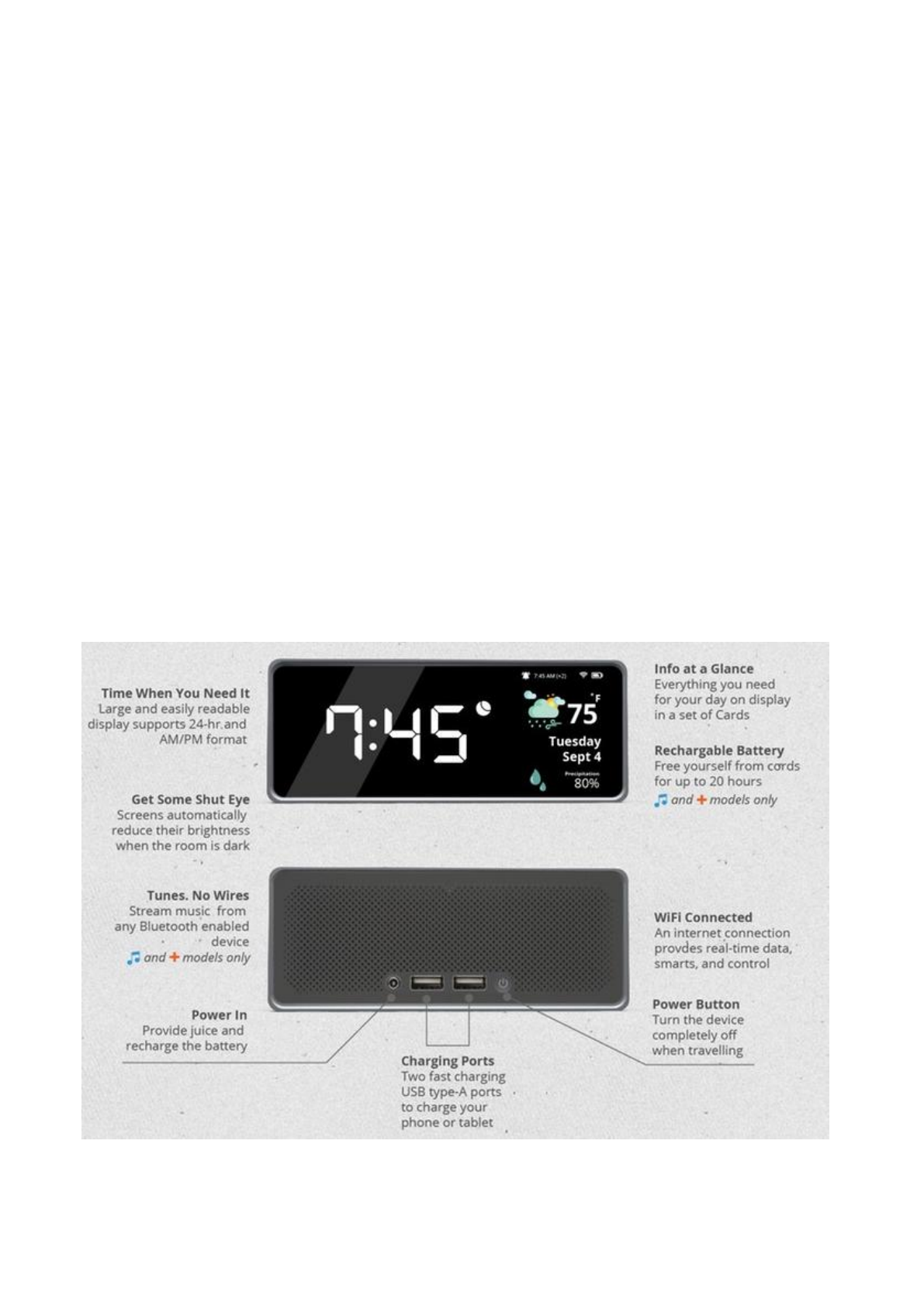
Oboo Smart Clock is an alarm clock, info center, and powerful speaker. Set as many alarms as you
need. Get up to date info for your day. Play your music. Control it with gestures.
1. Power
Oboo Smart Clock use a 12V/2A DC Adapter ,you can use the two fast-charging USB ports on
the back of Oboo to charge your devices.It comes with a built-in 1500mAh Lithium ion battery that
can power it for 3.5 hours of regular use and 1.5 hours of playing music over Bluetooth. Recharge
Oboo overnight for a fresh start the next day.
2. WiFi
Oboo is always connected thanks to its built-in WiFi. That’s how it can get the most up to date
weather and traffic data from trusted online sources as well as grab events from your calendar.
It is because of this constant internet connection that you can use the Oboo app to control your clock
from anywhere and everywhere.
Oboo Smart Clock will be hosting a WiFi access point network out of the box. The name of your
Oboo’s WiFi network will be something like Oboo-Clock-XXXX where XXXX are digits unique to
your device.
Use your Mobile equipment to connect to that network,the default password is 12345678.
3. Bluetooth
Wirelessly connect your smartphone, tablet, or other Bluetooth-enabled device within a 50-foot
range to stream your favorite tunes on Oboo’s high quality speakers.
Keep the tunes pumping wherever you go! The built-in battery makes your Oboo a 100% portable,
totally wireless speaker.
Oboo Smart Clock will be hosting a Bluetooth access point network out of the box. The name of
your Oboo’s Bluetooth network is Oboo Smart Clock, you can connnect the Bluetooth directly
without any password.
4. Automatic Time Adjustment
Never forget to fall backward or spring forward for daylight savings time again. Oboo uses the
Network Time Protocol to make sure the time and date are always set correctly.
Oboo uses those same smarts and WiFi based geolocation to automatically update the current time and
the time of your alarms when travelling.
5. A Touch of Light
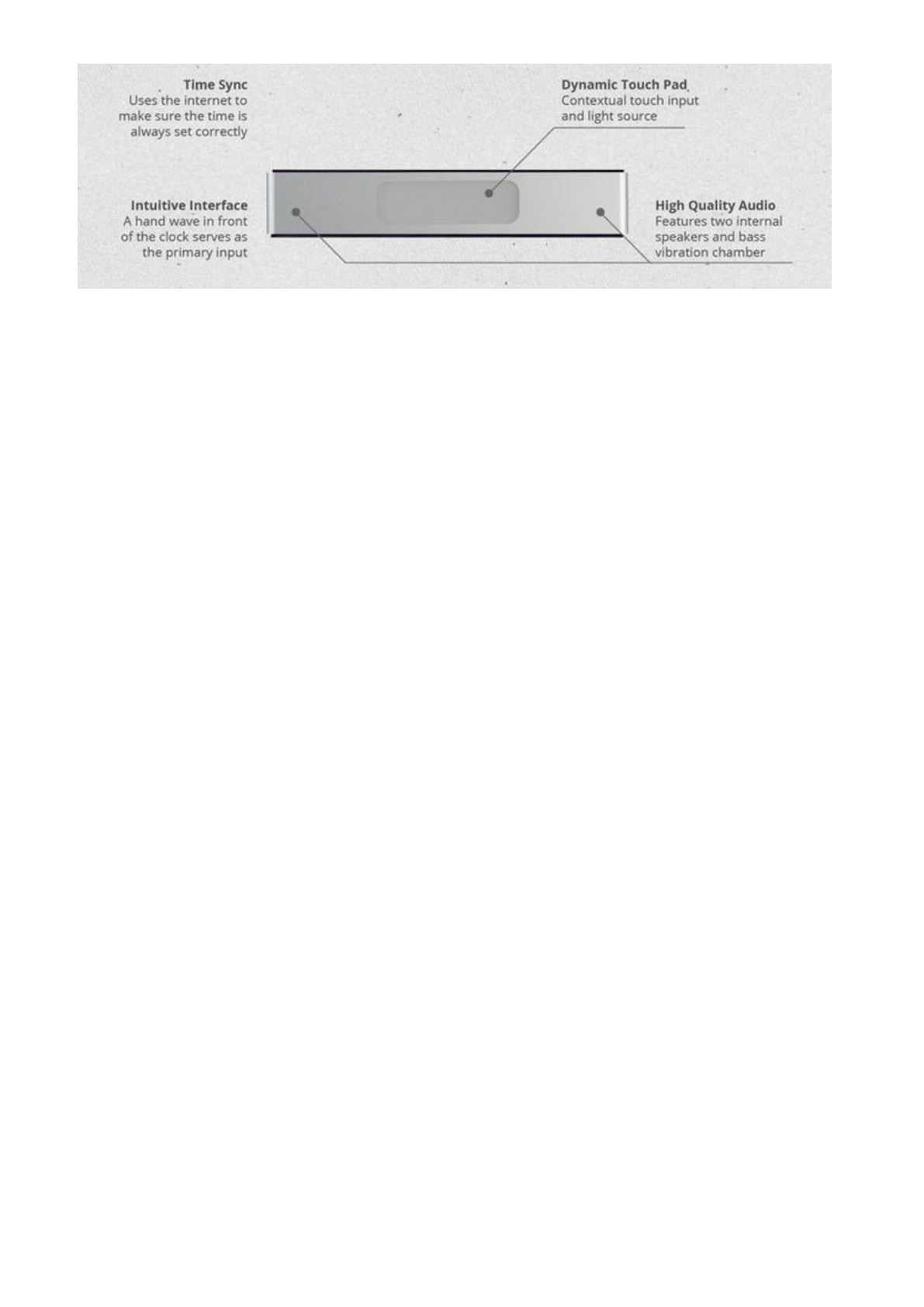
The top of the Oboo features a Touch Pad that replaces the need for physical buttons. An
animated, full color light bar is integrated into the touch pad to provide context and light up your
space.
6. Dynamic Buttons
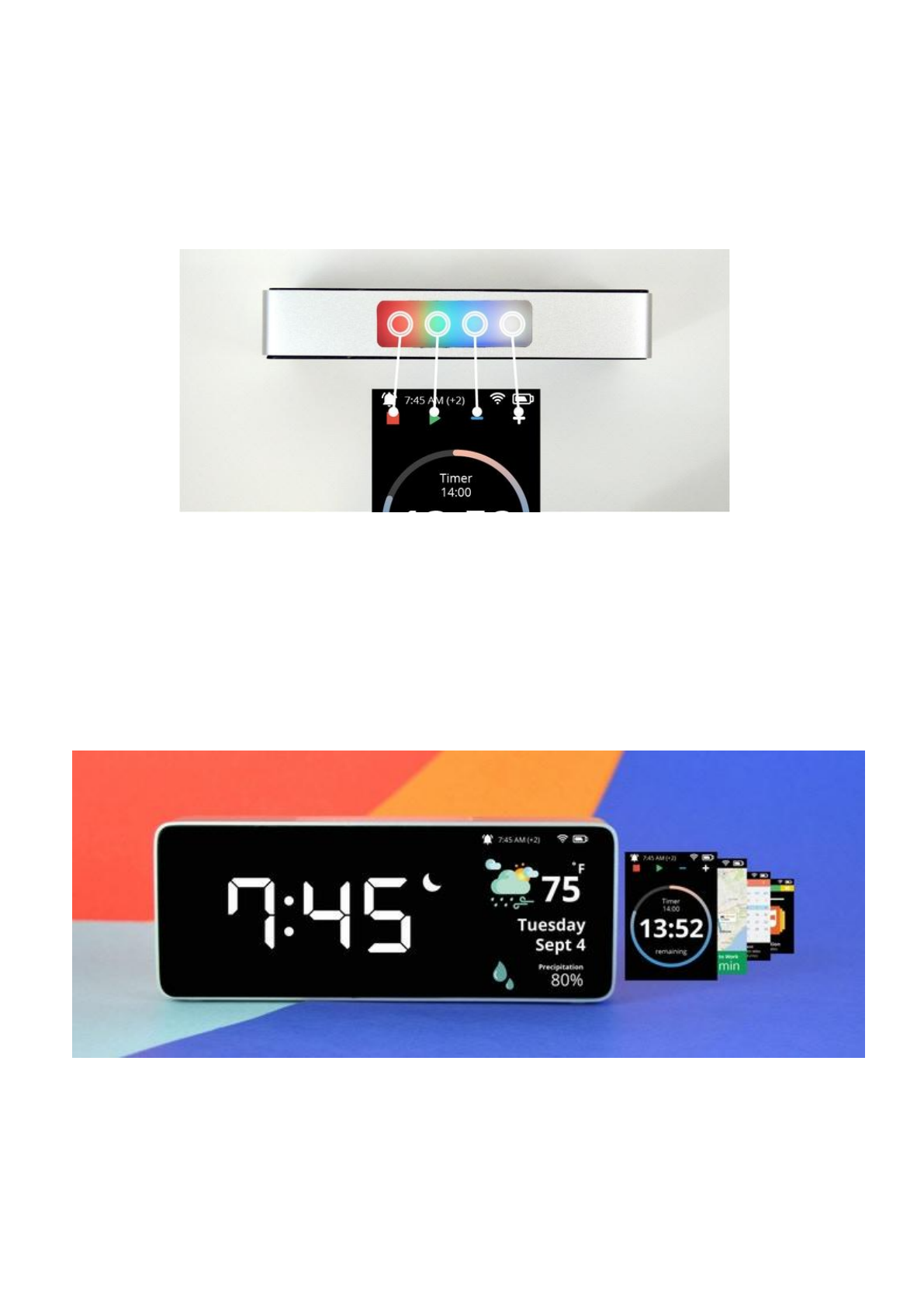
The functionality of the buttons is contextual and depends on what you’re trying to do. Each
button is color matched to actions displayed on the screen.
7. Alarm Button
When the alarm is going off and it’s time to get up, the entire touch pad acts as a single button:
the off button.
8.Cards
Everything you need for your day is available at a glance. Oboo grabs real-time data from the
internet and displays what you need to know in a series of cards.
Included Cards with Oboo's launch software:
Weather
Calendar
Traffic Info
Timer

9.Reacts to the Environment
Oboo dims its display when it’s time for bed so you can get the restful sleep that you need.
10.Wave Hello
Oboo Smart Clock features a front facing gesture sensor, providing an intuitive and natural way
to use your smart device.you can wave left, right, up, and down to control your Oboo.
Charging function
1. Plug in the charger to charge it, charge it for 2 hours.
2. Charging in the off state is without any indication.
3. When the Clcok is power on, on the top of the Cards will show the battery level.
Technical Parameters
1. Input voltage/current: 12V/2A
2. Built-in battery type: lithium battery
3. Built-in battery capacity: 3.7V/1500mAh
4. Bluetooth version: V4.2
5. WIFI protocol : 2.4GHz WiFi b/g/n
6. Workable range: 10M

FCC Warning Statement
Changes or modifications not expressly approved by the party responsible for compliance
could void the user’s authority to operate the equipment. This equipment has been tested
and found to comply with the limits for a Class B digital device, pursuant to Part 15 of the
FCC Rules. These limits are designed to provide reasonable protection against harmful
interference in a residential installation. This equipment generates uses and can radiate
radio frequency energy and, if not installed and used in accordance with the instructions,
may cause harmful interference to radio communications. However, there is no guarantee
that interference will not occur in a particular installation. If this equipment does cause
harmful interference to radio or television reception, which can be determined by turning
the equipment off and on, the user is encouraged to try to correct the interference by one
or more of the following measures:
‐‐ Reorient or relocate the receiving antenna.
‐‐ Increase the separation between the equipment and receiver.
‐‐ Connect the equipment into an outlet on a circuit different from that to which the
receiver is connected.
‐‐ Consult the dealer or an experienced radio/TV technician for help.
FCC Radiation Exposure Statement
The antennas used for this transmitter must be installed to provide a separation distance of at least 20
cm from all persons and must not be co‐located for operating in conjunction with any other antenna
or transmitter.