Onkyo A 905Tx Users Manual
A-905TX a-905tx_manual_e
A-905TX to the manual 6086ef36-139a-f354-ad04-9671e9b4300a
2015-01-24
: Onkyo Onkyo-A-905Tx-Users-Manual-233427 onkyo-a-905tx-users-manual-233427 onkyo pdf
Open the PDF directly: View PDF  .
.
Page Count: 28
English
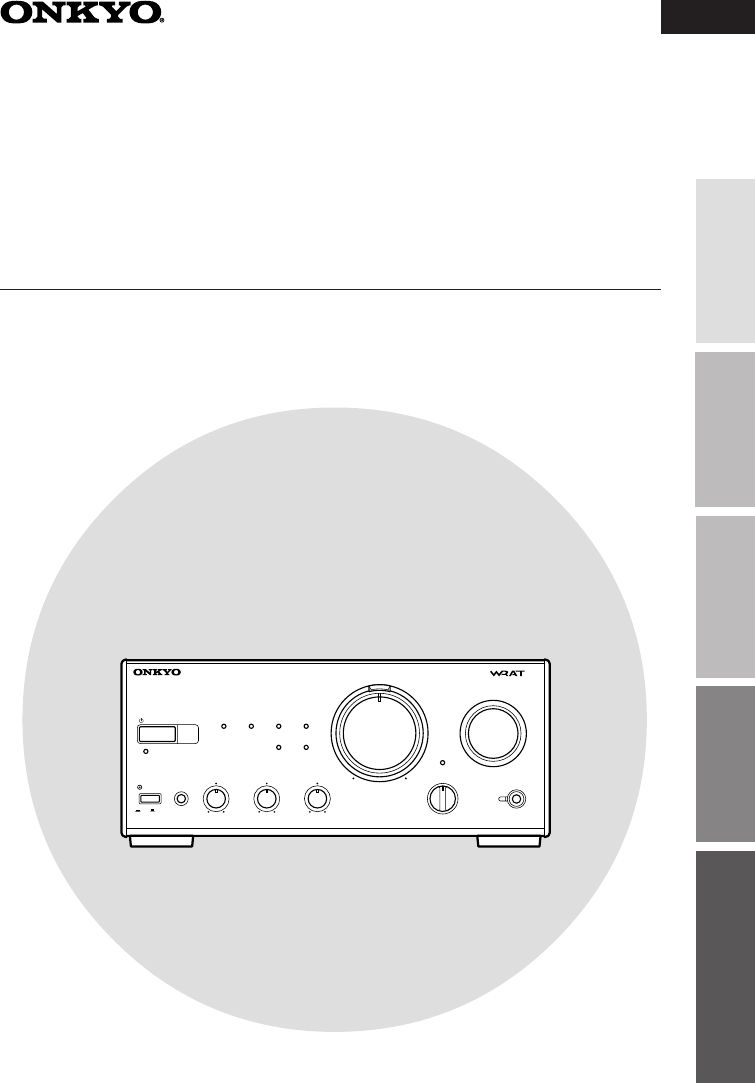
Instruction Manual
Integrated Stereo Amplifier
A-905TX
Operation Other Information
Before using Connections Preparations
STANDBY/ON
PHONES
STANDBY
A-905TX
INTEGRATED STEREO AMPLIFIER
TREBLEBASS BALANCE
POWER
OFF/1/2
—+ —+ L R
PRESENCE
ACOUSTIC
CD
MD TUNER
LINE/DVD
TAPE
CDR/PC
SOURCE DIRECT
DIRECT
DIRECT
TONE
INPUT
ON OFF
VOLUME
WIDE RANGE AMP TECHNOLOGY
2
Thank you for purchasing ...
Before using
Main Features
•High-Quality Separate Component
•WRAT (Wide Range Amp Technology) Circuit
•Processor In/Out, Subwoofer Pre Out
•Six-audio Source Inputs
Thank you for purchasing the ONKYO A-905TX Integrated Stereo Amplifier.
Please read this manual thoroughly before making any connection or turning on the power. Follow
these instructions to obtain optimum performance and maximum listening enjoyment from your new
A-905TX. Please retain this manual for future reference.
•Acoustic Presence Circuit Naturally En-
hances the Extreme Low Range
•Source Direct Function
•System Control Remote Controller
WARNING:
TO REDUCE THE RISK OF FIRE OR
ELECTRIC SHOCK, DO NOT
EXPOSE THIS APPLIANCE TO RAIN
OR MOISTURE.
CAUTION:
TO REDUCE THE RISK OF
ELECTRIC SHOCK, DO NOT
REMOVE COVER (OR BACK). NO
USER-SERVICEABLE PARTS INSIDE.
REFER SERVICING TO QUALIFIED
SERVICE PERSONNEL.
The lightning flash with arrowhead symbol, within
an equilateral triangle, is intended to alert the user
to the presence of uninsulated “dangerous
voltage” within the product’s enclosure that may
be of sufficient magnitude to constitute a risk of
electric shock to persons.
The exclamation point within an equilateral
triangle is intended to alert the user to the
presence of important operating and maintenance
(servicing) instructions in the literature
accompanying the appliance.
WARNING
RISK OF ELECTRIC SHOCK
DO NOT OPEN RISQUE DE CHOC ELECTRIQUE
NE PAS
OUVRIR
AVIS
Memory Preservation
This unit does not require memory preservation
batteries. A built-in memory power back-up sys-
tem preserves the contents of the memory dur-
ing power failures and even when the unit is un-
plugged. The unit must be plugged in order to
charge the back-up system.
The memory preservation period after the unit
has been unplugged varies depending on climate
and placement of the unit. On the average,
memory contents are protected over a period of
a few weeks after the last time the unit has been
unplugged. This period is shorter when the unit
is exposed to a highly humid climate.
3
Before using
Important Safeguards
10. Power Sources –␣ The appliance should be
connected to a power supply only of the type
described in the operating instructions or as
marked on the appliance.
11. Polarization
–
If the appliance is provided with
a polarized plug having one blade wider than
the other, please read the following information:
The polarization of the plug is a safety feature.
The polarized plug will only fit the outlet one
way. If the plug does not fit fully into the out-
let, try reversing it. If there is still trouble, the
user should seek the services of a qualified elec-
trician. Under no circumstances should the user
attempt to defeat the polarization of the plug.
12. Power-Cord Protection – Power-supply
cords should be routed so that they are not
likely to be walked on or pinched by items
placed upon or against them, especially near
plugs, convenience receptacles, and the
point where they exit from the appliance.
13. Cleaning – The appliance should be cleaned
only as recommended by the manufacturer.
14. Nonuse Periods – The power cord of the ap-
pliance should be unplugged from the outlet
when left unused for a long period of time.
15. Object and Liquid Entry – Care should be taken
so that objects do not fall and liquids are not spilled
into the enclosure through openings.
16. Damage Requiring Service – The appliance
should be serviced by qualified service per-
sonnel when:
A. The power-supply cord or the plug has
been damaged; or
B. Objects have fallen, or liquid has been
spilled into the appliance; or
C. The appliance has been exposed to rain; or
D. The appliance does not appear to oper-
ate normally or exhibits a marked change
in performance; or
E. The appliance has been dropped, or the
enclosure damaged.
17. Servicing – The user should not attempt to ser-
vice the appliance beyond that described in the
operating instructions. All other servicing should
be referred to qualified service personnel.
1. Read Instructions – All the safety and
operating instructions should be read before
the appliance is operated.
2. Retain Instructions – The safety and
operating instructions should be retained for
future reference.
3. Heed Warnings – All warnings on the
appliance and in the operating instructions
should be adhered to.
4. Follow Instructions – All operating and use
instructions should be followed.
5. Water and Moisture – The appliance should
not be used near water – for example, near
a bathtub, washbowl, kitchen sink, laundry
tub, in a wet basement, or near a swimming
pool, and the like.
6. Carts and Stands – The appliance should
be used only with a cart or stand that is rec-
ommended by the manufacturer.
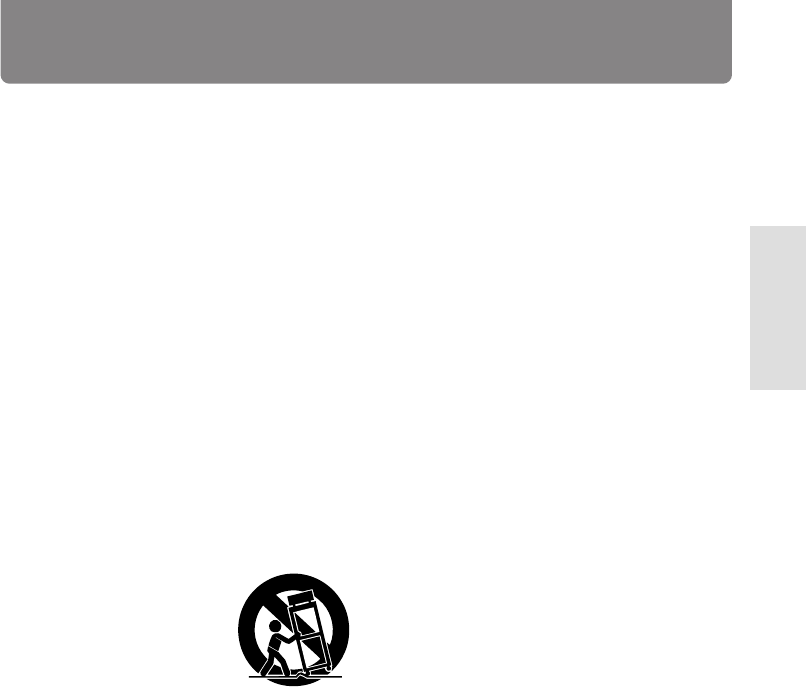
6A. An appliance and cart
combination should
be moved with care.
Quick stops, excessive
force, and uneven sur-
faces may cause the
appliance and cart
combination to over-
turn.
7. Wall or Ceiling Mounting – The appliance
should be mounted to a wall or ceiling only
as recommended by the manufacturer.
8. Ventilation – The appliance should be situ-
ated so that its location or position does not
interfere with its proper ventilation. For ex-
ample, the appliance should not be situated
on a bed, sofa, rug, or similar surface that
may block the ventilation openings; or if
placed in a built-in installation, such as a
bookcase or cabinet that may impede the
flow of air through the ventilation openings,
there should be free space of at least 20 cm
(8 in.) and an opening behind the appliance.
9. Heat – The appliance should be situated away
from heat sources such as radiators, heat reg-
isters, stoves, or other appliances (including
amplifiers) that produce heat.
PORTABLE CART WARNING
S3125A
4
Precautions
Declaration of Conformity
We, ONKYO EUROPE
ELECTRONICS GmbH
INDUSTRIESTRASSE 20
82110 GERMERING,
GERMANY
GERMERING, GERMANY
ONKYO EUROPE ELECTRONICS GmbH
A.HORIUCHI
declare in own responsibility, that the ONKYO product described
in this instruction manual is in compliance with the corresponding
technical standards such as EN60065, EN55013, EN55020 and
EN61000-3-2, -3-3.
1. Warranty Claim
You can find the serial number on the rear panel
of this unit. In case of warranty claim, please re-
port this number.
2. Recording Copyright
Recording of copyrighted material for other than
personal use is illegal without permission of the
copyright holder.
3. AC Fuse
The fuse is located inside the chassis and is not
user-serviceable. If power does not come on, con-
tact your Onkyo authorized service station.
4. Care
From time to time you should wipe the front and
rear panels and the cabinet with a soft cloth. For
heavier dirt, dampen a soft cloth in a weak solu-
tion of mild detergent and water, wring it out dry,
and wipe off the dirt. Following this, dry immedi-
ately with a clean cloth. Do not use rough mate-
rial, thinners, alcohol or other chemical solvents
or cloths since these could damage the finish or
remove the panel lettering.
5. Power
WARNING
BEFORE PLUGGING IN THE UNIT FOR THE FIRST
TIME, READ THE FOLLOWING SECTION CARE-
FULLY.
The voltage of the available power supply differs
according to country or region. Be sure that the
power supply voltage of the area where this unit
will be used meets the required voltage (e.g., AC
230 V, 50 Hz or AC 120 V, 60 Hz) written on the
rear panel.
For British model
Replacement and mounting of an AC plug on the
power supply cord of this unit should be performed
only by qualified service personnel.
IMPORTANT
The wires in the mains lead are coloured in accor-
dance with the following code:
Blue : Neutral
Brown : Live
As the colours of the wires in the mains lead of
this apparatus may not correspond with the
coloured markings identifying the terminals in your
plug, proceed as follows:
The wire which is coloured blue must be connected
to the terminal which is marked with the letter N
or coloured black.
The wire which is coloured brown must be con-
nected to the terminal which is marked with the
letter L or coloured red.
IMPORTANT
A 5 ampere fuse is fitted in this plug. Should the fuse
need to be replaced, please ensure that the replace-
ment fuse has a rating of 5 amperes and that it is ap-
proved by ASTA or BSI to BS1362. Check for the ASTA
mark or the BSI mark on the body of the fuse.
IF THE FITTED MOULDED PLUG IS UNSUITABLE FOR
THE SOCKET OUTLET IN YOUR HOME THEN THE
FUSE SHOULD BE REMOVED AND THE PLUG CUT
OFF AND DISPOSED OF SAFELY. THERE IS A DAN-
GER OF SEVERE ELECTRICAL SHOCK IF THE CUT OFF
PLUG IS INSERTED INTO ANY 13 AMPERE SOCKET.
If in any doubt, please consult a qualified electrician.
For Canadian model
For models having a power cord with a polarized
plug:
CAUTION: TO PREVENT ELECTRIC SHOCK,
MATCH WIDE BLADE OF PLUG TO WIDE SLOT,
FULLY INSERT.
Modele pour les Canadien
Sur les modèles dont la fiche est polarisée:
ATTENTION: POUR ÉVITER LES CHOCS
ÉLECTRIQUES, INTRODUIRE LA LAME LA PLUS
LARGE DE LA FICHE DANS LA BORNE
CORRESPONDANTE DE LA PRISE ET POUSSER
JUSQU’AU FOND.
5
Before using
Table of contents
Before using
Connections
Connecting to the ONKYO Separate Collection Series components .................. 6
Connecting to components other than the Separate Collection Series ............ 12
Connecting speaker systems .......................................................................... 15
Preparations
Preparing the remote controller...................................................................... 17
Operation
Turning the unit on ........................................................................................ 18
Choosing the required source ........................................................................ 19
Adjusting the sound....................................................................................... 20
Source Direct function/Muting/Listening with the headphones ....................... 21
Recording ...................................................................................................... 22
Other Information
Troubleshooting ............................................................................................. 23
Specifications ................................................................................................. 24
Index to parts and controls............................................................................. 25
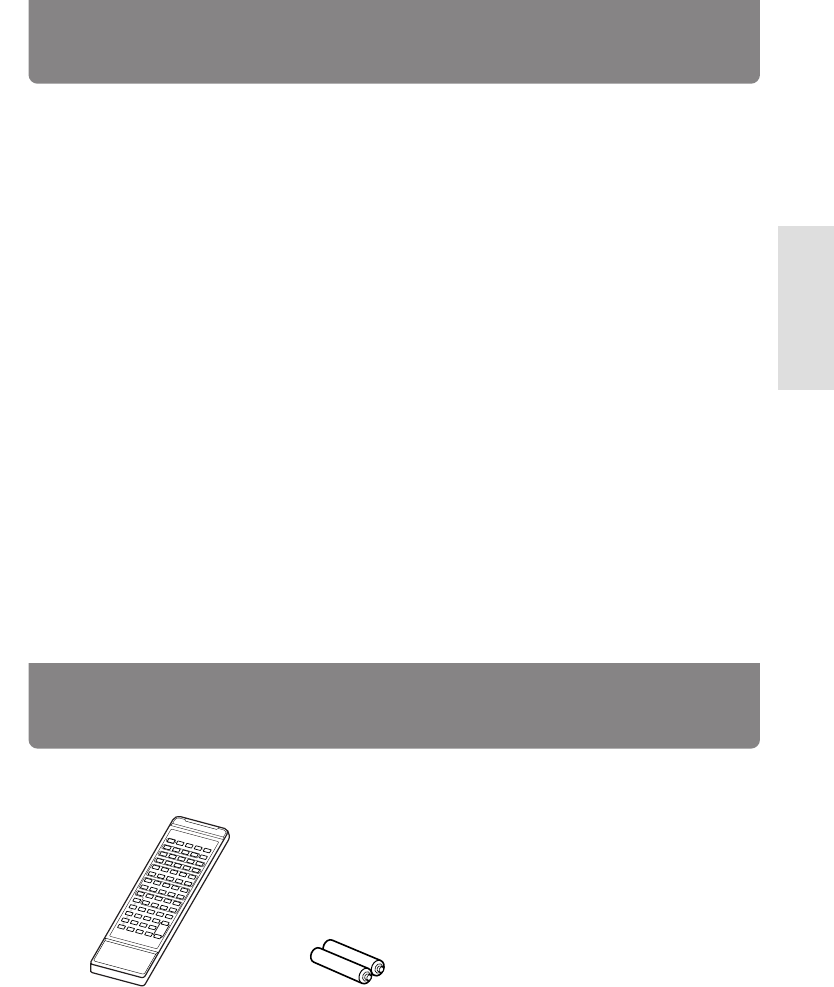
Remote controller x 1
(RC-456S)
Batteries x 2
(Size AA, R6, or UM-3)
Supplied accessories
Check that the following accessories are supplied with this unit.

6
Connections
Connecting to the ONKYO Separate Collection Series components
This section introduces you to the other Separate Collection Series system components and their con-
venient system functions, followed by connecting instructions.
The following Separate Collection Series components are commercially available:
• T-405TX ............ Stereo Tuner
• K-505TX ........... Stereo Cassette Tape Deck
• C-705TX ........... Compact Disc (CD) Player (Not available in U.S. and Canada)
• C-707CHX ........ Compact Disc (CD) Changer (Only available in U.S. and Canada)
• MD-105TX ........ Minidisc (MD) Recorder (Not available in U.S. and Canada)
• CDR-205TX ...... Compact Disc (CD) Recorder (available only in part of Asia)
Note that the available components may vary according to the area.
Combination use of the unit with the above system components enables you to operate the following
convenient functions:
• Auto Power On
– You can turn on the unit by pressing the STANDBY/ON switch on one of the system components.
(The unit's POWER switch must be set to ON.)
– You can turn on all the system components at the same time by pressing the STANDBY/ON switch
on the unit. (The unit's POWER switch must be set to ON.)
You can turn off each component not in use independently afterwards.
• Direct Change
Press the following button on the component you want to operate to switch the unit’s input selector
automatically to that component:
– The play button on the CD player (or changer), MD recorder, or stereo cassette tape deck, or
– The PRESET / buttons on the tuner.
• Remote Control Operation
All the system components can be operated using the supplied remote controller. The remote con-
trol buttons operate in the same way as the buttons on each component with the same indication.
• Program Timer
You can operate timer playback and recording using T-405TX. (Refer to the T-405TX instruction
manual for more information.)
• Sleep Timer
You can fall asleep to a music/radio program using the timer. (Refer to the T-405TX instruction
manual for more information.)
• CD Dubbing
Simple CD dubbing using a stereo cassette tape deck or MD recorder is possible with the pressing of
a single button (CD dubbing function using an MD recorder is not avalable on the C-707CHX). (Refer
to the K-505TX or MD-105TX Instruction Manual for more information).
• CD/MD Synchro Recording
When using a stereo cassette tape deck, MD recorder or CD recorder to record from the CD player or
when using a stereo cassette tape deck to record from an MD recorder, you can record with simply
starting on a CD player or MD recorder. (Refer to the K-505TX, MD-105TX or CDR-205TX instruction
manual for more information.)
• Dubbing a specific track from CD
You can specify a track on a CD and easily dub it to a connected MD recorder or CD recorder. (Refer
to the MD-105TX or CDR-205TX instruction manual for more information.)
7
Operation Other Information
Before using PreparationsConnections
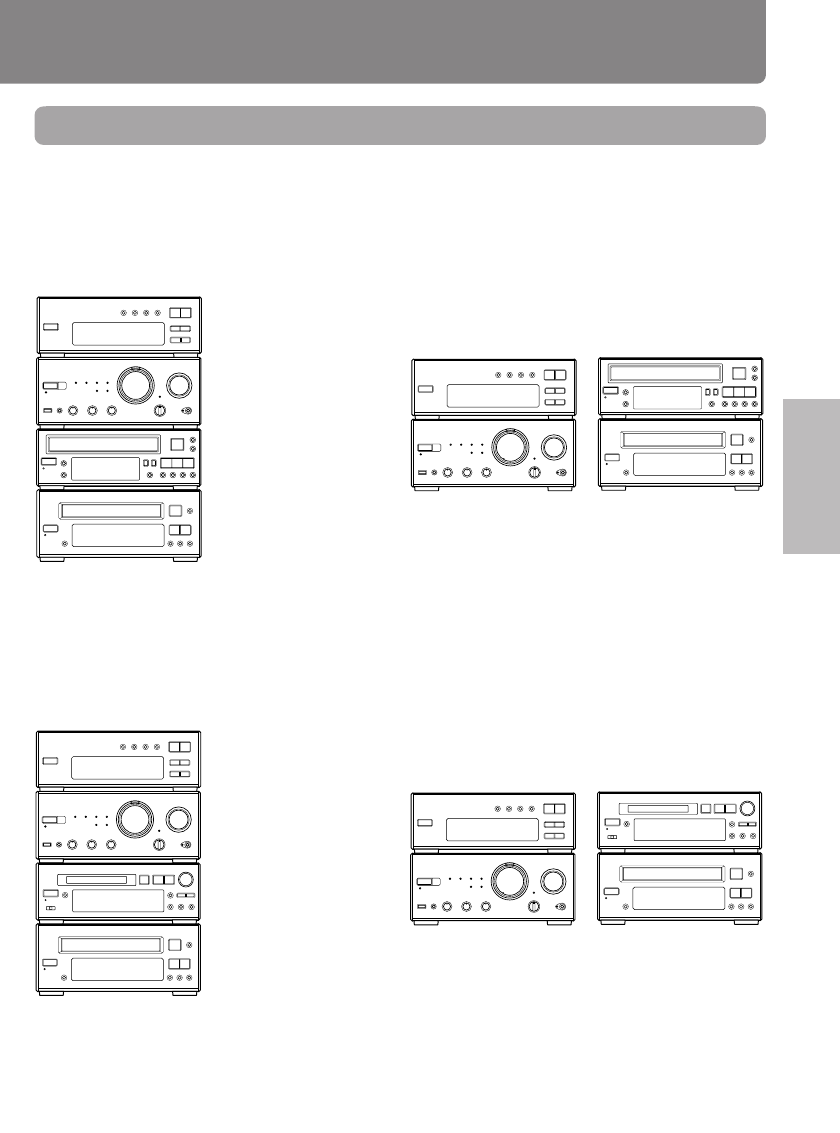
Arranging the system components
Combination example 1
Select the tuner T-405TX, CD player C-705TX (or CD changer C-707CHX), and stereo cassette tape
deck K-505TX in addition to this unit. When you arrange these components, stack them as shown
below.
Vertical way stacking Horizontal way stacking
Combination example 2
Select the tuner T-405TX, CD player C-705TX and MD recorder MD-105TX in addition to this unit.
When you arrange these components, stack them as shown below.
Vertical way stacking Horizontal way stacking
Tuner
(T-405TX)
CD player
(C-705TX)
MD recorder
(MD-105TX)
Amplifier – this unit
(A-905TX)
Tuner
(T-405TX)
CD player
(C-705TX)
Amplifier – this unit
(A-905TX)
MD recorder
(MD-105TX)
Tip
In addition to the above combination examples, you can also connect both the MD recorder MD-105TX
and stereo cassette tape deck K-505TX with the tuner T-405TX, CD player C-705TX, and this unit.
Tuner
(T-405TX)
CD player
(C-705TX) or
CD changer
(C-707CHX)
CD player
(C-705TX) or
CD changer
(C-707CHX)
Stereo cassette tape
deck (K-505TX)
Amplifier – this unit
(A-905TX)
Tuner
(T-405TX)
Amplifier – this unit
(A-905TX)
Stereo cassette tape
deck (K-505TX)
8
Connecting to the ONKYO Separate Collection Series components
Connecting to the audio connector
Before connecting
• Do not connect the unit’s AC power cord (mains lead) to a wall outlet (the mains) until you have
completed all the other connections, including and AC OUTLET connections on page 11 and
“Connecting speaker systems” on page 15.
• On each pair of connectors, a red connector (marked R) corresponds to the right channel, and a
white connector (marked L) to the left channel. Connect white plugs of audio connection cables to
L connectors and connect red plugs of audio connection cables to R connectors.
• Please refer to the instruction manual for each component when you make any connections.
• Insert the plug securely. If the connection is incomplete, noise or malfunction may result.
Improper connection
Insert completely
• When you use a digital audio optical cable, do not bend it sharply nor coil it tightly.
• Bundling an audio connection cable with the power cord or speaker cord may degrade the sound
quality.
• Be sure to use the cable, supplied with each component (except for the A-905TX) to connect to
the remote control connector. If the connection is incomplete, you will be unable to operate the
device using the remote controller.
• CD players and MD recorders use heat-sensitive parts. Do not place them on top of the amplifier.
To connect both the MD recorder MD-105TX and stereo cassette tape deck K-505TX to the
unit:
Connect the MD recorder to the unit following the “Connections for combination example 2” on the
next page and connect the stereo cassette tape deck to the unit following the “Connections for com-
bination example 1.”
The 230-240 V model is shown in the following illustrations.
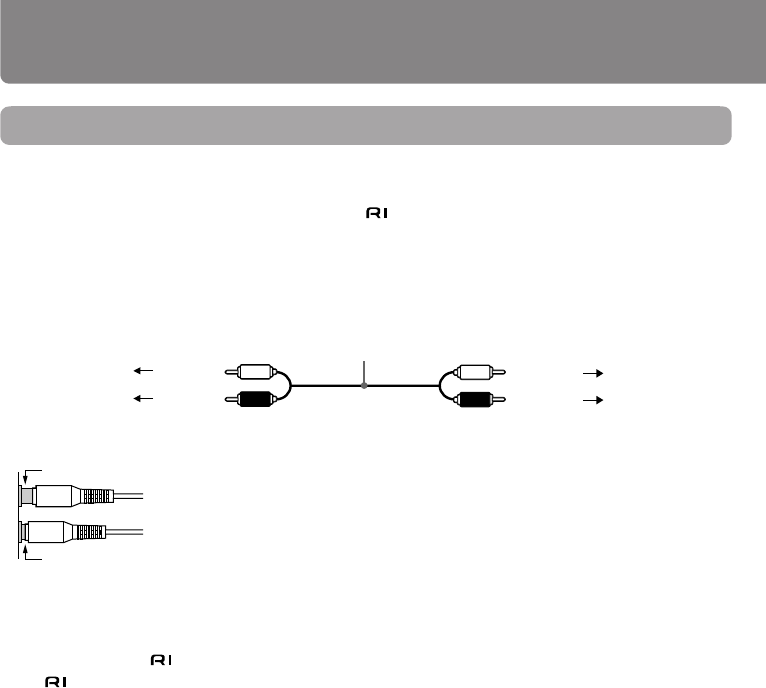
Audio connection cable
To L connector (White)
To R connector (Red)
(White) To L connector
(Red) To R connector
9
Operation Other Information
Before using PreparationsConnections
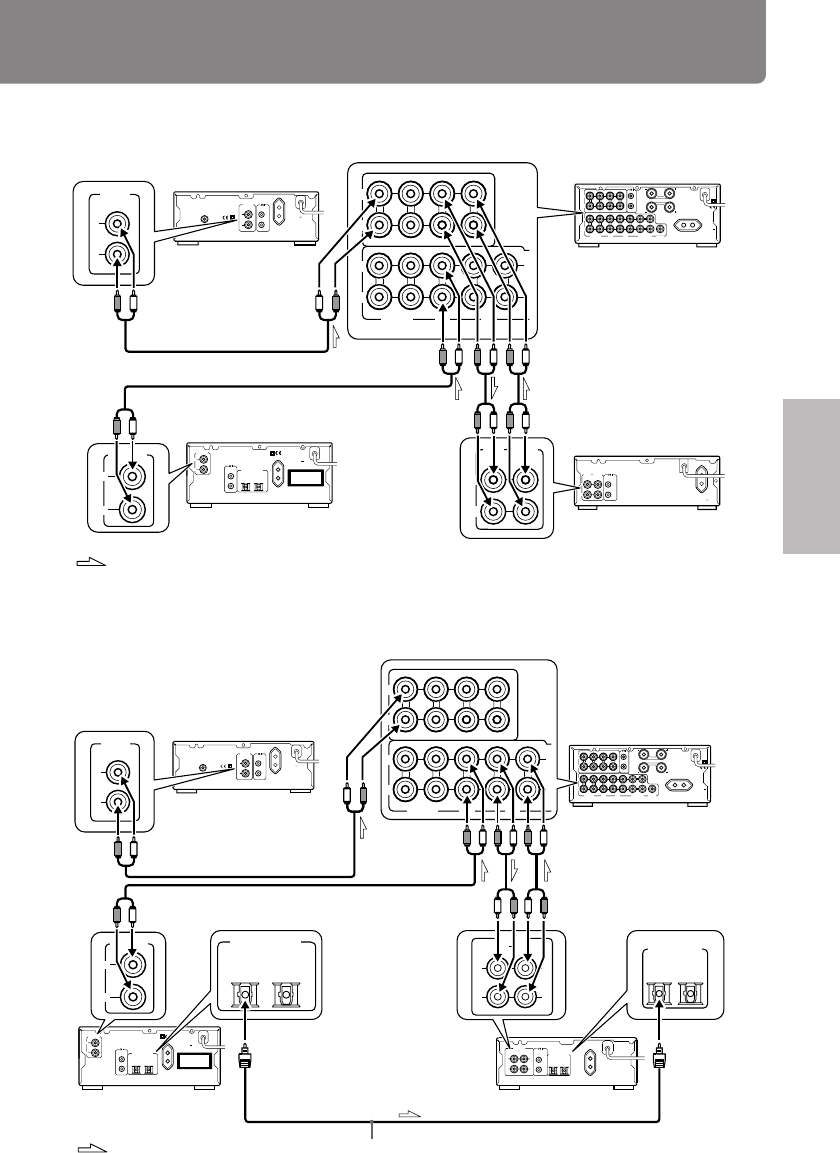
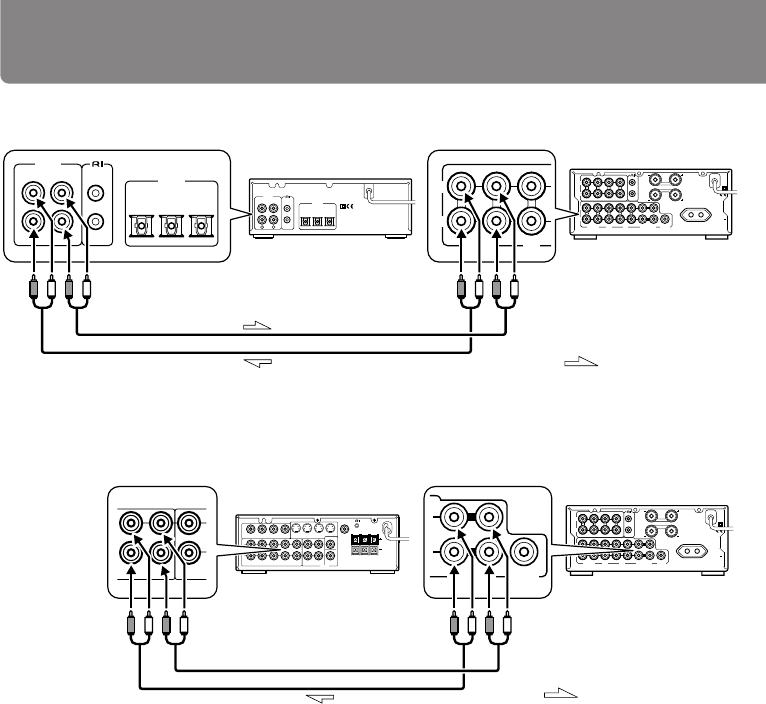
Connections for combination example 1
Connections for combination example 2
Tuner (T-405TX)
Amplifier
– this unit (A-905TX)
CD player (C-705TX)
Optical cable
MD recorder (MD-105TX)
: Signal flow
OPTICAL
L
R
ANALOG
OUTPUT
AC OUTLET
AC 230-240V 50Hz
UNSWITCHED
100W MAX.
12
DIGITAL OUTPUT
REMOTE
CONTROL
"CLASS 1 LASER
PRODUCT"
L
R
L
R
LINE/DVDTUNER
OUT IN
L
R
TAPE
SPEAKERS
OUT
(REC)
OUT
(REC)IN(PLAY)
IN(PLAY)
OUT
(REC)IN(PLAY)
REMOTE
CONTROL
CD
CDR/PC
PROCESSOR
MD
SUBWOOFER
PRE OUT
L
R AC OUTLET
AC 230-240V
50Hz
SWITCHED
100W MAX.
CAUTION:
SPEAKER IMPEDANCE
4 OHMS MIN./SPEAKER
OUTPUT
L
R
REMOTE
CONTROL
ANTENNA
AC OUTLET
AC 230-240V 50Hz
UNSWITCHED
100W MAX.
75
FM
L
R
(REC)(
PLAY)
INPUT OUTPUT REMOTE
CONTROL
OPTICAL
12
DIGITAL INPUT
L
R
ANALOG
OUTPUT
L
R
L
R
L
R
OUT
(REC)
OUT
(REC)IN(PLAY)
IN(PLAY)
OUT
(REC)IN(PLAY)
L
R
CD
CDR/PC MD
L
R
ANALOG
OUTPUT OPTICAL
12
DIGITAL OUTPUT
LINE/DVDTUNER TAPE
L
R
(REC)(
PLAY)
INPUT OUTPUT
L
R
ANALOG
OPTICAL
12
DIGITAL INPUT
Tuner (T-405TX)
CD player (C-705TX) or
CD changer (C-707CHX)
Stereo cassette tape
deck (K-505TX)
: Signal flow
OPTICAL
L
R
ANALOG
OUTPUT
AC OUTLET
AC 230-240V 50Hz
UNSWITCHED
100W MAX.
12
DIGITAL OUTPUT
REMOTE
CONTROL
"CLASS 1 LASER
PRODUCT"
L
R
L
R
LINE/DVDTUNER
OUT IN
L
R
TAPE
SPEAKERS
OUT
(REC)
OUT
(REC)IN(PLAY)
IN(PLAY)
OUT
(REC)IN(PLAY)
REMOTE
CONTROL
CD
CDR/PC
PROCESSOR
MD
SUBWOOFER
PRE OUT
L
R
AC OUTLET
AC 230-240V
50Hz
SWITCHED
100W MAX.
CAUTION:
SPEAKER IMPEDANCE
4 OHMS MIN./SPEAKER
OUTPUT
L
R
REMOTE
CONTROL
ANTENNA
AC OUTLET
AC 230-240V 50Hz
UNSWITCHED
100W MAX.
75
FM
L
R
D
(REC) (PLAY)
INPUT OUTPUT REMOTE
CONTROL
AC OUTLET
AC 230-240
V 50
Hz
UNSWITCHED
100W MAX
.
L
R
L
R
OUT
(REC)
OUT
(REC)IN(PLAY)
IN(PLAY)
OUT
(REC)IN(PLAY)
L
R
L
R
D
(REC) (PLAY)
INPUT OUTPUT
OUTPUT
L
R
L
R
ANALOG
OUTPUT
CD
CDR/PC MD
LINE/DVDTUNER TAPE
Amplifier
– this unit (A-905TX)
10
Connecting to the ONKYO Separate Collection Series components
L
R
L
R
LINE/DVDTUNER
OUT IN
L
R
TAPE
SPEAKERS
OUT
(REC)
OUT
(REC)IN(PLAY)
IN(PLAY)
OUT
(REC)IN(PLAY)
REMOTE
CONTROL
CD
CDR/PC
PROCESSOR
MD
SUBWOOFER
PRE OUT
L
R AC OUTLET
AC 230-240V
50Hz
SWITCHED
100W MAX.
CAUTION:
SPEAKER IMPEDANCE
4 OHMS MIN./SPEAKER
L
R
(REC) (PLAY)
INPUT OUTPUT
OPTICAL
INPUT 1 INPUT 2
DIGITAL
L
R
L
K
ANALOG
OUTPUT
REMOTE
CONTROL
OUT
(REC)IN(PLAY)
L
R
CD
CDR/PC
L
R
(REC) (PLAY)
INPUT OUTPUT
OPTICAL
INPUT 1 INPUT 2
DIGITAL
L
R
ANALOG
OUTPUT
REMOTE
CONTROL
L
R
L
R
LINE/DVDTUNER
OUT IN
L
R
TAPE
SPEAKERS
OUT
(REC)
OUT
(REC)IN(PLAY)
IN(PLAY)
OUT
(REC)IN(PLAY)
REMOTE
CONTROL
CD
CDR/PC
PROCESSOR
MD
SUBWOOFER
PRE OUT
L
R
AC OUTLET
AC 230-240V
50Hz
SWITCHED
100W MAX.
CAUTION:
SPEAKER IMPEDANCE
4 OHMS MIN./SPEAKER
IN
VIDEO-1 MONITOR
OUT
OUT IN
VIDEO-2
IN
VIDEO-1 IN OUT
PROCESSOR FRONT SURROUNDOUT IN
VIDEO-2 SUB-
WOOFER
R L
SURROUND
CENTER
REMOTE
CONTROL
SUB WOOFER
PRE OUT
CENTER
R
L
S VIDEO
VIDEO
SPEAKERS
MULTI
CHANNEL INPUT
OUT IN
VIDEO-2
IN
VIDEO-1 MONITOR OUT
CAUTION:
SPEAKER
IMPEDANCE
6 OHMS MIN.
/SPEAKER
OUT IN
PROCESSOR
SUBWOOFER
PRE OUT
IN OUT
PROCESSOR FRONT
Amplifier – this unit
(A-905TX)
CD Recorder
(CDR-205TX)
Amplifier – this unit
(A-905TX)
Processor
(e.g. ED-205)
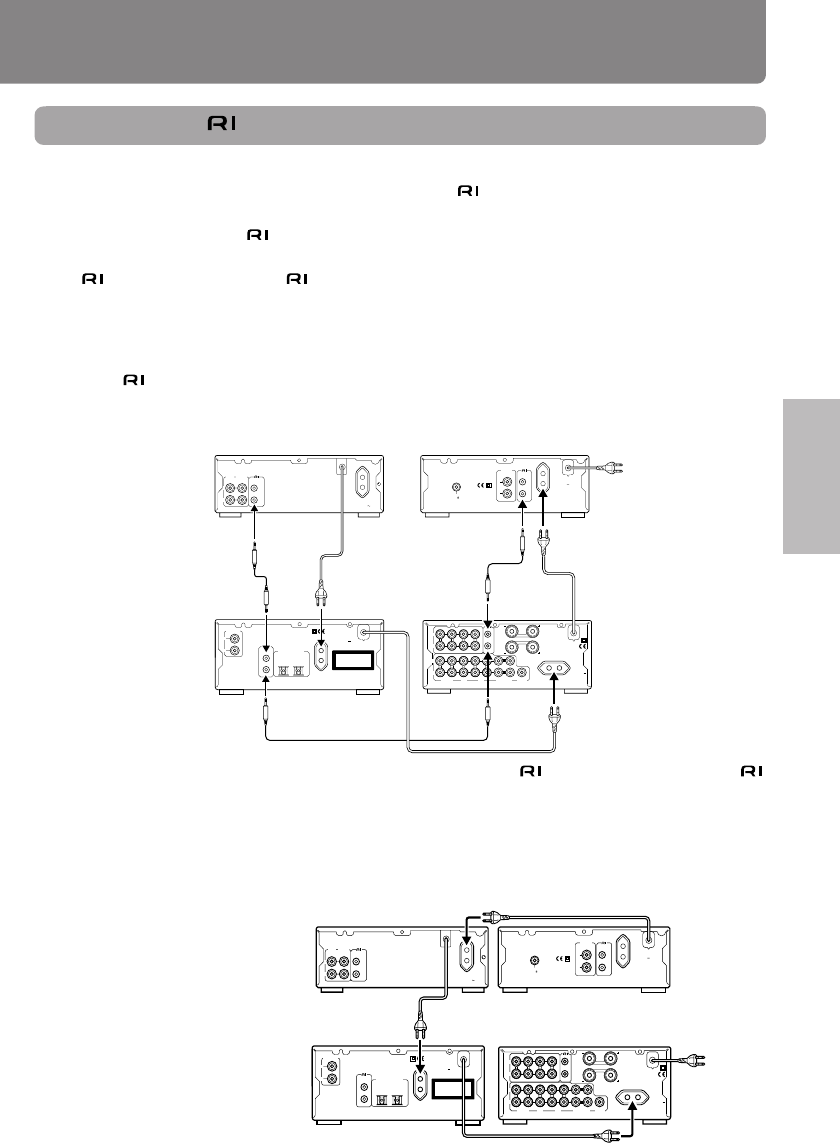
: Signal flow
: Signal flow
Connecting a CD Recorder CDR-205TX:
Connecting a processor such as ED-205:
Note:
Jumper plugs have been installed on the A-905TX’s PROCESSOR connectors. To connect an AV sur-
round processor, such as ED-205, remove the jumper plugs, then connect pin cables (see page 13).
11
Operation Other Information
Before using PreparationsConnections
Tuner (T-405TX)
Amplifier – this unit
(A-905TX)
Stereo cassette tape
deck (K-505TX) or
MD recorder (MD-
105TX)
(The illustration is
MD-105TX.)
CD player (C-705TX)
or
CD changer (C-
707CHX)
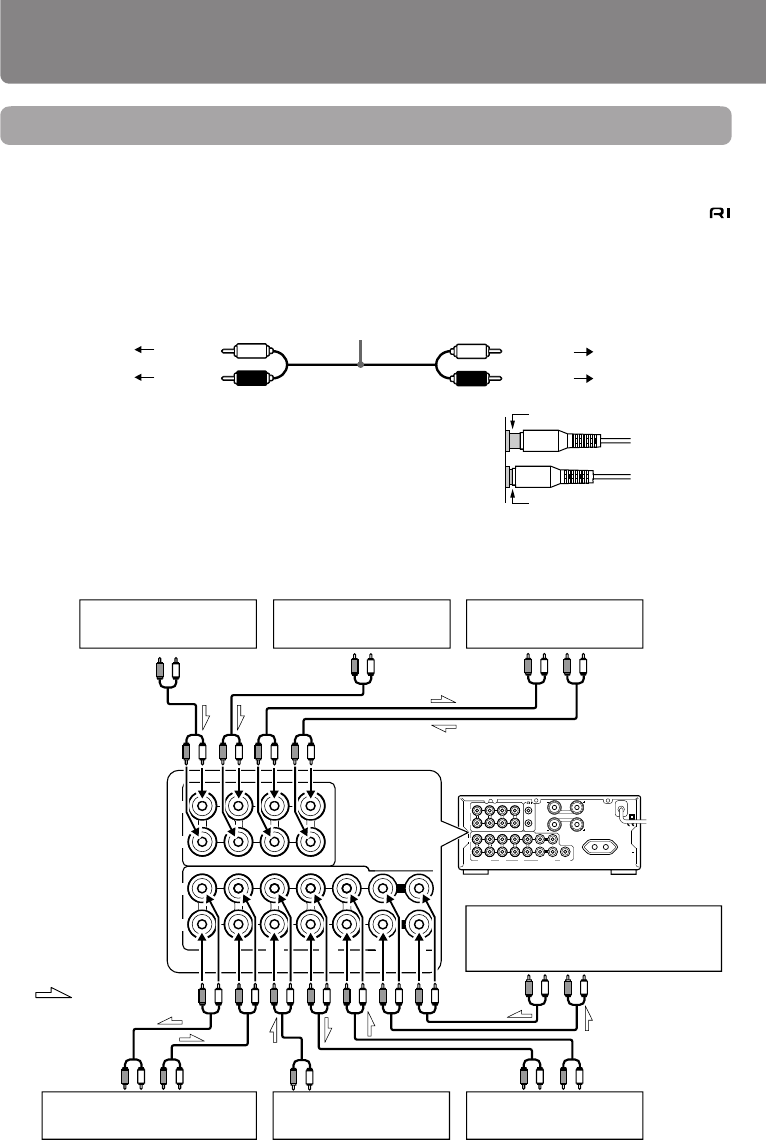
Connecting the connectors and AC OUTLETS
Before connecting
• The hookups on page 9, 10 is needed in addition to the (for remote control operations) and AC
OUTLET (for power supply to each component) hookups on this page.
• Each component has two connectors. There is no difference between those connectors. The
components may be connected in any order.
• The cable for connecting the connectors is supplied with each component (not supplied with
the unit).
Connections
To use the Clock/Timer function of the tuner T-405TX’s, connect the power cord as shown below and
connect the cable and audio connection cables (see page 9, 10). Be sure to connect the power cord
of the T-405TX to an AC outlet that supplies continuous power. Also, turn on the POWER switch on the
A-905TX to use the Timer function.
L
R
D
(REC) (PLAY)
INPUT OUTPUT REMOTE
CONTROL
AC OUTLET
AC 230-240
V 50
Hz
UNSWITCHED
100W MAX
.
OUTPUT
L
R
REMOTE
CONTROL
ANTENNA
AC OUTLET
AC 230-240V 50Hz
UNSWITCHED
100W MAX.
75
FM
L
R
L
R
LINE/DVDTUNER
OUT IN
L
R
TAPE
SPEAKERS
OUT
(REC)
OUT
(REC)IN(PLAY)
IN(PLAY)
OUT
(REC)IN(PLAY)
REMOTE
CONTROL
CD
CDR/PC
PROCESSOR
MD
SUBWOOFER
PRE OUT
L
R AC OUTLET
AC 230-240V
50Hz
SWITCHED
100W MAX.
CAUTION:
SPEAKER IMPEDANCE
4 OHMS MIN./SPEAKER
OPTICAL
L
R
ANALOG
OUTPUT
AC OUTLET
AC 230-240V 50Hz
UNSWITCHED
100W MAX.
12
DIGITAL OUTPUT
REMOTE
CONTROL
"CLASS 1 LASER
PRODUCT"
Note:
If you have a CD Recorder CDR-205TX, connect the CDR-205TX’s connector to an available
connector on the A-905TX.
To wall outlet
L
R
D
(REC) (PLAY)
INPUT OUTPUT REMOTE
CONTROL
AC OUTLET
AC 230-240
V 50
Hz
UNSWITCHED
100W MAX
.
OUTPUT
L
R
REMOTE
CONTROL
ANTENNA
AC OUTLET
AC 230-240V 50Hz
UNSWITCHED
100W MAX.
75
FM
L
R
L
R
LINE/DVDTUNER
OUT IN
L
R
TAPE
SPEAKERS
OUT
(REC)
OUT
(REC)IN(PLAY)
IN(PLAY)
OUT
(REC)IN(PLAY)
REMOTE
CONTROL
CD
CDR/PC
PROCESSOR
MD
SUBWOOFER
PRE OUT
L
R
AC OUTLET
AC 230-240V
50Hz
SWITCHED
100W MAX.
CAUTION:
SPEAKER IMPEDANCE
4 OHMS MIN./SPEAKER
OPTICAL
L
R
ANALOG
OUTPUT
AC OUTLET
AC 230-240V 50Hz
UNSWITCHED
100W MAX.
12
DIGITAL OUTPUT
REMOTE
CONTROL
"CLASS 1 LASER
PRODUCT"
K-505TX or
MD-105TX T-405TX
C-705TX or
C-707CHX A-905TX
To wall
outlet
If you connect the power cord as shown below, you can turn off the power to the entire system by
simply turning off the POWER switch on the amplifier A-905TX.
Note:
If the system is connected so that
you can use the tuner’s T-405TX
Clock/Timer function, turning off
the power to the entire system will
turn off the power to the tuner,
and the Clock and Timer functions
will no longer function. If you wish
to use the clock or Timer function,
leave the POWER switch set to
ON.
12
Connecting to components other than the
Separate Collection Series
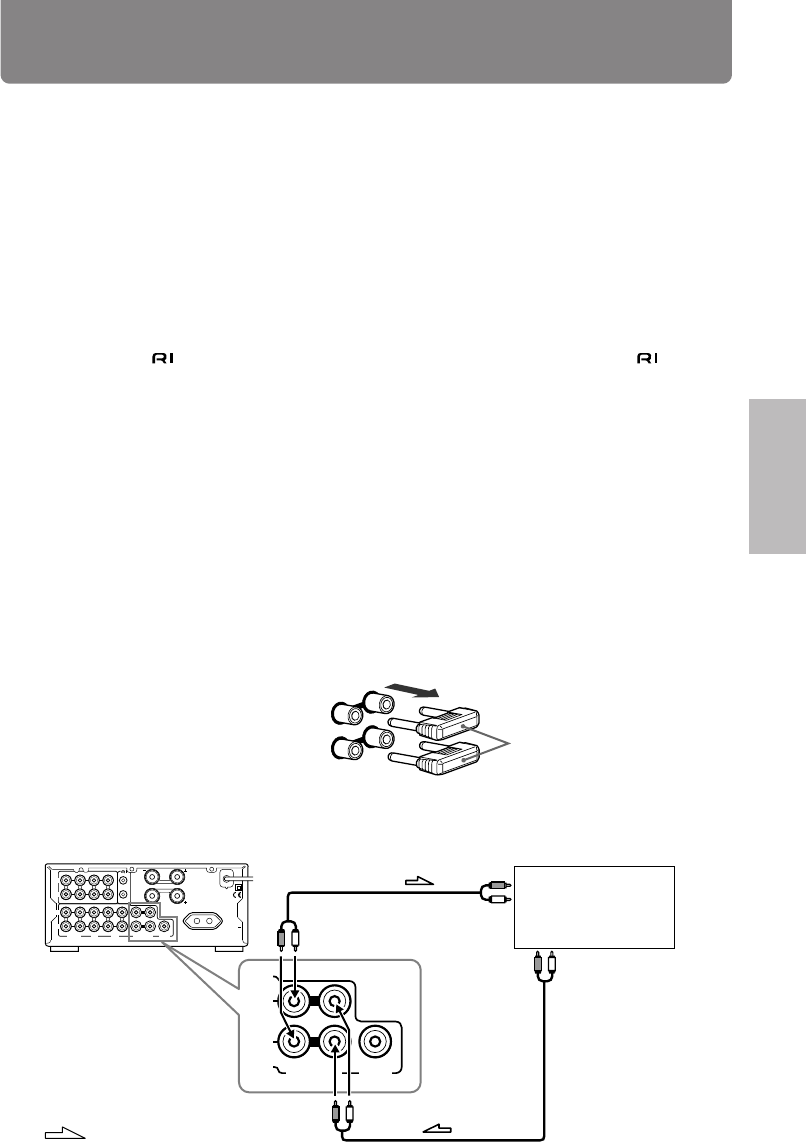
Connecting audio/video equipment to audio connectors
Before connecting
• Do not connect the AC power cord (mains lead) to the wall outlet (the mains) until you have com-
pleted all the other connections including the sound processor connections on the next page, the
connections on page 14, and the speaker connections on page 15.
• On each pair of connectors, a red connector (marked R) corresponds to the right channel, and a
white connector (marked L) to the left channel.Connect white plugs of audio connection cables to L
connectors and connect red plugs of audio connection cables to R connectors .
Improper connection
Insert completely
• Please refer to the instruction manual for each component when
you make any connections.
• Insert the plug securely. If the connection is incomplete, noise
or malfunction may result.
• If you are using an audio optical cable, do not bend or wrap it
tightly.
Connections
L
R
L
R
LINE/DVDTUNER
OUT IN
L
R
TAPE
SPEAKERS
OUT
(REC)
OUT
(REC)IN(PLAY)
IN(PLAY)
OUT
(REC)IN(PLAY)
REMOTE
CONTROL
CD
CDR/PC
PROCESSOR
MD
SUBWOOFER
PRE OUT
L
R AC OUTLET
AC 230-240V
50Hz
SWITCHED
100W MAX.
CAUTION:
SPEAKER IMPEDANCE
4 OHMS MIN./SPEAKER
L
R
L
R
OUT
(REC)
OUT
(REC)IN(PLAY)
IN(PLAY)
OUT
(REC)IN(PLAY)
L
R
CD
CDR/PC MD
LINE/DVDTUNER TAPE
OUT IN
PROCESSOR
Audio connection cable
To L connector (White)
To R connector (Red)
(White) To L connector
(Red) To R connector
DVD player or
VCR, etc.
Stereo cassette
tape deck
PLAY
OUTPUT
REC
INPUT
AUDIO OUT
AUDIO
OUT
OUTPUT
REC
INPUT
PLAY
OUTPUT
OUTPUT
: Signal flow
CD recorder or audio
processor for PC CD player MD recorder
Amplifier
– this unit (A-905TX)
Tuner
(illustration is 230-240 V model)
Sound processor
(such as a signal processor and
a graphic equalizer)
13
Operation Other Information
Before using PreparationsConnections
About the LINE/DVD connector
You can connect this connector to the audio output of video devices, such as a DVD player, Satelite
tuner, VCR, or the audio output of a second CD player or tape deck.
Note:
You cannot connect a turntable to this connector. If you wish to connect a turntable, obtain a phono
equalizer at a store and connect it as described in the instruction manual that comes with the phono
equalizer.
About the CDR/PC, MD, and TAPE connectors
You can also connect a second MD recorder or tape deck to the CDR/PC connector, and/or connect a
second device to the MD or TAPE connector. (If you try to connect an Onkyo tape deck, MD recorder, or
CD recorder that has connectors in this way, a malfunction may occur. Do not use the cables for
connections.)
You can connect a digital audio processor for a personal computer to the CDR/PC connector.
About the processor’s connectors
You can connect a sound processor (e.g. graphic equalizer, surround processor, etc.) to the unit.
Before connecting
• Disconnect the jumper plugs using the PROCESSOR connectors.
– Please retain them for future use.
– Never connect the jumper plugs to the other connectors, as this may cause the unit to malfunc-
tion, so that the sound is not reproduced.
– If you do not use the PROCESSOR connectors, reconnect the jumper plugs to them firmly.
Note:
When connecting jumper plugs, make sure you hold the plugs horizontally as shown in the figure and
connect each plug to the IN and OUT jacks.
Connect the sound processor to the unit.
This unit
Jumper plug
Sound processor
: Signal flow
INPUT
OUTPUT
OUT IN
PROCESSOR
L
R
L
R
LINE/DVDTUNER
OUT IN
L
R
TAPE
SPEAKERS
OUT
(REC)
OUT
(REC)IN(PLAY)
IN(PLAY)
OUT
(REC)IN(PLAY)
REMOTE
CONTROL
CD
CDR/PC
PROCESSOR
MD
SUBWOOFER
PRE OUT
L
R
AC OUTLET
AC 230-240V
50Hz
SWITCHED
100W MAX.
CAUTION:
SPEAKER IMPEDANCE
4 OHMS MIN./SPEAKER
OUT IN
IN(PLAY)
OUT(REC)
CD
TUNER
PROCESSOR
MD
L
R
SUBWOOFER
PRE OUT
14
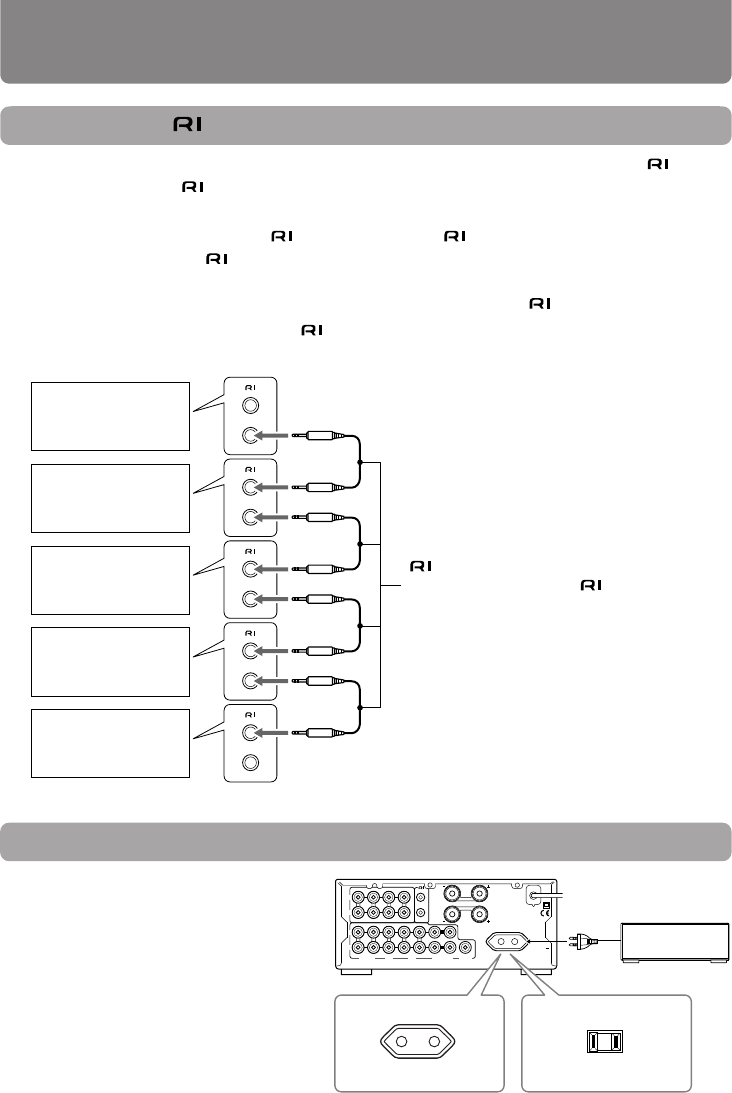
Connecting the cables
If your other components are made by ONKYO and those components are equipped with connec-
tors, you can control the -connected components with the supplied remote controller.
Before connecting
• The unit must be connected in the system hookups for control operations.
• Each component has two connectors. There is no difference between these connectors.
• The components may be connected in any order.
• The hookups on the previous page are necessary independently of the system hookups.
The illustration below is an example of a hookup.
Connections
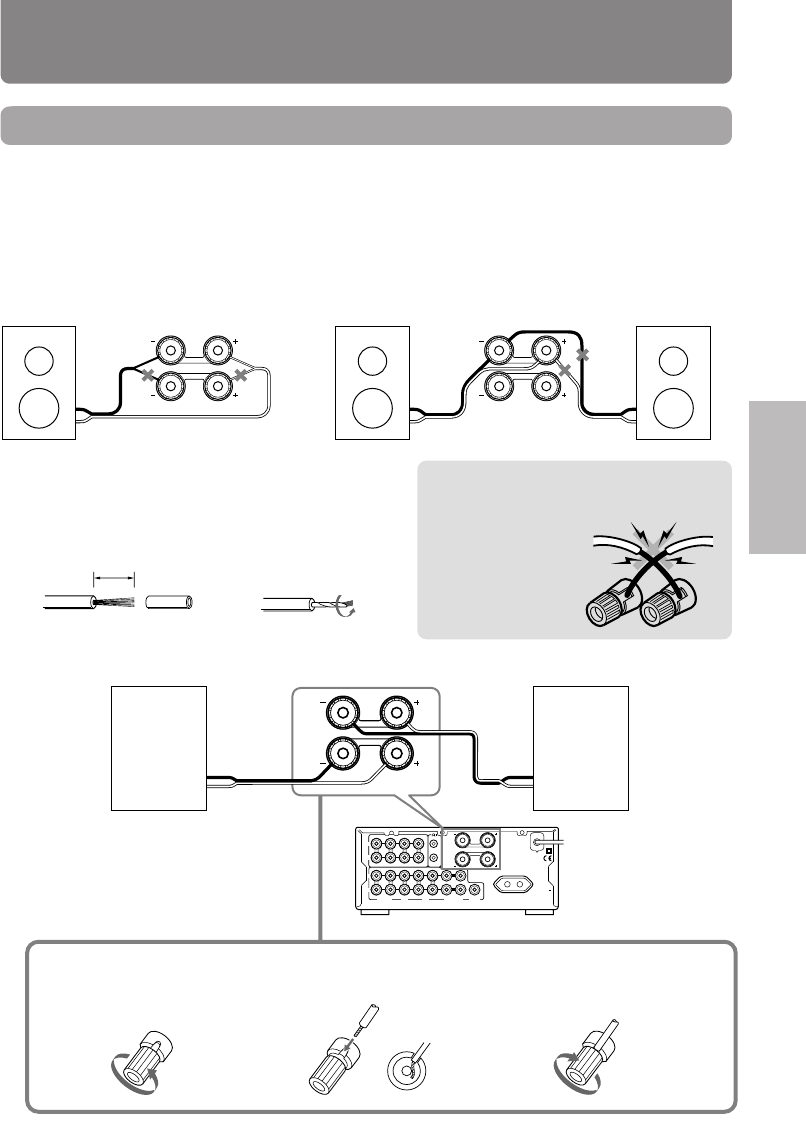
AC outlet connection
You can connect the power cord from an-
other audio device to the rear of the A-
905TX.
Since the AC outlet on the unit is a
SWITCHED type outlet, you can use the
POWER switch to turn on/off the power
to both the A-905TX and the connected
audio device.
The shape and capacity of the AC outlet
may differ depending on the area of pur-
chase. Make sure that the capacity of other
components connected to this unit does not
exceed the capacity that is printed on the
rear panel.
cable (supplied with every ONKYO
component that has connectors
except for the amplifier and receiver)
MD recorder
Tuner
Stereo cassette
tape deck
Amplifier
– this unit
CD player
L
R
L
R
LINE/DVDTUNER
OUT IN
L
R
TAPE
SPEAKERS
OUT
(REC)
OUT
(REC)IN(PLAY)
IN(PLAY)
OUT
(REC)IN(PLAY)
REMOTE
CONTROL
CD
CDR/PC
PROCESSOR
MD
SUBWOOFER
PRE OUT
L
R
AC OUTLET
AC 230-240V
50Hz
SWITCHED
100W MAX.
CAUTION:
SPEAKER IMPEDANCE
4 OHMS MIN./SPEAKER
Capacity is 120 watts.
120 V, 60 Hz models
230-240 V, 50 Hz models
Capacity is 100 watts.
Connecting to components other than the Separate Col-
lection Series
15
Operation Other Information
Before using PreparationsConnections
L
R
L
R
LINE/DVDTUNER
OUT IN
L
R
TAPE
SPEAKERS
OUT
(REC)
OUT
(REC)IN(PLAY)
IN(PLAY)
OUT
(REC)IN(PLAY)
REMOTE
CONTROL
CD
CDR/PC
PROCESSOR
MD
SUBWOOFER
PRE OUT
L
R AC OUTLET
AC 230-240V
50Hz
SWITCHED
100W MAX.
CAUTION:
SPEAKER IMPEDANCE
4 OHMS MIN./SPEAKER
L
R
SPEAKERS
-
+
-
+
Connecting speaker systems
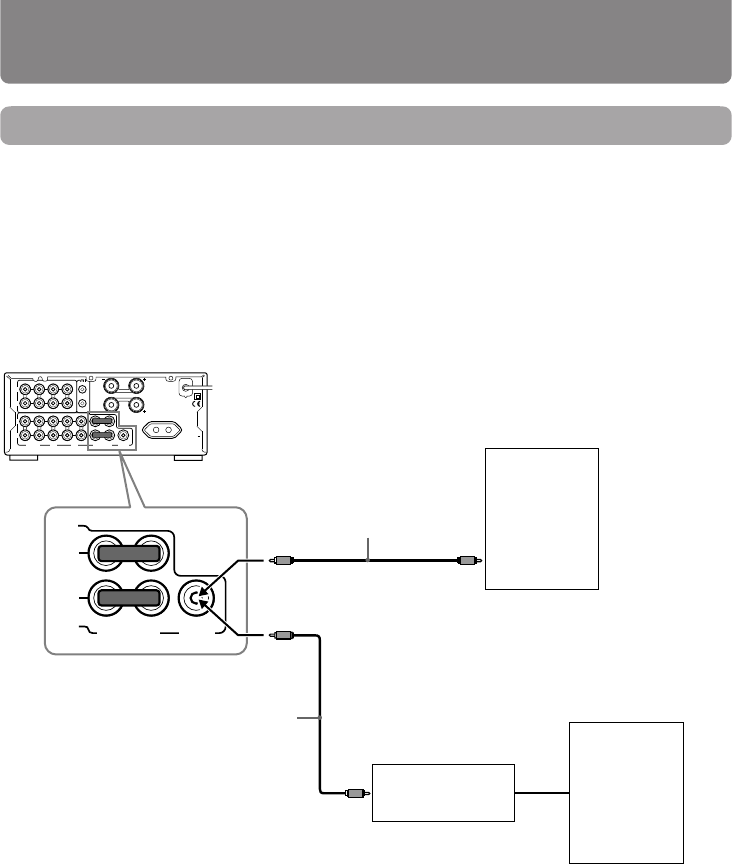
Connecting left and right speakers
Before connecting
• The load impedance of each speaker must be at least 4 ohms.
• Do not use unnecessarily long or extremely thin speaker cords. Otherwise, the DC resistance of the
speaker cords may become too high, lowering the damping factor and causing the sound quality to
deteriorate.
• Do not connect the speaker cord to the L and R connectors at the same time and do not connect two
or more speakers to the same speaker connectors.
Note
To prevent dam-
age to circuits
never short-circuit
the positive (+)
and negative (–)
speaker wires.
1Strip 15 mm from
the end of each
cord.
2Twist the stripped end
of the cord.
This unit
Right
speaker
Left
speaker
2Insert the stripped end
of the cord.
3Turn the knob clock-
wise to tighten.
Connecting the speaker cords to the speaker connectors
Preparing the speaker cords for connection
L
R
SPEAKERS
L
R
SPEAKERS
15mm
NO
1Turn the knob counter-
clockwise to loosen.
NO NO
16
Connecting a subwoofer
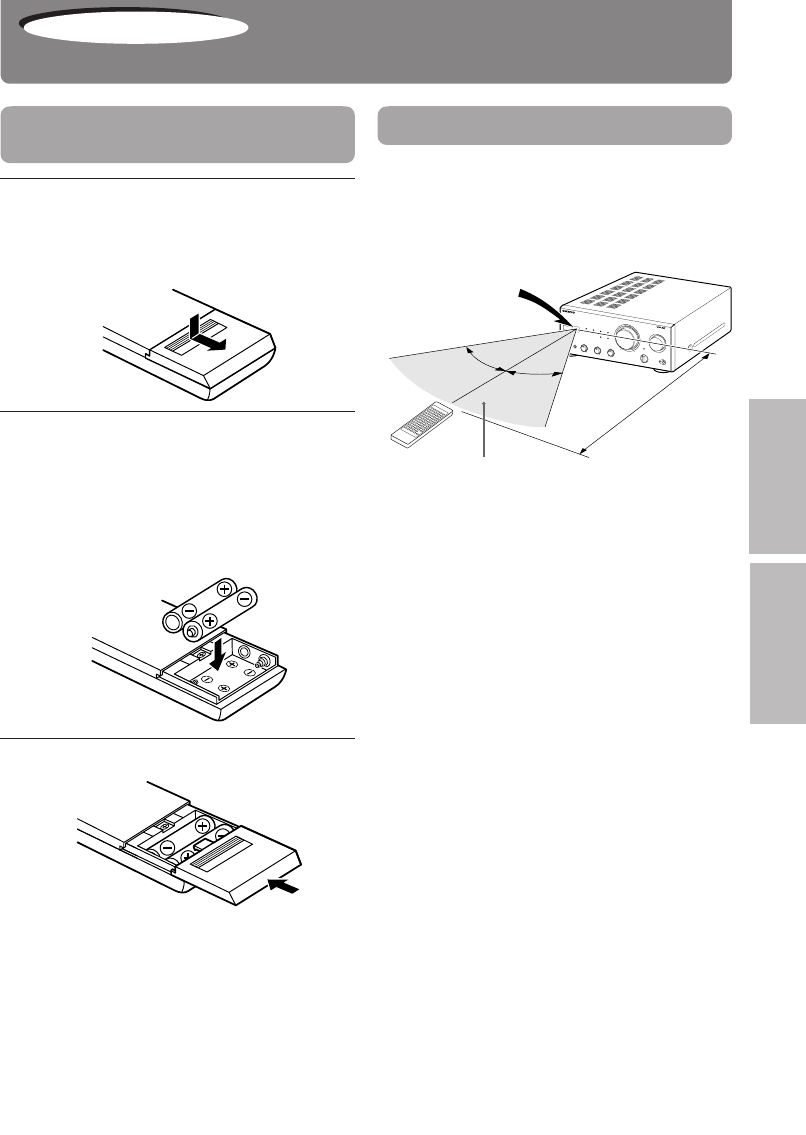
Before connecting
• If your subwoofer isn’t equipped with an amplifier, connect a separate amplifier to the unit first, then
connect the subwoofer to that amplifier.
• The SUBWOOFER PRE OUT connector supplies the left and right mixed monaural signals to the
subwoofer.
Connections
This unit
Active
Subwoofer
Amplifier Subwoofer
Audio connection cable
Audio connection cable
or
When connecting a subwoofer with a
built-in amplifier
When connecting a subwoofer with
no built-in amplifier
L
R
L
R
LINE/DVDTUNER
OUT IN
L
R
TAPE
SPEAKERS
OUT
(REC)
OUT
(REC)IN(PLAY)
IN(PLAY)
OUT
(REC)IN(PLAY)
REMOTE
CONTROL
CD
CDR/PC
PROCESSOR
MD
SUBWOOFER
PRE OUT
L
R
AC OUTLET
AC 230-240V
50Hz
SWITCHED
100W MAX.
CAUTION:
SPEAKER IMPEDANCE
4 OHMS MIN./SPEAKER
OUT IN
PROCESSOR
SUBWOOFER
PRE OUT
Connecting speaker systems
17
Operation Other Information
Before using PreparationsConnections
INTEGRATED STEREO AMPLIFIER VOLUME
INPUT
STANDBY/ON
PHONES
STANDBY
A-905TX
TREBLEBASS BALANCE
POWER
ON/BOOST
+
+-
-LR
PRESENCE
ACOUSTIC
CD
MD TUNER
LINE/DVD
TAPE
CDR/PC
SOURCE DIRECT
DIRECT
DIRECT
TONE
ON OFF
WIDE RANGE AMP TECHNOLOGY
Preparing the remote controller
Preparations
Installing the remote controller
batteries
1Remove the battery compartment
cover by pressing and sliding it
away from the remote controller
unit.
2Insert two AA (R6 or UM-3)-size
batteries into the battery com-
partment.
Carefully follow the polarity diagram (posi-
tive + and negative - symbols) inside the
battery compartment.
3Replace the compartment cover.
Notes
• Do not mix new batteries with old batteries or
different kinds of batteries.
•
To avoid corrosion, remove the batteries if the
remote controller is not to be used for a long time.
• Remove dead batteries immediately to avoid
damage from corrosion. If the remote control-
ler doesn’t operate smoothly, replace both the
batteries at the same time.
• The life of the batteries supplied is about six
months but this will vary depending on usage.
Notes
• Place the unit away from strong light such as
direct sunlight or inverted fluorescent light which
can prevent proper operation of the remote
controller.
• Using another remote controller of the same
type in the same room or using the unit near
equipment which uses infrared rays may cause
operational interference.
• Do not put any object such as a book on the
remote controller. The buttons of the remote
controller may be pressed by mistake and drain
the batteries.
• Make sure the audio rack doors do not have
colored glass. Placing the unit behind such doors
may prevent proper remote controller operation.
• If there is any obstacle between the remote con-
troller and the remote control sensor, the re-
mote controller will not operate.
Using the remote controller
Point the remote controller toward
the remote control sensor.
The STANDBY indicator lights up when the unit
receives a signal from the remote controller.
30˚
30˚
Remote control
sensor
About 5 m
(16 feet)
Control range
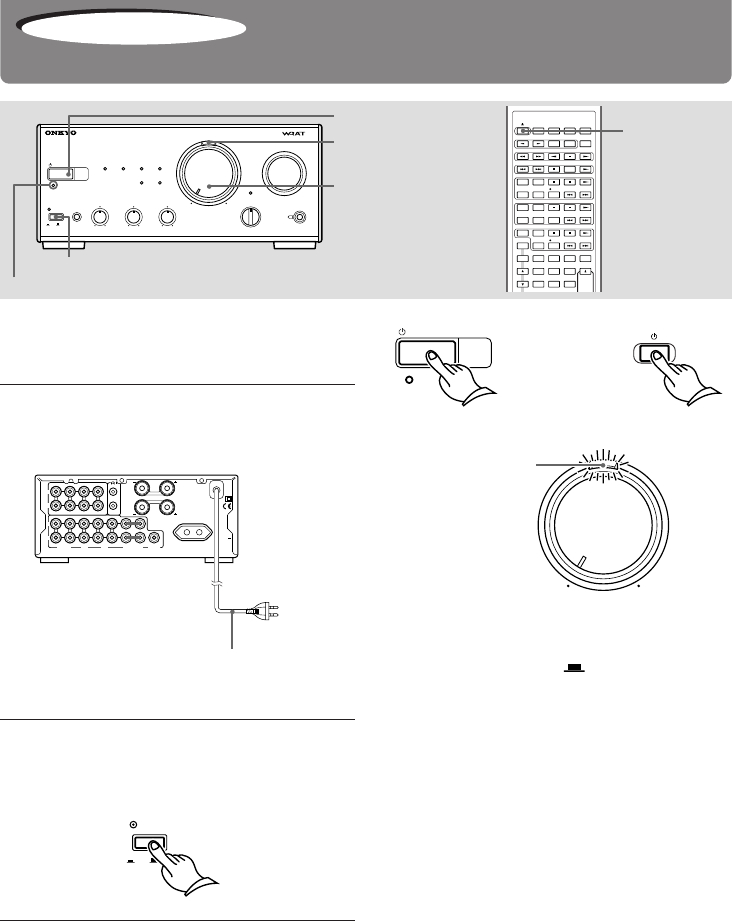
18
Turning the unit on
Before turning the unit on
Turn VOLUME control to the leftmost position to
avoid damaging the speakers.
1Connect the AC power cord (mains
lead) to the wall outlet (the
mains).
L
R
L
R
LINE/DVDTUNER
OUT IN
L
R
TAPE
SPEAKERS
OUT
(REC)
OUT
(REC)IN(PLAY)
IN(PLAY)
OUT
(REC)IN(PLAY)
REMOTE
CONTROL
CD
CDR/PC
PROCESSOR
MD
SUBWOOFER
PRE OUT
L
R AC OUTLET
AC 230-240V
50Hz
SWITCHED
100W MAX.
CAUTION:
SPEAKER IMPEDANCE
4 OHMS MIN./SPEAKER
2Press the POWER switch to supply
power to the unit.
The STANDBY indicator lights.
3Press STANDBY/ON button or
POWER button on the remote con-
troller to turn on the unit.
The STANDBY indicator goes off, and the
power/muting lamp above the VOLUME
control lights.
AC power cord (mains lead)
(illustration is 230-240 V models)
Notes
• The A-905TX is shipped with the main power
(POWER) switch in the ON position. When
the power cord is plugged in for the first time,
the A-905TX will automatically enter the standby
state and the STANDBY indicator will light (same
condition after step 2.)
• If the AC power cord (mains lead) is connected
to the AC outlet of another component, that
component’s AC power cord (mains lead) must
be connected to the wall outlet (the mains) to
supply power to the unit. If the component has
a power switch, it must be set to On.
• Leave POWER switch on. If you set POWER
switch to off:
– the remote controller will not operate, and
– the timer functions will not operate.
• If you do not use the unit for a long time, set
POWER to off by pressing POWER switch again.
• The unit may cause a power surge on your home
circuit when you turn it on. If this interferes with
any other devices connected to the same cir-
cuit, plug this unit into another outlet on a sepa-
rate circuit.
POWER
ON OFF
To wall
outlet
CLOCK SLEEP EFFECT
GRAPHIC EQ
MODE
123
456
789
VOLUME
PRESET
F
MA
M
PLAY MODE
PLAY MODE
REPEAT
CLEAR
SCROLL
MEMORY
REPEAT
CLEAR
DISC
REPEAT
CLEAR
ACOUSTIC
PRESENCE
TONE
RANDOM
TIMER
UP/DOWN
MUTING
INPUTTUNER
M D
DVD
C D
CDR
TAPE
REC
REC
PAUSE
/
STEP
STANDBY/ ON
STANDBY/
ON
Power/muting
lamp
VOLUME
STANDBY/ON
STANDBY indicator
STANDBY/ON
PHONES
STANDBY
A-905TX
INTEGRATED STEREO AMPLIFIER
TREBLEBASS BALANCE
POWER
OFF/1/2
—+ —+ L R
PRESENCE
ACOUSTIC
CD
MD TUNER
LINE/DVD
TAPE
CDR/PC
SOURCE DIRECT
DIRECT
DIRECT
TONE
INPUT
ON OFF
VOLUME WIDE RANGE AMP TECHNOLOGY
VOLUME
STANDBY/ON
STANDBY
STANDBY/ ON
or
Power/muting
lamp
Operation
POWER switch
19
Operation Other Information
Before using PreparationsConnections
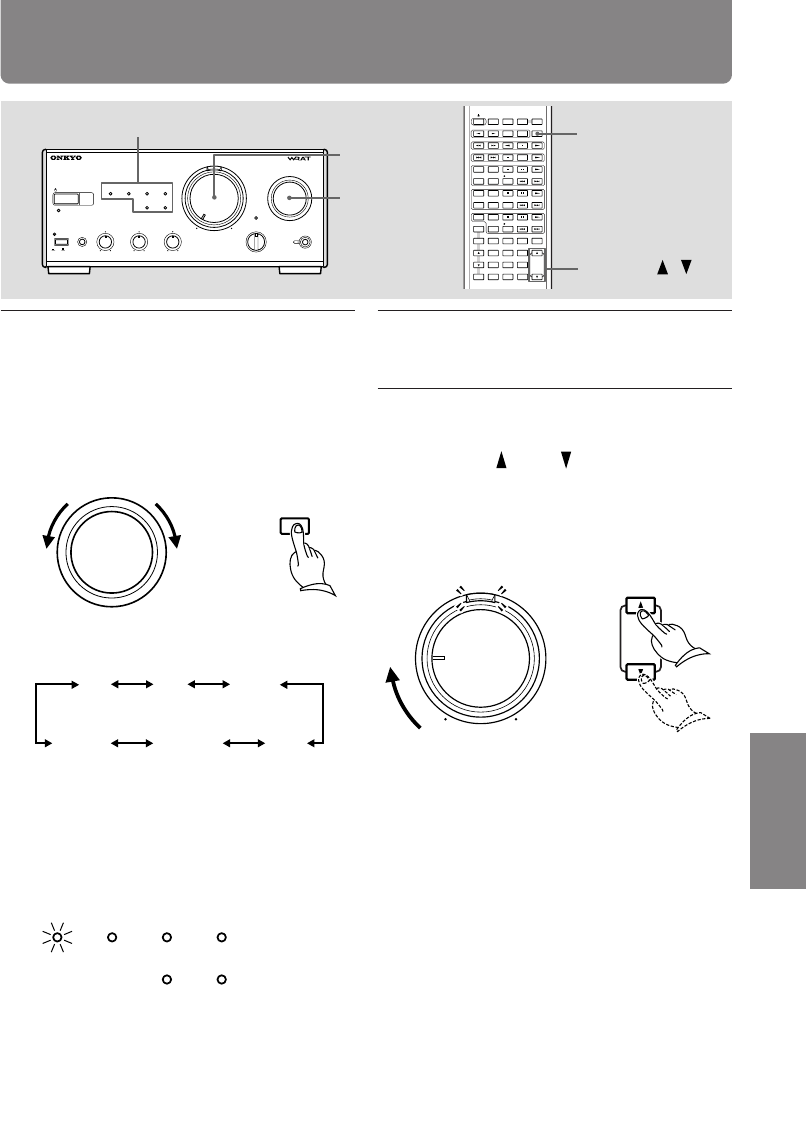
Choosing the required source
1Turn INPUT selector clockwise or
counterclockwise until the input
indicator of the source you wish
to listen to lights.
Or press INPUT button on the re-
mote controller.
2Start playing the source you se-
lected in step 1.
3Set the volume to appropriate
level using the VOLUME control or
VOLUME (up)/ (down) buttons
on the remote controller.
Turn VOLUME control clockwise to increase
the volume or counterclockwise to decrease
the volume.
INPUT
VOLUME
INPUT
VOLUME /
Input source indicators
or
INPUT
INPUT
VOLUME
VOLUME
STANDBY/ON
PHONES
STANDBY
A-905TX
INTEGRATED STEREO AMPLIFIER
TREBLEBASS BALANCE
POWER
OFF/1/2
LR
PRESENCE
ACOUSTIC
CD MD TUNER
LINE/DVD
TAPE
CDR/PC
SOURCE DIRECT
DIRECT
DIRECT
TONE
INPUT
ON OFF
VOLUME WIDE RANGE AMP TECHNOLOGY
—+ —+
CLOCK SLEEP EFFECT
GRAPHIC EQ
MODE
123
456
789
10
/
0
-
- /
-
-
-
VOLUME
PRESET
F
MA
M
PLAY MODE
PLAY MODE
REPEAT
CLEAR
SCROLL
MEMORY
REPEAT
CLEAR
DISC
REPEAT
CLEAR
ACOUSTIC
PRESENCE
TONE
RANDOM
TIMER
UP/DOWN
ENTER
MUTING
INPUTTUNER
M D
DVD
C D
CDR
TAPE
REC
REC
PAUSE
/
STEP
STANDBY/ ON
or
The indicators light in the following order:
CD MD TUNER
CDR/PC LINE/DVD TAPE
When you press the INPUT button on the
remote controller repeatedly, the indicators
light up in clockwise order.
e.g. The CD player is selected.
CD
MD TUNER
LINE/DVD
TAPE
CDR/PC
20
Adjusting the sound
ACOUSTIC
PRESENCE
Indicator
ACOUSTIC
PRESENCE
BASS
TREBLE
BALANCE
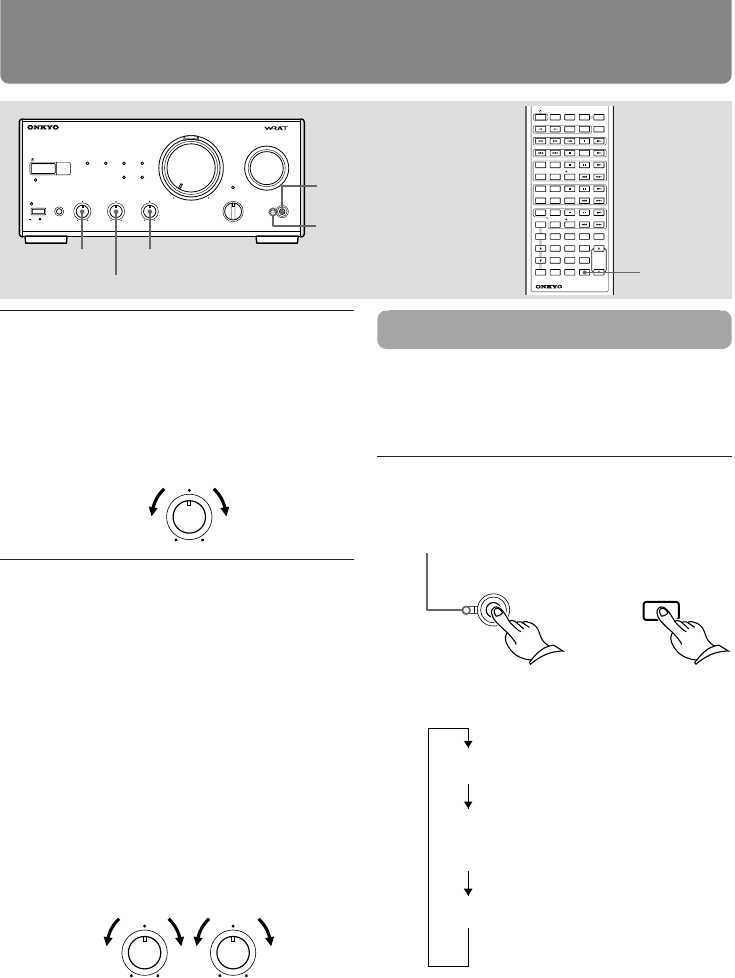
1Adjust left and right speaker bal-
ance.
Turn BALANCE control to “L” to
lower the volume level of the
right speaker, or “R” to lower the
volume level of the left speaker.
BALANCE
LR
2Adjust the tone.
The tone can be adjusted from –10
to +10.
Turn BASS control to “+” to rein-
force the level of the low frequen-
cies, or “–” to attenuate it.
There is no low frequency control at the cen-
ter position.
Adjust high frequencies.
Turn TREBLE control to “+” to re-
inforce the level of the high fre-
quencies, or “–” to attenuate it.
There is no high frequency control at the
center position.
TREBLEBASS
–+ –+
ACOUSTIC PRESENCE
Acoustic Presence adds realness to music through
the use of exclusive Onkyo circuitry. Presence set-
tings 1 and 2 are ideally suited for use with com-
pact speakers.
Press ACOUSTIC PRESENCE on the unit
or remote controller.
Each press changes the mode as follows:
STANDBY/ON
PHONES
STANDBY
A-905TX
INTEGRATED STEREO AMPLIFIER
TREBLEBASS BALANCE
POWER
OFF/1/2
LR
PRESENCE
ACOUSTIC
CD
MD TUNER
LINE/DVD
TAPE
CDR/PC
SOURCE DIRECT
DIRECT
DIRECT
TONE
INPUT
ON OFF
VOLUME
WIDE RANGE AMP TECHNOLOGY
—+—+
CLOCK SLEEP EFFECT
GRAPHIC EQ
MODE
123
456
789
10
/
0
- - / - - -
VOLUME
PRESET
F
MA
M
PLAY MODE
PLAY MODE
REPEAT
CLEAR
SCROLL
MEMORY
REPEAT
CLEAR
DISC
REPEAT
CLEAR
ACOUSTIC
PRESENCE
TONE
RANDOM
TIMER
UP/DOWN
ENTER
MUTING
INPUTTUNER
M D
DVD
C D
CDR
TAPE
REC
REC
PAUSE
/
STEP
STANDBY/ ON
REMOTE CONTROLLER RC
-456S
or
The indicator
OFF/1/2
PRESENCE
ACOUSTIC
ACOUSTIC
PRESENCE
Acoustic Presence is off and
the indicator is off.
The indicator lights up orange
and the low end and bass
range will be enhanced.
The indicator lights up green
and the bass range will be
further enhanced.
1
OFF
2
Tip
• Refer to the specifications on page 24 for more
information on the boost amount.
• The effect might not be obvious if the source’s
bass range or low end is weak.
21
Operation Other Information
Before using PreparationsConnections
Source Direct function/Muting/Listening
with the headphones
MUTING
PHONES
Power/muting
lamp
VOLUME
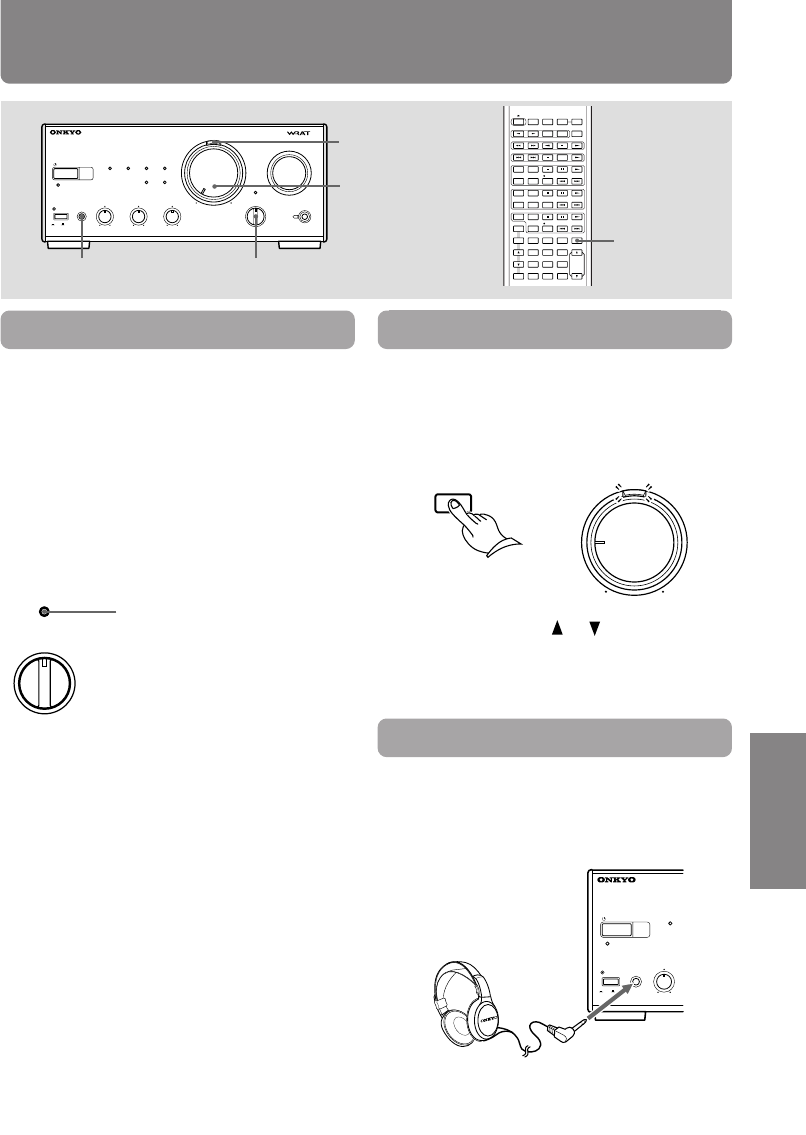
Muting the sound
Press MUTING button on the remote
controller to mute the sound.
The power/muting lamp above the VOLUME con-
trol flashes.
To restore the sound, press MUTING button again.
Listening with the headphones
Connect the stereo headphones mini
plug to the PHONES jack.
The speakers will reproduce no sound while the
headphones are connected.
Tip
During muting:
• if you press VOLUME or button on the re-
mote controller, the sound will be restored, and
• if you turn off the unit, and turn it on again, the
sound will be restored.
Tip
You can adjust the sound through the headphones
as well as through the speakers. See “Adjusting
the sound” on the previous page for operations.
VOLUME
MUTING
STANDBY/ON
PHONES
STANDBY
INTEGRATED STEREO
BASS
POWER
–+
CD
ON OFF
SOURCE DIRECT indicator
(This indicator lights up
when the knob is set to
“DIRECT.”)
STANDBY/ON
PHONES
STANDBY
A-905TX
INTEGRATED STEREO AMPLIFIER
TREBLEBASS BALANCE
POWER
OFF/1/2
LR
PRESENCE
ACOUSTIC
CD
MD TUNER
LINE/DVD
TAPE
CDR/PC
SOURCE DIRECT
DIRECT
DIRECT
TONE
INPUT
ON OFF
VOLUME
WIDE RANGE AMP TECHNOLOGY
—+ —+
CLOCK SLEEP EFFECT
GRAPHIC EQ
MODE
123
456
789
10
/
0
-
- /
-
-
-
VOLUME
PRESET
F
MA
M
PLAY MODE
PLAY MODE
REPEAT
CLEAR
SCROLL
MEMORY
REPEAT
CLEAR
DISC
REPEAT
CLEAR
ACOUSTIC
PRESENCE
TONE
RANDOM
TIMER
UP/DOWN
ENTER
MUTING
INPUTTUNER
M D
DVD
C D
CDR
TAPE
REC
REC
PAUSE
/
STEP
STANDBY/ ON
SOURCE DIRECT selector
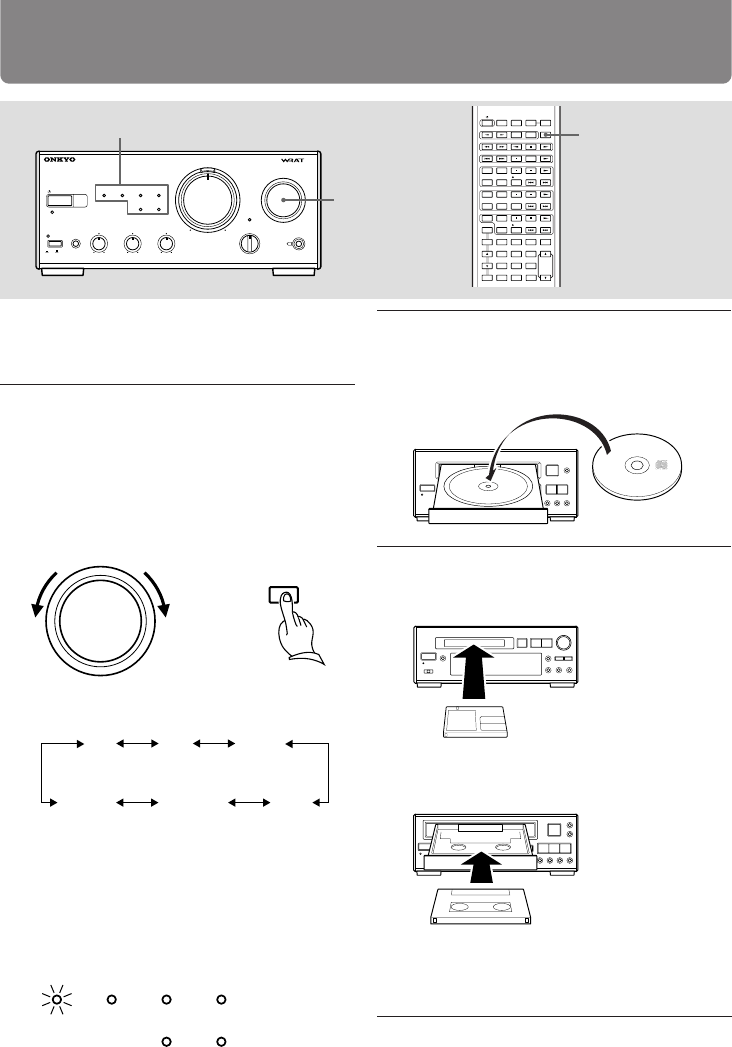
By bypassing the audio circuits of certain controls,
the Source Direct function allows you to enjoy a
sound closer to the original.
DIRECT: A signal selected via the Input Selector
will bypass the BASS and TREBLE con-
trols.
TONE: You can adjust the tonal quality of the
signal selected by the Input Selector us-
ing the BASS and TREBLE controls.
SOURCE DIRECT
DIRECT
DIRECT
TONE
Note
If you set the SOURCE DIRECT knob to “DIRECT”,
you cannot use the tone control function. How-
ever, Acoustic Presence mode is enabled. (You can
turn it off if you want.)
SOURCE DIRECT
22
Recording
Before recording
Refer to the instruction manuals of the related
components for detailed recording operations.
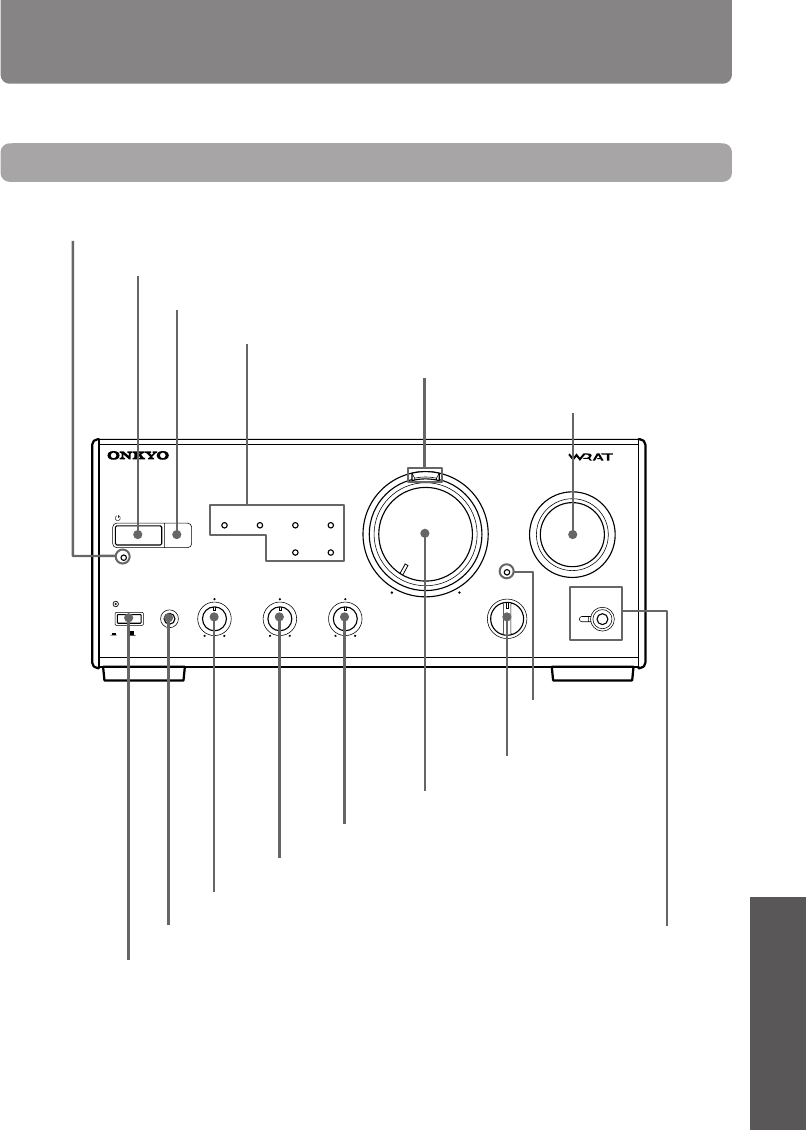
1Turn INPUT selector clockwise or
counterclockwise until the input
indicator of the source you wish
to record from lights.
Or press INPUT button on the re-
mote controller.
or
INPUT
INPUT
Input source indicators
The indicators light in the following order:
CD MD TUNER
CDR/PC LINE/DVD TAPE
When you press the INPUT button on the
remote controller repeatedly, the indicators
light up in clockwise order.
e.g. The CD player is selected.
CD
MD TUNER
LINE/DVD
TAPE
CDR/PC
2Prepare the playing source.
e.g. Insert the CD you want to record from
into the CD player.
3Prepare the recording component.
e.g. 1 Insert an MD into the MD recorder.
INPUT
INPUT
ONKYO
CD PLAYER
CD PLAYER
STANDBY/ON
PHONES
STANDBY
A-905TX
INTEGRATED STEREO AMPLIFIER
TREBLEBASS BALANCE
POWER
OFF/1/2
LR
PRESENCE
ACOUSTIC
CD MD TUNER
LINE/DVD
TAPE
CDR/PC
SOURCE DIRECT
DIRECT
DIRECT
TONE
INPUT
ON OFF
VOLUME WIDE RANGE AMP TECHNOLOGY
–+ –+
CLOCK SLEEP EFFECT
GRAPHIC EQ
MODE
123
456
789
10
/
0
-
- /
-
-
-
VOLUME
PRESET
F
MA
M
PLAY MODE
PLAY MODE
REPEAT
CLEAR
SCROLL
MEMORY
REPEAT
CLEAR
DISC
REPEAT
CLEAR
ACOUSTIC
PRESENCE
TONE
RANDOM
TIMER
UP/DOWN
ENTER
MUTING
INPUTTUNER
M D
DVD
C D
CDR
TAPE
REC
REC
PAUSE
/
STEP
STANDBY/ ON
e.g. 2 Insert a cassette into the stereo cas-
sette tape deck.
e.g. 3 Insert a blank CD into the CD re-
corder.
4Start recording with the compo-
nent prepared in step 3, then start
playing the source prepared in
step 2.

23
Operation Other Information
Before using PreparationsConnections
If you have any problems with the unit, please check the troubleshooting table below first. For any
problems not covered in the table, please consult your nearest ONKYO authorized service center.
Symptom
The unit doesn’t turn on.
Sound is reproduced from
neither left or right speaker.
Sound is reproduced from
only one speaker.
No sound is reproduced
when the (wake-up) timer
operates.
The remote control doesn’t
operate.
Remedy
Insert the AC power cord (mains lead)
plug into the wall outlet (the mains)
securely.
• Check the speaker connections (see
page 15).
• Adjust the volume level (see page
19).
• Press MUTING button on the re-
mote controller to restore the sound
(see page 21).
• Turn down the volume level first,
then disconnect the headphones.
Then, readjust the volume level.
• Connect the jumper plugs to PRO-
CESSOR connectors.
• Check the speaker connections (see
page 15).
• Adjust the sound balance (see page
20).
• Connect the jumper plug to PRO-
CESSOR connectors.
• Adjust the volume to the proper
level when you set the timer (see
page 19).
• Replace the batteries with new ones
(see page 17).
• Operate the remote controller
within the control range (see page
17).
• Try to operate the remote control-
ler from a different angle, or remove
the obstruction.
Troubleshooting
Other Information
Cause
The AC power cord is not fully in-
serted into the wall outlet.
• The wire of the speaker cord is
touching the other jacks, connec-
tors, or metal parts.
• The volume level is turned down
to the minimum.
• The sound is muted with the mut-
ing function.
• The headphones are connected to
the PHONES jack.
• Jumper plugs are not connected to
the PROCESSOR connectors.
• The speaker cord is not connected
properly or firmly, or is discon-
nected.
• The sound is unbalanced between
the left and right speakers.
• Jumper plug is not connected to
the PROCESSOR connectors.
• The volume level is turned down
to the minimum.
• The batteries in the remote control-
ler are dead.
• The remote controller is out of the
control range.
• There is some obstruction between
the remote controller and the unit.
Excessive electrical interference may temporarily render this system's sensitive microcomputer inoper-
able. If this happens, unplug the system for at least five seconds.

24
Specifications
Power output
22 watts per channel, min RMS,
at 4 ohms, both channels driven
1 kHz, with no more than 0.5% THD
15 watts per channel, min RMS,
at 8 ohms, both channels driven
1 kHz, with no more than 0.2% THD
2 × 20 watts at 4 ohms,1 kHz (DIN)
2 × 14 watts at 8 ohms,1 kHz (DIN)
2 × 32 watts at 4 ohms,1 kHz (EIAJ)
Total harmonic distortion
0.2% at rated power
IM distortion
0.2% at rated power
Damping factor
30 at 8 ohms
Frequency and response
15 to 30,000 Hz ± 1 dB
Input sensitivity/impedance
TUNER
/
LINE/DVD
/
CD: 200 mV/50 kohms
TAPE PLAY: 200 mV/50 kohms
MD PLAY: 200 mV/50 kohms
CDR/PC PLAY: 200 mV/2.2 kohms
Output sensitivity/impedance
TAPE REC: 200 mV/2.2 kohms
MD REC: 200 mV/2.2 kohms
CDR/PC REC: 200 mV/2.2 kohms
Bass control
± 8 dB at 50 Hz
Treble control
± 8 dB at 10,000 Hz
Acoustic Presence
1: +3 dB at 20.5 Hz, +3 dB at 82 Hz
2: +3 dB at 20.5 Hz, +6 dB at 82 Hz
Signal to noise ratio (IHF-A)
LINE/DVD
/
CD
/
MD
/
CDR/PC: 100 dB
Muting
–50 dB
Power supply
AC 120 V, 60 Hz
AC 230-240 V, 50 Hz
Power consumption
(AC 120 V, 60 Hz) : 63 W
(AC 230-240 V, 50 Hz) : 58 W
Dimensions (W × H × D)
205 × 91 × 302 mm
8-1/16" × 3-9/16" × 11-7/8"
Weight
3.4 kg, 7.5 lbs
Specifications and external appearance are subject to
change without notice as a result of product improve-
ment.
25
Operation Other Information
Before using PreparationsConnections
Index to parts and controls
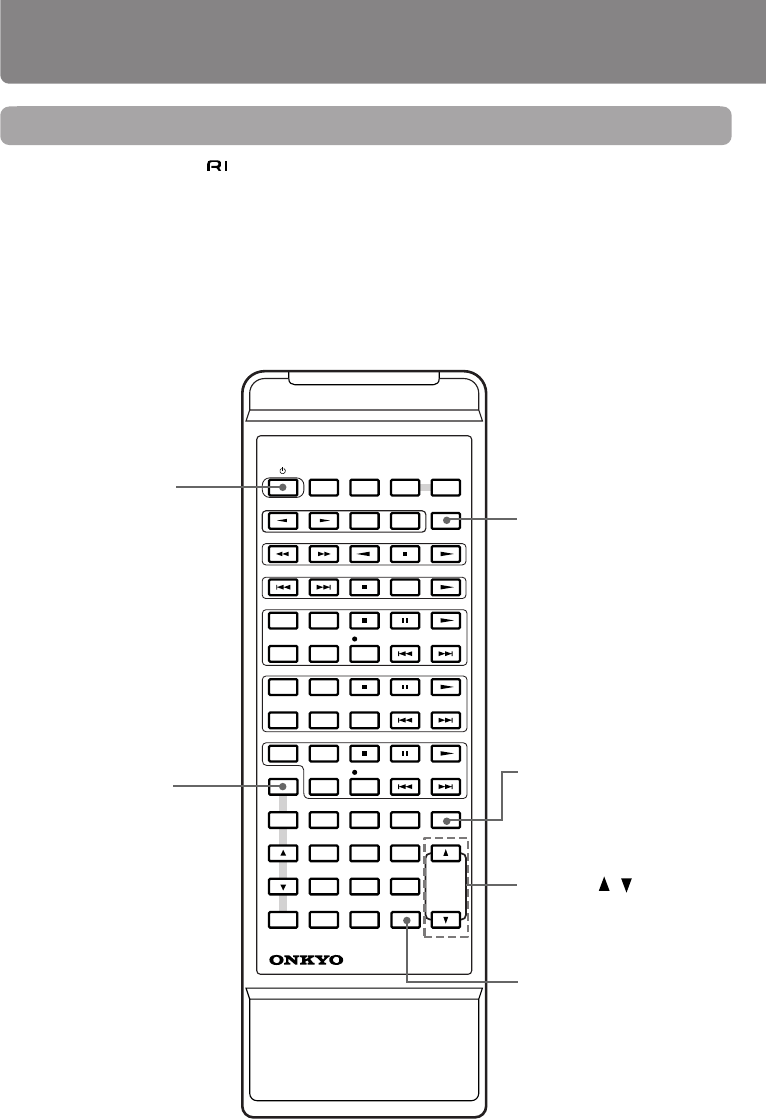
For operational instructions, refer to the page indicated in square parentheses.
Front panel
STANDBY/ON
PHONES
STANDBY
A-905TX
INTEGRATED STEREO AMPLIFIER
TREBLEBASS BALANCE
POWER
OFF/1/2
—+ —+ L R
PRESENCE
ACOUSTIC
CD
MD TUNER
LINE/DVD
TAPE
CDR/PC
SOURCE DIRECT
DIRECT
DIRECT
TONE
INPUT
ON OFF
VOLUME WIDE RANGE AMP TECHNOLOGY
Power/muting lamp [18, 21]
VOLUME control [19]
INPUT selector [19, 22]
ACOUSTIC PRESENCE
button/indicator [20]
BASS control [20]
TREBLE control [20]
BALANCE control [20]
POWER ON/OFF switch [18]
Input source indicators [19, 22]
PHONES jack [21]
STANDBY indicator [18]
Remote control sensor [17]
STANDBY/ON button [18]
SOURCE DIRECT selector [21]
SOURCE DIRECT
indicator [21]
26
CLOCK SLEEP EFFECT
GRAPHIC EQ
MODE
123
456
789
10
/
0
-
- /
-
-
-
VOLUME
PRESET
F
MA
M
PLAY MODE
PLAY MODE
REPEAT
CLEAR
SCROLL
MEMORY
REPEAT
CLEAR
DISC
REPEAT
CLEAR
ACOUSTIC
PRESENCE
TONE
RANDOM
TIMER
UP/DOWN
ENTER
MUTING
INPUTTUNER
M D
DVD
C D
CDR
TAPE
REC
REC
PAUSE
/
STEP
STANDBY/ ON
REMOTE CONTROLLER RC
-456S
Index to parts and controls
Remote controller
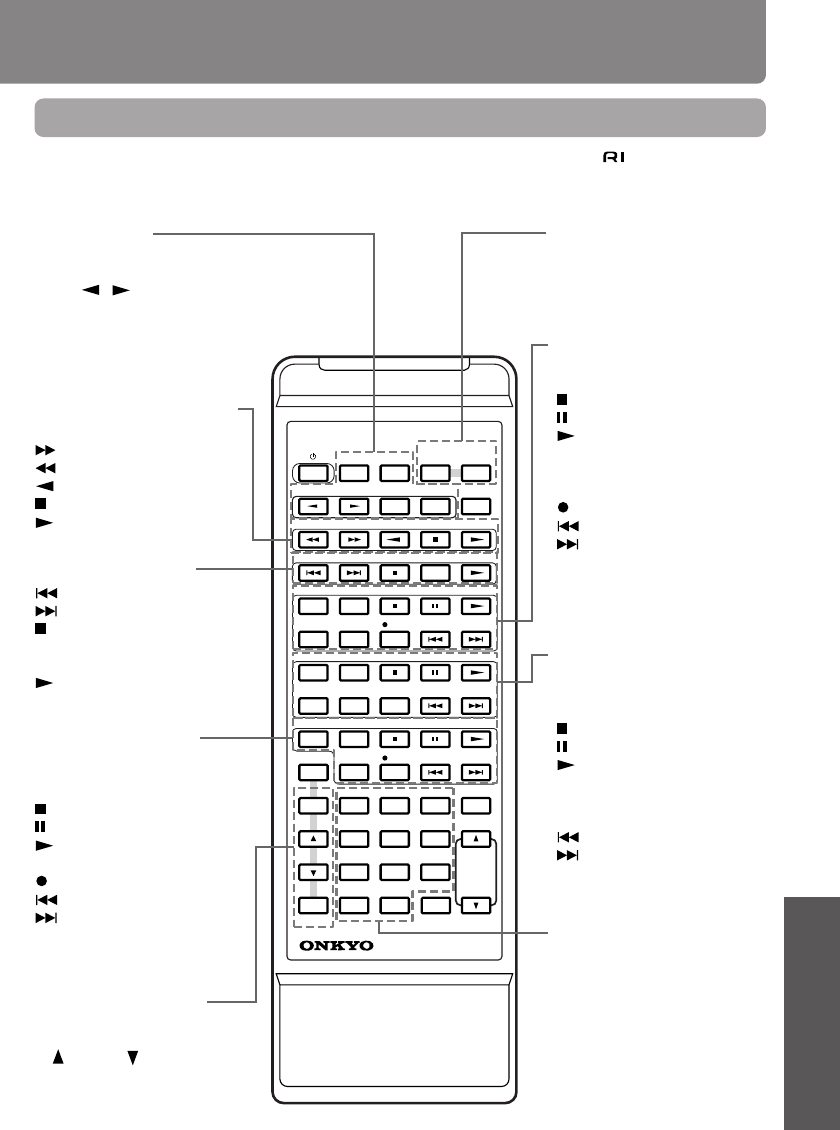
• You can control the other -connected components with the supplied remote controller.
• The remote controller buttons operate in the same way as the buttons on each component with the
same indication.
• For actual operations, please refer to the Instruction Manual for each component.
INPUT button [19, 22]
Enables you to select a listen-
ing source.
STANDBY/ON button
[18]
Toggles between STANDBY
and ON.
Disabled with this unit. MUTING button [21]
Mutes the sound temporarily.
VOLUME / buttons [19]
Enables you to increase or
decrease the volume level.
ACOUSTIC PRESENCE but-
ton [20]
Switches acoustic presence
off and types.
27
Operation Other Information
Before using PreparationsConnections
CLOCK SLEEP EFFECT
GRAPHIC EQ
MODE
123
456
789
10
/
0
-
- /
-
-
-
VOLUME
PRESET
F
MA
M
PLAY MODE
PLAY MODE
REPEAT
CLEAR
SCROLL
MEMORY
REPEAT
CLEAR
DISC
REPEAT
CLEAR
ACOUSTIC
PRESENCE
TONE
RANDOM
TIMER
UP/DOWN
ENTER
MUTING
INPUTTUNER
M D
DVD
C D
CDR
TAPE
REC
REC
PAUSE
/
STEP
STANDBY/ ON
REMOTE CONTROLLER RC
-456S
Remote controller
• Use the following buttons to control components that are connected to the - system.
• Buttons marked with an asterisk (*) cannot be used when the unit is combined with the Separate
Collection Series.
Graphic equalizer control*
EFFECT: Effect select button
MODE: Mode select button
MD recorder control
REPEAT: Repeat mode button
SCROLL: Scroll button
: Stop button
: Pause button
: Play button
PLAY MODE: Play mode selection
button
CLEAR: Clear button
REC: Recording button
: Track down button
: Track up button
CD player (or changer) con-
trol
REPEAT: Repeat mode button
RANDOM: Random play button
: Stop button
: Pause button
: Play button
MEMORY: Memory button
CLEAR: Clear button
DISC: Disc button for CD changer
: Track down button
: Track up button
Tuner control*
CLOCK : Clock call button
SLEEP : Sleep timer button
PRESET / : Tuner preset se-
lect buttons
FM: FM band select button
AM: AM band select button
Stereo cassette tape deck
control
: Fast-forward button
: Rewind button
: Reverse play button
: Stop button
: Play button
DVD player control
: Chapter/track down button
: Chapter/track up button
: Stop button
PAUSE/STEP : Pause/Step forward
button
: Play button
CD recorder control
REPEAT: Repeat mode button
PLAY MODE: Play mode selection
button
: Stop button
: Pause button
: Play button
CLEAR: Clear button
REC: Recording button
: Track down button
: Track up button
Timer setting control
(Tuner)
*
TIMER: Timer select button
UP / DOWN : Setting select
buttons
ENTER: Enter button
Tuner/CD player (or
changer) /MD recorder con-
trol
1~9, 10/0: Number buttons
—/—: Ten’s hold button
E
http://www.onkyo.co.jp/
HOMEPAGE
SN 29343066 Printed in Japan
I0103-1
Sales & Product Planning Div. : 2-1, Nisshin-cho, Neyagawa-shi, OSAKA 572-8540, JAPAN
Tel: 072-831-8111 Fax: 072-833-5222 http://www.onkyo-intl.com
ONKYO U.S.A. CORPORATION
18 Park Way, Upper Saddle River, N.J. 07458, U.S.A.
Tel: 201-785-2600 Fax: 201-785-2650 http://www.onkyousa.com
ONKYO EUROPE ELECTRONICS GmbH
Liegnitzerstrasse 6, 82194 Groebenzell, GERMANY
Tel: +49-8142-4401-0 Fax: +49-8142-4401-555 http://www.onkyo.net
ONKYO CHINA LIMITED
Units 2102-2107, Metroplaza Tower I, 223 Hing Fong Road, Kwai Chung,
N.T., HONG KONG Tel: 852-2429-3118 Fax: 852-2428-9039
