Oregon Scientific Bar618Hga Users Manual ManualsLib Makes It Easy To Find Manuals Online!
2014-12-11
: Oregon-Scientific Oregon-Scientific-Bar618Hga-Users-Manual-120844 oregon-scientific-bar618hga-users-manual-120844 oregon-scientific pdf
Open the PDF directly: View PDF  .
.
Page Count: 17

Wireless Acrylic Weather Station &
Atomic Alarm Clock
Model : BAR618HGA
User Manual
BAR618HGA lab test cover R4 2/18/04, 11:27 AM1
EN
1
CONTENTS
Contents ................................................................... 1
Introduction .............................................................. 2
About Oregon Scientific .......................................... 2
Product Overview .................................................... 3
Front View .............................................................. 3
Back View .............................................................. 4
Remote Sensor (THGR122NX) ............................. 5
Getting Started ......................................................... 6
Batteries ................................................................. 6
Change Settings .................................................... 6
Table Stand or Wall Mount ..................................... 6
Remote Sensor (THGR122NX) ................................ 6
Setup Sensor ......................................................... 6
Data Transmission ................................................. 8
Search for Sensor .................................................. 8
Clock ......................................................................... 8
Turn Atomic Clock ON/OFF ................................... 9
Set Clock ............................................................... 9
Switch Clock Display ............................................. 9
Alarms ....................................................................... 9
View Alarm Settings ............................................... 9
Set Alarm ............................................................... 9
Activate Alarm ........................................................ 9
Silence Alarm ......................................................... 9
Barometer ............................................................... 10
Barometric Trend ................................................. 10
Weather Forecast ................................................... 10
Temperature and Humidity .................................... 10
Select Temperature Unit ...................................... 10
Select Channel Number ....................................... 11
Minimum / Maximum Records ............................. 11
Moon Phase ............................................................ 11
Backlight ................................................................. 11
Reset System ......................................................... 11
Safety and Care ...................................................... 11
Warnings ................................................................. 12
Troubleshooting ..................................................... 12
Specifications ......................................................... 13
Main Unit Dimensions .......................................... 13
Remote Sensor Dimensions ................................ 13
Temperature ......................................................... 13
Relative Humidity ................................................. 13
Barometer and Weather Forecast ....................... 13
Remote Sensor (THGR122NX) ........................... 13
Clock .................................................................... 13
Power ................................................................... 14
FCC Statement ....................................................... 14
BAR618HGA lab test R4 2/18/04, 11:26 AM1
EN
2
INTRODUCTION
Thank you for selecting the Oregon ScientificTM Wireless
Acrylic Weather Station & Atomic Alarm Clock
(BAR618HGA). This device bundles precise time
keeping, weather forecast, barometric trend, and indoor
and outdoor temperature and humidity monitoring
features into a single tool you can use from the
convenience of your home.
In this box, you will find:
•Main unit
•Remote sensor (THGR122NX)
Keep this manual handy as you use your new product.
It contains practical step-by-step instructions, as well
as technical specifications and warnings you should
know.
ABOUT OREGON SCIENTIFIC
Visit our website (www.oregonscientific.com) to learn
more about other Oregon Scientific products such as
digital cameras, hand-held organizers, health and fitness
gear, and projection clocks. The website also includes
contact information for our customer service department,
in case you need to reach us.
BAR618HGA lab test R4 2/18/04, 11:26 AM2
EN
3
PRODUCT OVERVIEW
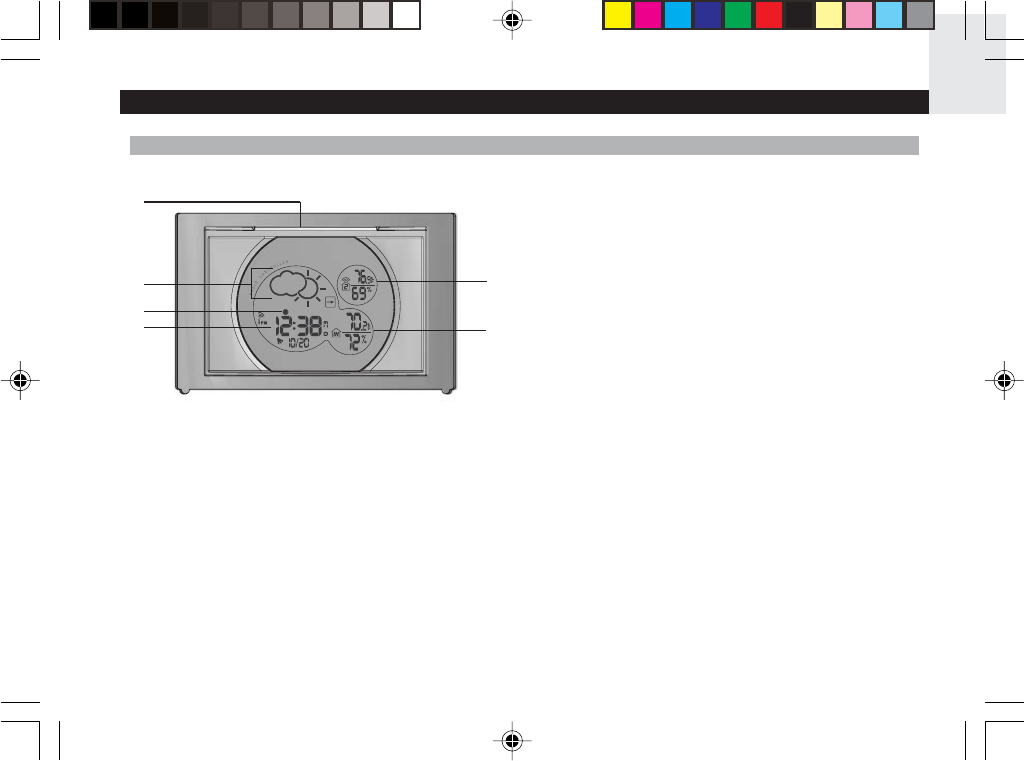
FRONT VIEW
1. SNOOZE / LIGHT button
2. Weather Forecast & Barometric Trend Area
3. Moon Phase
4. Clock / Calendar / Alarm Area
5. Outdoor Temperature & Humidity Area
6Indoor Temperature & Humidity Area
1
2
3
4
5
6
BAR618HGA lab test R4 2/18/04, 11:26 AM3
EN
4
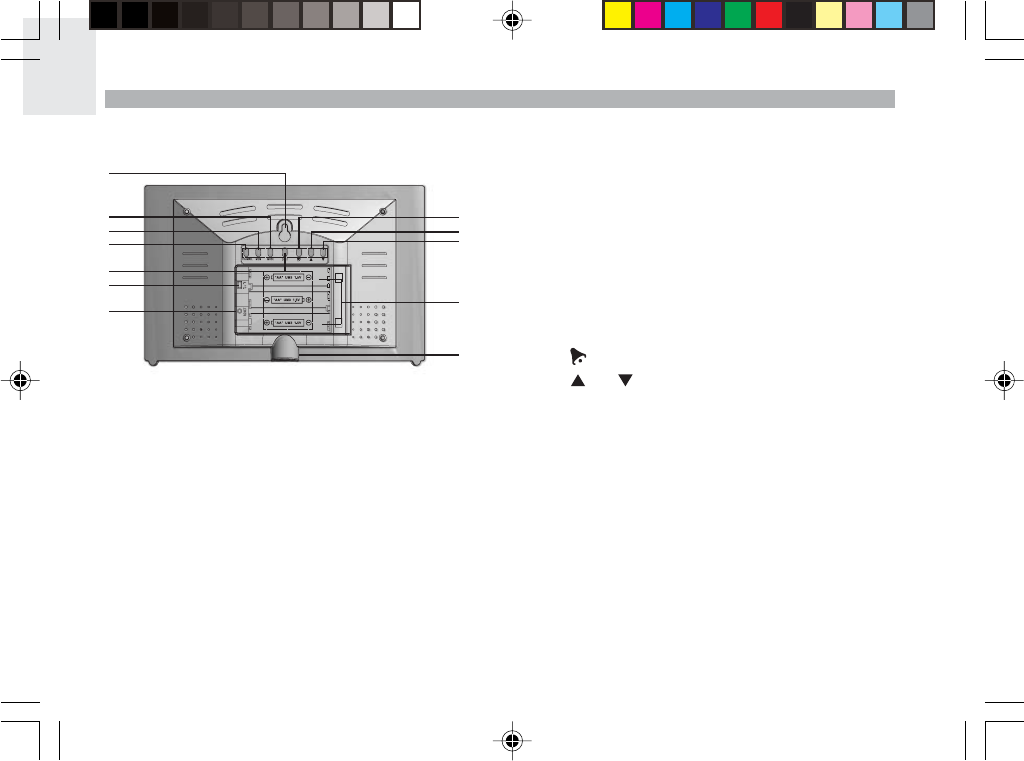
BACK VIEW
1. Wall mount
2. MODE: change display / settings
3. MEMORY: view current, maximum and minimum
temperature / humidity readings
4. CHANNEL: switch remote sensor
5. ((.)): view alarm status; set alarm
6. °C / °F switch
7. RESET hole
8. : turn alarm off for 24 hours
9.10. and : increase or decrease setting / activate
or deactivate Atomic Clock.
11. Battery compartment
12. Table stand
REMOTE SENSOR (THGR122N)
1
2
3
4
5
6
7
8
9
10
11
12
BAR618HGA lab test R4 2/18/04, 11:26 AM4
EN
5
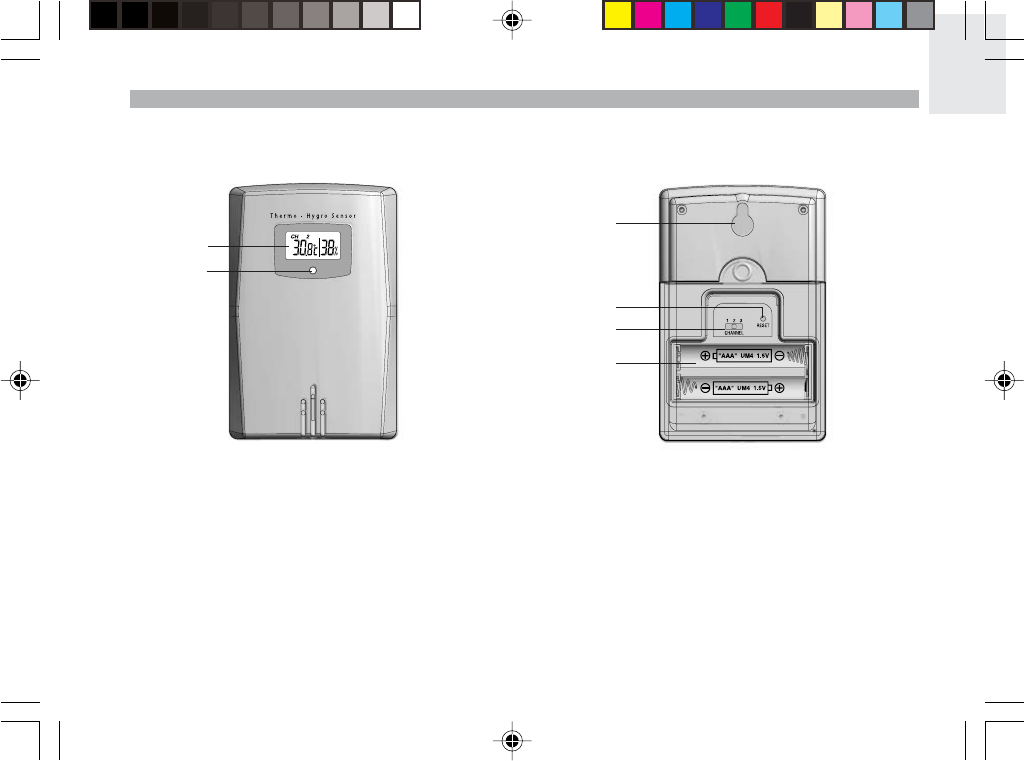
REMOTE SENSOR (THGR122NX)
1. LCD display
2. LED Status indicator
1. Wall mount hole
2. RESET
3. Channel number (1 - 3)
4. Battery compartment
(Battery compartment cover not shown)
1
2
1
2
3
4
BAR618HGA lab test R4 2/18/04, 11:26 AM5
EN
6
CHANGE SETTINGS
1. Press and hold MODE for 2 seconds to enter setting
mode.
2. Press UP or DOWN to change settings.
3. Press MODE to confirm.
TABLE STAND OR WALL MOUNT
Use the stand on the back of the product, or mount it on
a wall with a nail.
REMOTE SENSOR (THGR122NX)
This product is shipped with a THGR122NX Thermo/
Hygro Sensor that collects Temperature and Humidity
data. Data can be collected from up to 3 sensors.
Additional sensors sold separately.
SETUP SENSOR
1. Open the remote sensor battery compartment with
a small Phillips screwdriver.
2. Insert the batteries, matching the polarity as shown
in the battery compartment.
3. Set the channel. The switch is located in the battery
compartment.
GETTING STARTED
BATTERIES
Batteries are not supplied with this product. You will need
to purchase 3 x UM-3 (AA) 1.5V alkaline batteries for
the main unit, and 2 x UM-4 (AAA) 1.5V alkaline batteries
for the remote sensor.
Insert batteries before first use, matching the polarity as
shown in the battery compartment. For best results,
install batteries in the remote sensor before the main
unit. Press RESET after each battery change.
Do not use rechargeable batteries.
NOTE
shows when batteries are low.
UNIT LOCATION
Main Indoor Temperature /
Humidity Area
Remote Outdoor Temperature /
Humidity Area
SWITCH OPTION
Channel Channel 1 - 3. If you are using
more than one sensor, select a
different channel for each sensor.
BAR618HGA lab test R4 2/18/04, 11:26 AM6
EN
7
4. Place the sensor near the main unit. Press RESET
on the sensor. Then, press and hold MEM and
CHANNEL on the main unit to initiate signal sending
between the sensor and the main unit. The reception
icon on the main unit will blink for approximately
3 minutes while it is searching for the sensor. (Refer
to the Sensor Data Transmission section for more
information.)
5. Close the remote sensor battery compartment.
6. Secure the sensor in the desired location using the
wall mount or table stand.
For best results:
•Insert the batteries and select the channel before
you mount the sensor.
•Place the sensor out of direct sunlight and
moisture.
•Do not place the sensor more than 30 meters
(98 feet) from the main (indoor) unit.
•Position the sensor so that it faces the main
(indoor) unit, minimizing obstructions such as
doors, walls, and furniture.
•Place the sensor in a location with a clear view
to the sky, away from metallic or electronic
objects.
•Position the sensor close to the main unit
during cold winter months as below-freezing
temperatures may affect battery performance and
signal transmission.
You may need to experiment with various locations to
get the best results.
BAR618HGA lab test R4 2/18/04, 11:26 AM7
EN
8
NOTE
SEARCH FOR SENSOR
To search for a sensor, press and hold MEM and
CHANNEL for 2 seconds.
If the sensor is still not found, check the
batteries, obstructions, and remote unit location.
Signals from household devices such as
doorbells, electronic garage doors, and home security
systems may cause temporary reception failure. This is
normal and does not affect general product performance.
The reception will resume once the interference ends.
CLOCK
This product shows the current time, and day of week in
English, French, German, Italian, or Spanish. The US
Atomic Clock in Boulder, Colorado automatically updates
this information unless you disable the feature. The signals
are collected by the main unit when it is within 1500 km
(932 miles) of a signal.
Initial reception takes 2 - 10 minutes, and is initiated
when you first setup the unit, and whenever you press
RESET. Once complete, the reception icon will stop
blinking. The icon is shown in the Clock Area.
To force a manual search for Atomic Clock signals, press
and hold UP for 2 seconds. If no signal is found, check
the batteries.
If the Atomic Clock signal is received and the
hour is incorrect, use the "timezone offset" feature to
adjust it to the appropriate timezone. Please see "SET
CLOCK" on pg. 9 for instructions.
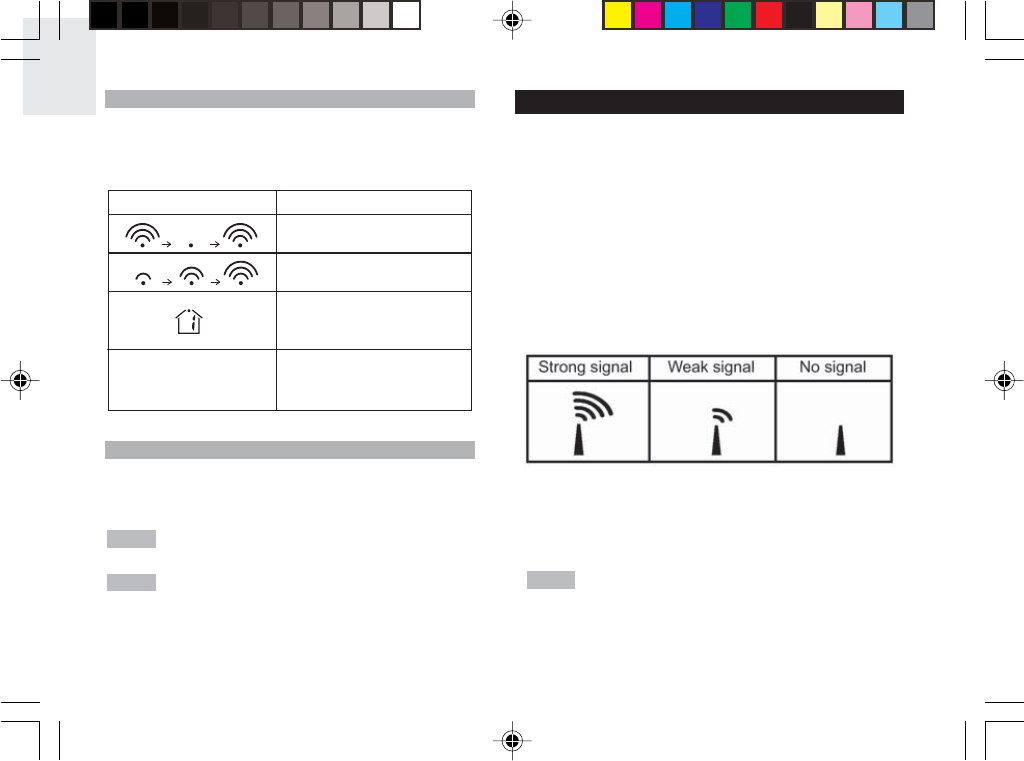
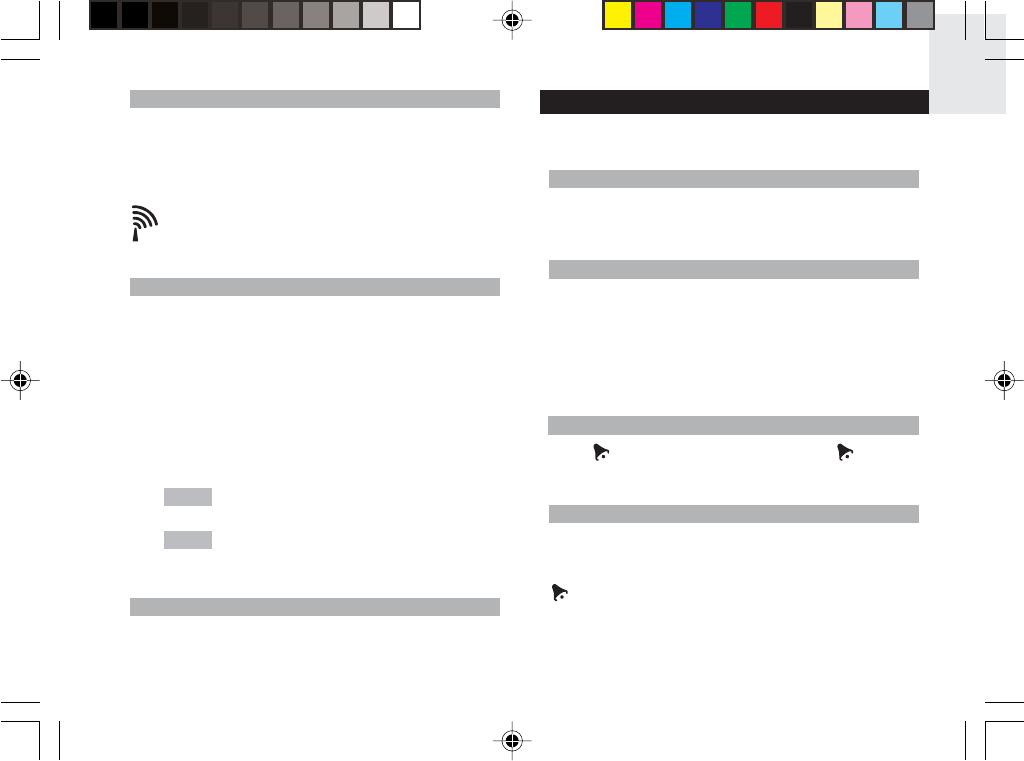
DATA TRANSMISSION
Data is sent from the sensor(s) every 40 seconds.
The reception icon shown in the Temperature and
Humidity Areas show the status.
--- shows in Outdoor
Temp / Humidity Area
ICON DESCRIPTION
Main unit is searching for
sensors.
At least 1 channel has
been found.
Channel 1 is selected (number
will change depending on the
sensor you select)
The selected sensor cannot
be found. Search for the
sensor or check batteries.
NOTE NOTE
BAR618HGA lab test R4 2/18/04, 11:26 AM8
EN
9
TURN ATOMIC CLOCK ON/OFF
Perform this step if you cannot receive Atomic Clock
signals. Press and hold DOWN for 2 seconds. Then,
manually set the clock following the "Set Clock"
instructions (below).
SET CLOCK
You only need to do this if you have disabled the Atomic
Clock feature (for example, if you are too far from or
cannot receive a signal).
1. Press and hold MODE for 2 seconds. The Clock
Area will blink.
2. Select the time zone, hour, minute, year, month,
day, and language. Press UP or DOWN to change
the setting. Press MODE to confirm.
The time zone options are (PA) Pacific,
(CE) Central, (MO) Mountain, and (EA) Eastern.
The language options are (E) English,
(F) French, (D) German, (I) Italian, and (S) Spanish.
SWITCH CLOCK DISPLAY
Press MODE to toggle between Clock with Seconds and
Clock with Weekday display.
The signal icon indicates that the Atomic Clock
feature is ON. No icon means that it is OFF.
ALARMS
This product is equipped with a 2-minute crescendo alarm.
VIEW ALARM SETTINGS
Press ((.)). The Alarm Time and ((.)) status will show in
the Clock Area.
SET ALARM
1. Press ((.)) to switch to Alarm display.
2. Press and hold ((.)) again for 2 seconds. The Alarm
settings will blink.
3. Select the hour and minute. Press UP or DOWN to
change settings. Press ((.)) to confirm.
ACTIVATE ALARM
Press to activate or deactivate the Alarm. shows in
the Clock / Alarm Area when the Alarm is activated.
SILENCE ALARM
When the Alarm time is reached, the
crescendo alarm will sound for 2 minutes. Press
SNOOZE / LIGHT to silence it for 8 minutes.
Or, press to turn it off until the next day.
NOTE
NOTE
BAR618HGA lab test R4 2/18/04, 11:26 AM9
EN
10
If no button is pressed, the Alarm will automatically
silence after 2 minutes. It will then sound again after
8 minutes.
BAROMETER
This product tracks barometric pressure changes over
the past 24 hours to provide the weather forecast
and a trend line showing the direction of barometric
change. Barometric changes are measured by the main
(indoor) unit.
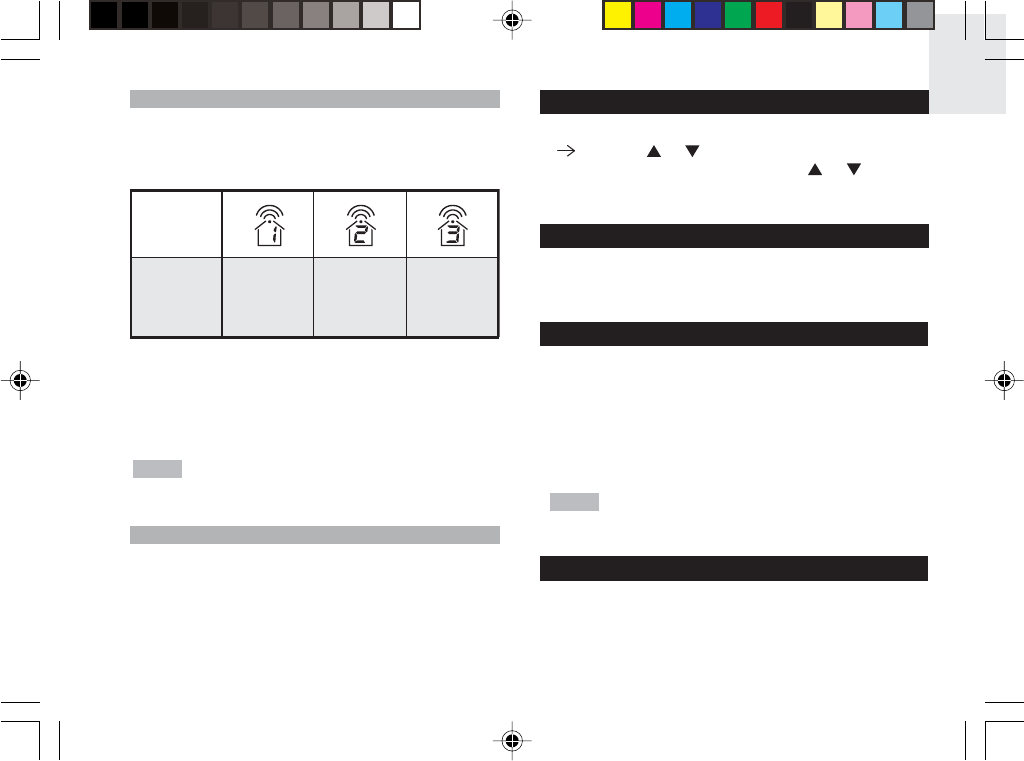
BAROMETRIC TREND
WEATHER FORECAST
This product forecasts the next 12 to 24 hours of
weather within a 30 to 50 km (19 - 31 mile) radius with
70 to 75 percent accuracy. The weather forecast is
always displayed.
TEMPERATURE AND HUMIDITY
This product can display current, minimum, and
maximum temperatures and humidity percentage
information collected by the remote sensors and main
(indoor) unit.
Outdoor data is displayed every 40 seconds. Indoor data
is collected and displayed every 10 seconds.
SELECT TEMPERATURE UNIT
Slide the °C / °F switch into the desired location. The
switch is located inside battery compartment of the
product. The setting for the main unit overrides the
remote sensor setting.
Clear Partly Cloudy Cloudy Rainy
Trend Description
Rising
Steady
Falling
BAR618HGA lab test R4 2/18/04, 11:26 AM10
EN
11
SELECT CHANNEL NUMBER
Press CHANNEL to switch between sensors 1 - 3.
To auto-scan between sensors, press and hold
CHANNEL for 2 seconds. Each sensor's data will be
displayed for 3 seconds. To end auto-scan, press
CHANNEL or MEM.
If you use a sensor that collects only
temperature data, humidity will not be shown.
MINIMUM / MAXIMUM RECORDS
Press MEM to toggle between current, maximum (MAX)
and minimum (MIN) records. To clear the records, press
and hold MEM for 2 seconds. A beep will sound to
confirm that the memory has been cleared.
NOTE
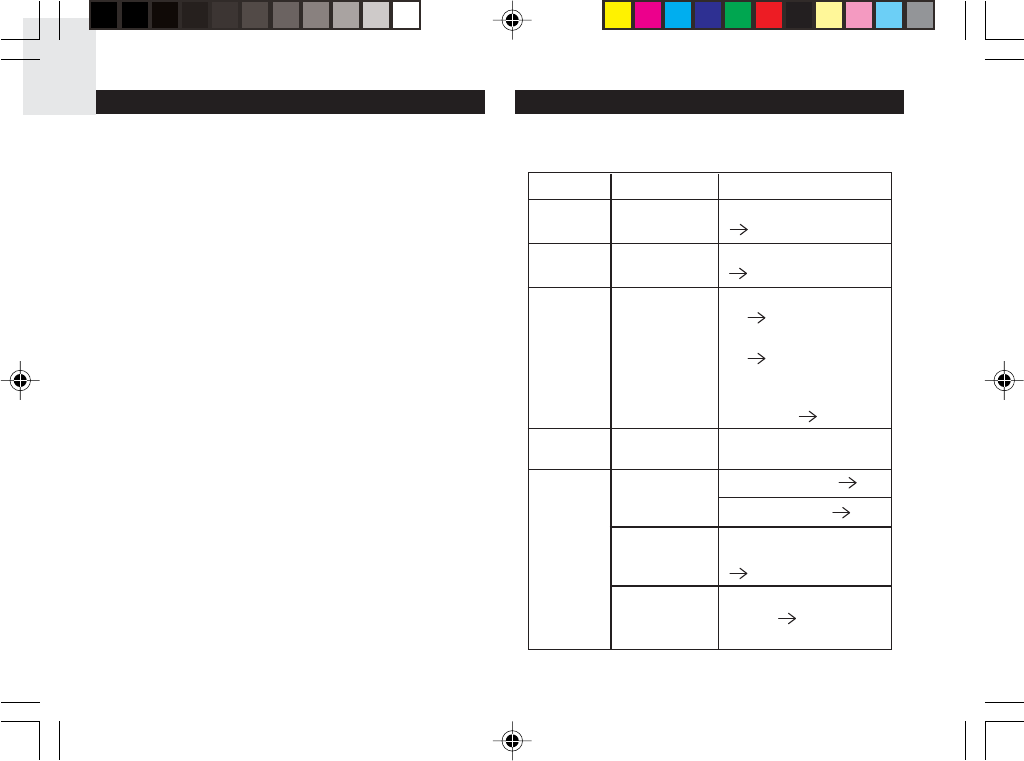
The icon shows the selected sensor.
Designat
ed Display
Remote
Display
Channel 1
Kinetic-
wave Icon
Remote
Display
Channel 2
Remote
Display
Channel 3
NOTE
MOON PHASE
The Calendar must be set for this feature to work.
( 9). Press or to view the moon phase for the
next or previous day. Press and hold or to scan
quickly through the years (2001 to 2099).
BACKLIGHT
Press SNOOZE / LIGHT to activate the backlight for
8 seconds.
RESET SYSTEM
The RESET buttons are located in the battery
compartments for the main unit and sensors. Press
RESET when you change the batteries and whenever
performance is not behaving as expected (for example,
unable to establish radio frequency link with remote
sensor or Atomic clock).
When you press RESET, all settings will return
to default value, and you will lose all stored information.
SAFETY AND CARE
Clean the product with a slightly damp cloth and alcohol-
free, mild detergent. Avoid dropping the product or
placing it in a high-traffic location.
BAR618HGA lab test R4 2/18/04, 11:26 AM11
EN
12
TROUBLESHOOTING
Check here before contacting our customer service
department.
Cannot auto-
synch
1. Adjust batteries.
( 6)
2. Press RESET
( 11)
3. Manually activate
Atomic Clock
feature ( 9)
Temp Shows "LLL"
or "HHH"
Temperature is out-of-
range
Data does
not match
main unit
Initiate a manual sensor
search ( 6)
Cannot
change
channel
Check sensors. Only
one sensor is working
( 6)
Check batteries ( 6)
Check location ( 7)
Remote
sensor
Cannot locate
remote
sensor
Problem Symptom Remedy
Calendar Strange date /
month
Change language
( 9)
Clock Cannot adjust
clock
Disable Atomic Clock
( 9)
WARNINGS
This product is designed to give you years of service if
handled properly. Observe the following guidelines:
•Never immerse the product in water. This can
cause electrical shock and damage the product.
•Do not subject the main unit to extreme force,
shock, or fluctuations in temperature or humidity.
•Do not tamper with the internal components.
•Do not mix new and old batteries or batteries of
different types.
•Do not use rechargeable batteries with this
product.
•Remove the batteries if storing this product for a
long period of time.
•Do not scratch the LCD display.
Do not make any changes or modifications to this
product. Unauthorized changes may void your right to
use the product. The technical specification of this
product and contents of this user guide are subject to
change without notice. Images not drawn to scale.
BAR618HGA lab test R4 2/18/04, 11:26 AM12
EN
13
SPECIFICATIONS
MAIN UNIT DIMENSIONS
L x W x H 185mm x 120mm x
49.5mm
Weight 305g with battery
REMOTE SENSOR DIMENSIONS
L x W x H 92 x 60 x 20 mm
(3.6 x 2.4 x .79 inches)
Weight 63 grams without battery
TEMPERATURE
Unit °C or °F
Indoor Range -5 °C to 50 °C
(23 °F to 122 °F)
Outdoor Range -20 °C to 60 °C
(-4 °F to 140 °F)
Resolution 0.1 °C (0.2° F)
RELATIVE HUMIDITY
Range 25% to 95%
Resolution 1%
Memory Minimum / maximum
BAROMETER AND WEATHER FORECAST
Range 700 to 1050 mb
(20.67 to 31.01 inHg)
Resolution 1 mb (0.03 inHg)
Display Rainy, cloudy,
partly cloudy, sunny
REMOTE SENSOR (THGR122NX)
RF frequency 433 MHz
Range 30 meters (98 feet)
with no obstructions
Transmission every 40 seconds
Channel No. 1 - 3
CLOCK
Atomic Clock Auto or manual
(disabled)
Clock display HH:MM:SS
Hour format 12hr AM/PM
Time zone PA (Pacific), MO (Mountain),
CE (Central) or EA (Eastern)
Calendar MM/DD; weekday in
5 languages (E, D, F, I, S)
Alarm Single alarm with
2- minute crescendo and
8-minute Snooze
BAR618HGA lab test R4 2/18/04, 11:26 AM13
EN
14
FCC STATEMENT
This device complies with Part 15 of the FCC Rules.
Operation is subject to the following two conditions:
(1) This device may not cause harmful interference, and
(2) This device must accept any interference received,
including interference that may cause undesired
operation.
Warning: Changes or modifications to this unit not
expressly approved by the party responsible for
compliance could void the user's authority to operate
the equipment.
NOTE: This equipment has been tested and found to
comply with the limits for a Class B digital device,
pursuant to Part 15 of the FCC Rules. These limits are
designed to provide reasonable protection against
harmful interference in a residential installation. This
equipment generates, uses and can radiate radio
frequency energy and, if not installed and used in
accordance with the instructions, may cause harmful
interference to radio communications.
POWER
Main unit batteries 3 x UM-3 (AA) 1.5V
alkaline
Sensor batteries 2 x UM-4 (AAA) 1.5V
alkaline
However, there is no guarantee that interference will not
occur in a particular installation. If this equipment does
cause harmful interference to radio or television
reception, which can be determined by turning the
equipment off and on, the user is encouraged to try to
correct the interference by one or more of the following
measures:
•Reorient or relocate the receiving antenna.
•Increase the separation between the equipment
and receiver.
•Connect the equipment into an outlet on a circuit
different from that to which the receiver is
connected.
•Consult the dealer or an experienced radio/TV
technician for help.
BAR618HGA lab test R4 2/18/04, 11:26 AM14
EN
15
DECLARATION OF CONFORMITY
The information below is not to be used as contact for
support or sales. Please call our customer service number
(listed on our website at www.oregonscientific.com,
or on the warranty card for this product) for all inquiries
instead.
We
Name: Oregon Scientific, Inc.
Address: 19861 SW 95th Place,
Tualatin, Oregon 97062 USA
Telephone No.: 1-800-853-8883
Fax No.: 1-503-684-8883
declare that the product
Product No.: BAR618HGA
Product Name: Wireless Weather Station
Manufacturer: IDT Technology Limited
Address: Block C, 9/F, Kaiser Estate,
Phase 1, 41 Man Yue St.,
Hung Hom, Kowloon,
Hong Kong
is in conformity with Part 15 of the FCC Rules. Operation
is subject to the following two conditions:
1) This device may not cause harmful
interference.
2) This device must accept any
interference received, including
interference that may cause
undesired operation.
BAR618HGA lab test R4 2/18/04, 11:26 AM15
© 2004 Oregon Scientific. All rights reserved.
P/N.: 086-003334-030
BAR618HGA lab test back coverR4 2/18/04, 11:27 AM1
