Oregon Scientific Rmr112 Users Manual ManualsLib Makes It Easy To Find Manuals Online!
2014-12-11
: Oregon-Scientific Oregon-Scientific-Rmr112-Users-Manual-120836 oregon-scientific-rmr112-users-manual-120836 oregon-scientific pdf
Open the PDF directly: View PDF  .
.
Page Count: 11
1
GB
Multi-Channel IN-OUT Thermometer
with Cable Free Sensor and RF Clock
MODEL: RMR112
USER'S MANUAL
INTRODUCTION
Congratulations on your purchase of the RMR112 Multi-Channel
In-Out Thermometer with 433MHz cable free sensor and
radio-controlled calendar clock.
The basic package comes with a main unit, which is the
temperature and calendar clock station, and a remote unit, the
thermo sensor.
The main unit has large read-outs for indoors temperature,
calendar clock and temperatures collected and transmitted by the
remote unit. The main unit can support up to three remote units.
The main unit is capable of keeping track of the maximum and
minimum temperature of different sites. And no wire installation
is required and the RMR112 operates at 433MHz.
As for the calendar clock, it is radio-controlled. It automatically
synchronizes its current time and date when it is brought within an
approximate 1500km radius of the radio signal generated from
Frankfurt, Germany (DCF77).
You can also set the calendar clock manually when it is off range.
Other features include four-language display, four-step crescendo
dual alarms and interchangeable display modes.
MAIN FEATURES
2
GB
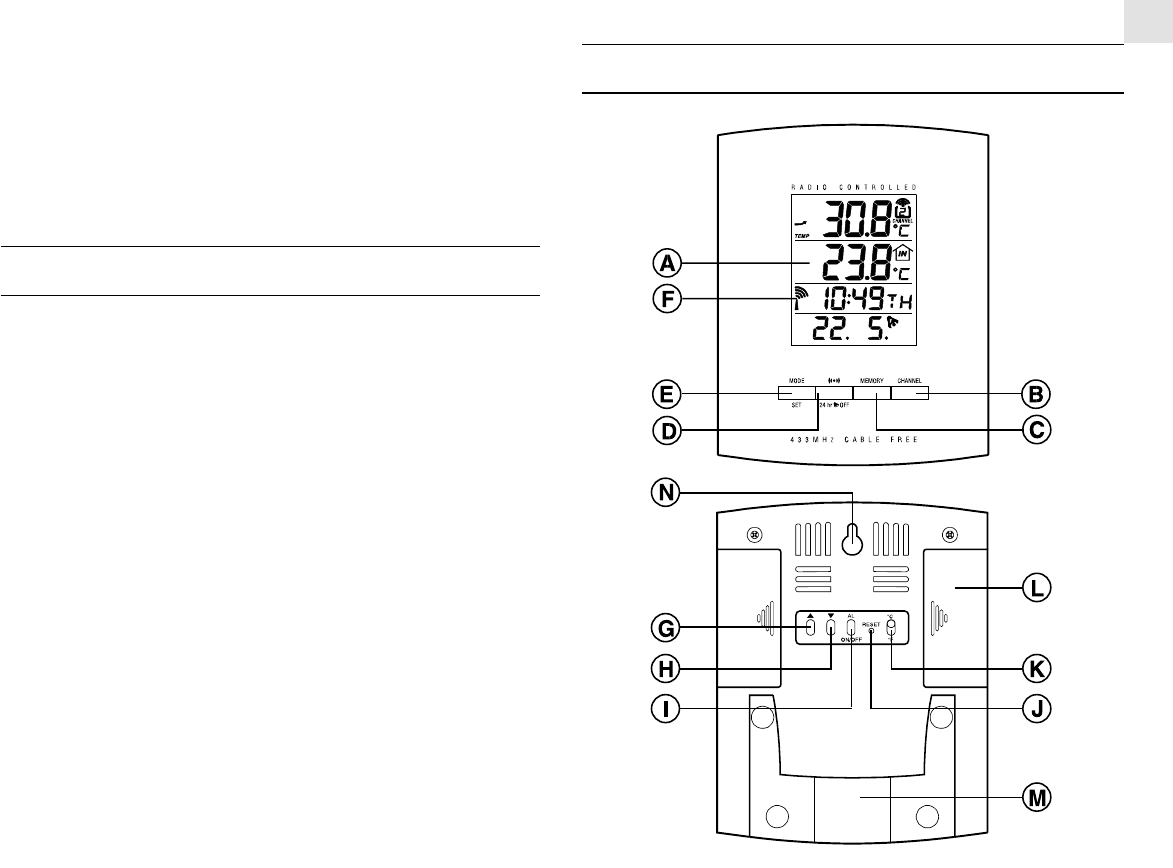
A FOUR-LINE DISPLAY
Facilitates easy reading of remote and indoors temperatures
and calendar clock
B CHANNEL BUTTON
Selects among different channels
C MEMORY BUTTON
Recalls the maximum or minimum temperature of individual
channels
D ALARM [24HR OFF] BUTTON
Sets the time for the alarms
E MODE/SET BUTTON
Toggles the display modes and confirms entry while setting
the values for display
F RADIO RECEPTION SIGNAL
Indicates the condition of radio reception
G UP ( ▲ ) BUTTON
Advances the value of a setting
H DOWN ( ▼ ) BUTTON
Decreases the value of a setting
I ALARM [ AL ON/OFF] BUTTON
Enables or disables the alarms
J RESET BUTTON
Returns all settings to default values
K°C/°F SLIDE SWITCH
Selects between degree Centigrade (°C) and Fahrenheit (°F)
L BATTERY COMPARTMENTS
Accommodates two UM-3 or “AA” size 1.5V alkaline
batteries
M REMOVABLE TABLE STAND
For standing the main unit on a flat surface
N WALL-MOUNT RECESSED HOLE
For mounting the main unit on a wall
MAIN FEATURES: REMOTE UNIT
3
GB
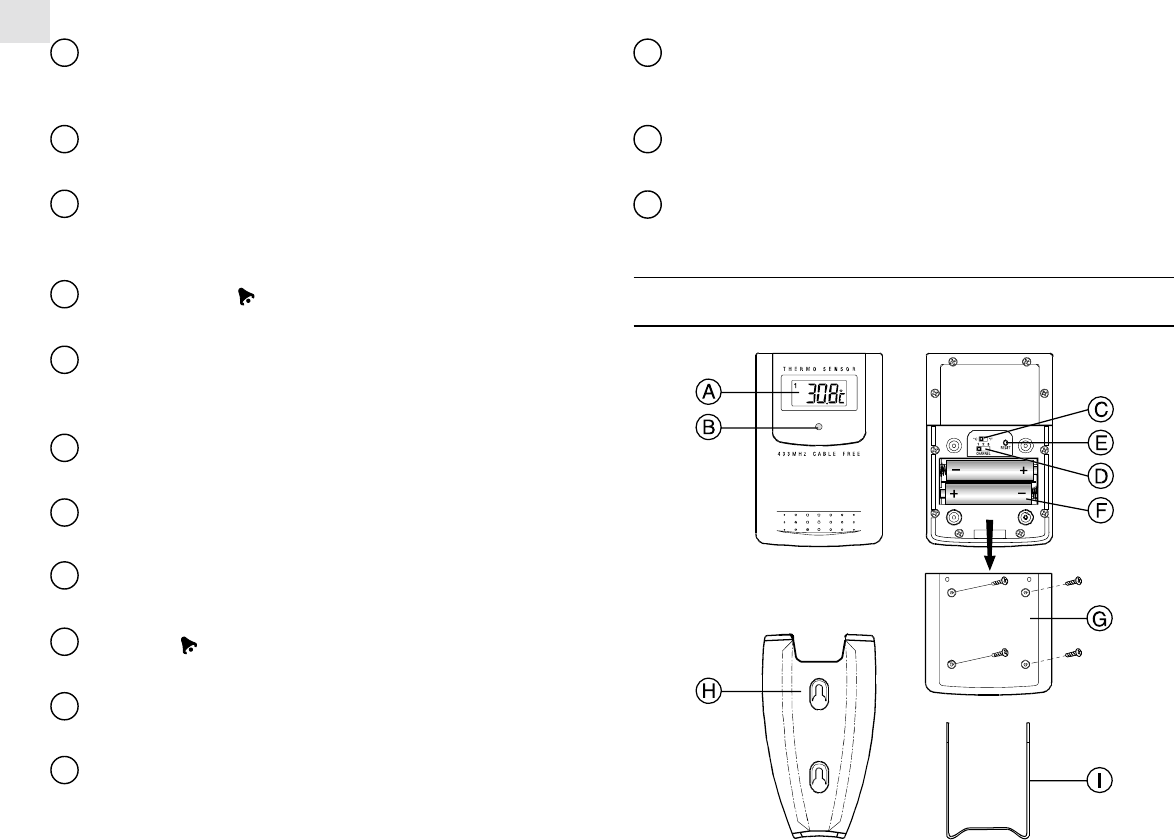
A LCD
Displays the current temperature monitored by the remote unit
B LED INDICATOR
Flashes when the remote unit transmits a reading
C°C/°F SLIDE SWITCH
Selects between Centigrade (°C) and Fahrenheit (°F)
D CHANNEL SLIDE SWITCH
Designates the remote unit Channel 1, Channel 2 or
Channel 3
E RESET BUTTON
Returns all settings to default values
F BATTERY COMPARTMENT
Accommodates two AAA-size batteries
G BATTERY DOOR
H WALL-MOUNT HOLDER
Supports the remote until in wall-mounting
I MOVABLE TABLE STAND
For standing the remote unit on a flat surface
BEFORE YOU BEGIN
For best operation,
1. Assign different channels to different remote units.
2. Insert batteries for remote units before doing so for the main
unit.
3. Place the main unit as close as possible next to the remote unit,
reset the main unit after installing batteries. This will ensure
easier synchronization between the transmission and reception
of signals.
4. Position the remote unit and main unit within effective trans-
mission range, which, in usual circumstances, is 20 to 30 meters.
Note that the effective range is vastly affected by the building
materials and where the main and remote units are positioned. Try
various set-ups for best result.
Though the remote units are weather proof, they should be placed
away from direct sunlight, rain or snow.
BATTERY AND CHANNEL
INSTALLATION: REMOTE UNIT
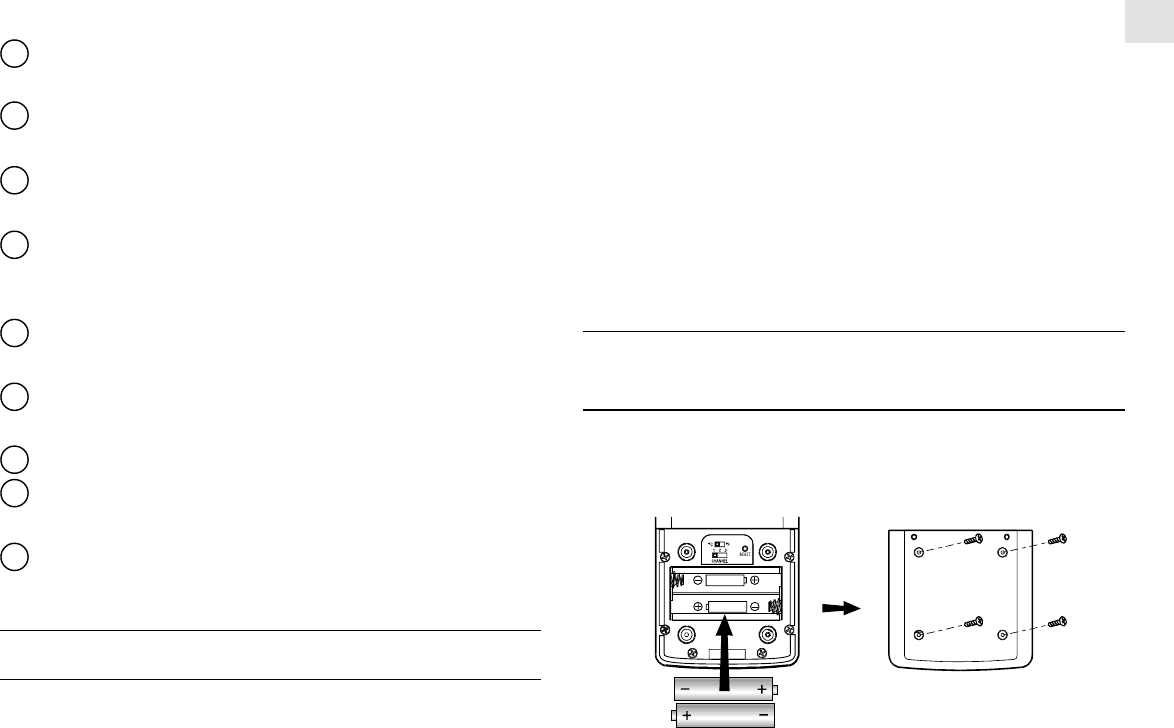
1. Remove the screws on the battery compartment.
2. Select the channel number on the CHANNEL slide switch.
3. Select the temperature display unit on the C/F slide switch.
4. Install 2 alkaline batteries (UM-4 or “AAA” size 1.5V) strictly
according to the polarities shown.
5. Replace the battery compartment door and secure its screws.
4
GB
HOW TO USE THE TABLE STAND
OR WALL MOUNTING
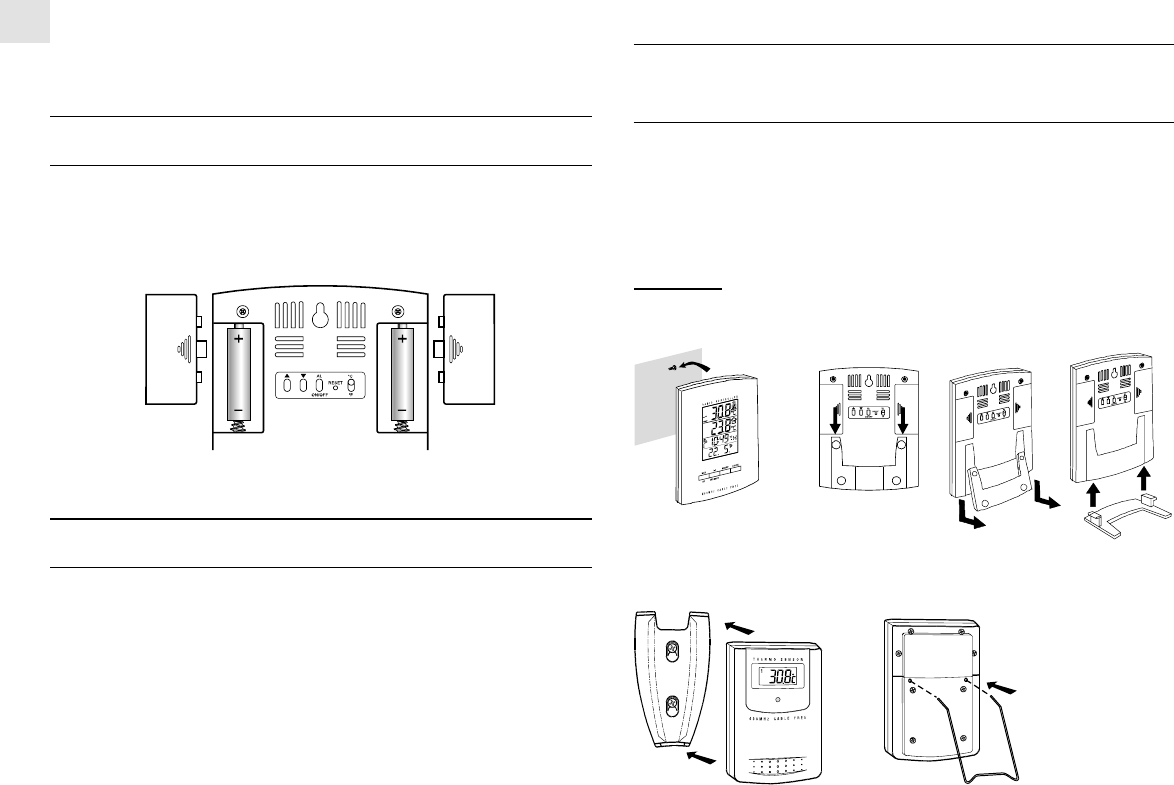
The main unit has a removable table stand, which when connected,
can support the unit on a flat surface. Or you can remove the stand
and mount the unit on a wall using the recessed screw hole.
As for the remote unit, it comes with a wall-mount holder and a
removable stand. Use either to hold the unit in place.
Main unit
Wall-mount Table Stand
Wall-mount Table Stand
Note that once a channel is assigned to a remote unit, you can only
change it by removing the batteries or resetting the unit.
BATTERY INSTALLATION: MAIN UNIT
1. Slide open the battery compartment door.
2. Install 2 alkaline batteries (UM-3 or “AA” size 1.5V) strictly
according to the polarities shown.
3. Replace the battery compartment door.
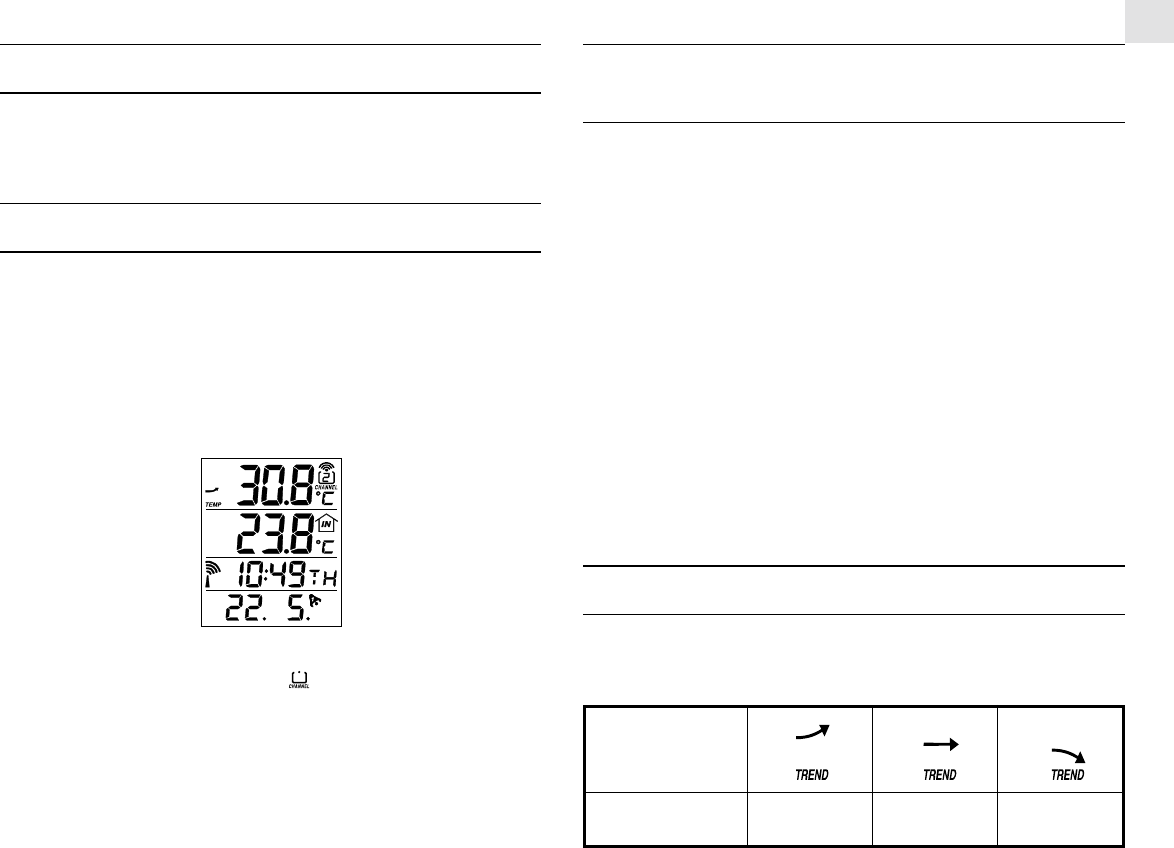
LOW BATTERY WARNING
When it is time to replace batteries, the respective low-battery
indicator will show up when the respective channel is selected.
The battery level of the main unit will be shown on the indoor
temperature when it is running low.
5
GB
HOW TO CHECK REMOTE AND
INDOOR TEMPERATURES
The indoors temperature is shown on the second line of the
display.
As for the remote sites or channels, press CHANNEL to go from
one channel to another. The kinetic wave display on the channel
number indicates the reception of that particular channel is in good
order.
If no readings are received from one particular channel for more
than two minutes, blanks “---” will be displayed until further read-
ings are successfully searched. Check the remote unit is sound and
secure. You can wait for a little while or press CHANNEL and
MEMORY simultaneously to enforce an immediate search. Of
course no reading will be shown if no remote unit is assigned to
that channel.
If the temperature goes above or below than the temperature mea-
suring range of the main unit or the remote unit (stated in
wpecification), the display will show “HHH” or “LLL”.
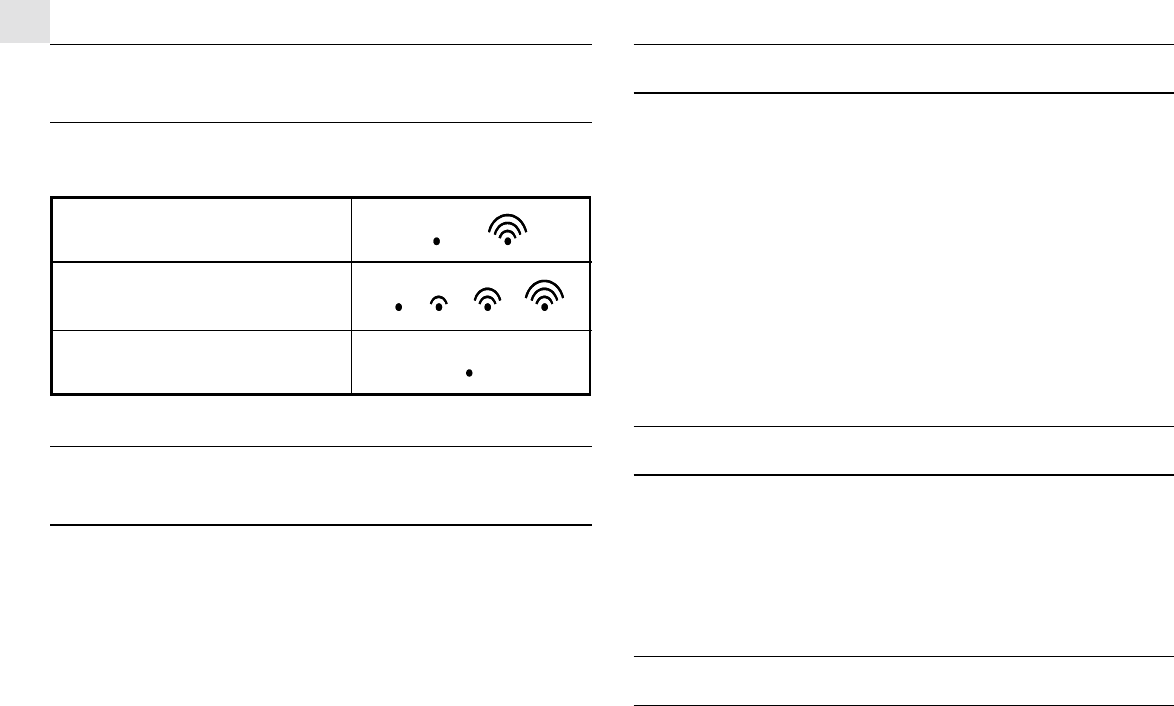
TEMPERATURE TREND
The temperature trend indicator on the screen shows the trend of
samplings collected at that particular remote site. Three trends,
rising, steady and falling, will be shown.
THE RESET BUTTON
This button is only used when the unit is operating in an unfavor-
able way or malfunctioning. Use a blunt stylus to hold down the
button. All settings will return to their default values.
GETTING STARTED
Once batteries are in place for the remote units, they will start trans-
mitting temperature readings at 30-second intervals.
The main unit will also start searching for signals for about a minute
once batteries are installed. Upon successful reception, the indi-
vidual channel temperatures will be displayed on the top line and
the indoors temperature on the bottom line. The main unit will
automatically update its readings at about 30-second intervals.
If no signals are received, blanks "----" will be displayed and the
kinetic wave icon will show " ". Press CHANNEL and
MEMORY simultaneously to enforce another search for about 30
seconds. This is useful in synchronizing the transmission and
reception of the remote and main units.
Repeat this step whenever you find discrepancies between the
reading shown on the main unit and that on the respective remote
unit.
Arrow
indicator
Temperature
Trend Rising Steady Falling
6
GB
HOW TO READ THE KINETIC WAVE
DISPLAY
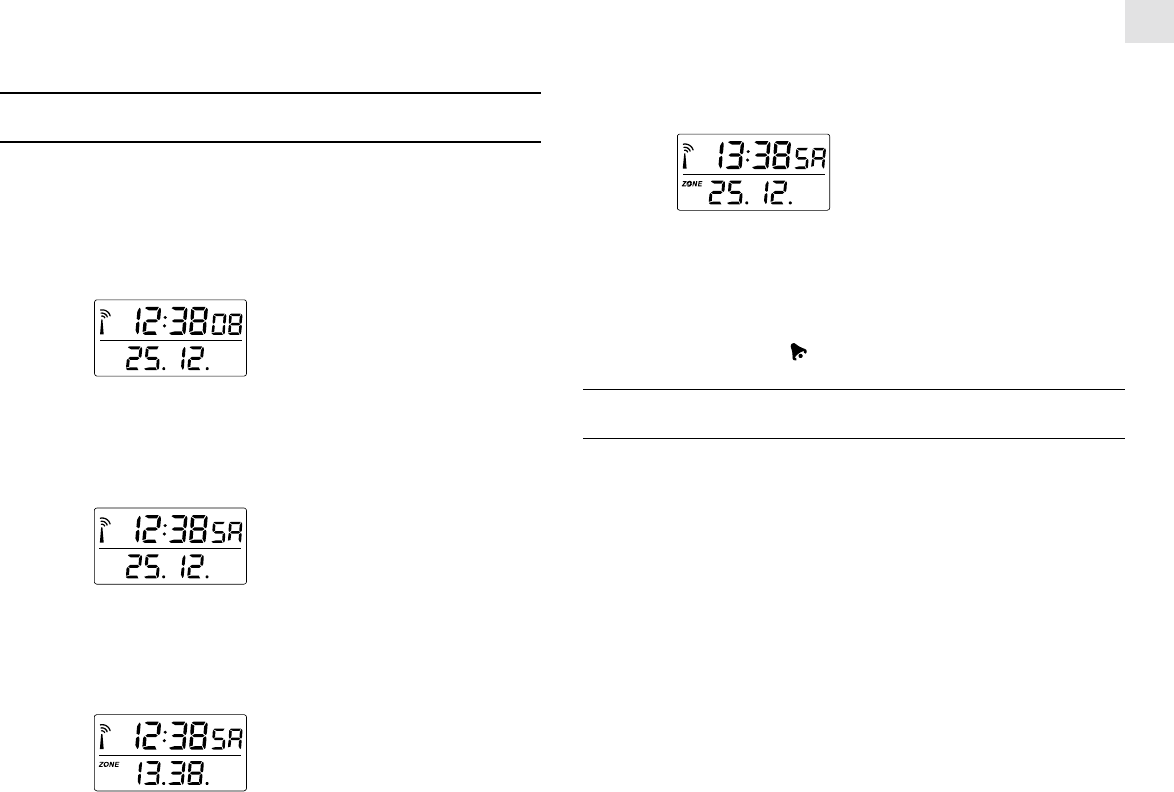
The kinetic wave display shows the signal receiving status of the
main unit. There are three possible forms:
MAXIMUM AND MINIMUM
TEMPERATURES
The maximum and minimum recorded indoor temperatures and
those of each channel will be automatically stored in memory. To
display them,
1. Select the channel to be checked.
2. Press MEMORY once to display the maximum temperature
and again the minimum temperature. The respective indicators,
MAX or MIN will be displayed.
To clear the memory, hold down MEMORY for two seconds. The
maximum and minimum temperatures will be erased. If you press
MEMORY now, the maximum and minimum temperatures will
have the same values as the current ones until different readings
are recorded.
The unit is in searching mode.
Temperature readings are
securely registered.
No signals.
DISCONNECTED SIGNALS
If without obvious reasons the display for a particular channel goes
blank, press CHANNEL and MEMORY to enforce an immediate
search. If that fails, check:
1. The remote unit of that channel is still in place.
2. The batteries of both the remote unit and main unit. Replace as
necessary.
Note: When the temperature falls below freezing point, the batter-
ies of outdoor units will freeze, lowering their voltage sup-
ply and the effective range.
3. The transmission is within range and path is clear of obstacles
and interference. Shorten the distance when necessary.
TRANSMISSION COLLISION
Signals from other household devices, such as door bells, home
security systems and entry controls, may interfere with those of
this product and cause temporarily reception failure. This is nor-
mal and does not affect the general performance of the product.
The transmission and reception of temperature readings will re-
sume once the interference recedes.
NOTE ON °C AND °F
The unit of temperature display is selected on the °C/°F slide switch.
Select °C for Centigrade or °F for Fahrenheit.
Note that the remote temperature display on the main unit is domi-
nated by the selection on the °C/°F slide switch of the main unit.
Whatever the display units of the remote sensors are, they will be
7
GB
automatically converted to the chosen one of the main unit.
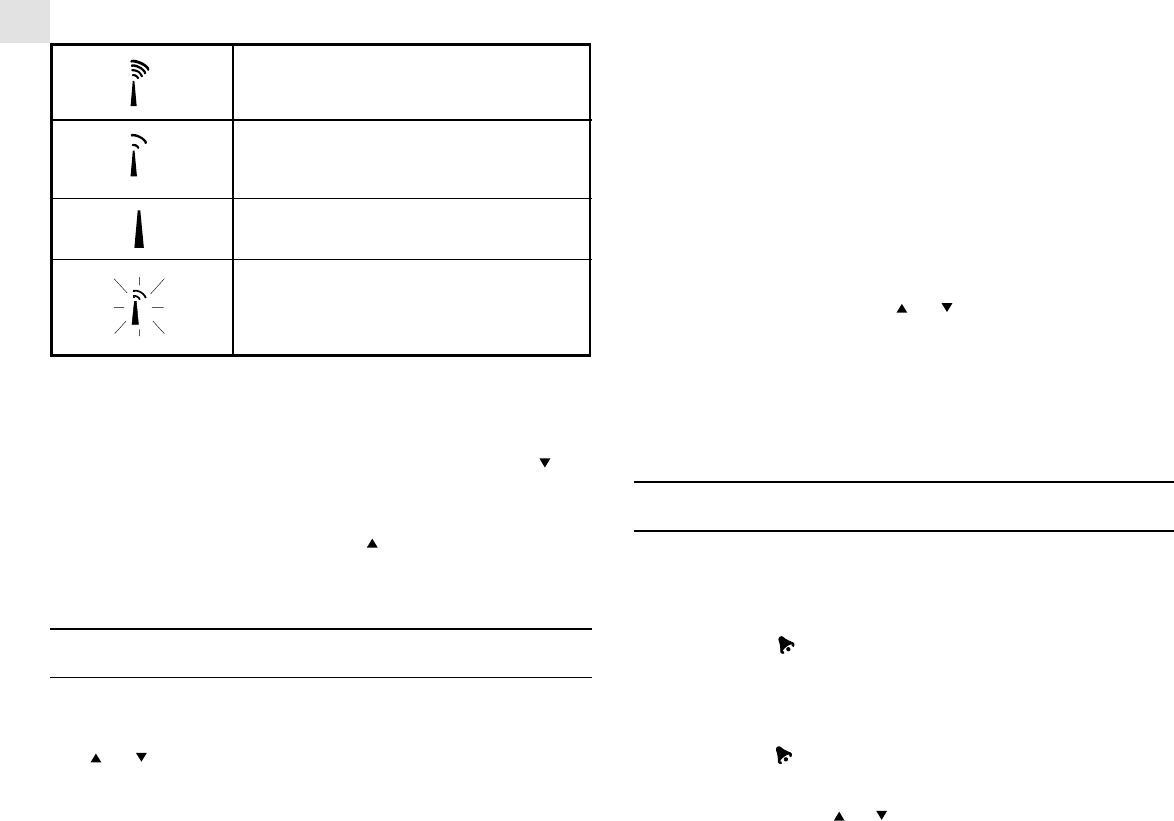
CALENDAR CLOCK DISPLAY MODES
The RMR112 supports four display modes in the sequence of:
MODE 1. Hour-Minute-Second (of local time)
--------------------------------------------
Day-Month (of local time)
MODE 2. Hour-Minute-Day of the Week (of local time)
-------------------------------------------------------
Day-Month (of local time)
MODE 3. Hour-Minute-Day of the Week (of local time)
-------------------------------------------------------
Hour-Minute (of second time zone)
MODE 4. Hour-Minute-Day of the Week (of second time zone)
----------------------------------------------------------------
Day-Month (of second time zone)
Each press on the MODE button will toggle the display in the above
order.
Note: The bottom line of the display will be replaced by the alarm
time if the [24HR OFF] button is pressed.
ABOUT RADIO RECEPTION
The RMR112 is designed to automatically synchronize its calen-
dar clock once it is brought within range of the Frankfurt DCF77
radio signal.
When the RMR112 is within range, its radio-control mechanism
will override all manual settings.
When the unit is receiving radio signal, the radio reception signal
will start to blink. A complete reception generally takes about 2 to
10 minutes, depending on the strength of the radio signal.
When the reception is complete, the radio reception signal will
stop blinking. The strength of the reception for the last full hour
will be indicated.
8
GB
For better reception, place the clock away from metal objects and
electrical appliances to minimize interference.
If you wish to disable the auto-reception feature, press the but-
ton for three seconds. The radio reception signal will disappear.
The unit will not respond to radio signals.
To enable the feature again, press the button for three seconds.
The radio reception signal will start blinking to initiate reception
automatically.
HOW TO SET THE CLOCK MANUALLY
To set the clock manually, hold MODE/SET for three seconds.
The display will return to MODE 1, with the hour digits blinking.
Use or to select the hour. Keep pressing the button will in-
crease or decrease the value rapidly.
Press MODE/SET to confirm. The minute digits will blink. Re-
peat the same procedure to set the minutes, then the day-of-month,
month, display language, day-of-week and offset for the second
time zone.
Note that the time and date are displayed in 24-HOUR clock and
DAY-MONTH format, respectively. For display language, you can
choose among English (E), German (D), French (F) and Italian
(I)-in that order. Day-of-week is the usual sequence of Monday
through Sunday.
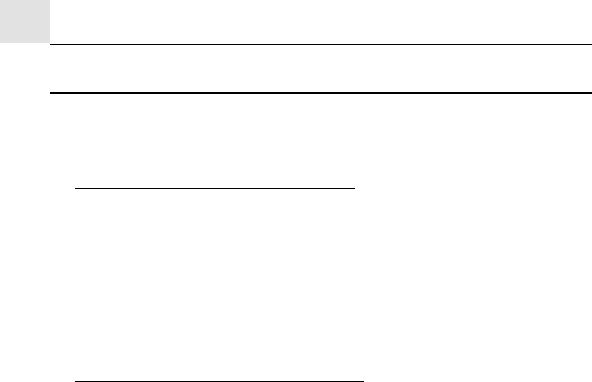
For the second time zone, which is indicated by the ZONE ICON,
enter the hour offset using the or buttons and the RMR212
will calculate the second time accordingly.
If there is an item you do not wish to change, simply press MODE/
SET to bypass the item.
When you are done, press MODE/SET to exit. The display will
return to the mode last chosen.
HOW TO SET AND ARM THE ALARMS
The RMR112 has two alarms, ALARM 1 and ALARM 2. They
can be invoked together or independently.
To set an alarm,
1. Press [24HR OFF] once to select ALARM 1 or again to
select ALARM 2. The last selected time of the alarm will be
displayed. If you have never set the alarm before, the time will
be displayed as 0:00.
2. Press [24HR OFF] for three seconds. The hour digits will
blink.
3. Enter the hour using or .
- Strong
- Weak
- No Reception
- Receiving
9
GB
4. Press [24HR OFF]. The minute digits will blink.
5. Enter the minutes using or .
6. Press [24HR OFF] to exit.
The alarm ON icon for the alarm chosen will be displayed indicat-
ing the alarm set above is now armed.
You can also arm or disarm an alarm by pressing the AL ON/OFF
button.
HOW TO STOP AN ALARM
To stop an alarm, you can use either [24HR OFF] or AL ON/
OFF.
Pressing [24HR OFF] will stop the alarm, which is still armed
and will go off at the set time the following day.
If AL ON/OFF is pressed instead, the alarm will be stopped and
deactivated all together.
PRECAUTIONS
This product is engineered to give you years of satisfactory
service if you handle it carefully. Here are a few precautions:
1. Do not immerse the unit in water.
2. Do not clean the unit with abrasive or corrosive materials. They
may scratch the plastic parts and corrode the electronic circuit.
3. Do not subject the unit to excessive force, shock, dust,
temperature or humidity, which may result in malfunction,
shorter electronic life span, damaged battery and distorted parts.
4. Do not tamper with the unit's internal components. Doing so
will invalidate the warranty on the unit and may cause
unnecessary damage. The unit contains no user-serviceable parts.
5. Only use fresh batteries as specified in the user's manual. Do
not mix new and old batteries as the old ones may leak.
6. Always read the user's manual thoroughly before operating the
unit.
TIME ZONE AND OFFSET TABLE
10
GB
SPECIFICATIONS
Temperature Measurement
Main unit
Indoor Temperature measurement
Proposed operating range : -5.0°C to +50.0°C
23.0°F to 122.0°F
Temperature resolution : 0.1°C
0.2°F
Remote Temperature measurement
Proposed operating range : -5.0°C to +50.0°C
23.0°F to 122.0°F
Temperature resolution : 0.1°C
0.2°F
Remote unit
Proposed operating range : -20.0°C to +60.0°C
-4.0°F to 140.0°F
Temperature resolution : 0.1°C
0.2°F
RF Transmission Frequency : 433 MHz
No. of Remote unit : Maximum of 3
RF Transmission Range : Maximum 30 meters
Temperature sensing cycle : around 30 seconds
Radio Controlled Clock
Maintime set and synchronized by Radio Signal DCF77 for
Continental/ Central Europe
24 h display with hh : mm ss
Date Format : Day. Month.
Day of week selectable in 4 language (E, F, D, I)
Second time zone with date and day
2-minute crescendo alarm
Power
Main unit : use 2 pcs UM-3 or”AA”
1.5V alkaline battery
Remote sensing unit : use 2 pcs UM-4 or
“AAA” 1.5V alkaline
bat tery
Weight
Main unit : 190 gm
Remote sensing unit : 100 gm
Dimension
Main unit : 136(L) x 108(W) x
27(T) mm
Remote sensing unit : 92(L) x 60(W) x 21(T)
mm
11
GB
NOTE ON COMPLIANCE
Warming: Changes or modifications to this unit not expressly
approved by the party responsible for compliance could void the
user’s authority to operate the equipment.
R&TTE Compliance Note
This device complies with the essential requirements of Article 3
of the R&TTE 1999/5/EC Directive, if used for its intended use
and that the following standard(s) has been applied:
Electromagnetic compatibility (Article 3.1.b of the R&TTE
Directive)
Applied standards ETS 300 683 : 1997
Efficient use of the radio frequency spectrum (Article 3.2 of the
R&TTE Directive)
Applied standards EN300 220 –1 : 1997
CAUTION
- The content of this manual is subject to change
without further notice.
- Due to printing limitation, the displays shown in this
manual may differ from the actual display.
- The contents of this manual may not be reproduced
without the permission of the manufacturer.
