PFK Electronics 720600 720/740 RF Dongle User Manual D720540 3

PFK Electronics (Pty) Limited 720/740 RF Dongle D720540 3

User Manual

Toucan Graphics - 0824216715 DPFK 720/540/02 R.3I S O / T S 1 6 9 4 9I S O 1 4 0 0 1CENELEC EN 50436-2AUTHORISED AUTOWATCH DEALERTo order, or for more information, contact:THATCHAMTHE MOTOR INSURANCEREPAIR RESEARCH C  ENTREUSA HOL AUS UK GER SA CDA UK720 TABOPERATORS INSTRUCTIONS
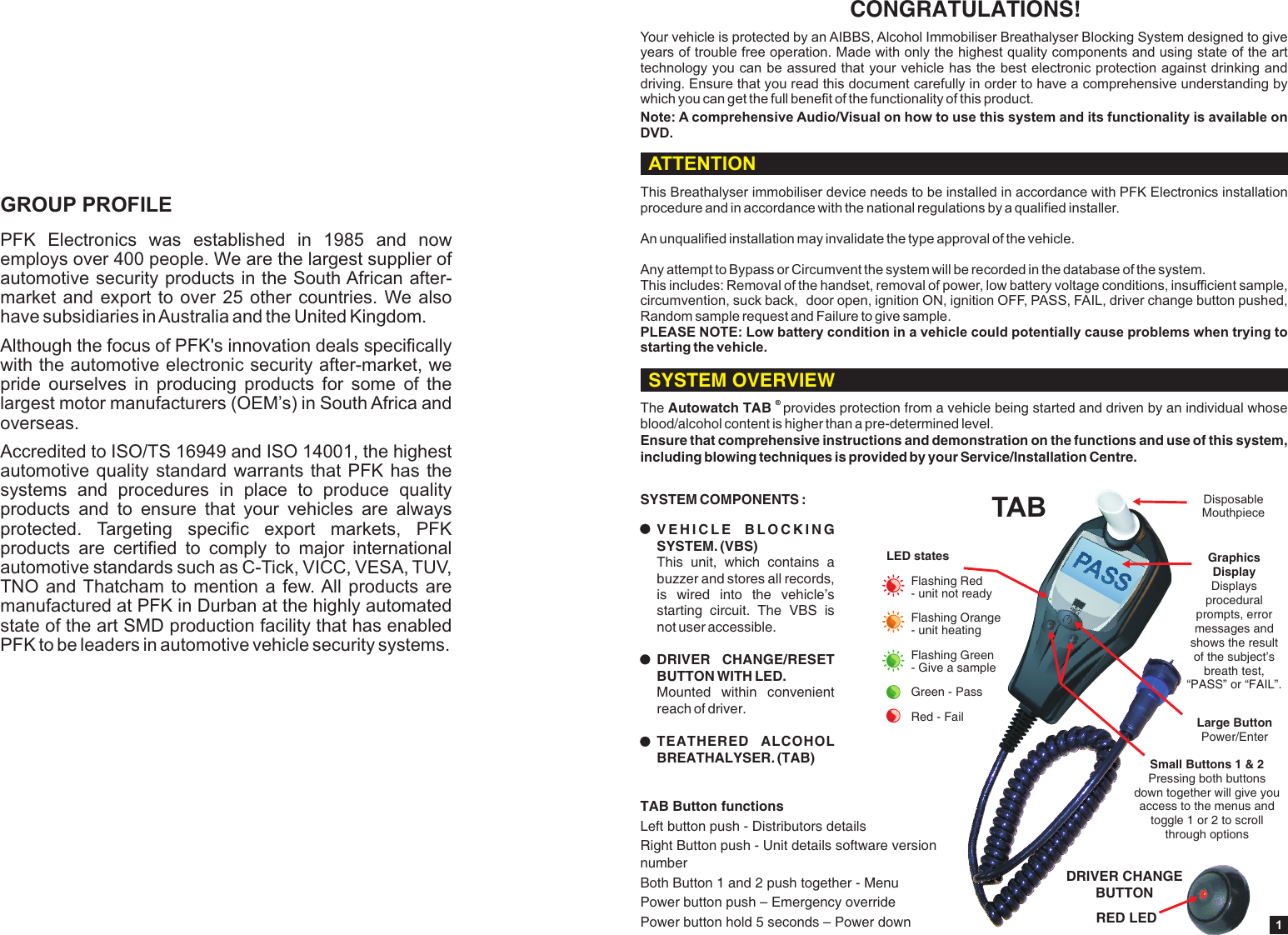
PFK  Electronics  was  established  in  1985  and  now employs over 400 people. We are the largest supplier of automotive security products in the South African after-market and export to over 25 other countries. We also have subsidiaries in Australia and the United Kingdom.Although the focus of PFK's innovation deals specifically with the automotive electronic security after-market, we pride  ourselves  in  producing  products  for  some  of  the largest motor manufacturers (OEM’s) in South Africa and overseas.Accredited to ISO/TS 16949 and ISO 14001, the highest automotive quality standard warrants that PFK  has  the systems  and  procedures  in  place  to  produce  quality products  and  to  ensure  that  your  vehicles  are  always protected.  Targeting  specific  export  markets,  PFK products  are  certified  to  comply  to  major  international automotive standards such as C-Tick, VICC, VESA, TUV, TNO and Thatcham to mention  a  few. All products are manufactured at PFK in Durban at the highly automated state of the art SMD production facility that has enabled PFK to be leaders in automotive vehicle security systems.GROUP PROFILE1CONGRATULATIONS!Your vehicle is protected by an AIBBS, Alcohol Immobiliser Breathalyser Blocking System designed to give years of trouble free operation. Made with only the highest quality components and using state of the art technology you can be assured that your vehicle has the best electronic protection against drinking and driving. Ensure that you read this document carefully in order to have a comprehensive understanding by which you can get the full benefit of the functionality of this product.Note: A comprehensive Audio/Visual on how to use this system and its   is available on DVD.functionality® The Autowatch TAB  provides protection from a vehicle being started and driven by an individual whose blood/alcohol content is higher than a pre-determined level.Ensure that comprehensive instructions and demonstration on the functions and use of this system, including blowing techniques is provided by your Service/Installation Centre.SYSTEM COMPONENTS :V E H I C L E   B L O C K I N G  SYSTEM. (VBS) This  unit,  which  contains  a buzzer and stores all records, is  wired  into  the  vehicle’s starting  circuit.  The  VBS  is not user accessible.DRIVER  CHANGE/RESET BUTTON WITH LED. Mounted  within  convenient reach of driver.TEATHERED  ALCOHOL BREATHALYSER. (TAB) ASSPRED LEDDRIVER CHANGE BUTTONSmall Buttons 1 & 2Pressing both buttons down together will give you access to the menus and toggle 1 or 2 to scroll through optionsSYSTEM OVERVIEWATTENTIONThis Breathalyser immobiliser device needs to be installed in accordance with PFK Electronics installation procedure and in accordance with the national regulations by a qualified installer.An unqualified installation may invalidate the type approval of the vehicle.Any attempt to Bypass or Circumvent the system will be recorded in the database of the system.This includes: Removal of the handset, removal of power, low battery voltage conditions, insufficient sample, circumvention, suck back,  door open, ignition ON, ignition OFF, PASS, FAIL, driver change button pushed, Random sample request and Failure to give sample.PLEASE NOTE: Low battery condition in a vehicle could potentially cause problems when trying to starting the vehicle.TAB Disposable MouthpieceLarge ButtonPower/EnterGraphics Display Displays procedural prompts, error messages and shows the result of the subject’s breath test, “PASS” or “FAIL”.LED statesFlashing Red - unit not readyFlashing Orange - unit heatingFlashing Green - Give a sampleGreen - PassRed - FailTAB Button functionsLeft button push - Distributors detailsRight Button push - Unit details software version numberBoth Button 1 and 2 push together - Menu Power button push – Emergency overridePower button hold 5 seconds – Power down
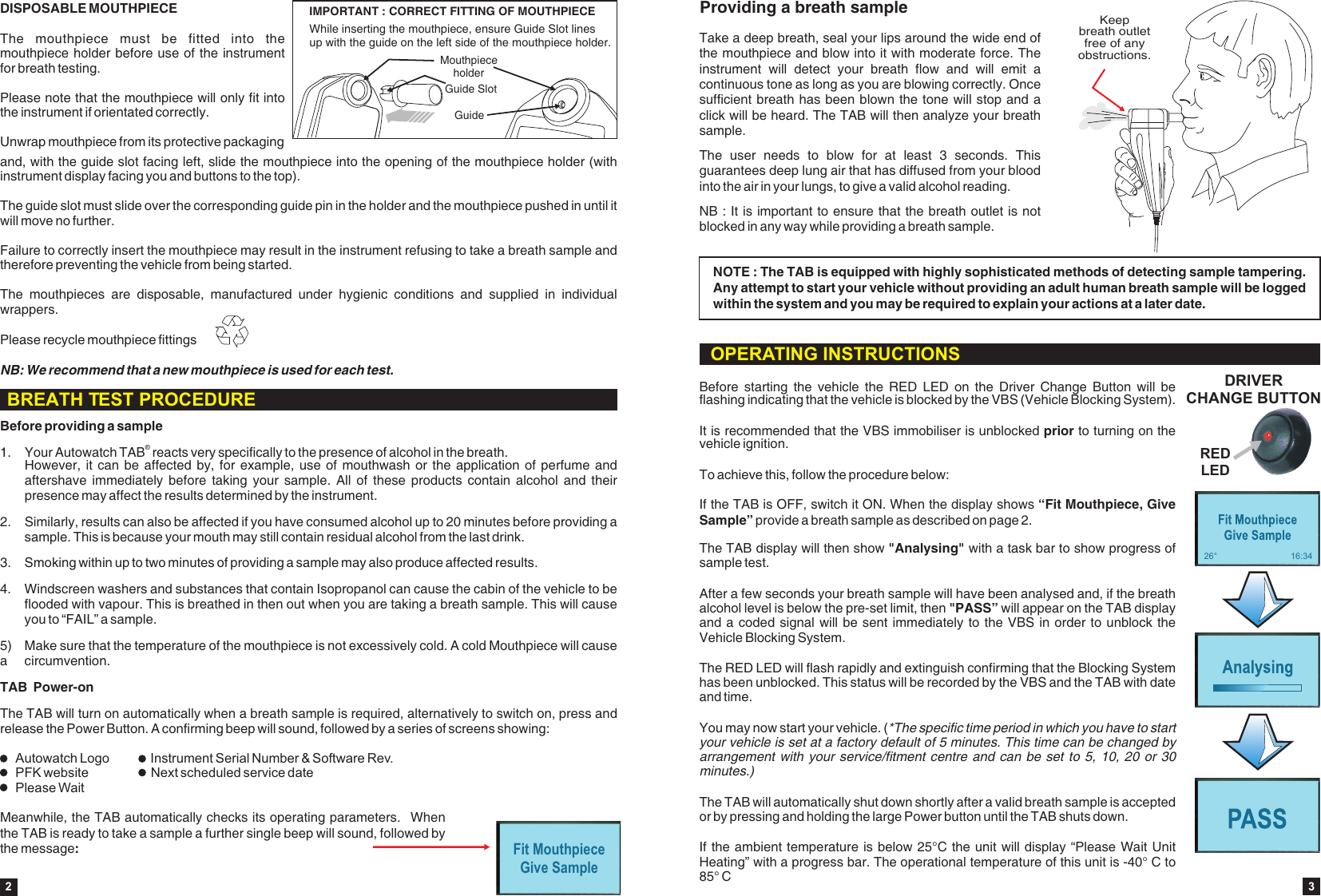
Before providing a sample®1. Your Autowatch TAB  reacts very specifically to the presence of alcohol in the breath. However, it  can be affected  by, for  example, use of  mouthwash or the  application of  perfume and aftershave  immediately  before taking your  sample.  All  of  these  products  contain alcohol  and  their presence may affect the results determined by the instrument.2. Similarly, results can also be affected if you have consumed alcohol up to 20 minutes before providing a sample. This is because your mouth may still contain residual alcohol from the last drink.3. Smoking within up to two minutes of providing a sample may also produce affected results.TAB  Power-onThe TAB will turn on automatically when a breath sample is required, alternatively to switch on, press and release the Power Button. A confirming beep will sound, followed by a series of screens showing:4. Windscreen washers and substances that contain Isopropanol can cause the cabin of the vehicle to be flooded with vapour. This is breathed in then out when you are taking a breath sample. This will cause you to “FAIL” a sample.5)  Make sure that the temperature of the mouthpiece is not excessively cold. A cold Mouthpiece will cause a  circumvention.Fit MouthpieceGive SampleIMPORTANT : CORRECT FITTING OF MOUTHPIECEIMPORTANT : CORRECT FITTING OF MOUTHPIECEGuide SlotMouthpiece holderGuideWhile inserting the mouthpiece, ensure Guide Slot linesup with the guide on the left side of the mouthpiece holder. DISPOSABLE MOUTHPIECEThe  mouthpiece  must  be  fitted  into  the mouthpiece holder before use of the instrument for breath testing.Please note that the mouthpiece will only fit into the instrument if orientated correctly. Unwrap mouthpiece from its protective packaging and, with the guide slot facing left, slide the mouthpiece into the opening of the mouthpiece holder (with instrument display facing you and buttons to the top). The guide slot must slide over the corresponding guide pin in the holder and the mouthpiece pushed in until it will move no further. Failure to correctly insert the mouthpiece may result in the instrument refusing to take a breath sample and therefore preventing the vehicle from being started.The  mouthpieces  are  disposable,  manufactured  under  hygienic  conditions  and  supplied  in  individual wrappers.  NB: We recommend that a new mouthpiece is used for each test.Please recycle mouthpiece fittings2Meanwhile, the TAB automatically checks its operating parameters.   When the TAB is ready to take a sample a further single beep will sound, followed by the message: BREATH TEST PROCEDUREAutowatch Logo  Instrument Serial Number & Software Rev.PFK website Next scheduled service datePlease WaitThe TAB display will then show   with a task bar to show progress of sample test.After a few seconds your breath sample will have been analysed and, if the breath alcohol level is below the pre-set limit, then "PASS” will appear on the TAB display and a coded signal will be sent immediately to the VBS in order to unblock the Vehicle Blocking System. The RED LED will flash rapidly and extinguish confirming that the Blocking System has been unblocked. This status will be recorded by the VBS and the TAB with date and time.You may now start your vehicle. (*The specific time period in which you have to start your vehicle is set at a factory default of 5 minutes. This time can be changed by arrangement with your  service/fitment centre and can be  set to 5, 10,  20 or 30 minutes.)The TAB will automatically shut down shortly after a valid breath sample is accepted or by pressing and holding the large Power button until the TAB shuts down. If the ambient temperature is below 25°C the unit will display “Please Wait Unit Heating” with a progress bar. The operational temperature of this unit is -40° C to 85° C"Analysing"If the TAB is OFF, switch it ON. When the display shows “Fit Mouthpiece, Give Sample” provide a breath sample as described on page 2.Before  starting  the  vehicle  the  RED  LED  on  the  Driver  Change  Button  will  be flashing indicating that the vehicle is blocked by the VBS (Vehicle Blocking System).It is recommended that the VBS immobiliser is unblocked prior to turning on the vehicle ignition.To achieve this, follow the procedure below:DRIVER CHANGE BUTTONRED LEDOPERATING INSTRUCTIONS26° 16:34Providing a breath sampleTake a deep breath, seal your lips around the wide end of the mouthpiece and blow into it with moderate force. The instrument  will  detect  your  breath  flow  and  will  emit  a continuous tone as long as you are blowing correctly. Once sufficient breath has been blown the tone will stop and a click will be heard. The TAB will then analyze your breath sample.NB : It is important to ensure that the breath outlet is not blocked in any way while providing a breath sample.The  user  needs  to  blow  for  at  least  3  seconds.  This guarantees deep lung air that has diffused from your blood into the air in your lungs, to give a valid alcohol reading.NOTE : The TAB is equipped with highly sophisticated methods of detecting sample tampering. Any attempt to start your vehicle without providing an adult human breath sample will be logged within the system and you may be required to explain your actions at a later date.Keep breath outlet free of any obstructions.3
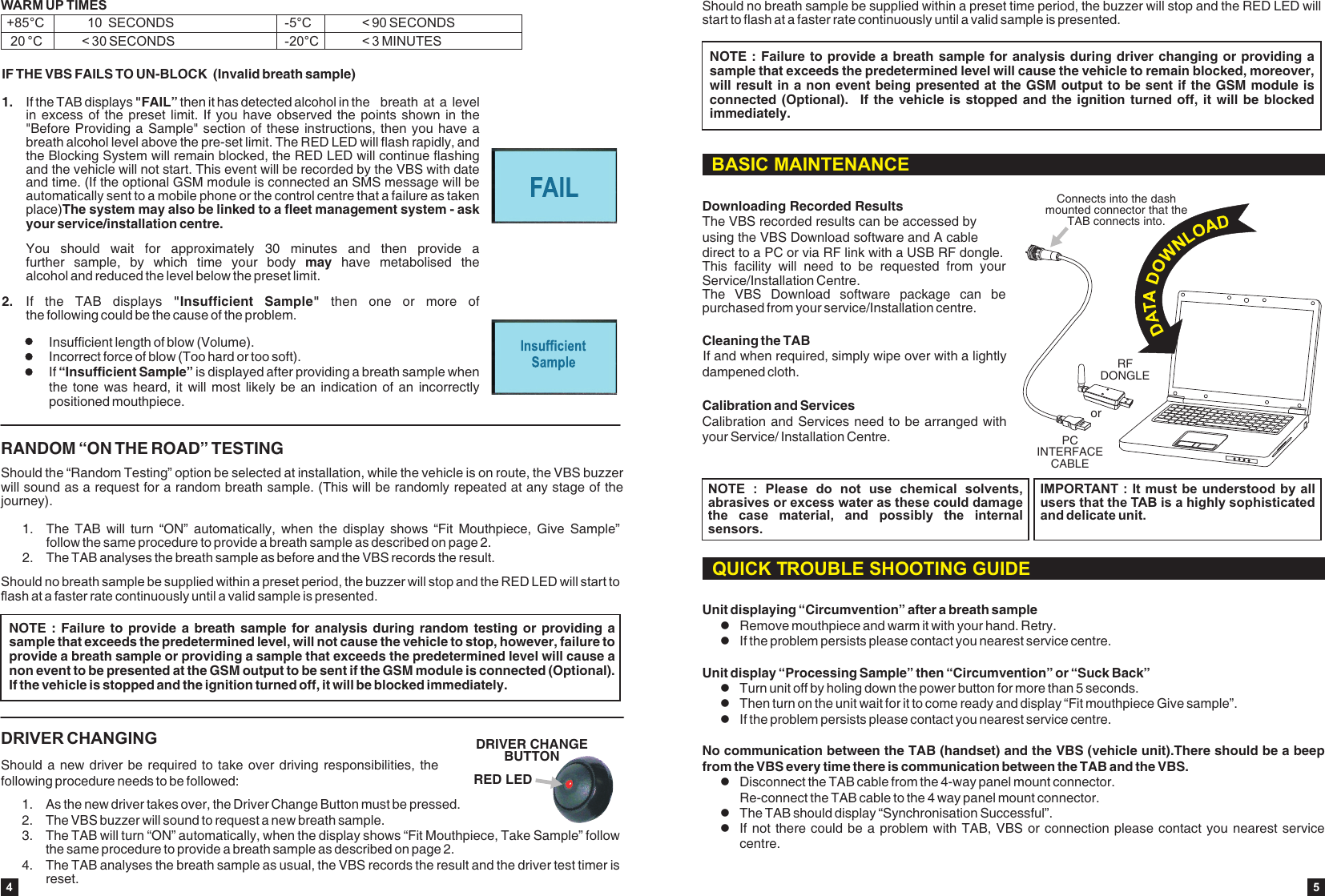
1. The  TAB  will  turn  “ON”  automatically,  when  the  display  shows  “Fit  Mouthpiece,  Give  Sample” follow the same procedure to provide a breath sample as described on page 2.2. The TAB analyses the breath sample as before and the VBS records the result.Should the “Random Testing” option be selected at installation, while the vehicle is on route, the VBS buzzer will sound as a request for a random breath sample. (This will be randomly repeated at any stage of the journey).RANDOM “ON THE ROAD” TESTINGShould no breath sample be supplied within a preset period, the buzzer will stop and the RED LED will start to flash at a faster rate continuously until a valid sample is presented.NOTE :  Failure  to provide  a breath  sample for  analysis  during random  testing or  providing a sample that exceeds the predetermined level, will not cause the vehicle to stop, however, failure to provide a breath sample or providing a sample that exceeds the predetermined level will cause a non event to be presented at the GSM output to be sent if the GSM module is connected (Optional). If the vehicle is stopped and the ignition turned off, it will be blocked immediately.DRIVER CHANGINGShould a new  driver be required to  take over driving responsibilities, the following procedure needs to be followed:1.  As the new driver takes over, the Driver Change Button must be pressed.2. The VBS buzzer will sound to request a new breath sample. 3. The TAB will turn “ON” automatically, when the display shows “Fit Mouthpiece, Take Sample” follow the same procedure to provide a breath sample as described on page 2.4. The TAB analyses the breath sample as usual, the VBS records the result and the driver test timer is reset.RED LEDDRIVER CHANGE BUTTONIF THE VBS FAILS TO UN-BLOCK  (Invalid breath sample)1. If the TAB displays "FAIL” then it has detected alcohol in the  breath at a  level in excess  of the  preset limit.  If you  have observed  the points  shown in  the "Before Providing a  Sample" section of these instructions,  then you have a breath alcohol level above the pre-set limit. The RED LED will flash rapidly, and the Blocking System will remain blocked, the RED LED will continue flashing and the vehicle will not start. This event will be recorded by the VBS with date and time. (If the optional GSM module is connected an SMS message will be automatically sent to a mobile phone or the control centre that a failure as taken place)The system may also be linked to a fleet management system - ask your service/installation centre. You  should  wait  for  approximately  30  minutes  and  then  provide  a further  sample,  by  which  time  your  body  may  have  metabolised  the alcohol and reduced the level below the preset limit.2. If  the  TAB  displays  "Insufficient  Sample"  then  one  or  more  of the following could be the cause of the problem.Insufficient length of blow (Volume).Incorrect force of blow (Too hard or too soft).If “Insufficient Sample” is displayed after providing a breath sample when the tone  was heard,  it will  most likely  be an  indication of  an incorrectly positioned mouthpiece.WARM UP TIMES  +85°C            10  SECONDS     20 °C           < 30 SECONDS -20°C            < 3 MINUTES-5°C              < 90 SECONDS4Should no breath sample be supplied within a preset timestart to flash at a faster rate continuously until a valid sample is presented. period, the buzzer will stop and the RED LED will NOTE : Failure to provide a breath  sample for  analysis during driver  changing or  providing a sample that exceeds the predetermined level will cause the vehicle to remain blocked, moreover, will result in a non event being presented at the GSM output to be sent if the GSM module is connected (Optional).    If the  vehicle is  stopped and  the ignition turned  off, it  will be  blocked immediately.BASIC MAINTENANCECleaning the TABIf and when required, simply wipe over with a lightly dampened cloth.Calibration and ServicesCalibration and Services need to be arranged with your Service/ Installation Centre.NOTE  :  Please  do  not  use  chemical  solvents, abrasives or excess water as these could damage the  case  material,  and  possibly  the  internal sensors.IMPORTANT : It must be understood by all users that the TAB is a highly sophisticated and delicate unit.Downloading Recorded ResultsThe VBS recorded results can be accessed by using the VBS Download software and A cable direct to a PC or via RF link with a USB RF dongle. This  facility  will  need  to  be  requested  from  your Service/Installation Centre.The  VBS  Download  software  package  can  be purchased from your service/Installation centre.PC INTERFACE CABLERFDONGLEorConnects into the dash mounted connector that theTAB connects into.Unit displaying “Circumvention” after a breath sampleRemove mouthpiece and warm it with your hand. Retry.lIf the problem persists please contact you nearest service centre. Unit display “Processing Sample” then “Circumvention” or “Suck Back”lTurn unit off by holing down the power button for more than 5 seconds.lThen turn on the unit wait for it to come ready and display “Fit mouthpiece Give sample”.lIf the problem persists please contact you nearest service centre. No communication between the TAB (handset) and the VBS (vehicle unit).There should be a beep from the VBS every time there is communication between the TAB and the VBS. lDisconnect the TAB cable from the 4-way panel mount connector. Re-connect the TAB cable to the 4 way panel mount connector. lThe TAB should display “Synchronisation Successful”.lIf not there could be a problem with TAB, VBS  or connection please  contact you nearest  service centre.lQUICK TROUBLE SHOOTING GUIDE5
DO….  Press all Function Switches gently and treat system with respect.DO….  Use the correct mouthpieces, refer to user guideDO….  Use a clean and hygienically wrapped new mouthpiece for every new user.DO….  Ensure user blows through the lipped end of the mouthpiece.DO….  Ensure the system is calibrated periodically as per manufacturer’s             recommendation.DO….  Read this handbook and comply with all instructions contained herein.DO… Have the system regularly checked DO…. Have your system serviced and calibrated by a qualified and approved Alcolock service providerDO NOT…. Perform a breath test if you have been either drinking in the last twenty minutes, or smoking in the last two minutes.DO NOT…. Clean the case with chemical or abrasive products, since these could cause permanent damage.DO NOT…. Allow the sampling port to become blocked.DO NOT…. Block or restrict the mouthpiece outlet for example with your finger when providing a breath sample. This may cause serious damage.DO NOT…. Consume alcohol and immediately blow into the system.DO NOT…. Eat any food and immediately blow into the system.DO NOT…. Blow smoke into the unit.DO NOT…. Drink cold or hot water and then immediately blow into the system.DO NOT…. Use mouth fresheners or similar type products which are alcohol based prior to providing a breath sample.DO NOT…. Open the instrument or attempt any repairs, as this invalidates the systems warranty.DO NOT…. Leave the mouthpiece in the in the unit when leaving the vehicle stationed for long periods.DO NOT… Deviate from the operators instructions.ALCOLOCKS DO’S AND DON’TSDO’S DON’TSIMPORTANT - EXCESSIVE ALCOHOLPlease note that in the case where excessive alcohol has been consumed, if a breath sample is presented to the system, the device may take some time to recover from the excessive alcohol presented to the sensor.IMPORTANT - ALTITUDEWARNING for altitudes greater than 2500 m the unit is more sensitive to ethanol, and an attempt to give a breath sample could result in a FAIL even when the BrAC is lower than the alcohol set point of the unit.The VBS will then block the vehicle from starting and the vehicle will not start.6WEEE DirectiveDo not throw away or dispose of in landfill site.  Return to local distributor or manufacturer.PFK ELECTRONICS (PTY) LTD.488 Umbilo Road, Durban 4001Kwazulu Natal, South AfricaTel : 27 31 274 7200 7Federal Communications Commission (FCC) Statement  15.21 You are cautioned that changes or modifications not expressly approved by the part responsible for compliance could void the user’s authority to operate the equipment.  15.105(b) This equipment has been tested and found to comply with the limits for a Class B digital device, pursuant to part 15 of the FCC rules. These limits are designed to provide reasonable protection against harmful interference in a res idential installation. This equipment generates, uses and can radiate radio frequency energy and, if not installed and used in accordance with the instructions, may cause harmful interference to radio communications. However, there is no guarantee that interference will not occur in a particular ins tallation.   If this equipment does cause harmful interference to radio or television reception, which can be determined by turning the equipment off and on, the user is encouraged to try to correct the interference by one or more of the following measures:  -Reorient or relocate the receiving antenna. -Increase the separation between the equipment and receiver. -Connect the equipment into an outlet on a circuit different from that to which the receiver is connected. -Consult the dealer or an experienced radio/TV technician for help.  This device complies with Part 15 of the FCC Rules.Operation is subject to the following two conditions: 1) this device may not cause harmful interference and 2) this device must accept any interference received, including interference that may cause undesired operation of the device.  FCC RF Radiation Exposu re Statement: This equipment complies with FCC radiation exposure limits set forth for an uncontrolled environment. End users must follow the s pecific operating instructions for satisfying RF exposure compliance. This transmitter must not be co-located or operating in conjunction with any other antenna or transmitter.

Navigation menu