PHOENIX SOLUTIONS BHM2100001 Bluetooth Mono Headset User Manual
PHOENIX Solutions Co., Ltd Bluetooth Mono Headset
User Manual

The Mini BT headset is a wireless headset for mobile phones with Bluetooth
technology. Bluetooth technology is a standard for wireless data communication
over a short distance. Headsets and Bluetooth compatible mobile phones can be
wirelessly connected up to a distance of 10 meters.
This product is a Bluetooth-compatible headset that fulfills the conditions as
required by Bluetooth 1.2 protocol. Two profiles are supported: devices equipped
with headset and hands-free profiles. Therefore, the headset functions with all
suitable Bluetooth devices that support the headset and/or hands-free profiles.
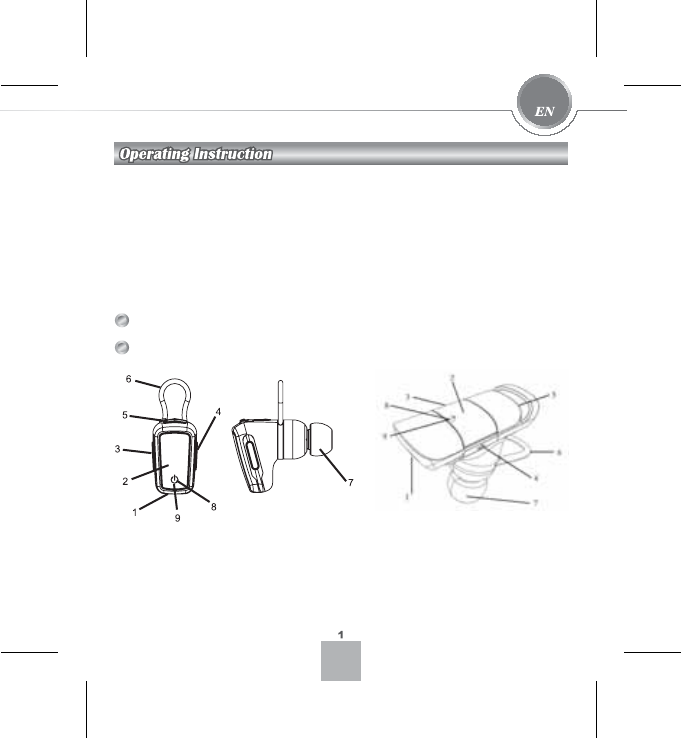
Bluetooth Headset
Description
1. Microphone
2. S1 button
3. S2 button
4. S3 button
5. Charging terminal
6. Ear band
7. Earphones/speakers
8. Blue LED indicator
9. Red LED indicator
BHM-110
BHM-121

Before using the headset for the first time, need to charge the headset with the
supplied power supply unit for at least 2 hours.
3OXJWKHFKDUJHULQWRWKHPDLQVVRFNHWDQGFRQQHFWLWWRWKHVRFNHWRQWKH
headset.
7KHLQWHJUDWHG/('OLJKWVUHGGXULQJWKHFKDUJLQJSURFHVVDQGJRHVRIIZKHQWKH
EDWWHU\LVIXOO\FKDUJHG7KHEOXH/('ZLOOEHRQDWWKHZKLOH
3OHDVHQRWHWKDWLIWKHKHDGVHWKDVQRWEHHQXVHGIRUDQH[WHQGHGSHULRGRIWLPH
RUWKHYROWDJHRIWKHKHDGVHWLVWRRORZWKHUHG/('ZLOOEHRQDIWHUDVHFRQG
GHOD\+RZHYHUWKHEOXH/('ZRXOGEHRQLPPHGLDWHO\
7KHUHG/('IODVKHVWRLQGLFDWH³ORZEDWWHU\´&KDUJHWKHEDWWHU\DQGRUWKH
headset as described.
Charging the headset
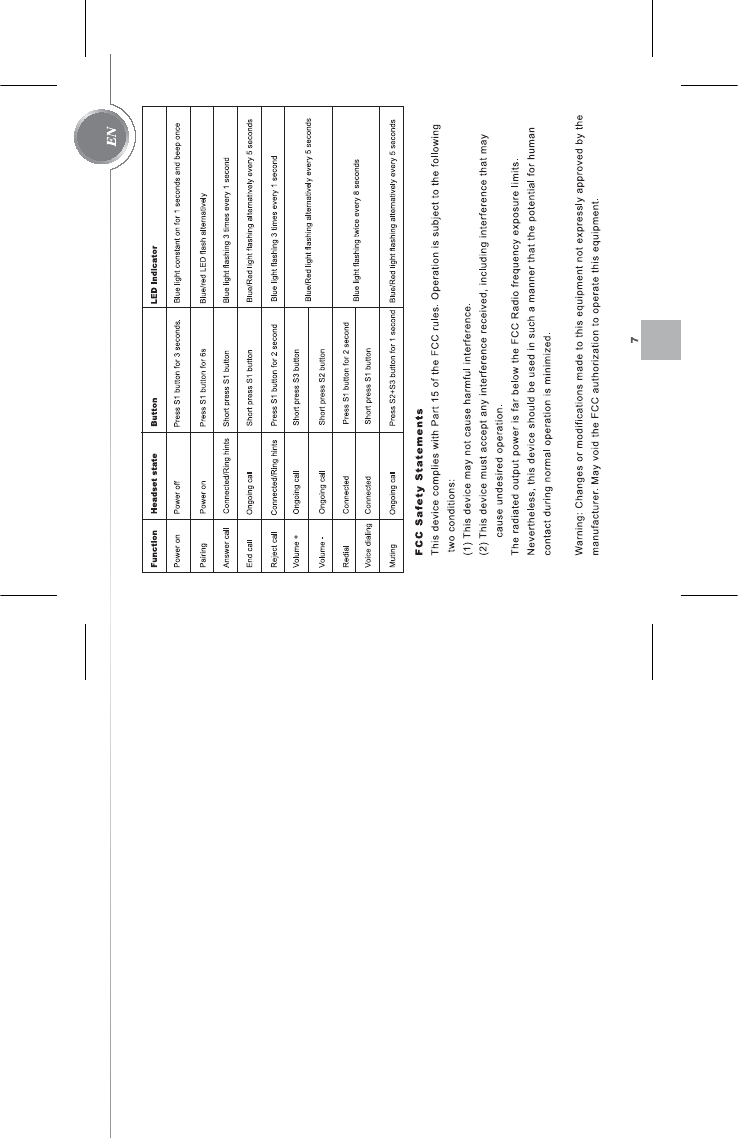
Functions of the S1, S2, and S3 buttons:
S1:
2QRIIVZLWFK
$FFHSWLQJFDOOV
3DLULQJ
(QGLQJFDOOV
9RLFHGLDOLQJ
5HGLDO
5HMHFWLQJFDOOV
S2:
9ROXPHGRZQ
S3:
9ROXPHXS
S2+S3:
0XWLQJ

Switching the headset on/off
Adjusting the headset to your mobile phone (pairing)
You must introduce both components to enable the headset to communicate with
your telephone. This process is known as pairing or coupling and is the basis for
using the Bluetooth headset.
Pairing only has to be carried out once before the headset is commissioned for the
first time. Ensure that the headset is fully charged and the power supply is not
plugged into the headset. Prepare your telephone for the pairing process.
Follow the instructions in the operating manual of your mobile phone to switch your
telephone to Bluetooth mode and initiate and perform the coupling procedure.
(QVXUHWKDWWKHKHDGVHWLVVZLWFKHGRII
3UHVVWKH6EXWWRQRQWKHKHDGVHWIRUVHFRQGVXQWLOWKH/('VWDUWVIODVKLQJ
red and blue alternately. The headset is now in pairing mode. Please note: The
headset maintains pairing mode for 5 minute. After this time, it must be started
again as described.
6WDUWSDLULQJZLWK\RXUPRELOHSKRQHDVGHVFULEHGLQWKHLQVWUXFWLRQPDQXDOIRU
your phone. Follow the instructions on your phone‘s display.
<RXUWHOHSKRQHVHDUFKHVIRUFRUUHVSRQGLQJGHYLFHVLQWKH%OXHWRRWKHQYLURQPHQW
:KHQ\RXUPRELOHSKRQHILQGVWKHKHDGVHW³%+0´RU³%+0´ZLOOEH
shown on the phone‘s display.
6HOHFWWKHKHDGVHWDQGIROORZWKHUHPDLQLQJLQVWUXFWLRQVLQWKHSKRQHRULQWKH
operating instructions of the phone.
3
3UHVVDQGKROGWKH³6´EXWWRQIRUVHFRQGVWRVZLWFKRQWKHKHDGVHW7KHEOXH
/('RQWKHKHDGVHWWKHQIODVKHV
3UHVVWKH³6´EXWWRQIRUVHFRQGVWRGHDFWLYDWHWKHKHDGVHW7KHUHG/('RQ
the headset flashes red briefly, and the headset shuts off.

Use/Call management
Accepting, ending, and rejecting calls
Making calls
4
,I\RXDUHDVNHGIRUWKHSDVVNH\RU3,1FRQILUPWKLVE\HQWHULQJ
3DLULQJLVQRZFRPSOHWH7KHUHG/('JRHVRXW7KHEOXH/('QRZIODVKHV
UHJXODUO\WKXVLQGLFDWLQJWKDWLWLVUHDG\IRURSHUDWLRQVWDQGE\7KHKHDGVHW
LVQRZUHDG\IRURSHUDWLRQDQGFDQEHXVHG
3OHDVHQRWHWKDWQRWDOOPRELOHSKRQHVVXSSRUWDOOWKHFDOOPDQDJHPHQW
IXQFWLRQV7KLVGHSHQGVRQZKHWKHUWKHPRELOHSKRQHVXSSRUWVWKHKDQGVIUHH
SURILOH³KHDGVHW´DQGRU³KDQGVIUHH´)RUPRUHLQIRUPDWLRQSOHDVHUHIHUWRWKH
RSHUDWLQJLQVWUXFWLRQVRI\RXUPRELOHSKRQH
<RXFDQDQVZHULQFRPLQJFDOOVXVLQJWKHKHDGVHW$QLQFRPLQJFDOOLV
LQGLFDWHGE\WKHEOXH/('IODVKLQJTXLFNO\DVZHOODVE\DQDXGLEOHVLJQDOLQ
WKHKHDGVHW
3UHVVWKH6EXWWRQWRDFFHSWWKHFDOO
3UHVVWKH6EXWWRQDJDLQWRHQGWKHFDOO
7RUHMHFWLQFRPLQJFDOOVSUHVVWKH6EXWWRQIRUVHFRQGV
(QVXUHWKDW\RXUKHDGVHWLVFRQQHFWHGWRWKHWHOHSKRQH
&DOOVDUHPDGHDVXVXDOZLWKWKHH[FHSWLRQWKDWWKHKHDGVHWLVXVHGWRPDNH
WKHFDOO

Making calls using voice dialing
Waiting calls
Switching off the sound of the microphone
Press the S1 button to accept a waiting call during another call.
During a call, the microphone on the headset can be set to mute. This can be
used, for example, to hold confidential conversations with another person or make
inquiries that the person on the phone cannot hear. To do so, press the S2 and S3
buttons simultaneously – the microphone will be deactivated. To switch the sound
of the microphone back on, press the S2 and S3 buttons at the same time again -
the microphone will be re-activated.
To make calls using voice dialing, the corresponding voice profiles must be set
up/stored in your phone. Your telephone must also support this function in
Bluetooth mode (hands-free profile only). For more information, please refer to the
operating instructions of your mobile phone.
Voice dialing using the headset operates in the same manner as if you were
making a call using the phone. The only difference is that voice dialing is activated
using the headset, not the phone.
3UHVVWKH6EXWWRQ
$VKRUWWRQHLQGLFDWHVWKDWYRLFHGLDOLQJKDVEHHQDFWLYDWHG
6D\WKHFRUUHFWQDPHRUWKHYRLFHSURILOHRIWKHSHUVRQ\RXZLVKWRFDOO
7KHFDOOZLOOEHPDGH
3UHVV6DJDLQWRFDQFHOYRLFHGLDOLQJ
5

Please note :
Volume control
Precautionary measures and caring for your Bluetooth headset
6
With some mobile phones, the connection between the telephone and the
headset is automatically disconnected after a certain period, or the devices
must be connected manually after both devices (headset and mobile phone)
are switched on. If this is the case, no call signal is heard via the headset for
incoming calls. To establish the connection for incoming calls, press the S1
button.
6ZLWFKRIIWKHKHDGVHWEHIRUHVWRULQJLWLQ\RXUSRFNHWRUHOVHZKHUHWRSUHYHQW
accepting calls unintentionally.
.HHSWKHKHDGVHWDZD\IURPOLTXLGVPRLVWXUHDQGGLUW
'RQRWXVHDJJUHVVLYHFOHDQLQJDJHQWVWRFOHDQWKHKHDGVHW
'RQRWH[SRVHWKHKHDGVHWWRH[FHVVLYHO\KLJKRUORZWHPSHUDWXUHV
,I\RXDUHQRWJRLQJWRXVHWKHKHDGVHWIRUDQH[WHQGHGSHULRGVWRUHLWLQDGU\
SODFHDQGSURWHFWLWDJDLQVWH[FHVVLYHWHPSHUDWXUHV
1RWHWKDWWKHLQWHJUDWHGEDWWHU\FDQQRWEHFKDQJHG'RQRWWU\WRRSHQWKH
housing of the headset.
8VHRQO\WKHHQFORVHGSRZHUVXSSO\XQLWFKDUJHUWRFKDUJHWKHKHDGVHW
Press the volume buttons (S2, S3) to set the volume of the headset as
UHTXLUHG7KHYROXPHFDQDOVREHFRQWUROOHGYLDWKHWHOHSKRQH