PJNF Technologies 100-HR HAND-HELD REMOTE FOR THE DRYLANAI SHUTTER CONTROL SYSTEM User Manual user manual
PJNF Technologies, Inc. HAND-HELD REMOTE FOR THE DRYLANAI SHUTTER CONTROL SYSTEM user manual
Users Manual
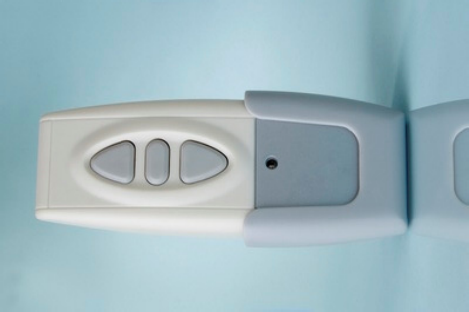
DryLanai
™
HAND HELD REMOTE
STORM SHUTTER CONTROL
OPERATING INSTRUCTIONS
Thank you for purchasing the DryLanai
™
Hand-Held Remote
Storm Shutter Control. Now you can easily raise or lower your
storm shutters from virtually any place in your home.
Please read and save these Instructions. They will:
• Make operation of your automatic storm shutters easier and
more convenient, and
• Help you in the future if you have questions.
How Your Hand-Held Remote Control Works
Utilizing the Radio Frequency (RF) technology that enables the
Rain Sensors on your porch or lanai to signal your Wall Controller
when it rains, your DryLanai
™
Hand-Held Remote can raise and
lower your storm shutters any time from the comfort of your easy
chair or the convenience of your kitchen.
The DryLanai
™
Hand-Held Remote is
• Compact. It’s small, light weight, durable and it fits in
your pocket.
• Easy to operate. It has only three buttons: UP, DOWN and
STOP.
• Omni directional. Unlike TV remotes, it transmits signals
by RF, not infrared, so it doesn’t require a line-of-sight to
the Wall Controller. It even works through walls.
Before your Hand-Held Remote can communicate with the Wall
Controller, the two units must be synchronized. This is done by
performing the following steps:
1. Bring the Hand-Held Remote into close proximity with
the Wall Controller (4 feet or less).
2. Touch ZONE 1 switch and ZONE 2 switches on the
Controller panel simultaneously and continuously until
all the ZONE lights begin to flash.
3. While the lights are flashing, press the STOP button on
the Hand-Held Remote. The signal light on the
Controller will light up momentarily and the flashing
ZONE lights will go out.
4. Test to ensure the process was successful by pressing
the STOP button on the Hand-Held Remote again. The
signal light on the panel will momentarily light up.
Your DryLanai
™
Hand-Held Remote is now ready to use.

To raise your shutters, simply press the UP button momentarily.
To lower your shutters, simply press the DOWN button. You can
stop your shutters at any intermediate position by pressing the
STOP button. You do not have to press the STOP button to stop
your shutters in their full up or full down position; they will stop
automatically. You cannot control each shutter individually with
this Hand-Held Remote.
Each DryLanai
™
Hand-Held Remote contains a CR2032 battery
that should function for many months under ordinary conditions.
If battery replacement is required, follow these steps:
1. Remove the small screw near the bottom of the rear
panel of the Hand-Held Remote enclosure.
2. Remove the rear panel of the enclosure.
3. Remove the old battery and replace it with a fresh
4. CR-2023 battery. Carefully observe battery polarity
(+ side facing you).
5. Replace the rear panel of the enclosure and secure it
with the screw you removed in Step 1.
Trouble Shooting
If your shutters do not respond to commands from your Hand-Held
Remote, check the following:
• Does the LED on the front panel of your Hand-Held Remote
light up when you press any of the buttons? If it doesn’t,
you may need to replace the battery. See battery
replacement instructions above.
• Does the signal light on your Wall Controller light up
when you press any of the buttons on your Hand-Held
Remote? If it doesn’t, you may need to re-synchronize
your remote with the Controller. See synchronization
instructions above.
Liability
PJNF Technologies, Inc. assumes no liability for any damage to
original shutter drive equipment (motors, limit switches, slats, etc.)
resulting from installation and use of this DryLanai
™
product.
Changes or modifications not expressly approved by PJNF
Technologies, Inc. could void the user’s authority to operate the
equipment.
FCC Statements:
This device complies with Part 15 of the FCC Rules. Operation is
subject to the following two conditions: (1) this device may not
cause harmful interference, and (2) this device must accept any
interference received, including interference that may cause
undesired operation.
Operation is subject to the following two conditions:
1. This device may not cause interference, and
2. This device must accept any interference, including
interference that may cause undesired operation of the
device.
This device may only be used with the approved antennas that are
shipped with the unit and installed by the manufacturer. The use
of any other antennas will invalidate the unit’s FCC Part 15
certification.
To reduce potential radio interference to other users, the antenna
type and its gain should be so chosen that the equivalent
isotropically radiated power (e.i.r.p.) is not more than that
permitted for successful communication. Operating the device
with the supplied, internal antenna will ensure that this requirement
is met.
Changes or modifications not expressly approved by the
responsible party could void the user’s authority to operate the
equipment.
Manufactured by:
PJNF Technologies, Inc.
www.DryLanai.com Rev 08/09
US Patent No. 7,342,375