PNI IFS-11414 Radar Detector User Manual PNIC ST2 T2 Manual EN indd
PNI Corporation Radar Detector PNIC ST2 T2 Manual EN indd
PNI >
Users Manual
OPERATION MANUAL
TRAVELLER II/TRAVELLER II+
TALKINGCORDLESSRADAR/LASERDETECTOR

Congratulations!............................................................... 1
Features............................................................................ 1
Package contents............................................................... 2
Identifying parts of the unit ............................................ 3
Pre-operating information .............................................. 5
Battery installation .......................................................... 5
Battery life........................................................................ 6
Low battery life indication.............................................. 6
Auto power-off ................................................................ 7
Installing the unit ............................................................. 8
Mounting guidelines....................................................... 8
Windshield mounting..................................................... 8
Radar operation.............................................................. 10
Power on ........................................................................ 10
Functions and modes.................................................... 10
Invisible to radar detector detectors............................. 14
Band identication........................................................ 14
Care and maintenance.................................................... 15
Fuse replacement........................................................... 15
Troubleshooting ............................................................. 16
Specications .................................................................. 18
Service and replacement ................................................ 19
Warranty information.................................................... 21
CONTENTS

1
You have acquired the SENSORO TRAVELLER II/
TRAVELLER II+ from PNI Corporation, the rst cordless
radar/laser detector speaking in English and Spanish. The
SENSORO TRAVELLER II/TRAVELLER II+ incorporates
the advanced new antenna technology and extremely low
power-consuming circuitry to ensure top-class performance
and satisfactory battery power management.
Features
• PROTECTION against all radar bands (X, K, and superwide Ka)
• 360° LASER COVERAGE against all laser guns
• INVISIBLE to all radar detector sensing devices (VG-2 and
Spectre)
• THREE SEPARATE CITY MODES (C, C2, and C3) in addition to
highway mode to virtually eliminate false radar alerts
• ADDITIONAL CITY MODE (C4) to delete X-band reports and
eliminate most false radar alerts
• USER SELECTABLE brightness and mute on/off
• USER SELECTABLE voice alert language and voice on/off
• SEPARATE POWER on/off button and volume control wheel
• LED-BACKLIT text display
• TUTORIAL MODE to demonstrate operations
• MEMORY to retain previously set operational modes after
power-off
CONGRATULATIONS!

2
• CORDLESS POWER connection (two AA batteries included)
• CORDED POWER connection into 12-volt car lighter socket
(power cord included)
• BILINGUAL voice alerts in English and Spanish
Your SENSORO TRAVELLER II/TRAVELLER II+ package
includes the following components:
• The SENSORO TRAVELLER II/TRAVELLER II+ talking
cordless radar/laser detector
• Two AA batteries
• Coiled 12-volt DC power cord
• Windshield mounting bracket with suction cups (two each)
and bumper
• Operation manual
SENSORO TRAVELLER II+ package includes the following
component:
• Dual socket 12-volt DC adapter for additional installations
to your vehicle’s fuse panel
PACKAGE CONTENTS
3
Top
Back
Front
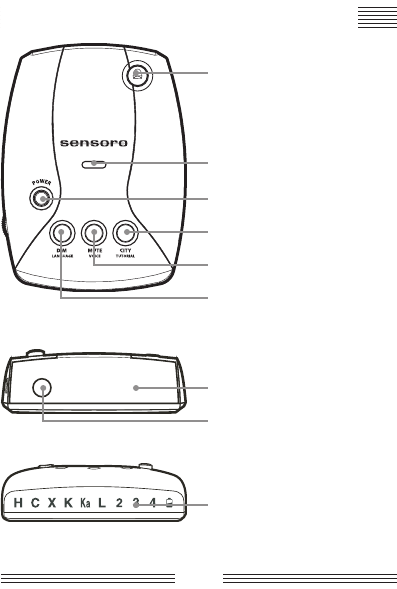
IDENTIFYING PARTS OF THE UNIT
Top Laser Receiver
Mounting Guide
POWER Button
CITY/TUTORIAL Button
MUTE/VOICE Button
DIM/LANGUAGE Button
Radar Receiver
Front Laser Receiver
LED Display
4
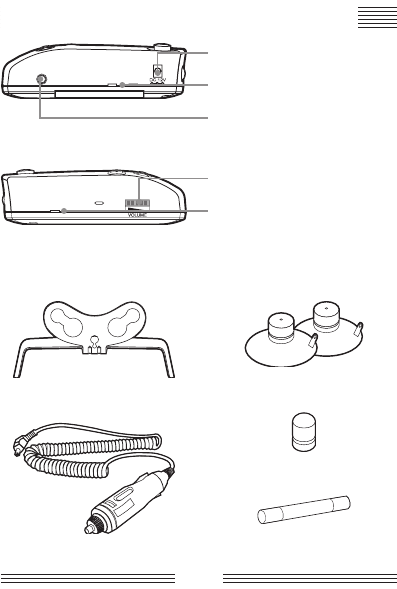
Right Side
Left Side
Suction cups
Bumper
Fuse
Mounting bracket
Power cord
IDENTIFYING PARTS OF THE UNIT
Power Cord Input Jack
Mounting Slots
Auxiliary Audio Jack
Volume Control Thumb Wheel
Mounting Slots
5
PRE-OPERATING INFORMATION
You can use the SENSORO TRAVELLER II/TRAVELLER II+
with your hands-free ear piece or amplied speakers by
connecting your ear piece or speakers to the auxiliary audio
jack of the unit. You must have an ear piece or speakers with
a 2.5mm (1/10˝) plug. If you have an ear piece or speakers
with different sized plug, use a 2.5mm adapter between the
plug and the jack. Please note that we do not provide ear
pieces, speakers, or 2.5mm adapters.
The SENSORO TRAVELLER II/TRAVELLER II+ is designed
to operate on two AA alkaline or lithium batteries. To ensure
maximum performance, we advise that you should not use
other battery types. You may use AA alkaline rechargeable
batteries. However, the resulting battery life will vary.
Do not leave the SENSORO TRAVELLER II/TRAVELLER II+
exposed to extreme heat like strong sunlight. It can damage
the unit and battery.
Battery installation
1. Remove the battery compartment door at the bottom of
the unit when the unit is powered off.
2. Remove any old batteries (both batteries must be replaced
at the same time.).
3. Press down two fresh AA alkaline or lithium batteries into
place, observing the polarity indication inside the battery
compartment.
4. Replace the battery compartment door.
5. Turn the unit on to verify correct battery installation.
6
Battery life
The SENSORO TRAVELLER II/TRAVELLER II+ can provide
approximately 50 hours of battery life from two AA alkaline
batteries. Battery life is affected by many variables like the
conditions and brand of battery, the ambient temperature,
the number and strength of engaged signals, the duration of
reported alerts, the user interface mode you select, etc. The
approximate battery life we quote is based on our aging tests
in a shielded laboratory. Your specic conditions and the way
you use the SENSORO TRAVELLER II/TRAVELLER II+ will
result in different battery life.
The SENSORO TRAVELLER II/TRAVELLER II+ provides
voice announcements when function buttons are used, so
that you can know which function was actually activated.
However, for the purpose of extended battery life, the
SENSORO TRAVELLER II/ TRAVELLER II+ was designed
to give voice announcements only for the secondary
functions (language, voice, and tutorial) of each button
which will be less frequently used than the primary
functions (city, dim, and mute).
Low battery life indication
The SENSORO TRAVELLER II/TRAVELLER II+ has a
separate low battery indication LED. It intermittently blinks
with warning alarms from the moment when there is about
two to four hours of remaining battery life.
PRE-OPERATING INFORMATION
7
PRE-OPERATING INFORMATION
Always keep the power cord (included in the package)
at the glove compartment of your vehicle and connect
power to the SENSORO TRAVELLER II/TRAVELLER II+
from your vehicle until you replace old batteries. This
way you can drive with the SENSORO TRAVELLER II/
TRAVELLER II+ always on.
Auto power-off
In the event that you forget to turn off the SENSORO
TRAVELLER II/TRAVELLER II+ when you leave your vehicle,
the SENSORO TRAVELLER II/TRAVELLER II+ has an
automatic power-off feature to conserve battery life. The
SENSORO TRAVELLER II/TRAVELLER II+ will automatically
shut off when no signals are detected for approximately 45
minutes. An obtrusive audio and visual warning will conrm
that the auto power-off is about to happen. You can cancel
auto power-off by pressing any button while the audio and
visual warning is being displayed.
Turn off the SENSORO TRAVELLER II/TRAVELLER II+
whenever you leave your vehicle. Even a weak signal can
cause the SENSORO TRAVELLER II/TRAVELLER II+ to
remain on and drain your batteries.
8
Mounting guidelines
The SENSORO TRAVELLER II/TRAVELLER II+ can be
mounted on your windshield using the mounting bracket
included in the package.
• Mount on the windshield in a centered location that will
not obstruct the view of the driver and is within reach, so
the buttons can be easily accessed.
• Do not mount behind windshield wipers, metal surfaces,
ornaments, or mirrored sunscreen glass, as these affect
radar/laser signals. Tinted glass does not affect radar/laser
signal reception.
Conceal the SENSORO TRAVELLER II/TRAVELLER II+
when you leave your vehicle to prevent theft and to
minimize the unit’s exposure to extreme temperatures,
which can temporarily impair performance.
INSTALLING THE UNIT
9
Windshield mounting
1. Install the suction cups and bumper onto the windshield
mounting bracket by sliding them into their holes (if not
pre-installed).
2. Press the bracket base rmly against the windshield until
the suction cups securely take hold.
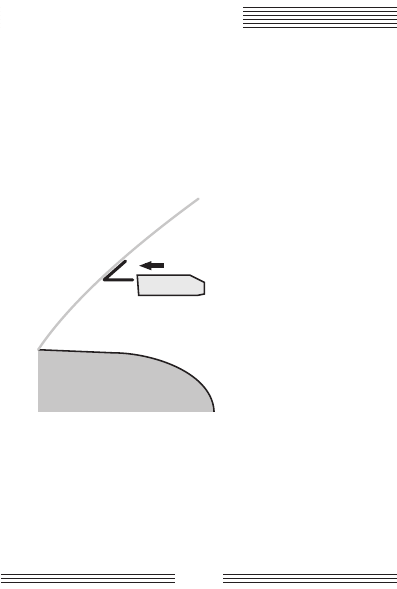
3. Slide the unit up to the bracket until the bracket arms
click into the slots on both sides of the unit.
Dashboard
Windshield
4. Bend the angle of the windshield mounting bracket, if
necessary, to adjust for best viewing and detection angle.
5. When you want to connect power from your vehicle, plug
the small connector of the power cord into the 12-volt DC
power input jack located on the side of the detector.
6. Plug the large adapter of the power cord into the lighter
socket of your vehicle.
INSTALLING THE UNIT
10
Power on
Press the POWER button. The SENSORO TRAVELLER II/
TRAVELLER II+ goes through a self diagnosis sequence and
displays the last mode previously set in memory.
Functions and modes
Volume control
Use the volume thumb wheel, located on the side of the SENSORO
TRAVELLER II/TRAVELLER II+, to adjust volume level.
Display brightness control (dim mode)
Press the DIM button repeatedly for less than two seconds
each time to toggle between the four levels of brightness
modes: bright, dim, dimmer, and dark.
Dim mode reduces the brightness of the display. When a
signal is detected, alerts are displayed in full brightness,
regardless of dim mode. Then the display returns to the
previously selected dimmer setting.
Mute on/off selection (mute mode)
Press the MUTE button repeatedly for less than two seconds
each time to toggle between mute on and mute off.
Only audio alerts are not reported in mute mode. Visual
and voice alerts are still provided in mute mode.
Mute on will silence the audio alarm for the remainder of
an existing signal and for any new alert received within
30 seconds of the last signal. Then the unit automatically
resets itself to mute off, so the next signal threat can be
received. Mute off manually restores the audio alert.
RADAR OPERATION
11
Highway/city mode selection
Press the CITY button repeatedly for less than two seconds
each time to toggle through ve signal sensitivity modes.
They are highway, city 1, city 2, city 3, and city 4. Each mode
is indicated by blinking “H” or “C” LED, with or without a
numbered LED. For city 2, 3, and 4 modes, the SENSORO
TRAVELLER II/TRAVELLER II+ takes turns blinking “C”
LED and a numbered LED one after the other. See following
illustrations:
Highway mode H C X K Ka L 2 3 4 M
City 1 mode H C X K Ka L 2 3 4 M
City 2 mode H C X K Ka L 2 3 4 M
City 3 mode H C X K Ka L 2 3 4 M
City 4 mode H C X K Ka L 2 3 4 M
X-band, occupied by police radar, is also shared for other
uses, such as automatic door openers like the ones used
at supermarkets, burglar alarms, terrestrial microwave
emission, RF braking systems, and other devices. In
addition, other radar detectors in close proximity may
falsely alert your detector. To reduce false alerts, the
SENSORO TRAVELLER II/TRAVELLER II+ has four
city ltering settings. Each move (from highway to city 1,
city 1 to city 2, city 2 to city 3) will give you the rejection
of X-band alarms by approximately 20%.
RADAR OPERATION

12
City 4 will have the SENSORO TRAVELLER II/
TRAVELLER II+ not report X-band radar signals at all.
For best protection from all radar bands, always drive in
highway mode. However, for maximizing your battery life
with best protection from K- and Ka-band, drive in city 4
mode.
Language selection (English and Spanish modes)
Press the LANGUAGE button repeatedly for more than two
seconds to toggle between English and Spanish mode. You
can always choose either English or Spanish mode for your
voice alert system.
Voice on/off selection (voice mode)
Press the VOICE button repeatedly for more than two
seconds to toggle between voice on and voice off. When
you drive with voice off, you will not be alerted by voice
messages, but you can extend your battery life as much as the
expected power saving for rejected voice reports.
Tutorial mode
The SENSORO TRAVELLER II/TRAVELLER II+ has a
tutorial mode intended to familiarize you with the various
visual displays and distinct audible alerts the unit performs.
Perform the following steps to begin the tutorial mode:
1. Press and hold the TUTORIAL button for more than two
seconds and the SENSORO TRAVELLER II/TRAVELLER II+
enters the tutorial mode after it beeps and displays in the
following order:
RADAR OPERATION

13
X-band detected operation:
H C X K Ka L 2 3 4 M
H C X K Ka L 2 3 4 M
H C X K Ka L 2 3 4 M
H C X K Ka L 2 3 4 M
K-band detected operation:
H C X K Ka L 2 3 4 M
H C X K Ka L 2 3 4 M
H C X K Ka L 2 3 4 M
H C X K Ka L 2 3 4 M
Ka-band detected operation:
H C X K Ka L 2 3 4 M
H C X K Ka L 2 3 4 M
H C X K Ka L 2 3 4 M
H C X K Ka L 2 3 4 M
Laser band detected operation:
H C X K Ka L 2 3 4 M
All LEDs on:
H C X K Ka L 2 3 4
The numbered LEDs are called signal strength meters
when they are used to indicate how strong a signal being
detected is. As a signal strength meter they are always
displayed together with a radar band LED (X, K, or Ka).
The higher the number, the stronger the radar signal.
When the numbered LEDs blink before and after “C” LED
does, they indicate the level of the city mode you’ve set.
RADAR OPERATION
14
2. Press any button to exit the all-LEDs-on status, that is the
end of tutorial mode.
Your SENSORO TRAVELLER II/TRAVELLER II+ uses
the same audio alarms and visual displays as for the
tutorial mode when it detects signals and reports alerts.
Invisible to radar detector detectors
VG-2 and Spectre, both called the radar detector detectors,
are interceptors used by law enforcement ofcers to identify
vehicles equipped with radar detectors in instances and
locations where they are not legal (such as in vehicles over
10,000 pounds or in Virginia and Washington D.C.). The
VG-2 and Spectre interceptors work by detecting emissions
generated by radar detectors within a certain frequency range.
The SENSORO TRAVELLER II/TRAVELLER II+ operates
on a frequency outside of this range. So it’s invisible to as
well as undetectable by all types of existing radar detector
sensing devices.
Band identication
The SENSORO TRAVELLER II/TRAVELLER II+ noties
you of the type of signal it receives (X, K, Ka, and Laser)
by using different audio, visual, and voice alerts for each
band. When an instant-on monitoring signal is detected, the
instant-on audio alert is activated rst and the display shows
X-, K-, or Ka-band alerts.
An “instant-on” alert signal is not another radar band,
but is a means by which an ofcer triggers the radar gun
on and off in usually less than two seconds.
RADAR OPERATION

15
Here are some tips to help you care for your SENSORO
TRAVELLER II/TRAVELLER II+:
• To deter theft, remove your SENSORO TRAVELLER II/
TRAVELLER II+ from your windshield when you leave
your vehicle.
• Avoid extended exposure to direct sunlight. Remove your
SENSORO TRAVELLER II/TRAVELLER II+ from your
windshield when your vehicle is parked for an extended
period of time. On hot days the temperature inside your
vehicle can reach levels that could damage your SENSORO
TRAVELLER II/TRAVELLER II+.
• Do not expose the SENSORO TRAVELLER II/
TRAVELLER II+ to rain, moisture, spray cleaners, or
liquids that could damage the internal circuitry of the
detector.
Fuse replacement
The lighter socket adapter of the power cord has a replaceable
2-Amp SAG fuse located below the silver tip. To check or
replace the fuse, slowly and carefully unscrew the tip of the
plug, making sure the spring and silver tip located inside the
plug do not y out when you remove the cap. Check fuse and
replace if necessary.
Your SENSORO TRAVELLER II/TRAVELLER II+ is designed
for reliable service. However, if you encounter a problem,
refer to the Troubleshooting section that follows before
making a service call.
CARE AND MAINTENANCE

16
The SENSORO TRAVELLER II/TRAVELLER II+ does not
power up when powered from batteries.
• Check and replace batteries.
The SENSORO TRAVELLER II/TRAVELLER II+ does not
power up when powered from the vehicle.
• Check all power cord connections.
• Check fuse in lighter socket adapter and replace if
necessary.
• Check lighter socket. Clean if dirty.
• Check your vehicle’s fuse panel. (Refer to your vehicle’s
manual.)
The SENSORO TRAVELLER II/TRAVELLER II+ did not
alert when passing an ofcer.
• Not all police cars have radar/laser detectors, or it may not
be in use at that time.
The SENSORO TRAVELLER II/TRAVELLER II+ shows
erratic or frequent alerts.
• Use one of the city modes.
TROUBLESHOOTING

17
TROUBLESHOOTING
The SENSORO TRAVELLER II/TRAVELLER II+ shows
partial or no display.
• Disengage dim mode and set the unit to bright display.
The SENSORO TRAVELLER II/TRAVELLER II+ alerts
weak.
• Set the unit to highway mode.
• Make sure the unit is level to the road.
• Make sure the radar window and the top laser receiver
are not obstructed. Move the SENSORO TRAVELLER II/
TRAVELLER II+ if necessary.

18
Radar
Receiver type: Dual conversion superheterodyne
Antenna type: Linear polarized, self-contained
Detector type: Scanning frequency discriminator
Frequency operation: X-band; 10.525 GHz ±50 MHz
K-band; 24.150 GHz ±100 MHz
Ka-band (superwide); 34.700 GHz ±1,300 MHz
Safety radar; 24.100 GHz
Laser
Receiver type: Pulsed laser signal receiver
Detector type: Digital signal processor pulse width
discriminator
Optical sensor: Dual convex condenser lens and high speed
photo diode detector
General
Temperature range: -4°F to 140°F (-20°C to 60°C)
Power requirements: 12V to 16V DC, 120 mA, negative ground
Dimensions: 1.30˝ H x 3.31˝ W x 4.50˝ L
Weight: 5.50 ounces with two AA alkaline batteries
Specications are typical, individual units may vary.
Specications are subject to change without notice.
Performance may vary with driving behaviors and driving
environments.
SPECIFICATIONS

19
For fastest service, contact or return your SENSORO
TRAVELLER II/TRAVELLER II+ to the place of purchase. If
you wish to return the unit for replacement or repair to PNI
Corporation, please follow the following procedures:
1. Products returned to PNI must be pre-authorized by PNI
with an RMA (return material authorization) number
marked on the outside of the package. Obtain an RMA
number by contacting PNI Corporation:
• By phone: 1 (888) 422-6672 (toll-free in the U.S. only)
or at (707) 566-2260
• By fax: (707) 566-2261
• By e-mail: sales@pnicorp.com
2. Provide a proof of purchase, such as a mechanical
reproduction or carbon copy of a sales receipt. If you
send your original receipt, it cannot be returned. Proof
of purchase must show printed date of purchase, model
number, and place of purchase. Once you have acquired an
RMA number, pack the unit securely to prevent damage
in transit. If possible, use the original packing material
and box. Be sure to send the entire product.
3. Ship prepaid and insured by way of a traceable carrier such
as United Parcel Service (UPS), Roadway Parcel Service
(RPS), or First Class Mail to avoid loss in transit.
SERVICE AND REPLACEMENT

20
4. With the issued RMA number written on the outside of
your package, send your proof of purchase and description
of the problem to the following address:
PNI Corporation
5464 Skylane Boulevard, Suite A
Santa Rosa, CA 95403-1084
5. Type or print your name and address where the
replacement should be delivered. After receipt of your
documents and unit, a replacement unit will be sent to
you. Please allow two to three weeks from receipt of your
returned product to delivery of your replacement.
S E R V ICE A ND R E P L A CE ME NT
Traveller Series
QJ3-IFS-11414
This device complies with part 15 of the FCC Rules. Operation is subject to the
following two conditions: (1) This device may not cause harmful interference,
and (2) this device must accept any interference received, including interference
that may cause undesired operation.
In addition, any changes or modifica ions to this product, which are not
expressly approved by PNI Corporation in writing, could void the user’s
authority to operate this product.

21
LIMITED WARRANTIES; LIMITATION OF LIABILITY
For Sensoro radar detectors,
models Traveller II and Traveller II+
TRAVELLER II: PNI Corporation (“PNI”) manufactures its products from
parts and components that are new or equivalent to new in performance
and warrants to the original user that this product will be free of defects in
workmanship and materials for one (1) year from the date of purchase.
TRAVELLER II+: PNI Corporation (“PNI”) manufactures its products
from parts and components that are new or equivalent to new in
performance and warrants to the original user that this product will be
free of defects in workmanship and materials for three (3) years from the
date of purchase.
This warranty does not cover wear and tear due to normal use, or damage
to the product as the result of improper usage, neglect of care, alteration,
accident or unauthorized repair.
If the product is found by PNI to be defective, PNI’s entire liability and
your exclusive remedy for breach of warranty shall be that PNI will repair
or replace the product and return the product or its replacement to you
at no charge, provided that you ship the product to PNI at your expense
with a description of the defect and subject to the other conditions of this
warranty. Should the product prove to be irreparable, PNI may substitute
an equivalent product of the same or similar style and of a value not in
excess of the original purchase price of your instrument.
PNI warrants the repaired or replacement product to be free from defects
in material and workmanship on the same terms as the product originally
purchased.
This warranty will be void if the products, serial number or other
identication marks have been defaced, damaged or removed. This
warranty does not cover wear and tear due to normal use, or damage to
the product as the result of improper usage, neglect of care, alteration,
accident or unauthorized repair, nor does this warranty apply to the
battery necessary to operate the product.
WARRANTY INFORMATION

22
WARRANTY INFORMATION
This warranty is extended to the original retail purchaser only and may
not be transferred or assigned to subsequent owners. In order to validate
your warranty, you must provide proof of purchase acceptable to PNI
together with the product shipped for warranty repair/replacement.
Products returned to PNI must be pre-authorized by PNI with an RMA
(return material authorization) number marked on the outside of the
package. Please refer to the Service and Replacement section for PNI
Corporation contact information.
THE FOREGOING WARRANTY IS GIVEN IN LIEU OF AND PNI
DISCLAIMS ALL OTHER WARRANTIES OR REPRESENTATIONS,
EXPRESSED OR IMPLIED, IN FACT OR IN LAW, WITH RESPECT
TO THIS PRODUCT, INCLUDING, BUT NOT LIMITED TO, (1) THE
IMPLIED WARRANTIES OF MERCHANTABILITY AND OF FITNESS
FOR A PARTICULAR PURPOSE, OR (2) THAT USE OF THE PRODUCT
WILL BE UNINTERRUPTED AND ERROR FREE.
PNI shall have no liability for any indirect or speculative damages
(including, but not limited to, consequential, incidental and special
damages) relating to the use of or inability to use this product, whether
arising out of contract, negligence, tort, or under any warranty theory,
or for infringement of any other party’s intellectual property rights,
irrespective of whether PNI had advance notice of the possibility of any
such damages, including, but not limited to, loss of use, revenue or prot.
In no event shall PNI’s total liability for all claims regarding the product
exceed the price paid for the product. PNI neither assumes nor authorizes
anyone to assume for it any other liabilities.
Some states do not allow the exclusion or limitation of incidental or
consequential damages, so the above limitations or exclusions may not
apply to you.ntial damages, so the above limitations or exclusions may not
apply to you.

23
NOTES

24
NOTES


PNI Corporation www.pnicorp.comPNI Corporation www.pnicorp.com
11467 R01 1000336 R01