PNI IFS-11875 Radar Detector User Manual SB RX7600 Manual

PNI Corporation Radar Detector SB RX7600 Manual

Contents

Users Manual RX7600

CONTENTSCONTENTSWELCOME  Features  .......................................................................................................................................................................   2  Package Contents  .......................................................................................................................................................   3  Controls  .......................................................................................................................................................................   5ABOUT RADAR / LASER DETECTION  ...............................................................................................................................  6INSTALLATION  ....................................................................................................................................................................  8  Windshield Installation - battery operation  ............................................................................................................   8  Windshield Installation - power cord operation  ....................................................................................................   9  Dashboard Installation  ..............................................................................................................................................  10   Visor Installation  .........................................................................................................................................................  11QUICK GUIDE  ..................................................................................................................................................................... 12OPERATION DETAILS  ......................................................................................................................................................... 16  BATTERY INFORMATION  ............................................................................................................................................ 16    Battery Installation  ................................................................................................................................................ 16    Battery Life  ............................................................................................................................................................. 17    Low Battery lndicator  ............................................................................................................................................ 17    Auto Power-Off  ...................................................................................................................................................... 17   TURNING ON THE RADAR DETECTOR  .....................................................................................................................  18  SETTING UP THE COMPASS  ......................................................................................................................................  18  USING THE BACKLIGHT  .............................................................................................................................................  20   USING THE MUTE FEATURE  ......................................................................................................................................  21   UNDERSTANDING SIGNAL ALERTS  .........................................................................................................................  21  USING THE ALERT FILTER BUTTON  .........................................................................................................................  22   INIVISIBILITY TO VG-2 DEVICES  ...............................................................................................................................  22  TUTORIAL MODE  .......................................................................................................................................................  23TROUBLESHOOTING  .........................................................................................................................................................  25SERVICE AND REPLACEMENT  ..........................................................................................................................................  26WARRANTY INFORMATION  .............................................................................................................................................  28
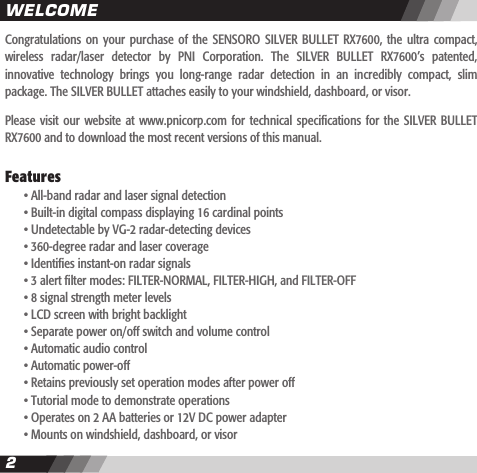
2CONTENTS3Congratulations  on your  purchase  of  the  SENSORO  SILVER  BULLET  RX7600,  the  ultra  compact, wireless  radar/laser  detector  by  PNI  Corporation.  The  SILVER  BULLET  RX7600’s  patented, innovative  technology  brings  you  long-range  radar  detection  in  an  incredibly  compact,  slim package. The SILVER BULLET attaches easily to your windshield, dashboard, or visor.Please visit  our website  at www.pnicorp.com  for  technical specications  for the  SILVER BULLET RX7600 and to download the most recent versions of this manual.Features  • All-band radar and laser signal detection  • Built-in digital compass displaying 16 cardinal points  • Undetectable by VG-2 radar-detecting devices   • 360-degree radar and laser coverage  • Identies instant-on radar signals  • 3 alert lter modes: FILTER-NORMAL, FILTER-HIGH, and FILTER-OFF  • 8 signal strength meter levels  • LCD screen with bright backlight  • Separate power on/off switch and volume control  • Automatic audio control  • Automatic power-off  • Retains previously set operation modes after power off  • Tutorial mode to demonstrate operations  • Operates on 2 AA batteries or 12V DC power adapter  • Mounts on windshield, dashboard, or visor WELCOME
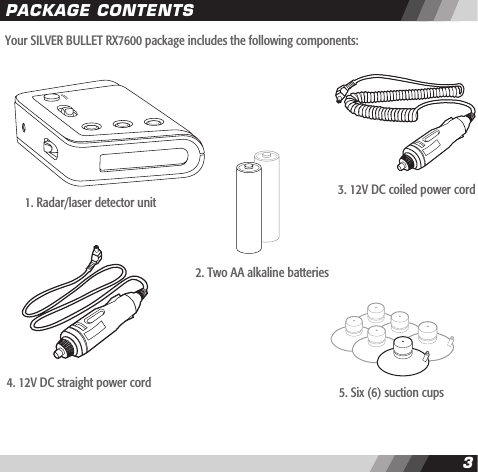
2CONTENTS3Your SILVER BULLET RX7600 package includes the following components:PACKAGE CONTENTS1. Radar/laser detector unit2. Two AA alkaline batteries3. 12V DC coiled power cord4. 12V DC straight power cord 5. Six (6) suction cups
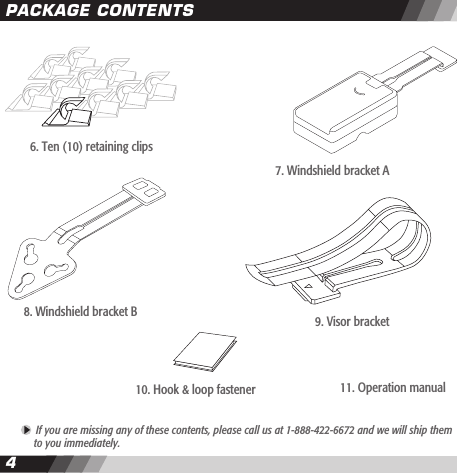
45PACKAGE CONTENTS If you are missing any of these contents, please call us at 1-888-422-6672 and we will ship them   to you immediately.8. Windshield bracket B 9. Visor bracket 10. Hook & loop fastener6. Ten (10) retaining clips11. Operation manual7. Windshield bracket A
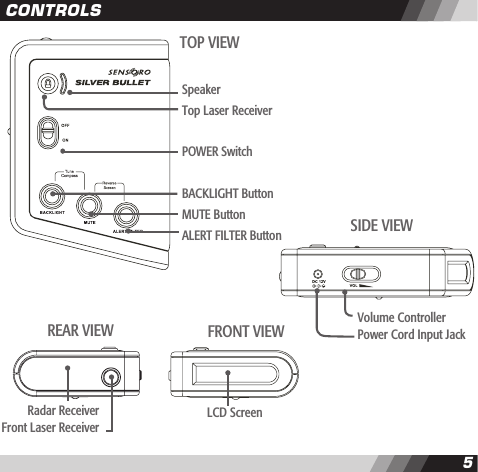
45CONTROLSSpeakerTop Laser ReceiverPOWER SwitchBACKLIGHT ButtonMUTE ButtonALERT FILTER ButtonTOP VIEWLCD ScreenFRONT VIEWVolume ControllerPower Cord Input JackSIDE VIEWRadar ReceiverFront Laser ReceiverREAR VIEW
67Radar DevicesUntil the mid-1970’s, X band (10.50~10.55 GHz) was the only frequency used by most police radar devices. Early  radar detectors needed  only to listen  for X  band  radar. But  in 1976 police  radar devices using K band (24.05~24.25 GHz) were introduced, leading to the development of the rst dual band detectors able to receive both frequencies (X and K).Then, in 1987, a proliferation of police radar devices using KA band frequencies began with the introduction of photo radar (34.3 GHz), followed by the Stalker (34.2~35.2 GHz) in 1991 and the BEE 36A (33.4~34.4 GHz) in 1992. The introduction of KA band photo radar (34.3 GHz) led to the development of tri-band detectors able to detect X, K, and a small portion of KA band. A fourth category of “wide-band” radar detectors capable of detecting X, K, and wide KA (34.2~35.2 GHz) bands reached the market following the introduction of Stalker radar. Finally, in response to the BEE 36A, a new generation of “superwide-band” radar detectors was developed. They detect all police radar devices operating on X, K, and superwide KA (33.4~36.0 GHz) bands. All SENSORO radar/laser detectors are superwide band receivers.When  radar detectors  proved  easily  capable of  detecting  radar  from miles  away,  radar  device manufacturers responded by developing “instant-on  radar.”  In the instant-on  mode, the radar’s transmitter is placed on hold, ready to re but not yet producing a signal for detectors to hear. The ofcer waits until his target is very close, releases the radar from stand-by mode, and gets a speed reading within a second or so. In this situation, no detector can offer much warning. But the SILVER BULLET is designed to display “INSTANT” when an instant-on signal is detected, followed by the name of the detected radar band. When an “INSTANT” alert is displayed, we recommend that you promptly reduce your speed if you’re driving faster than the speed limit.ABOUT RADAR / LASER DETECTOR
67Laser DevicesLaser devices transmit  an invisible  light beam  at a  frequency (more  accurately a  “wavelength”) of 904 nanometers. A nanometer is how a light wavelength is measured. Different laser devices operate at  different light pulse  rates and some  manufacturers call them  “bands.” All SENSORO radar/laser detectors can detect all current laser devices in use.Less than 1,000 laser devices are in service in 45 states at present. Most are used by city police on urban multi-lane roadways. The use of laser devices for speed monitoring is expected to increase, but will remain limited due to their high cost and limited attractiveness to agencies that favor the convenience of conventional moving radar. Currently, laser guns account for less than 5% of the total number of speed monitoring devices (radar and laser) sold in the U.S. annually; during the next ve years, this gure is expected to remain under 8%. Laser devices will likely be in service in every state within a few years.Laser devices can measure the speed of a target vehicle only when it is up to 1,500 feet away in line of sight. This means that when the “LASER” alert is displayed, the speed monitoring system is nearby. When the SILVER BULLET “LASER” alert is displayed, we highly recommend that you promptly reduce your speed if you’re driving faster than the speed limit.ABOUT RADAR / LASER DETECTOR
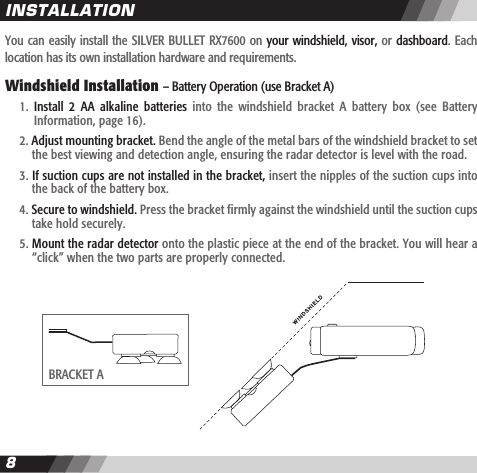
89You can easily install the SILVER BULLET RX7600 on your windshield, visor, or dashboard. Each location has its own installation hardware and requirements.  Windshield Installation – Battery Operation (use Bracket A)  1.  Install  2  AA  alkaline  batteries  into  the  windshield  bracket  A  battery  box  (see  Battery    Information, page 16).  2. Adjust mounting bracket. Bend the angle of the metal bars of the windshield bracket to set    the best viewing and detection angle, ensuring the radar detector is level with the road.  3. If suction cups are not installed in the bracket, insert the nipples of the suction cups into    the back of the battery box.  4. Secure to windshield. Press the bracket firmly against the windshield until the suction cups    take hold securely.  5. Mount the radar detector onto the plastic piece at the end of the bracket. You will hear a    “click” when the two parts are properly connected. INSTALLATIONBRACKET A
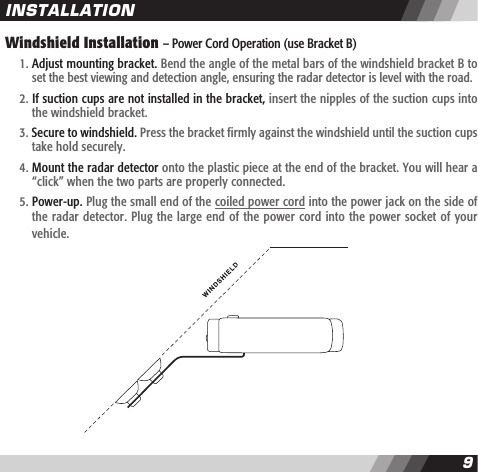
89Windshield Installation – Power Cord Operation (use Bracket B)   1. Adjust mounting bracket. Bend the angle of the metal bars of the windshield bracket B to    set the best viewing and detection angle, ensuring the radar detector is level with the road.  2. If suction cups are not installed in the bracket, insert the nipples of the suction cups into    the windshield bracket.  3. Secure to windshield. Press the bracket firmly against the windshield until the suction cups    take hold securely.  4. Mount the radar detector onto the plastic piece at the end of the bracket. You will hear a    “click” when the two parts are properly connected.  5. Power-up. Plug the small end of the coiled power cord into the power jack on the side of    the radar detector. Plug the large end of the power cord into the power socket of your     vehicle.INSTALLATION
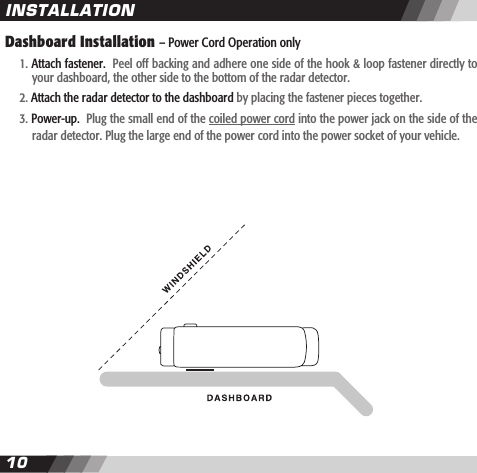
1011Dashboard Installation – Power Cord Operation only   1. Attach fastener.  Peel off backing and adhere one side of the hook & loop fastener directly to    your dashboard, the other side to the bottom of the radar detector.  2. Attach the radar detector to the dashboard by placing the fastener pieces together.  3. Power-up.  Plug the small end of the coiled power cord into the power jack on the side of the     radar detector. Plug the large end of the power cord into the power socket of your vehicle. INSTALLATION
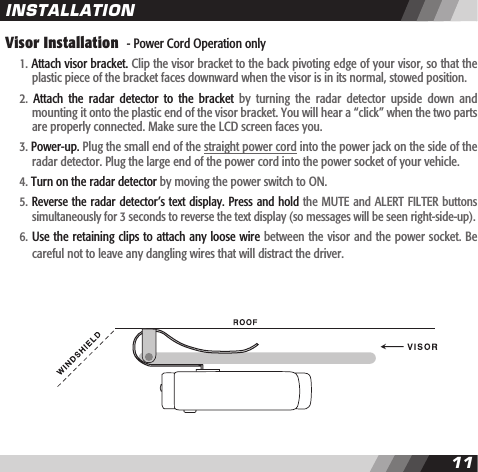
1011Visor Installation  - Power Cord Operation only  1. Attach visor bracket. Clip the visor bracket to the back pivoting edge of your visor, so that the    plastic piece of the bracket faces downward when the visor is in its normal, stowed position.  2.  Attach  the  radar  detector  to  the  bracket  by  turning  the  radar  detector  upside  down  and    mounting it onto the plastic end of the visor bracket. You will hear a “click” when the two parts    are properly connected. Make sure the LCD screen faces you.  3. Power-up. Plug the small end of the straight power cord into the power jack on the side of the    radar detector. Plug the large end of the power cord into the power socket of your vehicle.  4. Turn on the radar detector by moving the power switch to ON.  5. Reverse the radar detector’s text display. Press and hold the MUTE and ALERT FILTER buttons    simultaneously for 3 seconds to reverse the text display (so messages will be seen right-side-up).   6. Use the retaining clips to attach any loose wire between the visor and the power socket. Be    careful not to leave any dangling wires that will distract the driver.INSTALLATION
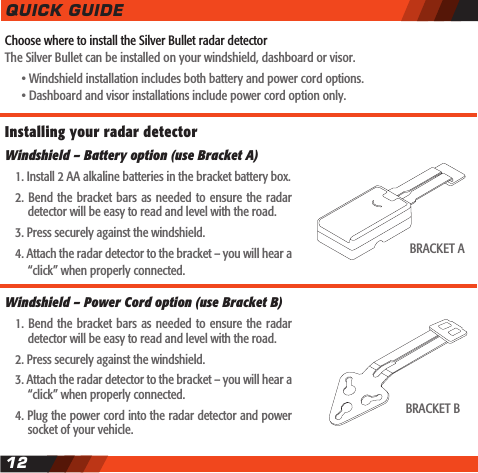
Choose where to install the Silver Bullet radar detectorThe Silver Bullet can be installed on your windshield, dashboard or visor.    • Windshield installation includes both battery and power cord options.    • Dashboard and visor installations include power cord option only.QUICK GUIDE12Installing your radar detector Windshield – Battery option (use Bracket A)  1. Install 2 AA alkaline batteries in the bracket battery box.  2. Bend the bracket bars  as  needed to ensure the radar    detector will be easy to read and level with the road.  3. Press securely against the windshield.  4. Attach the radar detector to the bracket – you will hear a    “click” when properly connected.Windshield – Power Cord option (use Bracket B)  1. Bend the bracket bars  as  needed to ensure the radar    detector will be easy to read and level with the road.  2. Press securely against the windshield.  3. Attach the radar detector to the bracket – you will hear a    “click” when properly connected.  4. Plug the power cord into the radar detector and power    socket of your vehicle.BRACKET ABRACKET B
QUICK GUIDE13Dashboard – Power  Cord option  (use Hook  & Loop fastener)  1.  Mount  the  radar  detector  directly  onto  the  dashboard    using the hook & loop fastener (with sticky sides attached    to the dashboard and bottom of radar detector).  2. Plug  the power  cord into the  radar  detector and power    socket of your vehicle.Visor – Power Cord option (use Visor Bracket)  1. Clip visor bracket to the back, pivoting edge of your visor.  2.  Turn the  radar  detector  upside-down  and attach  to  the    visor  clip  –  you  will  hear  a  “click”  when  properly    connected.  3. Attach the power cord to the radar detector.  4. Turn on the radar detector.  5.  Press  and  hold  the  MUTE  and  ALERT  FILTER  buttons    simultaneously  for  3 seconds to reverse  the text  display    (so messages will be seen right-side-up).  6. Use the retaining clips to neatly tuck away the power cord.Turning on the radar detector  1. Move the POWER switch to ON.  2. The screen will display ”SENSORO RADAR DETECTOR * * *     FILTER-NORMAL” indicating a normal lter mode.  3. The screen will then display a random compass direction    if the compass has not been set-up since purchase.HOOK & LOOP FASTENERVISOR BRACKET
14Setting up the compassTo  set the  compass  readings  you  will need  to  drive your vehicle  slowly  in  a full  circle. Be  sure you  are in  an  area where you can safely perform this maneuver.  1.  Install  the  radar  detector  in  your  vehicle  at  your    preferred location - windshield, dashboard, or visor.  2.  Press  and  hold  the  BACKLIGHT  and  MUTE  buttons     simultaneously for 3 seconds.  3.  The  screen  will  display  “DRIVE  IN  A  FULL  CIRCLE...    PRESS ANY BUTTON WHEN DONE.”   4. Drive your vehicle in a full circle. The direction and size    of  circle  do  not  matter.    You  have  one  minute  to     complete the maneuver.  5. Press any button to complete the compass set-up.Understanding alert messages  1.  When a  radar signal  is  detected,  the  screen displays    the name of the band – “X”, “K”, or “KA” – and a      number indicating the strength of the signal (1 to 8).  2.  When  a  laser  signal  is  detected,  the  screen  displays    “LASER”.  3. The higher the number, the stronger the signal.    4. Stronger signals  usually mean   the  police radar/laser    device is relatively close; weaker signals usually mean    it’s farther away.QUICK GUIDE
Adjusting the Alert Filter If  you  receive  too  many  false  alert  signals,  or  are  driving in specic environments, press the  ALERT  FILTER button to switch between lter modes:    1. FILTER-NORMAL – Optimized ltering for typical city or     highway driving  2. FILTER-HIGH – Increased ltering to reduce most false    alerts, good for high-density commercial areas  3. FILTER-OFF – No ltering of alert signals, ideal for open    space areasQUICK GUIDE15
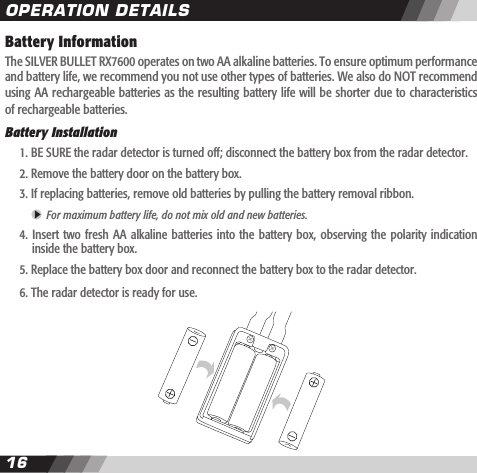
1617Battery InformationThe SILVER BULLET RX7600 operates on two AA alkaline batteries. To ensure optimum performance and battery life, we recommend you not use other types of batteries. We also do NOT recommend using AA rechargeable batteries as the resulting battery life will be shorter due to characteristics of rechargeable batteries.Battery Installation  1. BE SURE the radar detector is turned off; disconnect the battery box from the radar detector.  2. Remove the battery door on the battery box.   3. If replacing batteries, remove old batteries by pulling the battery removal ribbon.     For maximum battery life, do not mix old and new batteries.  4.  Insert  two fresh  AA alkaline  batteries into  the battery  box, observing  the polarity  indication    inside the battery box.   5. Replace the battery box door and reconnect the battery box to the radar detector.  6. The radar detector is ready for use. OPERATION DETAILS
1617Battery LifeThe SILVER BULLET RX7600 can provide approximately 30-40 hours of battery  life  from two AA alkaline batteries. Battery life is affected by many variables, such as the brand and condition of the batteries, the ambient temperature, the number and strength of engaged signals, and the duration of reported alerts, backlight, and user settings. The estimated battery life provided here is based on battery aging tests conducted in laboratory environments.Low Battery IndicatorA “LOW BATTERY” message will appear when 2 to 4 hours of battery life remain. This message will scroll across the screen for 10 seconds accompanied by a beeping sound. This will repeat every 30 minutes until no battery power remains and the radar detector shuts off. We suggest keeping the power cord readily available. If your batteries are drained, the cord will  allow you to continue using your radar detector until you can replace the batteries. Auto Power-Off To  conserve  battery power,  the  SILVER  BULLET  RX7600 will  automatically  shut  off  when there happens no change  for  10 minutes  to the  magnetic eld  data  that the  compass is  sensing. The radar detector will display ”ENTERING SLEEP MODE… PRESS ANY BUTTON TO STAY ON” and will beep for 20 seconds before powering down. To keep the radar detector on, just press any button while the audio and visual warnings are displayed. The automatic power-off does not function when the radar detector is operated by power cord.  Please turn off the radar detector whenever you leave your vehicle. Even a weak signal can cause  it to remain on and drain your batteries. If the radar detector turns off automatically, you can turn it back on by pressing any button, or  by moving the power switch to OFF and then to ON. OPERATION DETAILS
1819Turning On the Radar Detector  • Move the POWER switch to ON.  • The screen will display ”SENSORO RADAR DETECTOR * * * FILTER-NORMAL” if it’s your rst use    since purchase.  • If you selected an alternate alert lter mode during previous use, it will display either “FILTER-    HIGH” or “FILTER-OFF” instead of “FILTER-NORMAL” in the message above, per your selection.    • The screen will then display a random compass direction if the compass has not been set-up    since purchase.Setting Up the Compass  The digital compass built into the SILVER BULLET RX7600 allows you to determine the  direction your vehicle is heading at all times. To provide accurate directional readings, the compass must be set-up (calibrated) . This allows the compass to separate the earth’s magnetic eld from  the magnetic elds generated by your vehicle. IN ORDER TO SET-UP THE COMPASS YOU WILL NEED TO DRIVE YOUR VEHICLE SLOWLY IN A FULL CIRCLE, SO BE SURE YOU ARE IN AN AREA WHERE YOU CAN SAFELY PERFORM THIS MANEUVER.When to set up the compass:  • When the radar detector is rst installed in your vehicle.   • When  you  move  the  radar  detector  to  a  different  location  from  where  the  compass  was    previously set up.  • When the compass heading is inaccurate.OPERATION DETAILS
1819How to set up the compass:  1. Be sure the radar detector is properly installed in your preferred location – on the windshield,    the visor, or the dashboard of your vehicle.  2.  Press and  hold  the  BACKLIGHT  and MUTE  buttons simultaneously  for  3 seconds  until you     hear the radar detector beep once. The screen will display “DRIVE IN A FULL CIRCLE… PRESS     ANY BUTTON WHEN DONE”.  You will have one minute to complete the maneuver.  3. Drive your vehicle in a full 360o circle. The size of the circle and direction of your vehicle do    not matter. The circle does not need to be perfectly round but must be completed going in the    same direction.   4.  Press  any button to  complete the compass  set-up.   The radar  detector will beep  twice  and     display “SET-UP COMPLETE” if the set-up was successful. If there was an error during set-up, the radar detector will display “SET-UP INCOMPLETE… PRESS MUTE TO RESTART SET-UP… PRESS BACKLIGHT TO CANCEL SET-UP”.  • Press the MUTE button to restart the set-up.  The radar detector will display “DRIVE IN A FULL    CIRCLE… PRESS ANY BUTTON WHEN DONE”. Try again to drive your vehicle in a full 360 o    circle, then press any button to complete the set-up.    •  Press  the  BACKLIGHT  button to  cancel  the set-up.    The  radar  detector will  display  “SET-UP    CANCELLED”  and  exit  from  the  compass  set-up  process.  The  radar  detector  may  indicate    inaccurate directions until the compass set-up is successfully completed.  • When none of the buttons are pressed during the warning signal, the radar detector will display     “SET-UP CANCELLED” and exit from the compass set-up process.   The radar detector will ignore any signal threats during the compass set-up process. OPERATION DETAILS
2021Additional compass set-up information:  • If possible, select a level section of pavement, such as an empty parking lot or non-busy street,    to complete the compass set-up.   • Take a minimum of  20  seconds  but less than 1 minute to  drive  in  a  circle during the set-up    process.  • If you take more than 1 minute to complete the circle, the radar detector will display “PRESS ANY    BUTTON TO COMPLETE SET-UP”.   • Press any of the buttons during the warning signal to complete the set-up.   • If  you leave  the radar  detector  untouched during  this warning  signal, it  will display  “SET-UP     INCOMPLETE… PRESS MUTE TO RESTART SET-UP… PRESS BACKLIGHT TO CANCEL SET-UP”.    You  can immediately restart  the  compass set-up by  pressing  the MUTE  button  or cancel the     set-up by pressing the BACKLIGHT button or by not pressing any of the buttons.  Using the Backlight Press the BACKLIGHT button to switch the backlight on or off. The radar detector will sound 1 beep when the backlight is turned on, and 2 beeps when it is turned off.  If the backlight stays on for more than 15 minutes, the screen will scroll twice ”BACKLIGHT IS  ON… TURNING OFF WILL PROLONG YOUR BATTERY LIFE”. This will repeat every 15 minutes.The backlight is automatically on for 5 to 20 seconds at the following events:  • While the auto power-off messages are displayed – 20 seconds  • While the tutorial messages are displayed – 15 seconds  • While the low battery message is displayed – 10 seconds  • When a button is pressed – 5 seconds  • When an alert message is displayed – 5 secondsOPERATION DETAILS
2021Using the Mute FeaturePress the MUTE button to switch between “START MUTE” and “END MUTE”. In the “END MUTE” mode,  the radar  detector automatically  lowers  the audio  alert  level  to  the ambient  noise  level in your vehicle when it detects a continuous signal for 5 seconds or more. The audio alert level remains low for 60 seconds, even if, during that time, a second separate signal is detected. In the “START MUTE” mode, the radar detector will remain completely silent but will continue to provide visual alerts. Understanding Signal AlertsThree  radar  bands  (X,  K,  and  superwide  KA)  and  one    laser  band  are  typically  used  by  police radar/laser devices. When a radar signal is detected,  the  screen  displays the name of  the  radar band – “X”, “K”, or “KA” – together with a number indicating the strength of the detected signal (called the signal strength meter).   • There are 8 levels in the signal strength meter – 1 to 8. The higher the number, the stronger     the signal.   • The signal strength meter can provide a good indication of the proximity of the detected signal.    Usually, strong signals are closer to you than weak signals.When a laser signal is detected, the screen displays “LASER”.For more information about different kinds of radar and laser devices and detectors, see the ABOUT RADAR / LASER DETECTION section, page 6.OPERATION DETAILS
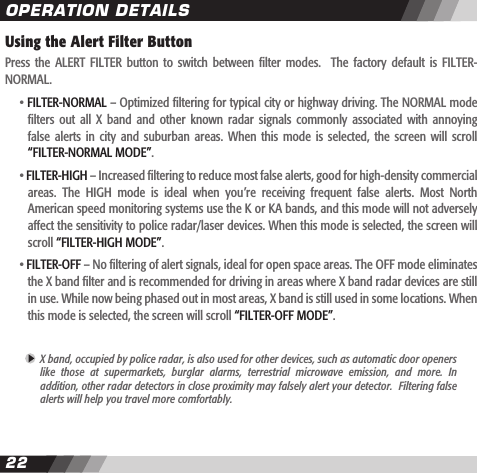
2223Using the Alert Filter ButtonPress  the  ALERT FILTER  button  to  switch  between  lter  modes.    The  factory  default is  FILTER-NORMAL.    • FILTER-NORMAL – Optimized ltering for typical city or highway driving. The NORMAL mode    lters  out  all  X  band  and  other  known  radar  signals  commonly  associated  with  annoying    false  alerts  in city  and  suburban  areas.  When  this  mode is  selected,  the screen  will  scroll     “FILTER-NORMAL MODE”.  • FILTER-HIGH – Increased ltering to reduce most false alerts, good for high-density commercial    areas.  The  HIGH  mode  is  ideal  when  you’re  receiving  frequent  false  alerts.  Most  North    American speed monitoring systems use the K or KA bands, and this mode will not adversely    affect the sensitivity to police radar/laser devices. When this mode is selected, the screen will     scroll “FILTER-HIGH MODE”.  • FILTER-OFF – No ltering of alert signals, ideal for open space areas. The OFF mode eliminates    the X band lter and is recommended for driving in areas where X band radar devices are still    in use. While now being phased out in most areas, X band is still used in some locations. When     this mode is selected, the screen will scroll “FILTER-OFF MODE”. X band, occupied by police radar, is also used for other devices, such as automatic door openers  like  those  at  supermarkets,  burglar  alarms,  terrestrial  microwave  emission,  and  more.  In  addition, other radar detectors in close proximity may falsely alert your detector.  Filtering false  alerts will help you travel more comfortably.OPERATION DETAILS
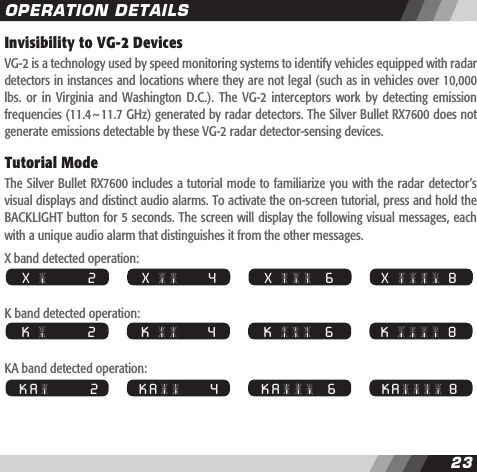
23Invisibility to VG-2 DevicesVG-2 is a technology used by speed monitoring systems to identify vehicles equipped with radar detectors in instances and locations where they are not legal (such as in vehicles over 10,000 lbs.  or in  Virginia  and  Washington D.C.).  The  VG-2  interceptors work  by  detecting  emission frequencies (11.4~11.7 GHz) generated by radar detectors. The Silver Bullet RX7600 does not generate emissions detectable by these VG-2 radar detector-sensing devices.Tutorial ModeThe Silver Bullet RX7600 includes a tutorial mode to familiarize you with the radar detector’s visual displays and distinct audio alarms. To activate the on-screen tutorial, press and hold the BACKLIGHT button for 5 seconds. The screen will display the following visual messages, each with a unique audio alarm that distinguishes it from the other messages.X band detected operation:K band detected operation:KA band detected operation:  X     8  X                 2   X             4   X       6  K     8  K                 2   K             4   K       6  K A   8  K A               2   K A           4   K A     6OPERATION DETAILS
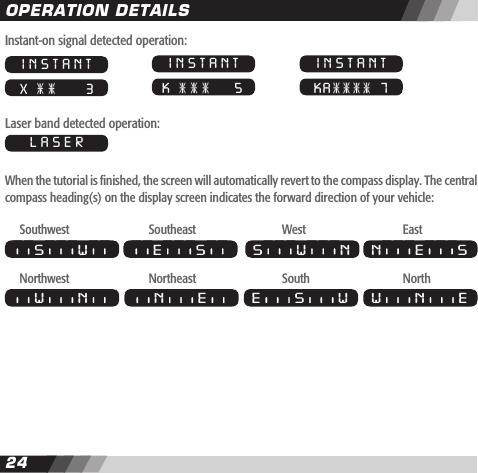
2425Instant-on signal detected operation:Laser band detected operation:When the tutorial is nished, the screen will automatically revert to the compass display. The central compass heading(s) on the display screen indicates the forward direction of your vehicle: Southwest    Southeast    West    EastNorthwest    Northeast    South    NorthOPERATION DETAILSINSTANT X       3INSTANT K      5INSTANT KA   7LASERS W E S S W N N E SW N EE S WN EW N
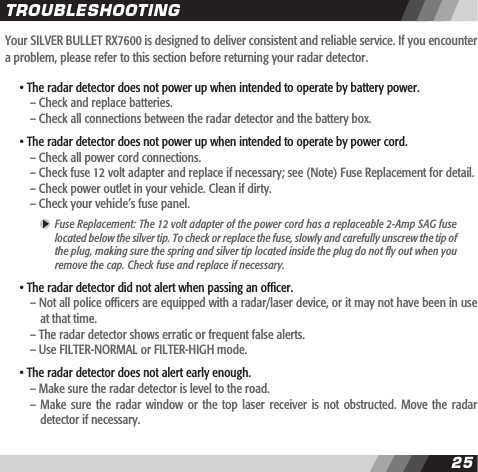
2425Your SILVER BULLET RX7600 is designed to deliver consistent and reliable service. If you encounter a problem, please refer to this section before returning your radar detector. • The radar detector does not power up when intended to operate by battery power.    – Check and replace batteries.    – Check all connections between the radar detector and the battery box. • The radar detector does not power up when intended to operate by power cord.    – Check all power cord connections.    – Check fuse 12 volt adapter and replace if necessary; see (Note) Fuse Replacement for detail.    – Check power outlet in your vehicle. Clean if dirty.    – Check your vehicle’s fuse panel.  Fuse Replacement: The 12 volt adapter of the power cord has a replaceable 2-Amp SAG fuse  located below the silver tip. To check or replace the fuse, slowly and carefully unscrew the tip of  the plug, making sure the spring and silver tip located inside the plug do not y out when you  remove the cap. Check fuse and replace if necessary. • The radar detector did not alert when passing an ofcer.    – Not all police ofcers are equipped with a radar/laser device, or it may not have been in use      at that time.    – The radar detector shows erratic or frequent false alerts.    – Use FILTER-NORMAL or FILTER-HIGH mode.  • The radar detector does not alert early enough.    – Make sure the radar detector is level to the road.    –  Make sure  the radar  window or  the top  laser receiver  is not  obstructed. Move  the radar       detector if necessary.TROUBLESHOOTING
2627If  you  have  questions,  missing  parts  or  comments,  please  contact  PNI  Corporation’s  customer service department between 8:00 a.m. and 5:00 p.m. (PST), Monday through Friday:   • (888) 422-6672 (toll-free within the U.S.)  • (707) 566-2260 (local number)  • Fax: (707) 566-2261  • Email:  CustomerService@pnicorp.comIf you wish to replace or repair a defective product, please use the following procedures:  1.  Obtain  a Return  Merchandise  Authorization  (RMA)  number by  contacting  our  Customer    Service department at one of the numbers above, or by emailing us at:        • E-mail: returns@pnicorp.com    Please note that RMA numbers are valid for 30 days only.  2.  Pack  the  product  securely  to  prevent  damage  in  transit.  Please  send  the  entire  product,     including all accessories.  Alterations to the product or its accessories will void your warranty.   3.  Include  a  proof  of  purchase,  such  as  a  mechanical  reproduction  of  your  sales  receipt    (original  receipts  cannot  be  returned).  Proof  of  purchase  must  show  printed  date  of    purchase, model number, and place of purchase. If you cannot provide a proof of purchase,     or if  the warranty  period has  ended, the  product may  be returned  to you  without being    tested and/or there will be a charge for replacement of your product.  4. Include a description of the problem.  5. Address your package to:      PNI Corporation      Attn: RMA# [insert the RMA # provided]      5464 Skylane Boulevard, Suite A      Santa Rosa, CA 95403-1084SERVICE AND REPLACEMENT
2627  6. Print the name  and return  address where  the replacement  should be  delivered on  the    outside of the package.Ship prepaid and insured via traceable carrier such as UPS, FedEx Parcel Service, or Priority Mail to avoid loss in transit. Please allow two to three weeks from receipt of your returned product for delivery of your replacement.Silver Bullet RX7600   •   FCC ID QJ3-IFS-11875This  device  complies  with part  15 of  the FCC  Rules. Operation  is  subject  to  the  following  two conditions: (1) This device may not cause harmful interference, and (2) this device must accept any interference received, including interference that may cause undesired operation.In addition, any changes or modications to this product, which are not expressly approved by PNI Corporation in writing, could void the user’s authority to operate this product.SERVICE AND REPLACEMENT
2829LIMITED WARRANTIES; LIMITATION OF LIABILITYFOR SENSORO RADAR/LASER DETECTORModel: Silver Bullet RX7600PNI Corporation (“PNI”)  manufactures its products from parts and components that are new or equivalent to new in performance, and warrants to the original user that this product will be free of defects in workmanship and materials for one (1) year from the date of purchase.This warranty does not cover wear and tear due to normal use, or damage to the product as the result of improper usage, neglect of care, alteration, accident, or unauthorized repair.If the product is found by PNI to be defective, PNI’s entire liability and your exclusive remedy for breach of warranty shall be that PNI will repair or replace the product and return the product or its replacement to you at no charge, provided that you ship the product to PNI at your expense with a description of the defect and subject to the other conditions of this warranty. Should the product prove to be irreparable, PNI may substitute an equivalent product of the same or similar style and of a value not in excess of the original purchase price of your instrument.PNI  warrants  the  repaired  or  replacement  product  to  be  free  from  defects  in  material  and workmanship on the same terms as the product originally purchased.This warranty will be void if the products, serial number, or other identication marks have been defaced, damaged, or removed. This warranty does not apply to the battery necessary to operate the product.This  warranty  is extended  to  the  original  retail purchaser  only  and  may  not be  transferred  or assigned to  subsequent owners. In  order to validate  your warranty, you  must provide proof  of purchase acceptable to PNI together with the product shipped for warranty repair/replacement.WARRANTY INFORMATION
2829Products  returned  to  PNI  must  be  pre-authorized  by  PNI  with  an  RMA  (return  material authorization)  number  marked  on  the  outside  of  the  package.  Please  refer to  the  Service  and Replacement section for PNI Corporation contact information.THE FOREGOING WARRANTY IS GIVEN IN LIEU OF AND PNI DISCLAIMS ALL OTHER WARRANTIES OR  REPRESENTATIONS,  EXPRESSED  OR  IMPLIED,  IN  FACT  OR  IN  LAW,  WITH  RESPECT  TO THIS  PRODUCT,  INCLUDING,  BUT  NOT  LIMITED  TO,  (1)  THE  IMPLIED  WARRANTIES  OF MERCHANTABILITY  AND OF  FITNESS FOR  A  PARTICULAR  PURPOSE,  OR (2)  THAT USE  OF  THE PRODUCT WILL BE UNINTERRUPTED AND ERROR FREE.PNI shall have no liability for any indirect or speculative damages (including, but not limited to, consequential, incidental, and special damages) relating to the use of or inability to use this product, whether arising out of contract, negligence, tort, or under any warranty theory, or for infringement of any other party’s intellectual property rights, irrespective of whether PNI had advance notice of the possibility of any such damages, including, but not limited to, loss of use, revenue, or prot. In no event shall PNI’s total liability for all claims regarding the product exceed the price paid for the product. PNI neither assumes nor authorizes anyone to assume for it any other liabilities.Some states do not allow the exclusion or limitation of incidental or consequential damages, so the above limitations or exclusions may not apply to you.WARRANTY INFORMATION
NOTES

Navigation menu